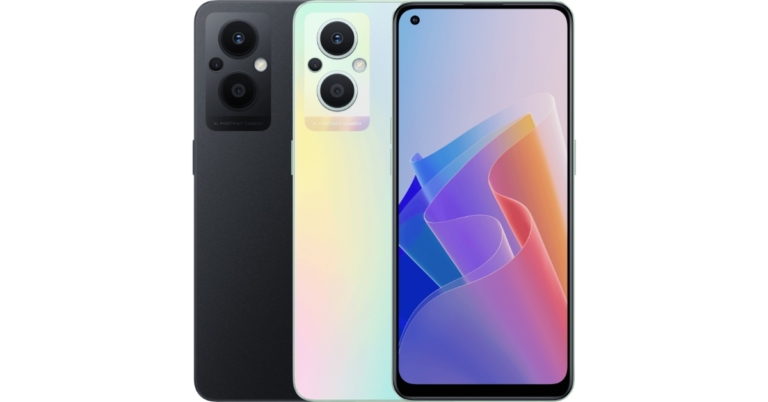
Oppo has added yet another new smartphone to its Reno series. The Oppo Reno 7Z 5G has been launched in Thailand, joining the Oppo Reno 7 Series which already includes Oppo Reno 7 5G and Oppo Reno 7 Pro 5G. The newly launched phone comes with a full-HD+ AMOLED display with a refresh rate of 60Hz and is powered by a Qualcomm Snapdragon 695 5G SoC. In addition to this, there is a 4,500mAh battery onboard.
In This Article
Oppo Reno 7Z 5G price and availability
The price of the Oppo Reno 7Z 5G has not been announced yet. As per the company the pricing, as well as the availability details of the device, will be released on March 3 at 4:30 p.m. (3 pm IST). The announcement will be made through the company’s social media channel. However, the company has listed the phone on the Oppo Thailand official website. The handset will be available in two colour choices of Cosmic Black and Rainbow Spectrum.
Oppo Reno 7Z 5G specifications
In terms of specifications, Oppo Reno 7Z 5G has a 6.43-inch full-HD+ AMOLED display with 1,800×2,400 pixels of resolution. The screen offers a refresh rate of 60Hz, a touch sampling rate of up to 180Hz, a pixel density of 409ppi, and a maximum brightness of 600 nits. The phone operates on ColorOS 12, which is based on Android 12. Additionally, the handset equips a Qualcomm Snapdragon 695 5G SoC with an Adreno 619 GPU and 8GB of LPDDR4x RAM. For storing content there is a 128GB of UFS 2.2 storage that can be expanded with a microSD card.Oppo Reno 7Z 5G features a triple rear camera setup consisting of a 64-megapixel primary sensor with an aperture of f/1.7, a 2-megapixel monochrome sensor with f/2.4 aperture and a 2-megapixel sensor with an aperture of f/2.4. In addition to this, there is a 16-megapixel front-facing sensor with an f/2.4 aperture for selfies and video calls.The Oppo Reno 7Z 5G comes with 5G, 4G LTE, dual-band Wi-Fi 5 with 802.11a/b/g/n, Bluetooth v5.2, a USB Type-C port, a 3.5mm headphone jack, NFC, and USB OTG connectivity options. Along with an in-display fingerprint sensor the phone includes an optical sensor, gravity sensor, gyroscope, pedometer, GPS, A-GPS, Beidou, Glonass, Galileo, and QZSS. The smartphone houses a 4,500mAh battery and supports 33W SuperVOOC fast charging.
For the latest gadget and tech news, and gadget reviews, follow us on Twitter, Facebook and Instagram. For newest tech & gadget videos subscribe to our YouTube Channel. You can also stay up to date using the Gadget Bridge Android App. You can find the latest car and bike news here.
The convenience of betting on apps is loved by all punters. It enables them to make some quick wins while on the go. Installing bettings apps is quick and easy but if you live in India, you need to be careful as not all apps are regulated or even legal.
If you want to understand more about installing betting apps in India and gambling through them, you are at the right place.
In This Article
Sports Betting Apps in India
The lack of organised sports betting platforms and the growing popularity of betting among the citizens paved the way for the emergence of online sportsbooks. As a result, many sports betting websites, both domestic and international, were launched in India. These sites or apps are licensed and regulated outside the country, as they are not legal in India.
These sports betting apps are safe and secure, therefore, players can entrust their funds and personal details without any fear of them getting misused. They offer a wide variety of sports, some of them even offering sports like Kabaddi, which is a popular Indian sport. Cricket, football, volleyball, soccer, ice hockey, horse racing, motorsports, basketball and boxing are some of the games that offer a wide variety of betting markets.
Not just a large variety of games, these betting sites also offer easy deposit and withdrawal options. Most of them accept payments in INR and even offer payment methods like UPI, PhonePay and Paytm, which are widely used by Indians. One point to note here is that not all betting websites have a fully operational mobile application. However, it does not make their mobile and desktop websites any less entertaining.
How To Install Mobile Betting Apps in India
Installing a mobile betting application in India is not difficult. There are two ways the players can download a mobile application for a betting website; either through the application store or the betting website.
Let’s look at both the ways to install the sportsbook applications.
Installing Application Through App Store/Play Store
First, make sure that the application for the betting site you want to download has one available. Many online sportsbooks do not have any application, just the website.
After making sure about the application, check if the application is available for your device. For instance, many gambling applications are not available on iOS devices due to security restrictions.
Once the above two steps are confirmed, you can enter the name of the betting app on Play Store (if you are using an Android device) or App Store (if you are using an iOS device)
Click on download, and wait for the application to get installed.
Once the installation is complete, register yourself with the app and add money to start playing with real money.
Installing Application Through Betting Website
Many online sports betting platforms provide QR codes and download links to their applications on their websites. Scan the QR codes or visit the link through your mobile to download the app. This is a very convenient way to download the app because of two reasons.
It saves you time to search for the application on the app store.
It can remove the chances of misunderstanding as you may end up downloading an app to a betting site with a similar name.
Are Sports Betting Apps Legal in India?
Yes, betting sites are legal in India as there are no laws and regulations regarding the conduction of online betting sites, but there is some grey area here. Players can download these apps and play with their real money. Also, most of these websites are safe as they are regulated and licensed in each country of origin. You can check their licences and regulatory authorities on their respective websites.
However, since there are no laws regarding online betting sites in India, the government does not promote and hence, does not take part in the conflicts revolving around this platform. So, you are responsible for your safety.
Final Thoughts
The emergence of sports betting websites has brought a wave of enthusiasm amongst the punters in India. Now they do not have to fear the law and can bet on their favourite sports from any part of the country.
However, it is always advised to take precautions and not get addicted to gambling.
For the latest gadget and tech news, and gadget reviews, follow us on Twitter, Facebook and Instagram. For newest tech & gadget videos subscribe to our YouTube Channel. You can also stay up to date using the Gadget Bridge Android App. You can find the latest car and bike news here.
Redmi Note 11 Series has been expanded as the company has announced yet another new smartphone in the market. The company has introduced the Redmi Note 11E in China. In addition to this, the company has also launched the Redmi Note 11E Pro. The smartphone comes with an AMOLED display and 67W fast charging and is powered by Qualcomm Snapdragon 695 SoC.
In This Article
Redmi Note 11E, Redmi Note 11E Pro price
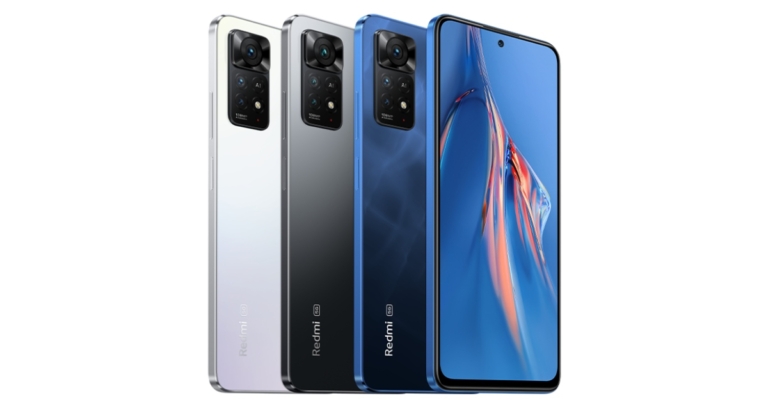
The Redmi Note 11E is priced at CNY 1,199 (Rs 14,400) for the base 4GB RAM with a 128GB storage option. Whereas the 6GB RAM with 128GB storage variant is priced at CNY 1,299 (Rs 15,000). The device will be available in three colour options of black, grey, and mint. The smartphone will go on sale from March 18 however it is currently on pre-orders in China.On the other hand, the Redmi Note 11E Pro is priced at CNY 1,699 (Rs 20,300) for the base 6GB RAM with a 128GB storage variant. The phone is also available in an 8GB RAM with 128GB model for CNY 1,899 (Rs 22,700) and an 8GB RAM with 256GB storage model for CNY 2,099 (Rs 25,100). The phone also comes in three colour options of black, blue, and white. It is available for pre-order in China, with sales beginning on March 4.
Redmi Note 11E specifications
The Redmi Note 11E has a 6.58-inch full-HD+ display with a refresh rate of 90Hz and a touch sampling rate of 240Hz. It runs MIUI 13, which is based on Android 11 and is powered by an octa-core MediaTek Dimensity 700 SoC paired with Mali-G57 MC2 GPU. The phone comes with up to 6GB LPDDR4x RAM along with 128GB of UFS 2.2 storage.The Redmi Note 11E has a dual rear camera setup with a 50-megapixel primary sensor as well as a 2-megapixel depth sensor. Also, there is a 5-megapixel selfie camera on the front for selfies and video chats.There is also a fingerprint sensor on the side, accelerometer, ambient light sensor, magnetometer, and proximity sensor are among the sensors onboard. 5G, 4G LTE, dual-band Wi-Fi, Bluetooth v5.1, GPS/ A-GPS, an Infrared (IR) blaster, and a USB Type-C port are among the connectivity options. Additionally the phone sports a 5,000mAh battery with 18W fast charging support.
Redmi Note 11E Pro specifications
The Redmi Note 11E Pro features a 6.67-inch full-HD+ Samsung AMOLED display with a 20:9 aspect ratio and a refresh rate of 120Hz and a touch sampling rate of 360Hz. In addition, the display has a peak brightness of 1,200 nits. The handset is powered by an octa-core Qualcomm Snapdragon 695 SoC and up to 8GB of LPDDR4x RAM and up to 256GB of UFS 2.2 onboard storage that can be expanded via a microSD card.Redmi Note 11E ProThe smartphone has a triple rear camera setup with a 108-megapixel primary sensor, an 8-megapixel ultra-wide lens and a 2-megapixel macro sensor. Moreover, there is a 16-megapixel selfie camera sensor as well. The connectivity options and sensors are the same as above.The Redmi Note 11E Pro comes with a 5,000mAh battery and 67W fast charging support.
For the latest gadget and tech news, and gadget reviews, follow us on Twitter, Facebook and Instagram. For newest tech & gadget videos subscribe to our YouTube Channel. You can also stay up to date using the Gadget Bridge Android App. You can find the latest car and bike news here.
Xiaomi officially teased the Redmi Note 11 Pro series’ arrival in India recently. Now the company took to Twitter to confirm that Redmi Note 11 Pro and Redmi Note 11 Pro 5G will be available in India on March 9. Note that both the devices are a part of the company’s Note 11 Pro series. Prior to India’s launch, the smartphone series has already been introduced in China last year and globally recently.According to the company, the Redmi Note 11 Pro series launch in India is set for March 9. The Redmi Note 11 Pro series in China also includes the Redmi Note 11 Pro+ variant. However, that device was released in India as the Xiaomi 11i HyperCharge 5G.
In This Article
Redmi Note 11 Pro specifications expected
The Note 11 Pro is powered by an octa-core MediaTek Helio G96 SoC and up to 8GB of LPDDR4X RAM and runs MIUI 13, which is based on Android 11. The display on the device is a 6.67-inch full-HD+ AMOLED Dot Display with a refresh rate of up to 120Hz. It has a 5,000mAh battery and supports 67W Turbocharging.A quad rear camera arrangement houses a 108-megapixel main sensor with an f/1.9 wide-angle lens, an 8-megapixel ultra-wide shooter, a 2-megapixel macro lens, and a 2-megapixel depth sensor. In addition, there is a front-facing 16-megapixel selfie camera for selfies and video chats.
Redmi Note 11 Pro 5G specifications expected
The Note 11 Pro 5G, like the Redmi Note 11 Pro, runs MIUI 13 and has a 6.67-inch AMOLED display with a refresh rate of up to 120Hz. The phone has an octa-core Qualcomm Snapdragon 695 SoC and up to 8GB of LPDDR4X RAM.It features three rear cameras: a 108-megapixel main sensor with an f/1.9 lens, an 8-megapixel ultra-wide lens, and a 2-megapixel macro camera.
Redmi Note 11 Pro, Redmi Note 11 Pro 5G price in India expected
After a long wait, the Asus 8Z, also known as the Asus Zenfone 8, has finally arrived in India. So, today, we’ll compare the specs and prices of the Asus 8z, the Xiaomi 11T Pro, and the iQOO 9, to help you decide which one is right for you. Both smartphones are the most recent offerings from their respective companies.
In This Article
Display
Asus 8Z: 5.9-inch AMOLED displayXiaomi 11T Pro: 6.67-inch flat 10 bit AMOLED true-color displayiQoo 9: 6.56-inch full-HD+ 10-bit AMOLED display
Asus 8Z: dual camera setup with a 64-megapixel Sony IMX686 main sensor with an f/1.8 aperture and a 12-megapixel Sony IMX363 ultra-wide-angle camera with Dual PDAF and 4cm macro shooting.Xiaomi 11T Pro: triple back camera system that includes a 108-megapixel Samsung HM2 main sensor with f/1.75 aperture, an 8-megapixel ultra-wide sensor with f/2.2 aperture, and a telephoto sensor.iQoo 9: triple back camera array with a 48-megapixel Sony IMX598 main sensor and ‘Gimbal’ technology. Additionally, there is a 13-megapixel wide-angle or macro sensor and a 13-megapixel portrait sensor.
Selfie camera
Asus 8Z: 12-megapixel selfie cameraXiaomi 11T Pro: 16-megapixel selfie cameraiQoo 9: 16-megapixel selfie camera
RAM and Storage
Asus 8Z: 8GB RAM with 128GB storageXiaomi 11T Pro: 8GB RAM and 128GB storage, 8GB RAM and 256GB storage, and 12GB RAM and 256GB storageiQoo 9: 8GB RAM with 128GB and 12GB RAM with 256GB storage
To begin with, the Asus 8Z is a smaller flagship device than the Xiaomi 11T and iQOO 9. The Asus 8z, on the other hand, is ideal for those looking for a lightweight device with a 5.9-inch AMOLED display. Furthermore, the Qualcomm Snapdragon 888 chipset powers the smartphone, which makes the choice a little hazy because Qualcomm also offers better chipsets, Snapdragon 888+ and Snapdragon 8 Gen 1. It should be noted that the iQoo 9 offers a better and faster Snapdragon 888+, whereas Xiaomi is also dependable on the 888 SoC. However, Xiaomi also supports 120W HyperCharge fast charging. Whereas Asus offers 30W Fast Charge, iQoo also has 120W FlashCharge – rapid charging capabilities.In terms of cameras, each of the three devices has a unique setup. Nonetheless, the Xiaomi has a more powerful 108MP main sensor, while the other two have 64MP and 48MP sensors, respectively.To be honest, Xiaomi (Xiaomi 11T Pro review) appears to be a better option because it has a larger and better display. If the camera is important to you, either Xiaomi or iQoo should be considered. Furthermore, both of these devices have multiple storage variants, the most recent chipsets, and support fast charging, which the Asus 8Z clearly lacks. The Asus 8z is a good choice if you want a small and light phone with a nearly stock Android experience.So, if we had to choose, we’d go with the Xiaomi 11T Pro if you’re looking for a feature-packed phone under Rs 40,000.
For the latest gadget and tech news, and gadget reviews, follow us on Twitter, Facebook and Instagram. For newest tech & gadget videos subscribe to our YouTube Channel. You can also stay up to date using the Gadget Bridge Android App. You can find the latest car and bike news here.
Dyson is a vacuum cleaning brand that originated in the UK and has been doing wonderfully well in India too. It has launched a flurry of products in a lot of segments. These include hairdressing equipment to household vacuum cleaners. After the last year’s V11, the company is out with its upgraded and much better version, which we got to play with. This is Dyson V12 Detect Slim Total Clean review you need to read before you buy.
In This Article
Dyson V12 Detect Slim Total Clean review: Design
If you compare the Dyson V12 Detect Slim Total Clean to the previous generation, at first glance you might miss the new upgrades. But when you start using it you will see a sea of change. The form factor is very similar, however, you do get a much better-looking matt finish rear body structure. The trigger button has not been replaced and a power on/off button has been placed on the head.
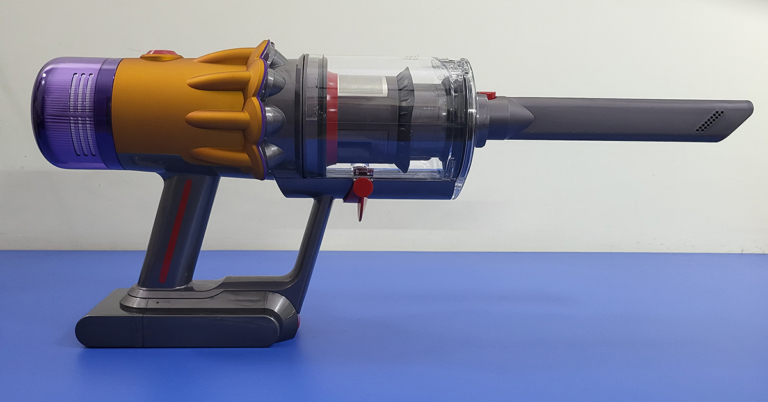
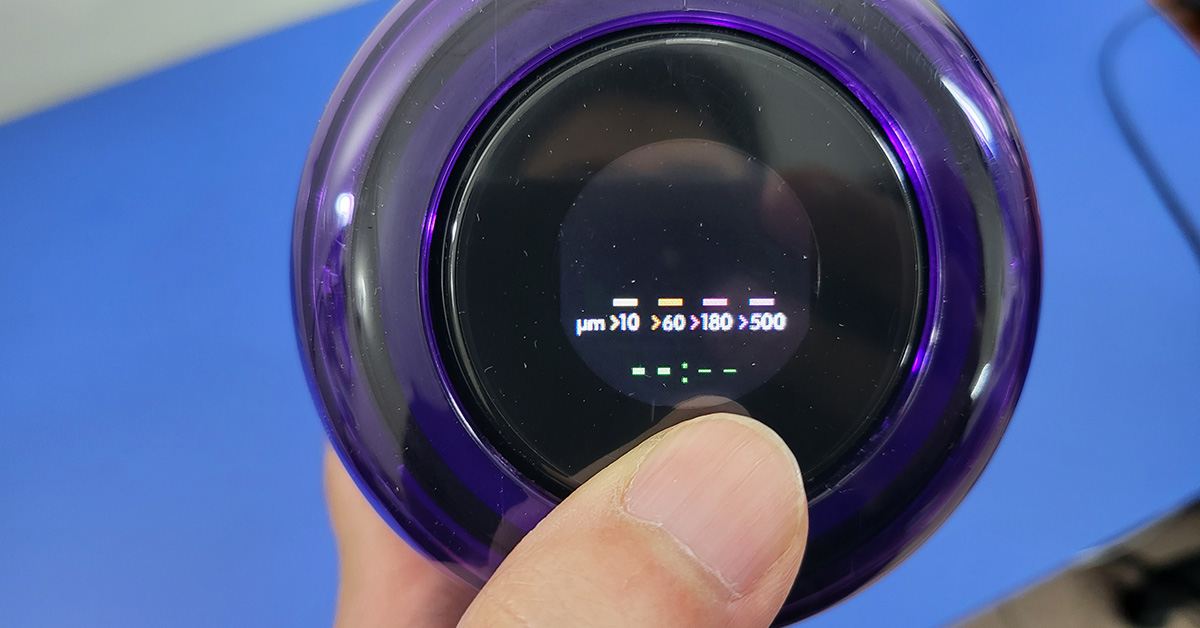
The Dyson V12 Detect Slim Total Clean also gets an LED screen that tells you the kind of dirt (basically particulate matter) that the vacuum cleaner has sucked in. New attachments have been added to the box including a cylindrical V-type head that can vacuum large hair strands and even ribbons, which the earlier model was unable to do.
The battery, which is also the base of the handle of the Dyson V12 Detect Slim Total Clean is removable and can be hot-swapped any time. But a second battery is not part of the package, you would need to pay a little extra for it. Attachments of the Dyson V12 Detect Slim Total Clean include a new laser slim fluffy head too, that we will talk more about in the performance section. Other parts include a wall dock for easy docking, a soft brush, crevice tool, direct-drive cleaner for hard surfaces and floors, combi tool and a stubborn dust brush.
All in all the Dyson V12 Detect Slim Total Clean is a well-built machine that has a clear dust container to hold all the dust and dirt particles. This can hold up 0.35 litres of filth within, after which you can easily remove it and be back to your therapeutic cleaning session.
Dyson V12 Detect Slim Total Clean review: Performance
Now for the fun part. The Dyson V12 Detect Slim Total Clean uses 11 cyclone technology to keep all the sucked dirt and particles within the dust container. The suction power of the VC is 150AW, which is much better than any other vacuum cleaner on the market of this size. The laser slim fluffy cleaner head is 25 CM wide and is the best addition to the new package. What it essentially does is that it shoots a laser beam at an inward 30–35-degree angle so that you can see the smallest of dust particles under the green laser light. The bristle bar in this head can also be removed and washed easily.
The Dyson V12 Detect Slim Total Clean is able to pick up particles as small as 3.5 microns and with the hair screw head picking up dog or human hair is child’s play. Moreover, the LED screen at the back keeps you updated. It will show you features like battery left, maintenance alerts, PM level of filth in the container and also power modes.
Talking about which, there are three power modes in the Dyson V12 Detect Slim Total Clean – Eco, Auto and Boost. Boost is the most powerful and Eco is the slowest. We did most of our cleaning in auto made as then the VC on its own adjusts the power to the kind of dirt and muck it faces.
Moving to its battery life, we got over 40 minutes of battery juice from the Dyson V12 Detect Slim Total Clean. We majorly used the moving heads like the Laser head and Direct Drive cleaner. In case you just use the non-mechanical heads, then the battery life will go higher in some cases even over 60 minutes. But 40 minutes of battery life is also very good to dustproof 3 bedrooms, 1 large living room, kitchen and a large balcony.
In case you have a bigger house then we recommend buying a second battery pack. The charge time of the Dyson V12 Detect Slim Total Clean as stated by the company is 4 hours. Which is about right. During our test, we encountered 4 hours 15 minutes of 0-100% charge time.
So how does the new Dyson V12 Detect Slim Total Clean feel when cleaning. Since the trigger has been removed from this version, we felt that there is less fatigue as you do not need to constantly press something. Also, with the new attachments, it was not very heavy to use. This VC can reach the tightest of corners and under bed areas which the usual robot vacuum cleaners cannot. Also cleaning above the cupboard and crevices in the sofa is very easy.
Verdict
We loved the addition of the laser tool in the Dyson V12 Detect Slim Total Clean. Yes, it reduced the battery by 5-10 minutes, but you do get to see with your own eyes, how dirty your beloved home can be. At 55,900 Dyson does ask for a good amount. Nevertheless, take this amount as an investment that you have to spend for a healthier, finer living for not just you but the whole family.
Dyson V12 Pros
Slimmer and lighter than before
Excellent suction capability
New laser attachment and LED display
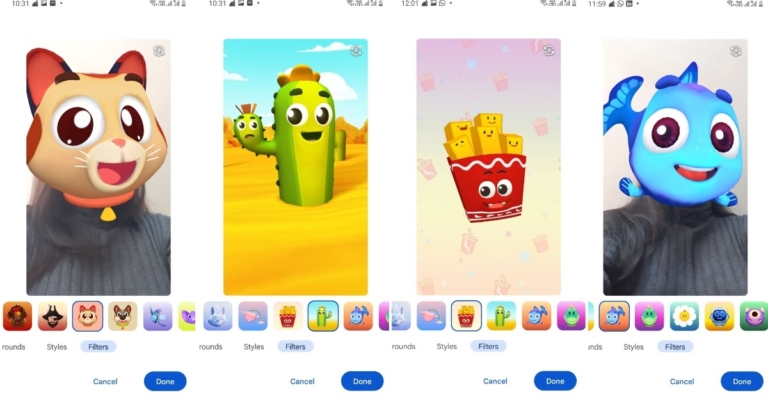
Changing your background in a Google Meet video call is a fact that most Google Meet users would already know by now. But what you may not know is that Google Meet now offers its users the option to put face filters as well for attending video conferences on its platform. You can put on a cat or a dog’s head, appear in a pirate’s avatar or swim like a cute little blue fish, and keep the environment of your video call cheerful and lively. However, this option to put face filters is available only on the Google Meet app in Android and iOS devices, and not through a web browser. And it is a matter of just a few clicks. Below are mentioned the steps depicted pictorially on how to use face filters on a Google Meet video call via your Android or iOS device.Step 1: Open the Google Meet app on your Android or iOS smartphone and join the link to attend the meeting. Next, click on the Apply Visual Effects icon as highlighted below. Read also: How to Blur Your Background in Google Meet?Step 2: In the next window that appears, scroll right to the end of the various visual effect options and click on the Filters option as highlighted below. Step 3: Select the desired face filter from the various filter options provided and click on Done. Step 4: Click on Join in the next screen and that’s it. You will be sporting your desired face filter as selected, during your video call. Read also: Top 3 ways to remove background noise in Google Meet video callsTherefore, in just 4 simple steps, you can use face filters on your next Google Meet video call. You can host filter themed family conferences or bond over with your friends posing as alien heads. Plus, isn’t it fun to watch even yourself as a super cute cactus with a frowning sidekick?Do let us know which one is your favourite face filter amongst the various quirky options provided by Google Meet, in the comments section below.For the latest gadget and tech news, and gadget reviews, follow us on Twitter, Facebook and Instagram. For newest tech & gadget videos subscribe to our YouTube Channel. You can also stay up to date using the Gadget Bridge Android App. You can find the latestcar and bike news here.
Last month Clubhouse rolled out the ability to listen to conversations on its platform without logging in and added 13 new languages. In a new update, the social audio platform has enabled users to interact in voice rooms rather than text rooms for this the company has provided a dedicated icon at the bottom left of the screen for In-Room Chat.Clubhouse In-Room Chat a feature within live rooms is being rolled out to iOS and Android. Users will now be able to interact in voice rooms rather than text rooms on Clubhouse. Text chat enabled rooms will have a dedicated button at the bottom left of the screen. The new functionality will also let moderators delete chat messages. While creators will be able to disable text chat when creating a new room. In addition to this listeners can report comments or provide feedback.Everyone will see a chat icon at the bottom left of their screen if chats are enabled (next to the Share and Clip icons). You can access the chat by tapping this icon or swiping right to comment on what’s going on in the room (text and emojis supported). You’ll also see the number of messages next to the chat icon, and a red dot will appear if you haven’t read any new comments.
How In-Room Chat works on Clubhouse
In-room chat will always be completely under the control of the creators. When you start a room, you can choose whether or not to enable chats using the room composer. Creators can also delete any message during live rooms or after a room has ended, as well as turn off in-room chat at any time during the room.If you’ve sent a message and want to delete it, you can do so during the live room or after the room has ended.Moderators can also be appointed. They will have the ability to delete messages while the room is live. As always, your moderators have the ability to remove anyone who is being disruptive from the room.Chats that violate Clubhouse policies should be reported. If you see someone breaking our rules, you can report them directly from the chat. Long press on their name to bring up the report menu. You can also block them by long pressing.After the room has ended, you can catch up on chats. Room chats will also appear when someone listens to the room’s replay (though they will be unable to add any additional comments to the chat).
For the latest gadget and tech news, and gadget reviews, follow us on Twitter, Facebook and Instagram. For newest tech & gadget videos subscribe to our YouTube Channel. You can also stay up to date using the Gadget Bridge Android App. You can find the latest car and bike news here.
2 March 2022 Amazon Quiz is now live on the Amazon app. The user can now participate in today’s quiz to win Rs 40,000 Amazon Pay Balance. The quiz will contain 5 questions and you have to answer them correctly.Amazon every day brings a fresh questionnaire to which the contestants have to answer correctly to enter into a lucky draw. The quiz can be played daily from 12 AM to 11:59 PM. By participating in the daily quiz the users can win Amazon Pay Balance from Rs 1,000 to up to Rs 50,000.There will be a total of five questions and all the questions will be based on general questions and current events. Amazon will announce only one winner via a lucky draw. While the results are announced at the end of the month.Every day we update all the Amazon Quiz questions with their correct answers on Gadget Bridge. Check out 2 March 2022 Amazon Quiz today answers to win Rs 40,000 Amazon Pay Balance.
In This Article
2 March 2022 Amazon Quiz Answers
Question 1: Which country is the world’s largest producer of opium, according to the United Nations Office on Drugs and Crime?
Answer: Afghanistan
Question 2: Alexia Putellas, who won the 2021 Best FIFA Women’s Player award, belongs to which country?
Answer: Spain
Question 3: Mount Semeru volcano recently erupted in which country?
Answer: Indonesia
Question 4: Which politician from Mongolia is alleged to have slapped this man?
Answer: Peljidiin Genden
Question 5: In which national park of India is the last of this species in Asia found in the wild?
The Chinese electronics manufacturer Lenovo has released its thinnest gaming laptop in India today. The company has introduced Lenovo Legion Slim 7 powered by AMD Ryzen 7 5800H and Nvidia GeForce RTX3060 discrete graphics. The laptop also has a display with a refresh rate of 165Hz and includes Dolby Vision compatibility for improved seeing and Nahimic 3D audio to enhance the gaming experience.
In This Article
Lenovo Legion Slim 7 price in India and availability details
The Lenovo Legion Slim 7 is available in Shadow Black for INR 1,44,990. From today, the laptop will be available on Lenovo.com, Lenovo Exclusive shops, and all online and offline channel partners.
Lenovo Legion Slim 7 specifications
The Lenovo Legion Slim 7 features a 15.6-inch WQHD IPS Anti-glare display. it offers 2,560×1,440 pixels of resolution a refresh rate of 165Hz and a colour spectrum coverage of 100 percent sRGB as well as Dolby Vision support. The display also incorporates a DC dimmer.Lenovo Legion Slim 7 is powered by Windows 11 Home (64-bit version). Under the chassis, there is an AMD Ryzen 7 5800H CPU, Nvidia GeForce RTX 3060 graphics card along with wiith 6GB of GDDR6 dedicated graphics storage. NVIDIA’s newest GPU is equipped with Ray Tracing cores, Tensor Cores, and streaming multiprocessors to give the most realistic ray-traced visuals, cutting-edge new capabilities, and the power of AI. The laptop has the Legion Coldfront 3.0, which raises thermal efficiency to new heights, letting gamers can experience maximum clock rates with no throttling during marathon gaming sessions. It allows users to set fan speed and voltage through Q-control 4.0.In addition to this, the laptop has 8GB soldered DDR4 RAM with a frequency of 3,200MHz, as well as 8GB SO-DIMM DDR4 RAM. The laptop can contain a total of 24GB of RAM in addition to the built-in 8GB RAM, a 16GB extendable SO-DIMM is available. Lenovo has included a 1TB SSD M.2 storage drive.What’s more TrueStrike Keyboard and Nahimic 3D audio is also provided. The keyboard has RGB illumination also there are stereo speakers with 2W audio output each bowed by Harman.The Legion Slim 7 is equipped with a 720p webcam with a privacy shutter. The Lenovo Legion Slim 7 is equipped with a 71Whr battery that is rated to provide approximately eight hours of battery life. There is also support for Rapid Charge Pro technology for fast charging.
For the latest gadget and tech news, and gadget reviews, follow us on Twitter, Facebook and Instagram. For newest tech & gadget videos subscribe to our YouTube Channel. You can also stay up to date using the Gadget Bridge Android App. You can find the latest car and bike news here.



 There is also a fingerprint sensor on the side, accelerometer, ambient light sensor, magnetometer, and proximity sensor are among the sensors onboard. 5G, 4G LTE, dual-band Wi-Fi, Bluetooth v5.1, GPS/ A-GPS, an Infrared (IR) blaster, and a USB Type-C port are among the connectivity options. Additionally the phone sports a 5,000mAh battery with 18W fast charging support.

 There is also a fingerprint sensor on the side, accelerometer, ambient light sensor, magnetometer, and proximity sensor are among the sensors onboard. 5G, 4G LTE, dual-band Wi-Fi, Bluetooth v5.1, GPS/ A-GPS, an Infrared (IR) blaster, and a USB Type-C port are among the connectivity options. Additionally the phone sports a 5,000mAh battery with 18W fast charging support.



 The Dyson V12 Detect Slim Total Clean also gets an LED screen that tells you the kind of dirt (basically particulate matter) that the vacuum cleaner has sucked in. New attachments have been added to the box including a cylindrical V-type head that can vacuum large hair strands and even ribbons, which the earlier model was unable to do.
 The Dyson V12 Detect Slim Total Clean also gets an LED screen that tells you the kind of dirt (basically particulate matter) that the vacuum cleaner has sucked in. New attachments have been added to the box including a cylindrical V-type head that can vacuum large hair strands and even ribbons, which the earlier model was unable to do.
 The battery, which is also the base of the handle of the Dyson V12 Detect Slim Total Clean is removable and can be hot-swapped any time. But a second battery is not part of the package, you would need to pay a little extra for it. Attachments of the Dyson V12 Detect Slim Total Clean include a new laser slim fluffy head too, that we will talk more about in the performance section. Other parts include a wall dock for easy docking, a soft brush, crevice tool, direct-drive cleaner for hard surfaces and floors, combi tool and a stubborn dust brush.
 All in all the Dyson V12 Detect Slim Total Clean is a well-built machine that has a clear dust container to hold all the dust and dirt particles. This can hold up 0.35 litres of filth within, after which you can easily remove it and be back to your therapeutic cleaning session.
 Read also: How to Blur Your Background in Google Meet?
Step 2: In the next window that appears, scroll right to the end of the various visual effect options and click on the Filters option as highlighted below.
Read also: How to Blur Your Background in Google Meet?
Step 2: In the next window that appears, scroll right to the end of the various visual effect options and click on the Filters option as highlighted below.
 Step 3: Select the desired face filter from the various filter options provided and click on Done.
 Step 4: Click on Join in the next screen and that’s it. You will be sporting your desired face filter as selected, during your video call.
 Read also: Top 3 ways to remove background noise in Google Meet video calls
Therefore, in just 4 simple steps, you can use face filters on your next Google Meet video call. You can host filter themed family conferences or bond over with your friends posing as alien heads. Plus, isn’t it fun to watch even yourself as a super cute cactus with a frowning sidekick?
Do let us know which one is your favourite face filter amongst the various quirky options provided by Google Meet, in the comments section below.
For the latest gadget and tech news, and gadget reviews, follow us on Twitter, Facebook and Instagram. For newest tech & gadget videos subscribe to our YouTube Channel. You can also stay up to date using the Gadget Bridge Android App. You can find the latest car and bike news here.
Read also: Top 3 ways to remove background noise in Google Meet video calls
Therefore, in just 4 simple steps, you can use face filters on your next Google Meet video call. You can host filter themed family conferences or bond over with your friends posing as alien heads. Plus, isn’t it fun to watch even yourself as a super cute cactus with a frowning sidekick?
Do let us know which one is your favourite face filter amongst the various quirky options provided by Google Meet, in the comments section below.
For the latest gadget and tech news, and gadget reviews, follow us on Twitter, Facebook and Instagram. For newest tech & gadget videos subscribe to our YouTube Channel. You can also stay up to date using the Gadget Bridge Android App. You can find the latest car and bike news here. 


 Lenovo Legion Slim 7 is powered by Windows 11 Home (64-bit version). Under the chassis, there is an AMD Ryzen 7 5800H CPU, Nvidia GeForce RTX 3060 graphics card along with wiith 6GB of GDDR6 dedicated graphics storage. NVIDIA’s newest GPU is equipped with Ray Tracing cores, Tensor Cores, and streaming multiprocessors to give the most realistic ray-traced visuals, cutting-edge new capabilities, and the power of AI. The laptop has the Legion Coldfront 3.0, which raises thermal efficiency to new heights, letting gamers can experience maximum clock rates with no throttling during marathon gaming sessions. It allows users to set fan speed and voltage through Q-control 4.0.
In addition to this, the laptop has 8GB soldered DDR4 RAM with a frequency of 3,200MHz, as well as 8GB SO-DIMM DDR4 RAM. The laptop can contain a total of 24GB of RAM in addition to the built-in 8GB RAM, a 16GB extendable SO-DIMM is available. Lenovo has included a 1TB SSD M.2 storage drive.
What’s more TrueStrike Keyboard and Nahimic 3D audio is also provided. The keyboard has RGB illumination also there are stereo speakers with 2W audio output each bowed by Harman.
The Legion Slim 7 is equipped with a 720p webcam with a privacy shutter. The Lenovo Legion Slim 7 is equipped with a 71Whr battery that is rated to provide approximately eight hours of battery life. There is also support for Rapid Charge Pro technology for fast charging.
For the latest gadget and tech news, and gadget reviews, follow us on Twitter, Facebook and Instagram. For newest tech & gadget videos subscribe to our YouTube Channel. You can also stay up to date using the Gadget Bridge Android App. You can find the latest car and bike news here.
Lenovo Legion Slim 7 is powered by Windows 11 Home (64-bit version). Under the chassis, there is an AMD Ryzen 7 5800H CPU, Nvidia GeForce RTX 3060 graphics card along with wiith 6GB of GDDR6 dedicated graphics storage. NVIDIA’s newest GPU is equipped with Ray Tracing cores, Tensor Cores, and streaming multiprocessors to give the most realistic ray-traced visuals, cutting-edge new capabilities, and the power of AI. The laptop has the Legion Coldfront 3.0, which raises thermal efficiency to new heights, letting gamers can experience maximum clock rates with no throttling during marathon gaming sessions. It allows users to set fan speed and voltage through Q-control 4.0.
In addition to this, the laptop has 8GB soldered DDR4 RAM with a frequency of 3,200MHz, as well as 8GB SO-DIMM DDR4 RAM. The laptop can contain a total of 24GB of RAM in addition to the built-in 8GB RAM, a 16GB extendable SO-DIMM is available. Lenovo has included a 1TB SSD M.2 storage drive.
What’s more TrueStrike Keyboard and Nahimic 3D audio is also provided. The keyboard has RGB illumination also there are stereo speakers with 2W audio output each bowed by Harman.
The Legion Slim 7 is equipped with a 720p webcam with a privacy shutter. The Lenovo Legion Slim 7 is equipped with a 71Whr battery that is rated to provide approximately eight hours of battery life. There is also support for Rapid Charge Pro technology for fast charging.
For the latest gadget and tech news, and gadget reviews, follow us on Twitter, Facebook and Instagram. For newest tech & gadget videos subscribe to our YouTube Channel. You can also stay up to date using the Gadget Bridge Android App. You can find the latest car and bike news here.  Lenovo Legion Slim 7 is powered by Windows 11 Home (64-bit version). Under the chassis, there is an AMD Ryzen 7 5800H CPU, Nvidia GeForce RTX 3060 graphics card along with wiith 6GB of GDDR6 dedicated graphics storage. NVIDIA’s newest GPU is equipped with Ray Tracing cores, Tensor Cores, and streaming multiprocessors to give the most realistic ray-traced visuals, cutting-edge new capabilities, and the power of AI. The laptop has the Legion Coldfront 3.0, which raises thermal efficiency to new heights, letting gamers can experience maximum clock rates with no throttling during marathon gaming sessions. It allows users to set fan speed and voltage through Q-control 4.0.
In addition to this, the laptop has 8GB soldered DDR4 RAM with a frequency of 3,200MHz, as well as 8GB SO-DIMM DDR4 RAM. The laptop can contain a total of 24GB of RAM in addition to the built-in 8GB RAM, a 16GB extendable SO-DIMM is available. Lenovo has included a 1TB SSD M.2 storage drive.
What’s more TrueStrike Keyboard and Nahimic 3D audio is also provided. The keyboard has RGB illumination also there are stereo speakers with 2W audio output each bowed by Harman.
The Legion Slim 7 is equipped with a 720p webcam with a privacy shutter. The Lenovo Legion Slim 7 is equipped with a 71Whr battery that is rated to provide approximately eight hours of battery life. There is also support for Rapid Charge Pro technology for fast charging.
For the latest gadget and tech news, and gadget reviews, follow us on Twitter, Facebook and Instagram. For newest tech & gadget videos subscribe to our YouTube Channel. You can also stay up to date using the Gadget Bridge Android App. You can find the latest car and bike news here.
Lenovo Legion Slim 7 is powered by Windows 11 Home (64-bit version). Under the chassis, there is an AMD Ryzen 7 5800H CPU, Nvidia GeForce RTX 3060 graphics card along with wiith 6GB of GDDR6 dedicated graphics storage. NVIDIA’s newest GPU is equipped with Ray Tracing cores, Tensor Cores, and streaming multiprocessors to give the most realistic ray-traced visuals, cutting-edge new capabilities, and the power of AI. The laptop has the Legion Coldfront 3.0, which raises thermal efficiency to new heights, letting gamers can experience maximum clock rates with no throttling during marathon gaming sessions. It allows users to set fan speed and voltage through Q-control 4.0.
In addition to this, the laptop has 8GB soldered DDR4 RAM with a frequency of 3,200MHz, as well as 8GB SO-DIMM DDR4 RAM. The laptop can contain a total of 24GB of RAM in addition to the built-in 8GB RAM, a 16GB extendable SO-DIMM is available. Lenovo has included a 1TB SSD M.2 storage drive.
What’s more TrueStrike Keyboard and Nahimic 3D audio is also provided. The keyboard has RGB illumination also there are stereo speakers with 2W audio output each bowed by Harman.
The Legion Slim 7 is equipped with a 720p webcam with a privacy shutter. The Lenovo Legion Slim 7 is equipped with a 71Whr battery that is rated to provide approximately eight hours of battery life. There is also support for Rapid Charge Pro technology for fast charging.
For the latest gadget and tech news, and gadget reviews, follow us on Twitter, Facebook and Instagram. For newest tech & gadget videos subscribe to our YouTube Channel. You can also stay up to date using the Gadget Bridge Android App. You can find the latest car and bike news here.