Poco C51 Review: An excellent deal

In India, tons of low-cost smartphones in the Rs 10,000 price range have been released in the last 2-3 quarters. Another recently released entry-level smartphone with a price under Rs 8,000 is the Poco C51. Let’s go further into the Poco C51 Review, beginning with the design aspect. Poco C51 Review India

Poco C51 Review: Design and Display

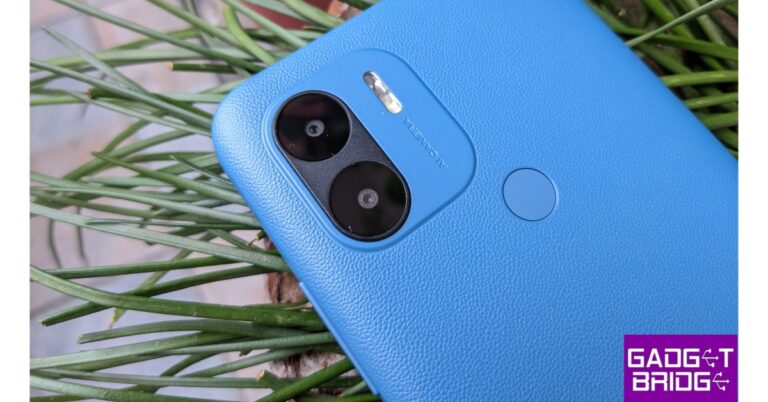
Speaking of the design and build quality, the Poco C51’s back features a leather-like texture that sets it apart from other smartphones in this category. Although we are reviewing the blue version, it is also available in black. The upper left corner of the device has a dual back camera setup. There is a fingerprint sensor on the back as well, and it functions extremely well and is quite quick to unlock the mobile. Poco C51 Review India On top, there is a single speaker, while the bottom has a microphone, a micro USB connector, and a headphone jack. On the left side of the plastic frame, there is a SIM tray that can hold two nano SIM cards and supports an SD card with up to 1TB storage. On the right, you get the power and volume rocker buttons. Poco C51 Review India Also Read: OnePlus Buds Pro 2 Review: Should you buy them? Poco C51 Review: Design and Display On the front, a teardrop-shaped notch houses a selfie camera. It has a waterdrop-shaped 6.52-inch HD+ display with a resolution of 720 x 1,600 pixels. The display sports 400 nits of brightness and 120Hz touch sampling rate is also supported. The text is easily readable and the colour reproduction is respectable.  Review of Poco C51 Using this phone, we also watched few videos, and the experience was generally positive. Widevine L3 certification allows content from services like Netflix and Prime Videos to stream at a maximum resolution of 540p. The upside is that YouTube videos can stream in HD at 60 frames per second and play incredibly fluidly without any lag or buffering. The single top-firing speaker also loud enough to hear music. Review of Poco C51 The device is flat and generally quite slim, with an (as said) good texture that gives it a particularly wonderful grip in your hand. You will need to purchase a cover separately because one is not included in the box. Despite the fact that the front screen is protected by Panda glass, we strongly advise using a phone cover.

Poco C51 Review: Performance and Camera

When it comes to performance, the Poco C51 is equipped with 64GB internal storage space, 4GB of RAM, and an octa-core MediaTek Helio G36 Processor. The device we have arrived with 4GB LPDDR4x RAM with the ability to add 3GB virtual RAM for a total of 7GB RAM. This helps with multitasking and speeds up the process of launching apps. Although it isn’t a powerhouse, it is incredibly battery-efficient and capable of handling typical daily tasks with ease. You can use it for casual gaming, email, WhatsApp, cameras, and social networking apps. Review of Poco C51 A point to remember, this is not a dedicated gaming device, we advise you to stick to simple/casual games like Candy Crush or Subway Surfer for gaming. Obviously, all of these simple games will function without any issues. But the demanding ones will take a toll. The operating system is Android 13 Go Edition, which is largely stock Android with a few useful features. You also receive the popular MIUI dialer, for example. It is neat and uncomplicated, and you may record calls without hearing the annoying recording disclaimer. Even for someone who is using a smartphone for the first time, the user experience of the Poco C51 is overall quite basic to use yet fluid. Keep in mind that because the gadget only supports 2.4 GHz Wi-Fi on a single band, downloading huge files will take a little longer.  The Poco C51 has two rear cameras, one with an 8-megapixel primary sensor and the other with a 2-megapixel depth sensor. Also, the gadget has a 5-megapixel front-facing camera for selfies. The smartphone additionally provides a 1080p @ 30fps video recording option. Although we didn’t have high expectations for its camera, astonishingly the primary sensor with HDR does a respectable job. There is a lot of detail in the images. Review of Poco C51 The portrait photographs have decent edge detection and are generally satisfactory. The 5-megapixel selfies are crisp and wide. Skin tones are also fair to decent. Review of Poco C51 Moreover, the rear camera can record Full HD films at a respectable 30 frames per second. Amazingly, even the front camera can record Full HD videos at 30 frames per second. In terms of the battery, the Poco C51 has a large 5,000mAh battery that, under normal usage conditions, will last you between one to two days, which is excellent. However, it would take two to three hours for the 10W supplied charger to completely charge.

Verdict

Poco C51 is a useful smartphone that can easily manage the majority of basic tasks. It includes a fresh Android 13 OS. One must purchase a cover separately because there is none included with the phone. In order to reduce costs, the business has also included a micro USB connector for charging, which we don’t really like. A USB-C type port might have been the better choice.  Overall, the Poco C51 won’t let you down if all you want is a phone for everyday use that costs less than Rs 8,000. You can definitely think about getting your parents or grandparents this phone too, who are graduating from a feature phone.

Poco C51 Pros

  • Simple UI
  • Long battery life
  • Decent cameras

Poco C51 Cons

  • Micro USB port instead of USB-C type
  • slow charging
  • A bit slow at times
For the latest gadget and tech news, and gadget reviews, follow us on TwitterFacebook and Instagram. For newest tech & gadget videos subscribe to our YouTube Channel. You can also stay up to date using the Gadget Bridge Android App. You can find the latest car and bike news here.

Apple BKC in Mumbai opening tomorrow: Details inside

0
Apple is set to open its first-ever retail stores in India this week The first two Apple stores in India are going to launch in Mumbai and Delhi. The BKC store is scheduled to open tomorrow i.e. Tuesday, April 18. Earlier this month the tech giant revealed the first picture of the store barricade in advance of the opening in Mumbai. On April 18, Apple will open its first retail store in Mumbai, and on April 20, it will open a second Apple store in Delhi. Today the company previewed Apple BKC, the first Apple Store in India. In Mumbai, it will be located in Bandra Kurla Complex financial, arts, and entertainment district. According to the company, the Apple BKC will serve as a dynamic space where customers can come together, explore Apple products and services, enjoy exceptional service, and learn how to get more out of their devices through free Today at Apple sessions. Deirdre O’Brien, Apple’s senior vice president of Retail said, “At Apple, our customers are at the centre of everything we do, and our teams are excited to celebrate this wonderful moment with them as we open our first retail store in India.” He further added, “Apple BKC is a reflection of Mumbai’s vibrant culture and brings together the best of Apple in a beautiful, welcoming space for connection and community.” Starting on the launch day on April 18 and through the summer, Apple BKC will provide a special Today at Apple series called “Mumbai Rising.” These free events, which include Apple products and services, will bring together visitors, local artists, and creatives, and offer practical activities that honour the local neighbourhood and culture. With a dedicated solar array and no reliance on fossil fuels for store operations the Apple BKC is one of the world’s most energy-efficient Apple Store locations, according to the company. The Apple Store runs only renewable energy and has a carbon-neutral operational footprint. In keeping with the distinctive geometry of the store, Apple BKC has a triangular handcrafted timber ceiling that extends past the glass façade to the bottom of the outer canopy. Apple claims that the 1,000 tiles that make up the ceiling are each constructed from 408 pieces of wood, making 31 modules for each tile. Around 450,000 distinct pieces of wood were used, all of which were put together in Delhi. There are two Rajasthani stone walls and a 14-meter stainless steel staircase leading from the ground floor to the cantilevered mezzanine welcome clients as they enter the store. Visitors can explore the surrounding display tables and avenues featuring the latest iPhone, Mac, iPad, AirPods, Apple Watch, and Apple TV lineups, as well as accessories like AirTag. In addition to this, Apple BKC offers Apple Pickup, which makes it even easier for customers to make a purchase online and pick up goods at a time that suits them. More than 100 staff members of Apple BKC speak more than 20 different languages to assist customers. They can also provide information on the Apple Trade-In programme. For the latest gadget and tech news, and gadget reviews, follow us on TwitterFacebook and Instagram. For newest tech & gadget videos subscribe to our YouTube Channel. You can also stay up to date using the Gadget Bridge Android App. You can find the latest car and bike news here.

Vivo X90 series India launch confirm to take place on April 26

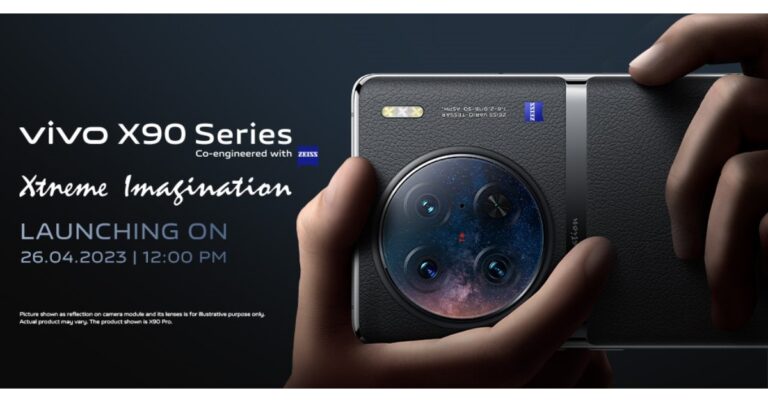
Vivo has finally revealed the official launch date for the Vivo X90 series in India. The company has now scheduled to launch the much-awaited series on April 26. The lineup includes three models Vivo X90, Vivo X90 Pro, and Vivo X90 Pro+ however the company is likely to only introduce the standard and the Pro variant. The device has already debuted in China last year in November and also made a global debut in February but is yet to hit Indian stores. Vivo X90 Series is set to launch in India on April 26. The launch event will take place at 12 noon. The company has not yet confirmed which model will debut but the Vivo X90 and Vivo X90 Pro are likely to arrive. Also, there is no information about the pricing and specifications. But the specs of both handsets will remain the same as the original ones. The official teasers only reveal that the devices will have a triple rear camera setup powered by Zeiss lenses. In terms of pricing previously it was tipped that the price of both models are expected to range from Rs 60,000 to Rs 80,000.

Vivo X90, Vivo X90 Pro specifications

Vivo X90 features a 6.78-inch AMOLED display with a 1,260 x 2,800-pixel resolution. The display comes with a 20:09 aspect ratio, a refresh rate of up to 120Hz, and a screen-to-body ratio of 93.53 percent. The DCI-P3 colour gamut is also supported. The handset runs on Android 13 with OriginOS 3 on top. The phone is driven by an octa-core 4nm MediaTek Dimensity 9200 SoC, up to 12GB of LPDDR5, and a G715 GPU. Internal storage on the Vivo X90 is expandable to 512GB UFS4.0. Also Read: Samsung Galaxy M14 with 6,000mAh battery launched in India Vivo X90 is highlighted with a triple rear camera setup that includes a 12-megapixel ultra-wide-angle camera with an f/2.0 aperture, a 12-megapixel portrait camera with a 50mm lens, and a 50-megapixel primary sensor with an f/1.75 aperture are all featured. It has a selfie camera with a 32-megapixel resolution and an f/2.45 aperture. In addition to this, there is a 4,810mAh battery and 120W fast charging. On the contrary, Vivo X90 Pro is powered by a MediaTek Dimensity 9200 CPU, up to 12GB of LPDDR5 RAM, and up to 512GB of UFS 3.1 internal storage that can be expanded further with a microSD card. The device also includes a 4,870mAh battery with support for both wireless charging at 50W and quick charging at 120W. The rest of the remaining features are similar to X90. The X90 Pro comes with a triple rear camera setup, with the primary camera being a 50-megapixel Zeiss 1-inch sensor with an f/1.75 aperture. In addition to this, it includes two 50-megapixel secondary 50mm sensors with an f/1.6 aperture each and a 12-megapixel ultra-wide-angle sensor. On the front, it boasts a 32-megapixel selfie camera with an f/2.45 aperture. For the latest gadget and tech news, and gadget reviews, follow us on TwitterFacebook and Instagram. For newest tech & gadget videos subscribe to our YouTube Channel. You can also stay up to date using the Gadget Bridge Android App. You can find the latest car and bike news here.
3 Ways to Add an Arrow or Circle Text in Microsoft Word

0
If you want your Word documents to stand out and have a certain flair to them, there are a few tricks you should employ routinely. One of these is adding arrows and circles to your text. This will give the necessary emphasis to important parts of the document while also elevating its presentation. So, without further, ado, here are 3 quick ways to add an arrow or circle text in Microsoft Word. Read Also: 2 Easy Ways To Create a Word Cloud in Microsoft Word

Here’s how you can add an arrow in MS Word

How to use voice typing in Microsoft Word? Step 1: Open the Word file. Place your cursor at the point where you want to insert the arrow. Step 2: Click on ‘Insert’ and select ‘Shapes’. Step 3: Select an arrow from under the ‘Lines’ section. You can also choose a more elaborate shape for your arrow from the ‘Block Arrows’ section. Step 4: Your mouse pointer will be replaced by a crosshair pointer. Use this pointer to draw an arrow wherever you want. You can change the outline and effect of the arrow too.

How to add an arrow symbol in MS Word

There are a bunch of Unicode and key combinations you can use to insert a handy arrow symbol wherever you want on your text. This is merely a symbol, so you cannot edit its size or colour. Here are all the major combinations you will need.
Type of Arrow Unicode Combo
Left arrow Alt + 8592
Right arrow Alt + 8594
Up arrow Alt + 8593
Down arrow Alt + 8595
Horizontal arrow pointing in both directions Alt + 8596
Vertical arrow pointing in both directions Alt + 8597
 
Type of Arrow Key Combination
Left arrow
  • –  >
Right arrow = = >
Up arrow < – –
Down arrow < = =
Horizontal arrow pointing in both directions < = >

Here’s how you can circle text in MS Word

15 advance keyboard shortcuts every Microsoft Word user should know Need to circle a word to add more emphasis to it? Here’s how you can do it in Microsoft Word. Step 1: Click on ‘Insert’ and select ‘Shapes’. Step 2: Select a circle or an oval from basic shapes. Step 3: Place the circle over the desired text. Step 4: The circle will be filled up with a random colour by default, which means you won’t be able to view the word it is covered. To make the circle transparent click on the ‘Shape fill’ option in the toolbar and select ‘No fill’.

Frequently Asked Questions

How do I insert a circle and arrow in Microsoft Word?

To insert an arrow and circle in a Word document, simply click on ‘Insert’ in the top menu and select ‘Shapes’. Click on the shape you want to add and it will appear on your document.

How do you circle a word in Microsoft Word?

To circle a word, click on Insert>Shapes and select Circle from basic shapes.

How do I type the symbol of an arrow in Microsoft Word?

To insert a left arrow symbol, simply press Alt and type 8592. For a right arrow symbol, press Alt and type 8594. Read Also: Max Streaming Service by Warner Bros. Discovery Announced, Debuting May 23

Conclusion 

These are the 3 quickest ways to add an arrow or circle text in Microsoft Word. These tricks will help you spruce up an ordinary text document and make it more fun to go through. Which MS Word tricks do you use the most? Let us know in the comments! For the latest gadget and tech news, and gadget reviews, follow us on Twitter, Facebook and Instagram. For newest tech & gadget videos subscribe to our YouTube Channel. You can also stay up to date using the Gadget Bridge Android App. You can find the latest car and bike news here.

Samsung Galaxy M14 with 6,000mAh battery launched in India

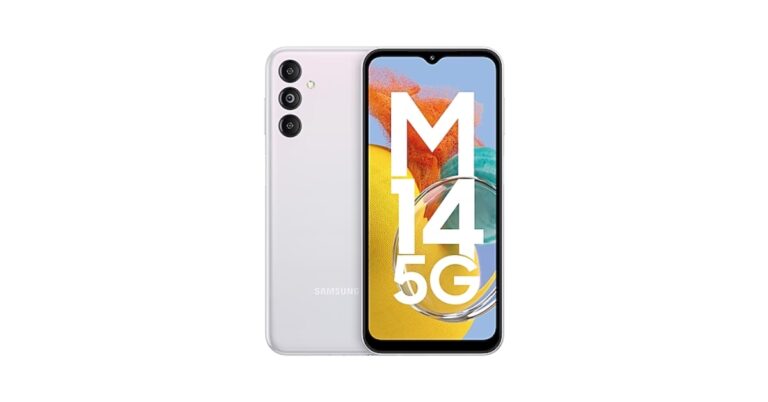
Samsung has upgraded its M-Series in India with the launch of Galaxy M14 5G. The newly launched smartphone is driven by a 5nm Exynos 1330 SoC. It sports a triple rear camera setup that includes a 50-megapixel primary sensor. In addition to this, the phone packs a huge 6,000mAh battery.

Samsung Galaxy M14 5G price in India, sale details

The price of the Samsung Galaxy M14 5G in India has been set at Rs 13,490 for the 4GB RAM with 128GB storage option. The phone will also be available in a 6GB with 128GB storage model priced at Rs 14,990. The handset comes in three colour options of Blue, Dark Blue, and Silver. The device is scheduled to go on sale on April 21 via the Samsung website, Amazon and select retail stores at 12 noon. Samsung Galaxy M14 5G price in India, sale details

Samsung Galaxy M14 5G specification

In terms of specification, the Samsung Galaxy M14 5G runs on One UI 5 based on top of Android 13 out of the box. Under the hood, there is an Exynos 1330 octa-core SoC paired with Mali G68 GPU for graphics. The phone will come in two different configurations: 4GB RAM with 128GB storage and 6GB RAM with a 128GB storage model. The phone also features a 6.6-inch Full HD+ PLS LCD display with 2408 x 1080 pixels of resolution. Also Read: Instagram rolling out new Reels features for creators Samsung Galaxy M14 5G sports a triple rear camera setup that includes a 50-megapixel main sensor with an f/1.8 aperture. It also consists of a 2-megapixel depth sensor and a 2-megapixel macro sensor. For taking selfies and video calls the handset comes with a 13-megapixel front-facing camera. The newly launched smartphone houses a 6000mAh battery with 25W fast charging support. In terms of connectivity, there is 5G, 4G, Wi-Fi, Bluetooth 5.2, NFC, and GPS. Moreover, there is a side-mounted fingerprint sensor on the phone for biometrics. For the latest gadget and tech news, and gadget reviews, follow us on TwitterFacebook and Instagram. For newest tech & gadget videos subscribe to our YouTube Channel. You can also stay up to date using the Gadget Bridge Android App. You can find the latest car and bike news here.

Instagram rolling out new Reels features for creators

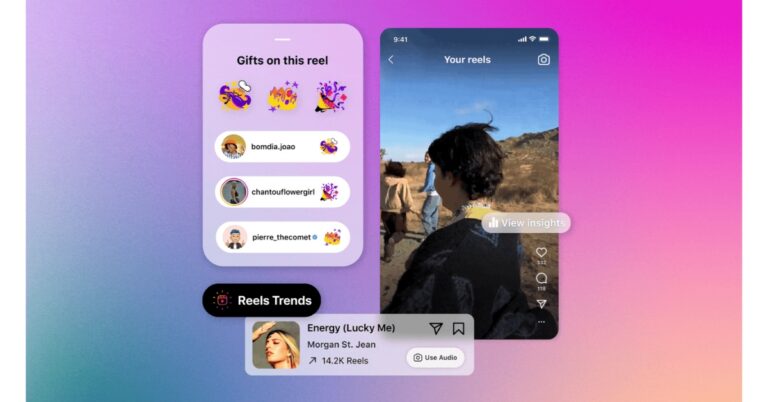
Meta-owned popular social media app and TikTok’s rival Instagram has unveiled new capabilities for its short-video creation tool to help creators in order to expand Reels’ functionality and visibility. A dedicated destination to find popular audio and hashtags, in addition to two new metrics to Reels insights, have been added to the app. Instagram has brought a bunch of new features, mostly for creators. While making the announcement Instagram said, “We strive to make Instagram a home for creators like you to express your creativity, connect with your audience and earn a living. Today we’re announcing improvements to Reels — to empower you to do what you do best.” Reels-Trends The first tool has been added to the professional dashboard, where creators can easily find inspiration through trending audio and hashtags on Instagram Reels. The users will be able to see the top trending songs on Reels, see how many times the audio has been used, tap in to use it or save the audio for themselves. trending on reels In addition to this digital creators on Instagram, can see what the top trending topics and hashtags are on Reels. “For example, the festival season might be trending earlier than you think. We’ve found that people actually start sharing their #coachella content before the festival even begins. These are the types of insights you can tap into with the new trends destination,” the blog post said. edit reels   Editing videos on Instagram will also get better and easier by bringing together video clips, audio, stickers, and text on a unified editing screen. This offers a more visual alignment and timing of your reel’s element. Both iOS and Android devices can access this worldwide. Instagram is also updating reel insights by adding two new metrics: total watch time and average watch time – and making it easier to see your insights while viewing your reels directly. This will provide a better understanding of where viewers are interested or where you might need to develop a more engaging hook to keep them watching.   Total watch time tracks all viewing time for your reel, including any time spent watching it again. Whereas average watch time captures the average amount of time spent playing your reel, calculated by dividing watch time by the number of total plays. For instance, if your average watch time is 17 seconds, out of everyone who watched your Reel they watched an average of 17 seconds. Reel-Insights To help you see how your reels contribute to your growth you will now get a notification with new followers from your reels. What’s more, Instagram has also announced to bring gifts to even more creators with upcoming expansions to more markets, including Australia, Canada, France, Mexico, New Zealand and the UK, in the coming weeks. In order to help you recognise your supporters, a new feature will be introduced to show you which followers have sent you gifts. Your supporters will receive a notification if you tap the heart icon next to them letting them know that you have seen and acknowledged their contribution, further strengthening the bond between you and your supporters. For the latest gadget and tech news, and gadget reviews, follow us on TwitterFacebook and Instagram. For newest tech & gadget videos subscribe to our YouTube Channel. You can also stay up to date using the Gadget Bridge Android App. You can find the latest car and bike news here.

How can I Turn on Live Captions on any Xiaomi or Redmi smartphone?

0
‘Live Caption’ of the better recent features on Android smartphones. If you cannot find the subtitles for a movie or video, you can simply turn on Live Caption and let your Android phone generate them in real-time. Live Caption is also very useful for people with hearing impairment, allowing them to view the contents of any phone call, voice note, and more. In this article, we show you how to turn on live captions on any Xiaomi or Redmi smartphone. Read Also: More security features added to WhatsApp, making it safer

Turn on Live Caption from the quick settings panel

Step 1: Swipe down from the right side of the status bar to reveal the quick settings panel. Step 2: Locate the tile for Live Caption. If you don’t find it, here’s how you can add it to the panel. Step 3: Tap on the edit icon at the top right corner of the quick settings panel. Step 3: Tap on the edit icon at the top right corner of the quick settings panel. Step 4: Tap on the green plus icon on the Live Caption tile.  Step 4: Tap on the green plus icon on the Live Caption tile.  Step 5: Tap on ‘Done’. Step 5: Tap on ‘Done’. Step 6: Swipe down from the status bar again and tap on Live Caption to enable it. Step 6: Swipe down from the status bar again and tap on Live Caption to enable it.

Turn on Live Caption from system settings

Step 1: Go to Settings and select Additional Settings. Step 1: Go to Settings and select Additional Settings. Step 2: Tap on Accessibility and switch to the ‘Hearing’ tab. Step 2: Tap on Accessibility and switch to the ‘Hearing’ tab. Step 3: Select ‘Live Caption’ and enable the toggle bar for ‘Use Live Caption’. Step 3: Select ‘Live Caption’ and enable the toggle bar for ‘Use Live Caption’.

Turn on Live Caption on Chrome

Step 1: Launch the Google Chrome app on your Xiaomi or Redmi smartphone. Step 2: Tap on the ellipses (three dots) at the top right corner of the screen. Step 3: Select Settings and tap on Accessibility. Step 3: Select Settings and tap on Accessibility. Step 4: Tap on ‘Captions’ and turn the toggle bar on for Show Captions. Step 4: Tap on ‘Captions’ and turn the toggle bar on for Show Captions.

Frequently Asked Questions

How do I turn on live captions on my phone?

Turn on Live Caption from the quick settings menu or enable it from Settings>Additional Settings>Accessibility>Hearing

What is Live Caption on Android?

Enabling Live Caption on your Android smartphone generates captions for videos, calls, voice notes, and any other kind of speech.

Does Live Caption drain battery?

Since generating live captions is a dynamic process, having it turned on all of the time will drain your battery faster. Read Also: OnePlus Pad Pricing in India has been tipped once again

Conclusion

This is how you can enable Live Caption on your Xiaomi or Redmi smartphone. Currently, Live Caption is only available for English audio. Once you’ve enabled live captions, you can toggle the size of the caption bar and place it anywhere on the screen. It also must be noted that Live Caption only works for speech and not songs.  For the latest gadget and tech news, and gadget reviews, follow us on Twitter, Facebook and Instagram. For newest tech & gadget videos subscribe to our YouTube Channel. You can also stay up to date using the Gadget Bridge Android App. You can find the latest car and bike news here.

Samsung Galaxy M14 5G launching in India today: Expected price and specs

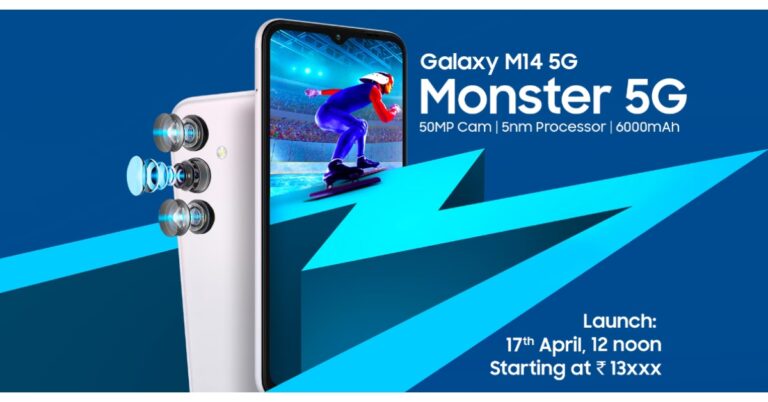
The South Korean electronics brand Samsung is all set to launch Samsung Galaxy M14 5G in India today. The device has already debuted in Ukraine last month. In addition to this, the upcoming phone has also been listed on Amazon to tease its availability and key specification. The M-Series phone is confirmed to house a massive 6,000mAh battery. It will be powered by a 5nm Exynos 1330 SoC. Additionally, the device will also feature a triple rear camera setup.

Samsung Galaxy M14 5G price in India (expected) and launch timing

Samsung Galaxy M14 5G is going to debut in India today at 12 noon. Before the official announcement, the company listed the phone on its official website as well as on Amazon in order to tease its availability and highlight its specifications and expected pricing. The teasers suggest that the M14 5G will start at Rs 13xxx which is above Rs 13,000.

Samsung Galaxy M14 5G specifications expected

The official teasers suggest that Galaxy M14 5G will have a 50-megapixel main sensor as part of its triple back camera. There will be a 13-megapixel selfie camera on the front as well. The handset will be powered by a 5nm Exynos 1330 SoC. It has also been confirmed that the smartphone will come equipped with a 6,000mAh battery with 25W fast charging support. The battery is claimed to last for up to two days when charged fully. Furthermore, the official teasers revealed that the Galaxy M14 will come in three different colour options and include a side-mounted fingerprint scanner. Last month Galaxy M14 5G debuted in Ukraine and will now hit India shores today. The specification of the forthcoming 5G smartphone is likely to be similar to that of the Ukrainian variant. It is believed that the device may feature a 6.6-inch full-HD+ IPS LCD display. The handset could also be available with up to 4GB RAM and 128GB internal storage. It may potentially come pre-installed with One UI, which is based on Android 13. In addition to a 50-megapixel primary sensor the triple camera setup on the rear may also include dual 2-megapixel sensors for depth and macro photos. For the latest gadget and tech news, and gadget reviews, follow us on TwitterFacebook and Instagram. For newest tech & gadget videos subscribe to our YouTube Channel. You can also stay up to date using the Gadget Bridge Android App. You can find the latest car and bike news here.

Garena Free Fire Redeem Codes Today 17 April 2023: Here is how to claim them

Garena Free Fire is a battle royale game with regular awards and tournaments to keep players interested. If you play Garena Free Fire, you should be aware of the redeem codes that are released on a daily basis. However, because the battle royale game is banned in India, players from other countries can use the Free Fire Redeem codes daily. If you’re unfamiliar with the Garena Free Fire redeem codes or don’t know how to get them, we’ve put together a step-by-step guide to help you redeem them. Check out Garena Free Fire Redeem Codes for 17 April 2023. The Free Fire redeem codes are a great way to get free stuff. These are 12-digit codes that contain alphabets and numbers, as well as an expiration date and time. Because the Garena FF redeem codes cannot be used more than once, you should hurry to the redemption page to claim your free reward before someone else does. To get a free reward, all you have to do is go to reward.ff.garena.com/en, which is the official redemption page. Also, keep an eye on this space for daily updates on Garena Free Fire redemption codes and rewards.

Garena Free Fire Redeem Codes Today 17 April 2023

  • Updating soon

How to Get Free Fire Redeem Codes for Garena on 17 April 2023?

  • Visit the Garena Free Fire game’s official website at reward.ff.garena.com.
  • Use your Facebook, Google, VK, Apple ID, Huawei ID, or Twitter account to log in.
  • You’ll be taken to a valid redemption code (s)
  • Copy and paste the 12-digit redemption code into the text box.
  • On the screen, a dialogue box will appear.
  • ‘Ok’ should be selected.
For the latest gadget and tech news, and gadget reviews, follow us on TwitterFacebook and Instagram. For newest tech & gadget videos subscribe to our YouTube Channel. You can also stay up to date using the Gadget Bridge Android App. You can find the latest car and bike news here.

Amazon Quiz Answers Today 17 April 2023: Participate to win Rs 5,000

Amazon is back with another quiz on its mobile platform. The Amazon Quiz is conducted every day for its customers. Customers from different parts of the country are participating in the daily quiz. Today’s Amazon quiz is now live on the Amazon App. The customers who participate in the 17 April 2023 Amazon Quiz will get a chance to win Rs 5,000 Amazon pay Balance. The Amazon Quiz can be played from 12 AM to 11:59 PM. For those who are unaware of the quiz, the e-commerce platform brings a fresh quiz on a daily basis which consists of five questions related to general knowledge and current affairs. The participants need to answer all the questions correctly and their names will be selected for a lucky draw. The winner will be announced at the end of the month. One wrong answer could eliminate you from the quiz. Only app users are eligible to participate in the Quiz. Check Out 17 April 2023 Amazon Quiz Answers. Amazon Quiz Today Prize – Rs 5,000 Amazon Pay Balance Quiz Date – 17 April 2023 Daily Timing – 12 AM to 11:59 PM Winner Announcement – Today 12 PM

Amazon Quiz Answers Today 17 April 2023

Question 1: For the fifth consecutive time, as the Chief Minister of which state did Neiphiu Rio recently take the oath? Answer: Nagaland Question 2: Who was awarded an Oscar for “Best Actor in a Leading Role” for his performance in “The Whale”? Answer: Brendan Fraser Question 3: Who is the second Indian after Mary Kom to win the world women’s boxing championship two years in a row? Answer: Nikhat Zareen Question 4: These mosaics are located in which city? Answer: Istanbul Question 5: This animal has mostly been spotted in which country? Answer: India

How To Play Amazon Quiz

Only app users are eligible to play the Amazon quiz every morning from 12 AM to 11:59 PM. The quiz is not available on the desktop. For those who are unaware of how to play the Amazon quiz below are the steps, you can follow to take the quiz.
  • Firstly download the Amazon app from Google Play Store or App Store
  • Now fill in the required information through the Sign Up option.
  • You need to log in to the Amazon app and scroll down on the home screen to find the Amazon Quiz banner.
  • Tap on the Amazon Quiz banner and tap on the Start button to start the Quiz.
  • Now you will get 5 questions and you need to answer them correctly. One wrong answer will eliminate you from the Quiz.
  • After answering all the questions correctly you are now eligible for a Lucky Draw.
  • The winner’s name will be announced today at 12 PM.
For the latest gadget and tech news, and gadget reviews, follow us on TwitterFacebook and Instagram. For newest tech & gadget videos subscribe to our YouTube Channel. You can also stay up to date using the Gadget Bridge Android App. You can find the latest car and bike news here.