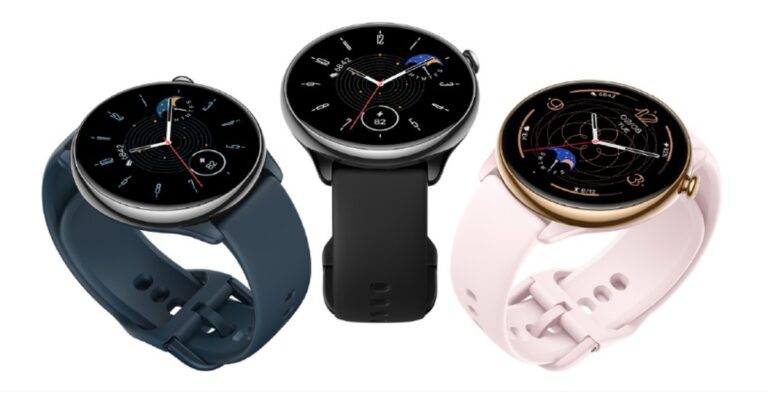
Popular fitness tracker maker brand Amazfit has launched Amazfit GTR Mini in India. The smartwatch features an HD AMOLED display and comes with over 120 sports modes. The device is claimed to provide 14 days of battery life. It further includes 5 satellite positioning systems, 24/7 Heart rate, SPO2, and advanced health monitoring features.
Amazfit GTR Mini price in India and availability
Amazfit GTR Mini has been launched in India with a price tag of Rs 10,999. The device comes in three colour options Midnight Black, Misty Pink, and Ocean Blue. It can be purchased via Amazon in the country.
Amazfit GTR Mini specs and features
Amazfit GTR Mini features a classy round design with a glazed back panel matching its soft, skin-friendly silicone strap. The smartwatch comes with a 1.28-inch HD AMOLED display with curved glass and an anti-fingerprint coating. The screen offers 326 PPI and has over 80 watch faces. There is a new Portrait mode that will allow users to upload 3 of their favourite pictures to the watch face. The fitness tracker runs on Zepp OS 2.0 and is powered by a dual-core Huangshan 2S chip.
There is an advanced BioTracker PPG optical sensor that provides insights into heart rate, blood-oxygen saturation, and stress level. According to the company using the One-tap Measuring function, users will be able to measure all three metrics at the same time with just one tap and get results in as fast as 15 seconds. When 24-hour health monitoring is activated the watch notifies of any abnormal readings such as high or low heart rates, low SpO₂ levels, or high-stress levels, and even recommends stress-reducing breathing exercises.
The Amazfit GTR Mini can last for up to 14 days on a single charge under typical usage or even 20 days in battery saver mode.
Also Read: Fire Boltt Invincible Plus Bluetooth calling smartwatch launched in India
There is the company’s own circularly-polarised GPS antenna technology which picks up almost twice as many satellite signals as regular antennas for accurate GPS tracking. However, the watch supports five satellite positioning systems.
There are more than 120 sports modes and smart recognition seven exercise types, including Outdoor Running, Outdoor Cycling, and more on the watch. The wearable is 5 ATM water-resistant, which means it can withstand the equivalent of up to 50 metres of water pressure, making it ideal for water sports.
Users can also share their workout data with various fitness communities and smartphone apps, including Strava, Relive, Adidas Running, Apple Health, and Google Fit.
For the latest gadget and tech news, and gadget reviews, follow us on Twitter, Facebook and Instagram. For newest tech & gadget videos subscribe to our YouTube Channel. You can also stay up to date using the Gadget Bridge Android App. You can find the latest car and bike news here.
Garena Free Fire is a battle royale game with regular awards and tournaments to keep players interested. If you play Garena Free Fire, you should be aware of the redeem codes that are released on a daily basis. However, because the battle royale game is banned in India, players from other countries can use the Free Fire Redeem codes daily. If you’re unfamiliar with the Garena Free Fire redeem codes or don’t know how to get them, we’ve put together a step-by-step guide to help you redeem them. Check out Garena Free Fire Redeem Codes for 17 March 2023.The Free Fire redeem codes are a great way to get free stuff. These are 12-digit codes that contain alphabets and numbers, as well as an expiration date and time. Because the Garena FF redeem codes cannot be used more than once, you should hurry to the redemption page to claim your free reward before someone else does. To get a free reward, all you have to do is go to reward.ff.garena.com/en, which is the official redemption page. Also, keep an eye on this space for daily updates on Garena Free Fire redemption codes and rewards.
Garena Free Fire Redeem Codes Today 17 March 2023
FFCMCPSJ99S3
MCPW2D1U3XA3
HNC95435FAGJ
MCPW2D2WKWF2
NPYFATT3HGSQ
ZZZ76NT3PDSH
XZJZE25WEFJJ
FFCMCPSUYUY7E
V427K98RUCHZ
FFCMCPSEN5MX
6KWMFJVMQQYG
MCPW3D28VZD6
EYH2W3XK8UPG
FFCMCPSGC9XZ
UVX9PYZV54AC
How to Get Free Fire Redeem Codes for Garena on 17 March 2023?
The popular Amazon Quiz is now live on the Amazon app. The 17 March 2023 Amazon Quiz gives you a chance to win Rs 2,500 Amazon Pay Balance by answering all the questions correctly. The quiz can be played every day from 12 AM to 11:59. Only app users are eligible to participate in the Quiz as it is not accessible on the web platform.The Amazon Quiz brings a fresh set of questions for its customers that contains five easy questions. The questionnaire consists of five questions related to general knowledge and current affairs. The participants need to answer all the questions correctly and their names will be selected for a lucky draw. The daily quiz brings an opportunity for the customers to win exciting prizes. They can win Amazon Pay Balance ranging from Rs 1,000 to Rs 50,000. The participants need to answer all the questions correctly and their names will be selected for a lucky draw. The winner will be announced at the end of the month. Check Out 17 March 2023 Amazon Quiz Answers.Amazon Quiz Today Prize – Rs 2,500 Amazon Pay BalanceQuiz Date – 17 March 2023Daily Timing – 12 AM to 11:59 PMWinner Announcement – Today 12 PM
Amazon Quiz Answers Today 17 March 2023
Question 1: Tara Norris, a pacer from USA, became the first bowler in Women’s Premier League history to take a fifer, playing for which side?Answer: Delhi CapitalsQuestion 2: The show ‘The Night Manager’ stars which actor playing the role of Shaan Sengupta?
Answer: Aditya Roy KapoorQuestion 3: Fatehpur Sikri was founded as the capital of the Mughal empire by which Mughal emperor?Answer: Akbar
Question 4: This is the iconic logo of which automobile brand?
Answer: Mercedes BenzQuestion 5: This weapon is wielded by which character from the Marvel Cinematic Universe?
Answer: Thor
How To Play Amazon Quiz
Only app users are eligible to play the Amazon quiz every morning from 12 AM to 11:59 PM. The quiz is not available on the desktop. For those who are unaware of how to play the Amazon quiz below are the steps, you can follow to take the quiz.
Firstly download the Amazon app from Google Play Store or App Store
Now fill in the required information through the Sign Up option.
You need to log in to the Amazon app and scroll down on the home screen to find the Amazon Quiz banner.
Tap on the Amazon Quiz banner and tap on the Start button to start the Quiz.
Now you will get 5 questions and you need to answer them correctly. One wrong answer will eliminate you from the Quiz.
After answering all the questions correctly you are now eligible for a Lucky Draw.
The winner’s name will be announced today at 12 PM.
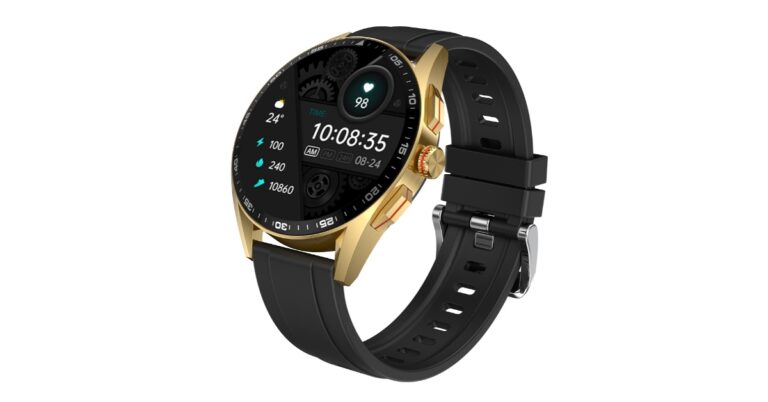
Fire-Boltt has introduced its latest smartwatch Invincible Plus in India. The device is a part of the company’s LUXE edition featuring an AMOLED display. The Fire Boltt Invincible Plus watch comes with a Bluetooth calling feature as well. It also has 4GB of inbuilt storage and a voice assistance function for hands-free operations. However, the watch includes 3 buttons and a rotatory button for easier navigation.The Fire Boltt Invincible Plus smartwatch comes with an introductory price of Rs 3,999. The device can be purchased via the company’s official website and Amazon in the country. The smartwatch is offered in two varieties of detachable straps- Silicon and Stainless Steel. The one with the stainless-steel strap comes in two colours- Black and Silver whereas the model with the Silicon strap comes in 5 colour variants- Jet Black, Rose Gold, Black Gold, Grey, and Dark Grey.Invincible Plus features a 1.43-inch always-on AMOLED display. The screen has 460×460 pixels of resolution and 600 nits of brightness. In addition to this, the display has support for a 60Hz of refresh rate. The smartwatch has a full metal body, 3 button pushers, and a magic crown rotatory button that enables users to easily navigate the menu and change watch faces. The watch is IP67 rated for resistance against water. Moreover, it has over 300 sports modes and a Bluetooth calling feature. The device also supports Voice assistance.The smart wearable comes with 4 GB inbuilt storage which means the users can download and save music in their smartwatch and have their personal MP3 on the wrist. It has TWS connect features which allow users to pair the smartwatch with their earbuds and listen to music or take calls. In addition to this, the Fire Boltt smartwatch comes with 5 inbuilt games, 7 menu layouts, and 120 inbuilt watch faces.In terms of health monitoring, the Fire Boltt Invincible Plus smartwatch includes continuous heart rate monitoring, SpO2 monitoring, sleep monitoring, and activity tracking. With a 380 mAh battery the watch can last for up to 7 days in mode and provides up to 20 days of battery life in standby mode. For added security, the device has a screen lock feature which ensures user privacy. Lastly, the fitness tracker has other miscellaneous features like an inbuilt calculator, alarm clock, stopwatch, weather updates, find my phone, smart notifications, sedentary reminders, and drink water reminders.
For the latest gadget and tech news, and gadget reviews, follow us on Twitter, Facebook and Instagram. For newest tech & gadget videos subscribe to our YouTube Channel. You can also stay up to date using the Gadget Bridge Android App. You can find the latest car and bike news here.
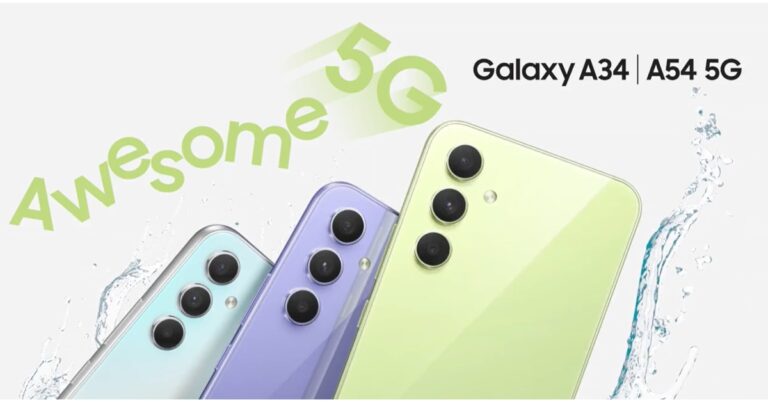
Samsung Galaxy A54 5G and Galaxy A34 5G have officially debuted in India today. Both phones have designs similar to the latest Galaxy S23 smartphone. They both shared a lot of similarities like the AMOLED display having 120Hz refresh rate support, a 5,000mAh battery and a triple rear camera setup. In addition, the handsets ship Android 13 out of the box.
Samsung Galaxy A54 5G and Galaxy A34 5G price and sale details
Samsung Galaxy A54 5G and Galaxy A34 5G are being offered in two different configurations. The A54 5G is available in 8GB RAM with 128GB/ 256GB storage options priced at Rs 38,999 and Rs 40,999 respectively. The phone is offered in three different shades of Awesome Lime, Awesome Graphite, and Awesome Violet. The device is scheduled to go on sale from March 16 in the country.
On the other hand Galaxy A34 5G also comes in two variations: 8GB RAM with 128GB and 256GB storage. The price of the 128GB storage is set at Rs 30,999 whereas the 256GB model comes at Rs 32,999. The phone is available in Awesome Lime, Awesome Graphite and Awesome Silver colours. This smartphone will be available for purchase from March 28.Both devices are currently up for pre-orders in the country.Also Read:Viewsonic introduced a new range of lamp-free LED projectors in India
Samsung Galaxy A54 5G and Galaxy A34 5G specs and features
Samsung Galaxy A54 5G and Galaxy A34 5G have a SAMOLED Full HD+ display measuring 6.4 inches and 6.6 inches respectively. Both screens have support for 120Hz refresh rate display. The devices run on One UI 5.1 on top of Android 13 out of the box. The company is promising 4 years of software upgrades and five years of security updates. There is an unspecified octa-core processor, most likely EXYNOS 1380 is being used with a 2.4GHz clock speed.For photos and videos, the Samsung Galaxy A54 5G and Galaxy A34 5G have a triple rear camera setup. The A54 has a 50MP primary sensor, 12MP ultra-wide sensor and a 5MP macro lens. For selfies, there is a 32MP front-facing shooter. Whereas A34 comes with a 48MP main lens, and 8MP-ultra-wide lens and a 5MP macro sensor. The device features a 13MP selfie camera. Both the primary sensors on the smartphone support OIS. The smartphones are fueled by a 5,000mAh battery and have IP67 certification for dust and water resistance.
For the latest gadget and tech news, and gadget reviews, follow us on Twitter, Facebook and Instagram. For newest tech & gadget videos subscribe to our YouTube Channel. You can also stay up to date using the Gadget Bridge Android App. You can find the latest car and bike news here.
If you just got a new iPhone, one of the first things you should do is import your WhatsApp chats from your previous device. Conversations can be tricky to navigate if you don’t have access to the chat history. Since you probably use WhatsApp’s ‘Message Yourself’ feature to store important information, you would want those messages to be carried forward to your new device as well. Android to iOS chat migration wasn’t possible for the longest time, but luckily there is a native process for it now. So, without further ado, here are the best ways to transfer your WhatsApp chat history from Android to iOS. Read Also:Netgear introduced Orbi RBK863 Mesh System and satellites in India
Use the Move to iOS app
Before using Move to iOS, make sure these prerequisites are met.
Android 5 or above installed on your Android smartphone.
iOS 15.5 is installed on your iPhone.
Move to iOS app is installed on your Android smartphone.
iPhone must have WhatsApp version 2.22.10.70 or higher.
Android smartphone must have WhatsApp version 2.22.7.74 or higher.
Your phone number must be the same across both devices.
iPhone must be new or reset to factory settings.
Both devices must be connected to a power source.
Both devices must be connected to the same WiFi network. Use a WiFi hotspot if necessary.
Here’s how you can migrate your WhatsApp data from Android to iOS using the Move to iOS app.Step 1: Launch the Move to iOS app on your Android smartphone.Step 2: Enter the code displayed on your iPhone.Step 3: Tap on ‘Continue’ and follow the on-screen instructions.Step 4: Select ‘WhatsApp’ on the Transfer Data page.Step 5: Tap ‘Start’ on your Android smartphone to begin the export of data. Once the data is prepared, you will be signed out of your WhatsApp account on your Android smartphone.Step 6: Tap on ‘Next’ and return to the Move to iOS app.Step 7: Tap on ‘Continue’ to transfer data on your iPhone. Wait until the transfer is complete.Step 8: Launch WhatsApp on your iPhone and log in using your phone number.Step 9: Tap on ‘Start’ to finish migrating your data to your iPhone.Step 10: Finish activating your iPhone. You will find your chats on opening WhatsApp.
Use MobileTrans
Wondershare MobileTrans is a great tool to transfer your WhatsApp data from Android to iOS. Here is a step-by-step breakdown.Step 1: Install and launch the Wondershare MobileTrans tool on your PC.Step 2: Select ‘WhatsApp Transfer’.Step 3: Click on the WhatsApp module and select ‘Transfer WhatsApp Messages’.Step 4: Connect your Android and iOS devices to your PC. MobileTrans will load all your WhatsApp data before transferring it.Step 5: Make sure the data is being transferred from Android to iOS. If it is the other way round, click on ‘Flip’.Step 6: Click on ‘Start’ to initiate the data migration. Your WhatsApp data will be transferred from your Android smartphone to your iPhone within a few minutes.Read Also:How to Video Call Between an iPhone and an Android?
Conclusion
These are the best ways to transfer your WhatsApp chat history and data from Android to iOS. You can also email your chat history to yourself as a text file and access it on your iPhone. However, you will only be able to read those chats within the file as WhatsApp does not load them in the app. The safest way to go about chat migration is by using the Move to iOS app. This is because WhatsApp doesn’t see your data while it’s being migrated. Once transferred, your data will not be removed from your Android smartphone unless you delete it yourself.For the latest gadget and tech news, and gadget reviews, follow us on Twitter, Facebook and Instagram. For newest tech & gadget videos subscribe to our YouTube Channel. You can also stay up to date using the Gadget Bridge Android App. You can find the latest car and bike news here.
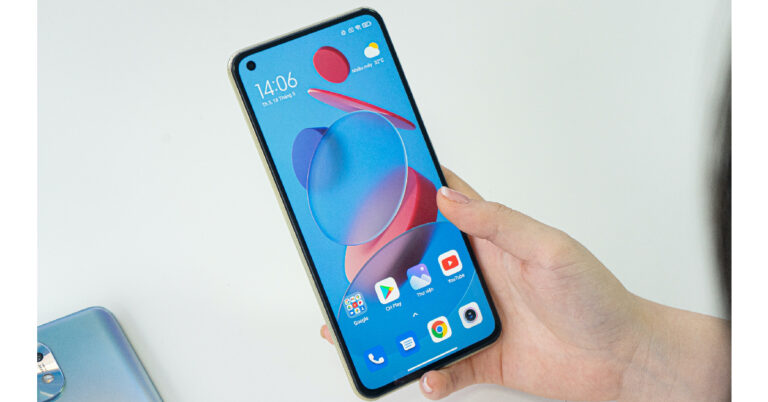
If you accidentally deleted an important video on your smartphone, not all hope is lost. There are a few ways you can still recover it. Most smartphones do not permanently remove images and videos right away. The file is first sent to the recycle bin, where it is kept for 30 days before being permanently deleted. If the file has been deleted from the recycle bin as well, it can still be restored using a specialised data recovery tool. In this article, we bring you the best ways to recover deleted videos from an Android phone.Read Also:Netgear introduced Orbi RBK863 Mesh System and satellites in India
Recover deleted videos from Recycle Bin
Step 1: Launch the Gallery app on your smartphone.Step 2: Tap on the hamburger menu at the bottom right corner of the screen.Step 3: Select Recycle Bin.Step 4: Locate the deleted video you want to recover, long-press it, and select Restore.
Recover videos using Google Photos
If you use Google Photos on your Android phone, here’s how you can recover deleted videos.Step 1: Launch the Google Photos app.Step 2: Tap on the ‘Library’ tab at the bottom of the screen.Step 3: Tap on ‘Bin’.Step 4: Long press the video you want to recover and select ‘Restore’.
Recover deleted videos using a third-party app
There are several third-party apps you can use to recover deleted videos on your Android phone without needing to connect it to a PC. Apps like UltData, Dumpster, and File Recovery will restore any deleted files on your Android phone. Here’s how you can use File Recovery to recover a deleted video on your Android phone.Step 1: Download and install the File Recovery – Restore Files app from Google Play Store.Step 2: Launch the File Recovery app and select ‘Video’.Step 3: File Recovery will scan your device’s storage for deleted videos.Step 4: Tap on the video you want to restore and select ‘Recover’.
Recover deleted videos using a data recovery tool on a PC
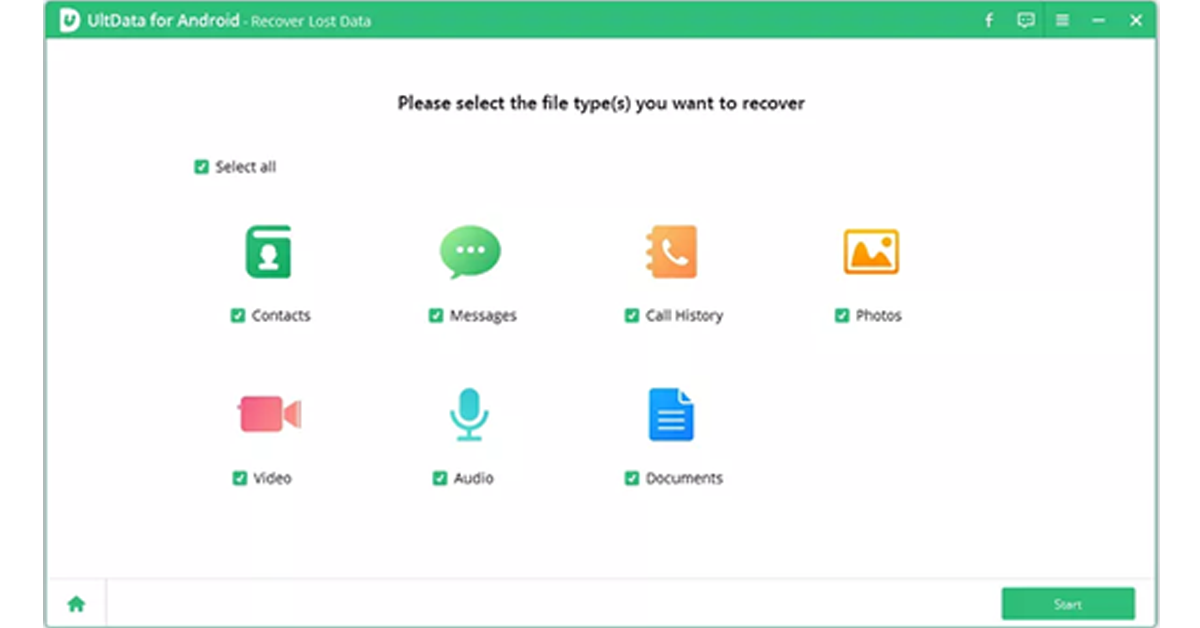
If you don’t want to use a data recovery app on your smartphone, there are several recovery tools for PC that can do the job for you. Before you begin this process, make sure you have enabled USB Debugging from the Developer Settings on your phone. Here’s how you can recover deleted videos using the UltData tool.Step 1: Download and install the UltData for Android tool on your PC.Step 2: Enable ‘USB Debugging’ on your smartphone from the Developer options.Step 3: Connect your smartphone to your PC using a USB cable. Select ‘Recover lost data’ on UltData.Step 4: Once the UltData for Android tool is able to detect your phone, choose the file types you want to recover. In this case, select ‘Video’. Hit ‘Start’.Step 5: After the tool completes the data recovery process, preview the files you want to save. Hit ‘Recover’ to save the files on your computer.Read Also:How to Video Call Between an iPhone and an Android?
Viewsonic, a manufacturer of visual products such as monitors, displays, and projectors, has brought a new range of projectors to the Indian market. The company has announced the release of LS510WE, LS510WP, LS610WHE, LS610HDH, LS610WHP and LS610HDHP LED projectors. These LED projectors by ViewSonic are claimed to cater to corporates and the education sector. They provide up to 4800 ANSI lumens of brightness with optimal energy efficiency.The new range of Viewsonic LED projectors includes a total of six models- LS510WE, LS510WP, LS610WHE, LS610HDH, LS610WHP and LS610HDHP. The LS series offers a lifespan of 30,000 operating hours and lesser power consumption. They come equipped with 3rd Generation LED technology ranging from 3000 to 4800 ANSI Lumens. The projectors provide a contrast ratio of 3,000,000:1. They are bright enough for any light condition or environment.LS510WHWith full HD resolution and WXGA the Viewsonic LS510WE, LS510WP, LS610WHE, LS610HDH, LS610WHP and LS610HDHP projectors come with 3800, 4000, 4500, 4500, 4800 and 4800 ANSI lumens, respectively. Out of the six models, LS610HDH is the most premium one that provides 1080p Full HD resolution with HDR/HLG support. There is ViewSonic’s exclusive SuperColor technology, which covers a wide colour gamut, ideal for meeting rooms and classroom presentations.Also Read:Fire-Boltt Supernova BT calling smartwatch launched in India In addition to this, the new Viewsonic projectors have a number of time and energy-saving features like fast power on and off, which is said to improve their efficiency by removing the need to wait for the projector to warm up or cool down. The lamp-free light source enables enhanced sustainability for a greener environment while delivering a wider colour gamut for bright and vivid images. It also reduces maintenance costs, contributing to a greener and more cost-efficient workplace.LS610WHThe projectors come equipped with 360-degree projection letting them rotate freely at any angle vertically to aid with creative applications. There is built-in 5V/2A USB output offering power to HDMI wireless dongles so that the users don’t need separate power adapters to stream multimedia content. The projectors also include Sealed Optical Engine with IP5X for protection against dust and to prevent heating.The device includes image adjustments for comprehensive horizontal and vertical keystones and four corner corrections for impressive presentations with bright images, clarity, and vibrant colours in various contexts. They can be installed vertically at any angle to project images onto various surfaces ranging from walls to floors and ceilings.The Viewsonic Lamp Free LED Projectors LS510WE, LS510WP, LS610WHE, LS610HDH, LS610WHP and LS610HDHP price start at Rs 80,000 and go up to Rs 21,0000.
For the latest gadget and tech news, and gadget reviews, follow us on Twitter, Facebook and Instagram. For newest tech & gadget videos subscribe to our YouTube Channel. You can also stay up to date using the Gadget Bridge Android App. You can find the latest car and bike news here.
Life360 used to be one of the best apps to share your live location with your friends and family, until it was alleged that the app was selling the location data of its users to third parties. This is a good enough reason to ditch any app, and more so if it is a location-sharing app that has access to your smartphone’s GPS at all times. If you’re looking for an app where your friends and family members can track your live location, there are plenty of options for you. In this article, we bring you the top 20 Life360 alternatives for location sharing.Read Also:How to Video Call Between an iPhone and an Android?
FollowMee
FollowMee is an excellent GPS tracker for Android and iOS devices. FollowMee turns your smartphone into a GPS-tracking device that can be monitored from the FollowMeewebsite. The device needs a stable internet connection to upload the location data to the FollowMee website. By default, the location updates every 5 minutes. You can reduce this time limit to enable live tracking. FollowMee is very particular about user privacy and does not sell location data to third parties.Download FollowMee from the Google Play Store
mSpy
You have enough to worry about. Your kids’ current location shouldn’t be one of them. That’s why you need a good location tracker that you can rely on. While location tracking is built into some phones, it’s not always as accurate as it should be. Another catch is that when you use a native location tracker, there’s usually a visual indicator to let your kid know that they’re being monitored.That’s not the case with mSpy, a powerful tool to track location. Just install mSpy on the target phone and you’ll be able to see its current location on a map. Unlike those built-in competitors, mSpy lets you see the location history, so you’ll know where your kids have been in the past.That’s not all that mSpy does. It also lets you monitor social media and IM conversations. This includes emails and texts. There’s also a keylogger, a screen recorder, and many other tools to help you know what’s going on.When you’re ready to track location with mSpy, head to mSpy.com, pick your plan, and follow the installation instructions in your email to get up and running.Download mSpy
Family360
Family360 is a great location-sharing app for when you’re going on a trip. Instead of sharing your location with your family every other hour, simply use this app to let them track your location at all times. Family360 lets you create ‘circles’ where you can add a group of people to view your live location. This app also lets your family view the traffic status throughout your journey, along with your ETA. It even sends notification alerts when you overspeed. A premium subscription to the app comes with exclusive features like live tracking, location history and more.Download Family360 from the Google Play Store
FamiSafe
FamiSafe is one of the better Life360 alternatives out there. This app from Wondershare is a comprehensive parental control app, with features like location tracking, website filtering, history check, and detecting suspicious texts and pictures. The location tracking services offered by FamiSafe include live tracking, location history, and creating safe zones on the map. Once your kids breach the safe zone, you will be notified on your phone.Download FamiSafe from the Google Play Store
Find My Phone – Family Locator
Family Locator is very simple to use and contains all the basic location-sharing features. You can let your family view your live location while you’re driving. The app automatically notifies them when you reach your location. Taking a flight? The app’s flight radar will keep your family updated with the flight status. Family locator also allows you to create private groups for close friends and family members.Download Family Locator from the Google Play Store
Glympse
With over 5 million downloads, Glympse is one of the more popular GPS tracking apps and a great alternative to Life360. One of the best parts of using this app is that it doesn’t require you to sign up, nor do your family members need to download the app to view your location. If you’re meeting someone at a common location, all you need to do is send them a ‘Glympse’ so they can know your ETA. This app is perfect for sharing your location on a short-term basis.Download Glympse from the Google Play Store
My Location – Track GPS and Maps
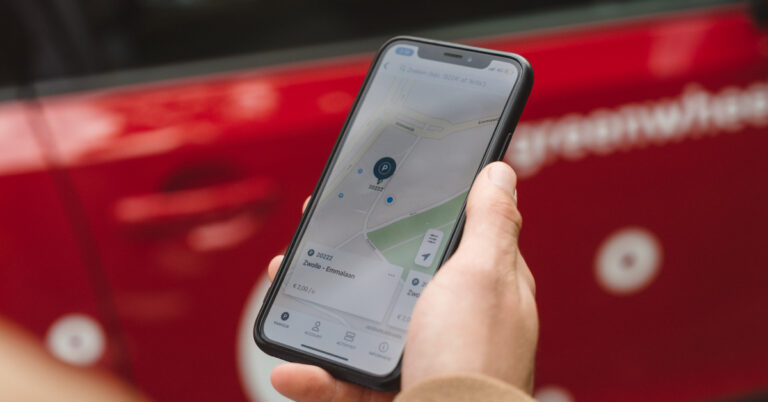
My Location is primarily a travel app that lets you save any location or address. If you’re visiting a place, you can use this app to learn more about the nearby hotspots, tourist destinations, and other interesting places. You can bookmark the places you want to visit and add short descriptions to them. If you’re travelling alone, you can use My Location to share your whereabouts with your friends and family. The selected contacts and track your location in real time. The tracking precision offered by this app is highly accurate, down to the exact coordinates. My Location supports popular geo formats such as KML, GPX, and GEOJSON. Certainly one of the best Life360 alternatives around.
Download My Location from the Google Play Store
Familo
Familo or Familonet is an excellent location tracking app that lets you stay updated on the whereabouts of your family members. You can share your location with your friends and family members with just one tap. If you’re tracking someone else’s location, you get automatic alerts when they reach predefined places like their school, workplace, or home. There is a handy chat option to stay connected with your loved ones at all times. If someone is in danger, they can hit the panic button in the app to send you an emergency alert along with their current location.
Download Familo from the Google Play Store
OwnTracks
OwnTracks is one of the best open-source alternatives to Life360. It is primarily designed for the purpose of letting users keep track of their own location. You can create a personal location diary on OwnTracks to maintain a record of the places you visit. This diary can be shared with your friends and family to let them track your location. OwnTracks is very easy to use as it does not overwhelm the user with bells and whistles. Its layout and interface are very accessible to the average user.
Download OwnTracks from the Google Play Store
Family Locator – Phone Tracker
Family Locator tracks your location accurately using frontier GPS technology and precise positioning points on the map. You can use it to track the location of your family members 24/7. The tracking data contains the detailed history of every location change. Since location-sharing consumes battery at a faster pace, this app has battery level indicators for every contact. You can remind a family member to charge their phone if it is running out of juice. There’s also a privacy feature in the app to temporarily hide your live location.
Download Family Locator from the Google Play Store
iSharing
iSharing is one of the best alternatives to Life360. It is primarily designed for parents to keep a watchful eye on their kids. Its live location tracking feature lets parents remotely check the whereabouts of their children. You can save up to 90 days of location history of a particular contact. The app sends real-time alerts when the kids leave or arrive at a location. The ‘Walkie-Talkie’ feature lets you send quick voice notes to the added members in the app.
Download iSharing from the Google Play Store
Google Maps
Apart from navigation, Google Maps also lets you share your live location with your family. While other apps on this list come with certain premium features (like safe zone marking), Google Maps keeps things simple and simply lets other people track your location when you share it with them. Google Maps‘ biggest advantage is its popularity. Since it is the default navigation app on Android smartphones, your friends and family won’t have much trouble accessing your location from the links you send them.Download Google Maps from the Google Play Store
GeoZilla
Apart from all the basic location-sharing features, Geozilla also offers a private messenger using which you can contact your family members within the app. You can even send images of your journey through the app’s messenger. GeoZilla also sends emergency alerts in case of an accident. The app is also compatible with Wear OS, making it one of the most versatile Life360 alternatives out there.Download Geozilla from the Google Play StoreRead Also:Retrieve Deleted Text Messages iPhone Without Backup
Zenly Penlo – Share Location
Zenly Penlo is based on the famous ‘Zenly’ app that Snapchat acquired to integrate location-sharing services into its platform. What we like about Zenly Penlo is the ease of access it provides to the average user. All you need to do is sign up using your email address, and you can begin sharing your live location with your family and friends. Apart from location sharing, Zenly Penlo also lets you monitor the battery status and vehicle speed. You can message your friends within the app itself.
Download Zenly Penlo from the Google Play Store
Google Family Link
Google’s very own Family Link app is a comprehensive parental control tool that lets you set up screen time and age-appropriate content filters for your child’s device, along with giving you control over their personal data and account. You can also choose to track their live location using Family Link and receive alerts when they leave or arrive at a particular location.
Download Google Family Link from the Google Play Store
Teensafe
Teensafe is one of the best apps to keep a close watch on the live location of your kids. Available for Android and iOS, Teensafe reports the current location of the device it is installed on. You can also set up safe boundaries on the map using this app. Once the device crosses the established boundary, the app pings you with an alert. Apart from location sharing, Teensafe also lets you monitor the saved contacts, call logs, and other information on the target device. Depending on your subscription package, you can also record the incoming and outgoing calls made on the device.
Download Teensafe
uMobix
uMobix is an advanced monitoring app for Android and iOS devices. It is one of the best Life360 alternatives around. This app can track the location of the target device and keep you updated with regular alerts. More advanced features of the app include recording individual keystrokes, viewing media files in the phone’s internal storage, taking screenshots, reporting call logs, accessing messages across all social media platforms and IM apps, camera snapshots, and more.
Download uMobix
Cocospy
Cocospy specialises in monitoring Discord activity on top of doing all the tasks of a regular location-sharing and phone-tracking app. Most apps fail to monitor Discord, which is where Cocospy excels. The only access is that the app requires root access on the target device. This may be a dealbreaker for some, as jailbreaking an iPhone comes with its own safety concerns. Prices for Cocospy start at $10.83 per month.
Download Cocospy
WhatsApp
If you don’t want any added functionalities apart from location sharing, WhatsApp has the optimum tools to carry out the job. You can share your current location or live location with any contact on WhatsApp. Simply tap the attachment icon in the message box and select ‘Location’ from the list of options. You can choose to share your live location for 15 minutes, 1 hour, or 8 hours.
Download WhatsApp from the Google Play Store
Snapchat
Like WhatsApp, Snapchat also lets you share your location with your friends and family. The ‘Snap Map’ feature allows you to share your current location with your friends as well as view where they are in real time. If you don’t want to break the bank on a ‘spy’ app that is too invasive, Snapchat is the perfect alternative that keeps the boundaries and privacy of the other person intact.
Download Snapchat from the Google Play StoreRead Also:Google Pixel Fold expected to launch alongside Pixel 7a: Expected launch date, pricing
Conclusion
These are the top 20 Life360 alternatives for location sharing. All of the apps in this list particularly state that they do not sell the location data of their users. Since they rely on premium membership as the primary source of their revenue, you will see minimal ads on their platforms. Premium membership to these apps comes with exclusive features.
Samsung Galaxy A54 5G and Galaxy A34 5G are all set to launch in India today. Both phones have been listed on the company’s official website in India revealing the key specs and design features of the phones. The phones are confirmed to have an IP67 rating. The devices are likely to have an AMOLED display with 120Hz refresh rate support. They may also arrive in three colour options according to the teasers.Samsung will officially launch the Galaxy A34 and Galaxy A54 5G smartphones in the Indian market today. According to the official teaser, the launch will take place at 12 noon IST. The company has not yet revealed much information about the upcoming phones but prior to the release expected pricing and specifications of both phones have already surfaced on the web. The devices have been spotted on an Austrian retailer’s website. Samsung Galaxy A54 5G is claimed to come with 6GB RAM with a 128GB storage option priced at EUR 500 which translates to Rs 44,000. Whereas the price of 8GB RAM with 256GB storage option is listed at EUR 550 converting to Rs 48,500. The phone comes in four colour options of Awesome Violet, Awesome Lime, Awesome Graphite, and Awesome White.Also Read: Google Pixel Fold expected to launch alongside Pixel 7a: Expected launch date, pricingWhereas the Samsung Galaxy A34 is listed in two variants. The base 6GB RAM with 128GB storage option is priced at EUR 390 about Rs 35,000 whereas the 8GB RAM with 256GB storage model comes at EUR 460 which translates to Rs 40,500. The phone is listed in four colour variants of Awesome Violet, Awesome Lime, Awesome Graphite, and Awesome Silver.Both devices are expected to feature 6.6-inch full-HD+ AMOLED displays. They may run on One UI 5.0 on top of Android 13.The Galaxy A54 5G, and the Galaxy A34 5G are likely to be powered by Exynos 1380 SoC and MediaTek Dimensity 1080 SoC respectively. The phone could house a 5,000mAh battery and triple rear camera setup. The camera system on the A54 5G is likely to include a 50MP main sensor, a 12MP secondary lens and a 5MP sensor. It may also feature a 32MP selfie camera.On the other hand, A34 5G’s triple camera setup is expected to include a 48MP primary sensor, an 8MP secondary and a 5MP lens. There may be a 13MP front-facing camera for selfies.
For the latest gadget and tech news, and gadget reviews, follow us on Twitter, Facebook and Instagram. For newest tech & gadget videos subscribe to our YouTube Channel. You can also stay up to date using the Gadget Bridge Android App. You can find the latest car and bike news here.


 There is an advanced BioTracker PPG optical sensor that provides insights into heart rate, blood-oxygen saturation, and stress level. According to the company using the One-tap Measuring function, users will be able to measure all three metrics at the same time with just one tap and get results in as fast as 15 seconds. When 24-hour health monitoring is activated the watch notifies of any abnormal readings such as high or low heart rates, low SpO₂ levels, or high-stress levels, and even recommends stress-reducing breathing exercises.
The Amazfit GTR Mini can last for up to 14 days on a single charge under typical usage or even 20 days in battery saver mode.
Also Read: Fire Boltt Invincible Plus Bluetooth calling smartwatch launched in India
There is the company’s own circularly-polarised GPS antenna technology which picks up almost twice as many satellite signals as regular antennas for accurate GPS tracking. However, the watch supports five satellite positioning systems.
There are more than 120 sports modes and smart recognition seven exercise types, including Outdoor Running, Outdoor Cycling, and more on the watch. The wearable is 5 ATM water-resistant, which means it can withstand the equivalent of up to 50 metres of water pressure, making it ideal for water sports.
Users can also share their workout data with various fitness communities and smartphone apps, including Strava, Relive, Adidas Running, Apple Health, and Google Fit.
For the latest gadget and tech news, and gadget reviews, follow us on Twitter, Facebook and Instagram. For newest tech & gadget videos subscribe to our YouTube Channel. You can also stay up to date using the Gadget Bridge Android App. You can find the latest car and bike news here.
There is an advanced BioTracker PPG optical sensor that provides insights into heart rate, blood-oxygen saturation, and stress level. According to the company using the One-tap Measuring function, users will be able to measure all three metrics at the same time with just one tap and get results in as fast as 15 seconds. When 24-hour health monitoring is activated the watch notifies of any abnormal readings such as high or low heart rates, low SpO₂ levels, or high-stress levels, and even recommends stress-reducing breathing exercises.
The Amazfit GTR Mini can last for up to 14 days on a single charge under typical usage or even 20 days in battery saver mode.
Also Read: Fire Boltt Invincible Plus Bluetooth calling smartwatch launched in India
There is the company’s own circularly-polarised GPS antenna technology which picks up almost twice as many satellite signals as regular antennas for accurate GPS tracking. However, the watch supports five satellite positioning systems.
There are more than 120 sports modes and smart recognition seven exercise types, including Outdoor Running, Outdoor Cycling, and more on the watch. The wearable is 5 ATM water-resistant, which means it can withstand the equivalent of up to 50 metres of water pressure, making it ideal for water sports.
Users can also share their workout data with various fitness communities and smartphone apps, including Strava, Relive, Adidas Running, Apple Health, and Google Fit.
For the latest gadget and tech news, and gadget reviews, follow us on Twitter, Facebook and Instagram. For newest tech & gadget videos subscribe to our YouTube Channel. You can also stay up to date using the Gadget Bridge Android App. You can find the latest car and bike news here. 





 Step 3:
 Step 4:
 Step 2:
 Step 3:
  Step 6:
 Step 3:
 Step 4: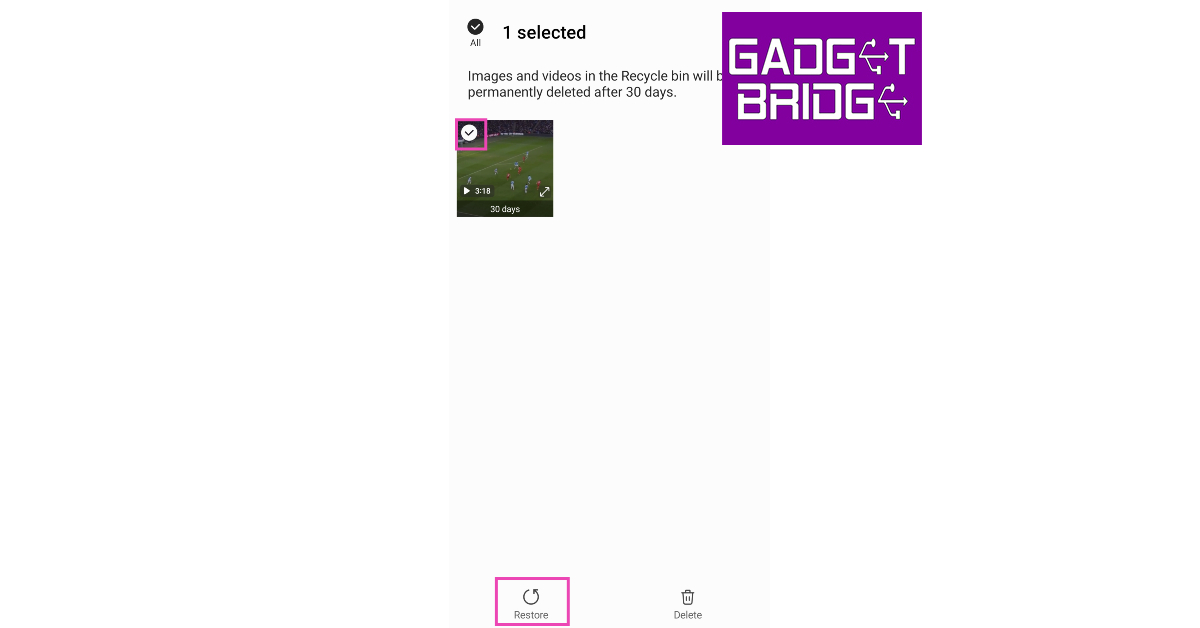
 Step 3:
 Step 4:
 Step 3:
 Step 4:
 Step 4:
 Step 5:




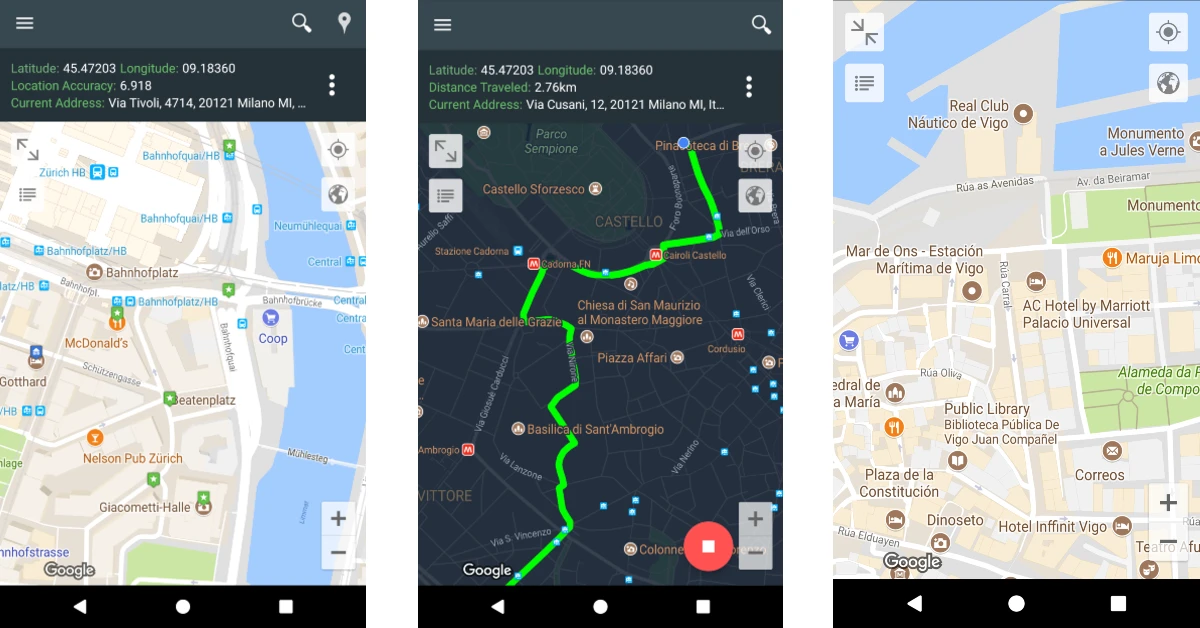 My Location is primarily a travel app that lets you save any location or address. If you’re visiting a place, you can use this app to learn more about the nearby hotspots, tourist destinations, and other interesting places. You can bookmark the places you want to visit and add short descriptions to them. If you’re travelling alone, you can use My Location to share your whereabouts with your friends and family. The selected contacts and track your location in real time. The tracking precision offered by this app is highly accurate, down to the exact coordinates. My Location supports popular geo formats such as KML, GPX, and GEOJSON. Certainly one of the best Life360 alternatives around.
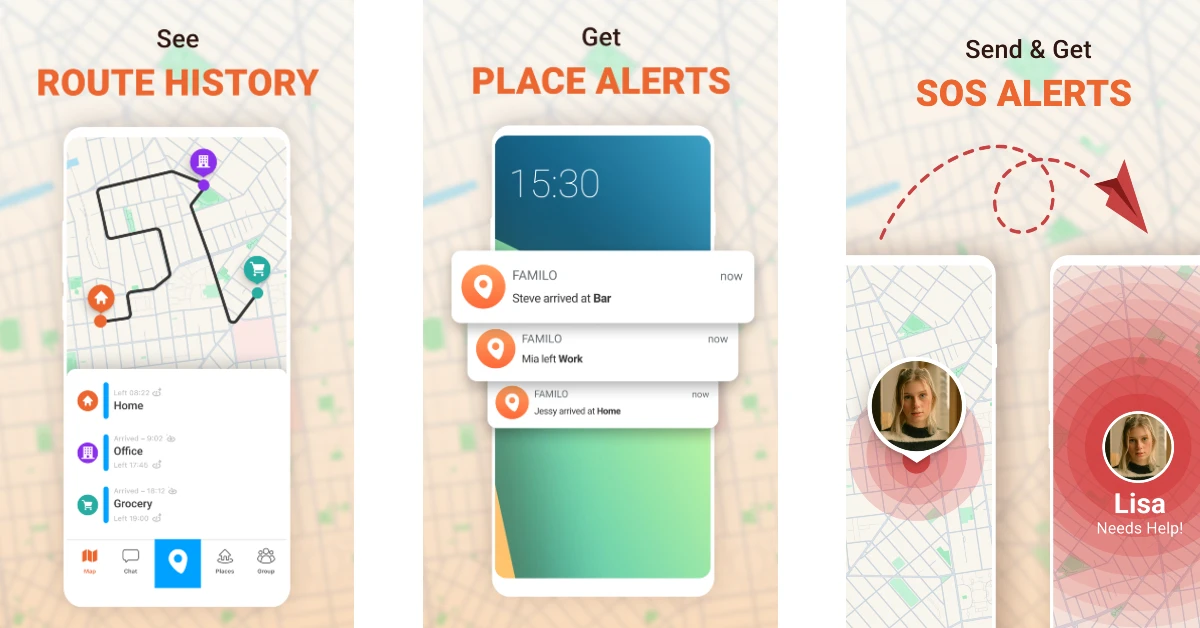 Familo or Familonet is an excellent location tracking app that lets you stay updated on the whereabouts of your family members. You can share your location with your friends and family members with just one tap. If you’re tracking someone else’s location, you get automatic alerts when they reach predefined places like their school, workplace, or home. There is a handy chat option to stay connected with your loved ones at all times. If someone is in danger, they can hit the panic button in the app to send you an emergency alert along with their current location.
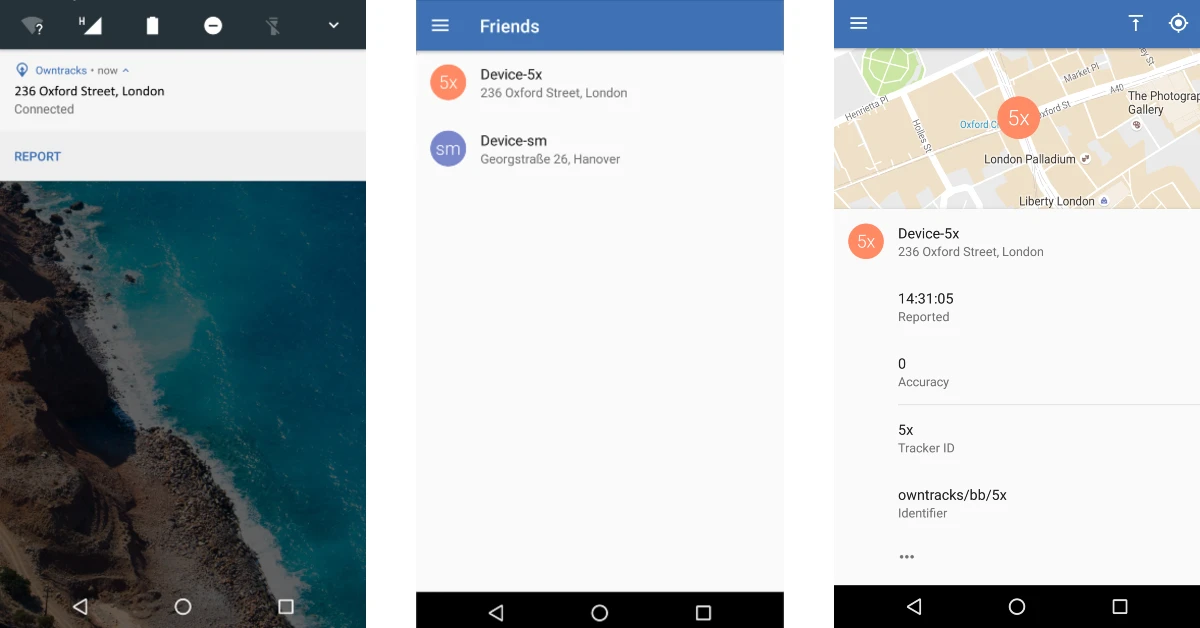 OwnTracks is one of the best open-source alternatives to Life360. It is primarily designed for the purpose of letting users keep track of their own location. You can create a personal location diary on OwnTracks to maintain a record of the places you visit. This diary can be shared with your friends and family to let them track your location. OwnTracks is very easy to use as it does not overwhelm the user with bells and whistles. Its layout and interface are very accessible to the average user.
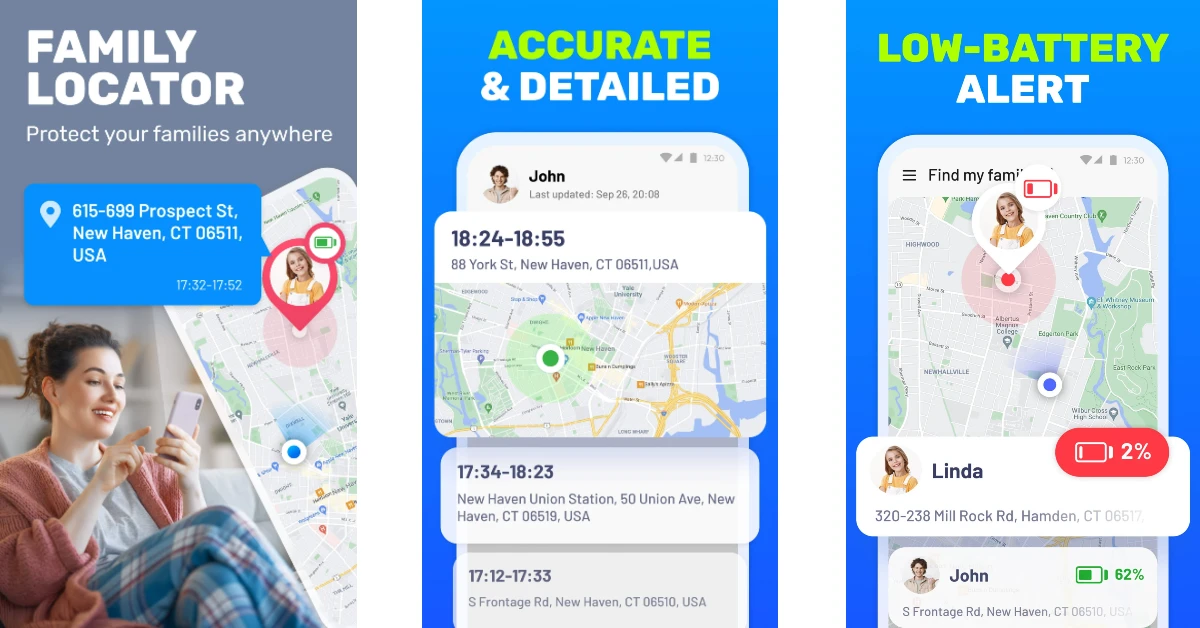 Family Locator tracks your location accurately using frontier GPS technology and precise positioning points on the map. You can use it to track the location of your family members 24/7. The tracking data contains the detailed history of every location change. Since location-sharing consumes battery at a faster pace, this app has battery level indicators for every contact. You can remind a family member to charge their phone if it is running out of juice. There’s also a privacy feature in the app to temporarily hide your live location.
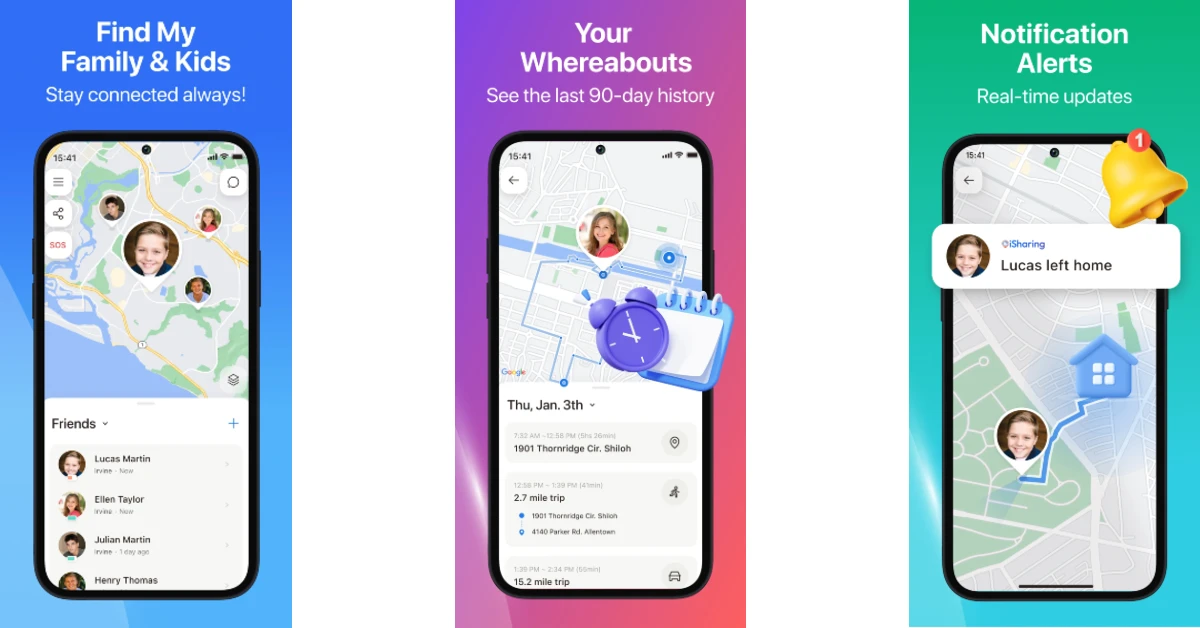 iSharing is one of the best alternatives to Life360. It is primarily designed for parents to keep a watchful eye on their kids. Its live location tracking feature lets parents remotely check the whereabouts of their children. You can save up to 90 days of location history of a particular contact. The app sends real-time alerts when the kids leave or arrive at a location. The ‘Walkie-Talkie’ feature lets you send quick voice notes to the added members in the app.


 Zenly Penlo is based on the famous ‘Zenly’ app that Snapchat acquired to integrate location-sharing services into its platform. What we like about Zenly Penlo is the ease of access it provides to the average user. All you need to do is sign up using your email address, and you can begin sharing your live location with your family and friends. Apart from location sharing, Zenly Penlo also lets you monitor the battery status and vehicle speed. You can message your friends within the app itself.
 Google’s very own Family Link app is a comprehensive parental control tool that lets you set up screen time and age-appropriate content filters for your child’s device, along with giving you control over their personal data and account. You can also choose to track their live location using Family Link and receive alerts when they leave or arrive at a particular location.
 Teensafe is one of the best apps to keep a close watch on the live location of your kids. Available for Android and iOS, Teensafe reports the current location of the device it is installed on. You can also set up safe boundaries on the map using this app. Once the device crosses the established boundary, the app pings you with an alert. Apart from location sharing, Teensafe also lets you monitor the saved contacts, call logs, and other information on the target device. Depending on your subscription package, you can also record the incoming and outgoing calls made on the device.
 uMobix is an advanced monitoring app for Android and iOS devices. It is one of the best Life360 alternatives around. This app can track the location of the target device and keep you updated with regular alerts. More advanced features of the app include recording individual keystrokes, viewing media files in the phone’s internal storage, taking screenshots, reporting call logs, accessing messages across all social media platforms and IM apps, camera snapshots, and more.
 Cocospy specialises in monitoring Discord activity on top of doing all the tasks of a regular location-sharing and phone-tracking app. Most apps fail to monitor Discord, which is where Cocospy excels. The only access is that the app requires root access on the target device. This may be a dealbreaker for some, as jailbreaking an iPhone comes with its own safety concerns. Prices for Cocospy start at $10.83 per month.
 If you don’t want any added functionalities apart from location sharing, WhatsApp has the optimum tools to carry out the job. You can share your current location or live location with any contact on WhatsApp. Simply tap the attachment icon in the message box and select ‘Location’ from the list of options. You can choose to share your live location for 15 minutes, 1 hour, or 8 hours.
 Like WhatsApp, Snapchat also lets you share your location with your friends and family. The ‘Snap Map’ feature allows you to share your current location with your friends as well as view where they are in real time. If you don’t want to break the bank on a ‘spy’ app that is too invasive, Snapchat is the perfect alternative that keeps the boundaries and privacy of the other person intact.