Top tech launches and announcements from MWC 2023

This year’s Mobile World Congress kicked off in Barcelona on February 27 and had some of the best mobile showcases in store for the year. The event concluded yesterday, March 2, and saw all the major brands show off their newest releases along with some bold concepts. From rollables to ultra-fast charging, MWC 2023 had it all. If you haven’t been keeping up with the headlines, here is a roundup of all the top tech launches and announcements from MWC 2023. Read Also: Amazon Echo Dot 5th Gen launched in India at just Rs 4,999

Xiaomi 13 Pro

Xiaomi 13 Pro India price and availability details revealed Launched in China at the tail end of last year, the Xiaomi 13 Pro made its global debut at this year’s MWC. The smartphone puts the cameras on centre stage, collaborating with Leica to put out one of the more remarkable camera units on recent flagships. The triple rear camera setup on the Xiaomi 13 Pro consists of a 50-megapixel 1-inch Sony IMX989 primary sensor, a 50-megapixel Leica’s 75mm floating telephoto lens, and a 50-megapixel wide-angle lens. The smartphone is powered by the latest Snapdragon 8 Gen 2 SoC and gets 120W fast charging support. In India, the Xiaomi 13 Pro fetches Rs 79,999.

Honor Magic Vs

Honor Magic Vs Foldable phones are definitely here to stay. Some of the most eye-catching products at MWC 2023 were foldable smartphones and it’s always fun to see every brand’s spin on the form factor and software integration. If we’re strictly talking about the form factor, Honor Magic Vs may even have Samsung beat. When folded shut, you won’t find any gap between the folding displays. Bringing sleekness seems like almost an impossible task, but Honor seems to have done a good job with the Magic Vs. The smartphone is powered by the Snapdragon 8+ Gen 1 SoC and gets 12 GB RAM. 

OnePlus 11 concept phone with Active CryoFlux

OnePlus 11 Concept phone presented at MWC 2023, to come with Active CryoFlux You’d think that OnePlus would take a breather after launching a series of products last month which included its flagship release OnePlus 11. But the smartphone manufacturer had a few surprises awaiting the attendees at MWC 2023. The company unveiled its newest concept phone which is based on OnePlus 11 and comes with Active CryoFlux cooling. The Active CryoFlux technology, OnePlus claims, can reduce the smartphone’s temperature by up to 2.1°C while gaming, leading to an increase in gameplay framerate by 3-4 fps. It can also reduce the phone’s temperature by 1.6°C while charging. While the numbers may not seem much, the phone itself looks outstanding with the cooling liquid flowing across the back in little pipelines. The liquid also forms a blue ring around the camera unit.

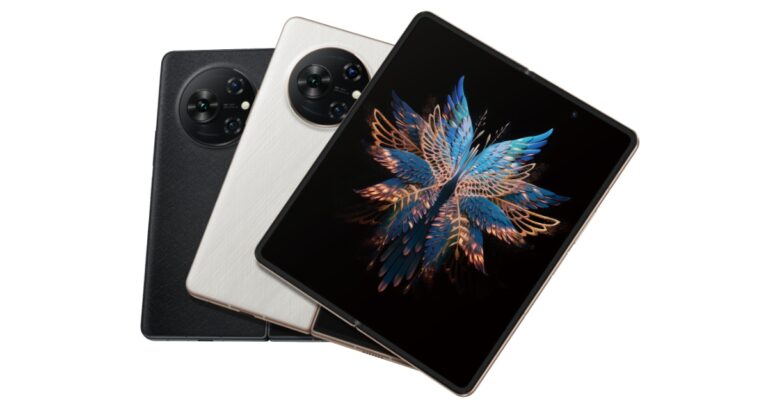
Tecno Phantom V Fold

Tecno launched its first folding phone Tecno V Fold in India This year, the MWC had two major foldable showcases. Honor showcased the Magic Vs at the event and Tecno had something to ‘unfold’ as well. Tecno’s debut foldable, Phantom V Fold, is currently available in India at Rs 79,999, making it one of the most affordable folding smartphones on the market. The smartphone gets a 6.42-inch 1080p LTPO AMOLED cover display with a refresh rate of 120Hz https://www.gadgetbridge.com/news/mwc-2023-oneplus-to-launch-its-first-foldable-smartphone-in-the-second-half-of-2023/and a 7.85-inch LTPO 120Hz primary display. Powering the foldable is MediaTek Dimensity 9000+ SoC which clocks a score of more than 1.08 million on the AnTuTu test. The triple rear camera setup consists of a 50MP primary shooter, a 50MP telephoto, and a 13MP ultrawide lens.

OnePlus steps into the foldable universe

MWC 2023: OnePlus to launch its first foldable smartphone in the second half of 2023 As we said earlier, foldable smartphones surely seem like the future. While Samsung dominates the category for now, brands like Xiaomi and Oppo have enjoyed a fair bit of success as well. Now with OnePlus stepping into the ring, things are bound to get interesting. The company announced its plans to release a foldable smartphone in the second half of 2023 but kept a tight lid on the looks and the specs. With a few months to go before the release, we are expecting some major leaks to surface on the Internet in the coming weeks.

Huawei Watch Buds

Huawei Watch Buds. Top tech launches and announcements from MWC 2023 Converging the TWS and smart wearable worlds, the Huawei Watch Buds smartwatch flips open to reveal wireless earbuds inside. As bizarre as it may appear, it still works pretty well. The smartwatch is IPX7 rated and comes with a complete range of health and fitness tracking functions. The earbuds are significantly smaller than your average TWS, but it’s something that is to be expected from a product with this form factor.

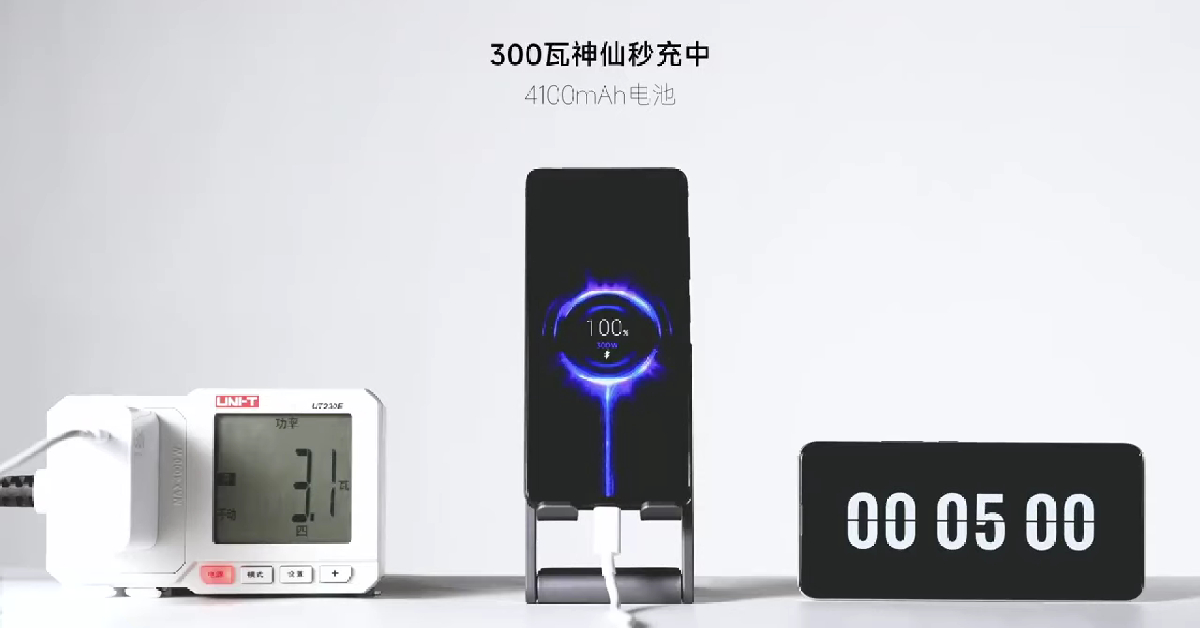
Redmi shows off 300W charging 

Redmi shows off 300W charging. Top tech launches and announcements from MWC 2023 If you thought fast charging on phones was getting ridiculous with massive charging bricks and extraordinary charge times, wait until you see what Redmi has to offer. While most smartphones on the market rarely tread above 120W charging, Redmi showcased its 300W charging using a modified Note 12 Pro. It took the charger a mere 5 minutes to completely replenish the 4,100mAh battery. Xiaomi hasn’t shared any details about how it accomplishes this feat, but you best believe it will feature in future smartphones. Read Also: Telegram for MacOS update: New features rolling out, bringing power saving mode and more

Conclusion

These were the major tech launches and announcements from MWC 2023 in Barcelona. While these announcements and launches may have gathered the headlines, there was a lot of other cool stuff on the showcase. Nokia came out with its G22 smartphone which is entirely self-repairable. Made in collaboration with iFixit, the smartphone makes it incredibly easy to replace the battery unit, camera sensors, and more. Motorola also had an interesting showcase in the form of the ‘Rizr’, a rollable smartphone that expands its screen at the press of a button. Which were your favourite showcases at MWC 2023? Let us know in the comments! For the latest gadget and tech news, and gadget reviews, follow us on Twitter, Facebook and Instagram. For newest tech & gadget videos subscribe to our YouTube Channel. You can also stay up to date using the Gadget Bridge Android App. You can find the latest car and bike news here.

Garena Free Fire Redeem Codes Today 3 March 2023: Here is how to claim them

0
Garena Free Fire is a battle royale game with regular awards and tournaments to keep players interested. If you play Garena Free Fire, you should be aware of the redeem codes that are released on a daily basis. However, because the battle royale game is banned in India, players from other countries can use the Free Fire Redeem codes daily. If you’re unfamiliar with the Garena Free Fire redeem codes or don’t know how to get them, we’ve put together a step-by-step guide to help you redeem them. Check out Garena Free Fire Redeem Codes for 3 March 2023. The Free Fire redeem codes are a great way to get free stuff. These are 12-digit codes that contain alphabets and numbers, as well as an expiration date and time. Because the Garena FF redeem codes cannot be used more than once, you should hurry to the redemption page to claim your free reward before someone else does. To get a free reward, all you have to do is go to reward.ff.garena.com/en, which is the official redemption page. Also, keep an eye on this space for daily updates on Garena Free Fire redemption codes and rewards.

Garena Free Fire Redeem Codes Today 3 March 2023

  • FF11DAKX4WHV
  • WLSGJXS5KFYR
  • FF11WFNPP956
  • ZYPPXWRWIAHD
  • FF10617KGUF9
  • MCPTFNXZF4TA
  • FF11HHGCGK3B
  • 8F3QZKNTLWBZ
  • ZRJAPH294KV5
  • B6IYCTNH4PV3
  • X99TK56XDJ4X
  • FF11NJN5YS3E
  • Y6ACLK7KUD1N
  • W0JJAFV3TU5E
  • YXY3EGTLHGJX
  • FF10GCGXRNHY
  • SARG886AV5GR
  • FF1164XNJZ2V
  • FF119MB3PFA5

How to Get Free Fire Redeem Codes for Garena on 3 March 2023?

  • Visit the Garena Free Fire game’s official website at reward.ff.garena.com.
  • Use your Facebook, Google, VK, Apple ID, Huawei ID, or Twitter account to log in.
  • You’ll be taken to a valid redemption code (s)
  • Copy and paste the 12-digit redemption code into the text box.
  • On the screen, a dialogue box will appear.
  • ‘Ok’ should be selected.
For the latest gadget and tech news, and gadget reviews, follow us on TwitterFacebook and Instagram. For newest tech & gadget videos subscribe to our YouTube Channel. You can also stay up to date using the Gadget Bridge Android App. You can find the latest car and bike news here.

Alexa anniversary sale goes live in India, up to 60 percent off on Echo devices and more

Since Alexa was introduced in India five years ago Amazon is celebrating this milestone by providing discounts and exclusive offers on some of its best-selling Alexa devices. The Alexa anniversary sale discounts will be applicable on products like Echo smart speakers and Fire TV devices. The Alexa anniversary sale has already begun on Amazon and will be live till March 4 at 11:59 PM. Buyers may also shop from a selection of Alexa-enabled products and smart home accessories from companies like boAt, Noise, Philips, Syska, and others.

Here are the offers to look out for:

During the Alexa anniversary sale Amazon is offering a flat 38% off on Echo Show 5 (2nd Gen). It can now be purchased at Rs 5,499 instead of Rs 8,999. Whereas Echo Dot (3rd Gen) is available at Rs 2,449 down from its original price of Rs 4499. Whereas with 15 and 50 percent off the Amazon Echo (4th Gen) and Echo Buds with Alexa (with wired charging case) can be purchased for Rs 8,499 and Rs 5,999 respectively. Alexa anniversary sale goes live in India, up to 60 percent off on Echo devices and more There is up to 60 percent on Alexa Smart Home combos. Get the Echo Dot (3rd Gen) + Philips smart bulb for Rs 2,599. Whereas the Echo Dot (4th Gen) + Philips smart bulb can be purchased for as low as Rs 3,599. Moreover, there is up to 60 percent off on Echo Dot (3rd Gen) Twin-Pack + Smart Bulb, up to 30 percent off on Amazon Echo (4th Gen) Smart Home Combos and up to 43% off on Echo Show 5 Smart Home Combos. Also Read: OnePlus 11 review: This is what a OnePlus flagship should look like Amazon is providing up to 44 percent discounts on Fire TV devices during the Alexa anniversary sale. There will be a flat 44% off on Fire TV Stick with Alexa voice remote. It can be purchased for Rs 2,799. with up to 35 percent off Fire TV Stick 4K Max and Fire TV Cube is now selling for Rs 4,199 and Rs 8,999 respectively. Customers can also obtain exciting additional benefits with the purchase of Echo and Fire TV devices. One can get up to Rs 500 cashback if Echo and Fire TV stick are bought together. Amazon is also offering 3 months Audible membership at no extra cost for the purchase of any Echo device. Up to 40 percent off is also being offered on top brands with Alexa built-in devices by boAt, Noise, Fastrack, and more. Lastly, there is up to 60 percent off on boAt Alexa built-in smartwatches For the latest gadget and tech news, and gadget reviews, follow us on TwitterFacebook and Instagram. For newest tech & gadget videos subscribe to our YouTube Channel. You can also stay up to date using the Gadget Bridge Android App. You can find the latest car and bike news here.

OnePlus 11 review: This is what a OnePlus flagship should look like

So, the OnePlus 11 review is finally here by Gadget Bridge. If you are looking to buy a flagship phone under Rs 60,000 then you must read our review before you consider purchasing one. We have been using the OnePlus 11 as our daily driver for almost two weeks. Its starting price in India is Rs 56,999. The device is the successor to last year’s OnePlus 10 Pro, but still lacks the IP68 certification and wireless charging capability. Does It appear that the corporation is sacrificing certain key features or ratings in order to reduce costs? It does, however, the mobile comes with a Snapdragon 8 Gen 2 CPU, a very decent camera setup, and a lovely 2K display. Let’s talk about it more in the OnePlus 11s review below.

OnePlus 11 review: Design and Display

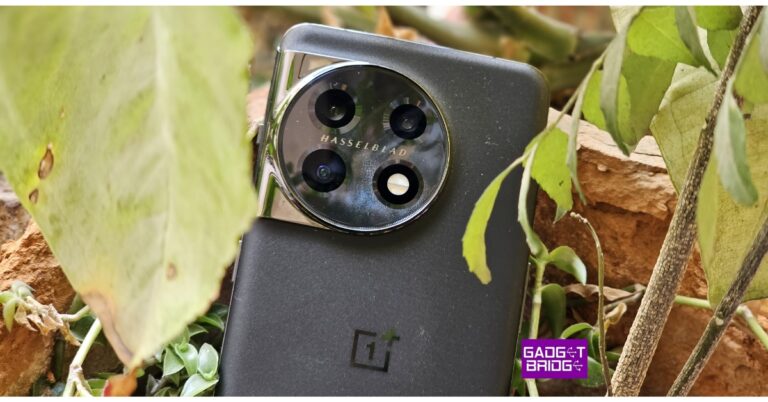
Let’s start with the design aspect. The OnePlus 11’s ergonomics are quite distinctive, and we really liked it. However, it bears striking resemblance to the OnePlus 10 Pro (review) that was launched last year. But this time the camera module is round rather than square. Also, the horizontal Hasselblad logo is positioned in between the camera sensors now. OnePlus 11 review: Design and Display The review device we received sports the Titan Black colour, which we really liked. Last year we received the glossy colour variant, which was more susceptible to scuffs. This time there is a Corning Gorilla Glass 5 protection on the rear and a sort of matte surface with some glitter on it, mimicking the night sky. Over that, the aluminium frame and gentle curves on both sides give it a quality appearance and feel. Because the phone is not too wide, our small hands were able to utilise it with one hand easily. Also Read: OnePlus 10 Pro Review: Is it the right investment? The company’s trademark alert slider has returned with the OnePlus 11, although it does not have a 3.5mm headphone port. The phone is splash and dust resistant and has an IP64 rating. It should be noted that the OnePlus 11 5G is only intended to offer protection from liquid splashes and cannot ensure protection against water immersion. Mid Range smartphones from Samsung and other manufacturers offer comparable ingress protection at a significantly lower price. OnePlus 11 review: Design and Display The OnePlus 11 5G’s front display is a magnificent 6.7-inch Samsung LTPO 3.0 AMOLED curved screen with a 1,440 x 3,216-pixel resolution. The panel has a 20.1:9 aspect ratio and a refresh rate that can be adjusted up to 120Hz. The mobile supports always-on displays with a maximum brightness of 1,300 nits and a resolution of 525 ppi. As protection, a Corning Gorilla Glass 7 is employed on top. On the panel, HDR and Dolby Vision codecs can be played. The display has very accurate colour reproduction, and it responds to touch input instantly. You can make the necessary adjustments in the display settings for improved colour calibration. It has a wonderful white balance and contrast. The firm used an E4 panel that is two generations old, therefore the display’s brightness is about average. So, the screen brightness on the OnePlus 11 might not particularly wow you if you spend a lot of time outdoors. It is capable of streaming Netflix content in Dolby Vision. In addition, the company used a 602mm vibration motor, which is 67% larger than its predecessor’s, to provide great haptics. The way vibration feedback has been incorporated into the user interface is simply amazing. While the speakers are sufficient for watching videos and listening to your audio playlists, we notice a certain amount of richness is absent while listening to music or other audio with a deeper acoustic, particularly in terms of bass and high frequencies. The fingerprint sensor is positioned perfectly in the screen and is fast as well as reliable.

OnePlus 11 review: Performance and Cameras

The OnePlus 11 is powered by an octa-core 4nm Snapdragon 8 Gen 2 SoC and comes integrated with an Adreno 740 GPU for graphics. The system supports UFS4.0 storage with a capacity of up to 256GB and has LPDDR5x RAM up to 16GB. The chipset is more powerful than you might think, and it can handle any task you throw at it. It can also perform your daily duties efficiently. With regular use, you won’t run into any issues. The performance of the device is unaffected or slowed down in any way by running multiple apps simultaneously. Over this, it can run the majority of high-end, graphically demanding games. Also Read: Samsung Galaxy S23 Ultra Review: A true flagship With good stability, we tested Asphalt 9: Legends on the maximum settings. The graphics are superb. There were no lags during races, the graphics are amazing, and the gameplay is fantastic. According to OnePlus, a new, larger vapour cooling system has been introduced, which should provide maximum heat dissipation for long-term performance. However, after 20 minutes of continuous play, the device starts to heat up. OnePlus 11 review: Design and Display This new phone’s operating system, ColorOS 13.0, is based on Android 13. The software experience is also excellent, so when it comes to daily tasks, the device is quick and smooth. There are many customization options available here, making it pleasant to use and stable.  The fact that OxygenOS from OnePlus is bloatware-free is actually what we appreciate most about it. The company guarantees four years of Android updates in addition to five years of security fixes for software updates. This means that customers of the OnePlus 11 would receive upgrades all the way up to Android 17. OnePlus 11 comes with a triple rear camera set up with Hasselblad partnership. Through a partnership with Hasselblad, the OnePlus 11 has a triple rear camera setup. One of the three back cameras on the OnePlus 11 5G is a 50-megapixel sensor (f/1.8 aperture) optical image stabilisation (OIS) sensor from Sony. A 48-megapixel Sony IMX58 super wide-angle sensor (f/2.2 aperture and 115-degree field of view) is included in the camera unit in addition to a 32-megapixel telephoto portrait sensor. A 16-megapixel sensor with an f/2.4 aperture is located on the device’s front for selfies and video calls.
review of OnePlus 11
Daylight normal shot
When shooting in daylight, you get good pictures with nice details and clarity, which is more obvious when you pixel peep. The dynamic range is also outstanding, and the colour reproduction is excellent. Since there are no saturation issues, the colours look natural, which is pretty impressive.
OnePlus 11 cameras
1-2x normal rear day light shots
There is a Hasselblad XPAN mode, and it has also been executed fairly well. Although the ultrawide angle lens also produces similar results, you obtain high-quality pictures with true colours. The photos are crisp to a good level. We’ve noticed that the primary lens produces photographs with a warmer tone than the ultra-wide lens, which produces images with a cooler tone.
review of OnePlus 11
macro shots
As we move on to the close-up shots, the OnePlus 11 does a wonderful job with the details and the colours looked fantastic. The clarity is also excellent. Keep in mind that the ultra-wide camera, which works really well, also handles the macro. It is crisp and has wonderful details. The telephoto portrait lens offers a 2x optical zoom and takes pictures that are generally of good quality. They are sharp and have good detail levels, and the colours are also well-preserved. Moreover, it offers to zoom up to 20x. Although you can shoot portraits using a telephoto lens, you can also use the primary lens for this purpose. 
review of OnePlus 11
rear portrait (1-2x)
However, the primary lens only has a 1x zoom, while the telephoto portrait lens has a 2x zoom. Punchy colours and high levels of clarity are seen in the portraits. The edge detection is also on point. Compared to the primary camera, telephoto portraits are superior.
OnePlus 11 cameras
Low light (Normal and Portrait)
The indoor lighting’s low-light pictures offer good details and almost no noise. You don’t need to manually switch between the standard mode and the night mode because it is automatic. The extremely low-light images are also good with excellent colour and sharpness levels. The noise levels are kept to a minimum, which is largely noticeable when you zoom in very closely. Overall, we were pleased with the primary camera’s low-light performance.
OnePlus 11 cameras
Indoor lighting(normal and portrait) (1)
OnePlus 11 cameras
Indoor lighting(normal and portrait) (1)
The telephoto lens can also be used to take decent low shots. The ultrawide camera also has a night mode, and the details are still fairly outstanding.
OnePlus 11 cameras
low light shot
Now, let’s talk about the selfie camera. The 16-megapixel Sony front-facing camera produces selfies with accurate skin tones. They have excellent sharpness and detail. Moreover, the dynamic range is excellent. There are no issues with saturation, and the colours are lovely and vibrant. The whiteness levels are likewise under control. Selfies seemed amazing and the portrait mode offered perfect edge detection.
OnePlus 11 cameras
Selfie (normal/portrait)
The phone is capable of 8K@24fps video recording. Both the video quality and the stabilisation are excellent. The 4K @ 60fps videos offer decent colour and good clarity levels. The stabilisation also performs well in this case. But, the stabilisation support is included with the 4K@30fps only, and the overall quality is excellent. The telephoto lens allows for 10x digital zoom in the video as well. The telephoto portrait lens with a 2x zoom can also be used to film videos. Also, the video appears to be of honourable quality. Again, the video quality from the ultra wide-angle camera is quite impressive and is able to record in both 1080p and 4K HD at 30 frames per second with stabilisation. Both the front and back cameras’ portrait videos are excellent. The bokeh effect may also be adjusted, and the edge detection is good. In terms of endurance, the OnePlus 11 brings a 5,000mAh battery. Our usage simply made it last a day. It was able to deliver around 6 to 7 hours of screen time, which comprised daily tasks including watching videos on YouTube and OTT platforms, gaming, browsing the web, watching reels, and using social media accounts. A 100W charger is also included in the box, and it takes this charger around 30 minutes to fully charge the device. review of OnePlus 11

Verdict

The OnePlus 11 produces superb photographs in all lighting conditions, including low light, close-up, portraits, and even macros. while taking beautiful selfies. The device is unquestionably recommended for those seeking a more compact design with a strong camera package and fantastic gaming capabilities.

Pros

  • Decent and compact design
  • Reliable software
  • Most premium and latest CPU
  • Decent cameras

Cons

  • Not IP68 rated
  • Wireless charging is not supported
For the latest gadget and tech news, and gadget reviews, follow us on TwitterFacebook and Instagram. For newest tech & gadget videos subscribe to our YouTube Channel. You can also stay up to date using the Gadget Bridge Android App. You can find the latest car and bike news here.

Amazon Quiz Answers Today 3 March 2023: Participate to win Rs 1,250

Amazon is back with another quiz on its mobile platform. The daily quiz is now live on the Amazon App and today’s Amazon Quiz will give you a chance to win Rs 1,250 Amazon pay Balance. The participants can play the 3 March 2023 Amazon Quiz from 12 AM to 11:59 PM. For those who are unaware of the quiz, the e-commerce platform brings a fresh quiz on a daily basis which consists of five questions related to general knowledge and current affairs. The participants need to answer all the questions correctly and their names will be selected for a lucky draw. The winner will be announced at the end of the month. One wrong answer could eliminate you from the quiz. Only app users are eligible to participate in the Quiz. In today’s Amazon Quiz the participants will get a chance to win Rs 1,250 Amazon Pay Balance. Check Out 3 March 2023 Amazon Quiz Answers. Amazon Quiz Today Prize – Rs 1,250 Amazon Pay Balance Quiz Date – 3 March 2023 Daily Timing – 12 AM to 11:59 PM Winner Announcement – Today 12 PM

Amazon Quiz Answers Today 3 March 2023

Question 1: In his 100th Test, who hit the winning runs in the 2nd Test match of the 2023 Border Gavaskar Trophy? Answer: Cheteshwar Pujara Question 2: Which famous Bollywood actor plays the role of Shailendra ‘Shelly’ Rungta in the series ‘The Night Manager’? Answer: Anil Kapoor Question 3: What was the nationality of the writer who authored the famous comic book series ‘Tintin’? Answer: Belgian Question 4: This is a visual from which country in Asia, famous as a tourist destination? Answer: Maldives Question 5: This is a skeleton of which dinosaur? Answer: Triceratops

How To Play Amazon Quiz

Only app users are eligible to play the Amazon quiz every morning from 12 AM to 11:59 PM. The quiz is not available on the desktop. For those who are unaware of how to play the Amazon quiz below are the steps, you can follow to take the quiz.
  • Firstly download the Amazon app from Google Play Store or App Store
  • Now fill in the required information through the Sign Up option.
  • You need to log in to the Amazon app and scroll down on the home screen to find the Amazon Quiz banner.
  • Tap on the Amazon Quiz banner and tap on the Start button to start the Quiz.
  • Now you will get 5 questions and you need to answer them correctly. One wrong answer will eliminate you from the Quiz.
  • After answering all the questions correctly you are now eligible for a Lucky Draw.
  • The winner’s name will be announced today at 12 PM.
For the latest gadget and tech news, and gadget reviews, follow us on TwitterFacebook and Instagram. For newest tech & gadget videos subscribe to our YouTube Channel. You can also stay up to date using the Gadget Bridge Android App. You can find the latest car and bike news here.

How to Take Full Screenshots on Google Chromebooks?

0
Since there is no ‘print screen’ key on most Google Chromebooks, taking a quick screenshot can get quite tricky. If you’re not used to working on a Chromebook, you may be thinking about downloading a third-party app or an extension to capture the screen. While you can go that route, it is not entirely necessary as there are plenty of native ways for the task. In this article, we show you how to take full screenshots on Google Chromebooks. Read Also: How to take a screenshot on Windows 10 using a laptop or a PC?

Use Screen Capture

Step 1: Click on the Quick Settings Panel at the bottom right corner of the screen. Step 2: Make sure the page you want to screenshot is active on your screen. Step 3: Select ‘Screen Capture’. Step 3: Select ‘Screen Capture’. Step 4: Select the portion of the screen you want to capture. You can also choose to capture the entire screen. Select the portion of the screen you want to capture. Step 5: Click on ‘Capture’ to take a screenshot. Step 5: Click on ‘Capture’ to take a screenshot. how to take full screenshots on a google chromebook Step 6: The screenshot will automatically be copied to the clipboard. You can also access the screenshot in the Tote section. The screenshot will automatically be copied to the clipboard. how to take full screenshots on a google chromebook

Use a keyboard shortcut 

Use a keyboard shortcut . how to take full screenshots on a google chromebook If you want to take a quick screenshot on your Chromebook then using a keyboard shortcut combination is the best way to go about it. Simply open the content you want to capture and press ‘Ctrl + Show Windows’ to take a full screenshot. The ‘Show Windows’ key is the one with a rectangle and two bars and is placed right above the 6 key. Once you take a full screenshot using this shortcut, it will automatically be copied to the clipboard. Simply paste it on any photo editor to edit it further. You can also access the screenshot from My Files>Downloads. To take a partial screenshot, press ‘Ctrl + Shift + Show Windows’ and use the trackpad to select the area you wish to capture. Press the capture button once you’re done. If you want to take a screenshot of a window without including the taskbar at the bottom, simply press ‘Ctrl + Alt + Show Windows’. A screenshot toolbar will pop up at the bottom of the screen. Press the window icon on the right to take a screenshot of the active window on your screen. Click the capture icon to take a screenshot. Read Also: 15 advanced keyboard shortcuts every Microsoft Word user should know

Conclusion 

This is how you can take full screenshots on Google Chromebooks. These are all native ways to take a screenshot and won’t require an extension or a third-party app. All screenshots are saved in the Downloads folder in ‘My Files’. Instead of accessing the screenshot file, you can directly paste it as an attachment in an email creation window or a photo editor by pressing ‘Ctrl + V’. This is because your Chromebook automatically copies all screenshots to the clipboard. For the latest gadget and tech news, and gadget reviews, follow us on Twitter, Facebook and Instagram. For newest tech & gadget videos subscribe to our YouTube Channel. You can also stay up to date using the Gadget Bridge Android App. You can find the latest car and bike news here.

How To Update Google Chrome to its Latest Version?

0
Of all the apps on your smartphone, the web browser is the one that you should keep updated at all times. The same goes for all the applications on your laptop or PC. An updated browser with the most recent security patches plays a big role in reducing the risk of malware, adware, ransomware, phishing scams, and more. In this article, we bring you two ways to update Google Chrome to its latest version on your smartphone, laptop, and PC. Read Also: Google has made payments easier on Chrome: Here’s how

Update Google Chrome on your smartphone

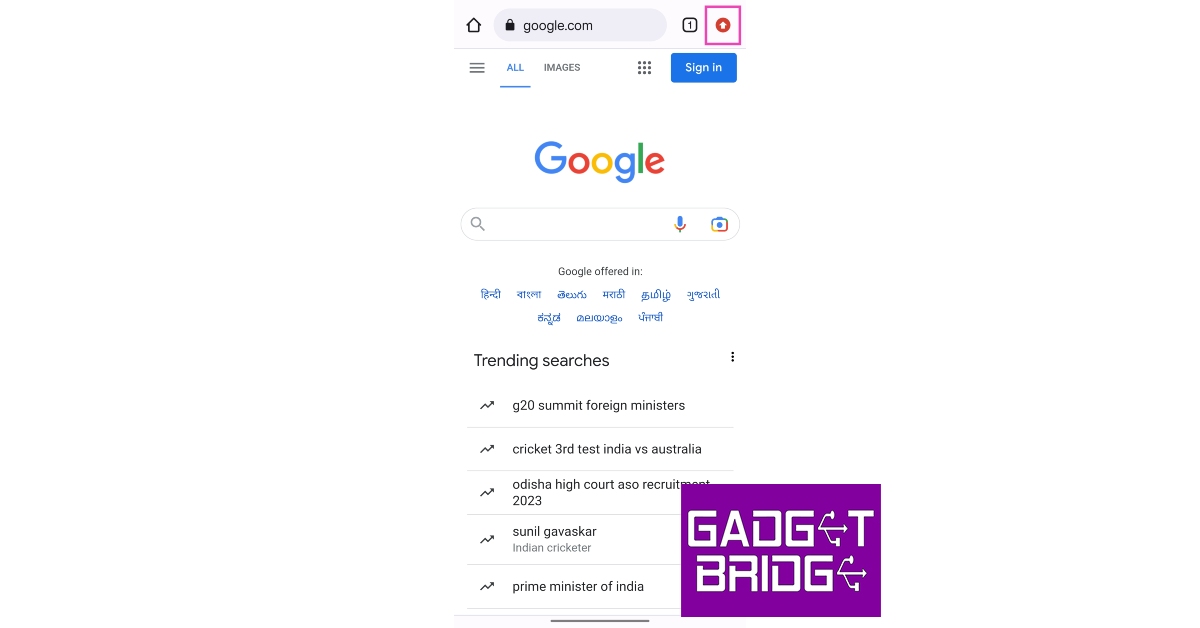
Step 1: Open the Google Chrome app on your smartphone. Step 2: Tap on the upward arrow icon at the top right corner of the screen. This arrow appears when a new update for Chrome is available. Tap on the upward arrow icon Step 3: Tap on ‘Update Chrome’. Step 3: Tap on ‘Update Chrome’. Step 4: You will be redirected to the app’s page on Google Play Store. Tap on ‘Update’ to update Chrome to its latest version. Tap on ‘Update’ to update Chrome to its latest version. Alternatively, you can directly launch Google Play Store or App Store on your smartphone and update Google Chrome from there.

Update Google Chrome on your laptop or PC

Step 1: Launch Google Chrome on your laptop or PC. Step 2: If the ellipses (three dots) icon on the top right corner of the screen is red, it means that an update is pending. If it is orange, it means that the update was published within the last 4 days. If you see a green icon it means that the update was published within the last 2 days. Step 3: Click on the ellipses and go to Help>About Google Chrome. Click on the ellipses and go to Help>About Google Chrome. Step 4: You will be directed to the Settings page where Chrome will check for any pending updates. You will see a blue tick if the Chrome version you are using is up to date. You will see a blue tick if the Chrome version you are using is up to date. Step 5: Download any pending updates and restart Chrome. Read Also: Google Chrome’s Dark Mode makes its way to Mac

Conclusion

This is how you can update Google Chrome to its latest version on your smartphone, laptop, and PC. Once the new version of Chrome has been installed, shut down the browser and relaunch it. If you notice any functional issues with the new update, reinstall the previous version of the browser and wait for the developers to fix the issues on the new update. For the latest gadget and tech news, and gadget reviews, follow us on Twitter, Facebook and Instagram. For newest tech & gadget videos subscribe to our YouTube Channel. You can also stay up to date using the Gadget Bridge Android App. You can find the latest car and bike news here.

Tecno launched its first folding phone Tecno V Fold in India

At the Mobile World Congress 2023 event in Barcelona the Chinese tech firm Tecno has officially announced the launch of its first foldable smartphone. The company presented Phantom V Fold which is powered by a 4nm MediaTek Dimensity 9000+ Processor. The device has a total of 5 cameras- three on the back and 2 for selfies.

Tecno Phantom V Fold price in India and sale details

Tecno Phantom V Fold has debuted in India first. According to a report the foldable has limited availability in India for this quarter. The price of 12GB RAM with a 512GB storage variant is priced at Rs 79,999. There is another 12GB RAM with 256GB storage option that will be available with a price tag of Rs 89,999. The device will come in two colour options of white and back. Tecno Phantom V Fold price in India and sale details

Tecno Phantom V Fold specifications

Tecno Phantom V Fold is highlighted with a 7.85-inch LTPO primary display with 2000 x 2296 pixels of resolution and a refresh rate of 120Hz. Whereas the cover display has a 6.42-inch LTPO AMOLED screen with 1080 x 2550 pixels of resolution. The outer screen also has a refresh rate of 120Hz. The Tecno foldable phone is driven by a 4nm MediaTek Dimensity 9000+ Processor which is said to have scored more than 1.08 million on the AnTuTu test. Note that a similar SOC has been used on the Oppo Find N2 Flip. Tecno Phantom V Fold price in India and sale details Photos and videos have been taken care of by a triple rear camera setup that includes a 50-megapixel main camera, a second 50-megapixel 2x zoom camera, and a 13-megapixel ultrawide camera. There are two selfie cameras on the phone, one 32-megapixel sensor on the front display and a second 16-megapixel sensor is given on the inside. The Tecno Phantom V Fold houses a 5,000mAh battery that comes with 45W wired charging. For the latest gadget and tech news, and gadget reviews, follow us on TwitterFacebook and Instagram. For newest tech & gadget videos subscribe to our YouTube Channel. You can also stay up to date using the Gadget Bridge Android App. You can find the latest car and bike news here.

Amazon Echo Dot 5th Gen launched in India at just Rs 4,999

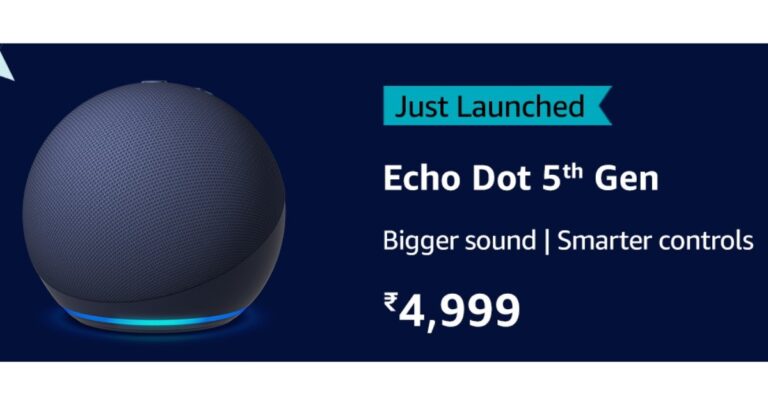
Amazon Echo Dot 5th Gen has been launched in India today. The company has released the smart speaker to celebrate its 5th anniversary in the country. The device is said to offer improved bass and crisper vocals over its predecessor. It can be used to create smart home routines with compatible electronics by making use of temperature sensors and built-in ultrasound motion detection. In addition to this, there are new tap gesture controls.

Amazon Echo Dot 5th Gen price in India and sale details

Amazon Echo Dot 5th Gen has been launched in India at a price tag of Rs 5,499. The device can be purchased at an introductory price of Rs 4,999 between March 2 and March 4 in the country. After this, the device will be sold at its original price tag. The smart speaker will be available via Amazon, online and offline stores of Croma, Reliance Digital, Poorvika, and others. The Alexa speaker comes in Black, Blue and White colour options. Amazon Echo Dot 5th Gen launched in India at just Rs 4,999

Amazon Echo Dot 5th Gen technical specs

Amazon Echo Dot 5th Gen comes with the same size, and form factor as the previous generation. It has revamped audio architecture which includes a custom full-range driver and the highest excursion speaker of any Echo Dot. Also Read: Telegram for MacOS update: New features rolling out, bringing power saving mode and more Users can use it to play their favourite songs from Hungama, Spotify, JioSaavan, Amazon Prime Music, Apple Music, and other subscription-based and free music streaming services. In addition to this Bluetooth can be utilised to play music on the Echo Dot from smartphones. The device is powered by an AZ2 Neural Edge processor which speeds up Alexa’s responses The all-new Amazon Echo Dot has a built-in temperature sensor that can sense the room temperature. These features can be used to set up helpful routines such as automatically turning on compatible AC when it gets too warm inside or turning it off when it gets too cold. The device also allows you to easily pause and resume music, turn off timers, or end Alexa-to-Alexa calls by tapping the top of the Echo Dot 5th Gen, which boasts an accelerometer that enables tap gesture controls. To manage their day customers can use Ultrasound Motion Detection by having Alexa turn on compatible lights or play music when they enter the room. Moreover just tap the top of the smart speaker to pause and resume music, dismiss timers or end Alexa-to-Alexa calls. Also Read: Vivo V27 Pro and Vivo V27 with 120Hz 3D curved display launched in India In terms of privacy, Amazon Echo Dot 5th gen speaker include multiple layers of privacy controls. There is a microphone on/off button and the ability to view and delete your voice recordings. For the latest gadget and tech news, and gadget reviews, follow us on TwitterFacebook and Instagram. For newest tech & gadget videos subscribe to our YouTube Channel. You can also stay up to date using the Gadget Bridge Android App. You can find the latest car and bike news here.

Telegram for MacOS update: New features rolling out, bringing power saving mode and more

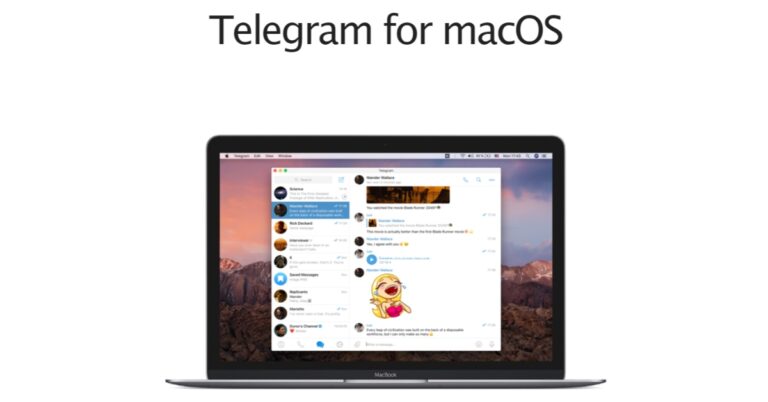
Popular social media platform Telegram has pushed out an update for macOS. The latest Telegram update version 9.4.1 brings new functionalities, improvements, and bug fixes to MacBooks. It includes features like power saving mode, a new switch to disable all resource-intensive processes with one click, GIFs, Individual autoplay settings for videos, and more. Telegram is rolling out an update version 9.4.1 for MacBook. The latest update now includes a power-saving mode for the devices that will cut down the app’s power usage when the MacBook’s battery is low. According to the company the power-saving mode activates automatically depending on how much battery is left in the laptop. In addition to this, the Telegram update also brings a new switch to disable all resource-intensive processes with one click. Auto-play options have also been enabled for videos, GIFs, stickers, animated emojis, and other content. Also Read: Vivo V27 Pro and Vivo V27 with 120Hz 3D curved display launched in India Furthermore, the update will also include a number of performance improvements and bug fixes. The update is now available for Telegram for macOS. It can be downloaded via the App Store on MacBook. Earlier last month the platform introduced its first significant update of the year, which included some 10 important features like profile picture maker, translating entire chats, and emoji categories, among others. With the launch of the new profile picture maker users can quickly turn any sticker or animated emoji into a profile picture for their accounts, groups, or channels.  Note that even non-Telegram Premium users can use animated and personalised emojis for these pictures. Premium users may now easily translate entire chats, groups, and channels by tapping the Translate bar at the top. When selecting replies or statuses by categories, emojis and stickers are now organised in the panel. Also, Telegram users now have the option to choose when the received content automatically saves to their gallery based on the size, type, and chat. You can now save only the items you want. After deleting files from your phone’s storage, you may always re-download them from your Telegram cloud account. Administrators now have control over nine different media kinds, such as video or audio messages, group members are permitted to send. They can also turn off text messages to form groups that are just for the media. For the latest gadget and tech news, and gadget reviews, follow us on TwitterFacebook and Instagram. For newest tech & gadget videos subscribe to our YouTube Channel. You can also stay up to date using the Gadget Bridge Android App. You can find the latest car and bike news here.