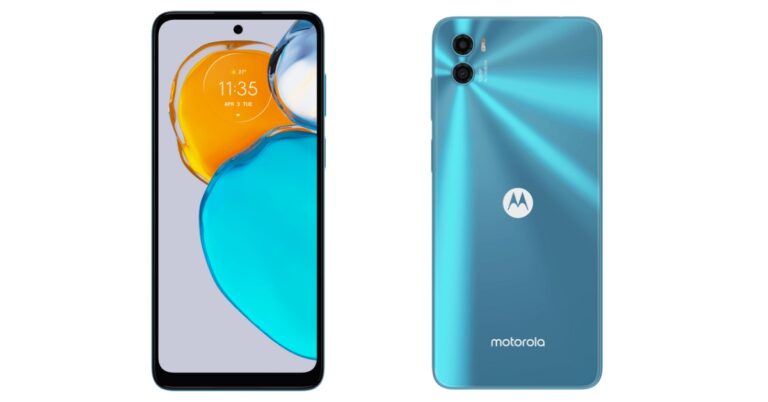
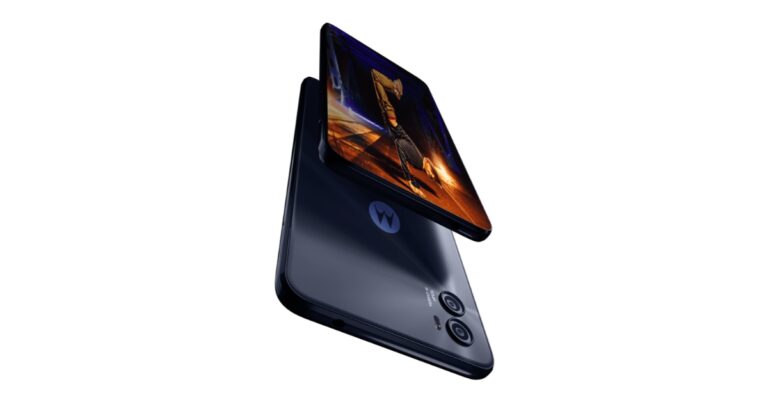
The Moto E22s, another affordable smartphone from Motorola, will be official released today in India. In advance of the phone’s official introduction, the business has released a few details about it. It is confirmed that the smartphone has a 90Hz refresh rate display. Additionally, a 5,000mAh battery is probably included with the device. A 16-megapixel primary camera will be part of a dual rear camera. The device is likely to be priced under Rs 10,000 and Flipkart will be the official marketplace from where the low-cost smartphone will be sold.
In This Article
Moto E22s price in India expected
The Moto E22s, another affordable smartphone from Motorola, is set to launch in India today at 12 noon. The Motorola Moto E22s is anticipated to cost less than Rs 10,000. The smartphone is predicted to be less expensive than the Moto E32, which just recently hit the Indian market.Moto E22s made its debut in the European markets before coming to India. It is offered there in a single 4GB RAM with 64GB storage option for EUR 159.99, which equals about Rs 12,700.
Moto E22s specifications
Motorola is also giving users a sneak peek at the smartphone’s specs on the local version of its official website. The phone will be available in the colours Arctic Blue and Eco Black in India. The middle of the top of the display will also feature a hole-punch cutout on the Moto E22s. A 6.5-inch HD+ IPS LCD panel with a 90Hz refresh rate will be included. The screen will also have a 20:9 aspect ratio and a pixel density of 268ppi. The processors powering the smartphone are described as the MediaTek Helio G37 SoC and 4GB of RAM. The Moto E22s has 64GB of internal storage, however, a microSD card allows for an upgrade to 1TB.It is also revealed that the Moto E22s will include a dual back camera setup with a 16-megapixel primary sensor and a 2-megapixel depth sensor. There will be a front camera with 8 megapixels. Additionally, a face unlock feature and a side-mounted fingerprint scanner will be available.
For the latest gadget and tech news, and gadget reviews, follow us on Twitter, Facebook and Instagram. For newest tech & gadget videos subscribe to our YouTube Channel. You can also stay up to date using the Gadget Bridge Android App. You can find the latest car and bike news here.
Garena Free Fire is a battle royale game with regular awards and tournaments to keep players interested. If you play Garena Free Fire, you should be aware of the redeem codes that are released on a daily basis. However, because the battle royale game is banned in India, players from other countries can use the Free Fire Redeem codes daily. If you’re unfamiliar with the Garena Free Fire redeem codes or don’t know how to get them, we’ve put together a step-by-step guide to help you redeem them. Check out Garena Free Fire Redeem Codes for October 17.The Free Fire redeem codes are a great way to get free stuff. These are 12-digit codes that contain alphabets and numbers, as well as an expiration date and time. Because the Garena FF redeem codes cannot be used more than once, you should hurry to the redemption page to claim your free reward before someone else does. To get a free reward, all you have to do is go to reward.ff.garena.com/en, which is the official redemption page. Also, keep an eye on this space for daily updates on Garena Free Fire redemption codes and rewards.
In This Article
Garena Free Fire Redeem Codes Today 17 October 2022
FFICJGW9NKYT
YXY3EGTLHGJX
FU9CGS4Q9P4E
U8S47JGJH5MG
VNY3MQWNKEGU
ZZATXB24QES8
FF10HXQBBH2J
WLSGJXS5KFYR
X99TK56XDJ4X
FF9MJ31CXKRG
FFAC2YXE6RF2
FFICJGW9NKYT
FFCO8BS5JW2D
FFIC33NTEUKA
B6IYCTNH4PV3
WOJJAFV3TU5E
How to Get Free Fire Redeem Codes for Garena on October 17?
Amazon is back with another quiz on its mobile platform. The 17 October 2022 Amazon Quiz is now live on its platform and today’s Amazon Quiz will give you a chance to win Rs 5,000 Amazon pay Balance.Every day Amazon brings a fresh questionnaire that comprises 5 questions. These questions are based on current affairs and general knowledge. The quiz can be played from 8 AM to 11:59 PM and the contestants need to answer correctly to enter into a lucky draw. In today’s Amazon Quiz the participants will get a chance to win Rs 5,000 Amazon Pay Balance.Today’s Amazon Quiz Prize – Rs 5,000 Amazon Pay BalanceQuiz Date – 17 October 2022Daily Timing – 12 AM to 11:59 PMWinner Announcement – Today at 12 PM
In This Article
Amazon Quiz Answers Today 17 October 2022
Question 1: Roger Federer’s last match was unfortunately a loss playing doubles with Rafael Nadal at which famous venue?Answer: O2 ArenaQuestion 2: Who among these has joined ‘The Voice’ in 2022 as a judge for the first time?
Answer: Camilla CabelloQuestion 3: Recently, the first indigenously developed Light Combat Helicopter was inducted into the Indian Airforce. What was it named?
Answer: PrachandaQuestion 4: This is a famous museum located in which city?Answer: ParisQuestion 5: This is a famous castle located in which country?
Answer: Germany
How To Play Amazon Quiz
Only app users are eligible to play the Amazon quiz every morning from 12 AM to 11:59 PM. The quiz is not available on the desktop. For those who are unaware of how to play the Amazon quiz below are the steps, you can follow to take the quiz.
Firstly download the Amazon app from Google Play Store or App Store
Now fill in the required information through the Sign Up option.
You need to log in to the Amazon app and scroll down on the home screen to find the Amazon Quiz banner.
Tap on the Amazon Quiz banner and tap on the Start button to start the Quiz.
Now you will get 5 questions and you need to answer them correctly. One wrong answer will eliminate you from the Quiz.
After answering all the questions correctly you are now eligible for a Lucky Draw.
The winner’s name will be announced today at 12 PM.
16 October 2022 Amazon Quiz has gone live. Customers from different parts of the country are participating in the daily quiz. The quiz begins from 12 AM to 11:59 PM. Those participating in the quiz can win exciting prizes by answering all the questions correctly. Today participants have a chance to win a Rs 1,250 Amazon Pay Balance.Amazon quiz brings an opportunity for its customers to win Amazon Pay Balance ranging from Rs 1,000 to Rs 50,000. The Quiz can be played from 12 AM to 11:59 PM. The e-commerce platform brings a fresh quiz on a daily basis which consists of five questions related to general knowledge and current affairs. The participants need to answer all the questions correctly and their names will be selected for a lucky draw. The winner will be announced at the end of the month.One wrong answer could eliminate you from the quiz. If you manage to answer all the questions correctly you can stand a chance to win a Rs 1,250 Amazon Pay Balance today. Only app users are eligible to participate in the Quiz. Check Out 16 October 2022 Amazon Quiz Answers.Amazon Quiz Today Prize – Rs 1,250 Amazon Pay BalanceQuiz Date – 16 October 2022Daily Timing – 12 AM to 11:59 PMWinner Announcement – Today 12 PM
In This Article
Amazon Quiz Answers Today 16 October 2022
Question 1: Erling Haaland scored his 3rd Premier League hat-trick of the season against which team?
Answer: Manchester UnitedQuestion 2: Mouni Roy plays the antagonist in the movie ‘Brahmastra’. What is the name of her character?
Answer: Junoon
Question 3: Name the chief executive of General Atomics Global Corporation who has been honoured with a lifetime achievement award by Joe Biden
Answer: Vivek LallQuestion 4: Name this famous placeAnswer: Forbidden CityQuestion 5: In the 3rd movie of the series, named after this character, Hugh Jackman will return to play which of these roles?Answer: Wolverine
How To Play Amazon Quiz
Only app users are eligible to play the Amazon quiz every morning from 12 AM to 11:59 PM. The quiz is not available on the desktop. For those who are unaware of how to play the Amazon quiz below are the steps, you can follow to take the quiz.
Firstly download the Amazon app from Google Play Store or App Store
Now fill in the required information through the Sign Up option.
You need to log in to the Amazon app and scroll down on the home screen to find the Amazon Quiz banner.
Tap on the Amazon Quiz banner and tap on the Start button to start the Quiz.
Now you will get 5 questions and you need to answer them correctly. One wrong answer will eliminate you from the Quiz.
After answering all the questions correctly you are now eligible for a Lucky Draw.
The winner’s name will be announced today at 12 PM.
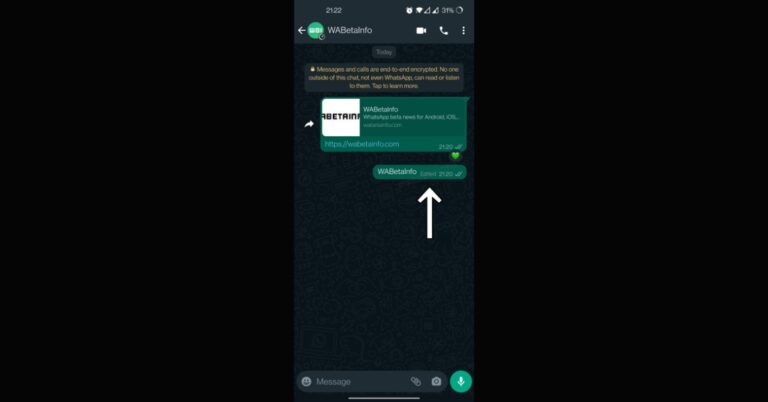
Users will soon be able to edit messages in WhatsApp and correct typos. WhatsApp is developing a new feature that will allow users to amend previously sent messages. The functionality was already known to be under development but now the company has started with a beta test on the desktop. The “edit message” option simply gives the sender a window of opportunity to alter their wording.In a future update of the app, WhatsApp plans to add a label indicating whether the message has been updated within the chat bubble. Recent advancements, as reported by WABetaInfo, indicate that a label reading “edited” will appear next to the text. After sending a message, users have 15 minutes to amend it. Don’t anticipate the functionality to appear any time soon in the stable version of WhatsApp as it is still being tested.WABetaInfo said, “The feature is still under development but thanks to the recent WhatsApp beta for Android 2.22.22.14 update, we discovered that there is finally news about how messages are marked as edited within a conversation.”The newly added edited feature appears to be a replacement for the “delete message” feature. However, a snippet from the app has leaked some fresh details regarding the feature. This screenshot demonstrates how the label “Edited” will appear after a message has been edited. In addition, WhatsApp will offer you exactly 15 minutes to edit a message, which we can now finally confirm. If the recipient doesn’t turn on their smartphone within a specified amount of time, WhatsApp may not guarantee that your message will actually be updated, as happens with deleted messages for everyone (probably, a day or a little more).Since the new feature is still in development, nobody—not even WhatsApp beta testers—will be able to use it just yet. The feature may be released to beta testers as we go nearer to the actual launch.
For the latest gadget and tech news, and gadget reviews, follow us on Twitter, Facebook and Instagram. For newest tech & gadget videos subscribe to our YouTube Channel. You can also stay up to date using the Gadget Bridge Android App. You can find the latest car and bike news here.
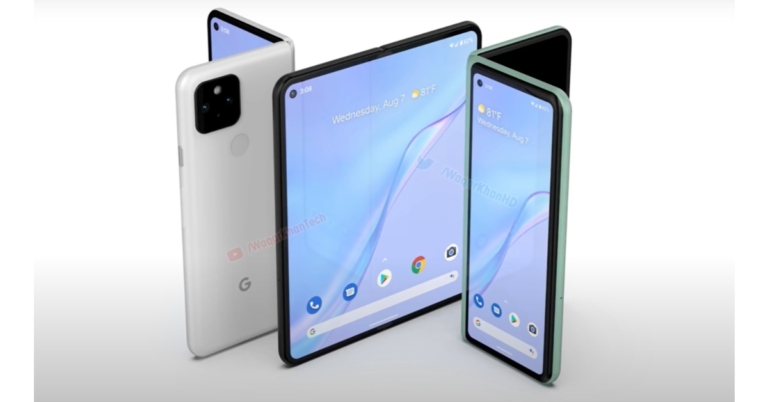
A lot of Google Pixel Fold rumours and leaks have been doing the round on the web. Recently the launch timeline of Google’s first foldable phone was leaked. In a new development, we have got information about the phone’s display in addition to camera details. The upcoming Google foldable phone is speculated to include two Samsung dual displays, 123mm by 148mm in size. Moreover, the device may also include a triple back camera arrangement.In partnership with 91Mobiles, Kuba Wojciechowski has leaked information about the claimed specifications of the Google Pixel Fold. According to him, Google Pixel Fold (code-named Felix) will have displays built by Samsung on both the outside and inside. An internal folding screen with a resolution of 1840 by 2208 is supported. It is 123mm x 148mm in size. The display has a maximum brightness of 1200 nits and an average brightness of 800 nits.A high refresh rate will be supported by the internal flexible display of the Pixel Fold. Wojciechowski is unsure, but it might reach 120Hz. The Pixel Fold will also have three rear cameras. It is anticipated that the main sensor will be a Sony IMX787 sensor. An IMX386 ultra-wide angle lens and an S5K3J1 telephoto lens will also be part of the system. An IMX355 sensor may be used in the inside display, while an S5K3J1 telephoto selfie sensor may be used in the outer display.In terms of availability, Ross Young, CEO of Display Supply Chain Consultants(DSCC), predicts that the first Pixel foldable phone will debut in the first quarter of 2023.In response to a tweet from tipper Roland Quandt (@rquandt) inquiring about the Pixel folding phone, Young stated that Google’s first foldable phone might debut at any time in Q1 2023. Further, he claims that the firm will start receiving panel shipments for this handset in January.
For the latest gadget and tech news, and gadget reviews, follow us on Twitter, Facebook and Instagram. For newest tech & gadget videos subscribe to our YouTube Channel. You can also stay up to date using the Gadget Bridge Android App. You can find the latest car and bike news here.
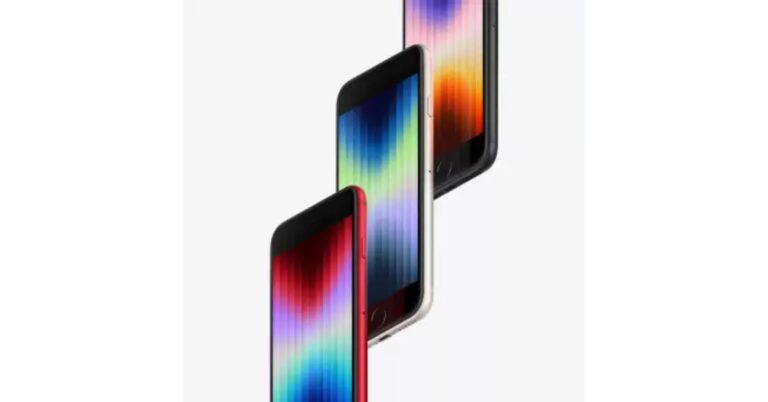
The third-generation iPhone SE was released by Apple in March of this year, and due to its outdated appearance, the phone was by all accounts quite pricey. In addition, the phone is the lowest-priced iPhone the manufacturer sells. Despite that, the company unexpectedly raised the price of the iPhone SE 3 by Rs 6,000 rather than merely by Rs 500 or Rs 1000.The third-generation iPhone SE was introduced in March of this year with a Rs 43,900 starting price. However, the phone has since increased in price in India by a total of Rs 6,000. After the most recent price adjustment, the device’s three storage options—64GB, 128GB, and 256GB—now cost Rs 49,900, Rs 54,900, and Rs 64,900, respectively. Remember that the item was formerly offered for Rs 43,900, Rs 48,900, and Rs 58,900.However, compared to when the phones were first released, the current pricing is significantly more. Therefore, the true query is: Is it still worth purchasing? It does not represent good value, in our opinion. You can choose to get the iPhone 12, which has a larger screen, longer battery life, and good cameras, for an equivalent or lower price.However, if you still want to buy the item, Flipkart may be able to provide it to you for a significantly lower price. The 64GB model is priced at Rs. 47,990, and the 128GB model is priced at Rs 52,990. The 256GB variant, however, is presently sold out. Additionally, an exchange discount of up to Rs 16,900 is available. Additionally, there are bank promotions on the purchase of the phone, such as a 10% discount when using Kotak and SBI Bank cards.
iPhone SE 3rd Generation specifications
The A15 Bionic chipset, which is also used in the iPad mini and the iPhone 13 series and has a four-core GPU, powers the iPhone SE 3. One of the things the gadget supports is live text. The business claims that the phone is 5G ready and has a large battery. The screen of the latest iPhone is 4.7 inches.It shares the same glass and aluminium construction as the iPhone 13. The smartphone is made to last, and the aluminium glass construction will offer enhanced protection, claims the tech giant. Furthermore, the iPhone SE 2022 now has IP67 certification.Furthermore, Touch ID is a feature of the new iPhone SE 2022. It retains the back’s lone 12-megapixel camera with a /1.8 aperture. The front-facing FaceTime HD camera of the iPhone SE is useful for taking selfies and video calls. According to the manufacturer, it offers the same camera features as the iPhone 13 with new Photo moods, Smart HDR 4, Photographic Styles, Deep Fusion, and Portrait mode. 4 and onward. The iPhone SE supports wireless charging and quick charging using Qi-certified chargers. You may charge your phone up to 50% in 30 minutes with an adaptor of 20 W or more (sold separately).
For the latest gadget and tech news, and gadget reviews, follow us on Twitter, Facebook and Instagram. For newest tech & gadget videos subscribe to our YouTube Channel. You can also stay up to date using the Gadget Bridge Android App. You can find the latest car and bike news here.
According to Motorola, it will be arriving with Moto E22s in India on October 17. The company has shared a few details about the phone ahead of the official launch. The device is confirmed to feature a 90Hz refresh rate display. Additionally, the handset is likely to come with a 5,000mAh battery. There will be a dual back camera with a 16-megapixel main camera.The company took to its social media to announce its upcoming smartphone. The Moto E22s’ Indian official launch date was confirmed by Motorola India in a tweet. The company has also revealed that the device will be available for purchase through Flipkart and other top retailers starting on October 17 at 12 noon. It is unclear what the smartphone would cost in the nation.Before arriving in India Moto E22s made its debut in the European markets. There it is available in a single 4GB RAM with a 64GB storage model priced at EUR 159.99 which converts to Rs 12,700. It is anticipated that the device’s price in India will be comparable to that in Europe.Prior to the smartphone’s release, Motorola is also previewing its specifications via its official website in the country. The phone’s India version will come in Arctic Blue and Eco Black colour options. Moreover, Moto E22s will have a hole-punch cutout at the top middle of the display. It will feature a 6.5-inch HD+ IPS LCD screen with a 90Hz refresh rate. Moreover, the screen will come with a pixel density of 268ppi and a 20:9 aspect ratio. The MediaTek Helio G37 SoC and 4GB of RAM are listed as the processors powering the smartphone. The inbuilt storage of the Moto E22s is 64GB, but it can be increased up to 1TB with a microSD card. The handset is confirmed to ship Android 12 out of the box. The Moto E22s in India will have a 5,000mAh battery that can enable 10W charging.The Moto E22s is also confirmed to have a dual rear camera arrangement that consists of a 16-megapixel primary sensor and a 2-megapixel depth sensor. An 8-megapixel front camera will be available. Moreover, there will be a side-mounted fingerprint scanner and face unlock.
For the latest gadget and tech news, and gadget reviews, follow us on Twitter, Facebook and Instagram. For newest tech & gadget videos subscribe to our YouTube Channel. You can also stay up to date using the Gadget Bridge Android App. You can find the latest car and bike news here.
The passkey capability for Chrome and Android in Google Password Manager is now available for testing by developers. Passwords and two-factor authentication are less secure than passkeys, for those who are uninformed. Unlike passwords, it may be used again and is safe from phishing and hacking assaults. Google claims that Passkeys will provide a consistent user interface across Windows, macOS, iOS, and ChromeOS.“Starting today, Google is bringing passkey support to both Android and Chrome,” the company said.Passkeys are a far safer alternative to passwords and other phishable forms of authentication. They are unreusable, secure against server hacks, and shield users from phishing scams. Passkeys are built on industry standards, operate in a variety of browser and operating system ecosystems, and may be applied to both websites and mobile applications.Passkeys expand on the already-existing experience of password autofill and adhere to well-known UX patterns. When utilising one, end users just confirm with their existing device screen lock, such as their fingerprint, just like they do today when using a saved password. To avoid lockouts in the event of device loss, passkeys on users’ phones and PCs are stored up and synced across the cloud. Users can also login in to apps and websites on other nearby devices using passkeys stored on their phone.Developers can use Chrome Canary and sign up for the Google Play Services beta. Later this year, both features will be generally accessible via reliable channels.On Android devices, users can generate and utilise passkeys that are securely synchronised through the Google Password Manager.Through the WebAuthn API, developers may add passkey support to their websites for end users utilising Chrome, Android, and other compatible devices.While announcing the Passkeys support on Android and Chrome Google said, “Our next milestone in 2022 will be an API for native Android apps. Passkeys created through the web API will work seamlessly with apps affiliated with the same domain and vice versa. The native API will give apps a unified way to let the user pick either a passkey or a saved password. Seamless, familiar UX for both passwords and passkeys helps users and developers gradually transition to passkeys.”
For the latest gadget and tech news, and gadget reviews, follow us on Twitter, Facebook and Instagram. For newest tech & gadget videos subscribe to our YouTube Channel. You can also stay up to date using the Gadget Bridge Android App. You can find the latest car and bike news here.
Instagram allows users to save a Reel as a draft so they can take their time to work on it before publishing it. The draft folder can be accessed from the upload screen and contains all your unfinished posts. A lot of times users report that their Reel drafts mysteriously get deleted from the folder. There are multiple reasons why this might happen. In this article, we show you how to recover disappeared Reel drafts on Instagram using a few simple methods.Read Also: Moto G32 review: Is this a reliable, inexpensive casual smartphone?
In This Article
Check the Recently Deleted folder
If you accidentally deleted a draft, you can always restore it from the Recently Deleted folder. Here’s how you can do that. Step 1: Open the Instagram app and go to your profile.Step 2: Tap on the hamburger menu icon at the top right corner of the screen.Step 3: Select ‘Your Activity’.Step 4: Scroll down and tap on the ‘Recently Deleted’ folder to access your deleted drafts.Step 5: Tap on the Reel and select ‘Restore’ from the three dots menu.The selected Reel will be restored and can be accessed from your Drafts.
Check the Upload screen
Got a call while you were about to upload a Reel? Or did your phone run out of power before you could save the draft? There’s no need to worry. Instagram makes sure you don’t lose your Reel if the app suddenly shuts down. While the Reel won’t get saved to Drafts, you can still pick up where you left from. Simply swipe left from your Instagram home screen and select Reels from the upload screen. You will find your unfinished Reel there.
Update your Instagram app
Instagram users often report their Reel Drafts magically disappearing from the app. Most of the time, this is due to the presence of a bug within the app. Instagram routinely puts out app updates that get rid of these bugs. Make sure you keep the app updated so you don’t lose any drafts. If you lost a draft, updating the Instagram app may bring it back. To update your Instagram app, go to Google Play Store and search for Instagram. Open the app page and tap on ‘Update’.Read Also: In India, NortonLifeLock releases Norton AntiTrack for more privacy against online tracking
Conclusion
Using these simple methods, you will be able to recover any Reel that disappeared from the Drafts folder on Instagram. Let us know if these methods worked out for you. If you still can’t restore your Reel draft, try contacting Instagram support for more help related to the issue.
Garena Free Fire is a battle royale game with regular awards and tournaments to keep players interested. If you play Garena Free Fire, you should be aware of the redeem codes that are released on a daily basis. However, because the battle royale game is banned in India, players from other countries can use the Free Fire Redeem codes daily. If you’re unfamiliar with the Garena Free Fire redeem codes or don’t know how to get them, we’ve put together a step-by-step guide to help you redeem them. Check out Garena Free Fire Redeem Codes for October 15.The Free Fire redeem codes are a great way to get free stuff. These are 12-digit codes that contain alphabets and numbers, as well as an expiration date and time. Because the Garena FF redeem codes cannot be used more than once, you should hurry to the redemption page to claim your free reward before someone else does. To get a free reward, all you have to do is go to reward.ff.garena.com/en, which is the official redemption page. Also, keep an eye on this space for daily updates on Garena Free Fire redemption codes and rewards.
In This Article
Garena Free Fire Redeem Codes Today 15 October 2022
Updating soon…
How to Get Free Fire Redeem Codes for Garena on October 15?
15 October 2022 Amazon Quiz has gone live on its platform. The quiz timings are 12 AM to 11:59 PM. The Amazon App users can participate in the quiz daily and all they have to do is submit correct answers to the questions asked on the e-commerce platform. Today’s participants can get a chance to win Rs 500 Amazon Pay Balance.By participating in the Amazon Quiz the participants can win Amazon Pay Balance ranging from Rs 1,000 to Rs 50,000 every day while sitting at home. To win the participants must answer five questions correctly that are based on current events and general knowledge. One wrong answer can eliminate you from the quiz. The results will be announced at the end of the month. Today’s question will let you win Rs 500 Amazon Pay Balance. Check below for today’s Amazon quiz answers.Amazon Quiz Today Prize – Rs 500 Amazon Pay BalanceQuiz Date – 15 October 2022Daily Timing – 12 AM to 11:59 PMWinner Announcement – Today 12 PM
In This Article
Amazon Quiz Answers Today 15 October 2022
Question 1:Who recently achieved the record of reaching 1000 runs in T20 internationals in the least number of balls faced?
Answer: Suryakumar YadavQuestion 2: In the upcoming movie ‘Adipurush’ who would be seen in the role of Ravana?Answer: Saif Ali KhanQuestion 3: Svante Paabo who recently won the Nobel Prize for Physiology or Medicine is from which country?
Answer: SwedenQuestion 4: What is the language in the photo?Answer: VietnameseQuestion 5: What was the main aim of building this tower in Tokyo?
Answer: Broadcasting
How To Play Amazon Quiz
Only app users are eligible to play the Amazon quiz every morning from 12 AM to 11:59 PM. The quiz is not available on the desktop. For those who are unaware of how to play the Amazon quiz below are the steps, you can follow to take the quiz.
Firstly download the Amazon app from Google Play Store or App Store
Now fill in the required information through the Sign Up option.
You need to log in to the Amazon app and scroll down on the home screen to find the Amazon Quiz banner.
Tap on the Amazon Quiz banner and tap on the Start button to start the Quiz.
Now you will get 5 questions and you need to answer them correctly. One wrong answer will eliminate you from the Quiz.
After answering all the questions correctly you are now eligible for a Lucky Draw.
The winner’s name will be announced today at 12 PM.
Asus Zenbook 17 Fold OLED is now available for pre-order in India, according to Asus. The device was announced in the US in late August. It is a 17.3-inch folding OLED Intel Evo-certified laptop with different modes for a distinctive user experience. The Zenbook 17 Fold comes with a big 75 Wh battery and a 12th Generation Intel Core i7 processor.
In This Article
Asus Zenbook 17 Fold OLED pre-booking details
Pre-orders for the Zenbook 17 Fold OLED will be accepted beginning today, October 14, at noon, and running until November 9th. On November 10, the company plans to introduce the ground-breaking laptop to the Indian market. It will cost Rs 329,990.Customers who pre-order the Zenbook 17 Fold OLED will receive it at an attractive price of Rs 284,290. The company is offering a rebate of up to Rs 5,000 and an exchange value of up to Rs 40,700. The following products, each worth Rs 27,100, will also be given away to customers who pre-book.
Asus Zenbook 17 Fold OLED specifications
The laptop has a 17.3-inch foldable OLED touchscreen with 1,920 x 2,560 resolution, a 4:3 aspect ratio, and a response time of 0.2 milliseconds. The device comes with a maximum brightness of 500 nits. 1.07 billion colours, 100 percent DCI-P3 colour gamut coverage and an 87 percent screen-to-body ratio are also included. It has an Intel Core i7 processor from the 12th generation with an Intel Iris Xe GPU. 16GB of LPDDR5 RAM and a 1TB SSD are both included in the Asus Zenbook 17 Fold.It has a 5-megapixel AI camera for optics, along with 3D noise reduction and an IR function.Harman Kardon-certified Dolby Atmos audio is delivered by a quad-speaker system. Cortana and Alexa speech assistants are supported through an integrated microphone that is also present.A 3.5mm combo audio jack and two Thunderbolt 4 ports are included. Added to that is a touchpad. In addition to this, there is the latest Intel WiFi 6E and a 75 Wh battery on the laptop.
For the latest gadget and tech news, and gadget reviews, follow us on Twitter, Facebook and Instagram. For newest tech & gadget videos subscribe to our YouTube Channel. You can also stay up to date using the Gadget Bridge Android App. You can find the latest car and bike news here.
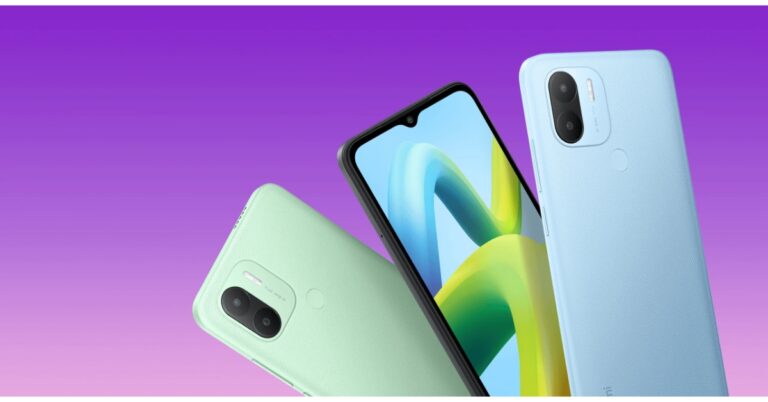
Redmi today announced the launch of its most recent budget-friendly model Redmi A1+ in India today. The device is powered by MediaTek Helio A22 SoC. It comes with a 5,000mAh battery and runs on Android 12 out of the box. The phone features a dual rear camera set-up and an HD+ display.
In This Article
Redmi A1+ price in India, sale details
Two variants of Redmi A1+ have been launched in India. The price of the 2Gb RAM with 32GB storage variant is set at Rs 6,999. Whereas the 3GB RAM with 32GB storage option will be available with a price tag of Rs 7,999. The phone will come in three colour options of Black, Light Blue, and Light Green.Starting on October 17 at 12 noon, Flipkart, Mi.com, Mi Home shops, and Xiaomi’s retail partners will all offer the device for sale throughout the nation.
Redmi A1+ specifications
Redmi A1+ is highlighted with a 6.52-inch HD+ display having 1,600×700 pixels of resolution. The display has a 20:9 aspect ratio and 70 percent coverage of the NTSC colour gamut. Additionally, the screen supports a 120Hz touch sampling rate and 400 nits of peak brightness. The budget smartphone is shipped with Android 12 out of the box. Under the hood, there is an octa-core MediaTek Helio A22 SoC and IMG PowerVR GPU. It has up to 3GB of LPDDR4X RAM and 32GB of internal storage which can be expanded up to 512GB using a microSD card.Redmi A1+ has a dual rear camera system with AI support that captures images and videos with an 8-megapixel primary sensor. The phone has a front-facing 5-megapixel selfie camera sensor for selfies and video calls.The Redmi A1+ has a 3.5mm audio jack, 4G LTE, Wi-Fi 802.11 b/g/n, Bluetooth 5, GPS/A-GPS, Glonass, and Beidou for connectivity. The handset also supports over 20 Indian languages.A 5,000mAh battery that supports 10W charging powers the Redmi A1+. Redmi claims that the battery has a standby period of up to 30 days and a video playback time of up to 30 hours.
For the latest gadget and tech news, and gadget reviews, follow us on Twitter, Facebook and Instagram. For newest tech & gadget videos subscribe to our YouTube Channel. You can also stay up to date using the Gadget Bridge Android App. You can find the latest car and bike news here.
Instagram has stated that it will begin testing new ways for users to confirm their age in India today. It will ask users to upload their ID or take a video selfie to prove their age if they try to change their date of birth on Instagram from under the age of 18 to 18 or older.Instagram in its announcement said, “Starting today, we’re expanding this test to additional countries including India and Brazil. We plan to expand to the UK and EU before the end of the year. We’re also removing Social Vouching as an option to verify age from the test to make some improvements.”In order to ensure that teenagers and adults are having the appropriate experience for their age group, it is testing this. In the US, testing started in June of this year, and it is now spreading to Brazil and India.As stated by the business If someone tries to change their Instagram date of birth from under the age of 18 to over 18, Instagram will ask them to prove their age by one of three methods: uploading their ID, taking a video selfie, or asking people who know them to do so. This is being tested so that the company can ensure that both teens and adults are having the appropriate experience for their age group. In order to protect users’ privacy, Instagram is also collaborating with Yoti, a business that specialises in online age verification.The company via blog post said, “In 2019, we began asking people to provide their age when signing up for Instagram. Since then, we’ve made this a requirement. Knowing people’s age allows us to provide appropriate experiences to different age groups, specifically teens.”To register for Instagram, users must be at least 13 years old. Our minimum age is higher in certain countries than in others. When it determines that a user is a teen (13–17), it offers them experiences that are appropriate for their age, such as defaulting them into private accounts, blocking unwelcome interaction from adults they don’t know, and limiting the ways that advertisers may reach them with advertisements.
For the latest gadget and tech news, and gadget reviews, follow us on Twitter, Facebook and Instagram. For newest tech & gadget videos subscribe to our YouTube Channel. You can also stay up to date using the Gadget Bridge Android App. You can find the latest car and bike news here.
YouTube has started rolling out unique handles for its creators this month. A YouTube handle will serve as a unique identifier for your channel and will show up on Channel pages as well as Shorts. Users can tag the Channel in comments using the unique handle. However, not every user can get a YouTube handle, there are certain eligibility requirements that need to be met first. In this article, we show you how to get a YouTube handle and make a personalised URL for your YouTube channel.Read Also: In India, NortonLifeLock releases Norton AntiTrack for more privacy against online tracking
In This Article
What are the basic eligibility criteria to get a YouTube handle or personalised URL?
If you want to get a personalised YouTube URL or handle, your channel must meet the following basic criteria.
Your channel must have 100 more subscribers.
Your channel/account must be at least 30 days old.
Your channel must have a profile picture.
There must be a banner image on your channel page.
How to get a personalised youtube URL
Step 1: Go to www.youtube.com and log in with your account.Step 2: Click on your profile icon at the top right corner of the screen and select ‘YouTube Studio’.Step 3: Scroll down the side menu on the left and select ‘Customisation’.Step 4: Click on the ‘Basic Info’ tab.Step 5: Click on the Channel URL box and type in the personalised URL you want.Step 6: Select Confirm. Your YouTube URL will be changed.You can change your YouTube URL any time you want. Simply follow the steps mentioned above and select ‘Delete’ under Channel URL. Type in a new unique URL and hit ‘Confirm’.
How to get a YouTube handle
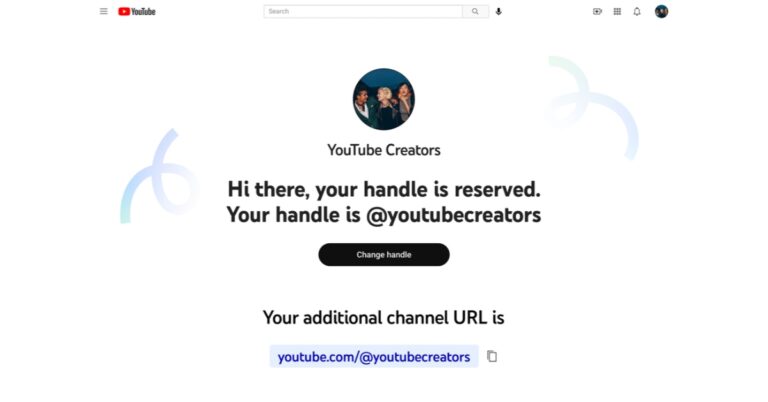
YouTube has started rolling out handles for the creators on the website. The process to reserve your YouTube handle is fairly simple if you’re eligible to get one. Here’s how you can get your own handle.Step 1: Go to www.youtube.com/handle.Step 2: In the window that pops up, type in your desired handle. If the handle is available, a green tick will appear next to it.Step 3: Select ‘Confirm Selection’.Your desired handle will be assigned to your channel. Read Also: Google Pixel 7 Vs iPhone 14: Battle between Android Vs iOS
Conclusion
This is how you can get a YouTube handle and a personalised YouTube URL for your account or channel. One of the many benefits of having a handle is that it is unique to your channel. YouTube allows multiple channels to have the same name, but a handle is reserved for one account. This makes it easy to identify a channel and tag it wherever you want.
A few years back, if you were worried about your smartphone spying on you, you’d be labelled a conspiracy nut. Now, with services like Google’s Voice Assistant and Amazon Echo, surveillance has taken the form of convenience and has made its way into our pockets. The Google Assistant on your smartphone is always monitoring surrounding sounds for the ‘Hey Google’ or ‘OK Google’ keywords. While voice commands are certainly very helpful, especially while driving, for a lot of people it is not worth giving up their privacy. In this article, we show you how to stop your Android phone from listening to you secretly. Read Also: In India, NortonLifeLock releases Norton AntiTrack for more privacy against online tracking
In This Article
Turn off Google Assistant
Step 1: Go to Settings and select Google.Step 2: Scroll down and tap on ‘Settings for Google apps’ and select ‘Search, Assistant, and Voice’.Step 3: Tap on ‘Voice’ and from the following window select ‘Voice Match’.Step 4: Turn the toggle bar for ‘Hey Google’ off.The voice assistant commands on your phone will be turned off. Your smartphone will not use the microphone at all times to scan for those keywords.
Turn off Google Assistant for Android Auto
The Google Voice Assistant for Android Auto is turned on by default. You will have to turn it off separately, even after disabling the Google Assistant on your smartphone. Here’s how you can do that.Step 1: Go to Settings and select Advanced Features.Step 2: Select Android Auto.Step 3: Tap on ‘Hey Google’ detection and turn the toggle bar off for ‘While driving’.
Turn off Microphone access for Google
If you want to go the extra mile, you can entirely turn off the microphone access for the Google app on your smartphone. Here’s how.Step 1: Go to Settings and select Apps.Step 2: Scroll down and select ‘Google’.Step 3: Tap on ‘Permissions’.Step 4: Under the ‘Allowed’ section, tap on ‘Microphone’ and select ‘Don’t Allow’.Google will not be able to access your smartphone’s microphone.
Bonus Tip
Turn off Google Assistant entirely
If you don’t use Google Assistant that often, you can turn it off entirely. Here’s how.Step 1: Go to Settings and select Google.Step 2: Scroll down and tap on ‘Settings for Google apps’ and select ‘Search, Assistant, and Voice’.Step 3: Tap on ‘Google Assistant’, scroll down and select ‘General’.Step 4: Turn the toggle bar off for Google Assistant in order to disable it.If you do not wish to turn off Google Assistant, you can simply change the preferred input from voice to keyboard.Read Also:Google Pixel 7 Vs iPhone 14: Battle between Android Vs iOS
Conclusion
This is how you can stop your Android phone from listening to you secretly. You can also access your previous voice search history by going to the Google My Activity page. Google maintains a record of your search history, and this includes voice commands as well. In the My Activity page go to Assistant>Voice and Audio to hear all your past recordings.
Lenovo has just added the Lenovo Tab P11 Pro (2nd Gen) to its array of premium tablets. The brand-new Tab P11 Pro (2nd Gen) comes with minor improvements over the model before that is P11 Pro. It has a dual-tone design and glass-like finish.
In This Article
Lenovo Tab P11 Pro price in India and availability
The cost of the 8GB RAM, 256GB storage, and hard Lenovo Precision Pen 3 combination for the Lenovo Tab P11 Pro (2nd Gen) is Rs 39,999. Starting on October 17, it can be purchased at Lenovo Exclusive Stores, Amazon.in, and Lenovo.com. Soon, it will also be accessible through additional offline shopping channels. The tablet is available in the Storm Grey colour option.
Lenovo Tab P11 Pro (2nd Gen) specifications
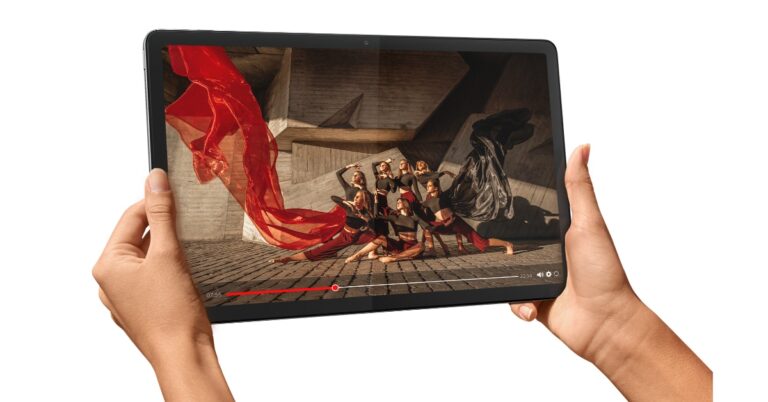
The 11.2-inch cinematic OLED display on the Tab P11 Pro (2nd Gen) has a 2560 x 1536-pixel resolution. It comes with a 15:9 aspect ratio and has a refresh rate of 120 Hz, a touch sampling rate of 360 Hz, and a maximum brightness of 600 nits. Dolby Vision HDR and HDR10+ are also supported.The Lenovo Tab P11 Pro (2nd generation) is powered by a new MediaTek Kompanio 1300T processor with an integrated Arm Mali-G77 MC9 GPU. 8GB of RAM and 256GB of internal storage are onboard and can be expanded to 1TB using a microSD card slot. It comes pre-installed with Android 12 OS. The tab can convert from a tablet to a laptop with the optional detachable keyboard with a built-in trackpad inspired by ThinkPad.The Lenovo Precision Pen 3 is an optional accessory that may magnetically attach to the smartphone for wireless charging and storage if writing is preferred. The Bluetooth-enabled pen automatically couples with the tablet and has a configurable button on its side that may be used to remotely control documents, music, photos, and recordings that are displayed on-screen. Lenovo Instant Memo allows users to instantly take notes by just holding the button while the screen is locked. The Tablet has quad speakers powered by JBL that support Dolby Atmos for audio. The tablet has an 8MP front-facing selfie camera and a 13MP back camera.The tablet is powered by an 8,200mAh battery cell, which can reportedly last up to 14 hours.Additionally, the Lenovo Tab P11 Pro (2nd Gen) supports Google Kids Space, which was previously available on the Tab M10 Plus (3rd Gen). The Google Kids Space is intended to be a special place where children can learn, create, and develop. When a child launches Kids Space, they are shown a selection of high-quality books, applications, and videos. Kids can develop their imagination and become experts in the areas they enjoy thanks to this special mode.With the help of Lenovo Freestyle, consumers can wirelessly connect their Android tablets to their Lenovo Windows PC and use them as either a portable second screen to expand their desktop or a wireless touch screen for their laptop.
For the latest gadget and tech news, and gadget reviews, follow us on Twitter, Facebook and Instagram. For newest tech & gadget videos subscribe to our YouTube Channel. You can also stay up to date using the Gadget Bridge Android App. You can find the latest car and bike news here.
Motorola has recently introduced a lot of smartphones. The company now has everything from low-cost, medium, to high-end smartphones. The Motorola cell phones that we have so far tested have been quite excellent. The Moto G32 has been in our testing for more than a week, and so far, it appears to be a respectable phone for the money. It has an integrated 680 SoC and uses the Android 12 OS. For water and dust resistance, the phone is IP52 rated. The phone also sports a triple-rear camera setup with a 50-megapixel main sensor. How did the smartphone fare in our tests? Let’s find out.
In This Article
Moto G32 review: Design and Display
First and foremost, the Moto G32’s design is something we truly appreciated. Although it still has a plastic back, the appearance of the new Moto G smartphone is very different from the previous models’ rather dull aesthetics.The panel also makes fingerprints and smudges less obvious than they would be on a glossy surface in general. Therefore, even without a cover, the G32 does not look as unkempt as it would. The phone’s back also has a triple camera module and the recognisable Moto batwing logo.The phone’s size is quite ergonomic and somebody with little hands won’t have any issues with the way the weight is distributed. Our fingers landed flawlessly on the phone’s side-mounted fingerprint sensor, but the sensor itself is a little sluggish. Along with a volume rocker, the fingerprint scanner also serves as the power button.The tactile sensation on the buttons is also good. Unlike the left side, which contains a dual SIM slot (can house 2 SIM cards and a micro-USB card to expand memory up to 1TB). A microphone is located on the top frame, while a 3.5mm headphone jack, microphone, USB Type-C port, and speaker grille are located on the bottom border.Additionally, the Moto G32 has an IP52 rating for water and dust resistance, so external protection is also taken care of.On the head, edges, and chin of the phone’s front are thin bezels, while the bottom bezel is broader. On the top of the screen is a selfie camera.A 20:9 aspect ratio and full-HD+ resolution of 1,080 by 2,400 pixels are present on its 6.5-inch LCD display. The screen refreshes at a speed of 90Hz, and touch input occurs at a rate of 180Hz. During our testing, we did not observe any scratches on the screen because it is additionally protected by Panda Glass 3.The display offers an immersive viewing experience while watching videos and gaming. Also, the screen feels fluid and seamless thanks to the 90Hz refresh rate. The smartphone comes with support for Widevine L1 and we tested it with HD movie playback on both Amazon and Netflix. The colours seem to be a bit boosted, especially bright reds and magenta. The viewing angle is also ok but the screen’s peak brightness is capped at 600 nits so the display isn’t bright when used outdoors.The speaker system’s audio capabilities include Dolby Atmos compatibility. However, despite the speakers being loud, the audio output is not particularly good and lacks a bit of depth.
Moto G32 review: Performance and Cameras
Performance-wise, the Qualcomm Snapdragon 680 SoC and Adreno 610 GPU power the Moto G32. The phone has 64GB of internal storage with 4GB of RAM, which can be increased to 1TB using a microSD card.When it comes to daily usage, the phone is a nice budget smartphone that is pretty quick. However, navigating between apps like Instagram, Facebook, Youtube, and other social media apps presents a challenge, making multitasking between the apps challenging.On the gaming front, Call of Duty Mobile can be played, but not at its optimal settings. Additionally, the phone warms up after only 15 minutes of use, so if you’re a serious gamer, avoid buying this phone.In terms of software, the G32 runs Android 12 out of the box, just like all current G Series devices. In order to provide a clean UI experience devoid of ads and bloatware, the firm offers Android 12 with My UX skin on top, which improves the overall experience.Additionally, there are opportunities for customisations. On the G32 smartphone, an update to Android 13 as well as three years of security patches have been promised. Additionally, you get all the Moto-only features, like gesture functions to turn on the camera and flashlight. You also get the Thinkshield, a security layer, in addition to this.The Moto G32 boasts a triple back camera configuration with a 50-megapixel primary camera, an 8-megapixel ultra-wide angle sensor, and a 2-megapixel macro lens. A selfie camera with a 16-megapixel resolution and an f/2.4 aperture.The 8-megapixel super wide camera of this phone, which is unusual for a phone in this price range, is its best feature. Even a lot of top and mid-range phones lack an 8MP sensor for ultra-wide photography.Performance-wise, under favourable lighting situations, the photos taken with the primary camera offer a considerable deal of detail. Shadows were fine, and neither the highlights nor the subjects were overhyped.Ultra-wideThe inclusion of an 8MP super wide camera is commendable, but when zoomed in, we saw edge distortion, faded colours, and a lack of details. However, the 8MP is still superior to the 5MP ultra-wide lens.MacroThe 2-megapixel macro lens, on the other hand, is rarely useful because you have to work very hard to capture clear pictures even in decent lighting.PortraitsBoth interior and outdoor low-light photos appeared just about average. Selfies are good if taken in bright lighting, they will be distorted and fuzzy otherwise.A 33W fast charger is included with the Moto G32, which has a 5,000mAh battery. We had a good battery life with the device—more than a day and a half. Additionally, it took the phone longer than 1 hour and 5 minutes to charge completely.
Verdict
The Moto G32 is the ideal gadget for a casual user. For roughly Rs 12,000, you get a battery life of almost a day, a smooth 90Hz display, and respectable casual gaming performance. In addition, you have a typical triple-camera setup. The Motorola smartphone offers you an IP52 certification, 33W quick charging, and most importantly a pure stock Android experience.
For the latest gadget and tech news, and gadget reviews, follow us on Twitter, Facebook and Instagram. For newest tech & gadget videos subscribe to our YouTube Channel. You can also stay up to date using the Gadget Bridge Android App. You can find the latest car and bike news here.
Garena Free Fire is a battle royale game with regular awards and tournaments to keep players interested. If you play Garena Free Fire, you should be aware of the redeem codes that are released on a daily basis. However, because the battle royale game is banned in India, players from other countries can use the Free Fire Redeem codes daily. If you’re unfamiliar with the Garena Free Fire redeem codes or don’t know how to get them, we’ve put together a step-by-step guide to help you redeem them. Check out Garena Free Fire Redeem Codes for October 14.The Free Fire redeem codes are a great way to get free stuff. These are 12-digit codes that contain alphabets and numbers, as well as an expiration date and time. Because the Garena FF redeem codes cannot be used more than once, you should hurry to the redemption page to claim your free reward before someone else does. To get a free reward, all you have to do is go to reward.ff.garena.com/en, which is the official redemption page. Also, keep an eye on this space for daily updates on Garena Free Fire redemption codes and rewards.
In This Article
Garena Free Fire Redeem Codes Today 14 October 2022
FRE3 46VG HSJM
WNEN RJTI OGBI
UYHF GDBN EM4K
RL5O T6Y9 HI8U
7YGG DBNE 2JMK
4RLO 5T6Y 9IH8
UYHG BNHJ AQF1
FGQH 2Y3E RF6T
5RCF XVZG BHJS
KE4O 56TI GUYH
BFDN MEKL 4O5I
T6UJ H34M VCLC
PXOL KXMZ AJQ2
34RT GUVC XYTG
FRDS CEVB R4N5
How to Get Free Fire Redeem Codes for Garena on October 14?
14 October 2022 Amazon Quiz has gone live on its platform. The quiz timings are 12 AM to 11:59 PM. The Amazon App users can participate in the quiz daily and all they have to do is submit correct answers to the questions asked on the e-commerce platform. Today’s participants can get a chance to win Rs 2500 Amazon Pay Balance.By participating in the Amazon Quiz the participants can win Amazon Pay Balance ranging from Rs 1,000 to Rs 50,000 every day while sitting at home. To win the participants must answer five questions correctly that are based on current events and general knowledge. One wrong answer can eliminate you from the quiz. The results will be announced at the end of the month. Today’s question will let you win Rs 2500 Amazon Pay Balance. Check below for today’s Amazon quiz answers.Amazon Quiz Today Prize – Rs 2,500 Amazon Pay BalanceQuiz Date – 14 October 2022Daily Timing – 12 AM to 11:59 PMWinner Announcement – Today 12 PM
In This Article
Amazon Quiz Answers Today 14 October 2022
Question 1: World No.1 Iga Swiatek has recently withdrawn from a team competition named after which legend due to a scheduling clash with WTA finals?
Answer: Billie Jean King
Question 2: The movie ‘Goodbye’ starring Amitabh Bachchan and Rashmika Mandanna is directed by whom?
Answer: Vikas Bahl
Question 3: A day before Dussehra a new temple in Jebel Ali officially opened. Jebel Ali is located in which country?
Answer: UAE
Question 4: This is the famous Euromast located in which city?
Answer: Rotterdam
Question 5: What was the first name of the founder of this brand, after whom it is named?
Answer: Ferdinand
How To Play Amazon Quiz
Only app users are eligible to play the Amazon quiz every morning from 12 AM to 11:59 PM. The quiz is not available on the desktop. For those who are unaware of how to play the Amazon quiz below are the steps, you can follow to take the quiz.
Firstly download the Amazon app from Google Play Store or App Store
Now fill in the required information through the Sign Up option.
You need to log in to the Amazon app and scroll down on the home screen to find the Amazon Quiz banner.
Tap on the Amazon Quiz banner and tap on the Start button to start the Quiz.
Now you will get 5 questions and you need to answer them correctly. One wrong answer will eliminate you from the Quiz.
After answering all the questions correctly you are now eligible for a Lucky Draw.
The winner’s name will be announced today at 12 PM.
The launch of Norton AntiTrack, a brand-new online privacy service, in India was announced by NortonLifeLock. Consumers’ internet searches are tracked and their personal information is collected by third-party businesses and websites. People can have more control over whether they leave a digital imprint by using Norton AntiTrack, which combines superior anti-fingerprinting technology with real-time tracker reaction and detection, blocking, and detection.For Mac and Windows PCs, Norton AntiTrack is an application and browser plugin that assists users in maintaining their data privacy online. Anti-fingerprinting technology returns untraceable data to the sites visited, helping to obfuscate the user’s digital identity from monitoring and fingerprinting attempts without slowing down their Mac or PC or interfering with their web functionality. This anti-fingerprinting technology hides users’ distinctive identifiers, like their operating system, device, font size, screen resolution, and more, making it harder for businesses to follow and profile users by generating a digital “fingerprint” of them.Consumers are followed online every day, according to the corporation. Every time a customer visits a website, they leave a digital trace of personal information that is compiled through cookies, fingerprinting, and profiling technology. This information may be utilised in a variety of ways outside of their control, including marketing initiatives to enhance user experience, targeted advertising and content, swaying their online behaviour and perhaps even their personal opinions. To build a comprehensive profile of a person’s online interests, this data may even be combined with other data.Customers can stay in control and be aware of the tracking attempts that have been thwarted thanks to Norton AntiTrack’s ability to view and track third party attempts to collect their data. Customers can select whether they want to be tracked by third parties on a certain website using the user-friendly dashboard.According to the corporation, Norton AntiTrack goes beyond standard private browsers and aids in preventing consumer profiling in ways that other products don’t.The browsers supported by Norton AntiTrack include Safari, Google Chrome, Mozilla FireFox, and Microsoft Edge. Norton AntiTrack is available for Mac, Windows 10, and Windows 11 (with the exception of Windows 10 in S mode and Windows powered by an ARM CPU).
For the latest gadget and tech news, and gadget reviews, follow us on Twitter, Facebook and Instagram. For newest tech & gadget videos subscribe to our YouTube Channel. You can also stay up to date using the Gadget Bridge Android App. You can find the latest car and bike news here.
Google Pixel 7 is now available for purchase in India. The device has gone on sale for the first time via Flipkart today. The handset is an upgrade over last year’s Pixel 6 Series and is powered by second-generation Tensor G2 SoC. Here is a comparison of the Google Pixel 7 vs iPhone 14 in case you’re wondering which of the two flagship devices will be a better pick.
Pixel 7: A dual rear camera setup includes 50-megapixel primary sensor and a 12-megapixel ultra-wide-angle lensiPhone 14: 12MP main camera (f/1.5 aperture) and 12MP ultrawide lens
Selfie camera
Pixel 7: 10.8-megapixeliPhone 14: 12MP front camera with f/1.9 aperture
Both phones feature an OLED display in terms of design, however, the Pixel phone has a larger screen than the iPhone in this comparison. The iPhone 14’s display has a notch, but we prefer the centre punch-hole that houses the selfie camera. Additionally, there is little denying that the Pixel 7’s design is finer than the iPhone. The Pixel phone has a 90Hz refresh rate display, but the iPhone can only sustain a 60Hz refresh rate.In terms of hardware both the phones equip their in-house chipsets but the one on Apple is one which we have already seen on last year’s iPhone.Both phones have excellent cameras, but the Pixel 7 has an advantage over the iPhone 14 due to its superior computational photography.Google performs far better than Apple on the pricing aspect as well. The flagship Android phone is less expensive than the iPhone. The Pixel 7 is a great option if you want a flagship Android phone with the newest hardware and software, but if you prefer Apple’s ecosystem and premium customer service and are willing to spend an extra Rs 20,000, the iPhone is a great option for you.
For the latest gadget and tech news, and gadget reviews, follow us on Twitter, Facebook and Instagram. For newest tech & gadget videos subscribe to our YouTube Channel. You can also stay up to date using the Gadget Bridge Android App. You can find the latest car and bike news here.
With over a billion monthly active users, Instagram is one of the most used apps in the world. With such big numbers, it becomes absolutely necessary to make sure the servers are running at all times. To reduce the load on its servers, Instagram automatically scales down the media that users upload on the app. This means that any photo or video you upload to Instagram gets compressed and loses some quality before getting published. Apart from reducing the load on servers, this also increases the speed of the app and creates uniformity in browsing. While there is no way to bypass this downscaling, there are some ways to limit its effects. In this article, we bring you the 10 best ways to upload photos and videos on Instagram without compression or losing image quality.Read Also: Flipkart Big Diwali Sale 2022: Get exciting deals on Poco smartphones
In This Article
Follow the upload guidelines
Instagram has very particular upload guidelines in place to maintain uniformity across the app and offer an optimised and smooth browsing experience for all users. If you follow these guidelines, Instagram will not downscale your photos and no compression will take place during the upload. Here are the basic guidelines for every type of upload.For images, make sure the image resolution is at least 1080p and the aspect ratio is between 1.91:1 (Landscape) and 4:5 (Portrait). For videos, follow the guidelines mentioned below.
Instagram automatically downscales the quality of your images and videos depending on the strength of your network connection. To avoid this from happening, make sure your media is uploaded at the highest quality by turning on this setting.
Step 1:Launch the Instagram app and go to your profile.
Step 2: Hit the hamburger menu at the top right corner of the screen.
Step 3: Select Settings and privacy.
Step 4: Tap on Data usage and media quality.
Step 5: Turn on the toggle switch for Upload at highest quality.
Make sure image quality isn’t lost in transfer between devices
If you took an image from your DSLR or mirrorless camera and want to upload it to Instagram using your smartphone, make sure there is no loss in quality while transferring the image from your camera to your phone. Conversely, you need to ensure the quality of the image remains intact when you’re uploading an image to Instagram from your computer. AirDrop, Google Drive, and Dropbox will not reduce the quality of your image while transferring it to another device. However, WhatsApp and other messengers are notorious for downscaling the images you send through them.
Use your smartphone’s native camera app instead of Instagram’s app camera
Your smartphone’s default camera app is the best way to take highly detailed pictures. The native camera app is familiar with the hardware of the phone and is designed to make the most out of it. The in-built camera in the Instagram app doesn’t take the best quality pictures and often downscales the image while processing it. Use the native camera app to take the pictures and resize them later according to Instagram’s guidelines.
Turn off ‘High Efficiency pictures’ in your smartphone camera’s settings
The High Efficiency Image Format (HEIF) saves space on your device by applying compression to the images captured by the camera before storing them. This reduces their file size. Here’s how you can turn it off.
Step 1: Launch the Camera app on your phone and hit the gear icon at the top left corner of the screen.
Step 2: Scroll down and turn the toggle switch off for High efficiency pictures.
Disable video compression on your smartphone
Step 1: Launch the Camera app on your phone and hit the gear icon at the top left corner of the screen.
Step 2: Scroll down and turn the toggle switch off for Reduce file size under Videos.
Compress the videos before uploading them
If your videos are of ultra-high quality, chances are Instagram will compress them before uploading. It is better to compress them yourself and have more control over how the output looks. Instagram usually compresses the videos more than required and it causes a severe drop in quality. There are a large number of software and online tools you can use to compress your video.
Resize your image before uploading it
Similar to videos, Instagram can compress your images a lot more than required before uploading them. There are a lot of photo editing apps on the Play Store that will help you in resizing the images for Instagram. Make sure the resolution is 1080p and the aspect ratio fits either the landscape, portrait, or square frame. Resizing the image prior to upload gives you more control over how it looks.
Do not add music to pictures
Adding music to images for your Instagram Stories can reduce their quality. This is largely due to the fact that Instagram limits the size of every upload, and adding music bulks up the size of the media. As a result, the image quality takes a hit. To make sure this doesn’t happen, avoid adding music to your pictures.
Adjust your camera settings
Use the manual mode in your phone’s camera app to capture highly detailed images in maximum resolution. Resize these images later according to Instagram’s guidelines. This gives you greater control over how your image will look.
Frequently Asked Questions (FAQs)
Why do my images drop in quality when I upload them on Instagram?
This happens because Instagram automatically downscales your images by compressing them before they are uploaded. This is done to limit the size of the files uploaded on the platform. If your image is under the file size limit, it will not get downscaled by a large degree.
How do I make sure Instagram uploads the highest quality images?
Go to Profile>Menu>Settings and privacy>Data usage and media quality and turn on the toggle switch for Upload media at highest quality.
What is the maximum upload size for videos on Instagram?
These are the 10 best ways to upload photos and videos without compression or losing quality on Instagram. While uploading an image without any loss of quality is almost impossible, you can retain a lot of essential details in your images and videos using the tips listed above. Try these methods and let us know how they work out for you.
It’s that time of the year again when Google is about to come out with its flagship Pixel smartphones. Many of you have probably pre-ordered it already and can’t wait to get your hands on the new avatar of the Pixel. The Google Pixel 7 and 7 Pro feature the powerful Google Tensor G2 processor and a very impressive camera unit. Once you unbox your Pixel 7, there is nothing better to do than put the specs to the test by using different apps. So without further ado, here are the top 10 apps to download first on your Google Pixel 7 and 7 Pro.Read Also: Best Apps to download on your new iPhone 14 Pro and 14 Pro Max
In This Article
Snapseed
With a camera unit that rivals that of the iPhone 14, you will want a photo editing app that takes the images taken by your Google Pixel 7 Pro to the next level. Google’s very own Snapseed app works wonders on the Google Pixel 7 and 7 Pro. With Snapseed, you get a complete photo editor. The app boasts 29 tools and filters including healing, brush, structure, HDR and perspective. While the Pixel has a decent built-in photo editor, Snapseed offers users more control over how the images look. What’s better is that Snapseed is free to download from the Google Play Store.
Manual Camera: DSLR Camera Pro
While we’re talking about the Google Pixel 7’s superior camera unit, we cannot miss out on one of the best camera apps around. The Manual Camera app costs Rs 330, but if you’re a serious photographer that wants to get the most out of your Pixel’s camera, we suggest you go for it. Manual Camera allows you to have total control over your phone’s camera, giving you the option to control the ISO, shutter speed, exposure, manual focus, and other features. There’s also a Manual Camera Lite app that you can download on the Google Play Store for free.
Energy Ring
The punch hole cutout for the front camera on the Google Pixel 7 and 7 Pro opens up all sorts of possibilities for fun apps. The Energy Ring app displays a coloured ring around the front camera which also acts as the battery level indicator. When your phone is fully charged, the ring will fully wrap around the front camera. As the battery level goes down, the ring shrinks and changes colour. You can also change the thickness, animation, and colour of the ring as well.
Nova Launcher
Get more control over how your Pixel’s home screen looks and behaves with the Nova Launcher. If you’re not a fan of the standard stock Android experience, use the Nova Launcher to make changes to the icon themes and app drawer. Some users often complain about the Google Pixel lacking the ‘double tap to lock screen feature’, which is one of the most used gestures in most Android phones. With Nova Launcher you can assign various actions to gestures, including double tapping to lock the screen. The more you dive into this app, the greater the possibilities will be.
Material Notes: Colourful Notes
Your Google Pixel 7 comes with Google’s Keep Notes app, which works fine for the most part. But if your daily tasks involve taking a lot of notes, you’ll need an app that makes it easy to organise and access them. Material Notes is one of the best note apps around. One of the unique features of this app is that it allows you to assign colours to your notes, which makes it easy to sort through them. The overall aesthetics are enhanced further with the option to choose from multiple fonts. You can even add notes to your home screen as widgets and use a PIN to keep your notes safe.
Apex Legends Mobile
With the Google Tensor G2 Octa Core processor and Mali G-710 MC10 GPU, your Google Pixel 7 Pro is well equipped to handle any graphically demanding games. Apex Legends Mobile, one of the heaviest smartphone games around, will run on your Google Pixel 7 without any hiccups. If you’re a fan of battle royale shooters, it doesn’t get any better than Apex Legends Mobile. The game features legendary character-based gameplay, best-in-class squad battles, and fast-paced combat.
Pocket: Save. Read. Grow.
Pocket has been around for a while and has featured on many lists like this. But the ease of reading and supplementary features that this app offers puts it heads and shoulders above its rivals. At a time when the influx of information is at an all-time high, it can get quite complicated to compile what you want to read from across the web. Pocket makes this task simpler by giving you the option to save articles, webpages, videos, and even Twitter threads in the app. Pocket’s inbuilt reader cuts all the clutter and provides a clean reading experience. An easy pick for the top 10 apps for Google Pixel 7 and 7 Pro.
DuckDuckGo
If you’re conscious of your privacy while browsing the internet, there aren’t many browsers that can provide the safety that DuckDuckGo does. DuckDuckGo prioritises your privacy and data safety over everything else. Tired of being bombarded by personalised ads across the internet? DuckDuckGo restricts any unnecessary tracker cookies by default and makes sure that your online activity is as private as possible. You can also clear all browsing data with just one tap.
Zedge
With over 100 million+ downloads on Google Play Store, Zedge is one of the most popular Android apps around. Zedge is the go-to app for finding the best wallpapers, ringtones, alarm tones, and stickers absolutely free of cost. Zedge’s vast library also consists of full HD and 4k wallpapers that will bring the best out of your phone’s home screen. Need a cool new unique ringtone? Zedge has got you covered.
Podcast Addict
Closing out this list is Podcast Addict, one of the highly-rated podcast apps for Android. The app gives a platform to over 5 million podcasts and 100 million+ episodes. The smooth UI makes it easy to browse podcasts by category, network, and popularity. You can also manage multiple channels like YouTube and Soundcloud from this app. Coming to playback, the podcast player offered by this app lets you control the audio speed and even skip the silences. Making playlists on Podcast Addict is a simple process and you can even set a sleep timer to automatically turn off a podcast after a certain period of time.Read Also: Google Pixel Fold likely to launch in Q1 of 2023
Conclusion
These are the top 10 apps to download first on your Google Pixel 7 and 7 Pro. This list covers multiple categories, from communication to entertainment, ensuring you get to explore every aspect of your powerful Pixel device. If you think we missed out on any app that deserves a spot on this list, let us know in the comments!







 Step 3: Select ‘Your Activity’.
 Step 3: Select ‘Your Activity’.
 Step 4: Scroll down and tap on the ‘Recently Deleted’ folder to access your deleted drafts.
 Step 5: Tap on the Reel and select ‘Restore’ from the three dots menu.
 The selected Reel will be restored and can be accessed from your Drafts.
 Instagram users often report their Reel Drafts magically disappearing from the app. Most of the time, this is due to the presence of a bug within the app. Instagram routinely puts out app updates that get rid of these bugs. Make sure you keep the app updated so you don’t lose any drafts. If you lost a draft, updating the Instagram app may bring it back. To update your Instagram app, go to Google Play Store and search for Instagram. Open the app page and tap on ‘Update’.
Read Also: In India, NortonLifeLock releases Norton AntiTrack for more privacy against online tracking
Instagram users often report their Reel Drafts magically disappearing from the app. Most of the time, this is due to the presence of a bug within the app. Instagram routinely puts out app updates that get rid of these bugs. Make sure you keep the app updated so you don’t lose any drafts. If you lost a draft, updating the Instagram app may bring it back. To update your Instagram app, go to Google Play Store and search for Instagram. Open the app page and tap on ‘Update’.
Read Also: In India, NortonLifeLock releases Norton AntiTrack for more privacy against online tracking



 Starting on October 17 at 12 noon, Flipkart, Mi.com, Mi Home shops, and Xiaomi’s retail partners will all offer the device for sale throughout the nation.
 Starting on October 17 at 12 noon, Flipkart, Mi.com, Mi Home shops, and Xiaomi’s retail partners will all offer the device for sale throughout the nation.
 Step 3: Scroll down the side menu on the left and select ‘Customisation’.
 Step 4: Click on the ‘Basic Info’ tab.
 Step 5: Click on the Channel URL box and type in the personalised URL you want.
 Step 6: Select Confirm. Your YouTube URL will be changed.
You can change your YouTube URL any time you want. Simply follow the steps mentioned above and select ‘Delete’ under Channel URL. Type in a new unique URL and hit ‘Confirm’.
Step 6: Select Confirm. Your YouTube URL will be changed.
You can change your YouTube URL any time you want. Simply follow the steps mentioned above and select ‘Delete’ under Channel URL. Type in a new unique URL and hit ‘Confirm’.
 Step 2: In the window that pops up, type in your desired handle. If the handle is available, a green tick will appear next to it.
 Step 3: Select ‘Confirm Selection’.
 Your desired handle will be assigned to your channel.
Read Also: Google Pixel 7 Vs iPhone 14: Battle between Android Vs iOS
Your desired handle will be assigned to your channel.
Read Also: Google Pixel 7 Vs iPhone 14: Battle between Android Vs iOS
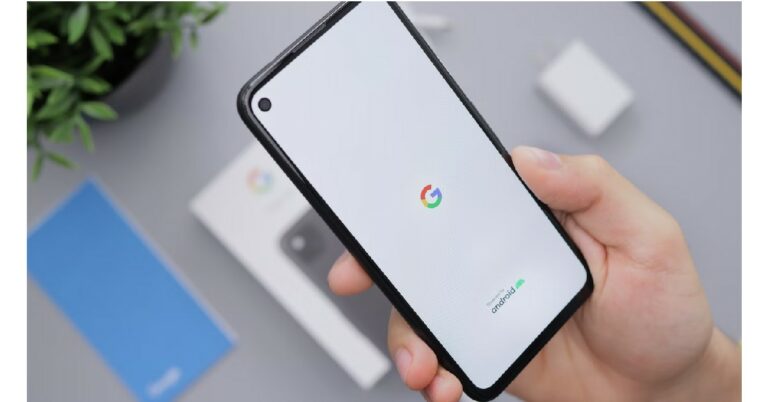
 Step 2: Scroll down and tap on ‘Settings for Google apps’ and select ‘Search, Assistant, and Voice’.
 Step 3: Tap on ‘Voice’ and from the following window select ‘Voice Match’.
 Step 4: Turn the toggle bar for ‘Hey Google’ off.
 The voice assistant commands on your phone will be turned off. Your smartphone will not use the microphone at all times to scan for those keywords.
 Step 2: Select Android Auto.
 Step 3: Tap on ‘Hey Google’ detection and turn the toggle bar off for ‘While driving’.

 Step 2: Scroll down and select ‘Google’.
 Step 3: Tap on ‘Permissions’.
 Step 4: Under the ‘Allowed’ section, tap on ‘Microphone’ and select ‘Don’t Allow’.
 Google will not be able to access your smartphone’s microphone.
 Step 4: Turn the toggle bar off for Google Assistant in order to disable it.
 If you do not wish to turn off Google Assistant, you can simply change the preferred input from voice to keyboard.
Read Also: Google Pixel 7 Vs iPhone 14: Battle between Android Vs iOS
If you do not wish to turn off Google Assistant, you can simply change the preferred input from voice to keyboard.
Read Also: Google Pixel 7 Vs iPhone 14: Battle between Android Vs iOS


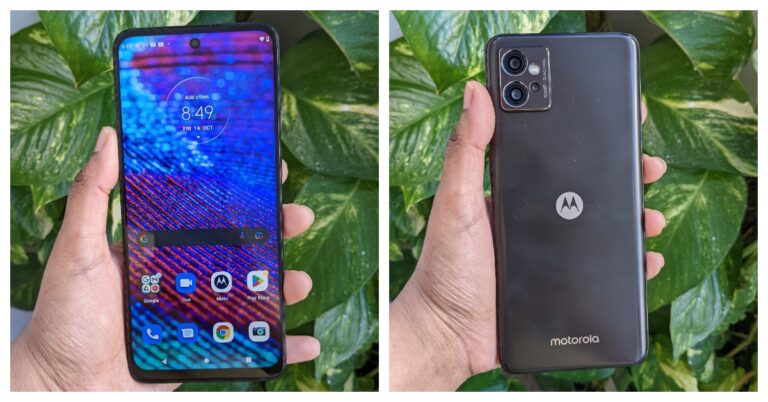
 The phone’s size is quite ergonomic and somebody with little hands won’t have any issues with the way the weight is distributed. Our fingers landed flawlessly on the phone’s side-mounted fingerprint sensor, but the sensor itself is a little sluggish. Along with a volume rocker, the fingerprint scanner also serves as the power button.
 The tactile sensation on the buttons is also good. Unlike the left side, which contains a dual SIM slot (can house 2 SIM cards and a micro-USB card to expand memory up to 1TB). A microphone is located on the top frame, while a 3.5mm headphone jack, microphone, USB Type-C port, and speaker grille are located on the bottom border.
 Additionally, the Moto G32 has an IP52 rating for water and dust resistance, so external protection is also taken care of.
On the head, edges, and chin of the phone’s front are thin bezels, while the bottom bezel is broader. On the top of the screen is a selfie camera.
A 20:9 aspect ratio and full-HD+ resolution of 1,080 by 2,400 pixels are present on its 6.5-inch LCD display. The screen refreshes at a speed of 90Hz, and touch input occurs at a rate of 180Hz. During our testing, we did not observe any scratches on the screen because it is additionally protected by Panda Glass 3.
Additionally, the Moto G32 has an IP52 rating for water and dust resistance, so external protection is also taken care of.
On the head, edges, and chin of the phone’s front are thin bezels, while the bottom bezel is broader. On the top of the screen is a selfie camera.
A 20:9 aspect ratio and full-HD+ resolution of 1,080 by 2,400 pixels are present on its 6.5-inch LCD display. The screen refreshes at a speed of 90Hz, and touch input occurs at a rate of 180Hz. During our testing, we did not observe any scratches on the screen because it is additionally protected by Panda Glass 3.
 The display offers an immersive viewing experience while watching videos and gaming. Also, the screen feels fluid and seamless thanks to the 90Hz refresh rate. The smartphone comes with support for Widevine L1 and we tested it with HD movie playback on both Amazon and Netflix. The colours seem to be a bit boosted, especially bright reds and magenta. The viewing angle is also ok but the screen’s peak brightness is capped at 600 nits so the display isn’t bright when used outdoors.
The speaker system’s audio capabilities include Dolby Atmos compatibility. However, despite the speakers being loud, the audio output is not particularly good and lacks a bit of depth.
The display offers an immersive viewing experience while watching videos and gaming. Also, the screen feels fluid and seamless thanks to the 90Hz refresh rate. The smartphone comes with support for Widevine L1 and we tested it with HD movie playback on both Amazon and Netflix. The colours seem to be a bit boosted, especially bright reds and magenta. The viewing angle is also ok but the screen’s peak brightness is capped at 600 nits so the display isn’t bright when used outdoors.
The speaker system’s audio capabilities include Dolby Atmos compatibility. However, despite the speakers being loud, the audio output is not particularly good and lacks a bit of depth.
 In terms of software, the G32 runs Android 12 out of the box, just like all current G Series devices. In order to provide a clean UI experience devoid of ads and bloatware, the firm offers Android 12 with My UX skin on top, which improves the overall experience.
Additionally, there are opportunities for customisations. On the G32 smartphone, an update to Android 13 as well as three years of security patches have been promised. Additionally, you get all the Moto-only features, like gesture functions to turn on the camera and flashlight. You also get the Thinkshield, a security layer, in addition to this.
The Moto G32 boasts a triple back camera configuration with a 50-megapixel primary camera, an 8-megapixel ultra-wide angle sensor, and a 2-megapixel macro lens. A selfie camera with a 16-megapixel resolution and an f/2.4 aperture.
The 8-megapixel super wide camera of this phone, which is unusual for a phone in this price range, is its best feature. Even a lot of top and mid-range phones lack an 8MP sensor for ultra-wide photography.
In terms of software, the G32 runs Android 12 out of the box, just like all current G Series devices. In order to provide a clean UI experience devoid of ads and bloatware, the firm offers Android 12 with My UX skin on top, which improves the overall experience.
Additionally, there are opportunities for customisations. On the G32 smartphone, an update to Android 13 as well as three years of security patches have been promised. Additionally, you get all the Moto-only features, like gesture functions to turn on the camera and flashlight. You also get the Thinkshield, a security layer, in addition to this.
The Moto G32 boasts a triple back camera configuration with a 50-megapixel primary camera, an 8-megapixel ultra-wide angle sensor, and a 2-megapixel macro lens. A selfie camera with a 16-megapixel resolution and an f/2.4 aperture.
The 8-megapixel super wide camera of this phone, which is unusual for a phone in this price range, is its best feature. Even a lot of top and mid-range phones lack an 8MP sensor for ultra-wide photography.
 Performance-wise, under favourable lighting situations, the photos taken with the primary camera offer a considerable deal of detail. Shadows were fine, and neither the highlights nor the subjects were overhyped.


 The phone’s size is quite ergonomic and somebody with little hands won’t have any issues with the way the weight is distributed. Our fingers landed flawlessly on the phone’s side-mounted fingerprint sensor, but the sensor itself is a little sluggish. Along with a volume rocker, the fingerprint scanner also serves as the power button.
 The tactile sensation on the buttons is also good. Unlike the left side, which contains a dual SIM slot (can house 2 SIM cards and a micro-USB card to expand memory up to 1TB). A microphone is located on the top frame, while a 3.5mm headphone jack, microphone, USB Type-C port, and speaker grille are located on the bottom border.
 Additionally, the Moto G32 has an IP52 rating for water and dust resistance, so external protection is also taken care of.
On the head, edges, and chin of the phone’s front are thin bezels, while the bottom bezel is broader. On the top of the screen is a selfie camera.
A 20:9 aspect ratio and full-HD+ resolution of 1,080 by 2,400 pixels are present on its 6.5-inch LCD display. The screen refreshes at a speed of 90Hz, and touch input occurs at a rate of 180Hz. During our testing, we did not observe any scratches on the screen because it is additionally protected by Panda Glass 3.
Additionally, the Moto G32 has an IP52 rating for water and dust resistance, so external protection is also taken care of.
On the head, edges, and chin of the phone’s front are thin bezels, while the bottom bezel is broader. On the top of the screen is a selfie camera.
A 20:9 aspect ratio and full-HD+ resolution of 1,080 by 2,400 pixels are present on its 6.5-inch LCD display. The screen refreshes at a speed of 90Hz, and touch input occurs at a rate of 180Hz. During our testing, we did not observe any scratches on the screen because it is additionally protected by Panda Glass 3.
 The display offers an immersive viewing experience while watching videos and gaming. Also, the screen feels fluid and seamless thanks to the 90Hz refresh rate. The smartphone comes with support for Widevine L1 and we tested it with HD movie playback on both Amazon and Netflix. The colours seem to be a bit boosted, especially bright reds and magenta. The viewing angle is also ok but the screen’s peak brightness is capped at 600 nits so the display isn’t bright when used outdoors.
The speaker system’s audio capabilities include Dolby Atmos compatibility. However, despite the speakers being loud, the audio output is not particularly good and lacks a bit of depth.
The display offers an immersive viewing experience while watching videos and gaming. Also, the screen feels fluid and seamless thanks to the 90Hz refresh rate. The smartphone comes with support for Widevine L1 and we tested it with HD movie playback on both Amazon and Netflix. The colours seem to be a bit boosted, especially bright reds and magenta. The viewing angle is also ok but the screen’s peak brightness is capped at 600 nits so the display isn’t bright when used outdoors.
The speaker system’s audio capabilities include Dolby Atmos compatibility. However, despite the speakers being loud, the audio output is not particularly good and lacks a bit of depth.
 In terms of software, the G32 runs Android 12 out of the box, just like all current G Series devices. In order to provide a clean UI experience devoid of ads and bloatware, the firm offers Android 12 with My UX skin on top, which improves the overall experience.
Additionally, there are opportunities for customisations. On the G32 smartphone, an update to Android 13 as well as three years of security patches have been promised. Additionally, you get all the Moto-only features, like gesture functions to turn on the camera and flashlight. You also get the Thinkshield, a security layer, in addition to this.
The Moto G32 boasts a triple back camera configuration with a 50-megapixel primary camera, an 8-megapixel ultra-wide angle sensor, and a 2-megapixel macro lens. A selfie camera with a 16-megapixel resolution and an f/2.4 aperture.
The 8-megapixel super wide camera of this phone, which is unusual for a phone in this price range, is its best feature. Even a lot of top and mid-range phones lack an 8MP sensor for ultra-wide photography.
In terms of software, the G32 runs Android 12 out of the box, just like all current G Series devices. In order to provide a clean UI experience devoid of ads and bloatware, the firm offers Android 12 with My UX skin on top, which improves the overall experience.
Additionally, there are opportunities for customisations. On the G32 smartphone, an update to Android 13 as well as three years of security patches have been promised. Additionally, you get all the Moto-only features, like gesture functions to turn on the camera and flashlight. You also get the Thinkshield, a security layer, in addition to this.
The Moto G32 boasts a triple back camera configuration with a 50-megapixel primary camera, an 8-megapixel ultra-wide angle sensor, and a 2-megapixel macro lens. A selfie camera with a 16-megapixel resolution and an f/2.4 aperture.
The 8-megapixel super wide camera of this phone, which is unusual for a phone in this price range, is its best feature. Even a lot of top and mid-range phones lack an 8MP sensor for ultra-wide photography.
 Performance-wise, under favourable lighting situations, the photos taken with the primary camera offer a considerable deal of detail. Shadows were fine, and neither the highlights nor the subjects were overhyped.






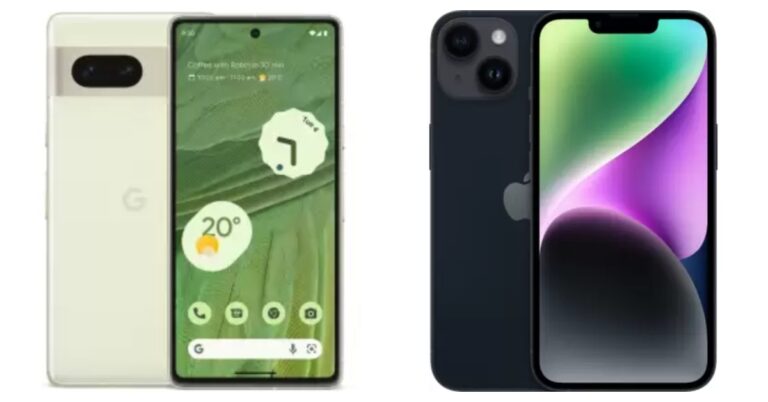
 Step 2: Hit the hamburger menu at the top right corner of the screen.
Step 3: Select Settings and privacy.
Step 2: Hit the hamburger menu at the top right corner of the screen.
Step 3: Select Settings and privacy.
 Step 4: Tap on Data usage and media quality.
 If you took an image from your DSLR or mirrorless camera and want to upload it to Instagram using your smartphone, make sure there is no loss in quality while transferring the image from your camera to your phone. Conversely, you need to ensure the quality of the image remains intact when you’re uploading an image to Instagram from your computer. AirDrop, Google Drive, and Dropbox will not reduce the quality of your image while transferring it to another device. However, WhatsApp and other messengers are notorious for downscaling the images you send through them.
 Step 2: Scroll down and turn the toggle switch off for High efficiency pictures.

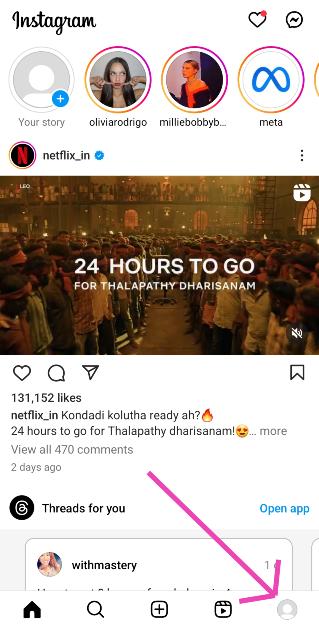 Step 2: Hit the hamburger menu at the top right corner of the screen.
Step 3: Select Settings and privacy.
Step 2: Hit the hamburger menu at the top right corner of the screen.
Step 3: Select Settings and privacy.
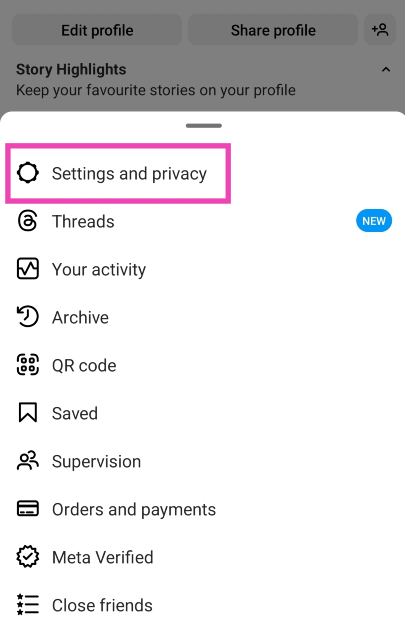 Step 4: Tap on Data usage and media quality.
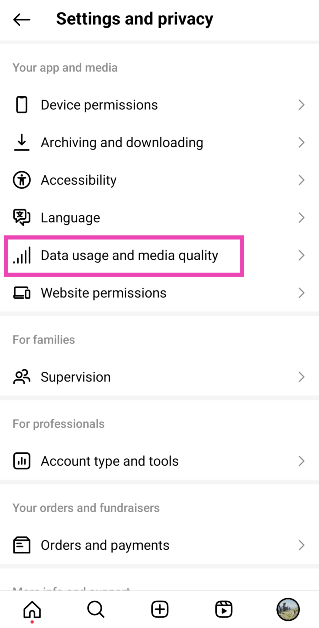 Step 5: Turn on the toggle switch for Upload at highest quality.
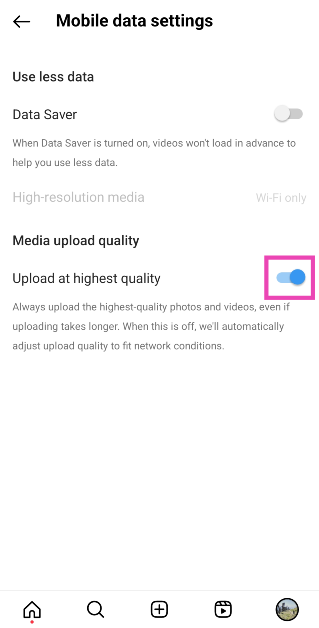
 If you took an image from your DSLR or mirrorless camera and want to upload it to Instagram using your smartphone, make sure there is no loss in quality while transferring the image from your camera to your phone. Conversely, you need to ensure the quality of the image remains intact when you’re uploading an image to Instagram from your computer. AirDrop, Google Drive, and Dropbox will not reduce the quality of your image while transferring it to another device. However, WhatsApp and other messengers are notorious for downscaling the images you send through them.
 Your smartphone’s default camera app is the best way to take highly detailed pictures. The native camera app is familiar with the hardware of the phone and is designed to make the most out of it. The in-built camera in the Instagram app doesn’t take the best quality pictures and often downscales the image while processing it. Use the native camera app to take the pictures and resize them later according to Instagram’s guidelines.
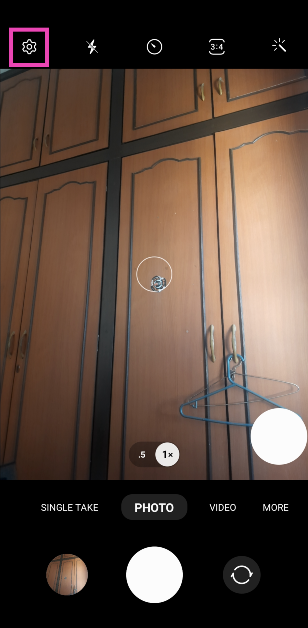 Step 2: Scroll down and turn the toggle switch off for High efficiency pictures.
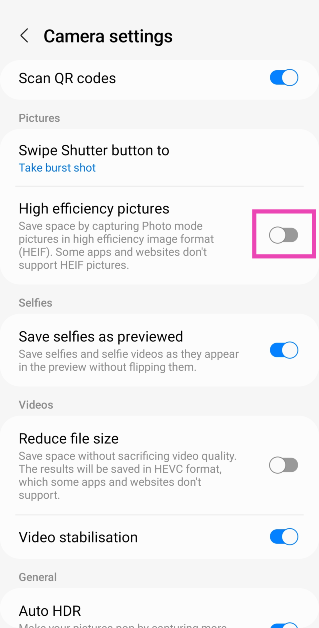
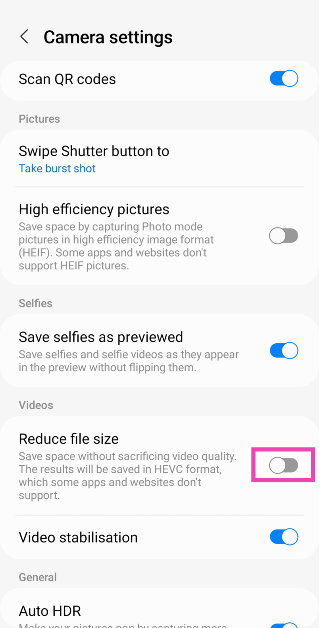
 If your videos are of ultra-high quality, chances are Instagram will compress them before uploading. It is better to compress them yourself and have more control over how the output looks. Instagram usually compresses the videos more than required and it causes a severe drop in quality. There are a large number of software and online tools you can use to compress your video.

 With a camera unit that rivals that of the iPhone 14, you will want a photo editing app that takes the images taken by your Google Pixel 7 Pro to the next level. Google’s very own Snapseed app works wonders on the Google Pixel 7 and 7 Pro. With Snapseed, you get a complete photo editor. The app boasts 29 tools and filters including healing, brush, structure, HDR and perspective. While the Pixel has a decent built-in photo editor, Snapseed offers users more control over how the images look. What’s better is that Snapseed is free to download from the Google Play Store.
 While we’re talking about the Google Pixel 7’s superior camera unit, we cannot miss out on one of the best camera apps around. The Manual Camera app costs Rs 330, but if you’re a serious photographer that wants to get the most out of your Pixel’s camera, we suggest you go for it. Manual Camera allows you to have total control over your phone’s camera, giving you the option to control the ISO, shutter speed, exposure, manual focus, and other features. There’s also a Manual Camera Lite app that you can download on the Google Play Store for free.
 The punch hole cutout for the front camera on the Google Pixel 7 and 7 Pro opens up all sorts of possibilities for fun apps. The Energy Ring app displays a coloured ring around the front camera which also acts as the battery level indicator. When your phone is fully charged, the ring will fully wrap around the front camera. As the battery level goes down, the ring shrinks and changes colour. You can also change the thickness, animation, and colour of the ring as well.
 Get more control over how your Pixel’s home screen looks and behaves with the Nova Launcher. If you’re not a fan of the standard stock Android experience, use the Nova Launcher to make changes to the icon themes and app drawer. Some users often complain about the Google Pixel lacking the ‘double tap to lock screen feature’, which is one of the most used gestures in most Android phones. With Nova Launcher you can assign various actions to gestures, including double tapping to lock the screen. The more you dive into this app, the greater the possibilities will be.
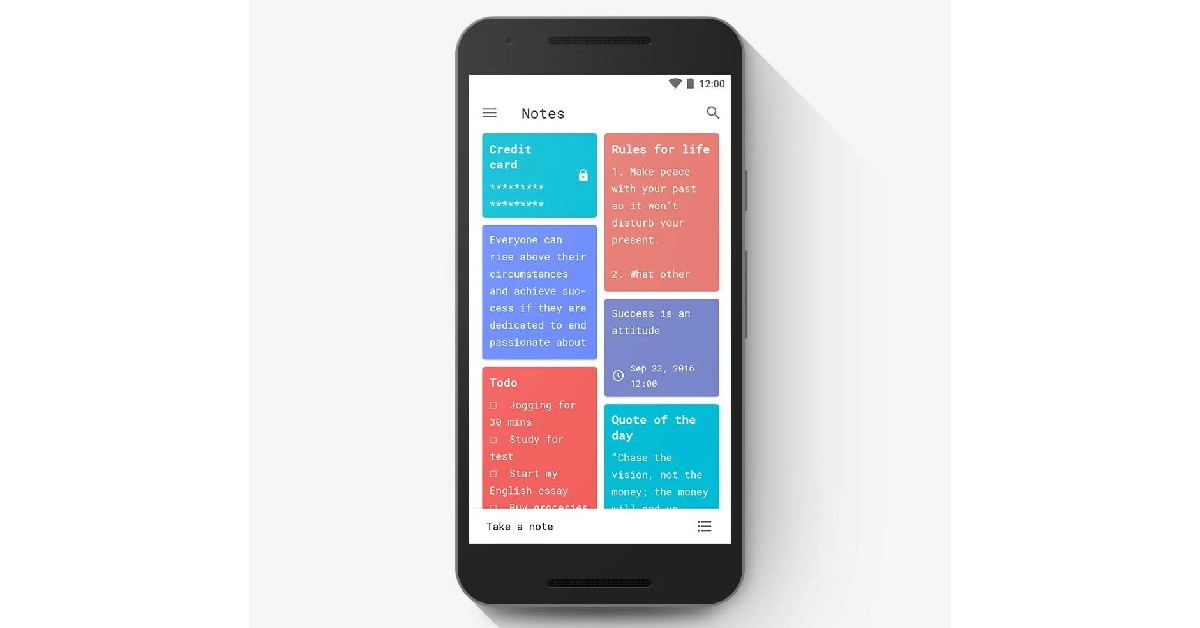 Your Google Pixel 7 comes with Google’s Keep Notes app, which works fine for the most part. But if your daily tasks involve taking a lot of notes, you’ll need an app that makes it easy to organise and access them. Material Notes is one of the best note apps around. One of the unique features of this app is that it allows you to assign colours to your notes, which makes it easy to sort through them. The overall aesthetics are enhanced further with the option to choose from multiple fonts. You can even add notes to your home screen as widgets and use a PIN to keep your notes safe.
 With the Google Tensor G2 Octa Core processor and Mali G-710 MC10 GPU, your Google Pixel 7 Pro is well equipped to handle any graphically demanding games. Apex Legends Mobile, one of the heaviest smartphone games around, will run on your Google Pixel 7 without any hiccups. If you’re a fan of battle royale shooters, it doesn’t get any better than Apex Legends Mobile. The game features legendary character-based gameplay, best-in-class squad battles, and fast-paced combat.
 Pocket has been around for a while and has featured on many lists like this. But the ease of reading and supplementary features that this app offers puts it heads and shoulders above its rivals. At a time when the influx of information is at an all-time high, it can get quite complicated to compile what you want to read from across the web. Pocket makes this task simpler by giving you the option to save articles, webpages, videos, and even Twitter threads in the app. Pocket’s inbuilt reader cuts all the clutter and provides a clean reading experience. An easy pick for the top 10 apps for Google Pixel 7 and 7 Pro.
 If you’re conscious of your privacy while browsing the internet, there aren’t many browsers that can provide the safety that DuckDuckGo does. DuckDuckGo prioritises your privacy and data safety over everything else. Tired of being bombarded by personalised ads across the internet? DuckDuckGo restricts any unnecessary tracker cookies by default and makes sure that your online activity is as private as possible. You can also clear all browsing data with just one tap.
 With over 100 million+ downloads on Google Play Store, Zedge is one of the most popular Android apps around. Zedge is the go-to app for finding the best wallpapers, ringtones, alarm tones, and stickers absolutely free of cost. Zedge’s vast library also consists of full HD and 4k wallpapers that will bring the best out of your phone’s home screen. Need a cool new unique ringtone? Zedge has got you covered.
 Closing out this list is Podcast Addict, one of the highly-rated podcast apps for Android. The app gives a platform to over 5 million podcasts and 100 million+ episodes. The smooth UI makes it easy to browse podcasts by category, network, and popularity. You can also manage multiple channels like YouTube and Soundcloud from this app. Coming to playback, the podcast player offered by this app lets you control the audio speed and even skip the silences. Making playlists on Podcast Addict is a simple process and you can even set a sleep timer to automatically turn off a podcast after a certain period of time.
Read Also: Google Pixel Fold likely to launch in Q1 of 2023
Closing out this list is Podcast Addict, one of the highly-rated podcast apps for Android. The app gives a platform to over 5 million podcasts and 100 million+ episodes. The smooth UI makes it easy to browse podcasts by category, network, and popularity. You can also manage multiple channels like YouTube and Soundcloud from this app. Coming to playback, the podcast player offered by this app lets you control the audio speed and even skip the silences. Making playlists on Podcast Addict is a simple process and you can even set a sleep timer to automatically turn off a podcast after a certain period of time.
Read Also: Google Pixel Fold likely to launch in Q1 of 2023