Garena Free Fire is a battle royale game with regular awards and tournaments to keep players interested. If you play Garena Free Fire, you should be aware of the redeem codes that are released on a daily basis. However, because the battle royale game is banned in India, players from other countries can use the Free Fire Redeem codes daily. If you’re unfamiliar with the Garena Free Fire redeem codes or don’t know how to get them, we’ve put together a step-by-step guide to help you redeem them. Check out Garena Free Fire Redeem Codes for 28 February 2023.The Free Fire redeem codes are a great way to get free stuff. These are 12-digit codes that contain alphabets and numbers, as well as an expiration date and time. Because the Garena FF redeem codes cannot be used more than once, you should hurry to the redemption page to claim your free reward before someone else does. To get a free reward, all you have to do is go to reward.ff.garena.com/en, which is the official redemption page. Also, keep an eye on this space for daily updates on Garena Free Fire redemption codes and rewards.
In This Article
Garena Free Fire Redeem Codes Today 28 February 2023
ZZZ76NT3PDSH
EYH2W3XK8UPG
FFCMCPSUYUY7E
NPYFATT3HGSQ
J3ZKQ57Z2P2P
FFDBGQWPNHJX
TDK4JWN6RD6
4TPQRDQJHVP4
GCNVA2PDRGRZ
XFW4Z6Q882WY
HFNSJ6W74Z48
HHNAT6VKQ9R7
2FG94YCW9VMV
4ST1ZTBE2RP9
8F3QZKNTLWBZ
V44ZZ5YY7CBS
WD2ATK3ZEA55
E2F86ZREMK49
B3G7A22TWDR7X
MCPW3D28VZD6
FFCMCPSGC9XZ
FFCMCPSEN5MX
MCPW2D2WKWF2
V427K98RUCHZ
MCPW2D1U3XA3
FFCMCPSJ99S3
6KWMFJVMQQYG
BR43FMAPYEZZ
UVX9PYZV54AC
XZJZE25WEFJJ
HNC95435FAGJ
X99TK56XDJ4X
FF7MUY4ME6SC
WEYVGQC3CT8Q
3IBBMSL7AK8G
How to Get Free Fire Redeem Codes for Garena on 28 February 2023?
28 February 2023 Amazon Quiz has gone live. Customers from different parts of the country are participating in the daily quiz. The quiz begins from 12 AM to 11:59 PM. Those participating in the quiz can win exciting prizes by answering all the questions correctly. Today participants have a chance to win a Rs 5,000 Amazon Pay Balance.Amazon quiz brings an opportunity for its customers to win Amazon Pay Balance ranging from Rs 1,000 to Rs 50,000. The Quiz can be played from 12 AM to 11:59 PM. The e-commerce platform brings a fresh quiz on a daily basis which consists of five questions related to general knowledge and current affairs. The participants need to answer all the questions correctly and their names will be selected for a lucky draw. The winner will be announced at the end of the month.One wrong answer could eliminate you from the quiz. If you manage to answer all the questions correctly you can stand a chance to win a Rs 5,000 Amazon Pay Balance today. Only app users are eligible to participate in the Quiz. Check Out 28 February 2023 Amazon Quiz Answers.Amazon Quiz Today Prize – Rs 5,000 Amazon Pay BalanceQuiz Date – 28 February 2023Daily Timing – 12 AM to 11:59 PMWinner Announcement – Today 12 PM
In This Article
Amazon Quiz Answers Today 28 February 2023
Question 1: In February 2023, who became the fifth Indian cricketer to smash a hundred in all three formats in international cricket?
Answer: Shubman Gill
Question 2: Sam Altman is the current CEO of which famous research lab?
Answer: OpenAI
Question 3: What did Oxford-based Tokamak Energy recently announce that they have built, claiming it to be the world’s first “super” one?
Answer: MagnetsQuestion 4: What is this animal’s main predator?
Answer: LionQuestion 5: In the disney movie with this animal in its name, the main character grows up alongside a meerkat and what animal?Answer: Warthog
How To Play Amazon Quiz
Only app users are eligible to play the Amazon quiz every morning from 12 AM to 11:59 PM. The quiz is not available on the desktop. For those who are unaware of how to play the Amazon quiz below are the steps, you can follow to take the quiz.
Firstly download the Amazon app from Google Play Store or App Store
Now fill in the required information through the Sign Up option.
You need to log in to the Amazon app and scroll down on the home screen to find the Amazon Quiz banner.
Tap on the Amazon Quiz banner and tap on the Start button to start the Quiz.
Now you will get 5 questions and you need to answer them correctly. One wrong answer will eliminate you from the Quiz.
After answering all the questions correctly you are now eligible for a Lucky Draw.
The winner’s name will be announced today at 12 PM.
Emoticons and emojis may sound like they mean the same thing but they are very different from each other. While they both may be used to express the tone and emotion of your texts, the symbols used to do so are entirely different. Emojis are animated faces that you can find on any onscreen keyboard you use on your phone. Some apps come with their own exclusive emojis. Meanwhile, emoticons are made up using alphabets and punctuation marks. This makes ‘:)’ an emoticon instead of an emoji. While emojis are definitely the norm these days, most people still prefer sending emoticons. Discord is notorious for automatically turning emoticons into emojis. In this article, we bring you the top ways to turn off Auto Emoji on Discord using the mobile app and PC website.Read Also: LG introduces a new 2023 Soundbar range in India
In This Article
Turn off Auto Emoji on Discord using your PC
Here’s how you can turn off Auto Emojis using Discord’s web portal on PC.Step 1: Log in to Discord using your web browser.Step 2: Click on the gear icon to access settings.Step 3: Select ‘Text and Images’ from the menu on the left and turn the toggle bar off for ‘Automatically convert emoticons in your messages to emojis’.
Turn off Auto Emoji on Discord using your mobile
While there is no option to turn off auto emojis on the Discord mobile app, there is still a way to avoid sending them. While typing out an emoticon, simply add a backslash (\) before it in order to keep it from turning into an emoji. For example, if you want to send the :s emoticon, type \:s and hit send. This way it won’t turn into the ‘confused’ emoji automatically. You will need access to a PC in order to turn off Auto Emoji on the Discord app. The changes you make to your Discord account settings on PC are synced to the Discord app as well. However, if you don’t have access to a PC, you can open Discord’s desktop site on the Chrome browser app on your smartphone and carry out the process explained in the previous method to turn off Auto Emojis.Read Also: Smartphone versions of Microsoft Bing, Edge, and Skype now include AI Chatbot capabilities
Finding technology items that honour God and His Kingdom is not always easy, especially when you want to give them away as gifts. But it won’t be an issue anymore with this detailed list. From faith-filled music players to Bible apps, these technology gifts will inspire recipients to stay connected with Jesus while living life in the digital world. Here are 15 great tech gifts for any Christian—each of them perfect for celebrating God’s love and grace during the holiday seasons and beyond. So get ready to shop and plan your budget immediately. The suggestions below of great ideas for technology gifts will make any Christian proud to use and grateful to receive!
In This Article
1. Preloaded MP3 Player with Christian Music:
A preloaded MP3 Player with Christian music is the perfect way to give a loved one a profound gift meaningfully. This convenient and affordable electronic gadget provides moments of soul-fulfilling worship in a modern, portable package. This device features popular gospel tunes and other Christian music. It is ideal for anyone’s mind and spirit seeking to be lifted by the power of Jesus’ words through appealing worship tunes. Also, its reasonable price makes it an attractive choice for any budget, while the bonus of its digital catalogue of Christian music serves as a steady source of spiritual nourishment. This meaningful Christian gift is wonderful for many occasions, so gifting a preloaded MP3 Player with spiritual music could be the ideal solution that’s sure to bring peace and joy no matter where life takes your loved ones!
2. Christian-themed Mouse Pad:
The Christian Mouse Pad is the perfect gift for any Christian home or office. It has plenty of printing and decorated designs, such as Bible verses in shimmering glitter or Christianity symbols like Jesus, angels, doves, shepherds, lambs, crosses, crucifixes, etc. These kinds of Christian-inspired mouse pad serves as a beautiful reminder of faith and hope, especially the ones with nature backgrounds. It is also equipped with a durable non-slip rubber base to minimize slipping and for the user to slide it anywhere they want. It would make an excellent desk accessory that is both comfortable and stylish. Whether for home offices, corporate offices, or even just as a novelty item, this Christian Mouse Pad will ignite faith within the user and is guaranteed a delighted recipient when you gift it.
3. Laptop with Christian Stickers:
Light up your favourite recipient’s office with a helpful laptop that is creatively decorated with elegant Christian Stickers! A laptop adorned with Christian symbols, icons, and Bible verses in the form of cute stickers can serve as a powerful visual representation of one’s faith. The stickers, which may include quotes, symbols, or images related to Christianity, can be placed on the laptop cover or keyboard to remind the owner and those around them of their beliefs. It can also serve as a conversation starter or an opportunity to share one’s faith with others. In a world where technology has become a universal part of our lives, a laptop with Christian stickers can be a simple yet effective way to express one’s identity and values. Thus, this laptop with be a powerful reminder of how one can use technology to share the Christian faith while utilizing its practical function.
>>>There are many samples of Christian stickers from reputable stores like PrinteeAZ; you can visit there to choose Christian stickers set for yourself.
About PrinteeAZ: It is a store specializing in selling POD products. Although it is a new brand, it has a good reputation with many customers. Each design printed on their products always brings a meaningful message to the buyer.
4. Christian Gifts Idea “He Died So that We May Live” Portable Battery Charger:
Another practical gift for your Christian or religious tech geek is the “He Died So That We May Live” Portable Battery Charger. Keep their phone powered up and never worry about being stranded with a dead battery again. This elegantly designed charger comes in a lightweight silver painting coat. It features a beautiful matte paint layer that gives extra protection from tears or physical forces, as it bends the material instead of being broken on impact. The bright painting layer helps the black lettering of “He Died So That We May Live” be prominent, which indeed makes a solid statement of faith! Plus, you can rest easy knowing that it was manufactured in compliance with strict safety standards. With its convenient size and slim body, this phone charger is sure to keep your favourite techie having a backup power source ready anytime, anywhere!
5. Christian Video Games:
Give the gift of technology that blends faith and fun together with Christian-themed video games. This gaming set includes a selection of family-friendly games created by top developers featuring incredible graphics, puzzles, and adventure elements based on Biblical stories or Christianity characters, such as Spiritual Warfare, Left Behind: Eternal Forces, Bible Builder, The Bible Game, and more. With an array of game genres to pick from—from action-packed adventures to immersive puzzle games—your Christian techie can explore the word of Jesus Christ or the lessons from the Bible from a different perspective. Additionally, these come with parental control settings for even more security and comfort, making them suitable for all ages. So give your technology-loving friend or family member something unique that will entertain them while still being rooted in faith.
6. Pink Faith It Mobile Tech Ring Stand:
A mini version of a religious symbol in your pocket, literally! The “Pink Faith” mobile tech ring with Bible verses of faith is a simple and stylish accessory that acts like your phone’s stand on flat surfaces. Crafted with premium stainless steel, the ring offers durable protection and allows for a secure grip to carry any device safely. It also protects against drops and falls while you put it on the table. The pink glossy finish adds a classy touch without too many texture details. Solid glue employs a secure fit to keep your accessories safe and sound and hold on to the back of the phone for a long time. The ring is also adjustable because the rotation is designed in two directions: 360° on itself and 180° relative to its axis. That way, your favourite Christian can twist the ring at will and place the phone in whatever position they prefer. Whether a person is religious or not, this unique and stylish ring is ideal for anyone looking to protect their mobile devices.
7. Jesus Bible Verse Cross Christian Phone Case:
Christian phone cases are a great Christian gift for yourself or some Christian tech geek when you need to be more precise about IT trends. This “Jesus Bible Verse Cross” Christian phone case features a durable print on a bright sunset background, while the white lettering of Bible verse from Phil. 4:13 stands in front of the image. The design also includes a low-opacity cross icon, making it the perfect Christian technological accessory. The case is made of silicone rubber to ensure the phone is well-protected all around the edges while being dressed in a Christian fashion. Pick up this Christian phone case today to help your tech-geek friend enjoy a unique Christian accessory with a beautiful design that will stand out among all other devices!
8. Bluetooth Speakers with Christian Cross:
Bluetooth Speakers with Christian Cross is an excellent option for adding a touch of faith and style to any apartment, backyard, or picnic setting. Featuring a sleek and modern design, it allows your recipient to enjoy the crystal-clear sound of their favourite tracks, programs, or podcasts without the hassle of wires. These speakers can provide entertainment indoors or out with great battery power, built-in wireless capabilities, and ultra-portable structure. This pair of Bluetooth Speakers with Christian Cross as gifts will give your Christian tech-enthusiast an optimal sonic experience that will elevate any gathering they attend.
9. Headphones Emblazoned with Bible Verses and Jesus:
If your recipient is not a fan of loud and spacious items that potentially disturb the neighbourhood or just wants to enjoy some time off with soft and musical tunes to find their inner peace; in that case, there are the latest Christian-themed headphones that hit the market for you to pick as a gift. It features full-range audio spectrums and noise reduction for optimal sound quality without external distractions. Not only are these headphones project powerful and clear sound, but they also boast an aesthetically pleasing and unique Christian-themed twist with Bible quotes embossed on their ear caps. With built-in microphones and comfortable ear cushions, this product provides a professional and private listening experience for people of faith. Whether your techie is listening to their favourite Christian music, praying along to the music, or taking calls, these headphones are sure to impact the receivers spiritually and sonically!
10. USB Flash Drives Preloaded with Faith-Filled Content:
USB Flash Drives are a great tool to store and transport data, but they can also bring faith and spirituality into everyday life. These USB Flash Drives preloaded with faith-filled content are an incredibly convenient way to keep Christian themes and lessons close at hand. These flash drives come with custom Christian wallpaper and PDF files of the Bible, Scriptures, or other scans of Christian books within the folders of the flash drives. Additionally, they can include audio worship music so users can easily listen in their car or on their computer at work, with a USB Flash Drive full of religious content. In the end, any Christian or tech geeks can have everything they need to stay spiritually connected throughout their busy days in one handy location.
11. Virtual Reality Headset with 360° Holy Bible Stories:
Witnessing Bible stories come to life in breathtaking 360° virtual reality can be an inspiring and powerful Christian experience. Using innovative technology, your dear Christians can now immerse themselves in Bible stories using the latest Virtual Reality Headset with Holy Bible Stories running in a 360° perspective in the digital world. From the comfort of their own home, direct witnesses to Christian stories—from David slaying Goliath to the soothing voice of a nativity tale—can gain a unique viewpoint and feel inspired by these timeless Christian-themed game walkthroughs. It’s incredible what kind of magical adventure this next-gen VR technology can bring to all Christians today!
12. “Keep It Holy” Christian Quotes as Keycap of Mechanical Keyboard:
Looking to decorate your Christian’s computer keyboard in a unique way? The “Keep It Holy” Christian Quotes Keycap Mechanical Keyboard offers the perfect solution. Constructed with Oil-Resistant PBT Keycaps, this mechanical keyboard is not only equipped with an eye-catching design but also boasts an incredibly durable finish that makes it resistant to almost all oil products and lessens the amount of grime and dust buildup over time, meaning the Bible print won’t fade or chip away with many uses or typing forces and will be cleaned quickly with a regular wet cloth. With its high-quality construction and timeless quotes from the Bible, the “Keep It Holy” Christian Keycaps will assist its user in decorating their keyboard and workspace in a meaningful way!
13. Portable Christian Projector:
A Portable Christian Projector is the perfect tool for those technology-savvy Christians looking for something to show off their faith and dedication. This projector has a library of Bible stories, worship songs, and sermons preloaded so they can project it anywhere. It also has an LED lamp that provides bright, vivid images and videos without a screen. It connects to almost any device via HDMI/USB, so they can also show off their favorite movies or play games with ease while being engaged in faith-filled content. With this projector, technology lovers and Jesus believers can experience the stories of Christianity anywhere they go. Consider getting the Portable Christian Projector for your tech-savvy Christian friend so they can nurture their religion quickly and thoroughly in its full glory anytime, anywhere.
14. Smartwatch Compatible Band with Bible Verse:
Smartwatches have become increasingly popular and the latest innovation in wearable technology that gives us access to staying connected, tracking fitness, and so much more. For those looking to bring spirituality into their tech lifestyle, “Smartwatch Compatible Bands” with Bible Verses will provide an additional dimension of faith. Their laser-engraved rubber bands are made from a sturdy yet flexible material that offers maximum security and comfort for all-day wear while at the same time nurturing your belief with daily words of wisdom. Additionally, each band will have printed or heat-engraved Christianity icons that are stylish and refined—a gift perfect for giving away on any occasion. With “Smartwatch Compatible Bands” with your recipient’s favorite Bible Verses, you can help your dear Christian easily find subtle ways to nurture their beliefs and maintain a spiritual lifestyle even when they are away from home.
15. Talking Bible – Electronic Holy Bible Audio Player in English:
The Talking Bible, an electronic Holy Bible audio player in English, is the perfect technology gift for any Christian interested in tech and digital devices without knowing deeply about the IT field. This device offers an incredible experience of listening to the whole Bible with the push of a button. It provides easy access to the Bible in both audio and digital text formats, enabling users to search and find their favourite verses easily. The Talking Bible Audio Player also features a built-in speaker, volume control, backlight technology, and multiple other features that will surely bring enjoyment to any Christian, such as the elderly, children, people with dyslexia, the physically disabled, or the visually impaired. Listening to God’s lessons and encouragement will lift any spirit and give the users more strength to overcome obstacles and hardships.
>>>>Buying POD products to gift someone is trending, so if you want a gift for a Christian who loves technology, these items are a great idea. For example, you can buy a Jesus shirt with a quote on the topic of technology or a package of Christian stickers used to stick on technology items, etc. Check out more Christian gifts at: Printeeaz.
Modern technology can be a great way to help Christians stay connected with Jesus and His teachings—thus, making these items fantastic gifting choices. By choosing digital devices and products such as music players preloaded with Christian music, smartphone cases with Scripture quotes, computer accessories or keyboards with Christian themes, portable chargers printed with faith-filled designs, Bluetooth speakers that feature inspirational quotes, and more, you can help bring technology into your Christian friend or family member’s life with a memorable and meaningful touch. And again, these presents can be used to celebrate God’s love during the holidays and beyond, making any Christian feel incredibly blessed. So, it is time for you to take references and search for the perfect gifts to give any Christian you know and love right away—They will appreciate your thoughtful and sweet gesture for years and years!
For the latest gadget and tech news, and gadget reviews, follow us on Twitter, Facebook and Instagram. For newest tech & gadget videos subscribe to our YouTube Channel. You can also stay up to date using the Gadget Bridge Android App. You can find the latest car and bike news here.
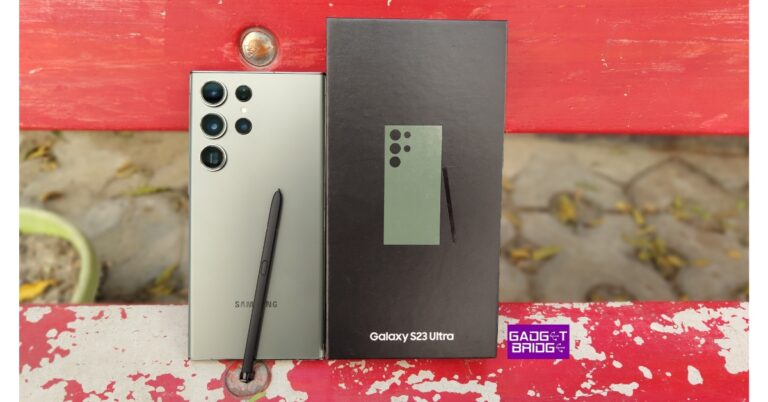
Unlike other manufacturers, Samsung has stuck with its stylus through the years. The S Pen first featured in the Note Series, and can now be found in the S23 Ultra and Galaxy Fold flagships. Digital artists prefer Samsung tablets for the seamless stylus integration. As impressive as the S Pen may be, it is pretty easy to lose it like any other accessory. In this article, we bring you the best ways to find a lost S Pen and S Pen Pro.Read Also: Smartphone versions of Microsoft Bing, Edge, and Skype now include AI Chatbot capabilities
In This Article
Before you begin: Enable offline finding
Tracking your lost S Pen with your Samsung smartphone only works if you have enabled offline finding. Here’s how you can do it.
Step 1:Launch the SmartThings app and switch to the Life tab.
Step 2: Tap on Find and hit the ellipses at the top right corner of the screen.
Step 3: Go to Settings and select Allow devices to be found.
Step 4: Turn on the toggle switch for Offline finding.
How to find S Pen Pro using the SmartThings app?
Your Samsung Galaxy Z Fold’s S Pen can be tracked pretty easily in case you leave it behind somewhere. However, it is only possible if your S Pen Pro is registered with the SmartThings app. Here’s how you can find your lost S Pen with the SmartThings app.Step 1: Launch the SmartThings app and switch to the Life tab. Tap on Find.Step 2: Select your Galaxy S Pen Pro from the list and hit Refresh.Step 3: Tap on More and select Navigate to find your way to the S Pen Pro. The map will show the location of the lost accessory. Select Blink Light on the SmartThings app once you’re near the pen. This will make it easier to spot the pen if it’s surrounded by other objects.
Find out when you last disconnected the S Pen
While you can track the exact location of the S Pen Pro, Samsung does not offer that feature on regular S Pens. However, you can find out when the Pen was last removed from your device. This will help you figure out where you may have left the S Pen. Here’s how you can find the date and time of removal. Step 1: Go to Settings and select Advanced Features.Step 2: Select S Pen.Step 3: Select More S Pen Features and look for Warn if Pen is left behind. This is where you will find the date and time when the pen was last removed.
Frequently Asked Questions (FAQs)
How do I turn on the tracking feature for my S Pen?
Go to the SmartThings app, select Life>Find>S Pen>Settings>Allow devices to be found and turn on the toggle switch for ‘Offline finding’.
How do I find my lost S Pen?
Launch the SmartThings app and go to Life>Find>S Pen>Refresh>Navigate to find your lost S Pen.
How do I find out when my S Pen was last disconnected from my device?
On your smartphone, go to Settings>Advanced features>S Pen>More S Pen Settings and see the time your S Pen was last removed under the ‘Warn if S Pen is left behind’ option.
Read Also: Top 10 hidden features in iOS 16
Conclusion
These are the two best ways to find a lost S Pen or S Pen Pro. In order to safeguard your S Pen, make sure you turn on the alert for when the S Pen is left behind. Go to Advanced Settings on your Samsung smartphone to turn it on. This feature will notify you whenever you stray too far from your S Pen.
Microsoft Teams is one of the most popular clients for online meetings out there. Some users may even prefer Microsoft Teams to Zoom and Google Meet because of its unique features like different chat channels for different groups and allowing meeting organisers to record the meeting in HD. While these are some helpful features, Microsoft Teams has its own quirks as well. Many users aren’t fond of the meeting client flipping their video and background by default. In this article, we bring you the top ways to flip or unmirror your video or background image in Microsoft Teams.Read Also:Top 10 hidden features in iOS 16
In This Article
Unmirror your video feed before joining the meeting
Step 1: Click on the gear icon in the preview window.Step 2: In the ‘Device Settings’ menu, turn off the toggle bar for ‘Mirror my video’.Step 3: Close the Device Settings menu and join the meeting.
Unmirror your video feed after joining the meeting
Forgot to flip your video before joining the meeting? Don’t worry about it. Microsoft Teams allows you to flip your camera feed while the meeting is going on. Here’s how.Step 1: Click on the ellipses (three dots) at the top of the screen.Step 2: Click on ‘Device settings’.Step 3: Turn the toggle bar off for ‘Mirror my video’.Step 4: Close the Device settings panel.Your video feed will be flipped.
Flip the background image in Microsoft Teams
If your background image on Microsoft Teams contains some text, you may want to flip it before joining the meeting. By default, Microsoft Teams mirrors your background image, making it hard for other members to read the text on it. Since there is no way to flip the background image on Microsoft Teams, you can use your PC’s default photo viewer to flip the image before uploading it as your background on Teams. Since the image will be mirrored again when you join the meeting, all the participants will be able to see the original unflipped image as your background.
Use a third-party app
Another quick way of flipping your video feed on Microsoft Teams is by using third-party webcam software. Apps like Manycam, Bandicam, and YouCam will help you accomplish this task. While joining a meeting, click on the camera tab and select the third-party webcam app. If you are already in a meeting, go to settings and switch the video input to the third-party app. Now, go to the app’s settings and select the option to flip your video.
Frequently Asked Questions (FAQs)
How do I unmirror my video on Microsoft Teams?
To unmirror your video feed on Microsoft Teams, hit the ellipses, select Device Settings, and turn off the toggle switch for Mirror my video.
How do I flip my background image on Microsoft Teams?
Since there is no native way to flip your background image on Microsoft Teams, you will need to do some editing on your PC beforehand. Open the image on your PC image viewer, select Edit and flip the image before putting it as your background on Microsoft Teams.
What are some good third-party webcam apps to manage my video feed on Microsoft Teams?
These are the top 4 ways to flip your video feed or background image on Microsoft Teams. If your PC’s webcam comes with its own software application, you can flip your camera footage from there as well. You can even use a third-party camera tool to flip your image, although we wouldn’t suggest it now that there’s a native feature on Teams for it.For the latest gadget and tech news, and gadget reviews, follow us on Twitter, Facebook and Instagram. For newest tech & gadget videos subscribe to our YouTube Channel. You can also stay up to date using the Gadget Bridge Android App. You can find the latest car and bike news here.
The 5G rollout in India commenced last year, and pretty soon we will be seeing the majority of the country getting access to 5G network coverage. For those that are stuck with their 4G smartphones, now would be a good time to upgrade. Earlier, we brought you our picks for the 10 best budget 5G smartphones. Now that 2023 has seen a spree of releases across different categories, we thought we’d make a much more comprehensive list of the best 5G smartphones on the market. So, without further ado, here are our picks for the best 5G smartphones you can buy right now across all price segments.Read Also: How to add a password to any file or app on Android?
In This Article
Samsung Galaxy S23 Ultra
Price: Rs 1,54,999Samsung’s flagship smartphone is always a contender for the best Android smartphone on the market. The S23 Ultra was released earlier this month and builds upon the solid foundations of the S22 while adding some additional flair of its own. The smartphone comes with a Snapdragon 8 Gen 2 SoC that has been customised for Samsung. The 6.8-inch Dynamic AMOLED 2X HDR 10+ display on the S23 Ultra is still one of the best displays you can get on any phone right now. Other than that, the S23 Ultra features a rear camera array comprising a 200MP primary lens, a 10MP telephoto + 10MP periscope telephoto lens, and a 12MP ultrawide lens.
iPhone 14 Pro
Price: Rs 1,29,900Launched last September, the iPhone 14 Pro gets some important changes across the board. The main camera sensor has been upgraded to 48MP and the notch on the display has been replaced by a pill-shaped cutout which Apple calls the ‘Dynamic Island’. This Dynamic Island acts as a notification bar for several systems and third-party apps and gives you quick access to a bunch of controls like music, navigation, and more.
OnePlus 11
Price: Rs 56,999OnePlus 11 brings back the alert slider that was missing on the OnePlus 10T. The Hasselblad collaboration is back as well, with the branding embossed in the circular camera unit. Snapdragon’s flagship SoC can be found on OnePlus 11 as well, and the smartphone comes with Android 13 out of the box with its OxygenOS 13 skin on top. You also get 100W SuperVOOC fast charging with OnePlus 11, something that Apple and Samsung’s flagships lack.
Samsung Galaxy S21 FE
Price: Rs 32,999At its current price, the Samsung Galaxy S21 FE makes a solid midrange smartphone. With this smartphone, you get Samsung’s quality AMOLED HDR10+ display with a refresh rate of 120Hz. The camera array consists of a 12MP primary shooter, 8MP telephoto, and 12MP ultrawide lens. The rear and front cameras are capable of recording 4K videos @ 30/60fps. The S21 FE also comes with wireless and reverse wireless charging, making it the perfect midrange all-rounder.
Vivo V25 Pro
Price: Rs 35,999Vivo V25 Pro was one of the more exciting releases last year, all because of its attractive pricing and the much-talked-about colour changing back. Powering the smartphone is the MediaTek 1200 SoC. The camera unit consists of a 64MP primary sensor, 8MP ultrawide, and 2MP macro lens. While a telephoto lens instead of the macro sensor would have been ideal, the 64MP primary shooter produces some stellar results. Read more about it in our review of the Vivo V25 Pro here.
iQOO Neo 7
Price: Rs 29,999The iQOO Neo 7 made its Indian debut on February 16 and is already looking to be one of the best midrange releases we will see this year. The iQOO Neo 7 is powered by MediaTek Dimensity 8200 SoC which has garnered a lot of praise over the months. Available with up to 12GB of LPDDR5 RAM and 256GB of UFS3.1 storage options, the smartphone runs on Funtouch OS 13 based on Android 13 out of the box. The Neo 7 also gets a 5,000mAh battery with 120W fast charging. We expect this smartphone to enjoy a lot of popularity among gamers this year.
Redmi Note 12 Pro+
Price: Rs 29,999The newly launched Redmi Note 12 Pro+ comes with a 200MP primary camera sensor, a first for the category. This camera can record 4K videos @ 30fps and also comes with Optical Image Stabilisation. One small drawback of the Redmi Note 12 series is that it comes with Android 12 out of the box instead of Android 13, which means it will receive one less software update compared to its competition. We reviewed the more affordable Redmi Note 12 Pro recently, you can read more about it here.
Vivo Y56
Price: Rs 19,999The newest release on this list, the Vivo Y56 was launched earlier this week at a price of Rs 19,999. While it may make its online debut in the coming days, offline retail stores have already started selling the Y56. The camera array consists of a 50MP primary shooter and a 2MP depth sensor. Powering the Y56 is the MediaTek Dimensity 700 SoC. The device comes in two colour options – Black Engine and Orange Shimmer.
Motorola Moto G71
Price: Rs 16,999The Moto G71 is one of the best 5G smartphones you can buy in the budget category. The smartphone comes with 13 5G bands and is powered by the Snapdragon 695 SoC. The rear camera unit comprises a 50MP primary lens, an 8MP ultrawide, and a 2MP macro lens. It can record videos in 1080p resolution at 30/60 fps. At the front is a 16MP selfie camera that can also record 1080p videos at 30fps.
Poco C50
Price: Rs 6,249Looking for an entry-level 5G smartphone? Poco has you covered. The Poco C50 is a perfect smartphone for those looking to upgrade to 5G without shelling out a lot of money. The smartphone is powered by MediaTek Helio A22, which is a decent SoC for entry-level smartphones. The C50 gets an 8MP primary shooter and a 0.06MP depth sensor along with a 5MP selfie camera. Read our review here.Read Also: AI-powered Magic Eraser is coming to all Pixel users and Google One Subscribers
Conclusion
These are our picks for the best 5G smartphones you can buy right now across all price segments. This year has already seen a lot of exciting releases across all categories and there are many more to come in the following months. Think we missed out on a smartphone that deserves to be on this list? Let us know in the comments!For the latest gadget and tech news, and gadget reviews, follow us on Twitter, Facebook and Instagram. For newest tech & gadget videos subscribe to our YouTube Channel. You can also stay up to date using the Gadget Bridge Android App. You can find the latest car and bike news here.
If you’ve got an app for everything then you must struggle with keeping your iPhone’s home screen clean and organised. One of the ways to manage the aesthetic of your iPhone’s home screen is by hiding the apps you use the least. This will prevent the app from showing up on the home screen without deleting it from your phone. In this article, we show you how to hide and unhide apps on an iPhone.Read Also: Lenovo announced ThinkBook Plus Gen 3 laptop in India
In This Article
Here’s how you can hide an app on your iPhone
Step 1: Locate the app you want to hide and tap and hold it until the quick menu pops up on the screen.Step 2: Select ‘Remove App’ from the menu.Step 3: In the following box select ‘Remove from home screen’. The app will not be deleted from your phone, but will no longer be visible on the home screen.Step 4: Alternatively, you can press and hold anywhere on the home screen and tap the minus icon on the app you want to hide. Select ‘Remove from home screen’ in order to hide it.Any hidden apps can be accessed by searching for them in the App Library. Here’s how you can prevent the app from showing up in search results.Step 5: Go to Settings and select ‘Siri & Search’.Step 6: Select the app in you want to prevent from showing up in search results.Step 7: Under the ‘On Home Screen’ section, turn the toggle bar off for ‘Show app in search results’.
Here’s how you can unhide an app on your iPhone
Step 1: Go to the home screen and scroll all the way to the right.Step 2: Search for the app in the search bar. If you have prevented the app from showing up in search results, go ahead and change that setting.Step 3: Once the app shows up in search results, long press it and drag it to the left. The app will be moved to the home screen.Step 4: Adjust the app’s position on the home screen by pressing and dragging it. Tap ‘Done’ once you’re done.Read Also: Samsung Galaxy S23 Ultra Review: A true flagship
LG has expanded its audio portfolio with the release of its new lineup of soundbars for 2023. The series includes the top-tier S95QR, SC9S, S75Q, S40Q, and SH7Q models. The soundbars have a centre up-firing speaker that improves speech clarity and more precisely “places” sounds in space to give movies and other media a more realistic sense.
In This Article
LG S95QR, SC9S, S75Q, S40Q, and SH7Q soundbar price and availability
The premium LG S95QR retails for Rs 1,09,990. Whereas the price of the S75Q is set at Rs 50,990, and that of the SC9S is Rs 59,990. The cost of the new LG S40Q is Rs 22,990, and that of the SH7Q is Rs 47,990. While the SC9S and SH7Q won’t be available until April 2023, the other versions are already available for purchase on the business’ website.
Features
The S95QR, the line’s top model for 2023, has an 810W output, 9.1.5 channels, and centre-firing speakers. In order to create a wide-ranging, dynamic soundscape that surrounds users and draws them deeper into the on-screen action and to further enhance the immersion of Meridian, Dolby Atmos, DTS:X, and IMAX enhanced content, LG’s top-of-the-line soundbar has a total of five up-firing channels, three of which are on the soundbar itself and two of which are in the wireless rear speakers.Also Read:Samsung Galaxy S23 Ultra Review: A true flagshipThis year’s enhanced wireless rear speakers, which have six channels instead of the four of its predecessors, are another highlight of the high-end S95QR. The S95QR’s rear speakers include triple up-firing drivers in addition to four front/side drivers, and they provide music equally over an extremely wide 135-degree angle. Users now have more placement options for speakers thanks to this improved functionality, which is especially practical for people with limited space.A more sensitive receiver, included in the S95QR and other select 2023 LG Soundbars, enables longer distances between the soundbar, subwoofer, and rear speakers without degrading audio quality.The 2023 soundbars can up-mix two-channel audio to 9.1.5 channels in Music Mode using Meridian Audio’s Horizon technology for more lifelike acoustic surround sound.With the support of IMAX Enhanced, Dolby Atmos, and DTS:X2, LG’s most recent high-end models enable moviegoers to enjoy real cinematic experiences in the comfort of their own living rooms or home theatres. LG’s soundbars now support MERIDEAN, a new feature for this year that adds a new level of aural three-dimensionality when playing compatible content.Together with a variable refresh rate (VRR) and auto low latency mode (ALLM), which flawlessly sync sound and on-screen action to increase immersion in console gaming. The finest image quality will be provided via the 4K/120Hz pass-through, which is also included.Using TV speakers, the soundbar’s WOW Orchestra feature creates a rich surround experience. For connecting external audio devices, it also has a better volume UI interface. The AI Room Calibration feature on the 2023 soundbars intelligently calibrates low-frequency performance to the room’s dimensions for the best possible sound output. In order to enhance the harmony and volume of the voice, its frequency range has been increased from 200Hz to 400Hz.
For the latest gadget and tech news, and gadget reviews, follow us on Twitter, Facebook and Instagram. For newest tech & gadget videos subscribe to our YouTube Channel. You can also stay up to date using the Gadget Bridge Android App. You can find the latest car and bike news here.
Microsoft has formally announced the release of updated smartphone preview versions of the Bing and Edge browser apps. Microsoft Skype app is also getting support for AI capabilities. Also, Bing may be added to a group chat so that users can ask queries and receive visible responses.The new Bing and Edge mobile apps’ preview release has been announced by Microsoft. The amazing capabilities of the new Bing and Edge on your smartphone are starting to roll out along with some intriguing new features, such as voice input. A new chat experience is also being developed by the business, starting with Skype, to improve social interactions with your friends and family.Also Read:AI-powered Magic Eraser is coming to all Pixel users and Google One SubscribersAlso, the business is introducing brand-new Bing and Edge mobile apps to act as your copilot for the web even when you are not on your PC. The Bing mobile app delivers a new design and experience and is currently available on iOS and Android devices. You can participate in a chat session in all the same ways as on a desktop by tapping the Bing icon at the bottom. Ask basic or difficult queries, and you’ll get responses along with citations. Select whether you want your responses to be displayed in the text, bullet points, or both. For help with your search, or to write an email, poem, or list, explore the Bing chat experience.Voice is now included in the new Bing mobile app. Voice search, which is accessible on both mobile and desktop, gives you more flexibility in how you may ask Bing questions and get its responses. Also, users of the preview will be able to access the redesigned Bing experience from the Microsoft Edge mobile app’s home page.Microsoft is also releasing Bing for Skype, which is driven by AI, to help you when you are communicating with friends and family. Some beneficial and enjoyable new scenarios and capabilities will be made possible by the new Bing.Also Read:Samsung Galaxy S23 Ultra Review: A true flagshipYou can decide whether to have your responses displayed in the text, bullet points, or as a simplified response. Your preferences can be accommodated by Bing. Bing, who speaks more than 100 languages well and can translate between them, can add something special to this instrument for international communications.The new Bing in Skype, which the company says is currently available worldwide in preview, can give you all the answers you need in a timely manner. If you’re currently using the Bing preview experience, you can use these capabilities. When testing these mobile experiences for the first few days, you could occasionally run into network problems in low-bandwidth scenarios.
For the latest gadget and tech news, and gadget reviews, follow us on Twitter, Facebook and Instagram. For newest tech & gadget videos subscribe to our YouTube Channel. You can also stay up to date using the Gadget Bridge Android App. You can find the latest car and bike news here.
Apple rolled out iOS 16 with the launch of the new iPhone 14 series last year. While iOS 16 grabbed the headlines for Always On Display and lock screen customisations, there were a lot of features that went under the radar. Some of these were a long time coming and others pleasantly surprised us with their practicality and ease of use. So, without further ado, here are the top 10 hidden features in iOS 16 that you should check out right now!Read Also: Samsung Galaxy S23 Ultra Review: A true flagship
In This Article
Remove background and copy objects from images
Earlier, you needed a third-party tool to remove the background from your images. Now, on iOS 16 you can do that with just one tap. Simply open the image on the Photos app and long-press on the object your want to isolate. Your iPhone’s software will recognise the edges of the object and extract it from the image, allowing you to paste it anywhere. You can easily create stickers and emoticons using this trick. Need to quickly save the extracted object? Simply paste it on a Note and edit it later.
Keep your Notes password protected
Talking about Notes, iOS 16 now lets you secure them with your iPhone’s pin. If you store all your passwords and login credentials in your Notes folder, now you won’t have to worry about someone accessing them without authorisation. All you need to do is launch the Notes app on your iPhone, tap the ellipses (three dots) at the top right corner of the screen, and select ‘Lock’.
New improved Dictation
For a lot of people, the Dictation function on iPhone comes in clutch when they need to send an important text while also focusing on the road while driving. Dictation allows speech-to-text functionality for your iPhone, which greatly improves its ease of accessibility. In iOS 16 you can use Dictation while you’re typing on your phone. This wasn’t possible in the previous versions of iOS 16, as Dictation would halt as soon as you touched the screen.
Metric conversions made easy
iOS 16 instantly recognises any measurement units and allows you to instantly convert them to the unit of your choice without leaving the app. While texting on iMessage, all units of measurement are underlined in the chat thread. Simply tap the figure and you will get the option to convert it into the unit of your choice. While typing a text, press and hold the unit and tap on the arrow at the end of the popup menu to convert it into the unit of your choice. If you find a foreign currency mentioned in a menu, all you need to do is point the camera at it and tap on the scan icon on the screen. This will allow you to convert it into your desired currency.
Translate any language
The Live Text feature on iOS 16 doesn’t just convert measurements and currencies, it can even translate a language! This will come in handy when you’re travelling abroad and having trouble understanding the menus or city maps. Simply point your camera at the text, tap on the scan icon on the screen, and translate it into your desired language. You can also translate the text on saved images using Live Text. The translations may not be 100% accurate but they will be helpful in getting the basic message across.
See the battery percentage in the status bar
This may be the tiniest of upgrades but it is certainly one of the most useful ones. Previous iOS versions did not display the battery percentage in the status bar itself, making you swipe down to view the amount of charge left on your iPhone. iOS 16 displays the battery percentage in the battery icon at the top right corner of the screen. To activate this feature, go to Settings>Battery and turn the toggle bar on for Battery Percentage.
Merge Duplicate Images
We’ve talked about this feature in the past, but it is too good to not mention it in this list. If you take multiple images at once and pick the best of the lot, deleting the additional images can be a daunting chore. Now, you can let your phone take care of it. iOS 16 intelligently selects the best images out of the bunch and eliminates the rest. To merge duplicate images, go to Photos>Albums>Duplicates and select Merge. Earlier, you would need a third-party app to do this task.
Schedule Mails and Undo send ones
Another handy feature that you will be using a lot on iOS 16 is scheduling your emails. After you’re done writing an email in the Mail app, simply press and hold the arrow icon and select ‘Send later’. Accidentally sent the email to the wrong person? Now you can undo it within seconds. To activate this feature, go to Settings>Mail and select ‘Undo Send Delay’ to set the time limit to undo send emails.
Send screenshots without saving them
Screenshots may not take a significant portion of the storage space, but they make your image gallery look like a mess. Most of the time, you only take a screenshot to send to a friend. Now you can do this without having to save the screenshot on your phone. Simply tap on the preview popup upon taking a screenshot and select ‘Copy and Delete’. Paste the screenshot in the conversion thread and send it to your friend without saving it to your phone.
Prevent the side button from ending the call
Do you accidentally hang up on people by pressing the side key? Now you can avoid this problem. Go to Settings>Accessibility>Touch and turn the toggle bar on for Prevent Lock to End Call. Now you won’t have to worry about accidentally pressing the side key while you’re on a call.Read Also: Lenovo announces ThinkBook Plus Gen 3 laptop in India
If you’re looking for an added layer of security for the contents of your phone, you should look into securing important files and apps with a password. In case your phone gets lost or stolen, you won’t have to worry about personal documents like your Driver’s License, Aadhar Card, and PAN card from getting into the hands of malicious entities. In this article, we show you how to add a password to any file or app on Android.Read Also: Samsung Galaxy S23 Ultra Review: A true flagship
In This Article
How to password-protect any file on Android
Step 1: Launch the Files app by Google on your smartphone. If you do not have this app on your phone, download it from Google Play Store.Step 2: In the ‘Browse’ tab, select ‘Safe folder’.Step 3: Choose a lock for your files. You can either add a pin or a pattern lock.Step 4: Go to the file or document you want to secure and tap the ellipses (three dots) next to it.Step 5: Select ‘Move to safe folder’.Step 6: Enter the pin or pattern you just created.Your file will be moved to the safe folder and can only be accessed when you enter the pin or pattern. You will need to move the file out of the secure folder to open it.
How to password-protect any app on Android
Step 1: Launch the S Secure app on your smartphone. This is one of Samsung’s native apps. If you use any other Android device, check if the manufacturer offers a Secure Folder for apps.Step 2: You can also access this feature by opening Settings and selecting ‘Advanced Features’.Step 3: Tap on ‘Lock and mask apps’.Step 4: Select ‘Locked apps’.Step 5: Add the app your want to protect with a password.Step 6: Hit back when you’re done. Your changes will be saved.Step 7: Tap the password-protected app. You will need to enter your pin, password, or pattern to access it.Read Also: Lenovo announced ThinkBook Plus Gen 3 laptop in India
Google plans to make Magic Eraser available to all Google One subscribers on both Android and iOS. Also, new HDR video effects and custom collage designs are being made available along with other cutting-edge editing options. Orders from the print store are shipped for free to Google One subscribers.The AI-powered Magic Eraser feature was only available on the Pixel 6 and Pixel 7. The firm just declared that users of Google One would soon be able to use Magic Eraser on any device. Also, it will be free to use for anyone with a Pixel 5a or earlier without the need for a Google One subscription. In addition to this, the company is also making more latest editing tools like exclusive collage styles and HDR video effects available for Pixel users with no need for a Google One subscription for free.
In This Article
Magic eraser
Magic Eraser can quickly and easily remove photo distractions like photobombers and power lines by identifying them in your images and detecting them. Other items can be circled or painted over with the Magic Eraser to make them disappear. Moreover, Camouflage in Magic Eraser allows you to adjust the colour of items in your shot so they organically blend in with the background, allowing you to concentrate on what is really important.Also Read:Apple Watch to study the heart in a way that has never been done before
New HDR effect
In order to capture every detail, you can already utilise the HDR effect on images to balance out dark foregrounds and bright backgrounds (or vice versa). You may now improve the brightness and contrast throughout your films by using the HDR effect.
New collage editor designs
Google is making a few tweaks to the collage editor in Google Photos to give users even more options when creating collages. The collage editor now allows all Google Photos users to apply Styles to a single shot. Second, there will be a variety of additional Styles available in the collage editor for Google One subscribers and Pixel users, giving you more options when creating your collages.
Free shipping on print orders
In the United States, Canada, the European Union, and the United Kingdom, Google One members can get free shipping on orders from the print store as of right now.
We don’t have to tell you how annoying bloatware on your smartphone can be. From occupying a significant chunk of storage to spamming notifications, bloatware apps on your device can turn out to be a real nuisance. While getting rid of these apps is the first thing most users carry out on their new smartphones, sometimes it can be trickier than you think. In this article, we show you how to fix the ‘Can’t Delete Apps’ issue on Android smartphones and tablets.Read Also:Lenovo announced ThinkBook Plus Gen 3 laptop in India
In This Article
Disable Apps
Certain apps on your phone cannot be uninstalled. Apps like Google Play Store are essential to the working of your device; deleting them would defeat the purpose of a smartphone. Generally, the ‘Google Services’ apps are quite challenging to get rid of. While most bloatware can be completely uninstalled from a device, some apps like Facebook may be stubborn and refuse to be deleted. However, there is a way of disabling them.Step 1: Go to Settings and select Apps.Step 2: Select the app you want to disable.Step 3: Select Disable from the bottom menu.The app will be disabled on your device and you won’t see it on the app drawer anymore.
Uninstall apps using the Google Play Store
If you can’t find the option to disable or delete an app on your Android smartphone’s settings menu, try using the Google Play Store before moving on to other fixes. This method will work for bloatware apps but not for native apps like Calculator, Phone, Contacts, etc. Launch the Google Play Store, go to your profile, select ‘Manage apps and device’, switch to the ‘Manage’ tab, select the apps you wish to uninstall, and hit the trash icon at the top right corner of the screen. We found this method to work for Google’s suite of apps.
Revoke admin privileges from the app
Some apps require admin privileges in order to carry out their tasks effectively. Most antivirus and mobile tracking apps fall into this category. If you want to uninstall these apps, you will need to revoke their admin status first. Here’s how you can go about it. Step 1: Go to Settings and select Biometrics and Security.Step 2: Scroll down and tap on Other Security Settings.Step 3: Select Device admin apps.Step 4: Turn the toggle bar off for the app you want to uninstall. This will revoke the app’s adminprivileges.Step 5: Hit the back button and go to Apps.Step 6: Scroll down and select the app you want to uninstall.
Use ADB to delete apps
This method may require some effort but it will remove the stubborn apps that refuse to be deleted even after trying the two methods mentioned above. Here’s how you can remove them using ADB.Step 1: Go to Settings and select About Phone.Step 2: Select Software Information.Step 3: Tap on Build Number 7 times to enter Developer Mode.Step 4: Go back to Settings, scroll all the way down, and select Developer options.Step 5: Scroll down to the Debugging section and turn the toggle bar on for USB debugging.Step 6: Connect your smartphone to your PC and allow USB debugging from the popup that shows up on your phone.Step 7: Here’s where the important part begins. First, you will need to download the official ADB driver for your PC. You can download it from this page. Step 8: Extract the package, press Shift + right-click anywhere on the screen and select Open PowerShell Window here. Step 9: In the following Window, type ./adb uninstall followed by a space and the name of the package. If you don’t know the name of the app package, use the ‘App Inspector’ app to find it. The apps from that package will be successfully removed from your device.
Frequently Asked Questions (FAQs)
Why can’t I uninstall some apps from my phone?
Most midrange and affordable phones come with pre-installed bloatware apps. Some of these apps cannot be removed from the device.
How do I delete the apps that cannot be uninstalled from my phone?
If an app cannot be deleted from your phone, you can choose to disable it. If you wish to completely get rid of the app, download ADB on your PC, connect your phone, run Powershell, and use the ./adb uninstall + [package name] command.
How do I mass delete apps from my phone?
Go to the Google Play Store, select your profile, tap on ‘Manage apps and device’, switch to the ‘Manage’ tab, select the apps you wish to delete, and tap the trash icon at the top right corner of the screen.
Read Also: Top 5 apps to keep track of festivals in India
Conclusion
These are the top 4 ways to fix the ‘Can’t Delete Apps’ issue on Android smartphones and tablets. These three fixes cover all kinds of apps and don’t require rooting your phone or performing a jailbreak. While disabling may not get rid of the app entirely, using the ADB tool will surely take care of it.
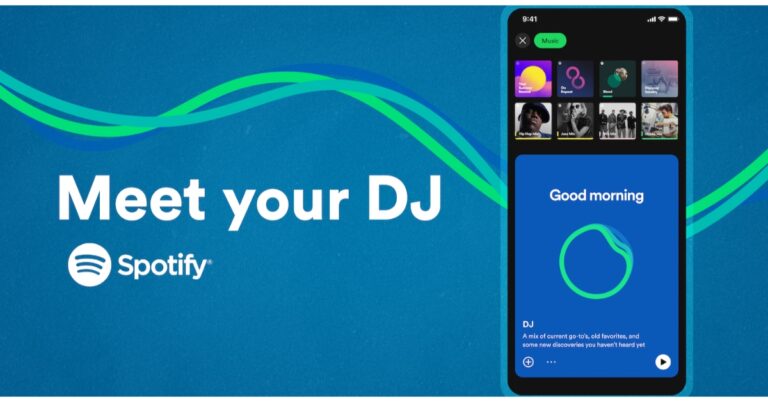
The introduction of AI-DJ has been announced by Spotify. Users will be able to get automatically generated playlists based on their listening interests, tastes, and history thanks to a recently introduced artificial intelligence-powered functionality.“We’re building on that innovation by harnessing the power of AI in an entirely new way. And today, we’re excited to share that we’re taking our personalization to a whole new level with DJ,” the company said via blog post.An AI-DJ capability will soon be available on Spotify. According to the company, the feature is presently accessible on Spotify‘s beta apps for iOS and Android. The DJ is a customised AI companion that is so familiar with you and your musical preferences that it can choose the music to play for you. This feature will give a carefully selected playlist of music combined with commentary about the songs and artists we believe you’ll enjoy in a beautifully realistic voice.Also Read:Spotify launched New Year’s Hub feature, making party music easily accessibleIt will look back at some of your old favourites and sort through the newest music, perhaps even bringing up a song you haven’t heard in a while. Then it will go over potential interests and present a stream of songs selected especially for you. Also, the lineup is continually updated based on your feedback.If you’re not feeling it, just hit the DJ button, and it will switch things up, the business claims. The DJ’s selections get better the more you listen and let him or her know what you enjoy (and don’t like!).“To create the DJ we reimagined the way users listen on Spotify. The DJ knows you and your music taste so well that it will scan the latest releases we know you’ll like, or take you back to that nostalgic playlist you had on repeat last year. Never before has listening felt so completely personal to each and every user.”Also Read:3 Simple Ways to Cancel Spotify Premium SubscriptionSpotify collaborated with Xavier “X” Jernigan, its Head of Cultural Partnerships, to develop the voice model for the DJ. The Get Up, Spotify’s inaugural (and personalised) morning programme, included X as one of the hosts. His persona and voice connected with its listeners, building a devoted audience for the podcast. His voice serves as the DJ’s initial prototype.AvailabilityFor Spotify Premium subscribers in the United States and Canada, Spotify AI DJ is presently available in English.Where to find the Spotify AI DJ?
On your iOS or Android smartphone, open the Spotify mobile app and go to your Music Feed on Home.
On the DJ card, press Play.
The DJ will play a selection of music and provide a brief analysis of the songs and artists chosen just for you.
To change the genre, artist, or mood, simply click the DJ button in the bottom right corner of the screen.
Garena Free Fire is a battle royale game with regular awards and tournaments to keep players interested. If you play Garena Free Fire, you should be aware of the redeem codes that are released on a daily basis. However, because the battle royale game is banned in India, players from other countries can use the Free Fire Redeem codes daily. If you’re unfamiliar with the Garena Free Fire redeem codes or don’t know how to get them, we’ve put together a step-by-step guide to help you redeem them. Check out Garena Free Fire Redeem Codes for 24 February 2023.The Free Fire redeem codes are a great way to get free stuff. These are 12-digit codes that contain alphabets and numbers, as well as an expiration date and time. Because the Garena FF redeem codes cannot be used more than once, you should hurry to the redemption page to claim your free reward before someone else does. To get a free reward, all you have to do is go to reward.ff.garena.com/en, which is the official redemption page. Also, keep an eye on this space for daily updates on Garena Free Fire redemption codes and rewards.
In This Article
Garena Free Fire Redeem Codes Today 24 February 2023
XFW4Z6Q882WY
2FG94YCW9VMV
FFDBGQWPNHJX
V44ZZ5YY7CBS
4TPQRDQJHVP4
VNY3MQWNKEGU
FFIC33NTEUKA
TDK4JWN6RD6
HFNSJ6W74Z48
WD2ATK3ZEA55
E2F86ZREMK49
FFBBCVQZ4MWA
FFCMCPSBN9CU
FFAC2YXE6RF2
HHNAR6VKQ9R7
ZZATXB24QES8
U8S47JGJH5MG
How to Get Free Fire Redeem Codes for Garena on 24 February 2023?
24 February 2023 Amazon Quiz has gone live on its platform. The quiz timings are 12 AM to 11:59 PM. The Amazon App users can participate in the quiz daily and all they have to do is submit correct answers to the questions asked on the e-commerce platform. Today’s participants can get a chance to win Rs 5,000 Amazon Pay Balance.By participating in the Amazon Quiz the participants can win Amazon Pay Balance ranging from Rs 1,000 to Rs 50,000 every day while sitting at home. To win the participants must answer five questions correctly that are based on current events and general knowledge. One wrong answer can eliminate you from the quiz. The results will be announced at the end of the month. Today’s question will let you win Rs 5,000 Amazon Pay Balance. Check below for today’s Amazon quiz answers.Amazon Quiz Today Prize – Rs 5,000 Amazon Pay BalanceQuiz Date – 24 February 2023Daily Timing – 12 AM to 11:59 PMWinner Announcement – Today 12 PM
In This Article
Amazon Quiz Answers Today 24 February 2023
Question 1:Bhairon Singh Rathore is a war hero from which of these battles?
Answer: Battle of LongewalaQuestion 2: Sundaresh Menon sat on the Supreme Court of India bench headed by CJI D Y Chandrachud. He is the chief justice of which country?Answer: SingaporeQuestion 3: Which famous author referred to Shah Rukh Khan as “a great actor, legend, and king” in a tweet?
Answer: Paulo CoelhoQuestion 4: Where was this bird first seen in the AmericasAnswer: BarbadosQuestion 5: Which species of this animal is found in the mainland USA?
Answer: Jackson’s
How To Play Amazon Quiz
Only app users are eligible to play the Amazon quiz every morning from 12 AM to 11:59 PM. The quiz is not available on the desktop. For those who are unaware of how to play the Amazon quiz below are the steps, you can follow to take the quiz.
Firstly download the Amazon app from Google Play Store or App Store
Now fill in the required information through the Sign Up option.
You need to log in to the Amazon app and scroll down on the home screen to find the Amazon Quiz banner.
Tap on the Amazon Quiz banner and tap on the Start button to start the Quiz.
Now you will get 5 questions and you need to answer them correctly. One wrong answer will eliminate you from the Quiz.
After answering all the questions correctly you are now eligible for a Lucky Draw.
The winner’s name will be announced today at 12 PM.
Earlier this month, the Samsung Galaxy S23 Series was introduced both globally and in India. The Gadget Bridge crew has therefore been using the Samsung Galaxy S23 Ultra since the day it was first introduced. While we have reviewed other products in the interim, this phone has been our main phone for the entire time. We are finally prepared to share with you our final, long-term review of the device after using it for a significant number of days. So, we will be sharing all of our Samsung Galaxy S23 Ultra experiences here.
In This Article
Samsung Galaxy S23 Ultra Review: Design and Display
The recently announced Samsung Galaxy S23 Ultra has the same appearance as its predecessor. It has a distinctive look that is quite similar to that of the previous generation but is jam-packed with modifications, improvements, and new functions. To lessen the device’s influence on the environment, recycled materials were used in its construction and design, including internal parts.According to the company recycled plastic was used for the upper and lower speaker modules as well as the inside cover of the S Pen, and recycled aluminium for the SIM tray, side keys, and volume keys. Even though it is a huge device, this phone is stunning in appearance, and we must commend it for not feeling uncomfortable to hold despite its size. But, based on our own observations, we can tell that this is most definitely a two-handed device for those with small hands.Ladies out there should be aware that your jeans pocket probably won’t fit this Samsung Galaxy S23 Ultra. Not blaming Samsung, but this is so frustrating that women’s clothes still lack functional pockets. Okay, this is a little out of topic but yes here I am advocating for larger pockets in women’s clothes. Hence, if you don’t like big phones, you should probably consider the Galaxy S23 plus, which offers a more-or-less comparable experience and a rather small form factor.All the time we used this phone, we never used a cover or a screen protector. It’s impressive that there isn’t a single scratch on the back. You can clearly see that it is in excellent condition. The front, however, has some scuffs, but nothing significant. Nonetheless, we strongly suggest that you put a decent case and screen protector on this device.But, the one issue we have with the S23 Ultra’s design is how quickly the dust accumulates on the camera array and how challenging it is to clean, particularly around the corners. The company should be commended for paying attention to details like the power button and volume rockers, which give excellent tactile feedback. We also appreciated how the frame and the back of the phone blended together smoothly.The first product with Corning Gorilla Glass Victus 2 is the S23 Ultra. With an average of 22% pre-consumer recycled content, the new layering provides durability for looooong use. With Vitus 2, the device’s front and rear are both shielded. Significantly, the sides of the metal frame on the Samsung Galaxy S23 Ultra are now flat rather than curved. The phone is now comfortable to hold thanks to the enhanced design. There is a slight bend to the edge, mostly for One UI edge functionality and a more fluid swiping experience.The back panel, however, has a matte appearance. Although the camera design has been slightly updated, the rear panel still feels and looks similar to the previous version. The very same floating camera setup is provided, but each lens has chrome rings around it. It has an IP68 rating for resistance to water and dust.We must acknowledge how stunning the S23 Ultra’s display is. It features one of the brightest screens on any smartphone right now, in addition to having exceptionally thin bezels. Its most distinctive feature is the 6.1-inch full-HD+ Dynamic AMOLED 2X display. In gaming mode, the display is rated to produce a 240Hz touch sampling rate and has a dynamic refresh rate of 1-120Hz, which can tumble to 48Hz.There is a feature called Vision Booster, commonly referred to as extra brightness mode, for greater visibility outdoors. Under direct sunlight, it raises the screen’s brightness, colour, and contrast levels for better readability. There is also an extra-dim setting that lessens eye strain, especially for those of us who are regretful of using our smartphones during the night while curled up under the blankets.The display on this phone is arguably the best one we’ve used so far. Thus, the colour and contrast levels on this display are excellent. Our favourite smartphone screen for watching entertainment is in fact this one. Because of the screen’s outstanding touch sensitivity and haptic feedback, even using it has been wonderful. Because of this, typing and unlocking the phone provide you with wonderfully refined vibrating feedback, greatly improving our experience with the S23 Ultra. The fingerprint sensor is incredibly quick, precise, and trustworthy.Here, a fantastic screen is combined with an outstanding set of stereo speakers. They are balanced, sharp, clear, and loud. We had a wonderful time watching content on OTT platforms and, in particular, listening to music on Spotify, as we previously mentioned.The Galaxy S23 Ultra also supports the S-Pen. It’s really responsive and comfortable to use the S-Pen. To be honest, we don’t use the S-Pen all that much, but if you’re an artist or an art fan, you’ll definitely love its incredibly low input latency and precise tracking ability.We definitely give this phone a thumbs up because it is really nicely made and designed overall.
Samsung Galaxy S23 Ultra Review: Performance and Camera
Let’s now discuss how it performed. We haven’t really had anything to gripe about this one either. For performing routine daily duties, the device operates flawlessly, and using it to play games has been enjoyable.The Qualcomm Snapdragon 8 Gen 2 platform for Galaxy is the name Samsung has given to its customised version of the Qualcomm Snapdragon 8 Gen 2 SoC used in the Galaxy S23 series. The processor has been very effectively incorporated, and other phones using the original chip have previously been tested, but the S23 Ultra aims to maintain a cooler temperature. Most significantly, it cools off considerably quickly.The S23 Ultra’s gaming performance is also simply astounding. The most demanding games may be played at their optimal settings with a little stutter, however, you may experience some heating after around 30 minutes. Other less demanding games, like Call of Duty, run smoothly without lagging and the temperatures stay under control.Now that we’ve got that out of the way, let’s talk about the software. One UI is one of the best Android skins available, so we have nothing but wonderful things to say about it. Its ease of use and navigation is something we appreciate. Furthermore finely optimised, the 120Hz refresh rate makes the phone quick and fluid. Users are better secured for a longer period of time thanks to the Galaxy S23 series’ inclusion of four generations of OS upgrades and five years of security updates. The most recent version of Samsung One UI, version 5.1, was also published while we were discussing the software upgrade and it brought some minor visual modifications to the user interface.In addition to other things, we were really pleased with the camera’s performance. Its aspects of photography and videography impressed us. A 200-megapixel primary wide camera with an 85-degree field of view and an f/1.8 aperture is the primary camera on the back of the Samsung Galaxy S23 Ultra. There are three more cameras: a 12-megapixel ultra-wide camera with a 120-degree field of view and an f/2.2 aperture, a 10-megapixel telephoto lens with an f/2.4 aperture and a 3-x optical zoom, and a third 10-megapixel telephoto sensor (10x optical zoom). A 12-megapixel selfie camera with an 80-degree field of vision and an f/2.2 aperture is located up front.The primary camera on the device produces top-notch pictures. You get a fantastic dynamic, but the colour appears to be a little enhanced. So, you will enjoy the photographs on it if you favour a more rich, more bright look. A 200-megapixel sensor known as the ISOCELL HP2 has been added to the Samsung Galaxy S23 Ultra’s primary camera system. With pixel binning, which will merge 16 pixels into one, you will be shooting at a resolution of about 12 megapixels. Nevertheless, you can choose to either use 50 megapixels or the full 200-megapixel resolution if you’d like. As we zoom in 100x, you can see a lot more detail.Normal vs portrait(lowlight)It captures excellent images in low light thanks to its excellent ability to preserve shadow and highlight details. Images taken indoors are clear, finely detailed, and noise-free. Also, we don’t often use flash unless it is absolutely necessary in certain circumstances.daylight/lowlight with flashWe’d like to point out that when we take images of moving subjects, there sometimes seems to be some shutter lag. Our pet was in the shot, and since they are seldom ever still, the pictures are generally blurry. This is an important point for those of us who enjoy taking pictures of children and their pets.Daytime wide/ultra-wide shotsLowlight wide/ultrawide shotsAlso, it features a superb ultra-wide camera, and it performs excellently all around. It has good shadow details and contrast ratio. The ultra-wide camera generated detailed photographs in low light.It does have autofocus, so you can use it to focus closely for macro images, and we thought it did a fantastic job. Notably, the S23 Ultra has two zoom cameras, one with a zoom range of about 3x and the other with a zoom range of 10x incorporating periscope technology. We found that a 10x zoom produces a crisper image. Now that the S23 Ultra can zoom out 30x, it is really beneficial if you need to zoom in on a distant sign. The text can be seen well in these sample photos. Although we personally don’t use this feature very often, you can use it to take images of the moon. It can even stretch up to 100x.portraitThe S23 Ultra also performs well for portraits. Here, it also offers a 3x optical zoom option, which in our opinion results in a far more appealing portrait. Yet we observed that our skin looked a little soft. Some of you might even enjoy that. Moreover, S23 Ultra offers foreground blur in pictures, although the outcomes are not to our taste. The edge detection and background blur are flawless.Daytime (normal/portrait)Selfie lowlightSpeaking of selfies, S23 Ultra was able to preserve the image quality and colour of our skin. You may also use a wider field of view here. It features a night mode for low-light selfies, however, it is quite challenging to keep your hands steady. Although you get a crisp image, using flash tends to over brighten everything.selfie portraitLet’s go on to videography right now. Samsung has also improved its video capabilities. As a result, you get superb dynamic range in favourable lighting when recording at 4K@30fps. It’s wonderful to see that Samsung now supports HDR10+ across all of its cameras. When you wish to export HDR video from the S23 Ultra, you do have the choice to convert that to SDR (standard dynamic range) video. The video becomes quite noisy when shot in low light. Low light autofocus is not as effective as it is in bright light.Samsung devices now sport 8K video, which is excellent and offers a tonne of information, especially if you wish to zoom in. Samsung features a super steady mode that produces excellent stabilisation performance. Moreover, 4K portrait video is available and performs a respectable job in general. Yet, blacks have a more blue tint than true black. While the stabilisation and dynamic range of selfie videos are both outstanding.The camera of the Samsung Galaxy S23 Ultra is superb, and using them shouldn’t be an issue. Although the device still suffers shutter slowness, the advantages include an expanded zoom and an overall good Ultra Wide camera. The videos feature better 8K and high dynamic range and sharpness. Nice stabilisation all in all, and improved cinematic mode.Finally, the S23 Ultra has good battery life. With our usage, the battery’s endurance is not very outstanding. The battery lasted the entire day for us and had about 35 percent charge left when we went to bed.
Verdict
The Samsung Galaxy S23 Ultra (starting at Rs 1,24,999) is a very well-built phone, offering the best display experience, performance and cameras. We have been quite happy with the camera performance among other things. Although its photography and videography capabilities are pretty excellent, there are still a few areas of its cameras that we wished have been better. For example, we discovered that the shutter speed on the S23 ultra was a little slower in portrait and ultra-wide modes. So, there is a potential that a photograph of a moving subject will turn out blurry. We have had a wonderful experience using the Galaxy S23 Ultra as our daily driver for weeks. There are a few minor details that we critiqued in our review, but they are all insignificant details that you are most likely to overlook anyhow. This is also your only trustworthy choice if you want a high-end phone with a stylus that works with it, unless you prefer a smaller phone, then Galaxy S23+ is a great option as well.
Apple announced on Wednesday that it has given Apple Watch units to researchers from around the world to aid in the exploration of new areas in heart health. According to the research, a typical, healthy adult’s heart beats more than 100,000 times in a single day. A picture that is largely unseen starts to take shape beat by beat and day by day.Apple provides consumers with an ongoing, active view of their health with its heart health features, which include high and low heart rate notifications, Cardio Fitness, irregular rhythm notifications, the ECG app, and AFib History.According to Apple, researchers, clinicians, and developers have discovered cutting-edge new methods to investigate, track, and treat a wide spectrum of diseases since Apple debuted ResearchKit and CareKit in 2015.Also Read:HP Omen 17 (2023) laptop with 13th Gen Intel i9 Core processor launched in IndiaApple started the Investigator Support Program to encourage research that will ultimately lead to widespread health improvements. Through this programme, Apple offers researchers Apple Watch devices, enabling them to make significant advancements in health research, including the understanding of the heart from a scientific perspective.Apple is highlighting the innovative work being done by health professionals all over the world who are utilising Apple Watch to study the heart in a way that has never been done before.The company has disclosed that Dr. Claudia Toro and Associate Professor Rachel Conyers are senior paediatric oncologists from Melbourne, Australia. Together, they are examining the potential effects of treatment on cardiac rhythm and attempting to come up with creative strategies to intervene.“I read about the Apple Heart Study and I thought this could be important for paediatrics,” said Dr. Conyers. “We used to think of cardiac toxicity as something that happened 10 years after treatment. But now we know that new cancer therapies (like specific inhibitors or immune therapy) can cause arrhythmias within 48 hours of medication — so there’s a big gap in terms of what we know about the toxicities at the moment.”To further understand how wildfire smoke affects heart health, Dr. Cheong at Texas A&M University and Drs. Brian Kim and Marco Perez at Stanford Medicine will start providing Apple Watches to firefighters the first week of next month. Up to 200 firemen from Texas and California who work in the wildland fire season (spring and summer respectively) will participate in the study.Also Read:MWC 2023: MediaTek will demonstrate advancements in satellite communications, computing and moreThe study will use Apple Watch to track data on activity, sleep, blood oxygenation, heart rate and rhythm, and more. Also, firefighters will wear an air quality monitor and complete surveys about their sleep, activities, and illnesses brought on by wildfire smoke.The anticipated prevalence of atrial fibrillation (AFib) in the European Union is predicted to quadruple by 2060, according to epidemiology experts in the region. AFib is a common heart arrhythmia that, if untreated, can have catastrophic consequences, including an increased risk of stroke or heart failure.Dr. Sebastiaan Blok, director of eHealth at the Cardiology Centres of the Netherlands, and his colleagues are researching strategies to identify AFib sooner at the Amsterdam University Medical Centers. As part of a wider project named HartWacht, the first reimbursable eHealth idea, the researchers have created a randomised controlled study.They intend to include more than 300 patients who are above 65 and meet the AFib risk criterion in their trial. The intervention group, which makes up half of the participants, will wear Apple Watch for at least 12 hours per day.Participants are required to take an ECG as part of the study’s protocol once every three weeks or as soon as any symptoms appear. The researchers will get in touch with the participant and give them instructions on how to take an ECG and share the results if they receive a notification of an abnormal rhythm.
For the latest gadget and tech news, and gadget reviews, follow us on Twitter, Facebook and Instagram. For newest tech & gadget videos subscribe to our YouTube Channel. You can also stay up to date using the Gadget Bridge Android App. You can find the latest car and bike news here.
HP Omen 17 (2023) was launched in India as the company’s latest gaming laptop. The device is powered by a 13th Gen Intel i9 Core processor and the NVIDIA GeForce RTX 4080 Laptop GPU. The new HP Omen laptop comes with QHD (Quad HD) 240hz display and is supported by OMEN Tempest Cooling Technology for desktop-caliber gaming.
In This Article
HP Omen 17 (2023) gaming laptop price in India and sale details
The HP Omen 17 (2023) gaming laptop comes with a starting price of Rs 2,69,990. The device will be available in a single Shadow Black colour option. It can be purchased via Omen Playground Stores, HP world stores & HP online store in the country.
HP Omen 17 (2023) gaming laptop specifications
HP Omen 17 (2023) gaming laptop features a 17.3-inch screen and up to a QHD (Quad HD) 240hz display. The screen offers 100% sRGB colours, a 3ms reaction time, and 300 nits of brightness.The device is powered by 13th Gen Intel i9 Core processor and comes integrated with the NVIDIA GeForce RTX 4080 Laptop GPU. The HP Omen 17 has 1TB of PCIe NVMe SSD storage and 32GB of LDDR5 RAM as standard equipment. The NVIDIA GeForce RTX 40 Series laptop GPUs, built with the incredibly efficient NVIDIA Ada Lovelace architecture, enables lifelike virtual worlds with complete ray tracing and deliver a quantum leap in performance with AI-powered DLSS 3. It runs Windows 11 Home out of the box. Moreover, the Max-Q suite of technologies enhances system efficiency by optimising power, battery life, and acoustics.OMEN Tempest Cooling Technology is used in the laptop to provide desktop-quality gaming. The OMEN 17 also has OMEN Gaming Hub, a one-stop location to improve a gamer’s performance. With integrated dual array digital microphones and temporal noise reduction, the HP Wide Vision 720p HD camera. Bang & Olufsen’s dual speakers significantly improve the experience.The device consists of one Thunderbolt 4 port, one DisplayPort 1.4 port, two USB Type-A ports, a mini DisplayPort port, one RJ-45, one AC smart pin, one headphone/microphone combination port, and an SD media card reader. Other connectivity choices include Wi-Fi 6E and Bluetooth version 5.2. The HP OMEN 17 laptop comes with a full-size 4-zone RGB backlit keyboard. It also houses an 83Wh battery that supports a 330W adaptor.
For the latest gadget and tech news, and gadget reviews, follow us on Twitter, Facebook and Instagram. For newest tech & gadget videos subscribe to our YouTube Channel. You can also stay up to date using the Gadget Bridge Android App. You can find the latest car and bike news here.
In India, Lenovo has unveiled a brand-new ThinkBook Plus Gen 3 laptop with two displays. The laptop was presented at the CES 2022 last year. A 17.3-inch screen serves as the laptop’s primary display, while a second 8-inch screen is located right next to the touchpad. A digital pen is included in the package to assist users in creating on the secondary screen. Also, the ThinkBook Plus Gen 3 laptop from Lenovo provides a CO2 offset service that enables buyers to conveniently offset carbon emissions for the brand-new item at the time of purchase.
In This Article
Lenovo ThinkBook Plus Gen 3 specifications
The 17.3-inch ultra-wide touch support display on the Lenovo ThinkBook Plus Gen 3 has a resolution of 3072 x 1440 pixels. It provides a 3K resolution, a 120Hz refresh rate, and a 21:10 aspect ratio. Touch functionality is also supported on the secondary 8-inch HD display with a resolution of 800 x 1280 pixels which is right next to the touchpad.Also Read:Infinix InBook Y1 Plus budget laptop launched in IndiaIt is powered by a 12th-generation Intel Core i7-12700H processor with a 1TB SSD M.2 2280 PCIe 4.0×4 NVMe storage drive, and 16GB Soldered LPDDR5 Memory. The laptop comes integrated with Intel Iris Xe Graphics. The laptop comes pre-installed with Windows 11 ProThe Lenovo ThinkBook Plus Gen 3 also boasts dual speakers with 2W output and Dolby Atmos compatibility. Lenovo makes it clear that the audio is from Harman and Kardon. There are three ports available: a USB-C port with charging capabilities, two USB-A connections, and an HDMI port.A camera privacy shutter and compatibility for Windows Hello with an IR camera are provided for security. The laptop has a built-in 69Wh battery that, according to the MobileMark battery test, may last up to 6.5 hours.It includes a digital pen that is allegedly the first stylus to support Pantone digital colour, allowing colour capturing using ColorKing and giving the user a variety of presentation and design options. Additionally, the laptop provides a CO2 Offset Service that enables buyers to seamlessly offset carbon emissions for their brand-new item at the time of purchase.Also Read:MWC 2023: MediaTek will demonstrate advancements in satellite communications, computing and more
Lenovo ThinkBook Plus Gen 3 price in India and sale details
One shade of grey is the only one available for the ThinkBook Plus Gen 3. The device is priced at Rs 1,94,990 upwards. The laptop is available for purchase through Lenovo’s official offline and online channels.Ashish Sikka, Director – Commercial 4P Strategy, Lenovo India said, “Lenovo is equipping businesses with cutting-edge devices for more fluid and flexible working environments. We as a company strongly believe in constant innovation and our ThinkBook portfolio is specifically designed to suit the evolving needs of small and medium businesses. The latest ThinkBooks are built with premium materials, are committed to ensuring security, and feature sophisticated and sustainable designs customised for the next generation of fearless business owners.”
For the latest gadget and tech news, and gadget reviews, follow us on Twitter, Facebook and Instagram. For newest tech & gadget videos subscribe to our YouTube Channel. You can also stay up to date using the Gadget Bridge Android App. You can find the latest car and bike news here.
Garena Free Fire is a battle royale game with regular awards and tournaments to keep players interested. If you play Garena Free Fire, you should be aware of the redeem codes that are released on a daily basis. However, because the battle royale game is banned in India, players from other countries can use the Free Fire Redeem codes daily. If you’re unfamiliar with the Garena Free Fire redeem codes or don’t know how to get them, we’ve put together a step-by-step guide to help you redeem them. Check out Garena Free Fire Redeem Codes for 23 February 2023.The Free Fire redeem codes are a great way to get free stuff. These are 12-digit codes that contain alphabets and numbers, as well as an expiration date and time. Because the Garena FF redeem codes cannot be used more than once, you should hurry to the redemption page to claim your free reward before someone else does. To get a free reward, all you have to do is go to reward.ff.garena.com/en, which is the official redemption page. Also, keep an eye on this space for daily updates on Garena Free Fire redemption codes and rewards.
In This Article
Garena Free Fire Redeem Codes Today 23 February 2023
ZZATXB24QES8
U8S47JGJH5MG
GCNVA2PDRGRZ
J3ZKQ57Z2P2P
FFICJGW9NKYT
XUW3FNK7AV8N
B3G7A22TWDR7X
FFICJGW9NKYT
XUW3FNK7AV8N
VNY3MQWNKEGU
FFIC33NTEUKA
FF7MUY4ME6SC
4ST1ZTBE2RP9
X99TK56XDJ4X
FFCMCPSJ99S3
How to Get Free Fire Redeem Codes for Garena on 23 February 2023?
23 February 2023 Amazon Quiz has gone live on its platform. The quiz timings are 12 AM to 11:59 PM. The Amazon App users can participate in the quiz daily and all they have to do is submit correct answers to the questions asked on the e-commerce platform. Today’s participants can get a chance to win Rs 1,250 Amazon Pay Balance.By participating in the Amazon Quiz the participants can win Amazon Pay Balance ranging from Rs 1,000 to Rs 50,000 every day while sitting at home. To win the participants must answer five questions correctly that are based on current events and general knowledge. One wrong answer can eliminate you from the quiz. The results will be announced at the end of the month. Today’s question will let you win Rs 1,250 Amazon Pay Balance. Check below for today’s Amazon quiz answers.Amazon Quiz Today Prize – Rs 1,250 Amazon Pay BalanceQuiz Date – 23 February 2023Daily Timing – 12 AM to 11:59 PMWinner Announcement – Today 12 PM
In This Article
Amazon Quiz Answers Today 23 February 2023
Question 1: Which Indian had the honour to unveil the 2022 FIFA World Cup?
Answer: Deepika Padukone
Question 2: Natasha Colin Kim Fah Lee Fokas created the Guinness World record for making the largest what?
Answer: Wearable cake dress
Question 3: Who once called India ‘beautiful chaos’ mentioning his trip there when he was 20 years old?
Answer: DJ Diplo
Question 4: What was the name of the Egyptian goddess represented by this animal?
Answer: Heqet
Question 5: This bird was an important symbol of which empire?
Answer: Roman Empire
How To Play Amazon Quiz
Only app users are eligible to play the Amazon quiz every morning from 12 AM to 11:59 PM. The quiz is not available on the desktop. For those who are unaware of how to play the Amazon quiz below are the steps, you can follow to take the quiz.
Firstly download the Amazon app from Google Play Store or App Store
Now fill in the required information through the Sign Up option.
You need to log in to the Amazon app and scroll down on the home screen to find the Amazon Quiz banner.
Tap on the Amazon Quiz banner and tap on the Start button to start the Quiz.
Now you will get 5 questions and you need to answer them correctly. One wrong answer will eliminate you from the Quiz.
After answering all the questions correctly you are now eligible for a Lucky Draw.
The winner’s name will be announced today at 12 PM.
In a diverse nation like India, it can get tricky to keep a track of all the national holidays and festivals. On top of that, every state has its own public holidays as well. For people that use Gregorian calendar apps, keeping a track of Indian holidays can be a bit complicated. However, there are several apps that will do it for you. In this article, we bring you the top 5 apps to keep track of festivals in India.Read Also: How to Check if your iPhone or Android is Refurbished or Brand New
In This Article
Indian Holiday Calendar
The Indian Holiday Calendar app gives you the complete list of Indian holidays and festivals including bank holidays, national and state holidays, stock market holidays, and festivals of all Indian religions and local regions. You can look up the holidays on the calendar or browse them through different categories. This app also sends you notifications about upcoming holidays and lets you add reminders for any date.
2023 Calendar Business Planner
The 2023 Calendar Business Planner app developed by Bharat Calendars provides a comprehensive list of Indian festivals and holidays. You will also find public holidays of other countries on this app. Apart from that, you can sync this calendar with Google Calendar and Outlook Calendar, choose different themes, schedule appointments, set up reminders, and carry out a whole bunch of customisations.
India Calendar
The India Calendar app features Indian-gazetted public holidays and festivals along with other important dates. This app also allows you to look up the Hindi calendar. Other than that, you can set up reminders, sync with Google Calendar, use the date calculator, and leave notes and entries with absolute ease.
Calendar 2023 with Holidays
The Calendar 2023 with Holidays app gives you the option to view the Gregorian calendar or the Hindu calendar. All the major holidays and festivals are listed at the bottom of every month. You can also read festival-related information on the app itself. You can swipe through the months or access all the holidays on one page. This app is easy to use and is equipped with all the basic functions you expect from a calendar app.
2023 Calendar
If you’re looking for an app that has an exhaustive list of Indian festivals along with added information about them, the 2023 Calendar app is a good place to start. This app contains all public holidays, festivals, and fasting details. The Hindu calendar on this app lists the exact fasting times along with the relevant information. You will also be able to find Islamic holidays along with the Ramzan calendar on this app.Read Also: Infinix InBook Y1 Plus budget laptop launched in India
Conclusion
These are our picks for the top 5 apps to keep a track of festivals and holidays in India. Most of the apps on this list will give you a comprehensive list of national, state, regional, and religious holidays without needing to add any extra information. If you are already accustomed to Google Calendar, most apps on this list also offer an easy syncing process to save your time.For the latest gadget and tech news, and gadget reviews, follow us on Twitter, Facebook and Instagram. For newest tech & gadget videos subscribe to our YouTube Channel. You can also stay up to date using the Gadget Bridge Android App. You can find the latest car and bike news here.
The Dimensity, Filogic, Genio, Kompanio, and Pentonic product and technology portfolios, as well as a number of fresh 5G outside mobile demos, will be highlighted by MediaTek at MWC 2023. Together with showing MediaTek-powered products from some of the top businesses in the world, MediaTek will also demonstrate its satellite communications platform. Demos of devices and technologies include innovations in mobile, satellite, smart TV, Wi-Fi 7, IoT, and 5G.Joe Chen, President of MediaTek said, “Our diverse technology portfolio underscores how we’re well-positioned to address the latest trends like bringing 5G and satellite connectivity to a wide range of devices and to deliver advancements in the latest technology. We’ll also have some of the latest MediaTek-powered devices to highlight how we are delivering incredible experiences in every product category.”The company shared that smartphones and other devices can now use MediaTek’s 5G Non-Terrestrial Network (NTN) solution, which is based on 3GPP standards. Visitors to the MWC can examine some of the newest gadgets running MediaTek’s NTN solutions at the company’s booth. Moreover, MediaTek will give a first-look demonstration of its newest New Radio NTN (NR-NTN) technology.Also Read:Infinix InBook Y1 Plus budget laptop launched in IndiaAccording to MediaTek, it will demonstrate its cutting-edge Access Traffic Steering, Switching, and Splitting (ATSSS) technology as one example. Using a MediaTek Dimensity 9200 flagship chipset, MediaTek and Deutsche Telekom recently completed the first proof of concept test for the ATSSS 3GPP Release 16 (R16) standard in the globe. By switching from cellular 5G to Wi-Fi and vice versa, the ATSSS changeover functionality helps ensure stable voice and video call quality as the first major use case implemented in a lab configuration. The technology enables quick, cost-effective improvements to user experience and network performance across both current cellular access networks and Wi-Fi access points.In collaboration with Ericsson, MediaTek will also showcase 5G mmWave beam technology to enhance connection performance and reliability. Together with that, MediaTek will demonstrate its 5G UltraSave for mmWave with Keysight 5G Network Emulation Solutions and describe how its technology optimises hardware and software design to prolong battery life during high-speed data transfer for a variety of 5G-enabled devices.MediaTek will showcase at MWC how its Dimensity 9200 chipset elevates leading smartphones. In the demos, MediaTek’s hardware tracing support, Intelligent Display Sync 3.0, which dynamically adjusts refresh rate, and Intelligent Picture Semantic Segmentation, which enhances image quality with multi-person segmentation and multi-layer colour management, are all included. The Vivo X90 and X90 Pro, MediaTek’s most recent flagship handsets powered by the Dimensity 9200, will also be on exhibit at the event.The OPPO Find N2 Flip and Tecno PHANTOM V Fold, both powered by the MediaTek Dimensity 9000+; the OnePlus Pad and Lenovo Tab Extreme, both with the MediaTek Dimensity 9000 flagship chipset built in; and the MediaTek Dimensity 9000 are just a few of the devices in each category that MediaTek will be showcasing at MWC.Also Read:OnePlus 11R pre-orders open in India: Details insideThe new Dimensity 7200 is also being introduced at MWC as part of the MediaTek 7000 Dimensity Series. The processor is constructed using TSMC’s second-generation 4nm technology, includes an Arm Mali G610 GPU, two Arm Cortex-A715 cores, six Cortex-A510 cores, an integrated AI Processor Unit, and two Arm Cortex-A715 cores, each with a maximum operating speed of 2.8GHz. The chipset supports 200MP and 4K HDR cameras with MediaTek’s Imagiq 765 and 14-bit HDR ISP. Up to 4.7Gbps downlink, as well as 2CC Carrier Aggregation and Dual 5G SIM with dual VoNR, are supported by the built-in R16 Sub-6GHz 5G modem.The business will display a whole ecosystem of gadgets running on MediaTek’s cutting-edge Wi-Fi 7/6E/6 Filogic technologies.
For the latest gadget and tech news, and gadget reviews, follow us on Twitter, Facebook and Instagram. For newest tech & gadget videos subscribe to our YouTube Channel. You can also stay up to date using the Gadget Bridge Android App. You can find the latest car and bike news here.





 Step 3:


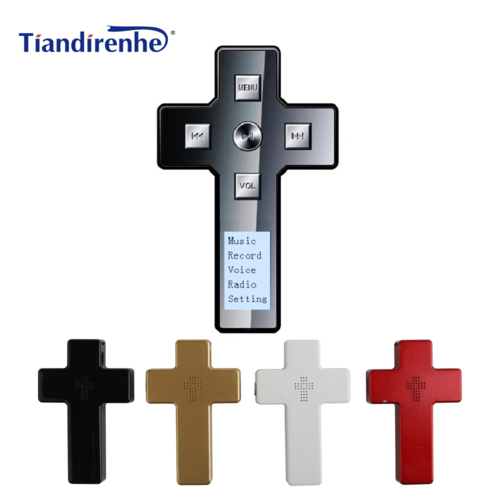


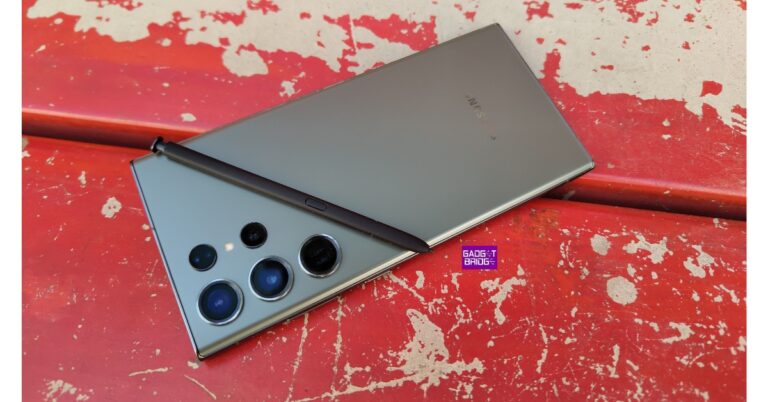
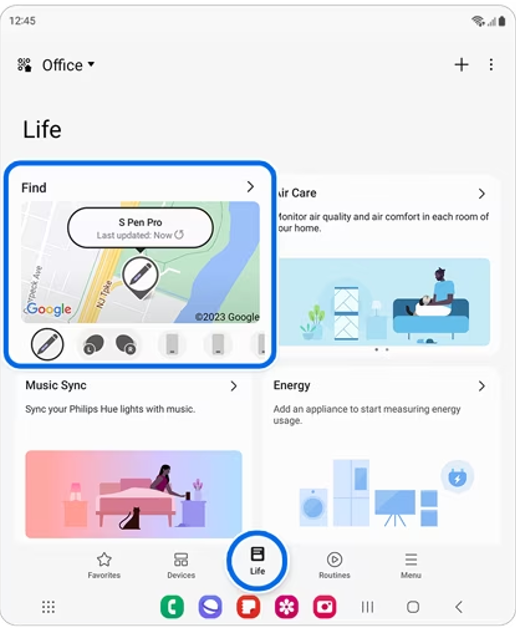 Step 2: Tap on Find and hit the ellipses at the top right corner of the screen.
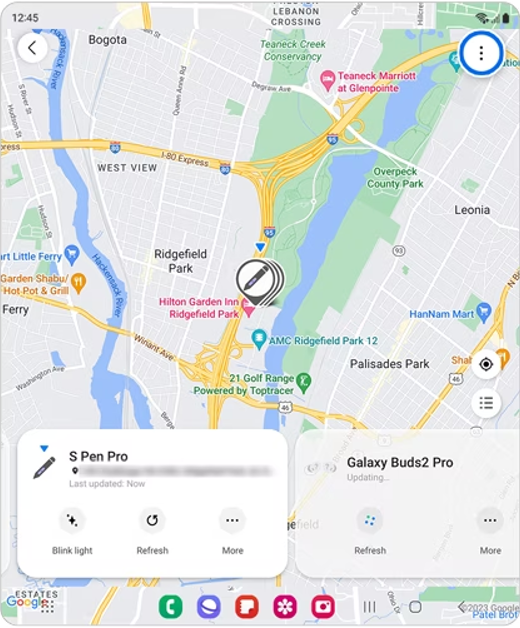 Step 3: Go to Settings and select Allow devices to be found.
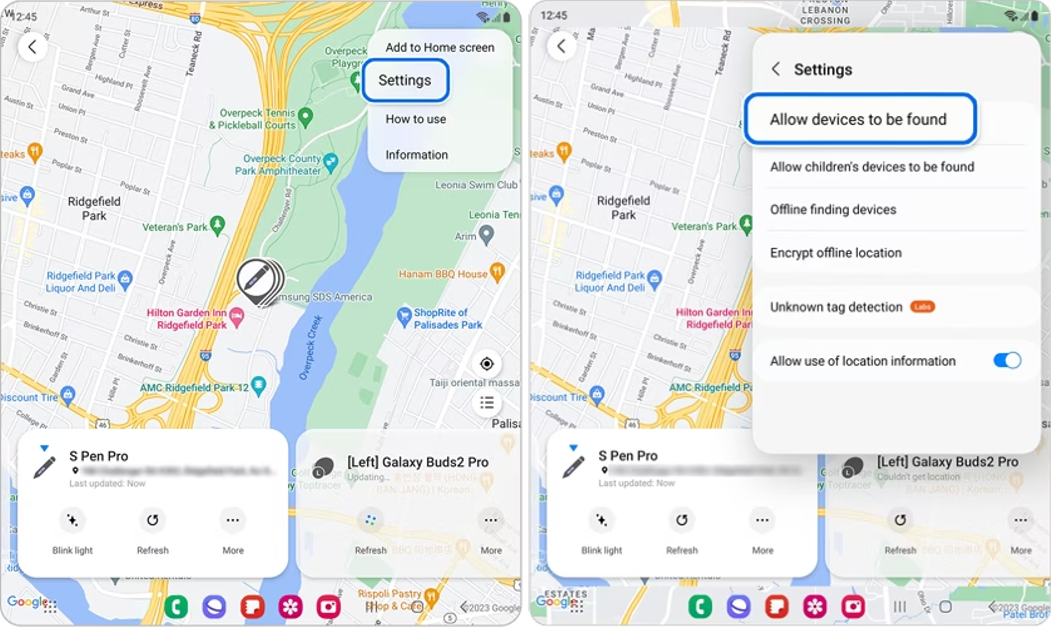 Step 4: Turn on the toggle switch for Offline finding.
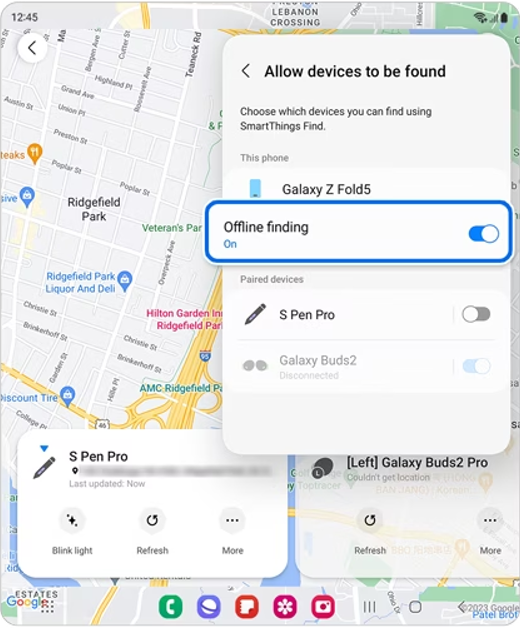
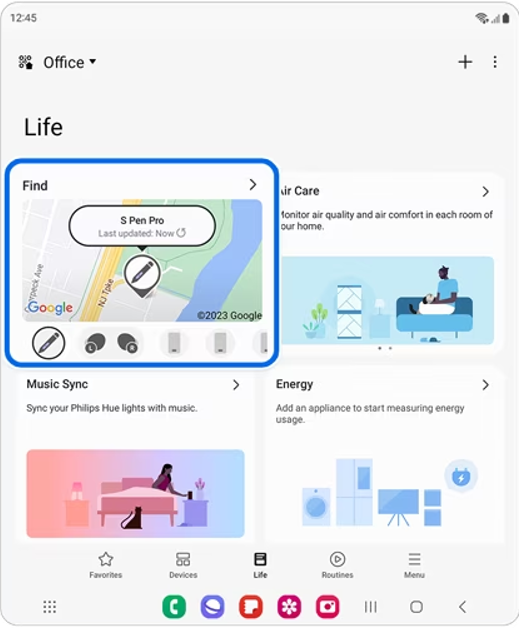 Step 2:
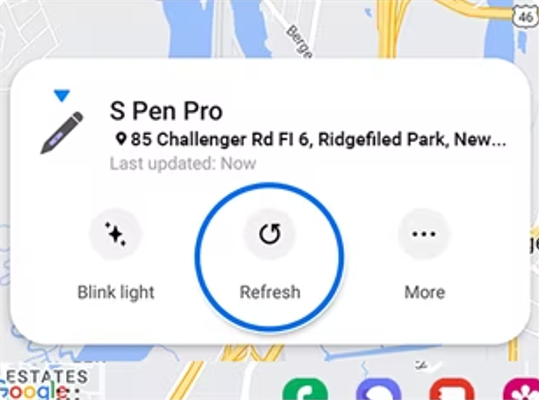 Step 3: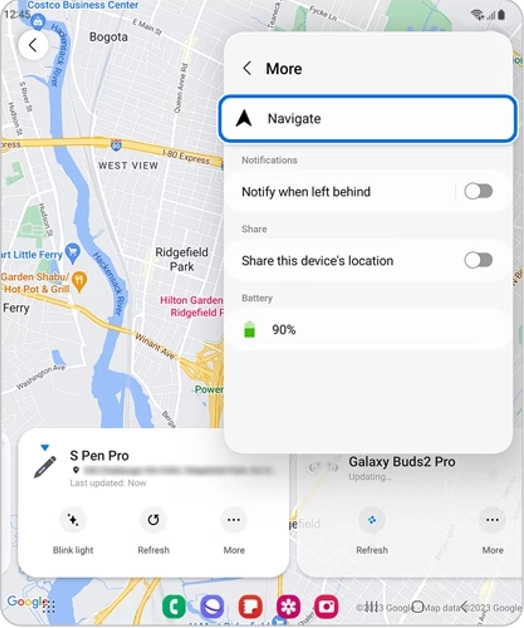
 Step 2:
 Step 3:



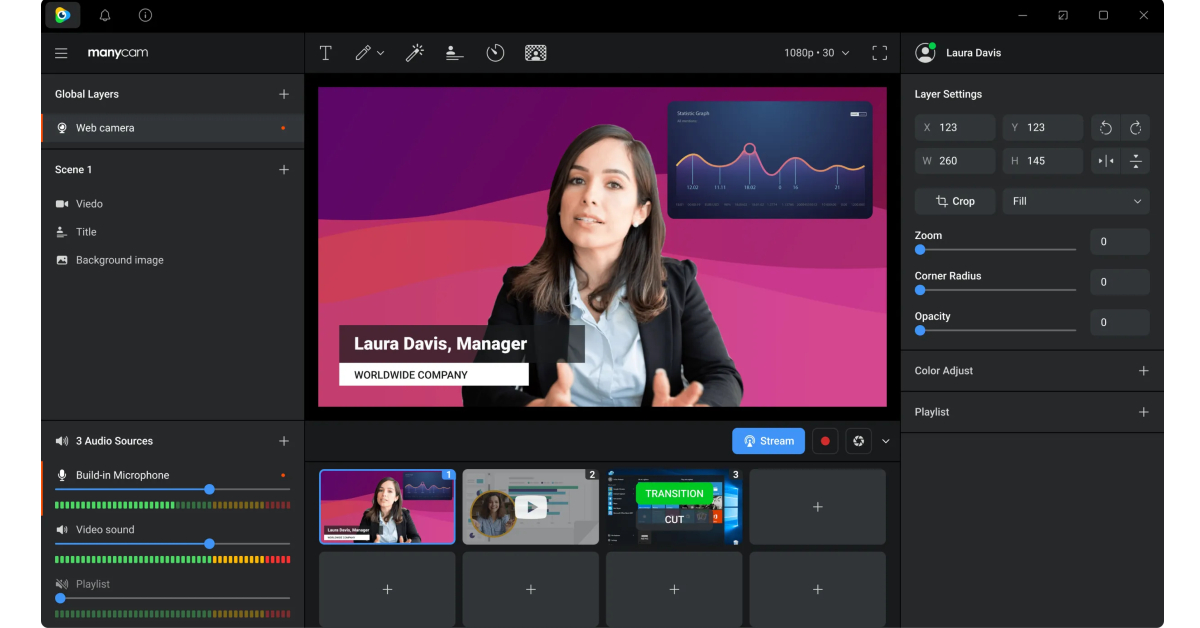 Another quick way of flipping your video feed on Microsoft Teams is by using third-party webcam software. Apps like Manycam, Bandicam, and YouCam will help you accomplish this task. While joining a meeting, click on the camera tab and select the third-party webcam app. If you are already in a meeting, go to settings and switch the video input to the third-party app. Now, go to the app’s settings and select the option to flip your video.


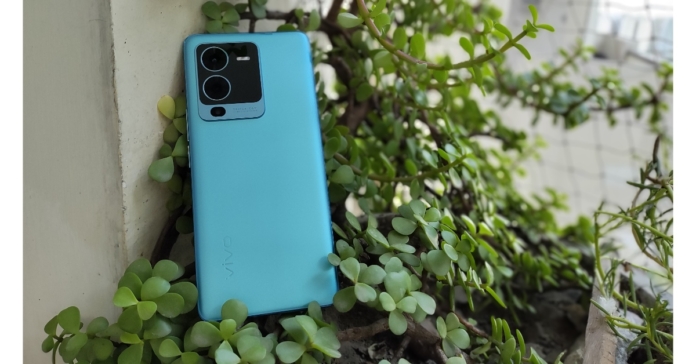


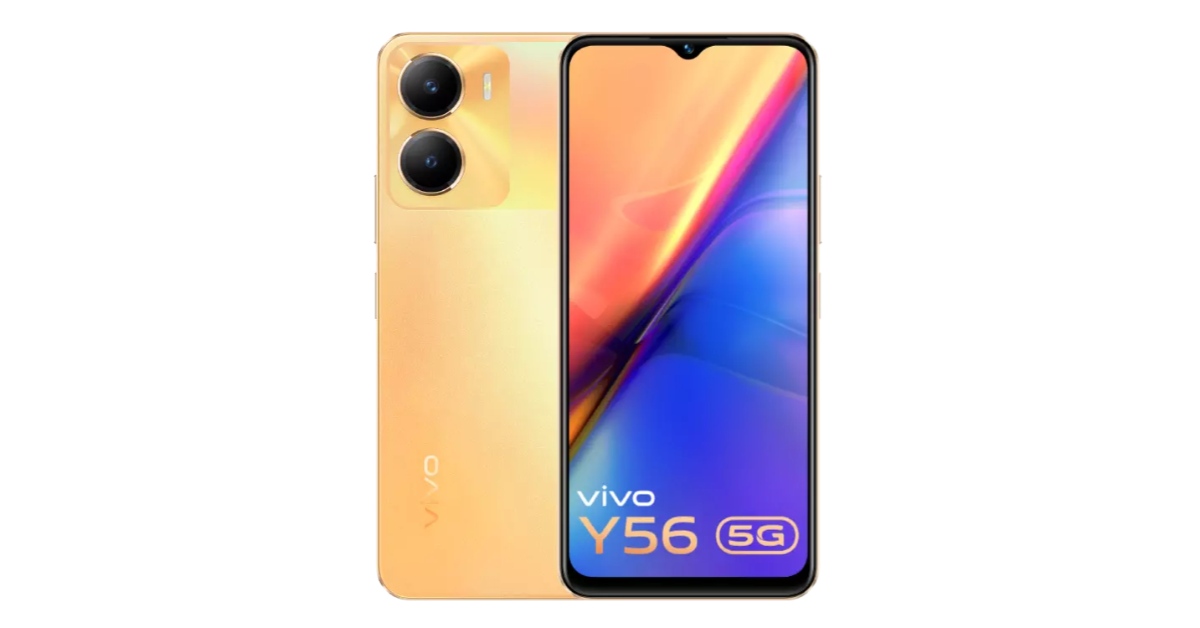


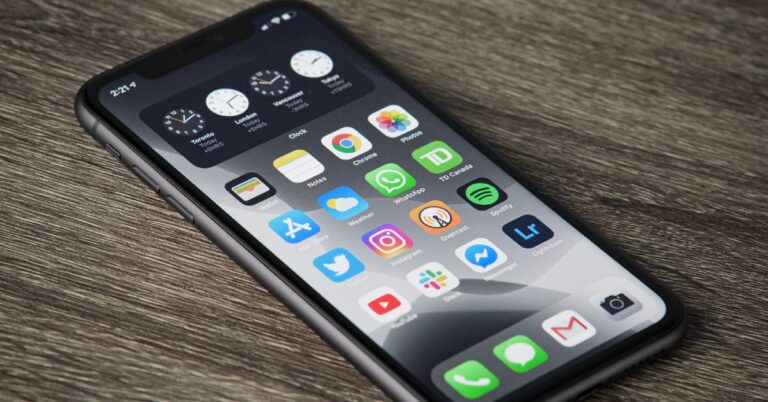
 Step 3:
 Step 4:
 Step 6:
 Step 2:
 Step 4: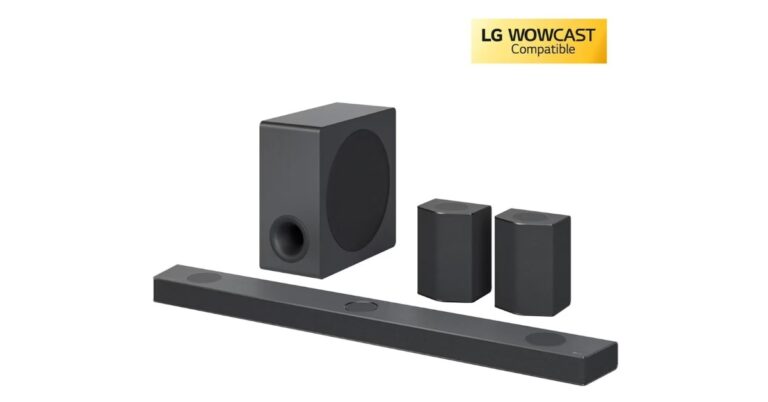

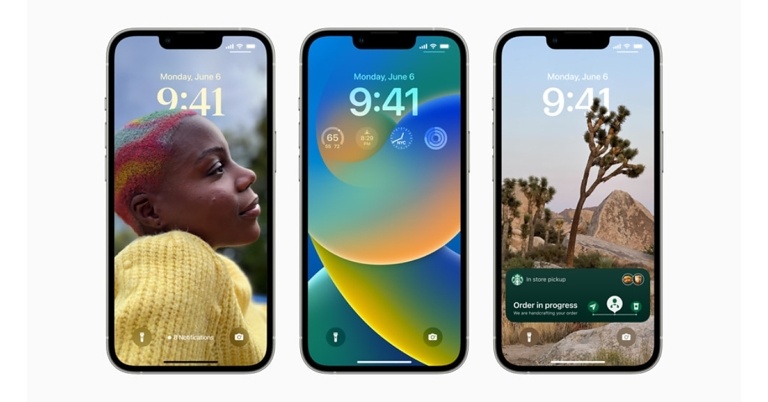

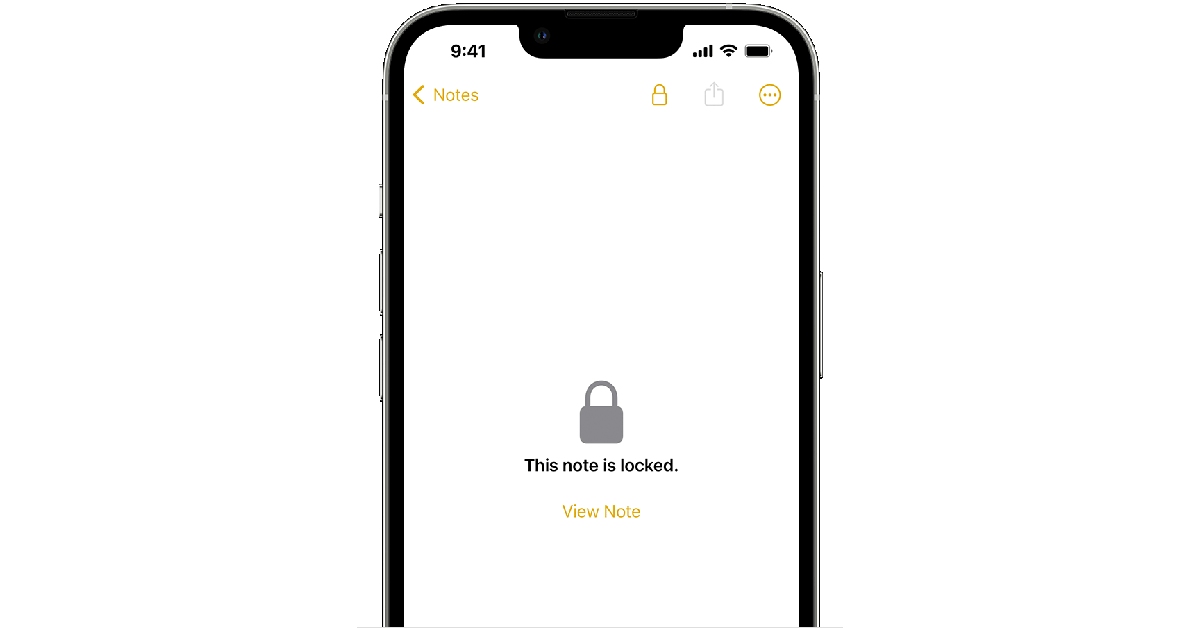


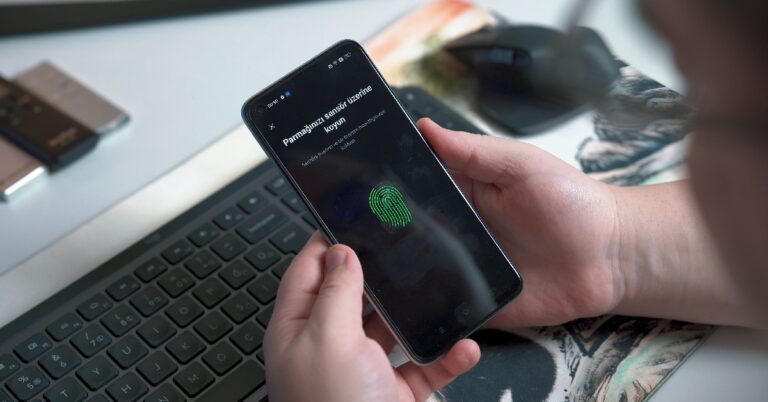
 Step 3:
 Step 6:
 Step 3:
 Step 4:
 Step 5:
 Step 6: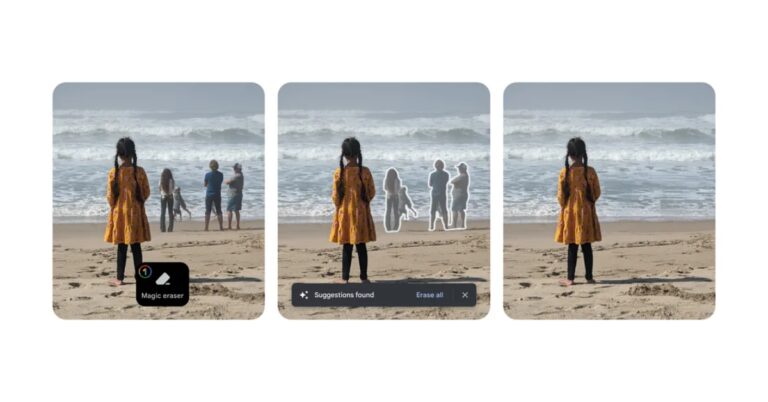
 Step 2:
 Step 3:
 If you can’t find the option to disable or delete an app on your Android smartphone’s settings menu, try using the Google Play Store before moving on to other fixes. This method will work for bloatware apps but not for native apps like Calculator, Phone, Contacts, etc. Launch the Google Play Store, go to your profile, select ‘Manage apps and device’, switch to the ‘Manage’ tab, select the apps you wish to uninstall, and hit the trash icon at the top right corner of the screen. We found this method to work for Google’s suite of apps.
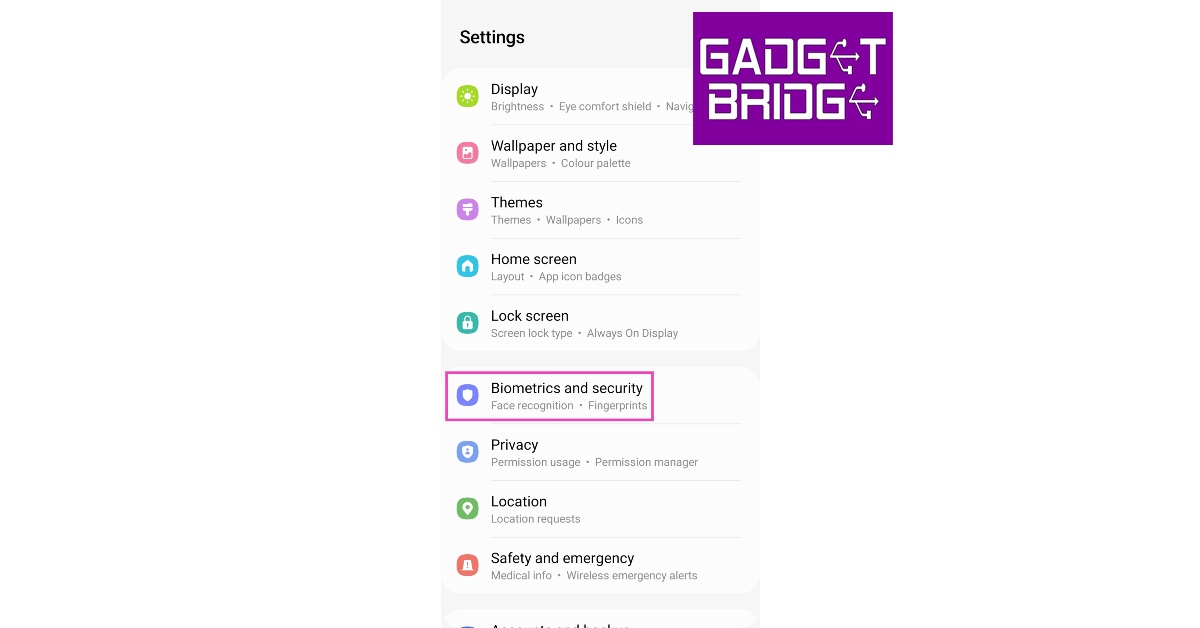 Step 2:
 Step 3:
 Step 4:
 Step 5:
 Step 2:
 Step 3:
 Step 4:
 Step 5:
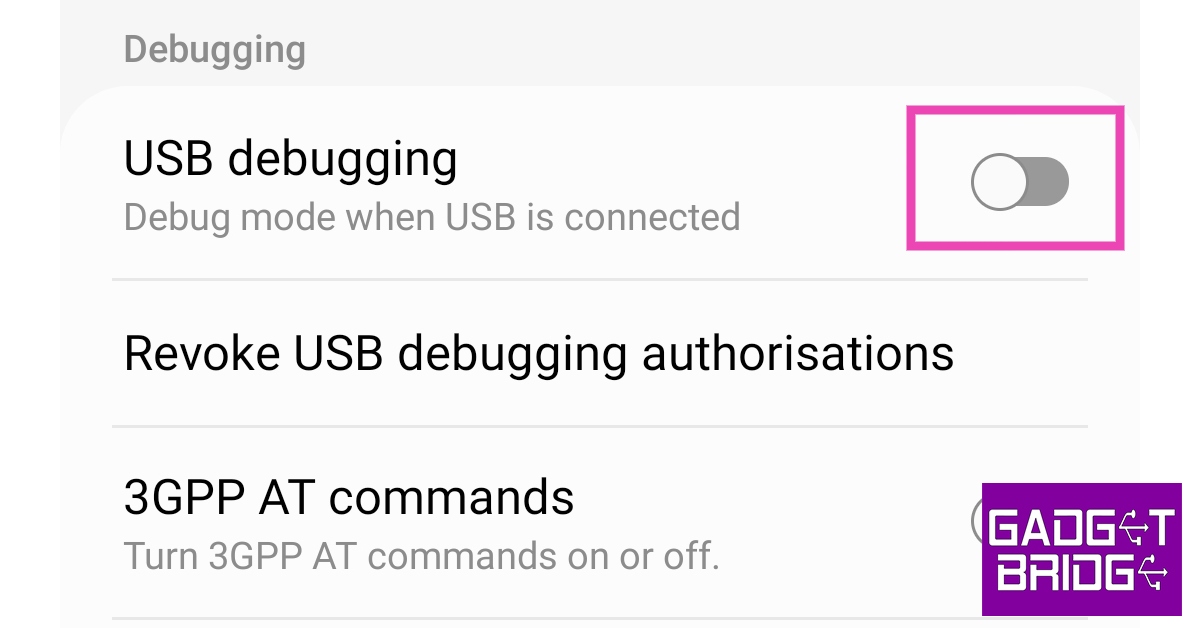 Step 6:
 Step 9: