25 May 2023 Amazon Quiz has gone live. Customers from different parts of the country are participating in the daily quiz. The quiz begins from 12 AM to 11:59 PM. Those participating in the quiz can win exciting prizes by answering all the questions correctly. Today participants have a chance to win a Rs 500 Amazon Pay Balance.Amazon quiz brings an opportunity for its customers to win Amazon Pay Balance ranging from Rs 1,000 to Rs 50,000. The Quiz can be played from 12 AM to 11:59 PM. The e-commerce platform brings a fresh quiz on a daily basis which consists of five questions related to general knowledge and current affairs. The participants need to answer all the questions correctly and their names will be selected for a lucky draw. The winner will be announced at the end of the month.One wrong answer could eliminate you from the quiz. If you manage to answer all the questions correctly you can stand a chance to win a Rs 500 Amazon Pay Balance today. Only app users are eligible to participate in the Quiz. Check Out 25 May 2023 Amazon Quiz Answers.Amazon Quiz Today Prize – Rs 500 Amazon Pay BalanceQuiz Date – 25 May 2023Daily Timing – 12 AM to 11:59 PMWinner Announcement – Today 12 PM
In This Article
Amazon Quiz Answers Today 25 May 2023
Question 1: The Government of India scheme for model residential school, specifically for Scheduled Tribes across India, is named after whom?
Answer: EklavyaQuestion 2: In 2023, which venue is scheduled to host the final match of the ICC World Test Championship?
Answer: The Oval
Question 3: At the age of 71, which actress made her debut on social media when she shared her first photo on Instagram?
Answer: Zeenat AmanQuestion 4: In what region is this animal found?Answer: Southern AfricaQuestion 5: This bird is sacred to which Greek God?Answer: Zeus
How To Play Amazon Quiz
Only app users are eligible to play the Amazon quiz every morning from 12 AM to 11:59 PM. The quiz is not available on the desktop. For those who are unaware of how to play the Amazon quiz below are the steps, you can follow to take the quiz.
Firstly download the Amazon app from Google Play Store or App Store
Now fill in the required information through the Sign Up option.
You need to log in to the Amazon app and scroll down on the home screen to find the Amazon Quiz banner.
Tap on the Amazon Quiz banner and tap on the Start button to start the Quiz.
Now you will get 5 questions and you need to answer them correctly. One wrong answer will eliminate you from the Quiz.
After answering all the questions correctly you are now eligible for a Lucky Draw.
The winner’s name will be announced today at 12 PM.
If you’re feeling the pinch from the cost of living crisis in the UK (like many of us), then cutting back on certain luxuries may be the best cause of action. One of them is more frugal when it comes to purchasing new necessities such as a new smartphone. It’s no secret that Apple’s iPhone prices have continued to increase throughout the years, so opting for an older model or refurbished iPhone may be the more economical solution in today’s climate, especially when there are arguably few innovations between iPhone generations. We’ve looked into exploring whether purchasing one of Apple’s iPhone 12 models from 2020 is still worth investing in 3-years after its initial release. Allow us to assist you in determining whether the iPhone 12, 12 Pro, 12 Pro Max, or 12 Mini is the ideal choice for your needs.
In This Article
Introducing the iPhone 12 Models
In October 2020, Apple unveiled the iPhone 12 models, marking the 14th generation of iPhones. It’s incredible how time flies! Due to the impact of Covid, Apple broke with tradition and introduced the iPhone 12 series in October, contrary to their usual release schedule in September. Despite a few leaks prior to the launch, there were still some surprises left for the audience.
What Sets the iPhone 12 Models Apart from its Predecessors?
Apple made a significant change in design for the iPhone 12 models. After embracing rounded corners since introducing the iPhone 6 in 2014, they decided to return to a more angular design. Personally, I was initially unsure about this shift, as I found the rounded corners on the iPhone 6 more aesthetically pleasing and practical.
However, when I held the iPhone 12 in my hands for the first time, I was pleasantly surprised by the elegant feel of the angular design and the immersive full-screen display. While it retains a slight resemblance to the iPhone 5, switching it on immediately brings you back to the present, with little to remind you of 2012.
Upgraded Processor
As expected with any new Apple release, the iPhone 12 comes equipped with a new chip. The A13 processor has been succeeded by the A14 processor. Reports suggest that the A14 chip is 50% faster than its predecessor, allowing for smoother performance and more immediate execution of complex applications. All models in the iPhone 12 series feature this new processor, with the exception of the camera, which differentiates between the Standard and Pro versions.
Clear Device Names
Apple continues its straightforward naming convention for the iPhone 12 models, as seen in the iPhone 11 series. With names like iPhone 12 (standard), iPhone 12 mini (compact), iPhone 12 Pro (premium), and iPhone 12 Pro Max (largest screen), it’s easy to understand the unique selling points of each model.
OLED Becomes the Standard
Apple has adopted OLED as the standard display technology for all iPhone 12 models, branding it as the Super Retina XDR Display. Every device in the iPhone 12 series features this display, making it a significant upgrade from the LCD display used in the iPhone 11.
Impressive iPhone 12 Camera
Unsurprisingly, Apple has once again prioritized camera quality in the iPhone 12 series. The entry-level iPhone 12 and 12 Mini boast a dual-camera system, consisting of an ultra-wide-angle and a wide-angle lens. The aperture has been widened to f/1.8, and the two premium models, iPhone 12 Pro and Pro Max, even reach f/1.8. The cameras have become more light-sensitive, allowing for excellent photo quality, even in low-light conditions. Apple’s proprietary software, the third iteration of intelligent HDR, further enhances photo quality.
Another noteworthy improvement we observed is the enhancement of the front camera. It’s a delight to see that high-resolution video calls are now achievable. Although the camera’s megapixel count remains at 12 MP, similar to the iPhone 11 Pro, the quality has significantly advanced, thanks to the integration of Deep Fusion technology and the powerful chip. So, the next time you connect with your loved ones through a video call, it might be a good idea to tidy up your appearance. However, it’s worth mentioning that there are a few competing smartphones available in the market that offer slightly superior camera quality. Examples include the Huawei P40 Pro and the Samsung Galaxy S20 Ultra 5G.
The difference between each iPhone 12 model
iPhone 12 – the timeless option
The entry-level iPhone 12 smartphone impresses with its innovative Ceramic Shield technology, which provides assurance that your device won’t shatter into a thousand pieces in case of a fall. This is a remarkable advancement! The iPhone 12 boasts the most cutting-edge technology compared to its predecessor, the iPhone 11. Although it adheres to Apple’s classic pricing, you can expect exceptional value for your money with this device.
iPhone 12 Mini – compact yet powerful
As you may already know, I have a strong affinity for smartphones that aren’t oversized. After having my eye on the iPhone 11 Pro, the introduction of the iPhone 12 Mini brings forth a whole new range of possibilities. From a purely technical standpoint, the smallest model in the iPhone 12 lineup offers the same features and advantages as the standard iPhone 12, but in a more compact form with a display size of 5.4 inches (13.72 centimetres). Regarding storage capacity, you have options ranging from 64 GB to 256 GB. One frequently asked question is regarding the battery life of the iPhone 12 Mini. Due to its smaller size compared to the iPhone 12, the battery doesn’t last quite as long. It provides approximately seven hours of intensive use and 18 hours in standby mode.
iPhone 12 Pro
As is customary, photography enthusiasts will be particularly delighted with the iPhone 12 Pro. This Apple model’s camera has been enhanced with a Lidar scanner, and it now offers the capability to save photos in RAW format, which is ideal for professional post-editing. However, if photography isn’t a top priority for you and is more of a bonus, then the standard iPhone 12 will suffice. Similar to the iPhone 11 Pro, the back of the iPhone 12 Pro features three cameras.
Another noteworthy feature of the iPhone 12 Pro is its wireless charging capability. Apple has retained this convenient functionality.
Is the iPhone 12 Pro Max the ultimate iPhone?
Big, Bigger, iPhone 12 Pro Max – this premium smartphone features a massive 6.7-inch diagonal screen, almost qualifying it as a phablet. For comparison, the iPad Mini has a 7.9-inch (20.07 cm) screen, making it just slightly larger. The iPhone 12 Pro Max stands as the most powerful device in Apple’s iPhone 12 series, but its suitability for your needs remains the most crucial factor to consider. In comparison to other models in the series, the iPhone 12 Pro Max excels in size and hosts an enlarged image sensor, ensuring even better photo quality, especially in challenging weather conditions. We found that the notable distinctions lie primarily in its size and the premium camera.
A remarkable addition is the introduction of “MagSafe”: Apple’s Q1 charging module has been extended with a magnet, allowing for a whole new range of accessories. This includes items like a secure car mount or the ability to safely fasten the device in your pocket, offering protection against potential theft.
Our verdict on the iPhone 12 lineup
The iPhone 12 series showcases solid improvements over Apple’s previous offerings, although it doesn’t introduce any groundbreaking revolutions. However, this isn’t necessarily a drawback considering the overall high quality of the devices. The iPhone 12 demonstrates an evolutionary leap compared to the Samsung S20 Ultra and Huawei P40 Pro. Notably, all iPhone 12 models come equipped with 5G, ensuring they are future-ready.
Does investing in an old, refurbished iPhone 12 make sense then?
One consistent point of criticism among fans is the price of the iPhone 12 currently with each new release. For instance, the iPhone 12 in black with 64 GB storage retails for around £649 on the Apple website. Fortunately, you can find refurbished iPhone 12 devices on Back Market for as low as £296. Additionally, Back Market offers refurbished iPhone 12 Mini devices for £234, allowing you to save up to 50% off the original price.
At Back Market, all devices and iPhone generations undergo professional cleaning by experts in the lab and thorough checks for any defects. Moreover, you have the advantage of a 30-day testing period to ensure the iPhone 12 meets your specific needs. By choosing a refurbished iPhone 12 from Back Market, you can make your purchase with peace of mind.
For the latest gadget and tech news, and gadget reviews, follow us on Twitter, Facebook and Instagram. For the newest tech & gadget videos subscribe to our YouTube Channel. You can also stay up to date using the Gadget Bridge Android App. You can find the latest car and bike news here.
What makes a smartphone really smart is its compatibility with other gadgets around the house. If you’re burnt out by watching content on your smartphone, you can switch it up and improve your viewing experience by mirroring your smartphone’s display to a TV or even a projector. We’ve talked about how you can connect your phone to your TV, you can read more about it here. Now, let’s turn our focus to projectors. In this article, we bring you the 4 best ways to connect an Apple or Android device to any projector.Read Also:RuPay credit cards can now link to Google Pay to make UPI payments
In This Article
Use Chromecast
The easiest and most reliable way to connect your smartphone to a projector is by using a Chromecast adapter. A Chromecast streaming adapter can plug into any device with an HDMI port. You can use it for your TV as well as a projector. Once the Chromecast device is plugged into the projector you can use the Google Home app on your smartphone to stream on it. Simply go to Google Home>Profile>Mirror Device>Cast Screen/Audio to mirror your smartphone’s display on the big screen using the projector.
Use WiFi Direct
You may not need to splurge extra cash on a Chromecast streaming adapter if your projector supports WiFi Direct. Most new devices will have this feature. Check your projector’s user manual or look up its model number online to see if it has this functionality. Once that is out of the way, go to Settings>Connections>WiFi>WiFi Direct on your smartphone and let it scan for nearby devices. Once you see your projector’s name on the list, tap on it and begin streaming content from your smartphone.
Use your manufacturer’s streaming support
If you’re using an Apple device, you can connect to your projector using AirPlay. Most modern projectors have integrated support for AirPlay, making them easier to connect to iPhones and iPads. Samsung users can use the Smart View feature on their phones to connect to any projector wirelessly. It should be noted that your projector and smartphone must be connected to the same WiFi network.
Cabled Connection
There are plenty of ways to establish a cabled connection between your smartphone and projector for streaming, but your choices eventually boil down to the ports you are working with. Mobile devices with USB-C ports can connect to a projector using a Type-C to HDMI Cable. If your projector has a USB-C port, then you’re in luck as you can stream the contents of your smartphone using a Type-C to Type-C USB cable while charging it at the same time.Some users also go for the MHL (Mobile High-Definition Link) cable, but its biggest drawback is that it offers micro USB instead of USB Type-C support. If you own an iPhone, you use a lightning-to-HDMI adapter to connect it to your projector with an HDMI cable. Here are the 5 best lightning to HDMI adapters you can buy in the US right now.
Frequently Asked Questions
How do I connect my Android phone to my projector?
You can either connect your Android phone to your projector wirelessly using WiFi Direct or go for a cabled connection using a Type-C to HDMI cable.
How do I connect my phone to a projector using USB?
If you want a USB connection between your phone and projector, you have a few options. You can either use an MHL cable which plugs into a micro USB port and HDMI port or you can use a USB Type-C to HDMI cable for modern smartphones. If your projector has a Type-C port, you can use a USB Type-C to Type-C cable as well.
How do I connect my iPhone to a projector?
To connect your iPhone to your projector, you will need a Lightning Digital AV Adapter. Once you’ve plugged in the adapter to your iPhone’s lightning port, use an HDMI cable to connect it to the projector. For an easier, wireless connection, use AirPlay.Read Also:How to Check Laptop Battery Health in Windows 11: Top 3 Ways
Conclusion
These are the 4 best ways to connect your Apple or Android device to any projector. Using a wireless connection is by far the easier option, but it can suffer from some latency issues at times. For a more consistent and stutter-free playback, use a cabled connection. If you’re planning on mirroring your phone for a long time (in case you’re playing a movie), make sure you use an MHL or Type-C to Type-C (if your projector allows it) so your phone can charge while it is connected to the projector.For the latest gadget and tech news, and gadget reviews, follow us on Twitter, Facebook and Instagram. For newest tech & gadget videos subscribe to our YouTube Channel. You can also stay up to date using the Gadget Bridge Android App. You can find the latest car and bike news here.
For a lot of consumers, D-Link is the go-to choice when it comes to network equipment. The brand boasts a vast catalogue spanning CCTV cameras, mobile hotspots, adapters, switches, mini UPS, and of course, WiFi routers. If you’re thinking about upgrading your home or office router, it is always a good idea to look at what D-Link’s next-gen products have to offer. The new EXO AX AX5400 router from D-Link supports WiFi 6 and offers a bunch of interesting features. Right now, this router is priced at Rs 11,000 for the Indian market. We’ve been testing it out for the last week to see if it’s worth the price tag. So, without further ado, let’s take a deep dive into our D-Link EXO AX AX5400 DIR-X5460 router review.Read Also:Vivo X90 review: Won’t disappoint
The D-Link DIR-X5460 WiFi router prioritises functionality over aesthetics when it comes to the design of the product. We don’t have any complaints here, you don’t buy a router for the looks. The DIR-X5460 has an all-plastic build, all the way from the body panels to the antennas.Covering the width of the top section of the router is a large air vent. The front end of the device has LED indicators for power, internet connectivity, 2.4GHz and 5GHz band connectivity, and USB storage status. The AX5400 does not have any internal fans, so it is absolutely necessary for it to have large air vents. The bottom panel is all vents along with four feet that keep the device in place. The two mounts near the centre can be used to prop the router on a wall.There are four antennas along the sides of the router, two on either side. You need to screw in the front two antennas while setting up the device. They can be found inside the package with the rest of the accessories. Two antennas protrude from the back panel, taking the total number of antennas to 6. At the back of the router, you will also find all the connection ports. These include 2 USB ports (USB 2.0 + USB 3.0), 4 Gigabit LAN ports, and 1 Gigabit WAN port. There’s also a power input port at the far right end of the panel along with the power button, a WPS security key, and the reset punch hole.The overall design is much more extravagant than the average WiFi router provided by your Internet Service Provider. The only minor issue we have here is with the horizontal power adapter. It tends to hoard a lot of space when plugged into an extension board. This won’t be an issue if you’ll be plugging the adapter into a solitary wall outlet.
D-Link has made it incredibly easy to set up the EXO AX AX5400 DIR-X5460 router. Once you take it out of the box, you need to attach the two antennas and plug in the ethernet and power cables in their allotted ports at the back. Once that is done, you need to download the D-Link app on your smartphone and follow the on-screen instructions. You can find the default password and WPS pin of the router on the sticker at the bottom. The D-Link DIR-X5460 is capable of working in a mesh network, which means you can easily connect it to an extender or another router.With the latest WiFi 6 technology on board, the D-Link EXO AX AX5400 DIR-5460 router promises ultra-fast speeds with a wider network coverage than any previous-gen router. With OFDMA and two-way MU MIMO technology, the DIR-X5460 can communicate with multiple devices simultaneously and allocate the data flow accordingly. One of the better things about this WiFi router is that you don’t need to sign in to the 2.4GHz and 5GHz band networks separately. Once you’re connected to the main network, the router will automatically upgrade you to the 5GHz band when the device is in its vicinity.The D-Link EXO AX AX5400 DIR-X5460 can provide speeds of up to 4,800 Mbps on the 5Ghz band and 600 Mbps on the 2.4GHz band. You can easily stream 4K videos on multiple devices connected to the network. Even with one device downloading heavy files, the speeds on other devices are mostly unaffected. We did not experience any hiccups or unnecessary stutter during our use. The router managed to provide exceptional coverage even in the distant corners of the house. The signal strength we received on the first floor was remarkable. The router even managed to reach some sections of the roof.We suggest you spend some more time on the D-Link app or web interface after setting up the router. There are a lot of interesting features here that you may find useful. One of the better features is parental control, which allows you to block certain websites and filter content on the network. You don’t have to pay any additional costs for this service, which is a big plus in our book.The router also comes with an integrated Ookla speed test, which can be accessed from the web interface. Since the router is the one conducting this speed test, it can apply these results to the QoS (Quality of Service) and prioritise the connection strength for different devices on the network. If there’s a dip in connection speed, the DIR-X5460 will automatically prioritise the active devices connected to the network. If you’re using the D-Link EXO AX AX5400 DIR-X5460 as a part of a mesh network in your office, you can choose to set it up in router mode or in extender mode. If you plan on using it as a home router, you can create different profiles for different users. You can also set up a different profile for guests. The guest profile can have a different password and restricted access to the wider network. Finally, you can also connect the DIR-X5460 to your Amazon Echo or Google Home device for voice control.Read Also:How to Check Laptop Battery Health in Windows 11: Top 3 Ways
Verdict
If you’re looking to upgrade from the free WiFi router provided by your ISP, the D-Link EXO AX AX5400 DIR-X5460 is a brilliant choice. You will notice an immediate bump in speeds and signal strength. The range of features offered by this router is also commendable. However, the Rs 11,000 price tag is still something that would pinch a lot of users. Let’s be honest, an average does not want to splurge more than Rs 10k on a piece of equipment that their ISP already provides for free. But if the price is not a factor for you, the D-Link EXO AX AX5400 DIR-X5460 will make a great addition to your home or office.
D-Link EXO AX AX5400 DIR-X5460 router: Pros
Incredible speeds
Good coverage
Helpful features like parental controls, guest profile, voice control, and more.
After Google I/O Microsoft kicked off its flagship event Microsoft Build 2023. The annual developer’s conference will end on May 25. At the Build the tech giant made some major announcements and the keynote was presented by Satya Nadella, the CEO of Microsoft along with 19 other speakers.This year’s Microsoft Build was all about AI (Artificial Intelligence). The CEO revealed how its products will be benefited from AI. It showcased how AI will fuel Windows with its own Copilot by introducing Windows Copilot. In addition to this, it is also extending the Bing Chat plugin to Windows and announced a new Hybrid AI tool.Microsoft launched Windows Copilot making it the first PC platform to centralise AI assistance.OpenAI released ChatGPT plugins in March of this year. Recently Microsoft also announced Bing plugins which allow ChatGPT and Bing Chat to assist you in finding and making a restaurant reservation using an OpenTable plugin. Similarly, the company has announced that it will adopt the same open plugin standard that OpenAI introduced for ChatGPT. Developers may now create plugins for business and consumer surfaces like ChatGPT, Bing, Dynamics 365 Copilot, Microsoft 365 Copilot, and Windows Copilot using a single platform. Microsoft also disclosed that Bing will become ChatGPT’s default search engine.As part of this shared plugin platform, Bing is adding to its support for plugins. In addition to previously announced plugins for OpenTable and Wolfram Alpha, we will also have Expedia, Instacart, Kayak, Klarna, Redfin and Zillow, among many others in the Bing ecosystem.According to the company, developers will now be able to extend Microsoft 365 Copilot with plugins. The ChatGPT, Bing, Teams message extensions and Power Platform connectors are just a few of the plugins for Microsoft 365 that will allow developers to make the most of their current investments. In addition to this by making use of the Microsoft Teams Toolkit for Visual Studio Code and Visual Studio, developers can also create new plugins with ease.During the announcement, Microsoft also revealed that now developers will be able to integrate their apps and services into Microsoft 365 Copilot with plugins. The ChatGPT, Bing, Teams message extensions and Power Platform connectors are just a few of the plugins for Microsoft 365 Copilot. Moreover, they can also use the Microsoft Teams Toolkit for Visual Studio Code and Visual Studio to quickly create new plugins for Microsoft 365 Copilot. By integrating their data into the Microsoft Graph and contextualizing relevant and useful information using the recently introduced Semantic Index for Copilot, developers may further develop Microsoft 365 Copilot.More than 50 plugins from partners will be available for customers as part of the early access program, including Atlassian, Adobe, ServiceNow, Thomson Reuters, Moveworks and Mural, with thousands more available by the general availability of Microsoft 365 Copilot.The company also launched Azure AI Studio which will allow developers to quickly and easily use their own data to support robust conversational AI models like OpenAI’s ChatGPT and GPT-4. Employees, customers, and partners may use natural language-based app interfaces to search through massive amounts of text, photos, and data to find information using Azure OpenAI Service on Your Data, which will soon be available in public preview, and Azure Cognitive Search. Additionally, Microsoft said that Azure Cognitive Search, which is now in private preview, will power vectors in Azure. This technology will enable search applications to be stored, indexed, and delivered through vector embeddings of organisational data, including text, photos, audio, video, and graphs.The tech giant has also introduced Windows Copilot for Windows 11. With this launch, Windows will be the first PC platform to centralise AI assistance. As per the company “With Bing Chat and first- and third-party plugins, users can focus on bringing their ideas to life, completing complex projects and collaborating instead of spending energy finding, launching and working across multiple applications.” A preview of Windows Copilot will start to become available for Windows 11 in June.For the latest gadget and tech news, and gadget reviews, follow us on Twitter, Facebook and Instagram. For newest tech & gadget videos subscribe to our YouTube Channel. You can also stay up to date using the Gadget Bridge Android App. You can find the latest car and bike news here.
The official schedule for WWDC23 events has been released by Apple. The eagerly anticipated World Wide Developers Conference (WWDC) 2023 will begin on June 5 and go until June 9. Apple is anticipated to present new software, including iOS, iPasOS WatchOS and more, at the conference. In addition to this, the company is also likely to introduce its first mixed-reality headset. The Cupertino-based corporation said that this year’s upcoming tech event will once again be streamed online.Apple finally announced the exact date and timing of WWDC 2023. The complete list of the five-day event’s scheduled programmes has finally been made public. Further providing details Apple revealed that its annual Worldwide Developers Conference will be held from June 5 and will end on June 9. It will be free for all developers, however again this year the WWDC23 will take place in an online format. On the first day, developers and students will have the chance to celebrate in person at a special event at Apple Park. Developers may learn about the newest technologies, tools, and frameworks coming to iOS, iPadOS, macOS, tvOS, and watchOS during the 5-day long event.According to the programme, the 2023 World Wide Developers Conference (WWDC) will begin on June 5 at 10 a.m. PDT (10:30 p.m. IST) with a keynote address by Apple CEO Tim Cook. The keynote address will be available via apple.com, the Apple Developer app, the Apple TV app, and YouTube, with on-demand playback available after the conclusion of the stream.In addition to this on the 2nd day of WWDC23, Apple will be hosting Platforms State of the Union that will start at 1:30 PM PDT and will be streamed via the Apple Developer app and the Apple Developer website. Developers may learn how to enhance their apps by delving deeper into the latest tools, technologies, and advancements across Apple platforms. On the same day Apple will announce this year’s Apple Design Awards to recognise and celebrate the art, craft, creativity, and technical expertise of Apple’s developer community. According to the company, this year’s Apple Design Award winners will be unveiled via the Apple Developer app and website.During the expert session, developers can get answers to their technical, design, and App Store questions. Moreover, Apple engineers and designers will host online events in Slack for developers to participate in technical conversations, get solutions to their queries, and network with one another.
For the latest gadget and tech news, and gadget reviews, follow us on Twitter, Facebook and Instagram. For newest tech & gadget videos subscribe to our YouTube Channel. You can also stay up to date using the Gadget Bridge Android App. You can find the latest car and bike news here.
If you share your Amazon Prime Video account with friends and family, they can access your profile and go through your watch and search history. While you may not prefer this, your watch history serves a purpose. Prime Video is able to generate better recommendations for you based on the stuff that you watch on the platform. If that’s not a good enough reason to keep it, here are the best 5 methods to clear Amazon Prime Video watch and search history on your PC and smartphone.Read Also:Vivo Y100 and Vivo Y100A get a price cut of Rs 1,000
In This Article
Clear Watch History from Account Settings
Step 1: Log into the Amazon Prime Video website with your Prime account.Step 2: Click on the profile icon at the top-right corner of the screen and select ‘Accounts and Settings’.Step 3: Click on the ‘Watch History’ tab.Step 4: Click on ‘Delete movie from Watch History’ next to a title to remove it.The movie/TV show will be removed from your watch history on Amazon Prime Video in a few days.
Remove a title from the Amazon Prime Video home screen
Here’s how you can remove a TV show or movie from the ‘Continue Watching’ section.Step 1: Log into Amazon Prime and scroll to the Continue Watching section.Step 2: Hover your cursor on the show or movie you want to remove.Step 3: Click the cross icon on the title you want to remove from the Continue Watching section.The title will be removed instantly.
Remove a title from Amazon Prime Video Watchlist
Adding a video to your watchlist saves it for future viewing and also helps the streaming platform to curate recommendations more aligned to your taste. If you changed your mind about a particular title, here’s how you can remove it from your watchlist.Step 1: Log into Amazon Prime Video on your PC browser.Step 2: Click on ‘My Stuff’ and select ‘Watchlist’.Step 3: Move your cursor to the title you want to delete and click on the check/tick icon next to the play button. If you accidentally removed the wrong title, you can undo your action before refreshing the page.
Clear Search History from the Amazon Prime Video app
Step 1: Launch the Amazon Prime Video app on your smartphone.Step 2: Tap on the profile icon on the top right corner of the screen.Step 3: Tap on the gear icon at the top-right corner of the screen.Step 4: Select ‘Clear video search history’.Your search history will be wiped from your Amazon Prime Video profile.
Remove items from the Watch Next section
Don’t like a particular recommendation? Here’s how you can remove it from the Watch Next category.Step 1: Launch the Prime Video app on your smartphone.Step 2: Scroll to the Watch Next category and long-press the title you want to remove.Step 3: Tap on ‘Hide this video’ or ‘Not Interested’.The movie or TV show will be removed from the Watch Next section.
Frequently Asked Questions
Can I clear my Amazon Prime Video watch history from the app?
You can only clear the watch history on your Prime Video account using the website. Log into your Prime Video account and go to Accounts & Settings>Watch History to remove a particular title.
How do I clear my search history on Amazon Prime Video?
To clear your search history on Amazon Prime Video, simply launch the app on your smartphone and go to My Stuff>Clear Video Search History.
Google Pay and the National Payments Corporation of India (NPCI) announced on Tuesday that users would be able to make UPI payments using RuPay credit cards. Therefore users can now conveniently pay at any online and offline merchant that accepts RuPay credit cards by linking their RuPay credit cards to Google Pay. Speaking about the rollout, Sharath Bulusu, Director of Product Management from Google, said, “Google Pay is a partner to India’s financial ecosystem – enabling millions of users to safely and conveniently make digital payments every day. This latest announcement is a reflection of our commitment to contribute to the Government’s vision to boost digital payments in India and play a significant role in the country’s credit journey. This feature will give Google Pay users more flexibility and choice in making payments, and will drive greater adoption of digital payments in the country.”Google Pay and NPCI have introduced the option for customers to make UPI payments with RuPay credit cards, capitalising on the rising popularity of UPI and the rising need for dependable credit in India. Users will be able to now link their RuPay credit cards to Google Pay to pay easily at any online and offline merchants that accept RuPay credit cards as a result of this improvement. According to reports, UPI transactions increased significantly in India. The number of UPI transactions reached 8.7 billion in March 2023, according to NPCI, which caused a significant increase in monthly transactions. The Reserve Bank of India (RBI) additionally permitted the linking of RuPay credit cards to the UPI platform in June 2022 in order to further support the expansion of digital payments in the nation.According to Google, this feature is currently rolling out to RuPay credit card holders of Axis Bank, Bank of Baroda, Canara Bank, HDFC Bank, Indian Bank, Kotak Mahindra Bank, Punjab National Bank and Union Bank of India. More banks will follow very soon.This initiative is believed to be a huge step for the nation’s millions of RuPay credit card users towards gaining access to the ease of digital payments.
How to activate RuPay credit cards on Google Pay
In order to activate RuPay credit cards on Google Pay, Axis Bank, Bank of Baroda, Canara Bank, HDFC Bank, Indian Bank, Kotak Mahindra Bank, Punjab National Bank and Union Bank of India customers need to add the RuPay credit card to Google Pay. They are required to tap on the “RuPay credit card on UPI” option in their profile and select the bank which issued their RuPay credit card. After this RuPay credit cards holder will need to set a unique UPI PIN by (a) entering the last six digits of the card number and expiry, (b) entering the OTP from their bank
For the latest gadget and tech news, and gadget reviews, follow us on Twitter, Facebook and Instagram. For newest tech & gadget videos subscribe to our YouTube Channel. You can also stay up to date using the Gadget Bridge Android App. You can find the latest car and bike news here.
Vivo recently improved the X-Series, a line of smartphones renowned for their outstanding photography performance. As the Vivo X90 has been introduced in the Indian market, it has a magnificent triple camera configuration powered by Zeiss optics. The smartphone not just has good cameras, but it also boasts top-notch hardware. Let’s see how this smartphone performs in the flagship category. This is the Vivo X90 review you should not miss.
In This Article
Vivo X90 review: Design and Display
Talking about the Vivo X90’s construction and design first. We have Breeze Blue as our test unit, which is a lovely tint. In contrast to the leather finish on the Pro model, which undoubtedly appears refined and elegant, the X90 has a shiny gradient surface. If you prefer a gadget that feels more premium, you can also take that option into account. The smartphone resists light scratches and is not a fingerprint magnet.Although the gadget is less broader than it is tall, we truly appreciate how this phone feels in our hands. It is perceptive, svelte, and appears exquisite. Despite being a little slippery, it is lighter. With metal frames surrounding it, both sides are smoothly curved. The camera module really stands out and unlike others, it does not wobble at all when placed on a flat surface.Three camera sensors and an LED flash are included in the module. On the back panel’s top-right corner is a Zeiss logo. In addition, a bright chrome strip with “Xtreme Imagination” written on it is located beneath the camera module. The phone has an IP64 rating for water and dust protection.The 6.78-inch curved AMOLED display of the X90 features a 1,260 x 2,800-pixel resolution. The screen-to-body ratio of the gadget is 93.53 percent, the aspect ratio is 20:9, and the refresh rate can reach 120 Hz. DCI-P3 colour gamut support has been validated for the screen. It incorporates an in-display fingerprint sensor that is accurate and quick and has no side bezels.Also Read:OnePlus Nord CE 3 Lite review: Is it a fully loaded package?Whether viewing a video, browsing the web, or even navigating through your favourite social media apps, the 120Hz AMOLED display is a treat. You may use it outdoors with ease because of its terrific brightness. The high-quality twin speakers further improve the overall usability of this phone.
Vivo X90 review: Performance and Camera
Performance is enhanced with the MediaTek Dimensity 9200 SoC. We did not observe any lag or stuttering, and the overall experience was pleasant. It has the ability to easily manage practically all daily duties. We played Call of Duty and Asphalt 9 in terms of gaming, and surprisingly, the experience was almost identical to that of the Snapdragon 8 Gen 2 CPU. Thanks to the large vapour chamber cooling system, we were able to play the games at their highest settings with consistent gameplay and very little heating near the camera module.The Vivo X90 comes pre-installed with the most recent Funtouch OS 13 version based on Android 13. Of course, some bloatware applications are pre-installed, but you may quickly remove those that you don’t require.Also Read:5 Best Photography smartphones in India: Ditch the DSLRThe triple back camera system of the Vivo X90 features Zeiss lenses. f/1.75 lens with a 50-megapixel main Sony IMX866 sensor with OIS and laser autofocus. A 12-megapixel Sony IMX663 telephoto portrait camera with an f/2.0 lens and 2x optical zoom as well as a 12-megapixel Sony IMX663 ultra-wide-angle camera with an f/2.0 lens are also included in the camera arrangement. For taking selfies, the smartphone has a 32-megapixel front-facing camera with an f/2.45 aperture.Look at the images taken during the day, first. The primary sensor can provide excellent details and sharpness in daylight, especially in direct sunlight, thanks to the Zeiss alliance. When you zoom into the photos, it becomes clear that their images are rich in depth. There are several problems with saturation, and the colours seem vivid rather than natural. Although the dynamic range is fairly good, it is inconsistent because it fails to activate even in Auto mode. The pictures were indeed underexposed, and the shadows are occasionally not very well controlled.The Vivo X90 performs reasonably well in terms of detailing in the daytime, with the exception of saturation problems that can be partially resolved by using Zeiss’s natural colour mode.Moving on, the ultra-wide angle lens generated excellent details and an excessive amount of crispness. Again, the colour is close to that of the primary camera, and the image colour reproduction is consistent, but the colour is prone to be oversaturated.The phone’s 12-megapixel telephoto portrait lens, which has a 2x optical zoom capability, does an excellent job bringing out details while maintaining good clarity levels. The images taken with a 2x optical zoom are also sharp and detailed.Without/with Zeiss natural colour modeWithout/with Zeiss natural colour modeSince Zeiss and the camera setup were collaboratively developed, you can now use the Zeiss natural colour mode. When you activate the Zeiss natural colour mode, the colour does improve but is still not realistically natural. The photos produced in the regular mode are a little saturated and appear unnatural at times. However, the X90-produced photos are mostly vibrant.macroThe X90 performs admirably with regards to details and sharpness levels in the close-up photos, and colour conveys the same message. Again, they appear to be enhanced and do not appear natural, which many of us will like. The smartphone can also take macro photos, and the pictures have good colour and detail quality here too.PortraitThe USP of the Vivo X90 is its amazing portrait photography. With the help of Zeiss, a variety of bokeh options are available. The edge detection is perfect, and the portraits are excellent. The skin tone appears to be natural as well. We loved taking shots here.Low lightwithout/with night mode onNow let’s talk about low-light photography. The X90 can produce good photos with very little noise and excellent resolution when in low-lit areas. Additionally, the sharpness levels are excellent. It is preferable to switch to night mode in extremely low light conditions, and this is where the V2 chip also plays a crucial role. Extremely low light conditions don’t affect the quality of the details. This time, the colours are decent. The clarity levels are remarkable, and there was nothing about the low-light photography that we could fault. Well done Vivo! Well done!SelfiesFinally, let’s talk about the phone’s selfie camera, which has a 32-megapixel sensor and produces good to great selfies. The skin tones are good, and if you turn off the beauty mode, you can still take sharp selfies with a great dynamic range. Additionally, edge detection is excellent.Along with astrophotography, there are additional capabilities like landscape and architecture modes. We did take some pictures and were able to catch some stars, but the fact is that you need a completely clear sky for that.When it comes to video recording, the Vivo X90 supports 4K at 60 frames per second with optical image stabilisation. There is some shake, but it is not a huge issue and the video quality is nice and sharp. Once again, the colours are dazzling. EIS is supported in 4K videos at 30 frames per second, and this stabilisation performs excellently. Both the sharpness levels and the details are good. While making videos, you can also optically zoom in by two times.The ultra-wide camera has good stabilisation and can shoot in 4K at 30 frames per second. The X90 also offers a cinematic mode, which performs wonderfully. The front camera only supports a maximum resolution of 1080p@30fps and does not support 4K recording.The Vivo X90 also supports 120W rapid charging and has a 4,810mAh battery. The battery will last up to 22.2 days in standby mode, according to the manufacturer. At medium to heavy usage, we were able to obtain an entire day’s supply of endurance. You have the choice to enable fast charging in the settings. You can find it by selecting the battery option. In order to use the full 120W rapid charge, one must enable the fast charging option. The included 120W charger can fully charge the phone in around 30 minutes.
Verdict
The collaboration with Zeiss has really elevated the Vivo X90’s cameras above and beyond, what you would expect from a flagship series. You can obtain outstanding low-light shots, good macros, great portraits, and a great choice for video recording with it. The colour saturation is the only problem, though.When it comes to performance, the device is lightning quick, the way it looks and the display experience definitely won’t let you down.
Vivo X90 Pros:
Premium design
Excellent display
120W fast charging
Excellent cameras
Vivo X90 Cons:
The colours in the pictures tend to be a bit saturated.
Garena Free Fire is a battle royale game with regular awards and tournaments to keep players interested. If you play Garena Free Fire, you should be aware of the redeem codes that are released on a daily basis. However, because the battle royale game is banned in India, players from other countries can use the Free Fire Redeem codes daily. If you’re unfamiliar with the Garena Free Fire redeem codes or don’t know how to get them, we’ve put together a step-by-step guide to help you redeem them. Check out Garena Free Fire Redeem Codes for 24 May 2023.The Free Fire redeem codes are a great way to get free stuff. These are 12-digit codes that contain alphabets and numbers, as well as an expiration date and time. Because the Garena FF redeem codes cannot be used more than once, you should hurry to the redemption page to claim your free reward before someone else does. To get a free reward, all you have to do is go to reward.ff.garena.com/en, which is the official redemption page. Also, keep an eye on this space for daily updates on Garena Free Fire redemption codes and rewards.
24 May 2023 Amazon Quiz has gone live on its platform. The quiz timings are 12 AM to 11:59 PM. The Amazon App users can participate in the quiz daily and all they have to do is submit correct answers to the questions asked on the e-commerce platform. Today’s participants can get a chance to win Rs 2,500 Amazon Pay Balance.By participating in the Amazon Quiz the participants can win Amazon Pay Balance ranging from Rs 1,000 to Rs 50,000 every day while sitting at home. To win the participants must answer five questions correctly that are based on current events and general knowledge. One wrong answer can eliminate you from the quiz. The results will be announced at the end of the month. Today’s question will let you win Rs 2,500 Amazon Pay Balance. Check below for today’s Amazon quiz answers.Amazon Quiz Today Prize – Rs 2,500 Amazon Pay BalanceQuiz Date – 24 May 2023Daily Timing – 12 AM to 11:59 PMWinner Announcement – Today 12 PM
In This Article
Amazon Quiz Answers Today 24 May 2023
Question 1: Kiara Advani married whom at the stately wedding venue of Suryagarh Jaisalmer?Answer: Sidharth MalhotraQuestion 2: Who became the most expensive purchase at the inaugural Women’s Indian Premier League (WIPL) 2023 auction?Answer: Smriti Mandhana
Question 3: Which of these food items appeared on a Google Doodle released in 2023?
Answer: Bubble teaQuestion 4: In Japan, this insect symbolism which season?Answer: AutumnQuestion 5: What is the most widespread species of this animal?
Answer: Red Fox
How To Play Amazon Quiz
Only app users are eligible to play the Amazon quiz every morning from 12 AM to 11:59 PM. The quiz is not available on the desktop. For those who are unaware of how to play the Amazon quiz below are the steps, you can follow to take the quiz.
Firstly download the Amazon app from Google Play Store or App Store
Now fill in the required information through the Sign Up option.
You need to log in to the Amazon app and scroll down on the home screen to find the Amazon Quiz banner.
Tap on the Amazon Quiz banner and tap on the Start button to start the Quiz.
Now you will get 5 questions and you need to answer them correctly. One wrong answer will eliminate you from the Quiz.
After answering all the questions correctly you are now eligible for a Lucky Draw.
The winner’s name will be announced today at 12 PM.
It should come as no surprise that your laptop’s battery deteriorates over time. Lithium-ion batteries, which are found in most laptops, wear down due to the heat generated with every charge cycle. If you’re wondering if your laptop’s battery performance has gone down recently, you can get generate a detailed report to get a better idea of the situation. In this article, we bring you the top 3 ways to check laptop battery health in Windows 11.Read Also:Top 4 Ways to Download Pictures From Facebook to Your Android Phone
In This Article
Use Command Prompt to get Battery Report
Step 1: Click on the search bar at the bottom toolbar and search for ‘Command Prompt’.Step 2: Right-click on the Command Prompt icon and select ‘Run as Administrator’.Step 3: Type the following command and hit Enter.powercfg /batteryreportStep 4: Your laptop’s battery report will be saved to the ‘System32’ folder in the C drive. Locate the report and open it.You can view the original and current battery capacity under the ‘Installed Batteries’ section. You can also view the battery capacity history to track the change in capacity over a greater period of time.
Use a third-party app or software
There are several third-party apps that can give you a detailed account of the battery health of your Windows 11 laptop. Apps like BatteryCat, BatteryInfoView, and HWinfo generate battery health reports for your laptop, giving you exact figures related to the wear level, current capacity, charge discharge rate, and more.
View Battery Usage Per App
There is a native way to view how much battery every app uses on your laptop. Simply open Settings and click on the System settings. Switch to the Battery tab and you will be able to see the percentage of battery each utilised by every app on your laptop.
Frequently Asked Questions
How do I get battery report on Windows 11?
To view your Windows 11 laptop’s battery report, launch Command Prompt as administrator and run the following command: powercfg /batteryreport. Go to C:/>Windows>System32 and click on the Battery Report HTML file.
Is Windows 11 battery report accurate?
The battery report generated by Windows 11 for your PC is very accurate and reliable. While some third-party apps may generate false numbers, you can count on Windows 11’s report to be accurate.
How can I view the battery consumed by every app on my Windows 11 laptop?
These are the 3 best ways to check your laptop’s battery health in Windows 11. There are some practices you must imbibe in order to maximise the battery life of your laptop. Always ensure that the battery on your laptop doesn’t get drained out. While charging, do not boost the battery to 100%. Always plug your laptop in to charge when it’s at 20-25% battery and charge it to 80-85%. The surrounding temperature also has a big impact on battery life.For the latest gadget and tech news, and gadget reviews, follow us on Twitter, Facebook and Instagram. For newest tech & gadget videos subscribe to our YouTube Channel. You can also stay up to date using the Gadget Bridge Android App. You can find the latest car and bike news here.
Vivo Y100 and Vivo Y100A are the two smartphones that were launched in India this year. Y100 debuted in India in February whereas the Y100A got released earlier this year. Now both smartphones are seeing a price drop of Rs 1,000.According to the company the Vivo Y100’s 8GB RAM with 128GB storage option is now available at a new price of Rs 23,999. On the other hand, the Vivo Y100A will come at Rs 25,999 for the 8GB RAM with 256GB storage option. These devices with the new effective price can be purchased starting today via Flipkart, vivo India e-store and across all partner retail stores.In addition to this, buyers can also avail cashback of up to Rs 2,000 using ICICI, SBI, Yes Bank, IDFC First Bank etc. Additionally, there are zero down payment options with select finance partners and additional benefits like vivo V-Shield Protection Plans for every purchase.
In This Article
Vivo Y100 specifications
Vivo Y100 features a 6.38-inch AMOLED Display. The screen supports a 90Hz refresh rate, 360Hz High touch sampling rate, supports peak brightness at 1300 nits and HDR10+ certification.The phone runs on FunTouch OS 13, which is based on Android 13. An octa-core MediaTek Dimensity 900 SoC built using a 6nm technology powers the device. The Vivo Y100 also includes UFS 2.2 and 8GB of additional RAM with Extended RAM 3.0, which speeds up and improves the experience of moving between apps.The 64-megapixel primary back camera on board the Vivo Y100 has optical image stabilisation. Dual 2-megapixel sensors are there in addition to this. A 16-megapixel front camera on the phone is used for selfies and video calls. It has a 4,500mAh battery inside that can be charged quickly at 44W.
Vivo Y100A specifications
Vivo Y100 comes with a 6.38-inch full-HD+ AMOLED display with 2400 × 1080 resolution. The screen of the phone offers 1300 nits of peak brightness. Additionally, the display comes with 90Hz refresh rate support. The phone runs on Android 13-based FunTouch OS 13 out of the box. Under the hood, there is an octa-core Qualcomm Snapdragon 695 SoC with an expandable RAM feature. The device comes in a single 8GB RAM with up to 128GB storage option. The internal memory is expandable via a microSD card.For the optics, the Vivo Y100A features a triple rear camera setup that includes a 64-megapixel primary sensor with OIS support. Moreover, the setup also consists of 2-megapixel sensors along with an LED flash. The phone comes with a 16-megapixel front-facing camera for taking selfies and video calling.The phone also houses a 4,500mAh battery with support for 44W flash charging.
For the latest gadget and tech news, and gadget reviews, follow us on Twitter, Facebook and Instagram. For newest tech & gadget videos subscribe to our YouTube Channel. You can also stay up to date using the Gadget Bridge Android App. You can find the latest car and bike news here.
HMD Global today announced the launch of the Nokia C32 in the Indian market today. The newly launched smartphone falls under the budget category. The device is shipped with Android 13 out of the box and is powered by an octa-core chipset. In addition to this, it is backed by a 5,000mAh battery that is claimed to last for 3 days. Also, the phone comes with a side-mounted fingerprint sensor.
In This Article
Nokia C32 price in India and sale details
The Nokia C32 price in India has been set at Rs 8,999 for the 4GB RAM with 64GB storage option. The price of the 4GB RAM with a 128GB storage model is set at Rs 9,499. The newly launched budget smartphone comes in Beach Pink, Charcoal, and Mint colour options.The device is now up for sale via Nokia’s official website in the country. The company is also offering a no-cost EMI offer starting from Rs 1,584/month for up to 6 months.
Nokia C32 specifications
In terms of specifications, the Nokia C32 features a 6.55-inch 2.5D display. The screen comes with 1600 x 700 pixels of resolution and has an aspect ratio of 20:9. The chipset name is not specified. It is powered by an octa-core chipset with a clock speed of up to 1.6 GHz. The phone comes with 4GB of RAM which can be expanded virtually to up to 7GB using unused storage. In addition to this, the device is available with up to 128GB of internal storage. Moreover, the phone operates on Android 13 and the company promises two years of quarterly security updates.The dual rear camera setup on Nokia C32 comes with an LED flash. The camera unit includes an AI-powered 50-megapixel primary sensor and a secondary 2-megapixel sensor. The phone comes with an 8-megapixel front-facing camera for taking selfies and video calling.Nokia C32 houses a 5,000mAh battery and supports 10W wired charging. As per the firm, the battery can easily last for up to 3 days once charged completely. For connectivity, there is Bluetooth v5.2, Wi-Fi, GPS, USB Type-C port and a 3.5mm audio jack.There is a side-mounted fingerprint sensor for authentication which also doubles up as a power button.
For the latest gadget and tech news, and gadget reviews, follow us on Twitter, Facebook and Instagram. For newest tech & gadget videos subscribe to our YouTube Channel. You can also stay up to date using the Gadget Bridge Android App. You can find the latest car and bike news here.
If you constantly need to cover your phone’s screen while using it under the sun, the display may have a problem. While most smartphones are legible under direct sunlight, some outdated displays may struggle to keep up with outdoor lighting. Luckily, there are a few ways to get around this issue. In this article, we bring you the top 7 easy methods to increase brightness beyond maximum on Android smartphones.Read Also:WhatsApp Editing feature is now rolling out to users
In This Article
Perform a diagnostic test for the light sensor
Your smartphone’s light sensor detects ambient light and triggers your smartphone to change its brightness according to the intensity of the surrounding light. If this sensor is broken, your phone may not hit peak brightness outdoors. You can run a diagnostic test for this sensor using a dialer code. Samsung users can access this test by dialling *#08*#. This code may differ for other manufacturers. Once you dial the code, you will be presented with a diagnostic tool menu. Tap on Sensors and then select Light Sensor. Subject your phone to different intensities of ambient light to check if the sensor is working.
Turn on Extra Brightness
Sometimes your phone’s highest brightness level may not be enough to counter the direct sunlight that falls on it. To get around this issue, some smartphone manufacturers let users boost the brightness by a bit, which makes the phone usable in outdoor light. Samsung calls this ‘Extra Brightness’. Here’s how you can enable it.Step 1: Go to Settings and select Display.Step 2: Make sure Adaptive Brightness is turned off.Step 3: Switch on the toggle bar for Extra Brightness.
Turn on Sunlight Mode
Like Samsung’s Extra Brightness, Xiaomi smartphones have a Sunlight Mode to boost the brightness of the display and improve its legibility in bright daylight. Here’s how you can enable it.Step 1: Go to Settings and select Display.Step 2: Tap on ‘Brightness Level’ and turn off Automatic Brightness.Step 3: Switch on the toggle bar for Sunlight Mode.Note: Boosting your phone’s brightness more than the maximum level can drain the battery much faster. Always ensure that you are using Extra Brightness and Sunlight Mode only for a short duration of time.
Turn off Adaptive Brightness
Adaptive Brightness is turned on by default on most Android smartphones. As the name suggests, it alters the brightness of your phone’s display depending on the surrounding light. This means that under direct sunlight the display will be at its brightest. Conversely, the display will automatically dim itself at night. Walking in and out of rooms can change your phone’s brightness, which some may find annoying. If you want your phone’s display to be bright at all times, simply turn off Adaptive Brightness. Here’s how.Step 1: Go to Settings and select Display.Step 2: Switch off the toggle bar for Adaptive Brightness.You can also swipe down from the status bar and tap the ellipses next to the brightness level to toggle Adaptive Brightness. Once you’ve switched it off, drag the brightness level to the maximum to use your phone at its brightest setting.
Use the CF.lumen app
CF.lumen is a great display management app for Android. It changes the colour temperature of the screen to suit the surrounding conditions, thereby reducing the strain on your eyes. One of the features that CF.lumen provides is the ability to lock your phone in day mode in bright light. Install the app on your smartphone and select the check box next to ‘Bright light’ under Light Sensor settings. This will increase the brightness on your Android phone.
Turn off Power Saving Mode
When your phone’s battery hits a certain threshold (usually 15% on most devices), it automatically activates the Power Saving mode. This mode conserves your phone’s battery by cutting down on excessive power consumption. This means the display brightness takes a hit as well. To restore the brightness level, you can either manually increase the brightness level from the slider in the quick settings menu or simply turn off the Power Saving mode.
Expose your phone to bright light
You may have noticed that your phone automatically becomes super bright when you pull it out in bright sunlight. If you check your phone’s specs, you will notice that there are two figures for brightness. While one is the figure for regular brightness level under ordinary conditions, the other figure denotes ‘peak brightness’. Your phone achieves ‘peak brightness’ only when it is subjected to hard external lighting. You can trigger this by taking out your phone under direct sunlight or putting it under a table lamp. The brightness will slowly fall down to its normal level once your phone is no longer subjected to the light.
Turn off light filters
Some smartphones have a blue light filter for the display that makes the colour tone of the screen warm and easy on the eyes. While your display can achieve maximum brightness with these filters on, turning them off can restore the cool colour temperature which many associate with natural brightness. On Samsung smartphones, swipe down from the status bar and disable ‘Eye comfort shield’ from the quick settings menu.
Stream content in HDR
HDR content is more detailed and gives off a ‘brighter’ feel than regular video content. If your smartphone supports HDR content, you can easily spot the difference. To enable HDR in YouTube videos tap the gear icon in the media player and select ‘Quality’. Go to the ‘Advanced’ section and select an HDR format.
Frequently Asked Questions
How can I increase the brightness of my phone above maximum?
Go to Settings>Display and turn off the toggle bar for Adaptive Brightness. Now manually slide the brightness bar to the maximum level. To boost the brightness even further, take your phone out under direct sunlight.
How do I force maximum brightness on Android?
To increase the maximum brightness on Android, turn on Extra Brightness mode or Sunlight Mode from the display settings.
Why is my phone’s brightness so low?
If Adaptive Brightness is turned on on your device, it can lower the brightness of the display when you are in a dimly lit room. Your phone’s brightness may also take a hit when it gets too warm.Read Also:MagEZ Slider 2: The Best 3-in-1 Wireless Charger from PITAKA
Motorola has finally launched Motorola Edge 40 in India. The device has already debuted alongside the Pro variant in some other markets earlier this month before arriving in the country. The newly launched Motorola phone is powered by MediaTek Dimensity 8020 SoC. It also features a pOLED display with 144Hz refresh rate support. In addition to this, the phone includes a dual rear camera setup and a 4,400mAh battery. The smartphone is IP68 rated for water and dust resistance.
In This Article
Motorola Edge 40 price in India and sale details
Motorola Edge 40 has debuted in India today. The device comes in a single 8GB RAM with a 256GB storage option priced at Rs 29,999. The smartphone will come in three colour options of Eclipse Black, Lunar Blue, and Nebula Green. It is scheduled to go on sale from May 30 however you can pre-book the phone via Flipkart from today onwards.
Motorola Edge 40 specifications
Motorola Edge 40 comes with a 6.55-inch full-HD+ curved pOLED display with 2400 x 1080 pixels of resolution. The 3D glass panel has 144Hz refresh rate support and offers 1200 nits of peak brightness. The phone runs on Android 13 out of the box. The company is claimed to provide 2 years of OS updates and three years of security updates. Under the hood, there is an octa-core MediaTek Dimensity 8020 5G SoC coupled with 8GB of LPDDR4x RAM and 256GB of USF 3.1 internal storage.For the photos and videos, there is a dual rear camera setup which includes a 50-megapixel main sensor with optical image stabilisation (OIS) support and a 13-megapixel sensor with an ultrawide sensor for macro vision. Motorola Edge 40 also features a 32-megapixel front camera for taking selfies and video calling.The Motorola Edge 40 houses a 4,400mAh cell with 68W TurboPower wired charging and 15W wireless charging support. In terms of connectivity, there is WiFi 6, Bluetooth v5.2, GPS and a USB Type-C port for charging. In addition to this, the screen has an in-display fingerprint sensor and anti-fingerprint coating.The green and black colour options of the phone have a vegan leather finish on the rear whereas the blue model has a matte finish.
For the latest gadget and tech news, and gadget reviews, follow us on Twitter, Facebook and Instagram. For newest tech & gadget videos subscribe to our YouTube Channel. You can also stay up to date using the Gadget Bridge Android App. You can find the latest car and bike news here.
Came across a funny meme on Facebook and want to save it to your phone? Instead of taking a screenshot, you can download the file directly to your device. The images that you download from Facebook are of much better quality than the screenshot. In this article, we bring you the top 4 ways to download pictures from Facebook to your Android phone.Read Also:MagEZ Slider 2: The Best 3-in-1 Wireless Charger from PITAKA
In This Article
Save pictures from the Facebook app
Step 1: Launch the Facebook app on your Android smartphone.Step 2: Open the photo you want to save.Step 3: Tap the ellipses (three dots) at the top right corner of the screen.Step 4: Select ‘Save to phone’.The picture will be saved on your Android device.
Save pictures from the Facebook website
Step 1: Launch Facebook’s website on your phone’s web browser.Step 2: Open the picture you want to save.Step 3: Tap the ellipses (three dots) at the top right corner of the screen.Step 4: Select ‘Save’.The picture will be saved on your Android smartphone.
Download a picture using Facebook’s desktop website
Step 1: Open Facebook on your PC’s web browser.Step 2: Open the image you want to save.Step 3: Click on the ellipses next to the profile name.Step 4: Hit ‘Download’.Step 5: Once the image has been downloaded to your PC, you can transfer it to your smartphone using Nearby Show. Here’s how you can use Nearby Share to wirelessly transfer files between your phone and PC.
Save a picture using Facebook’s desktop website
Step 1: Open Facebook on your PC’s web browser.Step 2: Open the image you want to save.Step 3: Right-click on the picture and select ‘Save image as’.Step 4: Select a destination folder for the image on your PC and give the picture a name.Step 5: Use Nearby Share to transfer the image from your PC to your smartphone.
Frequently Asked Questions
Can you download photos from Facebook?
Facebook’s website and app allow you to download the pictures on the platform directly to your device. You can also choose to download all pictures on your profile while you are extracting your profile information.
Why can’t I save pictures from Facebook?
If you are unable to save pictures from Facebook to your Android smartphone, go to Settings>Apps>Facebook>Permissions and allow media access.
These are the top 4 ways you can download any picture from Facebook to your Android phone. All pictures downloaded from Facebook are stored in your phone’s gallery in a folder named ‘Facebook’. You can copy and move the images to other folders. If you want to download all your Facebook photos at once, you can do so while downloading your Facebook Profile Information from Settings.For the latest gadget and tech news, and gadget reviews, follow us on Twitter, Facebook and Instagram. For newest tech & gadget videos subscribe to our YouTube Channel. You can also stay up to date using the Gadget Bridge Android App. You can find the latest car and bike news here.
Right now there are plenty of options for Smart door locks available in India. Some of them come with customisation options and allow access through fingerprints, passwords, voice commands, and of course physical keys. With Bluetooth and Wi-Fi connectivity, you can remotely update features and passwords. These are the best smart door locks you can buy right now for under Rs 10,000.The list of smart door locks below is based on features and functionalities available in India, which can not only help you keep your home secure but also make an eye-catching fashion statement for your guests while staying within your budget.
In This Article
Best smart door locks under Rs 10,000
QUBO Smart Door Lock Essential
Qubo a brand by Hero Group has a wide range of products for home security such as smart door locks, CCTV cameras and more. The QUBO Smart Door Lock Essential is one such dependable home security system. It is available in different variants and colour options. This is the most basic one and its price starts at Rs 9,990 and goes up to Rs 19,849 for the ultra variant.It offers 5-way password system features: Unlock using Fingerprint, Passcode, Bluetooth Mobile APP, RFID Access card or Emergency keys.. The device is made up of Alloy steel and aluminium. It can register up to 50 fingerprints and you get 2 RFID Access Cards. The QUBO Smart Door Lock Essential comes with Two-Layer Authentication: Add Double Security that requires a combination of 2 access methods to unlock your door. It is apt for single wooden doors with a thickness of 3.2 CM and above.Available at Amazon
LAVNA Smart Door Lock LA28
LAVNA Smart Door Lock LA28 is another product which is priced at Rs 8,169 and comes in two variants. It has Fingerprint, PIN, OTP, RFID Card and Manual Key Access ideal for single Wooden Doors. It can register up to 100 fingerprints, RFID cards and PINs in a smart lock. It has a touch keypad and you can use random numbers before or after the original pin in the presence of strangers.Available at Amazon
Yale YDME 50 Pro Smart Door Lock
The Yale YDME 50 Pro, Smart Door Lock comes with free installation service. Its price starts at Rs 9,699 and goes up to Rs 15,034 as it is available in three variants. It has multiple multiple options to access the lock- RFID Card, Pin Code and Key Override. Ideal for single wooden doors with thicknesses between 35 mm to 65 mm the Yale smart door lock can be installed on both left and right-handed doors. It also allows the user to enter any random number combinations and yet be successfully identified as long as the user enters the true password repeatedly.Available at Amazon
QUBO Smart Rim Lock
This QUBO Smart Rim Lock is quite affordable and is ideal for double doors. Available in two variants the price starts at Rs 5,990 and goes up to Rs 9,990. It has three options for authentication: Passcode, RFID Access card & Bluetooth Mobile App. You get 2 RFID access cards and use a pin code with decoy digits to keep your code spy safe. It also comes with Voice Guidance for convenient access along with a Silent mode option. The Smart door lock is compatible with wooden doors of 30mm to 50 mm thickness.Available at Amazon
Godrej Advantis Rimtronic RF (PIN+RFID) Digital Lock 3000
Another smart door lock suitable for double doors, the Godrej Advantis Rimtronic RF (PIN+RFID) Digital Lock 3000 is priced at Rs 8,338. This lock is capable to lock and unlock using RFID or a Password. It has an adjustable 7-level volume with a mute function. This door lock comes with a safety button which when switched on, the door cannot be opened from outside by RFID or password.Available at Amazon
For the latest gadget and tech news, and gadget reviews, follow us on Twitter, Facebook and Instagram. For newest tech & gadget videos subscribe to our YouTube Channel. You can also stay up to date using the Gadget Bridge Android App. You can find the latest car and bike news here.
Ever since the pandemic happened the demand for good vacuum cleaners has gone up. And if it does the work on its own then it is the cherry on top. Xiaomi is no stranger to robot vacuum cleaners and the latest to enter India from the brand is Xiaomi Robot Vacuum Mop 2i. We spent a lot of time with the new-age vacuum cleaner to know its ins and outs. This is the Xiaomi Robot Vacuum Mop 2i review you must read before buying any robot vacuum cleaner.
In This Article
Xiaomi Robot Vacuum Mop 2i review: Design
Out of the box, the Xiaomi Robot Vacuum Mop 2i looks like any other robot vacuum cleaner in the market with subtle differences. To begin with, this one is dressed in white, while others have darker colours on them. White in our view will get dirty over time and will show the stains. Don’t get us wrong, white looks spectacular but does get grimy rather quickly.
You will find the bumper upfront of the Xiaomi Robot Vacuum Mop 2i, which has sensors all around it. Above and bottom, too. On the top, you will get a power button, a home button and a camera that will map the whole house or area, which it needs to clean. Behind this is a flat panel that can be easily lifted. This hides the dust container (with 450ml capacity) that can be easily removed, cleaned and reinstalled.
Underneath there is a powerful 2,200Pa suction motor vent that can pick up the tiniest dust particles with ease. Here you will also get a sweeper that pushes the dirt toward the suction vent and located at the bottom back is the wet mop. You can fill it with water (up to 270ml) and it will wet mop the area as well.
With it comes a charging station that can be placed up against any wall near a power outlet and the Xiaomi Robot Vacuum Mop 2i will go back to it on its own, to charge.
Read Also:Xiaomi Smart TV X Pro Series, Smart Air Purifier 4 Series and Robot Vacuu
Xiaomi Robot Vacuum Mop 2i review: Performance
To make the Xiaomi Robot Vacuum Mop 2i vacuum work you will need to install the Mi Home app on your smartphone. For the first time make sure the mobile device and the Vacuum Cleaner are being connected to the same Wi-Fi network as that is needed for the initial setup. It takes 2-5 minutes to complete this setup and if the robot mop is charged fully you are ready to make it work for you.
For the first time, the Xiaomi Robot Vacuum Mop 2i takes 1-3 hours, depending on the home size, to map it out completely while cleaning it. It uses an advance zig-zag motion, which enables it to clean better. This means instead of going all over the place it goes in one direction then turns around and comes back in the other direction. Making sure it does not leave any dirty spots behind.
Once the Xiaomi Robot Vacuum Mop 2i has mapped your house, the next time it will take much lesser time to clean the house as it knows where the walls and obstacles are. For it to work best, make sure there are not too many objects left on the floor.
The Xiaomi Robot Vacuum Mop 2i is a great cleaner, not only it removes the dust it wet wipes the floor too. You can also control the amount of water that it uses. Over that the slim design is great to go under and clean hard-to-reach places. Once it is done or if it feels there is less battery, it will come back to the charging station on its own to charge fully. In case an area is left before recharging, it will go back to it to clean after fully charging.
Talking about its battery life, the Xiaomi Robot Vacuum Mop 2i has a 2,600mAh battery and the company claims it can last for 100 mins. In our tests, we got almost 90 minutes of clean time from it, which is not bad at all. It took the Xiaomi Robot Vacuum Mop 2i to clean 140 square yards area in under that much time.
Read Also: Top Smart Gadgets for Smart Homes
Verdict
The Xiaomi Robot Vacuum Mop 2i has 25 sensors with gyroscope to navigate it through your house. It has an anti-fall detection sensor too, so if it approaches a ledge or staircase it will not proceed and will turn around. For walls, it has a front collision bumper that enables it to detect and go back or around objects. Over that, you can also schedule clean-ups using the app. At Rs 18,999 this mop is a great investment, that is not very loud and will clean your home in no time.
Xiaomi Robot Vacuum Mop 2i Pros
Good suction
Wet mop function
90 minutes of clean time is good
Good News? WhatsApp is now allowing its users to edit WhatsApp messages. The Message editing feature is only applicable to text messages for up to 15 minutes after they are sent. Until now this feature was under development and is now being rolled out to all the users globally.Previously WhatsApp users only have the option to option to delete their text messages on WhatsApp in case of a typo or simply change their mind. Now the instant chatting app owned by Meta is rolling out an edit option. So now you have two options either to delete a wrong message or to edit a typo on a text message. Both these features are really helpful to users as one will save you from sending a text to the wrong contact and the newest one will save you time from deleting and re-writing an entire text again.Is it for all? Yes, the WhatsApp edit text message feature is being released to all users across the globe this includes the Android and iOS app, as well as the Web interface.The best part is one can edit messages on WhatsApp as soon as they realise they have made a typo or sent the wrong one. You will only have up to 15 minutes after the message is sent so that no one can edit the text after a set time limit therefore you are safe from any fraud.
How to edit a text to make corrections without deleting an entire message?
To edit a WhatsApp text all you need to do is long press and hold on a text message after you have sent it. A menu with the option to ‘edit’ will appear and you will be able to make your corrections. However, an edited tag will be shown soon after you have edited the message. In addition to this, a timestamp will also appear. The best part, the receiver will know you have made the correction to the text message but they will never know what corrections have been done as they don’t have access to the editing history.As with all personal messages, media and calls, your messages and the edits you make are protected by end-to-end encryption.While announcing the feature WhatsApp said, “From correcting a simple misspelling to adding extra context to a message, we’re excited to bring you more control over your chats. All you need to do is long-press on a sent message and choose ‘Edit’ from the menu for up to fifteen minutes after.”For the latest gadget and tech news, and gadget reviews, follow us on Twitter, Facebook and Instagram. For newest tech & gadget videos subscribe to our YouTube Channel. You can also stay up to date using the Gadget Bridge Android App. You can find the latest car and bike news here.
Garena Free Fire is a battle royale game with regular awards and tournaments to keep players interested. If you play Garena Free Fire, you should be aware of the redeem codes that are released on a daily basis. However, because the battle royale game is banned in India, players from other countries can use the Free Fire Redeem codes daily. If you’re unfamiliar with the Garena Free Fire redeem codes or don’t know how to get them, we’ve put together a step-by-step guide to help you redeem them. Check out Garena Free Fire Redeem Codes for 23 May 2023.The Free Fire redeem codes are a great way to get free stuff. These are 12-digit codes that contain alphabets and numbers, as well as an expiration date and time. Because the Garena FF redeem codes cannot be used more than once, you should hurry to the redemption page to claim your free reward before someone else does. To get a free reward, all you have to do is go to reward.ff.garena.com/en, which is the official redemption page. Also, keep an eye on this space for daily updates on Garena Free Fire redemption codes and rewards.
23 May 2023 Amazon Quiz has gone live on its platform. The quiz timings are 12 AM to 11:59 PM. The Amazon App users can participate in the quiz daily and all they have to do is submit correct answers to the questions asked on the e-commerce platform. Today’s participants can get a chance to win Rs 5,000 Amazon Pay Balance.By participating in the Amazon Quiz the participants can win Amazon Pay Balance ranging from Rs 1,000 to Rs 50,000 every day while sitting at home. To win the participants must answer five questions correctly that are based on current events and general knowledge. One wrong answer can eliminate you from the quiz. The results will be announced at the end of the month. Today’s question will let you win Rs 5,000 Amazon Pay Balance. Check below for today’s Amazon quiz answers.Amazon Quiz Today Prize – Rs 5,000 Amazon Pay BalanceQuiz Date – 23 May 2023Daily Timing – 12 AM to 11:59 PMWinner Announcement – Today 12 PM
In This Article
Amazon Quiz Answers Today 23 May 2023
Question 1: The 151-day-long Bharat Jodo Yatra by the Congress ended in which city?
Answer: Srinagar
Question 2: In 2023, who broke the record for the most Grammy wins of all time, with 32 awards over the years?
Answer: Beyonce
Question 3: Being developed in India by ADE, how do we better know the Tactical Airborne Platform for Aerial Surveillance?
Answer: Tapas
Question 4: According to Mythology, this bird helped the foundation of which modern metropolis?
Answer: Mexico City
Question 5: This bird was prized and revered in which medieval culture?
Answer: Aztec
How To Play Amazon Quiz
Only app users are eligible to play the Amazon quiz every morning from 12 AM to 11:59 PM. The quiz is not available on the desktop. For those who are unaware of how to play the Amazon quiz below are the steps, you can follow to take the quiz.
Firstly download the Amazon app from Google Play Store or App Store
Now fill in the required information through the Sign Up option.
You need to log in to the Amazon app and scroll down on the home screen to find the Amazon Quiz banner.
Tap on the Amazon Quiz banner and tap on the Start button to start the Quiz.
Now you will get 5 questions and you need to answer them correctly. One wrong answer will eliminate you from the Quiz.
After answering all the questions correctly you are now eligible for a Lucky Draw.
The winner’s name will be announced today at 12 PM.
There are different types of 3-in-1 wireless chargers. Some come in a rectangular structure that lays flat on the desk, which usually takes some space, and you can’t pick your phone up without interrupting charging. Some chargers work as a phone stand, but often they are heavy and not ideal for travel.
Is there a 3-in-1 wireless charger that takes little space, works as a phone stand, and can be used to travel? Well, PITAKA’s MagEZ Slider 2 could be the best you could get so far.
In This Article
Extremely Compact
With a compact triangle structure, the MagEZ Slider 2 is about the size of a mug, taking little space on your desk. That said, it’s powerful enough to charge the iPhone, AirPods, and Apple Watch at the same time.
Just one cable and one small charger. That’s all you need to charge your Apple essentials. You don’t have to frequently plug and unplug or pull the cable over the desk. The wireless charger not only saves you time but helps keep your desk tidy.
Works As A Magnetic Phone Stand
The MagEZ Slider 2 has no projecting bracket, but it can function as a phone stand. Simply snap your phone to the charger to get a comfortable 45-degree viewing screen. The charger can magnetically hold your iPhone in portrait mode for quick message glancing or landscape mode for hands-free video streaming.
Charge On the Go
As mentioned before, the MagEZ Slider 2 is very small, so you can take it with you when travelling. But the 3-in-1 wireless charger also works in another way to charge your devices on the go.
With a detachable MagSafe power bank, you can charge your iPhone while on the go to get through the day. Just slide the power bank (4000mAh) out, snap it to the back of your phone, and enjoy 7.5W fast and stable wireless charging.
The MFi-certified Apple Watch charger can be unplugged too. It can charge any Apple Watch model at 5W. And with a universal USB-C connector, you can plug it into your laptop’s or iPad’s USB port to charge your watch.
Many people who own a 3-in-1 wireless charger still feel the need to have a portable charger for their iPhone, which they rely so much on and their Apple Watch, which doesn’t last long. And the MagEZ Slider 2 is the ideal solution.
Could Be Stress-relief
Another feature that makes the MagEZ Slider 2 so unique is that it has a 360-degree carousel design, allowing you to spin it to access your devices. Moreover, spinning could help with your stress. Many people fiddle with something out of habit when they get bored or stressed. So the MagEZ Slider could come in handy. If you want to put the charger at a fixed angle, press the little button on the side to disable the spinning.
Additionally, the charger makes this clock-ticking sound when it spins, which may also help calm your emotions.
To summarize, the MagEZ Slider 2 is a compact, versatile 3-in-1 wireless charger for iPhone, AirPods, and Apple Watch. It can work as a magnetic phone stand at your desk. Its detachable mobile power bank and Apple Watch charger make charging on the go convenient. Also, it spins like one of those stress-relief toys.
For the latest gadget and tech news, and gadget reviews, follow us on Twitter, Facebook and Instagram. For newest tech & gadget videos subscribe to our YouTube Channel. You can also stay up to date using the Gadget Bridge Android App. You can find the latest car and bike news here.
It’s uncommon to see someone in today’s fast-paced society without a set of headphones or earphones on their ears. The perfect set of headphones or earphones can make all the difference, whether you enjoy listening to music, podcasting, or making a lot of phone calls. Choosing the ideal pair for you can be difficult with so many possibilities available.
It might be challenging to sort through the numerous alternatives available when selecting the ideal headphone or earphone. It might be looking on paper but you never know if it is as comfortable or qualitative as you might hope. It’s akin to playing slots for real money at websites such as Bovada, you’re never sure what you’re going to get, or what selection is right for you.
Making a choice might be difficult with so many aspects to think about, such as comfort, durability, and sound quality. You will have a better chance of discovering the ideal pair, though, if you keep an eye out for a few specific factors. We’ve got you covered, so don’t worry.
We will discuss distinct options in depth in this article to assist you in choosing the best set for your requirements.
In This Article
Over-Ear Headphones
Over-ear headphones are a popular choice for music producers, gamers, and audiophiles due to their top-notch sound quality. They encircle your ear, which helps in delivering a rich and immersive sound experience. Market-leading examples of over-ear headphones are the Bose Quiet Comfort 35 II and Sony WH-1000XM4. Over-ear headphones are available in both wired and wireless options.
They are also excellent in noise cancellation capabilities due to a closed-back design, which means that the sound is less likely to leak out and disturb people around you. However, this design may make your ears sweat if worn for extended periods, which can be uncomfortable. Prices range from anywhere between $100-$500 depending on the brand on each model’s differing features.
On-Ear Headphones
On-ear headphones sit on the outer ear and have a compact design in comparison to the over-ear headphones. They are a great option for those who don’t want to wear bulky headphones but still want good sound quality. Examples of market-leading on-ear headphones are the Beats Solo Pro, Sennheiser HD 25, and JBL 510BT.
They too come in both wired and wireless options. They are also more comfortable to wear for extended periods than over-ear headphones due to their lightweight design, which reduces one’s sweatiness when wearing them for extended periods. However, due to their portable design, they may sacrifice sound quality and noise-cancelling features compared to over-ear headphones.
The cost of on-ear headphones is somewhat cheaper than their over-ear competitors, with prices ranging from anywhere between $30 and $300, depending on the brand and features.
Wireless In-Ear Earphones
If you are an Apple user, you must have come across AirPods. Wireless in-ear earphones are the best option for those who don’t like to be tethered by a cord to their phone. The market leaders in this area are of course the Apple AirPods Pro, with Jabra Elite 75t and Beats providing healthy competition.
Their biggest selling point is that they are incredibly portable and convenient due to their small size and wireless design. They also come equipped with various features like noise-cancelling, quick charging, and touch controls. However, the compact design of wireless in-ear earphones may come at a disadvantage to some users who are looking for a richer audio experience.
Additionally, they are easy to misplace or drop, and they don’t have the longest battery life. The price of wireless in-ear earphones can range wildly, with the latest AirPods coming in at a mighty $250.
Classic Earbuds
Classic earbuds are the ones that come free with your phone or music device purchase. They are a pocket and budget-friendly option for those who want to listen to music casually. They are the smallest of all categories of ear/ headphones and can fit snuggly in your ears.
However, due to their design, they may not be the most comfortable or convenient for prolonged use. They also tend to have low sound quality, less noise isolation and frequently fall out of your ears. They are excellent for occasional use but not recommended for prolonged periods, however, if you are looking for a budget choice, these are the earphones for you.
Conclusion
The ideal headphone or earbud for you will rely on a variety of criteria, including your preferences for sound quality, price, and use. While over-ear headphones offer a more immersive audio experience, on-ear headphones are cosy and portable. While traditional earbuds are more portable, wireless in-ear headphones are tremendously convenient.
There are also further solutions available that we haven’t covered, like bone conduction headphones, which are perfect for people who need situational awareness. We sincerely hope that our information has helped you make an informed choice. Always remember to take your time and select the option that seems best to you in terms of comfort and cost.
For the latest gadget and tech news, and gadget reviews, follow us on Twitter, Facebook and Instagram. For the newest tech & gadget videos subscribe to our YouTube Channel. You can also stay up to date using the Gadget Bridge Android App. You can find the latest car and bike news here.
Investing in an initial public offering (IPO) can be an attractive prospect for those seeking to add a new company to their portfolio. However, it’s important to understand the intricacies of this investment strategy to minimize risk and maximize potential returns. In this article, we’ll explore the appeal of IPOs, how to analyze a prospectus, various investing strategies, and the risks and challenges of investing in IPOs.
In This Article
Understanding IPOs and Their Appeal
The allure of investing in an IPO lies in the potential for high returns. These stocks are typically priced low at the time of the initial offering and can quickly rise in value. Additionally, there’s the excitement of investing in a company in its early stages and contributing to its growth.
What is an Initial Public Offering (IPO)?
An Initial Public Offering (IPO) is the first sale of stock issued by a company to the public. This process allows the company to raise funds and become publicly traded. It is a significant milestone for any company, as it marks the transition from a privately held company to a publicly traded one. The IPO process involves the company hiring an investment bank to assess its value and determine the initial offering price. Once the shares are sold to the public, the company’s stock is traded on the stock market.
Going public is a complex process that requires a great deal of preparation. Before going public, companies must meet certain criteria, including revenue and profitability, to ensure they can generate investor interest. Once they decide to go public, the company must file a prospectus with the Securities and Exchange Commission (SEC), disclosing financial information, risks, and other important details. This information is used by investors to determine if the investment is worth their money.
The Process of Going Public
The process of going public can take several months or even years, depending on the company’s size and complexity. It involves a number of steps, including selecting an underwriter, preparing financial statements, and filing a registration statement with the SEC. The underwriter is responsible for marketing the IPO to potential investors and determining the initial offering price. The underwriter also helps the company navigate the complex regulatory requirements of going public.
Once the company has completed the IPO, its shares are listed on a stock exchange, such as the New York Stock Exchange (NYSE) or the NASDAQ. This allows investors to buy and sell the company’s stock, which can lead to significant gains or losses depending on market conditions.
Why Investors are Attracted to IPOs
Investing in an IPO can be an exciting opportunity for investors. Not only do IPOs have the potential for high returns, but they also offer the chance to be a part of a new company’s growth. Many investors are attracted to IPOs because they want to be a part of the next big thing. IPOs can also diversify a portfolio and provide exposure to a new industry or sector.
However, investing in an IPO is not without risks. IPOs are often volatile, and the stock price can fluctuate wildly in the first few months of trading. Investors should carefully consider the risks and rewards before investing in an IPO.
Quantum AI trading revolutionizes IPO investing by leveraging quantum computing and AI to analyze data, identify patterns, and optimize decision-making. This innovative approach offers valuable insights and the potential for superior returns in the volatile IPO market. As a result, investors can easily profit from Quantum AI trading.
In conclusion, IPOs offer investors the potential for high returns and the excitement of investing in a new company. However, investing in an IPO is not for everyone and requires careful consideration of the risks and rewards.
Analyzing an IPO Prospect
Before investing in an IPO, it’s essential to analyze the company’s fundamentals, the industry and market potential, and read the prospectus.
Evaluating the Company’s Fundamentals
Assessing the company’s fundamentals, including its financial statements, growth potential, and management team, is critical to understanding if the company can deliver investor returns. Additionally, it’s important to assess the company’s competitive advantages, potential risks, and regulatory environment.
Assessing the Industry and Market Potential
It’s essential to assess the industry and market potential of the company to understand if there is growth potential. Understanding the competitive landscape, industry trends, and market shifts can provide insight into the company’s future growth and potential challenges.
Reading the IPO Prospectus
The prospectus provides information such as company financials, risk factors, and key management personnel. Thoroughly reviewing this document is crucial to evaluate whether the company is worth investing in. Investors should pay attention to any red flags or uncertainties and assess the potential impact on their investment.
Strategies for Investing in IPOs
When investing in IPOs, there are various strategies to consider, including flipping shares for short-term gains, taking a long-term approach, and diversifying with IPO exchange-traded funds (ETFs).
Flipping IPO Shares for Short-Term Gains
Some investors participate in IPOs with the intention of selling their shares immediately after the public offering. This approach can be profitable but is riskier due to the unpredictability of the stock market. Investors must be aware of lock-up periods, which is a period in which insiders and institutional investors are prohibited from selling shares, and can cause a decrease in market liquidity.
Long-Term Investment Approach
Investing in an IPO for the long-term can be a more stable approach. By focusing on a company that has strong fundamentals and growth potential, investors can hold onto the stock for an extended period, allowing for potential gains over time. However, there is the risk that the company may not meet expectations or that market conditions change, negatively impacting the stock price.
Diversifying with IPO Exchange-Traded Funds (ETFs)
Investing in an IPO ETF can provide diversification and lower risk. These ETFs invest in a number of IPOs, spreading the investment across multiple companies, thereby reducing the risk to any single company. However, investors should be aware that ETFs come with their own sets of risks, including expenses and fees.
Risks and Challenges of Investing in IPOs
While IPOs can be exciting and profitable, there are also risks and challenges to investing in them. It’s essential to understand these factors before investing.
Limited Historical Data
One of the primary challenges of investing in IPOs is that there is limited historical data on the company. This lack of information makes it challenging to accurately predict the company’s future performance, leading to increased risk.
Volatility and Price Swings
Because IPOs are newly issued, they can be volatile, and the stock price can swing significantly in the early months of the offering. Extreme fluctuations in the price can lead to significant losses or gains, making IPOs a high-risk investment.
Potential Overvaluation
There is also the potential for the IPO price to be overvalued, reflecting an unrealistic expectation of the company’s future performance. Under these circumstances, the stock price may decrease significantly after the initial public offering, resulting in a loss for investors.
Conclusion
Investing in an IPO is an exciting prospect that can provide significant returns. However, it’s essential to understand the risks and challenges and ensure that the investment fits within your overall investment strategy. By evaluating the company’s fundamentals and market potential, choosing a strategy that fits your investment goals, and monitoring the investment closely, investors can mitigate risks and achieve success.
For the latest gadget and tech news, and gadget reviews, follow us on Twitter, Facebook and Instagram. For newest tech & gadget videos subscribe to our YouTube Channel. You can also stay up to date using the Gadget Bridge Android App. You can find the latest car and bike news here.



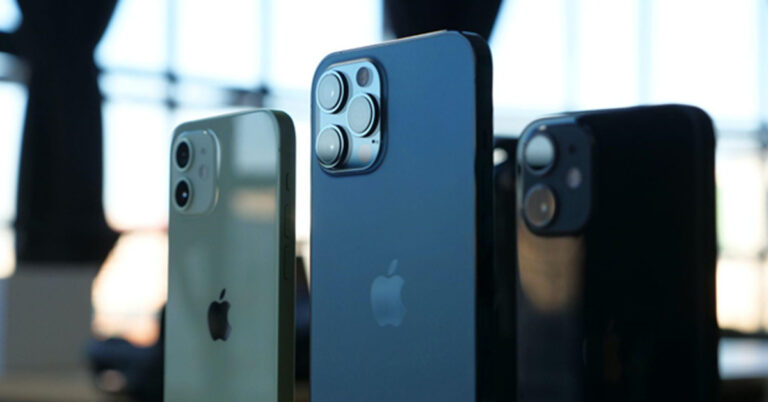
 Another noteworthy improvement we observed is the enhancement of the front camera. It’s a delight to see that high-resolution video calls are now achievable. Although the camera’s megapixel count remains at 12 MP, similar to the iPhone 11 Pro, the quality has significantly advanced, thanks to the integration of Deep Fusion technology and the powerful chip. So, the next time you connect with your loved ones through a video call, it might be a good idea to tidy up your appearance. However, it’s worth mentioning that there are a few competing smartphones available in the market that offer slightly superior camera quality. Examples include the Huawei P40 Pro and the Samsung Galaxy S20 Ultra 5G.



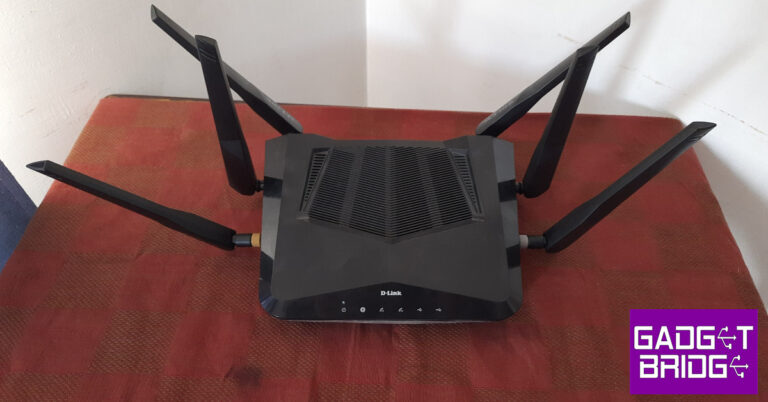






 Step 2:
 Step 3:
  Step 4:
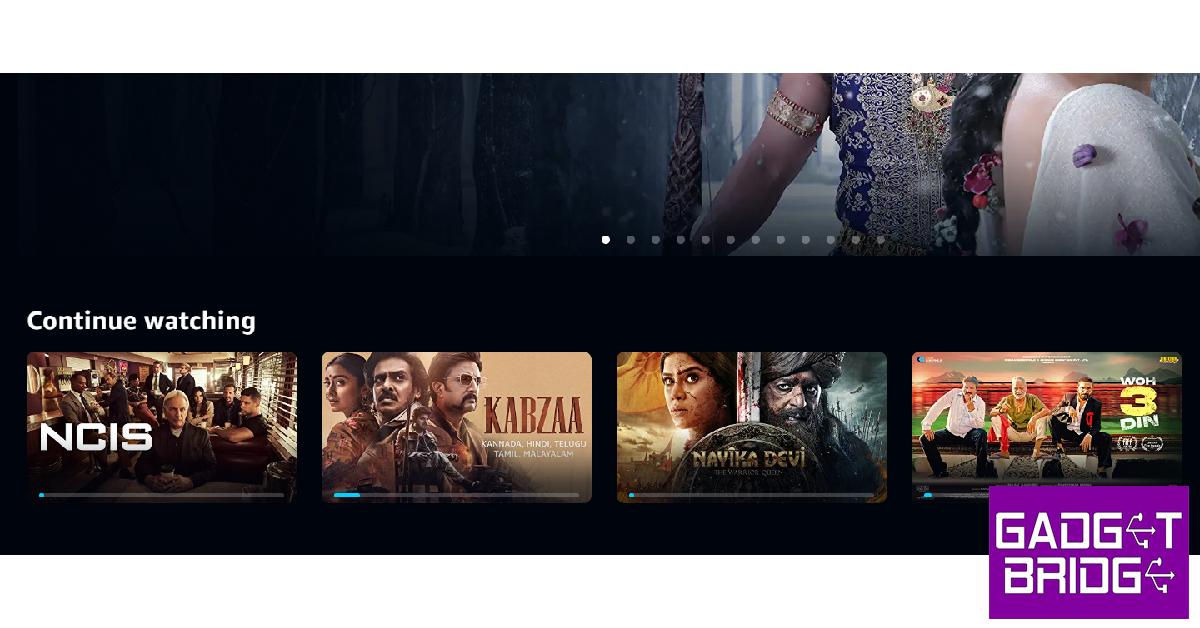 Step 2:
 Step 3:
 Step 3:
 Step 4:

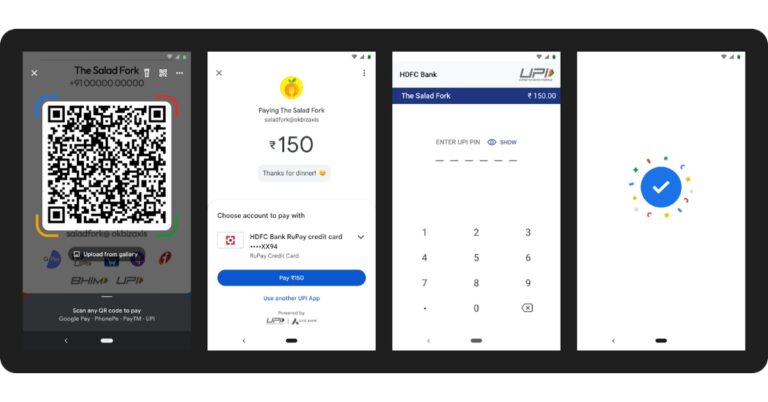

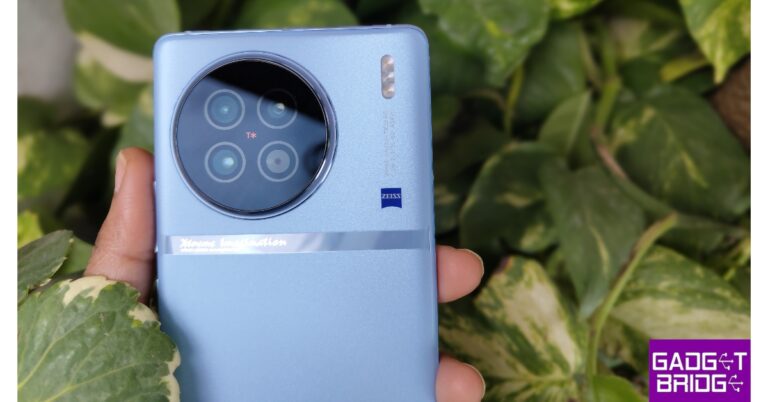













 Step 4:


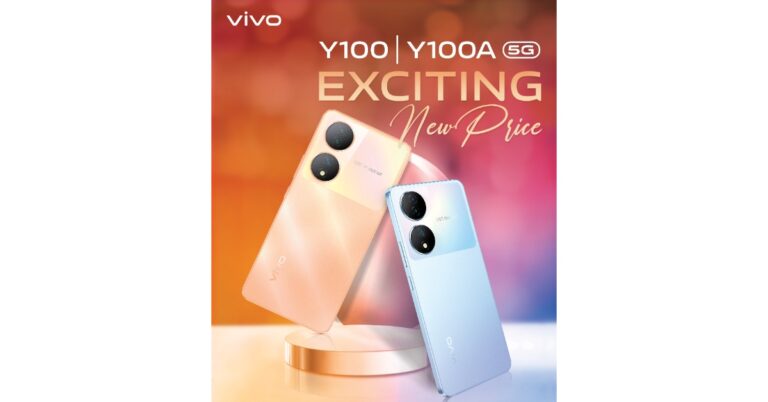


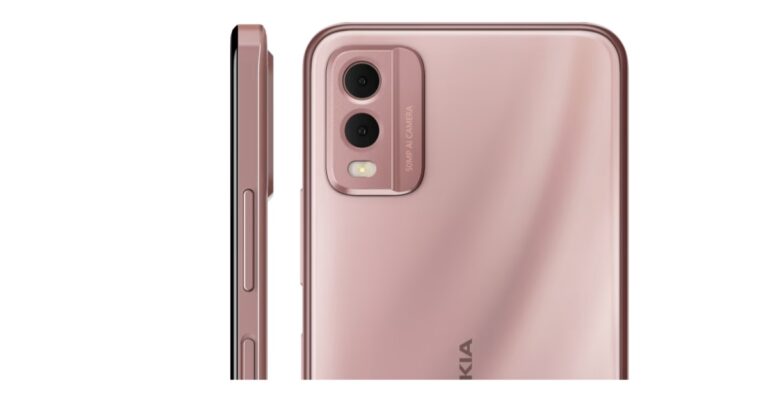

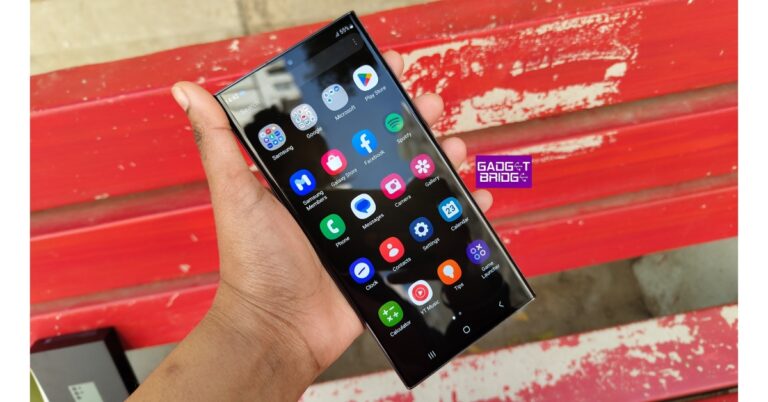

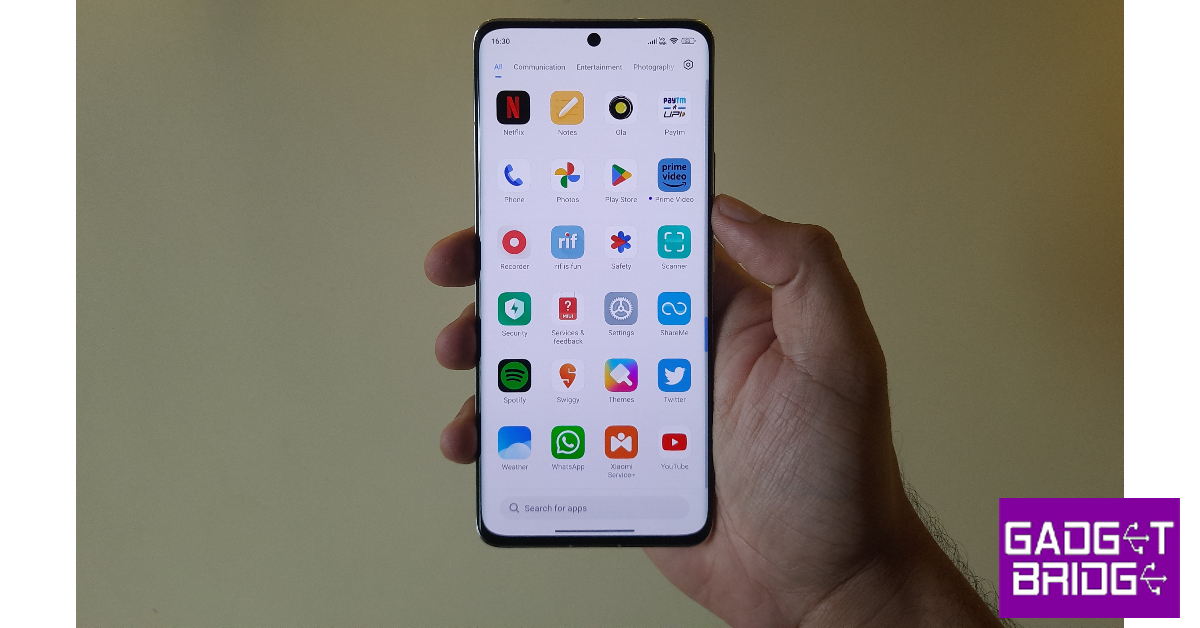
 Step 2:
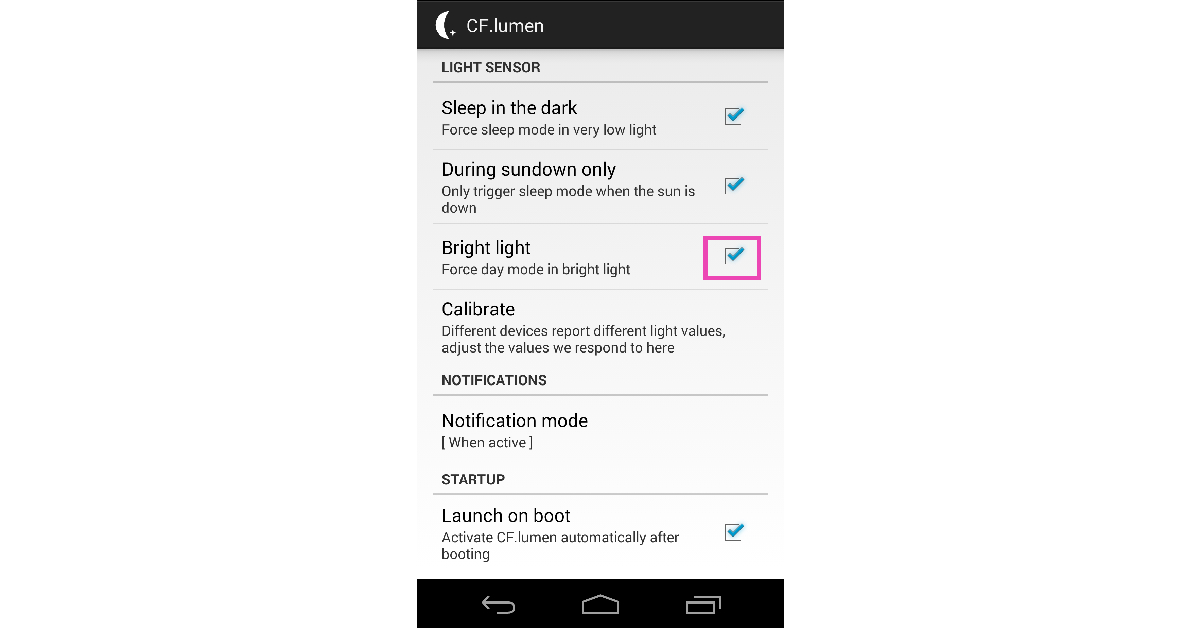 CF.lumen is a great display management app for Android. It changes the colour temperature of the screen to suit the surrounding conditions, thereby reducing the strain on your eyes. One of the features that CF.lumen provides is the ability to lock your phone in day mode in bright light. Install the app on your smartphone and select the check box next to ‘Bright light’ under Light Sensor settings. This will increase the brightness on your Android phone.



 Step 4:
 Step 4:
 Step 4:
 Step 5:
 Step 4:
 Step 5:


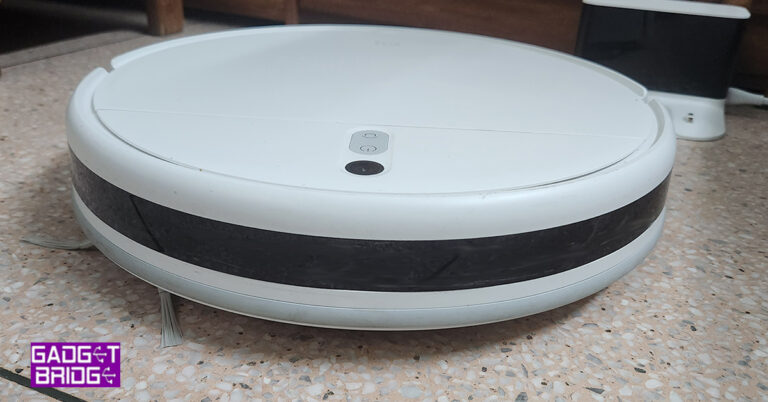
 You will find the bumper upfront of the Xiaomi Robot Vacuum Mop 2i, which has sensors all around it. Above and bottom, too. On the top, you will get a power button, a home button and a camera that will map the whole house or area, which it needs to clean. Behind this is a flat panel that can be easily lifted. This hides the dust container (with 450ml capacity) that can be easily removed, cleaned and reinstalled.

 Underneath there is a powerful 2,200Pa suction motor vent that can pick up the tiniest dust particles with ease. Here you will also get a sweeper that pushes the dirt toward the suction vent and located at the bottom back is the wet mop. You can fill it with water (up to 270ml) and it will wet mop the area as well.
 With it comes a charging station that can be placed up against any wall near a power outlet and the Xiaomi Robot Vacuum Mop 2i will go back to it on its own, to charge.
Read Also:
With it comes a charging station that can be placed up against any wall near a power outlet and the Xiaomi Robot Vacuum Mop 2i will go back to it on its own, to charge.
Read Also: 




 The MagEZ Slider 2 has no projecting bracket, but it can function as a phone stand. Simply snap your phone to the charger to get a comfortable 45-degree viewing screen. The charger can magnetically hold your iPhone in portrait mode for quick message glancing or landscape mode for hands-free video streaming.
 As mentioned before, the MagEZ Slider 2 is very small, so you can take it with you when travelling. But the 3-in-1 wireless charger also works in another way to charge your devices on the go.
With a detachable MagSafe power bank, you can charge your iPhone while on the go to get through the day. Just slide the power bank (4000mAh) out, snap it to the back of your phone, and enjoy 7.5W fast and stable wireless charging.
As mentioned before, the MagEZ Slider 2 is very small, so you can take it with you when travelling. But the 3-in-1 wireless charger also works in another way to charge your devices on the go.
With a detachable MagSafe power bank, you can charge your iPhone while on the go to get through the day. Just slide the power bank (4000mAh) out, snap it to the back of your phone, and enjoy 7.5W fast and stable wireless charging.
 The MFi-certified Apple Watch charger can be unplugged too. It can charge any Apple Watch model at 5W. And with a universal USB-C connector, you can plug it into your laptop’s or iPad’s USB port to charge your watch.
Many people who own a 3-in-1 wireless charger still feel the need to have a portable charger for their iPhone, which they rely so much on and their Apple Watch, which doesn’t last long. And the MagEZ Slider 2 is the ideal solution.
The MFi-certified Apple Watch charger can be unplugged too. It can charge any Apple Watch model at 5W. And with a universal USB-C connector, you can plug it into your laptop’s or iPad’s USB port to charge your watch.
Many people who own a 3-in-1 wireless charger still feel the need to have a portable charger for their iPhone, which they rely so much on and their Apple Watch, which doesn’t last long. And the MagEZ Slider 2 is the ideal solution.
 Another feature that makes the MagEZ Slider 2 so unique is that it has a 360-degree carousel design, allowing you to spin it to access your devices. Moreover, spinning could help with your stress. Many people fiddle with something out of habit when they get bored or stressed. So the MagEZ Slider could come in handy. If you want to put the charger at a fixed angle, press the little button on the side to disable the spinning.
Additionally, the charger makes this clock-ticking sound when it spins, which may also help calm your emotions.
To summarize, the MagEZ Slider 2 is a compact, versatile 3-in-1 wireless charger for iPhone, AirPods, and Apple Watch. It can work as a magnetic phone stand at your desk. Its detachable mobile power bank and Apple Watch charger make charging on the go convenient. Also, it spins like one of those stress-relief toys.
For the latest
Another feature that makes the MagEZ Slider 2 so unique is that it has a 360-degree carousel design, allowing you to spin it to access your devices. Moreover, spinning could help with your stress. Many people fiddle with something out of habit when they get bored or stressed. So the MagEZ Slider could come in handy. If you want to put the charger at a fixed angle, press the little button on the side to disable the spinning.
Additionally, the charger makes this clock-ticking sound when it spins, which may also help calm your emotions.
To summarize, the MagEZ Slider 2 is a compact, versatile 3-in-1 wireless charger for iPhone, AirPods, and Apple Watch. It can work as a magnetic phone stand at your desk. Its detachable mobile power bank and Apple Watch charger make charging on the go convenient. Also, it spins like one of those stress-relief toys.
For the latest