What you need to get a license in the iGaming business?

Obtaining permits for iGaming is an important step when starting an online casino or a sportsbook . “In order to apply for a license, it is necessary to prepare an application for a license, copies of the company’s statutory documents, an audit document on the size of the company’s authorized capital, and pay all relevant fees. This complex process may be intimidating for some entrepreneurs, but in the long run the investment of time and resources pays off. This approach will not only pay dividends in the future, but is also important in terms of legislation compliance,” BetB2B experts commented.

Gambling regulation rules vary from country to country, but the license is a paramount issue for operators wishing to open an online casino.

Application fees, license fees and taxes can be a significant burden on a casino’s budget and affect profits. Moreover, the process of obtaining a license in many jurisdictions is complex. Some try to avoid this process and the associated costs, but the benefits of licensing far outweigh the costs.

A representative of the world’s leading sports betting and online casino platform, BetB2B, emphasizes that it is important to think about the long term when obtaining a license: “iGaming  opens up opportunities for cooperation with financial institutions and quality game developers. It is also a sign of a reliable reputation, which is very important for players.”

Licensing is one of the key indicators that determine the reliability of a casino. When choosing a site for registration, players are advised to pay attention only to legal operators who have the appropriate documents confirming their safety. The reliability of such information can be checked on the official website of the casino, where an active validator badge leading to the certificate is usually placed. When using licensed sites, users can be sure that they are playing on genuine slots created by trusted manufacturers and without the risk of scripted modifications.

International Jurisdictions Granting Licenses for Online Casinos and Betting Sites – BetB2B

Many governments require licenses from local regulators to run an online casino or betting websites. BetB2B clarified that there are offshore jurisdictions that issue iGaming licenses that allow attracting an international audience.

Such licenses are granted by Malta, Curacao, Gibraltar, Isle of Man and Kahnawake. Among the most common foreign regulators are the following:

Curacao Gambling Commission.

The organization issues licenses through companies that have the authority to license other operators. There are four master license holders in Curacao: Cyberluck Curacao, Gaming Curacao (GC), Curacao Interactive Licensing (CIL) and Antillephone.

Malta Gaming Authority (MGA).

The commission issues two types of licenses: for developers of gambling software and owners of online casinos. Companies wishing to obtain a Maltese license must be audited by eCOGRA.

Isle of Man Gambling Supervision Commission (GSC).

The regulator issues several types of licenses, including gambling and betting. The license obtained in the Isle of Man has no regional restrictions and can be used in any place where gambling is legal.

Gibraltar Gaming Commission.

“The territory of Gibraltar is considered one of the most respected jurisdictions, therefore only the best casinos that have already established themselves in the market, have a clear development plan and have permissions from other regulators can obtain a license on this island,” commented BetB2B.

UK Gambling Commission.

This regulator is the most stringent and expensive on the list. They  carefully monitor their  reputation and the reliability of licensees. The Commission issues three types of licenses covering a wide range of iGaming services, including live casino games, lotteries, bookmakers, software development and others.

After the operator has decided on the jurisdiction and has gone through all the bureaucratic processes to obtain a license, it is necessary to build an efficient infrastructure for business. A company can try to build its own platform from scratch. This is an extremely costly and time-consuming process. In addition, you will have to face a lot of mistakes and high competition from more experienced market participants.

Turnkey solution BetB2B will help you quickly and efficiently start working in iGaming.

IT solutions for betting sites with a license – Bet b2b betting platform

  1. Turnkey solution BetB2B is a comprehensive offer for betting and casino site operators, which includes software and the following products: Sportsbook with Virtual Sports, Toto, casino content: Live Casino, Slots, own games and others. Also includes tools as a back office system, content management (CMS), client relationship management (CRM) and 2-line support.
  2. CRM BetB2B is a tool for analyzing player activity, saving their preferences, providing relevant bonuses within advertising campaigns, evaluating the effectiveness of promotions, as well as providing detailed statistics and reports on key metrics, information about players, their rates, popular games and other aspects, as well as player segmentation, communication and alert settings.
  3. CMS BetB2B allows you to manage the content of the site, allows you to configure the location of its elements, create user profiles, manage access rights, and generate support tickets. The tool also provides the ability to manage banners, rules, promotional materials and create promotional landings.
  4. Affiliate program is a complete tool for creating your own affiliate network, including network setup and management, reporting and statistics, and flexible commission settings.
  5. Agent scheme is a multi-level agent program with flexible commission settings, available in several languages.
  6. Back-office is a tool that allows you to track financial flows, create various employee profiles and manage their access rights.

“Our ready-made platform demonstrates the highest level of quality services in the gambling and betting market”, note in BetB2B, – Therefore, any team working with our platform makes a minimum of mistakes due to our professional experience. We continue to support the client’s business even after the company has been launched, helping to grow the business.”

For the latest gadget and tech news, and gadget reviews, follow us on TwitterFacebook and Instagram. For newest tech & gadget videos subscribe to our YouTube Channel. You can also stay up to date using the Gadget Bridge Android App. You can find the latest car and bike news here.

3 Methods to Download Multiple Photos or Videos from WhatsApp

1

One of the major reasons behind WhatsApp’s popularity is its seamless media-sharing capability. The platform now allows users to share HD images with each other. If you are a member of several WhatsApp groups, keeping the auto-downloads for media turned on can eat into a sizeable portion of the available mobile data. This is why it is suggested to manually download the media you want. In this article, we bring you the top 3 ways to download multiple photos and videos from WhatsApp using a PC, iPhone, and Android phone.

Read Also: Top 8 ways to fix ‘WhatsApp images not showing in gallery’

Download multiple photos or videos from WhatsApp Web Portal

Step 1: Go to web.whatsapp.com and scan the QR code using the WhatsApp app on your smartphone. You can also log in using your phone number.

Step 2: Once you are logged in, open the chat from which you want to download the images and videos.

Step 3: Hit the ellipses at the top right corner of the chat window and click on Select Messages.

Step 3: Hit the ellipses at the top right corner of the chat window and click on Select Messages.

Step 4: Select the images and videos you want to download.

Step 4: Select the images and videos you want to download.

Step 5: Hit the download icon at the bottom right corner of the screen.

Step 4: Select the images and videos you want to download. 3 Methods to Download Multiple Photos or Videos from WhatsApp

Download multiple photos or videos on WhatsApp for iOS

iPhone 13 now available for as low as Rs 21,499 on Flipkart: Details Inside

Step 1: Launch WhatsApp on your iPhone.

Step 2: Select the conversation from which you want to download the images and videos.

Step 3: Tap on the name of the contact.

Step 4: Select Media, Links, and Docs.

Step 5: Tap on the Select option at the top right corner of the screen.

Step 6: Select the images and videos that you want to download.

Step 7: Tap the Share icon at the bottom right corner of the screen.

Step 8: Select Save images.

Download multiple photos or videos on WhatsApp for Android

Step 1: Launch WhatsApp on your Android smartphone.

Step 2: Hit the ellipses at the top right corner of the screen and tap on Settings.

Step 2: Tap on Settings. 3 Methods to Download Multiple Photos or Videos from WhatsApp

Step 3: Select Chats.

Step 3: Select Chats. 3 Methods to Download Multiple Photos or Videos from WhatsApp

Step 4: Turn on the toggle switch for Media visibility.

Step 4: Turn on the toggle switch for Media visibility. 3 Methods to Download Multiple Photos or Videos from WhatsApp

Step 5: Go to the Gallery app on your device to find the images downloaded from WhatsApp.

Frequently Asked Questions (FAQs)

How do I download media from WhatsApp Web?

Open the conversation from which you want to download the images/videos, hit the ellipses, and click on ‘select messages’. Once you have selected the images and videos, click the download icon at the bottom right corner of the screen.

How do I download multiple WhatsApp images on an iPhone?

To download multiple WhatsApp images and videos on your iPhone, simply go to the media section of the chat, select the images, and hit the save option from the sharing menu.

How do I download WhatsApp images and videos on Android?

Go to Settings>Chats and switch on the toggle bar for Media visibility.

Read Also: Xiaomi Uniblade electric shaver launched in India at Rs 1,499

Conclusion

This is how you can download photos and videos on WhatsApp using a PC, iPhone, or Android phone. You can also save individual images or videos by opening them in WhatsApp and selecting ‘save’ from the list of options. To auto-download WhatsApp images, go to Settings>Storage and data

For the latest gadget and tech news, and gadget reviews, follow us on Twitter, Facebook and Instagram. For newest tech & gadget videos subscribe to our YouTube Channel. You can also stay up to date using the Gadget Bridge Android App. You can find the latest car and bike news here.
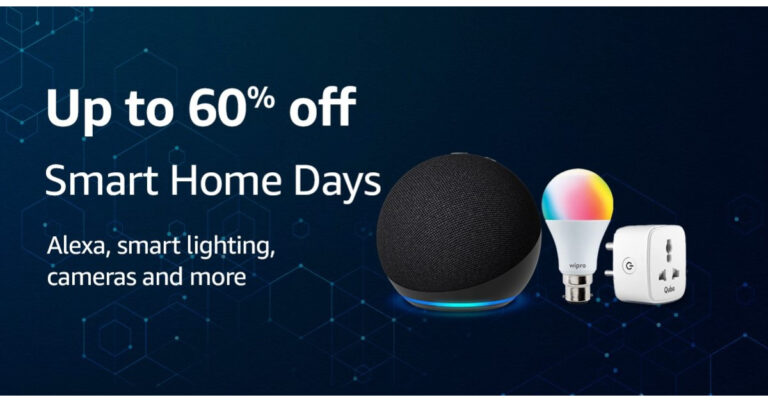
Amazon Smart Home Days announced, with up to 60% off Alexa-enabled devices

Amazon has announced the dates for the Smart Home Days Sale in India. The upcoming sale will kick off on September 7 and will go on till September 13 in the country. During the sale period, Amazon customers will be able to purchase Alexa-compatible products and smart home combos at amazing discounts.

Amazon Smart Home Days Sale has been announced to begin on September 7 and will run through September 13. Customers may take advantage of exclusive discounts and offers on Alexa smart home combos with Echo smart speakers, smart lamps, smart plugs, smart cameras, and more during “Smart Home Days”! Customers can also choose from a selection of high-quality smart home gadgets from leading manufacturers including Wipro, Philips, Qubo, HomeMate, TP-link, Mi, RealMe, and Havells.

Also Read: Amazon Echo Dot 5th Gen Review: Should you upgrade?

As per Amazon, there will be a flat 60 percent off on the Alexa Smart Home combo that includes Echo Dot (3rd Gen) and Wipro smart bulb. You can buy it for just Rs 2,099. With 55 percent off you can get Alexa Smart Home combo – Echo Dot (4th Gen) + Wipro smart bulb for Rs 2,899. The Combo pack of Echo Dot with clock (4th Gen) and Wipro smart bulb can be purchased for Rs 2,899.

Together Echo Dot (5th Gen) and Wipro smart bulb will be available at Rs 5,799 and Echo (4th Gen) with Wipro smart bulb will be up for sale at Rs 10,349.

Also Read: Poco C51 new variant launched in India: Price and availability

In addition to this, there will be up to 60% off on top smart lighting brands such as Wipro, Philips, Qubo, Halonix, Havells and more during Amazon Smart Home Days. Also top smart camera brands such as Qubo, TP-Link, Philips, Xiaomi, Zebronics and more. Moreover, Amazon will provide up to 75% off on HomeMate’s selection of smart home products – get smart plugs, touch switches, and smart lighting at attractive prices.

For the latest gadget and tech news, and gadget reviews, follow us on TwitterFacebook and Instagram. For newest tech & gadget videos subscribe to our YouTube Channel. You can also stay up to date using the Gadget Bridge Android App. You can find the latest car and bike news here.

Top Gaming Monitors with 120Hz refresh rate under Rs 15,000

When putting together a gaming rig, the monitor is one of the components that you should pick wisely. The market is flooded with excellent gaming monitors across different price points, making the choice harder for users. The refresh rate of the monitor is something you should not compromise on while building a gaming system. In this article, we bring you our picks for the top gaming monitors with 120Hz refresh rate under Rs 15,000.

Read Also: Xiaomi Uniblade electric shaver launched in India at Rs 1,499

LG UltraGear 24GL600F

Price: Rs 14,890 on Amazon

LG UltraGear 24GL600F

LG’s gaming-centric UltraGear 24GL600F monitor has a refresh rate of 144Hz and can reach a peak brightness of 300 nits. The 24-inch FHD display panel has a resolution of 1920 x 1080p and a 170/160-degree viewing angle. Equipped with a custom gaming mode, this monitor can quickly switch between FPS, RTS, & Custom Mode. Talking about the connectivity options, this UltraGear monitor has one display port, 2 HDMI ports, and a headphone jack. The wall mount and display port cable are provided in the box.

Samsung Odyssey G3

Price: Rs 12,399 on Samsung.com

Samsung Odyssey G3

Samsung is ahead of the curve when it comes to its gaming displays. The 24-inch Odyssey G3 has a 144Hz refresh rate and 1 ms response time. It offers a resolution of 1920 x 1080p. With AMD FreeSync Premium in its arsenal, the Odyssey G3 minimises stutter, tears, and latency during gameplay. Our favourite feature of the Odyssey series is the swivelling and tilting motions that allow you to move the display and adjust its positioning. 

Lenovo G24-20

Price: Rs 13,899 on Amazon

Lenovo G24-20

Belonging to Lenovo’s Gaming G-Series, the G24-40 offers a refresh rate of 165Hz and a response time of 1 ms. The monitor is equipped with AMD FreeSync Premium. It also gets the Lenovo Smart Artery software that offers a bunch of features like crosshair for FPS games, display auto-adjustment, frame rate counter, timer, and more. It also allows users to create different gaming modes. Another feature that we really like on the G24-20 is its anti-glare capability.

Zebronics ZEB A24FHD

Price: Rs 11,155 on Amazon

Zebronics ZEB A24FHD. Top Gaming Monitors with 120Hz refresh rate under Rs 15,000

The 27-inch Zebronics A24FHD has a 1920 x 1080p resolution and a refresh rate of 165Hz. The display panel is surrounded on all sides by very slim bezels. The ZEB A24FHD also gets built-in speakers, HDMI & display ports, a headphone jack, and wall mounting support. The metal table stand is provided in the box. The 24-inch variant of this model is priced at Rs 9,998.

AOC G2490Vx

Price: Rs 11,058 on Amazon

AOC G2490Vx. Top Gaming Monitors with 120Hz refresh rate under Rs 15,000

Known for its gaming products, AOC has a great lineup of gaming monitors. The moderately priced AOC G2490Vx has a 1920 x 1080p resolution, a refresh rate of 144Hz, and a 1 ms response time. The Adaptive Sync tech reduces screen tearing and unwanted stutters in gameplay. AOC’s DC backlight reduces screen flickers, making the visuals more comfortable to the eye. You can also set up your own customised gaming mode so you don’t have to change the settings every time you load a new game.

Acer Nitro VG240YS

Price: Rs 11,243 on Amazon

Acer Nitro VG240YS. Top Gaming Monitors with 120Hz refresh rate under Rs 15,000

The 24-inch Acer Nitro VG240YS has a refresh rate of 165Hz and a resolution of 1920 x 1080p. It can reach a peak brightness of 250 nits and has a 178-degree viewing angle. Featuring Visual Response Boost and AMD FreeSync Premium technology, this gaming monitor from Acer reduces the stutters and visual tears to a minimum. It also has built-in speakers and a blue light shield. The monitor is wall mountable and supports swivel adjustment.

Read Also: Vivo Y36 and Vivo Y02t prices dropped by up to Rs 1,000: Deets inside

Conclusion

These are our picks for the top gaming monitors with a refresh rate of 120Hz that you can buy under Rs 15,000. When choosing a monitor you should also consider its connectivity options as well as the mounting features on offer. While most of the monitors on this list are wall-mountable, not every product comes with the accessories necessary to mount it on a wall.

For the latest gadget and tech news, and gadget reviews, follow us on Twitter, Facebook and Instagram. For newest tech & gadget videos subscribe to our YouTube Channel. You can also stay up to date using the Gadget Bridge Android App. You can find the latest car and bike news here.

Poco C51 new variant launched in India: Price and availability

Poco has just introduced the Poco C51 in the nation in a new variant with additional RAM and storage. The device was launched in few months back in India. The device was released in a single 4GB RAM with 64GB storage configuration. The phone is powered by an octa-core MediaTek Helio G36 SoC. It features a 6.52-inch HD+ display. The handset comes with a dual 8MP rear camera and a 5,000mAh battery.

Poco C51 price in India and sale details

Poco C51 was launched in India at Rs 8,499 for a single 4GB RAM with 64GB storage options in April this year. Now the company has introduced the phone in a new 6GB RAM with 128GB storage option. The device comes in two colour options of Black and Blue.
In terms of availability, the phone is now available for purchase via Flipkart in the country. The entry-level phone is available with bank offers of up to 10 percent on the e-commerce platform.

Also Read: Poco C51 powered by a 5,000mAh battery launched in India

Poco C51 Review India

Poco C51 specifications

The Poco C51 has a 6.52-inch HD+ waterdrop-style notch display with a resolution of 720×1,600 pixels. The display’s 400 nits of brightness and 120Hz touch sampling rate are supported. The gadget also comes pre-installed with Android 13 Go Edition. An octa-core MediaTek Helio G36 SoC, up to 6GB of RAM, and 128GB of internal storage are found within the device. With the help of the 7GB Turbo RAM feature, you can run and move between different apps more quickly. While a microSD card allows the internal storage to be increased by up to 1TB.

The Poco C51 has a dual rear camera arrangement with an 8-megapixel primary sensor and a secondary depth sensor for taking pictures and movies. Additionally, the gadget has a 5-megapixel front-facing camera for selfies. Additionally, the smartphone provides a 1080p at 30fps option for video recording.

Also Read: Poco C51 Review: An excellent deal

The phone has a 5,000mAh battery in addition to this, and it supports 10W charging. The Poco C51 also has an accelerometer and a fingerprint sensor located on the back. It includes 4G LTE, Wi-Fi, Bluetooth, GPS, Glonass, Beidou, a micro-USB connector, and a headphone jack in terms of connectivity.

For the latest gadget and tech news, and gadget reviews, follow us on TwitterFacebook and Instagram. For newest tech & gadget videos subscribe to our YouTube Channel. You can also stay up to date using the Gadget Bridge Android App. You can find the latest car and bike news here.

3 Easy Methods to Enable Sound on Reddit Videos on Android and iOS

Ever since third-party Reddit apps shut down due to the platform’s API changes, users have been left with the official Reddit app. Navigating the official app can be tricky if you’re not used to it. Users often report not being able to hear the sound on videos on the official app. In this article, we bring you the top 3 easy methods to enable sound on Reddit videos on Android and iOS.

Read Also: Vivo Y36 and Vivo Y02t prices dropped by up to Rs 1,000: Deets inside

Unmute the videos

Unmute the videos

Videos on the official Reddit app are muted by default. Reddit started off as a text-based website, and videos are still new to the platform. One of the drawbacks of using the official Reddit app is that there is no way to read the comments without playing the video. If you’re browsing Reddit at work or in public, you probably don’t want to be blasted with sound upon opening a random post. This is why the videos on Reddit are muted by default. To unmute a video, simply tap the volume icon at the bottom right corner of the screen.

Check your device’s volume

Check your device’s volume

Can’t hear the sound on a video even after unmuting it? Maybe your phone is in silent mode. Swipe down from the status bar and tap the sound icon to switch the sound profile to loud. You can also press the volume up key to exit the silent mode and increase the volume of your device. If your smartphone has an alert slider, use it to enable loud mode.

Enable sound on Reddit videos on iOS

iPhone users have the option to disable the default mute setting on the Reddit app. Here’s how.

Step 1: Launch the Reddit app on your iPhone.

Step 2: Tap the profile icon at the top right corner of the screen.

Step 2: Tap the profile icon at the top right corner of the screen. 3 Easy Methods to Enable Sound on Reddit Videos on Android and iOS

Step 3: Scroll down and select Settings.

Step 3: Scroll down and select Settings. 3 Easy Methods to Enable Sound on Reddit Videos on Android and iOS

Step 4: Switch off the toggle bar for Mute videos by default.

Step 4: Switch off the toggle bar for Mute videos by default. 3 Easy Methods to Enable Sound on Reddit Videos on Android and iOS

Bonus Tip: Enable Sound on Reddit Videos on PC

Check if the video is muted

If you’re using Reddit on your PC, you can easily unmute a video by clicking on the sound icon at the bottom right corner of the video player. To further adjust the volume, simply hover the cursor over the sound icon and use the slider to increase or decrease the volume. There is no way to unmute all the videos on the platform by default.

Frequently Asked Questions (FAQs)

How do I enable sound on Reddit videos?

If you can’t hear the sound on a Reddit video, you will need to unmute it. Open the video and tap the sound icon at the bottom right corner of the screen to unmute it.

How do I turn off Quiet Mode on Reddit for iOS?

Tap the profile icon at the top right corner of the screen, go to Settings, and turn off the toggle bar for Mute Videos By Default.

Why does the Reddit video I’m watching not have an unmute icon?

If the media you’re watching does not have an unmute icon, it is likely a GIF and not a video.

Read Also: 3 Ways to Add the Messages App Icon Back to Home Screen

Conclusion

This is how you can enable sound on Reddit videos on Android and iOS. If the video you’re watching does not have any sound, you won’t see the unmute icon on the video player. If you’re facing issues with the Reddit app, clear its cache and launch it again to check if the problem has been resolved.

For the latest gadget and tech news, and gadget reviews, follow us on Twitter, Facebook and Instagram. For newest tech & gadget videos subscribe to our YouTube Channel. You can also stay up to date using the Gadget Bridge Android App. You can find the latest car and bike news here.

Microsoft to Remove WordPad from Upcoming Windows Update: Complete Information

According to tech giant Microsoft, it will be WordPad will be removed from its upcoming Windows update. As the WordPad gets dropped from Windows, Microsoft is advising PC users to make use of Windows Notepad and Microsoft Word for editing text instead. For those who are unaware it first came out in 1995.

In a later Windows version, namely Windows 12, Microsoft will remove WordPad. In its most recent list of deprecated features, the firm has indicated that it would remove the part. Notably, upgrades to the software will no longer be made.

Also Read: Woman steals iPhone 14 from store cutting wire with her teeth, gets caught

The company said, “WordPad is no longer being updated and will be removed in a future release of Windows. We recommend Microsoft Word for rich text documents like .doc and .rtf and Windows Notepad for plain text documents like .txt.”

Documents are saved in the.rtf format by the application. Basically, it uses simple formatting for editing text. So now users are advised to edit content using Windows Notepad and Microsoft Word for documents in the.doc and .rtf formats, according to Microsoft. The app only allows basic editing and does not enable additional editing features like creating numbered lists, inserting tables, changing the colour of text or the background of text, or linking to URLs, among others. 

Also Read: Xiaomi Uniblade electric shaver launched in India at Rs 1,499

While this is going on, Bing Chat and Bing Chat Enterprise support has now been made available to Google Chrome users. With this inclusion, Google Chrome users will be able to use Bing Chat on Windows, macOS, and Linux. The company has also added Bing Chat Enterprise support for Google Chrome for desktop and Edge for mobile devices. Bing Chat Enterprise users may now use the functionality by opening Microsoft Edge on their smartphones.

For the latest gadget and tech news, and gadget reviews, follow us on TwitterFacebook and Instagram. For newest tech & gadget videos subscribe to our YouTube Channel. You can also stay up to date using the Gadget Bridge Android App. You can find the latest car and bike news here.

BGMI redeem codes for 5 September 2023, claim and receive rewards and benefits

After being banned for nearly ten months, Battleground Mobile India, aka BGMI, is officially available again in India. BGMI fans are looking for ways to improve their game experience and one such method is the usage of redemption codes, which offers a variety of rewards and advantages using BGMI redeem codes players can gain access to new skins, outfits, loot crates, weapons and free UC and diamonds.

As mentioned earlier, these codes give users the chance to earn unique rewards and gain extra benefits while playing the game. This includes GUN SKINS (M4, AKM, M416, AWM, M24, UZI, KAR98K), free character voucher, Andy, Carlo, Sara, Victor character for free, free Anna Character on completing the mission and UC or Royal Pass Discount. So here we have gathered a list of the most recent BGMI redeem codes as of 5 September 2023. Also, redeem these codes asap as these are only valid for a limited duration.

BGMI Redeem Codes for 5 September 2023

updating soon…

How to get free Redeem Codes for BGMI on 5 September 2023?

  • Launch BGMI on your device.
  • Then select the Redeem Code option from the main menu.
  • Next, click on the Redeem code tab.
  • A new window will open, requesting the redemption code.
  • Now enter your BGMI code.
  • Confirm and click on the “Redeem” tab.
  • If your redeem code is valid then you will get a message confirming that your rewards were successfully redeemed.

(Note that these codes are case-sensitive, so be sure to type them correctly to prevent any errors.)

For the latest gadget and tech news, and gadget reviews, follow us on TwitterFacebook and Instagram. For newest tech & gadget videos subscribe to our YouTube Channel. You can also stay up to date using the Gadget Bridge Android App. You can find the latest car and bike news here.

Garena Free Fire Redeem Codes Today 5 September 2023: Here is how to claim them

Garena Free Fire is a battle royale game with regular awards and tournaments to keep players interested. If you play Garena Free Fire, you should be aware of the redeem codes that are released on a daily basis. However, because the battle royale game is banned in India, players from other countries can use the Free Fire Redeem codes daily. If you’re unfamiliar with the Garena Free Fire redeem codes or don’t know how to get them, we’ve put together a step-by-step guide to help you redeem them. Check out Garena Free Fire Redeem Codes for 5 September 2023.

The Free Fire redeem codes are a great way to get free stuff. These are 12-digit codes that contain alphabets and numbers, as well as an expiration date and time. Because the Garena FF redeem codes cannot be used more than once, you should hurry to the redemption page to claim your free reward before someone else does. To get a free reward, all you have to do is go to reward.ff.garena.com/en, which is the official redemption page. Also, keep an eye on this space for daily updates on Garena Free Fire redemption codes and rewards.

Garena Free Fire Redeem Codes Today 5 September 2023

  • FUKIKJJHVVXAQR2
  • FEDC3VEZBRFHGUY
  • FTVCBDNJRKIT5O6
  • FYUJGMVKLOF9TI6
  • FJ7MU8KILJP0OHI
  • FGFJAKI5QUY62RE
  • FYHJY7U6KJI9LLI
  • FKJUEHYSEEEFGST
  • FBN4RM5TL26YP7U
  • FOJKH4FLOD9I8U7
  • FYGTSAWY6U25TRE
  • FD3FV4BGRC5HTJY
  • FDRHKYIKJ5SH3Q2
  • F45T4YJYFDHBVFG
  • FHJKMLOIUCHYGFD
  • FRTYUIJYRTESHYJ
  • FD3C45VRMRBTNJM
  • FGKHBIUY3YDTGSE
  • FIHUYBFJIJGYUJF

How to Get Free Fire Redeem Codes for Garena on 5 September 2023?

  • Visit the Garena Free Fire game’s official website at reward.ff.garena.com.
  • Use your Facebook, Google, VK, Apple ID, Huawei ID, or Twitter account to log in.
  • You’ll be taken to a valid redemption code (s)
  • Copy and paste the 12-digit redemption code into the text box.
  • On the screen, a dialogue box will appear.
  • ‘Ok’ should be selected.

For the latest gadget and tech news, and gadget reviews, follow us on TwitterFacebook and Instagram. For newest tech & gadget videos subscribe to our YouTube Channel. You can also stay up to date using the Gadget Bridge Android App. You can find the latest car and bike news here.
Xiaomi Uniblade electric shaver launched in India at Rs 1,499

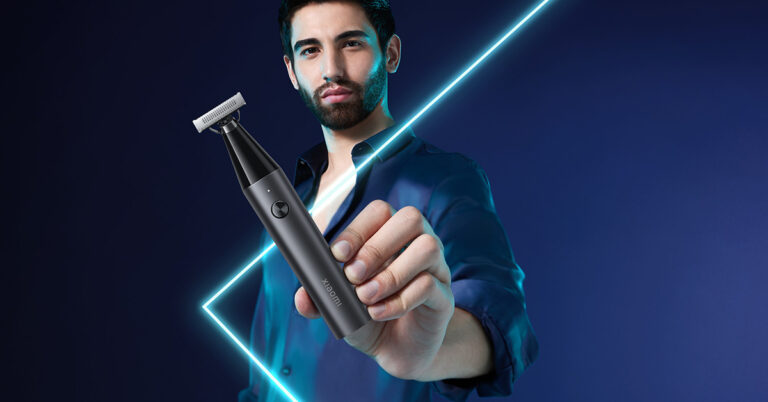
In the ever-evolving world of personal grooming, Xiaomi has once again stepped up to the plate with the launch of the new Xiaomi Uniblade, a grooming tool that promises to revolutionize the way men maintain their looks. Versatile, easy to use, and stylishly designed, the Uniblade is set to become every man’s go-to grooming accessory for both everyday routines and special occasions.

A Grooming Tool for Every Occasion

The Xiaomi Uniblade is more than just a grooming tool; it’s a complete grooming solution. With its sleek and ergonomic design, it adds a touch of sophistication to your daily grooming routine. Whether you’re heading to the office or preparing for a special night out, the Uniblade has got you covered.

Versatility at Its Best

What sets the Xiaomi Uniblade apart from the competition is its incredible versatility. This innovative grooming tool is meticulously crafted to trim, edge, and shave hair of any length, catering to a wide range of grooming needs. Whether you prefer a clean shave, a well-groomed stubble, or a neatly trimmed beard, the Uniblade has you covered. Say goodbye to multiple grooming tools cluttering your bathroom cabinet – the Uniblade simplifies your grooming routine.

Xioami-uniblade-1

Precision and Efficiency

Designed for effortless manoeuvrability, the Xiaomi Uniblade can reach even the most challenging and hard-to-reach areas with ease. Its cutting-edge three-way blade system ensures an impeccably smooth shave. The dual-edge blade tackles longer hair, while the central foil eliminates any remaining stubble. This three-way blade effortlessly manages varying hair lengths and thickness, even handling bent or flat-lying hair, providing a seamless shaving experience and leaving your skin silky smooth. Crafted from high-carbon steel, the blade guarantees durability and sharpness, ensuring a consistently outstanding shaving experience.

Adapting to Your Needs

The Uniblade’s flexible trimmer head is designed to pivot at a 40° angle, effortlessly adapting to the contours of your face. This ensures a close shave without causing any irritation or discomfort, making it your ideal shower companion. With an IPX7 rating for both dry and wet use and compatibility with shaving cream, it eliminates the need for disposable blades, promoting sustainability and reducing waste.

Read Also: Philips OneBlade Pro QP6550 electric shaver review: All in one for men

Simplicity and Efficiency

The Xiaomi Uniblade simplifies your grooming arsenal with its rotary dial, offering 14 different length settings, allowing you to customize your look effortlessly. No need for multiple attachments or tools; the Uniblade does it all.

Long-Lasting Performance

A mere 90-minute charge via a Type C cable provides the Xiaomi Uniblade with a full hour of continuous use, ensuring that it meets all your grooming needs in one go. Whether you’re at home or on the go, you can rely on the Uniblade to keep you looking your best.

Affordable and Accessible

Xiaomi understands the importance of affordability and accessibility. The Xiaomi Uniblade comes with a one-year warranty and is available at an attractive price of Rs 1,499. It can be conveniently purchased on Mi.com, Amazon, Flipkart, and other leading retail stores.

Read Also: Xiaomi Grooming Kit Pro with full washable body and LED Screen

Conclusion

The Xiaomi Uniblade is a game-changer in the world of grooming. With its versatility, precision, and stylish design, it’s set to become every man’s best friend in their grooming routine. Say goodbye to cluttered bathroom cabinets and disposable blades – the Uniblade simplifies grooming, all while being eco-friendly. So, whether it’s a regular workday or a special occasion, trust the Xiaomi Uniblade to keep you looking sharp and sophisticated.

For the latest gadget and tech news, and gadget reviews, follow us on TwitterFacebook and Instagram. For the newest tech & gadget videos subscribe to our YouTube Channel. You can also stay up to date using the Gadget Bridge Android App. You can find the latest car and bike news here.
Woman steals iPhone 14 from store cutting wire with her teeth, gets caught

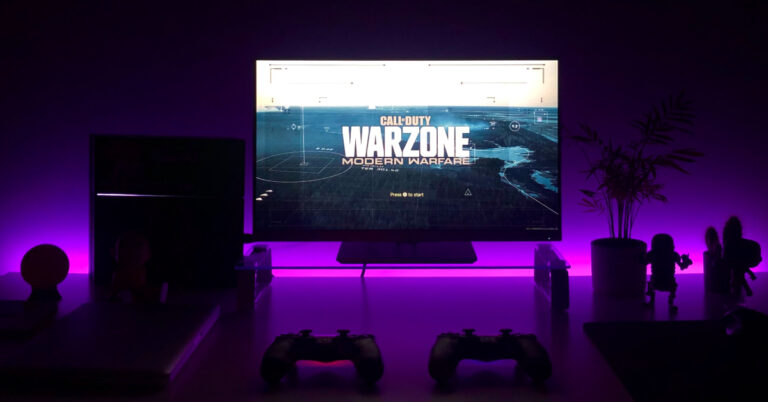
In a rather unusual turn of events, a woman in China was recently apprehended by the authorities for her audacious attempt to pilfer an iPhone 14 Plus, valued at 7,000 yuan (around ₹80,000 roughly), from an Apple store. This daring caper involved her quite literally sinking her teeth into the store’s anti-theft measures.

The woman in question, identified as Ms Qiu from Fujian province in southeastern China, was captured on surveillance cameras as she leaned over the display counter, her fingers casually caressing the coveted device. What followed was a jaw-dropping act of thievery as she nonchalantly chewed through the security cable that anchored the phone in place. Once the cable was completely severed, she swiftly concealed the phone in her bag and exited the store.

Unbeknownst to her, store employees soon discovered the missing iPhone and the conspicuously bitten cable. This triggered an alarm that went unnoticed by the staff as they approached Ms Qiu, who maintained the façade of an ordinary customer engrossed in scrolling through the stolen phone.

It wasn’t until Ms. Qiu made her escape from the store that the true extent of her audacity became apparent. Store personnel reviewed the surveillance footage, prompting them to alert the authorities. Within a remarkably short span of 30 minutes after the theft, Ms. Qiu was apprehended outside her residence.

Notably, the iPhone 14 series had been launched in India the previous year, featuring models such as the iPhone 14, iPhone 14 Plus, iPhone 14 Pro, and iPhone 14 Pro Max. While the iPhone 14 shared some similarities with its predecessor, the 2021 iPhone 13, the Pro models of the iPhone 14 boasted significant enhancements, including a more powerful processor and the highly-discussed dynamic island notch design.

For the latest gadget and tech news, and gadget reviews, follow us on TwitterFacebook and Instagram. For the newest tech & gadget videos subscribe to our YouTube Channel. You can also stay up to date using the Gadget Bridge Android App. You can find the latest car and bike news here.

After a three-month trial, the Indian government approves Krafton’s BGMI

Battlegrounds Mobile India (BGMI) appears to have secured official authorisation from the Indian government for Krafton to continue operating here, according to a report. After getting banned in India for 10 months, Battlegrounds Mobile India aka BGMI got clearance to restart operations in India in May this year. For those who are unaware, Free Fire, a competing battle royale game has also returned to the nation after being shut down for around 1.5 years.

However New State Mobile, a different app that Krafton owns is still operating in the country.

According to sources cited by Moneycontrol, the approval was given after the company successfully completed a three-month audit process. According to the report, the game will now need to pass quarterly evaluations in order to maintain its approval. These evaluations will concentrate on several facets of how the game functions.

The government’s action comes before the three-month trial period—given to KRAFTON for the game’s exclusivity in India—that was granted by the Ministry of Electronics and Information Technology (MeitY) in May of this year—expires.

In India, the mobile game held by Krafton was banned in July 2022 as a result of a government order. The Google Play Store and App Store soon removed it. It was outlawed, just like PUBG, and disappeared from India.

If you didn’t know, PUBG was reintroduced in India under the moniker BGMI, which stands for Battlegrounds Mobile India. In addition to the new branding, the game was created especially for Indian players.

For the latest gadget and tech news, and gadget reviews, follow us on TwitterFacebook and Instagram. For newest tech & gadget videos subscribe to our YouTube Channel. You can also stay up to date using the Gadget Bridge Android App. You can find the latest car and bike news here.

Vivo Y36 and Vivo Y02t prices dropped by up to Rs 1,000: Deets inside

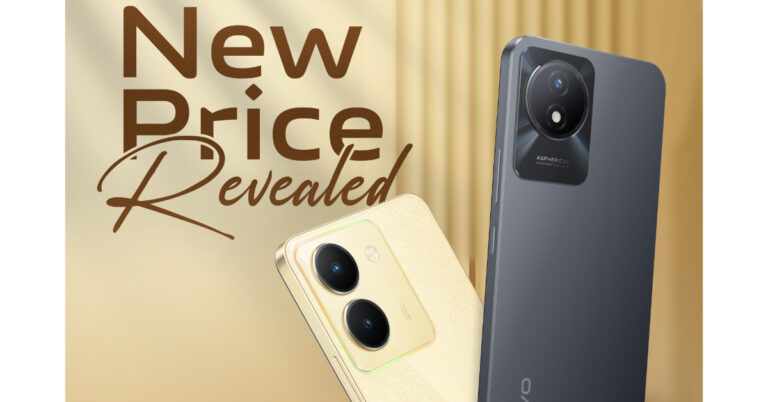
Vivo has announced a price reduction for the two of its smartphones. Vivo Y36 and Vivo Y02t are the latest to see the price cut months after their launch. The company announced a Rs 1,000 price cut on the Vivo Y36 whereas the Y02t is getting a price drop of Rs 500. Vivo Y36 made its debut in India two much back in June in a single variation. On the other hand Vivo Y02t debuted in May this year.

The Vivo Y36 and Vivo Y02t are now offered at new, competitive prices of Rs 15,999 for the 8GB RAM model with 12GB storage and Rs 9,499 for the 4GB RAM model with 64GB storage, respectively. Vivo has announced a Rs. 1,000 price reduction for the Vivo Y36. The phone, which originally cost Rs 16,999. The Vivo Y02t, on the other hand, has seen a price reduction of Rs 500, dropping from Rs 9,999 at launch for the single 4GB RAM and 128GB storage option.

Also Read: Google Pixel 8 and Pixel 8 Pro get listed on the FCC certification website, ahead of October 4 launch

Along with extra perks like vivo V-Shield Protection Plans, customers can receive a cashback of up to Rs 1000 when purchasing the vivo Y36 from specific financial partners like ICICI, SBI Card, IDFC First, Federal Bank, Yes Bank, Bank of Baroda, and IndusInd Bank. Note that the purchase of Vivo Y02t is not subject to any further bank offers.

Customers can purchase the devices with the revised effective pricing on Flipkart, the vivo India e-store, and at all of Vivo’s partner retail locations.

Vivo Y36 comes with a 6.64-inch full-HD+ LCD display that supports a 90Hz refresh rate and 240Hz touch sampling rate. Under the hood, there is an octa-core 6nm Snapdragon 680 SoC with 8GB of RAM and includes 128GB of storage that can be expanded up to 1TB using a microSD card. It runs on FunTouch OS 13 based on Android 13. The smartphone is highlighted with a dual rear camera setup that includes a 50-megapixel primary sensor with an f/1.8 aperture and a 2-megapixel bokeh lens. There is a 16-megapixel front-facing camera for taking selfies and video calling. In addition to this, the device packs a 5,000mAh battery that supports 44W fast charging. 

For the latest gadget and tech news, and gadget reviews, follow us on TwitterFacebook and Instagram. For newest tech & gadget videos subscribe to our YouTube Channel. You can also stay up to date using the Gadget Bridge Android App. You can find the latest car and bike news here.

2 Easy Ways to Copy and Share LinkedIn Profile Link

0

LinkedIn is a social media platform that specialises in forming professional connections and finding new jobs. Your LinkedIn profile holds all the vital information – from your work history to your educational qualifications. Forwarding your LinkedIn profile to a contact makes it very accessible for them to go through your work and contact you for further dialogue. In this article, we bring you 2 easy ways to copy and share your LinkedIn profile link with other people.

Read Also: Best 3 Ways to Change the Speed of Video on Android and iPhone

Copy and Share your LinkedIn Profile Link

Step 1: Open LinkedIn on your device’s web browser.

Step 2: Go to your LinkedIn profile.

Step 2: Go to your LinkedIn profile.

Step 3: Copy the URL under the Public Profile and URL section on the right.

Step 3: Copy the URL under the Public Profile and URL section on the right.

Step 4: Paste the URL from the clipboard to share it with someone.

Copy and Share your LinkedIn Profile Link from the web browser

Step 1: Open LinkedIn on your device’s web browser.

Step 2: Go to your LinkedIn profile.

Step 3: Click on the web browser’s address bar and press Ctrl + C. Your profile URL will be copied to the clipboard.

Step 3: Click on the web browser’s address bar and press Ctrl + C. Your profile URL will be copied to the clipboard.

Step 4: Paste the URL from the clipboard to share it with someone.

Frequently Asked Questions (FAQs)

How do I copy my LinkedIn profile URL?

Open your LinkedIn profile on a web browser and check out the Public Profile and URL section on the right. This is where you will find your profile URL. Copy this address to share it with others.

How do I change my LinkedIn profile URL?

To change your LinkedIn profile URL, click the pencil icon on the Public Profile and URL section. On the following page, hit the pencil icon in the Edit your custom URL section.

How do I find my LinkedIn profile URL?

Open your LinkedIn profile in a web browser, then click the address bar to locate the profile link.

Read Also: iQoo Z7 Pro 5G with 64-megapixel Samsung GW3 primary sensor launched in India

Conclusion

These are the 2 ways you can copy and share your LinkedIn profile link with others. If you want a customised link to your profile, simply hit the pencil icon next to the Public Profile and URL section. This will redirect you to a new page where you can set a new URL for your profile. If you found this article helpful, let us know in the comments!

For the latest gadget and tech news, and gadget reviews, follow us on Twitter, Facebook and Instagram. For newest tech & gadget videos subscribe to our YouTube Channel. You can also stay up to date using the Gadget Bridge Android App. You can find the latest car and bike news here.

BGMI redeem codes for 2 September 2023, claim and receive rewards and benefits

After being banned for nearly ten months, Battleground Mobile India, aka BGMI, is officially available again in India. BGMI fans are looking for ways to improve their game experience and one such method is the usage of redemption codes, which offers a variety of rewards and advantages using BGMI redeem codes players can gain access to new skins, outfits, loot crates, weapons and free UC and diamonds.

As mentioned earlier, these codes give users the chance to earn unique rewards and gain extra benefits while playing the game. This includes GUN SKINS (M4, AKM, M416, AWM, M24, UZI, KAR98K), free character voucher, Andy, Carlo, Sara, Victor character for free, free Anna Character on completing the mission and UC or Royal Pass Discount. So here we have gathered a list of the most recent BGMI redeem codes as of 2 September 2023. Also, redeem these codes asap as these are only valid for a limited duration.

BGMI Redeem Codes for 2 September 2023

updating soon…

How to get free Redeem Codes for BGMI on 2 September 2023?

  • Launch BGMI on your device.
  • Then select the Redeem Code option from the main menu.
  • Next, click on the Redeem code tab.
  • A new window will open, requesting the redemption code.
  • Now enter your BGMI code.
  • Confirm and click on the “Redeem” tab.
  • If your redeem code is valid then you will get a message confirming that your rewards were successfully redeemed.

(Note that these codes are case-sensitive, so be sure to type them correctly to prevent any errors.)

For the latest gadget and tech news, and gadget reviews, follow us on TwitterFacebook and Instagram. For newest tech & gadget videos subscribe to our YouTube Channel. You can also stay up to date using the Gadget Bridge Android App. You can find the latest car and bike news here.

Garena Free Fire Redeem Codes Today 2 September 2023: Here is how to claim them

Garena Free Fire is a battle royale game with regular awards and tournaments to keep players interested. If you play Garena Free Fire, you should be aware of the redeem codes that are released on a daily basis. However, because the battle royale game is banned in India, players from other countries can use the Free Fire Redeem codes daily. If you’re unfamiliar with the Garena Free Fire redeem codes or don’t know how to get them, we’ve put together a step-by-step guide to help you redeem them. Check out Garena Free Fire Redeem Codes for 2 September 2023.

The Free Fire redeem codes are a great way to get free stuff. These are 12-digit codes that contain alphabets and numbers, as well as an expiration date and time. Because the Garena FF redeem codes cannot be used more than once, you should hurry to the redemption page to claim your free reward before someone else does. To get a free reward, all you have to do is go to reward.ff.garena.com/en, which is the official redemption page. Also, keep an eye on this space for daily updates on Garena Free Fire redemption codes and rewards.

Garena Free Fire Redeem Codes Today 2 September 2023

  • FEICJGW9NKYT
  • KEYVGQC3CT8Q
  • FVRTNJ45IT8U
  • F4BHK6LYOU9I
  • F767T1BE456Y
  • FFCMCPSJ99S3
  • BR43FMAPYEZZ
  • XZJZE25WEFJJ
  • FF7MJ31CXKRG
  • FFPO8BS5JW2D
  • PJNF5CQBAJLK
  • F7AC2YXE6RF2
  • FHLOYFDHE34G
  • XGW4FNK7ATON
  • 67IBBMSL7AK8G
  • V427K98RUCHZ
  • MCPW2D1U3XA3
  • FFAC2YXE6RF2
  • HNC95435FAGJ
  • 6KWMFJVMQQYG
  • FFCMCPSUYUY7E
  • MCPW3D28VZD6
  • EYH2W3XK8UPG
  • FAGTFQRDE1XCF
  • FFCMCPSBN9CU
  • NPYFATT3HGSQ
  • FFCMCPSGC9XZ
  • MCPW2D2WKWF2
  • ZZZ76NT3PDSH
  • FFCMCPSEN5MX

How to Get Free Fire Redeem Codes for Garena on 2 September 2023?

  • Visit the Garena Free Fire game’s official website at reward.ff.garena.com.
  • Use your Facebook, Google, VK, Apple ID, Huawei ID, or Twitter account to log in.
  • You’ll be taken to a valid redemption code (s)
  • Copy and paste the 12-digit redemption code into the text box.
  • On the screen, a dialogue box will appear.
  • ‘Ok’ should be selected.

For the latest gadget and tech news, and gadget reviews, follow us on TwitterFacebook and Instagram. For newest tech & gadget videos subscribe to our YouTube Channel. You can also stay up to date using the Gadget Bridge Android App. You can find the latest car and bike news here.

3 Ways to Add the Messages App Icon Back to Home Screen

0

Most Android smartphones have an app drawer along with a home screen. The home screen is where you place all the important app shortcuts for easy access. Meanwhile, the app drawer is where you’ll find all the apps installed on your phone. On iPhone, the app drawer is known as the App Library and can be accessed by swiping left on the last home screen. On most smartphones, the Dialer and Messages app are the common fixtures on the home screen. Sometimes, users remove them by accident and can’t figure out how to get them back. In this article, we bring you 3 quick ways to add the Messages app icon back to the home screen on your iPhone and Android phone.

Read Also: 4 Reasons Why You Should Buy CZUR Fancy S Pro

Add the Messages App Icon to the Home Screen on Android

Step 1: Unlock your Android smartphone and swipe up to access the app drawer.

Step 2: Press and hold the Messages app icon.

Step 3: Move the Messages app towards the top until you exit the app drawer and land on the home screen.

Step 3: Move the Messages app towards the top until you exit the app drawer and land on the home screen.

Step 4: Drop the Messages app icon in the desired place.

Step 4: Drop the Messages app icon in the desired place.

Add the Messages App Icon to the Home Screen using the shortcut menu

Step 1: Unlock your Android smartphone and swipe up to access the app drawer.

Step 2: Long press the Messages app icon.

Step 2: Long press the Messages app icon.

Step 3: Select Add to Home in the Shortcut menu.

Step 3: Select Add to Home in the Shortcut menu.

Add the Messages App Icon to the Home Screen on iOS/iPhone

iphone-13-pro-review

Step 1: Unlock your iPhone and swipe left until you reach the App Library.

Step 2: Locate the Messages app in the Socials folder or simply search for it using the search tab at the top.

Step 3: Press and hold the Messages app icon.

Step 4: Move the icon towards the top of the screen until you exit the App Library and land on the home screen.

Step 5: Release the app icon. It will show up on the home screen.

Frequently Asked Questions (FAQs)

How do I add the Messages app icon to the home screen on my Android phone?

Go to the app drawer, press & hold the messages app icon, then drag it to the top of the screen until you land on the home screen. Release the app in the desired spot.

How do I add the Messages app icon to the home screen on my iPhone?

Go to the App Library, press & hold the messages app, then move it towards the top of the screen and release it once you hit the main screen.

How do I change the home screen layout of my Android phone?

Go to Settings>Home Screen, then use the home screen grid to change its layout.

Read Also: How to Sign Out of Amazon on All Devices?

Conclusion 

This is how you can add the Messages app icon to your iPhone or Android phone’s home screen. Android offers a lot more customisation options than iOS. Some Android skins let you ditch the app drawer altogether and just have one home screen for your device. You can also choose different grid layouts for your home screen. Go to Settings>Home Screen to explore more.

For the latest gadget and tech news, and gadget reviews, follow us on Twitter, Facebook and Instagram. For newest tech & gadget videos subscribe to our YouTube Channel. You can also stay up to date using the Gadget Bridge Android App. You can find the latest car and bike news here.
Google Pixel 8 and Pixel 8 Pro get listed on the FCC certification website, ahead of October 4 launch

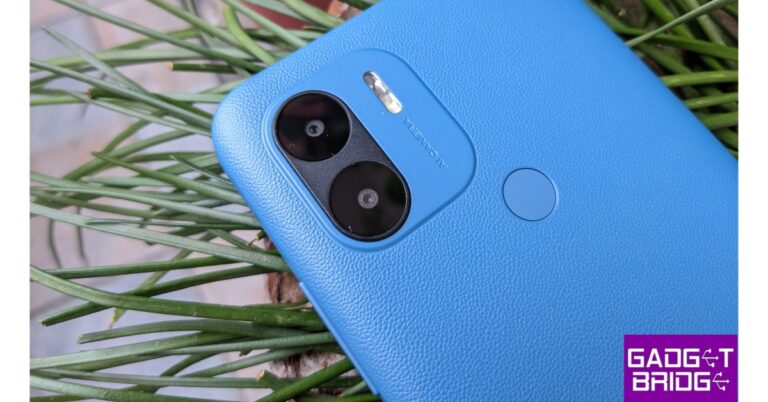
The Mountain View, California-based tech giant Google has revealed the precise date of the formal release of its Pixel 8 range of premium smartphones. The Pixel 8 and Pixel 8 Pro variants are anticipated to be part of the series. For the past few weeks, various rumours have circulated regarding the phone’s key features and other information. The Pixel 8 and Pixel 8 Pro are said to have been listed on the FCC certification website weeks before their release.

After Apple revealed the launch date for its iPhone 15 series Google has now officially confirmed the Pixel 8 series’ launch date. The launch date of October 4 has been announced via X . With a base and a Pro model, the Pixel 8 Series is planned to succeed the Pixel 7 series when it launches on October 4. The event, which is said to be being hosted by the corporation, would begin that day at 10 AM local time in New York.

Also Read: Android 14-based OxygenOS 14 confirmed to be released globally on this date: Details

The Pixel 8 and Pixel 8 Pro, weeks before their release, apparently went to the FCC certification website. According to the listing, the devices’ FCC listing indicates that there may be five different varieties available when they go on sale. GKWS6, G9BQD, GZPF0, GPJ41, and G1MNW are stated as model numbers for the Pixel 8, while G1MNW is reportedly the model number for the Pixel 8 Pro. Furthermore, it’s expected that the Pixel 8 and Pixel 8 Pro will support Bluetooth, Wi-Fi 6E, and both Sub6 and mmWave 5G connectivity.

The Pixel 8 Pro’s colour options and rear design were recently discovered on Google’s promo page for Google Subscriptions & Services. Porcelain White has been used as a colour scheme to tease the smartphone. It’s anticipated to have a single pill-shaped camera island (similar to its predecessors) with a triple back camera system. In addition to this, the existence of a further sensor that sits adjacent to the LED flash has also been suggested.

Additionally, it has been speculated that Google’s camera app on the Pixel 8 Series will get a new user interface. The upcoming series is likely to feature AI-powered cameras.

In some areas, the Google Pixel 8 series is expected to launch as an eSIM-only smartphone. The leaked renderings claimed that the left side’s SIM card slots were absent.

For the latest gadget and tech news, and gadget reviews, follow us on TwitterFacebook and Instagram. For newest tech & gadget videos subscribe to our YouTube Channel. You can also stay up to date using the Gadget Bridge Android App. You can find the latest car and bike news here.

How to set a battery charging limit on your Android phone?

0

Your phone’s battery is prone to a lot of wear and tear. While you cannot stop it from eventually degrading over time, you can maximize its longevity by taking a few measures. One of the easiest things you can do is not charge your phone beyond 80%. If you’re used to charging your phone overnight, this can be a tricky task to accomplish. In this article, we show you how to set a battery charging limit on your Android phone.

Read Also: 4 Reasons Why You Should Buy CZUR Fancy S Pro

Set a Battery Charging Limit on Android

Step 1: Go to Settings and select Battery and device care.

Step 1: Go to Settings and select Battery and device care.

Step 2: Select Battery.

Step 2: Select Battery. How to set a battery charging limit on your Android phone?

Step 3: Tap on More Battery Settings.

Step 3: Tap on More Battery Settings. How to set a battery charging limit on your Android phone?

Step 4: Switch on the toggle bar for Protect battery.

Set the battery charging limit using a third-party app

Some Android smartphone manufacturers may not have the feature to set a battery charging limit. In this case, use a third-party app like AccuBattery to set a charging alarm.

Step 1: Install the AccuBattery app on your phone.

Step 2: Launch the app and switch to the Charging tab.

Step 2: Launch the app and switch to the Charging tab. How to set a battery charging limit on your Android phone?

Step 3: Drag the bubble around the charge indicator to set the upper limit.

Step 3: Drag the bubble around the charge indicator to set the upper limit. How to set a battery charging limit on your Android phone?

Step 4: AccuBattery will remind you to unplug the charger when your phone hits the charge limit.

Frequently Asked Questions (FAQs)

How do I set a battery charging limit on my Android phone?

Go to Settings>Battery and device care>Battery>More Battery Settings and switch on the toggle bar for Protect Battery.

How do I set a charging alarm on my Android phone?

Install the AccuBattery app, switch to the charging tab, and drag the buddle around the charge indicator to set the alarm at a specific charge level. Once your phone’s battery hits that level, your device will ring an alarm to remind you to unplug your charger.

How long should I charge my phone to maximise its battery health?

To maximize your phone’s battery health, you should plug it in to charge when it hits 20% and plug out the charger when the battery level reaches 80%.

Read Also: How to Sign Out of Amazon on All Devices?

Conclusion

This is how you can set a battery charging limit on your Android smartphone. To maximise your phone’s battery health, turn on optimised charging. This ensures that your phone does not overcharge if you keep it plugged into the charger overnight. Once optimised charging is turned on, your phone trickle charges the battery once it hits 80%. Over a period of time, your phone recognises your waking-up pattern and only boosts your phone to 100% when you’re about to wake up from sleep. Check out this article to learn how to calibrate your Android phone’s battery.

For the latest gadget and tech news, and gadget reviews, follow us on Twitter, Facebook and Instagram. For newest tech & gadget videos subscribe to our YouTube Channel. You can also stay up to date using the Gadget Bridge Android App. You can find the latest car and bike news here.

Android 14-based OxygenOS 14 confirmed to be released globally on this date: Details

The precise date for the release of OxygenOS 14, the newest operating system from the Chinese smartphone manufacturer OnePlus, has been officially revealed. The company has announced that it will be live worldwide on September 25. According to the company, OxygenOS 14 will be one of the first operating systems based on Android 14 to be released and will include a number of interesting new features aimed at enhancing user experiences.

Kinder Liu, President and COO of OnePlus said, “OnePlus has been committed to delivering a fast, smooth and steady OxygenOS to our users. Powered by OnePlus’ latest innovations, OxygenOS 14 will be the most intelligent and intuitive software product in OnePlus’ history.”

Also Read: Apple Event: September 12 confirmed for the introduction of the iPhone 15 Series

According to OnePlus OxygenOS 14 will bring users an elevated fast and smooth experience powered by innovative algorithms. OnePlus is integrating OxygenOS 14 with its brand-new, exclusive performance platform, the Trinity Engine.

The Trinity Engine unlocks the full potential of OnePlus smartphones by attaining more hardware and software synergy, addressing industry-wide problems in pursuing higher power consumption efficiency, better multitasking capacity, and a more durable quick and smooth experience.

The engine is said to be equipped with six cutting-edge technologies, including HyperBoost, HyperTouch, ROM Vitalization, CPU Vitalization, and HyperRendering. Combining these technologies ensures a flexible, quick, and fluid experience in situations like multitasking, intense mobile gaming, and extended use.

Also Read: iQoo Z7 Pro 5G with 64-megapixel Samsung GW3 primary sensor launched in India

Prior to the general release, OnePlus had launched an Android 14-based OxygenOS 14 Closed Beta Testing (CBT) initiative for the OnePlus Nord 3 5G owners in India. 500 users can participate in the CBT programme. The users will be able to uncover and submit OS faults to OnePlus so that any serious problems will be resolved before the product is released to the general market. Users who are interested can sign up for the program to get a sneak peek at OnePlus’ next custom skin and offer comments and ideas on how to make the software experience better.

OnePlus Nord 3 5G (Review) was launched in India in July. Under the hood, there is a Snapdragon 7+ Gen 2 SoC.

 For the latest gadget and tech news, and gadget reviews, follow us on TwitterFacebook and Instagram. For newest tech & gadget videos subscribe to our YouTube Channel. You can also stay up to date using the Gadget Bridge Android App. You can find the latest car and bike news here.

Best 3 Ways to Change the Speed of Video on Android and iPhone

0

Changing the video speed is one of the most basic video-editing skills that every smartphone user should know. If you want to make your video more presentable, you should know how to set it to the ideal tempo. Your smartphone is easily able to accomplish this task without needing any third-party app. In this article, we bring you the 3 best ways to change the speed of a video on Android and iOS/iPhone.

Read Also: Top 3 Ways to Stop Instagram From Posting to Facebook

Use the native editor to change the speed of video on Android

Step 1: Select the video you want to edit.

Step 2: Tap the pencil icon on the bottom menu.

Step 2: Tap the pencil icon on the bottom menu. Best 3 Ways to Change the Speed of Video on Android and iPhone

Step 3: Scroll through the editing options and select Speed.

Step 3: Scroll through the editing options and select Speed. Best 3 Ways to Change the Speed of Video on Android and iPhone

Step 4: Use the slider to change the speed of the video.

Step 4: Use the slider to change the speed of the video. Best 3 Ways to Change the Speed of Video on Android and iPhone

Step 5: Hit the tick icon at the bottom right corner of the screen.

Step 6: Hit Save at the bottom right corner of the screen.

Step 5: Hit the tick icon at the bottom right corner of the screen. Best 3 Ways to Change the Speed of Video on Android and iPhone

Use the native editor to change the speed of video on an iPhone

iPhone 13 now available for as low as Rs 21,499 on Flipkart: Details Inside

Step 1: Launch the Photos app and select the video.

Step 2: Tap the Edit option at the top right corner of the screen.

Step 3: The speed bar is positioned right below the video seeker.

Step 4: Bring the bars closer to speed up the video and separate them further to slow it down.

Step 5: Hit Done at the bottom right corner of the screen.

Use a third-party app

Step 1: Install the Video Editor & Maker – InShot app from the Google Play Store.

Step 2: Tap on Video from the Create new section and load the video from your phone’s gallery.

Step 2: Tap on ‘Video’ from the ‘Create new’ section and upload the video from your phone’s gallery.

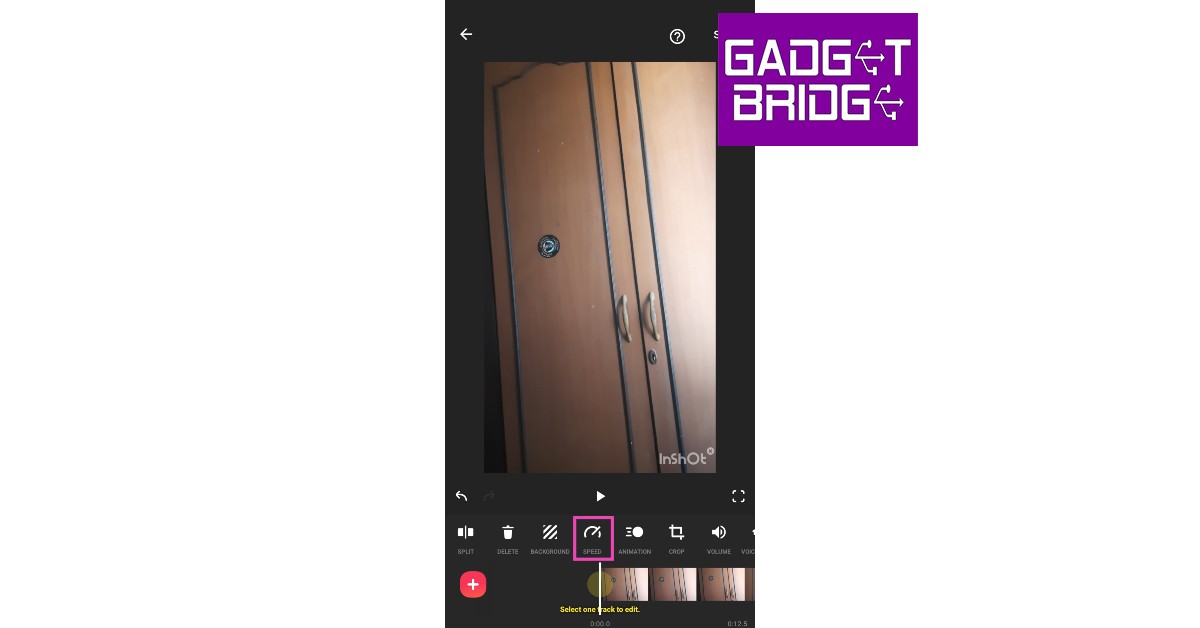
Step 3: Select Speed from the toolbar.

Step 3: Select ‘Speed’ from the toolbar.

Step 4: Select the playback speed. You can speed up the video or convert it entirely into slow motion.

Step 4: Select the playback speed. You can speed up the video or convert it entirely into slow motion.

Step 5: Tap on Curve to speed up or slow down different parts of the video. Tap the play button to preview.

Step 5: Tap on ‘Curve’ to convert different parts of the video into slow motion. Tap the play button to preview.

Step 6: Select Save.

Frequently Asked Questions (FAQs)

How do I change the speed of a video on Android?

Select the video and go to Edit>Speed. Choose a playback speed from the list of options.

How do I change the speed of a video on an iPhone?

Select the video and hit the Edit option at the top. Use the speed bar under the video seeker to change the speed of the video.

What are some good video editing apps for Android and iOS?

InShot, VITA, and iMovie are some of the best video editing apps for Android and iOS.

Read Also: Oppo Find N3 Flip featuring a 3.26-inch cover display launched

Conclusion

This is how you can change the speed of a video on Android and iPhone/iOS. When it comes to basic editing like changing the playback speed, your phone’s native editor is well-equipped to handle the task. For more advanced editing tasks, you will need to install a third-party video editor like InShot, Vita, or iMovie. Here is our list of the top 10 video editing apps for iPhone and iPad. Android users can check out this list to find the top 10 video editors for their platform.

For the latest gadget and tech news, and gadget reviews, follow us on Twitter, Facebook and Instagram. For newest tech & gadget videos subscribe to our YouTube Channel. You can also stay up to date using the Gadget Bridge Android App. You can find the latest car and bike news here.

iQoo Z7 Pro 5G with 64-megapixel Samsung GW3 primary sensor launched in India

iQoo has officially announced the launch of its new smartphones in India. iQoo Z7 Pro 5G is the latest addition to the company’s Z-Series lineup. The device is powered by an octa-core MediaTek Dimensity 7200 SoC. It comes with a dual camera setup that includes a 64-megapixel sensor. There is a 120Hz AMOLED display and a 4,500mAh battery with 44W wired Flash Charge support.

iQoo Z7 Pro 5G price in India, sale details

iQoo Z7 Pro 5G has been launched in India with a starting price of Rs 23,999 for the base 8GB RAM with 128 GB storage option. On the other hand, the cost of the 8GB RAM with 256GB storage option is set at Rs 24,999. However, additional bank offers of up to Rs 2,000 bring the price down to Rs 21,999 and Rs 22,999, respectively.

Also Read: Boat Smart Ring with heart and menstrual monitoring launched in India

As per the company, the effective price is for a limited time with launch offers, so users can purchase the device early to avail the best price. The iQOO Z7 Pro will be available for purchase on Amazon.in and iQOO e-store from September 5 at noon. The phone will be offered in two colour options- Blue Lagoon and Graphite Matte.

iQoo Z7 Pro 5G price in India, sale details

iQoo Z7 Pro 5G specifications

iQoo Z7 Pro 5G features a 6.78-inch full-HD+ AMOLED display with 2400 x 1080 pixels of resolution. The screen supports a 120Hz refresh rate and has a touch sampling rate of 300Hz. The device has an aspect ratio of 20:9 and comes with a peak brightness level of 1300 nits. The device runs on FuntouchOS 13 with Android 13. Under the hood, there is an octa-core 4nm MediaTek Dimensity 7200 SoC with Mali-G610 MC4 GPU. It comes with 8GB of LPDDR4X RAM and up to 256GB of UFS 2.2 storage.

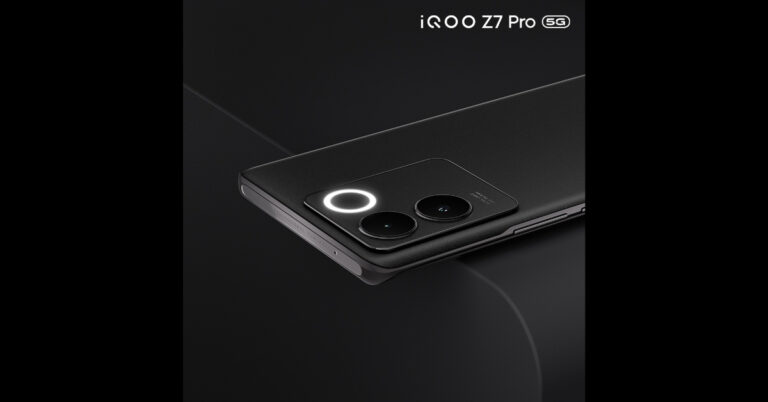
iQoo Z7 Pro 5G sports a dual rear camera setup that includes a 64-megapixel Samsung GW3 primary sensor and a 2-megapixel depth sensor. It also features a ring LED light. It also features a 16-megapixel front-facing sensor for taking selfies and video calling.

Also Read: Apple Event: September 12 confirmed for the introduction of the iPhone 15 Series

iQoo Z7 Pro 5G has an in-display fingerprint sensor, a gyroscope, an e-compass, a proximity sensor, an ambient light sensor, and an accelerometer. In addition to this has connectivity for 5G, 4G VoLTE, Wi-Fi 6, Bluetooth 5.3, GPS, and USB Type-C. It has an IP52 rating for water and dust resistance. The 4,600mAh battery in the iQoo Z7 Pro supports 66W wired fast charging.

For the latest gadget and tech news, and gadget reviews, follow us on TwitterFacebook and Instagram. For newest tech & gadget videos subscribe to our YouTube Channel. You can also stay up to date using the Gadget Bridge Android App. You can find the latest car and bike news here.

BGMI redeem codes for 1 September 2023, claim and receive rewards and benefits

After being banned for nearly ten months, Battleground Mobile India, aka BGMI, is officially available again in India. BGMI fans are looking for ways to improve their game experience and one such method is the usage of redemption codes, which offers a variety of rewards and advantages using BGMI redeem codes players can gain access to new skins, outfits, loot crates, weapons and free UC and diamonds.

As mentioned earlier, these codes give users the chance to earn unique rewards and gain extra benefits while playing the game. This includes GUN SKINS (M4, AKM, M416, AWM, M24, UZI, KAR98K), free character voucher, Andy, Carlo, Sara, Victor character for free, free Anna Character on completing the mission and UC or Royal Pass Discount. So here we have gathered a list of the most recent BGMI redeem codes as of 1 September 2023. Also, redeem these codes asap as these are only valid for a limited duration.

BGMI Redeem Codes for 1 September 2023

updating soon…

How to get free Redeem Codes for BGMI on 1 September 2023?

  • Launch BGMI on your device.
  • Then select the Redeem Code option from the main menu.
  • Next, click on the Redeem code tab.
  • A new window will open, requesting the redemption code.
  • Now enter your BGMI code.
  • Confirm and click on the “Redeem” tab.
  • If your redeem code is valid then you will get a message confirming that your rewards were successfully redeemed.

(Note that these codes are case-sensitive, so be sure to type them correctly to prevent any errors.)

For the latest gadget and tech news, and gadget reviews, follow us on TwitterFacebook and Instagram. For newest tech & gadget videos subscribe to our YouTube Channel. You can also stay up to date using the Gadget Bridge Android App. You can find the latest car and bike news here.

Garena Free Fire Redeem Codes Today 1 September 2023: Here is how to claim them

Garena Free Fire is a battle royale game with regular awards and tournaments to keep players interested. If you play Garena Free Fire, you should be aware of the redeem codes that are released on a daily basis. However, because the battle royale game is banned in India, players from other countries can use the Free Fire Redeem codes daily. If you’re unfamiliar with the Garena Free Fire redeem codes or don’t know how to get them, we’ve put together a step-by-step guide to help you redeem them. Check out Garena Free Fire Redeem Codes for 1 September 2023.

The Free Fire redeem codes are a great way to get free stuff. These are 12-digit codes that contain alphabets and numbers, as well as an expiration date and time. Because the Garena FF redeem codes cannot be used more than once, you should hurry to the redemption page to claim your free reward before someone else does. To get a free reward, all you have to do is go to reward.ff.garena.com/en, which is the official redemption page. Also, keep an eye on this space for daily updates on Garena Free Fire redemption codes and rewards.

Garena Free Fire Redeem Codes Today 1 September 2023

updating soon…

How to Get Free Fire Redeem Codes for Garena on 1 September 2023?

  • Visit the Garena Free Fire game’s official website at reward.ff.garena.com.
  • Use your Facebook, Google, VK, Apple ID, Huawei ID, or Twitter account to log in.
  • You’ll be taken to a valid redemption code (s)
  • Copy and paste the 12-digit redemption code into the text box.
  • On the screen, a dialogue box will appear.
  • ‘Ok’ should be selected.

For the latest gadget and tech news, and gadget reviews, follow us on TwitterFacebook and Instagram. For newest tech & gadget videos subscribe to our YouTube Channel. You can also stay up to date using the Gadget Bridge Android App. You can find the latest car and bike news here.

Essential Wallet and Smartphone Care Tips for Longevity

For most individuals, a wallet and a smartphone are probably two of their most prized possessions. You don’t often see anyone leaving their home without either of them. However, both wallets and smartphones are subject to wear and tear, more so than any other physical possession out there.

Thankfully, with the right care and consideration, you can enhance the longevity of your cherished belongings. Here are some simple, yet effective tips to care for your smartphone and wallet that you can follow to keep them looking new for a long time.

Tips to Care for Your Wallet 

Properly maintaining your wallet can not only enhance the way it looks but can also improve its integrity and durability. Here’s what you need to do.

●       Keep Away from Sunlight

Irrespective of whether you have a fabric or a leather wallet, always make sure that you keep it away from direct sunlight. The ultraviolet (UV) rays and heat from sunlight will dry the moisture from the material and cause it to fray and crack easily. If you want your wallet to last longer, remember to store it in a cool and dry place.

●       Clean Regularly

Over time, wallets tend to accumulate dust, dirt and grime, which can make them appear dull and lifeless. A task as simple as cleaning your wallet regularly with a soft, yet slightly damp cloth can do wonders to its looks. If you have a leather wallet, consider using a leather cleaner solution to get rid of grime. But be careful not to use any chemicals, excessive water or abrasives as they can damage the material permanently.

●       Refrain from Overstuffing

One of the major causes of wallet damage is overstuffing. Keeping coins and other metal objects for extended periods can scratch or tear the linings. To prevent this, check your wallet periodically and remove unwanted items, receipts and business cards. Lightening your wallet should ensure its longevity.

●       Protect from Moisture

Moisture and water are two things that can irreparably damage your wallet irrespective of whether it is made of leather or fabric. Therefore, you should always make sure to keep your wallet dry and away from moisture. If you find that your wallet has been exposed to either water or moisture, dry it immediately using a cloth or tissue before you start using it again.

Tips to Care for Your Smartphone

Similar to a wallet, your smartphone also deserves to be cared for considering that it is one of the most used physical possessions. However, unlike wallet maintenance, maintaining your smartphone is a different ballgame. Here are some tips that you can follow.


●       Use a Screen Protector

Although most smartphones these days are offered with toughened glass displays, they may still be prone to scratches and cracks if you drop them. Here’s where investing in a screen protector can help. Display protectors made from tempered glass, especially the ones that cover the entire screen, can prevent your display from getting damaged due to drops; and they’re very cost-effective and easy to replace.

●       Use a Case

Protecting your phone with a case is another good way to care for it. It not only protects your phone from nicks and dents but also prevents the back panel and the camera unit from getting scratched. There are many different types of phone cases ranging from the cost-effective TPU  (silicone) case to a hard-shell case.

●       Clean Ports and Openings

The various openings and ports of your phone can gather dust, dirt and grime. When left as it is, this can cause irreparable damage. This is precisely why it is crucial to clean them from time to time. If you feel that you’re not well equipped to clean your smartphone properly, don’t hesitate to take it to a professional.

●       Avoid Water Exposure

Preventing water exposure is not only an integral part of safeguarding your wallet, but is also an important aspect to ensure the longevity of your smartphone. And just because most phones are being offered with IPX dust and water protection doesn’t mean they’re impervious to water damage. Therefore, it is a good idea to keep your phone away from water and moisture.

Protect Your Wallet and Smartphone With Insurance

Diligent care for your wallet and smartphone can improve their longevity and keep them in good condition for years to come. However, despite your best efforts, you may still end up damaging them or worse, losing them.

Considering that your wallet doesn’t just contain cash but also your documentary evidence, debit cards and credit cards, losing them can prove to be costly. You may end up becoming a victim of unauthorised card use. Here’s where the CPP wallet care plan can help.

Available on Bajaj Finserv, this plan for your wallet is a pocket insurance plan that provides coverage of up to ₹2 Lakhs against card fraud, losses due to phishing and PIN-based frauds for just a nominal fee of just ₹699 per year. In addition to this, you also get emergency travel and hotel assistance worth ₹50,000 for domestic destinations and ₹1 Lakh for international destinations. Other plans like our key insurance cover also offer instant card-blocking services in case you lose your wallet.

Similarly, your smartphone is no less important than your wallet. Replacing a lost phone or even a damaged component like the display can drain your finances quickly. Having a pocket insurance plan during such incidents can be a lifesaver. The Mobile Protect Plan is an insurance plan for your smartphone starting at just ₹1,212 per annum. What’s more, the plan offers 100% comprehensive coverage against accidental and liquid damage to your phone’s display.

For the latest gadget and tech news, and gadget reviews, follow us on TwitterFacebook and Instagram. For newest tech & gadget videos subscribe to our YouTube Channel. You can also stay up to date using the Gadget Bridge Android App. You can find the latest car and bike news here.