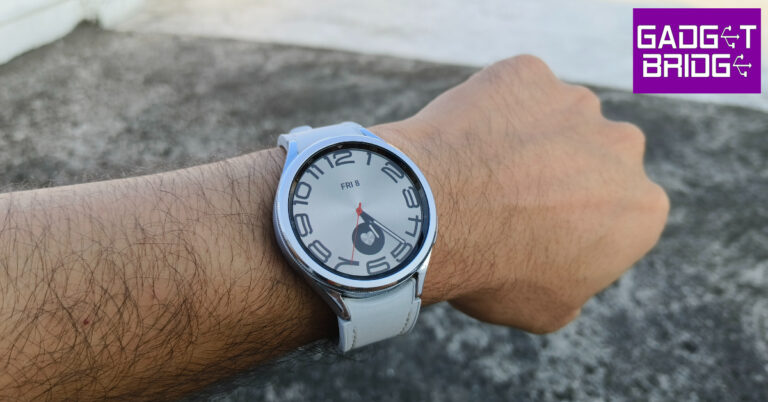
Samsung Galaxy Watch6 Classic Review: A supreme health tracker that does not compromise on style

Launched in July, the new Samsung Galaxy Watch6 Classic is available in two case size variants with LTE and Bluetooth connectivity options. The rotating physical bezel also makes a return on the Watch6 Classic after skipping the Galaxy Watch5 Pro. Samsung’s flagship wearable has been the best Android smartwatch for a few years now. In its latest iteration, the Galaxy Watch retains its signature design and efficient sensors while making some minor improvements across the board. It may not blow you away with a radical new design, but it continues to deliver the kind of near-flawless performance that is expected of it. We strapped the smartwatch around our wrist for a week, here is our in-depth Samsung Galaxy Watch6 Classic review.

Read Also: iPhone 15 Series camera details surfaced ahead of the official launch

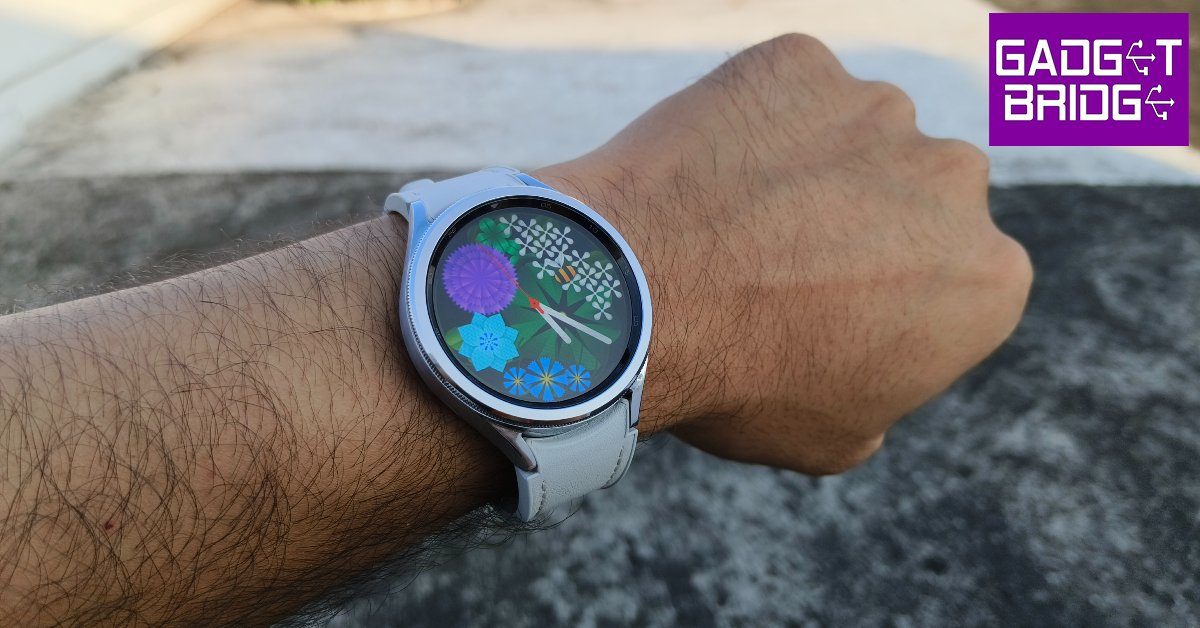
Samsung Galaxy Watch6 Classic review: Design and Display

The biggest design change on the Samsung Galaxy Watch6 Classic is the inclusion of the rotating physical bezel which earns the wearable its ‘Classic’ monicker. This bezel not only amps up the aesthetic of the watch but also comes in very handy while navigating its interface and controlling certain settings. The integration of the bezel with the software is very neat, but more on that later.
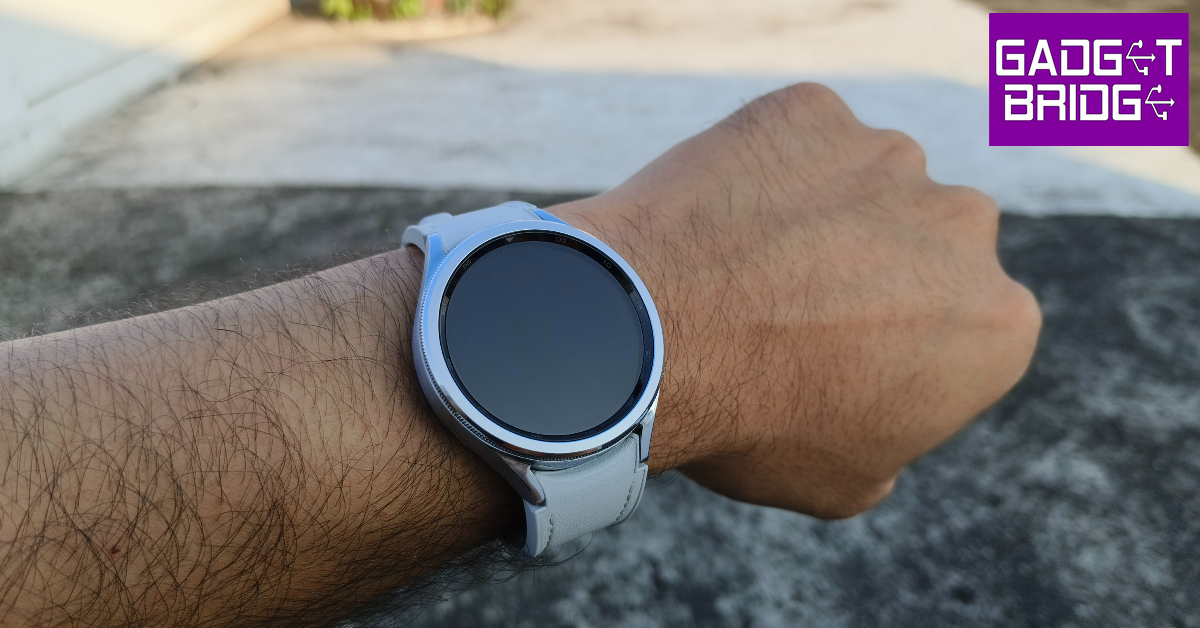
Samsung Galaxy Watch6 review: Design and Display

The stainless steel frame houses the home and back buttons on its left edge. The left edge is button-free. When it comes to the form factor and the quality of materials used, Samsung is far ahead of its peers. The stainless steel frame feels very premium, something that you expect when shelling out Rs 37,000 for a watch.
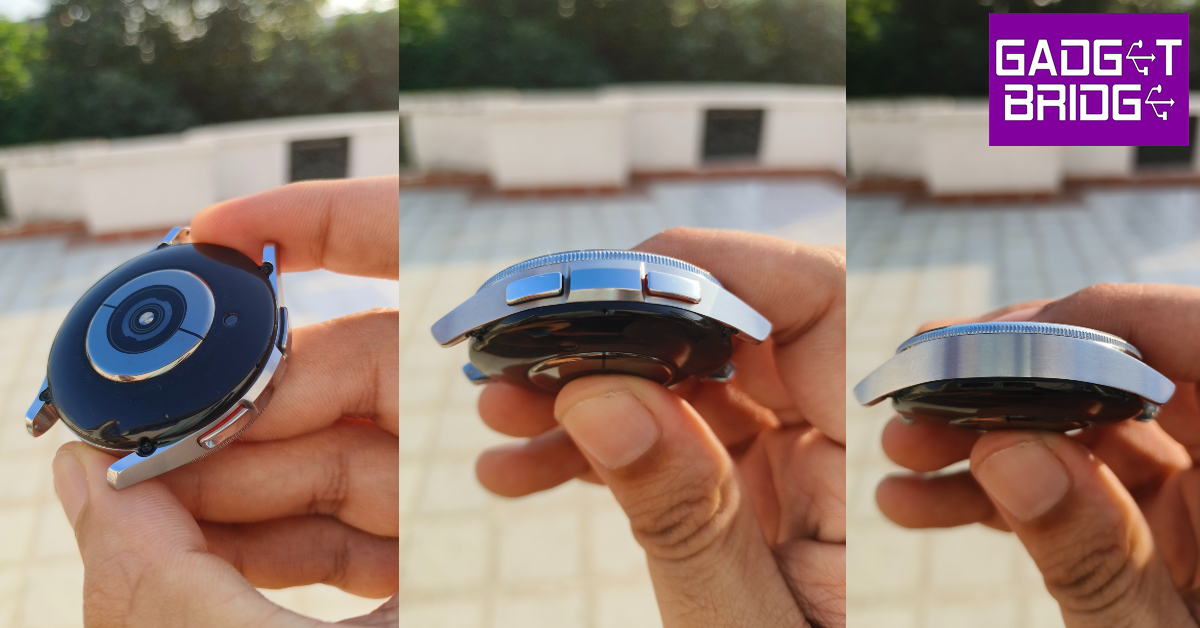
Samsung Galaxy Watch6 review: Design and Display

The 1.5-inch Super AMOLED display has a 480p resolution and gets Sapphire Crystal protection. It can reach a peak brightness of 2,000 nits, making it one of the brightest smartwatch displays out there. Viewing the display under direct sunlight presents no problems whatsoever. The touch response is top-notch as well, but the gestures and navigation controls could have been tuned better.
Flipping the watch around, you’ll notice that Samsung has stuck with its heart rate, SpO2, and temperature sensors. On the left side of the bottom panel lies a speaker grille and there’s a microphone on the right. The Samsung Galaxy Watch6 uses a wireless charger which magnetically locks on this bottom panel. We used the 47mm case variant of the Watch6 Classic. Weighing 59g, this watch is slightly heavier than its competitors, but you get used to it very quickly.

One of our favourite aspects of the Watch6 Classic is its strap. Samsung has gone for the traditional pin buckle strap on the Watch6 Classic instead of the clasping band that featured on the Watch5 Pro. But what we really like about this strap is the quality of the materials and the comfort it provides. Inside, the rubbery texture is extremely sweat-resistant and very cushiony. The outer part of the strap has a faux-leather texture which feels quite premium. The stitching along the borders elevates the look of the watch as well.
Another underrated feature about this strap that Samsung gets right is its attachment mechanism. The two buttons on the strap make it very easy to detach from the dial. A significant improvement over the pulling pin technique employed by most Android smartwatches.

Samsung Galaxy Watch6 Classic is rated IP68 for dust and water resistance. It can also prevent any water damage up to 50m, making it ideal for swimming. It is also MIL-STD-810H compliant and can easily take a good knock.

Samsung Galaxy Watch6 Classic review: Performance

Under the hood, the Samsung Galaxy Watch6 Classic gets the new Exynos W930 SoC. The previous two generations of the Galaxy Watch used the W920 chipset. The improvement may be marginal but it is certainly welcome. The smartwatch comes with 2GB of RAM and 16GB of internal storage. OS duties are handled by Android Wear OS 4 with Samsung’s One UI Watch 5 on top.
Samsung Galaxy Watch6 review: Performance

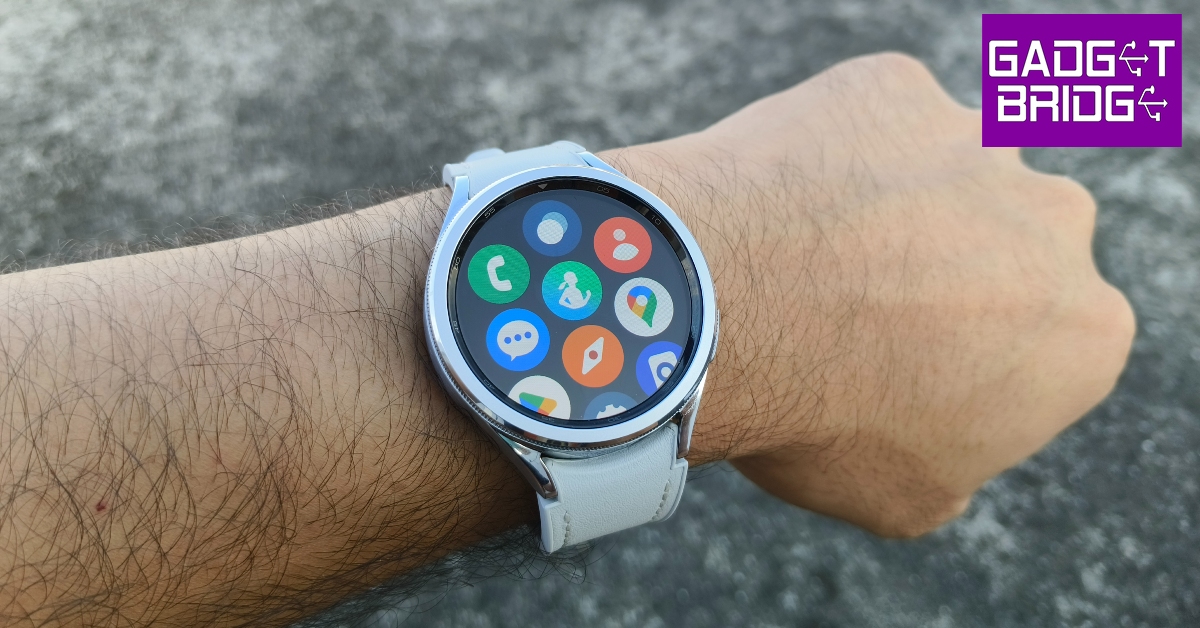
One UI Watch 5 OS isn’t really different from the Watch 4.5, but it comes with one very useful feature. If you use multiple smartphones, you can use the Watch6 with both of them without needing to clear its data. Another aspect where this smartwatch’s software really shines is the bezel integration. You can use the rotating bezel to control just about anything on the watch, be it scrolling through the widgets, conversations, and app library, or adjusting the brightness, setting the health metrics, and more.

We did experience a few stutters occasionally, but it did not impede the functioning of the watch in any capacity. Our only minor complaint with the OS is that it relies on swipe gestures from the edge of the dial to trigger the app library and the quick settings panel. While the notification page and widget section can be accessed with a quick swipe on the centre of the screen, the same is not the case for the app library and the quick settings. Perhaps a future update can fix this.
Samsung Galaxy Watch6 review: Performance

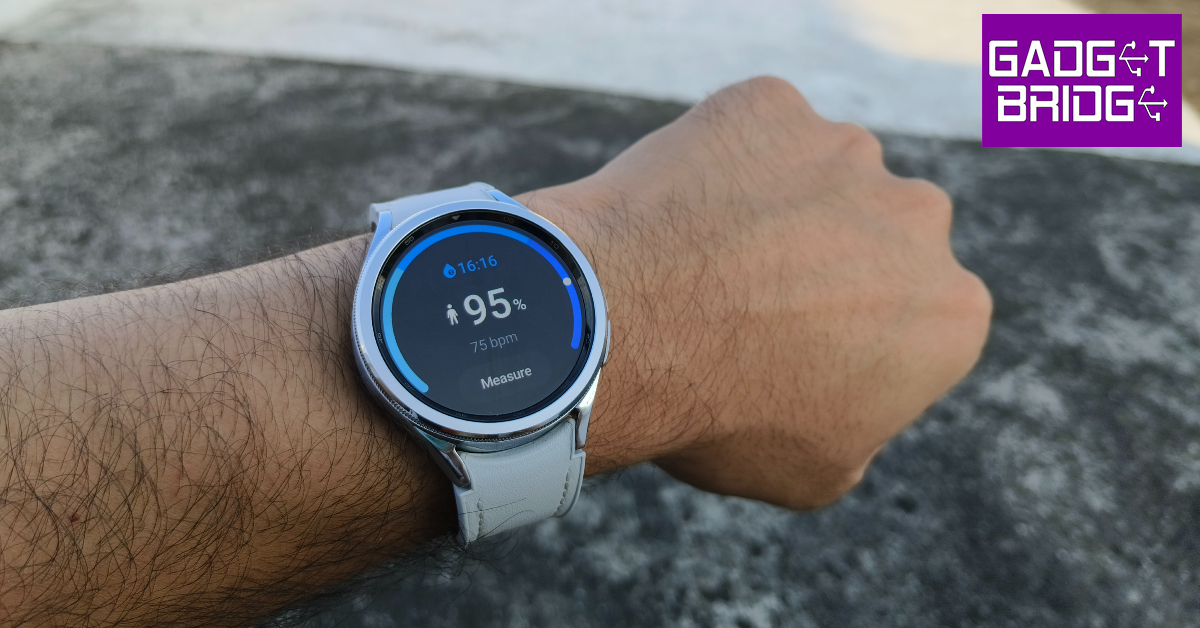
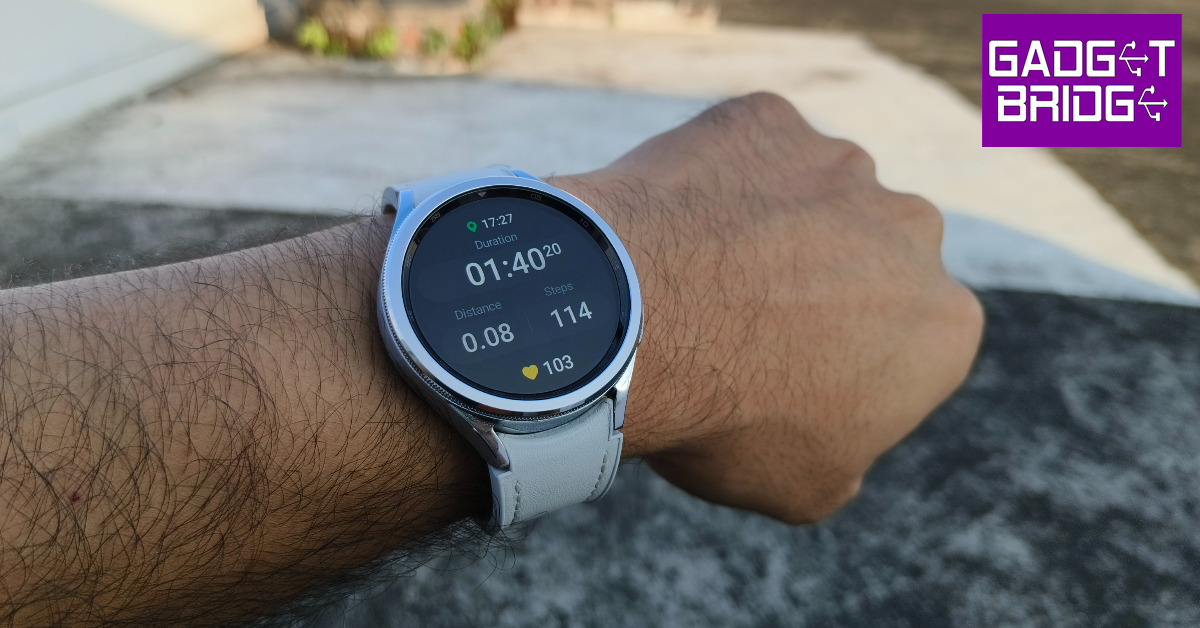
When it comes to health and fitness tracking, the Samsung Galaxy Watch6 Classic is unmatched among its Android peers. The smartwatch can auto-detect up to 7 activities including walking, running, cycling, swimming, rowing, and more. There’s further support for circuit training, weight machines, elliptical trainers, exercise bikes, and sports like Cricket, Football, Skiing, Boxing, and more. The in-built GPS can track your runs without relying on your smartwatch. The readings from the heart rate monitor and the blood oxygen sensor are consistent with medical-grade equipment.

You can also evaluate your body composition using the Galaxy Watch6 Classic, but we can’t speak to its accuracy. It is always better to treat these readings as supplementary to ones gained from medical equipment. The Watch6 also has a blood pressure sensor, but it is not yet available in India. The sleep tracking on this device is phenomenal as usual, with a detailed breakdown of your sleeping pattern available on the Samsung Health app.
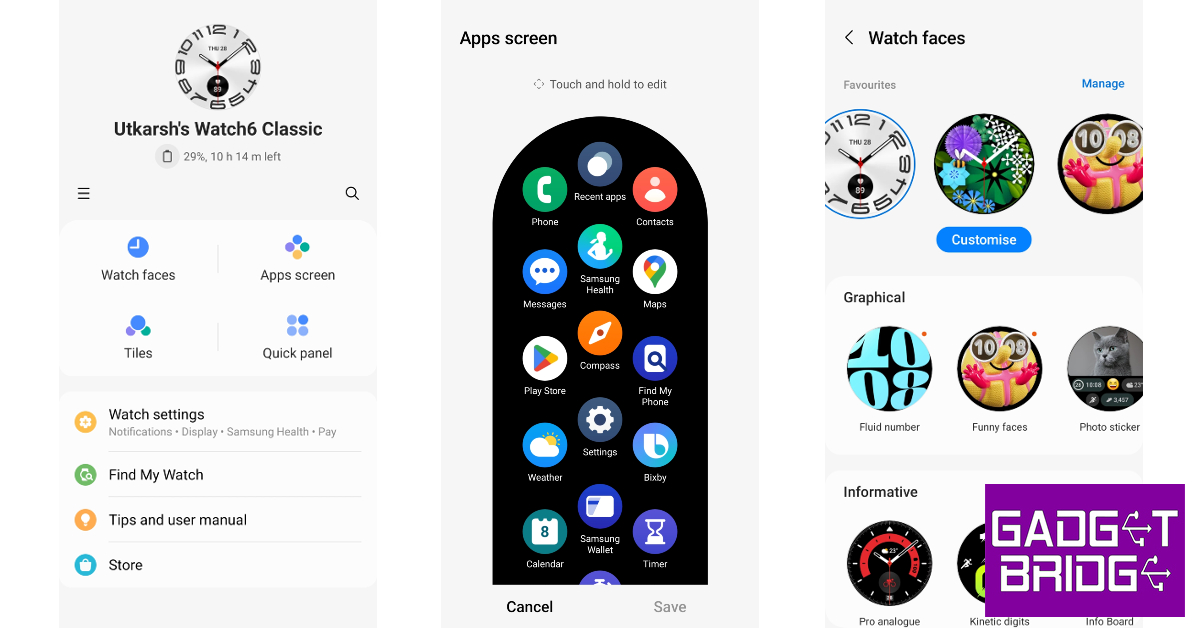
 

While the Galaxy Wearable app is essential to set up the smartwatch, you need the Samsung Health app to get detailed health reports and insights. The watch face, quick panel, tiles, and app screen can be customised from the Galaxy Wearable app. One UI Watch 5 OS now supports WhatsApp as well, which means you can receive and respond to messages from the Watch6 itself. Other than that, the app market for Android smartwatches still remains pretty limited.
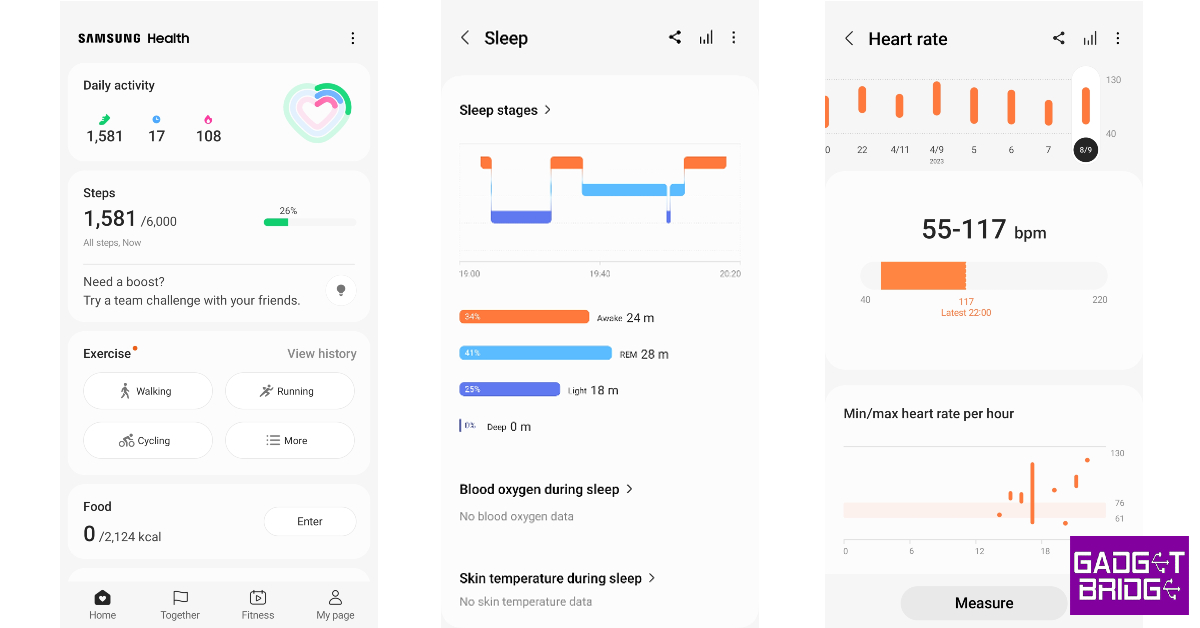
The Samsung Galaxy Watch6 Classic 47mm case variant gets a 425mAh battery. The 43mm variant comes with a 300mAh unit. We used the 47mm case variant and it lasted us just over a day on a full charge. With the Always On Display turned on at all times, the battery life takes a considerable hit. We used the fitness tracking features for almost an hour every day, which also helped in extending the battery life. On heavy use (LTE and GPS functions), you may have to connect the charger before the day ends.

Read Also: The all-new GoPro Hero 12 Black action camera launched in India

Verdict

With prices starting at Rs 36,999, the Samsung Galaxy Watch6 Classic is one of the more expensive smartwatches out there but it effortlessly handled every task we through at it during the review period. The good news is that the watch’s premium feel, design, and build quality more than makes up for it. The rotating bezel and the stainless steel case elevate the feel of the smartwatch to a level that is unmatched by its peers. The faux leather texture on the strap is also a nice touch. When it comes to health and fitness tracking, there aren’t any massive breakthroughs in this iteration of the Galaxy Watch, but it remains one of the best Android trackers on the market.

Samsung Galaxy Watch6 Classic Pros

  • Rotating bezel is back
  • Stainless steel case feels very premium
  • Comfortable strap with a faux leather finish on top
  • Accurate health and fitness tracking
  • Good OS support

Samsung Galaxy Watch6 Classic Cons

  • Price
  • Blood pressure measurement feature is not available in India

For the latest gadget and tech news, and gadget reviews, follow us on Twitter, Facebook and Instagram. For newest tech & gadget videos subscribe to our YouTube Channel. You can also stay up to date using the Gadget Bridge Android App. You can find the latest car and bike news here.
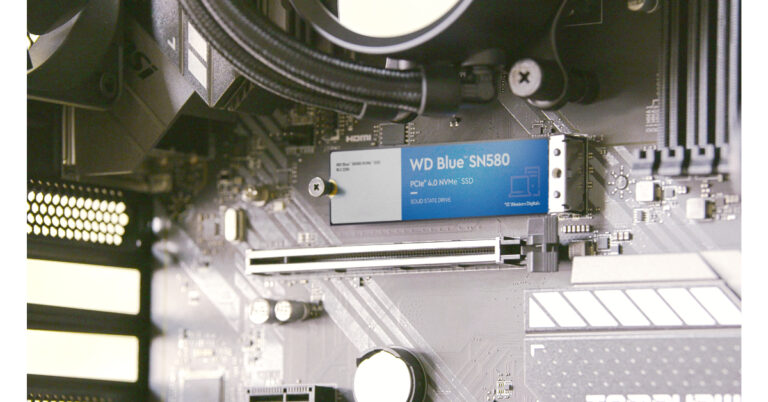
WD Blue SN580 NVMe SSD for creative professionals launched in India

Western Digital has introduced the new WD Blue SN580 NVMe solid-state drive (SSD) in India. The new NVMe PCIe Gen 4.0 internal flash drive is intended for usage by professionals and members of the creative enthusiast community whether upgrading existing PCs or improving a custom build.

WD Blue SN580 NVMe solid-state drive (SSD) price and sale details

The all-new WD Blue SN580 NVMe solid-state drive (SSD) is currently up for sale in India in capacities ranging from 250GB to 2TB with price starting at Rs 4,599. The device is being offered for sale online through Amazon.in and at a few local retail locations.

WD Blue SN580 NVMe solid-state drive (SSD) price and sale details

WD Blue SN580 NVMe solid-state drive (SSD) features

WD Blue SN580 is the first drive in the WD Blue product line to incorporate nCache 4.0 technology and NVMe PCIe Gen 4.0.

With faster application response times and boot times of up to 4,150 MB/s read and write speeds (1TB – 2TB models), NVMe PCIe Gen 4.0 increases productivity and enables seamless multitasking between projects with vast and complicated workflows.
With its high burst write speed and hybrid SLC cache, nCache 4.0 technology enables lightning-quick copying of big files and media assets for an improved creation workflow.

Also Read: Google has released a new promo video showing off the Pixel 8 and Pixel 8 Pro: Deets inside

It can store up to 2TB of data on a compact M.2 2280 form factor, making it a dependable option for the safe keeping of programmes, data, and media including 4K videos, music, and images. DRAM-less, low-power storage lets you continue working while in the zone or on the go while extending the life of your laptop’s battery.

With a rating of up to 900TBW (2TB model) and a 5-year limited warranty from Western Digital.

Khalid Wani, Senior Director- Sales, India, Western Digital, said “As the demand for immersive digital content grows in India, so does the need for high-performance tools. With lightning-fast NVMe PCIe Gen 4.0 technology, the WD Blue SN580 NVMe SSD turns lengthy load times into a thing of the past. Its slim M.2 form factor accommodates up to 2TB of content, and the 5-year limited warranty ensures peace of mind. Whether you’re a professional or an aspiring creator, this SSD is made just for you.

For the latest gadget and tech news, and gadget reviews, follow us on TwitterFacebook and Instagram. For newest tech & gadget videos subscribe to our YouTube Channel. You can also stay up to date using the Gadget Bridge Android App. You can find the latest car and bike news here.
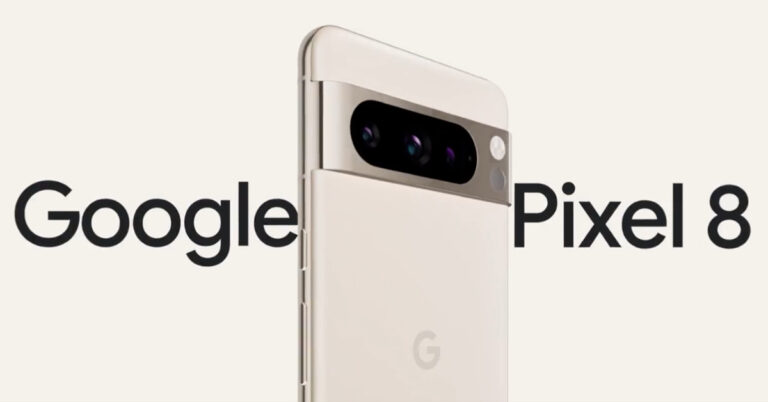
Google has released a new promo video showing off the Pixel 8 and Pixel 8 Pro: Deets inside

Google’s new promo video gives a glimpse of the Pixel 8 and Pixel 8 Pro ahead of the October launch. The Pixel 8 series is scheduled to debut on October 4. The new promo which has now been released showcases the design before their official debut. Google has also made mention of additional products possibly the Pixel Watch 2 and Pixel Buds Pro that will also debut alongside both the phones.

Google has provided a 360-degree view of the Pixel 8 Pro. In a brand-new promotional video, the business unveiled the Google Pixel 8 Pro, Pixel 8, and Watch 2. The phones still have a horizontal back camera and have rounded corners. The colour of the camera bar matches the smartphone’s frame. Although the body is made of glass, it has a glossy surface, and the camera bar and frame are muted colours.

The Pixel 8 Pro is displayed sporting a triple back camera configuration, while the Pixel 8 could be seen housing a twin camera rear device. For improved zooming this year, the third camera on the Pro variant may sport a periscope-style lens. Google has verified that the 8 Pro model even has a temperature sensor, albeit it is yet unknown what functions and capabilities it has in addition to sensing body temperature.

Google has released a new promo video showing off the Pixel 8 and Pixel 8 Pro: Deets inside

Also Read: Awesome White colour variant of Samsung Galaxy A54 5G launched in India

The video suggests that the Pixel 8 Pro will at least be available in Porcelain White. On the other hand, it is certain that the Pixel 8 will come in Pink as well as other colour options. The phone’s blue and black colours have previously been made public through Google’s “know your hardware.”

However, the Google Tensor G3 chipset is most likely to be included in the Pixel 8 and Pixel 8 Pro.

Google has released a new promo video showing off the Pixel 8 and Pixel 8 Pro: Deets inside

Along with the smartwatch and earphones, the firm has also revealed the pre-order sale date for its upcoming Pixel 8 series. Google has not yet announced the precise sale date for the smartphones and other gadgets in the Pixel 8 series. They are anticipated to make their debut in the first half of October 2023.

For the latest gadget and tech news, and gadget reviews, follow us on TwitterFacebook and Instagram. For newest tech & gadget videos subscribe to our YouTube Channel. You can also stay up to date using the Gadget Bridge Android App. You can find the latest car and bike news here.

7 easy ways to turn off or restart an Android phone without using the power button?

0

The physical buttons on your smartphone are prone to a lot of wear and tear. The power button is one of the most used buttons on your device since it also doubles up as the unlock key. Over a period of time, this button can go loose or entirety stop working. While you can still unlock your device using the fingerprint unlock or Face ID, turning off or restarting the device can be quite a hassle. In this article, we bring you the top 7 easy ways to turn off or restart an Android phone without using the power button.

Read Also: The Integration of Virtual Reality (VR) and Augmented Reality (AR) in Online Gaming Experiences

Turn off or restart your Android phone from Quick Settings

Step 1: Swipe down from the status bar to reveal the Quick Settings Menu.

Step 2: Tap the power icon at the top right corner of the screen. Some smartphones may have this option at the bottom of the menu.

Use the Quick Settings Panel

Step 3: Select turn off or restart from the power menu.

Use the Assistant Menu on Samsung phones

Similar to Assistive Touch on iPhones, Samsung devices have the Assistant Menu that lets users access basic functions anywhere on their phones. You can use this menu to power off or restart your device. Here’s how.

Step 1: Go to Settings and select Accessibility.

Step 1: Go to Settings and select Accessibility.

Step 2: Tap on Interaction and dexterity.

Step 2: Tap on Interaction and dexterity.

Step 3: Turn on the toggle switch for the Assistant menu.

Step 3: Turn on the toggle switch for the Assistant menu.

Step 4: Tap the Assistant Menu icon and select Power off menu. You can now turn off or restart your device.

Step 4: Tap the Assistant Menu icon and select Power off menu. You can now turn off or restart your device.

Step 5: You can also press and hold the Screen off icon to access the power menu.

Step 5: You can also press and hold the Screen off icon to access the power menu. 7 easy ways to turn off or restart an Android phone without using the power button?

Schedule power on/off

Another way of turning off and restarting your Android phone is by scheduling when it powers off and turns back on. Here’s how you can go about it.

Step 1: Go to Settings and select Battery and Device Care.

Step 1: Go to Settings and select Battery and Device Care. 7 easy ways to turn off or restart an Android phone without using the power button?

Step 2: Tap the ellipses at the top right corner of the screen and select Automation.

Step 2: Tap the ellipses at the top right corner of the screen and select Automation. 7 easy ways to turn off or restart an Android phone without using the power button?

Step 3: Tap on Auto restart at set times.

Step 3: Tap on Auto restart at set times. 7 easy ways to turn off or restart an Android phone without using the power button?

Step 4: Turn on the toggle switch and set the power schedule.

Step 4: Turn on the toggle switch and set the power schedule. 7 easy ways to turn off or restart an Android phone without using the power button?

Use Google Assistant to turn off your Android phone without the power button

Google’s voice assistant is a great tool to get a lot of tasks done without using any of the physical buttons on your device. Check out this article to learn how you can use the Google Assistant like a pro. Once you’ve set up the voice assistant, you can use it to turn off or restart your device. Simply say ‘Hey Googe, turn off (or restart) my phone’ and it will carry out the command. Samsung’s native voice assistant, Bixby, is capable of doing this too.

Restart your Android phone without the power button using ADB

Step 1: Go to Settings and select About Phone.

Step 1: Go to Settings and select About Phone. how to fix can't delete apps on android. how to delete pre-installed apps on android

Step 2: Select Software Information.

Step 2: Select ‘Software Information’. how to fix can't delete apps on android. how to remove an app that wont uninstall. how to enable usb debugging

Step 3: Tap on Build Number 7 times to enter Developer Mode.

Step 3: Tap on ‘Build Number’ 7 times to enter Developer Mode. how to connect android device to a pc using usb cable

Step 4: Go back to Settings, scroll all the way down, and select Developer options.

Step 4: Go back to Settings, scroll all the way down, and select ‘Developer options’. how to fix can't delete apps on android. how to enable usb debugging

Step 5: Scroll down to the Debugging section and turn the toggle bar on for USB debugging.

Step 5: Scroll down to the Debugging section and turn the toggle bar on for ‘USB debugging’. how to enable usb debugging

Step 6: Connect your phone to your PC using a USB cable.

Step 7: Install the ADB tool on your PC.

Step 8: Go to C:\adb and open the command prompt.

Step 9: Type adb devices and hit Enter.

Step 10: Type adb reboot and hit Enter.

Use recovery mode to turn on Android phone

If your phone is turned off and the power button is not working, you can turn it from recovery mode. All you need to do is plug in the power cable and hold the volume up/volume down button until you enter recovery mode. Tap the exit option on the menu to reboot your device.

Use a third-party app

Use a third-party app. 7 easy ways to turn off or restart an Android phone without using the power button?

Third-party apps like Power Menu and Shutdown help in turning off and restarting the device if the power button is broken. Once the app is installed, give it the necessary permissions. Launch the app and select Open Power Menu to access the power options. Select power off or restart from the menu.

Frequently Asked Questions (FAQs)

How do I turn off or restart my Android phone if the power button is broken?

Use the power icon in the Quick Settings Menu or go to Accessibility settings and turn on the Assistive menu. Once the Assistive menu appears on the screen, select the power off menu.

How do I turn on my Android phone if it is shut down and the power button does not work?

Plug your phone into a charger and press the volume up or volume down key until the device enters Recovery Mode. Hit Exit to restart your phone.

How do I schedule power on/off on my Android device?

Go to Settings>Battery>Automation to restart your phone at a scheduled time.

Read Also: iPhone 15 Series camera details surfaced ahead of the official launch

Conclusion

These are 7 ways to turn off and restart your Android phone without using the power button. There are a couple of ways you can fix the broken power button. If the damage is dirt-related, use a cotton swab dipped in isopropyl alcohol to clean the area around the button. If your phone is still under warranty, you can get the power button replaced free of cost.

For the latest gadget and tech news, and gadget reviews, follow us on Twitter, Facebook and Instagram. For newest tech & gadget videos subscribe to our YouTube Channel. You can also stay up to date using the Gadget Bridge Android App. You can find the latest car and bike news here.

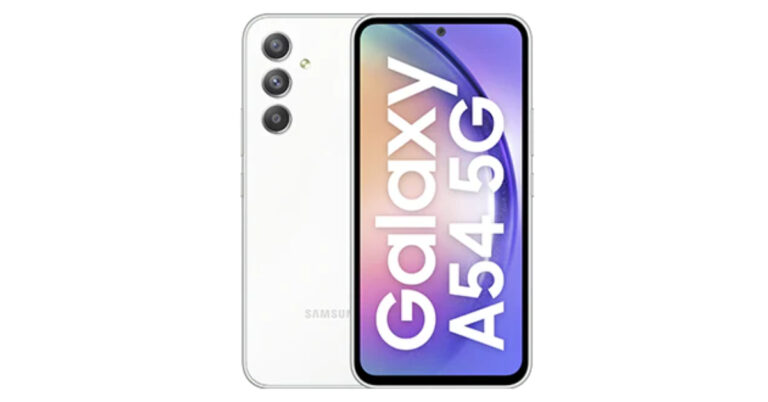
Awesome White colour variant of Samsung Galaxy A54 5G launched in India

For its Galaxy A54 5G smartphone, South Korean electronics giant Samsung has unveiled a new colour option. The 8GB RAM version of the phone will now come in Awesome White as a colour choice. Earlier this year, the device was unveiled in the colours Awesome Lime, Awesome Graphite, and Awesome Violet. The smartphone’s features and specifications stay the same.

Awesome White is now an available colour option for the Samsung Galaxy A54 5G. It costs the same in India as the other colour choices. Awesome Lime, Awesome Graphite, and Awesome Violet were the three colour options for the Galaxy A54 5G when it was first unveiled this year. Note that 8GB RAM with 256GB storage combo will be offered for the new colouring option, which is now available for purchase for Rs 40,999. Additional choices include exchange discounts and EMI plans.

Awesome White colour variant of Samsung Galaxy A54 5G launched in India

Also Read: “iPhone Ultra” model might be able to take spatial photos and videos for the Apple Vision Pro: Report

Customers using ICICI and SBI bank cards can get an instant cashback of Rs 2,000 and an extra bank-based bonus of Rs 2,000.

The 8GB RAM, 128GB, and 256GB storage variants of the Galaxy A54 5G were released in India in March of this year for Rs 38,999 and Rs 40,999, respectively.

Samsung Galaxy A54 5G (Review)features a 6.4-inch SAMOLED Full HD+ display. The display has support for a 120Hz refresh rate. The device runs on One UI 5.1 on top of Android 13 out of the box. The company is promising 4 years of software upgrades and five years of security updates. There is an unspecified octa-core processor, most likely EXYNOS 1380 being used with a 2.4GHz clock speed.

Also Read: iPhone 15 Series camera details surfaced ahead of the official launch

For the optics, the Samsung Galaxy A54 5G have a triple rear camera setup consisting of a 50MP primary sensor, a 12MP ultra-wide sensor and a 5MP macro lens. For selfies, there is a 32MP front-facing camera.

The smartphone packs a 5,000mAh battery and has IP67 certification for dust and water resistance.

For the latest gadget and tech news, and gadget reviews, follow us on TwitterFacebook and Instagram. For newest tech & gadget videos subscribe to our YouTube Channel. You can also stay up to date using the Gadget Bridge Android App. You can find the latest car and bike news here.
BGMI redeem codes for 8 September 2023, claim and receive rewards and benefits

After being banned for nearly ten months, Battleground Mobile India, aka BGMI, is officially available again in India. BGMI fans are looking for ways to improve their game experience and one such method is the usage of redemption codes, which offers a variety of rewards and advantages using BGMI redeem codes players can gain access to new skins, outfits, loot crates, weapons and free UC and diamonds.

As mentioned earlier, these codes give users the chance to earn unique rewards and gain extra benefits while playing the game. This includes GUN SKINS (M4, AKM, M416, AWM, M24, UZI, KAR98K), free character voucher, Andy, Carlo, Sara, Victor character for free, free Anna Character on completing the mission and UC or Royal Pass Discount. So here we have gathered a list of the most recent BGMI redeem codes as of 8 September 2023. Also, redeem these codes asap as these are only valid for a limited duration.

BGMI Redeem Codes for 8 September 2023

UKUZBZGWF – Free Fireworks

TIFZBHZK4A – Free Outfit

RNUZBZ9QQ – AKM Glacier Skin

PGHZDBTFZ95U – M416 Skin

R89FPLM9S – Companion

BTOQZHZ8CQ – New!

TQIZBZ76F – Vehicle Skin

5FG10D33 – Falcon and Free Emotes

BMTFZBZQNC – Free Drifter Set

SD14G84FCC – Free Skin for KAR98 Sniper Gun

RNUZBZ9QQ – AKM Glacier Skin

GPHZDBTFZM24U – UMP9 Skin

KARZBZYTR – Free Outfit

JJCZCDZJ9U – Golden Pan

BMTCZBZMFS – Pretty in Pink set and Pretty in Pink Headpiece

5FG10D33 – Outfit for Free

TQIZBz76F – 3 Free Motorcycle

How to get free Redeem Codes for BGMI on 8 September 2023?

  • Launch BGMI on your device.
  • Then select the Redeem Code option from the main menu.
  • Next, click on the Redeem code tab.
  • A new window will open, requesting the redemption code.
  • Now enter your BGMI code.
  • Confirm and click on the “Redeem” tab.
  • If your redeem code is valid then you will get a message confirming that your rewards were successfully redeemed.

(Note that these codes are case-sensitive, so be sure to type them correctly to prevent any errors.)

For the latest gadget and tech news, and gadget reviews, follow us on TwitterFacebook and Instagram. For newest tech & gadget videos subscribe to our YouTube Channel. You can also stay up to date using the Gadget Bridge Android App. You can find the latest car and bike news here.

Garena Free Fire Redeem Codes Today 8 September 2023: Here is how to claim them

Garena Free Fire is a battle royale game with regular awards and tournaments to keep players interested. If you play Garena Free Fire, you should be aware of the redeem codes that are released on a daily basis. However, because the battle royale game is banned in India, players from other countries can use the Free Fire Redeem codes daily. If you’re unfamiliar with the Garena Free Fire redeem codes or don’t know how to get them, we’ve put together a step-by-step guide to help you redeem them. Check out Garena Free Fire Redeem Codes for 8 September 2023.

The Free Fire redeem codes are a great way to get free stuff. These are 12-digit codes that contain alphabets and numbers, as well as an expiration date and time. Because the Garena FF redeem codes cannot be used more than once, you should hurry to the redemption page to claim your free reward before someone else does. To get a free reward, all you have to do is go to reward.ff.garena.com/en, which is the official redemption page. Also, keep an eye on this space for daily updates on Garena Free Fire redemption codes and rewards.

Garena Free Fire Redeem Codes Today 8 September 2023

F7YUJ67U8KJUJGU

FJT76UUQY6T25RF

F3V4BRNFGKVIU7Y

FCTGDXBENR4JM5K

FHJPO9I8HUYHMKL

FER56K7ULJO875A

FIGKRTLHOR5K6YP

F0O59I6KPO987A6

F58U4KM7Y882T76

FUJ67UJ55H476J7

F4QED2VGB34J5KT

FYU5R267FYHNGYJ

FO6Y9IHVNFDLEPO

F59I6JY7MBO9VI8

FU7YDTGE4N5M6LY

How to Get Free Fire Redeem Codes for Garena on 8 September 2023?

  • Visit the Garena Free Fire game’s official website at reward.ff.garena.com.
  • Use your Facebook, Google, VK, Apple ID, Huawei ID, or Twitter account to log in.
  • You’ll be taken to a valid redemption code (s)
  • Copy and paste the 12-digit redemption code into the text box.
  • On the screen, a dialogue box will appear.
  • ‘Ok’ should be selected.

For the latest gadget and tech news, and gadget reviews, follow us on TwitterFacebook and Instagram. For newest tech & gadget videos subscribe to our YouTube Channel. You can also stay up to date using the Gadget Bridge Android App. You can find the latest car and bike news here.

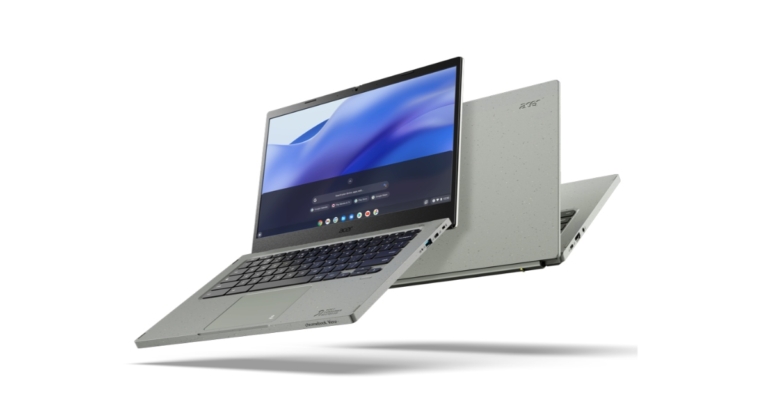
Why a Chromebook Is Probably All You Need For Work

Many corporate organizations and individual users want to get rid of powerful and often inconvenient computers with many administrative restrictions and functions that are not used as unnecessary. Therefore, an alternative (cheaper and more comfortable to use) is a Chromebook.

Missing traditional desktop

On the open screen of the Chromebook, when the user has everything closed (files, applications), it is empty and will remain so. You cannot place folders and shortcuts on the work screen, as was customary for traditional personal computers. It may seem unusual to some, who posted many of them for the convenience of quick access. Therefore, you will have to get used to such a unique moment.

Settings characteristic

Most of the Chromebook interface comes from MacOS. But there is no “right click”; instead, a two-finger tap is used, which brings up the context menu. Some key combinations are taken from Windows, but most are from Mac. Note that keyboard shortcuts cannot be changed. The only thing is that in the settings, there is a list of keyboard shortcuts from which you can remember the frequently used ones.

File uploads are visible

When you receive a file or a download link in the Windows system, you need to click on it, and the file opens. But the system, in parallel (by default), loads the file opened by the user in a specific folder. But on ChromeOS, the process is different. If you click on a file, the system will open a download window and ask you for a location to download it. It avoids automatic and uncontrolled downloads of unnecessary files for further use. This process avoids the automatic filling of the disk with unnecessary files that take up space.

Instant system activation and deactivation

The Chromebook instantly wakes up as soon as the user opens the lid, eliminating the use of the power button. When you close the top, it deactivates and goes into sleep mode. At the same time, in sleep mode during the night, it will spend no more than 2% of its energy resource, which indicates a very economical energy consumption.

Simple Formatting

The ChromeOS system allows you to go to the factory settings instantly. Finding the appropriate command in the settings menu would be best. This feature is very convenient if you need to transfer the Chromebook to another user (or sell it). By the way, a unique Power Wash feature allows you to delete all stored user files automatically.

Extensions and applications

Before purchasing a Chromebook, the user wonders what can be used to open various types of files. But this should be manageable because the ChromeOS system includes many programs allowing you to open almost any file.

There are three apps available for the modern Chromebook:

  • Chrome web browser extension;
  • ChromeOS application;
  • Android application.

The first two are in the Web Store. Extensions are launched through the corresponding item in the browser menu and open in its tabs but cannot be opened in a separate window. On the contrary, applications (ChromeOS Applications) will be displayed as shortcuts in the program menu and can be spread by individual cats, having their own shortcut.

The Android app can run on many Chromebooks, and Google Play has a slightly reduced list of apps. It has removed those applications considered incompatible with this device’s system.

Cloud storage

One of the most significant advantages of a Chromebook is the ability to store files in the cloud. ChromeOS has its file storage manager with Google Drive access configured (by default). This application is similar to Windows Explorer, which cannot please those who regularly use this program. So it is possible to use Google Cloud. Compared to Windows, where Explorer can access a local synced folder with the cloud, ChromeOS works directly with cloud files. The main thing is that comfortable access to file cloud storage is provided, excluding implementing unique settings. This feature is very convenient because the Chromebook has no built-in hard drive to save large volumes.

Thanks to the Chromebook system file manager, connecting to the other cloud storage file system is possible, for example, by using Google Workspace services.

Office Applications

All Google Office and system applications (Word, Excel, PowerPoint) work the same way as in the Windows system, but with slight differences, which obviously will not affect the work.

The user is always connected to the Chromebook

Using messages in life and being constantly in touch is the most important. Therefore, the service of various instant messengers is also provided in the ChromeOS system:

  • For e-mail, it is more convenient to work in the browser.
  • Google Meet – an extension is provided for it, launched from the extensions menu;
  • Telegram – effectively works with the Android application;
  • WhatsApp – there is an Android one, but it will not function on the created account; trying to register another. Therefore, the alternative is the unofficial WhatsChrome application, which works perfectly, and the official WhatsApp for Windows.
  • Viber – as well as Telegram, will work well with the Android application.

Therefore, people can use these messengers at their discretion – convenience and regular use. Chromebook is an inexpensive alternative to PCs and laptops, allowing you to use it without compromising efficiency.

For the latest gadget and tech news, and gadget reviews, follow us on TwitterFacebook and Instagram. For the newest tech & gadget videos subscribe to our YouTube Channel. You can also stay up to date using the Gadget Bridge Android App. You can find the latest car and bike news here.

The Integration of Virtual Reality (VR) and Augmented Reality (AR) in Online Gaming Experiences

Over 90% of the global industries are experiencing technological advancements; from banking and finance to dating and sports, all these sectors are being transformed by technology. Online casino is no exception to the transformation happening across various industries. Currently, two pieces of technology are the primary cause of the shifts in this market. The two pieces of technology are virtual reality (VR) and augmented reality (AR).

Online gambling has dramatically changed thanks to the two pieces of technology. The changes have changed significantly after the introduction and growth of smartphone gambling. As of today, major online gambling operators and platforms are relying on these techs to modify and enhance the user gambler’s experience.

Online Casino Landscape in New Zealand

Online casinos in New Zealand are embracing the global trend of moving from traditional brick-and-mortar to digital platforms. Today, many Kiwi gamers are attracted to online casinos as they are accessible and convenient. It enables them to gamble thrills from the comfort of their homes. It is evident that online casinos have unmatched convenience, but they frequently lack the lively atmosphere and thrilling experience of traditional casinos. When bridging the gap, VR and AR technologies offer an exciting possibility.

What are Virtual Reality and Augmented Reality?

VR and AR are similar technologies in that they change how you view and interact with your surroundings. Even though they are identical, there is a point where they differ, especially when it comes to hardware requirements and the scope in which they alter the surroundings.

When using virtual reality, users are submerged in entirely virtual surroundings. And this stimulates their senses to provide an experience similar to the actual events. However, by superimposing digital features over the real world, augmented reality enriches it and improves the gamers’ impression of reality.

AR improves the user’s environment while AR transports users to new locations. Even though VR and AR use different techniques, they aim to improve user engagement, interaction and enjoyment.

Advantages of VR and AR in Gambling

Increased interaction

The two technologies play a huge role in fostering the casino’s interaction with users. Players can now interact with the digital world, which was quite difficult some years back. They can interact by navigating the virtual casino floor or getting real-time game data.

Innovative marketing

Online casinos can heavily rely on VR and AR to create engaging marketing campaigns to attract players. There is a high chance that a player will be drawn into the virtual casino world with immersive experiences. Some experiences include sneak peeks on upcoming games, gifts and special occasions.

Social engagement and community development

User’s social participation is facilitated by the multiplayer capabilities of VR and the real-time interaction characteristics of AR. With this sense of community, players are motivated to interact, plan and celebrate wins with one another.

Personalisation

AR and VR raise customer pleasure by adapting to individual preferences and enabling personalized experiences. Players can customize their gaming experience, from selecting themed casino settings to creating unique avatars.

Challenges to the Introduction of VR and AR

Even though these two techs might sound promising in theory, there is a lot to overcome. Several obstacles must be dealt with to integrate VR and AR technologies successfully. Among the challenges accessing the VR and AR might be challenging, especially for users with less capable devices. VR and AR require a large amount of hardware resources and computer capacity. For a user to experience high-quality VR, they will need to have powerful GPUs and processors, which raises the cost of entry.

The delay between the system’s response and the user’s movements may also lead to motion discomfort, lowering the user’s interest.

The two technologies’ introduction tends to attract attention from ethical and regulatory concerns. Incorporating technology into online casinos raises concerns regarding players’ safety, addiction and responsible gambling.

Industry Adoption of Virtual Reality and Augmented Reality

To improve user experience, early adopters in the online gaming sector have started integrating VR and AR technologies. The prevalence of virtual poker rooms, realistic roulette tables, and interactive slot machines is rising. Casino owners who have successfully used these technologies report longer gaming sessions and higher user engagement. The accomplishments of these pioneers provide light on the advantages and difficulties of adopting VR and AR.

Conclusion

Recently, there has been a shift in how players interact with online casinos. All this has been because of the incorporation of augmented and virtual reality into the casino environment. With these two advancements, there is a high chance of revolutionizing the gambling industry with immersive, interactive and personalized experiences. Even though there are several challenges on the way, like technical requirements and ethical issues, the trend towards a more immersive interactive online casino seems promising. Integrating virtual reality, augmented reality and online casinos is poised to reshape how people experience gambling.

For the latest gadget and tech news, and gadget reviews, follow us on TwitterFacebook and Instagram. For the newest tech & gadget videos subscribe to our YouTube Channel. You can also stay up to date using the Gadget Bridge Android App. You can find the latest car and bike news here.

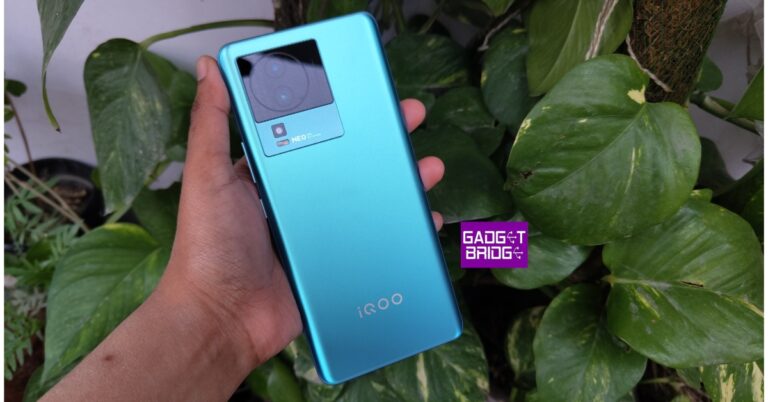
iQoo Neo 7 5G price has been reduced by Rs 2,000 in India: Details inside

iQoo Neo 7 5G was launched in India earlier this year. The device is currently selling at a reduced price. The company has announced a discount of Rs 2,000 on the mid-range smartphone. The MediaTek Dimensity 8200 SoC powers the phone. It has an AMOLED display with 120Hz. Additionally, the phone has 120W quick charging, which purports to be able to charge the device to 50% of its capacity in just 10 minutes.

Also Read: iPhone 15 Series camera details surfaced ahead of the official launch

iQoo Neo 7 5G was launched in India in two different configurations of 8GB RAM with 128GB storage and 12GB RAM with 256GB storage option priced at Rs 29,999 and Rs 33,999 respectively. After a discount of Rs 2,000 is currently selling at Rs 27,999 and Rs 31,999 respectively. The phone currently selling at a reduced price at the company’s official site and on Amazon.

The device is being offered in two colour options of Frost Blue and Interstellar Black.

iQoo Neo 7 Pro 5G price in India, sale details and offers

iQoo Neo 7 5G specifications

An octa-core 4nm MediaTek Dimensity 8200 5G SoC powers the iQoo Neo 7 5G. Up to 12GB of LPDDR5 RAM and 256GB of UFS3.1 storage space will be offered. The smartphone comes pre-installed with Funtouch OS 13, which is based on Android 13.

Since the iQOO Neo 7 5G (Review)has Extended RAM 3.0, a phone with 12 GB of RAM becomes a phone with 20 GB of RAM, an increase of 8 GB. Users are able to access and switch between numerous apps at once with the help of this function. For a better gaming experience, the smartphone includes dynamic X-Axis Linear Motors, Motion Control, and 4D Game Vibration.

Also Read: “iPhone Ultra” model might be able to take spatial photos and videos for the Apple Vision Pro: Report

A 64-megapixel primary sensor with OIS and an f/1.79 aperture is part of the triple rear camera arrangement for pictures and videos. Additionally, a 2-megapixel depth sensor and a 2-megapixel macro sensor both have f/2.4 apertures.

A 5,000mAh battery with 120W fast charging capabilities is included with the smartphone.

For connectivity, the phone has 5G, Wi-Fi, Bluetooth, OTG, NFC, GPS, and a USB Type-C port. Additionally, the display includes an embedded fingerprint reader. Among the sensors on board are an accelerometer, ambient light sensor, e-compass, gyroscope, proximity sensor, and infrared remote control.

For the latest gadget and tech news, and gadget reviews, follow us on TwitterFacebook and Instagram. For newest tech & gadget videos subscribe to our YouTube Channel. You can also stay up to date using the Gadget Bridge Android App. You can find the latest car and bike news here.

“iPhone Ultra” model might be able to take spatial photos and videos for the Apple Vision Pro: Report

Apple’s Wonderlust event is set for September 12. As the launch date is coming close iPhone 15 devices have been the subject of several leaks and rumours over the past few months, and there is no end in sight. According to the latest update, Apple is developing an iPhone “Ultra” model that might feature the ability to record videos and photos tailored to be used on the Apple Vision Pro.

Reportedly, Apple is working on a device that could be released after the Vision Pro goes on sale. The VR headset is said to sit in the stores next year. An iPhone “Ultra” model is allegedly in the works, according to a MacRumors story. The rumour suggests that the phone may be used to take precise, immersive videos and photographs that could be utilised on Apple Vision Pro.

Also Read: iPhone 15 Series camera details surfaced ahead of the official launch

The report stated, “A future “iPhone Ultra” model could capture spatial photos and videos to be displayed in Apple’s Vision Pro headset, according to a rumour shared by a Weibo account with a proven track record for disclosing accurate information about Apple’s plans.”
The “iPhone Ultra” model’s camera setup, which will be unveiled after the Vision Pro headset is introduced, will purportedly “lead the market to rethink what kind of photos and videos a mobile phone should take,” according to the report.

The information appears to be referring to the producing spatial images and videos, a special capability of the Vision Pro that employs outward-facing cameras to record immersive 3D content. According to Apple, the capability enables users to relive their memories in a way that has never been possible. While standard images and videos from an iPhone or other device may still be viewed on the headset, only a Vision Pro can be used to capture 3D images and videos, which are much more immersive.

A “three-dimensional camera” may be coming to the iPhone, according to the most recent rumour, adding more hardware to the device’s already-present rear camera setup of a main wide camera, a telephoto camera, an ultra-wide camera, a LiDAR scanner, and an Adaptive True Tone flash.

For the latest gadget and tech news, and gadget reviews, follow us on TwitterFacebook and Instagram. For newest tech & gadget videos subscribe to our YouTube Channel. You can also stay up to date using the Gadget Bridge Android App. You can find the latest car and bike news here.

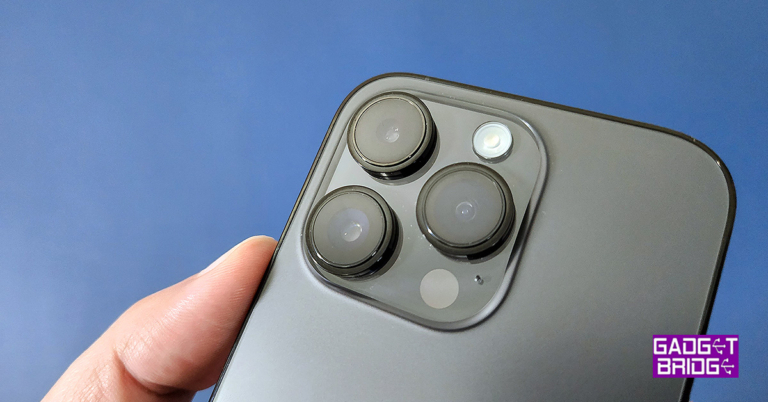
iPhone 15 Series camera details surfaced ahead of the official launch

Rumours and leaks about the upcoming iPhone have now become a part of our daily routine and the launch date is close by. September 12 is the date of the tech giant’s Apple event. Previously it was reported that the upcoming standard models will get a stacked CIS camera upgrade. A fresh web leak has revealed the camera features of the iPhone 15.

According to a report by MacRumors, there will be a 48-megapixel primary rear sensor on the iPhone 15 and iPhone 15 Plus. The sensor is believed to have an aperture of f/1.6. Notably, this is a considerable upgrade over the 12-megapixel primary sensor of the iPhone 14 and iPhone 14 Plus. A secondary 12-megapixel ultra-wide-angle sensor with an f/2.4 aperture is also rumoured to exist.

The iPhone 15 Pro and iPhone 15 Pro Max are anticipated to include the following sensors: a 48-megapixel Sony IMX803 primary rear sensor with an aperture of f/1.78, a 12.7-megapixel sensor with a telephoto lens and an aperture of f/2.8, and a 13.4-megapixel ultra-wide-angle sensor with an aperture of f/2.2. A periscopic telephoto lens will be the biggest improvement coming to the iPhone Pro Max.

Also Read: The all-new GoPro Hero 12 Black action camera launched in India

Previously, there was speculation that the iPhone 15 and 15 Plus would use a stacked CMOS, or complementary metal oxide semiconductor, image sensor. If this information is true, Apple will purportedly eliminate this capability from the iPhone 15 Pro and Pro Max, widening the gap between those models and its ordinary model.

The installation of additional layers above the photodiode layer is what is known as “stacked CIS technology,” a more recent technological innovation. These extra layers improve photo quality and offer additional advantages like noise reduction, brighter image rendering, detailed capture, and superior image processing. Furthermore, a significant upgrade from a 12MP to a 48MP image sensor may be made to the base versions. If these rumours concerning the regular iPhone 15 models‘ cameras are accurate, iPhone owners will take better photos and make better videos.

Also Read: Samsung announced new offers on Galaxy A54 5G and Galaxy A34 5G in India

This time Apple Event will be called “Wonderlust.” On September 12, the event will take place, and live online streaming will be available. At 10 p.m. PT and 10.30 p.m. IST, the event will take place in Apple Park. The unveiling will be live-streamed on Apple.com and the Apple TV app, respectively.

For the latest gadget and tech news, and gadget reviews, follow us on TwitterFacebook and Instagram. For newest tech & gadget videos subscribe to our YouTube Channel. You can also stay up to date using the Gadget Bridge Android App. You can find the latest car and bike news here.

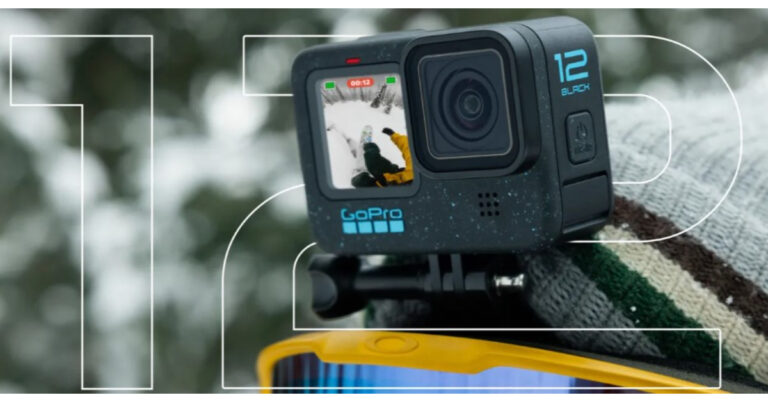
The all-new GoPro Hero 12 Black action camera launched in India

GoPro announced its new action camera in the Indian market. The newly launched GoPro Hero12 Black comes with many upgrades with enhanced performance over its predecessor. Two models have been introduced- a standard and a Creators Edition. The device has a bigger sensor and is powered by a GP2 processor. Using the Enduro battery that comes in the package the action camera is claimed to provide up to a two-fold increase in battery life.

GoPro Hero 12 Black price in India, availability

The GoPro Hero 12 Black costs at Rs 45,000 for the base model in India. On the other hand, the Creators Edition will set you back Rs 65,000.

The all-new GoPro Hero 12 Black action camera launched in India

There is only one colour option, Black, although the Hero 12 Black has Blue flecks on its body. The Media Mod, Light Mod, and Volta grip are included in the creator edition.

Also Read: Samsung announced new offers on Galaxy A54 5G and Galaxy A34 5G in India

Along with the GoPro Hero 12 Black the company has also introduced a new Max Lens Mod 2.0, however, it will be available for purchase in late November in the country. While Both the variants of the new Action camera are currently up for pre-orders. They are scheduled to go on sale from September 13. The device will be available via Amazon, Flipkart, Croma, Reliance Digital and Vijay Sales in the country.

GoPro Hero 12 Black price in India, availability

GoPro Hero 12 Black tech specs

The brand-new GoPro Hero 12 Black has a design that hasn’t undergone any significant modifications. The new action camera does, however, have a few small additions, such as blue specks on its body and the word “Black” printed on the side.

There is a 1,720mAh Enduro battery, which is now supposed to deliver up to two times longer battery life than the previous generation.

On the bottom, you do receive a brand-new universal tripod thread mount. It comes with a front-facing 1.4-inch non-touch display and a back-facing 2.27-inch touch display. GoPro Hero 12 Black has a 1/1.9-inch sensor with an 8:7 aspect ratio and the GP2 CPU. The GoPro Hero 12 Black’s Max Lens Mod 2.0 now has a 177-degree field of view at 4K 60 frames per second.

In order to give even better stability, HyperSmooth 6.0 with AutoBoost, is now included with the GoPro Hero 12 Black. It now comes with wireless audio recording. The Action camera may be used with Bluetooth headphones so that users can wirelessly use voice commands and do a lot more.

GoPro Hero 12 Black price in India, availability

GoPro is adding HDR support for footage captured in 5.3K and 4K quality. GP Log + LUTS as well as 10-bit colours are now supported by the new GoPro. The ability to take images and films in a 9:16 aspect ratio is also included in the new vertical capture mode. There is now an 8:7 setting for the TimeWarp, TimeLapse, Night Effects, and NightLapse effects.

In addition to this, there is a new Interval Photo feature, which allows you to timed-record videos for up to 120 seconds. Up to four Bluetooth devices can simultaneously be used with the GoPro Hero 12 Black.

For the latest gadget and tech news, and gadget reviews, follow us on TwitterFacebook and Instagram. For newest tech & gadget videos subscribe to our YouTube Channel. You can also stay up to date using the Gadget Bridge Android App. You can find the latest car and bike news here.

BGMI redeem codes for 7 September 2023, claim and receive rewards and benefits

After being banned for nearly ten months, Battleground Mobile India, aka BGMI, is officially available again in India. BGMI fans are looking for ways to improve their game experience and one such method is the usage of redemption codes, which offers a variety of rewards and advantages using BGMI redeem codes players can gain access to new skins, outfits, loot crates, weapons and free UC and diamonds.

As mentioned earlier, these codes give users the chance to earn unique rewards and gain extra benefits while playing the game. This includes GUN SKINS (M4, AKM, M416, AWM, M24, UZI, KAR98K), free character voucher, Andy, Carlo, Sara, Victor character for free, free Anna Character on completing the mission and UC or Royal Pass Discount. So here we have gathered a list of the most recent BGMI redeem codes as of 7 September 2023. Also, redeem these codes asap as these are only valid for a limited duration.

BGMI Redeem Codes for 7 September 2023

RNUZBZ9QQ – AKM Glacier Skin

PGHZDBTFZ95U – M416 Skin

R89FPLM9S – Companion

BMTCZBZMFS – Pretty in Pink set and Pretty in Pink Headpiece

GPHZDBTFZM24U – UMP9 Skin

KARZBZYTR – Free Outfit

SD14G84FCC – Free Skin for KAR98 Sniper Gun

RNUZBZ9QQ – AKM Glacier Skin

JJCZCDZJ9U – Golden Pan

UKUZBZGWF – Free Fireworks

TIFZBHZK4A – Free Outfit

5FG10D33 – Outfit for Free

TQIZBz76F – 3 Free Motorcycle

BMTFZBZQNC – Free Drifter Set

How to get free Redeem Codes for BGMI on 7 September 2023?

  • Launch BGMI on your device.
  • Then select the Redeem Code option from the main menu.
  • Next, click on the Redeem code tab.
  • A new window will open, requesting the redemption code.
  • Now enter your BGMI code.
  • Confirm and click on the “Redeem” tab.
  • If your redeem code is valid then you will get a message confirming that your rewards were successfully redeemed.

(Note that these codes are case-sensitive, so be sure to type them correctly to prevent any errors.)

For the latest gadget and tech news, and gadget reviews, follow us on TwitterFacebook and Instagram. For newest tech & gadget videos subscribe to our YouTube Channel. You can also stay up to date using the Gadget Bridge Android App. You can find the latest car and bike news here.

Garena Free Fire Redeem Codes Today 7 September 2023: Here is how to claim them

Garena Free Fire is a battle royale game with regular awards and tournaments to keep players interested. If you play Garena Free Fire, you should be aware of the redeem codes that are released on a daily basis. However, because the battle royale game is banned in India, players from other countries can use the Free Fire Redeem codes daily. If you’re unfamiliar with the Garena Free Fire redeem codes or don’t know how to get them, we’ve put together a step-by-step guide to help you redeem them. Check out Garena Free Fire Redeem Codes for 7 September 2023.

The Free Fire redeem codes are a great way to get free stuff. These are 12-digit codes that contain alphabets and numbers, as well as an expiration date and time. Because the Garena FF redeem codes cannot be used more than once, you should hurry to the redemption page to claim your free reward before someone else does. To get a free reward, all you have to do is go to reward.ff.garena.com/en, which is the official redemption page. Also, keep an eye on this space for daily updates on Garena Free Fire redemption codes and rewards.

Garena Free Fire Redeem Codes Today 7 September 2023

FYHNUHMJKN9I8BU

FYX5TR4ADFQGH2U

F3WERYHFGNVHJKI

F8XUYDHERN5OMTK

FKIUSEYHRNTGMKJ

FMKLTLYUILP0IUJ

FHNJSI87UA6RQF2

FVWB3EN4RJTGIUB

FYVGVCBNJDITU6J

FI86UJ7K8ULOJ98

FHG7C6X54EKRAFD

FQG2HJ34U5IT7GY

FVHCJXKIDBRU5JH

FYU8KIYYHJNT6Y7

FYLOH9IBJVMDKLE

FORTYIUJO9B8765

F4RAEQDF2GHJ3K4

FIO5T98GIOCF9RT

How to Get Free Fire Redeem Codes for Garena on 7 September 2023?

  • Visit the Garena Free Fire game’s official website at reward.ff.garena.com.
  • Use your Facebook, Google, VK, Apple ID, Huawei ID, or Twitter account to log in.
  • You’ll be taken to a valid redemption code (s)
  • Copy and paste the 12-digit redemption code into the text box.
  • On the screen, a dialogue box will appear.
  • ‘Ok’ should be selected.

For the latest gadget and tech news, and gadget reviews, follow us on TwitterFacebook and Instagram. For newest tech & gadget videos subscribe to our YouTube Channel. You can also stay up to date using the Gadget Bridge Android App. You can find the latest car and bike news here.

Gaming Mobiles: Are They Really Worth It?

Are gaming mobiles worth it? Are you getting a device that is worth your investment? It is so important to ask yourself questions like this when the time comes for you to choose a new device. If you don’t then you may find that you end up making a huge mistake with your choice. This is the last thing you need, but fortunately, there are things you can do to try and make it easier on yourself.

Great Battery Life

One thing to know about gaming phones is that they come with a fantastic battery life. Gaming phones are almost universally big and beefy, but this means that they can accommodate a bigger battery. This is a welcome perk for a lot of gamers, as you will be able to take advantage of longer gaming sessions. Gaming smartphones, including the ASUS ROG Phone 5 have great batteries that do not end up draining as fast as the standard smartphones you may see on the market.

Performance

If you want to make the most out of your gaming phone then you need to give some thought to the performance. Running a game is intensive for a phone, so you have to make sure that your device can keep up. One of the biggest reasons why you should get a dedicated gaming phone is because it features top hardware. You can take advantage of things such as haptic triggers, as well as RAM and even CPU. You can also capitalize on GPU configurations and OLED displays. If you want to boost your experience even more than you can do this with ease. If you want to look at things from a technical perspective then you will soon see that a lot of gaming phones are capable of reaching peak performance with ease, so you will never miss out on anything when it comes to gaming. If you want to take advantage of the best and latest games, why not check out 32Red casino UK slots?

Refresh Rate

The refresh rate of your device simply refers to how many times it is capable of drawing a new image. This is usually measured per second. Refresh rate is measured in Hertz. If you want an example, then you should know that a display that has a refresh rate of 144Hz is able to refresh a page 144 times for every second. If you have a high refresh rate then this is great as your device will be able to function smoother in just about any task you can imagine. If you have a high refresh rate then this will reduce screen tearing overall.

This happens when you have sudden animations. The screen will have to load more frames so that it can sync with the image on the screen. At the end of the day, this will have a big impact on games because the visual latency is way lower.

If you have a higher refresh rate then your eyes will ultimately thank you. Typical phone screens tend to have quite a high refresh rate. A lot of gaming phones go up to 144Hz. This refresh rate isn’t always required, given how many games need it. That being said, it is always good to have because if your phone cannot handle this kind of game then you will always be limited as to what you can play. If you can keep things like this in mind when choosing your phone then you are bound to get a better result out of your gameplay.

So is a gaming phone required? Not always, but at the same time, it doesn’t hurt to choose a phone that can stand up to the latest title releases.

For the latest gadget and tech news, and gadget reviews, follow us on TwitterFacebook and Instagram. For the newest tech & gadget videos subscribe to our YouTube Channel. You can also stay up to date using the Gadget Bridge Android App. You can find the latest car and bike news here.

How to Turn Off or Restart an iPhone without using the physical buttons?

0

One of the biggest difficulties that users often face with their smartphones is malfunctioning buttons. The physical buttons on your phone are prone to a lot of wear and tear. Over a period of time, these buttons can stop functioning entirely. This can prove to be a problem since you rely on those buttons to power off or restart your device. But, there are some alternatives to help you work around this issue. In this article, we show you how to turn off or restart an iPhone without using the physical buttons.

Read Also: Fitbit Versa won’t turn on? Try these fixes!

Turn off your iPhone from Settings

iPhone models that support physical dual nano SIMs

Step 1: Go to Settings and select General.

Step 2: Scroll down to the bottom and select Turn off.

Step 3: Drag the slider to the right to turn off your iPhone.

Restart your iPhone using Siri

Siri will get new voices

Using Apple’s native voice assistant is a great way of getting things done without touching your iPhone. You can use Siri to restart your iPhone without pressing any of the physical buttons. Simply say ‘Hey Siri, restart my iPhone’ and confirm your selection in the popup box. Before you use Siri, make sure you’ve set it up for your device. Go to Settings>Siri & Search and turn on the toggle switch for Listen to “Hey Siri”.

Turn off your iPhone using Assistive Touch

Step 1: Go to Settings and select General.

Step 2: Tap on Accessibility.

how to turn on flashlight on iphone without unlocking How to Turn Off or Restart an iPhone without using the physical buttons?

Step 3: Select Assistive Touch and turn it on.

Step 3: Select ‘Assistive Touch’ and turn on the toggle bar next to it. how to take a screenshot on iphone 13 How to Turn Off or Restart an iPhone without using the physical buttons?

Step 4: Go back to your iPhone’s home page.

Step 5: Tap the Assistive Touch ball and select Device.

Step 6: Tap and hold the lock screen option.

Step 7: Drag the slider to the right to turn off your iPhone.

Frequently Asked Questions (FAQs)

How do I turn off my iPhone without using the physical buttons?

Go to Settings>General, scroll down and select Turn off. Drag the slider to the right to turn off your device.

How do I restart my iPhone without using the physical buttons?

Simply ask Siri to restart your iPhone if you don’t want to use any of the physical buttons.

How do I turn off my iPhone using Assistive Touch?

Tap the Assistive Touch ball and select Device. Tap and hold the lock screen option until the power slider appears on the screen. Drag the slider to the right to turn off your iPhone.

Read Also: 3 Methods to Download Multiple Photos or Videos from WhatsApp

Conclusion

This is how you can turn off or restart an iPhone without using the physical buttons. Apart from these main methods, there are some other changes you can make to your iPhone that will demand a reboot in order to be implemented. For example, applying bold text across the UI or resetting the network settings will trigger a dialogue box asking you to restart your iPhone. You can restart your device without using a physical button by hitting the appropriate option on the dialogue box.

For the latest gadget and tech news, and gadget reviews, follow us on Twitter, Facebook and Instagram. For newest tech & gadget videos subscribe to our YouTube Channel. You can also stay up to date using the Gadget Bridge Android App. You can find the latest car and bike news here.

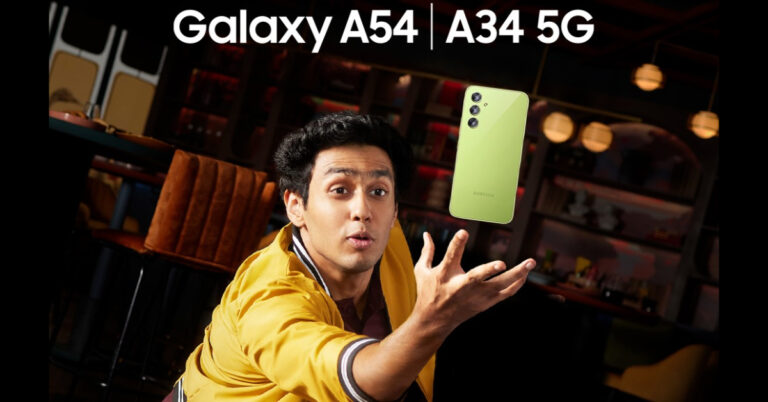
Samsung announced new offers on Galaxy A54 5G and Galaxy A34 5G in India

Samsung today announced exciting offers on Galaxy A54 5G and Galaxy A34 5G smartphones in India. Both the devices debuted in the nation in March this year. They both have many features in common, such as an AMOLED screen that supports a 120Hz refresh rate, a 5,000mAh battery, and a triple rear camera configuration. The phones come pre-installed with Android 13 as well.

Customers may now get the Galaxy A34 5G, which was originally priced at Rs 30,999, for a starting effective price of Rs 26,999. The updated pricing included a Rs 2,000 instant cashback as well as an additional Rs 2,000 bank payback for SBI and ICICI Bank credit card holders. The Galaxy A54 8GB RAM with 256 GB storage option, which was originally priced at Rs 40,999, is now available for purchase at just Rs 36,999. Customers looking for increased affordability can also benefit from the easy, no-cost, 12-month EMI with no down payment.

Also Read: Samsung Galaxy A54 5G Review: A great mid-ranger for everyday use

Samsung Galaxy A54 5G and Galaxy A34 5G specs and features

The SAMOLED Full HD+ display on the Samsung Galaxy A54 5G and Galaxy A34 5G measures 6.4 inches and 6.6 inches, respectively. Both panels can display at a refresh rate of 120Hz. The devices come pre-installed with Android 13 and One UI 5.1. Software upgrades for four years and security updates for five years are promised by the company. An unknown octa-core processor with a 2.4GHz clock speed is being used, most likely EXYNOS 1380.

The Samsung Galaxy A54 5G and Galaxy A34 5G both include a triple back camera configuration for photographs and videos. A 50MP primary sensor, a 12MP ultra-wide sensor, and a 5MP macro lens are all featured on the A54. A 32MP front-facing camera is available for taking selfies.

Also Read: Samsung Galaxy A34 review: Does it justify its price tag?

A34 has a 48MP primary lens, an 8MP ultra-wide lens, and a 5MP macro sensor, in contrast. A 13MP selfie camera is available on the gadget.

The smartphones feature an IP67 certification for dust and water resistance and a 5,000mAh battery to power them.

For the latest gadget and tech news, and gadget reviews, follow us on TwitterFacebook and Instagram. For newest tech & gadget videos subscribe to our YouTube Channel. You can also stay up to date using the Gadget Bridge Android App. You can find the latest car and bike news here.

Top 10 ways to fix phone call echo on Android

0

An echo in a voice call can prove to be very grating and annoying. While shifting to a place with a better network reception is the most obvious solution to this issue, it doesn’t work all of the time. Sometimes the echo may originate from a software malfunction on your phone. In this article, we bring you the top 10 ways to fix a phone call echo on Android.

Read Also: Top Gaming Monitors with 120Hz refresh rate under Rs 15,000

Request the receiver to take the call off the speaker

8 Best Ways to Block a Phone Number On Android or iPhone (iOS)

The most likely reason behind an echo on a phone call is the speaker phone. When the receiver decides to go hands-free on a call, their phone’s microphone picks up the voice being emitted by the speaker, causing an echo. This situation is pretty common while driving. If the phone is connected to the car’s infotainment system, the microphone receives it as a part of the background noise. Request the other party to take the call off the speaker in order to fix the phone call echo.

Restart your phone

If the echo problem keeps persisting even after taking the call off speaker, try restarting your phone. If the issue is caused by a software glitch, restarting your phone will quickly resolve it. To restart your Android phone, simply press and hold the side key and select ‘Restart’ from the power menu. If pressing the side key triggers the voice assistant, press and hold the volume key along with it to access the power menu.

Disable WiFi Calling

Sometimes, WiFi Calling can interfere with a regular cellular call and cause a malfunction. It can even lead to an echo being generated on the call. Here’s how you can turn off WiFi calling on your Android phone.

Step 1: Go to Settings and select Connections.

Step 1: Go to Settings and select Connections.

Step 2: Turn off the toggle switch for WiFi Calling.

Step 2: Turn off the toggle switch for WiFi Calling.

Alternatively, you can also disable WiFi Calling from the Quick Settings Menu.

Turn off Call Recording

Sometimes, recording a phone call can lead to an unwanted echo developing in the line. You can stop recording a phone call by tapping the option to end the recording in the call menu. If you have turned on auto-recording for all your phone calls, here’s how you can turn it off.

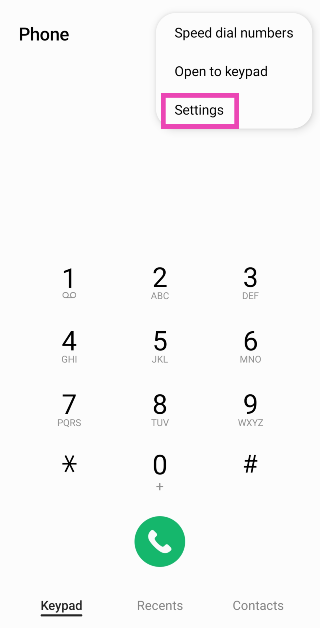
Step 1: Launch the dialer app and tap the ellipses at the top right corner of the screen.

Step 2: Tap on Settings.

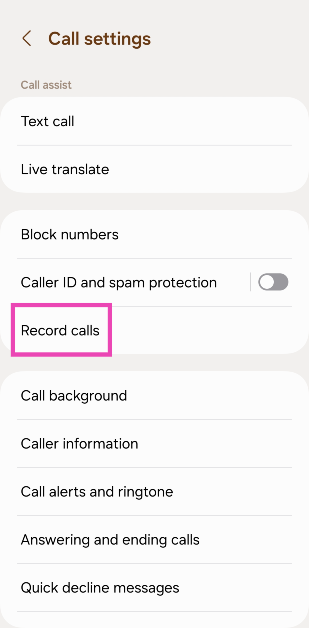
Step 3: Tap on Settings.

Step 3: Select Record calls.

Step 3: Select Record calls.

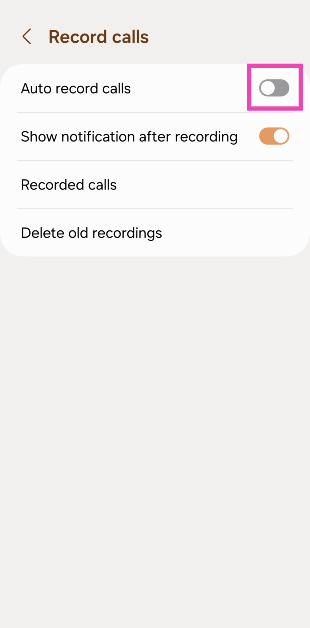
Step 4: Turn off the toggle switch for Auto record calls.

Step 4: Turn off the toggle switch for Auto record calls.

Clear dialer cache

If the echo is arising due to a corrupt file in the dialer’s cache, clearing it will fix the issue. Here’s how you can do it.

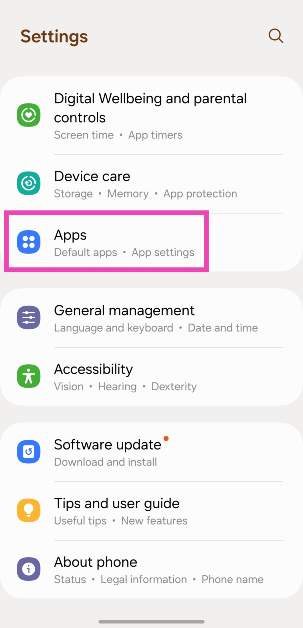
Step 1: Go to Settings and select Apps.

Step 1: Go to Settings and select Apps.

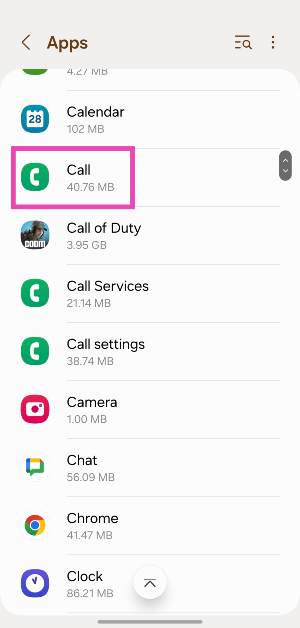
Step 2: Select the dialer app.

Step 2: Select the dialer app.

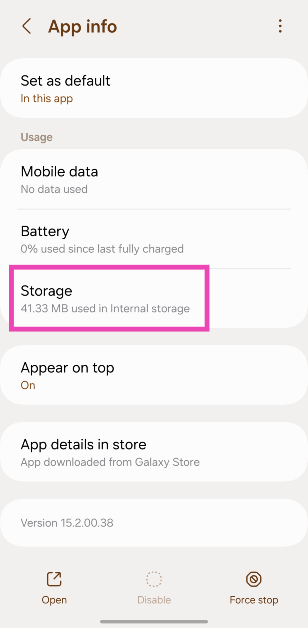
Step 3: Tap on Storage.

Step 3: Tap on Storage.

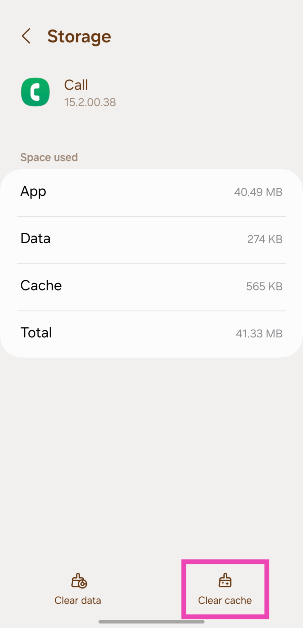
Step 4: Hit Clear Cache.

Step 4: Hit Clear Cache.

Reset Network Settings

If a weak network reception is the reason behind the echo you’re facing on voice phone calls, you can try performing a network settings reset on your Android device. Doing so will reset all your customised network settings and unpair all your Bluetooth devices. All the saved WiFi passwords will also be lost. A network settings reset ensures that any customised settings don’t get in the way of your device’s network reception. Here’s how you can go about it.

Step 1: Go to Settings and select General Management.

Step 1: Go to Settings, scroll down and select General management. Best 6 Methods to Fix SSL Connection Errors on Android Phones

Step 2: Scroll down and select Reset.

Step 2: Tap on ‘Reset.’ Android Connected To WiFi But No Internet. Best 6 Methods to Fix SSL Connection Errors on Android Phones

Step 3: Tap on Reset Network Settings.

Step 3: Tap on ‘Reset Network Settings’. Android Connected To WiFi But No Internet Best 6 Methods to Fix SSL Connection Errors on Android Phones

Step 4: Select Reset Settings.

Step 4: Select ‘Reset Settings’. Best 6 Methods to Fix SSL Connection Errors on Android Phones

Step 5: Enter your PIN to confirm your selection.

Use VoIP calling

edit whatsapp messages in android ios desktop

If a weak network reception is the reason behind the echo on a cellular call, switch to a WiFi connection and make a call over the internet. The easiest way to go about this is by calling the other person on WhatsApp. Since WhatsApp is very popular among Android users, chances are that the person you’re calling is already on it. Initiate a chat with them on WhatsApp and hit the call icon at the top of the screen to call them. You can also use other services like Telegram, Instagram, Facebook Messenger, Google Meet, Zoom, Skype, and more.

Move to another room

If you’re in a group call with some members sharing the same spot as you, it can create an unwanted echo. You can fix this by requesting other people to mute their microphones. This will prevent their phones from picking up the voice emanating from your device, thereby curbing the echo. If muting isn’t possible, ask the members to move to different places so their phones aren’t able to pick up the audio from other devices.

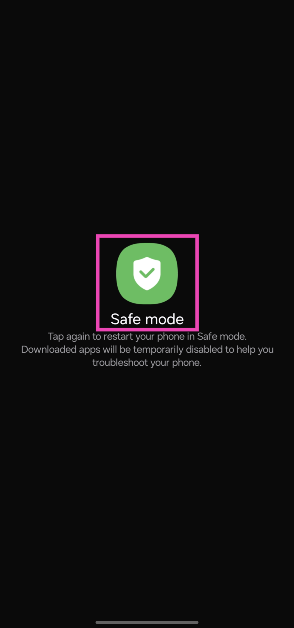
Set your phone to safe mode

It is possible that a rogue third-party app may be causing the echo on your phone calls. To confirm this, restart your phone in safe mode and try calling someone. If you do not notice an echo, it means that a third-party app is to blame.

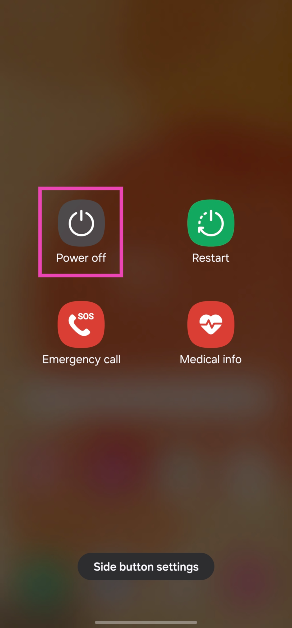
Step 1: Long press the side button. If the side button is programmed to trigger the voice assistant, press and hold it along with the volume-up key to trigger the power menu.

Step 2: Tap and hold the Power off icon.

Step 2: Tap and hold the Power off icon.

Step 3: Tap on Safe Mode.

Step 3: Tap on Safe Mode.

Update OS

Step 1: Go to Settings and select Software update.

Go to Settings and select Software update. 10 top ways to fix unable to answer calls on Android phone

Step 2: Tap on Download and install.

tap on download and install 10 top ways to fix unable to answer calls on Android phone

Step 3: Select Install now.

Select Install now. 10 top ways to fix unable to answer calls on Android phone

Frequently Asked Questions (FAQs)

How do I fix the phone call echo on Android?

Ask the person on the other end of the line to take the call off the speakerphone in order to fix the echo.

How do I get rid of echo on audio calls?

If you’re in a group call with some members present in your near vicinity, ask them to spread out so their phones don’t pick up the audio emanating from other devices.

Why do people hear an echo when they call me?

If you want to fix the issue on your end, stop picking up calls using the speaker phone and troubleshoot your microphone.

How do I turn off WiFi calling on Android?

You can turn off WiFi calling from the Quick Settings Menu or go to Settings>Connections and turn off its toggle switch.

How do I perform a network settings reset on Android?

Go to Settings>General Management>Reset>Reset Network Settings>Reset Settings and enter your phone’s PIN.

Read Also: Poco C51 new variant launched in India: Price and availability

Conclusion

This is how you can fix the phone call echo issue on Android. If you are facing a similar issue on WhatsApp calls, switch to a better WiFi network or turn on mobile data on your Android device. If you found this article helpful, let us know in the comments!

Best Midrange Gaming Laptops You Can Buy Right Now (2023)

Gaming laptops can sometimes turn out to be way more expensive than gaming PCs. If you’re looking for state-of-the-art cooling on a laptop, you will need to splurge some extra cash. However, there are some really good gaming laptops on the market that offer incredible value for money. Today, we bring you our picks for the best midrange gaming laptops you can buy right now.

Read Also: 3 Methods to Download Multiple Photos or Videos from WhatsApp

Acer Aspire 5 Gaming Laptop

Price: Rs 54,990 on Amazon

Acer Aspire 5 Gaming Laptop

Acer Aspire 5 is powered by the 12th Gen Intel Core i5 processor consisting of 12 cores. It also gets NVIDIA GeForce RTX 2050, which does a good job of handling the graphics. The dual fans and copper thermal pipes keep the laptop cool even when it’s functioning at its peak capacity. The 15.6-inch FHD IPS display has a screen-to-body ratio of 81.8% and gets features like Acer Color Intelligence and Acer BlueLightShield. The Aspire 5 is available in a 16GB RAM + 512GB storage variant. 

MSI GF63 Thin

Price: Rs 58,990 on Amazon

MSI GF63 Thin

MSI is known for its high-end gaming laptops, but its midrange offerings are some of the best in the segment. The MSI GF63 Thin gets the 11th Gen Intel Core i7-11800H processor under the hood and the NVIDIA GeForce GTX1650 Max GPU for the graphics. The 15.6-inch FHD IPS display panel has a resolution of 1920 x 1080p and a refresh rate of 144Hz. On top of that, the MSI GF13 Thin rocks 8GB of DDR4 3200MHz RAM that is upgradeable up to 64GB. In terms of storage, this laptop gets 512GB of NVMe PCIe Gen3x4 SSD. 

Acer Nitro 5 Gaming Laptop

Price: Rs 66,750 on Amazon

Acer Nitro 5 Gaming Laptop

Acer Nitro 5 is powered by the 11th Gen Intel Core i5-11400H along with an NVIDIA GeForce GTX 1650 GPU. It gets Acer CoolBoost technology that improves the overall cooling performance by 25%. The 15.6-inch LED IPS display has a resolution of 1920 x 1080p and a refresh rate of 144Hz. There is a dedicated button on the keyboard to trigger the NitroSense UI, allowing users to instantly view live metrics for fan speed, loading performance, power plan, and internal temperature. The Nitro 5 gets 16GB of RAM and 512GB of internal storage space.

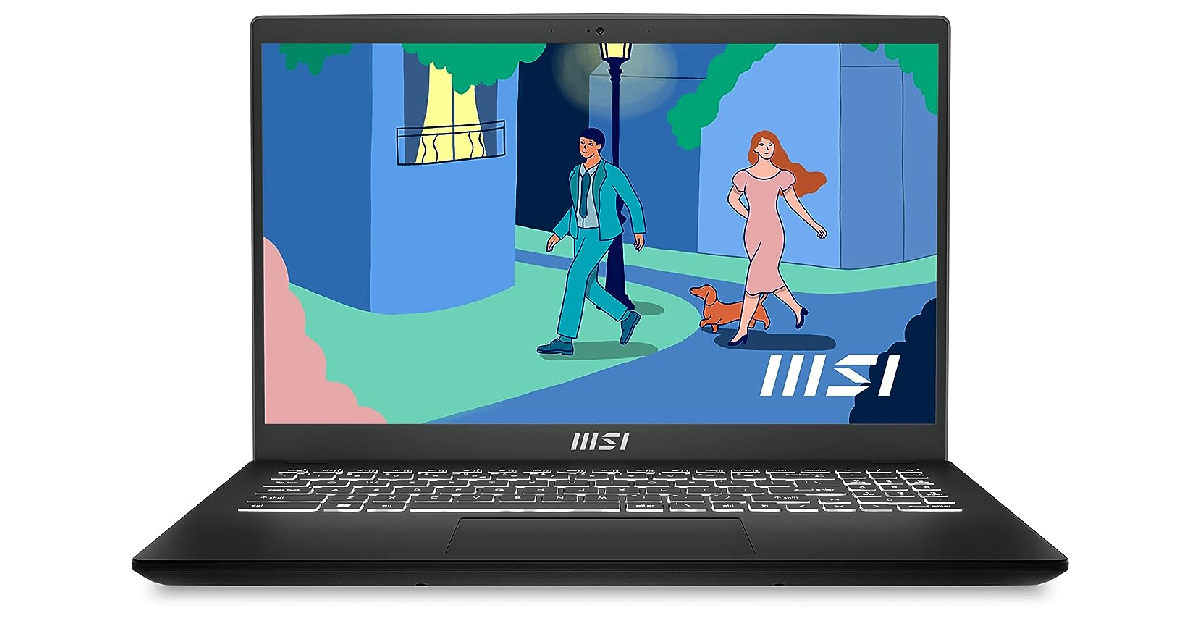
MSI Modern 15

Price: Rs 57,990 on Amazon

MSI Modern 15

MSI Modern 15 gets the AMD Ryzen 7-7730U processor along with AMD Radeon Graphics. The 15.6-inch IPS display has a resolution of 1920 x 1080p and a refresh rate of 60Hz. This laptop comes with a massive 1TB NVMe PCIe Gen3x4 SSD storage and 16GB DDR4 Onboard Dual Channel RAM. It weighs just 1.7kg and has dimensions of ‎35.9 x 24.1 x 1.9 cm. OS duties are handled by Windows 11 Home. 

Lenovo Ideapad Gaming 3

Price: Rs 55,499 on Amazon

Lenovo Ideapad Gaming 3

Priced just over Rs 55,000, the Lenovo Ideapad Gaming 3 is one of the best value-for-money laptops you can buy right now. It gets the 11th Gen Intel Core i5-11300H CPU and NVIDIA GeForce GTX 1650 4GB GDDR6 Dedicated Graphics. The 15.6-inch IPS LCD display has a 120Hz refresh rate and can reach up to 250 nits of peak brightness. The Ideapad Gaming 3 comes with 8GB of RAM (upgradeable to 16GB) and 512GB SSD storage.

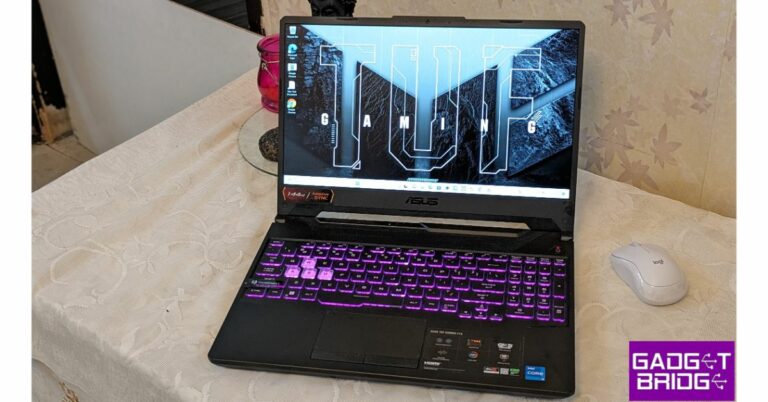
Asus TUF Gaming F15

Price: Rs 50,990 on Amazon

Asus TUF Gaming F15

This 2021 gaming laptop is still a solid device 2 years down the line. The Asus TUF Gaming F15 is powered by the 10th Gen Intel Core i5-10300H processor. It also gets a dedicated NVIDIA GeForce GTX 1650 GDDR6 4GB VRAM. The 15.6-inch IPS display panel has a refresh rate of 144Hz and a 1920 x 1080p resolution. The laptop comes preloaded with Windows 11 Home, but MS Office will cost you Rs 3,000 more. It has an internal storage of 512GB and 8GB of RAM.

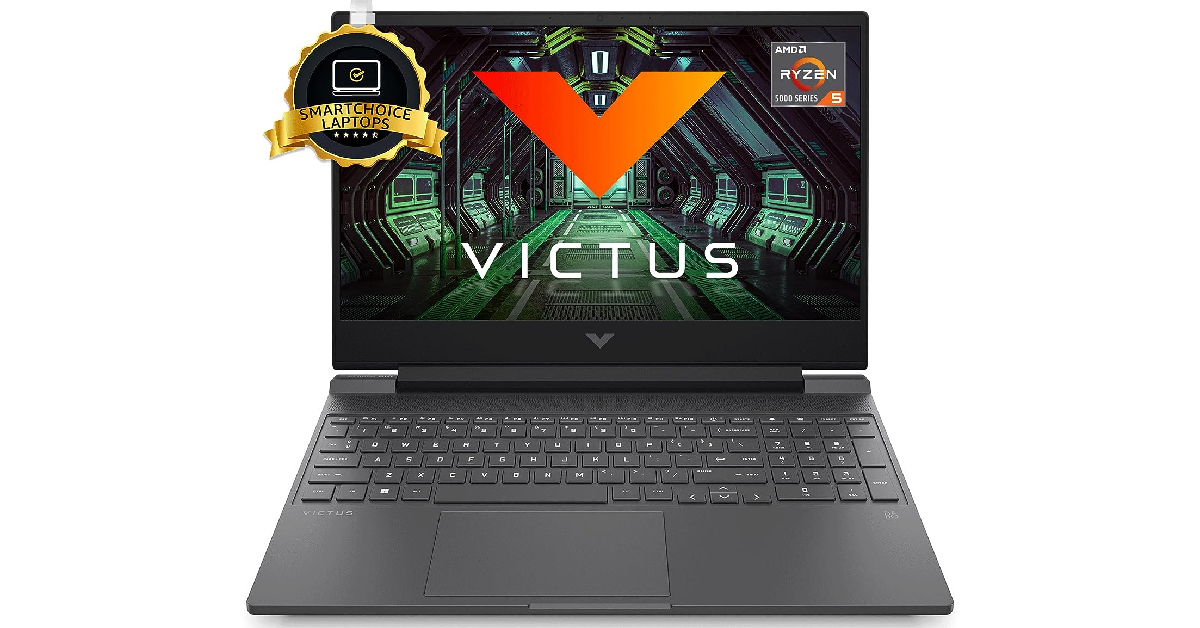
HP Victus Gaming Laptop

Price: Rs 56,990 on Amazon

HP Victus Gaming Laptop

HP Victus Gaming Laptop gets the AMD Ryzen 5 5600H processor under the hood. GPU duties are handled by AMD Radeon RX 6500M Graphics (4 GB GDDR6). One of our favourite things about this laptop is the integrated speaker setup powered by B&O. The 15.6-inch IPS FHD display has a refresh rate of 144Hz for seamless gaming. It also gets anti-glare and 1080p resolution. The Victus Gaming Laptop from HP comes with 512GB of SSD storage and 8GB RAM. The 16GB RAM variant costs Rs 2,000 more.

Read Also: Top Gaming Monitors with 120Hz refresh rate under Rs 15,000

Conclusion

These are our picks for the best midrange gaming laptops you can buy right now. Outside of the GPU and screen refresh rate, we would also suggest trying out the laptop keyboard before making a purchase. A good tactile, keyboard is what you should be looking for. While you can always connect a superior gaming keyboard of your choice to your laptop, a good laptop keyboard is pivotal for gaming when you’re on the go.

For the latest gadget and tech news, and gadget reviews, follow us on Twitter, Facebook and Instagram. For newest tech & gadget videos subscribe to our YouTube Channel. You can also stay up to date using the Gadget Bridge Android App. You can find the latest car and bike news here.

Redmi Smart Fire TV 4K India launch confirmed to take place on September 15

On September 15, Redmi will formally introduce a brand-new smart TV in India. Through a press release and an official tweet, the Chinese electronics company verified the upcoming product launch. The new smart TV, known as Redmi Smart Fire TV 4K, which will run on Amazon Fire OS and is anticipated to be on sale just through the online store. Some important details about the Redmi Fire TV’s projected specifications are also revealed on a dedicated microsite.

Also Read: WhatsApp new toggle for instant video messages for Android and iOS rolling out

Xiaomi states that it is preparing to introduce the Redmi Smart Fire TV 4K on September 15 in India. The launch event will begin streaming at 12 PM IST. Following this, Xiaomi made an official announcement on X (Twitter).

Even though it hasn’t been officially confirmed, we can anticipate that the 43-inch Redmi Smart Fire TV model sold in India will have many of the same capabilities as the model sold worldwide.

The upcoming Redmi Fire TV will run on Amazon Fire OS. This will enable users to access streaming services like Netflix, Amazon Prime Video, Disney+ Hotstar, YouTube, and more similar to its sibling the 32-inch Redmi Smart Fire TV that was launched at the beginning of the year. 

Also Read: 3 Methods to Download Multiple Photos or Videos from WhatsApp

The upcoming TV will probably run the most recent Fire TV software, according to the landing page. Additionally, it will have a slick appearance and minimal bezels. Furthermore, the TV will offer seamless connectivity and additional features. The TV will be powered by Amazon Fire OS and come with a voice-activated control that works with Alexa.

According to sources, the device is likely to be sold in retail establishments, on Amazon, and on the company’s own website.

For the latest gadget and tech news, and gadget reviews, follow us on TwitterFacebook and Instagram. For newest tech & gadget videos subscribe to our YouTube Channel. You can also stay up to date using the Gadget Bridge Android App. You can find the latest car and bike news here.

Fitbit Versa won’t turn on? Try these 9 fixes!

Fitbit’s influence on smart wearables cannot be overstated. Before the industry giants stepped into the smartwatch market, Fitbit’s name was already synonymous with fitness trackers. Since then, the company has been acquired by Google, but it still makes fitness wearables and smartwatches. Its flagship product, Fitbit Versa, is one of the most versatile smart wearables out there. In this article, we bring you 9 methods to fix your Fitbit Versa if it won’t turn on.

Read Also: Top Gaming Monitors with 120Hz refresh rate under Rs 15,000

Here’s why your Fitbit Versa won’t turn on

If your Fitbit Versa refuses to turn on, it could be due to one of these reasons.

The device’s battery is drained: If your Fitbit had been stashed away in a drawer somewhere for months, its battery probably drained out. Even if the device was at a 100% charge when you stashed it away, the battery can discharge in standby mode.

The battery has worn out: The battery pack of a device is susceptible to wear and tear over a period of time. Every battery pack has a fixed number of charge cycles that it is designed to go through. Once it passes that number, its performance starts depreciating. It is possible your Fitbit Versa’s battery has worn out.

Faulty charger: Maybe the problem does not lie with the battery but with the charger. If the charger isn’t able to deliver current to the device, it won’t charge at all. If you have another charger at hand, you use hit and trial to confirm if this is the case.

Software glitches: While software glitches are uncommon, they are not unheard of. If you manually flashed your wearable with a faulty OS, it could render the device unusable.

Charge your device

Fitbit Versa 4 review: Design

If your Fitbit Versa won’t turn on, it is likely because its battery has drained out. On a full charge, Versa’s battery lasts a little over 4 days. With the Always On Display turned on, the battery life gets cut down in half. Connect your Fitbit Versa to its charger. Make sure it has been plugged in for at least 20 minutes before turning it on.

Use a wall outlet to charge the Fitbit Versa

Use a wall outlet to charge the Fitbit Versa

Make sure that you use a power adapter to charge your Fitbit device. An adapter drawing power from a wall outlet will charge your device faster than a cable connected to your PC or laptop. In the latter scenario, your Fitbit gets trickle-charged. If your device has been inactive for a long time, trickle charging it may not be enough.

Make sure the charger is working

Fitbit Inspire HR fitness tracker

If plugging in your Fitbit Versa to charge does not fix the issue, inspect the charger for any faults. If you don’t see the charging notification a few seconds after connecting the smartwatch to the charger, it means that the device is struggling to charge. The fault may lie with the charger or the smartwatch itself. Connect the Fitbit to a spare charger. If it starts charging, the problem lies with the primary charger.

Troubleshoot your Fitbit Versa


Fitbit Sense 2 Review: Design and Display

Step 1: Connect your Fitbit device to its charger. Make sure the charger is plugged into a wall outlet.

Step 2: Press the power button 3 times within 8 seconds. Hold each press for about 1 second.

Step 3: Wait for 10 seconds. The Fitbit logo will appear on the screen.

Clean the charging port

fix fitbit versa

If your Fitbit Versa does not respond after being plugged into a charger, make sure its pin connectors are clean and dirt-free. Oftentimes, the charging port can accumulate dirt and grime, leading to a faulty connection with the charger. If you just got done with a workout, give the smartwatch a good wipe before charging it.

Restart your Fitbit Versa

Fitbit Versa 4 review: Performance fix fitbit versa

Did you try restarting your Fitbit Versa after it shut down? To restart the Versa, press and hold the back button on your smartwatch until the Fitbit logo appears on the screen. Once the logo is displayed on the screen, release the button. Your smartwatch will take a few seconds to start up.

Inspect the power button

Fitbit Sense 2 review India fix fitbit versa change watch face fitbit

The physical buttons on smartphones and smart wearables are known to get stuck due to the collection of dirt and grime under them. If your Fitbit’s power button is jammed, it can cause the device to shut down and not turn on. Use isopropyl alcohol and a clean microfibre cloth to remove the debris under the power button.

Change the Watch Face

Sometimes a corrupt watch face can turn black, giving the impression that the watch has shut down. If you can still control your Fitbit Versa using the app on your phone, try changing its watch face to fix the issue. Here’s how.

Step 1: Launch the Fitbit app on your smartphone.

Step 2: Tap the profile icon at the top right corner of the screen.

Step 2: Tap the profile icon on the top right corner of the screen. change watch face fitbit

Step 3: Select your Fitbit device from the menu.

Step 3: Select your Fitbit device from the menu.

Step 4: Tap on Gallery.

Step 4: Tap on ‘Gallery’. change watch face fitbit

Step 5: Select a watch face from the My Clocks section. In order to install a new watch face, tap the plus icon.

Select a watch face from the ‘My Clocks’ section. change watch face fitbit

Step 6: You can choose from a range of paid and free watch faces across categories like Digital, Stats Heavy, Analog, and more.

You can choose from a range of paid and free watch faces change watch face fitbit

Step 7: Choose a watch face you like and tap on Install.

Step 7: Choose a watch face you like and tap on ‘Install’. change watch face fitbit

Hard reset your Fitbit Versa

Fitbit Versa 4 review: Design fix fitbit versa

If you still can’t turn on your Fitbit Versa, performing a hard reset is your only option. This will clear your personal data from the device and log you out of all accounts.

Step 1: Press and hold all the buttons on the Fitbit for 10-15 seconds.

Step 2: When the Fitbit logo appears and disappears on the screen, release the bottom right button.

Step 3: When you feel a vibration, release the rest of the buttons.

Step 4: Your device will restart and you will land on the setup page.

Frequently Asked Questions (FAQs)

How do I restart my Fitbit Versa?

To restart your Fitbit Versa, press and hold the back button until the Fitbit logo appears on the screen. If your Fitbit watch has more than one button, press and hold all of them to restart it.

Why won’t my Fitbit Versa turn on?

If your Fitbit Versa doesn’t turn on, it is likely because it ran out of charge. Connect it to the charger to fix this issue.

How do I change my Fitbit Versa’s watch face?

Go to the Fitbit app on your phone, select Profile>Fitbit>Gallery>My Clocks, and tap the plus icon to add a new watch face.

Why has my Fitbit stopped working?

Your Fitbit may have stopped working due to insufficient charge, software-related bugs, physical damage, interference from other devices, or an incorrect software update.

Is it OK to wear a Fitbit all the time?

Fitbits do not harm the skin, so it is okay to wear one all the time. However, it is a good idea to take periodic breaks and let your wrist recover from the fatigue.

Read Also: Poco C51 new variant launched in India: Price and availability

Conclusion

These are the top 9 ways to fix your Fitbit Versa when it doesn’t turn on. If the issue is related to the device’s hardware, you need to take your smartwatch to a professional repair centre. Contact Fitbit support if your device is still under warranty.

WhatsApp new toggle for instant video messages for Android and iOS rolling out

With the most recent software updates, WhatsApp already made it possible for anybody to record and share video chats, but the company is still working on fresh improvements for this feature. The company is currently rolling out a new toggle for instant video messages. The new feature allows video messages to be recorded and sent in real-time. The most recent WhatsApp beta update for iOS and Android, however, is said to have incorporated the new feature in the settings. The function is turned on by default in the app’s settings and lets users share a quick video of up to 60 seconds.

Following the launch of a feature that enables users to send instant video messages on WhatsApp for iOS and Android, WhatsApp has continued to enhance it by adding a toggle to control the capability directly from the app’s settings. According to a report by WABetaInfo, some beta testers who install the most recent versions of WhatsApp beta for Android and iOS can use the functionality.

Specifically, certain beta testers may discover a new option directly within the app settings after installing the most recent WhatsApp beta updates for iOS 23.18.1.70 via the TestFlight app and WhatsApp beta updates for Android 2.23.18.21 from the Google Play Store.

WhatsApp new toggle for instant video messages for Android and iOS rolling out
Image Courtesy: WABetaInfo

With the most recent updates to WhatsApp beta for Android and iOS, it is now able to control the feature to exchange instant video messages, as shown in the shared screenshot. This functionality was previously activated by default, therefore it could not be turned off. Users may now control this feature and, if they so choose, disable it thanks to the new toggle.

As per the report, users of WhatsApp have the option to totally turn off this feature with this toggle, while still being able to send and receive video messages. It’s important to note that even if you don’t want to turn off video messaging, you should still check that option because some users have reported finding it switched off despite sending video messages in the past.

Some beta testers who install the most recent updates of WhatsApp beta for Android from the Google Play Store and WhatsApp beta for iOS from the TestFlight app can access the toggle to control the instant video messages functionality, and it will be made available to more beta testers over the next few days.

For the latest gadget and tech news, and gadget reviews, follow us on TwitterFacebook and Instagram. For newest tech & gadget videos subscribe to our YouTube Channel. You can also stay up to date using the Gadget Bridge Android App. You can find the latest car and bike news here.
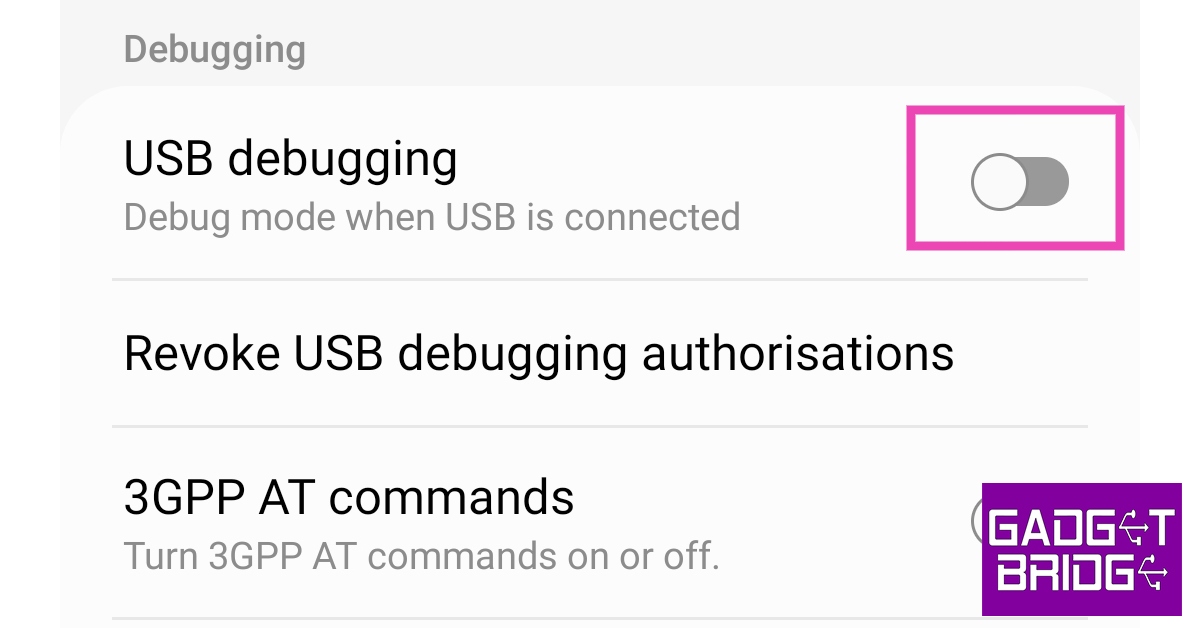
BGMI redeem codes for 6 September 2023, claim and receive rewards and benefits

After being banned for nearly ten months, Battleground Mobile India, aka BGMI, is officially available again in India. BGMI fans are looking for ways to improve their game experience and one such method is the usage of redemption codes, which offers a variety of rewards and advantages using BGMI redeem codes players can gain access to new skins, outfits, loot crates, weapons and free UC and diamonds.

As mentioned earlier, these codes give users the chance to earn unique rewards and gain extra benefits while playing the game. This includes GUN SKINS (M4, AKM, M416, AWM, M24, UZI, KAR98K), free character voucher, Andy, Carlo, Sara, Victor character for free, free Anna Character on completing the mission and UC or Royal Pass Discount. So here we have gathered a list of the most recent BGMI redeem codes as of 6 September 2023. Also, redeem these codes asap as these are only valid for a limited duration.

BGMI Redeem Codes for 6 September 2023

updating soon…

How to get free Redeem Codes for BGMI on 6 September 2023?

  • Launch BGMI on your device.
  • Then select the Redeem Code option from the main menu.
  • Next, click on the Redeem code tab.
  • A new window will open, requesting the redemption code.
  • Now enter your BGMI code.
  • Confirm and click on the “Redeem” tab.
  • If your redeem code is valid then you will get a message confirming that your rewards were successfully redeemed.

(Note that these codes are case-sensitive, so be sure to type them correctly to prevent any errors.)

For the latest gadget and tech news, and gadget reviews, follow us on TwitterFacebook and Instagram. For newest tech & gadget videos subscribe to our YouTube Channel. You can also stay up to date using the Gadget Bridge Android App. You can find the latest car and bike news here.

Garena Free Fire Redeem Codes Today 6 September 2023: Here is how to claim them

Garena Free Fire is a battle royale game with regular awards and tournaments to keep players interested. If you play Garena Free Fire, you should be aware of the redeem codes that are released on a daily basis. However, because the battle royale game is banned in India, players from other countries can use the Free Fire Redeem codes daily. If you’re unfamiliar with the Garena Free Fire redeem codes or don’t know how to get them, we’ve put together a step-by-step guide to help you redeem them. Check out Garena Free Fire Redeem Codes for 6 September 2023.

The Free Fire redeem codes are a great way to get free stuff. These are 12-digit codes that contain alphabets and numbers, as well as an expiration date and time. Because the Garena FF redeem codes cannot be used more than once, you should hurry to the redemption page to claim your free reward before someone else does. To get a free reward, all you have to do is go to reward.ff.garena.com/en, which is the official redemption page. Also, keep an eye on this space for daily updates on Garena Free Fire redemption codes and rewards.


Garena Free Fire Redeem Codes Today 6 September 2023

updating soon…

How to Get Free Fire Redeem Codes for Garena on 6 September 2023?

  • Visit the Garena Free Fire game’s official website at reward.ff.garena.com.
  • Use your Facebook, Google, VK, Apple ID, Huawei ID, or Twitter account to log in.
  • You’ll be taken to a valid redemption code (s)
  • Copy and paste the 12-digit redemption code into the text box.
  • On the screen, a dialogue box will appear.
  • ‘Ok’ should be selected.

For the latest gadget and tech news, and gadget reviews, follow us on TwitterFacebook and Instagram. For newest tech & gadget videos subscribe to our YouTube Channel. You can also stay up to date using the Gadget Bridge Android App. You can find the latest car and bike news here.