Garena Free Fire is a battle royale game with regular awards and tournaments to keep players interested. If you play Garena Free Fire, you should be aware of the redeem codes that are released on a daily basis. However, because the battle royale game is banned in India, players from other countries can use the Free Fire Redeem codes daily. If you’re unfamiliar with the Garena Free Fire redeem codes or don’t know how to get them, we’ve put together a step-by-step guide to help you redeem them. Check out Garena Free Fire Redeem Codes for May 26.The Free Fire redeem codes are a great way to get free stuff. These are 12-digit codes that contain alphabets and numbers, as well as an expiration date and time. Because the Garena FF redeem codes cannot be used more than once, you should hurry to the redemption page to claim your free reward before someone else does. To get a free reward, all you have to do is go to reward.ff.garena.com/en, which is the official redemption page. Also, keep an eye on this space for daily updates on Garena Free Fire redemption codes and rewards.
In This Article
Garena Free Fire Redeem Codes Today 26 May 2022
3ANG MEEJ Y8FJ
FFCO 8BS5 JW2D
FFAC 2YXE 6RF2
FFIC JGW9 NKYT
FF11 64XN JZ2V
FF11 WFNP P956
FF10 GCGX RNHY
FF10 617K GUF9
FF11 HHGC GK3B
FF11 9MB3 PFA5
FF11 NJN5 YS3E
FFIC JGW9 NKYT
FF9M J31C XKRG
How to Get Free Fire Redeem Codes for Garena on May 26?
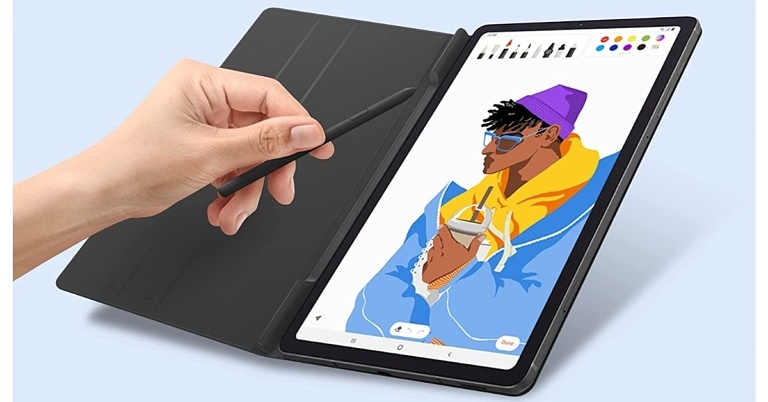
Samsung’s India’s website now has a support page for the Galaxy Tab S6 Lite 2022. The upcoming tablet is a refreshed model of the Galaxy Tab S6 Lite that was announced in 2020. The 2022 version has reached Italy ahead of the India launch. The fact that it has been listed on Samsung’s India website suggests that it will be released soon. A Snapdragon 720G SoC and a 7,040mAh battery will be included in the upcoming tablet.
In This Article
Galaxy Tab S6 Lite 2022 India launch details
The Galaxy Tab S6 Lite 2022 support page is now live on Samsung’s website in India, indicating that the tablet will be released soon. The tablet’s model number is displayed on the website as SM-P613. The tablet is an updated version of the Samsung Galaxy Tab S6 Lite, which was first released in India in 2020.
Galaxy Tab S6 Lite 2022 price in India expected
The tablet, which is a refresh of the 2020 Galaxy Tab S6 Lite, was recently released in Italy. There it was released for EUR 399.90 which translates to Rs 33,100. It came with 4GB of RAM and 64GB of internal storage at launch. An Oxford Gray colour option was available for the tablet.To recall, in 2020 Galaxy Tab S6 Lite was launched at Rs 27,900. Angora Blue, Chiffon Pink, and Oxford Gray were the three colour options for the older Galaxy Tab
Galaxy Tab S6 Lite 2022 specifications expected
One UI 4.1, based on Android 12, is used. The new tablet featured a 10.4-inch WUXGA TFT display, which was identical to the 2020 model. According to its specifications, the Galaxy Tab S6 Lite 2022 is equipped with an octa-core Snapdragon 720G SoC. It had 4GB of RAM and 64GB of internal storage when it was first released.An 8-megapixel rear camera sensor with an auto-focus lens is included in the tablet. The tablet has a 5-megapixel selfie camera on the front. It has a USB Type-C port and a 7,040mAh battery. AKG-tuned speakers, Dolby Atmos support, and a 3.5mm headphone jack round out the tablet’s features. It weighs 465 grams and supports the S Pen.
For the latest gadget and tech news, and gadget reviews, follow us on Twitter, Facebook and Instagram. For newest tech & gadget videos subscribe to our YouTube Channel. You can also stay up to date using the Gadget Bridge Android App. You can find the latest car and bike news here.
Daily Amazon brings a fresh quiz for its customers with exciting rewards on its platform. The Amazon quiz can be played every day from 12 AM to 11:59. 26 May 2022 Amazon Quiz has gone live on its platform and the e-commerce platform Amazon is today giving you a chance to win Rs 5,000 Amazon Pay Balance.To participate all you need to do is log in to your Amazon app on your device and give answers. Daily a new set of questions are presented to the participants which gives them a chance to win exciting prizes. The questionnaire consists of five easy questions that are usually based on general knowledge and current affairs. You can submit the correct answers and can win an Amazon Pay Balance of up to Rs 50,000. It should be noted that the quiz is not accessible on the web platform instead you have to participate only through the dedicated app.Amazon Quiz Today Prize – Rs 5,000 Amazon Pay BalanceQuiz Date – 26 May 2022Daily Timing – 12 AM to 11:59 PMWinner Announcement – Today 12 PM
In This Article
Amazon Quiz Answers Today 26 May 2022
Question 1: Who has been appointed India’s first National Maritime Security Coordinator?Answer: G Ashok KumarQuestion 2: Which of these neighbouring countries have decided to adopt India’s UPI system?Answer: NepalQuestion 3: Rameshbabu Praggnanandhaa grabbed headlines after defeating world No. 1 & five-time world champion in which sport?Answer: ChessQuestion 4: Who is the current CEO of this tech company?Answer: Shou Zi ChewQuestion 5: Name this animalAnswer: Pangolin
How To Play Amazon Quiz
Only app users are eligible to play the Amazon quiz every morning from 12 AM to 11:59 PM. The quiz is not available on the desktop. For those who are unaware of how to play the Amazon quiz below are the steps, you can follow to take the quiz.
Firstly download the Amazon app from Google Play Store or App Store
Now fill in the required information through the Sign Up option.
You need to log in to the Amazon app and scroll down on the home screen to find the Amazon Quiz banner.
Tap on the Amazon Quiz banner and tap on the Start button to start the Quiz.
Now you will get 5 questions and you need to answer them correctly. One wrong answer will eliminate you from the Quiz.
After answering all the questions correctly you are now eligible for a Lucky Draw.
The winner’s name will be announced today at 12 PM.
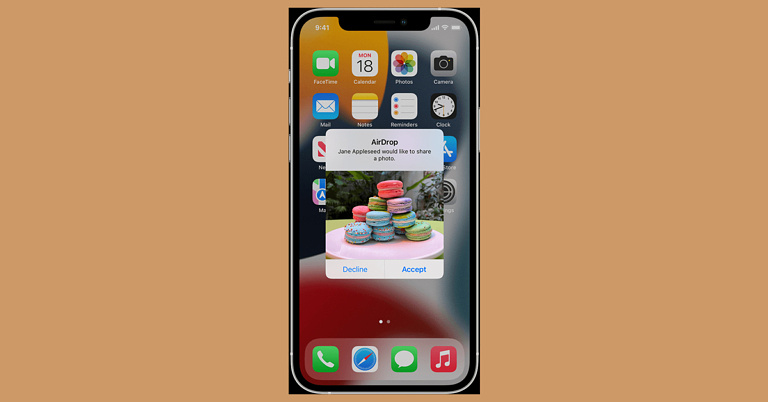
Apple ensures quick and efficient transfer of images, videos, or documents between iPhone and other iOS devices through its AirDrop feature. Be it sharing fun memories with your family or sharing your travel pictures with your nagging friends, AirDrop simplifies the whole transfer process to the next level. However, since it leverages the smartphone’s Wi-Fi and Bluetooth connectivity for the same, it requires the person to whom you are sending the file to be within the Wi-Fi or Bluetooth range. Another point to keep in mind is that both the devices need to keep their Wi-Fi and Bluetooth turned on, for a successful transfer between the two. Here are the two ways how to turn on AirDrop on your iPhone in 2022.
In This Article
Turn On AirDrop Using The iPhone Settings
Step 1: Go to Settings > Screen Time.Step 2: Tap on Content & Privacy Restrictions.Step 3: Tap on Allowed Apps and makes sure that AirDrop is turned on. Read also: How To Eject Water From Your iPhone Using Siri (2022)?
Turn On AirDrop Using The Control Centre
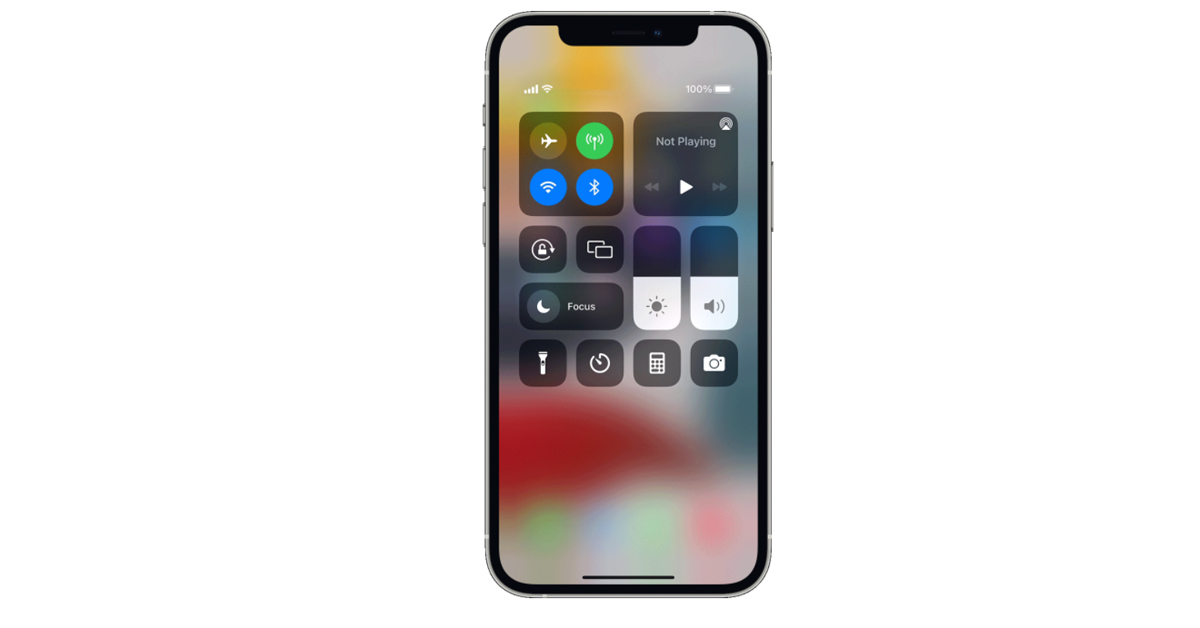
Step 1: If you possess iPhone X or later models, then swipe down from the top-right corner of the screen to open the Control Centre. If you possess iPhone 8 or earlier model, swipe up from the bottom of the screen for accessing the same. Step 2: Touch and hold the Network Settings card in the upper left corner.Step 3: Touch and hold the AirDrop button. You are provided with a list containing 3 options.
Receiving Off: This means you won’t receive any AirDrop requests.
Contacts Only: This means that only your contacts can see your device.
Everyone: This means that all nearby Apple devices using AirDrop can see your device.
You might already be a master at taking screenshots on your Android or iOS smartphone. But do you know how to take a screenshot on your PC? You might be a student who needs to take a screen capture during one of your online classes or a professional working from home, who needs a screenshot of an important presentation during a meeting. No matter how critical a situation you are in, fortunately, taking a screenshot on your PC is a matter of only milliseconds today. Here are the quickest and smartest 7 ways how to take a screenshot on Windows 11 in 2023.
In This Article
Using The PrintScreen Key
The easiest method to take a screenshot on your Windows 11 PC is by pressing the PrintScreen key (PrtScn or PrtScr) on your keyboard. When you press the PrintScreen key solely, the system takes a snapshot of your current screen and copies it to the clipboard. The screenshot gets stored temporarily in your PC’s memory. You can then directly go to the document, file, or space where you want to attach the screenshot and press Ctrl+V to paste it. However, remember that if you press the PrtScn key once and then press it again without pasting or saving the previous screenshot in a document, the former capture would be lost. This means that you would only be able to retrieve the screenshot taken from your latest PrtScn button press. Every time you press the PrintScreen key, you have to manually store it at the required place. Hence, do not forget to save the screen capture before you head on to take the next screenshot and press the PrtScn key again. Read also: How To Take A Screenshot On Your iPad (2022)? Top 3 Best Ways
Using PrintScreen + Windows Key
An even faster method to take a screenshot on your Windows 11 PC is by pressing the Windows key along with the PrintScreen key simultaneously. By using the Windows + PrtScn shortcut, the captured screenshot automatically gets stored in the Screenshots folder within the Pictures folder on your system, so you won’t have to worry about data loss. You can easily access these by going to File Explorer > Pictures > Screenshots. Note that in case you haven’t used this shortcut before, the Screenshots folder might not be visible to you at first. However, once you press the Windows + PrtScn keys, the folder automatically gets created, storing the capture within it. From here, you can access all your Windows 11 screenshots anytime you want.
Using The Snipping Tool
Windows 11 also provides its users with a built-in Snipping Tool. You can use this Snipping Tool in case you want a screenshot of only a specific part of the screen and not the entire screen itself. To access the Snipping toolbar, you need to press Windows Key + Shift + S keys together. You are provided with a couple of tools which help you with selecting the required area you want to snip, in the required shape. All you need to do is select the required tool, drag your mouse and release when you are satisfied with the results.Once you’ve created your screenshot, a thumbnail of the capture appears on the bottom right corner of your Windows screen for a couple of seconds. You can click on it for editing it further or saving it at the required location. Read also: How To Highlight, Draw And Write On Android Smartphone Screenshots
Using The PrintScreen Key For Screen Snipping
If pressing a combination of keys sounds a little complicated to you, you still don’t have to worry. Windows 11 allows you to set the PrtScn key as the button for directly opening up the Snipping Tool. All you have to do is go to Start > Settings > Accessibility > Keyboard and toggle on the ‘Use the Print Screen button to open screen snipping’ option. That’s it!Now you can get a refined screenshot via the Snipping Tool anytime you want, straight away by pressing the PrtScn button on the keyboard.
Use the Xbox Gamebar
You may not be familiar with the Xbox Gamebar if you’re not a gamer, but it is a great tool to take quick screenshots and record your PC’s screen. Press Windows + G to launch the Gamebar, or simply search for it on the taskbar. Once launched, use the camera icon to open the ‘Capture’ toolbar. Click the camera icon in the Capture toolbar to take a quick screenshot.
Use a third-party app
If you can’t get the Snipping Tool or Xbox Gamebar to work on your PC, there are plenty of third-party apps in the Microsoft Store that will help you take a quick screenshot. Nimble Screenshots and Screenshot Easy are two of the best apps you can use to take a screenshot on a Windows PC.
Take a screenshot on Microsoft Surface
Since Microsoft Surface’s keyboard attachment does not have a PrtScn key, users often wonder how to take a quick screenshot on the tablet. The answer is quite simple. Windows Surface follows the same method as most Android tablets. Simply press the power key and volume up button simultaneously to take a quick screenshot.
Frequently Asked Questions (FAQs)
How do I take a quick screenshot on a Windows 11 PC?
Press the Windows + PrtScn keys to take a quick screenshot of the entire screen on your Windows 11 PC. To take a screenshot of a portion of the screen, press Windows + Shift + S keys together.
How do I take a screenshot on Windows 11 without using the PrtScn key?
Press Windows + Shift + S to take a screenshot or use third-party apps like Nimble Screenshot and Screenshot Easy to capture the screen without using the PrtScn key.
How do I take a screenshot on Microsoft Surface?
To take a screenshot on Microsoft Surface, simply press the Volume Up + Power buttons together.
Recently the London-based company Nothing announced Flipkart as its key sales partner for Nothing Phone 1 in India. Today the company has released a sneak peek of the design inspiration and approach for its first smartphone phone (1).In an interview, Tom Howard, Nothing’s Head of Design discussed about the design and build of the upcoming smartphone Nothing Phone 1. According to the interview, the device will carry transparent design language similar to Nothing Ear 1 TWS earphones that was released last year. As per the company its aim is to reintroduce excitement and optimism to the industry. And their distinct design identity is consistent across all products and plays with transparency, but designers and engineers are fighting an uphill battle. Apart from that, the phone will support wireless charging. “we started to sketch different layouts that broke away from typical Android phones, choosing the wireless charging coil as our hero among the hundreds of components, and played with it like a puzzle,” he said.The phone’s manufacturing process was described by Howard as a “jigsaw puzzle,” with cameras, charging coils, and other components being highlighted. Custom wallpapers, widgets, sounds, and Nothing OS, which includes a custom launcher, are expected to be included in the smartphone.‘There are over 400 components in a smartphone, assembled in layers. We wanted to celebrate the “good ones”, the things we thought were really interesting to emphasise’ he quoted.The design is said to be inspired by Massimo Vignelli’s New York subway map and the way he connected a complex system and made it look like art.Ahead of the official announcement of Nothing Phone (1) a new leak suggests that Nothing Phone 1 will be released on July 21. The smartphone’s price has also been revealed. The Nothing Phone 1 will most likely be a mid-range device. The smartphone could cost around EUR 500, according to the report (roughly Rs 41,400).Nothing previously announced the first of many partnerships for its highly anticipated smartphone phone in the United Kingdom, Europe, and India (1). Nothing Phone 1 will be available in India through Flipkart. Following the success of ear (1), the company’s highly anticipated smartphone product phone (1) will launch in Summer 2022, according to Nothing (1). This is the continuation of a fruitful collaboration that began in 2021. (when Nothing announced its entry into India). In Germany, Telekom Deutschland will be the sole provider of phone (1), which will be available for purchase online and in select stores.
For the latest gadget and tech news, and gadget reviews, follow us on Twitter, Facebook and Instagram. For newest tech & gadget videos subscribe to our YouTube Channel. You can also stay up to date using the Gadget Bridge Android App. You can find the latest car and bike news here.
The WWDC22 programme is now available, with a full schedule of events available online and for free to the world’s more than 30 million Apple developers. The 2022 edition of the WorldWide Developers Conference (WWDC) will take place from June 6 to June 10. This year’s Cupertino-based company confirmed that its upcoming tech event will be held entirely online. Apple is expected to present new software, including iOS 16, at the conference.Apple today announced the keynote and Platforms State of the Union speakers for its annual Worldwide Developers Conference, as well as more details about what developers will learn and experience. WWDC22 is a free event for developers and designers to learn about the latest technologies, tools, and frameworks for iOS, iPadOS, macOS, tvOS, and watchOS. Developers will be able to speak directly with Apple engineers and designers in labs and Digital Lounges throughout the week for advice on creating innovative and platform-differentiating apps and games.
In This Article
Apple Keynote
June 6, 10 a.m. PDTWWDC22 kicks off with a sneak peek at some of the most significant updates coming to Apple platforms later this year. The keynote address will be streamed live and on-demand on apple.com, the Apple Developer app, the Apple TV app, and YouTube, with on-demand playback available after the stream ends.
Platforms State of the Union
June 6, 2 p.m. PDTDevelopers will learn how to take their apps to the next level by diving deeper into Apple’s new tools, technologies, and advancements. The Apple Developer app and website will stream State of the Union.
Apple Design Awards
June 6, 5 p.m. PDTEvery year, the Apple Design Awards honour and celebrate Apple developers’ art, craft, creativity, and technical expertise. The Apple Design Awards will be broadcast live on the Apple Developer app and website.
Access to Experts
Members of the Apple Developer Program, Apple Developer Enterprise Program members, and winners of the 2022 Swift Student Challenge can schedule one-on-one lab appointments with Apple experts for advice on implementing the latest technologies, following best practices, and designing their apps.Daily session videos will be available on the Apple Developer app and the Apple Developer website starting June 7.
Activities
Apple engineers and designers will host activities in Digital Lounges throughout the week to help developers engage in technical discussions, get answers to their questions, and connect with the community, in addition to sessions and lab consultations. Take part in a coding or design challenge, ask questions of the presenters, and more.
Swift Student Challenge
Apple continues to honour student developers from around the world by announcing the Swift Student Challenge winners today. Students of all ages can participate in the event by creating their own Swift Playgrounds app project to show off their coding skills.
Developer App
Developers can browse content by topic, sign up for Digital Lounges and one-on-one lab consultations, use SharePlay to watch videos with their peers, copy code directly from session videos, read feature stories, and more.Developers can also go to developer.apple.com for all WWDC content, registration, news, feature stories, and documentation.
For the latest gadget and tech news, and gadget reviews, follow us on Twitter, Facebook and Instagram. For newest tech & gadget videos subscribe to our YouTube Channel. You can also stay up to date using the Gadget Bridge Android App. You can find the latest car and bike news here.
OnePlus has come a long way. From being just another Chinese company that is trying to make it big in the smartphone market to now a powerful brand that has a good footing in the audio and TV segment too. The latest to enter its audio series are the OnePlus Nord Buds. We got our hands on these entry-level earbuds and checked them for quite a few days. This is the OnePlus Nord Buds review you need to go through, before purchasing.
In This Article
OnePlus Nord Buds review: Design
Unboxed, the OnePlus Nord Buds come inside a flat head and bottom charging case. Construct is somewhat similar to a makeup kit, which you see in western movies. Available in two colours black and white, we played around with the white version. The white case looks quite nice. It has the OnePlus branding in silver on top. A LED indicator can be seen on the front and a USB Type-C charging point can be seen at the back with a BT (Bluetooth) connection button.
Flip the sturdy lid open and you will find the shiny pearly white OnePlus Nord Buds. The design of these earphones is something we have not seen before. The stem of the earphones is flat like a pill but flatter. On it, you will find the silver feather touch buttons that can be used to play/pause music, skip tracks and take or reject calls. They respond well to each tap.
12.4mm Titanium Audio drivers are placed within a robust conch-type enclosure attached to the stem at one end and has a silicone tip at the other. Two additional silicone tips are also available for different ear cavity types. The charging points and sensors can also be found on the audio driver’s enclosure. The MICs can be found on the stems. Each earbud weighs 4.8 grams, and the charging case has a weight of 41.7 grams. All in all, we quite liked the whole outlook of the OnePlus Nord Buds and they fit in well.
Read Also:OnePlus Nord now unveiled in India for Rs 24,999, open sale to
OnePlus Nord Buds review: Performance
Coming to the performance of the OnePlus Nord Buds, we were impressed on many counts. To start with, the sound is quite nice, and the vocals are very crisp. These are tuned with Dolby Atmos, so we enjoyed most listening experiences from various genres. The treble is at par with the industry. However, the bass could have been thumpy-er.
To get to the best bass point, we tested it at two levels. Once, when connected to a laptop using BT. Here the bass was average. But when we moved to case 2, when connected with a smartphone, the equaliser options enabled us to boost the bass (using the Hey Melody app, bass mode). So, the results were much better here. Still, we felt a little bit more would have been superb. Something OnePlus can pick from the Oppo Enco counterparts.
To cancel wind and other noise, the OnePlus Nord Buds comes with AI noise cancellation. Since there are 4 MICs on these audio earplugs, it uses the AI method of noise reduction when making voice calls. It works well in most cases and when testing it, the other side hardly heard anything besides our lovely voice. Not bad for sub 3K wireless earphones.
Moving to the battery life, the company claims OnePlus Nord Buds can last for 7 hours. On our test, we got about 6.5 hours from them. This is great as each earbud has just a 41mAh battery inside. The hours can be extended using the supplied charging case, which holds an additional 480mAh battery inside. So, the total playback hours can be extended to up to 30 hours. Over that, in case you run out of battery juice in the OnePlus Nord Buds, just put them back in the charging case and after 10 minutes of charge can use them again for 4.5-5 hours.
Read Also:OnePlus Nord 2 5G with triple rear cameras goes on sale for the first
Verdict
The OnePlus Nord Buds are dust and water-resistant. These come with an IP55 rating for that. We took them out for a cycle run and we never felt that they will drop out. They are very comfortable to wear and supporting BT version 5.2 they can be paired with a plethora of devices. We tried our hands at BGMI mobile game too and the shot to sound latency here was very decent. So, we can recommend them for entry-level gaming as well. All in all, these are a neat buy for Rs 2,799. If you are looking for a good pair of trendy wireless earphones under Rs 3K, these are an excellent purchase.
Nord Buds Pros
Good to look at
AI Noise cancellation
Long battery life
Inexpensive
LG Electronics has announced the availability of its OLED TV lineup for 2022. The new lineup includes the world’s largest selection of OLED TVs, ranging in size from 106 cm (42) to 246 cm (97), for a truly customizable viewing experience. The range includes the world’s largest 223 cm (88) 8K OLED TV, which offers the best picture quality in its class. The LG Signature R OLED is the world’s first rollable OLED television. LG is also releasing the LD OLED Evo in their C2 series.LG’s Evo technology is built into the 2022 G2 series (LG OLED Evo Gallery Edition) and C2 series, taking the home entertainment experience to new heights with LG’s new (Alpha) 9 Gen 5 intelligent processor and unique picture algorithms. LG OLED Evo TVs have exceptional clarity and detail, resulting in lifelike images and a realistic viewing experience. The new Brightness Booster Max technology improves brightness by 30% on the G2 series and 20% on the C2 series, thanks to the increased processing power of the 9 Gen 5.LG’s new lineup also includes the world’s largest range of OLED TV screen sizes, ranging from 106 cm (42) to 246 cm (97) to give customers more options. The refined Gallery Design of the G2 series, which is available in two sizes: 139 cm (55) and 164 cm (65), allows users to mount the TVs flush to the wall for a seamless, sophisticated look and better spatial integration in the viewing environment.With six different screen sizes to choose from, LG’s C2 series has the most options in the 2022 lineup. The first-ever 106 cm (42) OLED TV joins the C2 series’ broad range of 246 cm (97), 210 cm (83), 195 cm (77), 164 cm (65), 139 cm (55), 121 cm (48), and 106 cm (42) models as a smaller room TV or for those who enjoy console and PC gaming.The LG G2, C2, and Z2 series models all come with the new and improved LG 9 Gen 5 intelligent processor. The new Dynamic Tone-mapping Pro Algorithm on the 9 Gen 5 processes over 5,000 areas on the screen individually The 9 Gen 5 AI processor is equipped with the latest processor to improve audio quality via the AI Sound Pro feature, allowing your OLED TV to up-mix 2-channel audio to a virtual 7.1.2 sound, allowing you to hear sound from above and behind you.The B2 OLED TV series in two screen sizes (164cm (65)-139cm (55)) and the A2 series in three screen sizes (164cm (65), 139cm (55), 121cm (48)) round out the 2022 OLED TV lineup. Both are powered by the company’s self-lit technology, 7 Gen 5 processor with Dynamic Tone-mapping, AI Sound Pro, and virtual 5.1.2 surround sound.LG’s 2022 OLED TVs feature webOS 22, the company’s cutting-edge Smart TV platform. WebOS 22 introduces several new personalization features, including customizable user profiles that allow each family member to tailor their viewing experience to their favourite apps and content services. Furthermore, webOS 22 makes Room To Room Share a breeze, allowing users to mirror their favourite content from one TV to another in their home via Wi-Fi. When the TV is turned off, the LG TV transforms into a media display displaying lifestyle and personal content, thanks to the Always Ready capability (applicable on 2022 models Z2, G2, and C2).Intertek has certified the panels used in this year’s lineup as having 100 percent colour fidelity and 100 percent colour volume. The 8K OLED TV in the Z2 series, is capable of displaying 33 million pixels and providing a profoundly immersive experience. LG’s most recent OLED TVs are the first to feature Dolby Vision IQ with Precision Detail and Dolby Atmos spatial sound through their speaker system. Moreover the LG televisions.In terms of pricing, the price of an OLED TV starts at Rs 89990, and a Rollable OLED TV costs Rs 7500000.
For the latest gadget and tech news, and gadget reviews, follow us on Twitter, Facebook and Instagram. For newest tech & gadget videos subscribe to our YouTube Channel. You can also stay up to date using the Gadget Bridge Android App. You can find the latest car and bike news here.
If you’re looking for a smartphone that can sustain handling multiple applications simultaneously without you having to face frequent app crashes, then RAM is the feature that you should keep a check on. A smartphone with a higher RAM can perform operations faster and more efficiently. Today, smartphones are available with a RAM of 8GB and even higher in the markets. And even if you’re on a budget, these can be easily affordable. Hence, we have compiled a list of the top 10 smartphones with 8GB RAM or more, that you can buy for under Rs 25000 in 2022.
In This Article
Samsung Galaxy M33 5G
The first one on our list of the top 10 8GB RAM phones under Rs 25000 in 2022 is the Samsung Galaxy M33 5G. Its top-spec trim is offered with 8GB RAM along with 128GB storage capacity. The model comes with an Exynos 1280 Octa-Core 2.4GHz 5nm processor and a battery capacity of a whopping 6000mAh, the highest in the market. You get to enjoy streaming videos on a 6.6-inch FHD+ LCD display with a 1080 x 2400 pixels resolution, protected by Corning Gorilla Glass 5. Moreover, the smartphone comes with a 50MP+5MP+2MP+2MP quad-camera setup and an 8MP front camera, and also supports Android 12. It is priced at Rs 19,499. Buy from here.
Samsung Galaxy A32
Next in line comes another 8GB RAM smartphone model from the Samsung brand. The Galaxy A32 offers you 128GB of internal storage along with 8GB of RAM. The device’s battery has a capacity of 5000mAh and the OS that comes pre-installed with it is Android 11. It runs on a MediaTek Helio G80 (2x2GHz + 6×1.8GHz) Octa-core processor. As a plus point, the Samsung Galaxy A32 comes with a 60MP+8MP+5MP+5MP quad-camera setup along with a 20MP front camera. Moreover, you get to enjoy a 6.4-inch FHD+ Super AMOLED display. The smartphone is priced at Rs 23,289. Buy from here.Read also: Top 10 Smartphones Under Rs 15,000 For Everyday Use (2022)
OnePlus Nord CE 2 5G
The third one on our list of the top 10 8GB RAM phones under Rs 25000 comes from the popular OnePlus brand. The top-spec model of its Nord CE 2 5G offers you 8GB RAM coupled with 128GB storage capacity. It comes with a 4500mAh battery along with a 65W SuperVOOC fast charger. The smartphone runs on a Mediatek Dimensity 900 5G Octa-core processor and comes with a 6.43-inch 90Hz FHD+ AMOLED display. The display is protected by Corning Gorilla Glass 5. The Nord CE 2 5G comes with an AI-infused triple camera system with a 64MP main camera and a 16MP front selfie camera. The device comes with Android 11 OS and is priced at Rs 24,999. Buy from here.
MI 10T 5G
The MI 10T 5G offers you 8GB RAM along with 128GB storage. The battery offered with it has a 5000mAh capacity. You get to watch movies and TV shows on a 6.67-inch FHD+ full-screen LCD display with a 144Hz refresh rate. The smartphone comes pre-installed with the Android 10 operating system and has up to 2.84GHz clock speed. It has a Qualcomm Snapdragon 865 Octa-core 7nm processor. The device comes with a 64MP precision triple rear camera and a 20MP front camera. It is priced at Rs 22,990.Buy from here.
Redmi Note 11S
Amongst the 8GB RAM smartphone options that the Redmi brand provides you under Rs 25k is its Note 11S model. It offers you a 128GB storage capacity along with a 108MP AI quad-camera setup. You get to click selfies from its 16MP front camera. The phone comes with a 5000mAh battery and a 33W Pro fast charger. It has a MediaTek Helio G96 Octa-core processor and up to 2.05GHz clock speed with LiquidCool Technology. The 90Hz FHD+ AMOLED display of the smartphone is 6.43-inches in size. And you get access to all these features for just Rs 18,499.Buy from here.
Redmi Note 10S
Another one from Redmi is its Note 10S smartphone model, which offers 8GB RAM with 128GB internal storage. The phone is powered by a 5000mAh battery and comes with a 33W fast charger. You get to stream movies, TV series, and videos on its 6.43-inch FHD+ AMOLED Dot display. It runs on a Mediatek Helio G95 Octa-core 12nm processor with up to 2.05 GHz clock speed. It offers you a 64MP+8MP+2MP+2MP quad-camera setup along with a 13MP front camera. The Redmi Note 10S is available at a price of around Rs 16,499. Buy from here.
iQOO Z3 5G
Next on our list of the top 10 8GB RAM smartphones in 2022 available for under Rs 25000 is the iQOO Z3 5G. It offers 8GB RAM (extendable up to 3GB more) coupled with a whopping 256GB internal storage. It comes with a Qualcomm Snapdragon 768G 5G 7nm octa-core processor and a 4400mAh battery. The battery comes with a 55W flash charger which can charge the smartphone fully in just 50mins. You get to click pictures from its AI triple rear camera system with the main camera being 64MP and the front camera being 16MP. The model has a 120Hz refresh rate and is priced at Rs 19,990.Buy from here.Read also: Top 10 Smartphones With 108MP Or Higher Cameras In 2022
Oppo F19 Pro
With the Oppo F19 Pro, you get 8GB RAM along with 128GB internal memory space. The battery capacity of the smartphone is 4310mAh and supports a 30W VOOC flash charge. It has a 6.43-inches FHD+ Super AMOLED display and a 2.2GHz MediaTek Helio P95 Octa-core processor. You get to enjoy capturing memories via its 48MP+8MP+2MP+2MP quad-camera setup along with a 16MP front camera. The smartphone is available for a price of Rs 21,990. Buy from here.
Vivo Y33T
Next comes Vivo Y33T, which provides 128GB storage along with 8GB RAM. It comes with a 50MP+2MP+2MP triple rear camera system, a 16MP front selfie camera, and a 5000mAh battery that supports 18W fast charging. The smartphone has a 6.58-inch FHD+ display with a Snapdragon 680 Octa-core processor and Android 11 OS. It comes at a price of Rs 17,990. Buy from here.
Motorola Edge 20 Fusion
The final smartphone to make it to our top 10 list is the Motorola Edge 20 Fusion, which provides you with 8GB RAM along with 128GB internal memory. You enjoy streaming videos on its 6.67-inch FHD+ 90Hz AMOLED display along with a battery capacity of 5000mAh. The highlight of the smartphone is its 108MP+8MP+2MP triple rear camera system which is paired with a front camera of a whopping 32MP. The smartphone comes with a MediaTek Dimensity 800U processor and supports 5G connectivity. It comes at a price of Rs 23,999.Buy from here.So those were our top picks for the 10 best smartphones with 8GB RAM that you can buy for under Rs 25000 in 2022. We would love to hear about your experience with these smartphones. Do share with the rest of us in the comments section below.For the latest gadget and tech news, and gadget reviews, follow us on Twitter, Facebook and Instagram. For newest tech & gadget videos subscribe to our YouTube Channel. You can also stay up to date using the Gadget Bridge Android App. You can find the latestcar and bike news here.





 Step 1:
 Step 3:
 Step 4:
 Read also:


 You may not be familiar with the Xbox Gamebar if you’re not a gamer, but it is a great tool to take quick screenshots and record your PC’s screen. Press Windows + G to launch the Gamebar, or simply search for it on the taskbar. Once launched, use the camera icon to open the ‘Capture’ toolbar. Click the camera icon in the Capture toolbar to take a quick screenshot.
 If you can’t get the Snipping Tool or Xbox Gamebar to work on your PC, there are plenty of third-party apps in the Microsoft Store that will help you take a quick screenshot.
  Since Microsoft Surface’s keyboard attachment does not have a PrtScn key, users often wonder how to take a quick screenshot on the tablet. The answer is quite simple. Windows Surface follows the same method as most Android tablets. Simply press the power key and volume up button simultaneously to take a quick screenshot.




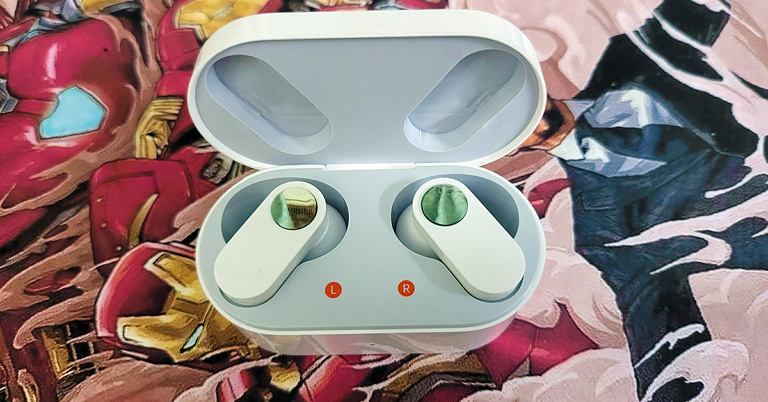
 Flip the sturdy lid open and you will find the shiny pearly white OnePlus Nord Buds. The design of these earphones is something we have not seen before. The stem of the earphones is flat like a pill but flatter. On it, you will find the silver feather touch buttons that can be used to play/pause music, skip tracks and take or reject calls. They respond well to each tap.
 12.4mm Titanium Audio drivers are placed within a robust conch-type enclosure attached to the stem at one end and has a silicone tip at the other. Two additional silicone tips are also available for different ear cavity types. The charging points and sensors can also be found on the audio driver’s enclosure. The MICs can be found on the stems. Each earbud weighs 4.8 grams, and the charging case has a weight of 41.7 grams. All in all, we quite liked the whole outlook of the OnePlus Nord Buds and they fit in well.
 Read Also:
  To cancel wind and other noise, the OnePlus Nord Buds comes with AI noise cancellation. Since there are 4 MICs on these audio earplugs, it uses the AI method of noise reduction when making voice calls. It works well in most cases and when testing it, the other side hardly heard anything besides our lovely voice. Not bad for sub 3K wireless earphones.
 Moving to the battery life, the company claims OnePlus Nord Buds can last for 7 hours. On our test, we got about 6.5 hours from them. This is great as each earbud has just a 41mAh battery inside. The hours can be extended using the supplied charging case, which holds an additional 480mAh battery inside. So, the total playback hours can be extended to up to 30 hours. Over that, in case you run out of battery juice in the OnePlus Nord Buds, just put them back in the charging case and after 10 minutes of charge can use them again for 4.5-5 hours.
Read Also:
Moving to the battery life, the company claims OnePlus Nord Buds can last for 7 hours. On our test, we got about 6.5 hours from them. This is great as each earbud has just a 41mAh battery inside. The hours can be extended using the supplied charging case, which holds an additional 480mAh battery inside. So, the total playback hours can be extended to up to 30 hours. Over that, in case you run out of battery juice in the OnePlus Nord Buds, just put them back in the charging case and after 10 minutes of charge can use them again for 4.5-5 hours.
Read Also: