Nokia brand licensee HMD Global has officially announced the launch of its latest tablet in the market. The Nokia T20 is the latest tablet by the company that comes with dual stereo speakers. It features a 2K display and includes a single 8MP rear camera. In addition to this, the Tab also boards an 8,200mAh battery that is claimed to last for a whole day. The company has introduced the tablet keeping in mind the current situation where the demand for tablets has grown since the pandemic started.
Nokia T20 tablet price and availability details
The Nokia T20 tablet has officially debuted in the European market first. The device comes in a Wi-Fi only and Wi-Fi + 4G option. The former one’s price starts at EUR that is roughly around Rs 17,200 for the 3GB RAM with 32GB storage. Whereas the latter one cost EUR 239 which translates to Rs 20,600 for the 4GB RAM with 64GB storage model. In terms of availability, the Nokia Tablet will be available in the UK and select markets from today onwards. As far as the Indian availability is concerned that is yet to be revealed by the company but the company did confirm that India is also on its list. Whereas in the US its price starts at $249,99 and will be available from November 17.
Nokia T20 Tablet specifications and features
The Nokia T20 Tablet comes with a 10.4-inch 2K in-cell display with 2,000×1,200 pixels of resolution. The screen will offer a peak brightness of 400 nits and has been protected with toughened glass. The tab runs on Android 11 and the company has promised to provide two years of OS upgrades and three years of security updates. Under the hood, there is an octa-core Unisonic Tiger T610 SoC painted with up to 4GB of RAM and 64GB of storage options. The internal storage can also be expanded up to 512GB using a microSD card. In terms of imaging, the Nokia Tablet features an 8-MP camera sensor on the back of the device along with an LED flash. While on the front it includes a 5MP selfie camera sensor. Nokia T20 Tablet is backed by an 8,200mAh battery that comes with 15W charging support but shipped with a 10W charger inside the retail box. The battery is claimed to provide 15 hours of internet surfing, 7 hours of conference calls and 10 hours watching videos. The device has also got an IP52 rating for splash and dust resistance.On the connectivity front, there is 4G LTE, Wi-Fi 802.11ac, Bluetooth v5.0, 3.5mm headphone jack and USB Type C port for changing. The Tablet also includes a dual speaker as well.
For the latest gadget and tech news, and gadget reviews, follow us on Twitter, Facebook and Instagram. For newest tech & gadget videos subscribe to our YouTube Channel. You can also stay up to date using the Gadget Bridge Android App. You can find the latest car and bike news here.
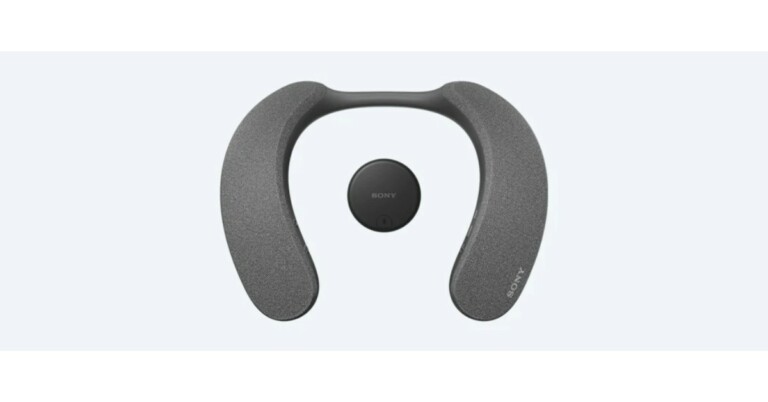
Sony has officially announced the launch of its latest audio device in the US. The Sony SRS-NS7 wireless neckband speaker is the company’s latest device that is compatible with the WLA-NS7 transmitter to provide the company’s proprietary 360 Spacial Sound experience. It also comes with Dolby Atmos support so you can pair it with your Sony Bravia XR TV for a high-quality sound experience.
Sony SRS-NS7 wireless neckband speaker specifications
Sony SRS-NS7 wireless neckband speaker features an upward-facing X-balanced speaker unit that provides an immersive listening experience without disturbing others. It has the company’s signature 360 Spatial Sound Personalizer that creates Dolby Atmos Cinematic surround sound. The Sony wireless neckband speaker comes with a flexible and ergonomic form-fitting design for all-day wearing. Moreover, the portable speaker is IPX4 splash-proof for protection against dust and water resistance. The audio device can be paired with the supplied wireless transmitter WLA-NS7 over a Bluetooth connection that helps minimise audio delay so you can be fully immersed in Dolby Atmos movies with sound and pictures precisely matched. While the passive radiator increases low-frequency response for clear bass sound. Hear thumping movie sound effects and deep beats.The Sony SRS-NS7 wireless neckband speaker is claimed to provide 12 hours of battery life and up to 5 hours at maximum volume and is suited for binge-watching. With just 10 minutes of quick charge, the wireless neckband speaker can last for 60 minutes. It comes with a built-in microphone for hands-free communication. While an X-Balanced Speaker Unit reproduces colleagues’ voices clearly. With echo-cancelling minimising feedback. The Sony wireless neckband speaker can be connected with two devices at the same time such as your laptop and smartphone. When you’re listening to music on your smartphone, you can take the call with just one click of the Play/Call button on the left side of the neckband.
Sony SRS-NS7 wireless neckband speaker price and availability
Sony SRS-NS7 wireless neckband speaker price has been set at $299.99 that converts to Rs 22,300 in Indian currency.The device is now up for pre-bookings via Sony Electronics, Amazon and Best Buy. However, the company will begin shipping from October 20 onwards. On the other hand, the Sony WLA-NS7 wireless transmitter is being sold separately for $59.99 that translates to Rs 4,400.
For the latest gadget and tech news, and gadget reviews, follow us on Twitter, Facebook and Instagram. For newest tech & gadget videos subscribe to our YouTube Channel. You can also stay up to date using the Gadget Bridge Android App. You can find the latest car and bike news here.
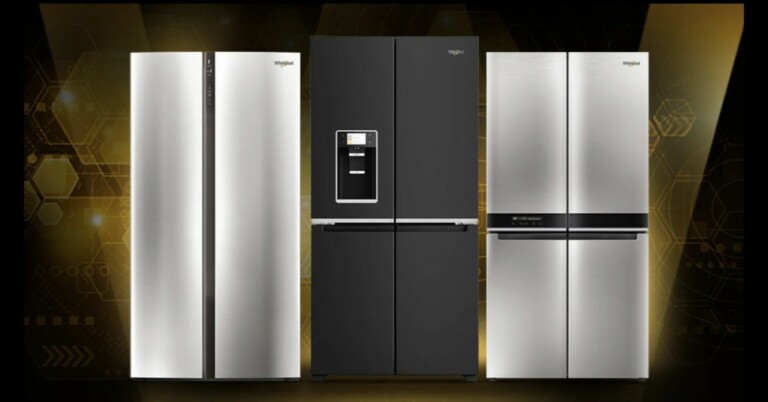
Whirlpool India has announced the launch of its latest W Series Range of Premium Quattro refrigerators in India. The new 4 door refrigerator comes in 665L storage space to provide ample space for your refrigeration needs. In addition to this, the Whirlpool refrigerator includes features like Adaptive Intelligence and triple cooling tech. It also comes with a 6-in-1 convertible mode.The Whirlpool W Series 4 Door refrigerators are exclusively available athttps://www.whirlpoolindia.com/. The price of the refrigerators starts at Rs 167,600 in India. Speaking of its features and specifications, the new Whirlpool W Series 4 Door refrigerators are equipped with adaptive intelligence technology and triple cooling technology that ensures optimum cooling and long-lasting freshness. The adaptive intelligence technology constantly detects temperature and humidity variations and quickly restores their ideal levels. This is done for optimal food preservation whereas the triple cooling system includes three independent cooling systems to create customised temperature and humidity in the three compartments (fridge, freezer and Convertible Space) to prevent odour mixing and keep food fresh for longer.The Whirlpool Quattro refrigerators come with an ozonizer that emits ozone to reduce odours and prevent bacteria from forming inside the cavity, improving hygiene and food freshness inside the fridge. It also has fast freeze is a smart button to accelerate the freezing process to deep freeze food quicker preserving its nutritional value.The door in door feature on the W Series 4 Door refrigerators allows easy drinks and snacks in one click without having to open the main door, thereby limiting the loss of cold air. There is a water and ice dispenser on the fridge that produces 1.5 kg of ice cubes per day or crushed ice. Its convertible functionality allows the users to choose between more than 6 preset temperatures from -22 °C to +10 °C. With the touch UI, one can easily operate and interact with the refrigerator. Commenting on the launch, KG Singh, Vice President Marketing, Whirlpool of India, said, “W Series range of Quattro format refrigerators opens a new realm of possibilities with its sophisticated design, spacious interiors and advanced refrigeration technology. With an award-winning design and immaculate craftsmanship, these stylish refrigerators add a touch of elegance to the consumer’s home. Powered by the state-of-the-art AI (Adaptive Intelligence) and Triple Cooling Technology, the refrigerator intuitively senses and adapts to changes in the ambient environment and usage patterns, to provide best-in-class cooling performance and long-lasting freshness. A convergence of functionality and powerful performance, W Series is a premium refrigerator for modern Indian families.”
For the latest gadget and tech news, and gadget reviews, follow us on Twitter, Facebook and Instagram. For newest tech & gadget videos subscribe to our YouTube Channel. You can also stay up to date using the Gadget Bridge Android App. You can find the latest car and bike news here.
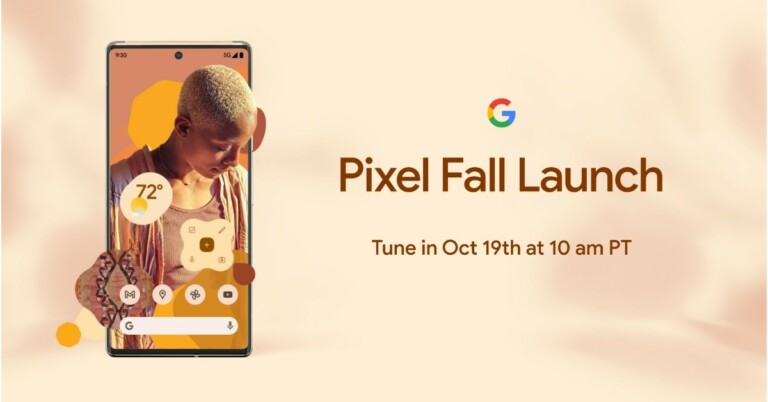
Google has finally and officially announced the launch date of Google Pixel 6 and Pixel 6 Pro. The tech giant will be hosting a Pixel fall launch event on the coming Tuesday that is on October 19. In addition to the launch of its flagship device, the company might also officially announce the release of Android 12. Google’s in-house Tensor chipset will also first feature on the Pixel 6 phones. According toGoogle’s Official pageon October 19 it will be introducing two devices: Pixel 6 and Pixel 6 Pro powered by Tensor, Google’s first custom mobile chip, they’re fast, smart and secure. The launch event will be hosted live on the company’s official YouTube channel and on social media platforms at 10 am PT that is 10:30 PM IST.The dedicated event page has been interestingly designed that lets you hold a spacebar on the website that changes the colour and the background music according to your mood. Also, October 19 was the most rumoured launch date while the sales are likely to begin from October 28. The company has not revealed much information about the upcoming event. But the price of Google Pixel 6 and Pixel 6 Pro was leaked much ahead of the official event. Leaks suggest that the Pixel 6 could be priced around EUR 649 that converts to Rs 56,100 whereas the Pixel 6 Pro could bear a price tag of EUR 899 that translates to Rs 77,700. It is also speculated that the vanilla variant will be available in two colour options of Carbon and Fog. The carbon variant is rumoured to be a black one while the Fog will be green in colour.Even before the pricing was leaked the hands-on video of Pixel 6 Pro also surfaced online. The video was shared by YouTuber M. Brandon Lee the same tipster who tipped the pricing of Pixel phones. The display of the device shows thin bezels and chin and has a hole punch to house the selfie camera. The power button and the volume rocker is seen on the right side of the frame whereas the back of the phone carries a horizontally mounted triple rear camera set up. The Google Pixel devices feature a dual-tone design with a camera bar that runs across the width of the smartphones. The company earlier confirmed that it has used new materials and finishes such as the Pro’s light polished aluminium frame, and the 6’s matte aluminium finish.In terms of specifications, it is already confirmed that the Pixel 6 Series will be powered by the company’s in-house Google Tensor chip. Reportedly both the handsets may feature a 33W fast charging. In addition to these upcoming phones, may include a Live Translate feature that will translate captions, messages and more with the camera’s viewfinder. It is also said to include an in-display fingerprint sensor as well.According to Google, the Pixel 6 and Pixel 6 Pro will combine the same beautiful aesthetic across software and hardware withAndroid 12, to the new Tensor SoC. According to the company, most of its features are powered by AI and ML. The processor has been designed in such a manner to make Pixel even more capable. For a better photography experience, the rear camera set-up has been upgraded with improved sensors and lenses are now too big to fit into the traditional square — so the new design gives the whole camera system a new home with the camera bar.
Will Google Pixel 6 and Pixel 6 Pro launch in India?
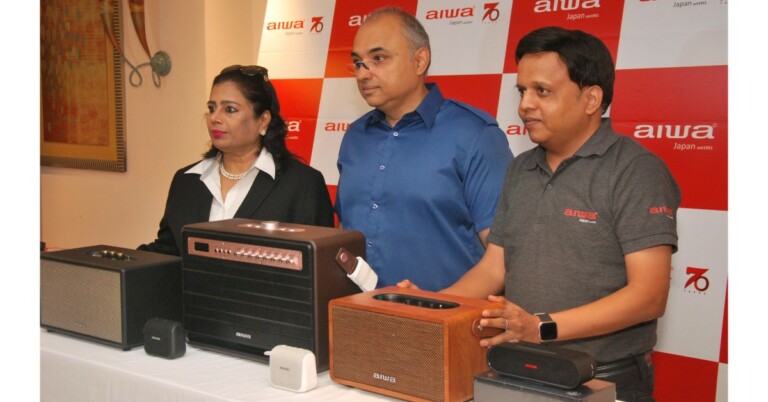
The Japanese consumer electronics brand, AIWA has introduced a new range of Hi-Fi speakers in the Indian market. The company has launched 6 models that include MI –X450 PRO ENIGMA, MI –X 150 Retro Plus X, SB-X350A, SB-X350J and SB-X30. All the models are portable and come with high power rechargeable batteries and can be used both at home and outdoors.
AIWA Hi-Fi speakers Pricing and Availability
The price of the MI –X450 PRO ENIGMA and MI –X 150 Retro Plus X have been set at Rs 59,990 and Rs 24,990 respectively. Whereas SB-X350A, SB-X350J and SB-X30 are priced at INR 19,990/- INR 17,990/- and INR 2,799/- respectively. The new range of hi-fi speakers are now up for sale and can be purchased via Reliance Digital Stores, Amazon and key retail partners across India.
MI –X450 PRO ENIGMA and MI –X 150 Retro Plus X specifications
MI –X450 PRO ENIGMA by AIWA features a triple-driver set-up and the speakers support a frequency response of 50 Hz to 15 kHz. The device includes Bluetooth version 5.0 and a built-in Lithium-ion battery. The AIWA speakers have a custom engineered audio limiter which helps in delivering distortion-free sound at the maximum volume. In addition to this, the audio device is offered with two wireless mics for the sing-along. There is a separate Echo/Bass/Treble/volume controls for mic output, Furthermore, it has a mic priority function along with a recording facility to record while singing on a karaoke track. MIX-X450On the other hand, MI-X 150 Retro Plus X includes high-efficiency amplifiers – class H & AB and Dual-link Technology that significantly improve the quality of audio.
SB-X350A, SB-X350J and SB-X30 specifications
SB-X 350A speaker comes equipped with two opposite-facing bass radiators that deliver 40 watts of power. The hi-fi speakers include Type-C charging and have a USB –IN port function along with an AUX-IN feature. Both SB-X350A and SB-X350J have TWS Multi-Link Technology that provides synced audio playback from multiple speakers for a true surround sound experience. SB-X350JThe SB-X350J is a compact desk speaker that is powered by Qualcomm aptX HD (high-resolution audio) supporting 24-bit music quality. There is Bluetooth 5.0 for connections. Moreover, the AIWA speaker has two passive bass radiators (front+ back facing) for even distribution of sound. In addition to this, the SB-X350J equips two custom-designed 40 mm, active audio drivers. There is a Type – C charging point that enables 3 hours of charging time and 5 hours of playback time. There is an LED battery display, a control panel and a 3.5mm AUX-IN as well.SB-X30SB-X30 on the other hand is also a lightweight speaker that comes with a built-in mic for phone calls hands-free function.
For the latest gadget and tech news, and gadget reviews, follow us on Twitter, Facebook and Instagram. For newest tech & gadget videos subscribe to our YouTube Channel. You can also stay up to date using the Gadget Bridge Android App. You can find the latest car and bike news here.
Amazon hosts a Quiz session for its customers daily. Its app platform brings a quiz on a daily basis, which begins at 12 AM and ends at 11:59 PM daily. The participants stand a chance to win cash prizes on a daily basis. Today’s 6 October 2021 Amazon Quiz will let you win Rs 15,000 Amazon Pay Balance.By participating in the Amazon Quiz the participants can win Amazon Pay Balance ranging from Rs 5,000 to Rs 50,000 every day while sitting at home. To win the participants must answer five questions correctly that are based on current events and general knowledge. One wrong answer can eliminate you from the quiz. The results will be announced at the end of the month. Today’s question will let you win Rs 15,000 Amazon Pay Balance. Check below for today Amazon quiz answers.
6 October 2021 Amazon Quiz Answers
Question 1: Who won the rain hit Belgian F1 grand prix, as half points were awarded for only the 6th time in F1 history?
Answer: Max Verstappen
Question 2: In the 2021 movie Haseen Dilruba who plays the lead role of Rani?
Answer: Taapsee Pannu
Question 3: On August 29, which company launched its 21st rocket of the year sending the Dragon Cargo capsule to the International Space Station?
HP on Tuesday introduced a new line-up of laptops in the Indian market. The laptops come with the new OS Windows 11 pre-installed. The HP Windows 11 ready laptops include HP ENVY x360 13, Pavilion Gaming 15, All-in-One PC and Pavilion 14 and Pavilion 15. Below are all the details of the latest devices with their pricing.Nitish Singal, Head, Personal systems (Consumer), HP India said, “At HP our goal is to empower people with the latest products to deliver seamless experiences. PC is essential, and our devices are designed for people who learn, play and work from home, at the office and on the go. With pre-installed Windows 11 devices, we’ve taken another step toward our goal of providing amazing PC experiences that enable people to learn, create, and collaborate in different ways.”HP ENVY x360 13The first on the list is HP ENVY x360 13 with pre-installed Windows 11. The device is suited for creators and it is being offered in three colour options of Pale Gold, Silver and Nightfall Black. The Pale Gold and Silver devices are powered by Intel 11th Gen i7 processors. Whereas the Nightfall Black includes AMD Ryzen 5 processor under its hood. According to the company with the new OS, the creators will have a simple, powerful UX to improve their productivity and focus on creativity.In terms of pricing the Pale Gold and Silver colour option will be available at Rs 109,999 while the Nightfall Black will come with a starting price of Rs 84,999.
The next one is the HP Pavilion Gaming 15. As the name suggests it is a dedicated gaming laptop that will be provided with Intel 11th Gen i7 and i5 processors to choose from. The machine comes equipped with a dual-fan system for improved thermal cooling. As it’s a Windows 11 ready laptop it will offer access to the apps and multitask with ease using tools like Snap Layouts, Desktops and a new more intuitive redocking experience.
The one with an Intel Gen i7 processor will cost you Rs 104,999 and the Intel Gen i5 will come with a starting price of Rs 78,167.The HP all in one PC features a 22-inch AIO with a slim, three-sided borderless display. The device is powered by AMD Ryzen 3 processor. With Windows 11 the users can access Snap Layouts, view multiple documents side by side or quickly move a window to a specific region of the screen. The PC will be available at a starting price of Rs 39,999.Lastly, the HP Pavilion portfolio comprises Pavilion 14 and 15. The Windows 11 laptops are powered by Intel 11th Gen i5 processor. The lineup’s price will begin at Rs 68,999 in India.
For the latest gadget and tech news, and gadget reviews, follow us on Twitter, Facebook and Instagram. For newest tech & gadget videos subscribe to our YouTube Channel. You can also stay up to date using the Gadget Bridge Android App. You can find the latest car and bike news here.
Acer has officially announced the launch of a new range of Windows 11 laptops in the Indian market. The new lineup consists of a total of 6 devices Swift X, Swift 3, Aspire 5, Aspire 3, Spin 3 and Spin 5. All the Acer Windows 11 ready laptops also come preloaded with Office 2021. In Office 2021, you’ll find new inking tools, data types, functions, translation and editing tools, motion graphics, ease-of-use features, and so much more.
Acer Swift X laptop
The Acer Swift X (SFX14-41G) model features a 14-inch Full HD display. The screen offers 100% sRGB colour gamut support and 300 nits of peak brightness. The device is powered by an AMD Ryzen 5 5600U Hexa-core processor with a base clock speed of 2.3Ghz and can go up to 4.2Ghz. The processor has been paired with a 4GB Nvidia RTX 3050 GPU and AMD Radeon Graphics. This Windows laptop comes with 16GB of RAM and has 512GB of SSD storage. The Acer Swift X packs a 4-cell 59Whr battery.The price of the Acer Swift X (SFX14-41G) starts at Rs 86,999.
Acer Swift 3
This model includes two models one with 11th Gen Intel Core processors and AMD Ryzen 5000U series processor. It offers up to 16 GB of RAM and a solid-state drive of up to 1 TB. Both the devices feature a 14-inch IPS screen with a resolution of 1920 x 1080 pixels. It has an 85 percent of ratio of the screen and a maximum brightness of 300 nits. Both the laptops include Intel Iris Xe graphics and Thunderbolt 4. In addition to this EVO-certified laptop gets up to 16 hours of battery back-up, and fast charging support.You can buy the Acer Swift 3 at a starting price of Rs 62,999.
Acer Aspire 5
The Aspire 5 comes in 14 inches and 15.6-inch screen sizes with a Full-HD IPS panel that comes with Acer’s Color Intelligence and eye care feature, Acer BlueLightShield and backlit keyboard. The machine is powered by the latest 11th Gen Intel Core processors with up to 1TB M.2 PCIe SSD and up to 2TB HDD. The new Aspire 5 also features dual-band Wi-Fi 61 (802.11ax) improves the average network throughput by up to 3 times and reduces latency by up to 75% compared to Wi-Fi 5 (802.11ac).Its price starts at Rs 57,999.
Acer Aspire 3
This laptop is powered by up to Intel Core i5-1135G7 with a 4.2 GHz clock speed. The device offers hybrid storage using SSD and HDD configuration which provides fast boot-up and software performance while the HDD provides ample storage for large files. In addition to this, the machine features a fingerprint reader for security that uses Windows Hello. The Acer Aspire 3 laptop also operates on Windows 11. The price of the product will start at Rs 55,999.
Acer Spin 3
Acer Spin 3 is a convertible laptop with a touchscreen 13.3-inch display. The screen offers a 16:10 aspect ratio and comes with a built-in Acer Active Stylus with Wacom AES 1.0. The PC is powered by an 11th Gen Intel Core Processor with Intel Iris Xe graphics. There are 4096 levels of pressure sensitivity for a realistic pen-on-paper feel. The Spin 3 has a battery life of up to 15 hours and charges in just 30 minutes. While the built-in charger recharges the stylus in just 15 seconds for 90 minutes.The price of the Acer Spin starts from Rs 74999Acer Spin 5The Acer Spin 5 model is also a convertible laptop that comes with Windows 11 out of the box. Under the chassis, there is an 11th Gen Intel Core i7 processor with Intel Iris Xe graphics paired with up to 1TB PCIe Gen 4 SSD, and up to 16GB LPDDR4X RAM. The device offers up to 15 hours of battery life. There are narrow bezels with a 3:2 ratio screen and an integrated electromagnetic resonance (EMR) stylus.The device will be available at a starting price of Rs 99,999Acer Windows 11 ready laptops availabilityIn terms of availability, all the latest Acer Windows 11 ready laptops will be available to purchase from the Acer e-store from October onwards. Customers can purchase from our online store by visiting the linkhttps://store.acer.com/en-in/Acer-Windows11 or our Acer exclusive stores, Flipkart, Amazon, and Croma, Reliance and Vijay Sales.
For the latest gadget and tech news, and gadget reviews, follow us on Twitter, Facebook and Instagram. For newest tech & gadget videos subscribe to our YouTube Channel. You can also stay up to date using the Gadget Bridge Android App. You can find the latest car and bike news here.
Google has provided tons of features to Safeguard your Android smartphone. Options like pin, password, pattern, face unlock and fingerprint make your device secure. What if you are unable to unlock your phone and forget your PIN? Yes, it can happen to the best of us. This is a well-detailed guide on how to unlock your Android phone after forgetting a pattern or pin. Google has been trying hard to secure its phone, and with no doubt, they are succeeding as well. It is a lot harder to open a newer Android device as compared to an old one.Read Also: How to reset your Android smartphone
Using Smart Lock
This feature works only with phones running Android 5.0 or above. If this is not the specification of your smartphone head to the next step it will surely help you. Google introduced the Smart Lock feature to keep your phone unlocked as soon as it is in the range of a known device using Bluetooth or your home Wi-Fi. The phone will automatically unlock if the feature is switched on your smartphone as soon as it connects to a trusted device without entering the passcode. Google has also introduced a feature with which your smartphone’s key will be your smart wearable making it so easy for the users.Read Also: How to factory reset your iPhone?How can you enable it? Follow the below steps.Step 1 – Open Settings. Step 2 – Head to Security. Step 3 – Select Smart Lock.
Reset your password
The feature was removed after Android 4.4, so if you are running Android 4.4 or lower, it will be very easy to unlock your Android smartphone. Just input your pattern or pin wrong 5-6 times and a prompt will appear on the screen named ”Forgot Password”. Tap on the settings, the phone will ask you to log in to your Google Account for verification. Once done, the phone will ask you to set a new password or PIN. As said above this step won’t be applicable for newer Android phones.
Unlock your Samsung smartphone using SmartThings Find
Samsung’s phone tracking service lets you remotely unlock your phone. If you forgot your phone passcode, all you need to do is log into the SmartThings Find portal using your Samsung ID. You will need your Samsung password for this. Once you’re in, select your smartphone from the list and hit ‘Unlock’ in the toolbar on the right.
Use Find My Device
By this method, you can surely get into your Android smartphone, but at the cost of getting your smartphone’s data. Yes, everything will be erased. Earlier, Google used to let users change pins directly from the Find My Device feature, but this method had some security flaws and thus the company removed the feature. In case you do not mind losing the data, visit https://www.google.com/android/find and log in to your respective account. Select the phone from the device list and tap on Erase.Note – To accomplish this step, the user’s phone should be connected to the internet service.
Factory reset with recovery
This step is a little tricky and should be used only if none of the options above work. You can factory reset your Android Smartphone using the ‘Recovery’ feature. To do that switch off your phone and hold the power key along with the up/down volume key(depending on the mobile you are using). Wait until you see a startup screen on your smartphone then release the button.Navigate to erase all data and factory reset options and wait for the process to complete. Please note: The same drawback comes with this step as well. All your data from your mobile phone will be deleted. If your phone is protected with Factory Reset Protection(FRP) you might need to log in again via your Google account to switch your Android phone on.
Frequently Asked Questions (FAQs)
Is it possible to unlock my Android phone without knowing its PIN?
If you hit ‘Forgot Password’ in the unlock window, your phone will ask you for your Google Account credentials, following which you will be allowed to change your password.
Can I unlock my Samsung phone without knowing the password?
Samsung’s SmartThings Find tracking portal lets you unlock your phone without a password once you have logged in using your Samsung account.
What is Smart Lock?
Smart Lock is Google’s service for Android phones. It lets you automatically unlock your device around other ‘known’ devices like your smartwatch.
Read Also:Top 5 AI Apps to Make Your Photos Sing on iPhone
Conclusion
That is all on how to unlock your Android phone after forgetting the pattern or pin. We advise you not to use these steps for any other purpose. Also, using these steps is advised for emergency purposes only.
Smartphones have changed the way we work in our day-to-day lives. With the introduction of touchscreens, using a phone has become easier as compared to the traditional physical keyboard. Despite being a boon, there is some trouble faced at times as well. This can be solved if you disable the touch screen on your smartphone. Some of the issues include being prone to accidental taps. This is especially problematic if your smartphone is in your pocket or purse. However, to avoid these accidents you can temporarily disable the touch screen of your iPhone or Android smartphone. Here are some ways how you can disable the touchscreen of your mobile.Read Also:Top 3 ways to add a Google Map to your website
Disable Touch Screen On Android
Screen pinning
The first method is using the screen pinning option. It is a feature which many people either have not heard of or don’t know how it works. It was introduced in Android phones after the update of Android 5.0. Follow these steps to use this feature:Step 1: Go to Settings.Step 2: Tap on Security.Step 3: Select Screen pinning.Step 4: Once the feature is turned on, toggle the Recent Apps gesture/button. You will see a pin symbol or long-press a specific application to find the pinning option.Read Also: Top Google Chrome extensions you should install today.
Use Pocket Mode
Companies nowadays have a built-in pocket mode feature that disables the phone’s screen when the light sensor of the phone gets covered. It is a handy feature, especially on the go. Head to settings and search for pocket mode(or similar, depending on your device). Once you find it, turn on its toggle switch.
Screen lock
One of the most underrated features to disable your screen. All you have to do is head to Settings>Security and enable the lock. One can choose between keeping a swipe lock or a PIN/password. Set the inactivity lock timer accordingly after doing the above. Once the phone is locked, it will require it to be unlocked before the user can work on it. So, the screen will stay locked till you put in your passcode.
Use a third-party app (Touch Protector)
If there is no pocket mode on your smartphone and the above steps are not working out for you. Try Touch Protector from Google Playstore. This app works somewhere between screen pinning and pocket mode. It will disable the screen until you want to work again. It also has a smart detection mode to enable the touch screen while receiving incoming calls. The best part is the application is completely free.Download from here
Use the Disable Touch Screen app by Firefly-Team
The Disable Touch Screen app by Firefly-Team can be downloaded for free from the Google Play Store. This app blocks accidental touches, so it doesn’t hinder your movie-watching experience. It works seamlessly with OTT apps like Netflix, Hotstar, Sony Liv, Voot, and more. Once you install the app, hit Start and press the lock button on the page that you want to lock.
Download from here
Disable Touch Screen On iPhone
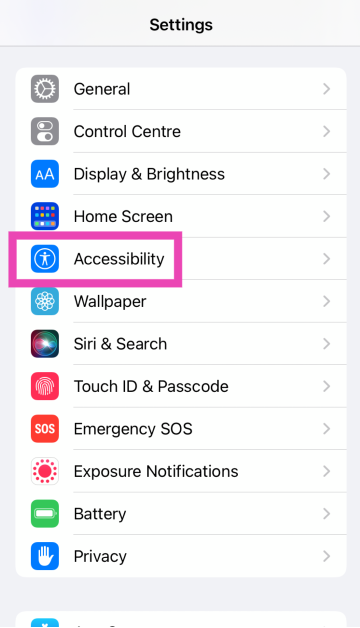
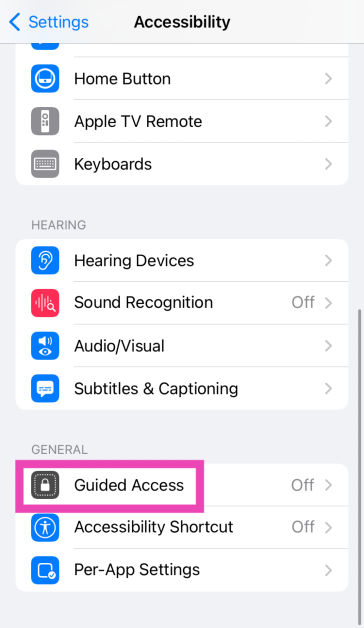
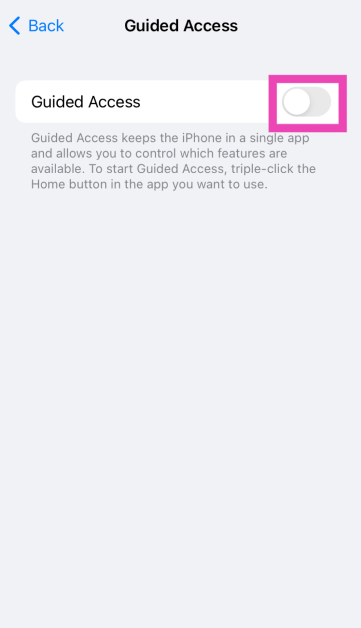
For iPhones, there is a built-in function to temporarily disable the touch screen. The feature is called Guided Access. Using this feature users can disable specific areas of the iPhone’s screen and lock the buttons as well. Step 1: Go to Settings.Step 2: Tap on Accessibility.Step 3: Scroll down and select Guided Access.Step 4: Turn on the toggle switch for Guided Access.Step 5: Once the feature is switched on, open the app that you want to lock. On an iPhone X or later device, triple-click the side button. On an iPhone 8 or earlier, triple-click the Home button. Select the part of the screen you want to disable. Tap the Guided Access option, then tap Start.
Frequently Asked Questions (FAQs)
Is it possible to disable the touch screen of my Android phone?
You can disable the touch screen on an Android phone by pinning any app to the home screen. This will lock the app and render all touch gestures useless. You can turn on app pinning by going to Settings>Security>Screen pinning.
How do I reduce accidental touches while watching movies on apps like Netflix and Prime Video?
Popular OTT platforms like Netflix, Prime Video, and Hotstar have a screen lock option for their smartphone apps. If an app lacks that feature, use a third-party app like Touch Protector.
How do I disable the touch screen on an iPhone?
Go to Settings>Accessibility>Guided Access and turn on its toggle switch. Triple-click the side button or the home button to turn it on for a particular app.
Read Also: You should definitely POCKET this App [Review]
Conclusion
This is how you can disable the touch screens on Android or iPhone mobile. These simple steps will come in handy and will avoid unnecessary screen taps on your smartphone. If you know of any other method to disable the touch screen on your iPhone or Android phone, do let us know in the comments!


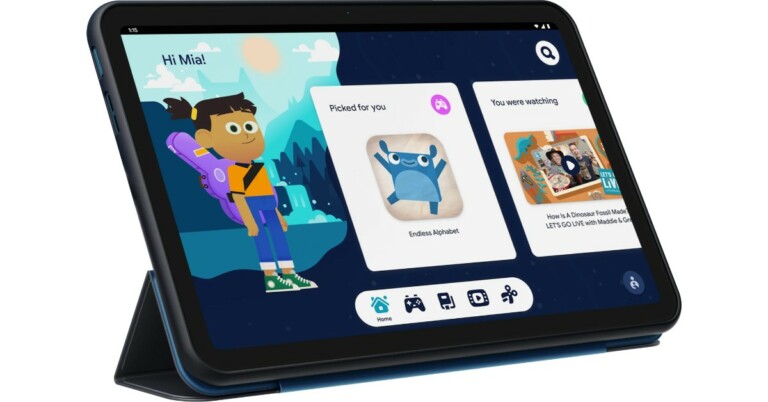
 In terms of availability, the Nokia Tablet will be available in the UK and select markets from today onwards. As far as the Indian availability is concerned that is yet to be revealed by the company but the company did confirm that India is also on its list. Whereas in the US its price starts at $249,99 and will be available from November 17.










 Step 2 –
 Step 3 –
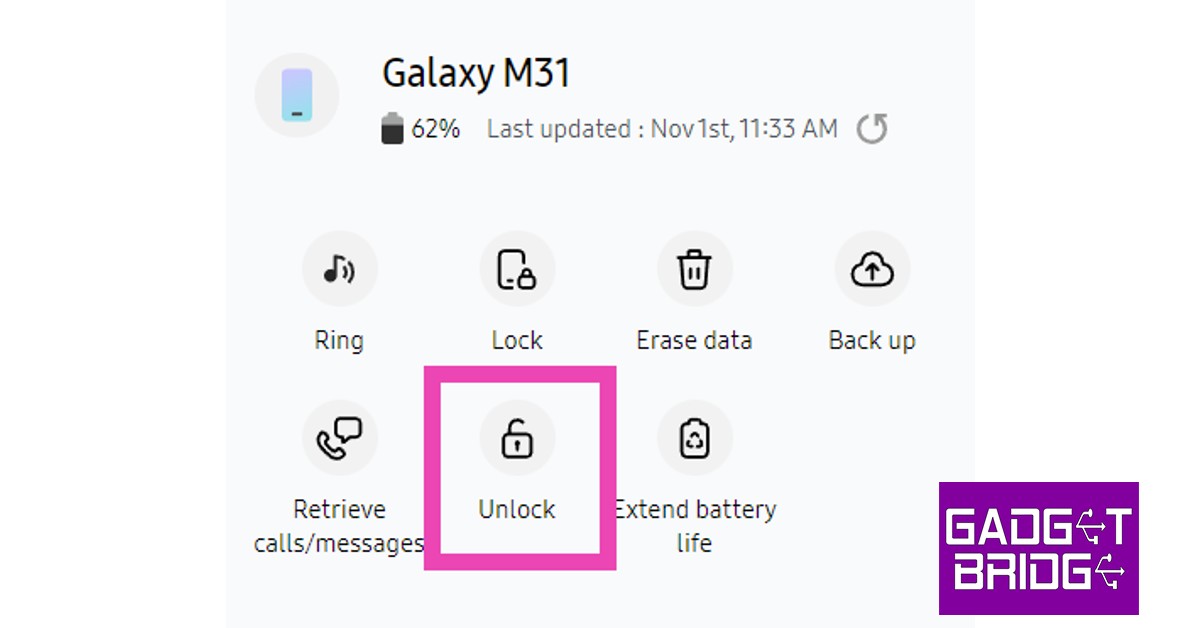 Samsung’s phone tracking service lets you remotely unlock your phone. If you forgot your phone passcode, all you need to do is log into the SmartThings Find portal using your Samsung ID. You will need your Samsung password for this. Once you’re in, select your smartphone from the list and hit ‘Unlock’ in the toolbar on the right.



 Read Also:

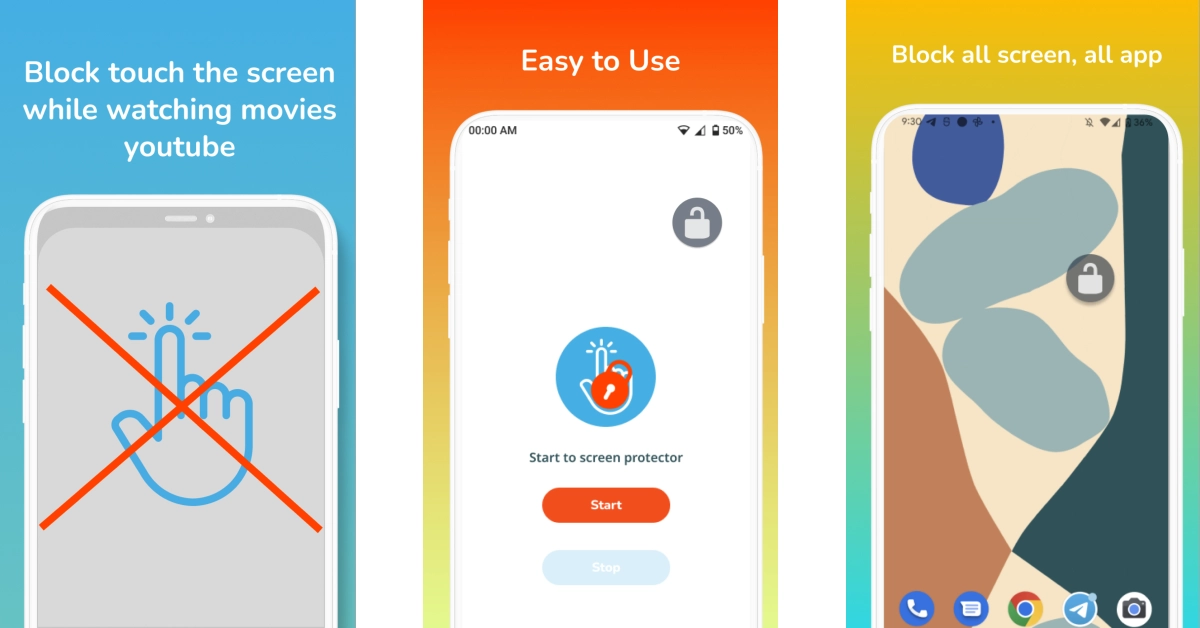 The Disable Touch Screen app by Firefly-Team can be downloaded for free from the Google Play Store. This app blocks accidental touches, so it doesn’t hinder your movie-watching experience. It works seamlessly with OTT apps like Netflix, Hotstar, Sony Liv, Voot, and more. Once you install the app, hit Start and press the lock button on the page that you want to lock.