Motorola is going to launch two new G-Series phones today in India. The devices are going to launch through Flipkart as the company has already created a dedicated microsite for the two devices. Moto G60 and Moto G40 Fusion are confirmed to be powered by the Qualcomm Snapdragon 732G chipset and will run Android 11 out of the box. The devices will launch through the e-commerce websites at 12 noon. Both the phones have been listed on Flipkart to tease their availability.Through the dedicated microsite the company has revealed the key highlights of the upcoming smartphone, which includes a triple rear camera setup, however, the primary sensors on both phones are different. The former will come with a 108-megapixel primary sensor while the latter one will include a 64-megapixel main sensor. The other two sensors on the G60 include an 8-megapixel ultra-wide lens and an 8-megapixel macro lens. Upfront it will boast a 32-megapixel selfie sensor. The listing reveals that the volume rocker, Google Assistant and the power key is given on the left frame of the smartphones while the sim card tray is located on the right side of the frame.Both the Motorola phones are said to run Android 11 out of the box as per Geekbench listing. The listing further reveals that the Moto G60 will come with 6GB of RAM while the Moto G40 Fusion indicates 4GB of RAM. As for the benchmarking results, the G40 has achieved a single-core score of 515 and a multi-core score of 1,375. Whereas Moto G40 Fusion has received 519 single-core scores and 1,425 multi-core scores. Rumours suggest that Moto G60 is expected to come with a 6.78-inch full-HD+ display with a 120Hz refresh rate. Under the hood, it is likely to include a Qualcomm Snapdragon 732G SoC with 6GB RAM, 128GB storage options. There is going to be a triple rear camera set up with a 108-megapixel Samsung HM2 sensor, 16-megapixel wide-angle lens, and 2-megapixel tertiary lens. For selfies, it is expected to include a 32-megapixel front-facing camera.
For the latest gadget and tech news, and gadget reviews, follow us on Twitter, Facebook and Instagram. For newest tech & gadget videos subscribe to our YouTube Channel. You can also stay up to date using the Gadget Bridge Android App.
The e-commerce website Flipkart is hosting Daily Trivia Quiz. Every day it brings a bunch of new questions for its users. By answering them correctly you can win exciting prizes. The questionnaire is based on questions related to general knowledge. Also, the users can win free vouchers and super coins, among other offers via the daily quiz. April 20 Flipkart Daily Trivia Quiz Answers has already gone live on its platform.
The participant should be at least 18 years old and should have a valid login ID. The Quiz is available on the mobile platform and not the web version. E-commerce conducts the quiz on daily basis and goes live at 12:00 AM IST and runs till 11:59 PM IST. The winners are announced within 15 days from the date of participation that can be viewed under the Gems/Rewards section in the app.
How to participate in the Flipkart Daily Trivia Quiz
To participate download the Flipkart app on your phone. Then open the Flipkart app then head to Game Zone. Now click on the Daily Trivia Banner or search for Daily Trivia. Enter the game and answer all 5 questions with correct answers.
April 20 Flipkart Daily Trivia Quiz Answers
Question 1: Which of these teams is captained by an Australian left-handed batsman?
Answer: Sunrisers Hyderabad
Question 2: To which country does this Sunrisers Hyderabad player belong?
Answer: Afghanistan
Question 3: Which was the first team to score over 200 runs in an innings in IPL 2021?
Answer: Punjab Kings
Question 4: Which Mumbai Indians player was adjudged the Man of the Match in the IPL 2020 Finals?
Answer: Trent Boult
Question 5: Who is the only player to take a hat-trick in his IPL debut?
Answer: Andrew Tye
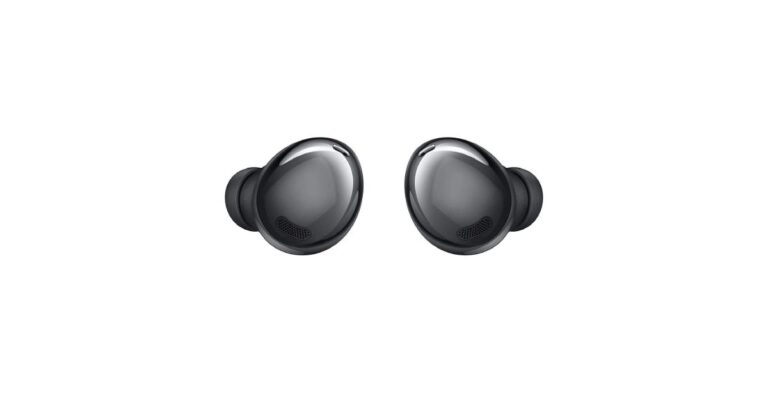
Amazon Quiz for April 20 has gone live. Daily the e-commerce platform brings a new quiz that gives a chance to its millions of users to win exciting prizes being offered by the company. The quiz contains 5 general questions that you have to answer correctly. Today you can stand a chance to win a Samsung Galaxy Ear Buds Pro.
Daily the e-commerce platform brings a fresh questionnaire to which the contestants have to answer correctly to enter into a lucky draw. The quiz can be played daily from 12 AM to 11:59 PM. The quiz contains a total of five questions, all the questions are based on general knowledge and current affairs. Only one person will be declared a winner. Amazon will announce the result of the quiz at the end of the month. Only app users are eligible to participate in the Quiz. If you don’t know the answers, every day we update all the Amazon Quiz questions with their correct answers on our website. Check out today’s answers for the Amazon Quiz to win Samsung Galaxy Ear Buds Pro.
April 20 Amazon Quiz Answers
Question 1: Proficient in guerrilla tactics, the COBRA or Commando Battalion for Resolute Action is a special operation unit of which force?
The answer is- CRPF
Question 2: The Maitri Setu, also called The Gateway of Northeast, is built over the Feni River to link which state with Bangladesh?
The answer is- Tripura
Question 3: “CROSSROAD” which recently sold for $6.6 million, is the most expensive digital art of what kind?
The answer is- Crypto Art
Question 4: Which one of these is not a component of this activity?
The answer is- Palette
Question 5: Which of these actors played this character in a movie that also starred Nicole Kidman?
The answer is- Val Kilmer
For the latest gadget and tech news, and gadget reviews, follow us on Twitter, Facebook and Instagram. For newest tech & gadget videos subscribe to our YouTube Channel. You can also stay up to date using the Gadget Bridge Android App.
Facebook is the most widely used social media platform with around 2.6 billion monthly active users globally. Owing to its handy features to connect and share with the people and secure platform, Facebook has emerged as the face of social media in India as well as other countries.
Who would need to change the default language on Facebook?
Facebook supports over 40 languages of the world. This enables users to get more familiarity with the platform. The default language is set as er your device’s language. For instance, if the default language of your device is American English, the same will be replicated to Facebook’s app or the website. However, you can go to the language settings to change it as per your preferences.
How to change the default language on Facebook on PC?
To change the default language on Facebook on PC, follow these steps.
Fitbit is a gadget that helps you track your fitness by providing stats about your physical activity and sleep cycle. There may be several reasons to reset a Fitbit smartwatch. You may be facing issues related to compatibility or syncing or you may just want to get a fresh user experience. The method to reset differs from one Fitbit model to another.
When you reset your Fitbit to factory settings, all stores data is deleted. This includes your settings related to notifications and alarms. Here are the methods to reset different models of Fitbit to factory settings.
How to reset a Fitbit Flex or Fitbit Flex 2?
To reset a Fitbit Flex or Fitbit Flex 2, follow these steps:
Remove the pebble from your Fitbit Flex and insert it into the charging cable.
Now connect the charger to the USB port of your PC.
Use a paper clip to press the small hole in the pebble unless the reset process begins.
The Fitbit Flex indicate the reset process by a glowing light.
How to reset Fitbit Charge or Charge HR?
To reset a Fitbit Charge or Charge HR, follow these steps.
Connect the Fitbit to the USB and press the button for about two seconds.
Without releasing the button, remove the USB cable from the Fitbit.
Keep the button pressed for about 6 seconds and release it.
Press the button again and hold it.
Release the button once you see ALT with a screen flash.
Press the button and release it once you feel the vibration.
Press the button and release it once you see the ERROR message.
Press the button and release it once you see the ERASE message.
The Fitbit will be rest to the factory settings and will automatically turn off.
How to reset Fitbit Charge?
How to reset a Fitbit Blaze or Fitbit Surge?
To Reset a Fitbit Blaze or Fitbit Surge, follow these steps.
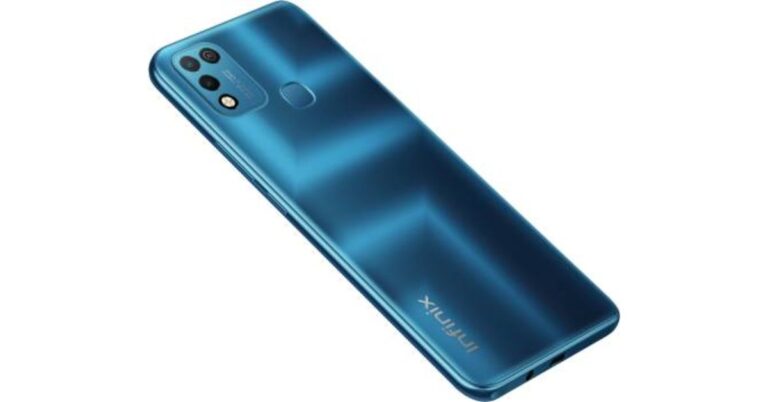
Transsion Holdings group has announced the launch of the Infinix Hot 10 Play smartphone in India. This phone is follow up of Infinix Hot 10 that was launched in India in October last year. It is powered by MediaTek Helio G35 SoC and packs a massive 6,000mAh battery. However, the phone comes with a dual rear camera set up as it a budget smartphone. Read on to know its specs and pricing.Infinix Hot 10 Play pricing and availabilityInfinix Hot 10 Play has been launched in India in a single 4GB RAM with a 64GB storage option. The device in India is priced at Rs 8,499 and will be available for purchase via the e-commerce website Flipkart. The sale is scheduled for April 26 from 12 noon onwards. The company is offering the phone in distinct shaded of Morandi Green, 7-Degree Purple, Aegean Blue, and Obsidian Black.The launch offers on the purchase of smartphone includes, benefits worth Rs 4,000 to Jio subscribers on prepaid recharge of Rs 349. This offer will include about 40 cashback vouchers of Rs 50 along with brand coupons worth Rs 2,000.Infinix Hot 10 Play tech specs
Infinix Hot 10 Play features a 6.82-inch HD+ TFT IPS display with a 90.66 percent screen-to-body ratio, 20.5:9 aspect ratio and 440 nits of peak brightness. This waterdrop-style notch display offers a contrast ratio of 1500:1 and is protected with NEG Dinorex T2X-1 glass layering. The phone runs Android 10 and is powered by MediaTek Helio G35 SoC. The internal storage of the device can be expanded up to 256GB via a microSD card.
In terms of cameras, there is a dual-camera on the back of Infinix Hot 10 Play which includes a 13-megapixel main sensor with f/1.8 aperture in addition to an AI lens. There is a quad-LED flash on the phone for better night time images. Upfront there is an 8-megapixel selfie camera with f/2.0 aperture along with an LED flash. The rear camera offers modes such as slow-motion video, and document mode. On the other hand, the selfie camera comes with various photo modes like AI Portrait, 3D Face Beauty mode, wide selfie mode and more.On the connectivity front, Infinix Hot 10 Play comes with GPS, Wi-Fi 802.11 ac, Bluetooth, Micro USB port, 3.5mm audio jack, and FM Radio. In addition to this, there is a rear-mounted fingerprint sensor. The mobile phone is backed by a massive 6,000mAh battery with comes with Power Marathon tech that is said to boost the battery life by 25 percent. As per the company it offers up to 55 days of standby time and 23 hours of video playback, 44 hours of music and more.
For the latest gadget and tech news, and gadget reviews, follow us on Twitter, Facebook and Instagram. For newest tech & gadget videos subscribe to our YouTube Channel. You can also stay up to date using the Gadget Bridge Android App.
Apple’s Worldwide Developers Conference (WWDC) 2021 is all set to take place on June 7, 2021, where the company will release exciting tools to enable them to create innovative apps. The event will be followed by Apple’s annual iPhone event that is expected to bring the most-awaited iPhone 13.
In 2021, the iPhone launch event was deferred due to the COVI9-19 outbreak. This year’s event is expected to take place in September 2021. The event will be all-virtual and will introduce the new series of the iPhone consisting of the iPhone 13, the iPhone 13 Pro, the iPhone 13 Pro Max and the iPhone 13 mini. There have been several rumours regarding the iPhone 13 mini after the images were allegedly leaked on the internet.
What are the expected features of the upcoming iPhone 13 mini?
The rumours indicate that the iPhone 13 mini will come with slight improvements in the design as compared to its predecessor. In terms of performance, the smartphone will certainly exhibit next-gen hardware and a next-gen iOS version. The top 5 anticipated features of the iPhone 13 mini are as follows.
Design
The images of the upcoming iPhone 13 were allegedly leaked on the internet. The smartphone may come with a new look at the rear as compared to the current iPhone 12 mini. The rear camera setup is expected to be square in shape te flash located at a higher position as compared to its predecessor. Considering the leaked image that depicts a smartphone in red colour, the iPhone 13 is expected to arrive in stylish colours.
Display
The display size of the iPhone 13 mini is expected to be the same as that of the iPhone 12 mini. Although the screen will be only 5.4-inch wide it may offer a higher refresh rate. This will make it a competitive smartphone for gaming. The company may also include a Face ID and an embedded TouchID.
Performance
The iPhone 13 may be powered by the powerful next-gen A15 Bionic processor. Thus, the smartphone will surely deliver higher performance as compared to the current iPhone 12. The device will run the iOS 15 that will be revealed at Apple’s Worldwide Developers Conference (WWDC) 2021 event.
Camera
The iPhone 13 may come with a dual-camera setup as found in iPhone 12. On the other hand, some rumours suggest a triple camera setup as seen in the iPhone 11. However, the leaked images support the former. The two cameras may reside at the diagonally opposite ends of the square located at the rear. Each lens is expected to offer a resolution of 12MP. When compared to the iPhone 12 mini, the iPhone 13, may bear larger lenses.
What are the expected features of the upcoming iPhone 13 mini?
Notch
Notch has always been a unique characteristic of an iPhone. The leaked images suggest that the company shall not do away with notch even in the upcoming iPhone 13. However, the thickness of the same will be reduced. This will make the screen a more prominent look.
For the latest gadget and tech news, and gadget reviews, follow us on Twitter, Facebook and Instagram. For newest tech & gadget videos subscribe to our YouTube Channel. You can also stay up to date with the Gadget Bridge Android App.
Apple Watch is a useful gadget that helps you plan and track different day-to-day activities. Besides tracking time, you can navigate routes, plan your schedule, monitor your fitness, set notifications. However, there are certain lesser-known capabilities of an Apple Watch that significantly make your task easy. Here are the top five things that you might not know your Apple Watch can do.
1) Control your Apple TV
Your Apple Watch enables you to control your Apple TV. Thus, you don’t have to worry if you lose your remote or it stops working. Using your Apple Watch, you can navigate through channels, change the volume, and adjust other settings. You can do all this through the Apple TV application on your watch. However, you need to sign in to your TV using your Apple account.
2) Unlock your Mac
The unique feature about Apple produces is the high level of integration that enables you to unlock one device using the other. You don’t need to type the password every time you wish to unlock your Mac. You can do conveniently using your Apple Watch. On your Mac, go to System Preferences > Security & Privacy settings. Select Use your Apple Watch to unlock apps and your Mac.
3) Use your Apple Watch as an intercom
Intercom helps you connect the Apple devices of your family members. This helps you conveniently and effectively share data with each other. You can enable the Intercom feature on a variety of devices like the Apple Watch, iPhone, or iPad. You just need to go to the Home app and tap the house button located on the top-left. Tap Home Settings a then tap Intercom. Now, you can use Siri on your Apple Watch to intercom messages.
What are the hidden features of the Apple Watch?
4) Use your Apple Watch as a viewfinder
iPhone does not offer a handy viewfinder or a screen at the rear for recording vlogs. However, you can use your Apple Watch as a viewfinder. This feature allows you to take group photos or vlogging without losing focus while zooming. Just launch the camera app on your iPhone. Start the Remote app on your Apple Watch. You will see the image captured by your iPhone on the display of your watch. Now you can rotate your iPhone at different angles without going out of focus.
5) Take a screenshot
Apple Watch allows you to take screenshots so that you can keep your fitness accomplishments as a record. It also allows you to save your memos and calculations to access them later. To activate the screenshots feature, launch the Watch app on your iPhone. Go to My Watch and select General. Scroll down and toggle the Enable Screenshots on. Once you enable the screenshots, you can capture your screen by pressing the crown and the side button simultaneously.
For the latest gadget and tech news, and gadget reviews, follow us on Twitter, Facebook and Instagram. For newest tech & gadget videos subscribe to our YouTube Channel. You can also stay up to date with the Gadget Bridge Android App.
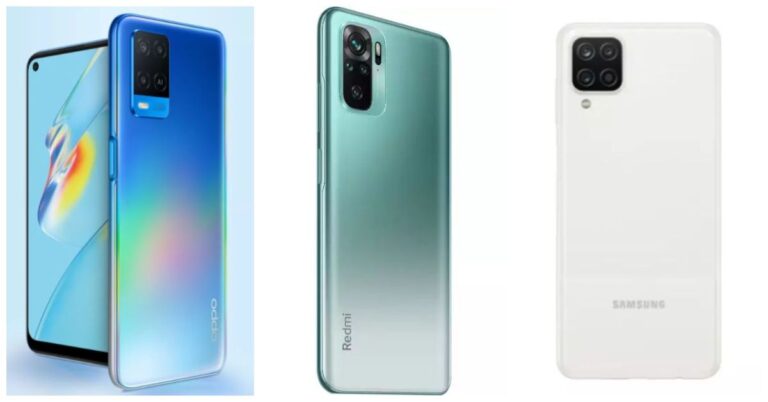
Oppo today announced the launch of the Oppo A54 smartphone in India. The newly launched phone comes with a 5,000mAh battery and fast charging support. It is powered by MediaTek Helio P35 SoC and features a triple rear camera setup. The device has debuted in the budget segment to take on Xiaomi and Samsung devices. So considering the price we have put together the Oppo A54 up against Redmi Note 10 and Samsung Galaxy A12 to help you decide, which one offers all the features at its best price.
Oppo A54:13-megapixel primary sensor. In addition to this, it also includes a 2-megapixel macro lens and another 2-megapixel depth sensor for portraits.Redmi Note 10: 48-megapixel primary sensor. In addition, an 8-megapixel ultra-wide-angle lens, a 2-megapixel macro lens and a 2-megapixel depth sensorSamsung Galaxy A12: 48-megapixel primary sensor, 5-megapixel ultra-wide-angle lens, 2-megapixel macro lens and lastly a 2-megapixel depth sensor
Oppo A54:4GB RAM with 64GB storage/4GB RAM with 128GB storage/6GB RAM with 128GB storageRedmi Note 10:4GB RAM with 64GB/ 6GB RAM with 128GB storageSamsung Galaxy A12:4GB RAM with 64GB storage/ 4GB RAM with 128GB storage
Both Oppo and Samsung devices are quite similar in specs. But if we consider the price, Xiaomi’s Redmi Note 10 comes loaded with better features at comparatively lower pricing. It features a Super AMOLED display, 5,000mAh battery, a 48-megapixel primary sensor and more. So we would suggest you to go for Xiaomi as it provides powerful features and is less expensive too.
For the latest gadget and tech news, and gadget reviews, follow us on Twitter, Facebook and Instagram. For newest tech & gadget videos subscribe to our YouTube Channel. You can also stay up to date using the Gadget Bridge Android App
Facebook Messenger is a messaging app and platform developed by the tech giant Facebook. The company is constantly working towards the integrations of its different platforms. Recently, it revealed a new feature that will enable users to watch Reels within WhatsApp. Now, the company has introduced a new feature to enhance communication among Messenger users and WhatsApp users.
What is the new level of integration to be achieved by Facebook and WhatsApp?
The new feature in Facebook messenger will bring more versatility in communication. The users will be able to chat with their WhatsApp contacts within the messenger application. The leaks regarding the feature indicate that the user interface of the Messenger app will remain the same. However, the chat bubble of WhatsApp will be seen that will give it a peculiar appearance.
The new feature will fill the gap of communication among people using Facebook’s different chat applications. As a result, a Messenger user who does not use WhatsApp will still be able to communicate with a WhatsApp user.
When will the new feature of Facebook’s Messenger arrive?
The new integration feature of the Messenger application is in the development phase. As a result, there is no official information regarding the release of the functionality in the app. The company is currently asking the users to accept the updated data privacy policy so that continue to use the platform after May 15, 2021. As a result, we may anticipate the new feature in the coming months.
What are the features that WhatsApp is working on to enhance expression?
Amid the COVID-19 pandemic, WhatsApp has served as a crucial medium to encourage people to get vaccinated. People who have got vaccinated love to share their experiences with others on WhatsApp. To make this task easier and more effective, WhatsApp has released the new “Vaccines for All” Sticker pack.
WhatsApp has been working on several innovative features to enable users to express themselves more effectively. These are as follows.
What are the features that WhatsApp is working on to enhance expression?
Instagram Reels
Facebook has been constantly working to integrate its different services for a cohesive user experience. As a result, the company reportedly wants to integrate Instagram Reels with WhatsApp. The new feature will enable users to watch Reels within WhatsApp.
Multi-device support
This feature will enable users to log into their account on different devices simultaneously. Currently, WhatsApp logs you out of the first device as soon as you log into your account on a second device except when you use the Desktop app. Thus, the new feature will extend the app’s multi-platform support facility.










 Infinix Hot 10 Play tech specs
Infinix Hot 10 Play features a 6.82-inch HD+ TFT IPS display with a 90.66 percent screen-to-body ratio, 20.5:9 aspect ratio and 440 nits of peak brightness. This waterdrop-style notch display offers a contrast ratio of 1500:1 and is protected with NEG Dinorex T2X-1 glass layering. The phone runs Android 10 and is powered by MediaTek Helio G35 SoC. The internal storage of the device can be expanded up to 256GB via a microSD card.
In terms of cameras, there is a dual-camera on the back of Infinix Hot 10 Play which includes a 13-megapixel main sensor with f/1.8 aperture in addition to an AI lens. There is a quad-LED flash on the phone for better night time images. Upfront there is an 8-megapixel selfie camera with f/2.0 aperture along with an LED flash. The rear camera offers modes such as slow-motion video, and document mode. On the other hand, the selfie camera comes with various photo modes like AI Portrait, 3D Face Beauty mode, wide selfie mode and more.
On the connectivity front, Infinix Hot 10 Play comes with GPS, Wi-Fi 802.11 ac, Bluetooth, Micro USB port, 3.5mm audio jack, and FM Radio. In addition to this, there is a rear-mounted fingerprint sensor. The mobile phone is backed by a massive 6,000mAh battery with comes with Power Marathon tech that is said to boost the battery life by 25 percent. As per the company it offers up to 55 days of standby time and 23 hours of video playback, 44 hours of music and more.
For the latest gadget and tech news, and gadget reviews, follow us on Twitter, Facebook and Instagram. For newest tech & gadget videos subscribe to our YouTube Channel. You can also stay up to date using the Gadget Bridge Android App.
Infinix Hot 10 Play tech specs
Infinix Hot 10 Play features a 6.82-inch HD+ TFT IPS display with a 90.66 percent screen-to-body ratio, 20.5:9 aspect ratio and 440 nits of peak brightness. This waterdrop-style notch display offers a contrast ratio of 1500:1 and is protected with NEG Dinorex T2X-1 glass layering. The phone runs Android 10 and is powered by MediaTek Helio G35 SoC. The internal storage of the device can be expanded up to 256GB via a microSD card.
In terms of cameras, there is a dual-camera on the back of Infinix Hot 10 Play which includes a 13-megapixel main sensor with f/1.8 aperture in addition to an AI lens. There is a quad-LED flash on the phone for better night time images. Upfront there is an 8-megapixel selfie camera with f/2.0 aperture along with an LED flash. The rear camera offers modes such as slow-motion video, and document mode. On the other hand, the selfie camera comes with various photo modes like AI Portrait, 3D Face Beauty mode, wide selfie mode and more.
On the connectivity front, Infinix Hot 10 Play comes with GPS, Wi-Fi 802.11 ac, Bluetooth, Micro USB port, 3.5mm audio jack, and FM Radio. In addition to this, there is a rear-mounted fingerprint sensor. The mobile phone is backed by a massive 6,000mAh battery with comes with Power Marathon tech that is said to boost the battery life by 25 percent. As per the company it offers up to 55 days of standby time and 23 hours of video playback, 44 hours of music and more.
For the latest gadget and tech news, and gadget reviews, follow us on Twitter, Facebook and Instagram. For newest tech & gadget videos subscribe to our YouTube Channel. You can also stay up to date using the Gadget Bridge Android App.  Infinix Hot 10 Play tech specs
Infinix Hot 10 Play features a 6.82-inch HD+ TFT IPS display with a 90.66 percent screen-to-body ratio, 20.5:9 aspect ratio and 440 nits of peak brightness. This waterdrop-style notch display offers a contrast ratio of 1500:1 and is protected with NEG Dinorex T2X-1 glass layering. The phone runs Android 10 and is powered by MediaTek Helio G35 SoC. The internal storage of the device can be expanded up to 256GB via a microSD card.
In terms of cameras, there is a dual-camera on the back of Infinix Hot 10 Play which includes a 13-megapixel main sensor with f/1.8 aperture in addition to an AI lens. There is a quad-LED flash on the phone for better night time images. Upfront there is an 8-megapixel selfie camera with f/2.0 aperture along with an LED flash. The rear camera offers modes such as slow-motion video, and document mode. On the other hand, the selfie camera comes with various photo modes like AI Portrait, 3D Face Beauty mode, wide selfie mode and more.
On the connectivity front, Infinix Hot 10 Play comes with GPS, Wi-Fi 802.11 ac, Bluetooth, Micro USB port, 3.5mm audio jack, and FM Radio. In addition to this, there is a rear-mounted fingerprint sensor. The mobile phone is backed by a massive 6,000mAh battery with comes with Power Marathon tech that is said to boost the battery life by 25 percent. As per the company it offers up to 55 days of standby time and 23 hours of video playback, 44 hours of music and more.
For the latest gadget and tech news, and gadget reviews, follow us on Twitter, Facebook and Instagram. For newest tech & gadget videos subscribe to our YouTube Channel. You can also stay up to date using the Gadget Bridge Android App.
Infinix Hot 10 Play tech specs
Infinix Hot 10 Play features a 6.82-inch HD+ TFT IPS display with a 90.66 percent screen-to-body ratio, 20.5:9 aspect ratio and 440 nits of peak brightness. This waterdrop-style notch display offers a contrast ratio of 1500:1 and is protected with NEG Dinorex T2X-1 glass layering. The phone runs Android 10 and is powered by MediaTek Helio G35 SoC. The internal storage of the device can be expanded up to 256GB via a microSD card.
In terms of cameras, there is a dual-camera on the back of Infinix Hot 10 Play which includes a 13-megapixel main sensor with f/1.8 aperture in addition to an AI lens. There is a quad-LED flash on the phone for better night time images. Upfront there is an 8-megapixel selfie camera with f/2.0 aperture along with an LED flash. The rear camera offers modes such as slow-motion video, and document mode. On the other hand, the selfie camera comes with various photo modes like AI Portrait, 3D Face Beauty mode, wide selfie mode and more.
On the connectivity front, Infinix Hot 10 Play comes with GPS, Wi-Fi 802.11 ac, Bluetooth, Micro USB port, 3.5mm audio jack, and FM Radio. In addition to this, there is a rear-mounted fingerprint sensor. The mobile phone is backed by a massive 6,000mAh battery with comes with Power Marathon tech that is said to boost the battery life by 25 percent. As per the company it offers up to 55 days of standby time and 23 hours of video playback, 44 hours of music and more.
For the latest gadget and tech news, and gadget reviews, follow us on Twitter, Facebook and Instagram. For newest tech & gadget videos subscribe to our YouTube Channel. You can also stay up to date using the Gadget Bridge Android App.