

Xiaomi TV Stick 4K is scheduled to launch in India on February 14
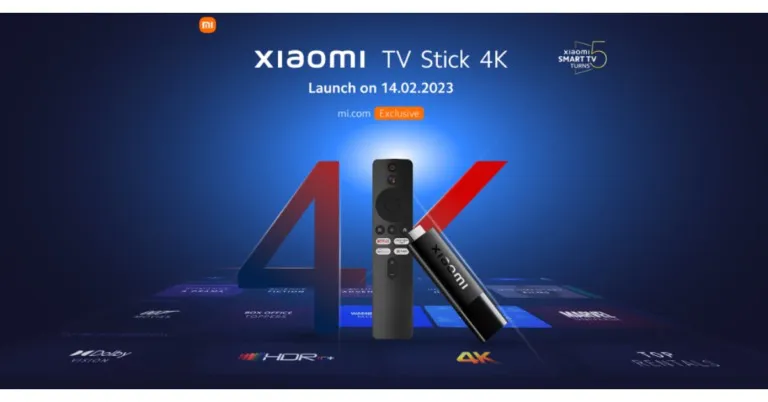
The smart home device from Xiaomi, the TV Stick 4K, will be debuting in India soon. The Chinese electronics manufacturer has confirmed its launch to take place on February 14. As the device has already been launched in another market we already know its features. So the streaming device will run on Android TV 11. Moreover, it will support Dolby Vision and will be powered by a quad-core Cortex A35 chipset. The upcoming device will succeed the existing Mi TV Stick, which was launched last year. However, 4K streaming is available with the upgraded model.
The company took to Twitter to announce that it is coming up with a new smart home device- Xiaomi TV Stick 4K in India on February 14. In December 2021, Xiaomi first made the device available.
Also Read: Xiaomi TV Stick 4K announced featuring 4K streaming, Android TV 11 and more
The Mi Voice Remote, which includes a specific Assistant button, is included with the Xiaomi TV Stick 4K. The remote includes a built-in Chromecast and shortcut buttons for every app. The streaming device supports both Dolby Atmos and Dolby Vision for better movie playback and helps in converting a regular TV to a Smart TV. The smart device comes preinstalled with YouTube, Netflix, and Amazon Prime Video.
It is powered by a quad-core Cortex-A35 processor together with a Mali-G31 MP2 GPU and 2GB of RAM. More RAM is included in the Xiaomi TV Stick 4K than the previous version but comes with the same storage capacity. The stick comes with 8GB of inbuilt storage. The system utilises Android TV 11 giving you access to more than 400,000 movies and TV shows from all of your favourite apps. Google Play offers 7000+ apps. Cast from any device, play music and games, and more.
Also Read: Sony Walkman NW-A306 launched in India
Wireless connectivity options supported by the smart home device include dual-band Wi-Fi 802.11 ac and Bluetooth v5.2. Additionally, it has a Micro-USB port for charging and an HDMI port for connecting to a television.
Because it includes Chromecast, users can cast entertainment from all of their preferred apps to a variety of gadgets, including smartphones, laptops, and tablets.
For the latest gadget and tech news, and gadget reviews, follow us on Twitter, Facebook and Instagram. For newest tech & gadget videos subscribe to our YouTube Channel. You can also stay up to date using the Gadget Bridge Android App. You can find the latest car and bike news here.
Best ways to use LiDAR Scanner on iPhone
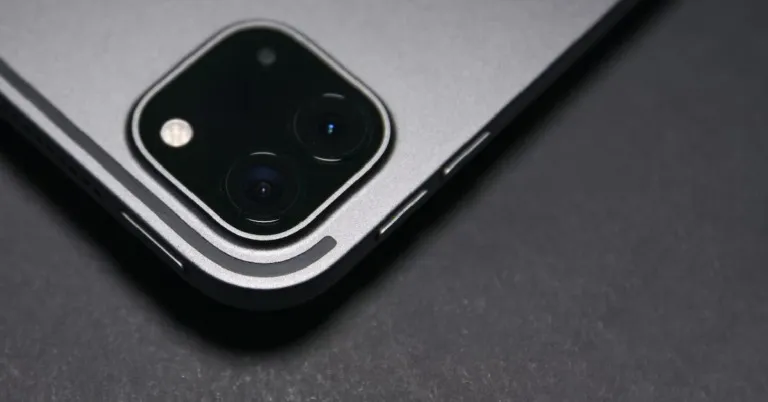
The LiDAR scanner was first introduced with the iPhone 12 and has been an exclusive feature of the Pro models ever since. LiDAR stands for Light Detection And Ranging. As you can guess already, LiDAR determines the shape, distance, and measurements of the objects in your surroundings by bouncing light signals off them and processing the results. LiDAR is quite similar to RADAR, the only difference being that it uses light signals instead of radio waves. In this article, we bring you the best ways to use the LiDAR scanner on your iPhone.
Read Also: Best places to buy a refurbished iPhone
 LiDAR records accurate measurements of the objects around you by scanning the signals that bounce off their surface and edges. While there are a ton of measuring apps for your iPhone, the ones that use LiDAR are generally much more accurate than the others. The native ‘Measure’ app works perfectly fine as well. Apart from measuring dimensions, LiDAR can also tell the distance of the object from you.
Capturing good images in low light conditions can be a real struggle. Most cameras find it hard to focus on a subject in dimly light surroundings. With LiDAR, this is not an issue. Using this technology, your iPhone can detect the distance of the subject from the lens and help the camera focus on it. Even in challenging situations, you will be able to take highly detailed images using LiDAR.
If you’re planning on carrying out a facelift for your house, you need to plan things out virtually first. With LiDAR, your iPhone is perfectly equipped to handle the task. There are tons of apps on the App Store that will help you create 3D renders of a room using LiDAR. Once you’ve got an accurate 3D representation of a room, you can use it to see how the furniture will fit into it. This will save you a lot of labour in readjusting the furniture in real-time.
Over the years, AR Gaming has become incredibly immersive. LiDAR takes the immersion to a whole new level, as it is able to gauge your surroundings better than a regular camera and can easily embed AR objects on it, making them look life-like. Several apps like Ikea and LEGO Hidden Side already use LiDAR to interact with real-world surroundings.
Using LiDAR, you can create accurate 3D models of the objects around you. The process of creating 3D scans and renders of real-life objects is called ‘photogrammetry’ and is a well-established part of movie making. Apps like Polycam can take 3D scans of objects within minutes. If you’re working on an art project, this feature can be of tremendous help.
Read Also: Portronics Hydra 10 RGB keyboard launched in India
LiDAR records accurate measurements of the objects around you by scanning the signals that bounce off their surface and edges. While there are a ton of measuring apps for your iPhone, the ones that use LiDAR are generally much more accurate than the others. The native ‘Measure’ app works perfectly fine as well. Apart from measuring dimensions, LiDAR can also tell the distance of the object from you.
Capturing good images in low light conditions can be a real struggle. Most cameras find it hard to focus on a subject in dimly light surroundings. With LiDAR, this is not an issue. Using this technology, your iPhone can detect the distance of the subject from the lens and help the camera focus on it. Even in challenging situations, you will be able to take highly detailed images using LiDAR.
If you’re planning on carrying out a facelift for your house, you need to plan things out virtually first. With LiDAR, your iPhone is perfectly equipped to handle the task. There are tons of apps on the App Store that will help you create 3D renders of a room using LiDAR. Once you’ve got an accurate 3D representation of a room, you can use it to see how the furniture will fit into it. This will save you a lot of labour in readjusting the furniture in real-time.
Over the years, AR Gaming has become incredibly immersive. LiDAR takes the immersion to a whole new level, as it is able to gauge your surroundings better than a regular camera and can easily embed AR objects on it, making them look life-like. Several apps like Ikea and LEGO Hidden Side already use LiDAR to interact with real-world surroundings.
Using LiDAR, you can create accurate 3D models of the objects around you. The process of creating 3D scans and renders of real-life objects is called ‘photogrammetry’ and is a well-established part of movie making. Apps like Polycam can take 3D scans of objects within minutes. If you’re working on an art project, this feature can be of tremendous help.
Read Also: Portronics Hydra 10 RGB keyboard launched in India
Take accurate measurements
 LiDAR records accurate measurements of the objects around you by scanning the signals that bounce off their surface and edges. While there are a ton of measuring apps for your iPhone, the ones that use LiDAR are generally much more accurate than the others. The native ‘Measure’ app works perfectly fine as well. Apart from measuring dimensions, LiDAR can also tell the distance of the object from you.
Low light photography
 Capturing good images in low light conditions can be a real struggle. Most cameras find it hard to focus on a subject in dimly light surroundings. With LiDAR, this is not an issue. Using this technology, your iPhone can detect the distance of the subject from the lens and help the camera focus on it. Even in challenging situations, you will be able to take highly detailed images using LiDAR.
Redecorate your house
 If you’re planning on carrying out a facelift for your house, you need to plan things out virtually first. With LiDAR, your iPhone is perfectly equipped to handle the task. There are tons of apps on the App Store that will help you create 3D renders of a room using LiDAR. Once you’ve got an accurate 3D representation of a room, you can use it to see how the furniture will fit into it. This will save you a lot of labour in readjusting the furniture in real-time.
AR Gaming
 Over the years, AR Gaming has become incredibly immersive. LiDAR takes the immersion to a whole new level, as it is able to gauge your surroundings better than a regular camera and can easily embed AR objects on it, making them look life-like. Several apps like Ikea and LEGO Hidden Side already use LiDAR to interact with real-world surroundings.
Create 3D models
 Using LiDAR, you can create accurate 3D models of the objects around you. The process of creating 3D scans and renders of real-life objects is called ‘photogrammetry’ and is a well-established part of movie making. Apps like Polycam can take 3D scans of objects within minutes. If you’re working on an art project, this feature can be of tremendous help.
Read Also: Portronics Hydra 10 RGB keyboard launched in India
Using LiDAR, you can create accurate 3D models of the objects around you. The process of creating 3D scans and renders of real-life objects is called ‘photogrammetry’ and is a well-established part of movie making. Apps like Polycam can take 3D scans of objects within minutes. If you’re working on an art project, this feature can be of tremendous help.
Read Also: Portronics Hydra 10 RGB keyboard launched in India
Conclusion
These are the best ways you can use the LiDAR scanner on your iPhone. If you’re wondering where the LiDAR scanner is located, it’s the small round circle at the bottom right corner of the camera panel. LiDAR is only available on the iPhone Pro models since the 12 series and iPad. For the latest gadget and tech news, and gadget reviews, follow us on Twitter, Facebook and Instagram. For newest tech & gadget videos subscribe to our YouTube Channel. You can also stay up to date using the Gadget Bridge Android App. You can find the latest car and bike news here.Sony Walkman NW-A306 launched in India
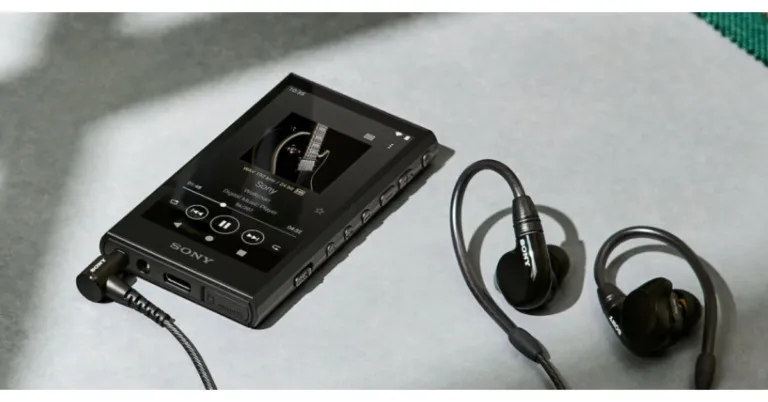
Today, Sony unveiled the newest member of the Walkman line, the NW-A306. The device is said to provide listeners with high-quality audio in a small package so they can experience music the way the artist intended. The new Sony walkman is Wi-Fi compatible for direct download and music streaming. To recall, the company introduced the Walkman NW-ZX707 late last month in the country.
With the sleek and portable new Sony Walkman NW-A306, customers may download and stream more of their favourite music. The lightweight NW-A306 series, which has a 3.6-inch touch screen and intuitive physical music controls, gives excellent music experiences and weighs only 199 grams. The high-quality aluminium machined frame offers improved rigidity for low impedance, clear, stable sound, and strong bass. It uses a gold-containing reflow soldering technology, which has a substantial impact on the overall enhanced sound localization and expanded sound range.
 Also Read: Sony Walkman NW-ZX707 with DSD Remastering Engine launched in India
A dual clock, film capacitor, and fine sound register have all been properly positioned inside the Walkman to achieve the evolutionary sound of both music players.
The native DSD format is compatible with the S-Master HX digital amp technology, which was independently designed for Walkman. According to the company, rich, full-bodied sound is produced with less distortion and noise across a wide frequency range, which is further enhanced by new, high-performance lead-free solder. It makes use of DSEE Ultimate, a real-time upscaler of compressed digital audio files, and Edge-AI (artificial intelligence). A deep and rich listening experience is provided by restoring the acoustic subtleties and dynamic range.
In comparison to earlier models, the NW-A306 offers excellent battery life, allowing users to enjoy more of their music for longer. In order to satisfy consumer demand, it has a battery life of up to 36 hours for 44.1kHz FLAC playing, up to 32 hours for 96kHz FLAC high-definition music playback, or even up to 26 hours while using the streaming service apps.
Also Read: The Sony Walkman is back in an all-new avatar: Tech specs, price and availability
Customers may experience DSEE Ultimate for upscaling their music in NW-A306 whether it is downloaded or streamed via Wi-Fi, building on the lessons learned from its preceding models. With wireless headphones, listeners can now enjoy DSEE Ultimate as well.
For the latest gadget and tech news, and gadget reviews, follow us on Twitter, Facebook and Instagram. For newest tech & gadget videos subscribe to our YouTube Channel. You can also stay up to date using the Gadget Bridge Android App. You can find the latest car and bike news here.
Also Read: Sony Walkman NW-ZX707 with DSD Remastering Engine launched in India
A dual clock, film capacitor, and fine sound register have all been properly positioned inside the Walkman to achieve the evolutionary sound of both music players.
The native DSD format is compatible with the S-Master HX digital amp technology, which was independently designed for Walkman. According to the company, rich, full-bodied sound is produced with less distortion and noise across a wide frequency range, which is further enhanced by new, high-performance lead-free solder. It makes use of DSEE Ultimate, a real-time upscaler of compressed digital audio files, and Edge-AI (artificial intelligence). A deep and rich listening experience is provided by restoring the acoustic subtleties and dynamic range.
In comparison to earlier models, the NW-A306 offers excellent battery life, allowing users to enjoy more of their music for longer. In order to satisfy consumer demand, it has a battery life of up to 36 hours for 44.1kHz FLAC playing, up to 32 hours for 96kHz FLAC high-definition music playback, or even up to 26 hours while using the streaming service apps.
Also Read: The Sony Walkman is back in an all-new avatar: Tech specs, price and availability
Customers may experience DSEE Ultimate for upscaling their music in NW-A306 whether it is downloaded or streamed via Wi-Fi, building on the lessons learned from its preceding models. With wireless headphones, listeners can now enjoy DSEE Ultimate as well.
For the latest gadget and tech news, and gadget reviews, follow us on Twitter, Facebook and Instagram. For newest tech & gadget videos subscribe to our YouTube Channel. You can also stay up to date using the Gadget Bridge Android App. You can find the latest car and bike news here.
 Also Read: Sony Walkman NW-ZX707 with DSD Remastering Engine launched in India
A dual clock, film capacitor, and fine sound register have all been properly positioned inside the Walkman to achieve the evolutionary sound of both music players.
The native DSD format is compatible with the S-Master HX digital amp technology, which was independently designed for Walkman. According to the company, rich, full-bodied sound is produced with less distortion and noise across a wide frequency range, which is further enhanced by new, high-performance lead-free solder. It makes use of DSEE Ultimate, a real-time upscaler of compressed digital audio files, and Edge-AI (artificial intelligence). A deep and rich listening experience is provided by restoring the acoustic subtleties and dynamic range.
In comparison to earlier models, the NW-A306 offers excellent battery life, allowing users to enjoy more of their music for longer. In order to satisfy consumer demand, it has a battery life of up to 36 hours for 44.1kHz FLAC playing, up to 32 hours for 96kHz FLAC high-definition music playback, or even up to 26 hours while using the streaming service apps.
Also Read: The Sony Walkman is back in an all-new avatar: Tech specs, price and availability
Customers may experience DSEE Ultimate for upscaling their music in NW-A306 whether it is downloaded or streamed via Wi-Fi, building on the lessons learned from its preceding models. With wireless headphones, listeners can now enjoy DSEE Ultimate as well.
For the latest gadget and tech news, and gadget reviews, follow us on Twitter, Facebook and Instagram. For newest tech & gadget videos subscribe to our YouTube Channel. You can also stay up to date using the Gadget Bridge Android App. You can find the latest car and bike news here.
Also Read: Sony Walkman NW-ZX707 with DSD Remastering Engine launched in India
A dual clock, film capacitor, and fine sound register have all been properly positioned inside the Walkman to achieve the evolutionary sound of both music players.
The native DSD format is compatible with the S-Master HX digital amp technology, which was independently designed for Walkman. According to the company, rich, full-bodied sound is produced with less distortion and noise across a wide frequency range, which is further enhanced by new, high-performance lead-free solder. It makes use of DSEE Ultimate, a real-time upscaler of compressed digital audio files, and Edge-AI (artificial intelligence). A deep and rich listening experience is provided by restoring the acoustic subtleties and dynamic range.
In comparison to earlier models, the NW-A306 offers excellent battery life, allowing users to enjoy more of their music for longer. In order to satisfy consumer demand, it has a battery life of up to 36 hours for 44.1kHz FLAC playing, up to 32 hours for 96kHz FLAC high-definition music playback, or even up to 26 hours while using the streaming service apps.
Also Read: The Sony Walkman is back in an all-new avatar: Tech specs, price and availability
Customers may experience DSEE Ultimate for upscaling their music in NW-A306 whether it is downloaded or streamed via Wi-Fi, building on the lessons learned from its preceding models. With wireless headphones, listeners can now enjoy DSEE Ultimate as well.
For the latest gadget and tech news, and gadget reviews, follow us on Twitter, Facebook and Instagram. For newest tech & gadget videos subscribe to our YouTube Channel. You can also stay up to date using the Gadget Bridge Android App. You can find the latest car and bike news here. Garena Free Fire Redeem Codes Today 10 February 2023: Here is how to claim them

Garena Free Fire is a battle royale game with regular awards and tournaments to keep players interested. If you play Garena Free Fire, you should be aware of the redeem codes that are released on a daily basis. However, because the battle royale game is banned in India, players from other countries can use the Free Fire Redeem codes daily. If you’re unfamiliar with the Garena Free Fire redeem codes or don’t know how to get them, we’ve put together a step-by-step guide to help you redeem them. Check out Garena Free Fire Redeem Codes for 10 February 2023.
The Free Fire redeem codes are a great way to get free stuff. These are 12-digit codes that contain alphabets and numbers, as well as an expiration date and time. Because the Garena FF redeem codes cannot be used more than once, you should hurry to the redemption page to claim your free reward before someone else does. To get a free reward, all you have to do is go to reward.ff.garena.com/en, which is the official redemption page. Also, keep an eye on this space for daily updates on Garena Free Fire redemption codes and rewards.
Garena Free Fire Redeem Codes Today 10 February 2023
- Updating Soon
How to Get Free Fire Redeem Codes for Garena on 10 February 2023?
- Visit the Garena Free Fire game’s official website at reward.ff.garena.com.
- Use your Facebook, Google, VK, Apple ID, Huawei ID, or Twitter account to log in.
- You’ll be taken to a valid redemption code (s)
- Copy and paste the 12-digit redemption code into the text box.
- On the screen, a dialogue box will appear.
- ‘Ok’ should be selected.
Amazon Quiz Answers Today 10 February 2023: Participate to win Rs 500

10 February 2023 Amazon Quiz has gone live on its platform. The quiz timings are 12 AM to 11:59 PM. The Amazon App users can participate in the quiz daily and all they have to do is submit correct answers to the questions asked on the e-commerce platform. Today’s participants can get a chance to win Rs 500 Amazon Pay Balance.
Amazon brings a fresh questionnaire that contains 5 questions daily. These questions are based on current affairs and general knowledge. The quiz can be played from 8 AM to 11:59 PM and the contestants need to answer correctly to enter into a lucky draw.
Only one person is declared as a winner and the results will be announced at the end of every month. And to make sure that you give correct answers to all the 5 questions Gadget Bridge everyday updates all the answers to the Amazon Quiz. Do check out 10 February 2023 Amazon Quiz Answers to win Rs 500 Amazon pay Balance.
Amazon Quiz Today Prize – Rs 500 Amazon Pay Balance
Quiz Date – 10 February 2023
Daily Timing – 12 AM to 11:59 PM
Winner Announcement – Today 12 PM
Amazon Quiz Answers Today 10 February 2023
Question 1: Who came into the Australian Open 2023 men’s singles as the No.1 seed but was knocked out in the second round? Answer: Rafael Nadal Question 2: Who is the composer behind the Oscar nominated song ‘Naatu Naatu’? Answer: MM Keeravani Question 3: Cannelloni, Cavatelli, Ravioli and Penne are types of what? Answer: Pasta Question 4: A part of which monument is shown here? Answer: Taj Mahal Question 5: The places shown here are depicted in which popular show? Answer: Game of ThronesHow To Play Amazon Quiz
Only app users are eligible to play the Amazon quiz every morning from 12 AM to 11:59 PM. The quiz is not available on the desktop. For those who are unaware of how to play the Amazon quiz below are the steps, you can follow to take the quiz.- Firstly download the Amazon app from Google Play Store or App Store
- Now fill in the required information through the Sign Up option.
- You need to log in to the Amazon app and scroll down on the home screen to find the Amazon Quiz banner.
- Tap on the Amazon Quiz banner and tap on the Start button to start the Quiz.
- Now you will get 5 questions and you need to answer them correctly. One wrong answer will eliminate you from the Quiz.
- After answering all the questions correctly you are now eligible for a Lucky Draw.
- The winner’s name will be announced today at 12 PM.
How to record video meetings on Zoom in HD?
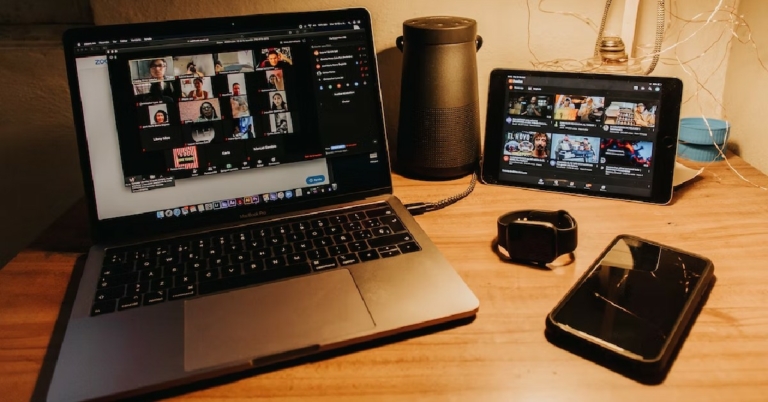
Unlike Google Meet, you don’t need a paid subscription to record a video meeting on Zoom. However, there is one small catch here. Zoom only lets you record meetings at a maximum resolution of 720p. In order to record at a higher 1080p resolution, you will need to subscribe to a Business or Enterprise plan. If you’re planning on recording a lecture, a 720p HD resolution is good enough. In this article, we show you how to record video meetings in HD in Zoom.
Read Also: Best ways to fix ‘Sound Not Working on Reddit Videos’ in app and website
Step 3: Go to the Video tab and select the checkbox for ‘HD’. Additionally, select the checkbox for ‘Touch up my appearance’ as well.
Step 4: Now, go to the recording tab and set a destination folder for the recorded file.
Step 5: Select the checkbox for ‘Record a separate audio file of each participant’. This will help you during the post-processing of the video. If multiple speakers talk over each other during the meeting, you will be able to use separate audio files to make the audio output much cleaner.
Step 6: Start a meeting and wait for the participants to join.
Step 7: To start recording the meeting, click on ‘More’ at the bottom toolbar and select ‘Recording on this computer’. Alternatively, you can press Alt+R to start a recording.
Step 8: To stop recording, click on ‘More’ and select ‘Stop Recording’. The video will be converted to mp4 format and saved to the destination folder.
Read Also: Moto E13 with 6.5-Inch IPS Display announced in India
Here’s how you can record a video meeting on Zoom in HD
Step 1: Launch the desktop client for Zoom and sign in using your email address. Step 2: Click on the gear icon to open Settings. Step 3: Go to the Video tab and select the checkbox for ‘HD’. Additionally, select the checkbox for ‘Touch up my appearance’ as well.
 Step 4: Now, go to the recording tab and set a destination folder for the recorded file.
Step 5: Select the checkbox for ‘Record a separate audio file of each participant’. This will help you during the post-processing of the video. If multiple speakers talk over each other during the meeting, you will be able to use separate audio files to make the audio output much cleaner.
Step 4: Now, go to the recording tab and set a destination folder for the recorded file.
Step 5: Select the checkbox for ‘Record a separate audio file of each participant’. This will help you during the post-processing of the video. If multiple speakers talk over each other during the meeting, you will be able to use separate audio files to make the audio output much cleaner.
 Step 6: Start a meeting and wait for the participants to join.
Step 7: To start recording the meeting, click on ‘More’ at the bottom toolbar and select ‘Recording on this computer’. Alternatively, you can press Alt+R to start a recording.
Step 6: Start a meeting and wait for the participants to join.
Step 7: To start recording the meeting, click on ‘More’ at the bottom toolbar and select ‘Recording on this computer’. Alternatively, you can press Alt+R to start a recording.
 Step 8: To stop recording, click on ‘More’ and select ‘Stop Recording’. The video will be converted to mp4 format and saved to the destination folder.
Read Also: Moto E13 with 6.5-Inch IPS Display announced in India
Step 8: To stop recording, click on ‘More’ and select ‘Stop Recording’. The video will be converted to mp4 format and saved to the destination folder.
Read Also: Moto E13 with 6.5-Inch IPS Display announced in India
Conclusion
This is how you can record a video meeting on Zoom in HD. The quality of the recorded video is heavily reliant on the strength of your internet connection. You may have noticed that the call quality often drops down when the network reception on your device is poor. The same changes will be reflected in the recorded video. For the latest gadget and tech news, and gadget reviews, follow us on Twitter, Facebook and Instagram. For newest tech & gadget videos subscribe to our YouTube Channel. You can also stay up to date using the Gadget Bridge Android App. You can find the latest car and bike news here.Best places to buy a refurbished iPhone
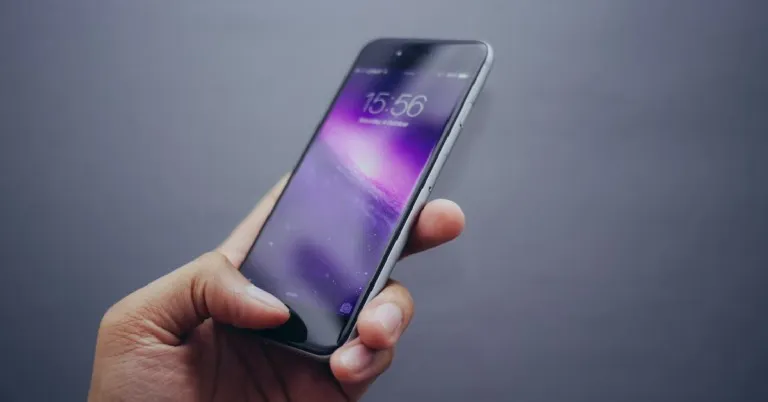
If you don’t want to shell out a hefty sum of money on the new iPhone, buying a refurbished iPhone is the next best thing. Apple provides up to six years of software updates for iPhones, which means you can easily buy a two year old iPhone at a reduced cost and use it without any security issues for at least four years. On the other hand, most Android phones get software updates for three to five years, depending on the manufacturer. But, what exactly is a ‘refurbished iPhone’ and which are the best places where you can buy one? Read along to find out.
Read Also: How to easily Translate WhatsApp Messages on Android to any language: Top 3 ways
Buying a refurbished iPhone from Apple’s very own Refurbished Store is the safest bet. Sure, they may price the smartphone a bit higher than other sellers, but the iPhone comes with a brand-new battery and exterior shell. Phone batteries are known to deteriorate over time, so a new battery significantly improves the life of the product. A new shell improves the look of the product, ensuring it feels good as new.
Blynk is one of the more popular and reliable players when it comes to selling refurbished phones in India. The refurbished smartphones you buy on Blynk come with a one-year warranty and a seven-day money-back guarantee. Simply log on to the site and look for refurbished iPhones. Currently, you can buy a refurbished iPhone 11 for as low as Rs 29,000 on Blynk.
The world’s biggest e-commerce website may be new to the ‘refurbished’ arena, but it has taken no time to attract buyers to its platform. Refurbished products on Amazon carry the ‘Renewed’ tag. All you need to do is search ‘Renewed iPhone’ on Amazon and browse through the best results. Refurbished iPhones on Amazon are professionally tested by the seller and come with a 6-month warranty.
A platform to buy and sell used products, Sahi Value also deals in refurbished iPhones. Simply log on to the website, scroll down to the bottom and click on ‘Refurbished iPhones’ to have a look at their collection. Currently, you can even buy the latest (refurbished) iPhone 14 Pro on Sahi Value at a reduced price of Rs 1,19,000. Meanwhile, a refurbished iPhone 13 Mini will cost you as low as Rs 46,000. Sahi Value also offers pan-India shipping for free along with Cash on Delivery and EMI options.
What is a refurbished iPhone?
A ‘refurbished iPhone’ simply means a previously used iPhone that has been repaired by a trained technician and is in full working condition. You will rarely ever run into any performance issues with a refurbished iPhone. One key difference between a refurbished iPhone and a regular used iPhone is that the former usually comes with a product warranty. While buying a refurbished iPhone, you should ensure that it has some years of software updates left on it. Periodic software updates keep your smartphone secure and get rid of any unexpected software bugs. While a used iPhone may cost cheaper, buying a refurbished one is a much safer choice. Since a lot of users upgrade their iPhones every year, you are likely to get a good deal on a refurbished iPhone that is close to mint condition.Which are the best places to buy a refurbished iPhone?
There are several sellers and e-commerce websites that can get you a good deal on a refurbished iPhone. Here are the best ones.Apple’s Refurbished Store
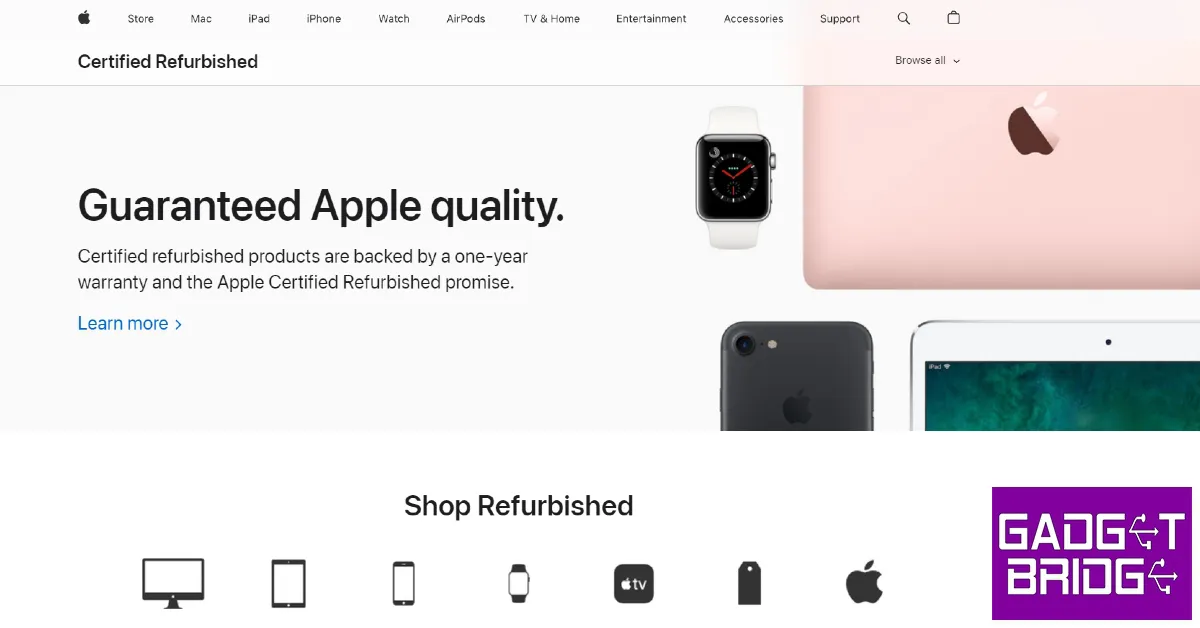 Buying a refurbished iPhone from Apple’s very own Refurbished Store is the safest bet. Sure, they may price the smartphone a bit higher than other sellers, but the iPhone comes with a brand-new battery and exterior shell. Phone batteries are known to deteriorate over time, so a new battery significantly improves the life of the product. A new shell improves the look of the product, ensuring it feels good as new.
Blynk
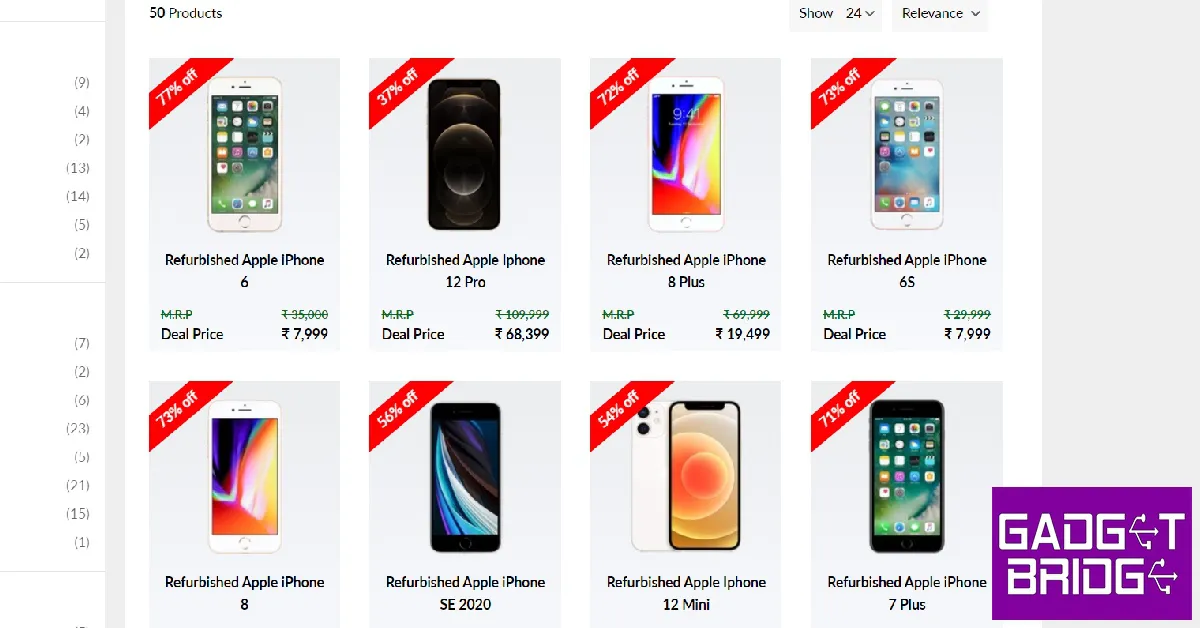 Blynk is one of the more popular and reliable players when it comes to selling refurbished phones in India. The refurbished smartphones you buy on Blynk come with a one-year warranty and a seven-day money-back guarantee. Simply log on to the site and look for refurbished iPhones. Currently, you can buy a refurbished iPhone 11 for as low as Rs 29,000 on Blynk.
Amazon
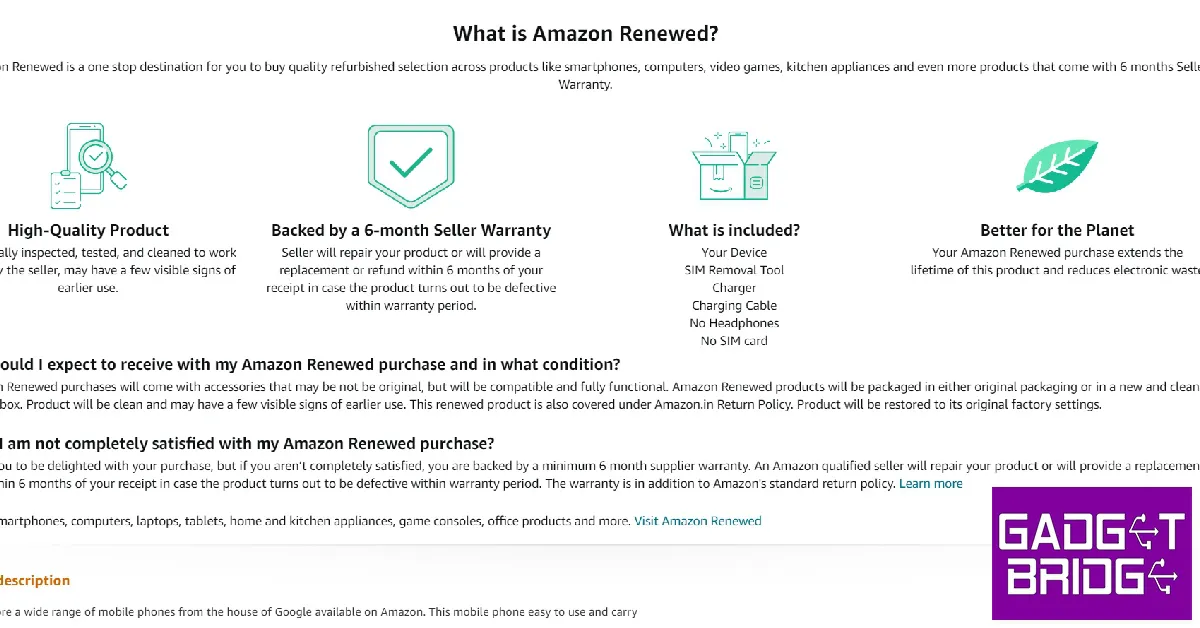 The world’s biggest e-commerce website may be new to the ‘refurbished’ arena, but it has taken no time to attract buyers to its platform. Refurbished products on Amazon carry the ‘Renewed’ tag. All you need to do is search ‘Renewed iPhone’ on Amazon and browse through the best results. Refurbished iPhones on Amazon are professionally tested by the seller and come with a 6-month warranty.
Sahi Value
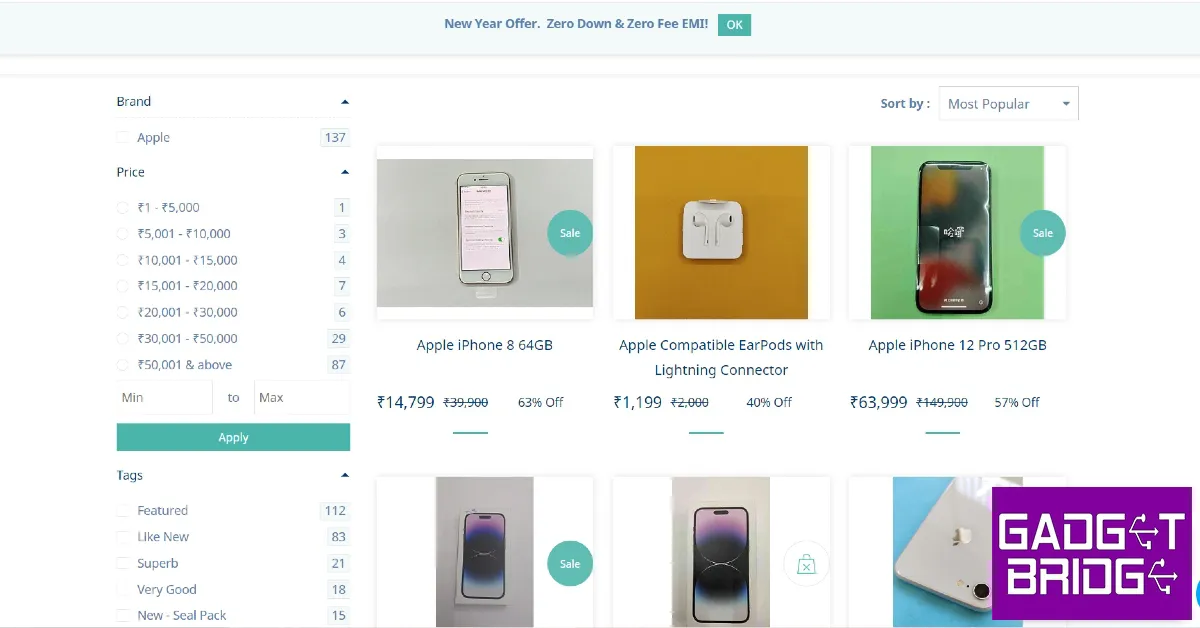 A platform to buy and sell used products, Sahi Value also deals in refurbished iPhones. Simply log on to the website, scroll down to the bottom and click on ‘Refurbished iPhones’ to have a look at their collection. Currently, you can even buy the latest (refurbished) iPhone 14 Pro on Sahi Value at a reduced price of Rs 1,19,000. Meanwhile, a refurbished iPhone 13 Mini will cost you as low as Rs 46,000. Sahi Value also offers pan-India shipping for free along with Cash on Delivery and EMI options.
Offline Sellers
If you don’t think you’re getting a good deal on the Internet, there are several local sellers in your area that may offer you a better price. Some sellers also offer very lucrative exchange offers where you can turn in your current smartphone for a better deal on a refurbished iPhone. Read Also: Google announces Bard, a new AI chatbot and ChatGPT competitorConclusion
These are the best places to buy a refurbished iPhone. While buying a refurbished iPhone, always make sure you check if the battery of the device is in good condition. To check the battery health of an iPhone, read our article here. If you have decided on buying a refurbished iPhone, we would suggest getting one which has a few years of software updates left. For the latest gadget and tech news, and gadget reviews, follow us on Twitter, Facebook and Instagram. For newest tech & gadget videos subscribe to our YouTube Channel. You can also stay up to date using the Gadget Bridge Android App. You can find the latest car and bike news here.Portronics Hydra 10 RGB keyboard launched in India
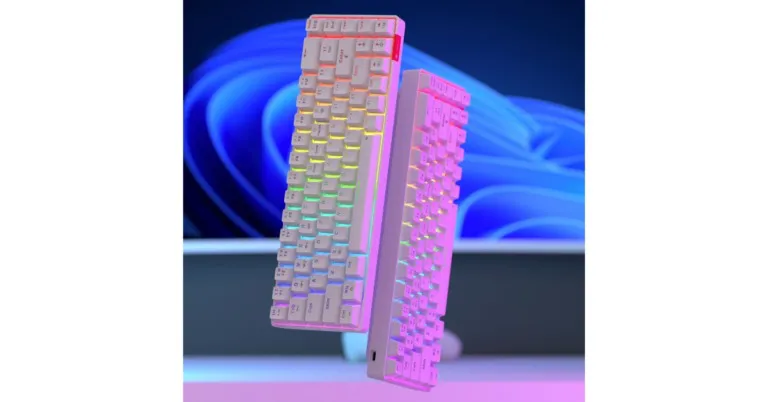
Portronics has today expanded its portfolio with the announcement of the new keyboard in India. The company has introduced its first gaming keyboard- Portronics Hydra 10 a compact wireless RGB keyboard. It comes with 20 different RGB customisations. Moreover, the keyboard is iOS-compatible and offers both wired and wireless connectivity.
Portronics Hydra 10 RGB keyboard price in India and availability
The Portronics Hydra 10 RGB keyboard has been launched in India with a price tag of Rs 2,999. According to the company the gaming keyboard is currently being offered at an introductory price. It comes with a 12 months warranty and is available for purchase via the company’s official website Portronics.com, Amazon.in, Flipkart.com, and other leading online and offline stores in the country. Also Read: OnePlus TV 65 Q2 Pro, Keyboard 81 Pro introduced in IndiaPortronics Hydra 10 RGB keyboard specifications and features
The Portronics Hydra 10 RGB keyboard features some of the newest technologies and a luxury design. The Hydra 10 has been designed specifically for gamers and has extremely tactile, user-replaceable, maintenance-free RED mechanical switches for a speedy and painless clicking experience. To improve the appearance of your gaming system, the keys are backlit with RGB LEDs that can output 16.8 million distinct colours and have 20 different customisation choices. The keyboard is made with an incredibly small 68-key form factor (580g), with great portability for frequent travellers in mind. The Portronics Hydra 10 can connect utilising Bluetooth V5.0 and 2.4GHz Wireless receiver, both of which are designed for extreme connectivity and interoperability across numerous devices and platforms. This keyboard is simple to pair and connect with four separate devices at once: three using Bluetooth and one using a laptop or desktop’s wireless 2.4GHz nano receiver. A 1000mAh internal rechargeable battery powers the keyboard and charges via a USB-C connector. When your battery runs out, you may use the USB-C connector to connect this as a wired keyboard and play games with the utmost lag-free performance. With just an hour of charge, the USB-C Port’s fast charging can provide 5 days of wireless use. For the latest gadget and tech news, and gadget reviews, follow us on Twitter, Facebook and Instagram. For newest tech & gadget videos subscribe to our YouTube Channel. You can also stay up to date using the Gadget Bridge Android App. You can find the latest car and bike news here.Canon EOS R8 and EOS R50 full-frame mirrorless cameras launched in India
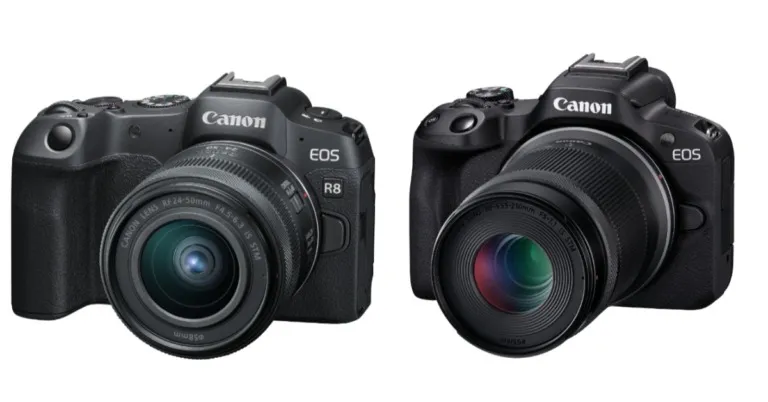
Canon has announced the arrival of the EOS R8 and EOS R50 as new mirrorless cameras in India. Both serious amateurs and wedding industry experts will like using the new Canon EOS R8 mirrorless camera. It includes the Canon Log 3 and up to 40 frames per second continuous shooting capabilities of the EOS R6 Mark II with the portability of the EOS RP. The Canon EOS R50, on the other hand, is a portable, lightweight APS-C mirrorless camera designed for vloggers and content creators.
Canon EOS R8
The weight of the Canon EOS R8 is approximately 461g (with battery pack and SD card). It is equipped with Movie Digital IS, which uses digital technology to stabilise images on five axes while recording videos and correct tilt. It has a 24.2-megapixel CMOS image sensor, allowing for the capture of 6K data across its entire width and the production of high-quality cropless oversampled 4K UHD footage at up to 60p. Additionally, the camera incorporates heat suppression features that let you record for an unlimited amount of time at 4K 30p and up to 30 minutes at 4K 60p. When shooting in Full HD at a resolution of 180p or above, the resulting video will be 30p with slowed-down action. The Canon new full-frame camera includes two modes for capturing 10-bit 4:2:2 high dynamic range video HDR PQ and Canon Log 3. It is asserted that the HDR PQ offers incredible dynamic range and natural colour. Canon Log 3, on the other hand, provides the same level of information but it is not “baked-in,” giving it more flexibility for post-processing processes that are more involved and entail colour grading. The Dual Pixel CMOS AF II technology found in the EOS R6 Mark II is also present in the EOS R8. The mirrorless camera R8 boasts an EOS iTR AF X system for quick and precise focusing that not only uses deep learning to identify and track people, animals, and moving objects but also “locks” onto other things based on their shape, colour, and brightness. The AF is still functional in low-light situations because of the low-light restrictions of up to EV-6.5 for still photos and EV-42 for videos. This improves the camera’s usability in low light and works with the high native ISO speed ranges of up to ISO 102,400 (still photography) and ISO 25,600 (video photography). Canon also introduced two new RF lenses, the RF24-50mm f/4.5-6.3 IS STM and the RF-S55-210mm f/5-7.1 IS STM, in addition to the EOS R8. Both of these allow focus breathing correction and provide optical IS up to 4.5 stops equal.- Focus breathing correction is a feature of professional cinema cameras that lessens the angle of view’s discernible variations during focusing.
- False colours and zebras: advanced visual aids for exposure adjustment and setting.
- Aspect marker display: for easier framing of video to fit various social media dimensions.
- UVC (USB Video Class)/UAC (USB Audio Class) support: Plug-and-play direct transmission of audio and Full HD video to a computer with just a USB connection; ideal for live streaming.
- The Multi-function Shoe, a digital interface that permits a cordless digital setup with appropriate add-ons like external microphones, is another feature of this device.
Canon EOS R50
With so many clever features, Canon’s new entry-level APS-C mirrorless camera makes creating videos and other digital content simple and hassle-free. The 1-inch image sensor on the most recent smartphones is three times smaller than the APS-C format image sensor on the EOS R50. As a result, even in low light, photos and videos will be crisper, more detailed, and noise-free. Additionally, users may anticipate stunning, authentic-looking bokeh (shallow focus) effects. The EOS R50’s 24.2 megapixels can also produce excellent Uncrop 4K 30p video oversampled from 6K of data. The EOS R50 is made for vloggers who want dedicated camera image quality without the typical learning curve associated with using one. The Dual Pixel CMOS AF II technology, which uses its features to detect and track humans, animals (such as dogs, cats, and birds), and vehicles (such as motorcycles and racing cars), just became smarter. The Movie for Close-up Demo mode swiftly and automatically shifts focus on the subject that is nearest to the camera for close-up demonstrations. With the focus where you want it, you can flaunt your new device or internet shopping haul in one fluid take. When used in conjunction with an RF lens that has in-lens IS, the EOS R50 has two separate Movie IS (Image Stabiliser) levels (‘Enhanced’ and ‘On’) that digitally execute 5-axis camera shaking correction. The “Movie IS: Enhanced” option by default optimises image stabilisation for handheld wide-angle photography while the monitor is in “selfie” mode by removing the undesired motion that accentuates itself at the borders of wide-angle shots. You can simply transfer films and JPEG photographs from your camera to a smartphone using the simple-to-install Camera Connect smartphone software using either a wireless Wi-Fi or wired USB-C connection. The RF-S18-45mm f/4.5-6.3 IS STM and the RF-S55-210mm f/5-7.1 IS STM are two kit choices for the EOS R50, which is available in black and white. For the latest gadget and tech news, and gadget reviews, follow us on Twitter, Facebook and Instagram. For newest tech & gadget videos subscribe to our YouTube Channel. You can also stay up to date using the Gadget Bridge Android App. You can find the latest car and bike news here.Truke BTG Beta Review: What do you get for Rs 1,000 tag?
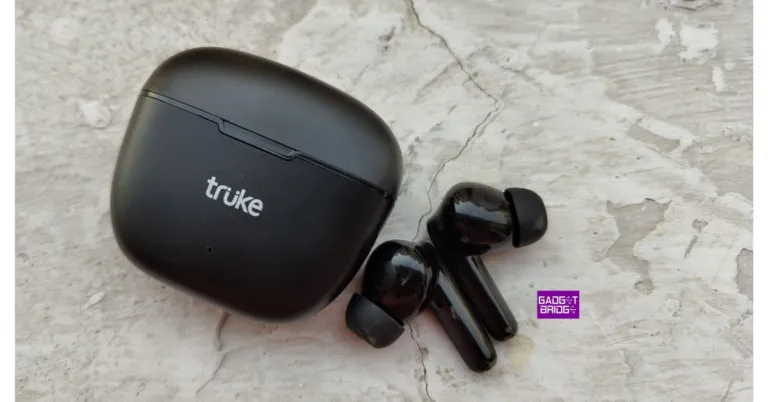
In India, the demand for gaming headphones is increasing. Online gaming revenue in India reportedly grew by 28% from USD 906 million in 2019 to USD 1.3 billion in 2021. Recently, the BTG (Born To Game) Beta earphones from Truke, a German Audio trademark but made in India, were released in India. The audio device, as its name would imply, makes the claim that its True Gaming Mode, which boasts the Best-In-Class Ultra Low Latency of less than 40ms, would provide the best gaming experience. These TWS earphones for gaming are on a budget and cost Rs 999. It features dual MEMS microphones, 13mm drivers, AAC codec support, up to 38 hours of battery and one-step quick pairing. Are the TWS worth the price? Let’s find out in the review below.
 A USB-C connector for charging the charging case is located at the bottom. A USB-C cable has been included within the box by Truke. The case is portable and light, making it simple to handle. On the charging case for the Truke BTG Beta earbuds, there are no buttons. Simply opening the case causes it to begin searching for a device to pair with. Furthermore, the matte finish helps hide any scratches.
Also Read: Truke BTG X1 Review: Great looks with a performance to match!
A USB-C connector for charging the charging case is located at the bottom. A USB-C cable has been included within the box by Truke. The case is portable and light, making it simple to handle. On the charging case for the Truke BTG Beta earbuds, there are no buttons. Simply opening the case causes it to begin searching for a device to pair with. Furthermore, the matte finish helps hide any scratches.
Also Read: Truke BTG X1 Review: Great looks with a performance to match!
 When you lift the case’s cover, you’ll see that the earphones are safely inserted into the corresponding slots. It is marked with the words Left and Right. When you lift the case’s cover, you’ll see that the earphones are safely inserted into the corresponding slots. It is marked with the words Left and Right. The case comes with built-in magnets to hold the earphones in place.
 Talking more about the earbuds, they are extremely lightweight and comfortable to wear, and they offer a secure, comfortable fit that makes them ideal for prolonged use. They have a two-tone appearance. The interior piece has a glossy sheen, while the upper part, which has the Truke logo, has a matte finish. The responsive touch sensors in both earbuds allow you to switch between tracks, accept or decline voice calls, and activate the voice assistant.
 The touch sensors are positioned behind the LED indicators which turn red while you keep them within the case, showing that they are charging. The LED indicator shines green when they are completely charged.
The earphones are IPX4-certified to offer protection from water and dust. They are therefore perfect for use while exercising or engaging in sports like running.
The touch sensors are positioned behind the LED indicators which turn red while you keep them within the case, showing that they are charging. The LED indicator shines green when they are completely charged.
The earphones are IPX4-certified to offer protection from water and dust. They are therefore perfect for use while exercising or engaging in sports like running.
 The 13mm Titanium drivers in the Truke BTG Beta earphones are a nice touch. They also support the AAC codec. You can choose to “Use High-quality Audio” in the Bluetooth options. The earbuds are set to the SBC codec by default because this option is deactivated. The AAC codec turns on after you activate this feature.
Also Read: Google Pixel Buds Pro Review: Highest Quality TWS
The Truke BTG Beta earphones support the newest Bluetooth 5.3 version and have a wireless range of approximately 10 metres in terms of connectivity. It only takes a few seconds to reconnect to the previously paired device, and connectivity is immediate because they allow 1-step rapid pairing. Even before you remove the earphones from the case, they will automatically pair with the nearest previously linked device once the case lid is opened.
The 13mm Titanium drivers in the Truke BTG Beta earphones are a nice touch. They also support the AAC codec. You can choose to “Use High-quality Audio” in the Bluetooth options. The earbuds are set to the SBC codec by default because this option is deactivated. The AAC codec turns on after you activate this feature.
Also Read: Google Pixel Buds Pro Review: Highest Quality TWS
The Truke BTG Beta earphones support the newest Bluetooth 5.3 version and have a wireless range of approximately 10 metres in terms of connectivity. It only takes a few seconds to reconnect to the previously paired device, and connectivity is immediate because they allow 1-step rapid pairing. Even before you remove the earphones from the case, they will automatically pair with the nearest previously linked device once the case lid is opened.
 Due to the lack of dual-pairing functionality, you are unable to use these earphones with two devices at once. The Google Assistant and Apple’s Siri voice assistants are also supported by the earbuds. Double-tap on either earbud to turn it on. Voice assistance is also effective.
The earbuds are equipped with Dual MEMS microphones, one on each earbud, and Deep Neural Network Call Noise Cancellation technology, which uses AI to precisely pick up sound waves. The AI-powered noise cancelling does function ok.
The 40ms low-latency gaming mode is these earphones’ main selling point. Truke BTG Beta has two modes: gaming mode and music mode. Simply touching the left earbud three times toggles the functionality on or off for those who wish to utilise the earphones’ Gaming Mode. The Gaming Mode, which we tested, performed well, but the Music Mode, as the default option, did not particularly wow us. While using it, there was never any lag. During the game, there is no stutter, voice sync problems, or audio lag.
It didn’t deliver a high-quality, immersive musical experience, but its audio quality can at most be described as average. We experimented with many songs from various genres. Although Music Mode produces high-quality treble-heavy music, they don’t seem to have the ability to produce high-quality bass, therefore their potential to create a rich and seamless experience is still limited.
If you prefer deeper bass, you won’t appreciate these earbuds because they typically lean more toward the treble. On higher volume levels, We did not notice any distortion, but when the volume level reaches 80%, the sound begins to seep. Overall, the call quality is decent and ought to be sufficient for even lengthy voice calls.
The BTG’s battery life is likewise excellent. With 100 percent of the volume, you’ll likely get 5 to 6 hours of battery life. By keeping the volume somewhat low and turning the earbuds off when not in use for an extended period of time, you can increase your endurance. While charging, the white light on the earbuds is constantly on.
The green light will appear when the earphones are fully charged, and the blue charging indicator light will turn off after 10 seconds. When the charging case is linked to a USB cable, a white light will continue to flicker. When the charging case is powered up, a white light will remain on until the USB cord is removed.
Due to the lack of dual-pairing functionality, you are unable to use these earphones with two devices at once. The Google Assistant and Apple’s Siri voice assistants are also supported by the earbuds. Double-tap on either earbud to turn it on. Voice assistance is also effective.
The earbuds are equipped with Dual MEMS microphones, one on each earbud, and Deep Neural Network Call Noise Cancellation technology, which uses AI to precisely pick up sound waves. The AI-powered noise cancelling does function ok.
The 40ms low-latency gaming mode is these earphones’ main selling point. Truke BTG Beta has two modes: gaming mode and music mode. Simply touching the left earbud three times toggles the functionality on or off for those who wish to utilise the earphones’ Gaming Mode. The Gaming Mode, which we tested, performed well, but the Music Mode, as the default option, did not particularly wow us. While using it, there was never any lag. During the game, there is no stutter, voice sync problems, or audio lag.
It didn’t deliver a high-quality, immersive musical experience, but its audio quality can at most be described as average. We experimented with many songs from various genres. Although Music Mode produces high-quality treble-heavy music, they don’t seem to have the ability to produce high-quality bass, therefore their potential to create a rich and seamless experience is still limited.
If you prefer deeper bass, you won’t appreciate these earbuds because they typically lean more toward the treble. On higher volume levels, We did not notice any distortion, but when the volume level reaches 80%, the sound begins to seep. Overall, the call quality is decent and ought to be sufficient for even lengthy voice calls.
The BTG’s battery life is likewise excellent. With 100 percent of the volume, you’ll likely get 5 to 6 hours of battery life. By keeping the volume somewhat low and turning the earbuds off when not in use for an extended period of time, you can increase your endurance. While charging, the white light on the earbuds is constantly on.
The green light will appear when the earphones are fully charged, and the blue charging indicator light will turn off after 10 seconds. When the charging case is linked to a USB cable, a white light will continue to flicker. When the charging case is powered up, a white light will remain on until the USB cord is removed.
Truke BTG Beta Review: Design
The small charging case for the Truke BTG Beta is included in the box. They have an plane jane, simple design and a traditional black body. In addition, Truke BTG Beta is available in different colours. A white version is also an option for gamers. With the Truke logo on the front, the case is built entirely of high-quality plastic and has a matte black finish. An LED indicator, located below the Truke branding, lets you know how the charging case and earphones are doing. So that it may stand upright on a flat surface, the charging case’s bottom is flat. A USB-C connector for charging the charging case is located at the bottom. A USB-C cable has been included within the box by Truke. The case is portable and light, making it simple to handle. On the charging case for the Truke BTG Beta earbuds, there are no buttons. Simply opening the case causes it to begin searching for a device to pair with. Furthermore, the matte finish helps hide any scratches.
Also Read: Truke BTG X1 Review: Great looks with a performance to match!
A USB-C connector for charging the charging case is located at the bottom. A USB-C cable has been included within the box by Truke. The case is portable and light, making it simple to handle. On the charging case for the Truke BTG Beta earbuds, there are no buttons. Simply opening the case causes it to begin searching for a device to pair with. Furthermore, the matte finish helps hide any scratches.
Also Read: Truke BTG X1 Review: Great looks with a performance to match!
 When you lift the case’s cover, you’ll see that the earphones are safely inserted into the corresponding slots. It is marked with the words Left and Right. When you lift the case’s cover, you’ll see that the earphones are safely inserted into the corresponding slots. It is marked with the words Left and Right. The case comes with built-in magnets to hold the earphones in place.
 Talking more about the earbuds, they are extremely lightweight and comfortable to wear, and they offer a secure, comfortable fit that makes them ideal for prolonged use. They have a two-tone appearance. The interior piece has a glossy sheen, while the upper part, which has the Truke logo, has a matte finish. The responsive touch sensors in both earbuds allow you to switch between tracks, accept or decline voice calls, and activate the voice assistant.
 The touch sensors are positioned behind the LED indicators which turn red while you keep them within the case, showing that they are charging. The LED indicator shines green when they are completely charged.
The earphones are IPX4-certified to offer protection from water and dust. They are therefore perfect for use while exercising or engaging in sports like running.
The touch sensors are positioned behind the LED indicators which turn red while you keep them within the case, showing that they are charging. The LED indicator shines green when they are completely charged.
The earphones are IPX4-certified to offer protection from water and dust. They are therefore perfect for use while exercising or engaging in sports like running.
Truke BTG Beta Review: Performance
The Truke BTG Beta connects to your device when you open the lid of the case. You have the option to manually turn off the earphones in addition to having them turn off automatically when you place them back in the charging case. The earphones can be turned off by pressing and holding the button on any of the two earbuds for five seconds. Although the earphones are touch sensitive, we have not had any problems with them and are efficient. Unfortunately, there is no volume control on these earbuds. This implies that the touch sensors on the earphones cannot be used to change the volume. You’ll need to use a linked device to control the volume. The 13mm Titanium drivers in the Truke BTG Beta earphones are a nice touch. They also support the AAC codec. You can choose to “Use High-quality Audio” in the Bluetooth options. The earbuds are set to the SBC codec by default because this option is deactivated. The AAC codec turns on after you activate this feature.
Also Read: Google Pixel Buds Pro Review: Highest Quality TWS
The Truke BTG Beta earphones support the newest Bluetooth 5.3 version and have a wireless range of approximately 10 metres in terms of connectivity. It only takes a few seconds to reconnect to the previously paired device, and connectivity is immediate because they allow 1-step rapid pairing. Even before you remove the earphones from the case, they will automatically pair with the nearest previously linked device once the case lid is opened.
The 13mm Titanium drivers in the Truke BTG Beta earphones are a nice touch. They also support the AAC codec. You can choose to “Use High-quality Audio” in the Bluetooth options. The earbuds are set to the SBC codec by default because this option is deactivated. The AAC codec turns on after you activate this feature.
Also Read: Google Pixel Buds Pro Review: Highest Quality TWS
The Truke BTG Beta earphones support the newest Bluetooth 5.3 version and have a wireless range of approximately 10 metres in terms of connectivity. It only takes a few seconds to reconnect to the previously paired device, and connectivity is immediate because they allow 1-step rapid pairing. Even before you remove the earphones from the case, they will automatically pair with the nearest previously linked device once the case lid is opened.
 Due to the lack of dual-pairing functionality, you are unable to use these earphones with two devices at once. The Google Assistant and Apple’s Siri voice assistants are also supported by the earbuds. Double-tap on either earbud to turn it on. Voice assistance is also effective.
The earbuds are equipped with Dual MEMS microphones, one on each earbud, and Deep Neural Network Call Noise Cancellation technology, which uses AI to precisely pick up sound waves. The AI-powered noise cancelling does function ok.
The 40ms low-latency gaming mode is these earphones’ main selling point. Truke BTG Beta has two modes: gaming mode and music mode. Simply touching the left earbud three times toggles the functionality on or off for those who wish to utilise the earphones’ Gaming Mode. The Gaming Mode, which we tested, performed well, but the Music Mode, as the default option, did not particularly wow us. While using it, there was never any lag. During the game, there is no stutter, voice sync problems, or audio lag.
It didn’t deliver a high-quality, immersive musical experience, but its audio quality can at most be described as average. We experimented with many songs from various genres. Although Music Mode produces high-quality treble-heavy music, they don’t seem to have the ability to produce high-quality bass, therefore their potential to create a rich and seamless experience is still limited.
If you prefer deeper bass, you won’t appreciate these earbuds because they typically lean more toward the treble. On higher volume levels, We did not notice any distortion, but when the volume level reaches 80%, the sound begins to seep. Overall, the call quality is decent and ought to be sufficient for even lengthy voice calls.
The BTG’s battery life is likewise excellent. With 100 percent of the volume, you’ll likely get 5 to 6 hours of battery life. By keeping the volume somewhat low and turning the earbuds off when not in use for an extended period of time, you can increase your endurance. While charging, the white light on the earbuds is constantly on.
The green light will appear when the earphones are fully charged, and the blue charging indicator light will turn off after 10 seconds. When the charging case is linked to a USB cable, a white light will continue to flicker. When the charging case is powered up, a white light will remain on until the USB cord is removed.
Due to the lack of dual-pairing functionality, you are unable to use these earphones with two devices at once. The Google Assistant and Apple’s Siri voice assistants are also supported by the earbuds. Double-tap on either earbud to turn it on. Voice assistance is also effective.
The earbuds are equipped with Dual MEMS microphones, one on each earbud, and Deep Neural Network Call Noise Cancellation technology, which uses AI to precisely pick up sound waves. The AI-powered noise cancelling does function ok.
The 40ms low-latency gaming mode is these earphones’ main selling point. Truke BTG Beta has two modes: gaming mode and music mode. Simply touching the left earbud three times toggles the functionality on or off for those who wish to utilise the earphones’ Gaming Mode. The Gaming Mode, which we tested, performed well, but the Music Mode, as the default option, did not particularly wow us. While using it, there was never any lag. During the game, there is no stutter, voice sync problems, or audio lag.
It didn’t deliver a high-quality, immersive musical experience, but its audio quality can at most be described as average. We experimented with many songs from various genres. Although Music Mode produces high-quality treble-heavy music, they don’t seem to have the ability to produce high-quality bass, therefore their potential to create a rich and seamless experience is still limited.
If you prefer deeper bass, you won’t appreciate these earbuds because they typically lean more toward the treble. On higher volume levels, We did not notice any distortion, but when the volume level reaches 80%, the sound begins to seep. Overall, the call quality is decent and ought to be sufficient for even lengthy voice calls.
The BTG’s battery life is likewise excellent. With 100 percent of the volume, you’ll likely get 5 to 6 hours of battery life. By keeping the volume somewhat low and turning the earbuds off when not in use for an extended period of time, you can increase your endurance. While charging, the white light on the earbuds is constantly on.
The green light will appear when the earphones are fully charged, and the blue charging indicator light will turn off after 10 seconds. When the charging case is linked to a USB cable, a white light will continue to flicker. When the charging case is powered up, a white light will remain on until the USB cord is removed.