2 September 2022 Amazon Quiz has gone live on its platform. The quiz timings are 12 AM to 11:59 PM. Interested users can participate in the Amazon daily quiz to win exciting prizes. The company puts up 5 questions based on general awareness. You can submit the correct answers from the four options. Today the participants have the chance to win a Rs 1,000 Amazon Pay Balance.Daily the e-commerce platform Amazon brings a new set of questionnaires that includes five easy questions. The Amazon Quiz can be played from 12 AM to 11:59. The users have to answer all the questions correctly to enter into a lucky draw. The result of today’s quiz will be announced at the end of the month and only one person is declared a winner. We at Gadget Bridge update all the answers to the Amazon Quiz on our website for the convenience of our readers. Here are the answers of the 2 September 2022 Amazon Quiz that will make you win Rs 1,000 Amazon Pay Balance.Amazon Quiz Today Prize – Rs 1,000 Amazon Pay BalanceQuiz Date – 2 September 2022Daily Timing – 12 AM to 11:59 PMWinner Announcement – Today 12 PM
In This Article
Amazon Quiz Answers Today 2 September 2022
Question 1: Logistics technology platform Shiprocket has recently become India’s 106th Unicorn. It is backed by which of these companies?
Answer: ZomatoQuestion 2: Who recently beat Stefanos Tsitsipas in the final to win the Cincinnati Open?Answer: Borna CoricQuestion 3: A recent movie directed by Mangesh Hadawale and starring the likes of Gajraj Rao and Rajpal Yadav is titled what?
Answer: Thai MassageQuestion 4: This picture is taken inside the complex of which famous French palace?Answer: Palace of VersaillesQuestion 5: The creator of the series, from which these characters are taken, was born in which country?Answer: Belgium
How To Play Amazon Quiz
Only app users are eligible to play the Amazon quiz every morning from 12 AM to 11:59 PM. The quiz is not available on the desktop. For those who are unaware of how to play the Amazon quiz below are the steps, you can follow to take the quiz.
Firstly download the Amazon app from Google Play Store or App Store
Now fill in the required information through the Sign Up option.
You need to log in to the Amazon app and scroll down on the home screen to find the Amazon Quiz banner.
Tap on the Amazon Quiz banner and tap on the Start button to start the Quiz.
Now you will get 5 questions and you need to answer them correctly. One wrong answer will eliminate you from the Quiz.
After answering all the questions correctly you are now eligible for a Lucky Draw.
The winner’s name will be announced today at 12 PM.
With over two billion active monthly users, WhatsApp is the biggest instant messaging platform in the world. In fact, it is so popular that it has entirely replaced SMS texts. With the biggest user base in the world, WhatsApp is also prone to a lot of spam from business accounts and inappropriate texts from unwanted contacts. Blocking someone on WhatsApp is a sure-shot way of limiting access to your account and not receiving any messages from unwanted contacts. In this article, we’ll show you how to block or unblock someone on WhatsApp.Read Also: Twitter Circle is now rolling out to all the users
In This Article
How to block someone on WhatsApp from the chat thread
Step 1: Go to the chat thread of the contact you want to block and tap the ellipses at the top right corner of the screen.Step 2: Tap on ‘More’ and select ‘Block’.Step 3: If you want to report the contact, tap the ‘Report Contact’ box. To block, select ‘Block’.The contact will be blocked.
How to block someone on WhatsApp from the Settings menu
Step 1: Open WhatsApp and tap on the ellipses at the top-right corner of the screen and select ‘Settings’.Step 2: Select Account>Privacy.Step 3: Scroll down and select blocked contacts and tap on the plus icon at the top-right corner of the screen.Step 4: Select the contact you want to add to the block list.
How to unblock someone on WhatsApp
Unblocking someone on WhatsApp is a pretty easy process. If you still have the chat thread with the blocked contact, open it and press ‘Tap to unblock’. The contact will be unblocked immediately. You can also go to Settings>Account>Privacy>Blocked Contacts and tap on the contact to remove it from the block list.
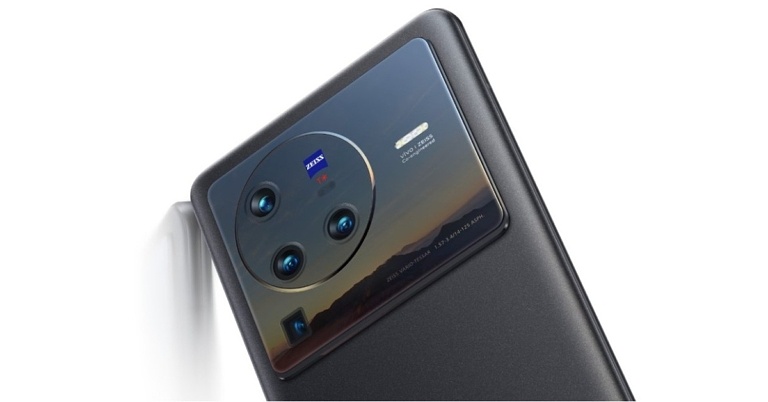
Today, Vivo released fantastic deals and discounts in honour of Onam. As the FIFA World Cup Qatar 2022’s official sponsor, Vivo is offering its consumers an exclusive chance to win tickets to the tournament’s matches. The company is also offering exciting deals that will be available on major channels beginning on August 30 and running through September 18, 2022.Along with enticing cashback offers of up to INR 4,000 on the newest handsets like the Vivo X80 series and Vivo V25 Pro, buyers will also be able to take advantage of extended warranties on a variety of Vivo smartphones under the terms of the offer.These incentives, along with enticing financing options, will be available beginning on August 30, 2022, and will remain in effect through September 18, 2022.Customers may take advantage of a variety of tempting deals at this time, including a six-month extended warranty on the Vivo X80 series, the V25 Pro, the V23e, the Y21G, and the Y35.While major banks and credit partners will be providing free EMIs with no fees and no interest. In addition to this the company has revealed that on the Vivo X80 series, V23, V25 Pro, Y75, and other range of devices, you can get up to INR 4,000 in cashback.“Onam is the festival of harvest and prosperity that fills people’s lives with hope and positivity. We intend to celebrate this auspicious festival with our valued customers by bringing a host of attractive offers to them. Being a consumer-centric brand, our latest offers will ensure guaranteed benefits on a wide range of our products. With a plethora of offers and easy finance options to choose from, consumers will have many reasons to rejoice this festive season with their loved ones.” said Yogendra Sriramula, Head of Brand Strategy, Vivo India
Vivo X80 specifications
This flagship phone has a 6.78-inch AMOLED 2K display with a resolution of 1,440 by 3,200 pixels and a refresh rate of 120 Hz. The Vivo X80 Pro runs OriginOS on top of Android 12 and is powered by a Snapdragon 8 Gen 1 processor.The highlight of its triple rear camera system is a 50-megapixel Sony IMX866 RGBW sensor with an f/1.75 aperture and optical image stabilisation (OIS). This system also has a 12-megapixel ultra-wide sensor with an f/2.0 aperture and a 12-megapixel portrait sensor with an f/1.98 aperture. This smartphone has a 32-megapixel selfie camera on the front.A fingerprint reader is also integrated into the display of the Vivo X80. It has a 4,500mAh battery that can be charged quickly with an 80W flash charger.
For the latest gadget and tech news, and gadget reviews, follow us on Twitter, Facebook and Instagram. For newest tech & gadget videos subscribe to our YouTube Channel. You can also stay up to date using the Gadget Bridge Android App. You can find the latest car and bike news here.
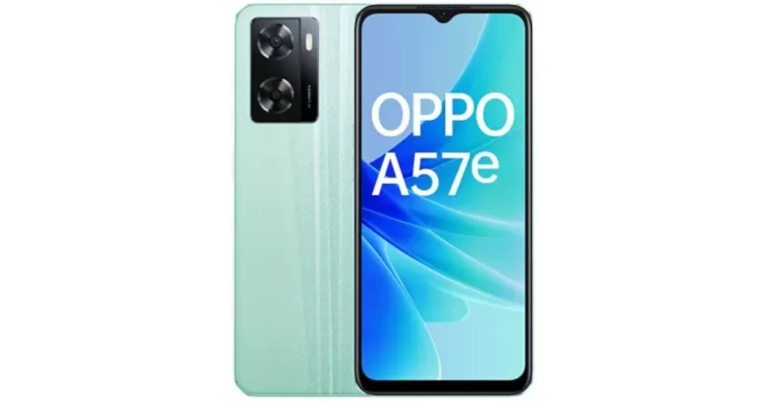
The Chinese smartphone company Oppo today expanded its A-Series portfolio with the launch of the Oppo A57e in India. The smartphone is a follow-up Oppo A57 which arrived in India this year. The newly launched handset is powered by MediaTek Helio G35 SoC and it runs on ColorOS 12.1. In addition to this, the phone packs a 5,000mAh battery and 33W SuperVOOC charging support. Moreover, there is a dual rear camera set up onboard.
In This Article
Oppo A57e price in India and sale details
Oppo A57e price in India has been launched in India with a price tag of Rs 13,999 for the single 4GB RAM with 128GB storage option. The device will be offered in two colour options of Green and Black. In terms of availability, the newly launched smartphone will be available for purchase via the e-commerce platform Flipkart in the country.
Oppo A57e specifications
The Oppo A57e has a 6.56-inch HD+ IPS LCD screen with 1,612×720 pixels of resolution. The display comes with up to 600 nits of screen brightness. The smartphone runs ColorOS 12.1 based on Android 12 out of the box. An octa-core MediaTek Helio G35 SoC with 4GB of RAM and 128GB of internal storage powers the smartphone. The device has 64GB of built-in storage that can be increased to 1TB with a certain microSD card.With a 13-megapixel primary sensor and a 2-megapixel depth sensor, it has a dual back camera arrangement. It has an 8-megapixel front-facing camera with an f/2.0 aperture lens for taking selfies and making video calls. Additionally, the front camera has a Nightscape Selfie mode for crystal-clear photos in dim lighting.The 5,000mAh battery on the Oppo A57e supports 33W SuperVOOC charging. Ultra Linear stereo speakers are included with the smartphone. For biometric security, the phone has a fingerprint sensor and face recognition.The smartphone has gravity, accelerometer, light, and proximity sensors. There are a few different ways to connect, including 4G, Wi-Fi, Bluetooth v5.2, a USB Type-C connection, and a 3.5mm headphone jack.
For the latest gadget and tech news, and gadget reviews, follow us on Twitter, Facebook and Instagram. For newest tech & gadget videos subscribe to our YouTube Channel. You can also stay up to date using the Gadget Bridge Android App. You can find the latest car and bike news here.
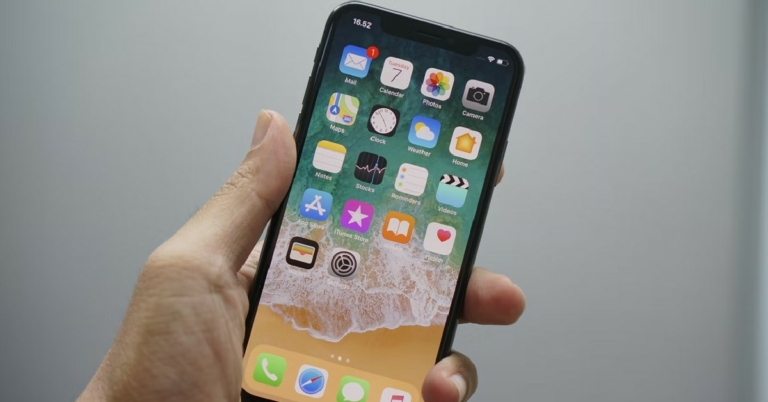
Your iPhone device name is the identifier with which other devices on the network can recognise it. Your iPhone is named ‘iPhone’ by default. You can see this name once you’ve connected your iPhone to your computer or when you’re using AirDrop or Personal Hotspot. While this is fine for the most part, it can get quite confusing when there are multiple iPhones on the network and all of them have the same default name. Changing your iPhone device name can resolve this situation. In this article, we will show you how to change the device name of your iPhone in a few simple steps.Read Also: Twitter Circle is now rolling out to all the users
In This Article
Here’s how you can change your iPhone device name
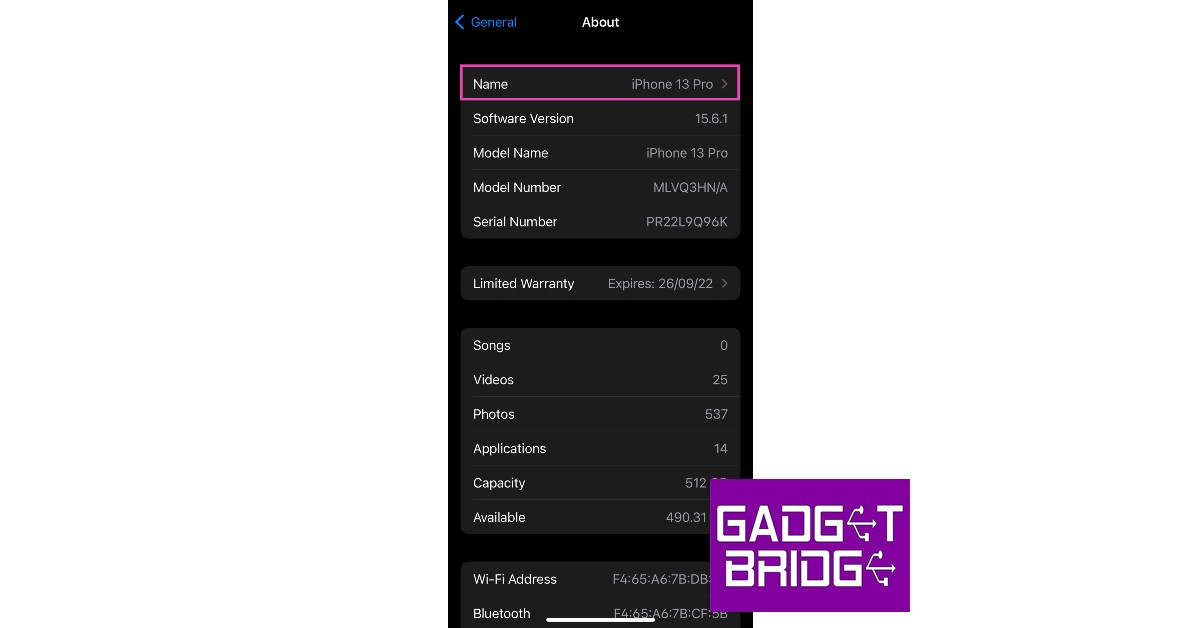
Step 1: Open ‘Settings’ and select ‘General’.Step 2: From the following window, select ‘About’.Step 3: Select ‘Name’ and tap on the cross icon in the text bar.Step 4: Enter the desired name for your iPhone and select ‘Done’.The name of your iPhone will be changed. This name will be displayed on all devices on your network.Read Also: Snapchat not working? Fix Snapchat with these 7 simple hacks
Bonus Tip
How to change the device name of your iPhone using your PC or Mac
Step 1: Connect your iPhone to your computer and launch iTunes.Step 2: Click on the iPhone icon on the header bar. You will find it on the left of ‘Library’.Step 3: Click on the device name on the sidebar and type in the new name.Step 4: Click on return. Your iPhone device name will be changed.
Frequently Asked Questions
How do I change the device name of my iPad?
You can follow the steps mentioned above to change your iPad device name as well.
How do I change the name of my AirPods?
In order to change the name of your AirPods or any other Bluetooth accessory, you’ll first have to connect it to your iPhone. Once connected, go to Settings>Bluetooth and tap on the ‘i’ icon next to the accessory name. Click on ‘Name’ and enter the new name for the accessory. Hit ‘done’ to save changes.
Garena Free Fire is a battle royale game with regular awards and tournaments to keep players interested. If you play Garena Free Fire, you should be aware of the redeem codes that are released on a daily basis. However, because the battle royale game is banned in India, players from other countries can use the Free Fire Redeem codes daily. If you’re unfamiliar with the Garena Free Fire redeem codes or don’t know how to get them, we’ve put together a step-by-step guide to help you redeem them. Check out Garena Free Fire Redeem Codes for September 1.The Free Fire redeem codes are a great way to get free stuff. These are 12-digit codes that contain alphabets and numbers, as well as an expiration date and time. Because the Garena FF redeem codes cannot be used more than once, you should hurry to the redemption page to claim your free reward before someone else does. To get a free reward, all you have to do is go to reward.ff.garena.com/en, which is the official redemption page. Also, keep an eye on this space for daily updates on Garena Free Fire redemption codes and rewards.
In This Article
Garena Free Fire Redeem Codes Today 1 September 2022
5XMJ-PG7R-H49R
FFBC-T7P7-N2P2
FFPL-PQXX-ENMS
FFX6-0C2I-IVYU
FFE4-E0DI-KX2D
HK9X-P6XT-E2ET
FFPL-NZUW-MALS
5FBK-P6U2-A6VD
FFA0-ES11-YL2D
FFMC-2SJL-KXSB
FFPL-OWHA-NSMA
FFPL-FMSJ-DKEL
F2AY-SAH5-CCQH
FFXV-GG8N-U4YB
How to Get Free Fire Redeem Codes for Garena on September 1?
The Twitter Circle function, which enables users to share particular tweets with chosen users, was made available to all platform users. The Twitter Circle was previously under testing and was only accessible to limited users but now it has been rolled out to all the users. The functionality allows users to share tweets that are private to them with up to 150 other people.While announcing Circle, Twitter in its official announcement said, “Sometimes you just want to talk to your people. That’s why we created Twitter Circle, a new way to Tweet to a smaller crowd.”With Twitter Circle, users may now decide on a Tweet-by-Tweet basis who can view and interact with their content. This makes it simpler to connect with a smaller group of followers and have more private interactions.Twitter started experimenting with Twitter Circle in May, and the firm reports that the feedback has been extremely positive. As a result, the business is now making this in-demand functionality accessible to everyone worldwide on iOS, Android, and Twitter.com.You now have the choice to share your Tweet with either your circle or all of your followers before you post on Twitter. You can change who is in and out of a circle at any time, and it can hold up to 150 people. No one will be informed of any modifications you make to your circle.Tweets that were sent to your circle will have a green badge next to them. They cannot be shared or Retweeted and can only be seen by the people you’ve chosen to be in your circle. Additionally, even if your Twitter account is public, all responses to these Tweets remain private.With its Close Friends feature, rival Instagram also provides a similar option that lets users share stories with particular friends.Now that you know you can Tweet to a customised, smaller audience with Twitter Circle. No matter who they follow on Twitter, anyone can be joined to a circle. They will be able to read Tweets and replies shared in that circle after they have entered it.Moreover, the whole list of individuals in your Twitter Circle is only visible to you. When you share a Circle Tweet, members can see your engagement if someone likes it or comments to it, unless your account is restricted. However, people won’t be able to see a list of your circle members. Only their followers who are also in your Twitter Circle will see their engagement if someone in your Circle maintains a protected account.The Retweet icon cannot be used by members of your Circle to distribute your Tweets on Twitter or inside their own Twitter Circle.Please keep in mind that anyone in your Circle can still download, copy, and/or share photos or screenshots of the stuff you share there.
For the latest gadget and tech news, and gadget reviews, follow us on Twitter, Facebook and Instagram. For newest tech & gadget videos subscribe to our YouTube Channel. You can also stay up to date using the Gadget Bridge Android App. You can find the latest car and bike news here.
Discord is one of the leading apps that offers cross-platform support across PlayStation, Xbox, and PC. Even though it is the first choice for gamers to connect online, it does not have a PlayStation app yet. That is bound to change in the coming months as Sony announced its partnership with Discord last year. A native Discord app for PlayStation is currently in the works. For those who can’t wait to use Discord on their PlayStation, here is a quick guide on how to use Discord on your PlayStation 4 and PS5.Read Also: Sony takes over Savage Game Studios, will be part of PlayStation Studios Mobile Division
In This Article
Here’s how you can use discord on Playstation 4 or PS5
Step 1: Launch PlayStation Party on your PS5 and select a friend to send a message.Step 2: Type ‘www.discord.com’ and send it as a message to your friend. If you’re using a PS4 simply access www.discord.com from the web browser. Since PS5 does not have a native web browser you can access, you need to send the discord link as a message and then click on it on the chat. PS5 will then open the webpage on the browser. Step 3: From the webpage select ‘Open Discord in your Browser’ and enter your login credentials. Step 4: Once you’re logged in you will be able to read and send messages on Discord.
How to link your PlayStation account to your Discord.
Step 1: Open the Discord app on your smartphone.Step 2: Go to your profile and select ‘Connections’.Step 3: Tap on ‘Add’ at the top-right corner of the screen.Step 4: Select ‘PlayStation Network’.Step 5: Sign in to your PSN account.Step 6: After you’ve signed in you can choose to display your PSN activity and game activity status on your Discord profile. Anyone that clicks on your profile will be able to see your PSN account and the game you’re currently playing.Read Also: How to transfer your PlayStation4 games and saved data to your new PlayStation 5 console?
Frequently Asked Questions
Is there a way to use all Discord functions on PlayStation?
You can use Discord for voice chat on your PS4 or PS5 but it can get quite expensive. You will need to purchase an Astro MixAmp ($189 on Amazon) and set up a cross-connection between your PlayStation and PC. Once that is done, you will be able to use Discord chat while using your PS.
When will the Discord app come to PlayStation?
Ever since Sony announced its investment and partnership with Discord, there have been talks of launching a Discordapp for PlayStation. For now, you can only link your PSN account to your Discord profile. But PlayStation users may finally be able to use Discord on their console by March 2023.
Is there an alternative to Discord on PlayStation?
While there is no alternative to Discord that offers cross-platform support, you can use PartyChat to add more users to your PSN.
Popular social media platform Instagram is bringing good changes to its platform. In order to serve better-personalised content, the company will begin testing the ability to mark multiple posts in Explore as Not interested. This is said to make it simpler for users to guide the platform to recognise posts that they aren’t interested in seeing. Furthermore, Instagram will also soon begin testing the option to express that you do not want to see suggested pictures that contain particular hashtags or caption terms.The photo-sharing service via its blog post said, “Today, we’re announcing that we’re testing two new ways to help you shape your Instagram experience. And we’re sharing a list of controls and methods that you can use to see more of what you want on your Instagram Feed.”Instagram is experimenting with allowing users to mark multiple posts in Explore as Not Interested. Those posts will be immediately removed, and similar content won’t be displayed to you in the future.Additionally, Instagram will soon begin testing a feature that will allow users to notify the social media site they do not want to see suggested photos with specific words, phrases, or emojis in the caption or hashtags. You can use this tool to stop seeing stuff that doesn’t interest you, whether you’re seeing something that’s irrelevant or have grown disinterested in something you used to appreciate.How to Access Favourites and FollowingYou’ll notice a user’s posts appear more frequently and higher when you add them to your Favourites. Additionally, you may view a separate feed for each of your favourites to keep up with just their posts.You will only view posts in chronological order from the accounts you follow when using Following. This view does not include any suggested posts, but you can see the posts from the last 30 days to catch up on anything you might have missed.By tapping the Instagram logo in your feed, you may access Favourites and Following.How to use the Not Interested ControlBy tapping Not Interested, the post will be immediately removed from your feed and fewer posts similar to it will be recommended in the future. Tap the X in the top right corner of the post if it doesn’t interest you. As an alternative, you can tap on Not Interested from the three-dot menu.How to Snooze Suggested PostsYou can easily snooze suggested posts for 30 days if you want to take a break from them. Tap the X in the top right corner, then select Snooze all suggested posts for 30 days, to snooze suggested posts.Adjust Your Sensitive Content ControlInstagram restricts hate speech, bullying and other content that might present a risk of harm to people on its platform. You might come across something, though it doesn’t violate the guidelines, that some people might find disturbing. So you may choose to stick with the current settings or change the Sensitive Material Control to see more or less of specific sensitive content types. Go to your profile, press the Settings menu, select Account, and then tap Sensitive Content Control to examine your sensitive content controls.
For the latest gadget and tech news, and gadget reviews, follow us on Twitter, Facebook and Instagram. For newest tech & gadget videos subscribe to our YouTube Channel. You can also stay up to date using the Gadget Bridge Android App. You can find the latest car and bike news here.
A cookie is a piece of data that the website stores on your device so it can recognise you the next time you visit it. Essential data like your login information is stored in cookies, so you do not have to log in every time you visit a website. Cookies can also track your browsing information and store that data to provide you with more relevant content. E-commerce websites like Amazon use cookies to store your browsing information so it can later advertise you better deals on those products. Even though they are legally allowed to do so, ethically a lot of users consider this a violation of privacy. If you want to clear or block cookies from your iPhone either to free up space or preserve your online privacy, follow the steps given below.Read Also: What new features will be found in the iPhone 14?
In This Article
Delete cookies from Safari on iPhone
Deleting cookies from your iPhone is a simple process, here’s how you can go about it.Step 1: Open Settings on your iPhone and select Safari.Step 2: Scroll down and select ‘Advanced’. In the following window select ‘Website Data’.Step 3: If you want to remove all cookies at once, tap ‘Remove all website data’. In the following pop up select ‘Remove Now’. All cookies from the Safari browser will be deleted.Step 4: If you want to clear cookies from a specific website, tap on the ‘Edit’ or slide it to the left and press delete.Step 5: Tap the red button next to the website of your choice. Press ‘Delete’ and then select ‘Done’.The cookies from the selected website will be deleted.
Block cookies from Safari on iPhone
If you don’t want cookies storing your data, you can simply block them from Safari. Apple provides the best safety features, and blocking cookies comes in handy when you don’t want tracking cookies to keep a log of your online activity. Some sites may not work when you block them from using cookies. You may have to flag each site individually to use them again. Here’s how you can block all cookies on your iPhone. Step 1: Go to Settings and Select Safari.Step 2: Under the ‘Privacy & Security’ section turn on the toggle bar for ‘Block all cookies’ and select ‘Block all’ in the popup dialogue box.All cookies will be blocked from storing information on your device.Read Also: Where is and what is the ALT key in a MAC keyboard?
Frequently Asked Questions
What kind of information can cookies track?
Cookies can track all kinds of information including but not limited to your login credentials, browsing history, preferred webpage language, items in your cart, search queries, device information, and even your location.
How often should I clear cookies from your iPhone?
Most cookies come with an expiration date. But it is still suggested that you clear cookies from your device every week or so. Clearing cookies also frees up much-needed storage space.
How do I block cookies on Google Chrome on iPhone?
If you use Chrome as the default browser on your iPhone, you can simply clear all cookies and browsing history by going to Chrome>Menu>History>Clear Browsing Data>Cookies, Site Data.




 Step 2:
 Step 3:
 Step 3:
 Step 4:

 Step 2:
 Step 3:
 Step 4:



 Step 1:
 Step 3:
 Step 4:
 Step 5:
 Step 6: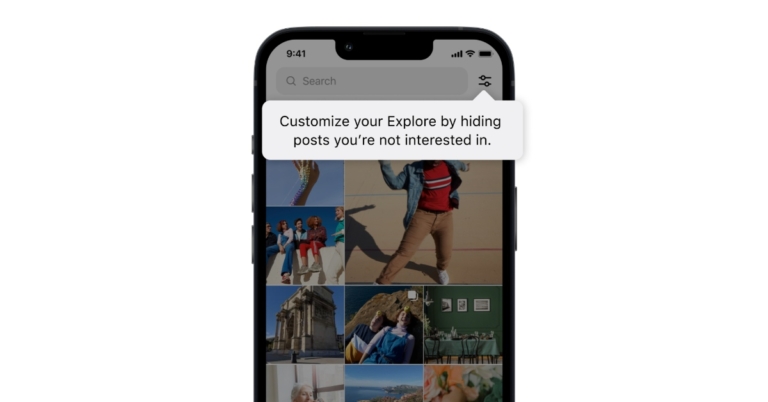

 Step 2:
 Step 3:
 Step 4: