Garena Free Fire is a battle royale game with regular awards and tournaments to keep players interested. If you play Garena Free Fire, you should be aware of the redeem codes that are released on a daily basis. However, because the battle royale game is banned in India, players from other countries can use the Free Fire Redeem codes daily. If you’re unfamiliar with the Garena Free Fire redeem codes or don’t know how to get them, we’ve put together a step-by-step guide to help you redeem them. Check out Garena Free Fire Redeem Codes for 21 October 2023.The Free Fire redeem codes are a great way to get free stuff. These are 12-digit codes that contain alphabets and numbers, as well as an expiration date and time. Because the Garena FF redeem codes cannot be used more than once, you should hurry to the redemption page to claim your free reward before someone else does. To get a free reward, all you have to do is go to reward.ff.garena.com/en, which is the official redemption page. Also, keep an eye on this space for daily updates on Garena Free Fire redemption codes and rewards.
In This Article
Garena Free Fire Redeem Codes Today 21 October2023
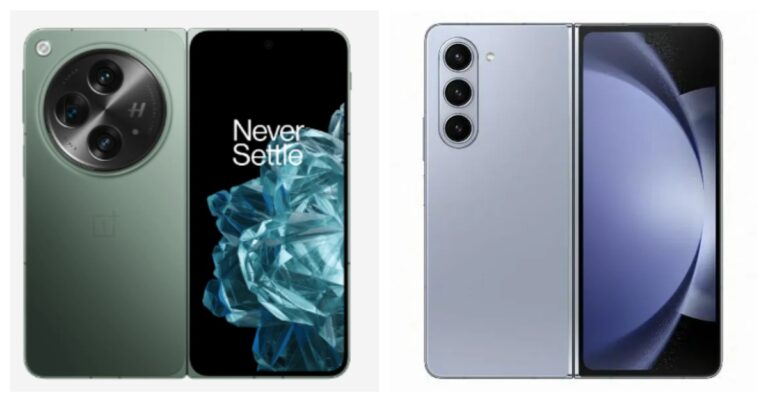
OnePlus Open launched in India last evening. The company is offering its first foldable with flagship-level specs. Therefore it becomes a serious challenger to all the brands offering a foldable phone especially Samsung which has already established its dominance in the market. The company recently launched Galaxy Z Fold 5 in India. Therefore, why not pit these two against each other? Here is our specs-by-specs comparison of the OnePlus Open and Samsung Galaxy Z Fold 5.
In This Article
Display
OnePlus Open: Inner- 7.82-inch LTPO 3.0 Flexi-fluid AMOLED primary display
Outside- 6.31 inches Super Fluid AMOLED with LTPO 3.0
Samsung Galaxy Z Fold 5: Inner- 7.6-inch QXGA+ Dynamic AMOLED 2X Infinity Flex Display
Outside- 6.2-inch HD+ Dynamic AMOLED 2X Display
Also Read:Samsung Galaxy Z Fold 5 with S Pen Fold Edition launched
Processor
OnePlus Open: Qualcomm Snapdragon 8 Gen 2
Samsung Z Fold 5: Qualcomm Snapdragon 8 Gen 2
Rear camera(s)
OnePlus Open: A triple rear camera setup tuned by Hasselblad includes a 1/1.43” 48MP Sony LYTIA-T808 “Pixel Stacked” CMOS primary sensor with Autofocus (1.12 μm, f/1.7 aperture, 85° FoV and OIS). There is a 1/2” 48MP Ultra-Wide lens (0.8 μm, 114° FoV, f/2.2 and EIS) and OmniVision OV64B 64MP Telephoto with OIS, 3X optical (0.7 μm, f/2.6, Up to 120X digital zoom).
Samsung Z Fold 5: Rear: A 50MP Wide-angle Camera (Dual Pixel AF, OIS, F1.8, Pixel size: 1.0μm, FOV: 85˚), 10MP Telephoto Camera (PDAF, F2.4, OIS, Pixel size: 1.0μm, FOV: 36˚, 3X optical zoom), 12MP Ultra Wide Camera (F2.2, Pixel size: 1.12μm, FOV: 123˚), 12MP Ultra Wide Camera (F2.2, Pixel size: 1.12μm, FOV: 123˚).
Selfie camera
OnePlus Open: The company has provided two cameras for selfies 20MP primary (inner) and 32MP secondary (outer).
Samsung Z Fold 5: There is a 10MP Selfie Camera (F2.2, Pixel size: 1.22μm, FOV: 85˚) on the cover, and a 4MP Under Display Camera (F1.8, Pixel size: 2.0μm, FOV: 80˚).
RAM and storage
OnePlus Open: 16GB RAM with 512GB storage
Samsung Z Fold 5: 12GB RAM with 256GB storage, 12GB RAM with 512GB storage, 12GB RAM with 1TB storage
With impressive specifications, the OnePlus Open appears to be an intimidating rival for the Galaxy Z Fold 5. The most recent Snapdragon 8 Gen 2 Mobile CPUs are in both phones. However, the Samsung Fold is available in three distinct configurations while the OnePlus Phablet just has one RAM and storage choice. The designs of both phones were influenced by the respective business flagships.
Compared to the Fold 5, the OnePlus Open is more compact and slender. The OnePlus phone’s display is also brighter than the Galaxy phone’s. They both ship pre-installed with Android 13 devices.
When it comes to photography, OnePlus does better than Samsung. On paper, the OnePlus Open cameras appear to be reliable, but the performance of the camera on the Fold 5 doesn’t fall short (Samsung Galaxy Z Fold 5 Review).
Although the Samsung Fold 5 is available in a variety of configurations, its basic model costs even more than the OnePlus Open 16GB RAM with a 512GB storage option. We are aware that Samsung has a sizable and loyal fan base for its reliable and proven handsets. However, the OnePlus Open definitely beats the OnePlus Fold 5 in terms of specs and cost.
For the latest gadget and tech news, and gadget reviews, follow us on Twitter, Facebook and Instagram. For newest tech & gadget videos subscribe to our YouTube Channel. You can also stay up to date using the Gadget Bridge Android App. You can find the latest car and bike news here.
Instagram started off as a photo-sharing app but now hosts some of the most engaging video content on its platform. If you ever notice a drop in quality while watching Stories and Reels on the platform, it may be due to several reasons. Don’t know where to begin fixing it? In this article, we bring you the top 10 ways to fix the ‘Instagram displaying low-quality and blurry Stories’ issue on your Android smartphone.Read Also:How to create and join a Channel on WhatsApp?
In This Article
Why are your Instagram stories blurry?
If you notice a drop in quality or straight-up blurriness in your Instagram stories, it could be due to the following reasons.
Poor internet connection: If your internet connection isn’t up to the standard, it can cause your stories to upload at a poor quality.
Media compression: If you’re uploading bulky images or videos, Instagram may compress them to lessen the load on its servers.
Copyrighted content: Instagram often strikes down copyrighted content on its platform. If your story is blurry, there is a chance it could have been taken down.
Graphic content: If your Instagram story contains graphic content like gore or nudity, it will be automatically blurred by the platform.
Turn off Data Saver on Instagram
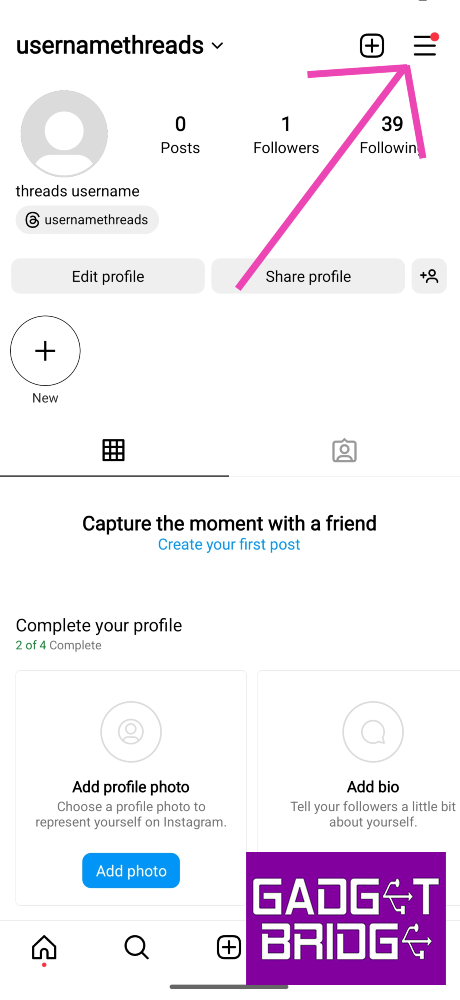
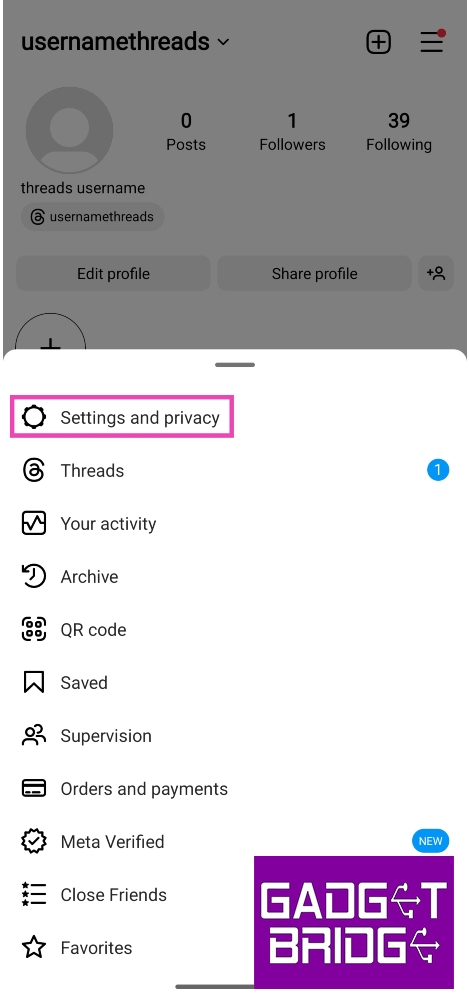
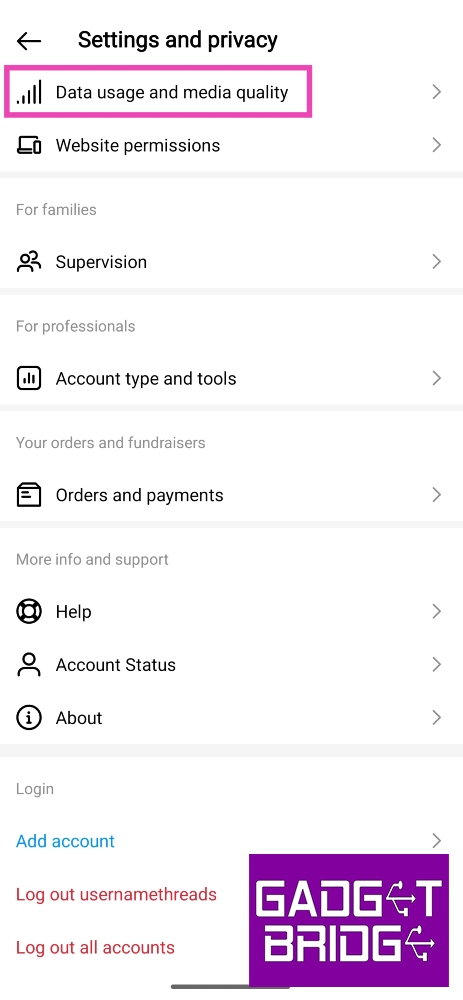
Step 1: Go to your Instagram profile and tap the hamburger menu at the top right corner of the screen.Step 2: Select Settings and privacy.Step 3: Tap on Data usage and media quality.Step 4: Turn the toggle switch off for Data Saver.
Check your internet connection
A weak connection can lead to a severe drop in image and video quality on Instagram. As a result, Instagram stories, posts, and reels may appear blurry or pixelated. Perform an internet speed test on your device to know for sure. Switch to a better network connection to fix this problem.
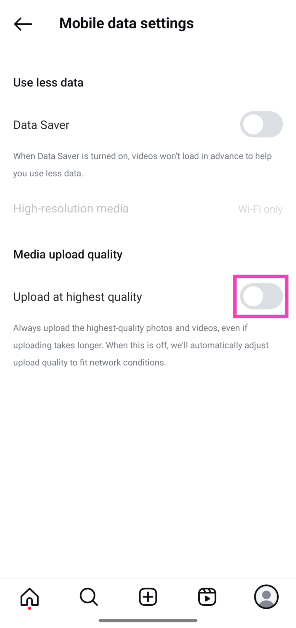
Change media upload quality
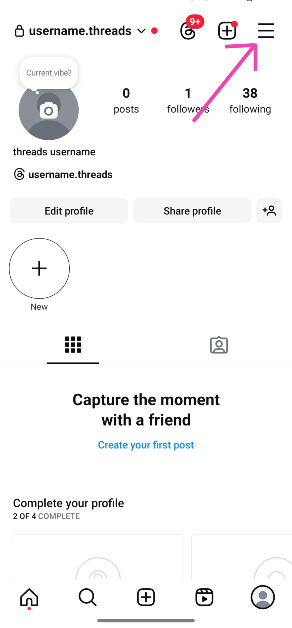
Step 1: Go to your Instagram profile and tap the hamburger menu at the top right corner of the screen.
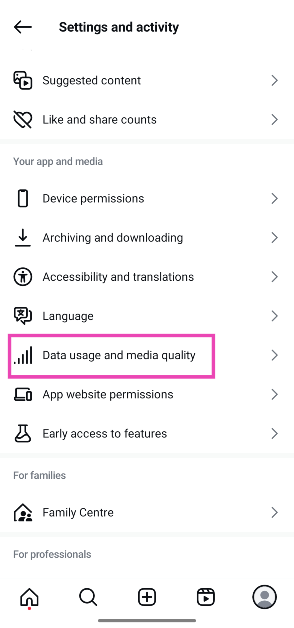
Step 2: Tap on Data usage and media quality.
Step 3: Turn on the toggle switch next to Upload at highest quality.
Use the in-app camera
Instead of uploading a picture from your phone’s gallery, use Instagram’s in-app camera to take a picture and then upload it as your story. Instagram’s in-app camera is optimised for the platform and the loss in quality is minimal compared to uploading a picture or video from your phone’s gallery. Of course, this method only works when you’re present in the scene you want to capture. If you want to upload an old picture to your story, this method is irrelevant.
Don’t add music or stickers to your stories
Adding music or stickers to your stories makes them bulkier. This dials down their quality during the upload process. To maintain the quality of your image or video, do not apply any add-ons available on the story creation page. Keep your media the focus of your story. This will ensure that it is uploaded at the highest possible quality.
Make sure your photos & videos follow Instagram’s upload guidelines
While uploading a picture or video on your Instagram story, make sure it adheres to the platform’s guidelines for resolution, size, and aspect ratio. If your media is too high-quality or large in size, Instagram will compress it, thereby making it blurry. The aspect ratio should be 9:16 and the resolution should be 1,920 x 1,080p. Images should not be larger than 30MP while the video size should not exceed 4GB.
Clear Instagram’s app cache
Step 1: Go to Settings and select Apps.Step 2: Scroll down and select Instagram.Step 3: Tap on Storage.Step 4: Select Clear Cache from the bottom of the screen.
Update the Instagram app
If you’re using an older version of the Instagram app, it may present issues from time to time. New versions are better optimised and quicker than their previous versions. Go to Google Play Store, search for Instagram, and hit the Update button on the app’s page. You can also download the latest version of Instagram from a third-party app marketplace.
Delete and reinstall Instagram
If updating the app doesn’t fix the issue, delete it from your device and then reinstall it. To delete Instagram from your phone, tap and hold its icon on the app drawer and select Uninstall. Confirm your selection in the popup box. Launch the Google Play Store app, search for Instagram, and hit the Install button on the app’s page to download it again.
Turn off your phone’s data saver
Step 1: Go to Settings and select Connections.Step 2: Tap on Data Usage.Step 3: Tap on Data Saver.Step 4: Turn off the toggle switch for Turn on now.
Frequently Asked Questions (FAQs)
Why am I seeing low-quality blurry images on Instagram stories?
Instagram may drop the quality of stories, posts, and reels when your internet connection is weak. Switch to a network with a better signal strength to fix this issue.
Why is my Instagram story low quality?
Instagram compresses your images and videos if they do not adhere to the upload guidelines, which makes them look they are in low quality.
How do I turn off the data saver on Instagram?
To turn off the Data Saver on Instagram, go to Settings and privacy>Data usage and media quality and turn off the toggle switch for Data Saver.
How do I make sure Instagram posts high-quality images on my profile?
Go to Settings and privacy>Data usage and media quality and turn on the toggle switch for Upload at highest quality.
How to upload stories on Instagram without losing quality?
These are the top 10 ways to fix the ‘Instagram displaying low-quality and blurry Stories’ issue on your Android smartphone. If you are facing issues with media quality while uploading pictures or stories to your profile, go to ‘Data usage and media quality settings’ and turn on the toggle switch for ‘Upload at highest quality’.
Over the years, ads and notification spam have become a real problem on Android smartphones. It is more common on budget smartphones, but of late even some midrange and flagship devices have started pushing ads in the form of popups and notification spam. In this article, we bring you the top 6 ways to block pop-up ads and unwanted notifications on your Android smartphone.Read Also:How to create and join a Channel on WhatsApp?
In This Article
Why is your phone displaying ads?
Adware: If you’re seeing ads on your phone’s interface, it is likely due to adware. This usually happens when you download an app from a third-party marketplace. To limit adware on your device, make sure you install apps from legitimate sources only.
In-app ads: If you’re using a free version of an app, you will need to bear through some ads. These ads are usually limited within the app but they may contain 30-second clips that take up the entire screen. If you want to get rid of them, you will need to subscribe to a premium membership of the app.
Browser popups: When you visit a website on a web browser, it asks you for the permission to send popups. These popups act as notifications for new content posted on the website. If you accidentally allowed a website to send you popups, you can always reverse that decision.
Ads on the lockscreen: Most Android OEMs have a magazine style layout for their lock screens. This magazine-style wallpaper often contains ads disguised as content. On a lot of devices, wallpaper services are turned on by default.
Intrusive notifications: Some Android OEMs have their own app stores to rival the Google Play Store. These app stores send periodic notifications which are basically ads for their services.
Disable the ad-pushing app from displaying over other apps
Step 1: Go to Settings and select Apps.Step 2: Tap the ellipses at the top right corner of the screen and select Special access.Step 3: Tap on Appear on top.Step 4: Turn off the toggle switch for the app that has been pushing pop-up ads on your device.
Turn off Wallpaper Services
Some Android smartphones push ads on the device’s lock screen by using a custom wallpaper service. Here’s how you can disable it.Step 1: Go to Settings and select Lock screen.Step 2: Tap on Wallpaper services.Step 3: Tap on None and turn off the toggle switch for Swipe left for info page.Step 4: Hit Apply.
Revoke notifications for the app
If an app keeps spamming your phone with unwanted notifications, here is how you can revoke its notification access.Step 1: Go to Settings and select Apps.Step 2: Tap on the app that has been spamming your notifications.Step 3: Tap on Notifications.Step 4: Turn off the toggle switch for Allow notifications.
Turn off Google Chrome popups
Step 1:Launch the Google Chrome web browser on your Android phone.
Step 2: Hit the ellipses and select Settings.
Step 3: Tap on Site settings.
Step 4: Select Pop-ups and redirects and turn off its toggle switch.
Use a DNS service
You can use an ad-blocking private DNS service to block ads on your phone while browsing the web. Here’s how.
Step 1: Go to Settings and select Connections & sharing.
Step 2: Tap on Private DNS.
Step 3: Select Specified DNS.
Step 4: Enter the hostname of the DNS provider. For example, dns.adguard-dns.com or family.adguard-dns.com.
Step 5: Hit Save.
Turn off notifications for suggested videos from YouTube
Step 1: Launch the YouTube app on your phone and tap on your profile picture at the bottom right corner of the screen.Step 2: Tap the gear icon at the top right corner of the screen to access settings.Step 3: Scroll down and tap on Notifications.Step 4: Turn off the toggle switch for Recommended Videos and other kinds of notifications you want to block.
Frequently Asked Questions (FAQs)
How do I block pop-up ads on my Android phone’s lock screen?
Certain Android smartphone manufacturers are known to push ads on the lock screen. You can disable them by going to Settings>Lock screen>Wallpaper services and selecting None.
How do I block the recommended video suggestions from YouTube?
Launch the YouTube app and go to your profile. Select Settings>Notifications and turn off the toggle switch for Recommended videos.
Is there a way to block pop-up ads on Android?
If you routinely receive pop-up ads from a particular app, revoke its access to display over other apps. In order to do this, go to Settings>Apps>Special Access>Appear on top and turn off the toggle switch next to the app in question.
How do I disable pop-ups?
Go to Chrome>Settings>Permissions>Pop-ups and redirects and turn off its toggle switch.
Why am I suddenly getting popup ads on my phone?
If you’re seeing random ads on your phone’s interface, it could be because of adware. Your phone may have been exposed to adware after installing an app from third-party sources.
Read Also:Sony WF-1000XM5 Review: Setting the benchmark yet again
Conclusion
This is how you can block pop-up ads and unwanted notifications on Android. Some smartphones may push a larger volume of ads than others. Vivo and Xiaomi devices are notorious for this. Check out this article to learn how you can disable ads on a Xiaomi smartphone.
Tired of managing multiple WhatsApp accounts on different phones? Multiple accounts being used on separate devices is no longer a problem with WhatsApp. With the recently released Multiple account feature for WhatsApp, you may now switch between two different accounts on a single device. As of right now, Android users can use WhatsApp with numerous accounts.
Meta’s chief Mark Zuckerberg has launched a multiple-account feature for WhatsApp. His post on Facebook reads, “Switch between two accounts on WhatsApp. Soon you’ll be able to have two WhatsApp accounts on one phone within the app.” He also shared a screenshot of a new feature demonstrating two WhatsApp accounts on a single phone.
WhatsApp official blog post reads “Today, we’re introducing the ability to have two WhatsApp accounts on Android logged in at the same time. Helpful for switching between accounts – such as your work and personal – now you no longer need to log out each time, carry two phones or worry about messaging from the wrong place.”
Also Read:Google to start manufacturing Pixel Phones in India, Pixel 8 will be the first Pixel phone to be produced locally
The introduction of this Multiple accounts feature on WhatsApp will prevent users from downloading imitations or fake versions as a way of getting more accounts on their devices. This will help in keeping their personal data and chats secure and private. Users can easily switch from one account to another and set up their work and personal WhatsApp accounts on one single phone.
Also, users will be able to control their privacy and notification settings on each account. They can mute notifications on their primary or secondary account. Besides this WhatsApp also allows its users to set up a single account on multiple phones.
How to set up multiple WhatsApp accounts on a single phone?
Third-party keyboard apps can come in very handy if you don’t enjoy typing on your smartphone’s native onscreen keyboard. To put it simply, it is very rare for one native keyboard app to cater to the demands of every user. Third-party keyboards not only come with their own unique set of features, but they also let you control the thematic aspects of your onscreen keyboard. In this article, we bring you the top 9 Android keyboard apps for everyday use.Read Also:Sony WF-1000XM5 Review: Setting the benchmark yet again
In This Article
Gboard
Download from Google Play StoreGboard is Android’s default keyboard but if your phone doesn’t run stock Android OS it gets sidelined for the manufacturer’s native keyboard. You can switch to Gboard from General Settings on your device. If you can’t find it on the list, you can always download it from Google Play Store. In our opinion, Gboard is the most complete Android keyboard app out there. Its exhaustive list of languages makes it very versatile among different lingual demographics. You can also translate your text to another language directly from the keyboard. Apart from standard QWERTY typing, Gboard also supports glide typing, voice typing, and handwriting recognition.
Microsoft SwiftKey
Download from Google Play StorePowered by Bing AI, Microsoft SwiftKey may just be one of the most clutch keyboard apps out there. You can chat to Bing AI using the keyboard itself, using it to resolve any queries on the spot. However, our favourite feature has to be ‘text rewrite’, which directs the AI bot to change the tone of the text to professional, casual, polite, or ‘social post’. If you’re wondering what a ‘social post’ is, it can be used to come up with fun captions for your social media posts. AI cred aside, SwiftKey also has an extensive sticker, emoji, and GIF library which you can browse through with ease.
Flesky
Download from Google Play StoreFlesky is known for its glide typing chops, which make typing on it faster and more efficient. Instead of typing individual letters on the keyboard, you can just glide through them using a swiping gesture. Flesky will recognise the word you want to type and immediately push it on the text box. While it may seem chaotic, this process works perfectly. It has since been integrated into more popular keyboards (like Gboard) as well. Other than glide typing, Flesky lets you customise your keyboard with unique themes and mini-apps.
Grammarly
Download from Google Play StoreMost commonly known for being a grammar-checking tool, Grammarly also has an Android plugin that can be used on any keyboard. It’s pretty good too! Grammarly checks your texts for any typos, punctuation errors, and grammatical inconsistencies. On top of that, it also suggests vocabulary enhancement and alternate ways of framing a sentence. You also get a short explanation of your error along with every correction.
Chrooma
Download from Google Play StoreIf you’re very particular about aesthetics, you will love this one. Chrooma Keyboard for Android adapts its colour theme to the app you’re using. You can also choose from a bunch of eye-catching RGB and AMOLED themes. If you like having total control over how your phone looks, then you’re going to want to tweak the keyboard as well. Apart from colourful themes, Chrooma also provides a seamless and smooth typing experience. The app has multi-language support, a one-handed mode, a split layout function, and supports gesture typing.
Ginger Keyboard
Download from Google Play StoreRegular keyboards only check for spelling and punctuation errors, but Ginger makes sure your sentence is properly structured and grammatically sound. This will come in handy for users who don’t like proofreading their texts before hitting send. Ginger Keyboard supports over 50 languages and has essential features like predictive text, predictive emojis, swipe typing, and emoji search.
Typewise
Download from Google Play StoreTypewise puts an interesting spin on the traditional QWERTY keyboard with its unique honeycomb design. This layout reduces the likelihood of making a typo by 4 times compared to a regular keyboard. The honeycomb keys are larger than the rectangular tiles on a QWERTY keyboard, making them easier to hit and reducing the chance of a typo. Typewise Keyboard also offers interesting fonts, themes, and intuitive gestures to elevate the typing experience.
ai.type
Download from Google Play StoreIf you’re looking for a keyboard with an exhaustive list of emojis and thousands of thematic options, ai.type should be right up your alley. With thousands of free themes and personalised layouts, ai.type is the perfect keyboard for people who like having control over how their phone looks. You can also stitch a theme of your own and share it with your friends. This app also offers helpful features like a calculator, keyboard resizer, cursor tracker, font selection, swipe typing, and more.
Bobble Keyboard
Download from Google Play StoreEnding this list is one of the most popular keyboard apps for Android – Bobble Keyboard. This app has over 50 million downloads and a 4.5-star rating out of 430K reviews. One of the main attractions of Bobble is that it creates personalised animated stickers based on your selfies. The keyboard creates your own personal ‘bobblehead’ which can then be used to generate stickers and gifs for popular messaging apps like WhatsApp, Instagram, and Facebook. You can also choose a range of fonts and select pre-made posts for your WhatsApp status updates.Read Also:Oppo Find N3 foldable phone with Hasselblad cameras launched
At the Google for India 2023 event the tech giant announced to manufacture Pixel Phones locally. The Made in India Pixel devices are expected to roll out in 2024. Google recently introduced the Pixel 8 Series in India globally so it is evident that the latest Pixel smartphone will be manufactured in India only.Also Read:OnePlus Open powered by Snapdragon 8 Gen 2 SoC and Hasselblad branded triple rear cameras launched in IndiaGoogle has officially confirmed that Made in India Pixel phones will now be manufactured in the country. The company revealed its future plans at the Google for India 2023 event. As per the search giant, the first batch of Pixel smartphones will be available in 2024. Notably only assembling will be done at the local level. For this Google is collaborating with international and domestic manufacturers in India to produce Pixel smartphones locally. Google intends to begin manufacturing with Pixel 8.Pixel 8Speaking at the event, Rick Osterloh, Senior Vice President of Devices & Services said, “We’re humbled at how India has embraced our consistent smartphone innovations, and continue to receive heartening feedback from our partners and our growing #TeamPixel family. When we set out with our hardware business, we committed to building and investing for the long run, and our plan to manufacture in India is an early step in the long journey of expanding our device production capacity and helping meet the country’s growing demand for Pixel smartphones. We look forward to sharing more details in the coming months, and can’t wait to bring the magic of Pixel smartphones to more people across the nation.”The company has admitted that the country is a top priority for Pixel smartphones and this move will increase their device production capacity and support the growing demand for Pixel in the nation. In addition to this Google has expanded its Pixel service network across the nation. As of now, they have 28 service centres in 27 cities across the nation thanks to their collaboration with F1 Info Solutions. Google will continue to expand coverage to more locations and cities in the months ahead.
For the latest gadget and tech news, and gadget reviews, follow us on Twitter, Facebook and Instagram. For newest tech & gadget videos subscribe to our YouTube Channel. You can also stay up to date using the Gadget Bridge Android App. You can find the latest car and bike news here.
Garena Free Fire is a battle royale game with regular awards and tournaments to keep players interested. If you play Garena Free Fire, you should be aware of the redeem codes that are released on a daily basis. However, because the battle royale game is banned in India, players from other countries can use the Free Fire Redeem codes daily. If you’re unfamiliar with the Garena Free Fire redeem codes or don’t know how to get them, we’ve put together a step-by-step guide to help you redeem them. Check out Garena Free Fire Redeem Codes for 20 October 2023.The Free Fire redeem codes are a great way to get free stuff. These are 12-digit codes that contain alphabets and numbers, as well as an expiration date and time. Because the Garena FF redeem codes cannot be used more than once, you should hurry to the redemption page to claim your free reward before someone else does. To get a free reward, all you have to do is go to reward.ff.garena.com/en, which is the official redemption page. Also, keep an eye on this space for daily updates on Garena Free Fire redemption codes and rewards.
In This Article
Garena Free Fire Redeem Codes Today 20 October2023
updating….
How to Get Free Fire Redeem Codes for Garena on 20 October2023?
Let’s face it, we all spend more online than we really ought to. Even so-called freemium software solutions often have hidden costs that you only find out after you have committed to them. There again, there are numerous free games out there you can download that are virtually unplayable unless you upgrade your avatar with a little hard-earned cash. Nevertheless, there are some truly cost-free options to help you stay on top of your overall outlay online. Read on to find out more about some of the best ones.
In This Article
Android Apps Without the Charge
Firstly, there have always been apps that have been freely available to download and some offer exceptional functionality given they don’t have a price tag. However, the top-rated apps tend to be ones you have to pay for, especially if you are an Android user. Did you know, though, that it is perfectly possible to obtain paid apps on an Android device without having to stump up your credit card details? Doing so relies upon leveraging all of your Google Play points but it can certainly be worth it for the right sort of app. Even if you don’t have enough credit in your Play Store account to obtain the app you want completely free of charge, this method can significantly reduce your digital outlay.
Domain Name Registration at Zero Costs
In the past, building an online presence for a blog that you intended to monetize or a site that you wanted to make e-commerce sales through meant having to pay for a hosting service that would charge you for the chosen name of the website. However, it is perfectly possible to obtain a free domain these days without the need for any money to change hands. Even better, you can choose your preferred domain name and benefit from business email addresses with the same domain. This is a very good idea for start-up entrepreneurs who want to secure their chosen brand identity online without having to worry that a would-be competitor has got there first. Why pay for a domain name registration when you can secure the name you want at no cost at all?
Free File Transfers Made Easy
Transferring a file isn’t always super difficult if both devices concerned have the same operating system but things get a little trickier when you are moving a sizeable file from one to another. Android and Mac compatibility has historically been one of the hardest problems to overcome in terms of file transfers with audio files and video projects being particularly onerous. However, there are now some useful file transfer tools you can obtain online without charge that will get the job done reliably. What’s more, they work from iOS to Android and vice-versa, so you will obtain complete flexibility without having to shell out a cent.
WhatsApp recently added a new feature that lets you broadcast directly to your audience. WhatsApp Channels are public broadcasts that can be followed by anyone on the platform. Once you join a channel, your contact info is kept hidden from other followers. You can react to the posts shared by the Channel owner but you cannot contribute posts of your own. In this article, we show you how to create and join a Channel on WhatsApp.Read Also:How to use Google Chrome extensions on Android? Top 3 Ways
In This Article
Create a Channel on WhatsApp
Step 1: LaunchWhatsApp and switch to the Updates tab.Step 2: Tap the Plus icon next to Channels.Step 3: Tap on Create Channel and hit Continue.Step 4: Enter the Channel Name and Channel Description in their respective fields.Step 5: Tap on Create Channel.
Join an existing Channel on WhatsApp
Step 1: LaunchWhatsApp and switch to the Updates tab.Step 2: Hit the Plus icon next to Channels.Step 3: Select Find Channels.Step 4: Browse through the different categories or search for a particular channel by hitting the magnifying glass icon at the top right corner of the screen.Step 5: Tap the Plus icon next to the Channel you want to join.
Frequently Asked Questions (FAQs)
What are Channels on WhatsApp?
A WhatsApp Channel allows you to broadcast messages and media to your audience. Once you create a channel, it can be searched publicly and people can join it anytime they want. Similarly, you can search and join any channel from the ‘Updates’ tab.
How is a Channel different from a group?
When you join a Channel on WhatsApp, your contact info isn’t displayed to other followers. Unlike groups, you cannot participate in a channel, apart from reacting to the posts.
This is how you can create and join a Channel on WhatsApp. Once you create a channel, you can share it with your contacts on WhatsApp and other instant messengers. However, the participants will need a WhatsApp account to join the channel. People can also see your 30-day post history before joining your channel.For the latest gadget and tech news, and gadget reviews, follow us on Twitter, Facebook and Instagram. For newest tech & gadget videos subscribe to our YouTube Channel. You can also stay up to date using the Gadget Bridge Android App. You can find the latest car and bike news here.
OnePlus Open has made its debut in India today. It is the company’s first foldable phone and it resembles the Oppo Find N3 only that both bear the logo of the respective companies. The OnePlus Phablet features 120Hz displays. It is powered by Qualcomm Snapdragon 8 Gen 2 SoC. Also, there are Hasselblad-branded triple rear cameras.
In This Article
OnePlus Open specifications, features
OnePlus Open is highlighted with a 7.82-inch LTPO 3.0 Flexi-fluid AMOLED primary display with 2440×2268 pixels of resolution. The screen offers a 2K resolution with 426 ppi pixel density. It has an aspect ratio of 1.0758: 1 and a screen-to-body ratio of 89.6%. The screen supports a dynamic refresh rate ranging between 1-120Hz and a touch response rate of up to 240Hz. 1400 nits is a typical screen brightness and 2800 nits are the peak brightness. The display also supports sRGB, DCI-P3, 10-bit Color Depth and TÜV Rheinland Intelligent Eye Care protection.
On the other hand, the secondary display features Super Fluid AMOLED with LTPO 3.0 measuring 6.31 inches. The 2K display has 2484×1116 pixels of resolution. The rest of the outer display details are same as the inner display. The company has used Ultra Thin Glass on the primary and Ceramic Guard protection on the secondary display.
Also Read:Samsung Galaxy Z Fold 5 review (long term): A foldable delight
Other display features include Nature tone display; Eye comfort; Image sharpener; Video color enhancer; Screen color mode; Colour personalization; Color vision enhancement; Auto brightness; Manual brightness; Screen color temperature; Bright HDR video mode; Night mode; multi-brightness and color calibration.
On the software front, the book-style foldable phone comes with OxygenOS 13.2 based on Android 13. Dual splits and fast focus, Drag and drop sharing, Triple splits are some of the features. Under its hood, there is a Qualcomm Snapdragon 8 Gen 2 Mobile Platform with Adreno 740 GPU. It comes with 16GB LPDDR5X with RAM-Vita and 512GB UFS 4.0 storage.
Coming to endurance the OnePlus Open includes a Dual-cell 4,805 mAh battery with 67W SUPERVOOC Charging support.
Also Read:Oppo Find N3 foldable phone with Hasselblad cameras launched
In terms of photography, the foldable device has a triple rear camera setup tuned by Hasselblad. The camera unit includes a 1/1.43” 48MP Sony LYTIA-T808 “Pixel Stacked” CMOS primary sensor with Autofocus (1.12 μm, f/1.7 aperture, 85° FoV and OIS). There is a 1/2” 48MP Ultra-Wide lens (0.8 μm, 114° FoV, f/2.2 and EIS) and OmniVision OV64B 64MP Telephoto with OIS, 3X optical (0.7 μm, f/2.6, Up to 120X digital zoom). The camera features a Hasselblad Camera for Mobile, Nightscape, Dolby Vision, Smart Scene Recognition, Portrait Mode, Pro Mode, Panorama, Tilt-Shift mode, Long Exposure, Dual-View Video, Retouch, Movie Mode, XPan Mode, Focus Peaking etc. For videography, there is support for 4K video at 30/60 fps, 1080p video at 30/60 fps, 720p video at 30/60 fps, Dolby Vision HDR at 4K, 30 fps and more.
The company has provided two cameras for selfies 20MP primary (inner) and 32MP secondary (outer).
In terms of connectivity, there is WiFi, Bluetooth 5.3, NFC, GPS, (L1+L5 Dual Band), GLONASS, Galileo (E1+E5a Dual Band), Beidou, A-GPS and QZSS. The sensors onboard include Side-mounted Fingerprint Sensor, Accelerometer, M-sensor Electronic Compass, Gyroscope, Ambient Light Sensor, Proximity Sensor, Sensor Core, Flick-detect Sensor, Infrared Sensor and USB Type C Port.
OnePlus Open comes with IPX4 certification for water resistance. According to the company, it has dispersive waterproof protection applied to critical components inside the phone. Drainage holes are given on the hinge to both sides of the spindle. The hinge’s spine plate is made of zirconium-based amorphous alloy. According to the company, a liquid metal material is used for creating artificial bones in the medical arena.
The phablet features OnePlus’s iconic Alert Slider which has been redesigned. OnePlus previously revealed that Pete Lau Founder of OnePlus and Senior Vice President and Chief Product Officer of OPPO directed his teams at OnePlus and OPPO to work together to bring the best of both brands to the new phone. This is why both OnePlus Open and Oppo Find N3 look similar.
OnePlus Open price in India, sale details
OnePlus Open price in India has been set at Rs 1,39,999 for a single 16GB RAM with 512GB storage. The device is available in two colourways Emerald Dusk and Voyager Black. The Pre-order window for the foldable is now open with open sale starting on October 27. The company will be offering an additional Rs 8,000 exchange bonus on selected models. You can also avail benefits worth Rs 15,000 with Jio Plus Rs 699 post paid plan. ICICI and One Card users will get an instant discount of Rs 5,000 and 12 month no-EMI plans at leading banks.
The phablet will be available for purchase via OnePlus India online store, Amazon, Reliance digital and selected retail stores in the country.
For the latest gadget and tech news, and gadget reviews, follow us on Twitter, Facebook and Instagram. For newest tech & gadget videos subscribe to our YouTube Channel. You can also stay up to date using the Gadget Bridge Android App. You can find the latest car and bike news here.
The newly launched Sony WF-1000XM5 offers some interesting upgrades over its predecessor, WF-1000XM4, which is pretty unanimously considered to be the best TWS on the block. The XM4 ushered in some significant changes to the wireless earbuds’ design and form factor. These changes have been perfected on the WF-1000XM5. This TWS also features a new 8.4mm driver dubbed ‘Dynamic Driver X’ as well as the new V2 chip and the HD noise-cancelling QN2e processor. We’ve been using these earbuds for the last week and they may just be the finest ones we have tested yet. Here is our Sony WF-1000XM5 review.Read Also:Dyson Purifier Big+Quiet with HEPA H13-grade particle filter launched in India
In This Article
Sony WF-1000XM5 review: Design
Sony WF-1000XM5’s retail package is crafted out of environmentally conscious paper material made out of bamboo, sugarcane fibres, and post-consumer recycled paper. Sony calls it ‘Original Blended Paper’. Inside the box, you will find the charging case, two wireless earbuds, a USB Type-C charging cable, and three extra ear tips in SS, S, and L sizes.The WF-1000XM5 refines the design that we saw on the XM4. These earbuds are 25% smaller and 20% lighter. The concentric copper accents on the earbuds have now been replaced by copper grilles for the microphones. The matte finish on the touch panels offers a nice contrast to the glossiness of the rest of the body. We like how these panels blend into the body instead of being bordered by a visible line. If the XM4s were more elaborate in their design, the XM5 would be best defined as polished and minimal.There are three microphones on either earbud. The rubber ear tips are cushy and provide an ideal fit. Even with ANC turned off, these earbuds can passively nullify a decent level of surrounding noise. Out of the box, the earbuds come with medium-sized ear tips attached to them. The overall fit is very comfortable and we didn’t feel any kind of ear fatigue even after wearing the buds for hours on end.The XM5’s charging case retains the rectangular design but is more compact than the previous model. The small LED lamp under the lid has been replaced by a notification light. The USB Type-C charging port is positioned at the back of the case, with the pairing button right next to it. The gold Sony branding can be found on top of the lid. This case also supports Qi wireless charging.Sony WF-1000XM5 is rated IPX4 for dust and water resistance, which means the earbuds can survive minor water splashes. We wore the XM4 while working out and they did not present any issues under sweaty conditions. The fit remained secure despite the inner panels of the earbuds being glossy.
Sony WF-1000XM5 review: Performance
The Sony WF-1000XM5 uses the new 8.4mm Dynamic Driver X on either earbud to deliver the audio output. It also gets a chip upgrade in the form of the Integrated V2 processor. On top of that, it features a dedicated HD Noise Cancelling QN2e processor. There is support for SBC, AAC, and LC3 (low latency) codecs along with Sony’s exclusive LDAC codec.Let’s get down to the brass tacks. The soundstage offered by Sony WF-1000XM5 solidifies its place in the upper echelon of audio products. The XM5 upholds the reputation of Sony’s flagship 1000X series, which means they are certainly the best-sounding earbuds on the market right now.The soundstage is close to neutral while carrying that ever-so-subtle Sony signature. The lows, mids, and highs are well represented on the soundstage and do not shroud each other. The overall output is very ripe and detailed. We played a diverse range of genres on the Sony WF-1000XM5 during the review period and the earbuds did justice to every single track. The low end is tuned to perfection. It provides the right level of warmth to the mix without muffling the higher frequencies. If you’re switching from a midrange headset, you will certainly notice new details in the songs that previously went under the radar.The mids and highs blend very well on the soundstage. We were particularly impressed with how well every hit of the clapper and snare drum was presented on the output without sounding too harsh. Even the guitar riffs sound crispier than usual on the XM5s. Cranking up the volume to the maximum level, we did not notice any significant distortion in the mix. The output remained well-balanced and uniform.The brilliance of XM5’s soundstage is matched by its spectacular ANC capability. As we mentioned earlier, even without ANC being turned on, the rubber tips on these earbuds do a great job of passively nullifying a good degree of surrounding noise. With ANC turned on, you can completely nullify the ambient noises from the air conditioner, ceiling fan, and distant traffic. If you struggle with taking naps on airplanes and crowded buses, these earbuds can reduce the surrounding noise by a significant factor and bring much-needed calm.While the state-of-the-art ANC and elite soundstage put the XM5 ahead of the competition, its smartphone app lets it down. For a TWS that’s replete with cutting-edge features, you need an app that makes them easily accessible. The Sony Headphones Connect app feels like it is a few good updates away from doing that. The UI of the app can be quite confusing to navigate. For starters, it doesn’t need a section for the audio player. Instead of drop-down menus for essential functions like ANC and Equaliser, a dedicated tab would have been much more useful. For now, they are bundled together with secondary features like Head Tracking, Reality Audio, and others.The Sony WF-1000XM5 is equipped with a host of features and some beta services. The ‘Adaptive Sound Control’ feature studies how you use your headphones in certain situations. For example, it will turn on Noise Cancellation when you’re sitting down and automatically switch to Transparent Mode when you start walking or running. If you’re inside a vehicle, ANC will be switched back on. Apart from your actions, the WF-1000XM5 can also take your location into account and switch to the appropriate ANC/Transparency level. We like this feature in theory, but it wasn’t as seamless as we had hoped. But we’re certain that it will get better with future updates.Features like multi-point connection, speak-to-chat, and auto-pause work as intended. You can also press and hold the left earbud to switch to transparency mode. The earbuds revert to ANC mode as soon as you release your finger. You can choose Playback and Sound Control/Quick Access controls for either earbud. These are preset controls that cannot be customised by the user.The XM5 puts up a great performance on audio and video calls. With the help of ‘bone conduction sensors’ and AI-based noise reduction algorithms, the earbuds are able to extract your voice perfectly from the surrounding noise and relay it to the receiver. Even in outdoor conditions, these earbuds isolated the voice from surrounding traffic noises almost perfectly. A shining performance where most TWS products fail badly.Talking about the battery life, we were able to get 7-8 hours out of the Sony WF-1000XM5 during the review period. We used Active Noise Cancellation intermittently, depending on the surroundings. With the ANC turned off completely, we were able to get 10-11 hours of playtime on a single charge. The charging case takes 1.5 hours to fully charge using a USB Type-C cable. You can get two full charge cycles out of this case.Read Also:YouTube app keeps crashing on your iPhone? Here are 9 easy fixes
Verdict
The Sony WF-1000XM5 is ahead of the curve in all the important aspects. Once you get used to its stellar soundstage, it will be very hard to go back to a regular pair of headphones. The ANC prowess of the XM5 puts nearly every other TWS to shame. At Rs 29,990, Sony WF-1000XM5 is certainly the best pair of wireless earbuds you can buy. Apart from the superior audio output, features like multi-point connection, adaptive sound, and speak-to-chat give the XM5 an edge over its counterparts.
Oppo has finally unveiled its new foldable phone- Oppo Find N3. The new smartphone is successor to Find N2 which was launched last year. The phone has an AMOLED display on the outside and the inside. Both screens support a 120Hz refresh rate. Under the hood, there is a Snapdragon 8 Gen 2 processor. The foldable phone has a total of five cameras three on the rear and two for selfies.
In This Article
Oppo Find N3 specifications
The Oppo Find N3 features a 6.31-inch 2K AMOLED cover display with 1,116×2,484 pixels of resolution. The screen supports a refresh rate of 120HZ along with 431ppi pixel density. It also boasts a 7.82-inch 2K LTPO 3.0 AMOLED screen with 2,268 x 2,440 pixels of resolution. The primary display supports a 120Hz dynamic refresh rate and 240Hz touch response rate. The AMOLED display has a peak brightness of 2,800Hz and a 426ppi pixel density. The front panel comes with Ultra-Thin Glass (UTG).
The Oppo Find N3 operates on ColorOS 13 on top of Android 13. At its heart, there is an octa-core Snapdragon 8 Gen 2 SoC with an Adreno 740 GPU for graphics. The device is offered with 16GB of LPDDR5X RAM and 512GB of UFS 4.0 storage.
The foldable phone by Oppo includes a triple rear camera setup powered by Hasselblad. The circular camera module includes a 48-megapixel Sony LYTIA-T808 1/1.43-inch sensor with OIS and EIS, a 64-megapixel OmniVision OV64B lens with 3X optical zoom and a 48-megapixel Sony IMX581 lens. The company provided a 20-megapixel sensor on the primary display and a 32-megapixel lens on the outer display for taking selfies and video calling.
The Oppo Find N3 sports a 4,805mAh battery that supports 67W SuperVOOC 2.0 fast charging. In addition to this, the handset includes a tri-state alert slider and a side-mounted fingerprint sensor. Also, there is an under-screen colour temperature sensor along with an ambient light sensor, an accelerometer, a gyroscope, a hall sensor, a proximity sensor and a geomagnetic sensor.
For connectivity, there is a USB Type-C port, 5G, 4G LTE, Wi-Fi 7, Bluetooth 5.3, GPS/ A-GPS, NFC, Beidou, GPS, GLONASS, Galileo and QZSS.
Samsung has officially announced the launch of a new smartphone in the Indian market. The company has introduced Samsung Galaxy A05s in the country. The handset is powered by a Snapdragon 680 SoC and runs on Android 13 with OneUI. The 4G phone features a 6.7-inch full-HD+ LCD display. Moreover, the smartphone packs a 5,000mAh battery.
In This Article
Samsung Galaxy A05s price in India, sale details
Samsung Galaxy A05s has been launched in India with a price tag of Rs 17,499 for the lone 6GB RAM with 128GB storage option. However, the device is currently available at Rs 14,999. In addition to this SBI Bank credit card EMI transactions will get Rs 1,000 instant discount to the customers. The smartphone is offered in three colour options of Black, Light Green, and Light Violet. The phone can be purchased via the company’s website in the country.
Samsung Galaxy A05s specifications
The Samsung Galaxy A05s is powered by an octa-core Snapdragon 680 SoC with 6GB RAM and a 128GB storage option. The storage can be expanded up to 1TB using a microSD card. The device has an Adreno 610 GPU for graphics. The device comes with One UI 5.1 with Android 13 out-of-the-box.
Also Read:OnePlus Open India launch today: How to watch the live stream
The smartphone features a 6.7-inch full-HD+ PLS LCD with 1,080×2,4000 pixels of resolution. The bezels on the sides are slim while the chin is noticeable.
For photos and videos, the device comes with a triple rear camera set up positioned vertically at the left corner along with a circular LED flash unit. The camera setup includes a 50-megapixel primary shooter with an f/1.8 aperture. Furthermore, the system includes a secondary 2-megapixel macro lens with an f/2.4 aperture and a tertiary 2-megapixel depth sensor with an f/2.4 aperture. For selfies, the smartphone features a 13-megapixel front-facing camera with f/2.0 aperture housed inside a centre-aligned waterdrop notch.
The Samsung Galaxy A05s comes equipped with a 5,000mAh battery with 25W charging support. In terms of connectivity, the phone includes a 3.5mm audio jack, 4G LTE, dual-band Wi-Fi, Bluetooth 5.1, GPS, and a USB Type-C port. Along with a fingerprint sensor the handset includes an accelerometer, light sensor and proximity sensor.
One of the main reasons why Google Chrome is the go-to browser for most people is the comprehensive support it provides for extensions. The Chrome Webstore is a goldmine for useful extensions that can make your routine tasks easier and provide a boost to your productivity. Unfortunately, Google Chrome’s Android app does not offer extension support yet. But that doesn’t mean you can’t use browser extensions on your smartphone. In this article, we bring you the top 3 ways to use Google Chrome extensions on your Android phone.Read Also:YouTube app keeps crashing on your iPhone? Here are 9 easy fixes
In This Article
Use Yandex Browser
Step 1:Install Yandex Browser on your Android phone from the Google Play Store.Step 2:Launch the web browser and type https://chrome.google.com/webstore in the address bar. Hit Enter.Step 3:Search for the extension you want to add to the browser.Step 4: Open the extension’s page and select Add to Chrome. Confirm your selection in the popup box.Step 5: Tap the hamburger menu at the bottom right corner of the screen and select Extensions to view all your installed extensions and enable them.
Install Kiwi Browser to use Google Chrome extensions on Android
Step 1:Install Kiwi Browser on your device.Step 2: Launch the browser and tap the ellipses at the top right corner of the screen.Step 3: Select Extensions.Step 4: Turn on the toggle switch for Developer Mode and tap on ‘+(from store)’.Step 5:Search for the extension you want to install on the browser.Step 6: Select Add to Chrome on the extension’s webstore page.Step 7: You can enable or remove your installed extensions from the Extensions tab.
Use Firefox
Step 1:Install Firefox on your device from the Google Play Store.Step 2: Tap on the ellipses at the top right corner of the screen and select Add-ons.Step 3: Go through the list of extensions (add-ons) and tap the plus icon next to the ones you want to install.Firefox has a limited number of add-ons for Android. For more options, stick to Kiwi and Yandex.
Frequently Asked Questions (FAQs)
Can I use Google Chrome extensions on my Android phone?
While Google Chrome does not allow extension support for its mobile apps yet, you can use Chromium-based browsers like Kiwi and Yandex for the same task. Mozilla Firefox also has add-on support, although there are only a few add-ons to choose from.
How do I use Google Chrome extensions on my Android phone?
Install Kiwi or Yandex browser on your phone, then go to chrome.google.com/webstore. Search and install the extension of your choice from the Chrome Webstore.
Do Kiwi and Yandex browsers support all PC extensions?
These are the top 3 ways to use Google Chrome extensions on Android. Kiwi and Yandex are Chromium-based browsers, which means they can run Google Chrome extensions on their respective mobile apps.Make sure you also check out our list of the best productivity extensions for Google Chrome. Is there a Chrome extension that you can’t function without? We’d love to hear from you in the comments.For the latest gadget and tech news, and gadget reviews, follow us on Twitter, Facebook and Instagram. For newest tech & gadget videos subscribe to our YouTube Channel. You can also stay up to date using the Gadget Bridge Android App. You can find the latest car and bike news here.
OnePlus’s first foldable- OnePlus Open will debut in India today. The specifications and design information of the device have been made public in part due to business disclosures, but primarily due to leaks of certain features. The upcoming foldable will feature OnePlus’ iconic alert slider. The hinge of the upcoming phone would be composed of high-quality material while the teasers showed off a typical OnePlus design.
In This Article
How to watch the OnePlus Open India launch event live?
OnePlus Open India launch event will held today. According to the company the launch event will be hosted in Mumbai. The keynote will begin at 7.30 PM and will be livestreamed through the official YouTube channel. The event will also be live-streamed on OnePlus’s official media channels. The company has also created a dedicated Event Page to webcast the event. You can also watch the event live on our website, we have embedded the link below.
OnePlus Open specifications expected
OnePlus Open has been teased several times days before the official launch. While numerous leaks have revealed details about the foldable phone’s form factor features as well as colour options. But just ahead of the launch full camera specifications of the device surfaced on the internet that goes in line with what OnePlus has revealed.We are already aware that OnePlus Open will be featuring a triple rear camera set up but a tipster has revealed that the camera module will consist of below mentioned sensors:Rear camera:
– Primary 48MP Sony LYTIA-T808 sensor (1/1.43”, f/1.7) with OIS– Secondary 48MP Ultra-Wide lens (1/2”, f/2.2)– Third 64MP Telephoto with OIS, 3X optical (145mm, f/2.6)For selfie:
– 20MP (inner)– 32MP (outer)Note that OnePlus Open will be the first to use new Sony LYTIA sensor. The company has also confirmed that its upcoming foldable phone will feature Sony LYTIA-T808 sensor equipped with Sony’s Dual-layer Transistor Pixel technology.Furthermore, it has been leaked that for the inner display, the company may use an LTPO 3.0, 7.82-inch fluid AMOLED display. Also with 2,800 nits of peak brightness, the front panel will get Dolby Vision support. According to the tipster OnePlus will call it a ProXDR. In addition to this the display on the inside will fast and smooth because of the 120Hz refresh rate support.Leaks also suggest that the OnePlus Open will feature a 6.31-inch 2K AMOLED cover display. The outer screen will support a refresh rate of 120Hz along with 2,800 nits of peak brightness. For robustness, the company may use Ceramic Guard protection which is equivalent to Ceramic Shield screen protection which Apple uses on it iPhones.
OnePlus has confirmed that it foldable will include several third-party apps. OnePlus has made sure that the pre-installed apps are compatible with the foldable design for better user experience.
Garena Free Fire is a battle royale game with regular awards and tournaments to keep players interested. If you play Garena Free Fire, you should be aware of the redeem codes that are released on a daily basis. However, because the battle royale game is banned in India, players from other countries can use the Free Fire Redeem codes daily. If you’re unfamiliar with the Garena Free Fire redeem codes or don’t know how to get them, we’ve put together a step-by-step guide to help you redeem them. Check out Garena Free Fire Redeem Codes for 19 October 2023.The Free Fire redeem codes are a great way to get free stuff. These are 12-digit codes that contain alphabets and numbers, as well as an expiration date and time. Because the Garena FF redeem codes cannot be used more than once, you should hurry to the redemption page to claim your free reward before someone else does. To get a free reward, all you have to do is go to reward.ff.garena.com/en, which is the official redemption page. Also, keep an eye on this space for daily updates on Garena Free Fire redemption codes and rewards.
In This Article
Garena Free Fire Redeem Codes Today 19 October2023
Updating…
How to Get Free Fire Redeem Codes for Garena on 19 October2023?
Winters have arrived in India and soon the air quality here specifically in Northern India will start to worsen. If you are looking to buy a new air purifier Dyson’s latest air purifier equipped with upgraded filtration has launched in India. The Dyson Purifier Big+Quiet is touted to deliver double the airflow compared to previous Dyson purifiers. It comes with a new airflow delivery system- Cone Aerodynamics. It has an improved three-phase filtration system that can capture up to 99.95% of ultrafine particles.
In This Article
Dyson Purifier Big+Quiet price in India and sale details
Dyson Purifier Big+Quiet as the name suggests is the company’s most quietest yet powerful purifier. It produces just 56 decibels of noise. It is capable of purifying the air in spaces as large as 1000 sq.ft. It utilises Cone Aerodynamics which is a new airflow delivery system that offers more than double the airflow of previous models. It delivers a 10-meter projection at angles of 0 degrees, 25 degrees or 50 degrees depending on user preference.The Dyson Air purifier can capture VOCs, NO2 and ozone in the air produced by tobacco smoke, household cleaning products, building materials, and outdoor air pollution. It has a fully sealed filtration system to HEPA H-13 which locks the air pollutants in the filter. The HEPA H13-grade particle filter is made of 21 meters of borosilicate microfibres pleated 459 times. Also, it can capture 99.95% of particle pollutants, including dust and allergens as small as 0.1 microns, and lasts up to two years. It also captures benzene and household odours.The Dyson Purifier Big+Quiet has an array of integrated sensors monitoring particle and gas levels, allowing users to monitor indoor air quality through the live results on the LCD screen and in the MyDyson app. Dyson algorithm which cross-checks data every second, to analyse the air and automatically react to environmental changes to purify.
For the latest gadget and tech news, and gadget reviews, follow us on Twitter, Facebook and Instagram. For newest tech & gadget videos subscribe to our YouTube Channel. You can also stay up to date using the Gadget Bridge Android App. You can find the latest car and bike news here.
OnePlus Pad Go was launched in India earlier this month. Now the company has announced that the device will go on open sale on October 20 in the country. So if you are planning to buy the device the open sale will be accessible through the company’s official website as well as the e-commerce platform Amazon. Also, it is an affordable version of the OnePlus Pad which debuted a few months ago. The Pad Go comes with an 11.35-inch 2.4K display with 90Hz refresh rate support. It is powered by MediaTek Helio G99 octa-core SoC and includes a 13-megapixel rear camera with electronic image stabilisation (EIS) support.OnePlus Pad Go is scheduled to go on open sale in India on October 20. The Sale will begin at 12 noon through Amazon and the company’s website. Both the Wi-Fi and the LTE variants of the OnePlus Pad Go will go on sale in the Indian market. To recall, OnePlus Pad Go was launched in India with a starting price of Rs 19,999 for the base 18GB RAM with 128GB storage Wifi model. The LTE model of the tablet comes in two configurations 18GB RAM with 128GB storage and 8GB RAM with 256GB storage priced at Rs 21,999 and Rs 23,999.The OnePlus Pad Go will be available across Amazon, Flipkart, Oneplus.in, OnePlus Store App, OnePlus Experience Stores, Reliance, Croma and other key offline partner outlets.The CICI Bank & OneCard cards users can avail of an upto INR 2,000 off if purchased via OnePlus Pad Go in OnePlus Experience Stores, OnePlus.in & offline partner stores.Customers can also avail additional INR 1000 special price coupon discount on Oneplus.in. on 8 + 128GB WIFI variant. Amazon users can also get up to INR 2,000 Instant Bank Discount using SBI cards. Whereas on Flipkart buyers can avail an upto Rs 2,000 Instant Bank Discount using ICICI Bank cards.Students will receive Rs 2,000 off on 8GB+128GB WIFI and Rs 1,000 off on 8GB+128GB LTE and 8GB+256GB LTE models.RCC members are eligible to get benefits up to INR 1500 on the purchase of OnePlus Pad Go on OnePlus.in.
OnePlus Pad Go specifications
OnePlus Pad Go comes with an 11.35-inch 2.4K LCD display with 2408 x 1720 pixels of resolution. The panel has a 90Hz refresh rate, a 7.5 aspect ratio and a touch sampling rate of 180Hz. Moreover, the screen has a pixel density of 220ppi and a peak brightness of 400nits. The display comes with TuV Rheinland blue-light filter protection along with Dolby Vision and HDR10+ support.OnePlus Pad Go runs on Android 13-based OxygenOS 13.1. The tablet is powered by MediaTek Helio G99 octa-core SoC with Mali-G57 MP2 GPU. It will be available in Wi-Fi and LTE variants with up to 8GB LPDDR4X RAM with 256GB UFS 2.2 storage options.There is a single 13-megapixel rear camera lens with electronic image stabilisation (EIS) support on the back of the tablet along with up to 4K30 fps video recording. An 8-megapixel front-facing camera with up to 1080p 30fps video recording support is there for selfies.The OnePlus Pad Go includes an 8,000mAh with 33W SuperVOOC charging support. As per the company it provides up to 514 hours of standby time and 40 hours of music playback.
For the latest gadget and tech news, and gadget reviews, follow us on Twitter, Facebook and Instagram. For newest tech & gadget videos subscribe to our YouTube Channel. You can also stay up to date using the Gadget Bridge Android App. You can find the latest car and bike news here.
Over the years, YouTube has not only evolved to host a variety of content, but it also boasts one of the most accessible and fastest apps to watch video content on the Internet. The YouTube app for Android and iOS is perfectly optimised for the mobile platform and its video player does not take a long time to buffer the videos you want to watch. App crashes and other malfunctions are extremely rare for YouTube and can be easily fixed. In this article, we bring you the top 9 fixes for the ‘YouTube app keeps crashing’ issue on your iPhone.Read Also:How to Access Your Home WiFi Router Remotely? Top best ways
In This Article
Restart your iPhone
A quick restart resolves the background issues that may be causing the YouTube app to malfunction. Press and hold the side key along with either volume key until the power slider appears on the screen. Drag the slider to the right to turn off your iPhone. Once the device has shut down, press and hold the side key to turn it on again.
Restart the app
Another quick way of fixing this issue is by closing and re-launching the YouTube app on your iPhone. Swipe up from the bottom of the screen and hold until you can access the App Switcher. Navigate to the YouTube card and swipe it up to close the app. Now, go to your iPhone’s home page and launch the YouTube app.
Check your iPhone’s storage to keep YouTube app from crashing
One of the most common reasons behind constant app crashes is the lack of internal storage. Apps need a certain amount of breathing space to run smoothly. If your phone’s storage is filled to the brim, it may cause certain apps to malfunction. To fix this, go to Settings>General>iPhone Storage and delete the files you don’t use.
Check your network reception
A weak internet connection can cause the YouTube app to crash on your iPhone. Check the network connection on the status bar to determine its strength. Perform an internet speed test to gauge if it is enough for YouTube to function. App crashes due to a faulty connection are rare but not improbable.
Update the YouTube app
If you’re using an old version of the YouTube app, it may be the reason why it keeps randomly crashing. Old app versions contain bugs that are creased out in future updates. On top of that, super old versions of apps are routinely phased out by developers, which means they no longer be functional. To update the YouTube app on your iPhone, go to the App Store, search for YouTube, and hit the Update option on the app’s page.
Turn on Background App Refresh
Turning on Background App Refresh ensures that the YouTube app stays updated and carries out its necessary functional tasks when you are not actively using it. It can be turned off after the app stabilises and does not crash at random.Step 1: Go to Settings and select YouTube.Step 2: Turn on the toggle switch for Background App Refresh.
Delete and Re-install the app
Another way to keep the YouTube app from crashing on your iPhone is by deleting it from the device and then re-installing it. To delete YouTube from your iPhone, press and hold its icon on the home screen and select ‘Delete App’ from the popup menu. Confirm your selection in the following dialogue box. Reinstall the app from its page on the App Store.
Update iOS
Step 1: Make sure your iPhone is connected to a WiFi network and plug in its charger.Step 2: Go to Settings and select General.Step 3: Select Software Update.Step 4: Tap on Download and Install.
Reset Network Settings
Step 1: Go to Settings and select General.Step 2: Scroll down and select Transfer or reset iPhone.Step 3: Select Reset followed by Reset Network Settings.
Frequently Asked Questions (FAQs)
Why does the YouTube app keep crashing on my iPhone?
Software-related issues, background glitches, bugs in the app, and lack of storage space are some of the common reasons behind app crashes on an iPhone.
How do I stop YouTube from crashing on my iPhone?
Make sure there’s enough storage space on your iPhone, update the app by deleting and reinstalling it, and restart your phone to fix this issue.
Can a faulty network cause the YouTube app to malfunction?
Watch and Stream Bigg Boss Season 17 online for free
Bigg Boss Season 17 can be streamed online on Jio Cinema for free. Viewers can catch all the daily episodes on the Jio Cinema mobile app and website. On top of that, the streaming platform also has a live feed that broadcasts footage from the Bigg Boss house throughout the day. This 24-hour feed can be accessed from Jio Cinema’s home page. To watch daily episodes of the reality show, switch to the TV shows tab on the Jio Cinema app and website, and search for Bigg Boss.Apart from the latest seasons, the Jio Cinema app contains all the episodes of Bigg Boss from Season 4 onwards. As of now, three episodes of the 17th season have been aired on Colors TV and can be watched on Jio Cinema. New episodes are added to the platform as soon as the broadcast ends on TV. This year’s contestants include Munawar Faruqui, Ankita Lokhande, Vicky Jain, Sana Raees Khan, and other celebrities and influencers across the spectrum.Users do not need to subscribe to the Jio Cinema app in order to watch Bigg Boss for free. Currently, the premium subscription to Jio Cinema costs Rs 999 per year and unlocks all the Hollywood content on the platform. Premium subscribers can enjoy an ad-free experience while watching Bigg Boss. Meanwhile, those without a subscription will have to endure some ads throughout the 24-hour livestream and daily episodes.Read Also:Best smartwatch deals to look out for under Rs 5,000 on Amazon
HP today introduced a new range of Pavilion Plus laptops in India. The series includes Pavilion Plus 16 and Pavilion Plus 14 laptops. They are powered by the latest 13th Gen Intel Core processors and up to NVIDIA RTX 3050 graphics. In addition to this, they have an IMAX-enhanced display for a superior viewing experience. They are equipped with HP Presence 2.0 for smart AI features plus a 5MP IR camera with a manual camera shutter enhances privacy and security in the hybrid world.
In This Article
HP Pavilion Plus 16 and Pavilion Plus 14 price in India
The HP Pavilion Plus 16 comes with a 16-inch WQXGA IPS display with 2560 x 1600 pixels of resolution. The screen supports a refresh rate of 120Hz. It has a screen-to-body ratio of 89.74% and a peak brightness of 400 nits. The HP laptop runs on Windows Home 11 and is powered by a 13th Gen Intel Core i7-13700H processor with up to Nvidia GeForce RTX 3050 graphics. The machine is available with 16 GB LPDDR5x RAM, up to 1TB PCIe Gen4 NVMe TLC M.2 SSD storage and 1TB PCIe Gen4 NVMe TLC M.2 SSD storage.The HP Pavilion Plus 16 comes equipped with a 68Wh battery. It has Wi-Fi 6E AX211 (2×2) and Bluetooth 5.3 for wireless connectivity along with Thunderbolt 4 with USB Type-C, port, 1 USB Type-C port, two USB Type-A ports, a 3.5mm audio jack, an AC smart pin, an HDMI 2.1 port for connectivity.
HP Pavilion Plus 14 specifications
HP Pavilion Plus 14 features a 14-inch IMAX enhanced 2.8K OLED display with 2880 x 1800 pixels of resolution. The screen has a 16:10 aspect ratio along with 88% screen-to-body ratio. It supports up to 120Hz refresh rate and 400nits (SDR) and 500 (HDR) brightness. The laptop comes pre-installed with Windows 11 Home Edition. Under the hood, there is a 13th gen Intel Core i7 1355U processor/ up to an AMD Ryzen 7 7840H processor with Intel Iris Xe graphics. It comes with up to 16 GB LPDDR5x RAM and 1 TB PCIe NVMe M.2 SSD.The HP Pavilion Plus 14 is fuelled by a 68Wh battery that supports fast charging. The device comes with a manual camera shutter along with Windows Hello for added privacy.
For the latest gadget and tech news, and gadget reviews, follow us on Twitter, Facebook and Instagram. For newest tech & gadget videos subscribe to our YouTube Channel. You can also stay up to date using the Gadget Bridge Android App. You can find the latest car and bike news here.
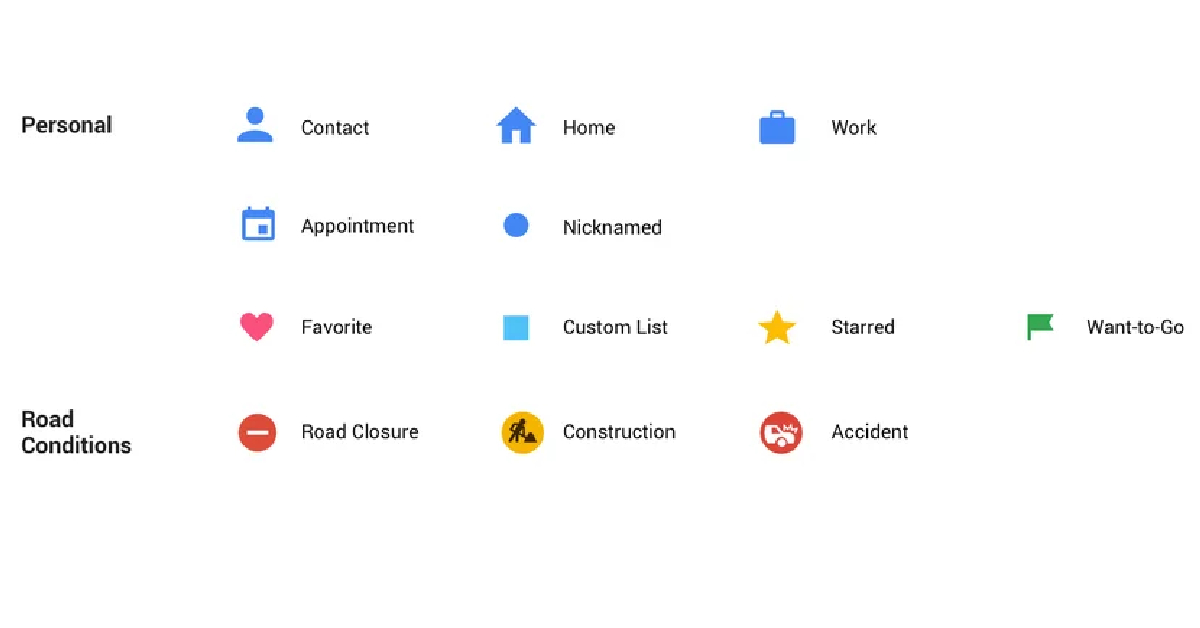
Google Maps is one of the most important apps on your phone. You can never be truly lost if you know how to use this app. While the app is simple to use, all the symbols and signs on the map can be hard to decipher at times. It doesn’t help that new signs are constantly added to the app. To make things easier, here is the meaning behind all the major icons and symbols on Google Maps.Read Also:Best smartwatch deals to look out for under Rs 5,000 on Amazon
In This Article
Map Page Icons
Target icon: The icon shaped like an aim or a target is the Recentre button that takes you to your current location as soon as it is pressed.Blue icon with an arrow: This icon is placed right below the target icon. Tapping this icon takes you to the journey page, where you can find the route by setting your current location and destination.Compass icon: This is pretty self-explanatory. The red end of the compass points towards the North. Tapping on this compass realigns the map in the proper direction.Layer icon: This icon is placed above the compass icon on the map page. Tapping it lets you change the style of the map. If you want to access Google Street View or Satellite View, this is the button you should hit.
Journey Icons
Yellow road: State and national highways are represented with a yellow road on the map.Colour-coded road passage: A blue passage on the map represents that there is minimal traffic on that stretch of the road. Meanwhile, an orange passage means there’s mild traffic on the road and a red passage symbolises stagnant traffic.Red car icon: When you see this icon, it means that there has been a crash or a collision on the road.Exclamation Mark: This icon means that the road ahead is closed.Shovel sign: This icon comes up when the road ahead is under construction.Red icon with a minus sign: This means that the road ahead is closed.Two arrows: Tap this icon to see the bird’s eye view of the route to your destination.Loudspeaker icon: This icon can be used to mute the voice directions.Magnifying glass icon: Searches locations along the route.Plus icon in a chat bubble: This button can be used to add a report about a collision, congestion, roadwork, or any other event along the way.Recentre: This button takes you to your current location.
Icons and Symbols for places on Google Maps
Yellow pin with a star: All your saved locations on the map will be marked by this pin.Fork and Knife pin: This pin marks any restaurant or eatery in the area. Tap on the pin to learn more about the restaurant. You can even set it as a destination. Man sleeping on bed pin: This pin is used to mark all the hotels, motels, and hostels on the map. Tap on this pin to get to know all the details about the hotel including availability, price, etc.Academic cap pin: This pin is used for schools, colleges, and other places of learning.Gas pump pin: This pin marks all the petrol pumps on the map.Shopping bag pin: Marks the convenience stores, grocery stores, and shopping malls on the map.Shopping cart pin: Used for denoting local markets on the map.H pin: Hospitals and medical clinics.Places like banks, tourist spots, post offices, parks, sports stadiums, and other places have their exclusive pins too.
Frequently Asked Questions (FAQs)
How do I use navigation on Google Maps to find a route to my desired destination?
Launch the Google Maps app on your phone and tap the blue icon with a right arrow to set your current location and destination. Once that’s done, tap Start to begin navigation.
How do I report a car crash on Google Maps?
To report a car crash on Google Maps, tap the chat bubble icon with a plus icon and select ‘Crash’.
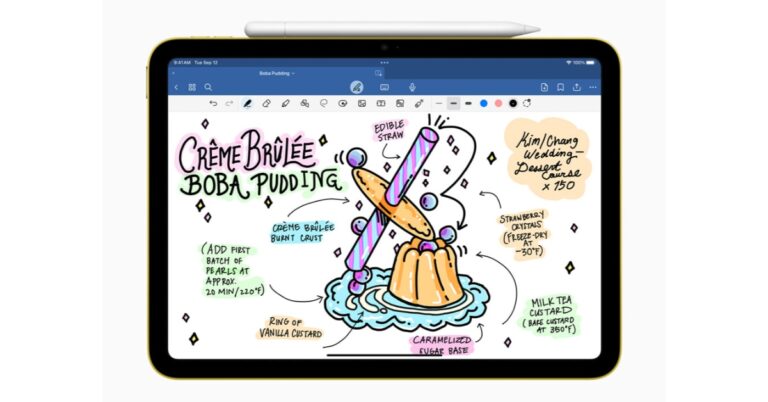
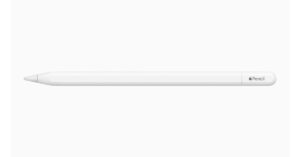
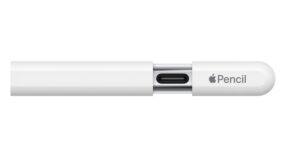
Apple has officially announced the launch of an affordable version of Apple Pencil but limited features. Now what’s new about this stylus is that it comes with a USB-C port for charging. Also, it is specially designed for students to take notes on their iPads. It has no pressure sensitivity or double tap to change tools as these features are specifically for artists or designers. Also, it lacks wireless pairing and free engraving. It still attaches magnetically to your iPad but cannot charge wirelessly.
The new Apple Pencil is an affordable variant of Apple Pencil (2nd gen). The device is even cheaper than Apple Pencil (1st gen). It works with all iPad models that have a USB-C port. The device is attached magnetically to the iPad thanks to the flat edge. However, it cannot be charged wirelessly unlike the upper variant of the Stylus. So one needs to pair and charge it to the iPad using a USB cable by sliding the cap on the top. The new Apple Pencil also has a matte finish. According to the company, the device when magnetically attached to an iPad for storage, enters into a sleep state to preserve battery life.It can be used for note-taking, sketching, annotating, journaling, and more but cannot be used by artists or designers. That’s because it lacks some important features like pressure sensitivity or double tap-to-change tools. It also works with iPadOS features like Scribble, and Quick Note, and when collaborating with others in Freeform. Users can sketch and illustrate with even greater precision when used with M2 models of iPad Pro, the new Apple Pencil supports hover.The newly launched Apple Pencil is also compatible with iPad (10th generation) and can also be paired with all iPad models that have a USB-C port, including iPad Pro, iPad Air, and iPad mini. For the latest gadget and tech news, and gadget reviews, follow us on Twitter, Facebook and Instagram. For newest tech & gadget videos subscribe to our YouTube Channel. You can also stay up to date using the Gadget Bridge Android App. You can find the latest car and bike news here.
Garena Free Fire is a battle royale game with regular awards and tournaments to keep players interested. If you play Garena Free Fire, you should be aware of the redeem codes that are released on a daily basis. However, because the battle royale game is banned in India, players from other countries can use the Free Fire Redeem codes daily. If you’re unfamiliar with the Garena Free Fire redeem codes or don’t know how to get them, we’ve put together a step-by-step guide to help you redeem them. Check out Garena Free Fire Redeem Codes for 18 October 2023.The Free Fire redeem codes are a great way to get free stuff. These are 12-digit codes that contain alphabets and numbers, as well as an expiration date and time. Because the Garena FF redeem codes cannot be used more than once, you should hurry to the redemption page to claim your free reward before someone else does. To get a free reward, all you have to do is go to reward.ff.garena.com/en, which is the official redemption page. Also, keep an eye on this space for daily updates on Garena Free Fire redemption codes and rewards.
In This Article
Garena Free Fire Redeem Codes Today 18 October2023
updating soon…
How to Get Free Fire Redeem Codes for Garena on 18 October2023?



 Step 2:
 Step 3:
 Step 4: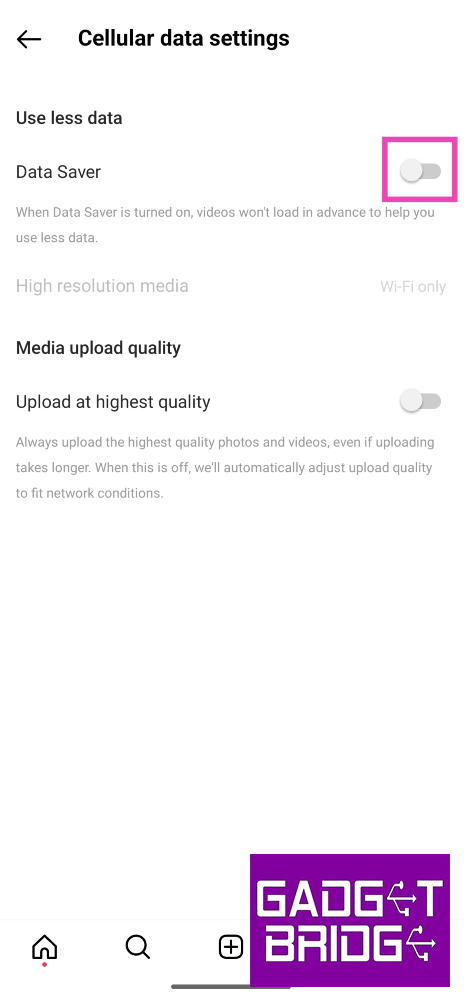
 Step 2: Tap on Data usage and media quality.
 Step 3: Turn on the toggle switch next to Upload at highest quality.
 Instead of uploading a picture from your phone’s gallery, use Instagram’s in-app camera to take a picture and then upload it as your story. Instagram’s in-app camera is optimised for the platform and the loss in quality is minimal compared to uploading a picture or video from your phone’s gallery. Of course, this method only works when you’re present in the scene you want to capture. If you want to upload an old picture to your story, this method is irrelevant.
 Adding music or stickers to your stories makes them bulkier. This dials down their quality during the upload process. To maintain the quality of your image or video, do not apply any add-ons available on the story creation page. Keep your media the focus of your story. This will ensure that it is uploaded at the highest possible quality.
 While uploading a picture or video on your Instagram story, make sure it adheres to the platform’s guidelines for resolution, size, and aspect ratio. If your media is too high-quality or large in size, Instagram will compress it, thereby making it blurry. The aspect ratio should be 9:16 and the resolution should be 1,920 x 1,080p. Images should not be larger than 30MP while the video size should not exceed 4GB.
 Step 2:
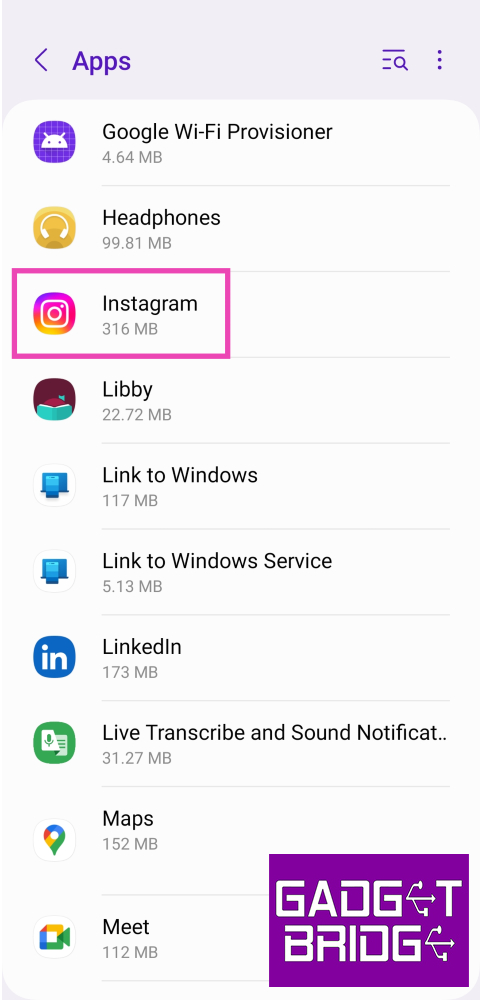 Step 3:
 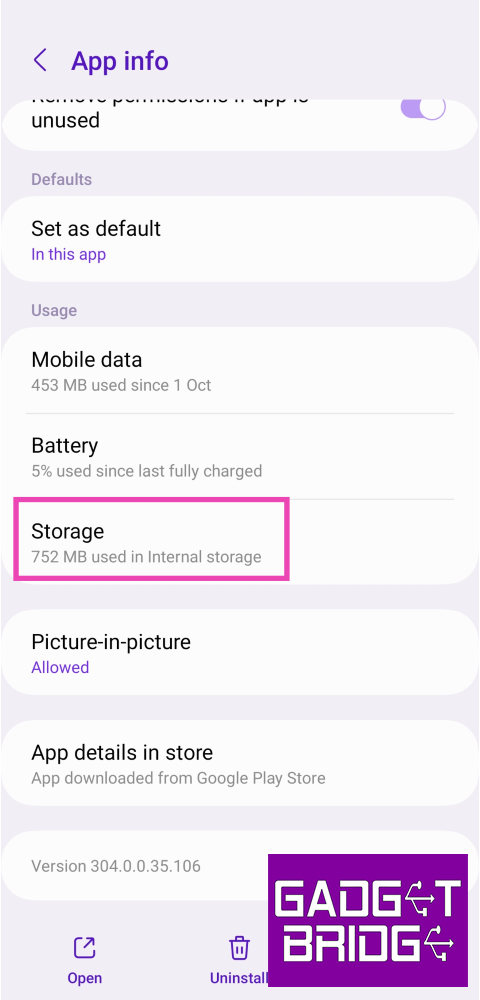 Step 4: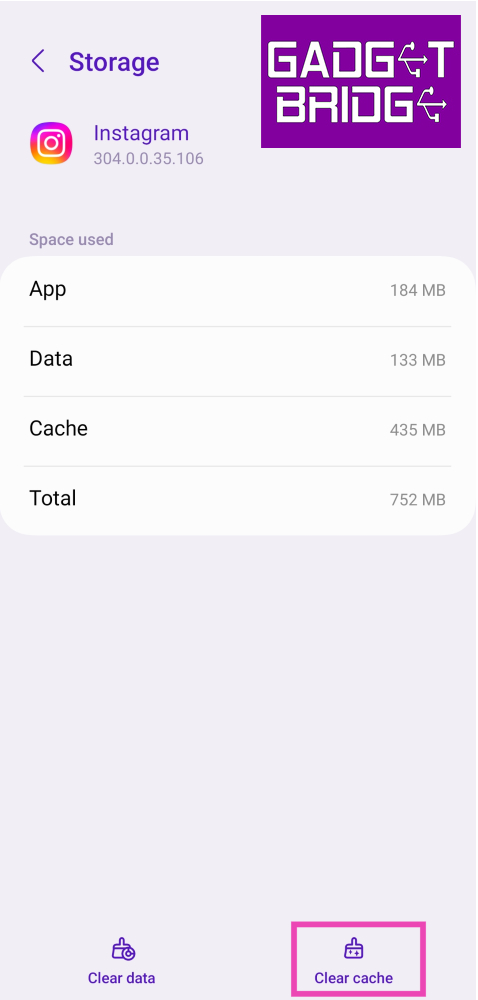
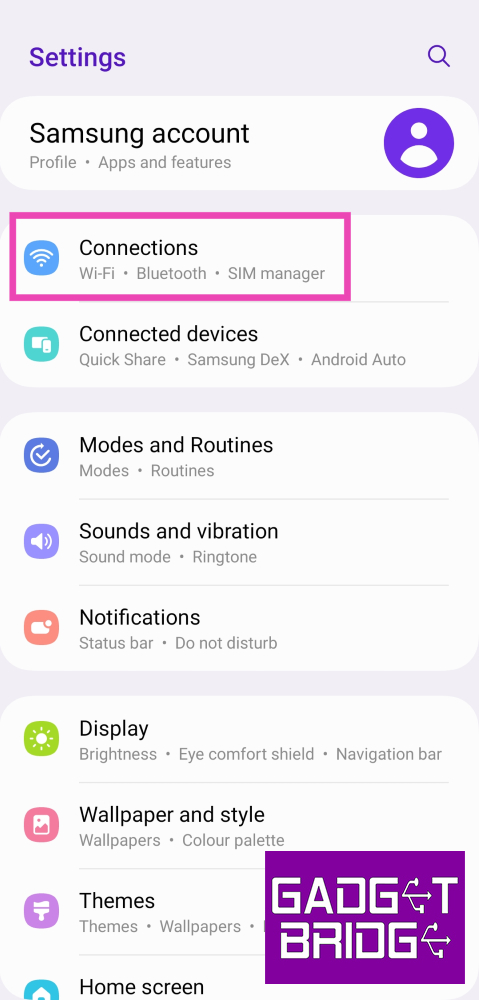 Step 2:
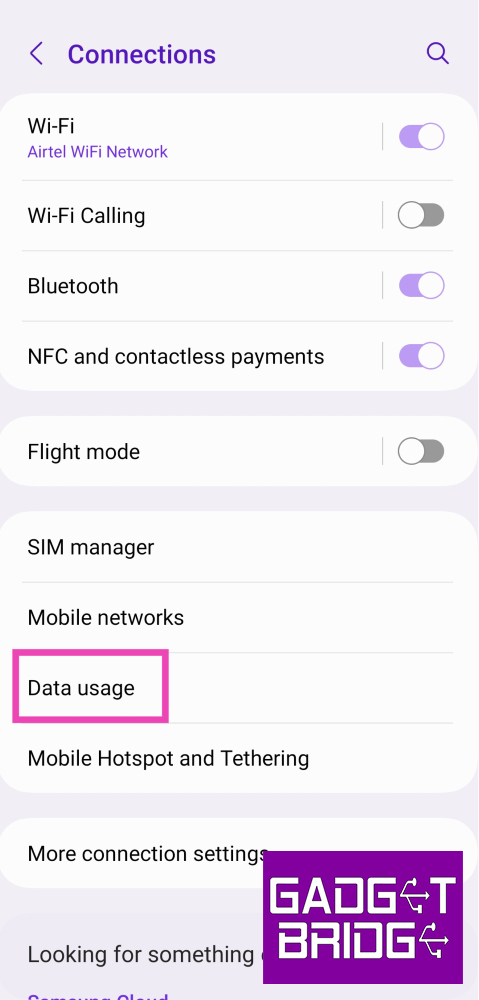 Step 3:
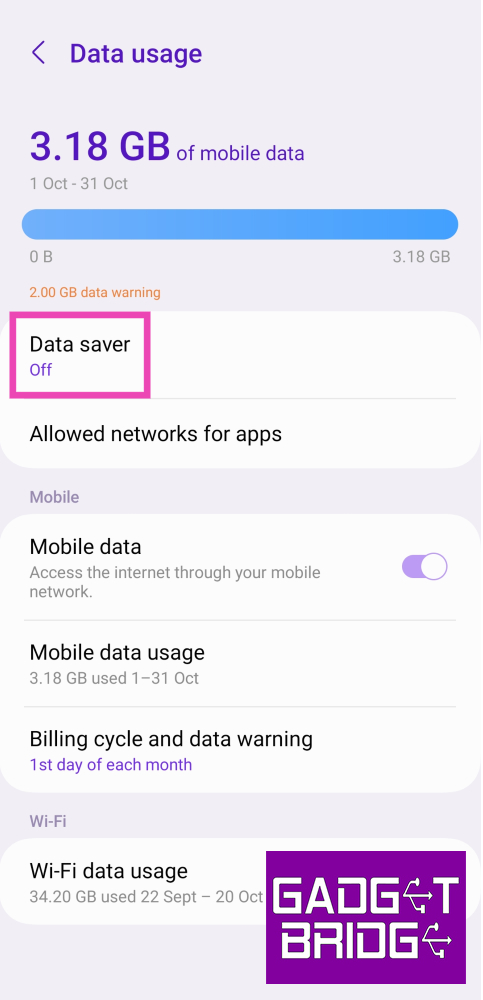 Step 4: Turn off the toggle switch for Turn on now.
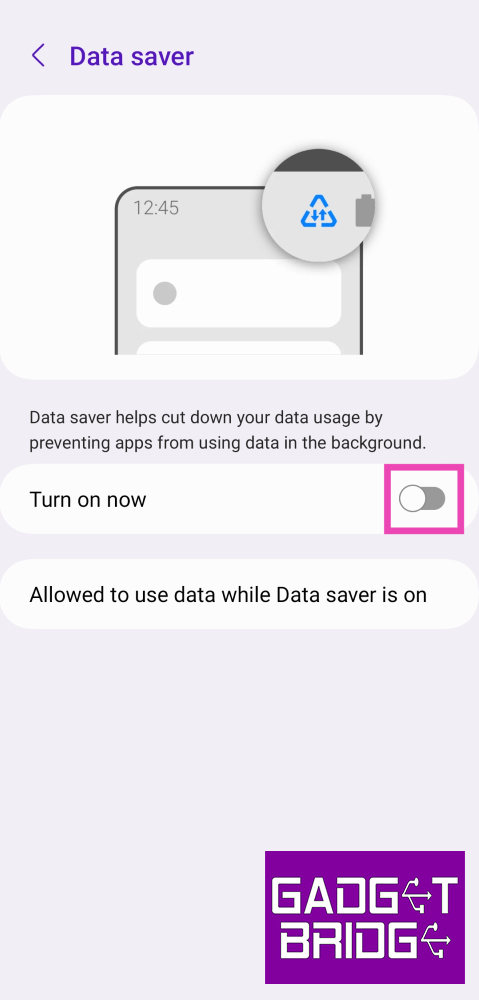
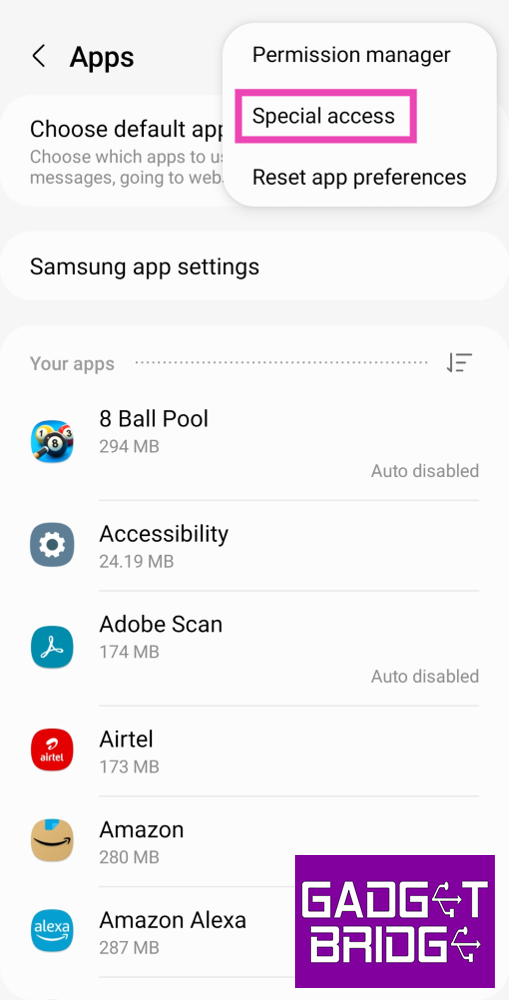 Step 3:
 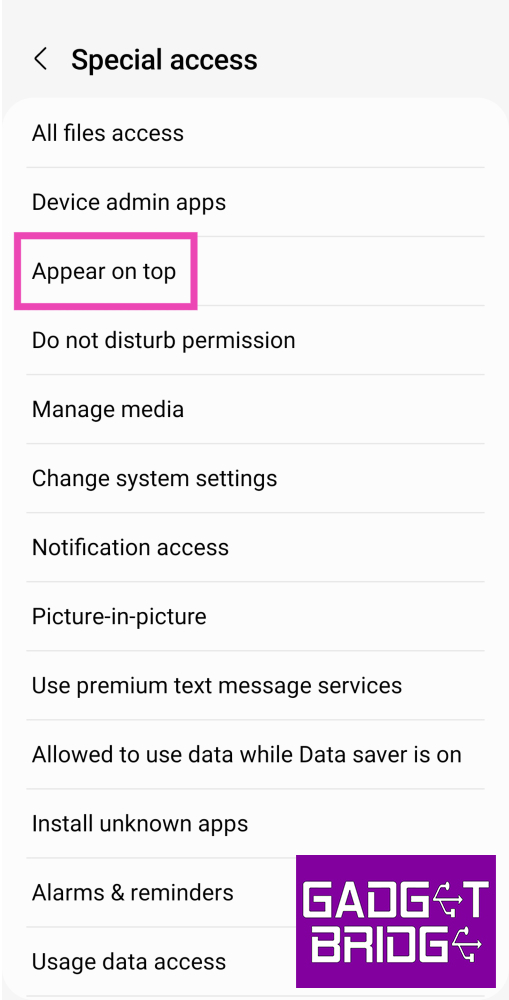 Step 4: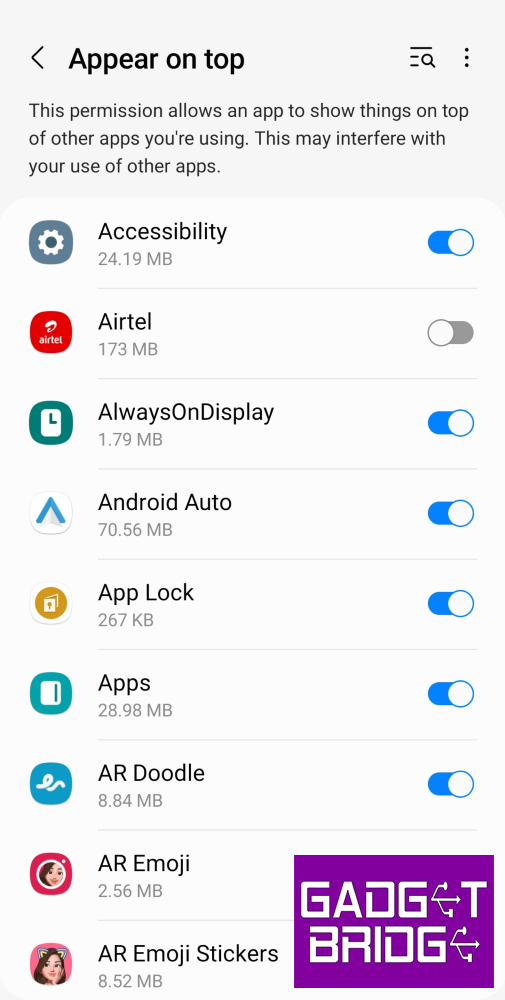
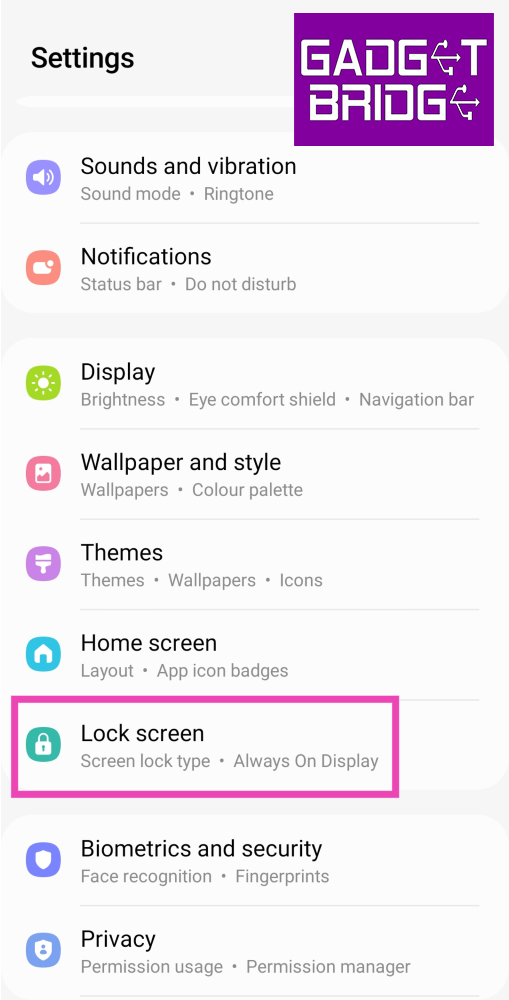 Step 2:
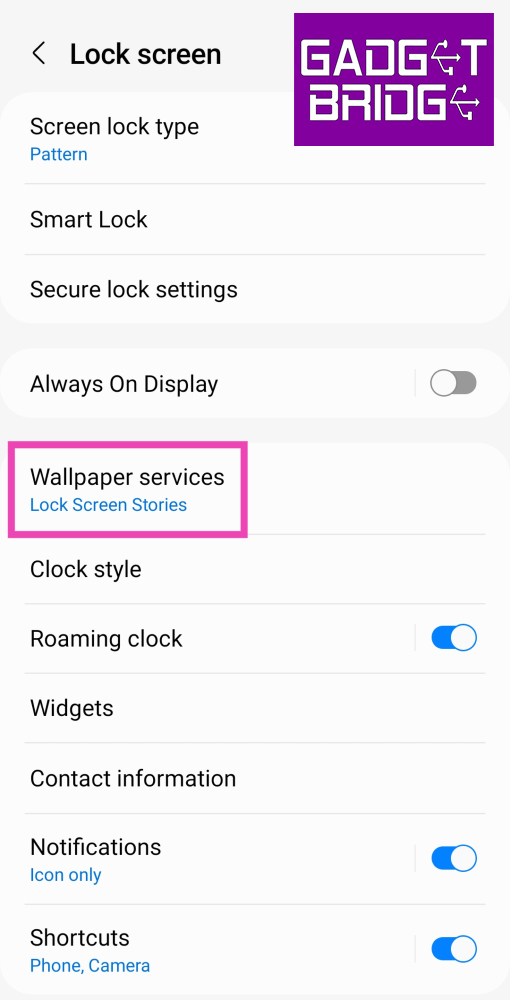 Step 3:
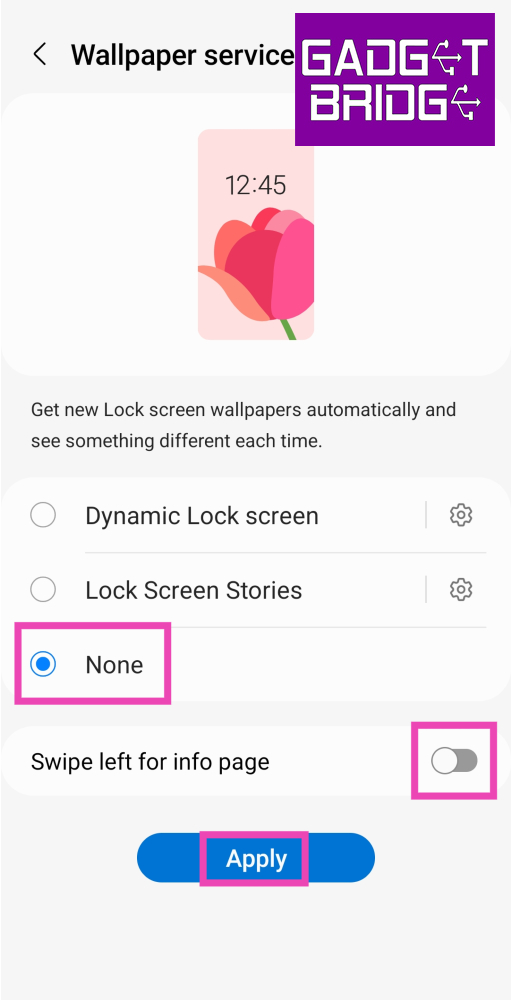 Step 4:
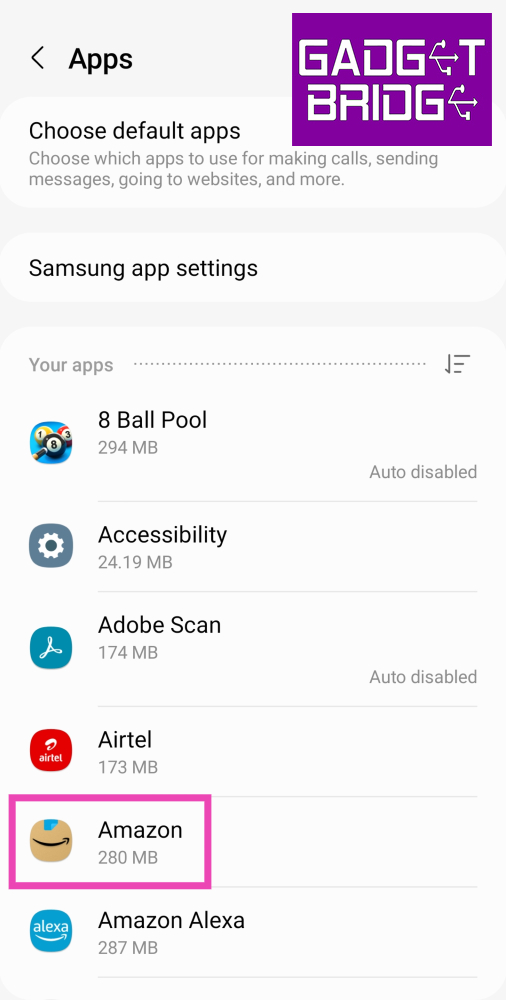 Step 3:
 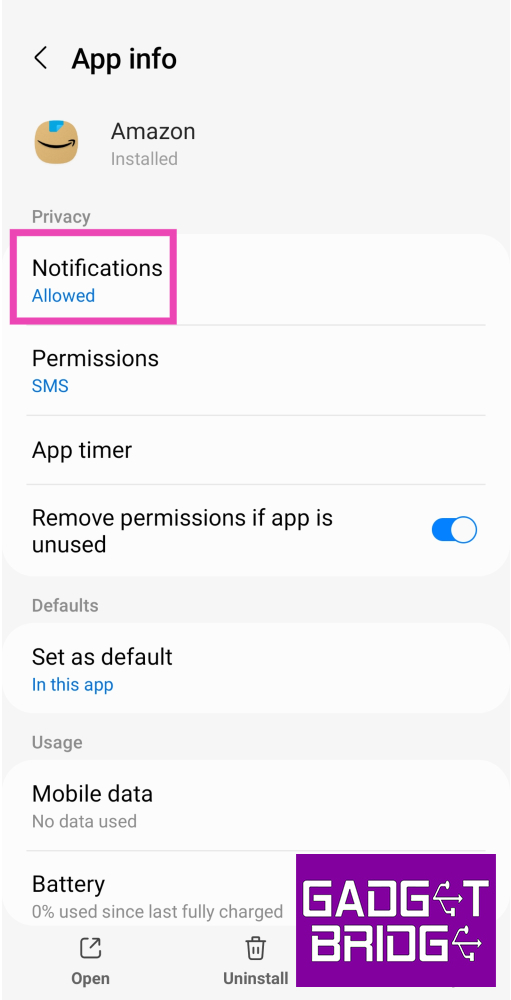 Step 4: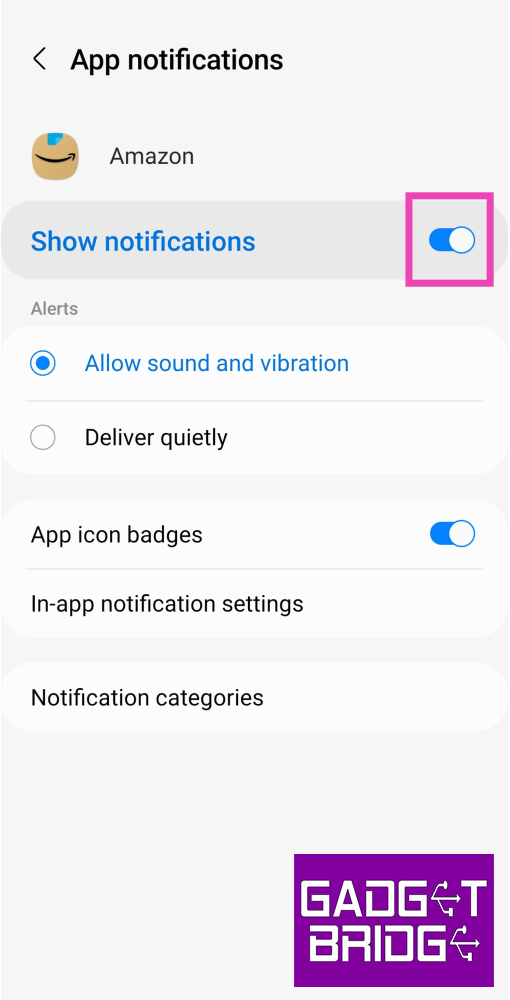
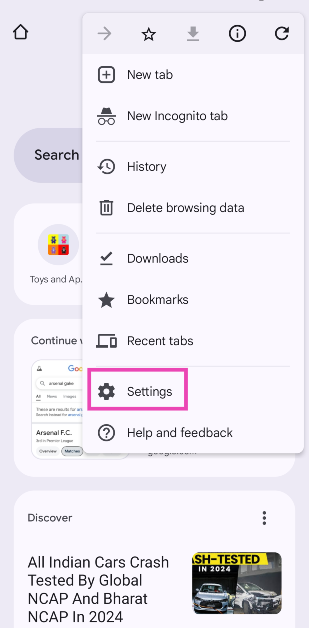 Step 3: Tap on Site settings.
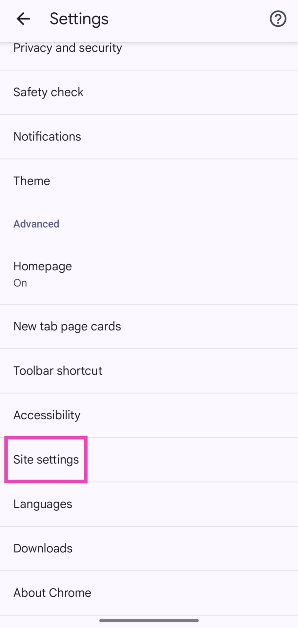 Step 4: Select Pop-ups and redirects and turn off its toggle switch.
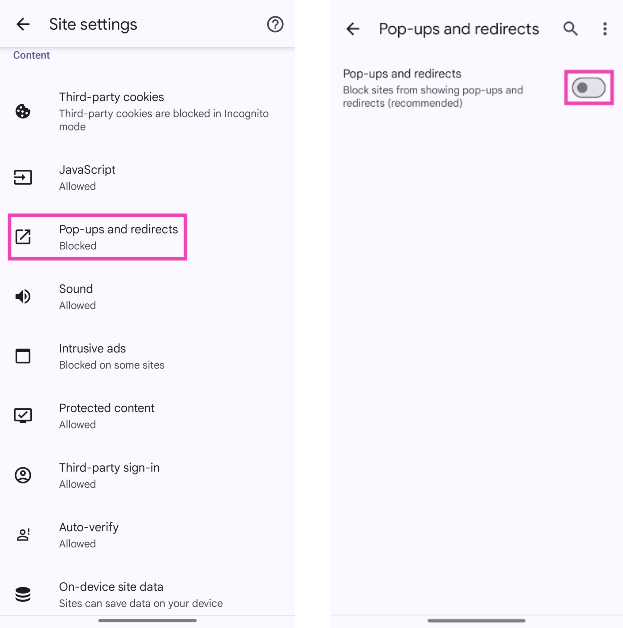
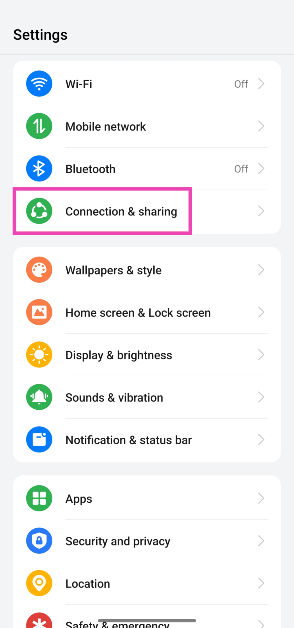 Step 2: Tap on Private DNS.
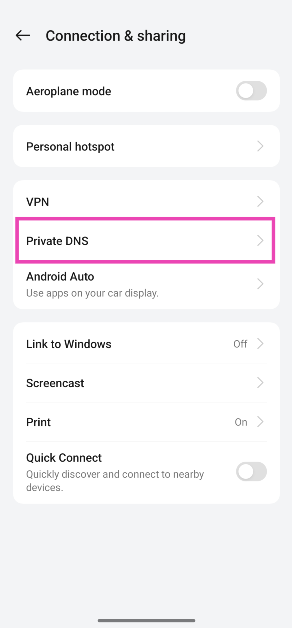 Step 3: Select Specified DNS.
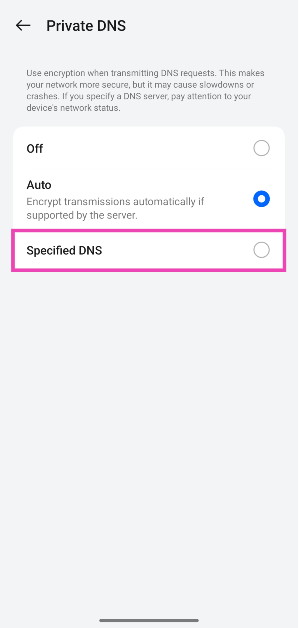 Step 4: Enter the hostname of the DNS provider. For example, dns.adguard-dns.com or family.adguard-dns.com.
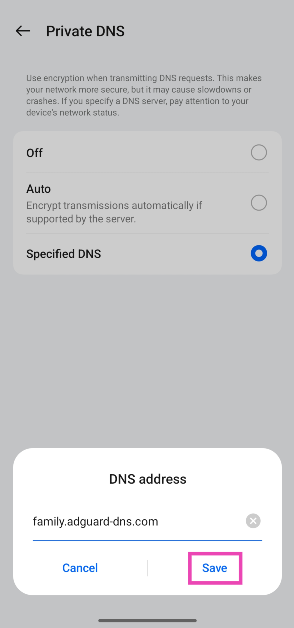 Step 5: Hit Save.
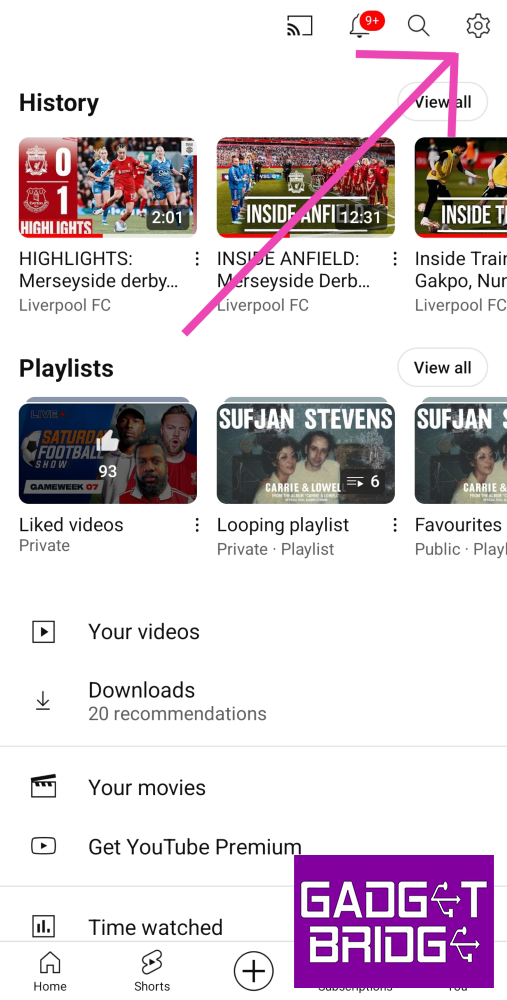 Step 3:
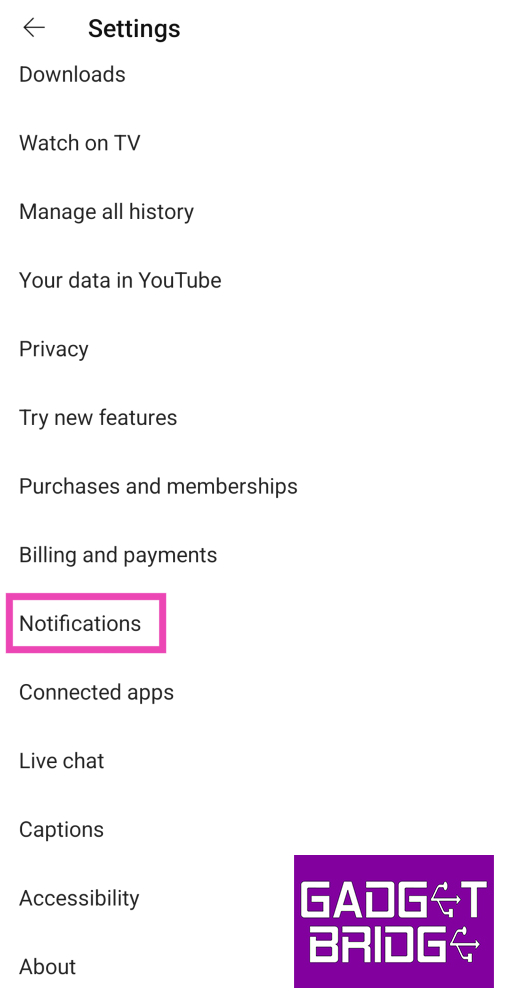 Step 4: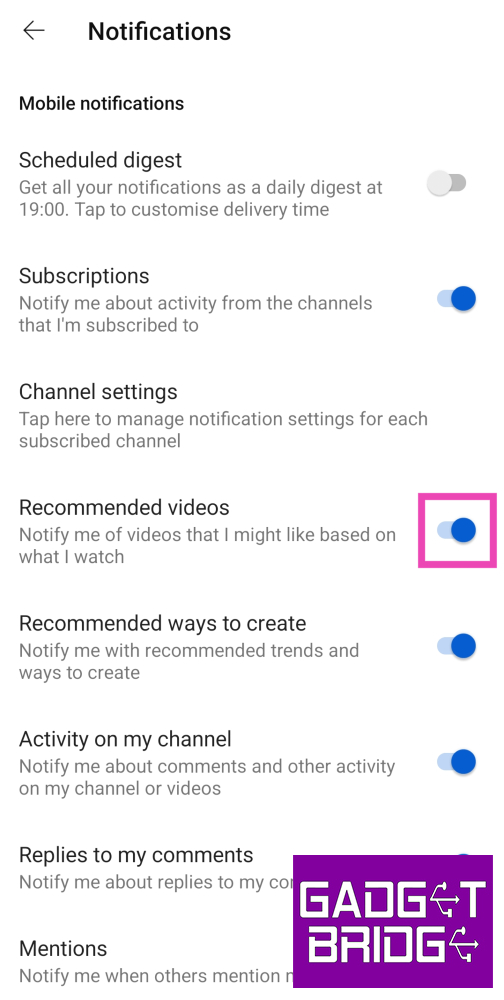
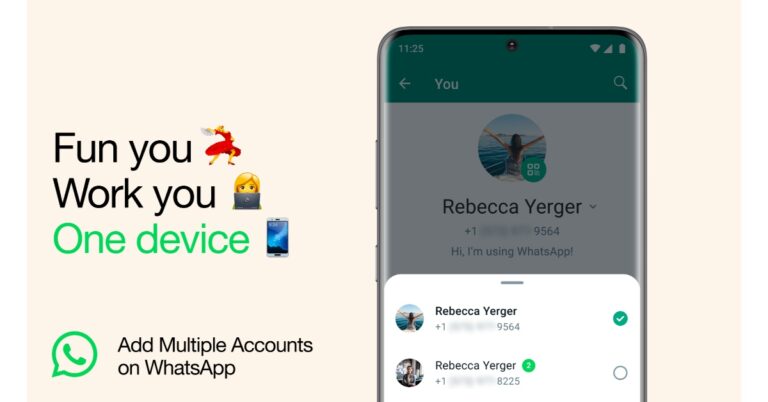
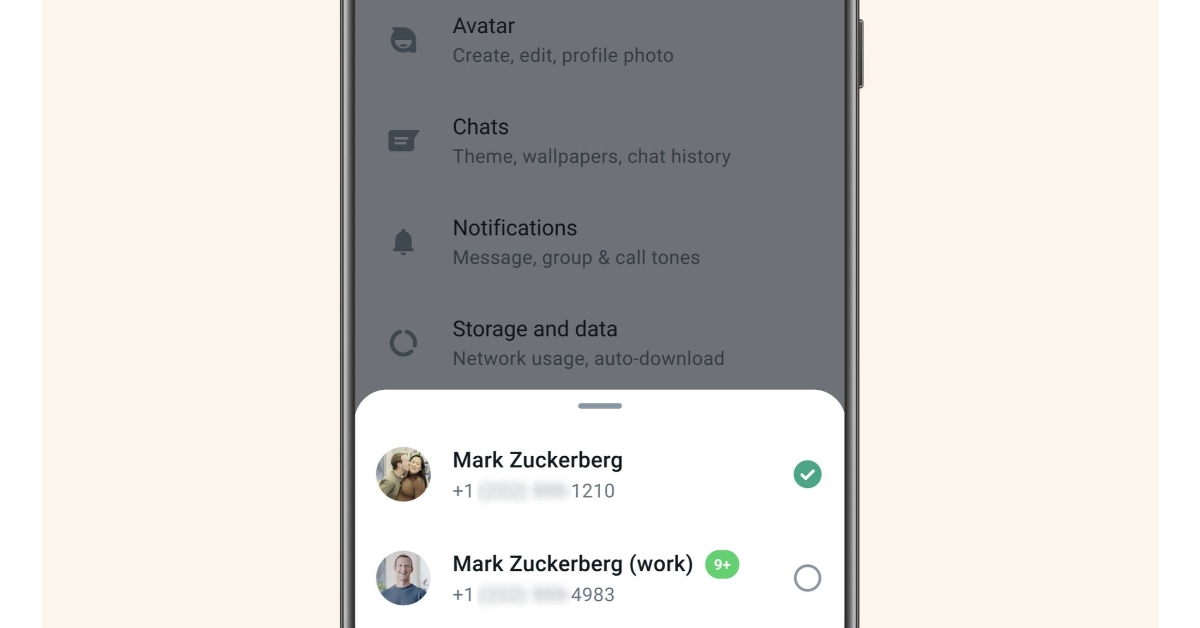 WhatsApp official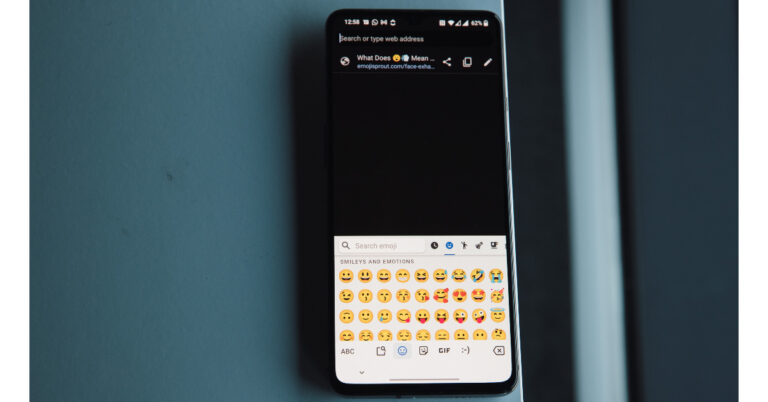

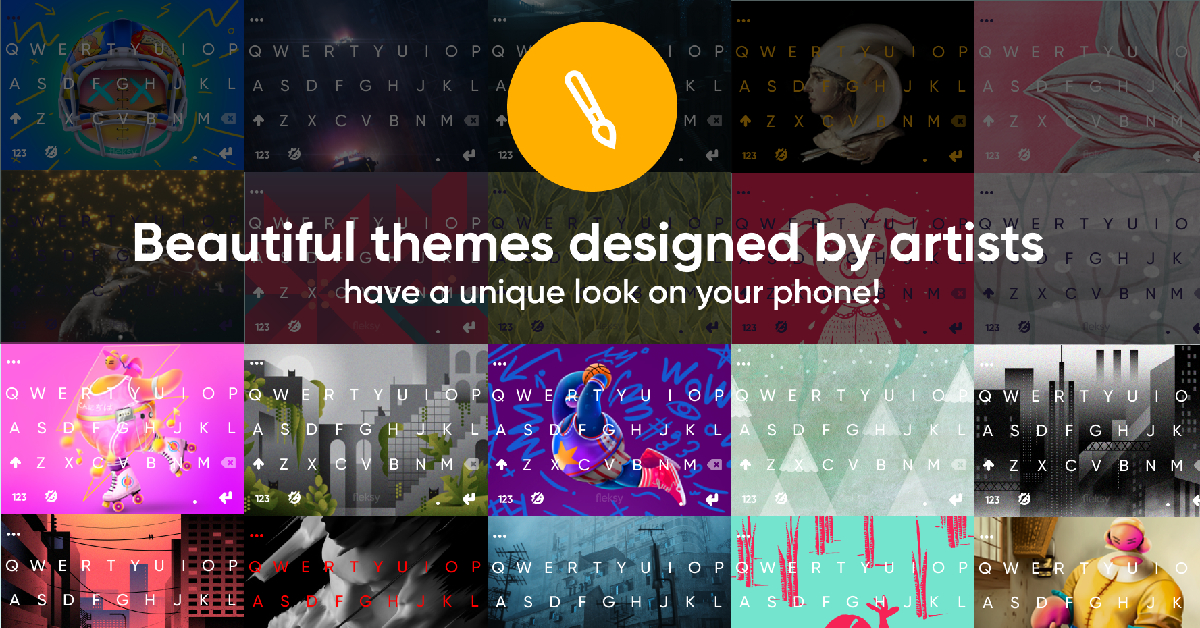
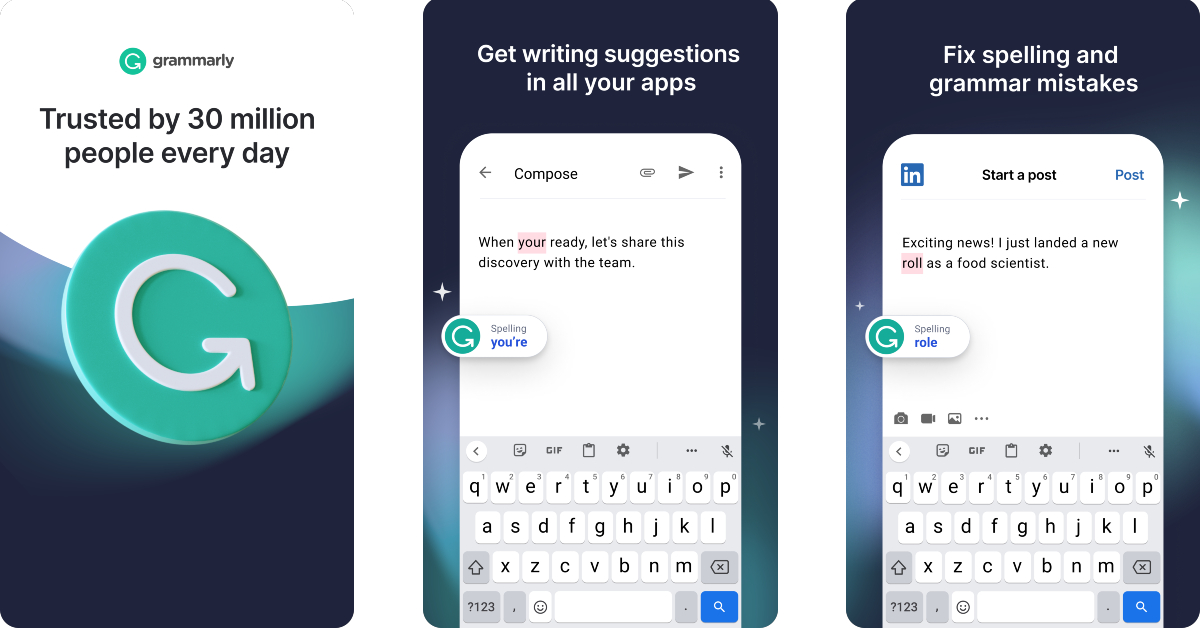
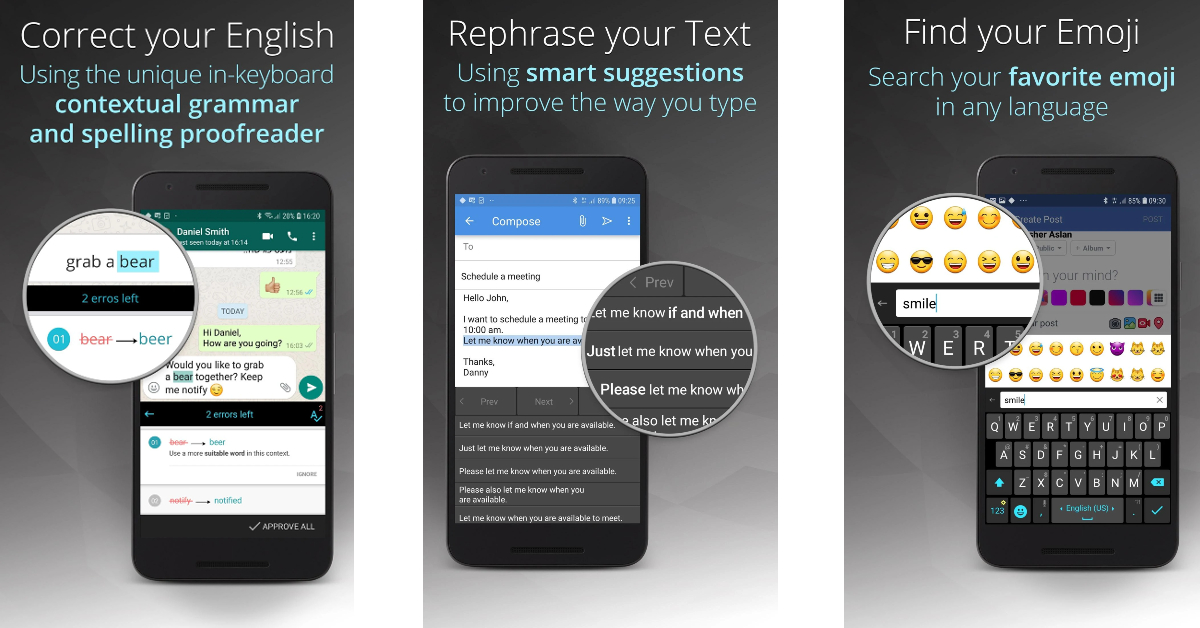
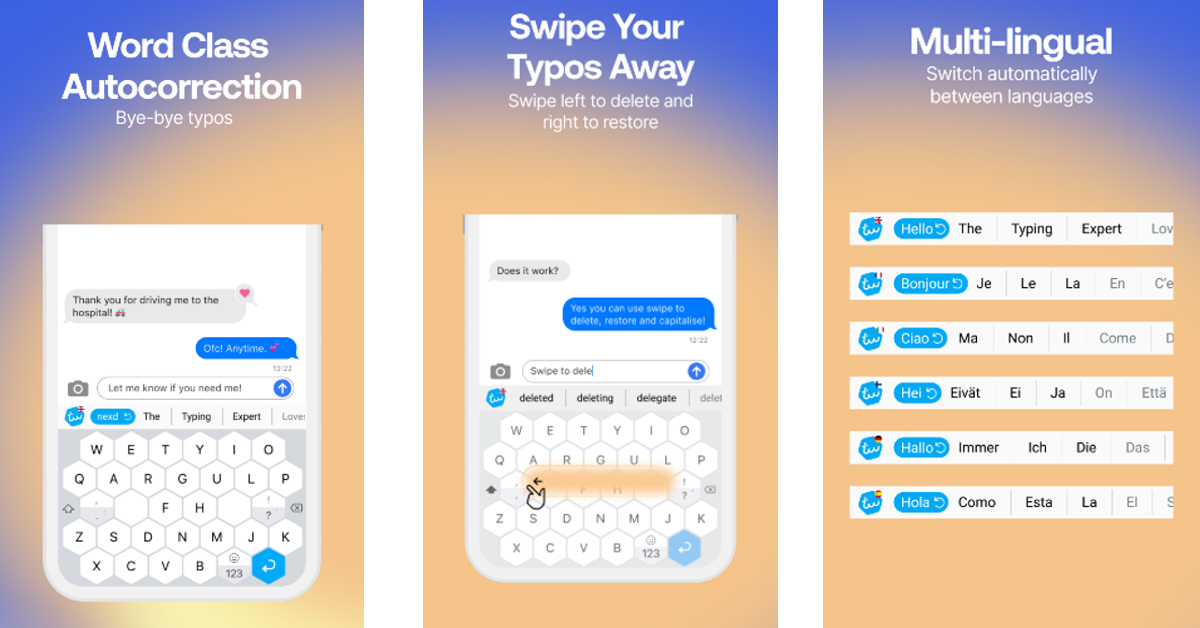
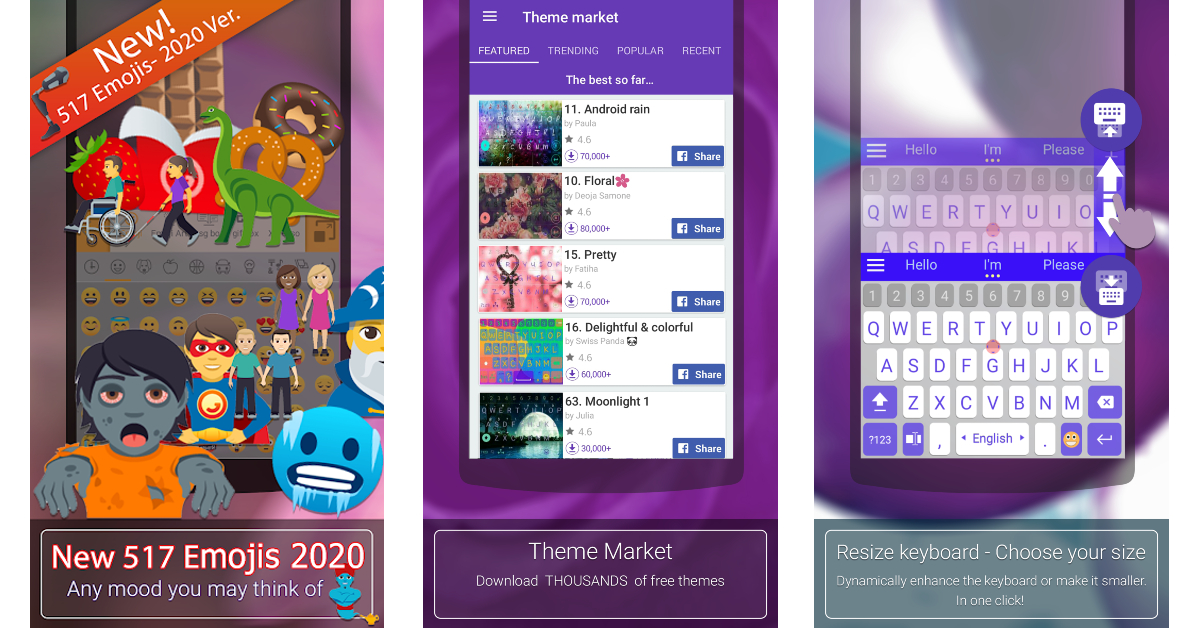
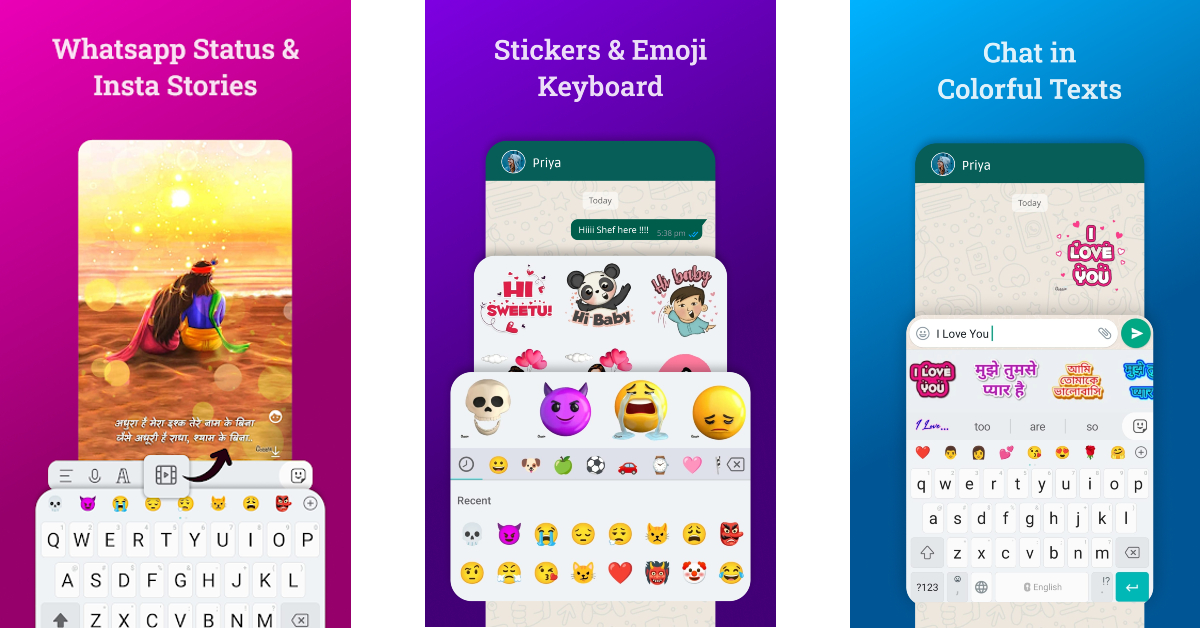
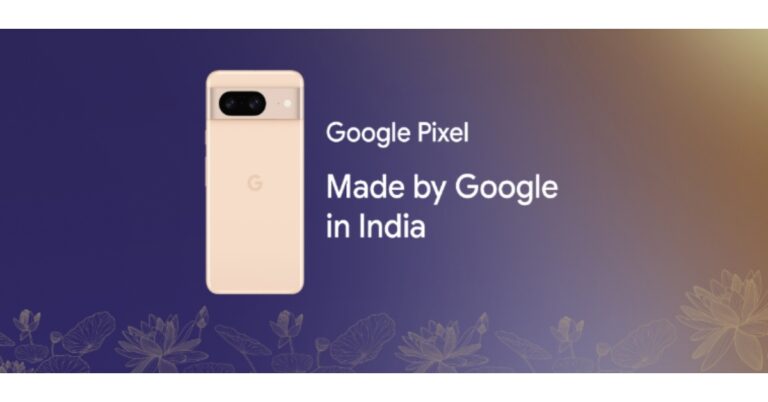



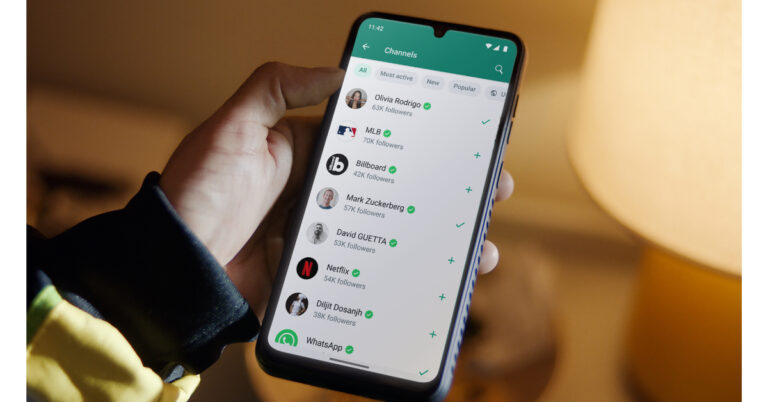
 Step 2:
 Step 3:
 Step 4:
 Step 5:
 Step 4:
 Step 5:
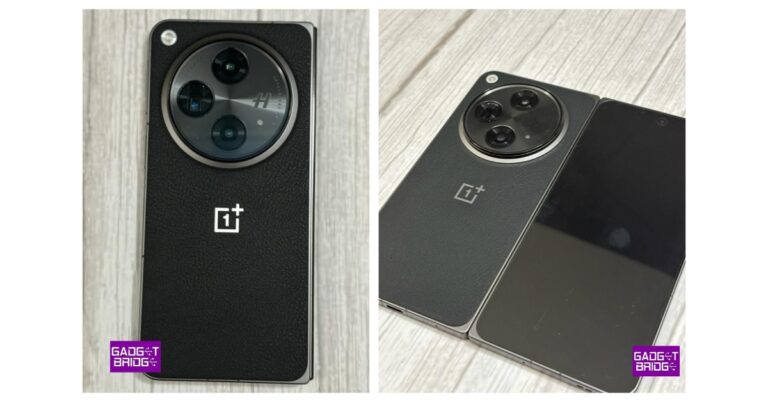
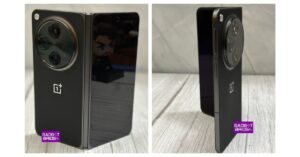 On the other hand, the secondary display features Super Fluid AMOLED with LTPO 3.0 measuring 6.31 inches. The
 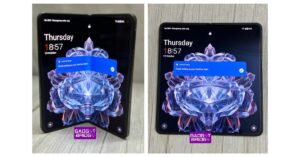 Coming to endurance the OnePlus Open includes a Dual-cell 4,805 mAh battery with 67W SUPERVOOC Charging support.
Also Read:
Coming to endurance the OnePlus Open includes a Dual-cell 4,805 mAh battery with 67W SUPERVOOC Charging support.
Also Read: 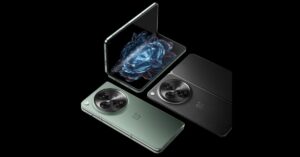 The company has provided two cameras for selfies 20MP primary (inner) and 32MP secondary (outer).
In terms of connectivity, there is WiFi, Bluetooth 5.3, NFC, GPS, (L1+L5 Dual Band), GLONASS, Galileo (E1+E5a Dual Band), Beidou, A-GPS and QZSS. The sensors onboard include Side-mounted Fingerprint Sensor, Accelerometer, M-sensor Electronic Compass, Gyroscope, Ambient Light Sensor, Proximity Sensor, Sensor Core, Flick-detect Sensor, Infrared Sensor and USB Type C Port.
The company has provided two cameras for selfies 20MP primary (inner) and 32MP secondary (outer).
In terms of connectivity, there is WiFi, Bluetooth 5.3, NFC, GPS, (L1+L5 Dual Band), GLONASS, Galileo (E1+E5a Dual Band), Beidou, A-GPS and QZSS. The sensors onboard include Side-mounted Fingerprint Sensor, Accelerometer, M-sensor Electronic Compass, Gyroscope, Ambient Light Sensor, Proximity Sensor, Sensor Core, Flick-detect Sensor, Infrared Sensor and USB Type C Port.
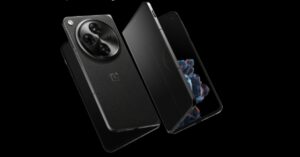 The phablet features OnePlus’s iconic Alert Slider which has been redesigned. OnePlus previously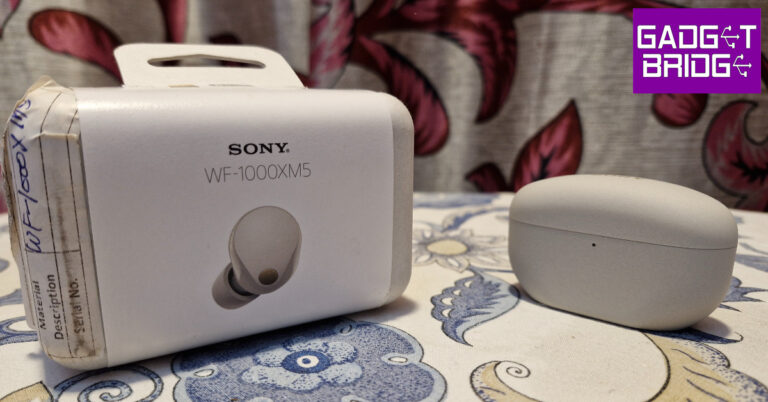
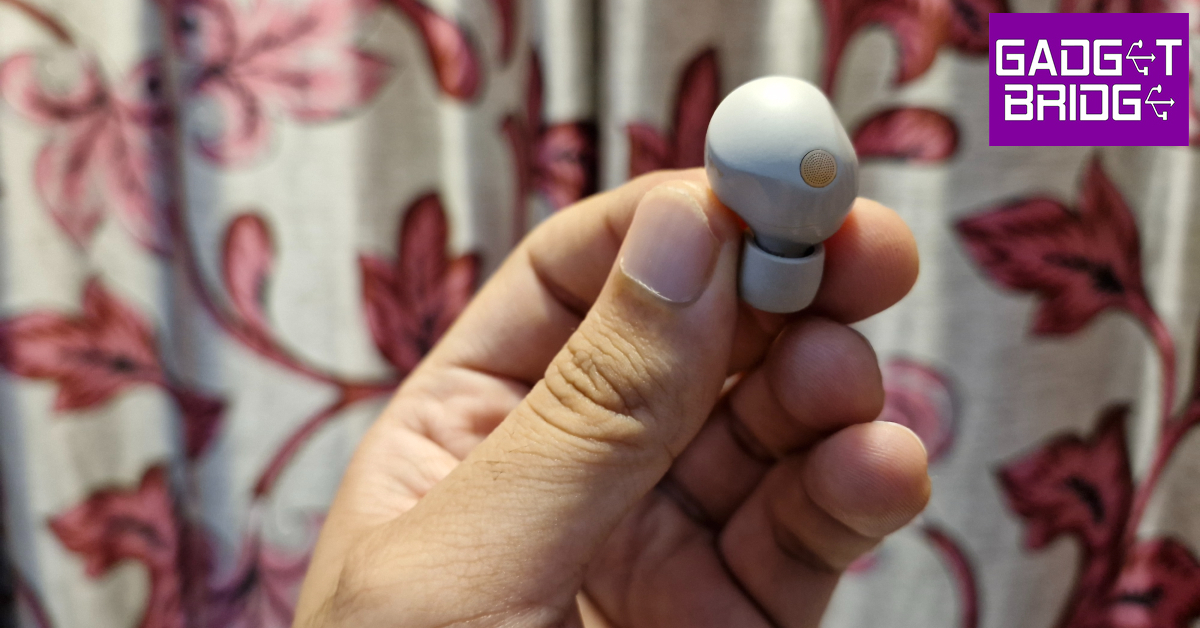
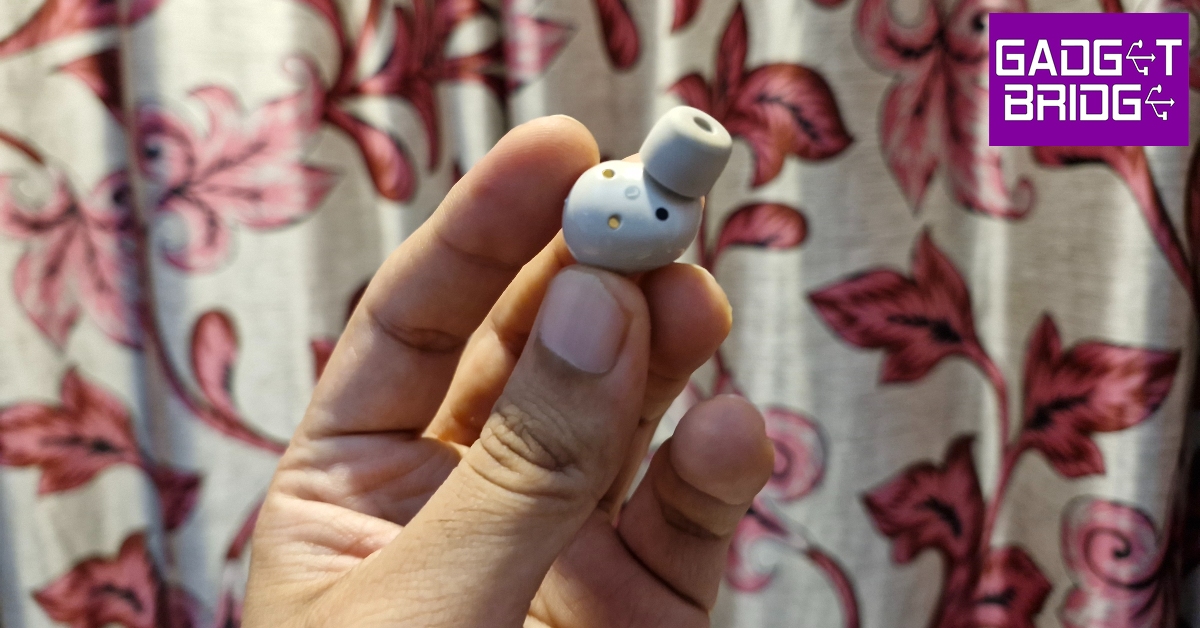
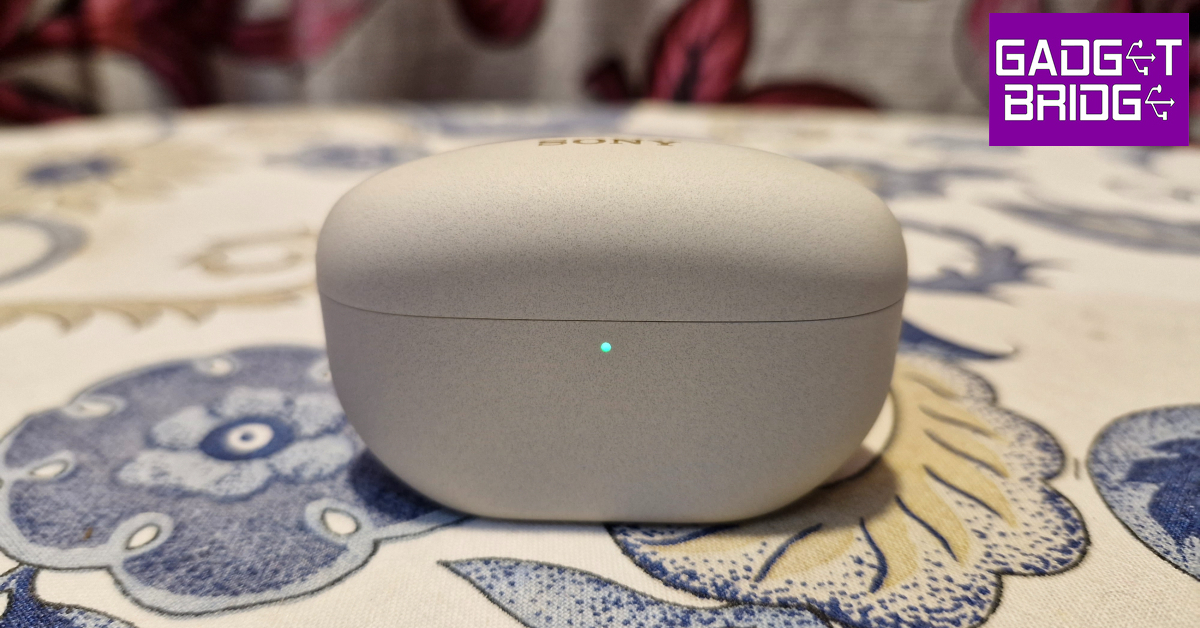
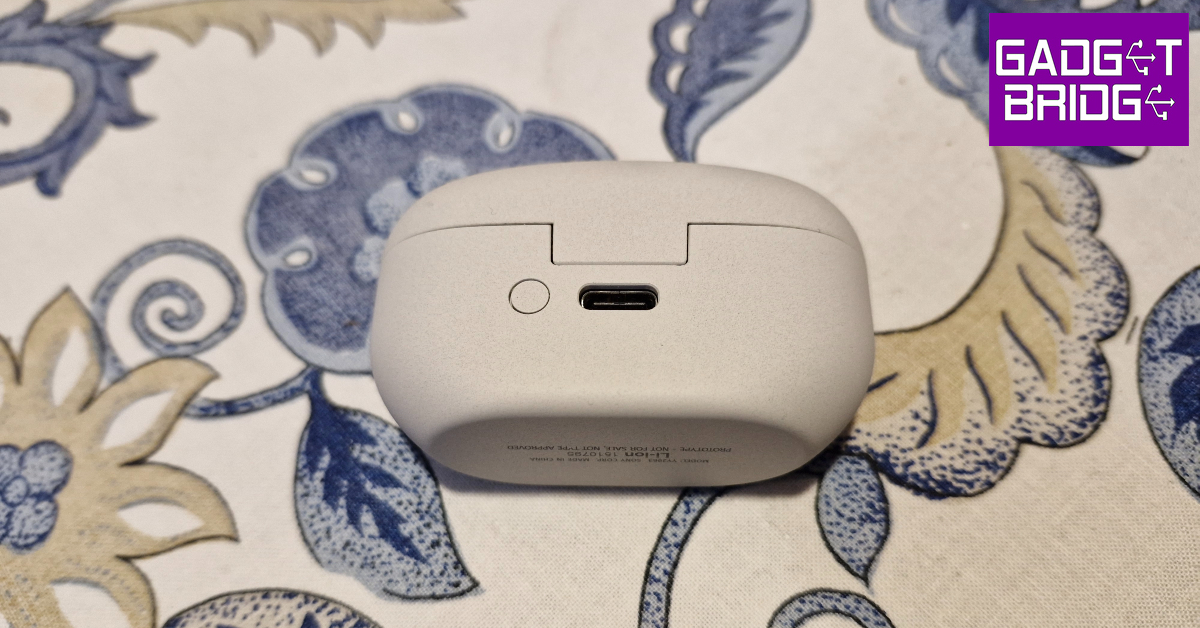
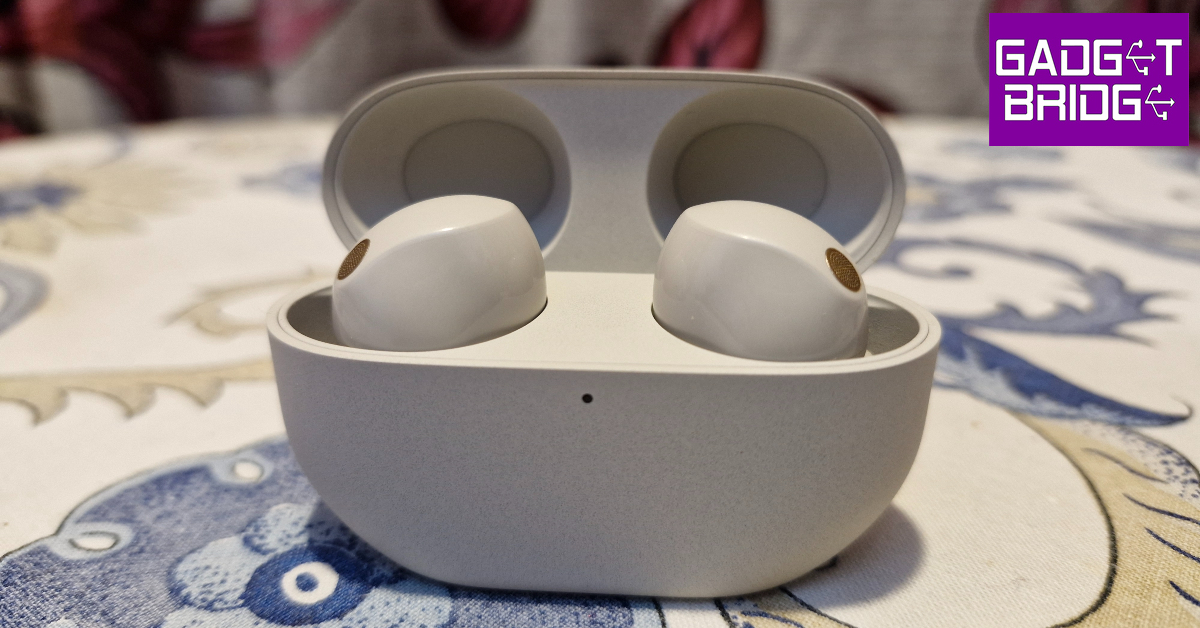
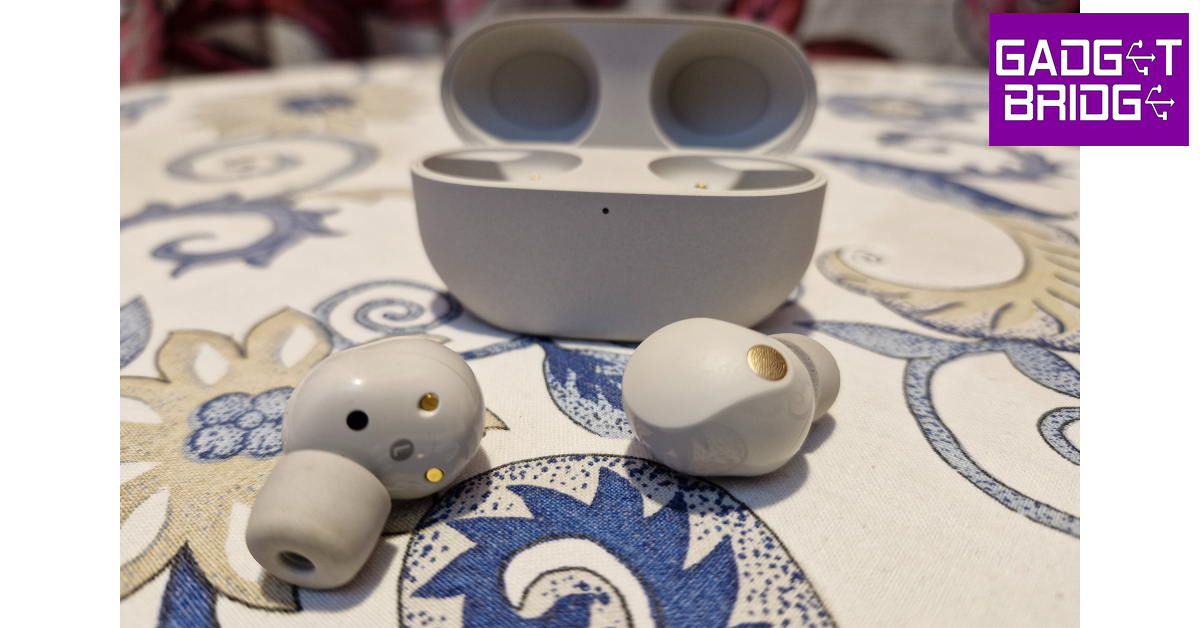
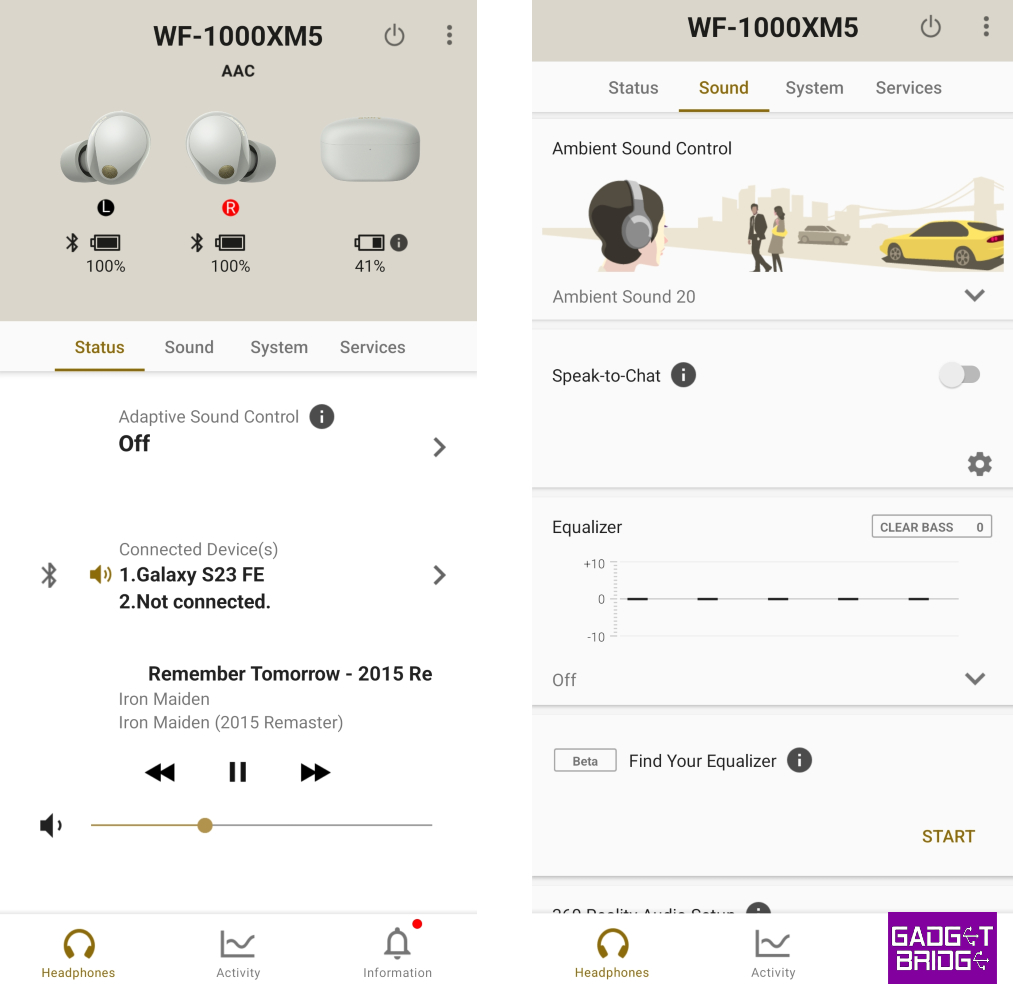
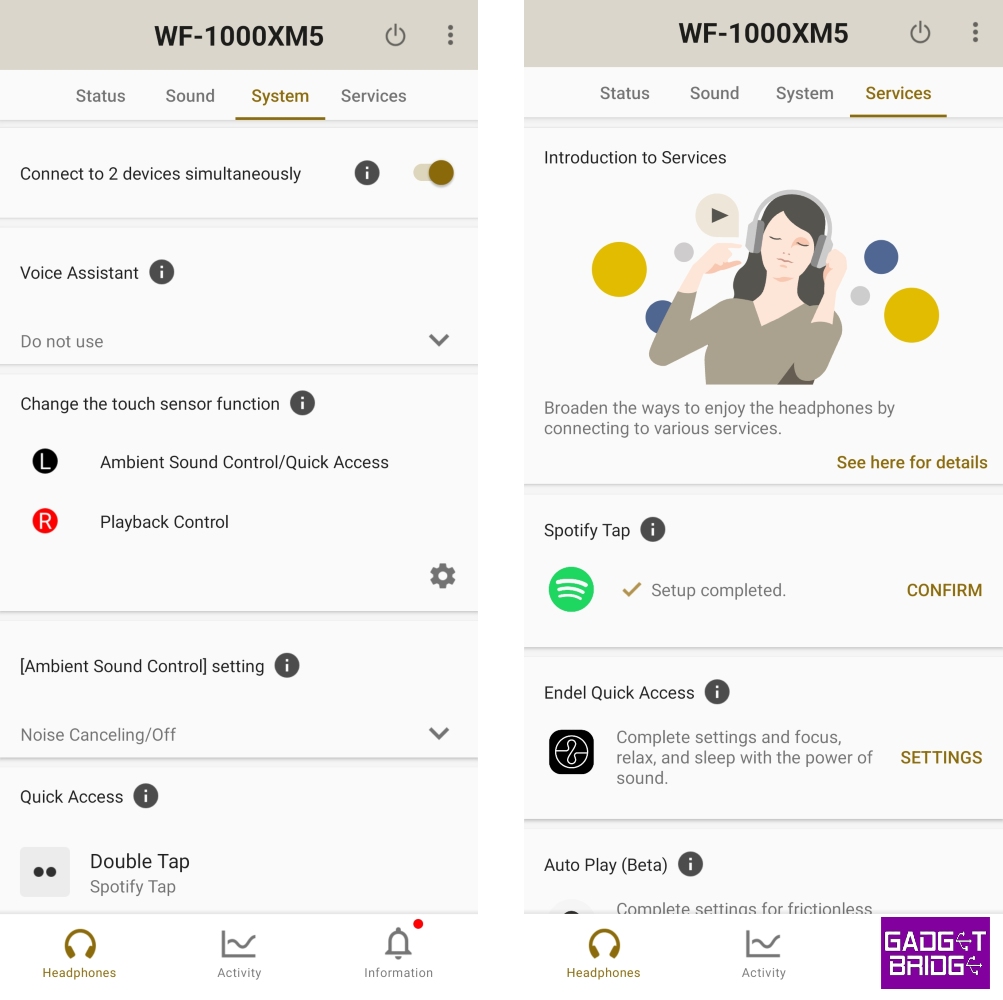
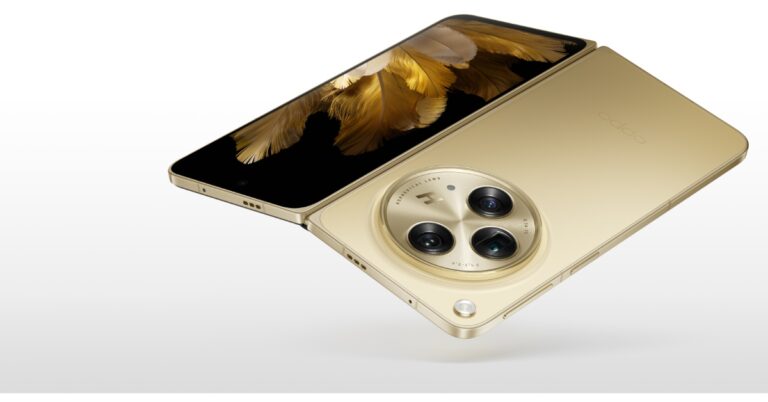
 The Oppo Find N3 operates on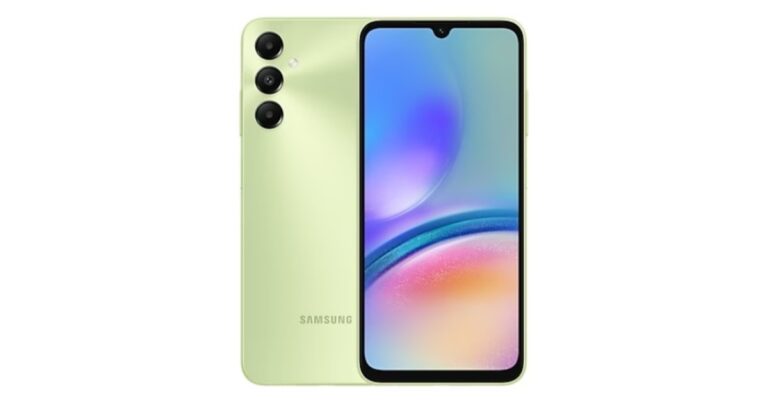
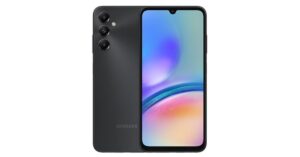
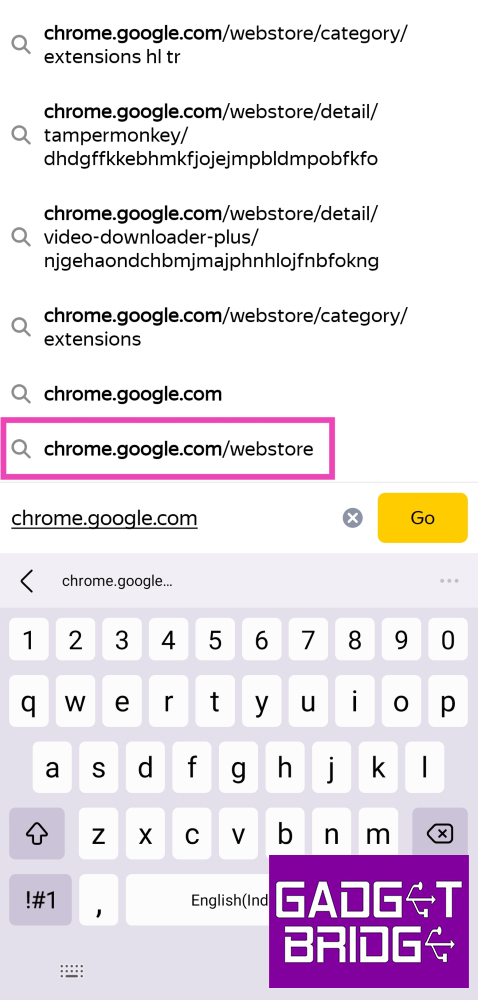 Step 3: Search
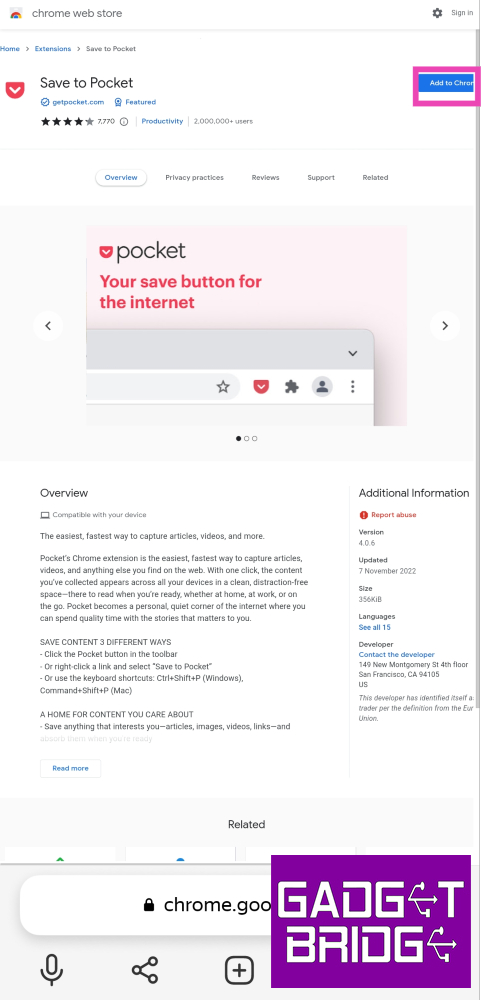 Step 5: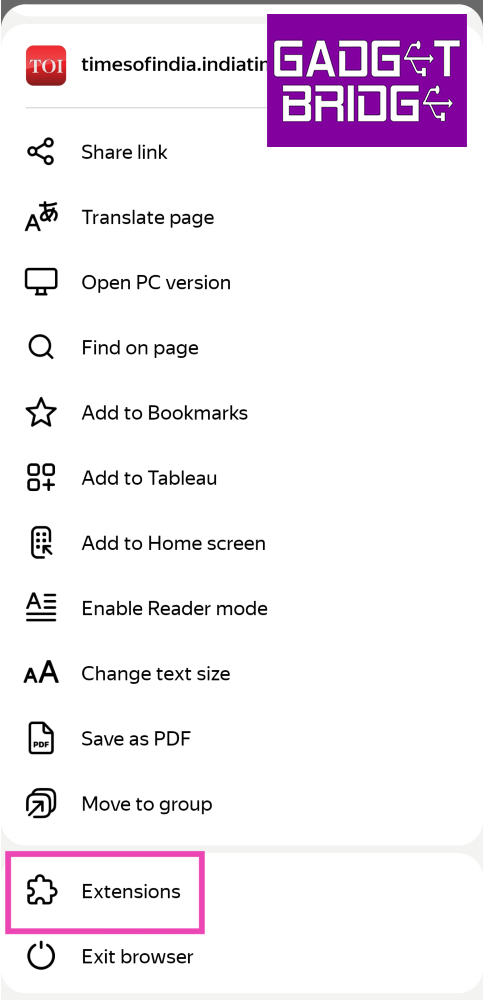
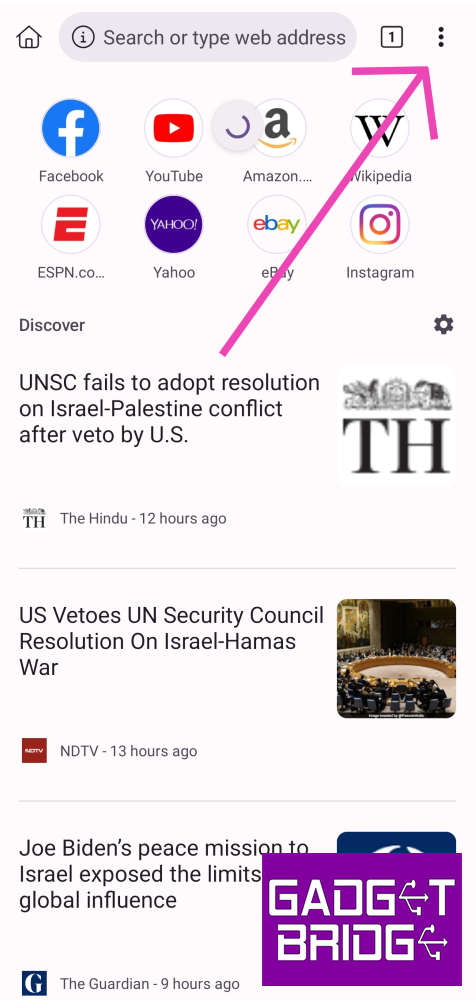 Step 3:
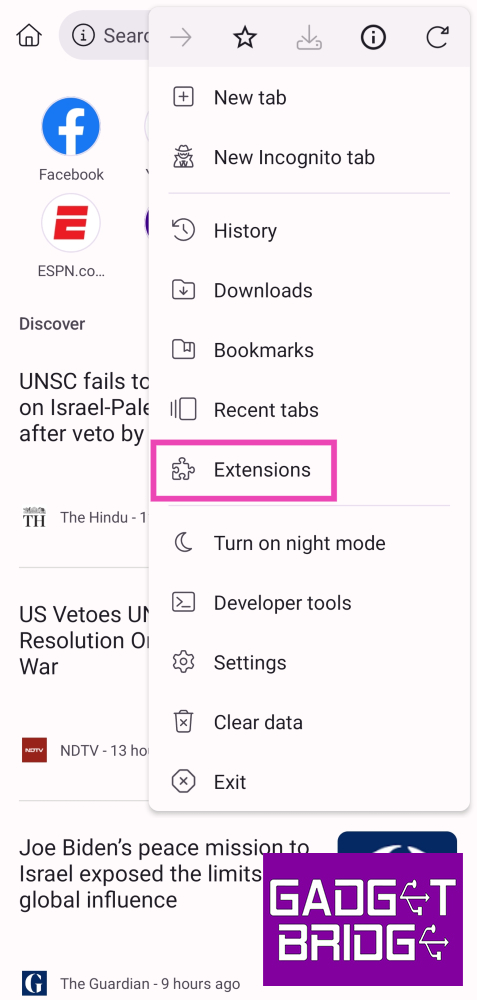 Step 4:
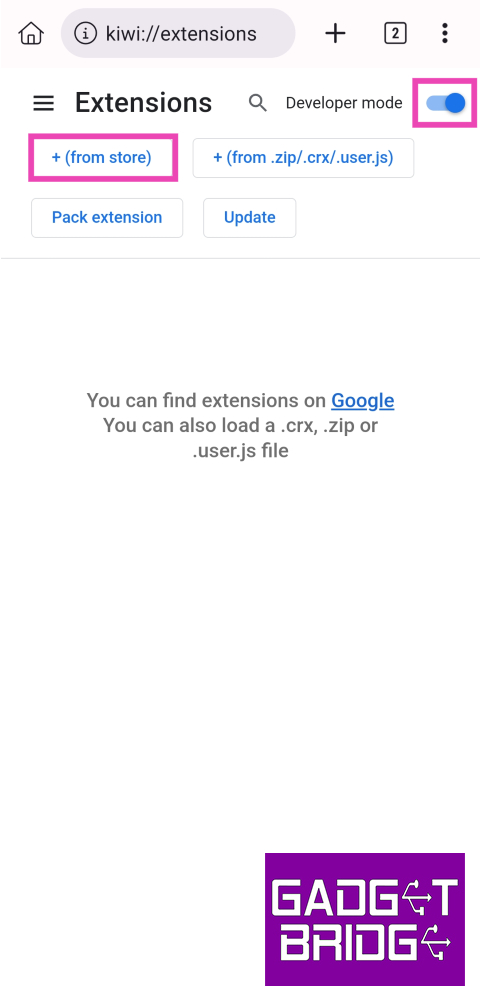 Step 5: Search
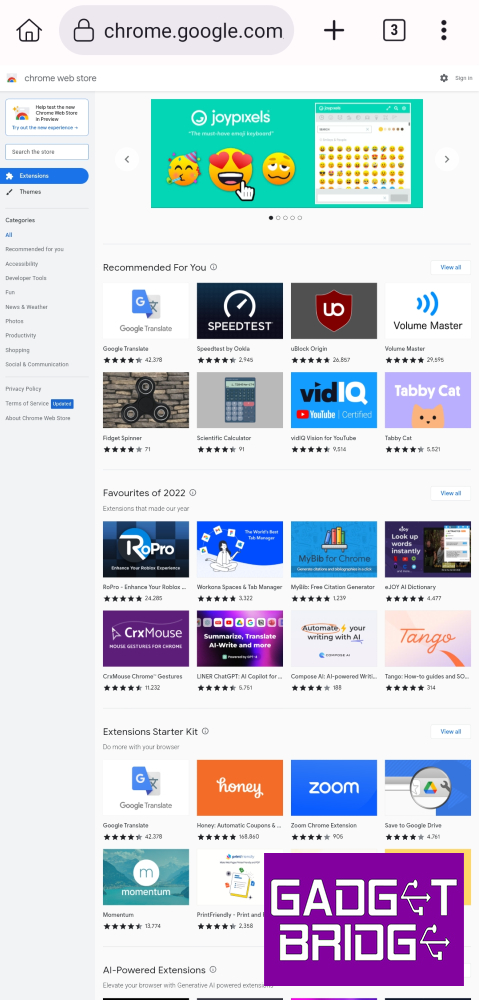 Step 6:
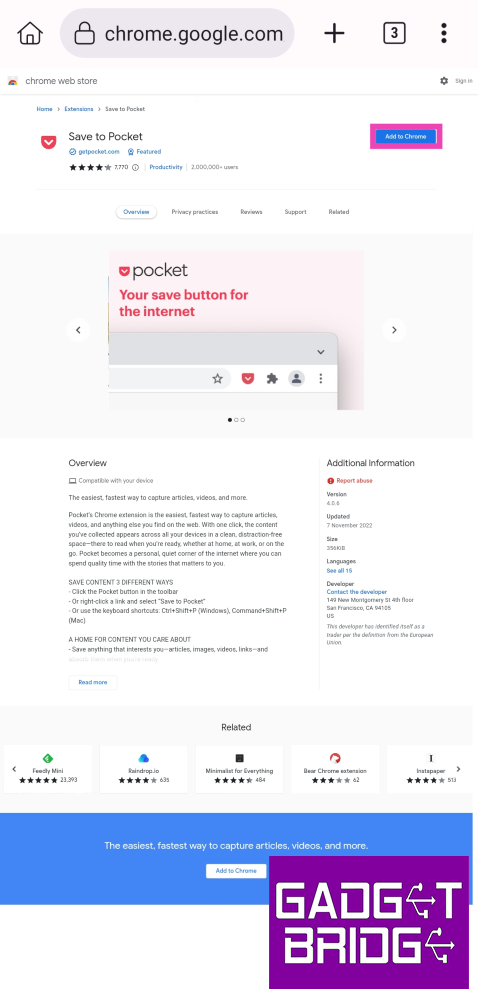 Step 7:
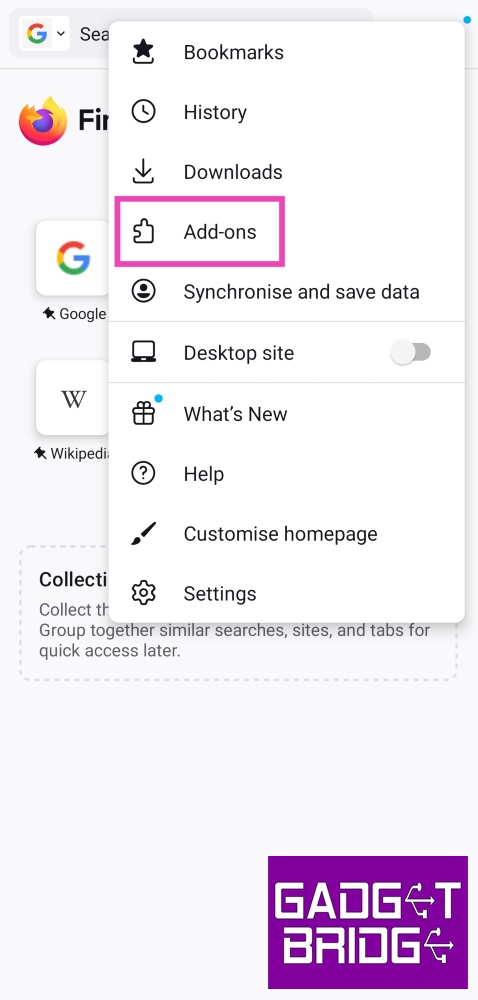 Step 3: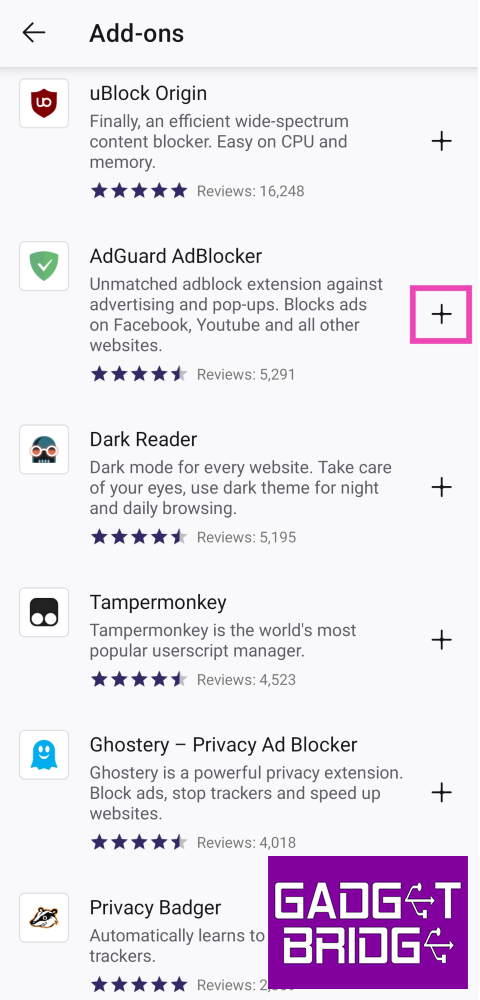
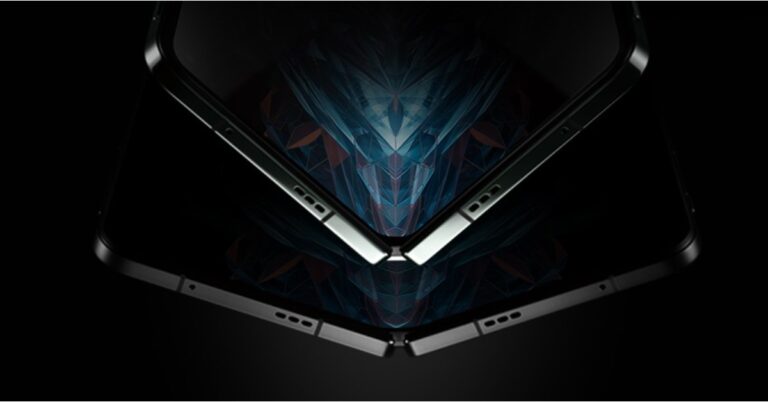


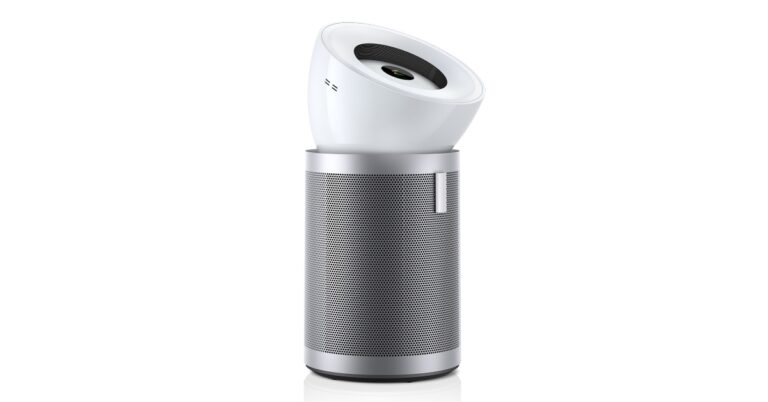


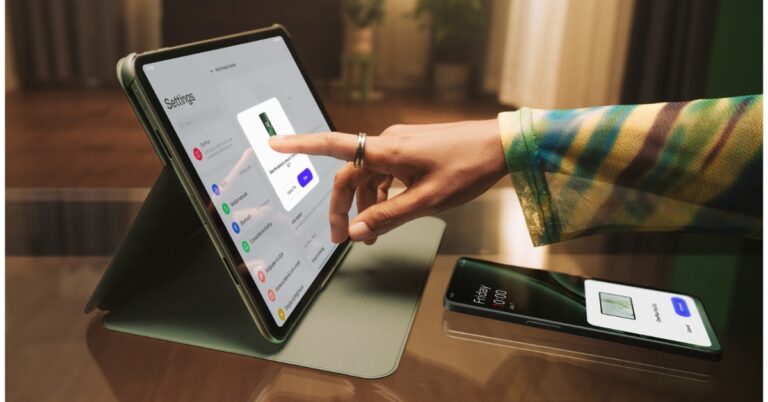
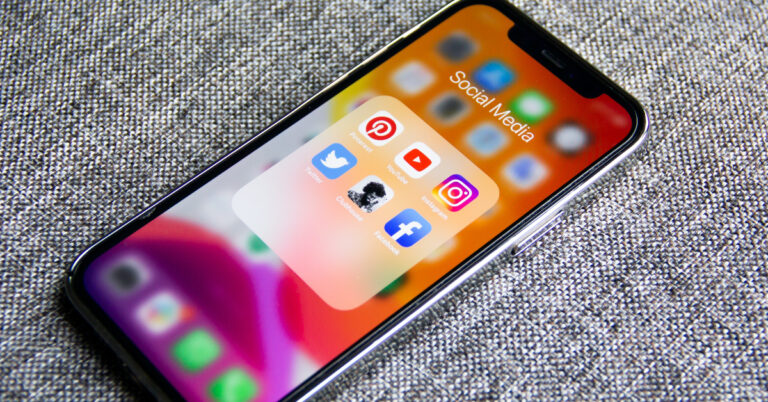



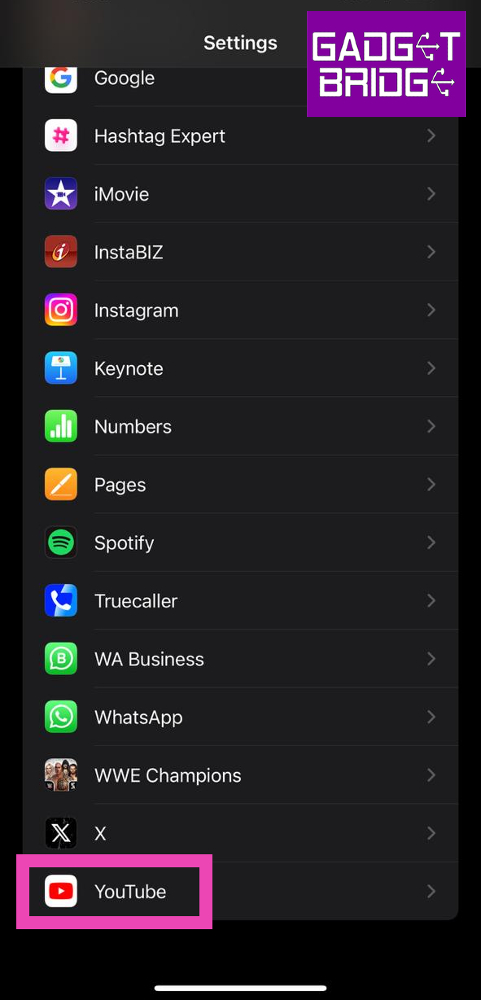 Step 2: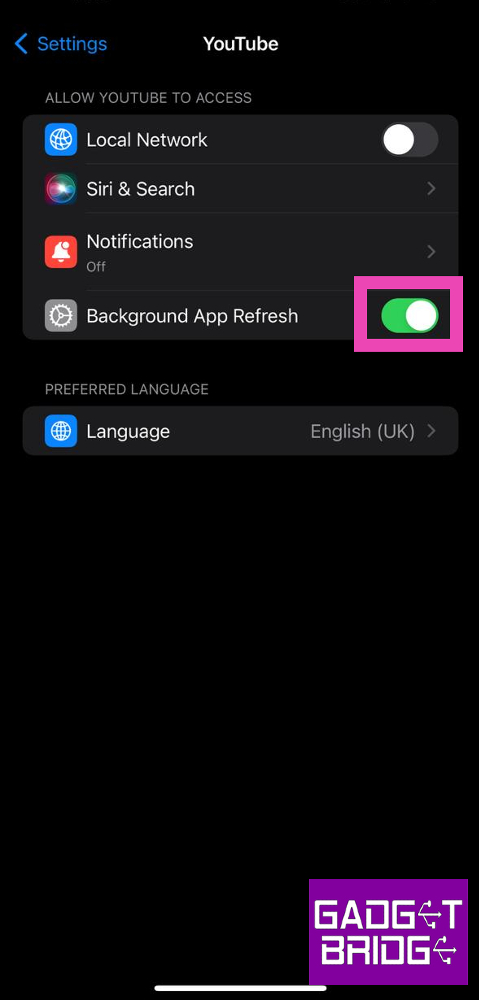
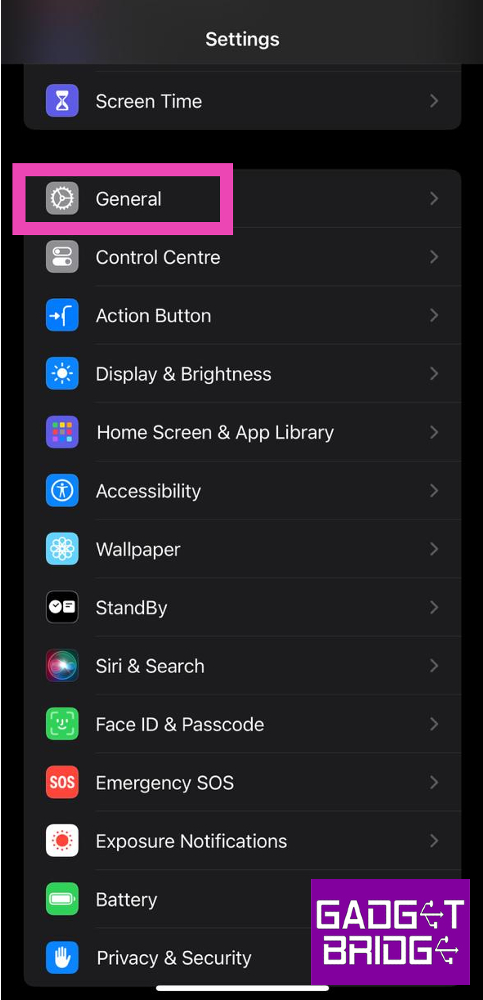 Step 3:
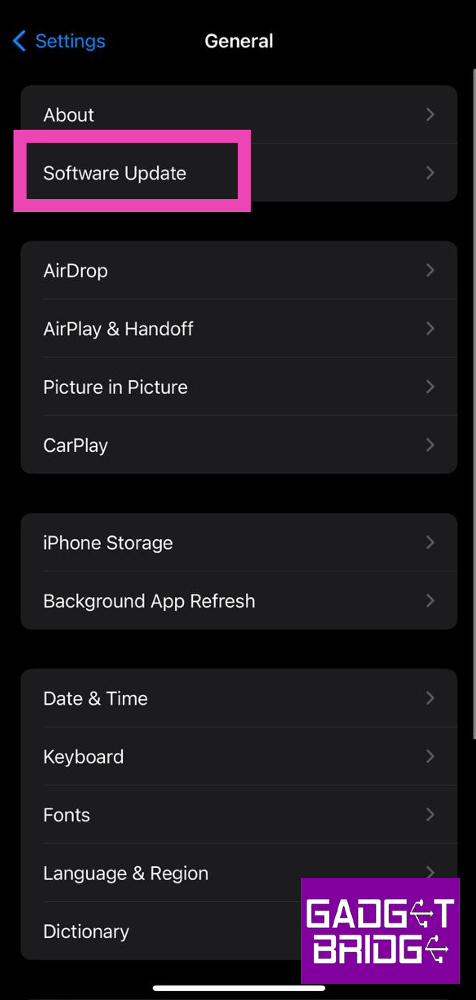 Step 4: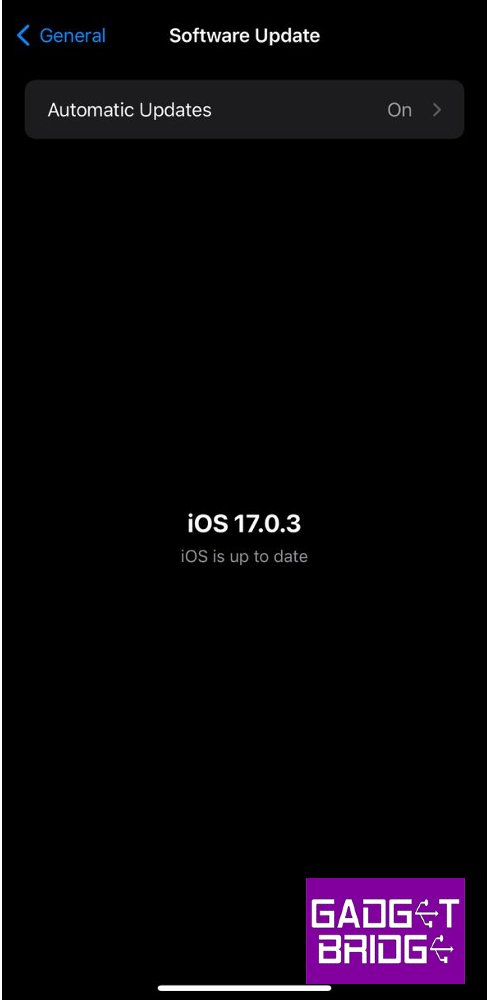
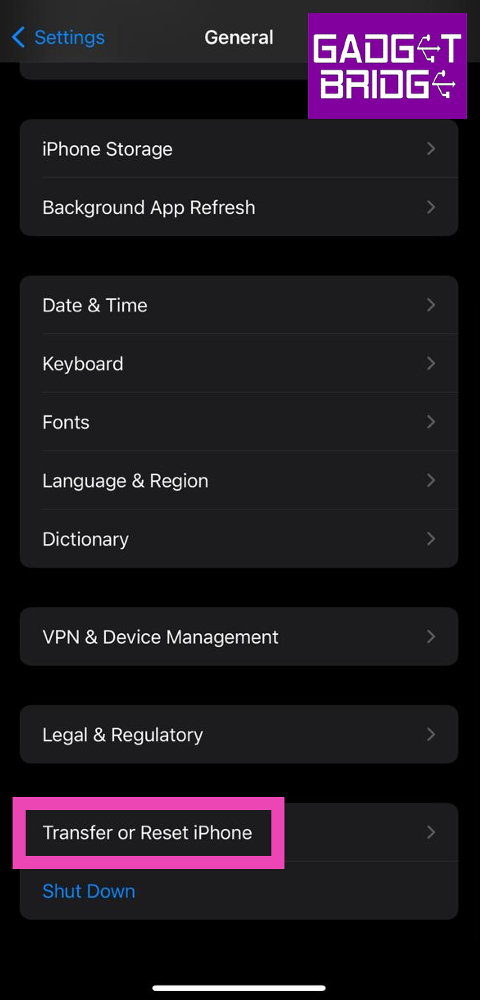 Step 3: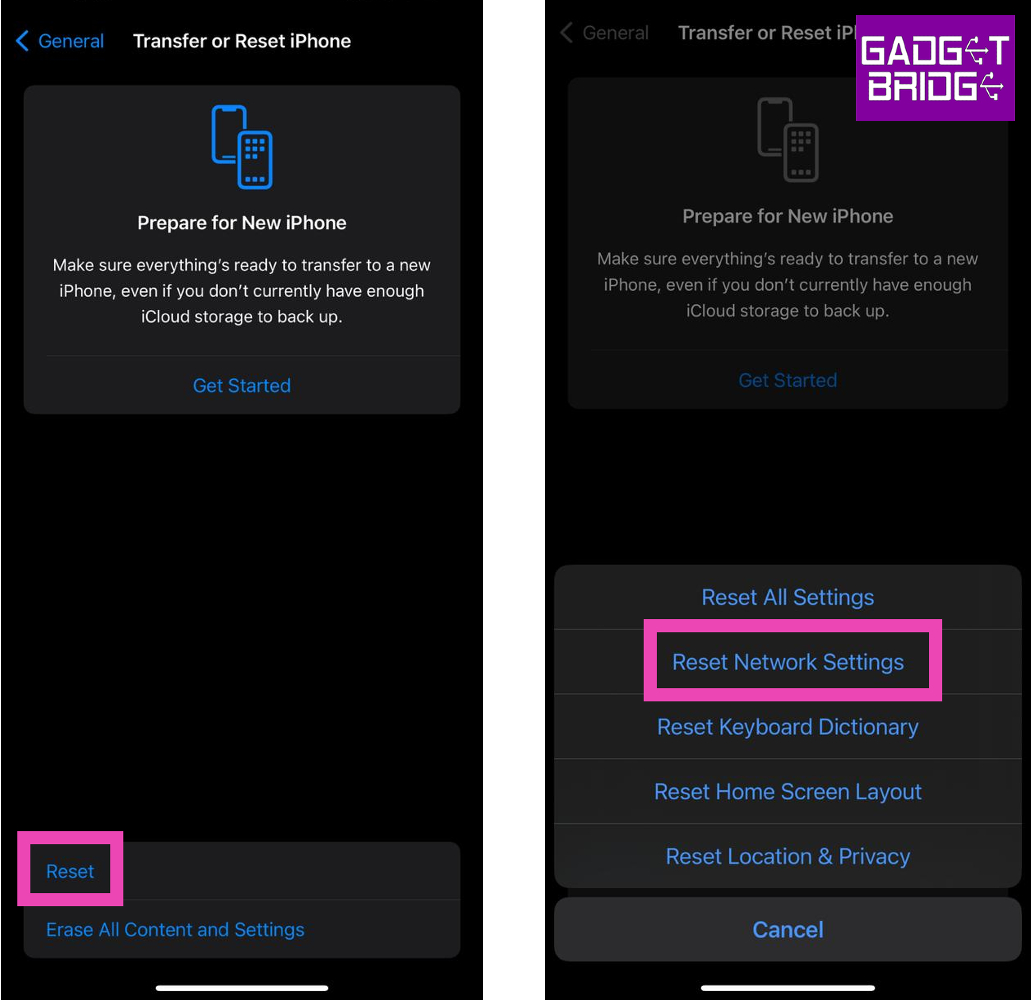


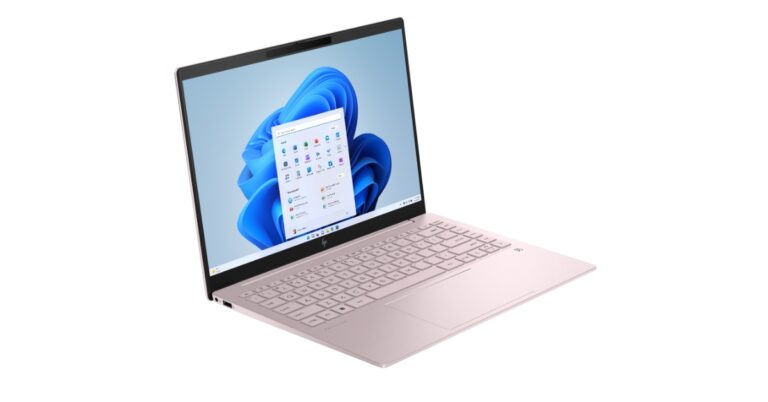
 Also Read: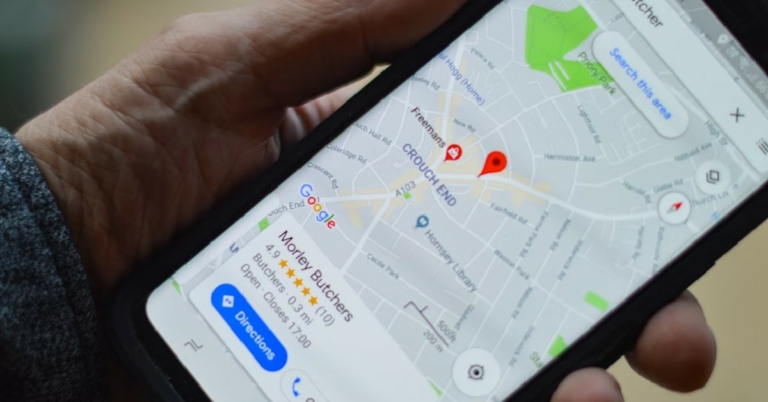
 Target icon:
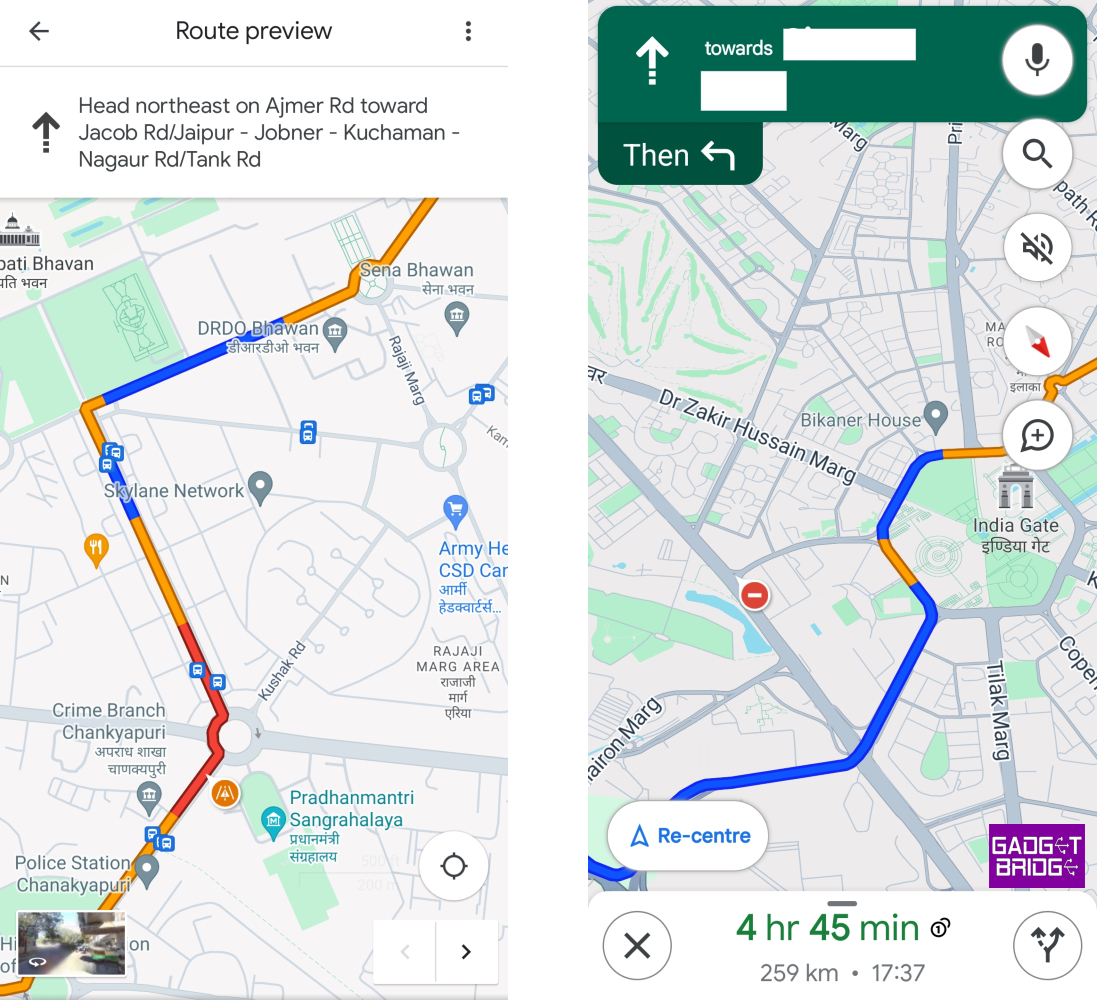 Yellow road:
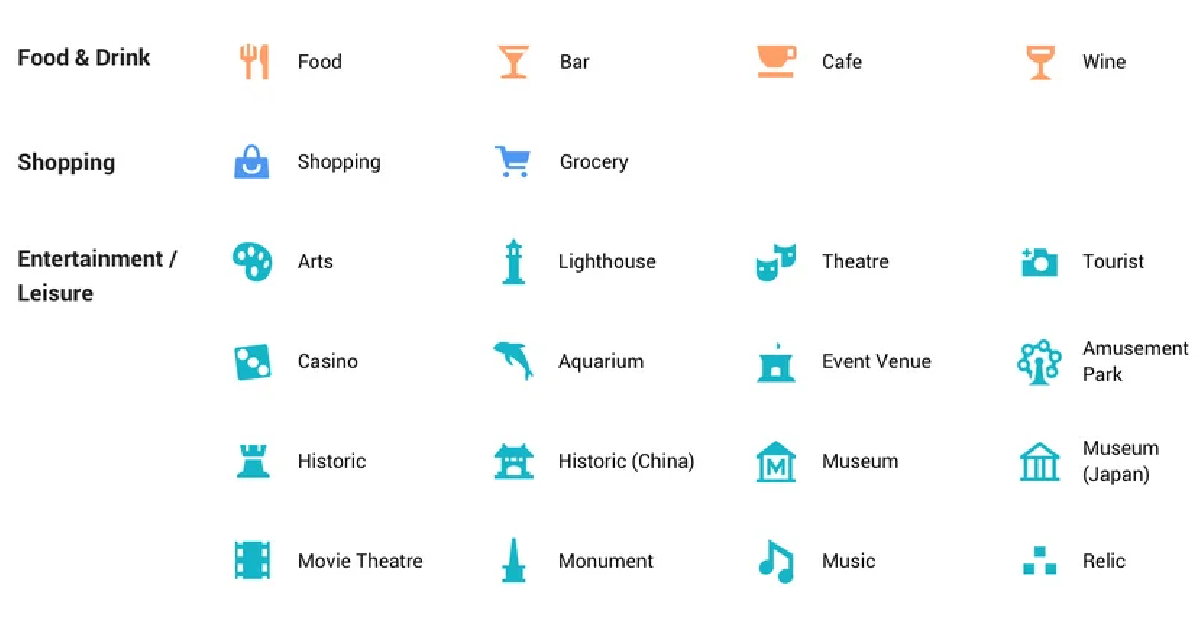 Yellow pin with a star:
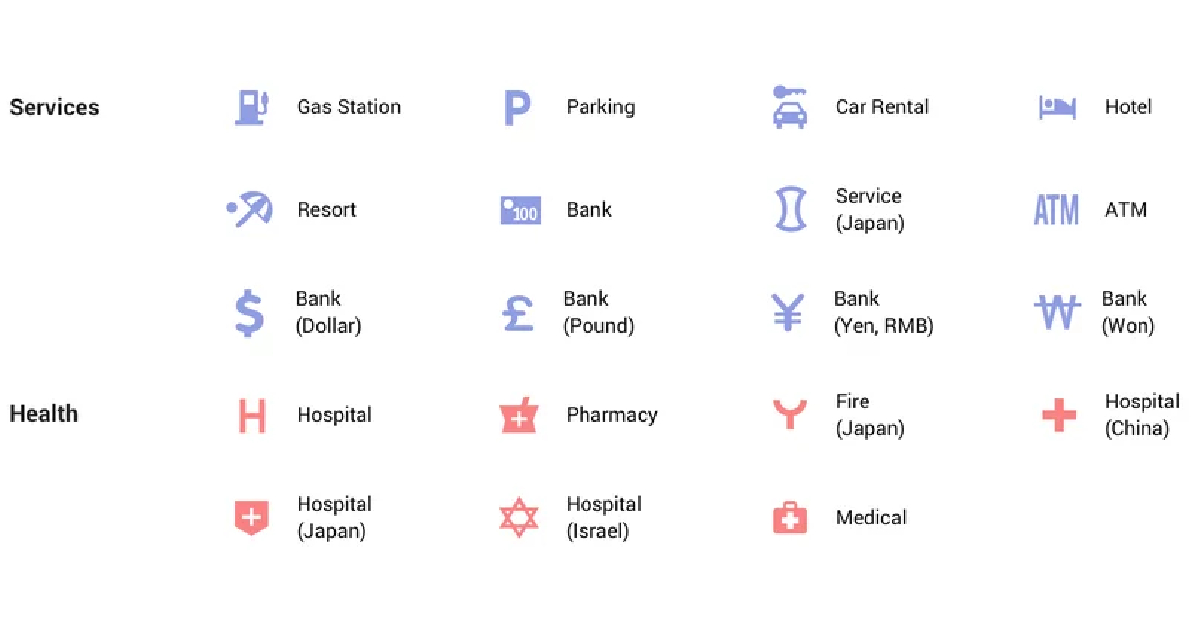 Man sleeping on bed pin:
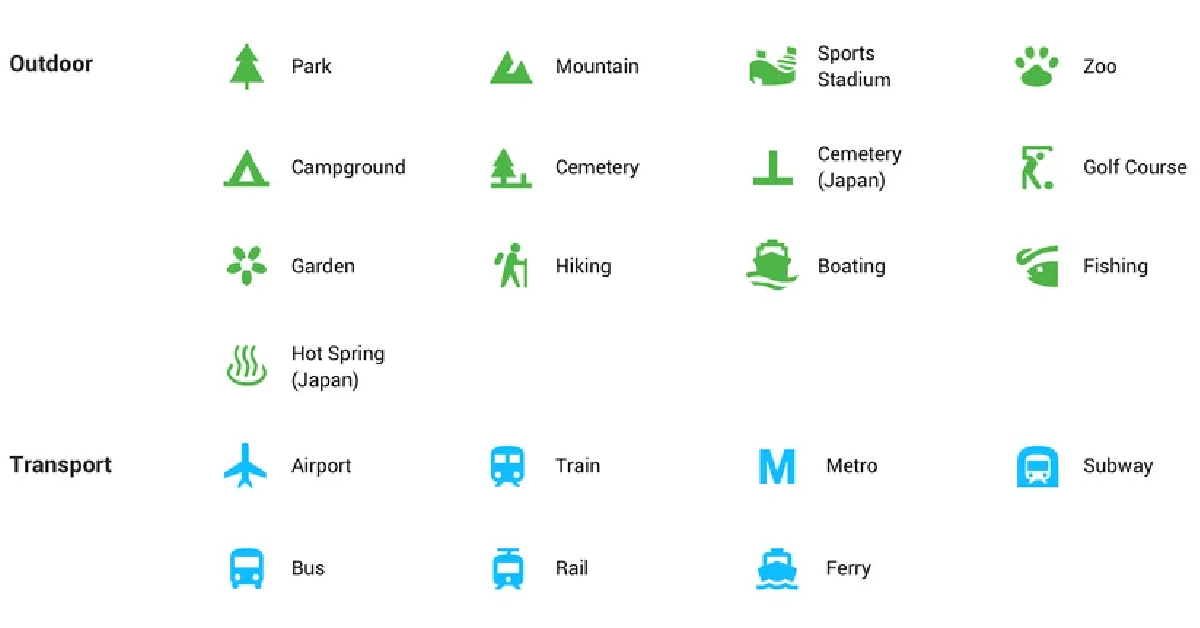 Gas pump pin:
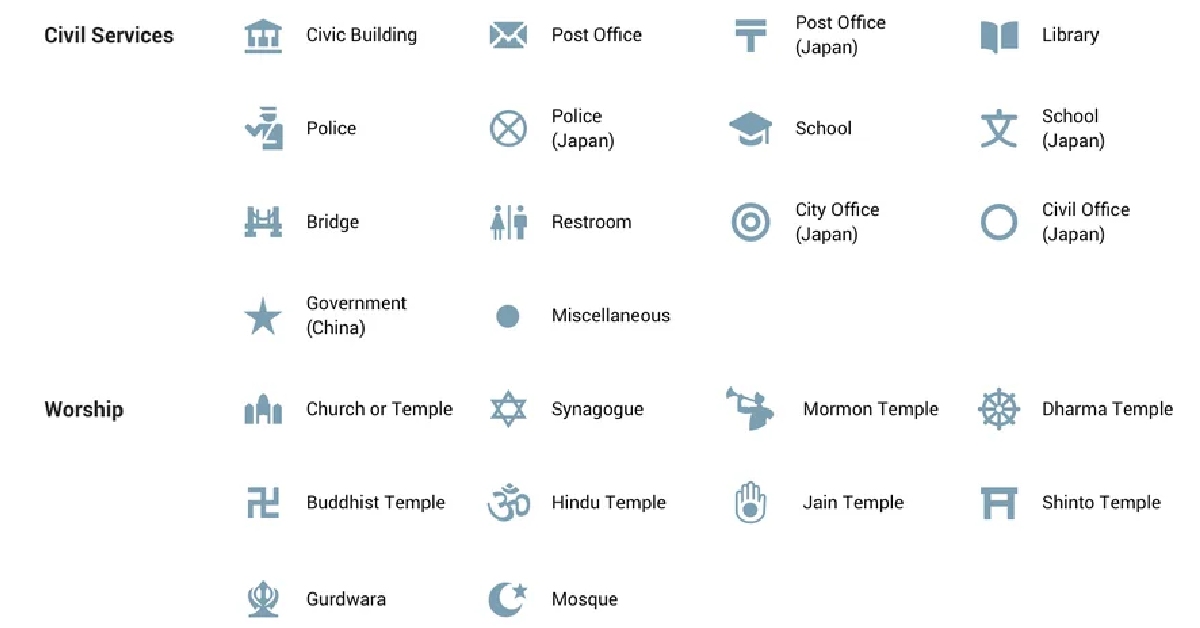 Shopping cart pin: