Garena Free Fire is a battle royale game with regular awards and tournaments to keep players interested. If you play Garena Free Fire, you should be aware of the redeem codes that are released on a daily basis. However, because the battle royale game is banned in India, players from other countries can use the Free Fire Redeem codes daily. If you’re unfamiliar with the Garena Free Fire redeem codes or don’t know how to get them, we’ve put together a step-by-step guide to help you redeem them. Check out Garena Free Fire Redeem Codes for 24 April 2023.The Free Fire redeem codes are a great way to get free stuff. These are 12-digit codes that contain alphabets and numbers, as well as an expiration date and time. Because the Garena FF redeem codes cannot be used more than once, you should hurry to the redemption page to claim your free reward before someone else does. To get a free reward, all you have to do is go to reward.ff.garena.com/en, which is the official redemption page. Also, keep an eye on this space for daily updates on Garena Free Fire redemption codes and rewards.
In This Article
Garena Free Fire Redeem Codes Today 24 April 2023
Updating Soon
How to Get Free Fire Redeem Codes for Garena on 24 April 2023?
24 April 2023 Amazon Quiz has gone live. Customers from different parts of the country are participating in the daily quiz. The quiz begins from 12 AM to 11:59 PM. Those participating in the quiz can win exciting prizes by answering all the questions correctly. Today participants have a chance to win a Rs 1,000 Amazon Pay Balance.Amazon quiz brings an opportunity for its customers to win Amazon Pay Balance ranging from Rs 1,000 to Rs 50,000. The Quiz can be played from 12 AM to 11:59 PM. The e-commerce platform brings a fresh quiz on a daily basis which consists of five questions related to general knowledge and current affairs. The participants need to answer all the questions correctly and their names will be selected for a lucky draw. The winner will be announced at the end of the month.One wrong answer could eliminate you from the quiz. If you manage to answer all the questions correctly you can stand a chance to win a Rs 1,000 Amazon Pay Balance today. Only app users are eligible to participate in the Quiz. Check Out 24 April 2023 Amazon Quiz Answers.Amazon Quiz Today Prize – Rs 1,000 Amazon Pay BalanceQuiz Date – 24 April 2023Daily Timing – 12 AM to 11:59 PMWinner Announcement – Today 12 PM
In This Article
Amazon Quiz Answers Today 24 April 2023
Question 1: Every year, the King of Norway awards the Abel Prize to acknowledge exceptional contributors in which field?Answer: MathematicsQuestion 2: ‘Mircha’ Rice from West Champaran recently received GI tag. From which state is it?
Answers: Bihar
Question 3: Which Indian won the men’s air pistol gold in the 2023 ISSF Pistol/Rifle World Cup?
Answer: Sarabjot SinghQuestion 4: This bird is the national bird of which country?Answer: UKQuestion 5: Who brought this beverage to India?Answer: Baba Budan
How To Play Amazon Quiz
Only app users are eligible to play the Amazon quiz every morning from 12 AM to 11:59 PM. The quiz is not available on the desktop. For those who are unaware of how to play the Amazon quiz below are the steps, you can follow to take the quiz.
Firstly download the Amazon app from Google Play Store or App Store
Now fill in the required information through the Sign Up option.
You need to log in to the Amazon app and scroll down on the home screen to find the Amazon Quiz banner.
Tap on the Amazon Quiz banner and tap on the Start button to start the Quiz.
Now you will get 5 questions and you need to answer them correctly. One wrong answer will eliminate you from the Quiz.
After answering all the questions correctly you are now eligible for a Lucky Draw.
The winner’s name will be announced today at 12 PM.
If you haven’t got an Apple TV+ subscription yet, you are missing out on some of the freshest content across all media streaming platforms. Apart from the highly popular and acclaimed Ted Lasso, Apple TV+ has a range of TV shows and movies across different genres on its platform. Haven’t made up your mind yet? Here are all the best TV shows and movies you can watch this week on Apple TV+.Read Also:New Acer Chromebook Spin 714 laptops with 13th Gen Intel Core processors launched
In This Article
Ghosted
Starring Ana de Armas and Chris Evans, Ghosted is one of the highly anticipated Apple TV+ releases this year. This romantic action-adventure movie is available for streaming from Friday, April 21. Chris Evans portrays Cole who falls for Sadie, played by Ana de Armas. Upon the shocking revelation that Sadie is a secret agent, Cole finds himself with Sadie in the midst of an international adventure to save the world.
Drops of Gold
This eight-episode multi-lingual French drama is set around the world of gastronomy and fine wines. Based on the Japanese manga of the same name, Drops of Gold brings Fleur Gefflier (Elle) and Tomohisa Yamashita (The Head) against each other in a wine-tasting duel with Fleur’s inheritance on the line. Fleur, who knows nothing about wine tasting must battle it out with her father’s spiritual successor to claim the greatest wine collection in the world.
Big Beasts
From the makers of ‘Tiny Worlds’ comes ‘Big Beast’, a ten-part docuseries narrated by Tom Hiddleston. Big Beasts takes the viewers to distant parts of the world to meet some of the largest animal species known to mankind including the grey whale, the elephant seal, the giant otter, the brown bear, and more. Big Beasts was filmed across 17 countries over four and a half years.
Extrapolations
This star-studded drama features Kit Harrington, Meryl Streep, Sienna Miller, Daveed Diggs, Edward Norton, Diane Lane, Tahar Rahim, David Schwimmer, Marion Cotillard, Forest Whitaker, Indira Varma, Tobey Maguire, and more. Extrapolations is set in the near future where humanity is reeling from the effects of climate change. The season finale of Extrapolations is currently streaming on Apple TV+.
The Last Thing He Told Me
Based on the New York Time #1 Bestselling Book by the same name, The Last Thing He Told Me is another star-studded Apple TV+ series featuring Jennifer Garner, Nikolaj Coster-Waldau, Angourie Rice, Aisha Tyler, Augusto Aguilera, Geoff Stults and John Harlan Kim. In this gripping TV series, Hannah (played by Garner) tries to forge a relationship with her 16-year-old stepdaughter to investigate the mysterious disappearance of her husband. New episodes of The Last Thing He Told Me premiere every Friday.
The Big Door Prize
This fresh comedy series starring Chris O’Dowd, Gabrielle Dennis, Ally Maki, Josh Segarra, Damon Gupton, Crystal Fox, Sammy Fourlas and Djouliet Amara has already been renewed for a second season. A mysterious machine appears in the general store of this small town and promises to reveal each resident’s true life potential. The sixth episode of The Big Door Prize is currently streaming on Apple TV+ with new episodes every Wednesday.
Ted Lasso
This Emmy award-winning hit from Apple TV+ needs no introduction. Ted Lasso an American football coach, played by Jason Sudeikis, finds himself coaching a British soccer team across the pond. This comedy-drama stars Jason Sudeikis, Hannah Waddingham, Brendan Hunt, Jeremy Swift, Juno Temple, Brett Goldstein, Phil Dunster, Nick Mohammed and Sarah Niles. New episodes every Wednesday.
Silo
Created by Emmy-nominated screenwriter Graham Yost, Silo is set in a dystopian where the last ten thousand surviving humans live burrowed in a mile-deep Silo. Amidst the confusion, Juliette (played by Rebecca Ferguson) sets out to find some answers about the murder of a loved one and uncovers a whole new mystery. Silo will debut on Apple TV+ on May 5.Read Also:Snap brings its AI chatbot to all Snapchat users for free
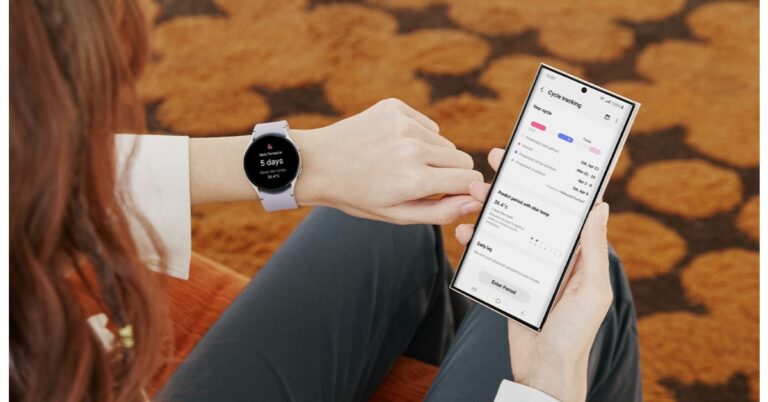
Samsung has rolled out an important health feature for Samsung Galaxy Watch 5 Series. The lineup includes two devices Galaxy Watch 5 and Galaxy Watch 5 Pro. The users of the Samsung smartwatch may now better track their menstrual cycles while they sleep by using the temperature sensor. The new health tracker will be gradually rolled out starting today via upgrades to the Samsung Health app in Korea, the US, and 30 European markets.According to Samsung’s latest announcement, it has added skin-based temperature measurement to its calendar-based cycle tracking feature. Both Galaxy Watch5 and Galaxy Watch5 Pro can get even more detailed information to manage their menstrual cycles and overall health.Hon Pak, Vice President and Head of the Digital Health Team, MX Business at Samsung Electronics said, “Samsung’s holistic view of wellness has been further advanced by our sensor innovations, delivering in-depth health insights that empower users. The new infrared temperature sensor on Galaxy Watch5 broadens our whole health offerings, providing more convenient ways to track and understand personal health.”Also Read:Samsung Galaxy Watch 5 Pro review: Is it an ideal smartwatch?The feature on the Galaxy watches will be accessible in 32 nations, including 30 different European regions, the US, and Korea. India presently lacks access to the Galaxy Watch 5’s new Menstrual Cycle tracker feature. According to the company, basal body temperature (BBT) varies by menstrual phase. So one needs to measure BBT immediately after waking and prior to any physical activity or impact from surroundings.The company explained that it would be inconvenient and perhaps even forgotten to measure the BBT first thing in the morning to get accurate BBT readings. So the new feature on the smartwatch will now automate this procedure for the user’s convenience.Natural Cycle is the software that will be doing the Menstrual cycle tracking function. It is integrated with Samsung’s sensor tech and is going to monitor variations in skin temperature during sleep right from the wrist, which is said to be a reliable indicator of basal body temperature. The Galaxy Watch 5 and Watch 5 Pro comes with infrared technology to provide readings that are more accurate even when environmental circumstances vary. Users may track ovulation with Cycle Tracking, which also improves period prediction.
For the latest gadget and tech news, and gadget reviews, follow us on Twitter, Facebook and Instagram. For newest tech & gadget videos subscribe to our YouTube Channel. You can also stay up to date using the Gadget Bridge Android App. You can find the latest car and bike news here.
Garena Free Fire is a battle royale game with regular awards and tournaments to keep players interested. If you play Garena Free Fire, you should be aware of the redeem codes that are released on a daily basis. However, because the battle royale game is banned in India, players from other countries can use the Free Fire Redeem codes daily. If you’re unfamiliar with the Garena Free Fire redeem codes or don’t know how to get them, we’ve put together a step-by-step guide to help you redeem them. Check out Garena Free Fire Redeem Codes for 22 April 2023.The Free Fire redeem codes are a great way to get free stuff. These are 12-digit codes that contain alphabets and numbers, as well as an expiration date and time. Because the Garena FF redeem codes cannot be used more than once, you should hurry to the redemption page to claim your free reward before someone else does. To get a free reward, all you have to do is go to reward.ff.garena.com/en, which is the official redemption page. Also, keep an eye on this space for daily updates on Garena Free Fire redemption codes and rewards.
In This Article
Garena Free Fire Redeem Codes Today 22 April 2023
WEYVGQC3CT8Q
X99TK56XDJ4X
EYH2W3XK8UPG
4ST1ZTBE2RP9
FFCMCPSUYUY7E
8F3QZKNTLWBZ
MCPW2D2WKWF2
GCNVA2PDRGRZ
FF7MUY4ME6SC
UVX9PYZV54AC
BR43FMAPYEZZ
B3G7A22TWDR7X
6KWMFJVMQQYG
NPYFATT3HGSQ
FFCMCPSGC9XZ
How to Get Free Fire Redeem Codes for Garena on 22 April 2023?
Have you participated in the Amazon Quiz today? If not then participate in the 22 April 2023 Amazon Quiz as it has already gone live on the app. The daily quiz can be played from 12 AM to 11:59 every day on the mobile app platform. Today e-commerce is giving the chance to win Rs 2,500 Amazon Pay Balance.Every day Amazon brings a fresh quiz for its customers. By participating in the quiz the participants can win an Amazon Pay Balance of up to Rs 50,000. The quiz can only be played on the mobile app as it is not available for the desktop platform. The quiz contains five easy questions and you have to answer all the questions correctly. The participants will then be shortlisted for a lucky draw to select a winner. Whereas the results are declared at the end of the month. Check out today’s Amazon quiz answers to win Rs 2,500.Amazon Quiz Today Prize – Rs 2,500 Amazon Pay BalanceQuiz Date – 22 April 2023Daily Timing – 12 AM to 11:59 PMWinner Announcement – Today 12 PM
In This Article
Amazon Quiz Answers Today 22 April 2023
Question 1: Which country recently reported polio cases for the first time in 30 years?Answer: BurundiQuestion 2: What is the name of the ESA’s project that aims to comprehend the present nature and formation of the Milky Way?
Answer: Gaia missionQuestion 3: The International Telecommunication Union opened the ITU Area Office and Innovation Centre in which Indian city?Answer: New DelhiQuestion 4: What did the ancient Egyptians associate this bird with?
Answer: Afterlife
Question 5: Where does the Indian government have a centre dedicated to the husbandry of these animals?
Answer: Dirang
How To Play Amazon Quiz
Only app users are eligible to play the Amazon quiz every morning from 12 AM to 11:59 PM. The quiz is not available on the desktop. For those who are unaware of how to play the Amazon quiz below are the steps, you can follow to take the quiz.
It should surprise no one that Google Chrome enjoys the bulk of the web browser market share. The web browser’s popularity speaks for itself in this regard. While everyone may have laughed Internet Explorer off the discussion, Microsoft seems to be making a comeback with Edge. Upon shifting to Chromium, Edge has been making waves again, and turning some heads towards it. If you’re reading this article, you may be thinking if Edge is the better browser for you. So, let’s take a deep dive and see how Microsoft Edge racks up against Google Chrome. Read Also:Snap brings its AI chatbot to all Snapchat users for free
In This Article
Speed
While it may be general consensus that Edge (and earlier, Internet Explorer) is pretty slow, the evidence points to the contrary. Google Chrome is notorious for hoarding a lot of RAM, even when there aren’t a lot of active tabs open on the browser. Microsoft Edge is a lot more efficient at managing RAM, resulting in slightly faster speeds. While RAM consumption entirely depends on your usage, Microsoft Edge generally tends to utilize up to 500MB less RAM than Google Chrome. What’s surprising is that Microsoft’s web browser narrowly edges out Chrome in benchmark tests like WebXPRT 3.
Security
Since Microsoft Edge is based on Chromium, both browsers are pretty evenly matched when it comes to Security. However, Microsoft’s Defender SmartScreen gives Edge added protection against malware, malicious downloads, and other harmful threats to your system. You can also choose the level of tracking protection and personalised ads prevention on Chrome. While your browser is always prone to threats, Microsoft’s product seems like the safer choice here.
Extensions
It is hard to imagine a web browsing experience without browser extensions. You can thank Chrome for that. Up until recently, Edge (previously Internet Explorer) had little to offer when it came to extensions, or as Microsoft calls it – add-ons. But Edge’s shift to Chromium changed that. Now you can add any extension from the Chrome Web Store to Microsoft Edge. Both web browsers are pretty evenly matched in this regard.
User Interface
One of the reasons why you may not want to switch from Google Chrome is the familiarity of the UI. Chrome is very accessible to use, even for beginners. Its intuitive design makes the browser very easy to use on a daily basis. However, if Chrome’s pleasant user interface is the only thing that’s keeping you from moving to Edge, then it shouldn’t be a problem. Both browsers look similar to each other. Both offer dark themes and have accessible icons for the most used features. Looking for something different? Microsoft Edge also lets you place your tabs vertically for easier access and a more unique look.
Syncing
Another reason why you wouldn’t want to leave Google Chrome is its unique capability to sync your data across different devices. Well, that feature isn’t so unique anymore. Microsoft Edge can sync everything from bookmarks and extensions to settings, tabs, passwords, and browser history across multiple devices. Of course, you will need an active Microsoft Account for this. But if you intend to use Edge on your PC, then you probably already have a Microsoft Account. Microsoft’s ecosystem on PC will work even better when you add Edge into the mix.
AI Integration
Earlier this year, Microsoft announced that it will be bringing AI integration to Microsoft Edge, along with Skype, Bing, and SwiftKey. Microsoft is one of the biggest investors in ChatGPT, and has been successful in using AI to improve its products. The AI is being rolled out in a phased manner, so it may not be available for your device just yet. While Google has been focussing on using AI for Gmail, Docs, and Sheets, Microsoft is already making strides in making the web browsing experience more fun for users.Read Also:How to disable ads on a Xiaomi smartphone?
Conclusion
When it comes to these major web browsing aspects, it’s fair to say that Microsoft Edge narrowly beats Google Chrome in speed, performance, security, privacy, and AI integration, while matching it in other parameters like extensions and user interface. If you have been on the fence about switching to Microsoft Edge, the browser’s integration with ChatGPT will surely help you in making your final decision.For the latest car and bike news, car reviews/bike reviews, and auto features follow us on Twitter and Facebook. You can find the latest gadget and tech news, and gadget reviews here.
Sony today introduced the new BRAVIA X75L television series in India today. The new lineup features a 4K Ultra HD LED display. The Smart TV is powered by an X1 4K Processor and Live Colour technology. The device comes with Google TV and there is support for PS5. In addition to this Sony BRAVIA X75L is shipped with a voice-enabled remote.
In This Article
Sony BRAVIA X75L Series specs and features
The Sony BRAVIA X75L comes in four sizes 43-inch, 50-inch, 55-inch and 65-inch. All the models are powered by X1 Picture Processor which uses advanced algorithms to cut noise and boost detail while the Live Colour technology help is offering 4K resolution with natural colours. In addition to this, 2K and Full HD pictures are upscaled close to 4K resolution by 4K X-Reality PRO using a unique 4K database.BRAVIA X75L Series features open baffle down firing twin speakers that deliver 20-Watt powerful sound with Dolby Audio which is ideal for low-end sounds like movies, sports and music. According to the company, the clear phase technology BRAVIA uses a powerful computer model to analyze and compensate for inaccuracies in speaker responses. It does this by ‘sampling’ the speaker frequency with higher precision.Also Read:Acer announced Acerpure Pro Vero Air Purifier with 3-in-1 + HEPA FilterMoreover Sony BRAVIA X75L Series includes Google TV giving access to over 10,000 apps and seeing 700,000+ movies and TV episodes. The BRAVIA X75L also supports Apple Home Kit and AirPlay that integrates Apple devices like iPads and iPhones with the TV. It also includes a function for the PS5 that, together with Auto HDR Tone Mapping and Auto Genre Picture Mode, completely changes the way you play video games. Additionally, it allows gaming with Auto Low Latency Mode (ALLM) thanks to its compatibility with HDMI 2.1.The Smart TV comes with a voice-enabled remote with built-in microphones allowing Google Assitant to access the TV with voice command.
Sony BRAVIA X75L Series price and availability
The Sony BRAVIA X75L Series comes in four models. The price of the KD-43X75L is set at Rs 69,900. Whereas the model number KD-50X75L, and KD-65X75L will be available with a price tag of Rs 85,900 and Rs 139,900 respectively. The price of the KD-55X75L variant is yet to be announced.All the Smart TVs will be available for purchase starting April 24 Sony Centers, major electronic stores, and e-commerce portals in India.
For the latest gadget and tech news, and gadget reviews, follow us on Twitter, Facebook and Instagram. For newest tech & gadget videos subscribe to our YouTube Channel. You can also stay up to date using the Gadget Bridge Android App. You can find the latest car and bike news here.
The Acerpure Pro Vero Air Purifier has debuted in the market. The air purification device is made up of 33% post-consumer recycled (PCR) materials in the chassis and decreases CO2 emissions by up to 20% during production. It features an Energy-saving Green mode and includes an advanced 3-in-1 + HEPA Filter and anti-formaldehyde filter coating. This is claimed to eliminate up to 99% of PM2.5 particles and formaldehyde in the air.
In This Article
Acerpure Pro Vero Air Purifier specs and features
The Pro Vero Air Purifier features a space-saving exterior, a clean, matte white finish, and an intuitive LED touch panel. The Air Purifier comes with a PM2.5 air quality sensor that can identify suspended particles indoors and can automatically be switched to the appropriate operating mode in real-time. In addition to this, there are three different light indicators that notify users of the current air quality. Whereas the Geen mode on the device is said to self-adjust its purification power based on the surrounding conditions.Powered by a 3-in-1 + HEPA Filter, the Pro Vero Air Purifier can remove bacteria and 99.9% of suspended PM2.5 particles in the air. The 4-layer protection system filters out harmful gases and allergensAlso Read:New Acer Chromebook Spin 714 laptops with 13th Gen Intel Core processors launchedThe activated carbon cotton-infused filter with an anti-formaldehyde coating can remove 99% of formaldehyde and other harmful substances in the surrounding.
Acerpure Pro Vero Air Purifier price and availability
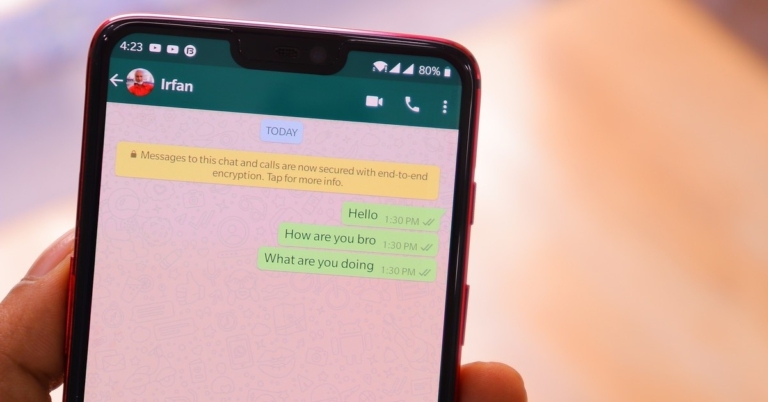
One of the cool features of WhatsApp is link previews in the chat. Every time you send the link to a website in a chat, WhatsApp loads a small preview card, giving the user some idea about the link that has been sent to them. These previews are best utilised for YouTube links, as they allow the receiver to see the thumbnail and title of the video. Sometimes, these previews don’t work as intended. Users also report that WhatsApp often has trouble loading YouTube links that are sent to them. In this article, we bring you the top 6 ways to fix the ‘YouTube links or previews not opening or loading in WhatsApp’ issue on your smartphone.Read Also:How to disable ads on a Xiaomi smartphone?
In This Article
Load YouTube links in the browser
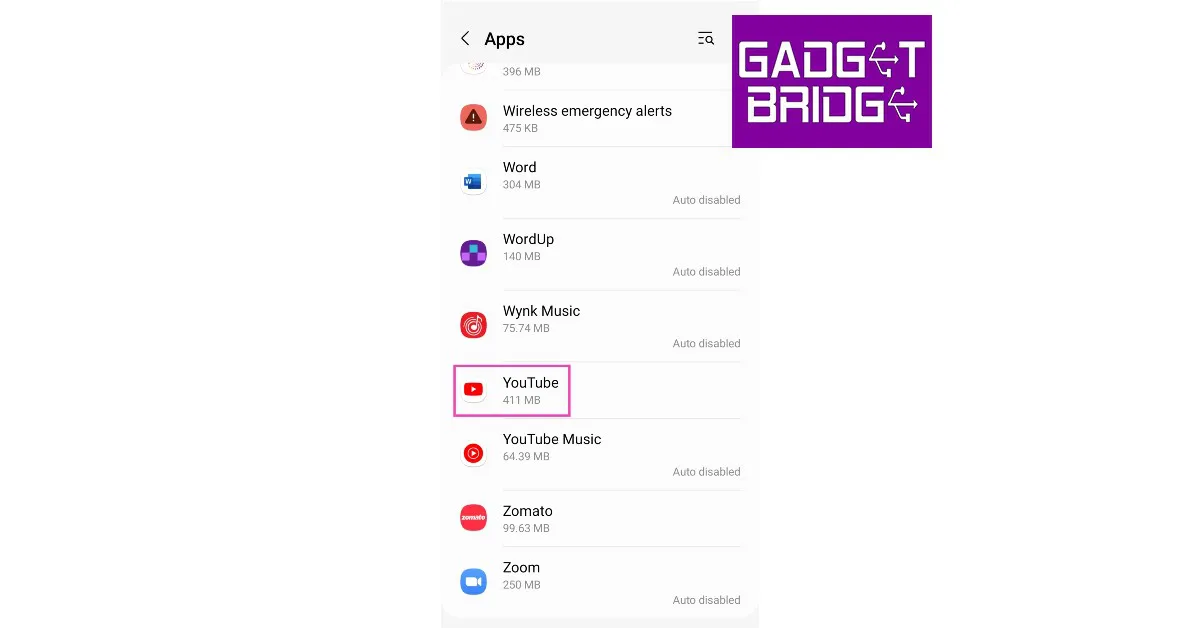
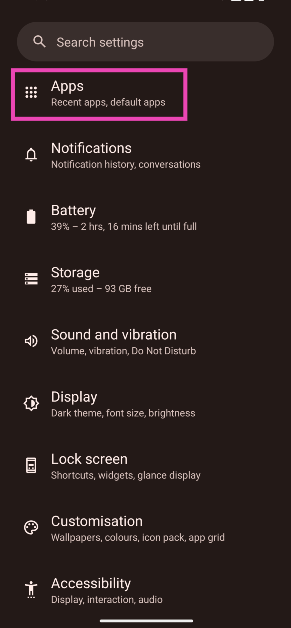
Clicking on a YouTube link on WhatsApp redirects you to the YouTube app. If the YouTube app is malfunctioning on your phone, the video may not load. To get around this issue you can try loading the YouTube link on a web browser. To reduce the extra effort of copying the link and pasting it to the browser’s address bar, here’s how you can get a YouTube link on WhatsApp to open directly in a browser.Step 1: Go to Settings and select Apps.Step 2: Select YouTube.Step 3: Tap on Set as default.Step 4: Turn the toggle bar off for Open supported links.
Clear YouTube’s app cache
A cache is a storage location for temporary files. Sometimes these files get corrupted and interfere with the functioning of the app. Here’s how you can clear YouTube’s app cache.Step 1: Go to Settings and select Apps.Step 2: Select YouTube.Step 3: Tap on Storage.Step 4: Select Clear cache from the toolbar at the bottom of the screen.
Make sure the YouTube app is compatible with shortened and mobile URLs
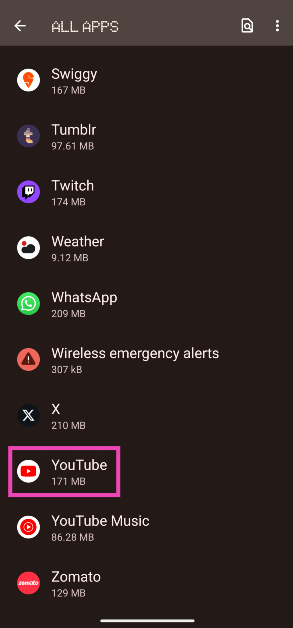
Step 1: Go to Settings and select Apps.
Step 2: Tap on YouTube.
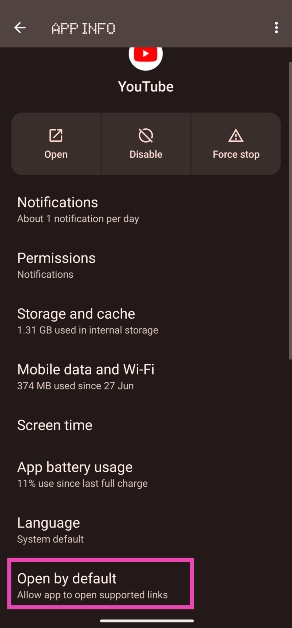
Step 3: Tap on Open by default.
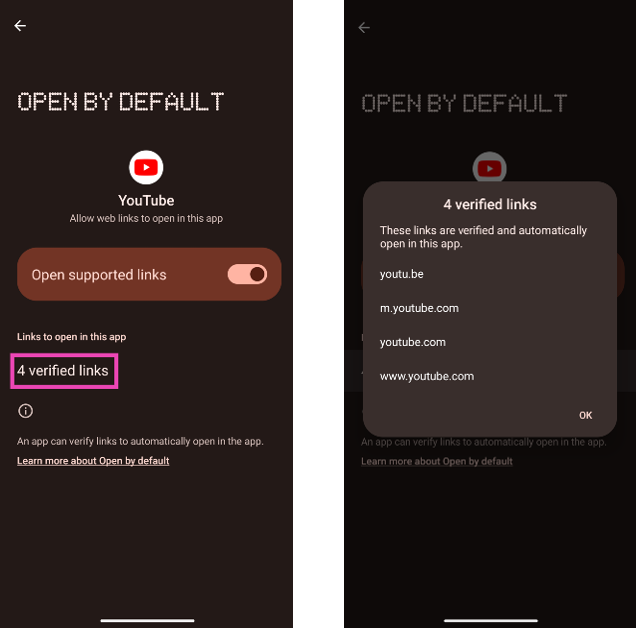
Step 4: Tap on verified links and make sure they contain the shortened (youtu.be) as well as mobile (m.youtube.com) links.
YouTube previews not working on WhatsApp? Try these fixes
There’s an annoying bug on WhatsApp that pops up every now and then. While doesn’t affect the essential functions of the app, it is frustrating to deal with as it prevents YouTube previews from loading in the conversation when you send a link to a video. Here are some common fixes to this issue.
Force Stop WhatsApp
Force-stopping WhatsApp will put an end to all background processes and activity. Any background glitches that may be preventing the preview from loading will now be resolved. Here’s how you can force-stop WhatsApp on your smartphone.Step 1: Go to Settings and select Apps.Step 2: Select WhatsApp.Step 3: Tap on Force Stop from the toolbar at the bottom.Step 4: Confirm your selection in the popup box.
Try sending the link through WhatsApp Web
If the WhatsApp app on your smartphone refuses to load YouTube previews, you can try sending the link through WhatsApp Web on your PC. Here’s how you can login to WhatsApp Web.Step 1: Open the WhatsApp Web portal on your PC’s web browser.Step 2: Launch WhatsApp on your phone. Tap on the ellipses and select Linked devices.Step 3: Tap on Link a device and scan the QR code displayed on the WhatsApp Web portal.You will be logged in to WhatsApp on your PC. Open the relevant conversation and paste the YouTube link. The preview should load in the chat.
Clear WhatsApp’s app cache
Step 1: Go to Settings and select Apps.Step 2: Tap WhatsApp.Step 3: Select Storage.Step 4: Select Clear cache from the toolbar at the bottom of the screen.
Frequently Asked Questions
How do I fix ‘WhatsApp not opening YouTube links’?
If you can’t open YouTube links on WhatsApp, try loading them in the web browser. Go to Settings>Apps>YouTube>Set As Default and turn the toggle bar off ‘Open Supported Links’.
Why is WhatsApp not showing a preview of YouTube links?
To fix this issue, update WhatsApp and YouTube on your phone. If WhatsApp still doesn’t preview YouTube links in the chat, force stop the app and try again. You can also try sending the link through WhatsApp Web.
This is how you can fix the YouTube links not loading or opening in WhatsApp issue on your smartphone. If your WhatsApp and YouTube apps aren’t updated make sure they are. Developers usually fix recurring bugs with a quick update. Go to the Google Play Store and update the app. If you found this article helpful, let us know in the comments!
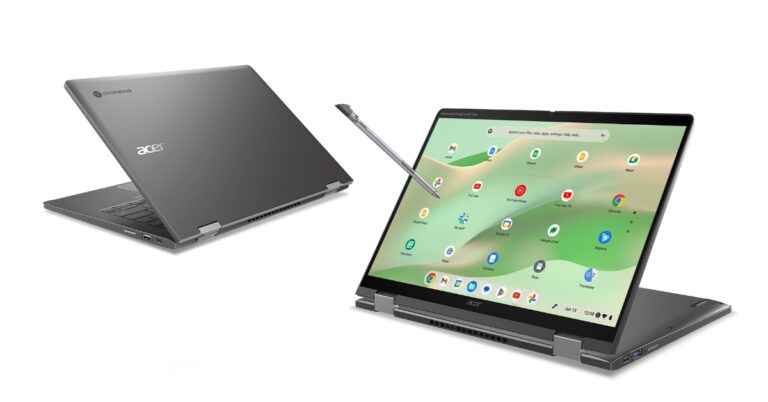
The Acer Chromebook Spin 714 and Acer Chromebook Enterprise Spin 714 laptops were introduced at the GPC 2023. The device features a convertible design and comes with the latest 13th Gen Intel Core processors and Intel vPro. They include a 14-inch WUXGA (1920×1200) display and a QHD 2K webcam. These machines are said to offer 10 hours of battery life.
The Acer Chromebook Spin 714 and Chromebook Enterprise Spin 714 come with flexible 360-degree convertible modes with an optional USI stylus that is claimed to offer 4,096 different levels of pressure and tilt sensitivity for a natural feel and precise strokes when sketching or note-taking on the display.The device features a 14-inch WUXGA display having 1920 x 1200 pixels of resolution. The 16: 10 screen comes with a 100% sRGB colour range and is protected with Antimicrobial Corning Gorilla Glass to protect it from scratches while resisting stains and odour-causing bacteria. Under the chassis, there are up to 13th Gen Intel Core i7 processors.According to the company Chromebook Enterprise Spin 714 enables business users to access Chrome Enterprise Upgrade, which unlocks ChromeOS’s built-in business features.Both Chromebooks run on ChromeOS and support web-based and Google Play apps.They further include a QHD 2K webcam with temporal noise reduction technology for video conferencing. The webcam has a physical shutter to protect privacy. In addition to this, the laptop has dual microphones and dual upward-facing speakers with DTS Audio and a built-in smart amplifier, which provides higher-quality, distortion-free sound, and deeper bass.In terms of connectivity, there is Wi-Fi 6E, Bluetooth 5.2, HDMI and two Thunderbolt 4 ports. In addition to this, there is an optional fingerprint reader for biometrics. The Acer Chromebooks also come with a backlit keyboard and Corning Gorilla Glass touchpad.
Acer Chromebook Spin 714 and Chromebook Enterprise Spin 714 price and availability
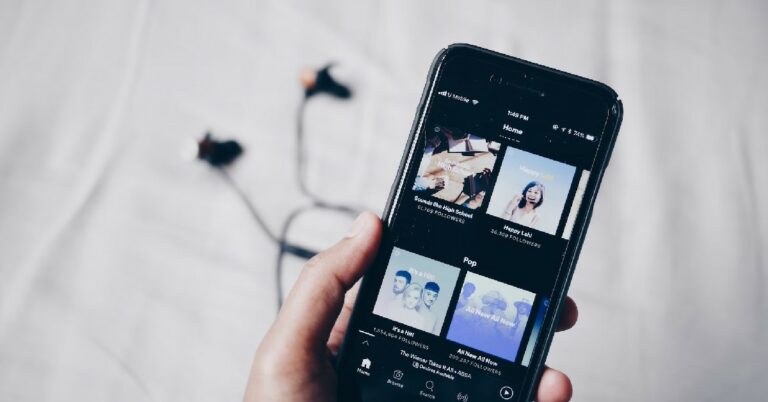
Discord offers a lot of integrations on its platforms, making it one of the most feature-rich IMs to chat with your friends. If you want to make it easy for your friends to follow you across social media platforms, you can individually link them to your Discord profile. But that’s not where the integration ends, you can even host a music listening party with your friends on Discord. In this article, we show you how to link or add your Spotify to your Discord account and how to host a listening party with your friends.Read Also:How to record a video while playing music on an iPhone?
In This Article
Here’s how you can add your Spotify to your Discord profile
Step 1: Launch the Discord app on your smartphone and tap on your profile icon at the bottom right corner of your screen.Step 2: Select ‘Connections’.Step 3: Tap on ‘Add’ at the top right corner of the screen.Step 4: Scroll down and select Spotify.Step 5: Login to Spotify using your registered email and password.Step 6: Give Discord access to your Spotify account.Step 7: Go back to the Discord app.Step 8: Your Spotify will be linked to your Discord profile. You can choose whether you want to display your Spotify account on your profile or as your status.
How to listen to music with Discord friends using Spotify?
Step 1: Launch Discord on your PC. Make sure your Spotify profile is linked to your Discord.Step 2: Play a song on Spotify.Step 3: Open the conversation with the friend you want to listen along with.Step 4: Click on the plus icon next to the message box.Step 5: Click on ‘Invite to listen to Spotify’.Step 6: Add a comment if you want and click on ‘Send Invite’.
Frequently Asked Questions
How do you show what you are listening to on Spotify on Discord?
First, you need to link your Spotify account to your Discord. To do this, go to Profile>Connections>Add>Spotify. Allow Discord access to your Spotify account and enable the toggle bar for ‘Display on Profile’ and ‘Display Spotify as your status’.
Can you listen to Spotify together on Discord?
Once you’ve linked your Spotify with your Discord account, you can listen to music together with your friends. Simply open a conversation and click on the plus icon. Send a listening invite in order to listen to music with your friends.
This is how you can link or add your Spotify to your Discord account. Once you’ve chosen to display Spotify as the status on your Discord account, your friends will be able to see what song you are listening to on Spotify at any given moment. You can also listen to music along with a friend even if they don’t have a Spotify Premium account.For the latest gadget and tech news, and gadget reviews, follow us on Twitter, Facebook and Instagram. For newest tech & gadget videos subscribe to our YouTube Channel. You can also stay up to date using the Gadget Bridge Android App. You can find the latest car and bike news here.
At its Snap Partner Summit 2023, Snap announced that it is making its “My AI” chatbot running on OpenAI’s GPT technology available to all its Snapchat users for free. In addition to this. To recall Snap introduced My AI chatbot for Snapchat+ subscribers just a few months back. At the event, the company also introduced several new features for the creators along with new options to story formats and Calling lenses. In addition to this Snap has also added location-sharing options for the Snap Map.Snapchatter can now customise the AI chatbot with a custom Bitmoji and a new name. In addition to this, My AI can be added to conversations with friends by simply @ mention My AI and asking a question on behalf of the group. You can also ask My AI to suggest weekend activities for your family or get the perfect Lens recommendation to wish a friend a happy birthday.Moreover sharing Snaps with MY AI is also getting easier as our community can send Snaps to My AI and receive a chat reply. According to the company soon Snapchat+ subscribers will be able to Snap My AI and get a unique generative Snapback.Apart from making AI chatbot available to all its users the company at its Snap Partner Summit 2023 announced a slew of new features. It has introduced new-gen Lenses powered by Generative AI, now available globally. Snapchatter will be able to transform themselves and the world around them into an animated sci-fi scene through the Cosmic Lens.Also Read:Snap introduces its own version of OpenAI’s GPT technology My AIThe social media app will begin recommending Lenses that fit with the context of a photo or video a Snapchatter has captured. According to Snap, Snapchat users will find more Lens recommendations when people or pets are captured in the frame.Snapchat is also experimenting with ways to bring AR to Memories more quickly. As per the company, the users will be able to view their most recent shots alongside Lenses in the Snapchat Camera. Lens Carousel ranking algorithms to recommend Lenses based on Snapchatters’ unique preferences and updated the AR Bar has also been improved. Users can find hundreds of suggested Lenses organised by category, right on the Camera screen.New Calling Lenses from Snap have also been released. This will allow users to appear in the same frame during video calls without using a grid. In addition to this communities and After Dark are two new options for Stories.A new location-sharing feature with 3D landmarks has also been added to Snap Map. When you share your live location with a friend they will see your Bitmoji.
For the latest gadget and tech news, and gadget reviews, follow us on Twitter, Facebook and Instagram. For newest tech & gadget videos subscribe to our YouTube Channel. You can also stay up to date using the Gadget Bridge Android App. You can find the latest car and bike news here.
Garena Free Fire is a battle royale game with regular awards and tournaments to keep players interested. If you play Garena Free Fire, you should be aware of the redeem codes that are released on a daily basis. However, because the battle royale game is banned in India, players from other countries can use the Free Fire Redeem codes daily. If you’re unfamiliar with the Garena Free Fire redeem codes or don’t know how to get them, we’ve put together a step-by-step guide to help you redeem them. Check out Garena Free Fire Redeem Codes for 21 April 2023.The Free Fire redeem codes are a great way to get free stuff. These are 12-digit codes that contain alphabets and numbers, as well as an expiration date and time. Because the Garena FF redeem codes cannot be used more than once, you should hurry to the redemption page to claim your free reward before someone else does. To get a free reward, all you have to do is go to reward.ff.garena.com/en, which is the official redemption page. Also, keep an eye on this space for daily updates on Garena Free Fire redemption codes and rewards.
In This Article
Garena Free Fire Redeem Codes Today 21 April 2023
Updating soon
How to Get Free Fire Redeem Codes for Garena on 21 April 2023?
Daily Amazon brings a fresh quiz for its customers with exciting rewards on its platform. The Amazon quiz can be played every day from 12 AM to 11:59. 21 April 2023 Amazon Quiz has gone live on its platform and the e-commerce platform Amazon is today giving you a chance to win Rs 5,000 Amazon Pay Balance.To participate all you need to do is log in to your Amazon app on your device and give answers. Daily a new set of questions are presented to the participants which gives them a chance to win exciting prizes. The questionnaire consists of five easy questions that are usually based on general knowledge and current affairs. You can submit the correct answers and can win an Amazon Pay Balance of up to Rs 50,000. It should be noted that the quiz is not accessible on the web platform instead you have to participate only through the dedicated app.Amazon Quiz Today Prize – Rs 5,000 Amazon Pay BalanceQuiz Date – 21 April 2023Daily Timing – 12 AM to 11:59 PMWinner Announcement – Today 12 PM
In This Article
Amazon Quiz Answers Today 21 April 2023
Question 1: For which country’s President has the International Criminal Court issued an arrest warrant?Answer: RussiaQuestion 2: Which state launched the first women’s cooperative fund named ‘Mahila Nidhi’?
Answer: Rajasthan
Question 3: In 2023, which Indian became the oldest player to win the ATP Masters 1000 title?Answer: Rohan Bopanna
Question 4: This specific genus of parrot is concentrated in which continent?Answer: AfricaQuestion 5: Where did this company establish its first factory in India?
Answer: Pune
How To Play Amazon Quiz
Only app users are eligible to play the Amazon quiz every morning from 12 AM to 11:59 PM. The quiz is not available on the desktop. For those who are unaware of how to play the Amazon quiz below are the steps, you can follow to take the quiz.
Firstly download the Amazon app from Google Play Store or App Store
Now fill in the required information through the Sign Up option.
You need to log in to the Amazon app and scroll down on the home screen to find the Amazon Quiz banner.
Tap on the Amazon Quiz banner and tap on the Start button to start the Quiz.
Now you will get 5 questions and you need to answer them correctly. One wrong answer will eliminate you from the Quiz.
After answering all the questions correctly you are now eligible for a Lucky Draw.
The winner’s name will be announced today at 12 PM.
At last count, there are some 350,000 games available for iOS, and 480,000 currently up for grabs on the Google Play Store. That’s an impressive selection, however, not every game is worth your time or money. In truth, for every memorable and innovative title, there are 20 clones or knock-offs out there, and telling them apart can be a real challenge. Fortunately, there are options available for cutting through the noise, from scouring review platforms to checking out the rotating selection of Editor’s Choices in-app.
But for the more enterprising gamer, there’s another way to spread your wings on the mobile platform. That’s by forgoing the limitations of the official app stores all together and checking out what the wider world of mobile gaming has to offer in 2023. Let’s take a look at some compelling alternatives to try out below.
In This Article
Browser-Based Gaming
We take our web browsers for granted at our peril. While there’s no escaping the fact that smartphone apps make up a huge part of our digital diet nowadays, we can sometimes forget that there are many diverse experiences and options available to us on our smartphones by way of the ‘open internet’.
For example, there’s a whole world of HTML5 and Flash-emulated minigames available online, many of which have never found their way into the app stores. We don’t just mean the likes of 8 Ball Pool—captivating as it is—but full-fledged indie marvels like Supergiant Games’ award-winning RPG, Bastion.
Likewise, certain gameplay sectors are historically underrepresented in the app stores. This is especially the case when it comes to iGaming. In 2023, browser access remains the best and most popular way to play online casino games on the mobile platform, and with a huge array of offers and bonuses out there provided by leading comparison platforms, it’s never been more affordable to explore this diverse world of compelling titles.
Sideloading
The app stores are subject to licensing agreements and the regulatory frameworks outlined by Apple and Google. This is natural, but it does mean that certain gamers can lose out when it comes to accessing the games they want to play on their own devices. Sideloading—the practice of installing apps and games on a smartphone outside of an app store—is an invaluable means of wrestling back control from these platforms.
There are various reasons why you may want to sideload a game. The most common is that the game you’re looking to install is region-locked for your country or part of the world. Sideloading, in this case, lets you get around this arbitrary limitation.
Another reason why people like to sideload games is that it enables them to play different or discontinued versions of existing games. Flappy Bird, for example, can still be installed and played on your device using this method, even though it’s no longer available in the app stores.
Finally, ongoing legal disputes between publishers and platform curators can result in games being removed from the app stores. This is precisely what has happened with Epic Games’ immensely popular Fortnite. However, with sideloading you can easily install this game to your device and play in peace.
Open Source Gaming
There are many reasons why someone may want to explore gaming outside of the official app stores. One great use case is for those with concerns about privacy. The Google Play Store, and the App Store, are both closed software libraries. This means that you cannot see the source code of the apps you’re installing. This can be problematic, especially given that many popular apps, like the social network TikTok, have been found to ship with spyware concealed in their source code.
F-Droid, on the other hand, is an example of an open-source app store. There, every app is free to install, and all source code can be inspected by anyone who may wish to. While you won’t find big-budget productions on F-Droid, there are a surprising number of entertaining and well-supported games worth your time and attention there.
For the latest gadget and tech news, and gadget reviews, follow us on Twitter, Facebook and Instagram. For newest tech & gadget videos subscribe to our YouTube Channel. You can also stay up to date using the Gadget Bridge Android App. You can find the latest car and bike news here.
Xiaomi is known for putting out the most budget-friendly smartphones on the market. One of the ways Xiaomi is able to reduce the cost of its devices is by integrating advertisements in its MIUI OS. While everyone likes a good smartphone within their budget, not a lot of people like being subjected to ads while browsing their phones. Luckily, there is a fix for that. In this article, we bring you the best ways to disable or remove ads on a Xiaomi smartphone.Read Also:Best RGB lights you can buy for your desk or room
In This Article
Disable ads from Settings
Step 1: Launch the device Settings on your Xiaomi smartphone.Step 2: Scroll down and select ‘Passwords and Security’.Step 3: Tap on ‘Authorisation & revocation’.Step 4: Turn the toggle bar off for ‘msa’.
Turn off notifications for ‘Get Apps’
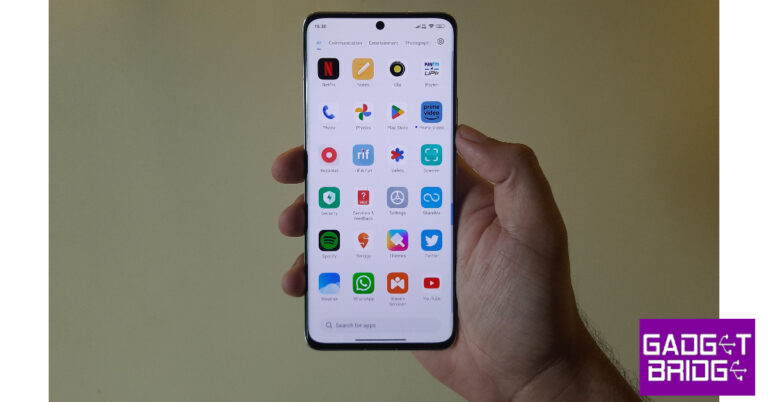
The ‘Get Apps’ marketplace on your Xiaomi smartphone is notorious for routinely sending pesky notifications which are basically ads for other apps. Here is how you can disable these notifications.Step 1: Go to your Xiaomi smartphone’s home screen. Press and hold the ‘Get Apps’ icon.Step 2: Select ‘App info’.Step 3: Tap on ‘Notifications’.Step 4: Turn the toggle bar off for ‘Show notifications’.
Remove personalised ads
If you don’t want to see any personalised ads on your smartphone, try this trick. You will receive the same amount of ads, but they won’t be personalised anymore. To turn off ads entirely, try the methods mentioned above.Step 1: Go to Settings and select ‘Passwords and Security’.Step 2: Tap on ‘Privacy’.Step 3: Select ‘Ad services’.Step 4: Turn the toggle bar off for ‘Personalised app recommendations’.
Frequently Asked Questions
Does Xiaomi have ads on their phones?
Since 2018, Xiaomi has integrated ads in their MIUI OS across all phones. Even the flagship Xiaomi phones come with ads.
How do I stop ads on my Xiaomi phone?
To completely remove ads from your Xiaomi smartphone, go to Settings>Passwords and Security>Authorisation & Revocation and disable the msa app.
Acer has updated its Swift series with the launch of the new Swift X 16 powered by AMD Ryzen 9 7940H processor. The machine comes with NVIDIA GeForce RTX 4050 Laptop GPU. There are Studio Drivers pre-installed to handle graphically demanding creative applications. The laptop supports Wi-Fi 6E and features a 3.2K 120 Hz OLED display. 1080p FHD camera is also included on the device.
In This Article
Acer Swift X 16 features
Starting with the build and design the Swift X 16 is a lightweight laptop and 1.9 kg. It comes with a 17.9 mm chassis with a new design inside and out with thin-and-light aluminium chassis and redesigned thermal arrangements. The touchpad is said to have 33% more scrolling space as compared to its previous model.In terms of display, the Acer laptop is powered by a 16-inch 3.2K OLED panel with 3200 x 2000 pixels of resolution. It has VESA DisplayHDR TrueBlack 500 and TÜV Rheinland Eyesafe display certifications for comfortable viewing. The display offers 100% DCI-P3, 500 nits peak brightness, 120Hz refresh rate, and less than 0.2 ms response time.The Acer Swift X 16 is powered by AMD Ryzen 9 7940H processor and built-in AMD Radeon 780M graphics. It includes access to NVIDIA Studio Drivers and exclusive tools such as NVIDIA Omniverse, NVIDIA Broadcast, and NVIDIA Canvas. It comes with up to 16 GB of LPDDR5 memory, up to 2 TB of PCIe Gen 4 SDD storage, and a MicroSD slot for added storage. In terms of connectivity, there are two USB Type-C ports, HDMI 2.1 and Wi-Fi 6E.It has upgraded TwinAir cooling, which increases air intake by up to 36% thanks to its larger fans and newly added turbo mode, as well as an air-inlet keyboard designThe laptop runs on Windows 11 and supports Windows Hello via its fingerprint reader and Wake on Voice for biometrics.It also has a 1080p FHD camera that makes use of Acer’s Temporal Noise Reduction (TNR) and Acer PurifiedView’s suite of AI features such as Background Blur, Automatic Framing and Eye Contact technology for video calling.
Most camera apps pause any background audio while recording a video. This creates a problem when you want the background music to be a part of the video. While Android phones don’t have a native feature for this, there is one helpful trick for iPhones that will help you get around this issue. In this article, we the top 2 ways to record a video while playing music on your iPhone.Read Also:Apple Saket, first Apple Store in Delhi opening today
In This Article
Here’s how you can record a video on your iPhone with music playing in the background
Step 1: Unlock your iPhone and play a song. Step 2: Minimise the music app without pausing the song and launch the native camera app on your iPhone.Step 2: Stay on the Photo tab. Press and hold the shutter icon.Step 3: Your iPhone will start recording video without pausing the music. Slide the shutter icon to the right if you want to lock it. This will let you record the video without having to constantly hold the shutter icon.Step 4: Tap the Stop icon to end the recording.The video will be saved in the Photos app.
Use the Mideo app
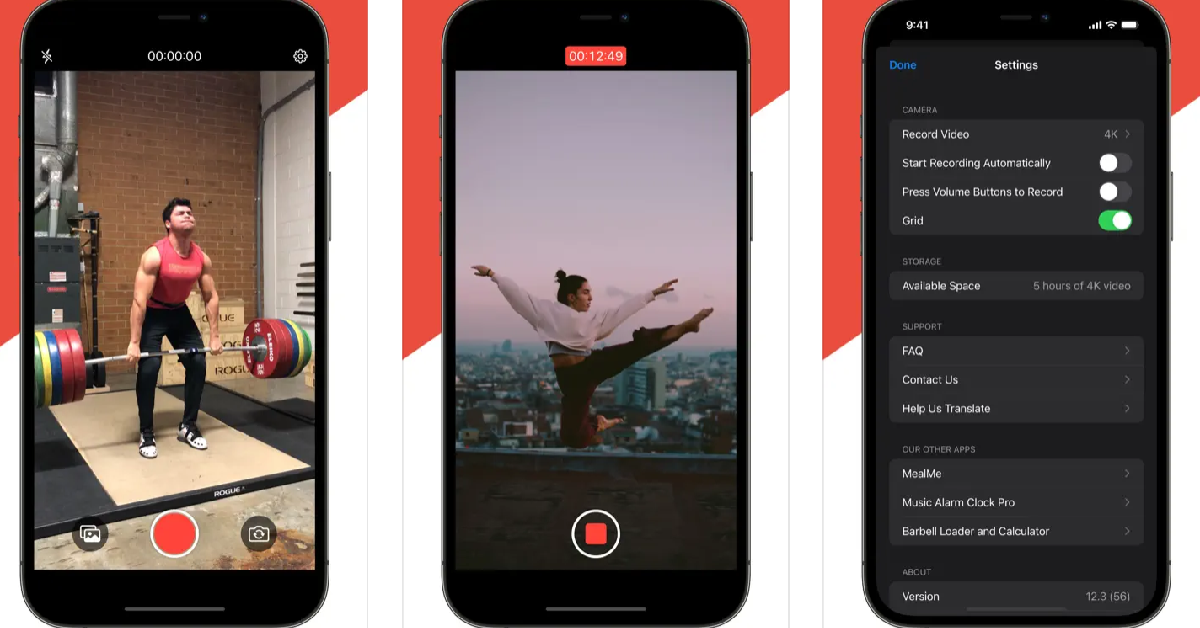
If you’re on an older version of iOS and can’t get the native app to record a video with the music playing in the background, use the Mideo app. Once the app has been installed, play music on your iPhone using a saved file or a streaming service. Then, launch Mideo and start shooting a video. The music will keep playing in the background and will be recorded in the video as well. The recorded videos are saved in the Photos app.
Mideo can record videos using the front and rear cameras. It also offers portrait mode, tap-to-focus, grid lines and more. Users can shoot videos in 720p, 1080p, or 4K resolution. You can also program the app to start recording a video as soon as it is launched, without needing to press the red button.
Frequently Asked Questions
Can you record a video while playing music?
Your iPhone lets you record a video with music playing in the background. All you need to do is press and hold the shutter icon (without leaving Photo mode) and slide it to the right to lock it. Your iPhone will record a video without pausing the music.
What apps can I use to record a video while playing music on an iPhone?
You don’t need a third-party app to record a video while playing music on your iPhone. Simply, open the Camera app and press and hold the photo shutter icon to start recording a video. If you want a third-party alternative, then Mideo is a good app for this task.
Why am I not able to record videos on my iPhone with a song playing in the background?
Your iPhone will not record videos with the background song if it is connected to your AirPods or headphones. Disconnect the audio accessory and try again.
Read Also:Xiaomi 13 Pro review: Performs Leica boss!
Conclusion
These are the 2 ways to record a video while playing music on an iPhone. The native method only works on an iPhone. Android users will have to rely on third-party apps like Record Video With Music. If you found this article helpful, let us know in the comments!
Meta-owned photo and video-sharing app Instagram has announced a new feature that many users have asked for on the platform. The company is now rolling out the ability to add up to five links to the profile’s bio to help users and creators promote their works. Before this change users were only able to share a link in their bio.Instagram users will now be able to share and promote more of their work with their followers by posting up to five links on their profiles. The company took to Twitter to make the announcement about the upcoming change on its platform. The news about the upcoming update was also shared by Meta CEO Mark Zuckerberg on its Broadcast channel. The users were only permitted to add one link to their bio. That one link to a page held several links. But now Instagram users will be able to add such as Linktree, Beacons, and Discord accounts, among others links to the platform.
In This Article
How to add up to five links to your Instagram profile’s bio?
Tap the Add External Link option in the Links section of the Edit Profile menu to add extra links to your bio.
When will this feature reach all Instagram users?
By the end of this month, all Instagram users should have access to the functionality that allows them to add up to five links to their profile’s bio.Besides this, the company also rolled out a bunch of new Reels features for creators. A dedicated destination to find popular audio and hashtags, in addition to two new metrics to Reels insights, have been added to the app. Users will be able to find trending audio and hashtags on Instagram Reels right from the professional dashboard. The users will be able to see the top trending songs on Reels, see how many times the audio has been used, tap in to use it or save the audio for themselves. In addition to this Instagram is also updating reel insights by adding two new metrics: total watch time and average watch time – and making it easier to see your insights while viewing your reels directly.
For the latest gadget and tech news, and gadget reviews, follow us on Twitter, Facebook and Instagram. For newest tech & gadget videos subscribe to our YouTube Channel. You can also stay up to date using the Gadget Bridge Android App. You can find the latest car and bike news here.
Apple Saket opened its doors to customers in Delhi, and fans and curious consumers gathered up to get the first look at Apple’s second store during the grand opening. Until now Apple services in India could only be availed through Authorised stores. But now Apple has officially opened its first Apple Store namely Apple BKC in Mumbai and the second store that is Apple Saket in Delhi.Apple Saket opened in Delhi at 10 AM and the company’s CEO Tim Cooks inaugurated the store and opened it to the fans and customers. Even before the store opened, customers lined up outside the first Apple store in Delhi, which is housed in the Select Citywalk Mall in Saket. Yes, the atmosphere was fantastic, and long lines of customers formed to get a glimpse of Tim Cook and end up buying the most recent gadgets.The Apple store in Delhi will display all the latest tech and gadgets including iPhones, iPads, MacBooks, Apple Watch, AirPods and lots more to discover. In addition to this, the Apple accessories will also be up for display.Apple retail outlet in Delhi features a Barricade with a unique design that is inspired by Delhi’s many gates, each signifying a new chapter to the city’s storied past. The store looks vibrant, colourful yet classy. It has this unique curved storefront, which also has an Indian-made feature wall. White oak tables showing Apple’s products and accessories are placed inside the Apple Store. The Apple Store in the nation’s capital will have a dedicated Apple Pickup station available. Because of this, customers will find it less complicated to place an online order and pick up their equipment from the store at a convenient moment.However, the Apple Saket is almost half the size of Mumbai’s Apple Store, Apple BKC. Both stores are carbon neutral and run on renewable energy.Here fans and customers can participate in free Today at Apple workshops to learn how to make the most of their devices. The company claims that its store at Saket will have over 70 highly qualified retail team members who hail from a total of 18 different Indian states and can speak more than 15 different languages. They will be assisting customers in discovering and shopping for the newest Apple devices.
For the latest gadget and tech news, and gadget reviews, follow us on Twitter, Facebook and Instagram. For newest tech & gadget videos subscribe to our YouTube Channel. You can also stay up to date using the Gadget Bridge Android App. You can find the latest car and bike news here.
RGB lights are an essential part of any gaming setup. If you’re trying to improve the look of your gaming desk, you can use RGB lights in several creative ways. What you need is an RGB light strip that can be easily applied to your monitor, TV, or CPU. These lights can also be used to create an ambience in your living room. So, without further ado, here is our list of the best RGB LED lights you can buy right now for your desk or living room.Read Also:Xiaomi 13 Pro review: Performs Leica boss!
In This Article
Gesto RGB LED Light Strip
Price: Rs 799The Gesto RGB LED Light Strip has 8 primary colours along with a wide range of colour temperatures. These lights are easy to install and can easily be cut up depending on the dimensions of the surface you are trying to cover. There are 4 dynamic and music modes on offer. The light strip can be dimmed, depending on the ambience you’re trying to set. The light strip has an in-built microphone that lets it match the rhythm of the song or the soundtrack of the game you are playing. The Gesto LED light strip offers voice control with Alexa and can also be controlled over a home WiFi network.
XERGY RGB LED Flexible Strip
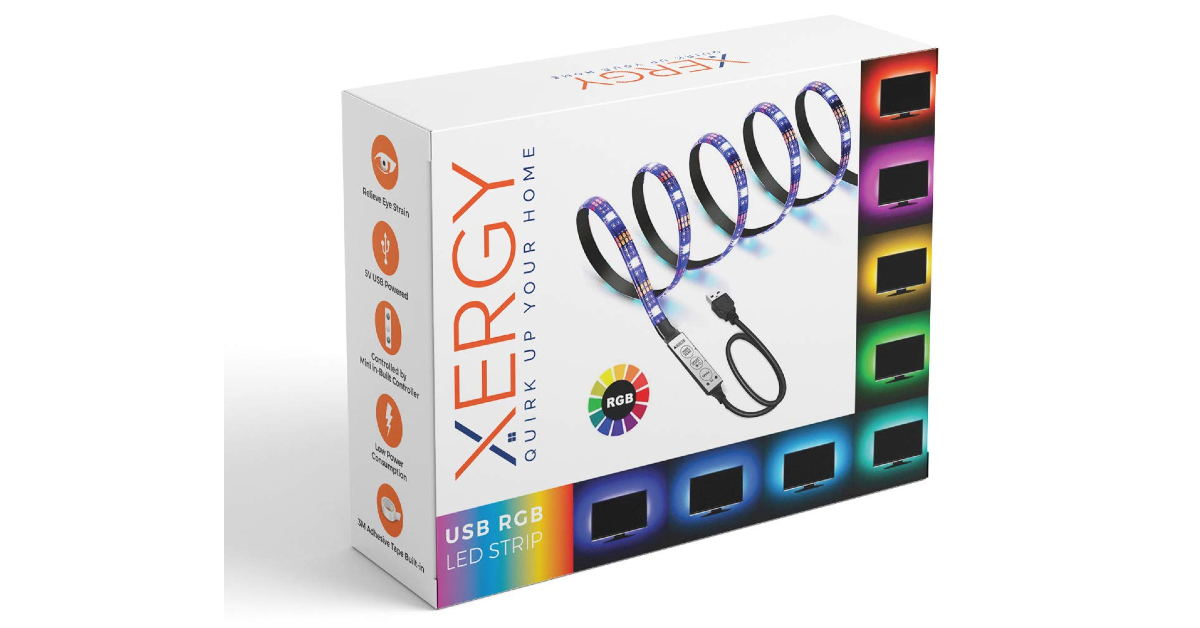
Price: Rs 359XERGY RGB LED Flexible Strip is an affordable light strip that primarily finds its use as an ambient light for TVs, monitors, speakers, and any other device. Being 1 meter in length, this light strip can easily cover 32-inch TVs and monitors. It can easily be plugged into a USB port of the device it is covering. The XERGY light strip has 20 colours on offer, including red, green, blue, yellow, pink, purple, white, and more. The controller is attached to the end of the light strip and can be used to select the flashing mode, brightness, and speed.
Desidiya RGB LED Light Strip
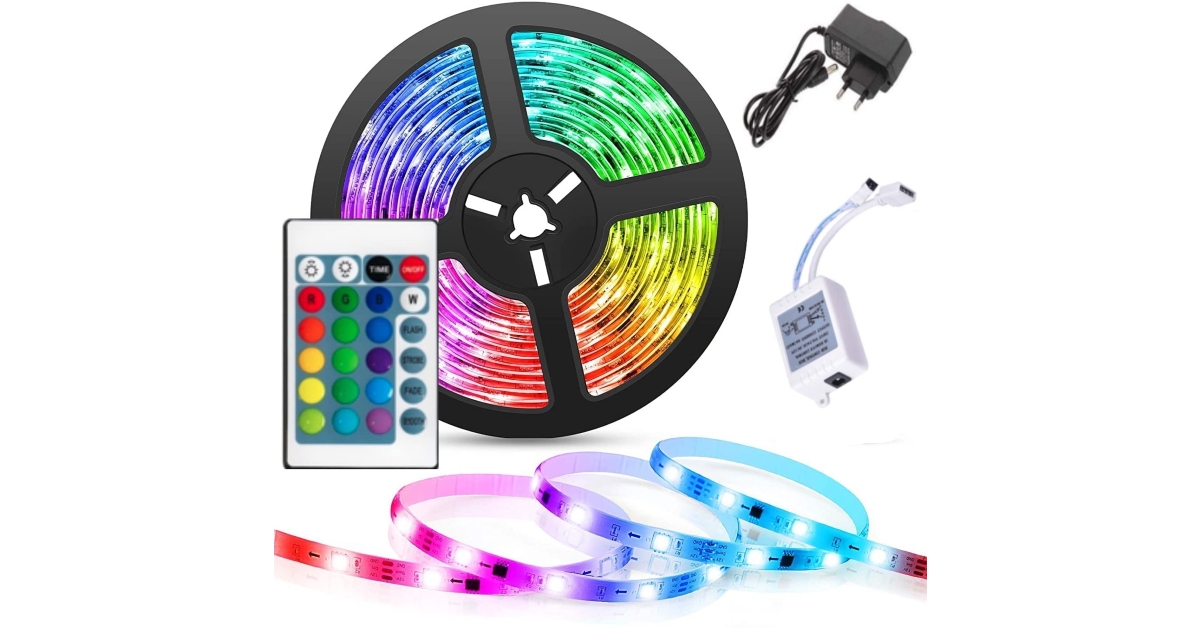
Price: Rs 629The Desidiya RGB LED Light Strip can be plugged directly into a 220V wall outlet. This light strip has 5050 SMD LEDs. Desidiya Light Strip comes with an IR controller, RF control box, and power adapter. There are 16 colour options on board. There are a bunch of preset patterns, with further customisation options to create your own unique mood lighting. This LED Light Strip is waterproof and can be easily cut up to meet the demands of the surface it is covering.
Ustellar RGB Monitor Light Bar
Price: Rs 8,609The Ustellar RGB Monitor Light Bar attaches itself to the top of the monitor and projects white light on the monitor and desk while illuminating the background with RGB lights. This dual-sided monitor bar is perfect for those who work in limited lighting conditions and need extra light to reduce the eye strain from the monitor. The RGB lights on the back of the bar are a fun addition. This light bar also offers app support to control the intensity, colour, and time schedule of the lights. It is also compatible with Alexa and Google Home. On top of that, the light bar has touch buttons for easy access.
Koicaxy RGB LED Light Bar
Price: Rs 499If you’re looking for something other than light strips, the Koicaxy RGB LED Light Bar can be a great addition to your gaming desk. This light stick has 32 LED light beads and is built in with a large-capacity battery. What makes this light bar better is that it is voice-activated and can change its rhythm to the beats of the music. This light bar will suit gamers and music enthusiasts alike.
Nexillumi LED Light Strip
Price: Rs 4,523This LED Light Strip by Nexillumi spans a massive 16.4 feet and contains a total of 180 lights. The light strip is completely waterproof and can be cut up to cover different surfaces. An inbuilt mic allows the light strip to change its rhythm to the beat of the music. A handy remote control is provided with the light strip. This remote control has 44 keys and a bunch of options to control the brightness, pattern, temperature and set timer.
RSCT LED Strip Lights (5 meters)
Price: Rs 399
The RSCT LED Strip Lights can be directly plugged into a 220V power outlet. Reaching up to 5 meters in length, these strip lights are perfect to light up a wall or a desk. It comes with a 24-button IR remote controller. Being completely waterproof, you don’t have to worry about placing these lights next to a window. The water protection also comes in useful against accidental spillages.
Wipro LED Strip Lights
Price: Rs 4,399
Looking for a high-end product that can be used outdoors and last you a long time? Wipro LED Strip Lights should fit the bill perfectly. Spanning 10 metres in length, these LED lights have 600 individual sources. With IP65 protection, this light strip is perfect for indoor as well as outdoor use. The flexible design allows you to cover every kind of surface in your room. The richness in colours and quality of light is also a cut above the rest. It may be priced higher than other products on this list, but Wipro’s LED light strip is well worth the money you’re paying for it.
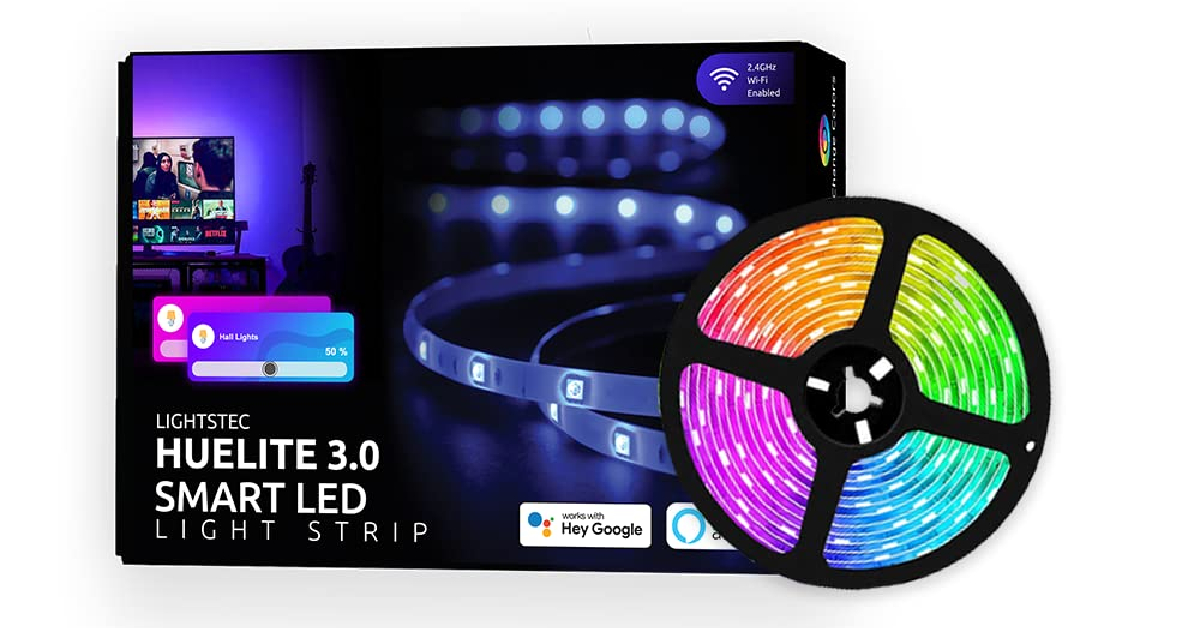
Lightsec Huelite 3.0 Smart LED Strip
Price: Rs 999
What makes Lightsec Heulite 3.0 a solid buy is Alexa and Google Assistant support. This smart LED strip can register voice commands easily. The Huelite mobile app for Android and iOS gives users access to over 16 million colours, dynamic modes, and a host of other features. This RGB light strip can be used for your desk, furniture, paintings, TVs, and other objects. On top of all that, Huelite also offers a 1-year warranty on this product.
Read Also:How to add subtitles to Instagram Reels and Video Posts?
Conclusion
These are our picks for the best RGB LED lights you can buy for your desk or room. Most of the products in this list come with a limited warranty period. We’d recommend going for a light strip that is easily cuttable and comes with a bunch of customisation options. Do you have any RGB light recommendations? Let us know in the comments!For the latest gadget and tech news, and gadget reviews, follow us on Twitter, Facebook and Instagram. For newest tech & gadget videos subscribe to our YouTube Channel. You can also stay up to date using the Gadget Bridge Android App. You can find the latest car and bike news here.
Before cell phones existed, the easiest way to find someone using their name or phone number was through the Yellow Pages. The big yellow directory was a permanent fixture in every household and came in very handy when you needed to contact but all you had was either their name or phone number. Ever since mobile phones gained popularity, the Yellow Pages have disappeared from the scene. But there are still several ways of looking someone up. In this article, we bring you the top 8 ways to find someone using their phone number.Read Also:Lenovo Back to School (BTS) offers announced, with cashback offers up to Rs 10,000
In This Article
Search for the number on Google
If the number you are searching for belongs to a business, it will appear in a simple Google search. Most businesses have their numbers listed on their Google page/website or indexed by Google. Performing a simple search will bring up all the details of the contact. You can view the location of the contact or tap on ‘Directions’ to be redirected to Google Maps.
Use SearchPeopleFree
SearchPeopleFree is one of the best directories to look people up online. You can search for a person by name, phone number, address, or email. This website uses information in the public domain to bring up the name, address history, social media profiles, and public record of the person you are searching for. The website is free to use and doesn’t require you to sign up. One of the downsides of this service is that it is US-centric.
Use TrueCaller
If you are in India, then TrueCaller is the best way of finding someone using their phone number. To use TrueCaller you need to sign up on the app using your phone number. You can use the app’s services only when you give it access to your contacts. Once you have signed up on TrueCaller, other people can look you up using your name or number too. To find someone using their phone number, simply tap on the search tab and enter the phone number. TrueCaller will look for the number in its directory and bring up matching results. You can go through the person’s profile on TrueCaller and find their full name, call history (with you), and even block them from contacting you.
Use Radaris
Radaris is another website with an exhaustive directory. You can use this website to search for people using their phone number, name, address, email, or business. Radaris draws its data from information in the public domain and compiles it in one place. The website says it is the most comprehensive public records database online. Radaris has been around for 10 years and keeps updating its directory regularly with new entries. The website has 224 million phone numbers in its store, which makes it easy to track the person you are looking for.
CocoFinder
CocoFinder is a great website for employers who are looking to perform a background check on their employees. You can also use it to find someone using their phone number. This website gives you a detailed report about a person which includes their age, date of birth, current address, court records, relatives, and more. CocoFinder has a huge database with billions of entries. The website generates accurate results with very little search time.
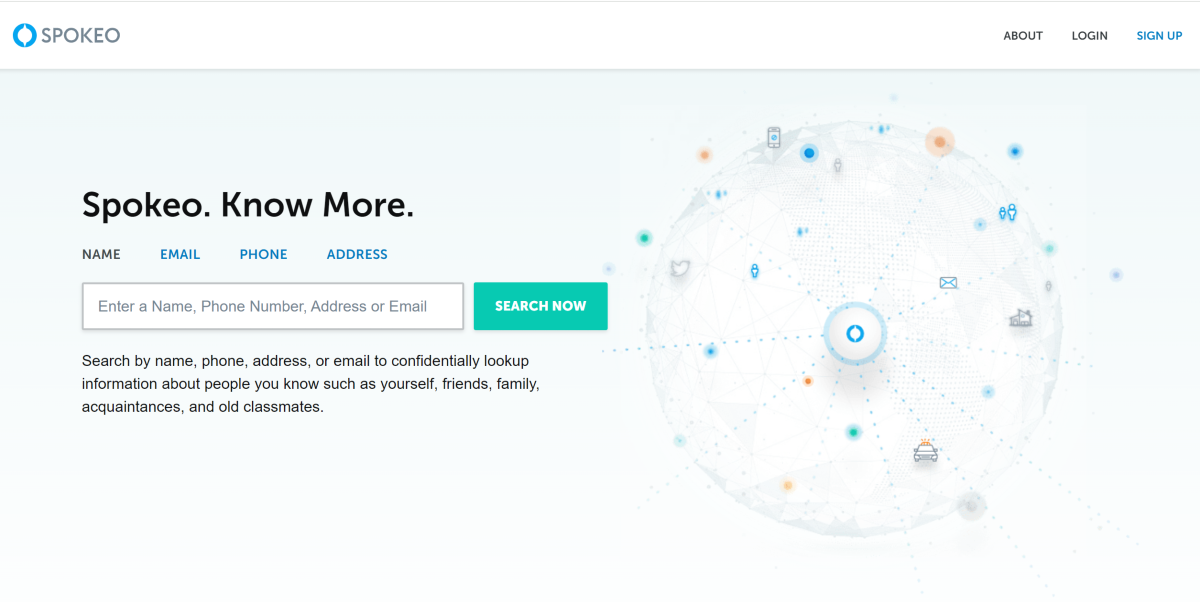
Spokeo
Spokeo lets you search for people by name, phone number, email, and address. The website looks into a library of 130 million property records, 6 billion consumer records, 3.9 billion historical records, 600 million court records, and 120+ social networks. Once you hit a match, you can get information like contact details, location history, wealth data, criminal records, and more.
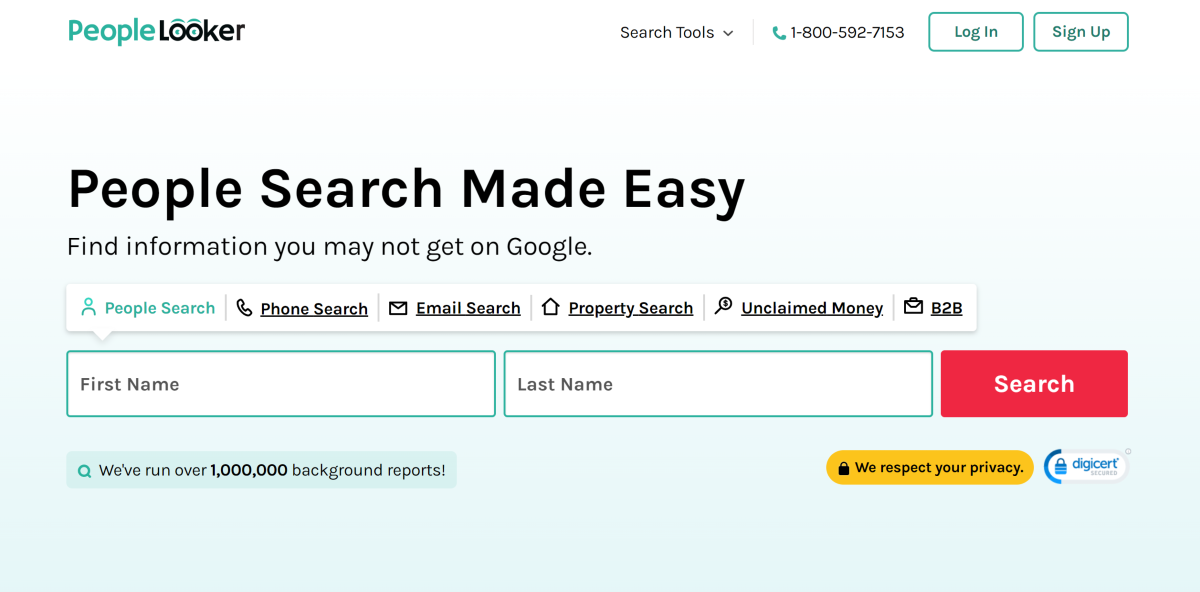
PeopleLooker
PeopleLooker claims to make public information that you can’t find on Google more accessible to users. It gives you access to names, addresses, photos, court records, email addresses and more. There are 8 tools on the website including people search, reverse phone, phone directory, B2B, unclaimed money, and more. The interface of the website is simple and easy to access.
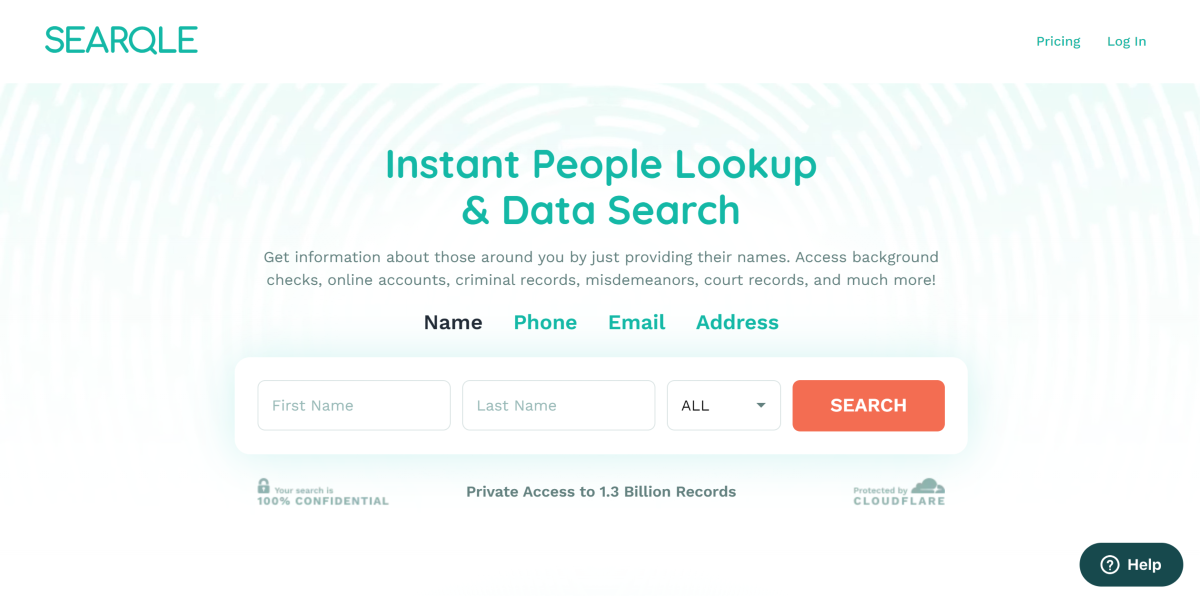
Searqle
Searqle is a great website to perform background checks on potential employees just by using their phone numbers. By entering a person’s phone number you can look up their social media profiles, misdemeanours, court records, and more. If you’re getting constant calls from an unknown number, you can use this website to dig for more information about the caller.
Read Also:How to add subtitles to Instagram Reels and Video Posts?
Conclusion
These are the best ways you can find someone using their phone number. If you’re located in India, using TrueCaller is your best bet. TrueCaller does not provide any additional information other than the contact’s name, but it is still a good start. Using their name, you can search for the person on social media until you’ve found a match.
On April 18, the first Apple Store in India, Apple BKC opened its doors at the Jio World Drive Mall in Bandra Kurla Complex (BKC), Mumbai. Today, Apple Saket the company’s second store will open at Select CITYWALK in New Delhi.According to Apple’s announcement, Apple Saket is going to be the company’s first store in the capital to open today. Ahead of the opening, the company gave a sneak peek of the store. Apple’s first store was unveiled in Mumbai just a day before. Both the Apple Stores in Delhi and Mumbai, according to the company, are carbon neutral and run on renewable energy. Both Apple BKC and Apple Saket’s interiors and designs reflect the local aesthetic.Customers may buy Apple’s fantastic selection of goods and services in Apple Saket, get first-rate assistance from staff members, and take part in free Today at Apple workshops to learn how to make the most of their devices. Apple Saket has a distinctively curved storefront, which also has an Indian-made feature wall. White oak tables showing Apple’s products and accessories are placed inside Apple Store.White oak tables showing Apple’s products and accessories are placed inside Apple Saket’s distinctively curved storefront, which also has an Indian-made feature wall. A special Apple Pickup station is available at the capital’s Apple Store. Customers will find it simpler to order online and pick up their devices from the store at a convenient time as a result. Apple Saket and Apple’s activities in India, like all Apple facilities, are carbon neutral and run entirely on renewable energy.Also Read:Lenovo Back to School (BTS) offers announced, with cashback offers up to Rs 10,000Apple states that the Delhi store boasts more than 70 highly qualified retail team members who hail from a total of 18 different Indian states and can speak more than 15 different languages. They are going to Assist customers to discover and shop the newest Apple devices.Customers can schedule an appointment at the Genius Bar at Apple Saket to receive hands-on technical and hardware support in addition to the other services offered. Genius Bar appointments will assist with everything from setting up a device, recovering an Apple ID, selecting an AppleCare plan, or modifying subscriptions.The company will also offer free, daily in-store sessions through Today at Apple which is led by Apple Creatives, who are themselves, talented artists and creators, the sessions range from basics and how-to lessons to using professional-grade programs.
For the latest gadget and tech news, and gadget reviews, follow us on Twitter, Facebook and Instagram. For newest tech & gadget videos subscribe to our YouTube Channel. You can also stay up to date using the Gadget Bridge Android App. You can find the latest car and bike news here.
Garena Free Fire is a battle royale game with regular awards and tournaments to keep players interested. If you play Garena Free Fire, you should be aware of the redeem codes that are released on a daily basis. However, because the battle royale game is banned in India, players from other countries can use the Free Fire Redeem codes daily. If you’re unfamiliar with the Garena Free Fire redeem codes or don’t know how to get them, we’ve put together a step-by-step guide to help you redeem them. Check out Garena Free Fire Redeem Codes for 20 April 2023.The Free Fire redeem codes are a great way to get free stuff. These are 12-digit codes that contain alphabets and numbers, as well as an expiration date and time. Because the Garena FF redeem codes cannot be used more than once, you should hurry to the redemption page to claim your free reward before someone else does. To get a free reward, all you have to do is go to reward.ff.garena.com/en, which is the official redemption page. Also, keep an eye on this space for daily updates on Garena Free Fire redemption codes and rewards.
In This Article
Garena Free Fire Redeem Codes Today 20 April 2023
ZZZ76NT3PDSH
FFCMCPSUYUY7E
V427K98RUCHZ
MCPW2D2WKWF2
BR43FMAPYEZZ
6KWMFJVMQQYG
HNC95435FAGJ
EYH2W3XK8UPG
NPYFATT3HGSQ
FFCMCPSGC9XZ
MCPW3D28VZD6
XZJZE25WEFJJ
UVX9PYZV54AC
FFCMCPSEN5MX
FFCMCPSJ99S3
MCPW2D1U3XA3
How to Get Free Fire Redeem Codes for Garena on 20 April 2023?
















 Step 2:
 Step 3:
 Step 4:
 Step 4:
 Step 2: Tap on YouTube.
 Step 3: Tap on Open by default.
 Step 4: Tap on verified links and make sure they contain the shortened (youtu.be) as well as mobile (m.youtube.com) links.
 Step 3:
  Step 4:
 Step 3:
 Step 4:
 Step 2:
 Step 3:
 Step 4:
 Step 5:
 Step 6:
 Step 7:
 Step 8:
 Step 5:
 Step 6:





 Step 3:
 Step 4:
 Step 3:
 Step 4:
 Step 3:
 Step 4:

 Step 1:
  If you’re on an older version of iOS and can’t get the native app to record a video with the music playing in the background, use the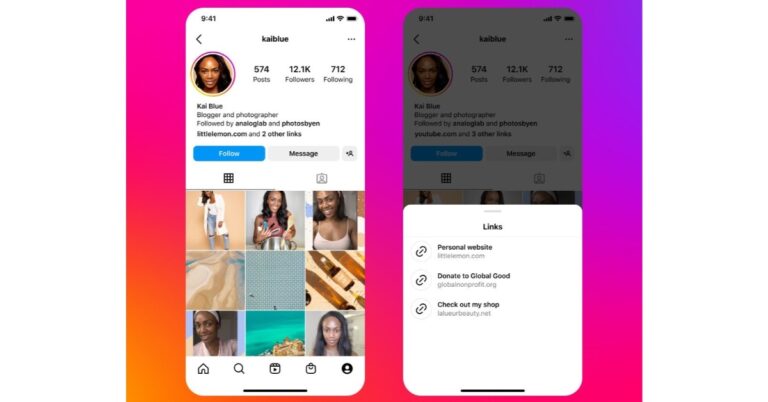







 The
The 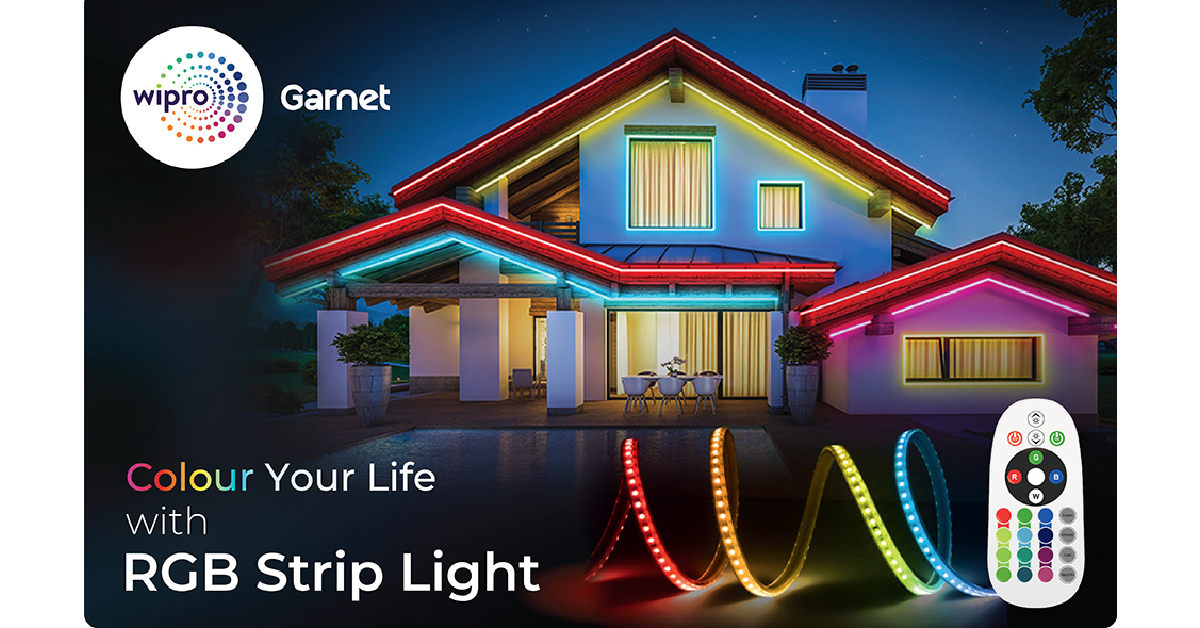 Looking for a high-end product that can be used outdoors and last you a long time?
  What makes


 Spokeo lets you search for people by name, phone number, email, and address. The website looks into a library of 130 million property records, 6 billion consumer records, 3.9 billion historical records, 600 million court records, and 120+ social networks. Once you hit a match, you can get information like contact details, location history, wealth data, criminal records, and more.
 PeopleLooker claims to make public information that you can’t find on Google more accessible to users. It gives you access to names, addresses, photos, court records, email addresses and more. There are 8 tools on the website including people search, reverse phone, phone directory, B2B, unclaimed money, and more. The interface of the website is simple and easy to access.
 Searqle is a great website to perform background checks on potential employees just by using their phone numbers. By entering a person’s phone number you can look up their social media profiles, misdemeanours, court records, and more. If you’re getting constant calls from an unknown number, you can use this website to dig for more information about the caller.