Are you planning to buy a good 5G smartphone? Here is a list of 5 best 5G smartphones available in India for under Rs 30,000. Our crew has tried and tested each of the phones on the list, and they are all currently on the market in the nation. Check out their reviews, pricing and specifications.
The OnePlus Nord 2T 5G features a 6.43-inch full-HD+ AMOLED display having 1,080×2,400 pixels of resolution. It has a screen refresh rate of 90Hz. The phone is powered by MediaTek Dimensity 1300 SoC, combined with up to 12GB of LPDDR4X RAM.
OnePlus Nord 2T has a triple rear camera setup with a 50-megapixel Sony IMX766 main sensor and an optical image stabilisation (OIS)-enabled f/1.8 lens. A 2-megapixel monochrome sensor with an f/2.2 lens and an 8-megapixel ultra-wide camera with a 120-degree field of view is also included in the camera arrangement. The front of the OnePlus Nord 2T 5G has a 32-megapixel Sony IMX615 camera with an f/2.4 lens for selfies and video calls.
The device has a 4,500mAh dual-cell battery that can be charged quickly at 80W with the included charger.
The handset is available at a starting price of Rs 28,999
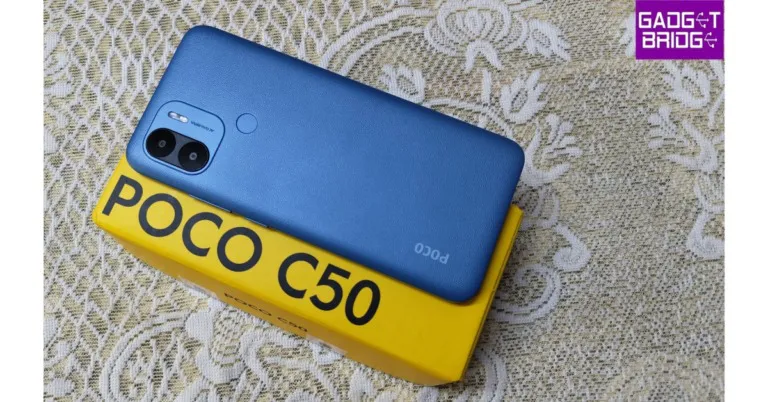
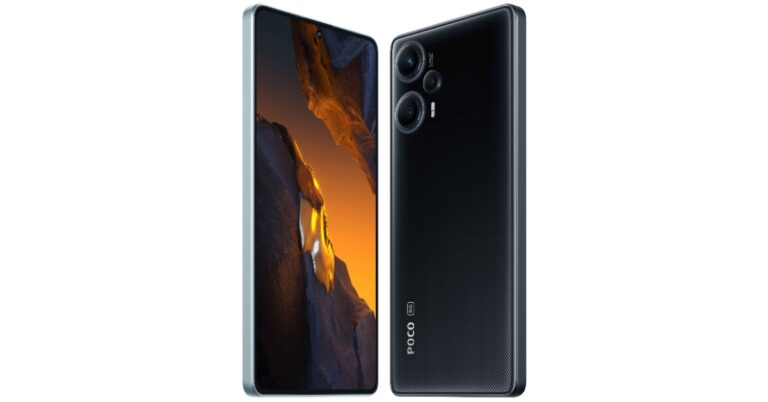
The Poco X5 Pro 5G has a 6.67-inch Xfinity AMOLED Display with a 120Hz adaptive refresh rate. The phone is powered by Snapdragon 778G SoC and an Adreno 642L GPU. Additionally, there is up to 256GB of internal UFS 2.2 storage and up to 8GB of LPDDR4x RAM. The device includes a triple rear camera setup consisting of a 108-megapixel ISOCELL HM2 main sensor. A 2-megapixel macro camera and an 8-megapixel ultra-wide angle lens are also included. On the front, there is a 16-megapixel selfie camera.
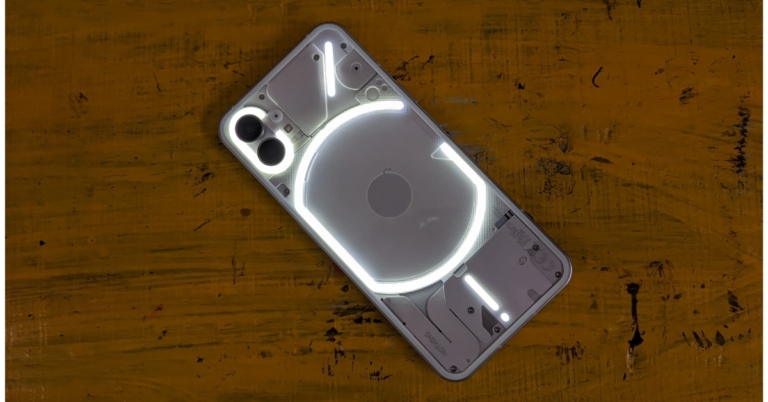
Nothing Phone 1 is highlighted with a 6.55-inch, 10-bit OLED display. Under the hood, there is Qualcomm Snapdragon 778G CPU and an Adreno 642L GPU. The phone come equipped with a dual rear camera setup that includes two 50MP sensors: one is a primary Sony IMX766 sensor (f/1.88) with OIS and EIS, and the other is a Samsung JN1 ultrawide sensor (f/2.2) with 140 degrees of field of view. Additionally, a 16MP Sony IMX471 sensor is given on the front for taking selfies and video calling.
iQoo Neo 7 5G The device has a 6.78-inch full-HD+ AMOLED screen with a resolution of 1,080×2,400 pixels and a refresh rate of 120Hz. It is powered by an octa-core 4nm MediaTek Dimensity 8200 5G SoC and has an Extended RAM 3.0, which increases your RAM by 8 GB, turning a phone with 12 GB of RAM into a phone with 20 GB of RAM. The triple rear camera setup a 64-megapixel primary sensor with OIS ( f/1.79 aperture). In addition to this, there is a 2-megapixel macro sensor (f/2.4 aperture) and a 2-megapixel depth sensor (f/2.4 aperture). In addition to this, the phone includes a 5,000mAh battery with 120W fast charging support.
The phone is available at a starting price of Rs 30,780.
Lastly, Redmi Note 12 Pro+ comes with a 6.67-inch full-HD OLED display that has an up to 120Hz refresh rate. Under the hood, there is an octa-core 6nm MediaTek Dimensity 1080 SoC, up to 12GB of LPDDR4X RAM, and a Mali-G68 GPU. The handset features a triple rear camera setup that includes a 200-megapixel primary sensor with OIS. A 2-megapixel macro lens and an 8-megapixel ultra wide-angle camera are also part of the arrangement. The phone’s 16-megapixel front camera sensor is used for taking selfies.
The Redmi Note 12 Pro+ houses a 5,000mAh battery that enables 120W rapid charging.
If you have been using your Android phone for a long time, it is possible you may have forgotten its model number. Knowing the model number is essential if you are reselling the phone or looking up solutions to issues that are specific to your device. Luckily, there are several ways you can find the model number of your phone. In this article, we bring you the top 6 easy ways to identify and verify the make and model number of your Android phone.
Step 3: The model name, model number, and serial number of your smartphone will be displayed. You will also find the IMEI number here.
Step 4: Some smartphones may contain the model and serial number in the Regulatory Information section.
Use a secret code
There are certain dialer codes you can use to carry out the basic tests and diagnose certain issues on your device. These codes vary among different manufacturers. But there is a universal code for finding out the IMEI and Serial number of your device. Launch the dialer and type in *#06# to view the IMEI and Serial number. It is also possible to identify and verify the make of your Android phone by using certain dialer codes. For Samsung smartphones, enter *#2222#, *#1234#, and *#12580*369# to check the hardware and software details of your device along with the date of manufacturing.
Check the packaging
Your device’s packaging contains all the product information you can ask for. You will find the model number, serial number, and IMEI number printed on it. Find the retail box that your Android phone shipped in and turn it around to reveal the device info. You will also be able to see details like the date of manufacturing, the number of network bands on the device, the BIS mark, and more.
Check the sticker on the back panel
When you take your device out of the box, you will notice a sticker on its back panel. This sticker contains the essential information about the device. This is where you’ll find the model number of your Android phone as well. If the sticker is still applied to the back panel, check the model number on it. If not, try to remember if you applied the sticker somewhere else after peeling it off your device. It is likely that you applied it to the retailer box.
Check under the battery
If your smartphone comes with a removable battery, you will find the model number printed underneath it. Simply remove the back panel and then remove the phone’s battery. The phone’s IMEI and Serial number will either be printed on the panel or there will be a sticker containing them.
Use a third-party app
There are a bunch of third-party apps that can reveal your device information with ease. Droid Hardware Info is one of the best apps around for this task. Once you’ve installed the app on your phone, give it the necessary permission to function properly. Upon launching the app, you will be able to see all device information related to the system, memory, camera, and more. The app will display the model number, build number, OS version, name of the manufacturer, build fingerprint, and other information.
Frequently Asked Questions
How do I find the model number of my phone?
Go to Settings>About Phone to view the model number of your device. You can also find the retail number on the retail packaging. If you do not have the retail box on you, use a third-party app like Droid Hardware Info to find additional information about your device.
Is the model number the same for two devices?
Yes, the model number is the string given to a product when it is launched. All units within that line will have the same model number. The model number between two units from the same product range may differ if they are sold in different regions with different warranties and support.
Is the serial number the same as the model number?
No. The serial number is unique to your individual device whereas the model number is the same for all units in that product line.
These are the top 6 ways to identify and verify the make and model number of your Android phone. You can use the model number to look up more information about your device online. If you are looking for troubleshooting options, it is suggested to search for your phone by its model number to find more specific results.
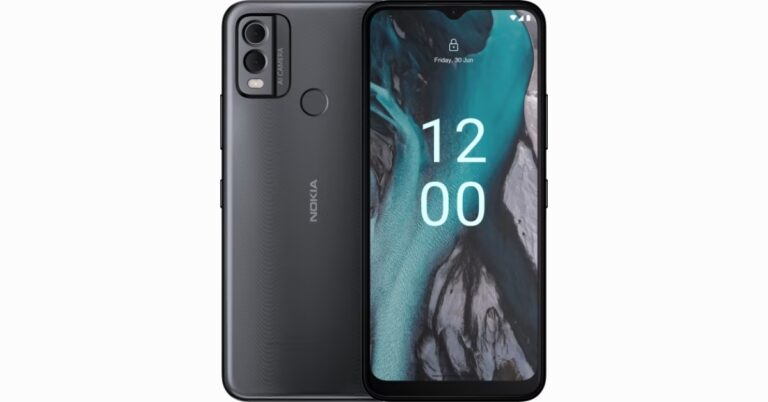
Nokia C-Series is getting bigger. HMD Global has announced Nokia C22 in the Indian market. The phone is priced under Rs 10,000 and is claimed to provide three days of battery life. It comes with the Android 12 Go edition out of the box. The budget smartphone also includes a dual rear camera setup and 2.5D display glass. The company also provides a one-year replacement guarantee.
Nokia C22 price in India, sale details
Nokia C22’s price in India has been set at Rs 7,999 for the base 2GB RAM with 64GB storage option. Whereas the price of the 4GB RAM with 64GB storage option will be available at Rs 8,499. The phone will come in three colour options of Charcoal, Purple, and Sand.
Benefits for Jio Plus (Postpaid) users on the Rs 399 plan, which provides 75GB monthly data + 3 add-on SIMs. Customers can give a missed call on 70000 70000 for Jio SIM home delivery. In addition to this Jio Plus(Postpaid) Nokia phone users will get special benefits worth up to Rs 3,500 as 100 GB additional Data (10 GB Additional Monthly Data for 10 months) worth Rs 1000 and additional coupons worth up to INR 2500 in the form of:
3-month EazyDiner subscription worth Rs 700
Rs 750 off on flights over Rs 4500 on Ixigo
3 months ET Prime Subscription worth Rs 1100 at Rs 49 only.
Nokia C22 specifications
Nokia C22 features a 6.5-inch HD+ 2.5D display with 720×1,600 pixels of resolution. It has an aspect ratio of 20:9 with Auto HDR support for extra clarity. The device IP52 is rated for protection against dust and water. Under the hood, there is an octa-core Unisoc SC9863A SoC paired with up to 4GB of RAM and 64GB of inbuilt storage. The internal storage can be expanded up to 256GB using a microSD card. Memory extension turns unused storage space into an additional 2GB of Virtual memory, making multitasking simple and smooth.
The phone is shipped with the Android 13 Go edition. The company promises to provide regular security updates for at least two years.
For photos and videos, the Nokia C22 includes a dual rear camera setup that includes a 13-megapixel primary lens and a 2-megapixel secondary sensor, along with an LED flash. For taking selfies and video calling the affordable smartphone comes with an 8-megapixel front-facing camera.
The 5,000mAh battery on the phone is supported by the Battery Saver feature. It is claimed to provide three days of battery life.
Garena Free Fire is a battle royale game with regular awards and tournaments to keep players interested. If you play Garena Free Fire, you should be aware of the redeem codes that are released on a daily basis. However, because the battle royale game is banned in India, players from other countries can use the Free Fire Redeem codes daily. If you’re unfamiliar with the Garena Free Fire redeem codes or don’t know how to get them, we’ve put together a step-by-step guide to help you redeem them. Check out Garena Free Fire Redeem Codes for 12 May 2023.
The Free Fire redeem codes are a great way to get free stuff. These are 12-digit codes that contain alphabets and numbers, as well as an expiration date and time. Because the Garena FF redeem codes cannot be used more than once, you should hurry to the redemption page to claim your free reward before someone else does. To get a free reward, all you have to do is go to reward.ff.garena.com/en, which is the official redemption page. Also, keep an eye on this space for daily updates on Garena Free Fire redemption codes and rewards.
Garena Free Fire Redeem Codes Today 12 May 2023
8F3QZKNTLWBZ
WEYVGQC3CT8Q
X99TK56XDJ4X
EYH2W3XK8UPG
FFAC2YXE6RF2
FFBBCVQZ4MWA
FFCMCPSGC9XZ
MCPW2D2WKWF2
GCNVA2PDRGRZ
FFCMCPSBN9CU
UVX9PYZV54AC
BR43FMAPYEZZ
NPYFATT3HGSQ
How to Get Free Fire Redeem Codes for Garena on 12 May 2023?
Amazon is back with another quiz on its mobile platform. The Amazon Quiz is conducted every day for its customers. Customers from different parts of the country are participating in the daily quiz. Today’s Amazon quiz is now live on the Amazon App. The customers who participate in the 12 May 2023 Amazon Quiz will get a chance to win Rs 2,500 Amazon pay Balance.
The Amazon Quiz can be played from 12 AM to 11:59 PM. For those who are unaware of the quiz, the e-commerce platform brings a fresh quiz on a daily basis which consists of five questions related to general knowledge and current affairs. The participants need to answer all the questions correctly and their names will be selected for a lucky draw. The winner will be announced at the end of the month. One wrong answer could eliminate you from the quiz. Only app users are eligible to participate in the Quiz. Check Out 12 May 2023 Amazon Quiz Answers.
Question 1: In which country was the inaugural ‘Global Buddhist Conference’ hosted?
Answer: India
Question 2: In April 2023, who became the fastest pacer to take 200 wickets in T20 cricket?
Answer: Shaheen Afridi
Question 3: Apple’s first retail store in India has been opened in which city?
Answer: Mumbai
Question 4: Which Yoga pose is named after this reptile?
Answer: Kurmasana
Question 5: This animal is mostly found in which grassland?
Answer: Savannah
How To Play Amazon Quiz
Only app users are eligible to play the Amazon quiz every morning from 12 AM to 11:59 PM. The quiz is not available on the desktop. For those who are unaware of how to play the Amazon quiz below are the steps, you can follow to take the quiz.
Firstly download the Amazon app from Google Play Store or App Store
Now fill in the required information through the Sign Up option.
You need to log in to the Amazon app and scroll down on the home screen to find the Amazon Quiz banner.
Tap on the Amazon Quiz banner and tap on the Start button to start the Quiz.
Now you will get 5 questions and you need to answer them correctly. One wrong answer will eliminate you from the Quiz.
After answering all the questions correctly you are now eligible for a Lucky Draw.
The winner’s name will be announced today at 12 PM.
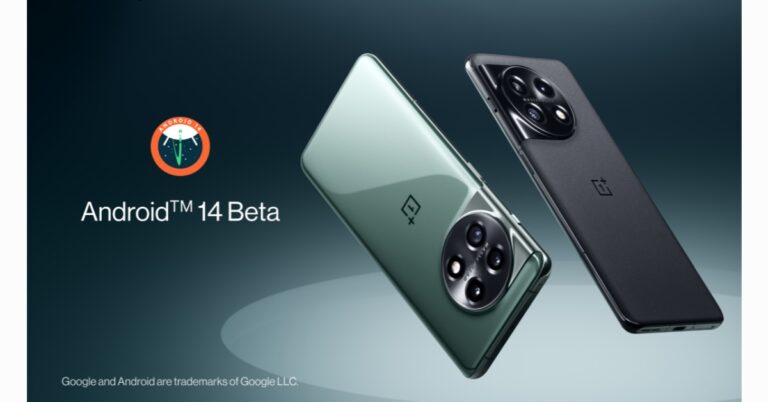
OnePlus today announced the release of Android 14 Beta 1 for its OnePlus 11 5G smartphone. Developers now can experience an early build of Android 14 as part of the Developer Preview Program for the OnePlus 11 5G. Note that Google at I/O 2023 has expanded Android 14 Beta 2 to a limited number of smartphone brands.
“OnePlus has been working closely with Google to provide our signature fast, smooth and steady OxygenOS to our users, which is based on the Android operating system,” said Kinder Liu, President and COO of OnePlus, “By cooperating with Google, we are excited to provide an early build of Android 14 to OnePlus 11 5G developers.”
The core themes of Android 14 are privacy, security, performance, developer productivity, and user customization. Android 14 Beta 1 will be available on the OnePlus 11 5G.
According to the company, the build of Android 14 is ideal for This build of Android 14 is best suited for developers and other advanced users. The app developers and other early adopters will be able to start creating even better software experiences.
“That said, we DO NOT recommend flashing this ROM if you have little to no experience in software development, if you expect to use the device as a daily driver, or if you have no experience flashing custom ROMs,” the company said.
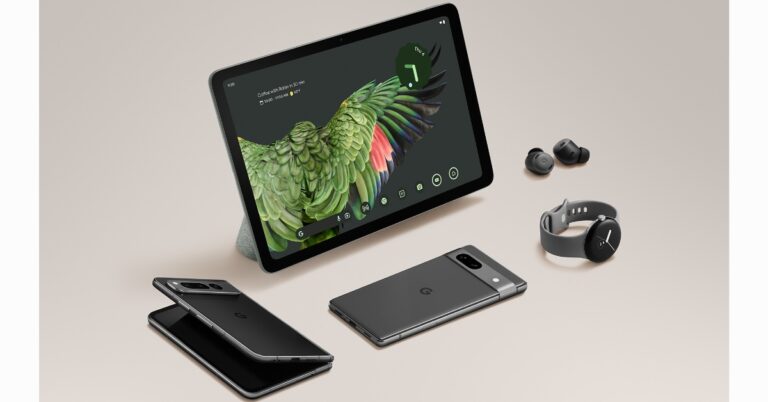
With the introduction of the Pixel Tablet, Google has announced its foray into the tablet market. The device is powered by Google’s proprietary Tensor G2 chipset, which also powers the Pixel Fold. Due to its unique features, the device will be a little more competitive than its rivals, the Samsung Galaxy Tab, Apple iPad, and OnePlus Pad. The tablet comes with a charging speaker dock that also functions as a digital photo frame, a speaker with a display, a smart home controller, and other things.
Google Pixel Tablet price and availability
The price of the Google Pixel Tablet is set at $499 which translates to Rs 43,000. The Google tablet is currently available for pre-order in the US and other regions like UK, Canada, Germany, France, Sweden, Denmark, Norway, the Netherlands, Japan, and Australia. The sale will begin on June 20. We are not sure if it will be available in India, but we would really like to have it here as well.
Pixel Tablet case is also available which is basically a polished metal ring stand so you can view the tablet at different angles. It is available separately at $79. The good news is the Charging Speaker Dock comes at no extra cost.
Google Pixel Tablet Specifications
The Google Pixel Tablet features a Full HD+ 11-inch LCD display with 2560×1600 pixels of resolution. The device only supports a standard 60Hz refresh rate. It has thick bezels on the sides to provide a better grip and prevent accidental touches.
The Pixel Tablet comes equipped with Tensor G2 SoC which powers Pixel Fold, Pixel 7 and Pixel 7 Pro as well. In terms of optics, the device has two 8-megapixel cameras: one on the back panel that lacks an LED flash and one on the front panel that is positioned horizontally.
Furthermore, it includes a Charging speaker dock which is not even provided with the best-selling tablets across the globe. The dock lets you charge your device while the speaker has multiple uses. It is said to have 4x bass than the Pixel Tablet. The Google tablet also turns into a helpful home device you can use even hands-free when in Hub Mode. It can also be used as a voice-activated assistant, music and entertainment player, smart home controller, or digital photo frame.
When it’s in Hub Mode, tap the Google Home icon to access all of your compatible smart home devices so you can view your video doorbell feed, adjust your thermostat or turn on the living room lights. You’ll see the same devices in your “Favorites” tab in the Google Home app that’s available for anyone to use starting today. It’s also the first tablet with Chromecast built-in, so you can cast videos or music from your phone to the tablet when it’s in Hub Mode.
Google Pixel Tablet Pros
Comes with a Charging Speaker Dock at no extra cost.
Thick bezels prevent accidental touches and provide a good grip.
The Selfie camera is placed in a horizontal orientation for a better video-calling experience.
At Google IO 2023, Google today unveiled the highly anticipated Google Pixel Fold. With its first-ever foldable phone, the company will compete with Samsung, Oppo, Vivo, Xiaomi, and Tecno. A 5.8-inch cover display and a 7.6-inch primary foldable display are both featured on the Pixel Fold. Under the hood, there is a Tensor G2 chipset.
Google Pixel Fold specifications
The primary 7.6-inch display on the Google Pixel Fold has a 1,840 x 2,208-pixel resolution and a 6:5 aspect ratio. The main panel also has a refresh rate of 120Hz and a pixel density of 380ppi. The external display is a 5.8-inch OLED panel with a resolution of 1,080 by 2,092 pixels, a refresh rate of 120 Hz, and a 17.4:9 aspect ratio. It is protected with Corning Gorilla Glass Victus protection. The result is a more portable device that fits into any pocket with ease. Moreover, Pixel Fold has an IPX8 rating for water resistance.
The Google foldable phone is powered by the company’s in-house Tensor G2 SoC in addition to a Titan M2 security chip similar to Pixel 7 and Pixel 7 Pro. The foldable device operated on Android 13. The device is available with 12GB of LPDDR5 RAM and up to 512GB of inbuilt storage.
The triple rear camera of the Pixel Fold comes equipped with a 48-megapixel wide-angle sensor with an f/1.7 aperture, OIS, and CLAF. A 10.8-megapixel ultrawide lens with an f/2.2 aperture and 121-degree field of view is also included in the camera unit. There is a 10.8-megapixel dual PD telephoto lens with 5x optical zoom and 20x Super Res Zoom. In terms of selfies and video calling, there is an 8-megapixel inner selfie camera with an f/2.0 aperture on the inside and an external 9.5-megapixel sensor with a 1.22 pm pixel width on the exterior.
For connectivity, there is 5G, 4G LTE, Wi-Fi 6E, Bluetooth, GPS, Google Cast, NFC, and a USB Type-C port. There is a side-mounted fingerprint sensor and face-unlock for biometrics. In addition to this, it includes other sensors as well- an accelerometer, barometer, gyro sensor, geomagnetic sensor, hall sensor, proximity sensor, and light sensor.
Furthermore, the cameras come with Pixel features like Magic eraser, Photo unblur, Super Res Zoom with 5x optical zoom, Real Tone, Night Sight and Portrait photography along with pro-level modes from Pixel 7 Pro, such as 10-bit HDR video. You can also take astrophotography shots without a tripod handy, you can use tent mode to aim the camera at the night sky and use the front display for camera controls.
The Pixel Fold further boasts a 4,821mAh battery that supports 30W charging. There is a Taskbar which allows users to quickly switch between apps, or drag a compatible app into split-screen mode to multitask with two apps side-by-side. You can easily drag and drop files across apps when in split-screen, including Google Photos, Messages, and Slides. Since the Taskbar is dynamic, it will disappear when you’re done using it so it doesn’t take up screen space. In order to watch the content or take pictures or videos without a tripod, you may also go hands-free using tabletop mode.
Pixel Fold price and sale details
The Google Pixel Fold has been launched in two variants. The price of the 256GB model is set at $1,799 which translates to Rs 1,47,500. Whereas the 512GB storage option comes with a price tag of $1,919 which converts to Rs 1,57,300. The foldable smartphone will come in two colour options of Porcelain and Obsidian.
The device is currently available for pre-order in the US. Apart from US, the device will be accessible in Germany, Japan and UK.
Garena Free Fire is a battle royale game with regular awards and tournaments to keep players interested. If you play Garena Free Fire, you should be aware of the redeem codes that are released on a daily basis. However, because the battle royale game is banned in India, players from other countries can use the Free Fire Redeem codes daily. If you’re unfamiliar with the Garena Free Fire redeem codes or don’t know how to get them, we’ve put together a step-by-step guide to help you redeem them. Check out Garena Free Fire Redeem Codes for 11 May 2023.
The Free Fire redeem codes are a great way to get free stuff. These are 12-digit codes that contain alphabets and numbers, as well as an expiration date and time. Because the Garena FF redeem codes cannot be used more than once, you should hurry to the redemption page to claim your free reward before someone else does. To get a free reward, all you have to do is go to reward.ff.garena.com/en, which is the official redemption page. Also, keep an eye on this space for daily updates on Garena Free Fire redemption codes and rewards.
Garena Free Fire Redeem Codes Today 11 May 2023
BR43FMAPYEZZ
NPYFATT3HGSQ
FFCMCPSGC9XZ
8F3QZKNTLWBZ
EYH2W3XK8UPG
UVX9PYZV54AC
FF7MUY4ME6SC
MCPW2D1U3XA3
FFCMCPSEN5MX
4ST1ZTBE2RP9
B3G7A22TWDR7X
6KWMFJVMQQYG
HNC95435FAGJ
WEYVGQC3CT8Q
X99TK56XDJ4X
MCPW2D2WKWF2
GCNVA2PDRGRZ
How to Get Free Fire Redeem Codes for Garena on 11 May 2023?
Have you participated in the Amazon Quiz today? If not then participate in the 11 May 2023 Amazon Quiz as it has already gone live on the app. The daily quiz can be played from 12 AM to 11:59 every day on the mobile app platform. Today e-commerce is giving the chance to win Rs 5000 Amazon Pay Balance.
Every day Amazon brings a fresh quiz for its customers. By participating in the quiz the participants can win an Amazon Pay Balance of up to Rs 50,000. The quiz can only be played on the mobile app as it is not available for the desktop platform. The quiz contains five easy questions and you have to answer all the questions correctly. The participants will then be shortlisted for a lucky draw to select a winner. Whereas the results are declared at the end of the month. Check out today’s Amazon quiz answers to win Rs 5000.
Question 1: The ‘Hwasong-18 intercontinental ballistic missile’ was developed by which country?
Answer: North Korea
Question 2: Mohammad Shahabuddin Chuppu was sworn in as the 22nd President of which country?
Answer: Bangladesh
Question 3: In April 2023, who became the 4th batsman in the world to score 6000 runs in IPL?
Answer: Rohit Sharma
Question 4: This is the masoleum of which spiritual leader?
Answer: Inam Reza
Question 5: This deer is native to which region of the world?
Answer: Indian Subcontinent
How To Play Amazon Quiz
Only app users are eligible to play the Amazon quiz every morning from 12 AM to 11:59 PM. The quiz is not available on the desktop. For those who are unaware of how to play the Amazon quiz below are the steps, you can follow to take the quiz.
Firstly download the Amazon app from Google Play Store or App Store
Now fill in the required information through the Sign Up option.
You need to log in to the Amazon app and scroll down on the home screen to find the Amazon Quiz banner.
Tap on the Amazon Quiz banner and tap on the Start button to start the Quiz.
Now you will get 5 questions and you need to answer them correctly. One wrong answer will eliminate you from the Quiz.
After answering all the questions correctly you are now eligible for a Lucky Draw.
The winner’s name will be announced today at 12 PM.
Google officially announced the launch of Pixel 7a at the Google IO 2023. The device is an economical alternative to the flagship Pixel 7 series. In addition to this, the device has also made its debut in India as well and will be available for purchase via Flipkart. The device comes equipped with Google Tensor G2 and Titan M2 the company’s own dedicated security chip. In addition to this, the phone features up to 90Hz Smooth Display.
Pixel 7a price in India and sale details
The Pixel 7a has launched in India with a price tag of Rs 43,999 for the single 8GB RAM with 128GB storage option. The handset will come in three colourways Charcoal, Snow, and Sea. The launch offer includes an instant discount of Rs 4,000 if HDFC bank cards are used. The device will be available for purchase via Flipkart in the country.
Pixel 7a specifications
The Pixel 7A features a 6.1-inch full-HD+ OLED with HDR support. The screen has a refresh rate of 90Hz and is protected with Corning Gorilla Glass 3. The device is powered by the Tensor G2 SoC and Titan M2 security chip, paired with 8GB of LPDDR5 RAM and 128GB of UFS 3.1 storage.
Pixel 7a includes a dual rear camera setup. The system consists of a 64-megapixel primary sensor with optical image stabilization (OIS) support and a 13-megapixel ultra-wide lens. In addition to this, there is a 13-megapixel front-facing camera for taking selfies and video calling. Pixel 7a includes Super Res Zoom up to 8x and the front camera is able to capture 4K video. Furthermore, the handset comes with features like Magic Eraser and Photo Unblur in Google Photos and Real Tone technology, so your skin tone is accurately represented.
In terms of connectivity, there is Wi-Fi, Bluetooth v5.3, NFC and USB Type-C (3.2 Gen 2) port. The fingerprint sensor is embedded in the display. In addition to this, the phone houses a 4,385mAh battery and doesn’t include a charger.
Google is hard at work on Bard, their AI-backed chatbot in order to compete with Microsoft-backed OpenAI. The company has announced the integration of AI features to search, Docs and more to its products, which will compete with Microsoft’s updated Bing. In addition, the company disclosed new features and integrations at Google IO 2023.
Bard was launched a few months back as its answer to Microsoft-backed OpenAI. The company has been working on it in order to provide a much better experience to its users. It is now able to generate, explain and debug code in 20+ programming languages thanks to better maths, logic, and reasoning abilities. Google has removed the waitlist process and is making Bard available in over 180 countries and territories, with more coming soon.
In addition to this, Bard is now introduced in Japanese and Korean and is expected to support the top 40 languages in the near future.
Soon, both Bard’s responses and your prompts will have more visual elements. “You’ll be able to ask it things like, “What are some must-see sights in New Orleans?” — and in addition to text, you’ll get a helpful response along with rich visuals to give you a much better sense of what you’re exploring.”
In addition to this, along with text, you will be able to use images in your own prompts. Google has announced the integration of Google Lens into Bard. For instance, you want to have some fun using a photo of your dog. You can upload it and prompt Bard to “write a funny caption about these two.” Using Google Lens, Bard will analyse the photo, detect the dogs’ breeds, and draft a few creative captions — all within seconds. Dark theme is now available in Bard. You can turn on the Dark theme directly in Bard to make it easier on your eyes in low light, or you can allow your OS settings to determine when it comes on.
Google is also making two new Export Actions available to make it simple to import Bard’s responses directly into Gmail and Docs. According to the company, you can ask Bard to write an email invitation for your new pickleball league, summarising the rules of the game and highlighting its inclusivity of all ages and levels.
Bard is also being brought to Google apps and services like Docs, Drive, Gmail, Maps and others. With extensions from third parties, Bard will also be able to access a variety of services from across the web. Adobe Firefly will be integrated into Bard in the upcoming months so you can quickly and easily convert your own creative concepts into high-quality images which you can then edit further or add to your designs in Adobe Express.
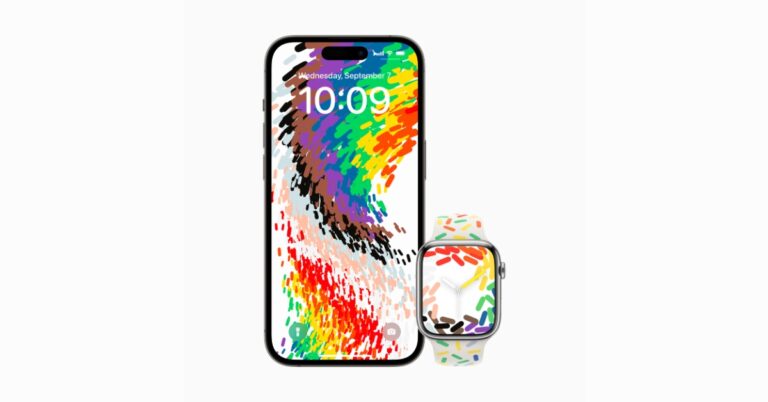
Apple is releasing a new Pride Edition Sport Band in support of LGBTQ+ communities. In addition to this, the company has also brought matching watch faces and iOS wallpaper celebrating the ongoing movement to protect and advance equality for LGBTQ+ communities.
The new Sport Band design features the original pride flag’s rainbow colours and five others- black and brown symbolize Black and Latin communities, in addition to those who have passed away from or are living with HIV/AIDS, while light blue, pink, and white represent transgender and nonbinary individuals.
According to Apple the Pride Edition band includes a happy rainbow of geometric forms on a white background, which are compression-moulded into the final band. In the forming process, the base material flows around each individual shape, creating small variations in their layout. Whereas the new Pride Celebration watch face and iOS wallpaper celebrates the community’s strength and mutual. When a user raises and moves their wrist or taps the watch display, colourful shapes appear to move into the display from the band. In addition to this, the corresponding wallpaper dynamically moves when the user unlocks their iPhone.
The company is making efforts to support and raise awareness of LGBTQ+ advocacy groups that are working to bring about positive change, including Equality Federation Institute, an advocacy accelerator that is building a network of state-based LGBTQ+ advocacy organisations in the U.S., and GLSEN, an education organisation working to end discrimination, harassment, and bullying based on sexual orientation, gender identity, and gender expression. Encircle, Equality North Carolina, Equality Texas, Gender Spectrum, Human Rights Campaign, ILGA World, the National Centre for Transgender Equality, PFLAG, SMYAL, and The Trevor Project are a few other advocacy groups that Apple supports.
Pricing and Availability
One can buy the Pride Edition Sport Band via apple.com/in on May 23 and available at Apple Store starting May 24 at Rs 4,500. The Pride Edition Sport Band comes in 41mm and 45mm sizes, and is compatible with Apple Watch Series 3 and later. In order to use the new Pride Celebration watch face and iPhone wallpaper, you must have watchOS 9.5 and iOS 16.5 installed. Customers can download the matching Pride Celebration watch face through App Clips on the Apple Watch Pride Edition Sport Band packaging, in Apple Store locations, and the Apple Store app, or download it from apple.com/in.
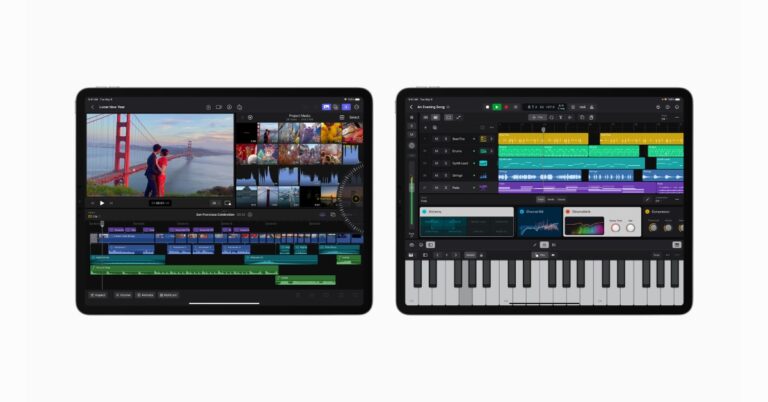
Apple has officially announced that now Final Cut Pro (FCP) and Logic Pro tools will be available on iPad. FCP comes with an all-new touch interface and intuitive tools for video creators. Whereas Logic Pro includes a complete collection of sophisticated tools for songwriting, beat making, recording, editing, and mixing.
Final Cut Pro for iPad and Logic Pro for iPad will be available to be accessed via App Store starting May 23 at Rs 499 per month Rs 4,999 per year with a one-month free trial. Note that Logic Pro will be accessible on iPad models with the A12 Bionic chip or later, and Final Cut Pro is compatible with iPad models with the M1 chip or later. Both Logic Pro and Final Cut Pro for iPad require iPadOS 16.4.
Final Cut Pro for iPad
According to the company, the editing process is much simpler than before thanks to a new jog wheel, which also allows users to interact with content in completely new ways. Users will be able to navigate the Magnetic Timeline, move clips, and make fast frame-accurate edits with just the tap of a finger, and with the immediacy and intuitiveness of Multi-Touch gestures.
iPad users will be able to use the Apple Pencil to directly write and draw on top of video content using Live Drawing. Additionally, they can quickly browse and preview video on an iPad Pro by using Apple Pencil hover without ever touching the screen. To speed up the work process by using a Magic Keyboard or Smart Keyboard Folio to utilise key commands. Additionally, creators can view and edit gorgeous HDR footage and accurately apply colour accuracy using Reference Mode.
FCP for iPad utilizes Apple silicon and machine learning to speed up time-consuming editing tasks. Without a green screen, editors can rapidly modify or erase the background behind a subject in a clip by using Scene Removal Mask. Whereas Voice Isolation helps in reducing background noise from audio recorded in the field, and Auto Crop adapts film for vertical, square, and other aspect ratios.
Video creators can select from a large library of professional graphics, effects, and audio. It also features HDR backgrounds, editable patterns that can be customised, and professional soundtracks that adapt to the length of a film, among others. Editors can save supported media immediately inside a Final Cut Pro project by importing it from Files or Photos. Additionally, iMovie for iOS projects can be imported into Final Cut Pro for iPad, and iPad users can export their Final Cut Pro projects to Mac.5
Logic Pro for iPad
On the other hand, Logic Pro for iPad is an all-in-one professional music creation app. Users will be able to play software instruments and interact naturally with controls using multi-touch gestures, as well as navigate complex projects with pinch-to-zoom and swipe-to-scroll. Plug-in Tiles put the most useful controls at the creator’s fingertips. The built-in microphones on the iPad allow users to record voice or instrument sounds.
The brand-new sound browser uses dynamic filtering to help music creators find the ideal sound. Users may tap any sound in the sound browser to hear it before putting it into a project, which helps them save time. The sound browser displays all of the available instrument patches, audio patches, plug-in presets, samples, and loops in one place. Roundtrip functionality is supported by Logic Pro for iPad which lets users transfer projects between Logic Pro for Mac and iPad. iPad users can export their finished songs in a variety of compressed and lossless audio formats, as well as individual audio track stems.
Classifying the images on your phone by the date and time they were taken is an excellent way to keep the photo gallery neat and organised. This also ensures that pictures from a certain event show up together on your phone. Of course, if someone sends you more images of a particular event then your phone will assign the current date to those images instead of the date the event took place. This can throw a wrench into your spotless arrangement or images. Luckily, there is a way you can get around this. In this article, we show you how to change the date and time of a photo on Android.
Here’s how you can change the date and time on any photo
Step 1: Launch the Gallery app on your Android smartphone and select an image.
Step 2: Tap the ellipses (three dots) at the bottom right corner of the screen.
Step 3: Select ‘Details’.
Step 4: Tap on the ‘Edit’ option at the top right corner of the screen.
Step 5: Tap the Date & Time section.
Step 6: Set your desired date and time.
Step 7: Hit ‘Done’.
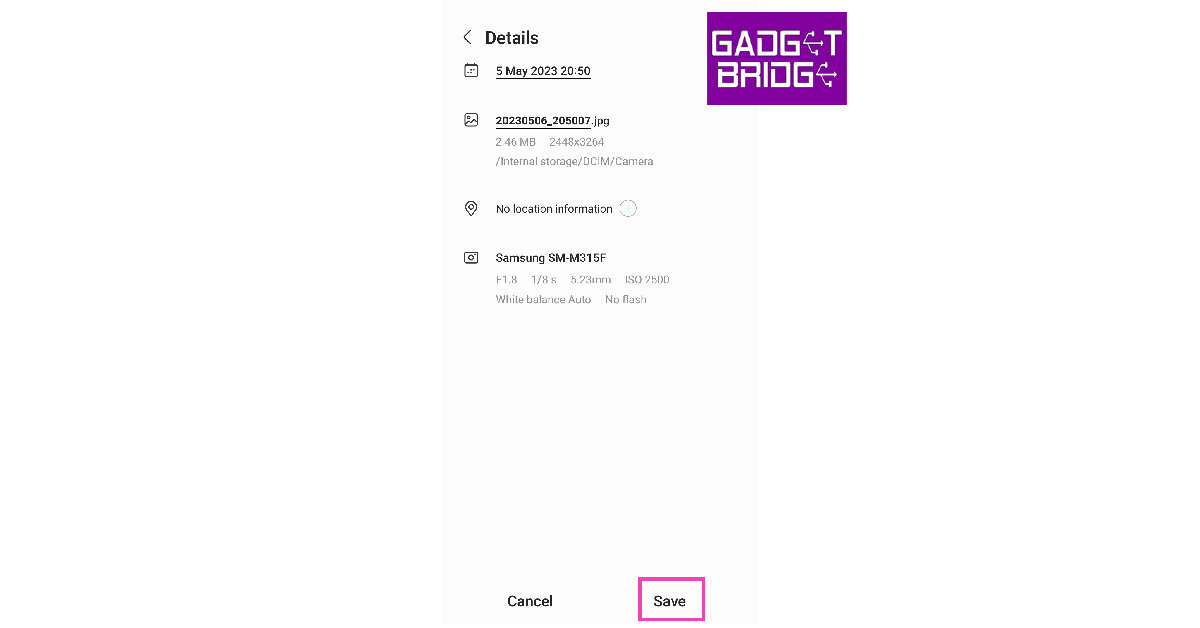
Step 8: Tap on ‘Save’.
The date and time on the image will be changed.
Frequently Asked Questions
Can you change the date and time a photo was taken?
Most Gallery apps on Android allow you to change the date and time on the picture’s metadata. Once you open the metadata check if there’s an edit option next to the date and time.
How can I remove the date and time from a photo?
You can remove the date and time from a photo by erasing its metadata. Websites like Fotor and Metacleaner can help you remove the data and time from a photo.
Do the photos taken from my phone contain my location?
If you have turned on location tags for images, your coordinates at the time of taking a picture are stored in its metadata. To avoid this, either disable location tags from the camera app or clear the picture’s metadata.
This is how you can change a photo’s data and time info on an Android smartphone. The option to change the date and time of an image used to be available on Google Photos but it is no longer there. If the native gallery app on your smartphone does not let you edit the metadata of the images within it, try using a third-party gallery app.
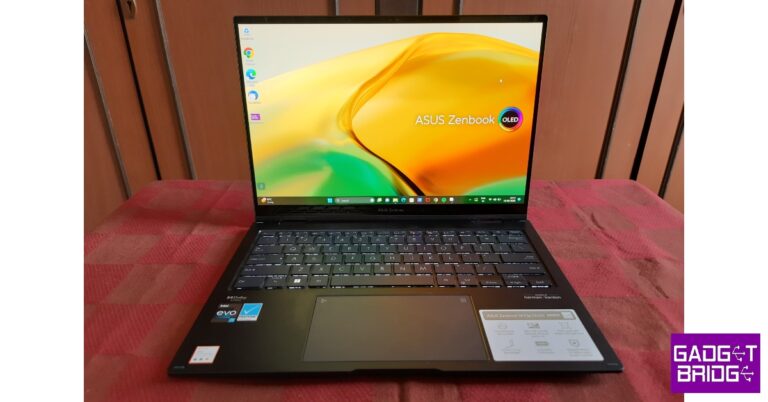
Asus arguably has the strongest notebook catalogue out of all the laptop manufacturers out there. The brand is the go-to choice for many Windows users, and it’s easy to understand why. The company isn’t afraid to experiment in terms of design as well as functionality. The recently launched Asus Zenbook 14 Flip OLED proves this point. This 2-in-1 touchscreen laptop is currently available for Rs 1,09,990. We have been using the laptop for about 2 weeks, putting it through a series of tests. So, does this device justify the price tag? Find out in our Asus Zenbook 14 Flip OLED review.
Asus Zenbook 14 Flip OLED review: Design and Display
As soon as you take the laptop out of its sleeve, you will notice the incredible build quality of this machine. This shouldn’t come as a surprise to Asus users as Zenbooks rarely compromise on the materials. The alloy chassis of the laptop feels sturdy and meets the US MIL-STD-810H military-grade standard.
The back panel has a matte finish and sports angular lines to give a unique look. The ‘Asus Zenbook’ branding has been embossed on top of the left hinge. While not strictly a fingerprint magnet, the back panel can accumulate some smudges after a few days of use. Nothing that a microfibre cloth can’t take care of.
The Asus Zenbook 14 Flip OLED weighs 1.5kg and has dimensions of 12.26in x 8.80in x 0.63in. We travelled with this laptop and didn’t have any issues working on it on flights and bus rides. The compactness of the laptop ensures that you don’t face any hurdles opening it in cramped seats.
The 360-degree ErgoLift hinges work phenomenally well on this Zenbook. The motion to flip the display is smooth and can be carried out with just one finger when the laptop is positioned on the desk. The two small rubber feet placed at the bottom of the back panel ensure the laptop stays in place when the display is being adjusted. There are no annoying wobbles or flexes anywhere on the laptop. When you are in laptop mode, the two hinges slightly lift up the keyboard, offering a better typing position.
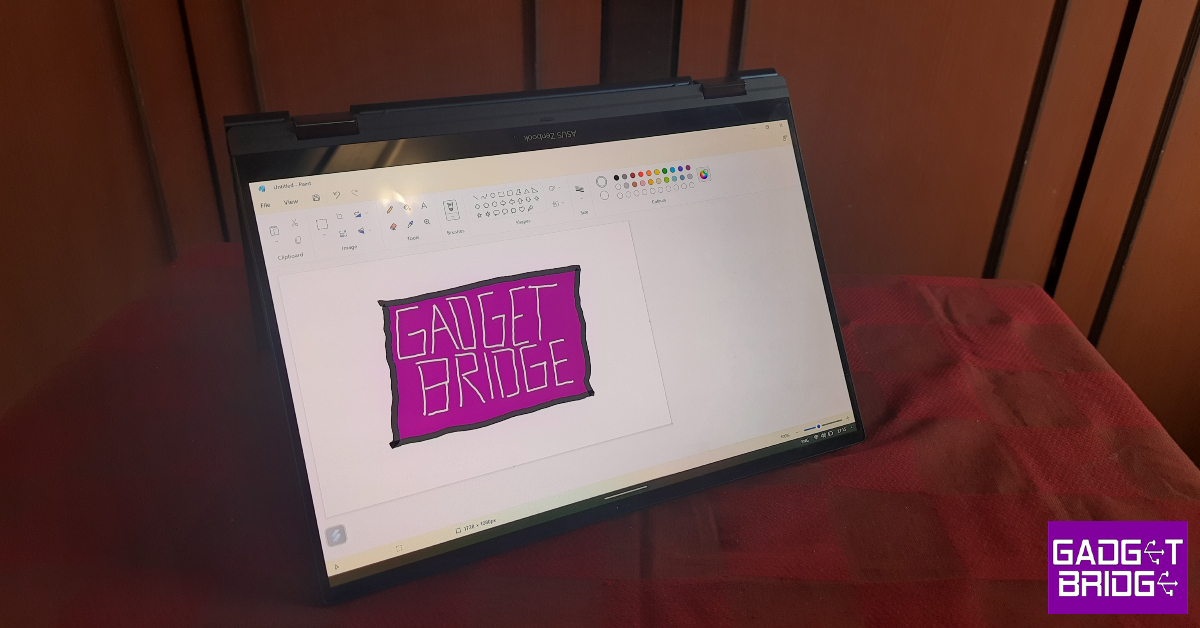
The display can be flipped around completely and used as a tablet. You can prop the laptop up as a tent and use the display to watch content. For a more stable position, you can turn the display by 180 degrees and use the keyboard as a stand. Due to very slim bezels, the display is prone to accidental touches when it’s being placed in different positions. Larger bezels would have given a better grip on the display, but taken away the impressiveness.
Tablet Mode
On the right side of the bottom casing, you will find two USB Type-C Thunderbolt ports 4 for power delivery or connecting to an external storage or display. Right below these ports are the two notification lights, while the 3.5mm headphone jack and HDMI 2.1 port find their way to the top of the array. On the left lies a single USB 3.2 Gen 2 Type-A port.
The backlit keyboard on this Zenbook is satisfying to type on. The keys offer 1.4mm of travel, which we found to be optimum. There isn’t a lot of noise generated while typing and the clickiness is not overwhelming. Our primary tasks involved a lot of typing, and we can safely say that the seamless typing experience offered by the keyboard does boost productivity.
The sensitivity level on the touch trackpad is tuned perfectly. You can browse web pages and switch between different windows and tabs with ease. Long pressing the top right corner of the trackpad overlays a backlit virtual numpad on it. While it looks pretty cool we didn’t find much use for it. It also has the tendency to get triggered accidentally. Luckily, you can disable it from the settings.
The 14-inch OLED display is an absolute delight and something that separates this device from other premium laptops in its category. This display has a resolution of 2,880 x 1,800p and a 16:10 aspect ratio. A peak brightness of 550 nits is optimum for indoor usage but leaves a little more to be desired when you’re working on the laptop in bright outdoor conditions. Surrounding the display are very slim bezels. The screen-to-body ratio on offer here is 87%. The screen refresh rate has been capped at 90Hz.
Watching video content on the Asus Zenbook 14 Flip OLED was a very pleasant experience. The richness of colours produced on this display is absolutely stunning. The blacks were really deep and the colour contrast was very punchy and fun. The level of detail produced in the images was also impressive. Since there are minimal bezels surrounding the display, the viewing experience is very immersive. But our favourite part about using this Zenbook is the sheer versatility that comes with a foldable display. You can prop the laptop in the tent position and rest it on any surface you want. Moving from the bed to the couch? Simply fold the display all the way around and use it like a tablet. The bottom-firing Harmon Kardon speakers produce good-quality audio output. We didn’t have to reach for our headphones every time played content on the laptop.
With the Asus Zenbook 14 Flip OLED, you also get the Asus Pen 2.0. There is neither a dedicated slot nor a magnetic clip for this pen on the laptop. You will have to carry it around with you if you intend to use it while you’re on the go. Not having a special compartment for the pen means no compromises on the size of the pen. It fits in the hand like an actual pen would. The pen has 4090 pressure levels and offers ultra-low latency. The low latency is noticeable when you use the pen to write or draw. The response is incredibly quick and there are no lags whatsoever. The pressure sensitivity is also tuned to perfection. This is something that artists and creators will particularly enjoy. The pen comes with four switchable tips and has a multi-function button that can be customised by the user.
Asus Zenbook 14 Flip OLED review: Performance
Powering the Asus Zenbook 14 Flip OLED is Intel’s 13th generation of P-series processors. The Zenbook 14 Flip is available with 1.9 GHz Intel Core i5 1340P and 2.2 GHz Intel Core i7 1360P processors. We used the latter variant for this review. There is no dedicated GPU on this laptop, it uses integrated Intel Iris Xe Graphics. Storage options include 512GB or 1TB M.2 NVMe PCIe 4.0 SSD along with 8GB or 16GB LPDDR5 RAM. Talking about connectivity, the Zenbook 14 Flip comes with WiFi 6E and Bluetooth 5.3 support.
Tent Position
The Zenbook breezed past any of the routine everyday tasks we threw at it. We used the laptop for two weeks and used it as our primary work device. Daily tasks included extensive web usage, using Word and Google Docs for writing, photo editing, constantly checking emails, and playing music in the background.
There were absolutely no problems performing all these tasks at once. The laptop breezed past these activities like they were nothing. Even with dozens of tabs open on Chrome, we were able to pick up exactly where we left off. The bottom panel did warm up after a while, but that is to be expected when you’re using the laptop throughout the day.
We used the Asus Pen for light photo editing and taking notes. It is remarkable how well the software is optimised for the pen. While we didn’t use it to its maximum potential (you’re gonna need an artist to tap into that), the pen still is a very handy device that you won’t forget about after initial use. The lack of a dedicated GPU is pretty noticeable when you put this laptop to the gaming test. While it handled games like CS:GO pretty well, more graphic-intensive games were only playable in lower resolution. On Geekbench 6, the laptop attained a single-core score of 1,849 points and a multi-core score of 7,294 points. The GPU benchmark test revealed an OpenCL score of 15126 points.
Geekbench 6 Results
The Windows 11 experience on this Zenbook is pretty standard. There is some bloatware to be found, which is not a good look on a device that you’re paying upwards of Rs 1,00,000 for. The McAfee antivirus software comes preloaded on the laptop and can get annoying with constant popups. Once you open the start menu, you will notice a lot of apps like WhatsApp, ESPN, and Instagram on the screen, but you will have to tap on them to install them on the device. A cleaner look would have been much better.
Using the Keyboard as a stand
Moving on, the Asus Zenbook 14 Flip OLED is packed with a 75 Wh battery. Over a regular workday, we got up to 8 hours of battery backup on this device. This included light gaming and an hour of video streaming on top of regular tasks. We should also mention that we used the OLED display is the highest brightness possible with the backlit keyboard turned on at all times. Fully charging the laptop took almost 2 hours.
The Asus Zenbook 14 Flip OLED manages to strike a fine balance between design and functionality. The coolness factor is massively hyped by the slim form factor and the flexible display. At Rs 1,0,990 you’re getting the best device in this genre, and if you plan on using it for everyday tasks, you don’t have to think twice about buying it. However, if you want your laptop to handle graphic-intensive games, this may not be the device for you.
Google Play Store had humble beginnings but now it is home to millions of apps. Oftentimes, it can get hard to keep track of all the apps you used in the past but have since deleted from your smartphone. If you’re trying to find an app that you enjoyed using in the past, there is a way to make your search much quicker. In this article, we bring you the best 5 methods to find and restore recently deleted apps on Android.
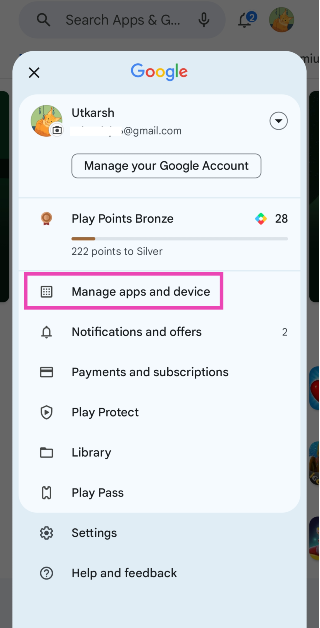
Step 1: Launch the Google Play Store app on your Android phone.
Step 2: Tap on your profile picture at the top right corner of the screen.
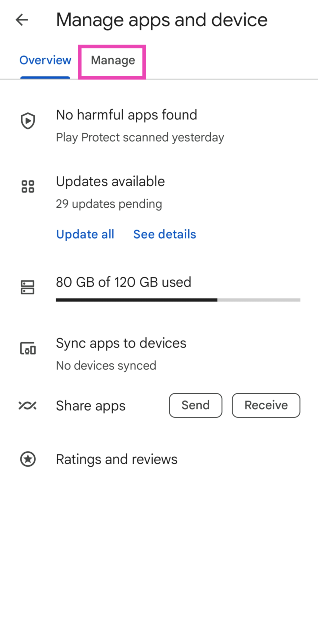
Step 3: Tap on Manage apps and device.
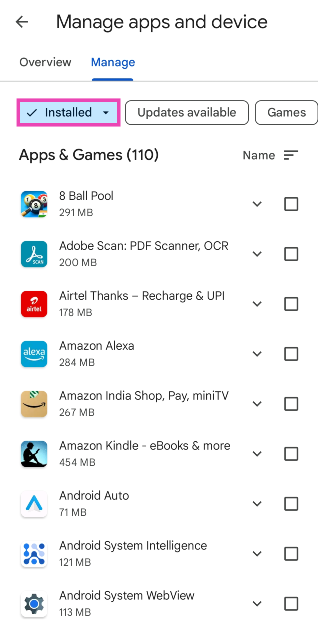
Step 4: Switch to the Managed tab.
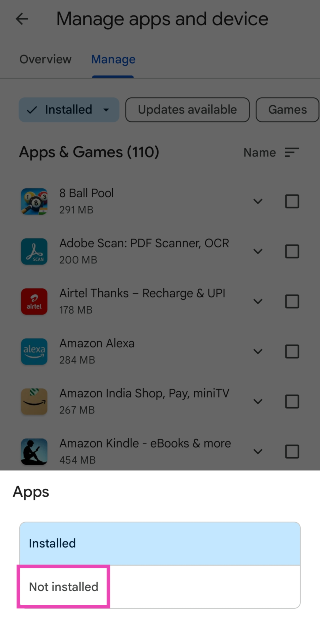
Step 5: Tap on the Installed category at the top of the screen.
Step 6: Select Uninstalled.
Find and reinstall recently deleted apps from the Google Play Store
Step 1: Launch Google Play Store on your Android device.
Step 2: Tap on your profile icon at the top right corner of the screen.
Step 3: Select My apps and games.
Step 4: Switch to the Library tab.
Step 5: You will be able to see all the apps linked to your Google Account that aren’t installed on your device anymore. To see the most recently deleted apps, tap on the sort icon and select Recent.
Step 7: Tap the Install button next to the apps you want to reinstall.
Find and reinstall recently deleted apps from the Google Play Store website
Step 2: Click on your profile icon at the top right corner of the screen and select Library and devices.
Step 3: Switch to the Apps tab to see all the current and previously deleted apps on your Android account. Click on an app to reinstall it.
Find and install recently deleted apps from Galaxy Store
Step 1: Launch the Galaxy Store app on your Samsung device.
Step 2: Tap on the hamburger menu icon at the bottom right corner of the screen.
Step 3: Select My Apps.
Step 4: Tap on the sort icon and turn off the toggle bar for Show installed apps.
Step 5: You will be able to see all the recently deleted apps. Tap on the download icon next to an app to reinstall it.
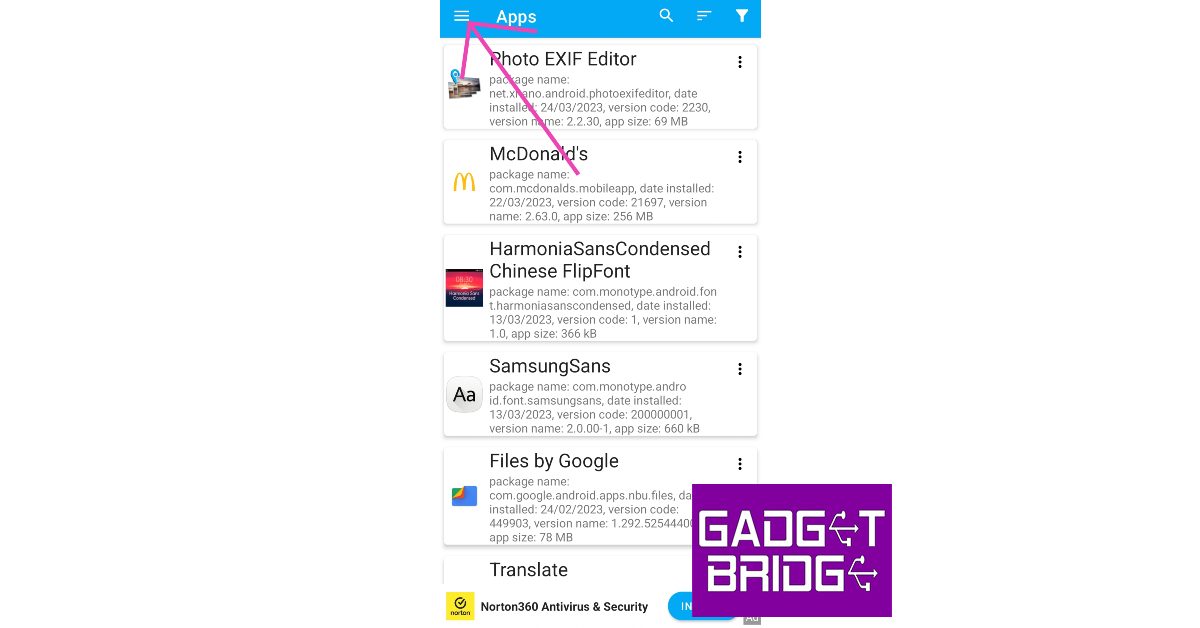
Use App Manager to view recently deleted sideloaded apps
If you downloaded an app from a third-party marketplace, it won’t show up on the Play Store or Galaxy Store. Here’s how you can check your phone for recently deleted sideloaded apps.
Step 1: Download and install the App Manager app from Google Play Store.
Step 2: Launch App Manager on your phone.
Step 3: Tap the hamburger menu icon at the top right corner of the screen.
Step 4: Select Removed apps.
Step 5: You will be able to see all the recently deleted apps from your device. Tap the ellipses next to an app to download it from an appropriate marketplace.
Frequently Asked Questions
Can you restore recently deleted apps?
You can easily find and recover recently uninstalled apps on your Android phone by going to Google Play Store>Profile>Manage Apps and Devices>Manage>Not Installed.
Why can’t I find a deleted app on the Play Store?
If you cannot find a recently deleted app on the Google Play Store, it is possible that it may have been removed from the platform. Use a third-party marketplace like APKMirror to sideload it on your device.
Where can I find downloaded APKs on my device?
Any APKs downloaded from third-party marketplaces show up in the ‘Downloads’ folder on your device. You can access this folder from the File Manager.
These are the top 5 ways to find and restore recently deleted apps on your Android smartphone. If you accidentally deleted a paid app, you can reinstall it without paying for it again. Your purchases are linked to your Google Account, which means you can download the app multiple times on the same account. If you are using a different Google Account, you will have to pay for the app again.
Tech Giant Sony has announced India Hero Project. The brand-new project that Sony Interactive Entertainment (SIE) has undertaken to identify and support emerging game developers in India. This is said to boost the Indian game development community.
“We believe in the enormous potential of Indian game developers and the amazing experiences they can provide our players worldwide. India’s rich culture, creativity and global perspective hold promise for unique games. We are delighted to foster local developers in India Hero Project,” said Hector Fernandez, Head of Global Third-Party Business Development & Strategic Initiatives for Sony Interactive Entertainment. “PlayStation is committed to utilizing our global capabilities and sharing our game development ethos to amplify new and diverse talents emerging from the region.”
According to the company, the India Hero Project will strengthen Sony Interactive Entertainment’s dedication to elevating the creative voices of independent developers across the globe and delivering compelling new content to PlayStation consumers. There SIE will be supporting with a passion for building high-quality games for PlayStation®5 (PS5), PlayStation VR2 and PC through strategic opportunities, including mentorship from industry leaders in the areas of technical art, design, production, and general insights into the business of making games.
An open submission process has already begun and candidates ranging from one-person companies to larger studio entities are invited to register interest. To apply, companies must be India-based game developers able to register as PlayStation Registered Developers.
“For 20 years, PlayStation has been bringing compelling entertainment experiences to the Indian gaming community. It has been exciting to see the evolution of the market over this time, and we are more excited than ever before for what’s to come,” said Radhika Thakur, Corporate Strategy & Development at Sony Interactive Entertainment. “We feel there is a strong opportunity to grow the market further. Through the India Hero Project, PlayStation will be proudly supporting Indian talent in bringing new, high-quality games to the global gaming community.”
Google IO 2023 is going to begin today. The company’s CEO, Sundar Pichai, and his core team are anticipated to make the major announcements at the tech event. Google will make product announcements at IO 2023, along with updates to Android and Wear OS software. Today at the event, the eagerly anticipated Google Pixel Fold will also make its debut. In addition, the tech giant is probably going to show us the Pixel 8 and Pixel Watch 2.
How to watch Google IO 2023
The Shoreline Amphitheatre in Mountain View, California will host Google IO 2023. There will be a small live audience for the event. Google IO 2023 will be a two-day event, and Google will stream the conference live to a global audience starting at 1 pm ET (10:30 pm IST) today. This event will be streamed live on the Google website, social media channels, and YouTube channel.
What to expect?
The Google IO event is a yearly event that highlights the company’s most recent advancements in operating systems like Android and Wear OS as well as its most recent or planned products. The corporation will make some significant announcements today, and this year won’t be any different. The company has been working on a foldable phone for a very long time, and today is the day it will unveil its eagerly anticipated Google Pixel Fold. Instead of providing specific details about the new product, the firm posted a short video about its upcoming mobile phone. The business tweeted “May the Fold be with you” to let people know when Pixel Fold would be available.
Google Pixel Fold
Although Google hasn’t provided any information regarding the Pixel Fold’s specifications, the teaser film shows off the device. It has a design resembling a book, similar to what we’ve seen on Samsung Galaxy Fold devices. The phone’s resemblance to other Pixel devices is not surprising, though, considering it was widely leaked before the company made its official announcement.
The device appears to feature glass on the back and metallic-looking frames. Like the Galaxy Fold, the full-size outer display unfolds, and like the Pixel 7 series, it has a triple-camera setup on the rear that is arranged horizontally. The camera unit in the Pixel Fold, however, is more sophisticated because of its less overt design and more streamlined appearance. The speaker and LED flash are additional features.
It has rounded corners and a sizable cover display, unlike Samsung’s Z Fold. On top, a selfie camera is located, and the side bezels are wide. The Z Fold lacks a periscopic camera, but the Google Foldable phone will have one. Supposedly, it has a 5X optical zoom. According to the leaks, the Pixel Fold may be available in silver and black. The Google foldable phone may also feature an inbuilt 7.6-inch display with a 1,840 x 2,208 pixel resolution. Additionally, the primary display will have a 380ppi pixel density and a 120Hz refresh rate. A 5.8-inch OLED panel with a resolution of 1,080 by 2,092 pixels, a refresh rate of 120 Hz, and a 17.4:9 aspect ratio is expected for the external display. As a result, the device will be more compact and easily fit into any pocket.
Similar to the Pixel 7 Series, the device is rumoured to be powered by Google’s own Tensor G2 SoC along with a Titan M2 security chip.
The 48-megapixel wide-angle sensor in the Fold’s triple back camera could include an f/1.7 aperture, OIS, and CLAF. It’s possible that the camera will include a 10.8-megapixel ultrawide lens with a 121-degree field of view and an f/2.2 aperture. There will also be a 10.8-megapixel dual PD telephoto lens with 5x optical zoom and 20x Super Res Zoom. A 9.5-megapixel external sensor with a 1.22 pm pixel width and an internal 8-megapixel selfie camera with an f/2.0 aperture can be used to snap selfies.
The 12GB RAM with 256GB storage model of Pixel Fold will cost $1,799, which is equal to Rs 1,47,000 in Indian rupees. The 12GB RAM with 512GB storage option, however, would cost $1919, or roughly Rs 1,57,500.
Google Pixel 7A
Additionally, the business is anticipated to introduce the Pixel 7a, a new budget-friendly smartphone, at this year’s Google I/O presentation. On May 11, the gadget will also officially launch in India.
A 6.1-inch full-HD+ OLED display is anticipated for the Pixel 7A. The screen’s refresh rate will be 90 Hz. The Tensor G2 SoC, along with 8GB of LPDDR5 RAM and 128GB of UFS 3.1 storage, is most likely to power the gadget. There are rumours that it has a dual back camera configuration. A 12-megapixel ultra-wide lens and a 64-megapixel primary sensor with optical image stabilisation (OIS) capabilities are thought to make up the device. There will also be a 10.8-megapixel front-facing camera for photos and video calls in addition to this. According to reports, the device may include a 4,400mAh battery that supports 20W cable charging.
Pixel 8 Pro Image Courtesy: Onleaks/smartprix
A glimpse of Google Pixel 8, Pixel 8 Pro and Pixel Watch 2
Google Pixel 8, Pixel 8 Pro and Pixel Watch 2 will also make an appearance at this year’s Google IO. However, all the devices will finally release later this year or around October. The Pixel 8 is probably going to have a similar appearance to the Pixel 7. While the standard Pixel 8 will have a 6.2-inch screen and 8GB of RAM, the Pixel 8 Pro is said to have a 6.52-inch screen with smoother corners, a hole-punch front camera, and 12GB of RAM.
The Pixel Watch 2 is expected to be powered by the Snapdragon W5+ Gen 1. On the software front, Material You is anticipated to launch with Android 13 and bring Dynamic Colour to Wear OS.
Garena Free Fire is a battle royale game with regular awards and tournaments to keep players interested. If you play Garena Free Fire, you should be aware of the redeem codes that are released on a daily basis. However, because the battle royale game is banned in India, players from other countries can use the Free Fire Redeem codes daily. If you’re unfamiliar with the Garena Free Fire redeem codes or don’t know how to get them, we’ve put together a step-by-step guide to help you redeem them. Check out Garena Free Fire Redeem Codes for 10 May 2023.
The Free Fire redeem codes are a great way to get free stuff. These are 12-digit codes that contain alphabets and numbers, as well as an expiration date and time. Because the Garena FF redeem codes cannot be used more than once, you should hurry to the redemption page to claim your free reward before someone else does. To get a free reward, all you have to do is go to reward.ff.garena.com/en, which is the official redemption page. Also, keep an eye on this space for daily updates on Garena Free Fire redemption codes and rewards.
Garena Free Fire Redeem Codes Today 10 May2023
FTJY89UOPI0LMFN
FDFHTHFTYJHGYUJ
FESRTAQR26EDC3V
FFS4RGRFT6HGYK
FIUJLOU90OLKTJR
FTGRVBTNMGHBKV
FUYDTGRBTNYMHK
FUJVTFYJHFTYHTFY
FH6RT6HTYHNTFYR
F6HYBDR449345TY
F4BRHFJGUVYTGFS
FEVBRNJTIYUGHVB
FNDRJTYMHVJUDYE
How to Get Free Fire Redeem Codes for Garena on 10 May2023?
Amazon is back with another quiz on its mobile platform. The daily quiz is now live on the Amazon App and today’s Amazon Quiz will give you a chance to win Rs 1000 Amazon pay Balance. The participants can play the 10 May 2023 Amazon Quiz from 12 AM to 11:59 PM. For those who are unaware of the quiz, the e-commerce platform brings a fresh quiz on a daily basis which consists of five questions related to general knowledge and current affairs.
The participants need to answer all the questions correctly and their names will be selected for a lucky draw. The winner will be announced at the end of the month. One wrong answer could eliminate you from the quiz. Only app users are eligible to participate in the Quiz. In today’s Amazon Quiz the participants will get a chance to win Rs 1000 Amazon Pay Balance. Check Out 10 May 2023 Amazon Quiz Answers.
Question 1: In which country did India construct the Buzi Bridge?
Answer: Mozambique
Question 2: Parkash Singh Badal, who recently passed away, was the Chief Minister of which state for 5 consecutive terms?
Answer: Punjab
Question 3: What is the name of the world’s largest and most powerful rocket that SpaceX launched from Texas, USA?
Answer: Starship
Question 4: This animal was the most prestigious hunting target in which era of Europe?
Answer: Medieval
Question 5: This temple is located in which district of Gujarat?
Answer: Kutch
How To Play Amazon Quiz
Only app users are eligible to play the Amazon quiz every morning from 12 AM to 11:59 PM. The quiz is not available on the desktop. For those who are unaware of how to play the Amazon quiz below are the steps, you can follow to take the quiz.
Firstly download the Amazon app from Google Play Store or App Store
Now fill in the required information through the Sign Up option.
You need to log in to the Amazon app and scroll down on the home screen to find the Amazon Quiz banner.
Tap on the Amazon Quiz banner and tap on the Start button to start the Quiz.
Now you will get 5 questions and you need to answer them correctly. One wrong answer will eliminate you from the Quiz.
After answering all the questions correctly you are now eligible for a Lucky Draw.
The winner’s name will be announced today at 12 PM.
Poco F5 5G has officially debuted in India today. The smartphone is the successor of Poco F4 which was launched last year. The device is the first smartphone in India to come equipped with Snapdragon 7+ Gen 2 SoC. The smartphone features an AMOLED display with a 120Hz refresh rate. In addition to this, it packs a 5,000mAh battery with 67W fast charging support.
Poco F5 5G specifications
Poco F5 is highlighted with a 6.67-inch Full HD+ Flow AMOLED display with 2,400 x 1,080 pixels of resolution. The screen comes with 1000 nits of peak brightness and HDR10+ with Dolby Vision. F5’s display also supports a 120Hz refresh rate and 240Hz of touch sampling rate. In addition to this, the screen has a Corning Gorilla Glass 5 layer for protection. It features 1920Hz PWM Dimming for comfortable binge-watching.
The device is fuelled by a Snapdragon 7+ Gen 2 paired with an Adreno GPU. It is available with 8GB of LPDDR5X RAM that can be further expanded up to 19GB. In addition to this, the handset also offers 256GB of UFS 3.1 storage. The phone operates on Android 13-based MIUI 14 for Poco with an added 1+1 year warranty and an MIUI Dialer. The new F-series smartphone also offers 2+3 years of Software updates.
In terms of optics, Poco F5 5G features a triple rear camera setup comprising of a 64-megapixel primary sensor, an 8-megapixel ultra-wide lens and a 2-megapixel macro lens. There is a 16-megapixel front-facing camera for taking selfies and video calling.
The smartphone will also sport a 5,000mAh battery with a 67W turbocharger. It has a Vapour Chamber Cooling System with a 3725mm square heat dissipation area and 14 layers of graphite sheets. The device is IP53 rated for resistance against water and dust. In terms of connectivity, it includes 5G, 4G LTE, Wi-Fi 6E, Bluetooth 5.3, and a headphone jack (3.5mm). As per the company, the device boasts a Hyperboost gaming feature which is a series of complex software and hardware optimizations to deliver a top-notch gaming experience using FEAS 2.2 (Frame Energy Aware Scheduler), Dedicated 5 GHz Wifi Antenna, and 10x Super Resolution Touch.
Poco F5 5G price in India and sale details
The Poco F5 will be available in two different configurations of 8GB RAM with 256GB storage priced at Rs 29,999 and 12GB RAM with 256GB storage at Rs 33,999. As a special sale day offer, customers can get the device at an exciting price of Rs 26,999 (8+256GB) and Rs 30,999 (12+256GB) after a Rs 3,000 offer with ICICI Debit and Credit cards or an equivalent product exchange offer.
In addition to this, the POCO loyalty program offers customers to get an additional Rs 1,000 off on exchanging a POCO smartphone.
The Poco smartphone will be offered in three colour options of Carbon Black, Snowstorm White, and Electric Blue. The device is scheduled to go on sale from May 16 in the country via Flipkart.
If you are a photographer or a visual artist, it is super important to watermark your work especially when you’re uploading them to the Internet. A legible watermark ensures that people know the source or the creator of the image even if it hasn’t been credited by the poster. A watermark should not be too distracting, but at the same time, it shouldn’t completely blend into the background. In this article, we bring you the top 5 apps that you can use to create a watermark and automatically add it to your pictures.
Most smartphones allow users to watermark their pictures automatically from the native camera app itself. Here’s how you can go about it.
Step 1: Launch the native Camera app on your smartphone.
Step 2: Tap the gear icon for settings.
Step 3: Select ‘Watermark’.
Step 4: Turn on the toggle bar next to ‘Watermark’.
Step 5: Add the text for your watermark.
Step 6: Hit ‘Back’ and go to the camera app.
Any pictures you take will be watermarked with the text of your choice.
Add Watermark on Photos
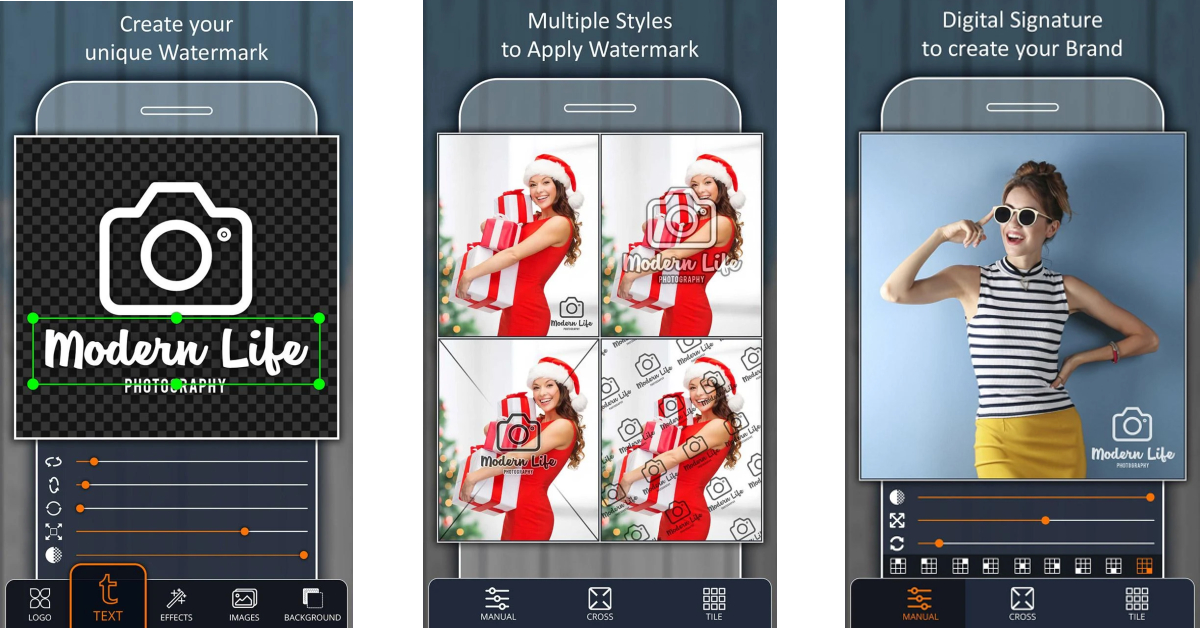
The ‘Add Watermark on Photos’ app for Android lets you add customisable watermarks to your images with ease. Using this app, you can watermark a bunch of images at once. You can create fully customised text from within the app and choose different layouts for it. You can import your own logo and use it to watermark your images. The multiple layout styles allow you to place the watermark at the corner or across the image as a translucent pattern.
Watermark: Logo, Text on Photo
The ‘Watermark: Logo, Text on Photo’ app has over 250 creative fonts and 1000+ stickers that you can use to create a watermark for your images. One of the unique features of this app is that it lets you create a signature that can be used as a watermark. You can adjust the pen size and colour while creating a signature. This app also lets you resize your images for different social media platforms.
Watermark Maker
Watermark Maker by AZ Mobile Software has tons of options and customisations to create a personal and unique watermark for your images. You can use this app to create a digital signature for your brand as well. Once you’ve created a logo, you can add it to a large batch of images at once. This is an exceptional feature as it saves you a lot of time that would otherwise have been spent on editing multiple pictures individually.
Photo Watermark
Photo Watermark by MVTrail Tech has a very accessible and clean layout that gets the job done without overcomplicating things. This app lets you create a unique watermark using different fonts and stickers. You can take images from within the app and it will automatically watermark them from you. The app also has a bunch of sharing options that let you upload the image to different social media platforms.
These are the best apps you can use to automatically add a watermark to your photos. While designing a watermark, make sure that you keep it simple and clear. This makes it easier for the viewer to understand the source of the image. If a watermark occupies a large area on the image, it becomes too distracting and also keeps people from sharing the picture.
Every smartphone buyer often searches for a long-lasting battery, expandable storage, and a respectable camera. And with the variety of alternatives available, choosing a device that meets your demands and your budget can be challenging. Here are the 5 best 5G smartphones you can currently purchase without burning a hole in your wallet.
Chinese smartphone manufacturers like Xiaomi, Redmi, Poco, and Motorola have a nice selection of 5G smartphones that will fit within your set budget if you’re looking to buy a 5G smartphone with all the features under Rs 15,000.
Samsung Galaxy M14 5G
Samsung Galaxy M14 5G is available at Rs 13,490 for the 4GB RAM with 128GB storage option. The smartphone also comes in a 6GB with 128GB storage model priced at Rs 14,990. The device comes in three colour options of Blue, Dark Blue, and Silver. The handset features a 6.6-inch Full HD+ PLS LCD display. It operates on Android 13 out of the box. The phone is powered by an Exynos 1330 octa-core SoC paired with Mali G68 GPU for graphics.
The Galaxy M14 5G also features a triple rear camera setup that includes a 50-megapixel main sensor with an f/1.8 aperture. It also consists of a 2-megapixel depth sensor and a 2-megapixel macro sensor. For taking selfies and video calls the handset comes with a 13-megapixel front-facing camera. It boasts a 6,000mAh battery with 25W fast charging support.
iQoo Z6 Lite 5G
iQoo Z6 Lite 5G comes in two variants 4GB RAM with 64GB storage model is priced at Rs 13,999 whereas the 6GB RAM with 128GB storage model costs Rs 15,499. The phone comes with a 6.58-inch full-HD+ display. It is powered by Snapdragon 4 Gen 1 SoC. The dual back camera arrangement of the iQOO Z6 Lite 5G includes a 50MP Eye Autofocus main camera and a 2MP macro camera. The phone has an 8-megapixel front camera for taking selfies and making video calls. It has a 5,000mAh battery with 18W fast charge support.
Redmi 11 Prime 5G
Redmi 11 Prime 5G is available in two storage configurations, 4GB RAM with 64GB storage and 6GB RAM with 128GB storage priced at Rs 13,999 and Rs 15,999 respectively. In terms of specs, the Redmi 11 Prime 5G is powered by MediaTek Dimensity 700 SoC. It features a 6.58 FHD+ display with 2408×1080 pixels of resolution. The 5G smartphone runs on MIUI 13, and Android 12 out of the box. The phone includes a dual rear camera set up on the phone that includes a 50MP primary lens with f/1.8 aperture and a 2MP depth sensor with f/2.4 aperture. For taking selfies and video calling the Redmi’s 5G phone features an 8MP camera lens on the front with f/2.0 aperture. Additionally, the Redmi phone comes with a 5,000mAh battery with 18W fast charging and a 22.5W charger inside the box.
Poco M4 Pro 5G
Poco M4 Pro 5G price starts at Rs 14,999 for the base 4GB RAM with 64GB storage variant. The smartphone is also available in a 6GB with 128GB option for Rs 16,999 and an 8GB RAM with 128GB model for Rs 18,999.
The Poco M4 Pro 5G features a 6.6-inch full-HD+ Dot Display and is powered by an octa-core MediaTek Dimensity 810 SoC and up to 8GB of LPDDR4X RAM. In addition to this, there is a dual rear camera setup that includes a 50-megapixel main sensor with f/1.8 aperture along with an 8-megapixel ultra-wide angle sensor. The front of the Poco smartphone features a 16-megapixel selfie camera sensor with an f/2.45 aperture. The M4 Pro 5G has a 5,000mAh battery with 33W Pro fast charging capabilities.
Samsung Galaxy F23 5G
The Samsung Galaxy F23 5G 4GB RAM with 128GB storage option is priced at Rs 14,999 whereas the 6GB RAM with 128GB memory option comes with a price tag of Rs 15,999. Samsung Galaxy F23 5G has a 6.6-inch full-HD+ Infinity-U Display. Under the hood, there is Qualcomm Snapdragon 750G SoC. The triple rear camera setup includes a 50-megapixel Samsung ISOCELL JN1 primary sensor with f/1.8 aperture. An 8-megapixel ultra-wide lens and a 2-megapixel macro sensor are also included in the camera setup. The phone has an 8-megapixel selfie camera sensor on the front for selfies and video chats. The phone sports a 5,000mAh battery that supports 25W fast charging.
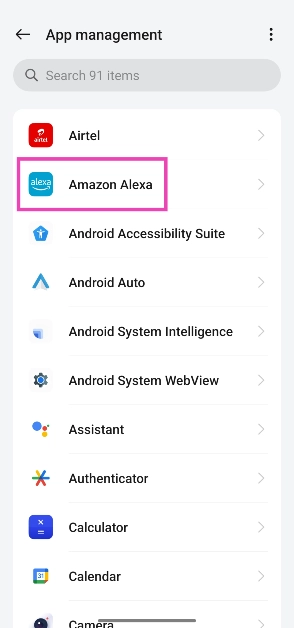
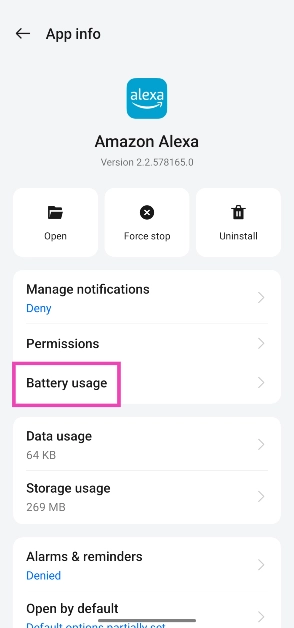
If you notice a decline in speed on your Android smartphone, it may be because of the multiple apps occupying RAM space. These background apps can also drain the battery quicker than usual. While your phone does a good job of managing apps in the background, it is not uncommon for apps to behave in an unusual manner. In this article, we bring you the 4 easy methods to stop Android apps from running in the background of your device.
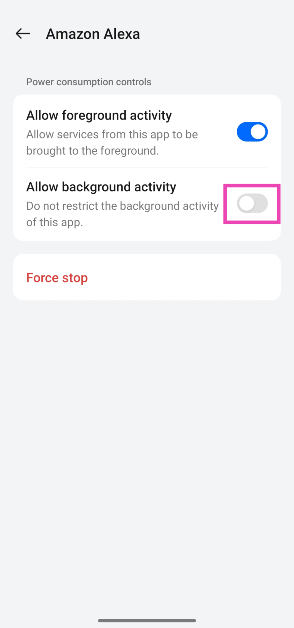
Step 4: Turn off the toggle switch next to Allow background activity.
Force Stop an App from Settings
Step 1: Go to Settings.
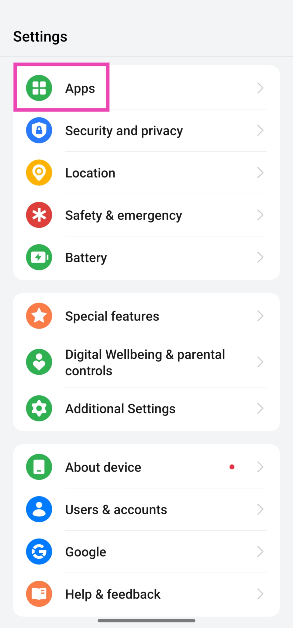
Step 2: Scroll down and select Apps.
Step 3: Scroll down and tap on the app you want to stop.
Step 4: Select Force Stop from the bottom menu.
Stop a background app process from Developer Options
Using Developer Options, you can see which apps and processes are currently occupying the RAM on your device. You can stop an app’s process to clear some much-needed RAM space. But first, you will need to enable Developer Options from Settings. Here’s how you can go about the entire process.
Step 1: Go to Settings and select About Phone.
Step 2: Select Software Information.
Step 3: Tap on Build Number 7 times to enter Developer Mode.
Step 4: Go back to Settings, scroll all the way down, and select Developer options.
Step 5: Tap on Running Services.
Step 6: Here you will be able to see the current RAM status of your device.
Step 7: Tap on an app to stop it from running in the background.
Step 8: Tap on Stop.
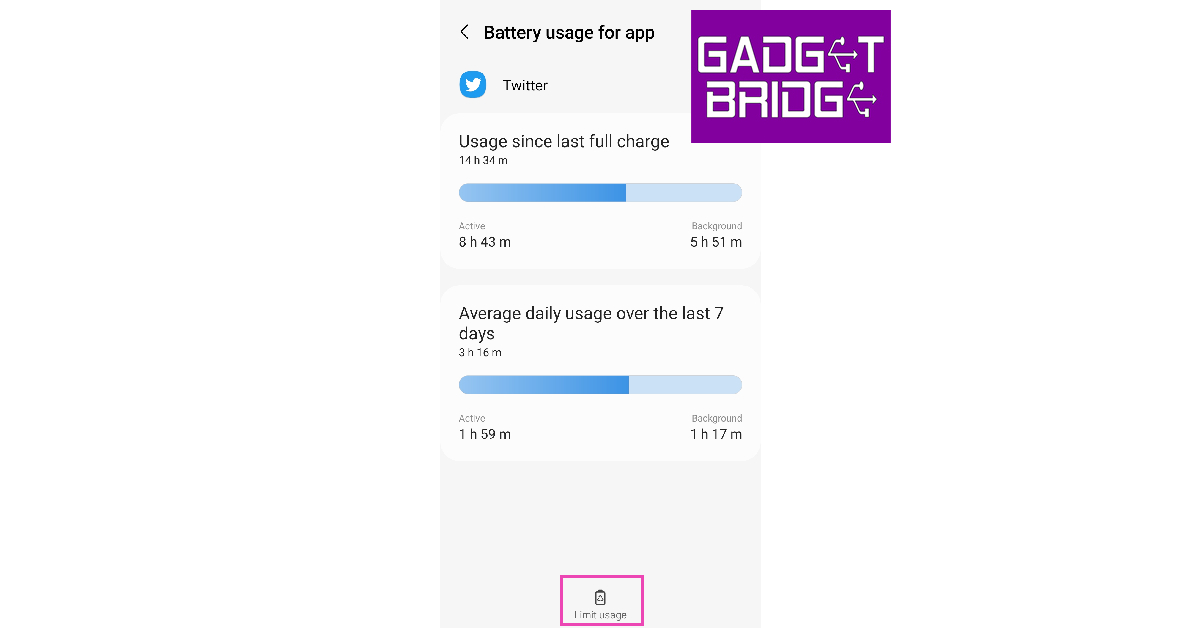
Limit an app’s background usage from Battery settings
You can choose which apps you want to put to ‘deep sleep’. Doing this will limit all background activity of the app and you will not be able to receive any notifications from it. Here’s how you can do it.
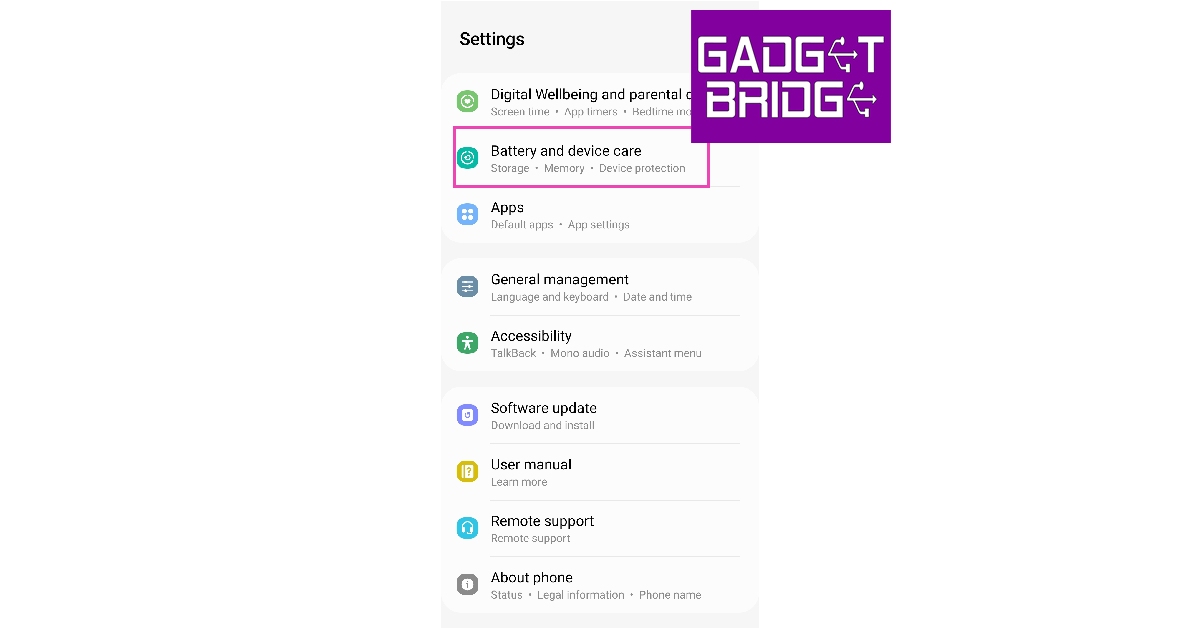
Step 1: Go to Settings and select Battery and device care.
Step 2: Tap on Battery.
Step 3: Scroll down and select the app you want to put to sleep.
Step 4: Tap on Limit usage.
Step 5: Select Put in deep sleep.
Frequently Asked Questions
How do I turn off background apps on Android?
You can either force-stop an app from App Settings or put it to deep sleep from Battery Settings on your Android device.
Is it good to remove background apps?
If an app is taking up a lot of RAM space, it is a good idea to stop it from functioning in the background. Apart from that, it is advised that you don’t remove apps from working in the background, as your phone’s CPU does a good job of optimising app usage and prioritising the apps running in the background.
Do background apps drain the battery?
Not every background app drains the same amount of battery. To check the battery stats for individual apps, go to Settings>Battery.
These are the 4 ways you can stop Android apps from running in the background of your device. If an app isn’t occupying too much space on the RAM or actively draining the battery, it is a good idea to keep it running in the background. Modern smartphones are better equipped to shelve background apps and prioritise their running status.