

In This Article
Oppo Reno 7 5G, Reno 7 Pro 5G Price in India leaked ahead of launch
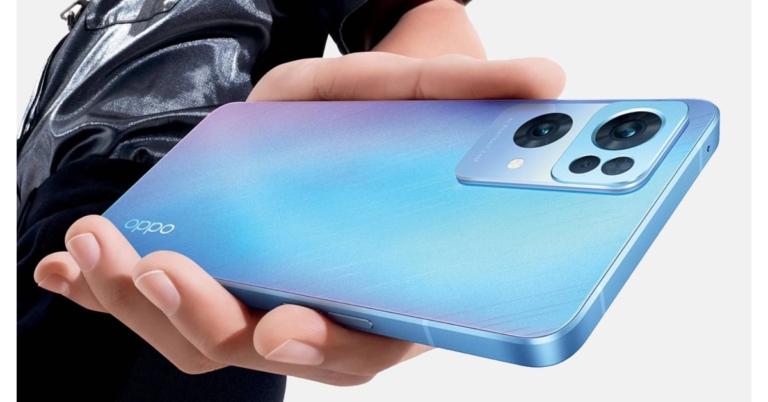
Ahead of its official release Oppo Reno 7 5G and Reno 7 Pro 5G prices in India have resurfaced online. The company’s latest series launch is going to take place on February 7 in the country. Reportedly the vanilla Reno 7 is likely to differ from the Chinese variant. The smartphone is said to be powered by MediaTek Dimensity 900 SoC instead of a Snapdragon 778G chipset.
Spotify to add content advisory labels to podcasts on COVID-19
Following criticism from rock and folk stars for giving voice to misinformation about COVID-19 vaccines, Spotify CEO said that every podcast episode including debates over COVID-19 will include a content alert. The action comes on the heels of Neil Young and Joni Mitchell’s statement that they will withdraw their music from Spotify in protest of the popular streaming service facilitating the propagation of misinformation about COVID-19 vaccines.
The popular music streaming service Spotify via its blog post revealed about adding a “content advisory” to any podcast episode that includes discussion about COVID-19. In the following days, this new initiative to battle disinformation will be sent out to nations throughout the world. The company further added that this is the first content alert issued by a major podcast platform.
“We are working to add a content advisory to any podcast episode that includes a discussion about COVID-19. This advisory will direct listeners to our dedicated COVID-19 Hub, a resource that provides easy access to data-driven facts, up-to-date information as shared by scientists, physicians, academics and public health authorities around the world, as well as links to trusted sources. This new effort to combat misinformation will roll out to countries around the world in the coming days. To our knowledge, this content advisory is the first of its kind by a major podcast platform,” Spotify noted in its blog post.
In addition to this Spotify will also begin testing methods to emphasise its Platform Rules in its creator and publisher tools in order to promote awareness about what is allowed and assist creators to understand their responsibilities for the material they upload on our platform. This is in addition to the agreements under which authors and publishers agree to utilise Spotify’s services.
The renowned singer Neil Young sent an open letter accusing Spotify of promoting erroneous information regarding vaccines – perhaps causing death by distributing Rogan’s podcast, which has millions of listeners. Rogan has advocated for the use of the anti-parasitic drug ivermectin to treat the virus in youngsters outside of its approved use.
“I realised I could not continue to support Spotify’s life-threatening misinformation to the music-loving public,” his published letter stated.
For the latest gadget and tech news, and gadget reviews, follow us on Twitter, Facebook and Instagram. For newest tech & gadget videos subscribe to our YouTube Channel. You can also stay up to date using the Gadget Bridge Android App. You can find the latest car and bike news here.
The Gionee G13 Pro, a knockoff of the iPhone 13, has been launched

The Chinese smartphone company, Gionee, has introduced its latest smartphone in the market. The company has introduced the Gionee G13 Pro in China which looks close to Apple 13.
Yes, the design of the handset, even the notch at the front and the camera set up are identical to Apple’s latest device. But this phone is cheaper than the premium one. It is powered by Unisoc T310 SoC and operates on HarmonyOS. On the cell phone, there is an elderly mode that makes it more user-friendly for the elderly.

In This Article
Price of Gionee G13 Pro and availability
Gionee G13 Pro has been introduced in China in two different configurations. The base 4GB RAM with 32GB storage model of the newly introduced device costs CNY 529 translates to Rs 6,200. While the 4GB RAM with 128GB storage variant costs CNY 699 which converts to Rs 8,200. It comes in three different colours: First Snow Crystal, Sea Blue, and Star Party Purple. The device is now up for purchase via JD.com.
Gionee G13 Pro specifications
The Gionee G13 Pro has a full-HD 6.26-inch display with a 19:9 aspect ratio. It comes pre-installed with HarmonyOS. The smartphone supports multiple software installations and allows multiple WeChat accounts to be opened at the same time. The phone is powered by a Unisoc T310 SoC, which is combined with 4GB of RAM and up to 128GB of inbuilt storage. The smartphone sports a design that is comparable to the Apple iPhone 13 in terms of camera module and even the notch for the front camera. The Gionee G13 Pro is highlighted with a dual back camera arrangement with a 13-megapixel main sensor and a secondary macro sensor for optics. It has a 5-megapixel sensor for selfies. For connection, the Gionee G13 Pro offers 4G LTE, Wi-Fi, Bluetooth, USB Type-C, and a 3.5mm headphone connector. It also an Elderly Mode makes it easier for the elderly to use the smartphone by increasing the font and icon sizes. The Smart Mode on the device is intended for younger, office-going clients who demand a more optimised UI experience. The split-screen feature allows users to play and chat simultaneously. The Gionee smartphone has a surround sound stereo speaker configuration. It comes with a 3,500mAh battery. For the latest gadget and tech news, and gadget reviews, follow us on Twitter, Facebook and Instagram. For newest tech & gadget videos subscribe to our YouTube Channel. You can also stay up to date using the Gadget Bridge Android App. You can find the latest car and bike news here.31 January 2022 Amazon Quiz today answers: Answer to win Rs 30,000 Amazon Pay Balance

The popular Amazon Quiz is now live on the Amazon app. The 31 January 2022 Amazon Quiz gives a chance to win Rs 30,000 Amazon Pay Balance by answering all the questions correctly. The quiz can be played every day from 12 AM to 11:59. Only app users are eligible to participate in the Quiz as it is not accessible on the web platform.
The Amazon Quiz brings a fresh set of questions for its customers that contains five easy questions. The questionnaire consists of five questions related to general knowledge and current affairs. The participants need to answer all the questions correctly and their names will be selected for a lucky draw. The daily quiz brings an opportunity for the customers to win exciting prizes. They can win Amazon Pay Balance ranging from Rs 1,000 to Rs 50,000. The participants need to answer all the questions correctly and their names will be selected for a lucky draw. The winner will be announced at the end of the month. Check Out 31 January 2022 Amazon Quiz Answers.
In This Article
31 January 2022 Amazon Quiz Answers
Question 1: In January 2022, who became the first woman to gain 300 million Instagram followers?
Answer: Kylie JennerQuestion 2: With over $1 billion at the global box office, which was the highest-grossing movie of 2021?
Answer: Spider-Man: No Way HomeQuestion 3: Which country recently released the Social Media (Basic Expectations and Defamation) Bill 2021?
Answer: AustraliaQuestion 4: This picture shows a soldier from which country (the statue in the background should help)?
Answer: MongoliaQuestion 5: Which country’s flag is this?
Answer: Greece For the latest gadget and tech news, and gadget reviews, follow us on Twitter, Facebook and Instagram. For newest tech & gadget videos subscribe to our YouTube Channel. You can also stay up to date using the Gadget Bridge Android App. You can find the latest car and bike news here.Comparison: Vivo Y75 5G Vs Vivo Y73 Vs OnePlus Nord CE

Vivo has launched the Vivo Y75 5G smartphone in India as the company’s latest model in the Y series. The handset differs from the previous version Vivo Y73 smartphone in various ways. To target the public, the 5G mobile has been developed at a more inexpensive price range, which will put it up against other smartphones like the OnePlus Nord CE and other devices in the same price range. So we’ve combined all three gadgets to assist you to decide which one to buy.
In This Article
Display
Vivo Y75 5G: 6.58-inch full-HD+ IPS LCD display Vivo Y73: 6.44-inch full-HD+ AMOLED display OnePlus Nord CE: 6.43-inch 90Hz Fluid AMOLED displayProcessor
Vivo Y75 5G: MediaTek Dimensity 700 SoC Vivo Y73: MediaTek Helio G95 SoC OnePlus Nord CE: Qualcomm Snapdragon 750G processorRear camera(s)
Vivo Y75 5G: A triple rear camera arrangement consisting of a 50-megapixel main camera with an f/1.8 aperture. Furthermore, there is a 2-megapixel macro camera with an f/2.0 aperture lens and a 2-megapixel depth sensor with f/2.0 aperture. Vivo Y73: A triple rear camera set up that includes a 64-megapixel main sensor with an f/1.79 aperture, a 2-megapixel macro lens with f/2.4 aperture and a 2-megapixel depth sensor with an f/2.4 aperture. OnePlus Nord CE: Triple rear camera set up on its back featuring a 64-megapixel primary camera sensor, an 8-megapixel ultra-wide camera with 119 degrees of FoV and a 2-megapixel depth sensorSelfie camera
Vivo Y75 5G: 16-megapixel front-facing camera Vivo Y73: 16-megapixel selfie camera OnePlus Nord CE: 16-megapixel selfie sensorRAM and storage
Vivo Y75 5G: 8GB RAM with a 128GB storage Vivo Y73: 8GB RAM with a 128GB storage OnePlus Nord CE: 6GB RAM with 128GB/ 8GB RAM with 128GB/12GB RAM with 256GBBattery
Vivo Y75 5G: 5,000mAh battery Vivo Y73: 4,000mAh battery OnePlus Nord CE: 4,500mAh batteryOperating system
Vivo Y75 5G: Funtouch OS 12 on top of Android 12 Vivo Y73: Funtouch OS 11.1 based on Android 11 OnePlus Nord CE: OxygenOS 11 on top of Android 11Price
Vivo Y75 5G: Rs 21,990 Vivo Y73: Rs 20,990 OnePlus Nord CE: Rs 22,999Verdict
Looking at the specification sheet there are some exceptional differences between the three smartphones. Vivo Y75 5G comes with a larger display than the other two smartphones. However, all three phones. In terms of hardware, the OnePlus Nord CE 5G runs on the Qualcomm processor while the other two equips a MediaTek chipset. While Vivo Y75 offers a long-lasting battery life, the OnePlus device comes with 30W fast charging support. In addition, the Nord CE has a superior camera. So, if money is a concern, we recommend the Vivo Y75, and if money isn’t an issue and you require a phone with a strong camera, we recommend the Nord CE. You may read a review of the phone here to have a better grasp of it. For the latest gadget and tech news, and gadget reviews, follow us on Twitter, Facebook and Instagram. For newest tech & gadget videos subscribe to our YouTube Channel. You can also stay up to date using the Gadget Bridge Android App. You can find the latest car and bike news here.Fastrack Reflex Vox smartwatch with built-in Amazon Alexa launched in India
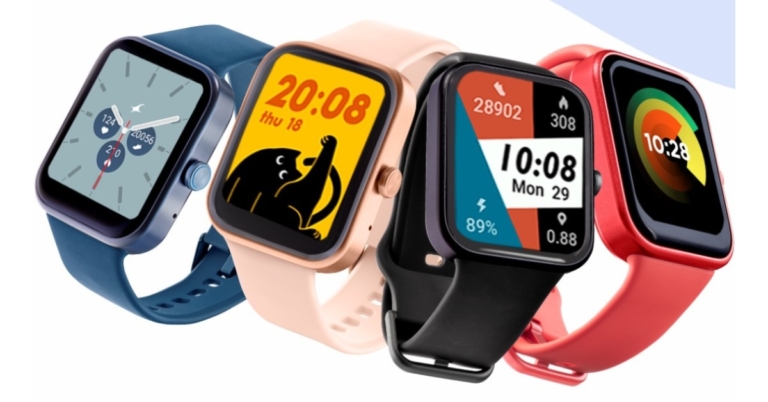
The Fastrack Reflex Vox smartwatch has been introduced in India. It is the Fastrack Reflex product line’s first smartwatch featuring built-in Amazon Alexa compatibility. The Fastrack Reflex range already includes TWS, neckband style earphones and other devices. The watch offers a rectangular-shaped HD display that comes with over 100 watch faces. The watch also includes various sports modes and includes health features like SPO2 sensor, heart and sleep monitoring sensor and more.
In This Article
Fastrack Reflex Vox price in India and sale details
Fastrack Reflex Vox price in India has been set at Rs 6,995. But it will be available at an introductory price of Rs 4,995. The device will be available for purchase through Fastrack shops, World of Titan, authorised Titan dealer outlets, Shoppers Stop, and Lifestyle retail stores. In addition to this, the wristwatch is also being sold on the Fastrack website and Amazon beginning January 29. The smart wearable is available in four different colours: Carbon Black, Blazing Blue, Champagne Pink, and Flaming Red.Fastrack Reflex Vox specifications
The entire specs of the Fastrack Reflex Vox are unknown but as per the company, the device will feature a rectangular design dial. It has a 1.69-inch HD screen. The smartwatch comes with over 100 watch faces as well as a multi-sports mode. In addition to this, there is built-in Amazon Alexa compatibility on the watch. Apart from this, there is a slew of health and activity trackers on the Fastrack Reflex Vox smartwatch that includes a heart rate monitor, Sp02 monitor to measure blood oxygen saturation level, sleep tracker, activity tracker and stress monitor. In addition to this, the fitness tracker also has a menstruation tracker. Fastrack Reflex Vox has functions such as music playback control, camera control, hydration alarms, and notifications alerts. According to the manufacturer, the smartwatch has a battery life of up to ten days. For the latest gadget and tech news, and gadget reviews, follow us on Twitter, Facebook and Instagram. For newest tech & gadget videos subscribe to our YouTube Channel. You can also stay up to date using the Gadget Bridge Android App. You can find the latest car and bike news here.29 January 2022 Amazon Quiz today answers: Answer to win Rs 40,000 Amazon Pay Balance

29 January 2022 Amazon Quiz has gone live on its platform. The quiz timings are 12 AM to 11:59 PM. The interested users can participate in the Amazon daily quiz to win exciting prizes. The company puts up 5 questions based on general awareness. You can submit the correct answers from the four options. Today the participants have the chance to win a Rs 40,000 Amazon Pay Balance.
Daily the e-commerce platform Amazon brings a new set of questionnaires that includes five easy questions. The Amazon Quiz can be played from 12 AM to 11:59. The users have to answer all the questions correctly to enter into a lucky draw. The result of today’s quiz will be announced at the end of the month and only one person is declared a winner. We at Gadget Bridge update all the answers to the Amazon Quiz on our website for the convenience of our readers. Here are the answers of the 29 January 2022 Amazon Quiz that will make you win Rs 40,000 Amazon Pay Balance.
In This Article
29 January 2022 Amazon Quiz Answers
Question 1: Mj Rodriguez has made history as the first transgender actor to win which award?
Answer: Golden GlobeQuestion 2: In January 2022, which famous tennis star was detained at Melbourne’s Tullamarine Airport?
Answer: Novak DjokovicQuestion 3: Under the ‘dual command’ system of policing, which two cities in Madhya Pradesh now has police commissioners?
Answer: Bhopal and IndoreQuestion 4: What is the name of the pasta seen in the picture?
Answer: TagliatelleQuestion 5: Name this city
Answer: Venice For the latest gadget and tech news, and gadget reviews, follow us on Twitter, Facebook and Instagram. For newest tech & gadget videos subscribe to our YouTube Channel. You can also stay up to date using the Gadget Bridge Android App. You can find the latest car and bike news here.Redmi Smart TV X43 launch in India to take place on February 9
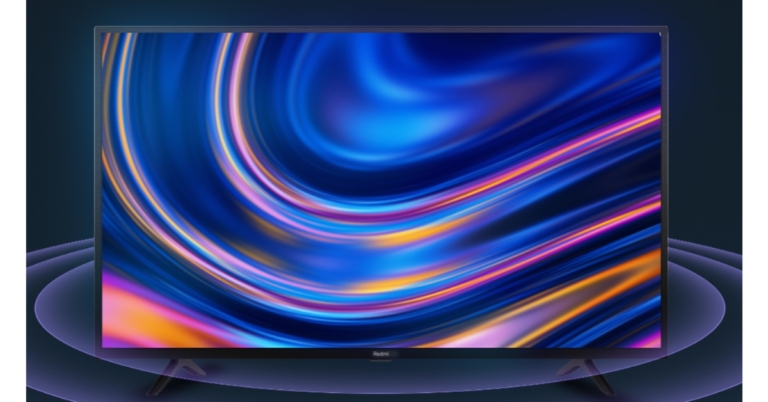
The Chinese electronics major Xiaomi today announced its upcoming product in the Indian market. The company has begun teasing Redmi Smart TV X43. The device is scheduled to launch in India on February 9. Note that the smart television will launch alongside Redmi Note 11S and Redmi Smart Band Pro. As the name suggests the device will be offered in 43-inch screen size with 4K resolution however the phone already is available in three more sizes 50,55, and 65 inches.
Xiaomi is expanding its 4K smart TV lineup with the introduction of the Redmi Smart TV X43 in India. The device would be unveiled on February 9 at an event. The company took to Twitter to announce its upcoming television in India. Through its teasers, the company is also highlighting the key features of the Xiaomi Smart TV. It will feature a 43-inch display with 4K resolution. In addition to this, the TV will support 4K HDR and Dolby Vision.
 The company has also listed out the key highlights of the Redmi Television on the event page on Xiaomi’s official website. As per the event page, the Tv will offer future-ready flagship performance and will have a 30W speaker configuration with Dolby Audio compatibility. The Redmi Smart TV X43 would operate on Android TV and will have the company’s newest PatchWall software, as well as IMDb integration. The details related to the processor are yet to be revealed but the device will be compatible with other home devices. To recall older X-series smart TVs utilise a quad-core MediaTek SoC with Mali G52 GPU, along with 2GB of RAM. also they come with a Full HD+ display.
Pricing information is also being withheld and will be given on the day of the launch. The earlier model with a larger display starts at Rs 37,999, therefore the next Redmi Smart TV X43 will be either less expensive or somewhat more expensive because it will have a 4K display rather than an FHD display.
For the latest gadget and tech news, and gadget reviews, follow us on Twitter, Facebook and Instagram. For newest tech & gadget videos subscribe to our YouTube Channel. You can also stay up to date using the Gadget Bridge Android App. You can find the latest car and bike news here.
The company has also listed out the key highlights of the Redmi Television on the event page on Xiaomi’s official website. As per the event page, the Tv will offer future-ready flagship performance and will have a 30W speaker configuration with Dolby Audio compatibility. The Redmi Smart TV X43 would operate on Android TV and will have the company’s newest PatchWall software, as well as IMDb integration. The details related to the processor are yet to be revealed but the device will be compatible with other home devices. To recall older X-series smart TVs utilise a quad-core MediaTek SoC with Mali G52 GPU, along with 2GB of RAM. also they come with a Full HD+ display.
Pricing information is also being withheld and will be given on the day of the launch. The earlier model with a larger display starts at Rs 37,999, therefore the next Redmi Smart TV X43 will be either less expensive or somewhat more expensive because it will have a 4K display rather than an FHD display.
For the latest gadget and tech news, and gadget reviews, follow us on Twitter, Facebook and Instagram. For newest tech & gadget videos subscribe to our YouTube Channel. You can also stay up to date using the Gadget Bridge Android App. You can find the latest car and bike news here.
 The company has also listed out the key highlights of the Redmi Television on the event page on Xiaomi’s official website. As per the event page, the Tv will offer future-ready flagship performance and will have a 30W speaker configuration with Dolby Audio compatibility. The Redmi Smart TV X43 would operate on Android TV and will have the company’s newest PatchWall software, as well as IMDb integration. The details related to the processor are yet to be revealed but the device will be compatible with other home devices. To recall older X-series smart TVs utilise a quad-core MediaTek SoC with Mali G52 GPU, along with 2GB of RAM. also they come with a Full HD+ display.
Pricing information is also being withheld and will be given on the day of the launch. The earlier model with a larger display starts at Rs 37,999, therefore the next Redmi Smart TV X43 will be either less expensive or somewhat more expensive because it will have a 4K display rather than an FHD display.
For the latest gadget and tech news, and gadget reviews, follow us on Twitter, Facebook and Instagram. For newest tech & gadget videos subscribe to our YouTube Channel. You can also stay up to date using the Gadget Bridge Android App. You can find the latest car and bike news here.
The company has also listed out the key highlights of the Redmi Television on the event page on Xiaomi’s official website. As per the event page, the Tv will offer future-ready flagship performance and will have a 30W speaker configuration with Dolby Audio compatibility. The Redmi Smart TV X43 would operate on Android TV and will have the company’s newest PatchWall software, as well as IMDb integration. The details related to the processor are yet to be revealed but the device will be compatible with other home devices. To recall older X-series smart TVs utilise a quad-core MediaTek SoC with Mali G52 GPU, along with 2GB of RAM. also they come with a Full HD+ display.
Pricing information is also being withheld and will be given on the day of the launch. The earlier model with a larger display starts at Rs 37,999, therefore the next Redmi Smart TV X43 will be either less expensive or somewhat more expensive because it will have a 4K display rather than an FHD display.
For the latest gadget and tech news, and gadget reviews, follow us on Twitter, Facebook and Instagram. For newest tech & gadget videos subscribe to our YouTube Channel. You can also stay up to date using the Gadget Bridge Android App. You can find the latest car and bike news here. OnePlus Nord CE 2 5G launch expected on February 11
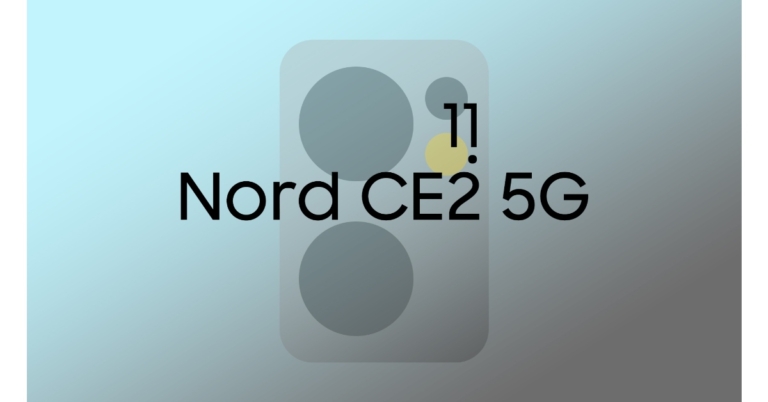
The OnePlus Nord CE 2 5G will be available next month, according to a new leak. The device is going to succeed the original and the company’s most affordable handset, the OnePlus Nord CE 5G was announced last year. But the upcoming smartphone is likely to be introduced on February 11, ahead of the OnePlus 10 Pro’s global debut in March. In addition to this, the smartphone is also said to have received certification in India as well as in Europe signalling the upcoming launch. It is expected to be powered by a MediaTek Dimensity 900 SoC and feature a 90Hz hole-punch AMOLED display.
OnePlus has yet to publish any information on the new OnePlus Nord CE 2 5G But according to a tweet by famous tipster Max Jambor, the OnePlus Nord CE 2 5G smartphone might be released on February 11. Along with the tweet the tipster also shared some graphics of the upcoming phone’s camera module implying that it may include three cameras. The handset was recently noticed in the source code of the company’s website.
As we said before the Nord CE 2 has also bagged certification in India as it was previously spotted on the BIS website bearing IV2201 model number. The device is codenamed Ivan, according to prior sources. The BIS listing, however, does not offer any information regarding the phone’s RAM and storage choices, colour options, or specs.
However, several OnePlus Nord 2 CE 5G features and images, as well as pricing information, have already leaked online. It is likely to come with a 6.4-inch full-HD+ AMOLED display along with 90Hz refresh rate support. It is said to include MediaTek Dimensity 900 SoC, combined with up to 12GB of RAM.
According to leaked renderings, the OnePlus Nord CE 2 5G would include a triple rear camera configuration inside a rectangular-shaped camera module. A 64-megapixel primary sensor, an 8-megapixel secondary sensor, and a 2-megapixel macro camera are said to be included in the smartphone. Additionally, the smartphone might possibly include a hole-punch display playing house to a 16-megapixel selfie camera.
The leaks also suggest that OnePlus Nord CE 2 5G will pack a 4,500mAh battery with 65W charging capabilities. The phone is expected to run on Android 12-based OxygenOS 12.
In India, the OnePlus Nord 2 CE 5G is expected to cost (roughly) Rs 28,000. The phone is scheduled to be released in early 2022.
For the latest gadget and tech news, and gadget reviews, follow us on Twitter, Facebook and Instagram. For newest tech & gadget videos subscribe to our YouTube Channel. You can also stay up to date using the Gadget Bridge Android App. You can find the latest car and bike news here.
Top 10 lesser-known tips and tricks of Google Chrome browser

For most of us, Google Chrome is our go-to browser. It is because of simple and minimalistic design and user-friendly surface. However, it also comes with secret tricks that you all might not be aware of. Thus, in order to save your time and energy, here are some Google Chrome hacks.
 Select the Chromecast-enabled device on which you want your browser window to appear in the pop-up window. You can also choose to cast a single tab, your entire desktop, or a specific file to the target television.
You can then name the group, assign a colour to it, add a new tab, split the group, close all tabs in the group, and open all tabs in a new window from the pop-up menu.
You can also drag tabs to reorganise the group, add new tabs, or remove pages. To add a new tab, remove a tab from the group, or move a tab to a new or existing group, right-click a tab within the group.
Chrome allows you to open the default New Tab page, all the tabs you had opened the previous time, or select specific pages to open. If you select Open a specific page or set of pages, you can either add specific pages or save all of the tabs that are currently open.
You can play/pause, seek backwards and forward, and skip or go back a track by clicking the button. If it’s a YouTube video, you can watch it from any tab by using picture-in-picture mode or by enabling live captions.
So, to perform quick searches, go to Manage search engines and click Add, then enter the site URL. The next time you type the particular site’s name into the Omnibox, you’ll see a prompt on the far right telling you to press the tab to search within the site.
When you press the tab button, the Omnibox changes to show that you are now searching within that website rather than Google. When you enter a search term, you will be taken to that page rather than a Google search result.
This feature is not limited to reference or search sites. You can use Omnibox to search directly through almost any website.
Read Also: How to Disable Google Smart Lock on Android and Chrome?
or
by pressing Shift + escape.
You can enter your information by clicking “Add address.”
So, these were the time-saving Google Chrome hacks that will make your daily life easier.
For the latest gadget and tech news, and gadget reviews, follow us on Twitter, Facebook and Instagram. For newest tech & gadget videos subscribe to our YouTube Channel. You can also stay up to date using the Gadget Bridge Android App. You can find the latest car and bike news here.
Select the Chromecast-enabled device on which you want your browser window to appear in the pop-up window. You can also choose to cast a single tab, your entire desktop, or a specific file to the target television.
You can then name the group, assign a colour to it, add a new tab, split the group, close all tabs in the group, and open all tabs in a new window from the pop-up menu.
You can also drag tabs to reorganise the group, add new tabs, or remove pages. To add a new tab, remove a tab from the group, or move a tab to a new or existing group, right-click a tab within the group.
Chrome allows you to open the default New Tab page, all the tabs you had opened the previous time, or select specific pages to open. If you select Open a specific page or set of pages, you can either add specific pages or save all of the tabs that are currently open.
You can play/pause, seek backwards and forward, and skip or go back a track by clicking the button. If it’s a YouTube video, you can watch it from any tab by using picture-in-picture mode or by enabling live captions.
So, to perform quick searches, go to Manage search engines and click Add, then enter the site URL. The next time you type the particular site’s name into the Omnibox, you’ll see a prompt on the far right telling you to press the tab to search within the site.
When you press the tab button, the Omnibox changes to show that you are now searching within that website rather than Google. When you enter a search term, you will be taken to that page rather than a Google search result.
This feature is not limited to reference or search sites. You can use Omnibox to search directly through almost any website.
Read Also: How to Disable Google Smart Lock on Android and Chrome?
or
by pressing Shift + escape.
You can enter your information by clicking “Add address.”
So, these were the time-saving Google Chrome hacks that will make your daily life easier.
For the latest gadget and tech news, and gadget reviews, follow us on Twitter, Facebook and Instagram. For newest tech & gadget videos subscribe to our YouTube Channel. You can also stay up to date using the Gadget Bridge Android App. You can find the latest car and bike news here.
In This Article
Chromecast
You can use Chrome’s built-in Cast functionality to send what you’re seeing on your PC screen to your TV. The simplest method is to right-click anywhere in Google Chrome and select Cast. You can also access it by clicking the three-dot icon in the upper right corner. Select the Chromecast-enabled device on which you want your browser window to appear in the pop-up window. You can also choose to cast a single tab, your entire desktop, or a specific file to the target television.
Group tabs
Tangled in multiple taps that often get confused? Chrome allows you to organize your tabs into groups so that everything is neatly organized and easy to find. To make a group, right-click a tab and select Add tab to a new group. You can then name the group, assign a colour to it, add a new tab, split the group, close all tabs in the group, and open all tabs in a new window from the pop-up menu.
 You can also drag tabs to reorganise the group, add new tabs, or remove pages. To add a new tab, remove a tab from the group, or move a tab to a new or existing group, right-click a tab within the group.
Reopen closed tabs
We often accidentally close tabs that might be of importance. Going back to browsing history and searching there can be a bit of a task. To bring back the most recently closed tab, use the keyboard shortcut Control/Command + Shift + T. Or If you close a tab by accident, right-click on the menu bar (not the tab itself), and a pop-up menu will appear with the option to re-open a closed tab.
Startup Pages
There are times when we have to use the same pages again and again. Thus, chrome has a feature of startup pages. Click On Startup in the Settings menu and select what you want Chrome to open the next time you reopen it.
 Chrome allows you to open the default New Tab page, all the tabs you had opened the previous time, or select specific pages to open. If you select Open a specific page or set of pages, you can either add specific pages or save all of the tabs that are currently open.
Integrated music control
Bored while working? Music also helps to build our concentration. Chrome includes an in-built music controller, which can be accessed via the music note icon in the menu bar. You can play/pause, seek backwards and forward, and skip or go back a track by clicking the button. If it’s a YouTube video, you can watch it from any tab by using picture-in-picture mode or by enabling live captions.
Search engine
Another Google Chrome hack is if you want to go directly to a particular website and a particular page on that website. Without having to navigate to Google.com. To enable this feature, go to Settings > Search engine > Manage search engines. You’ll see your default search engine (the one Chrome uses whenever you type a query into the Omnibox) as well as other sites that are already available for quick searches.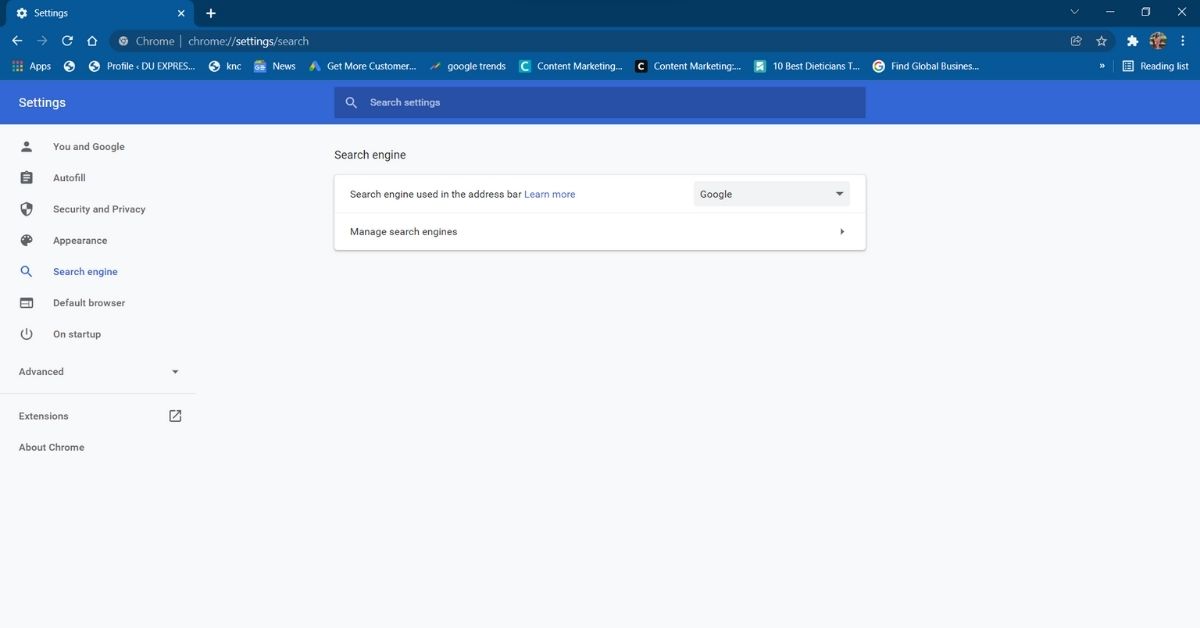 So, to perform quick searches, go to Manage search engines and click Add, then enter the site URL. The next time you type the particular site’s name into the Omnibox, you’ll see a prompt on the far right telling you to press the tab to search within the site.
 When you press the tab button, the Omnibox changes to show that you are now searching within that website rather than Google. When you enter a search term, you will be taken to that page rather than a Google search result.
 This feature is not limited to reference or search sites. You can use Omnibox to search directly through almost any website.
Read Also: How to Disable Google Smart Lock on Android and Chrome?
This feature is not limited to reference or search sites. You can use Omnibox to search directly through almost any website.
Read Also: How to Disable Google Smart Lock on Android and Chrome?
Open Tabs
Another Google Chrome hack to save your time is directly landing on the search tab. Chrome allows you to search for open tabs, allowing you to quickly navigate to the web page you require. Use the search bar to search for the title of an open tab. Chrome will autocomplete results and show recently used tabs that match the query as you type the title. To go to the tab, click the Switch to this tab button under the right result.
Task Manager
Low internet speed? Now that everything is virtual, we often rely on our internet for everything. The task manager displays the memory and CPU usage of each tab open in your Google Chrome browser. If you have three or more Tabs open in your browser and they are causing slowness, you can open task manager to locate the problematic site. You can open it by right-clicking on the title bar and selecting “Task Manager,” or
by pressing Shift + escape.
or
by pressing Shift + escape.

Home button
The home button is quite useful when you have to start your work on the same page. You can add a home button by following the steps below.- To add a home button in Chrome, click the three dots in the top-right corner.
- Select “settings,”.
- Under the tab, select ‘Appearance’.
- Check the box for the “Show Home button in the toolbar.”
- Add the URL of the site you want to make the home page.

Autofill anything
We’re always annoyed when we have to type our details again and again, but chrome has a function to save your time and effort. Chrome’s AutoFill options, which can recollect the information. From addresses to passwords, you can save everything at autofill. Navigate to Settings -> Autofill, and then select “AutoFill options.”
You can enter your information by clicking “Add address.”
 So, these were the time-saving Google Chrome hacks that will make your daily life easier.
For the latest gadget and tech news, and gadget reviews, follow us on Twitter, Facebook and Instagram. For newest tech & gadget videos subscribe to our YouTube Channel. You can also stay up to date using the Gadget Bridge Android App. You can find the latest car and bike news here.
So, these were the time-saving Google Chrome hacks that will make your daily life easier.
For the latest gadget and tech news, and gadget reviews, follow us on Twitter, Facebook and Instagram. For newest tech & gadget videos subscribe to our YouTube Channel. You can also stay up to date using the Gadget Bridge Android App. You can find the latest car and bike news here.