We all have our phones safely locked with face-ids, finger locks and multiple pins. As much as we are depending on our phone for all the important information, we are getting more fanatic about its security. However, we often forget to lock the most important apps. There might be occasions when our child might order something or those friends who irresponsibly brush through our photos. It is imperative to lock the important/sensitive apps as well. Here’s how to lock apps on iPhone with a face id.
In This Article
WhatsApp
WhatsApp is by far the most sensitive app we use. From personal chats to professional notices, WhatsApp has become our go-to chat service. That makes it most important to secure. Follow the below steps to lock it.
Open the WhatsApp app and go to the bottom of the screen to the Settings menu.
Choose Account > Privacy
Then select Screen Lock at the bottom of the page.
Authy, a two-factor authentication service that lets you sync your account across various devices, is a wonderful alternative for this. It also receives bonus points for supporting Face ID.
Open Authy and press the Settings gear in the top-right corner of the main screen to enable it.
On the resulting menu, select Security.
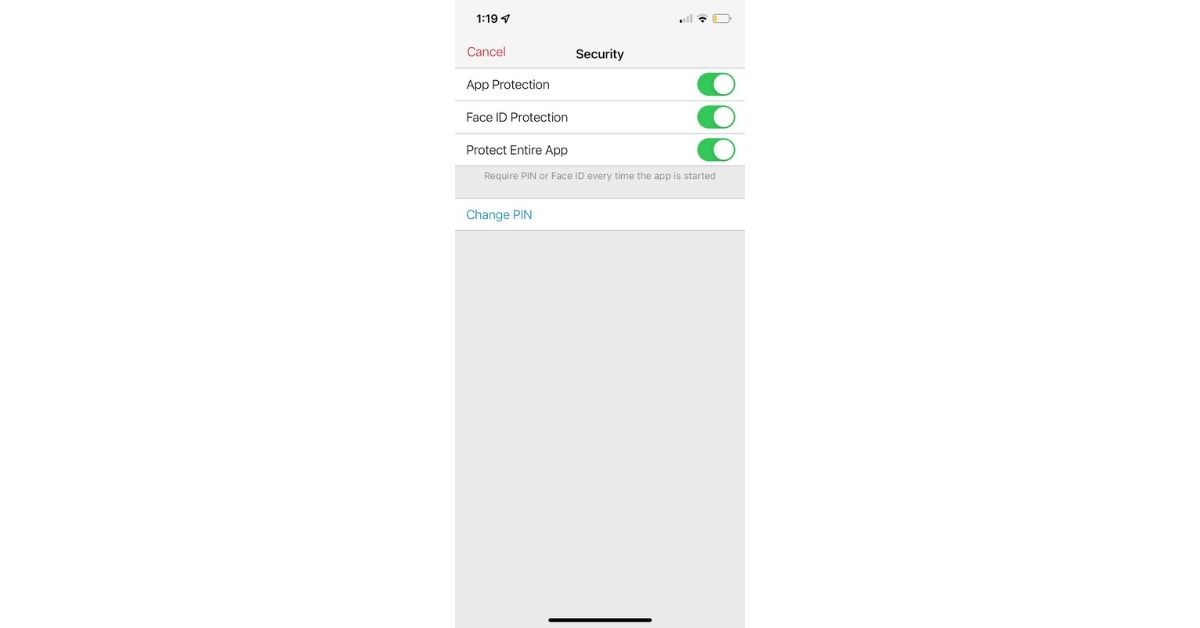
To protect the app, you’ll need to enable App Protection and choose a four-digit PIN.
turn on the Face ID Protection slider to allow you to log in using your face.
You’ll have to scan or enter your PIN every time you access the app if you enable Protect Entire App.
This just protects the Settings menu otherwise.
Notes app
While any other in-built iOS app might not let you add face-id, the notes app does. Follow the steps below to add.
Open an existing note or start a new one. Then, in the top-right corner of the page, hit the three-dot menu button to lock it. Select Lock from the sheet that appears.
You’ll be asked to add a password to lock notes in Apple Notes if you haven’t already done so. If you’d like, type it twice and include a clue. Make sure the Use Face ID slider is turned on so you may use Face ID instead of your password for convenience.
Go to Notes > Password in the Settings app on your iPhone to update or reset this password later with your Apple ID.
Financial Apps
There is another way, how to lock apps on iPhone with a face id. Apps like Paytm, PayPal and other financial apps procure some sensitive information, thus it is important to safely keep them locked.
Open the Paytm app, and tap on your ID.
You’ll see a ‘Paytm Security Shield’ button, activate it.
select Face ID from the drop-down menu.
Face ID is supported by several banking and financial apps, including Chase Mobile and PayPal. However, because support differs considerably by the bank, it’s impossible to cover them all here.
Check your banks or credit card company’s apps to check if this functionality is available.
Guided Access on iPhone
Guided access lets you lock all but one app that the person who is borrowing the phone will be able to access. This feature is great to protect sensitive data while you let any child or your friend access your phone. You can do this by following the below steps.
On an iPhone X or after, triple-click the side button; on an iPhone 8 or older, triple-click the home button.
Start by tapping Guided Access.
When you get your phone back, triple-click the side or home button to unlock all of your apps. Then tap End after entering your Guided Access passcode. You’ll be able to access all of your apps once more.
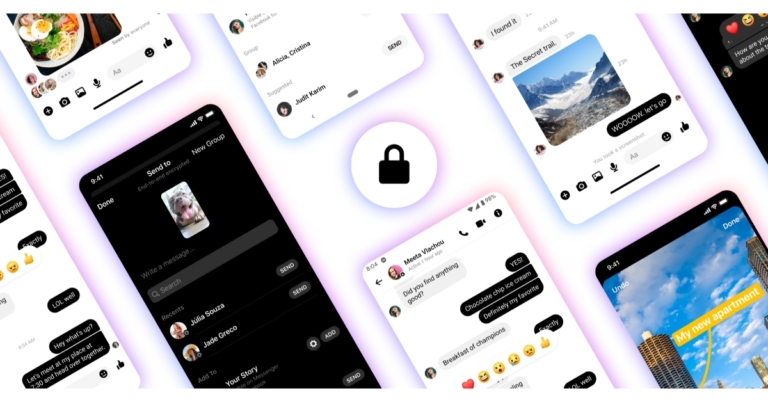
Meta owned Facebook Messenger app is now getting new security features enhancing the secret conversations. Meta has rolled out a new software update that brings functionalities like screenshot alerts that will soon notify users of screenshots captured inside Secret Conversations. The conversations through the Secret Conversations feature are end-to-end encrypted. Not just that the service will now offer GIFs, stockers, reactions and more.While announcing the release of the new Facebook Messenger update the Meta owned service commented, “Today, we’re announcing updates for Messenger’s opt-in end-to-end encrypted chats that will help improve your messaging experience. We know that people expect their messaging apps to be secure, private and provide them with a space to be expressive. This is why we are continuing to introduce some of the rich features that you already love in Messenger to end-to-end encrypted chats.”End-to-end Encrypted Group Chats and Calls in Messenger are now being available to everyone for the Facebook Messenger’s Secret Conversations feature. Now the users can choose to connect. The application has also been updated with screenshot alerts.Last year Facebook upgraded the settings for vanishing messages in its end-to-end encrypted conversations and now it will be sending a notification when it detects someone screenshotting a disappearing message. This feature will make private conversation secure, personal and provide users with a space to be expressive. The users will be notified if someone obtains pictures of their vanishing messages. Similar functionality is being offered in Messenger’s vanish mode and the company will be expanding this feature for disappearing messages in for end-to-end encrypted chats.In addition to this GIFs and Stickers are now available for a more feature-rich chat experience in end-to-end encrypted chats. Facebook Messenger is also getting the ability to react to messages. With reactions, you’ll be able to press and hold on to a message to bring up the reactions tray, where you may select your reaction: You may also “love” a message by double-tapping it.Not just that the users may now reply to particular messages by long pressing or swiping to reply. To Tap and hold to reply long-press on a message to reply to it. Your response contains a copy of the original message. You may also swipe on the message you wish to respond to. Swipe, then type.The Secret conversations in Facebook Messenger are also being updated with typing indicators, message forward and verified badges to help you identify authentic accounts and have meaningful interactions.The Secret Conversations is also getting the ability to Save Media by long-pressing on any media you receive. Also, the users will be able to edit photos or videos before sending them from their gallery. This includes adding stickers, scribbling or adding text, cropping, and audio editing too (for videos).
For the latest gadget and tech news, and gadget reviews, follow us on Twitter, Facebook and Instagram. For newest tech & gadget videos subscribe to our YouTube Channel. You can also stay up to date using the Gadget Bridge Android App. You can find the latest car and bike news here.
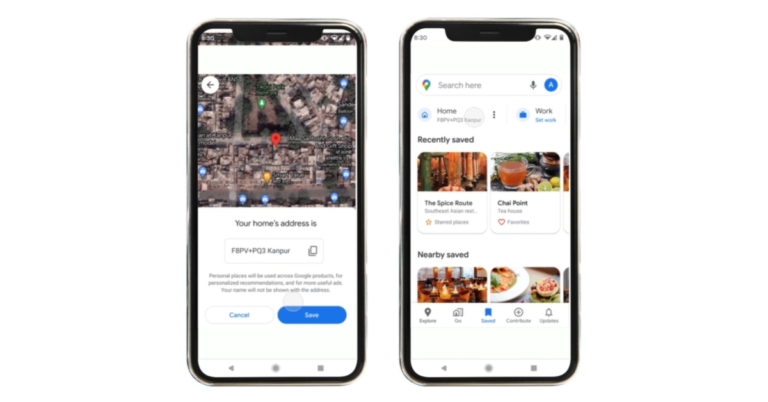
Google Maps is rolling out a new software update for Indian users allowing them to save and share the address of their home with Plus Codes. This will let the users obtain exact digital addresses for their homes or any place on Earth which also include places that don’t have accurate formal addresses. Plus Codes also ease the discovery of and navigation to businesses.Google via its blog post said, “Today, we are pleased to announce the launch of a new India-first feature on Google Maps: use your current location to find the Plus Codes address for your home.”Plus Codes are free, open-source digital addresses that give easy and accurate addresses for every location on Earth, including those with no formal addresses. Instead of street and neighbourhood names, Plus Codes are based on latitude and longitude and are shown as a brief series of numbers and letters that provide precision all the way up to the door.While announcing the release of Plus Codes feature for Google Maps India, the company said, “Since its launch in 2018, we have seen Plus Codes being adopted at scale by NGOs in India and beyond (including Addressing the Unaddressed, Shelter Associates, and Rural Utah Project) and governments (such as Sub-Saharan Africa) as it serves the addressing needs of millions of people. Plus Codes also ease the discovery of and navigation to businesses.”People may utilise Plus Codes addresses smoothly, whether they are getting food or parcels delivered, providing a location to friends or relatives to assist them get to your house, or navigating, without the burden of sharing approximate locations with landmarks or voice directions that may be unclear.When users in India save a ‘Home’ location on Google Maps, they will see a new “Use your present location” option that utilises their phone’s location to produce a Plus Code (if the location precision passes required limits), which they may then use as their Home address. We’ve also put a column at the top of the ‘Saved’ page to help you find, copy, and share these addresses. The functionality is now only accessible on Android, with iOS to come soon.Google launched this functionality in India a month ago and as per the company over 300,000 users in India have already used Plus Codes to find their home location. The firm is excited to grow to additional sorts of settings (beyond ‘Home’ and ‘Work,’ and is actively searching for possibilities to work with e-commerce, shipping, and delivery companies to provide the experience to more people around the world.
For the latest gadget and tech news, and gadget reviews, follow us on Twitter, Facebook and Instagram. For newest tech & gadget videos subscribe to our YouTube Channel. You can also stay up to date using the Gadget Bridge Android App. You can find the latest car and bike news here.
28 January 2022 Amazon Quiz has gone live on its platform. The quiz timings are 12 AM to 11:59 PM. The Amazon App users can participate in the quiz daily and all they have to do is submit correct answers to the questions asked on the e-commerce platform. Today’s participants can get a chance to win Rs 15,000 Amazon Pay Balance.Amazon brings a fresh questionnaire that contains 5 questions daily. These questions are based on current affairs and general knowledge. The quiz can be played from 8 AM to 11:59 PM and the contestants need to answer correctly to enter into a lucky draw.Only one person is declared as a winner and the results will be announced at the end of every month. And to make sure that you give correct answers to all the 5 questions Gadget Bridge everyday updates all the answers to the Amazon Quiz. Do check out 28 January 2022 Amazon Quiz Answers to win Rs 15,000 Amazon pay Balance.
In This Article
28 January 2022 Amazon Quiz Answers
Question 1: Alpha, Beta, Delta & Omicron are some variants of the coronavirus. From which alphabet are these names taken?
Answer: Greek
Question 2: Which IIT is set to start a Master’s programme on electric vehicles that will enhance research capabilities in the field?
Answer: IIT Madras
Question 3: Which of these organisations celebrated its 73rd Raising Day in November 2021?
Answer: NCC
Question 4: What is the headpiece worn by the bride in the picture known as?
Answer: Veil
Question 5: A monument situated where resembles this famous monument of India and is also called Dakkhani Taj?
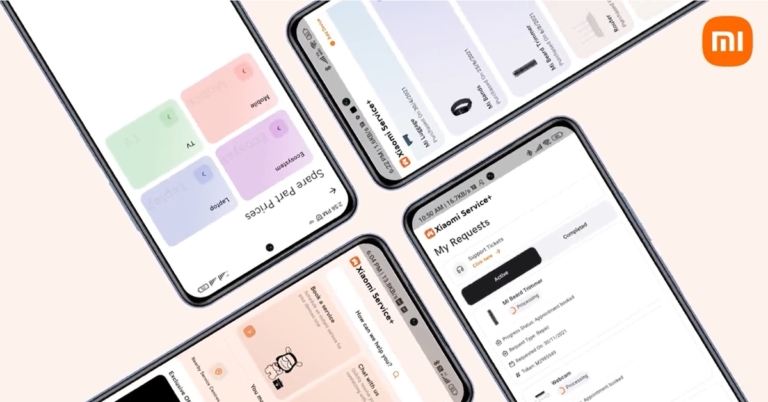
Xiaomi India has announced the launch of Xiaomi Service+, a one-stop app that will cover all of its customers’ service and support needs. Xiaomi Service+ software provides a variety of support services such as device repair, pricing quotes, live chat help, and more. In addition to this Customers may now seek after-sales support from the comfort of their own homes. The app allows you to schedule repair requests for all Xiaomi devices, as well as installation and demos.Xiaomi Service+, which reinforces Xiaomi’s long-standing commitment to offering smooth after-sales services, provides a variety of support services such as device repair, pricing quotes, live chat help, and others. Customers may access all of them with a few mouse clicks from the comfort of their own homes. The app will include both AI chatbots and live agent interactions. The customers will also be able to schedule gadget installation and demos, as well as maintenance requests through the dedicated app.While launching the Xiaomi Service+ the firm said that this application has been designed to help the company maintain a strong relationship with customers after they had purchased a device. It may also be used to find the nearest outreach service facility. Users may examine spare component costs as well as warranty information for the devices they have purchased. They will also be able to use the app to check the status of their service requests. Furthermore, with services such as chat with an AI Bot and live chat with an agent, Xiaomi Service+ guarantees that consumers always have access to customer care.The Xiaomi Service+ app seeks to give information to consumers with just a few taps. It is available for download via Google Play or Getapps. As per Xiaomi it is the initial point of contact for service requests and is backed by Xiaomi India’s 2000 service centres spread around the nation. These facilities are ISO 9001 and 120001 accredited, with a 96 percent success rate in turnaround time.Speaking at the launch of Xiaomi Service+, Muralikrishnan B, COO, Xiaomi India said, “At Xiaomi, we work towards building relationships that go beyond the purchase of a device. The launch of the Xiaomi Service+ app is a testimony to our commitment to providing seamless support and after-sale services to every single customer for speedy redressal and solution delivery. Keeping in mind the growing need to receive at-home services, Xiaomi Service+ aims to address every customer’s service request from the comfort of their home with just a few clicks. The app can be effectively used to raise service requests, track the status of the request, and receive information on the warranty status of their device, among a host of other features. Service+ is a cornerstone in elevating the user after-sales service experience.”
For the latest gadget and tech news, and gadget reviews, follow us on Twitter, Facebook and Instagram. For newest tech & gadget videos subscribe to our YouTube Channel. You can also stay up to date using the Gadget Bridge Android App. You can find the latest car and bike news here.
Krafton has announced the launch of the PUBG Epic Fails event for PC and consoles in India. The publisher of PUBG: Battlegrounds has introduced this event which encourages new and existing players to submit their favourite in-game “fail” moments via social media for the chance to win in-game currency (G-Coin), the game’s next Survivor Pass and a real-life trophy to humorously commemorate their “fails.” All new and existing PC and console players may submit their in-game “fails” on social media for a chance to win in-game money, a forthcoming Survivor Pass, and other prizes.The PUBG Epic Fails event, which runs from now until 11:00 p.m. PST on Feb. 22, is intended to be a fun and engaging way to welcome new players to PUBG: BATTLEGROUNDS now that it is free-to-play.PUBG: Battlegrounds players are urged to use the hashtag #PUBGEpicFails to upload short video clips or screenshots of their most humiliating or humorous in-game events through Twitter, Instagram, or Facebook. Each entry should also include the player’s in-game moniker and chosen gaming platform (e.g., PlayStation, Xbox, Steam, etc.). To be eligible to win, all submissions must be received by 11:00 p.m. PST on February 22.Talking about the winners and prizes, a total of 22 winners will be chosen at random and will get 20,000 G-Coin, a 16.2 Survivor Pass, and a physical trophy. In addition to this, an extra 100 winners will be chosen as “Weekly Best” and will get a random G-Coin crate holding 500 to 50,000 G-Coin. The winners will be revealed on February 28.The PUBG Epic Fails event follows the recent free-to-play launch of PUBG: Battlegrounds. The company disclosed that the game was the highest-ranked game on Steam when it was free-to-play on January 12.
For the latest gadget and tech news, and gadget reviews, follow us on Twitter, Facebook and Instagram. For newest tech & gadget videos subscribe to our YouTube Channel. You can also stay up to date using the Gadget Bridge Android App. You can find the latest car and bike news here.
The work-from-home culture has got us all hooked to our internet and web browsers. We all have upgraded our data plans to fasten the speed. However, there are times when we might connect to Wi-Fi and are just not getting the needed speed. There might be occasions when more than one device is connected to a Wi-Fi plan and the speed gets split. So, checking the speed makes sense. Also, at times you are in a low mobile network area and you want to check the 3G/4G/5G speed. Thus, here are 10 methods to check Internet speed on your Apple iPhone.Read Also:Top 10 smartphones with a curved display panel (2023)
In This Article
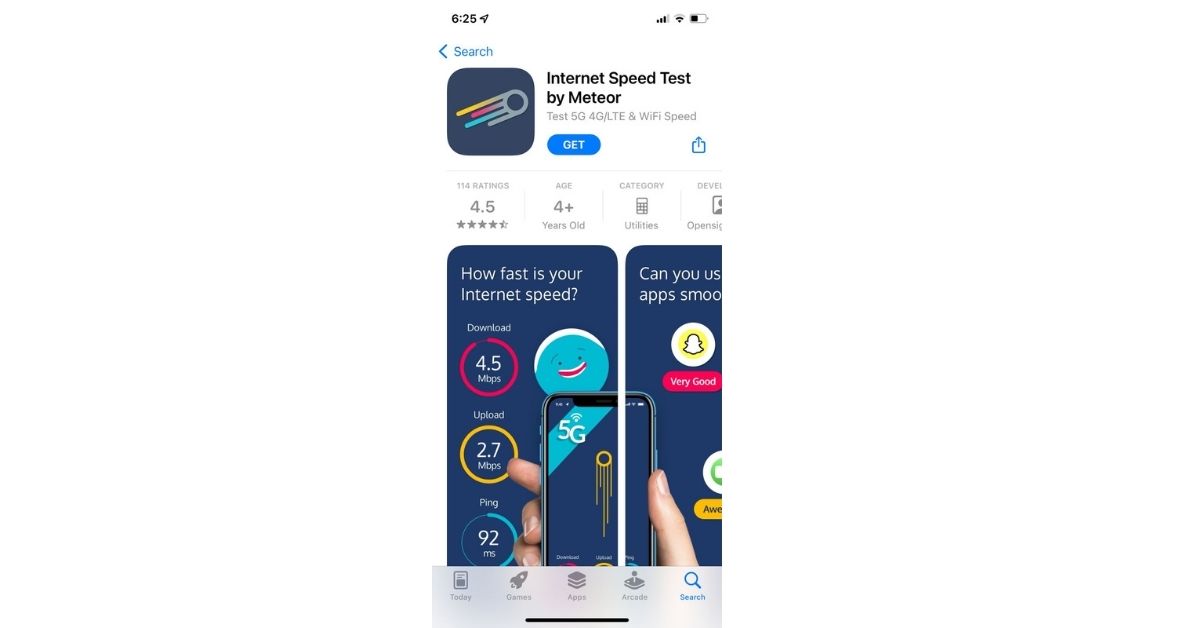
The Meteor
The speed test from Meteor Open Signal evaluates your internet connection via Wi-Fi, 3G, 4G/LTE, and 5G. Meteor allows you to test your connection on a variety of apps, including Spotify, YouTube, TikTok, Instagram, and Zoom.You can examine detailed statistics and sort past tests based on performance. Download and grant all the permissions you want to and you are good to go.Download from here.
Speedcheck
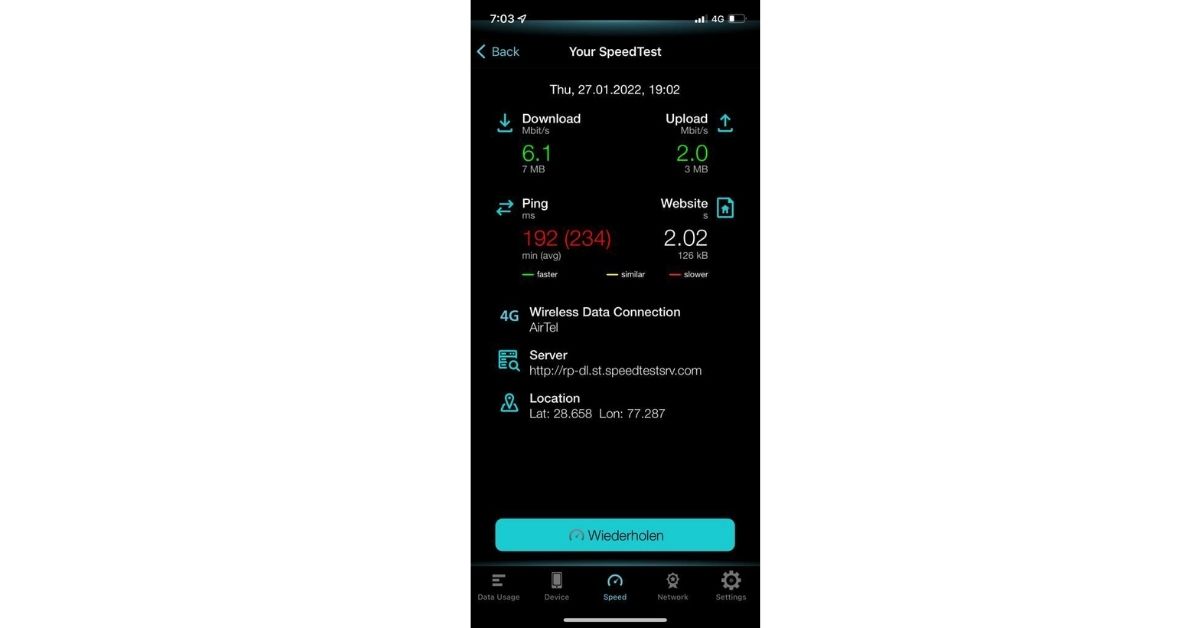
It can be used to test the speed of internet connections and add your findings to SpeedSpot’s Wi-Fi speed database. You can use the company’s app, SpeedSpot’s Wi-Fi Finder, directly from the app to find the fastest Wi-Fi hotspots worldwide. It can check your downloads and upload speeds, as well as your ping, on cellular and Wi-Fi networks. The testing takes less than 20 seconds with a single tap using a global high-speed server network for dependable results. At the same time, it provides feedback on your tests (privately). Lastly, it can easily share your findings on Twitter and Facebook.Download from here.
Read Also: Best ways to fix Android connected to WiFi but no internet issue
Traffic monitor with widget
On your iPhone or iPad, download the Traffic Monitor app. This is a third-party app that you can get from the App Store. After your download is complete, you can find it on your home screen or in your app library. After reviewing the terms, click Accept. This will only be necessary the first time you launch the app. On your screen, tap the speed meter. This will launch a real-time internet speed test on your iPhone or iPad. The app might be paid which depends on your data plan. Traffic Monitor can also locate other devices on your network in order to test local network speeds. When you select this option, your current speeds will be displayed on the page. Select the Data Usage tab. This shows your monthly and daily traffic statistics. The current month and last month can be found under “MONTHLY TRAFFIC,” and today and yesterday can be found under “DAILY TRAFFIC.”Download from here.
Via the web browser
Another method to check internet speed on your Apple iPhone is through a web browser like Safari.Step 1: Open a web browser app on your iPhone.Step 2: Type 3G speed test on GoogleStep 3: Tap ‘Run speed Test’. You can see the upload meter and download meter when the test is finished, your speed will be displayed on the screen.
Speedtest by Ookla
It has the best ratings on the App Store, Ookla’s Speedtest is one of the most popular Wi-Fi test apps on the market. After downloading the app, users can use it to test network speed, streaming performance, and other features. The in-app hamburger menu provides access to previous performance results, which include previous download and upload speeds as well as ping, jitter, and packet loss information. Download from here.
Speed Test Master
Speed Test Master is one of the best speed-checking apps you can get on your iPhone. This app can speed test for 2G, 3G, 4G, 5G, DSL, and ADSL. Equipped with a handy WiFi analyser, it can also measure the speed and strength of your WiFi connection. Apart from the upload and download speeds, Speed Test Master can also diagnose the problem with the network, check for unauthorised devices using your network, and produce real-time graphs for internet status.
Speed Test & WiFi Analyzer
The Speed Test & WiFi Analyzer app by Appenvision Ltd accurately calculates the speed of your internet connection and also identifies the problems with your WiFi setup, if there are any. You can also conduct a ping test and get detailed statistics related to your internet connection. The app maintains a history of your previous speed tests so you can track the performance of your network provider over time. On top of that, the app also has a VPN for users who want to maintain their anonymity while connected to a public network.
Download from here.
Fast Speed Test
Simple and easy to use, the Fast Speed Test app gets rid of the frills and keeps things to the point. The app is well-optimised for iPhones and loads very quickly. One of our favourite things about this app is that there are no ads on it. Simply hit the button to initiate the speed test on your device. Once you get the results, you can share them on any platform you like directly from the app. Fast is owned by Netflix.
Download from here.
Speed Test SpeedSmart Internet
Speed Test by VeeApps is one of the most comprehensive internet speed test apps out there right now. You can check your internet speed with a quick one-tap test, compare it to other ISPs in your country, and track the performance of the connection over a period of time by recording the speed tests. An average speed test on this app takes less than 20 seconds. The app focuses on aesthetics as well, offering a helpful dark mode option.
Download from here.
Speed Test Master
Flaunting a 4.6 rating on the App Store from over 12,000 reviews, the Speed Test Master app is one of the best internet speed test apps for iOS. This app can conduct a speed test for 2G, 3G, 4G, 5G, DSL, and ADSL. It can accurately calculate the upload and download speed, ping latency, and jitter. If you’re facing trouble with your WiFi connection, you can use this app’s WiFi analyser tool to diagnose and troubleshoot the problem. It can also detect which devices are using your WiFi connection without your permission.
Download from here.
Frequently Asked Questions (FAQs)
Which are some of the best Internet Speed Test apps for iOS/iPhone?
The Meteor, Speedcheck, Ookla, Traffic Monitor, and Speed Test Meter are some of the best internet speed test apps for iOS/iPhone.
How do I check the speed of the internet connection on my iPhone without using an app?
To check your internet speed without using an app, either use the official Ookla website or simply search for ‘internet speed test’ on Google.
So, these were the best methods to check Internet speed on your Apple iPhone, on both WiFi and 3G/4G/5G networks. Speed testing your 5G connection can consume a lot of mobile data. Make sure you have enough data left on your plan to carry out the speed test. Do you have a personal favourite app that you use to check the speed of your internet connection? Let us know in the comments!
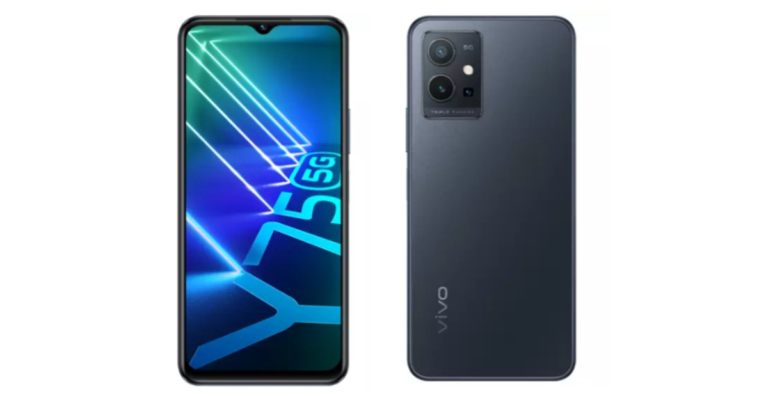
The Chinese smartphone company Vivo today announced the launch of its new 5G smartphone in the Indian market. The company has expanded its Y-Series lineup with the launch of the Vivo Y75 5G. The phone comes equipped with Dimensity 700 SOC and is powered by a 5,000mAh battery. The phone also features a triple rear camera set up that includes a 50MP primary lens and a 16MP selfie camera.
In This Article
Vivo Y75 5G price in India and sale details
Vivo Y75 5G has been launched in a single 8GB RAM with a 128GB storage model. The device is priced at Rs 21,990 and will be offered in two colour options of Starlight Black and Glowing Galaxy. The smartphone is scheduled to go on sale from January 27 via Vivo India E-store and across all partner retail stores.
Vivo Y75 5G tech specifications
Vivo Y75 5G features a 6.58-inch full-HD+ IPS LCD display with 1,080×2,408 pixels of resolution. The additional Eye Protection Mode filters out the harmful blue light for a more comfortable viewing experience. The smartphone operates on Funtouch OS 12 on top of Android 12. The device is powered by a 7nm octa-core MediaTek Dimensity 700 SoC runs at a clock rate as high as 2.2 GHz. It will be offered with 8GB of RAM with 128GB of internal storage that can be expanded up to 1TB using a microSD card. The extended RAM of 4GB guarantees smooth app switching. Multi Turbo 5.0 raises data connectivity, system processing speed, and power-saving performance to an entirely new level, even after extended use.The Vivo Y75 5G has a triple rear camera arrangement consisting of a 50-megapixel main camera with an f/1.8 aperture. Furthermore, there is a 2-megapixel macro camera with an f/2.0 aperture lens and a 2-megapixel depth sensor with f/2.0 aperture. The smartphone also has a 16-megapixel front-facing camera with an f/2.0 aperture. It is also supported by a wide range of features, including Personalised Portrait Mode, Super HDR, and Super Night Mode providing a delightful photography experience.The Vivo Y75 5G supports 5G, 4G LTE, Bluetooth 5.1, Wi-Fi, GPS, and FM radio connectivity. The phone is powered by a 5,000mAh battery and enables 18W rapid charging through USB Type-C. Furthermore, the newly redesigned Ultra Game Mode 2.0 provides a more sensual and better gaming experience.
For the latest gadget and tech news, and gadget reviews, follow us on Twitter, Facebook and Instagram. For newest tech & gadget videos subscribe to our YouTube Channel. You can also stay up to date using the Gadget Bridge Android App. You can find the latest car and bike news here.
As attention span lowers, the importance of reels goes higher. Reels are our one-stop entertainment point. They are short, fun and sometimes knowledgeable. But here’s a deal! If you’re dead set on keeping your online game strong or breaking into the influencer scene with a bang, it’s time to call a reputable Social Media Management Company. They’ll take charge and deliver seamless results because you might miss those points that they don’t! However, some reels remain quite close to us, we may be inspired, entertained or might just find it cute. There are plenty of creators out there who get inspired from IG reels and want to use a small part of it in their own Reels. In most cases, downloading IG Reels is a task. Thus, these are the top 4 ways to download Instagram reels with sound in case you want to save them and watch them later.
In This Article
Download from stories
Downloading Instagram Reels using Stories is a simple yet useful hack that does not require any additional app or tool usage. Just follow these steps and you will be able to download in no time:
Play the Instagram Reels video and then tap the Send/Receive icon.
Click on the “Add Reel to your Story” button.
A preview screen will appear. To download the video in full-screen mode, pinch-and-zoom to fill the screen.
When finished, tap the “Download” button at the top. That’s all! The video will be saved in the gallery of your phone.
Download on iPhone app
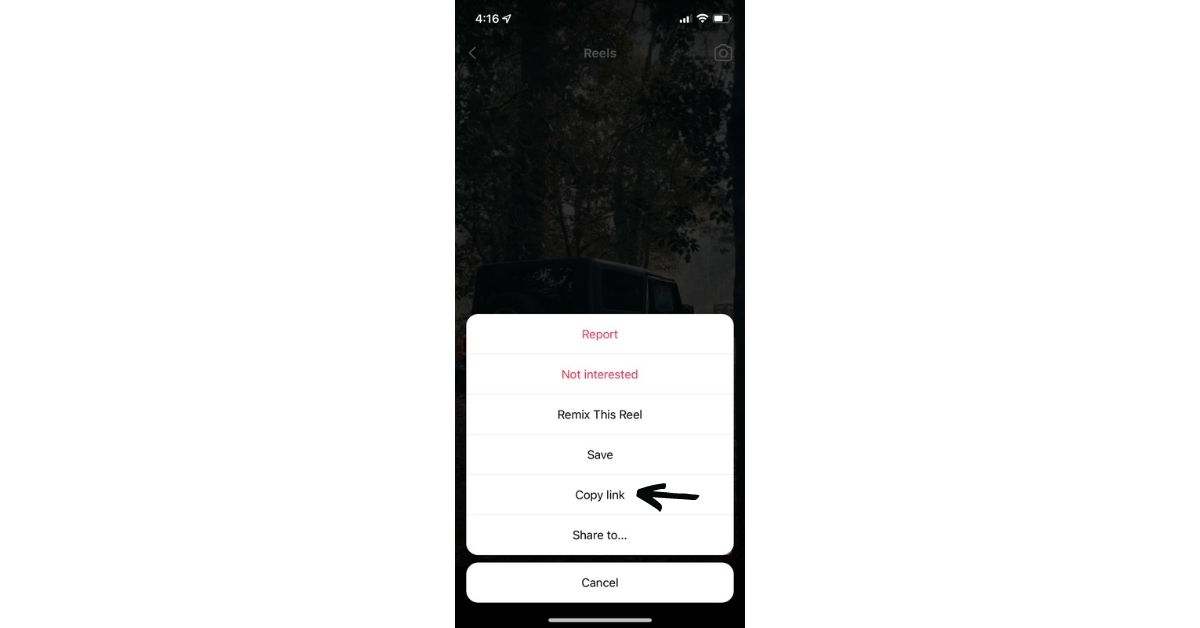
Another way of the top 4 ways is to download Instagram reels with sound in case you want to save them and watch them later is through InstDown. First, go to the Apple App Store and download the app InstDown for Instagram Reels.Open the app and configure it, granting it access to your images and media. Return to Instagram and select the Reels video you want to download. Then select the three-dot icon > Copy Link.Return to InstDown, and the Instagram link you copied will be automatically pasted.Tap Generate! The video will be saved to the Photos folder on your device. And that’s it.Read Also:Audio not working in Instagram reels and Instagram stories? Top 5 ways to fix it.
Third-party sites
Launch the Instagram Reel that you want to save. Select the Copy link by tapping the three-dot icon.
Now, on your Android or iPhone or laptop, open instafinsta.com or any other Reel downloading website in a browser. If you aren’t taken directly to it, go to the Reels tab on the website.
Paste the link copied in step 1 into the website’s available box and click the Download button.
Wait for the video to be processed by the website. When you’re finished, you’ll see a preview of the video beneath the box where you pasted the link. Scroll to the bottom and click the Download button. There will be a confirmation pop-up. Permission is granted to download the video.
If the video begins to play simply touch and hold it. Another Download video button will appear. Tap it to activate it. If that doesn’t work, hold down the Download button from the above step and select Download linked file from the menu.On Android, you can access them via the Gallery app as well as File Explorer. On an iPhone, open the Files app and navigate to the Downloads folder.
Other top websites to download Instagram reels from are
The is by far the simplest and fastest way to download reels with audio. Screen recording is another option for saving or downloading Instagram Reels with sound on an Android or iOS phone. Because screen recorders are built into almost all Android smartphones and iPhones.To begin, launch the screen recorder and press record on your phone (if it asks you to record sound, enable that too) and play the reel video you want to save.Simply stop recording the screen and save the video to your phone’s gallery.
So, these were the top 4 ways to download Instagram reels with sound safely, easily and immediately. if you use any other way to download Instagram Reels with sound then do let us know below in the comments section.
For the latest gadget and tech news, and gadget reviews, follow us on Twitter, Facebook and Instagram. For the newest tech & gadget, videos subscribe to our YouTube Channel. You can also stay up to date using the Gadget Bridge Android App. You can find the latest car and bike news here.
As the world is becoming more and more tech-savvy, we are moving from cash to credits. Gen-Z finds online payments and cards far more convenient than cash payments. One of the main benefits that come with online payments is cashback. So, these are the Top 4 credit card bill payment apps that give the best cash backs in India.
In This Article
Cred
Cred is a PCI DSS v3.2.1 certified company, which implies that they have implemented the appropriate industry-standard security procedures mandated by PCI. You must have a solid credit score in order to register on Cred. Cred is considered one of the best credit card payment apps because it offers you cashback with each transaction.The cashback is in the form of cred coins and can also include mystery cashbacks. Cred allows you to connect your Gmail account to automatically download credit card statements, but if you’re concerned about your privacy, you should avoid using the service. There’s also a one-of-a-kind referral programme that pays you up to 750 dollars for referring friends. Make your account here.
Paytm
Paytm offers you a dynamic platform where you can not only pay your credit card bills but a lot of other bills as well. Although the cashback is not really huge. You can acquire various scratch cards after some bill payments.However, there is no discreet cashback system.1 lakh cashback points equal to 1,000 Rupees and every card transaction will earn you a minimum of 1,000 points (as claimed). You can pay via wallet, UPI or card. Use Paytm here.Read Also: Paytm Payments Bank and MoneyGram have teamed up to offer international remittances directly to Paytm Wallet
Phone pe
Another one of the top 4 credit card bill payment apps that give the best cash backs in India is Phonepe has included a section for paying credit card bills. As a reward, Phonepe offers scratch cards. Once you pay the bill, the feature will be enabled.When compared to other UPI apps, it is the best app for UPI payments. PhonePe allows you to pay your credit card bill with UPI or a debit card. As said, it rewards you with a scratch card that contains a mystery cashback or other offers. Make your Phone Pe account here.
Amazon
Amazon is considered one of the best shopping apps. But now it has also become a leading player in the banking race. From UPIs to wallet payments, you can now pay your credit card bill through Amazon. Unlike cred, Amazon occasionally offers cashback and rewards. When it comes to paying your credit card bills, we believe this is another viable option. You can take advantage of special offers from time to time. Amazon does have a downside, which is that you cannot use your Amazon Pay balance to pay your credit card bill. Explore Amazon Pay here.Thus, to make your lives easier and enjoyable, these were our top picks for your credit card bill payment apps that will fetch you some extra money when paying them online.
For the latest gadget and tech news, and gadget reviews, follow us on Twitter, Facebook and Instagram. For the newest tech & gadget, videos subscribe to our YouTube Channel. You can also stay up to date using the Gadget Bridge Android App. You can find the latest car and bike news here.




 .
. 














 Download from
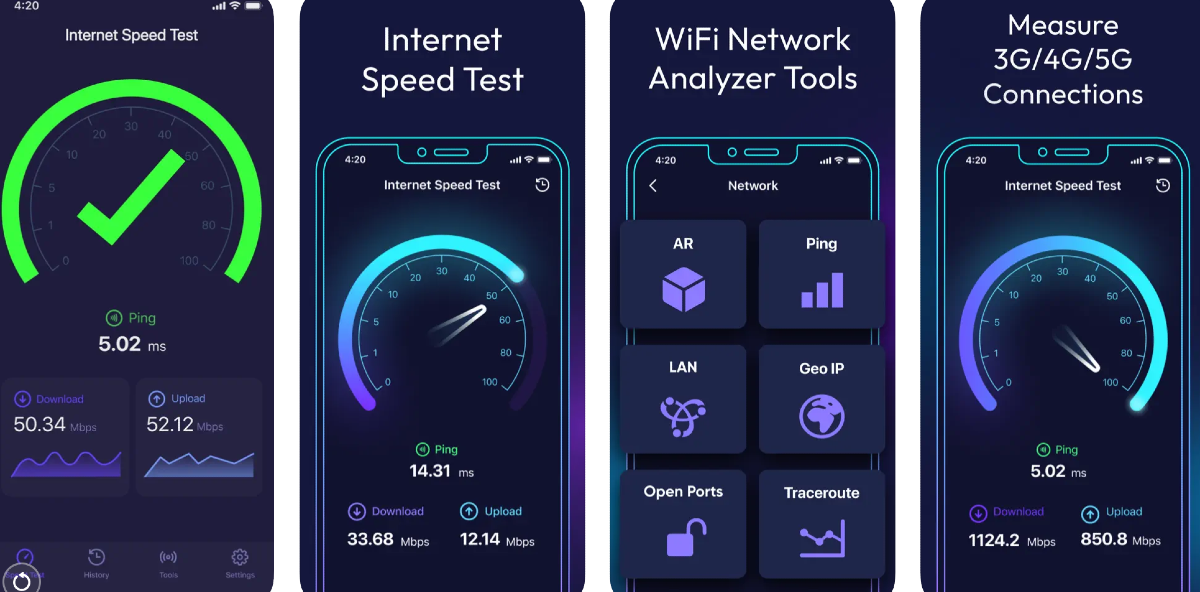 The Speed Test & WiFi Analyzer app by Appenvision Ltd accurately calculates the speed of your internet connection and also identifies the problems with your WiFi setup, if there are any. You can also conduct a ping test and get detailed statistics related to your internet connection. The app maintains a history of your previous speed tests so you can track the performance of your network provider over time. On top of that, the app also has a VPN for users who want to maintain their anonymity while connected to a public network.
Download from
The Speed Test & WiFi Analyzer app by Appenvision Ltd accurately calculates the speed of your internet connection and also identifies the problems with your WiFi setup, if there are any. You can also conduct a ping test and get detailed statistics related to your internet connection. The app maintains a history of your previous speed tests so you can track the performance of your network provider over time. On top of that, the app also has a VPN for users who want to maintain their anonymity while connected to a public network.
Download from 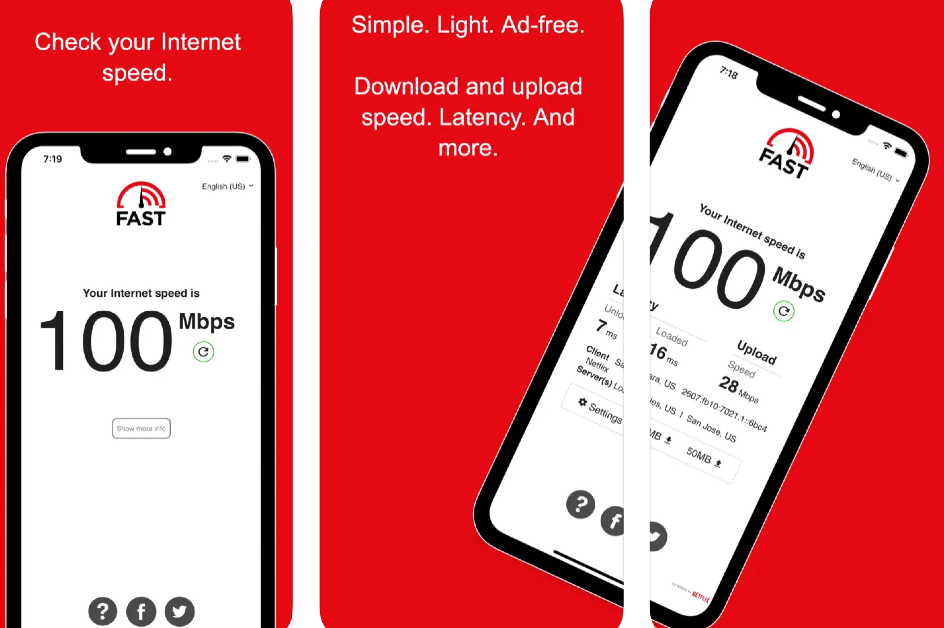 Simple and easy to use, the Fast Speed Test app gets rid of the frills and keeps things to the point. The app is well-optimised for iPhones and loads very quickly. One of our favourite things about this app is that there are no ads on it. Simply hit the button to initiate the speed test on your device. Once you get the results, you can share them on any platform you like directly from the app. Fast is owned by Netflix.
Download from
Simple and easy to use, the Fast Speed Test app gets rid of the frills and keeps things to the point. The app is well-optimised for iPhones and loads very quickly. One of our favourite things about this app is that there are no ads on it. Simply hit the button to initiate the speed test on your device. Once you get the results, you can share them on any platform you like directly from the app. Fast is owned by Netflix.
Download from 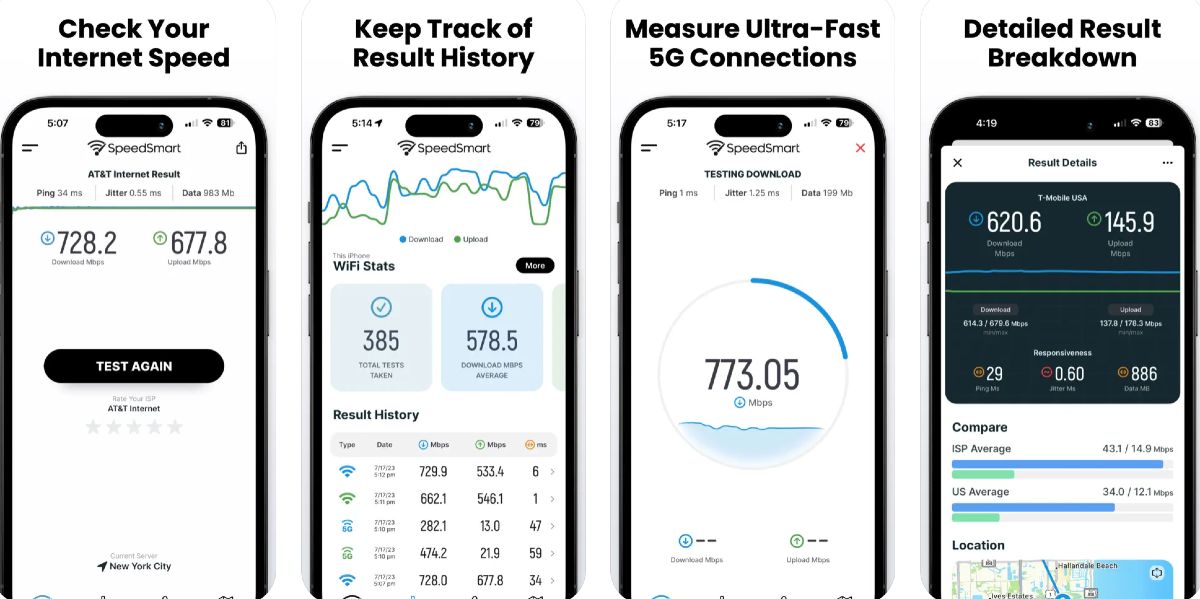 Speed Test by VeeApps is one of the most comprehensive internet speed test apps out there right now. You can check your internet speed with a quick one-tap test, compare it to other ISPs in your country, and track the performance of the connection over a period of time by recording the speed tests. An average speed test on this app takes less than 20 seconds. The app focuses on aesthetics as well, offering a helpful dark mode option.
Download from
Speed Test by VeeApps is one of the most comprehensive internet speed test apps out there right now. You can check your internet speed with a quick one-tap test, compare it to other ISPs in your country, and track the performance of the connection over a period of time by recording the speed tests. An average speed test on this app takes less than 20 seconds. The app focuses on aesthetics as well, offering a helpful dark mode option.
Download from 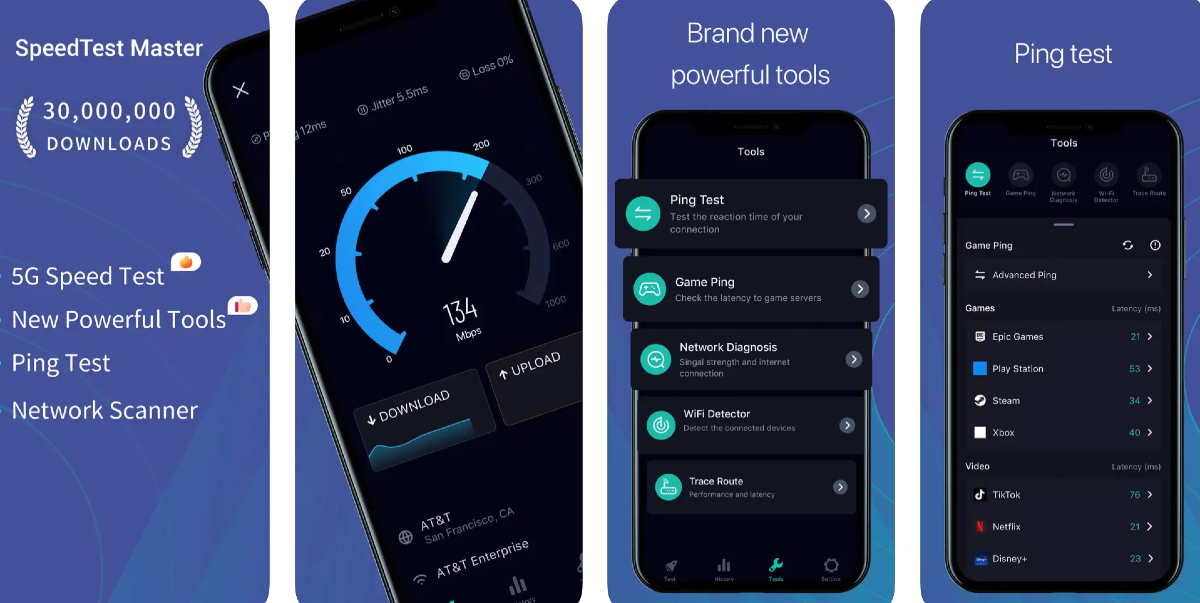 Flaunting a 4.6 rating on the App Store from over 12,000 reviews, the Speed Test Master app is one of the best internet speed test apps for iOS. This app can conduct a speed test for 2G, 3G, 4G, 5G, DSL, and ADSL. It can accurately calculate the upload and download speed, ping latency, and jitter. If you’re facing trouble with your WiFi connection, you can use this app’s WiFi analyser tool to diagnose and troubleshoot the problem. It can also detect which devices are using your WiFi connection without your permission.
Download from
Flaunting a 4.6 rating on the App Store from over 12,000 reviews, the Speed Test Master app is one of the best internet speed test apps for iOS. This app can conduct a speed test for 2G, 3G, 4G, 5G, DSL, and ADSL. It can accurately calculate the upload and download speed, ping latency, and jitter. If you’re facing trouble with your WiFi connection, you can use this app’s WiFi analyser tool to diagnose and troubleshoot the problem. It can also detect which devices are using your WiFi connection without your permission.
Download from