

10 December 2021 Amazon Quiz today answers: Answer to win Rs 10,000 Amazon Pay Balance

The 10 December 2021 Amazon Quiz is now live on the Amazon app. In today’s quiz participants have a chance to win Rs 10,000 Amazon Pay Balance by answering all the questions correctly. The quiz can be played every day from 12 AM to 11:59. Only app users are eligible to participate in the Quiz as it is not accessible on the web platform.
The Amazon Quiz brings a fresh set of questions for its customers that contains five easy questions. The questionnaire consists of five questions related to general knowledge and current affairs. The participants need to answer all the questions correctly and their names will be selected for a lucky draw. The daily quiz brings an opportunity for the customers to win exciting prizes. They can win Amazon Pay Balance ranging from Rs 1,000 to Rs 50,000. The participants need to answer all the questions correctly and their names will be selected for a lucky draw. The winner will be announced at the end of the month. Check out 10 December 2021 Amazon Quiz Answers.
Acer Aspire Vero laptop with 11th Gen Intel Core Processor launched in India
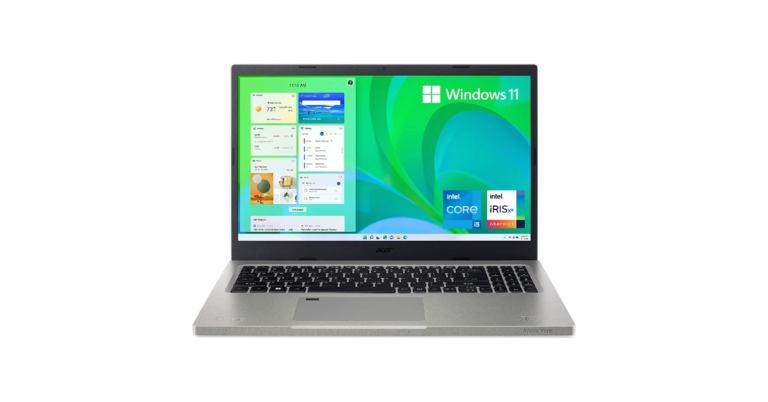
Acer has added a new eco-friendly laptop under its Vero lineup. The company has introduced the Acer Aspire Vero laptop in the Indian market today. The PC is made out of recycled plastic. In addition to this, it comes with inbuilt software, VeroSense which further the goals of eco-minded users, such as energy-saving to extend battery life. The Acer laptop is powered by an 11th Gen Intel Core Processor with Intel Iris Xe Graphics. Continue reading to know more.
Speaking on the launch Sudhir Goel, Chief Business Officer, Acer India said, “More than just a stylish computer the Aspire Vero is a tangible manifestation of Acer’s commitment to more sustainable operations. This is a deliberate initiative that has been designed and conceptualised to bring about a change for our future. Vero will reduce plastic waste and thereby CO2 emissions. We, at Acer, are proud of this initiative and look forward to manufacturing products that promote sustainability and preserve our planet.”

Acer Aspire Vero laptop price in India and availability
The Acer Aspire Vero laptop has been launched in India at a starting price of Rs 60,990. The newly arrived Acer laptop will be available in the country via Acer online Store, Acer Exclusive stores and other authorised retail stores. The company is offering a special exchange deal where any laptop exchanged for Aspire Vero will get an additional Rs 2000 off. In addition to this as a token of thanks, Acer is including a free plant with each purchase, which compliments the eco-friendly nature of the laptop.
Acer Aspire Vero laptop specifications
Coming to the design and specifications, the Aspire Vero laptop comes with a 30% PCR plastic chassis cutting CO2 emissions by 21% to produce that part. The PC utilises PCR (Post-consumer Recycled)plastic across the entire chassis. The keyboard design is intended to emphasise eco ideals with the R and E keys standing out in yellow based on the concepts (Reduce, Reuse and Recycle). The Aspire Vero is highlighted with a 15.6-inch FHD IPS display with 1920 x 1080 pixels of resolution. The screen has sleek bezels offering a screen-to-body ratio of 81.42%. It is powered by an 11th Gen Intel Core i5-1155G7 processor with a clock speed of 2.50 GHz. This has been paired with Intel Iris Xe Graphics. The laptop comes with 8GB DDR4 SDRAM and 512GB of SSD configuration. The PC operates on Windows 11 Home edition While the new generation of Acer PurifiedVoice with AI noise reduction actively suppresses background noise for both users and is compatible with external headphones and mics. In terms of network and communication, the Acer Aspire Vero laptop supports IEEE 802.11 a/b/g/n/ac/ax, Gigabit Ethernet, Bluetooth 5.0, Wi-Fi 6, a Type-C, and two Type-A ports, with one supporting power-off charging and 1 HDMI port. The touchpad on the keyboard supports multi-touch gestures. There is a 3-cell Lithium-Ion (Li-Ion) which is claimed to provide 7 hours of battery life and is shipped with a 65W charger. For the latest gadget and tech news, and gadget reviews, follow us on Twitter, Facebook and Instagram. For newest tech & gadget videos subscribe to our YouTube Channel. You can also stay up to date using the Gadget Bridge Android App. You can find the latest car and bike news here.How to record phone calls and conversations on Apple iPhone

Recording phone calls is a feature that everyone wants, but not everyone has the luxury to record calls on their phone. If you have an iPhone, recording calls might be a little tricky for you, this is because Apple does not allow natively to record incoming as well as outgoing calls.
It’s true that in recent times Android users are also facing issues with recording calls. Most of the android phones are now coming with Google Dialer as the default dialer and it does allow you to record calls. Over that, every time when you press the record button it will notify the other party about that. But, at least android users can record calls, unlike Apple who does not even let you record calls in the first place.
Although recording calls without permission is not a good practice, if you have the consent of the other party to record calls, you can go ahead and try these tricks.
Here is how you can record calls and conversations on an iPhone:
 TapACall also provides you with a Transripted version of your call as well but you have to pay extra for that. With that, this is undoubtedly the best call recording app if you are an iPhone user.
You can download TapACall Pro from the app store.
It is a paid app with its weekly subscription costing $6.99 with 3 days of free trial, and monthly subscription costs $14.99
The best thing about this app is that it is available in India as well.
You can download Automatic Call Recorder from the app store here.
And this is how you can record call and conversations with your iPhone easily.
Read also: 7 best ways to fix alarm volume too high or low on iPhone
For the latest gadget and tech news, and gadget reviews, follow us on Twitter, Facebook and Instagram. For newest tech & gadget videos subscribe to our YouTube Channel. You can also stay up to date using the Gadget Bridge Android App. You can find the latest car and bike news here.
TapACall also provides you with a Transripted version of your call as well but you have to pay extra for that. With that, this is undoubtedly the best call recording app if you are an iPhone user.
You can download TapACall Pro from the app store.
It is a paid app with its weekly subscription costing $6.99 with 3 days of free trial, and monthly subscription costs $14.99
The best thing about this app is that it is available in India as well.
You can download Automatic Call Recorder from the app store here.
And this is how you can record call and conversations with your iPhone easily.
Read also: 7 best ways to fix alarm volume too high or low on iPhone
For the latest gadget and tech news, and gadget reviews, follow us on Twitter, Facebook and Instagram. For newest tech & gadget videos subscribe to our YouTube Channel. You can also stay up to date using the Gadget Bridge Android App. You can find the latest car and bike news here.
Use another phone as a recorder
Since the iPhone doesn’t allow you to record calls natively and most of the apps on AppStore don’t work or you have to pay a hefty subscription. You can always put your phone on speaker and record calls with another phone. So, if you have an extra phone lying around you can use its voice recorder to record the conversation using an iPhone’s loudspeaker. This is not the ideal way to record calls as you have to put your phone on loudspeaker and the recording quality won’t be as good either. Read also: New to iPhone? Do the following first if you own an iPhone 13Install Apps from AppStore
There are a few useful apps on Apple’s AppStore that you can use to record calls. Here are two of them:TapACall Pro:
TapACall Pro is one of the best and quite famous apps for iPhone. TapACall allows users to record both incoming and outgoing calls as well without any time limit. However, this is a paid app. You have to pay $11 for a one year subscription, and if you want to renew your subscription after that, then it will cost you $20. TapACall Pro creates a three way call (a conference call) between You, TapACall and the Person you want to record. After the call is recorded TapACall sends you the recorded call, which you can store to your iPhone, iCloud, Dropbox or anywhere you want. TapACall also provides you with a Transripted version of your call as well but you have to pay extra for that. With that, this is undoubtedly the best call recording app if you are an iPhone user.
You can download TapACall Pro from the app store.
TapACall also provides you with a Transripted version of your call as well but you have to pay extra for that. With that, this is undoubtedly the best call recording app if you are an iPhone user.
You can download TapACall Pro from the app store.
Automatic Call Recorder:
Out of a few call recording apps that are available on Apple App Store, Automatic Call Recorder is one of the best call recording applications. Automatic Call Recorder allows users to record incoming and outgoing calls and on top of that, you can also record international calls if you want. The app works with/without the internet so you need not worry about your internet connection. The working of Automatic Call Recorder is the same as that of TapACall, when you hit the record button it creates a conference call. The only requirement for this app is your carrier should support 3-way calling. It is a paid app with its weekly subscription costing $6.99 with 3 days of free trial, and monthly subscription costs $14.99
The best thing about this app is that it is available in India as well.
You can download Automatic Call Recorder from the app store here.
And this is how you can record call and conversations with your iPhone easily.
Read also: 7 best ways to fix alarm volume too high or low on iPhone
For the latest gadget and tech news, and gadget reviews, follow us on Twitter, Facebook and Instagram. For newest tech & gadget videos subscribe to our YouTube Channel. You can also stay up to date using the Gadget Bridge Android App. You can find the latest car and bike news here.
It is a paid app with its weekly subscription costing $6.99 with 3 days of free trial, and monthly subscription costs $14.99
The best thing about this app is that it is available in India as well.
You can download Automatic Call Recorder from the app store here.
And this is how you can record call and conversations with your iPhone easily.
Read also: 7 best ways to fix alarm volume too high or low on iPhone
For the latest gadget and tech news, and gadget reviews, follow us on Twitter, Facebook and Instagram. For newest tech & gadget videos subscribe to our YouTube Channel. You can also stay up to date using the Gadget Bridge Android App. You can find the latest car and bike news here. Now users can make voice and video calls through Gmail in the Google Chat

In September this year, Google provided Google Meet the ability to make voice and video calls. So now the Google Chat in Gmail is getting the ability to make 1:1 voice and video calls individually to the users in your chats. Other details like missed calls and ongoing call details will also be seen in the chats.
For those who are unaware of the ability, audio and video calls were integrated into Google Meet some time ago, but now it is being extended to Google Chats as well. In Google Meet one can access the feature by tapping on the link generated by the caller to join a call. Now one can directly make calls to an individual chat and no special link is needed to be generated for conversations. The users can simply dial a call to a person from their contact list.
Announcing the new functionality, Google said, “You can now start or join meetings and audio calls from 1:1 chats in Google Chat in Gmail on Android and iOS. At the moment, this feature will be available for 1:1 chats only.”
 Within the 1:1 chat, select the phone or video chat to join a call. You’ll see a banner of the person you’re on the phone with, the call duration, and a Meet icon in the chat roster while on the phone.
 Missed calls will be indicated with a red phone or video icon within the conversation and the chat roster.
 While you can select “Join a call” from the Google Chat app, the call will be transferred to the Gmail app. You’ll be prompted to download the Gmail app from the Google Play Store or the App Store if you don’t already have it on your device. When this feature is available for the Google Chat mobile app, we’ll post an update on the Google Workspace Updates Blog.
Note that this feature will be available for Google Chat in Gmail and when Meet video calling is enabled. Also, it will be accessible by default on Android and iOS devices — both the caller and receiver will need the latest version of Gmail.
Google also stated, “As some teams begin to return to the office, while others remain distributed, we hope this makes it easier to connect with your colleagues in the hybrid work world. This feature will allow you to seamlessly switch between chat to a video or audio call when needed, helping you collaborate and move your work forward.”
For the latest gadget and tech news, and gadget reviews, follow us on Twitter, Facebook and Instagram. For newest tech & gadget videos subscribe to our YouTube Channel. You can also stay up to date using the Gadget Bridge Android App. You can find the latest car and bike news here.
While you can select “Join a call” from the Google Chat app, the call will be transferred to the Gmail app. You’ll be prompted to download the Gmail app from the Google Play Store or the App Store if you don’t already have it on your device. When this feature is available for the Google Chat mobile app, we’ll post an update on the Google Workspace Updates Blog.
Note that this feature will be available for Google Chat in Gmail and when Meet video calling is enabled. Also, it will be accessible by default on Android and iOS devices — both the caller and receiver will need the latest version of Gmail.
Google also stated, “As some teams begin to return to the office, while others remain distributed, we hope this makes it easier to connect with your colleagues in the hybrid work world. This feature will allow you to seamlessly switch between chat to a video or audio call when needed, helping you collaborate and move your work forward.”
For the latest gadget and tech news, and gadget reviews, follow us on Twitter, Facebook and Instagram. For newest tech & gadget videos subscribe to our YouTube Channel. You can also stay up to date using the Gadget Bridge Android App. You can find the latest car and bike news here.
Here is how to make or join voice and video calls in Google Chats in Gmail
First and foremost select the phone or video icon in the top right corner of a 1:1 chat to call someone directly. Within the 1:1 chat, select the phone or video chat to join a call. You’ll see a banner of the person you’re on the phone with, the call duration, and a Meet icon in the chat roster while on the phone.
 Missed calls will be indicated with a red phone or video icon within the conversation and the chat roster.
 While you can select “Join a call” from the Google Chat app, the call will be transferred to the Gmail app. You’ll be prompted to download the Gmail app from the Google Play Store or the App Store if you don’t already have it on your device. When this feature is available for the Google Chat mobile app, we’ll post an update on the Google Workspace Updates Blog.
Note that this feature will be available for Google Chat in Gmail and when Meet video calling is enabled. Also, it will be accessible by default on Android and iOS devices — both the caller and receiver will need the latest version of Gmail.
Google also stated, “As some teams begin to return to the office, while others remain distributed, we hope this makes it easier to connect with your colleagues in the hybrid work world. This feature will allow you to seamlessly switch between chat to a video or audio call when needed, helping you collaborate and move your work forward.”
For the latest gadget and tech news, and gadget reviews, follow us on Twitter, Facebook and Instagram. For newest tech & gadget videos subscribe to our YouTube Channel. You can also stay up to date using the Gadget Bridge Android App. You can find the latest car and bike news here.
While you can select “Join a call” from the Google Chat app, the call will be transferred to the Gmail app. You’ll be prompted to download the Gmail app from the Google Play Store or the App Store if you don’t already have it on your device. When this feature is available for the Google Chat mobile app, we’ll post an update on the Google Workspace Updates Blog.
Note that this feature will be available for Google Chat in Gmail and when Meet video calling is enabled. Also, it will be accessible by default on Android and iOS devices — both the caller and receiver will need the latest version of Gmail.
Google also stated, “As some teams begin to return to the office, while others remain distributed, we hope this makes it easier to connect with your colleagues in the hybrid work world. This feature will allow you to seamlessly switch between chat to a video or audio call when needed, helping you collaborate and move your work forward.”
For the latest gadget and tech news, and gadget reviews, follow us on Twitter, Facebook and Instagram. For newest tech & gadget videos subscribe to our YouTube Channel. You can also stay up to date using the Gadget Bridge Android App. You can find the latest car and bike news here. Oppo to launch its first foldable phone Oppo Find N on December 15, to feature a retractable camera
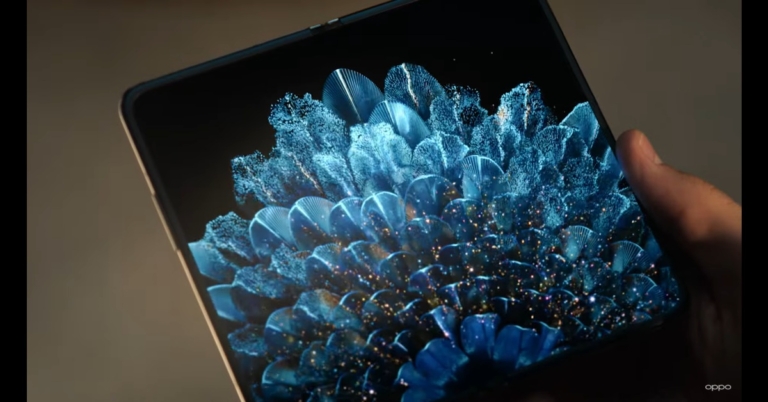
Oppo, a Chinese smartphone company, has debuted its first and only foldable phone. The Oppo Find N will be competing against Samsung’s foldable device. The new device has been introduced by Oppo’s Chief Product Officer Pete Lau through an open letter on the blog.
Oppo Find N foldable phone is claimed to be the company’s first foldable flagship smartphone, the culmination of four years of intense R&D and six prototype generations. While introducing the foldable phone the company founder Pete Lau said the first-gen of the Oppo Find N prototype was made internally in April 2018 till then many other companies have already launched their foldable devices. But the company wanted its device to be more competitive and attractive, simple in design, natural and comfortable in the material.
 It must provide powerful performance while remaining within a reasonable weight and size range. It must feel good in the hand, especially for a foldable device with a large screen. Each of these goals has been met by the OPPO Find N.
The blog post said, “In the past, smartphone evolution focused on the display panel, first combining a small display with a big keyboard, and evolving to today’s full-screen smartphones. But in an era where everyone has a phone with similar configurations, the smartphone experience has come to a standstill. If we can find a way to break through the bottleneck of smartphone displays, we could once again revolutionise efficiency and interactivity.”
Pete Lau further added, “OPPO realised this four years ago, and since then the team has worked tirelessly to find a creative solution. OPPO has always dared to venture into the unknown to look for breakthroughs and innovative answers, while also exercising restraint when it comes to impacting the user experience. For OPPO, it is better to launch a product at a later date when it is ready to offer a great user experience instead of simply rushing to keep up with trends.”
Furthermore, Oppo wanted its foldable phone to be both useful and simple to operate. The Oppo Find N closes inwards similar to the Galaxy Z Fold series. According to Pete, both the closed-screen and open-screen experiences for a foldable smartphone should be equally simple to use. Then, on top of that, it should create a revolutionary efficient experience that no traditional smartphone can match.
Oppo Find N is scheduled to make its debut during Oppo INNO Day 2021 on December 15.
Talking about the officially released teasers the Oppo Find N will have slim bezels on the outer cover and the primary display. The display has a hole punch cut out on the inside while on the cover we may see a hidden under-display shooter.
It must provide powerful performance while remaining within a reasonable weight and size range. It must feel good in the hand, especially for a foldable device with a large screen. Each of these goals has been met by the OPPO Find N.
The blog post said, “In the past, smartphone evolution focused on the display panel, first combining a small display with a big keyboard, and evolving to today’s full-screen smartphones. But in an era where everyone has a phone with similar configurations, the smartphone experience has come to a standstill. If we can find a way to break through the bottleneck of smartphone displays, we could once again revolutionise efficiency and interactivity.”
Pete Lau further added, “OPPO realised this four years ago, and since then the team has worked tirelessly to find a creative solution. OPPO has always dared to venture into the unknown to look for breakthroughs and innovative answers, while also exercising restraint when it comes to impacting the user experience. For OPPO, it is better to launch a product at a later date when it is ready to offer a great user experience instead of simply rushing to keep up with trends.”
Furthermore, Oppo wanted its foldable phone to be both useful and simple to operate. The Oppo Find N closes inwards similar to the Galaxy Z Fold series. According to Pete, both the closed-screen and open-screen experiences for a foldable smartphone should be equally simple to use. Then, on top of that, it should create a revolutionary efficient experience that no traditional smartphone can match.
Oppo Find N is scheduled to make its debut during Oppo INNO Day 2021 on December 15.
Talking about the officially released teasers the Oppo Find N will have slim bezels on the outer cover and the primary display. The display has a hole punch cut out on the inside while on the cover we may see a hidden under-display shooter.
 The official teaser also suggests a metal built with metal framing on the sides. The short teaser also shows a USB Type C port along with a fingerprint sensor on the side. Speaking on the cameras another video teaser shows a retractable rear camera setup consisting of triple sensors and a flash.
For the latest gadget and tech news, and gadget reviews, follow us on Twitter, Facebook and Instagram. For newest tech & gadget videos subscribe to our YouTube Channel. You can also stay up to date using the Gadget Bridge Android App. You can find the latest car and bike news here.
The official teaser also suggests a metal built with metal framing on the sides. The short teaser also shows a USB Type C port along with a fingerprint sensor on the side. Speaking on the cameras another video teaser shows a retractable rear camera setup consisting of triple sensors and a flash.
For the latest gadget and tech news, and gadget reviews, follow us on Twitter, Facebook and Instagram. For newest tech & gadget videos subscribe to our YouTube Channel. You can also stay up to date using the Gadget Bridge Android App. You can find the latest car and bike news here.
 It must provide powerful performance while remaining within a reasonable weight and size range. It must feel good in the hand, especially for a foldable device with a large screen. Each of these goals has been met by the OPPO Find N.
The blog post said, “In the past, smartphone evolution focused on the display panel, first combining a small display with a big keyboard, and evolving to today’s full-screen smartphones. But in an era where everyone has a phone with similar configurations, the smartphone experience has come to a standstill. If we can find a way to break through the bottleneck of smartphone displays, we could once again revolutionise efficiency and interactivity.”
Pete Lau further added, “OPPO realised this four years ago, and since then the team has worked tirelessly to find a creative solution. OPPO has always dared to venture into the unknown to look for breakthroughs and innovative answers, while also exercising restraint when it comes to impacting the user experience. For OPPO, it is better to launch a product at a later date when it is ready to offer a great user experience instead of simply rushing to keep up with trends.”
Furthermore, Oppo wanted its foldable phone to be both useful and simple to operate. The Oppo Find N closes inwards similar to the Galaxy Z Fold series. According to Pete, both the closed-screen and open-screen experiences for a foldable smartphone should be equally simple to use. Then, on top of that, it should create a revolutionary efficient experience that no traditional smartphone can match.
Oppo Find N is scheduled to make its debut during Oppo INNO Day 2021 on December 15.
Talking about the officially released teasers the Oppo Find N will have slim bezels on the outer cover and the primary display. The display has a hole punch cut out on the inside while on the cover we may see a hidden under-display shooter.
It must provide powerful performance while remaining within a reasonable weight and size range. It must feel good in the hand, especially for a foldable device with a large screen. Each of these goals has been met by the OPPO Find N.
The blog post said, “In the past, smartphone evolution focused on the display panel, first combining a small display with a big keyboard, and evolving to today’s full-screen smartphones. But in an era where everyone has a phone with similar configurations, the smartphone experience has come to a standstill. If we can find a way to break through the bottleneck of smartphone displays, we could once again revolutionise efficiency and interactivity.”
Pete Lau further added, “OPPO realised this four years ago, and since then the team has worked tirelessly to find a creative solution. OPPO has always dared to venture into the unknown to look for breakthroughs and innovative answers, while also exercising restraint when it comes to impacting the user experience. For OPPO, it is better to launch a product at a later date when it is ready to offer a great user experience instead of simply rushing to keep up with trends.”
Furthermore, Oppo wanted its foldable phone to be both useful and simple to operate. The Oppo Find N closes inwards similar to the Galaxy Z Fold series. According to Pete, both the closed-screen and open-screen experiences for a foldable smartphone should be equally simple to use. Then, on top of that, it should create a revolutionary efficient experience that no traditional smartphone can match.
Oppo Find N is scheduled to make its debut during Oppo INNO Day 2021 on December 15.
Talking about the officially released teasers the Oppo Find N will have slim bezels on the outer cover and the primary display. The display has a hole punch cut out on the inside while on the cover we may see a hidden under-display shooter.
 The official teaser also suggests a metal built with metal framing on the sides. The short teaser also shows a USB Type C port along with a fingerprint sensor on the side. Speaking on the cameras another video teaser shows a retractable rear camera setup consisting of triple sensors and a flash.
For the latest gadget and tech news, and gadget reviews, follow us on Twitter, Facebook and Instagram. For newest tech & gadget videos subscribe to our YouTube Channel. You can also stay up to date using the Gadget Bridge Android App. You can find the latest car and bike news here.
The official teaser also suggests a metal built with metal framing on the sides. The short teaser also shows a USB Type C port along with a fingerprint sensor on the side. Speaking on the cameras another video teaser shows a retractable rear camera setup consisting of triple sensors and a flash.
For the latest gadget and tech news, and gadget reviews, follow us on Twitter, Facebook and Instagram. For newest tech & gadget videos subscribe to our YouTube Channel. You can also stay up to date using the Gadget Bridge Android App. You can find the latest car and bike news here. Jabra PanaCast 20 portable video conferencing camera launched
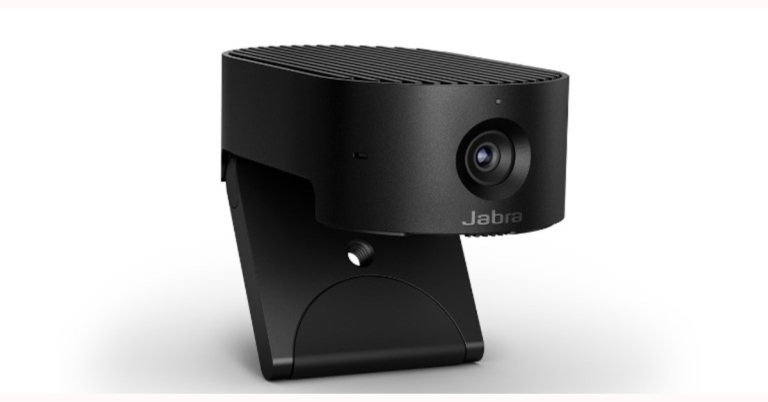
Danish audio equipment manufacturer Jabra has announced the launch of a portable video conferencing device in the market. The company has introduced PanaCast 20 premium video conferencing device which is a plug-and-play video conferencing solution that has been completely reimagined for today’s hybrid world.
PanaCast 20 premium video conferencing device can be clipped to any monitor. The tool can deliver a real-time 4K Ultra-HD image that is said to be sharp and crystal-clear, with virtually no latency, thanks to advanced processors, powerful onboard AI, and a premium 13-megapixel camera.
Intelligent Zoom from Jabra uses artificial intelligence to follow the user’s movements and adjust framing in real-time. This keeps the user in the middle of the frame while allowing for more natural movement, giving the impression that everyone is in the same room. The PanaCast 20 is capable of adapting to almost any lighting situation. Jabra uses Intelligent Lighting Optimization to analyse the environment and automatically adjust the image to improve video quality, even in low-light situations.
 In addition to this, Picture in Picture mode is also available on the PanaCast 20, which combines two real-time video streams into one with the help of Edge AI processing. It integrates the second stream with the main image in a separate window. Even if dual-stream devices are not supported, this mode works with any UC platform.
The video conferencing device by Jabra comes integrated with an AI processor that controls all of the features of the device, the intelligent personal camera is designed for data security. As a result, all actions are performed on the device itself, lowering the risk of a data breach significantly. Simultaneously, the PanaCast 20 has an integrated privacy cover that can be positioned over the camera lens, giving the user complete control over whether or not they want to be seen.
The Jabra PanaCast 20 is compatible with all major UC platforms, and users of the personal camera can pair it with other Jabra audio products like the Evolve2 75 headphones and the Speak 750. Throughout the product’s lifespan, regular software updates will be available, ensuring maximum ROI.
In terms of pricing Jabra PanaCast 20 will be available for purchase at a price tag of $299 that translates to Rs 22,572.
For the latest gadget and tech news, and gadget reviews, follow us on Twitter, Facebook and Instagram. For newest tech & gadget videos subscribe to our YouTube Channel. You can also stay up to date using the Gadget Bridge Android App. You can find the latest car and bike news here.
In addition to this, Picture in Picture mode is also available on the PanaCast 20, which combines two real-time video streams into one with the help of Edge AI processing. It integrates the second stream with the main image in a separate window. Even if dual-stream devices are not supported, this mode works with any UC platform.
The video conferencing device by Jabra comes integrated with an AI processor that controls all of the features of the device, the intelligent personal camera is designed for data security. As a result, all actions are performed on the device itself, lowering the risk of a data breach significantly. Simultaneously, the PanaCast 20 has an integrated privacy cover that can be positioned over the camera lens, giving the user complete control over whether or not they want to be seen.
The Jabra PanaCast 20 is compatible with all major UC platforms, and users of the personal camera can pair it with other Jabra audio products like the Evolve2 75 headphones and the Speak 750. Throughout the product’s lifespan, regular software updates will be available, ensuring maximum ROI.
In terms of pricing Jabra PanaCast 20 will be available for purchase at a price tag of $299 that translates to Rs 22,572.
For the latest gadget and tech news, and gadget reviews, follow us on Twitter, Facebook and Instagram. For newest tech & gadget videos subscribe to our YouTube Channel. You can also stay up to date using the Gadget Bridge Android App. You can find the latest car and bike news here.
 In addition to this, Picture in Picture mode is also available on the PanaCast 20, which combines two real-time video streams into one with the help of Edge AI processing. It integrates the second stream with the main image in a separate window. Even if dual-stream devices are not supported, this mode works with any UC platform.
The video conferencing device by Jabra comes integrated with an AI processor that controls all of the features of the device, the intelligent personal camera is designed for data security. As a result, all actions are performed on the device itself, lowering the risk of a data breach significantly. Simultaneously, the PanaCast 20 has an integrated privacy cover that can be positioned over the camera lens, giving the user complete control over whether or not they want to be seen.
The Jabra PanaCast 20 is compatible with all major UC platforms, and users of the personal camera can pair it with other Jabra audio products like the Evolve2 75 headphones and the Speak 750. Throughout the product’s lifespan, regular software updates will be available, ensuring maximum ROI.
In terms of pricing Jabra PanaCast 20 will be available for purchase at a price tag of $299 that translates to Rs 22,572.
For the latest gadget and tech news, and gadget reviews, follow us on Twitter, Facebook and Instagram. For newest tech & gadget videos subscribe to our YouTube Channel. You can also stay up to date using the Gadget Bridge Android App. You can find the latest car and bike news here.
In addition to this, Picture in Picture mode is also available on the PanaCast 20, which combines two real-time video streams into one with the help of Edge AI processing. It integrates the second stream with the main image in a separate window. Even if dual-stream devices are not supported, this mode works with any UC platform.
The video conferencing device by Jabra comes integrated with an AI processor that controls all of the features of the device, the intelligent personal camera is designed for data security. As a result, all actions are performed on the device itself, lowering the risk of a data breach significantly. Simultaneously, the PanaCast 20 has an integrated privacy cover that can be positioned over the camera lens, giving the user complete control over whether or not they want to be seen.
The Jabra PanaCast 20 is compatible with all major UC platforms, and users of the personal camera can pair it with other Jabra audio products like the Evolve2 75 headphones and the Speak 750. Throughout the product’s lifespan, regular software updates will be available, ensuring maximum ROI.
In terms of pricing Jabra PanaCast 20 will be available for purchase at a price tag of $299 that translates to Rs 22,572.
For the latest gadget and tech news, and gadget reviews, follow us on Twitter, Facebook and Instagram. For newest tech & gadget videos subscribe to our YouTube Channel. You can also stay up to date using the Gadget Bridge Android App. You can find the latest car and bike news here. Want to download videos from the internet? We have selected the 11 best tools for you

With the internet revolution in India, it became very easy and affordable for almost everyone to consume online videos, as much as someone wants to. But if you have a bad internet connection video watching experience can be very painful and unpleasant. So that you might want to have your favourite video song downloaded offline on your device.
We have used and made a list of 11 different websites and apps that you can use to download videos from the internet. Here they are:
To download a video, just download the HitPaw software from here. Follow the on-screen instructions to install the app on your computer and then you can download any video from the internet using it. They also have 24-hour tech support, in case you need it.
You can download it from here.
Or you can just copy and paste the video link. You can download videos from the internet’s all the famous platforms including YouTube, Facebook, Instagram, Daily motion, and many more, with the help of this tool.
 Downloading videos with Snaptube is again just copying the video link and pasting it in the app. The best part about this app is that users can download the videos in original upload quality. So, you can now also download 4K UHD videos with this.
The process of downloading the video is again the same, just copy the video link of the video that you want to download and simply paste it in the search box.
Read also: How to download Twitter videos on a PC or a smartphone?
For the latest gadget and tech news, and gadget reviews, follow us on Twitter, Facebook and Instagram. For newest tech & gadget videos subscribe to our YouTube Channel. You can also stay up to date using the Gadget Bridge Android App. You can find the latest car and bike news here.
Downloading videos with Snaptube is again just copying the video link and pasting it in the app. The best part about this app is that users can download the videos in original upload quality. So, you can now also download 4K UHD videos with this.
The process of downloading the video is again the same, just copy the video link of the video that you want to download and simply paste it in the search box.
Read also: How to download Twitter videos on a PC or a smartphone?
For the latest gadget and tech news, and gadget reviews, follow us on Twitter, Facebook and Instagram. For newest tech & gadget videos subscribe to our YouTube Channel. You can also stay up to date using the Gadget Bridge Android App. You can find the latest car and bike news here.
HitPaw Video Converter and downloader
HitPaw is one of the best video converters and downloader out there in the market. You can try it for free. You can download videos through this software from places like YouTube, Instagram, Facebook, TikTok and more. If you just want to extract audio or just the thumbnail out of the video, you can do that too. After Downloading you can convert the video to a format of your choice with the application as well. To download a video, just download the HitPaw software from here. Follow the on-screen instructions to install the app on your computer and then you can download any video from the internet using it. They also have 24-hour tech support, in case you need it.
You can download it from here.
To download a video, just download the HitPaw software from here. Follow the on-screen instructions to install the app on your computer and then you can download any video from the internet using it. They also have 24-hour tech support, in case you need it.
You can download it from here.
SaveFrom
This is a video downloader site with the help of which you can download YouTube videos in a few simple steps.- Open the video on YouTube that you want to download
- Look for the URL in your browser and simply add “ss” to it you will be redirected to a new window
- Select the resolution in which you want to download the video and that’s it.
 Or you can just copy and paste the video link. You can download videos from the internet’s all the famous platforms including YouTube, Facebook, Instagram, Daily motion, and many more, with the help of this tool.
Y2 Mate
It is yet another amazing tool through which you can download YouTube videos.Y2 Mate also allows users to download videos from the internet up to Full HD resolution. Using this tool is also very simple and you can download Youtube videos just by following these simple steps:

- Open Y2 Mate on the browser
- Copy the link of the YouTube video that you want to download
- Paste the link inside the box and select the video resolution, and hit download.
Snaptube– Another popular mobile application
Snaptube is one of the most popular and used apps among many users. It not only allows users to download the video but one can also stream video on it Downloading videos with Snaptube is again just copying the video link and pasting it in the app. The best part about this app is that users can download the videos in original upload quality. So, you can now also download 4K UHD videos with this.
YooDownload
YooDownload is another popular and simple to use tool on our list by which you can download videos from YouTube, Facebook, Twitter, Instagram, and SoundCloud is YooDownload. The process of downloading the video is again the same, just copy the video link of the video that you want to download and simply paste it in the search box.
 Read also: How to download Twitter videos on a PC or a smartphone?
Freemake Video Downloader: Another simple to use tool
It is another simple and easy to use tool, just copy and paste the link and you are good to go. You can also download the videos in 4K resolution using this tool. Freemake is available free for both Windows and Mac users. So, no matter what device you use you can download 4K videos on any device.
Twitter video downloader
Unlike other tools in the list, which can download video from all platforms, this tool as the name says download video from Twitter only. You just need to put the Twitter video URL in it and that’s it. You can download videos in mp3, mp4 and mp4 HD format with this tool. Twitter video downloader is again very simple to use and easy to understand tool.
Instagram downloader
Just like Twitter, Instagram has its downloader tool too. Instagram Downloader allows users to download videos from posts as well as stories. So, now if you see an interesting story that you want to share with your friends who are not on Instagram you can download the video and share it. Interface of this tool is quite simple
VideoGrabby
Is yet another internet instrument with which you can just copy and paste the link of the video that you want to download from the internet. Users can download videos from YouTube, Instagram, SoundCloud, and many more. The interface of VideoGrabby is quite straightforward and anyone can use this tool.
FastestTube: A very fast and simple video downloading tool
Out of all the tools mentioned this is the simplest tool to download YouTube videos. FastestTube is an extension that users can add to their browser which adds a download button on YouTube. So, if you think copying and pasting is too much work for you, this tool will help you out.
4K Video Downloader
This tool again uses copy and paste format to download the video and as the name says, it helps you to download videos in 4K quality. Just add the URL and you are ready to download your favourite video. Also, you can subscribe channels with this tool after you sign in.
For the latest gadget and tech news, and gadget reviews, follow us on Twitter, Facebook and Instagram. For newest tech & gadget videos subscribe to our YouTube Channel. You can also stay up to date using the Gadget Bridge Android App. You can find the latest car and bike news here. Telegram update: Brings new privacy tools to prevent others from saving content in groups and channels

Telegram has released updates that now include features protecting users’ content in groups and channels. The new Telegram update also brings improved privacy tools to prevent others from saving content in groups and channels, the ability to delete messages from specific dates and so on. In addition to this, the popular messaging service has also added iOS features like Live Text support and more.
Telegram’s new update will assist creators in protecting their Telegram content and ensuring that it is only available to their intended audience. Owners of Groups and Channels who want to keep their content exclusive to their members can disable message forwarding from their chat, which also disables screenshots and limits the ability to save media from posts.
Open the Group or Channel Info page > Group / Channel Type > Restrict Saving Content to restrict users’ ability to forward messages.
Telegram users have complete control over their online presence and can delete any message from a conversation at any time. You can now delete chat history from a specific day or date range in any one-on-one chat. To access the calendar, tap the date bar that appears as you scroll through the conversation, then select which days you want to clear.
Clearing history by date is currently only available in one-on-one chats, but messages can be set to delete themselves one day, week, or month after they are sent in any chat.
Telegram has now also added a new button for quickly linking a desktop device, as well as a setting to log out inactive devices after a certain amount of time.
To view more information about any device in the list, tap it. You can also toggle whether it can accept calls or new Secret Chats by tapping it.
An option to post anonymously in public groups on behalf of your channel has also been added. Tap the profile picture next to the message bar and choose one of your channels – the messages you send after that will appear with the name and photo of the channel instead of your personal account.
Instead of receiving codes via text message, some mobile devices will be given the option of receiving a login call from Telegram and then entering several digits of the phone number that called.
iOS-specific features
Text Recognition (Live Text) for photos in Telegram chats is enabled on iOS 13 and higher devices, allowing you to quickly select, copy, and search without touching your keyboard. This image recognition is handled entirely on your device in a secure manner.
iOS users can now use all text formatting options in media captions, including text links, to add just the right amount of emphasis to a message with a little bit of bold or italics. Note that this feature is already available on the Android platform.
Telegram has also redesigned contact info on iOS. Contacts, Groups and Channels have updated info pages with a new look in the style of iOS 15.
For the latest gadget and tech news, and gadget reviews, follow us on Twitter, Facebook and Instagram. For newest tech & gadget videos subscribe to our YouTube Channel. You can also stay up to date using the Gadget Bridge Android App. You can find the latest car and bike news here.
9 December 2021 Amazon Quiz today answers: Answer to win Rs 5,000 Amazon Pay Balance

9 December 2021 Amazon Quiz has gone live on its platform. The quiz timings are 12 AM to 11:59 PM. The Amazon App users can participate in the quiz daily and all they have to do is submit correct answers to the questions asked on the e-commerce platform. Today’s participants can get a chance to win Rs 5,000 Amazon Pay Balance.
Amazon brings a fresh questionnaire that contains 5 questions daily. These questions are based on current affairs and general knowledge. The quiz can be played from 8 AM to 11:59 PM and the contestants need to answer correctly to enter into a lucky draw.
Only one person is declared as a winner and the results will be announced at the end of every month. And to make sure that you give correct answers to all the 5 questions Gadget Bridge everyday updates all the answers to the Amazon Quiz. Do check out 9 December 2021 Amazon Quiz Answers to win Rs 5,000 Amazon pay Balance.
9 December 2021 Amazon Quiz Answers
Question 1: Which person in the news was the voice for the character of Simba, in the Hindi dubbing of Disney’s The Lion King (2019)?
Answer: Aryan KhanQuestion 2: Biological E-company that is receiving $50 million funding from US International Development Finance Corporation is based in which city?
Answer: HyderabadQuestion 3: Among the 11 sportspeople who have been recommended for the Dhyan Chand Khel Ratna 2021, there are how many Paralympians?
Answer: 5Question 4: This is the Sheikh Zayed Grand Mosque Center located in which city?
Answer: Abu DhabiQuestion 5: This is a famous site located in Amman, Jordan. It is called the Temple of ____. Fill in the blanks
Answer: Hercules For the latest gadget and tech news, and gadget reviews, follow us on Twitter, Facebook and Instagram. For newest tech & gadget videos subscribe to our YouTube Channel. You can also stay up to date using the Gadget Bridge Android App. You can find the latest car and bike news here.Daiwa 4K UHD Smart TV D43U1WOS and Daiwa 4K UHD Smart TV D55U1WOS launched
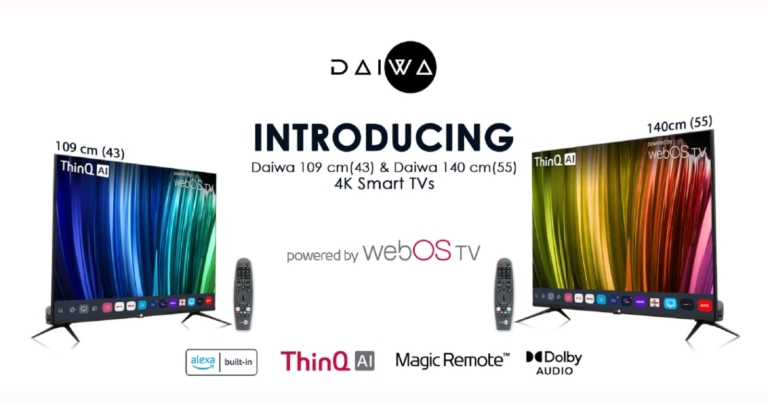
The Homegrown Indian Appliance brand Daiwa has announced the launch of its new range of 4K UHD televisions in the Indian market today. The company has introduced Daiwa 4K UHD Smart TV D43U1WOS and Daiwa 4K UHD Smart TV D55U1WOS. As the name suggests the former one will come in 43-inch size while the latter is 55-inch in size. Both the televisions are powered by webOS TV and include other features like ThinQ AI Voice assistance, an intuitive user interface supporting new technologies and a wide range of streaming services.
 There is support for a multi-HDR format that includes HDR10 and HLG (Hybrid Log-Gamma). HDR10 delivers detailed images with rich colours by optimising every single scene. According to the company, the dynamic scene-by-scene adjustment technology builds impressive HDR-quality visuals. While the HLG provides an extended colour gamut, with enhanced brightness and contrast. MEMC (Motion Estimation and Motion Compensation) supporting 4K at 60Hz ensures smooth blur-free visuals and lively transitions while watching sports or playing games. The TVs also support ALLM (Auto Low Latency Mode), which lowers input lag for a smooth gaming experience.
Both Daiwa 4K UHD Smart TVs are powered by ARM CA55 1.1 GHz Quad-core processor paired with RAM of 1.5 GB with an internal storage of 8 GB. The TVs support a content store with infotainment apps; that includes Netflix, Amazon Prime Video, YouTube, Disney+ Hotstar, Spotify and many more.
ThinQ AI lets you access voice assistance via the Magic Remote or the LG ThinQ App on your smartphone. It learns user patterns and builds suggestions and recommendations for music, movies, and other media based on those patterns. Smart TVs’ intelligent edit function organises apps and programmes based on previous choices and usage frequency. Alexa Built-in is now available on 4K Ultra HD Daiwa Smart TVs running webOS TV, allowing users to access all Alexa functions on the TV and control it with Alexa. Daiwa Smart TVs create the ultimate hands-free experience with voice command operations using ThinQ AI and Alexa Built-in.
The TVs have Dual-Band Wi-Fi, Miracast, and 2 Way Bluetooth 5.0 for high-speed connectivity. The TVs come with a Magic Remote that includes Universal Control of all connected devices (such as set-top boxes, soundbars, and so on) as well as Voice Command, dedicated Netflix and Amazon Prime Video hotkeys, and a unique click wheel.
For the latest gadget and tech news, and gadget reviews, follow us on Twitter, Facebook and Instagram. For newest tech & gadget videos subscribe to our YouTube Channel. You can also stay up to date using the Gadget Bridge Android App. You can find the latest car and bike news here.
There is support for a multi-HDR format that includes HDR10 and HLG (Hybrid Log-Gamma). HDR10 delivers detailed images with rich colours by optimising every single scene. According to the company, the dynamic scene-by-scene adjustment technology builds impressive HDR-quality visuals. While the HLG provides an extended colour gamut, with enhanced brightness and contrast. MEMC (Motion Estimation and Motion Compensation) supporting 4K at 60Hz ensures smooth blur-free visuals and lively transitions while watching sports or playing games. The TVs also support ALLM (Auto Low Latency Mode), which lowers input lag for a smooth gaming experience.
Both Daiwa 4K UHD Smart TVs are powered by ARM CA55 1.1 GHz Quad-core processor paired with RAM of 1.5 GB with an internal storage of 8 GB. The TVs support a content store with infotainment apps; that includes Netflix, Amazon Prime Video, YouTube, Disney+ Hotstar, Spotify and many more.
ThinQ AI lets you access voice assistance via the Magic Remote or the LG ThinQ App on your smartphone. It learns user patterns and builds suggestions and recommendations for music, movies, and other media based on those patterns. Smart TVs’ intelligent edit function organises apps and programmes based on previous choices and usage frequency. Alexa Built-in is now available on 4K Ultra HD Daiwa Smart TVs running webOS TV, allowing users to access all Alexa functions on the TV and control it with Alexa. Daiwa Smart TVs create the ultimate hands-free experience with voice command operations using ThinQ AI and Alexa Built-in.
The TVs have Dual-Band Wi-Fi, Miracast, and 2 Way Bluetooth 5.0 for high-speed connectivity. The TVs come with a Magic Remote that includes Universal Control of all connected devices (such as set-top boxes, soundbars, and so on) as well as Voice Command, dedicated Netflix and Amazon Prime Video hotkeys, and a unique click wheel.
For the latest gadget and tech news, and gadget reviews, follow us on Twitter, Facebook and Instagram. For newest tech & gadget videos subscribe to our YouTube Channel. You can also stay up to date using the Gadget Bridge Android App. You can find the latest car and bike news here.
Daiwa 4K UHD Smart TV D43U1WOS and Daiwa 4K UHD Smart TV D55U1WOS pricing
Daiwa 4K UHD Smart TV D43U1WOS has been launched in India at Rs 34,999. Whereas Daiwa 4K UHD Smart TV D55U1WOS bears a price tag of Rs 49,999. Both the smart televisions come with a 12 months complete warranty and additional 12 months Panel Warranty (T&C apply). These can be bought through the company’s official website and other online retailers in the country.Daiwa 4K UHD Smart TV D43U1WOS and Daiwa 4K UHD Smart TV D55U1WOS features
Both Daiwa 4K UHD Smart TV D43U1WOS and Daiwa 4K UHD Smart TV D55U1WOS feature a bezel-less display with a screen to body ratio of 96%. The screen supports 4K visuals with 1.07 billion colours, and the Cinema Mode is calibrated to D6500 Colour Temperature for users to experience a cinema-like viewing experience just the way the director intended. While the deep learning AI and Quantum Luminit+ Technology up-scales the low-resolution images to 4K to offer sharp and vivid visuals. The Smart TVs also support personalised picture and sound settings while viewing the content on OTT apps as per the user’s preference. There is support for a multi-HDR format that includes HDR10 and HLG (Hybrid Log-Gamma). HDR10 delivers detailed images with rich colours by optimising every single scene. According to the company, the dynamic scene-by-scene adjustment technology builds impressive HDR-quality visuals. While the HLG provides an extended colour gamut, with enhanced brightness and contrast. MEMC (Motion Estimation and Motion Compensation) supporting 4K at 60Hz ensures smooth blur-free visuals and lively transitions while watching sports or playing games. The TVs also support ALLM (Auto Low Latency Mode), which lowers input lag for a smooth gaming experience.
Both Daiwa 4K UHD Smart TVs are powered by ARM CA55 1.1 GHz Quad-core processor paired with RAM of 1.5 GB with an internal storage of 8 GB. The TVs support a content store with infotainment apps; that includes Netflix, Amazon Prime Video, YouTube, Disney+ Hotstar, Spotify and many more.
ThinQ AI lets you access voice assistance via the Magic Remote or the LG ThinQ App on your smartphone. It learns user patterns and builds suggestions and recommendations for music, movies, and other media based on those patterns. Smart TVs’ intelligent edit function organises apps and programmes based on previous choices and usage frequency. Alexa Built-in is now available on 4K Ultra HD Daiwa Smart TVs running webOS TV, allowing users to access all Alexa functions on the TV and control it with Alexa. Daiwa Smart TVs create the ultimate hands-free experience with voice command operations using ThinQ AI and Alexa Built-in.
The TVs have Dual-Band Wi-Fi, Miracast, and 2 Way Bluetooth 5.0 for high-speed connectivity. The TVs come with a Magic Remote that includes Universal Control of all connected devices (such as set-top boxes, soundbars, and so on) as well as Voice Command, dedicated Netflix and Amazon Prime Video hotkeys, and a unique click wheel.
For the latest gadget and tech news, and gadget reviews, follow us on Twitter, Facebook and Instagram. For newest tech & gadget videos subscribe to our YouTube Channel. You can also stay up to date using the Gadget Bridge Android App. You can find the latest car and bike news here.
There is support for a multi-HDR format that includes HDR10 and HLG (Hybrid Log-Gamma). HDR10 delivers detailed images with rich colours by optimising every single scene. According to the company, the dynamic scene-by-scene adjustment technology builds impressive HDR-quality visuals. While the HLG provides an extended colour gamut, with enhanced brightness and contrast. MEMC (Motion Estimation and Motion Compensation) supporting 4K at 60Hz ensures smooth blur-free visuals and lively transitions while watching sports or playing games. The TVs also support ALLM (Auto Low Latency Mode), which lowers input lag for a smooth gaming experience.
Both Daiwa 4K UHD Smart TVs are powered by ARM CA55 1.1 GHz Quad-core processor paired with RAM of 1.5 GB with an internal storage of 8 GB. The TVs support a content store with infotainment apps; that includes Netflix, Amazon Prime Video, YouTube, Disney+ Hotstar, Spotify and many more.
ThinQ AI lets you access voice assistance via the Magic Remote or the LG ThinQ App on your smartphone. It learns user patterns and builds suggestions and recommendations for music, movies, and other media based on those patterns. Smart TVs’ intelligent edit function organises apps and programmes based on previous choices and usage frequency. Alexa Built-in is now available on 4K Ultra HD Daiwa Smart TVs running webOS TV, allowing users to access all Alexa functions on the TV and control it with Alexa. Daiwa Smart TVs create the ultimate hands-free experience with voice command operations using ThinQ AI and Alexa Built-in.
The TVs have Dual-Band Wi-Fi, Miracast, and 2 Way Bluetooth 5.0 for high-speed connectivity. The TVs come with a Magic Remote that includes Universal Control of all connected devices (such as set-top boxes, soundbars, and so on) as well as Voice Command, dedicated Netflix and Amazon Prime Video hotkeys, and a unique click wheel.
For the latest gadget and tech news, and gadget reviews, follow us on Twitter, Facebook and Instagram. For newest tech & gadget videos subscribe to our YouTube Channel. You can also stay up to date using the Gadget Bridge Android App. You can find the latest car and bike news here.