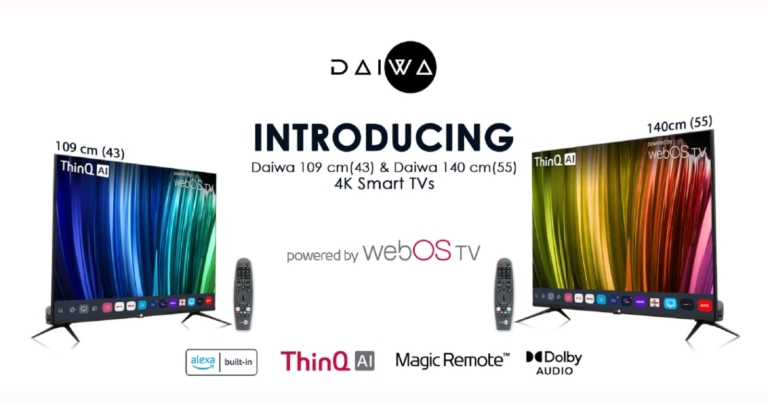
The Homegrown Indian Appliance brand Daiwa has announced the launch of its new range of 4K UHD televisions in the Indian market today. The company has introduced Daiwa 4K UHD Smart TV D43U1WOS and Daiwa 4K UHD Smart TV D55U1WOS. As the name suggests the former one will come in 43-inch size while the latter is 55-inch in size. Both the televisions are powered by webOS TV and include other features like ThinQ AI Voice assistance, an intuitive user interface supporting new technologies and a wide range of streaming services.
Daiwa 4K UHD Smart TV D43U1WOS and Daiwa 4K UHD Smart TV D55U1WOS pricing
Daiwa 4K UHD Smart TV D43U1WOS has been launched in India at Rs 34,999. Whereas Daiwa 4K UHD Smart TV D55U1WOS bears a price tag of Rs 49,999. Both the smart televisions come with a 12 months complete warranty and additional 12 months Panel Warranty (T&C apply). These can be bought through the company’s official website and other online retailers in the country.
Daiwa 4K UHD Smart TV D43U1WOS and Daiwa 4K UHD Smart TV D55U1WOS features
Both Daiwa 4K UHD Smart TV D43U1WOS and Daiwa 4K UHD Smart TV D55U1WOS feature a bezel-less display with a screen to body ratio of 96%. The screen supports 4K visuals with 1.07 billion colours, and the Cinema Mode is calibrated to D6500 Colour Temperature for users to experience a cinema-like viewing experience just the way the director intended. While the deep learning AI and Quantum Luminit+ Technology up-scales the low-resolution images to 4K to offer sharp and vivid visuals. The Smart TVs also support personalised picture and sound settings while viewing the content on OTT apps as per the user’s preference.There is support for a multi-HDR format that includes HDR10 and HLG (Hybrid Log-Gamma). HDR10 delivers detailed images with rich colours by optimising every single scene. According to the company, the dynamic scene-by-scene adjustment technology builds impressive HDR-quality visuals. While the HLG provides an extended colour gamut, with enhanced brightness and contrast. MEMC (Motion Estimation and Motion Compensation) supporting 4K at 60Hz ensures smooth blur-free visuals and lively transitions while watching sports or playing games. The TVs also support ALLM (Auto Low Latency Mode), which lowers input lag for a smooth gaming experience.Both Daiwa 4K UHD Smart TVs are powered by ARM CA55 1.1 GHz Quad-core processor paired with RAM of 1.5 GB with an internal storage of 8 GB. The TVs support a content store with infotainment apps; that includes Netflix, Amazon Prime Video, YouTube, Disney+ Hotstar, Spotify and many more.ThinQ AI lets you access voice assistance via the Magic Remote or the LG ThinQ App on your smartphone. It learns user patterns and builds suggestions and recommendations for music, movies, and other media based on those patterns. Smart TVs’ intelligent edit function organises apps and programmes based on previous choices and usage frequency. Alexa Built-in is now available on 4K Ultra HD Daiwa Smart TVs running webOS TV, allowing users to access all Alexa functions on the TV and control it with Alexa. Daiwa Smart TVs create the ultimate hands-free experience with voice command operations using ThinQ AI and Alexa Built-in.The TVs have Dual-Band Wi-Fi, Miracast, and 2 Way Bluetooth 5.0 for high-speed connectivity. The TVs come with a Magic Remote that includes Universal Control of all connected devices (such as set-top boxes, soundbars, and so on) as well as Voice Command, dedicated Netflix and Amazon Prime Video hotkeys, and a unique click wheel.
For the latest gadget and tech news, and gadget reviews, follow us on Twitter, Facebook and Instagram. For newest tech & gadget videos subscribe to our YouTube Channel. You can also stay up to date using the Gadget Bridge Android App. You can find the latest car and bike news here.
Thunder Tier One, Krafton’s latest to enter into the PC industry for the military-strategic gameplay enthusiasts. This shooter game is now available for purchase on Steam.Pawel Smolewski, Creative Director of Thunder Tier One, said: “Thunder Tier One started as a personal project, somewhere for myself and friends to play around and try out new ideas. The fact it has now developed into a full game for fans to enjoy is truly exciting. The small Thunder Tier One team has been fully focused on bringing the title to life. We are thankful for KRAFTON’s support in helping us to bring a new experience to this genre and its core audience. Now we’re looking forward to our community jumping into Salobia and experiencing the world we’ve created.”Players interested in military tactics and strategy will enjoy Thunder Tier One. Fans will lead an elite special operations team in the fictional Eastern European country of Salobia as they fight to stop a dangerous network of terrorist insurgents. A nine-mission story-driven campaign is included in the game, which can be played in four-player co-op, online PVP, or solo with AI teammates. Exfil, Advance & Secure, Domination, and Deathmatch are among the four-game modes available.Exfil is a 4v4 mode in which the attacking team must exfiltrate a package within a set amount of time while the defending team must prevent them from doing so by any means necessary. Advance & Secure, a 4v4 mode, pits teams against each other to fight for a number of sectors and claim victory. Domination is a PVE game in which up to four players compete against the clock to control a series of checkpoints, disarm explosives, and defend against counter-attacks. Last but not least, Deathmatch is a classic free-for-all with up to eight players.The game will also be accessible to modding in the near future, allowing fans to create their own characters, maps, missions, game modes, weapons and more.Thunder Tier One the military tactics and strategy game is now available for sale on Steam and will cost Rs 529 in India.
For the latest gadget and tech news, and gadget reviews, follow us on Twitter, Facebook and Instagram. For newest tech & gadget videos subscribe to our YouTube Channel. You can also stay up to date using the Gadget Bridge Android App. You can find the latest car and bike news here.
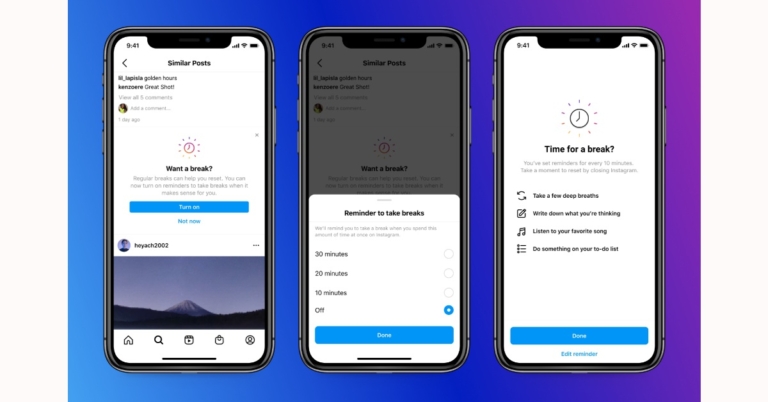
Users can now set reminders to take a break while scrolling through Instagram, starting today for a positive and purposeful Instagram experience. In addition to this, the photo-sharing app has also announced some new tools and features to keep young people even safer on Instagram.In order to improve the experience on Instagram for teens, parents and guardians. Instagram has developed new tools for parents and guardians and launched the ‘Take A Break’ feature.Instagram has planned to launch its first tools in March 2022 to help parents and guardians to help them guide and support their teens on the platform. They will be able to view how much time their teens spend on Instagram and set time limits. Teens will also get a new option to notify their parents if they report someone, giving their parents the opportunity to talk about it with them.It is also developing a new educational hub for parents and guardians that will include additional resources such as product tutorials and expert advice to help them talk to their kids about social media.Take a Break has also been launched to give people the tools they need to make better decisions about how they spend their time. Instagram will also ask users to take a break from Instagram if they’ve been scrolling for a certain amount of time, and we’ll suggest they set reminders to take more breaks in the future.The users will also be notified suggesting they turn these reminders on. Take A Break feature will be first rolled out in the US, UK, Ireland, Canada, New Zealand and Australia and will be made accessible to user regions by early next year.Instagram is also testing out a new feature that let teens manage their content when they grow up. They will be able to bulk delete content they’ve posted like photos and videos, as well as their previous likes and comments. This new experience will be available to everyone in January 2022. In addition to this, the ability for people to tag or mention teens who don’t follow them, or to include their content in Reels Remixes or Guides by default when they first join Instagram will also be switched off.
For the latest gadget and tech news, and gadget reviews, follow us on Twitter, Facebook and Instagram. For newest tech & gadget videos subscribe to our YouTube Channel. You can also stay up to date using the Gadget Bridge Android App. You can find the latest car and bike news here.
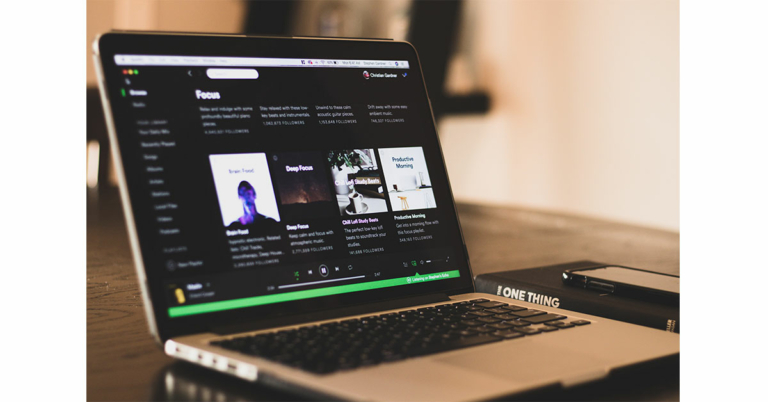
Spotify is one of the most popular audio streaming platforms around the world. It has everything, from a great collection of music to some very insightful and knowledgeable podcasts. Users can listen to them from any device, be it an Android, an iPhone or a Windows machine users can use Spotify on any device they want. Many users prefer to use the web player instead of installing an application on their device, but what if it stops working? Here are some quick remedies to fix Spotify Web Player if it stops working.Read Also:10 Best smartphones under Rs 10000 in India (February 2024)
Disable Extensions
Out of many reasons for the Spotify web player not working, interference by extensions is one of the most common ones. Certain extensions that you add to your browser create a problem and interfere with the working of the Spotify web player. If you have extensions installed on your browser then remove all of them and then add them back, one by one, to see which extension was creating the problem. After you remove the problematic extension try to play Spotify on your web browser. It should start working fine.Alternatively, if you don’t want to remove the extensions that you have installed on your browser then open the web player in a private window or in incognito mode and open the Spotify web player, it should work fine after this fast fix.If the problem still occurs try to play the web player on a different browser.Read also: Spotify gets integration with Google Assistant in India
Enable or allow to Play Protected Content
If Spotify on your web browser is giving the notification “Play of protected content not enabled,” then you have to enable it in order to fix the Spotify Web player. To enable play-protected content in Chrome browser you have to head over to the settings menu and follow the given steps:
Click on Privacy and security and open the site settings
Select Additional content settings and enable the Sites to ask to play the Protected Content option.
Alternatively, you can just search “chrome://settings/content” to directly jump to the setting, after that just enable “Allow sites to Play Protected Content” and you are good to go.Read also: Spotify beats Apple Music to reach 100 million paid subscribers
Change the audio playing device
Spotify is one of the most popular audio streaming platforms across the world and that’s because users can have access to multiple devices and connect them by logging from one account. However, there are times when this can be a bit confusing as to which device is playing the audio. So, if Spotify Web Player is not playing audio then the problem might be that you have accidentally switched the device and now the audio is being played on another device.You can switch the device by clicking on the PC icon sitting close to the speaker icon.From there you can select the device from which you want to listen to the songs, and that’s how you can fix this issue. If you can not switch the device then simply sign out from everywhere else.
Clear browsing data
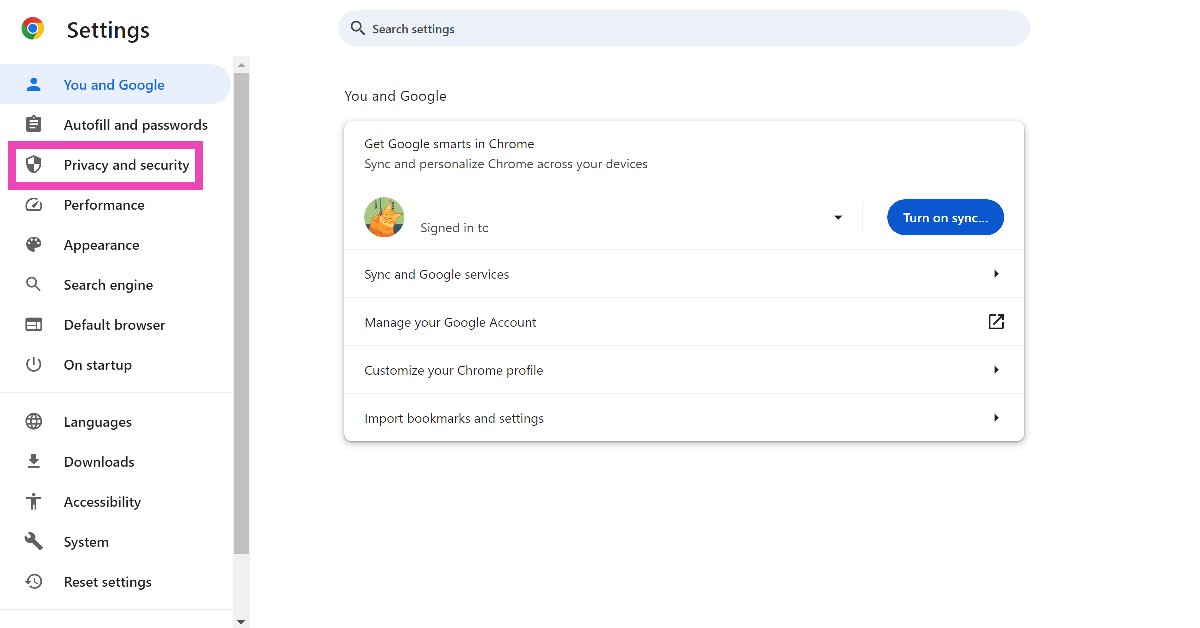
Step 1: Go to Settings and switch to the Privacy and security tab.
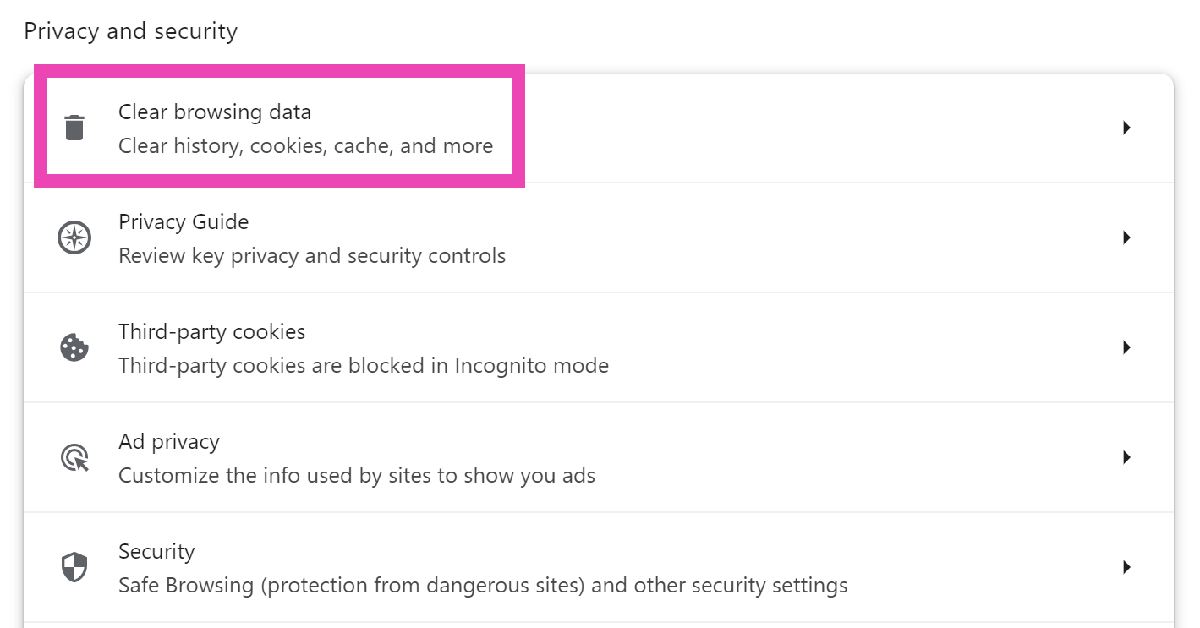
Step 2: Click on Clear browsing data.
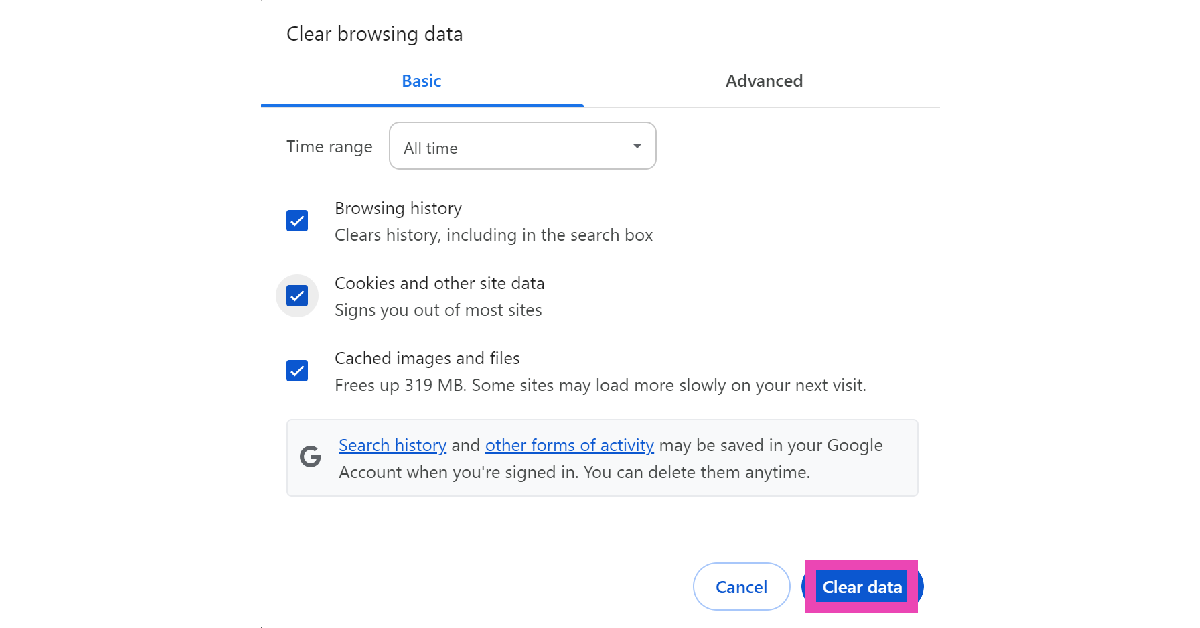
Step 3: Select all three options and hit Clear data.
Update your web browser
If you’re using a very old version of your web browser, it may no longer be compatible with Spotify’s web player. In Google Chrome, if you see a red arrow where the ellipses should be, click on it and hit ‘Update’. Other web browsers have the ‘update’ option in the ‘About’ section of the settings. On your smartphone, go to Google Play Store, open the web browser’s page, and hit ‘Update’.
Restore your web browser to its original settings
Sometimes, customised settings can meddle with the functioning of Spotify’s web player. If you don’t know which setting is causing the issue, it is a good idea to reset the web browser to its factory default settings. Go to the ‘Reset Settings’ tab in Google Chrome’s settings and select ‘Restore settings to their original defaults’.
Frequently Asked Questions (FAQs)
How do I fix Spotify’s web player if it isn’t working?
Make sure the ‘Play Protected Content’ setting is turned on in your web browser. Disable the extensions that may be interfering with the web player’s functioning. Clearing the cache and browsing data is also a good idea.
How do I log out of Spotify on all devices at once?
Go to the Spotify web player, access your account page, and select ‘Sign out everywhere’. This will ensure that other devices don’t pause the media playback at random times.
We are sure the above tips will help you fix the Spotify web player problem. Try them on your web browser and go back to rocking your jams! If you know of any additional tips, let us know in the comments section below.
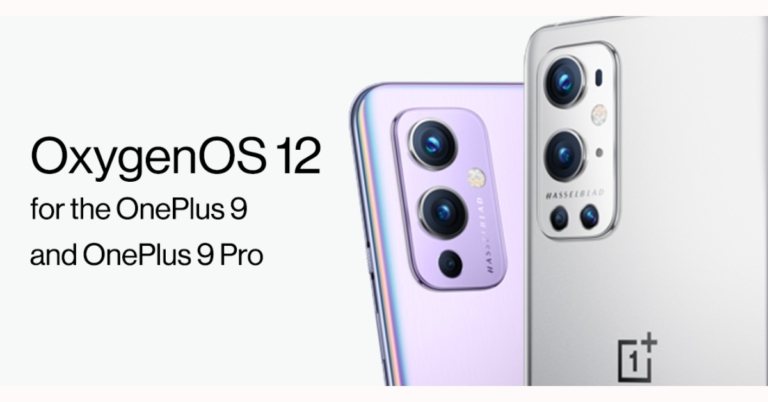
Google and Samsung recently rolled out a stable Android 12 update for their devices. Now OnePlus has pushed out OxygenOS 12 update to its flagship devices. OnePlus 9 and OnePlus 9 Pro are the first to have started receiving the stable Android 12 update, which brings some of the system improvement and added features.The new OxygenOS 12 update comes via an over-the-air (OTA) update. The OTA update is also available to users in India and is 4.04GB in size. This OTA will be incremental, as usual. A small percentage of users will receive the OTA, and we’ll begin a wider rollout in a few days.OxygenOS 12 comes with a slew of new features, including a new Shelf with new cards and built-in OnePlus Scout, an improved Work-Life Balance mode that is now available to all of our users, and a new Canvas AOD experience that opens the door to customization, in addition to the improvements Android 12 brings – such as improved privacy features. The changelog below contains a more detailed list of the new features.According to the changelog, the OnePlus 9 and OnePlus 9 Pro will now get improved textures on desktop icons, thanks to a design inspired by new materials and combining lights and layers.Dark mode now has three levels that can be adjusted, allowing for a more personalised and comfortable user experience. Additional Card style options have been added, making data content more visually appealing and easier to read. Earphone Control Card with Bluetooth earphone one-click adjustment has been added. OnePlus Scout is now available in Shelf, allowing you to search multiple contents on your phones, such as Apps, Settings, Media Data, and more. The OnePlus Watch Card was recently added to the Shelf, allowing you to quickly check your health stats.In addition to this with the rollout of OxygenOS 12 update, all users now have access to the Work-Life Balance feature, which allows you to switch between Work and Life mode with ease using quick settings.WLB 2.0 now allows for automatic Work/Life mode switching based on specific locations, Wi-Fi networks, and times, as well as personalised App notification profiles based on personalization.With a two-finger pinch gesture, Gallery now allows you to switch between different layouts, intelligently recognising the best-quality photos and cropping the thumbnail based on the content, making the gallery layout more pleasing.Moreover, Canvas AOD adds a new line and colour styles to your lock screen for a more personalised experience with inspiring visuals.Multiple brushes and strokes have been added, as well as colour adjustment support.Improved face recognition and optimization of the software algorithm to better identify the features and skin colour of various figures. While announcing the OxygenOS 12 update for India the firm said, “We are excited to announce the roll-out of OxygenOS 12 for our user community.Over the years, the India R&D team have made key contributions to several innovative OxygenOS features such as OnePlus Scout, OnePlus Work-Life Balance, and the OnePlus Shelf. Right from research and conceptualization to development and testing, the India R&D team has helmed the roll-out of these features to be enjoyed by OnePlus users across the world.”
For the latest gadget and tech news, and gadget reviews, follow us on Twitter, Facebook and Instagram. For newest tech & gadget videos subscribe to our YouTube Channel. You can also stay up to date using the Gadget Bridge Android App. You can find the latest car and bike news here.
Google is now rolling out the December Android 12 Pixel features to the new Pixel 6 and Pixel 6 Pro devices. The fresh update also brings other useful features like digital car key support, a new Quick Tap to Snap feature and extra improvements. These features are also being extended to older Pixel phones.Google via a Blog Post made the announcement of the new update rollout. The latest functionalities will be released over the next few weeks, starting today with relevant updates coming to Pixel 3a through Pixel 5a (5G) devices – see g.co/pixel/updates for details. Pixel 6 and Pixel 6 Pro devices will begin receiving their updates next week.When you use Quick Tap, you can already customise the actions your Pixel performs, from taking a screenshot to playing music. You can access Snapchat directly from your lock screen with Quick Tap to Snap, making Pixel the fastest phone to make a Snap. All Pixel 4a with 5G or newer Pixel phones can use Quick Tap to Snap. Plus, starting this month, you’ll be able to add a new Pixel-only Lens to your Snaps: Pixel Face.For the Pixel 6 and Pixel 6 Pro, Google has teamed up with BMW to enable digital car keys. You can now unlock and lock your car by tapping your phone on the door handle, and you can start your car by placing your Pixel on the interior key reader and pressing the engine start button on select 2020-2022 BMW models in certain countries.The Pixel 6 Pro now has ultra-wideband capability. This technology enhances Nearby Share, allowing you to send files, videos, map locations, and more to other ultra-wideband devices in close proximity in a quick and secure manner.In addition to this, the Conversation mode, a beta version of the Sound Amplifier app’s early-stage accessibility feature, is now available on Pixel. This feature employs on-device machine learning to aid anyone in hearing conversations in noisy environments by focusing on their conversation partner while filtering out background noise. While Google Research continues to work on conversation mode, you can get a sneak peek and help make it better for everyone by volunteering to be an early tester.Pixel’s Now Playing experience has been updated to make it easier for you to find your next favourite song. Automatic recognition in Now Playing is done entirely on-device, as it always is. Turn on the new search button and tap to let Pixel find a song for you if Now Playing hasn’t automatically identified one playing nearby (available on Pixel 4 or newer Pixel phones). If you really like it, you can save it as a favourite by pressing the music note icon next to the track’s recognition on your lock screen. December Android 12 Pixel update also brings improved bass-level control for the Pixel Buds A-Series. With any Android 6.0+ device, you can now open the Pixel Buds app and use a slider to adjust the bass from -1 to +4, giving you twice the bass range you currently have.In celebration of International Day of Persons with Disabilities, the tech giant has collaborated with Dana Kearly, a disabled multidisciplinary artist from Vancouver B.C., to create three beautiful new wallpapers for the Curated Culture collection.Last but not least December Android 12 Pixel features also include Car crash detection which is now supported in Taiwan, Italy and France, in addition to Spain, Ireland, Japan, the U.K., Australia, Singapore and the U.S. Newest and the older Pixel devices can help detect if you’ve been in a serious car accident when car crash detection is turned on in the Personal Safety app. If your phone detects a crash, it will contact you to see if you’re okay. Pixel can share your location and other relevant details with emergency responders if there is no response. (This feature is dependent on network connectivity and other factors, and it may not be reliable or available in all areas for emergency communications.)In addition to this, the Recorder app now supports new languages for transcription. On Pixel 3 and newer Pixel phones, these include Japanese, French, and German.
For the latest gadget and tech news, and gadget reviews, follow us on Twitter, Facebook and Instagram. For newest tech & gadget videos subscribe to our YouTube Channel. You can also stay up to date using the Gadget Bridge Android App. You can find the latest car and bike news here.
Humans are social animals but with the era of technology it is not necessary to move out to make new friends, one can just relax in their homes and talk to people all around the world. That is the reason, why social media is so popular. So we thought of giving you the best alternative to Omegle.Omegle is a very popular platform to have conversations with strangers all around the world using a video format, but there are other good options also if you really want to talk to people all around the world, who you do not know.Here is a list of the 5 best Omegle alternatives:
Emerald chat
Emerald chat can be a great option if you want to make friends across borders. You need not have to be tech-savvy or a geek to understand the clean and easy interface of Emerald chat. Once you click on the start button it starts connecting you to other users. It has some interesting features like rating your partner, and a history feature so that if you had a good conversation with someone you can always call them back.With Emerald chat, users can connect through 1 on 1 text chat, videos chats, and group chats. Also, it offers a bot-free experience.
You can find Emerald chat here. Read also: Now you can talk with up to 10 people at the same time using Jio
Chatroulette – One of the best alternative to omegle
This is by far the best platform to talk to strangers. When you start Chatroulette, it gives you 30 points/currency and only if you have the currency left you can talk more.If someone accepts you then you add 5 points/currency to your amount and when you search for a new partner 5 points get deducted from your amount. So, if your balance is less than 5 you won’t be able to chat for the next 60 seconds. Hence, offers the cleanest calling experience.Also, a bonus fact, this site was created by a 17 old year teen.You can find Chatroullete here.
Paltalk
It is again an amazing platform to make new friends, Paltalk offers an interface that most of us are already familiar with. It looks a lot like facebook’s messenger app. The best part of the platform is that it has over 5000+ public chat rooms so you will never feel alone and can always get into a group conversation. It also offers users to send stickers, to break the ice. Also, its application is available for Android and iOS.Download from here. Read also: Are you a video creator? Here are 7 YouTube alternatives you can
Chatspin
Chatspin offers its users two ways to connect with other people. One is through text and the other one is through video calls. It is a great platform if you want to learn a new language, that’s the reason it is gaining popularity in recent times. It allows users to communicate in 12 different languages. So, if you want to learn a language that is supported by Chatspin you can talk to a native speaker of that language. You can also use location filters in this.You can find Chatspin here.
Chatliv – Another best alternative to omegle
Is also a very good alternative to Omegle and that’s because unlike Omegle, which has tons of bots in it this offers a clean bot-free experience so you won’t share your screen with a bot using this platform. It is also a very simple to use platform so anyone can use it by just spending a few minutes with it. Also, to use this platform you don’t have to log in. Chatliv also offers different chat rooms so you can have a group conversation with anyone around the globe.You can find Chatliv here. For the latest gadget and tech news, and gadget reviews, follow us on Twitter, Facebook and Instagram. For newest tech & gadget videos subscribe to our YouTube Channel. You can also stay up to date using the Gadget Bridge Android App. You can find the latest car and bike news here.
The popular Amazon Quiz is now live on the Amazon app. The 8 December 2021 Amazon Quiz gives a chance to win Rs 25,000 Amazon Pay Balance by answering all the questions correctly. The quiz can be played every day from 12 AM to 11:59. Only app users are eligible to participate in the Quiz as it is not accessible on the web platform.The Amazon Quiz brings a fresh set of questions for its customers that contains five easy questions. The questionnaire consists of five questions related to general knowledge and current affairs. The participants need to answer all the questions correctly and their names will be selected for a lucky draw. The daily quiz brings an opportunity for the customers to win exciting prizes. They can win Amazon Pay Balance ranging from Rs 1,000 to Rs 50,000. The participants need to answer all the questions correctly and their names will be selected for a lucky draw. The winner will be announced at the end of the month. Check Out 8 December 2021 Amazon Quiz Answers.
8 December 2021 Amazon Quiz Answers
Question 1: NASA’s Juno probe recently offered the first 3D view of the atmosphere of which planet?
Answer: Jupiter
Question 2: As per the new retention rules, ahead of the auction for the 2022 IPL, each franchise would be allowed to retain a maximum of how many players?
Answer: 4
Question 3: Which famous singer has sung the theme song for the new James Bond movie No Time to Die?
Answer: Billie Eilish
Question 4: This is the flag of which nation?
Answer: Morocco
Question 5: This is a doll of which Disney character?
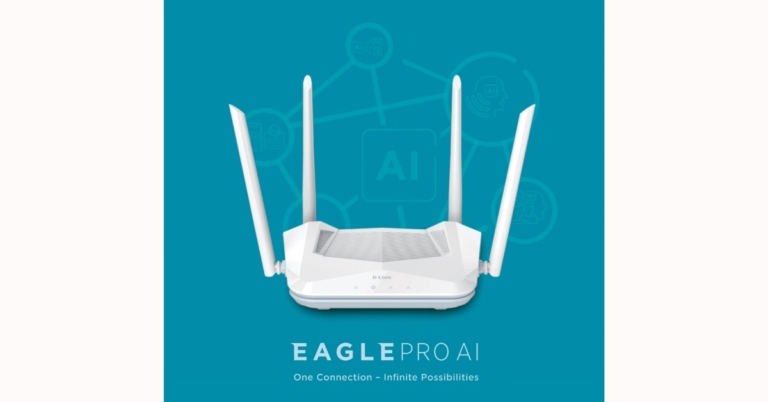
D-Link has added to its networking equipment lineup by introducing a new line of Wi-Fi routers. The company has launched D-Link R15 EAGLE PRO AI AX1500 Smart Router in India that is an AI-enabled Router for a better Wi-Fi experience.
D-Link R15 EAGLE PRO AI AX1500 Smart Router price and availability
The D-Link R15 EAGLE PRO AI AX1500 Smart Router has been launched in India with a price tag of Rs 3,299. The new AI-enabled router can be bought through the e-commerce website Amazon in the country.
D-Link R15 EAGLE PRO AI AX1500 Smart Router specifications
The all-new R15 EAGLE PRO AI Router combines cutting-edge Wi-Fi 6 technology with artificial intelligence to provide unrivalled Wi-Fi coverage and speed. The D Link router series includes AI-enhanced capabilities for optimising Wi-Fi, ensuring peak network performance throughout, and allowing users to enjoy the convenience of an AI-powered Wi-Fi network.In addition to this the D-Link R15 EAGLE PRO AI AX1500 Smart Router offers a host of AI-enabled features. The built-in AI Wi-Fi Optimizer continuously scans for the least-interfering Wi-Fi channel to ensure the best possible connection. Simultaneously, the AI Traffic Optimizer prioritises the most important internet usage for the best possible online experience and stability. While the AI Parental Control gives parents complete control over their children’s online activities, including internet pause/start, website filtering, managing multiple profiles, internet access scheduling, and bedtime schedule, among other things.The AI Mesh Optimizer is also included in this router, which strengthens the connection between mesh nodes to provide seamless and reliable Wi-Fi. With the integrated AI Assistant, managing Wi-Fi is now easier than ever before. It continuously monitors data usage and reviews the network, sending recommendations and weekly reports to the EAGLE PRO AI app.Also, the R15 EAGLE PRO AI AX1500 Smart Router provides dual-band wireless speeds of up to 1,500 Mbps for lightning-fast wireless coverage with increased range and reliability. This router, which is backed by the EAGLE PRO AI App, offers an intelligent one-touch setup for seamless connectivity as well as a slew of AI features.
For the latest gadget and tech news, and gadget reviews, follow us on Twitter, Facebook and Instagram. For newest tech & gadget videos subscribe to our YouTube Channel. You can also stay up to date using the Gadget Bridge Android App. You can find the latest car and bike news here.
The Taiwanese computer manufacturing giant, Acer, today expanded its Predator lineup with the launch of a new gaming laptop in the Indian market. The company has introduced the Acer Predator Helios 500 that packs a 4K 120 Hz Mini LED display. Under the hood, there is an 11th Gen Intel Core i9 processor and NVIDIA GeForce RTX 3080 Laptop GPU. It also features custom-engineered 5th Gen AeroBlade 3D Fan Technology with Vortex flow and Powergem advanced cooling.
Acer Predator Helios 500 price in India and availability
The Acer Predator Helios 500 has been launched in India with a starting price of Rs 3,37,999. The gaming laptop can be purchased through the Acer online Store, Acer Exclusive stores and other authorised retail stores in the country.
Acer Predator Helios 500 (PH517-52)It has a 17.3-inch 4K Mini LED 120 Hz display, which is powered by AUO AmLED technology and supports Full-array local dimming for the best colour saturation and contrast. It offers 512 backlight zones, making it possible to reach VESA’s DisplayHDR 1000 specification. It has an overclockable 11th Gen Intel Core i9 processor and NVIDIA GeForce RTX 3080 Laptop GPU with 16GB VRAM and is designed to delight gamers by bringing desktop-like gameplay to users on the go. The laptop also supports PCIe NVMe SSDs in RAID 0 and one SATA HDD.The Acer Predator Helios 500 also includes Acer PowerGem, a custom-engineered technology made from a metal-alloy polymer that sits on top of the CPU and serves to distribute the heat it generates throughout the device. Acer’s Vortex Flow technology uses two fans, one of which is a 5th Generation AeroBlade 3D Fan, to direct airflow to critical components and boost performance during long gaming sessions.Users can activate the Predator Pulsar and customise the light cluster with PredatorSense to customise their keyboard with per-key RGB backlighting. Acer’s patented MagForce keys, which both feature a MagTek mechanical switch to turn the keypress function into a joystick mechanism, can be added to the WASD key assembly. This allows gamers to gradually increase key pressure for precise control of the character’s / car’s speed – from the initial (0.8 mm) to full speed at 100 percent (3 / 3.1 mm) actuation.The Helios 500 has multiple ports to give players even more control, including one HDMI 2.1, one mini-DP1.4, two USB Type-C Thunderbolt 4 ports, three USB 3.2 Gen2 ports with offline charging, and one RJ45 port. Better connectivity and lower latency are provided by the Intel Killer E3100 Ethernet Controller, Intel Killer Wi-Fi 6 AX1650, and the Killer Intelligence Center.
For the latest gadget and tech news, and gadget reviews, follow us on Twitter, Facebook and Instagram. For newest tech & gadget videos subscribe to our YouTube Channel. You can also stay up to date using the Gadget Bridge Android App. You can find the latest car and bike news here.


 There is support for a multi-HDR format that includes HDR10 and HLG (Hybrid Log-Gamma). HDR10 delivers detailed images with rich colours by optimising every single scene. According to the company, the dynamic scene-by-scene adjustment technology builds impressive HDR-quality visuals. While the HLG provides an extended colour gamut, with enhanced brightness and contrast. MEMC (Motion Estimation and Motion Compensation) supporting 4K at 60Hz ensures smooth blur-free visuals and lively transitions while watching sports or playing games. The TVs also support ALLM (Auto Low Latency Mode), which lowers input lag for a smooth gaming experience.
Both Daiwa 4K UHD Smart TVs are powered by ARM CA55 1.1 GHz Quad-core processor paired with RAM of 1.5 GB with an internal storage of 8 GB. The TVs support a content store with infotainment apps; that includes Netflix, Amazon Prime Video, YouTube, Disney+ Hotstar, Spotify and many more.
ThinQ AI lets you access voice assistance via the Magic Remote or the LG ThinQ App on your smartphone. It learns user patterns and builds suggestions and recommendations for music, movies, and other media based on those patterns. Smart TVs’ intelligent edit function organises apps and programmes based on previous choices and usage frequency. Alexa Built-in is now available on 4K Ultra HD Daiwa Smart TVs running webOS TV, allowing users to access all Alexa functions on the TV and control it with Alexa. Daiwa Smart TVs create the ultimate hands-free experience with voice command operations using ThinQ AI and Alexa Built-in.
The TVs have Dual-Band Wi-Fi, Miracast, and 2 Way Bluetooth 5.0 for high-speed connectivity. The TVs come with a Magic Remote that includes Universal Control of all connected devices (such as set-top boxes, soundbars, and so on) as well as Voice Command, dedicated Netflix and Amazon Prime Video hotkeys, and a unique click wheel.
For the latest gadget and tech news, and gadget reviews, follow us on Twitter, Facebook and Instagram. For newest tech & gadget videos subscribe to our YouTube Channel. You can also stay up to date using the Gadget Bridge Android App. You can find the latest car and bike news here.
There is support for a multi-HDR format that includes HDR10 and HLG (Hybrid Log-Gamma). HDR10 delivers detailed images with rich colours by optimising every single scene. According to the company, the dynamic scene-by-scene adjustment technology builds impressive HDR-quality visuals. While the HLG provides an extended colour gamut, with enhanced brightness and contrast. MEMC (Motion Estimation and Motion Compensation) supporting 4K at 60Hz ensures smooth blur-free visuals and lively transitions while watching sports or playing games. The TVs also support ALLM (Auto Low Latency Mode), which lowers input lag for a smooth gaming experience.
Both Daiwa 4K UHD Smart TVs are powered by ARM CA55 1.1 GHz Quad-core processor paired with RAM of 1.5 GB with an internal storage of 8 GB. The TVs support a content store with infotainment apps; that includes Netflix, Amazon Prime Video, YouTube, Disney+ Hotstar, Spotify and many more.
ThinQ AI lets you access voice assistance via the Magic Remote or the LG ThinQ App on your smartphone. It learns user patterns and builds suggestions and recommendations for music, movies, and other media based on those patterns. Smart TVs’ intelligent edit function organises apps and programmes based on previous choices and usage frequency. Alexa Built-in is now available on 4K Ultra HD Daiwa Smart TVs running webOS TV, allowing users to access all Alexa functions on the TV and control it with Alexa. Daiwa Smart TVs create the ultimate hands-free experience with voice command operations using ThinQ AI and Alexa Built-in.
The TVs have Dual-Band Wi-Fi, Miracast, and 2 Way Bluetooth 5.0 for high-speed connectivity. The TVs come with a Magic Remote that includes Universal Control of all connected devices (such as set-top boxes, soundbars, and so on) as well as Voice Command, dedicated Netflix and Amazon Prime Video hotkeys, and a unique click wheel.
For the latest gadget and tech news, and gadget reviews, follow us on Twitter, Facebook and Instagram. For newest tech & gadget videos subscribe to our YouTube Channel. You can also stay up to date using the Gadget Bridge Android App. You can find the latest car and bike news here. 




 Step 2: Click on Clear browsing data.
 Step 3: Select all three options and hit Clear data.




 It has some interesting features like rating your partner, and a history feature so that if you had a good conversation with someone you can always call them back.
 If someone accepts you then you add 5 points/currency to your amount and when you search for a new partner 5 points get deducted from your amount. So, if your balance is less than 5 you won’t be able to chat for the next 60 seconds. Hence, offers the cleanest calling experience.
 Also, a bonus fact, this site was created by a 17 old year teen.


 It is also a very simple to use platform so anyone can use it by just spending a few minutes with it. Also, to use this platform you don’t have to log in. Chatliv also offers different chat rooms so you can have a group conversation with anyone around the globe.