

21 October 2021 Amazon Quiz today answers: Answer to win Rs 40,000 Amazon Pay Balance

Amazon Quiz for October 21 is now live on the Amazon app. The user can now participate in today’s quiz to win Rs 40,000 Amazon Pay Balance. The quiz will contain 5 questions and you have to answer them correctly.
Amazon every day brings a fresh questionnaire to which the contestants have to answer correctly to enter into a lucky draw. The quiz can be played daily from 12 AM to 11:59 PM. By participating in the daily quiz the users can win Amazon Pay Balance from Rs 1,000 to up to Rs 50,000.
There will be a total of five questions and all the questions will be based on general questions and current events. Amazon will announce only one winner via a lucky draw. While the results are announced at the end of the month.
Every day we update all the Amazon Quiz questions with their correct answers on Gadget Bridge. Check out 21 October 2021 Amazon Quiz today answers to win Rs 40,000 Amazon Pay Balance.
Samsung Galaxy Z Flip 3 Bespoke Edition and Watch 4 Bespoke Edition launched: Here is what’s new this time
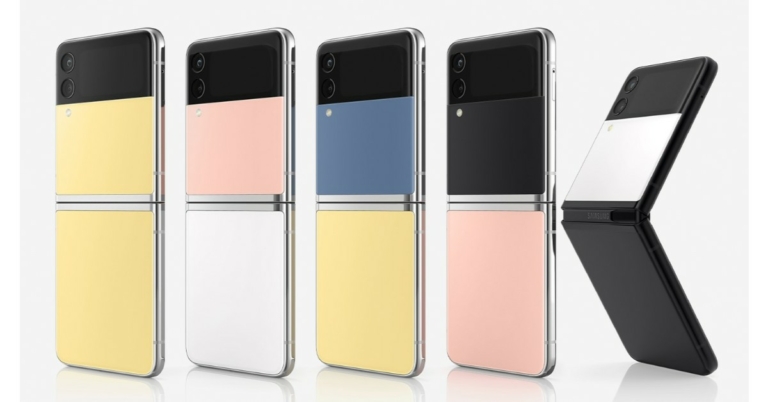
During its August Galaxy Unpacked event, Samsung introduced its clamshell smartphone Samsung Galaxy Z Flip 3. But at today’s Galaxy Unpacked Part 2 the South Korean firm launched a new Bespoke edition of the foldable smartphone.
Yes, the Samsung Galaxy Z Flip 3 Bespoke edition has been unveiled. The device is made to order and can be easily customised according to your preference that will reflect your personality. Not only this the company has expanded the Bespoke edition to Galaxy Watch 4 too. Read on to know the details.
 It will also provide a 360-degree preview of combinations and ways to download an image of the selections for easily shareable social content. Once the order is placed, devices are tailor-made and arrive in special edition packaging with a Bespoke Edition wallpaper and Cover Screen that matches the device’s colours for a fully coordinated look.
Not only this the company will also provide a year of Samsung Care+ protection — users’ phones will be covered from accidental damage, including screen replacement, water damage and back cover replacement. The Galaxy Z Flip 3 Bespoke Edition and Galaxy Watch 4 Bespoke Edition will be available in Korea, the US, the UK, Germany, France, Canada and Australia starting today.
It will also provide a 360-degree preview of combinations and ways to download an image of the selections for easily shareable social content. Once the order is placed, devices are tailor-made and arrive in special edition packaging with a Bespoke Edition wallpaper and Cover Screen that matches the device’s colours for a fully coordinated look.
Not only this the company will also provide a year of Samsung Care+ protection — users’ phones will be covered from accidental damage, including screen replacement, water damage and back cover replacement. The Galaxy Z Flip 3 Bespoke Edition and Galaxy Watch 4 Bespoke Edition will be available in Korea, the US, the UK, Germany, France, Canada and Australia starting today.
 According to the company it has tested thousands of colour options and identified hues and that would perfectly complement each other. It will provide a palette of 49 possible colour combinations for Galaxy Z Flip 3 Bespoke Edition allowing users to mix and match to create their own unique combination by choosing phone frame options of Black or Silver, and front and back colours of Blue, Yellow, Pink, White or Black.
Interestingly so that you don’t get bored of the look of your device Samsung will also offer Bespoke Upgrade Care exclusively for Galaxy Z Flip 3 Bespoke Edition users so they can change their device colour whenever they want to. All they need to do is just register their foldable phone in order to get the device panel replaced with new colours at Samsung.com.
Similarly, you can now also customise the Galaxy Watch4 series at the Galaxy Watch 4 Bespoke Studio, by mixing and matching from a variety of Galaxy Watch 4 series colours, sizes and strap styles.
For the latest gadget and tech news, and gadget reviews, follow us on Twitter, Facebook and Instagram. For newest tech & gadget videos subscribe to our YouTube Channel. You can also stay up to date using the Gadget Bridge Android App. You can find the latest car and bike news here.
According to the company it has tested thousands of colour options and identified hues and that would perfectly complement each other. It will provide a palette of 49 possible colour combinations for Galaxy Z Flip 3 Bespoke Edition allowing users to mix and match to create their own unique combination by choosing phone frame options of Black or Silver, and front and back colours of Blue, Yellow, Pink, White or Black.
Interestingly so that you don’t get bored of the look of your device Samsung will also offer Bespoke Upgrade Care exclusively for Galaxy Z Flip 3 Bespoke Edition users so they can change their device colour whenever they want to. All they need to do is just register their foldable phone in order to get the device panel replaced with new colours at Samsung.com.
Similarly, you can now also customise the Galaxy Watch4 series at the Galaxy Watch 4 Bespoke Studio, by mixing and matching from a variety of Galaxy Watch 4 series colours, sizes and strap styles.
For the latest gadget and tech news, and gadget reviews, follow us on Twitter, Facebook and Instagram. For newest tech & gadget videos subscribe to our YouTube Channel. You can also stay up to date using the Gadget Bridge Android App. You can find the latest car and bike news here.
Samsung Galaxy Z Flip Bespoke Edition and Watch 4 Bespoke Edition availability
The company has not revealed the pricing that will depend on the customisation colour you select to be designed. According to the company, consumers will be able to redesign and check out their Galaxy Z Flip 3 and Watch 4 Bespoke Edition at Bespoke Studio exclusively on Samsung.com. Bespoke Studio is a dedicated platform that will help in customising your personal devices. It will also provide a 360-degree preview of combinations and ways to download an image of the selections for easily shareable social content. Once the order is placed, devices are tailor-made and arrive in special edition packaging with a Bespoke Edition wallpaper and Cover Screen that matches the device’s colours for a fully coordinated look.
Not only this the company will also provide a year of Samsung Care+ protection — users’ phones will be covered from accidental damage, including screen replacement, water damage and back cover replacement. The Galaxy Z Flip 3 Bespoke Edition and Galaxy Watch 4 Bespoke Edition will be available in Korea, the US, the UK, Germany, France, Canada and Australia starting today.
It will also provide a 360-degree preview of combinations and ways to download an image of the selections for easily shareable social content. Once the order is placed, devices are tailor-made and arrive in special edition packaging with a Bespoke Edition wallpaper and Cover Screen that matches the device’s colours for a fully coordinated look.
Not only this the company will also provide a year of Samsung Care+ protection — users’ phones will be covered from accidental damage, including screen replacement, water damage and back cover replacement. The Galaxy Z Flip 3 Bespoke Edition and Galaxy Watch 4 Bespoke Edition will be available in Korea, the US, the UK, Germany, France, Canada and Australia starting today.
Samsung Galaxy Z Flip 3 Bespoke Edition and Galaxy Watch 4 Bespoke Edition
Samsung for the very first time has introduced the Bespoke experience to Samsung Galaxy Z Flip 3 Bespoke Edition and Galaxy Watch 4 Bespoke Edition. The Bespoke Studio will allow unique customization abilities including its flexible form factor, a creative array of accessories and the ability to optimize their mobile experience with One UI. In addition to this, the company has also extended new customizable colour combinations and special UX for users to further personalize Samsung Galaxy Z Flip 3 Bespoke Edition and Galaxy Watch 4 Bespoke Edition. According to the company it has tested thousands of colour options and identified hues and that would perfectly complement each other. It will provide a palette of 49 possible colour combinations for Galaxy Z Flip 3 Bespoke Edition allowing users to mix and match to create their own unique combination by choosing phone frame options of Black or Silver, and front and back colours of Blue, Yellow, Pink, White or Black.
Interestingly so that you don’t get bored of the look of your device Samsung will also offer Bespoke Upgrade Care exclusively for Galaxy Z Flip 3 Bespoke Edition users so they can change their device colour whenever they want to. All they need to do is just register their foldable phone in order to get the device panel replaced with new colours at Samsung.com.
Similarly, you can now also customise the Galaxy Watch4 series at the Galaxy Watch 4 Bespoke Studio, by mixing and matching from a variety of Galaxy Watch 4 series colours, sizes and strap styles.
For the latest gadget and tech news, and gadget reviews, follow us on Twitter, Facebook and Instagram. For newest tech & gadget videos subscribe to our YouTube Channel. You can also stay up to date using the Gadget Bridge Android App. You can find the latest car and bike news here.
According to the company it has tested thousands of colour options and identified hues and that would perfectly complement each other. It will provide a palette of 49 possible colour combinations for Galaxy Z Flip 3 Bespoke Edition allowing users to mix and match to create their own unique combination by choosing phone frame options of Black or Silver, and front and back colours of Blue, Yellow, Pink, White or Black.
Interestingly so that you don’t get bored of the look of your device Samsung will also offer Bespoke Upgrade Care exclusively for Galaxy Z Flip 3 Bespoke Edition users so they can change their device colour whenever they want to. All they need to do is just register their foldable phone in order to get the device panel replaced with new colours at Samsung.com.
Similarly, you can now also customise the Galaxy Watch4 series at the Galaxy Watch 4 Bespoke Studio, by mixing and matching from a variety of Galaxy Watch 4 series colours, sizes and strap styles.
For the latest gadget and tech news, and gadget reviews, follow us on Twitter, Facebook and Instagram. For newest tech & gadget videos subscribe to our YouTube Channel. You can also stay up to date using the Gadget Bridge Android App. You can find the latest car and bike news here. Comparison: Google Pixel 6 Vs iPhone 13
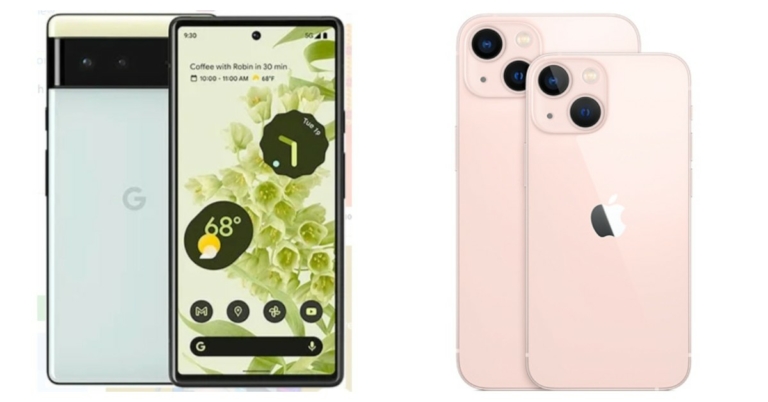
Software giant Google has officially announced the launch of its much-awaited Pixel 6 at its fall event. This premium smartphone is powered by Google’s in-house Tensor chipset. The device is the first to come with Android 12 out of the box. Also recently Google’s biggest Rival Apple announced the iPhone 13 series. Both iPhone 13 and Pixel 6 bear an eye-catching design. But there is a huge price difference between both the phones. Let’s compare both handsets to see which one is more value for money. Google Pixel 6 Vs iPhone 13
Display
Google Pixel 6: 6.4-inch LTPO display and it supports an adaptive refresh rate up to 90Hz. iPhone 13: 6.06 inches Super Retina XDR displayProcessor
Google Pixel 6: Google’s in-house Tensor chipset iPhone 13: A15 Bionic chipsetRear camera(s)
Google Pixel 6: 50MP primary sensor that binds images down to 12.5MP. There is a 12MP ultra-wide lens iPhone 13: Dual rear cameras- 12MP wide-angle and 12MP ultra-wide lensSelfie camera
Google Pixel 6: 8MP selfie camera iPhone 13: 12MP selfie cameraRAM and storage
Google Pixel 6: 8GB of RAM and 128GB/256GB of UFS 3.1 storage. iPhone 13: 128GB storage, 256GB storage and 512GB storageBattery
Google Pixel 6: 4,614mAh battery that comes with wireless and 30W fast charging support. iPhone 13: 3,240 mAhOperating system
Google Pixel 6: Android 12 iPhone 13: iOS 15Starting Price
Google Pixel 6: $599 that translates to Rs 44,971 iPhone 13: Rs 79,999Our Take
Like we said earlier both the phones come with a fresh design, but the camera rear bar on the Google Pixel 6 not only makes it appear unique but adds premiumness to its form factor. Also here Apple has a notch for the selfie camera, whereas Google has a punch hole cutout making the screen look appealing and less intrusive. There is a slight difference in the screen size and resolution. The iPhone offers a 60Hz refresh rate whereas the Pixel comes with 90Hz refresh rate support. The Pixel 6 gives a tough fight to the iPhone 13 in terms of dimensions and cameras. In addition to this, Google’s phone is priced much cheaper than Apple iPhone 13. So if you are planning to upgrade your Android phone then we would recommend you to go for Google Pixel 6. For the latest gadget and tech news, and gadget reviews, follow us on Twitter, Facebook and Instagram. For newest tech & gadget videos subscribe to our YouTube Channel. You can also stay up to date using the Gadget Bridge Android App. You can find the latest car and bike news here.How to connect AirPods Pro to MacBook

At the recent launch event, Apple unveiled its new Airpods 3 and MacBook Pro series. These are some of the best products available in the market. Airpods are known for their great audio quality and experience, while the MacBooks are lightweight and easy to carry, powerful computing solutions. Are you new to the Apple ecosystem and figuring out how to connect your AirPods Pro to a MacBook? Fret not, this guide will tell you exactly how to do that and how it works.
Before starting the process make sure the macOS running on your device is Catalina 10.15.1 or later. Now, there are a total of two ways to accomplish this process. Either pair the AirPods Pro manually or let it pair automatically.
 Read Also: How to connect Apple AirPods to an Android smartphone?
Read Also: Amazon now let’s users control Alexa recordings
Now the sound should be playing from your AirPods Pro. If the output is still coming out of your MacBook, head to the volume control in the menu above and make sure that AirPods are selected for audio output.
For the latest gadget and tech news, and gadget reviews, follow us on Twitter, Facebook and Instagram. For newest tech & gadget videos subscribe to our YouTube Channel. You can also stay up to date using the Gadget Bridge Android App. You can find the latest car and bike news here.
Read Also: How to connect Apple AirPods to an Android smartphone?
Read Also: Amazon now let’s users control Alexa recordings
Now the sound should be playing from your AirPods Pro. If the output is still coming out of your MacBook, head to the volume control in the menu above and make sure that AirPods are selected for audio output.
For the latest gadget and tech news, and gadget reviews, follow us on Twitter, Facebook and Instagram. For newest tech & gadget videos subscribe to our YouTube Channel. You can also stay up to date using the Gadget Bridge Android App. You can find the latest car and bike news here.
Pair Automatically
If the Airpods are already paired with iPhone and the Mac is signed in to iCloud with the same Apple ID, you do not have to do anything. Your AirPods Pro are already paired with your MacBook and ready to use. Place the earphone in your ear and click either on the Bluetooth menu or Volume control in your MacBook. You will spot your AirPods already paired( see the below image for reference). Click on them and start listening to multimedia on your Airpods Pro. Read Also: How to connect Apple AirPods to an Android smartphone?
Pair Manually
If you do not find your AirPods Pro paired automatically, you can do it manually by following the below steps. Step 1 – Choose system preference from the Apple menu on your Mac. Step 2 – Click on Bluetooth to make sure it is on. Step 3 – Open the lid of the AirPods Pro with pods inside the case. Step 4 – Press and hold the setup button until the status light starts flashing in white colour. Step 5 – You will spot your AirPods Pro in the Bluetooth list now. Press Connect to pair them with your mac. Read Also: Amazon now let’s users control Alexa recordings
Now the sound should be playing from your AirPods Pro. If the output is still coming out of your MacBook, head to the volume control in the menu above and make sure that AirPods are selected for audio output.
For the latest gadget and tech news, and gadget reviews, follow us on Twitter, Facebook and Instagram. For newest tech & gadget videos subscribe to our YouTube Channel. You can also stay up to date using the Gadget Bridge Android App. You can find the latest car and bike news here.
Read Also: Amazon now let’s users control Alexa recordings
Now the sound should be playing from your AirPods Pro. If the output is still coming out of your MacBook, head to the volume control in the menu above and make sure that AirPods are selected for audio output.
For the latest gadget and tech news, and gadget reviews, follow us on Twitter, Facebook and Instagram. For newest tech & gadget videos subscribe to our YouTube Channel. You can also stay up to date using the Gadget Bridge Android App. You can find the latest car and bike news here. How to reset a MacBook Pro: A Step by step guide
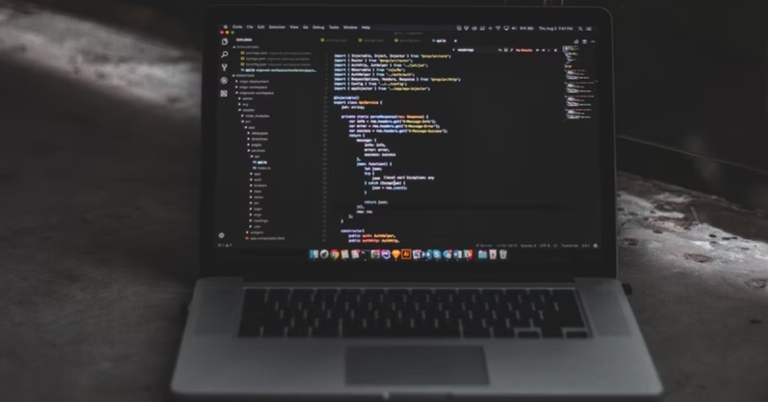
The new MacBook with the up[grated M1 chip has a significant boost in performance and can accomplish any task in a blink of an eye. With a premium design and beautiful display, the new MacBook Pro can be an excellent choice to buy. Even the older MacBooks are still capable and there is no denying that. But what if for instance, you want to reset your Macbooks pro? This step by step guide will help you in doing so.
We advise before starting the reset procedure, do take a proper backup of your system and make sure there are no important files left behind. Resetting the device will lead to formatting of the storage and the files will be erased as well.
Step 6 – Head to Erase Volume Group.
Read Also: How to find, lock, or erase data on a lost Android device?
Now the system will enter recovery mode, rest of the steps for resetting remain the same(consider following from Step-2 in the previous method).
If done correctly this will completely reset MacBook pro. If you are unable to complete any of the steps properly we advise you to seek professional help. Also, it happens often that the Mac does not enter into recovery mode at once, try again and see if it works for you.
Read Also: How to reset your Android smartphone
For the latest gadget and tech news, and gadget reviews, follow us on Twitter, Facebook and Instagram. For newest tech & gadget videos subscribe to our YouTube Channel. You can also stay up to date using the Gadget Bridge Android App. You can find the latest car and bike news here.
On Intel chip
Step 1 – Enter into recovery mode by pressing Command+R immediately after restarting the device. Step 2 – Head to Disk utility in the utility window and click continue. Step 3 – The startup disk will be in front of you named Macintosh HD(until you changed its name). Step 4 – Click on Erase. Step 5 – Fill in the Name and format(APFS preferred) of the new fresh disk. Step 6 – Head to Erase Volume Group.
Read Also: How to find, lock, or erase data on a lost Android device?
Step 6 – Head to Erase Volume Group.
Read Also: How to find, lock, or erase data on a lost Android device?
On M1 chip
The M1 chip has the same functionalities and options, only the process to reach recovery mode is different. Step 1 – Press and hold the power button Step 2 – Wait until to see the startup menu in front of you Step 3 – Click on Options and then Continue. Now the system will enter recovery mode, rest of the steps for resetting remain the same(consider following from Step-2 in the previous method).
If done correctly this will completely reset MacBook pro. If you are unable to complete any of the steps properly we advise you to seek professional help. Also, it happens often that the Mac does not enter into recovery mode at once, try again and see if it works for you.
Read Also: How to reset your Android smartphone
For the latest gadget and tech news, and gadget reviews, follow us on Twitter, Facebook and Instagram. For newest tech & gadget videos subscribe to our YouTube Channel. You can also stay up to date using the Gadget Bridge Android App. You can find the latest car and bike news here.
Now the system will enter recovery mode, rest of the steps for resetting remain the same(consider following from Step-2 in the previous method).
If done correctly this will completely reset MacBook pro. If you are unable to complete any of the steps properly we advise you to seek professional help. Also, it happens often that the Mac does not enter into recovery mode at once, try again and see if it works for you.
Read Also: How to reset your Android smartphone
For the latest gadget and tech news, and gadget reviews, follow us on Twitter, Facebook and Instagram. For newest tech & gadget videos subscribe to our YouTube Channel. You can also stay up to date using the Gadget Bridge Android App. You can find the latest car and bike news here. Comparison: Google Pixel 6 Pro VS Samsung Galaxy S21 Ultra
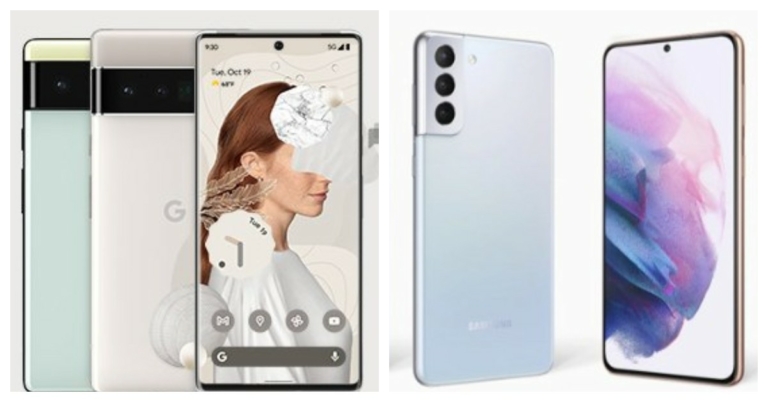
Google Pixel 6 Pro has officially debuted in the market. This is one of the most premium-looking phones the company has introduced. The device is the first to feature Google’s in-house Tensor chipset and to run on Android 12. So today we have compared the phone with the Samsung Galaxy S21 Ultra to help you better understand which phone is worth buying. Google Pixel 6 Pro VS Samsung Galaxy S21 Ultra
Display
Google Pixel 6 Pro: 6.7-inch LTPO display that comes with a variable refresh rate that ranges from 10Hz to 120Hz Samsung Galaxy S21 Ultra: 6.8-inch Edge QHD+ Dynamic AMOLED 2X Infinity-O DisplayProcessor
Google Pixel 6 Pro: Google’s in-house Tensor chipset Samsung Galaxy S21 Ultra: Exynos 2100 SoCRear camera(s)
Google Pixel 6 Pro: 50MP primary sensor that binds images down to 12.5MP. There is a 12MP ultra-wide lens and 48MP telephoto lens offering 4x optical zoom and up to 20x zoom with an improved version of Pixel’s Super Res Zoom. Samsung Galaxy S21 Ultra: 108-megapixel primary sensor with f/1.8 aperture and OIS support. In addition to this, there is a 12-megapixel Dual Pixel sensor with an f/2.2 aperture, a 10-megapixel telephoto lens with f/2.4 aperture, 3x optical zoom and lastly another 10-megapixel telephoto sensor with f/4.9 aperture, OIS support and 10x optical zoom. There is an additional laser autofocus sensor on the phone too and the camera set up supports 100X Space Zoom.Selfie camera
Google Pixel 6 Pro: 11.1MP selfie camera Samsung Galaxy S21 Ultra: 40-megapixel selfie camera with an f/2.2 aperture.RAM and storage
Google Pixel 6 Pro: 12GB of RAM and storage options of 128GB, 1256GB, and 512GB. Samsung Galaxy S21 Ultra: 12GB RAM with 128GB and 16GB RAM with 512GB storageBattery
Google Pixel 6 Pro: 5,003mAh battery which has wireless and 30W fast charging support. Samsung Galaxy S21 Ultra: 5,000mAh batteryOperating system
Google Pixel 6 Pro: Android 12 Samsung Galaxy S21 Ultra: One UI on top of Android 11Starting Price
Google Pixel 6 Pro: $899, which converts to Rs 67,494 Samsung Galaxy S21 Ultra: Rs 1,05,999Our Take
When it comes to cameras Samsung Galaxy S21 Ultra offers a superior camera set-up than the Pixel 6 Pro. This means it offers better images. Also, the higher the camera sensors the phone offers more enhanced effects/features like wide-angle and better portrait images. Even when it comes to the front camera Pixel 6 Pro lags behind. The display of Pixel 6 Pro is also smaller than its competition. But in terms of pricing, Samsung Galaxy S21 Ultra is much more expensive than the Google Pixel Pro. So you can consider going for the Samsung if you are not on a tight budget as S21 Ultra is our preferred choice. For the latest gadget and tech news, and gadget reviews, follow us on Twitter, Facebook and Instagram. For newest tech & gadget videos subscribe to our YouTube Channel. You can also stay up to date using the Gadget Bridge Android App. You can find the latest car and bike news here.Top 17 Manga apps on iOS and Android (2021)

Comic books are a good sail through from your free time and can be very interesting as well. Mangas also known as Japanese comic books are some of the top picks by enthusiasts. These comics have an intriguing storyline with vivid photos to get you deeply involved with them. Before the world of Netflix started, these were the still movies with action-packed scenes, dramas or be it comedy, you name it and these comics have it as well. Nowadays finding one is really difficult, but technology to the rescue again. Here are the best free manga apps for you to consider for both iOS and Android in 2021.
The application gets the latest Manga comics directly for Japan for you to enjoy and kill your boredom. From Space Brothers to Attack on Titan, the application covers it all. The official Manga applications roll out updated comics or the new ones as soon as they get released in the market. There are some free books available to download as well but to get the exclusive content you have to pay a little subscription fee.
Download: iOS, Android
Hit series like Dragonball, Naruto and some cult classics are readily available in this application. The VIZ Manga allows you to go through the digital catalogue to select from a list of some famous Manga comics. Adding to this, the developers add new comics daily.
The application has an amazon feature to build your own library and go through comics according to your taste and pace. Further, it lets you download the books so they are available for you to read even when you are offline. You can read free reviews of paid volumes making it easy for you to make decisions if you want to on that comic.
Download: iOS, Android
This provides you with all the Manga comics legally and comes directly from the author themselves. You want to ensure that you are buying an original copy of the comic and the authors are getting their cut, try Mangamo. The application has a pretty solid collection of comics for you to read. Some great titles like Attack of the Titans, Immortal Undertaker and more.
A minimum subscription fee gives you access to 30+ Manga comics legally. The developers add new chapters every week so you never run out of something to read. The subscription also covers no ads or random pop ups to hinder your peaceful reading experience. If you don’t want to register and want to try what you are paying for? Mangano issues one free chapter every 24 hours for you to indulge and get you to the story.
Download: iOS, Android
The application has many popular titles Like Naruto, Dragon Ball and more but the main highlight goes with the name of the application. Shonen Jump is an exclusive manga series with an exciting storyline and action-packed sequel. The application is ideal for Shonen Jump fans out there. The developers let you read 100 chapters every day for free. No worries if you are even more enthusiastic as you can read more than 100 chapters by paying a small subscription fee.
Download: iOS, Android
One of the most popular options among Manga comic readers. The application is completely free and is an open-source Manga reader. All you have to do is head to the website from the link below, download the application on your Android device, and you are good to go. The application fetches the comic books from services like MyAnimeList, AniList, Kitsu, Shikimori, and Bangumi and arranges them in an organised library.
The built-in reader is simple to use with a colour filter for those late-night readings. The application is completely free with regular updates on board. The only drawback that stands is that the application is not available for iOS users. Otherwise, it is among the best free manga apps available
Download: Android
Manga Plus is an official manga comic service run by Shueisha. The application adds the latest comic books in English and Spanish for your interest. The publisher with various creators and artists for ensuring piracy free content for you. The application is available free on both iOS and Android with tons of manga titles to choose from at your fingertips. Manga Plus gives you access to an online community with whom you can share your thoughts and enjoy reading.
Download: iOS, Android
 Ideal if you are multilingual as the application supports comics in several languages that include English, Indonesian, Vietnamese, Spanish, Portuguese and Thai making it flexible for readers across the globe. The highlight of the application is that users can upload their self made comics open to the world as well to get a lot of praise.
Natively the application has a wide range of libraries including comedy, love, horror, romance, and action. With daily addition to it daily it is one of the top picks that you can consider spending your money on. The application is free to download with in-app purchases.
Download: Android, iOS
Read Also: Best SD and memory card readers under Rs 500 for your Windows PC
The application is perfect for Manga lovers with a built-in range of reading tools that help you improve your reading experience. You can set the colours and enhance them according to your taste. Also, the application supports a lot of formats including CBZ, CBR, CB7, CBT, PDF, DJVU, and WebComics and is PC compatible. All you have to do is pay a subscription fee and you are open to a series of comic books and hours of fun.
Download: Android
A sub-brand of a big manga company, “Manga Rock” is the best free manga apps designer and publisher. The Application revolves around giving a chance to new comic creators and publishers. Users can buy a subscription to open up the world of new artists and publishers. This application is good for people who want to read something new rather than traditional manga comics.
With topics like action, romance, comedy, horror, drama, isekai, slice of life, sci-fi, and more to choose from you have hours of entertainment with you. The revenue generated by this app is split between content creators and publishers to support them.
Download: iOS, Android
Available for both iOS and Android, Manga Readers offers you thousands of comics with over 30 sources for you to never run out of books to read. The application has a powerful search tool that lets you find famous topics, comics or precise episodes which you want to read. The application remembers where you left reading and will create an automated bookmark for you. Tired of downloading manga one by one? Use Manga Readers to download 5 simultaneously. Download the app for free and consider buying in-app purchases if you wish.
Download: Android, iOS
With over 20 sources, manga Dogs is easily one of the top picks you can consider. The application has a massive library of manga comics to choose from and the application gives you personal recommendations as well. THe highlight of the application is that it knows the book you are reading and will alert you as soon as the new chapter for the same is available.
Download: iOS, Android
Available exclusive for iOS users the application consists of over 30,000 manga comics to choose from. It has a decent category with timely new updates of the application as well as new comics. The application is lightweight and feels snappy to use making it one of the best free manga apps. Enjoy your manga reading experience with Manga Monster.
Download: iOS
The application is what its name suggests. The Online Manga Reader is a lightweight application that lets you read manga comics online. The application fetches the comics from various different sources and provides them to you in an ever-updating catalogue. Feeling way too silent while reading? The application allows you to play songs while you read your book. Other features include offline download, bookmark, personal library and more. Consider installing the application on your Android phone for free and enjoy some manga comics.
Download: Android
Want to read Manga in a traditional way? Consider using Manga Box. It has one of the biggest libraries of books with popular authors across the globe. Additionally, the developers add new content daily to all the genres giving you a lot of options to choose from. There is no customisation or heavy tools to come across, just a simple traditional manga application that you can enjoy.
Download: iOS, Android
Read Also: Realme tells Xiaomi to ‘behave’ on being called a copycat brand
With over 15,000 comics to choose from this is ideal for people who absolutely love to read manga comics. Manga Zone has a huge library of titles for you to read and is available in English as well. The developers add new chapters instantly after the release and you don’t have to find an English translation for that. Read online or download the comic for later this application is a great choice and the best free manga apps to consider.
Download: iOS, Android
ComiXology is an all-rounder application with over a million comics. The application is not only settled till manga but you can find all the genres in one go. If you want to freshen up your mood you can consider reading other comics as well. You can also continue reading from your computer by opening the ComiXology website and logging in. The application is completely free for both iOS and Android with in-app purchases.
Download: iOS, Android
The application consists of many titles that are fresh and new in the market. These comics are mostly made by people who love manga. The application has a huge variety of comics by people across the globe. You can publish your own magazine here as well to gain some popularity. The application has a big community from where you can talk to other artists and readers.
Download: iOS, Android
For the latest gadget and tech news, and gadget reviews, follow us on Twitter, Facebook and Instagram. For newest tech & gadget videos subscribe to our YouTube Channel. You can also stay up to date using the Gadget Bridge Android App. You can find the latest car and bike news here.
Ideal if you are multilingual as the application supports comics in several languages that include English, Indonesian, Vietnamese, Spanish, Portuguese and Thai making it flexible for readers across the globe. The highlight of the application is that users can upload their self made comics open to the world as well to get a lot of praise.
Natively the application has a wide range of libraries including comedy, love, horror, romance, and action. With daily addition to it daily it is one of the top picks that you can consider spending your money on. The application is free to download with in-app purchases.
Download: Android, iOS
Read Also: Best SD and memory card readers under Rs 500 for your Windows PC
The application is perfect for Manga lovers with a built-in range of reading tools that help you improve your reading experience. You can set the colours and enhance them according to your taste. Also, the application supports a lot of formats including CBZ, CBR, CB7, CBT, PDF, DJVU, and WebComics and is PC compatible. All you have to do is pay a subscription fee and you are open to a series of comic books and hours of fun.
Download: Android
A sub-brand of a big manga company, “Manga Rock” is the best free manga apps designer and publisher. The Application revolves around giving a chance to new comic creators and publishers. Users can buy a subscription to open up the world of new artists and publishers. This application is good for people who want to read something new rather than traditional manga comics.
With topics like action, romance, comedy, horror, drama, isekai, slice of life, sci-fi, and more to choose from you have hours of entertainment with you. The revenue generated by this app is split between content creators and publishers to support them.
Download: iOS, Android
Available for both iOS and Android, Manga Readers offers you thousands of comics with over 30 sources for you to never run out of books to read. The application has a powerful search tool that lets you find famous topics, comics or precise episodes which you want to read. The application remembers where you left reading and will create an automated bookmark for you. Tired of downloading manga one by one? Use Manga Readers to download 5 simultaneously. Download the app for free and consider buying in-app purchases if you wish.
Download: Android, iOS
With over 20 sources, manga Dogs is easily one of the top picks you can consider. The application has a massive library of manga comics to choose from and the application gives you personal recommendations as well. THe highlight of the application is that it knows the book you are reading and will alert you as soon as the new chapter for the same is available.
Download: iOS, Android
Available exclusive for iOS users the application consists of over 30,000 manga comics to choose from. It has a decent category with timely new updates of the application as well as new comics. The application is lightweight and feels snappy to use making it one of the best free manga apps. Enjoy your manga reading experience with Manga Monster.
Download: iOS
The application is what its name suggests. The Online Manga Reader is a lightweight application that lets you read manga comics online. The application fetches the comics from various different sources and provides them to you in an ever-updating catalogue. Feeling way too silent while reading? The application allows you to play songs while you read your book. Other features include offline download, bookmark, personal library and more. Consider installing the application on your Android phone for free and enjoy some manga comics.
Download: Android
Want to read Manga in a traditional way? Consider using Manga Box. It has one of the biggest libraries of books with popular authors across the globe. Additionally, the developers add new content daily to all the genres giving you a lot of options to choose from. There is no customisation or heavy tools to come across, just a simple traditional manga application that you can enjoy.
Download: iOS, Android
Read Also: Realme tells Xiaomi to ‘behave’ on being called a copycat brand
With over 15,000 comics to choose from this is ideal for people who absolutely love to read manga comics. Manga Zone has a huge library of titles for you to read and is available in English as well. The developers add new chapters instantly after the release and you don’t have to find an English translation for that. Read online or download the comic for later this application is a great choice and the best free manga apps to consider.
Download: iOS, Android
ComiXology is an all-rounder application with over a million comics. The application is not only settled till manga but you can find all the genres in one go. If you want to freshen up your mood you can consider reading other comics as well. You can also continue reading from your computer by opening the ComiXology website and logging in. The application is completely free for both iOS and Android with in-app purchases.
Download: iOS, Android
The application consists of many titles that are fresh and new in the market. These comics are mostly made by people who love manga. The application has a huge variety of comics by people across the globe. You can publish your own magazine here as well to gain some popularity. The application has a big community from where you can talk to other artists and readers.
Download: iOS, Android
For the latest gadget and tech news, and gadget reviews, follow us on Twitter, Facebook and Instagram. For newest tech & gadget videos subscribe to our YouTube Channel. You can also stay up to date using the Gadget Bridge Android App. You can find the latest car and bike news here.
-
Crunchyroll Manga
 The application gets the latest Manga comics directly for Japan for you to enjoy and kill your boredom. From Space Brothers to Attack on Titan, the application covers it all. The official Manga applications roll out updated comics or the new ones as soon as they get released in the market. There are some free books available to download as well but to get the exclusive content you have to pay a little subscription fee.
Download: iOS, Android
The application gets the latest Manga comics directly for Japan for you to enjoy and kill your boredom. From Space Brothers to Attack on Titan, the application covers it all. The official Manga applications roll out updated comics or the new ones as soon as they get released in the market. There are some free books available to download as well but to get the exclusive content you have to pay a little subscription fee.
Download: iOS, Android
-
VIZ Manga
 Hit series like Dragonball, Naruto and some cult classics are readily available in this application. The VIZ Manga allows you to go through the digital catalogue to select from a list of some famous Manga comics. Adding to this, the developers add new comics daily.
The application has an amazon feature to build your own library and go through comics according to your taste and pace. Further, it lets you download the books so they are available for you to read even when you are offline. You can read free reviews of paid volumes making it easy for you to make decisions if you want to on that comic.
Download: iOS, Android
Hit series like Dragonball, Naruto and some cult classics are readily available in this application. The VIZ Manga allows you to go through the digital catalogue to select from a list of some famous Manga comics. Adding to this, the developers add new comics daily.
The application has an amazon feature to build your own library and go through comics according to your taste and pace. Further, it lets you download the books so they are available for you to read even when you are offline. You can read free reviews of paid volumes making it easy for you to make decisions if you want to on that comic.
Download: iOS, Android
-
Mangamo
 This provides you with all the Manga comics legally and comes directly from the author themselves. You want to ensure that you are buying an original copy of the comic and the authors are getting their cut, try Mangamo. The application has a pretty solid collection of comics for you to read. Some great titles like Attack of the Titans, Immortal Undertaker and more.
A minimum subscription fee gives you access to 30+ Manga comics legally. The developers add new chapters every week so you never run out of something to read. The subscription also covers no ads or random pop ups to hinder your peaceful reading experience. If you don’t want to register and want to try what you are paying for? Mangano issues one free chapter every 24 hours for you to indulge and get you to the story.
Download: iOS, Android
This provides you with all the Manga comics legally and comes directly from the author themselves. You want to ensure that you are buying an original copy of the comic and the authors are getting their cut, try Mangamo. The application has a pretty solid collection of comics for you to read. Some great titles like Attack of the Titans, Immortal Undertaker and more.
A minimum subscription fee gives you access to 30+ Manga comics legally. The developers add new chapters every week so you never run out of something to read. The subscription also covers no ads or random pop ups to hinder your peaceful reading experience. If you don’t want to register and want to try what you are paying for? Mangano issues one free chapter every 24 hours for you to indulge and get you to the story.
Download: iOS, Android
-
Shonen Jump
 The application has many popular titles Like Naruto, Dragon Ball and more but the main highlight goes with the name of the application. Shonen Jump is an exclusive manga series with an exciting storyline and action-packed sequel. The application is ideal for Shonen Jump fans out there. The developers let you read 100 chapters every day for free. No worries if you are even more enthusiastic as you can read more than 100 chapters by paying a small subscription fee.
Download: iOS, Android
The application has many popular titles Like Naruto, Dragon Ball and more but the main highlight goes with the name of the application. Shonen Jump is an exclusive manga series with an exciting storyline and action-packed sequel. The application is ideal for Shonen Jump fans out there. The developers let you read 100 chapters every day for free. No worries if you are even more enthusiastic as you can read more than 100 chapters by paying a small subscription fee.
Download: iOS, Android
-
Tachiyomi
 One of the most popular options among Manga comic readers. The application is completely free and is an open-source Manga reader. All you have to do is head to the website from the link below, download the application on your Android device, and you are good to go. The application fetches the comic books from services like MyAnimeList, AniList, Kitsu, Shikimori, and Bangumi and arranges them in an organised library.
The built-in reader is simple to use with a colour filter for those late-night readings. The application is completely free with regular updates on board. The only drawback that stands is that the application is not available for iOS users. Otherwise, it is among the best free manga apps available
Download: Android
One of the most popular options among Manga comic readers. The application is completely free and is an open-source Manga reader. All you have to do is head to the website from the link below, download the application on your Android device, and you are good to go. The application fetches the comic books from services like MyAnimeList, AniList, Kitsu, Shikimori, and Bangumi and arranges them in an organised library.
The built-in reader is simple to use with a colour filter for those late-night readings. The application is completely free with regular updates on board. The only drawback that stands is that the application is not available for iOS users. Otherwise, it is among the best free manga apps available
Download: Android
-
Manga plus
 Manga Plus is an official manga comic service run by Shueisha. The application adds the latest comic books in English and Spanish for your interest. The publisher with various creators and artists for ensuring piracy free content for you. The application is available free on both iOS and Android with tons of manga titles to choose from at your fingertips. Manga Plus gives you access to an online community with whom you can share your thoughts and enjoy reading.
Download: iOS, Android
Manga Plus is an official manga comic service run by Shueisha. The application adds the latest comic books in English and Spanish for your interest. The publisher with various creators and artists for ensuring piracy free content for you. The application is available free on both iOS and Android with tons of manga titles to choose from at your fingertips. Manga Plus gives you access to an online community with whom you can share your thoughts and enjoy reading.
Download: iOS, Android
-
MangaToon
 Ideal if you are multilingual as the application supports comics in several languages that include English, Indonesian, Vietnamese, Spanish, Portuguese and Thai making it flexible for readers across the globe. The highlight of the application is that users can upload their self made comics open to the world as well to get a lot of praise.
Natively the application has a wide range of libraries including comedy, love, horror, romance, and action. With daily addition to it daily it is one of the top picks that you can consider spending your money on. The application is free to download with in-app purchases.
Download: Android, iOS
Read Also: Best SD and memory card readers under Rs 500 for your Windows PC
Ideal if you are multilingual as the application supports comics in several languages that include English, Indonesian, Vietnamese, Spanish, Portuguese and Thai making it flexible for readers across the globe. The highlight of the application is that users can upload their self made comics open to the world as well to get a lot of praise.
Natively the application has a wide range of libraries including comedy, love, horror, romance, and action. With daily addition to it daily it is one of the top picks that you can consider spending your money on. The application is free to download with in-app purchases.
Download: Android, iOS
Read Also: Best SD and memory card readers under Rs 500 for your Windows PC
-
ComicRack
 The application is perfect for Manga lovers with a built-in range of reading tools that help you improve your reading experience. You can set the colours and enhance them according to your taste. Also, the application supports a lot of formats including CBZ, CBR, CB7, CBT, PDF, DJVU, and WebComics and is PC compatible. All you have to do is pay a subscription fee and you are open to a series of comic books and hours of fun.
Download: Android
The application is perfect for Manga lovers with a built-in range of reading tools that help you improve your reading experience. You can set the colours and enhance them according to your taste. Also, the application supports a lot of formats including CBZ, CBR, CB7, CBT, PDF, DJVU, and WebComics and is PC compatible. All you have to do is pay a subscription fee and you are open to a series of comic books and hours of fun.
Download: Android
-
INKR comics
 A sub-brand of a big manga company, “Manga Rock” is the best free manga apps designer and publisher. The Application revolves around giving a chance to new comic creators and publishers. Users can buy a subscription to open up the world of new artists and publishers. This application is good for people who want to read something new rather than traditional manga comics.
With topics like action, romance, comedy, horror, drama, isekai, slice of life, sci-fi, and more to choose from you have hours of entertainment with you. The revenue generated by this app is split between content creators and publishers to support them.
Download: iOS, Android
A sub-brand of a big manga company, “Manga Rock” is the best free manga apps designer and publisher. The Application revolves around giving a chance to new comic creators and publishers. Users can buy a subscription to open up the world of new artists and publishers. This application is good for people who want to read something new rather than traditional manga comics.
With topics like action, romance, comedy, horror, drama, isekai, slice of life, sci-fi, and more to choose from you have hours of entertainment with you. The revenue generated by this app is split between content creators and publishers to support them.
Download: iOS, Android
-
Manga Readers
 Available for both iOS and Android, Manga Readers offers you thousands of comics with over 30 sources for you to never run out of books to read. The application has a powerful search tool that lets you find famous topics, comics or precise episodes which you want to read. The application remembers where you left reading and will create an automated bookmark for you. Tired of downloading manga one by one? Use Manga Readers to download 5 simultaneously. Download the app for free and consider buying in-app purchases if you wish.
Download: Android, iOS
Available for both iOS and Android, Manga Readers offers you thousands of comics with over 30 sources for you to never run out of books to read. The application has a powerful search tool that lets you find famous topics, comics or precise episodes which you want to read. The application remembers where you left reading and will create an automated bookmark for you. Tired of downloading manga one by one? Use Manga Readers to download 5 simultaneously. Download the app for free and consider buying in-app purchases if you wish.
Download: Android, iOS
-
Manga Dogs
 With over 20 sources, manga Dogs is easily one of the top picks you can consider. The application has a massive library of manga comics to choose from and the application gives you personal recommendations as well. THe highlight of the application is that it knows the book you are reading and will alert you as soon as the new chapter for the same is available.
Download: iOS, Android
With over 20 sources, manga Dogs is easily one of the top picks you can consider. The application has a massive library of manga comics to choose from and the application gives you personal recommendations as well. THe highlight of the application is that it knows the book you are reading and will alert you as soon as the new chapter for the same is available.
Download: iOS, Android
-
Manga Monster
 Available exclusive for iOS users the application consists of over 30,000 manga comics to choose from. It has a decent category with timely new updates of the application as well as new comics. The application is lightweight and feels snappy to use making it one of the best free manga apps. Enjoy your manga reading experience with Manga Monster.
Download: iOS
Available exclusive for iOS users the application consists of over 30,000 manga comics to choose from. It has a decent category with timely new updates of the application as well as new comics. The application is lightweight and feels snappy to use making it one of the best free manga apps. Enjoy your manga reading experience with Manga Monster.
Download: iOS
-
Online Manga Reader
 The application is what its name suggests. The Online Manga Reader is a lightweight application that lets you read manga comics online. The application fetches the comics from various different sources and provides them to you in an ever-updating catalogue. Feeling way too silent while reading? The application allows you to play songs while you read your book. Other features include offline download, bookmark, personal library and more. Consider installing the application on your Android phone for free and enjoy some manga comics.
Download: Android
The application is what its name suggests. The Online Manga Reader is a lightweight application that lets you read manga comics online. The application fetches the comics from various different sources and provides them to you in an ever-updating catalogue. Feeling way too silent while reading? The application allows you to play songs while you read your book. Other features include offline download, bookmark, personal library and more. Consider installing the application on your Android phone for free and enjoy some manga comics.
Download: Android
-
Manga Box
 Want to read Manga in a traditional way? Consider using Manga Box. It has one of the biggest libraries of books with popular authors across the globe. Additionally, the developers add new content daily to all the genres giving you a lot of options to choose from. There is no customisation or heavy tools to come across, just a simple traditional manga application that you can enjoy.
Download: iOS, Android
Read Also: Realme tells Xiaomi to ‘behave’ on being called a copycat brand
Want to read Manga in a traditional way? Consider using Manga Box. It has one of the biggest libraries of books with popular authors across the globe. Additionally, the developers add new content daily to all the genres giving you a lot of options to choose from. There is no customisation or heavy tools to come across, just a simple traditional manga application that you can enjoy.
Download: iOS, Android
Read Also: Realme tells Xiaomi to ‘behave’ on being called a copycat brand
-
Manga Zone
 With over 15,000 comics to choose from this is ideal for people who absolutely love to read manga comics. Manga Zone has a huge library of titles for you to read and is available in English as well. The developers add new chapters instantly after the release and you don’t have to find an English translation for that. Read online or download the comic for later this application is a great choice and the best free manga apps to consider.
Download: iOS, Android
With over 15,000 comics to choose from this is ideal for people who absolutely love to read manga comics. Manga Zone has a huge library of titles for you to read and is available in English as well. The developers add new chapters instantly after the release and you don’t have to find an English translation for that. Read online or download the comic for later this application is a great choice and the best free manga apps to consider.
Download: iOS, Android
-
ComiXology
 ComiXology is an all-rounder application with over a million comics. The application is not only settled till manga but you can find all the genres in one go. If you want to freshen up your mood you can consider reading other comics as well. You can also continue reading from your computer by opening the ComiXology website and logging in. The application is completely free for both iOS and Android with in-app purchases.
Download: iOS, Android
ComiXology is an all-rounder application with over a million comics. The application is not only settled till manga but you can find all the genres in one go. If you want to freshen up your mood you can consider reading other comics as well. You can also continue reading from your computer by opening the ComiXology website and logging in. The application is completely free for both iOS and Android with in-app purchases.
Download: iOS, Android
-
WebComics
 The application consists of many titles that are fresh and new in the market. These comics are mostly made by people who love manga. The application has a huge variety of comics by people across the globe. You can publish your own magazine here as well to gain some popularity. The application has a big community from where you can talk to other artists and readers.
Download: iOS, Android
For the latest gadget and tech news, and gadget reviews, follow us on Twitter, Facebook and Instagram. For newest tech & gadget videos subscribe to our YouTube Channel. You can also stay up to date using the Gadget Bridge Android App. You can find the latest car and bike news here.
The application consists of many titles that are fresh and new in the market. These comics are mostly made by people who love manga. The application has a huge variety of comics by people across the globe. You can publish your own magazine here as well to gain some popularity. The application has a big community from where you can talk to other artists and readers.
Download: iOS, Android
For the latest gadget and tech news, and gadget reviews, follow us on Twitter, Facebook and Instagram. For newest tech & gadget videos subscribe to our YouTube Channel. You can also stay up to date using the Gadget Bridge Android App. You can find the latest car and bike news here. Samsung Galaxy Unpacked Part 2 today: Here is what to expect

Apple and Google are done with their launches and today Samsung has set the stage to unveil its new product in the market. Yes, the South Korean brand will be hosting yet another Unpacked event today.
The company is calling it Samsung Galaxy Unpacked Part 2. Everything at the event is going to be a surprise, as the firm has not dropped any hint about what products that will be introduced. However, it does mention that it will be “opening up new experiences for self-expression through technology”. But rumours suggest that Samsung Galaxy S21 FE is likely to debut today.
Samsung Galaxy Unpacked Part 2 event will be held online due to pandemic. The virtual event will kickstart at 10 AM ET that is 7:30 PM IST. The launch event is said to be live-streamed via the company’s official YouTube channel, official website as well as on Samsung Newsroom.
Here is what to expect from today’s Samsung Galaxy Unpacked Part 2
Rumours suggest that the company might launch Samsung Galaxy F21 FE but according to reports the launch of the device has been delayed. Now the device is expected to arrive in January next year. The company is also speculated to launch Galaxy Z Series foldable phones in new colour options. If this is to be believed then this is for the first time that Samsung will be holding a separate event just to introduce a new colour variant of any of its devices. To recollect, Samsung held an August Galaxy Unpacked event to launch its foldable phones. While announcing the event the company said, “Our users are multifaceted and live life in so many colourful, interesting and unique ways. As such, the technology they use every day should reflect their individuality. Join Galaxy Unpacked Part 2 on October 20 to see how Samsung is opening up new experiences for self-expression through technology.” But if the company has plans to launch the Fan Edition of the Samsung Galaxy S21 then the device is expected to arrive in four colour options of Black, Green, Purple, and White. While the design of the phone will be similar to the vanilla Galaxy S21. But it may not include a metal housing around the camera sensors and microSD slot for expanding storage. Other than this the Samsung Galaxy S21 FE is said to have IP68 certification for dust and water resistance. It is said to withstand up to 1.5m and up to 30 minutes. Furthermore, the display will support a high refresh rate along with an ultrasonic in-display fingerprint scanner. In addition to this, there will be Dolby Atmos, wireless and reverse wireless charging support. For the optics, the Galaxy S21 FE could feature a triple rear camera set up that may include an ultra-wide-angle sensor and may not include a charger this time. For the latest gadget and tech news, and gadget reviews, follow us on Twitter, Facebook and Instagram. For newest tech & gadget videos subscribe to our YouTube Channel. You can also stay up to date using the Gadget Bridge Android App. You can find the latest car and bike news here.Xiaomi Mi Notebook Ultra review: An ultra-premium notebook with exceptional daily performance
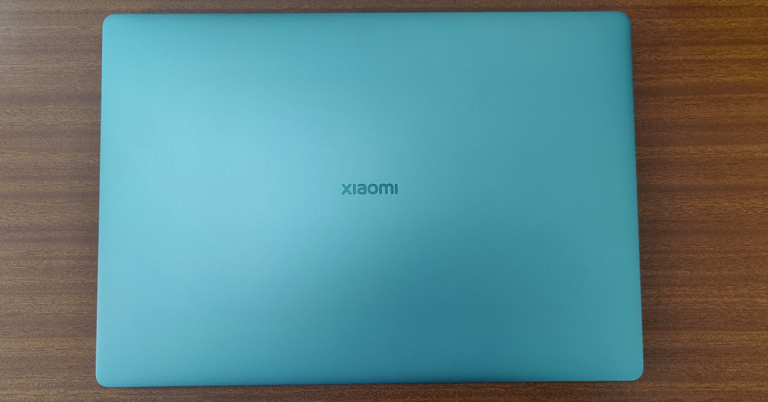
Xiaomi has recently started producing laptops for the global and Indian markets and they have already become a force to reckon with. At competitive prices, they are bringing good looking and powerful laptops for the world and the latest to come out from their factory is Xiaomi Mi Notebook Ultra. We spent few weeks with the device to understand it well. This is the Xiaomi Mi Notebook Ultra review you all have been waiting for.
 When shut, it measures just 17.9mm from the sides, which again adds to its slim form factor. Xiaomi branding in Chrome can be seen on the top lid as well under the 15.6-inch screen. Open it up and you will see a large keyboard without a NUM pad. The keys have a scissor mechanism, which has 1.5mm deep key travel. The overall writing experience is good with it, but a bit robust tactile feel would have been better. The keyboard is also backlit and has 2 levels of it, good for people who work in dimly lit rooms or late at night.
With it, you get a fairly large trackpad. This is a multi-touch trackpad and works quite well. Also, there is a fingerprint sensor with Windows hello in the Xiaomi Mi Notebook Ultra. The circular power button located on the top right (above the keyboard) also doubles up as a fingerprint sensor. This works well and 9 out of 10 times detected our finger without any extra effort.
For connectivity, the Xiaomi Mi Notebook Ultra comes with 1 USB 2.0, 1 USB 3.0 gen 1, 1 Thunderbolt 4 and 1 USB Type-C charging port. These are accompanied by an HDMI as well as a single Mic cum Audio 3.5mm port. Users also get an HD webcam on top of the screen with few MICS in the fray.
When shut, it measures just 17.9mm from the sides, which again adds to its slim form factor. Xiaomi branding in Chrome can be seen on the top lid as well under the 15.6-inch screen. Open it up and you will see a large keyboard without a NUM pad. The keys have a scissor mechanism, which has 1.5mm deep key travel. The overall writing experience is good with it, but a bit robust tactile feel would have been better. The keyboard is also backlit and has 2 levels of it, good for people who work in dimly lit rooms or late at night.
With it, you get a fairly large trackpad. This is a multi-touch trackpad and works quite well. Also, there is a fingerprint sensor with Windows hello in the Xiaomi Mi Notebook Ultra. The circular power button located on the top right (above the keyboard) also doubles up as a fingerprint sensor. This works well and 9 out of 10 times detected our finger without any extra effort.
For connectivity, the Xiaomi Mi Notebook Ultra comes with 1 USB 2.0, 1 USB 3.0 gen 1, 1 Thunderbolt 4 and 1 USB Type-C charging port. These are accompanied by an HDMI as well as a single Mic cum Audio 3.5mm port. Users also get an HD webcam on top of the screen with few MICS in the fray.

 Moving to its display, it is one of the best features of this laptop. Users get a 3.2K display, which means the resolution of the screen is 3,200 x 2,000 pixels summing up to 242 pixels per inch (PPI) density. The peak brightness of the screen is about 300 nits and 90Hz refresh rate is supported.
Together they portray vivid colours, crisp text and possesses excellent viewing angles. We played a lot of Netflix shows on the machine and it did not disappoint at all. With it, you also get dual 2W speakers that are DTS optimised. These are quite loud and does not require you to add any additional external speakers.
So let’s move on to how does it perform in real life. Xiaomi Mi Notebook Ultra comes packed with Windows 10 Home edition, which is fine for most users. If you want to use this laptop for day to day work, edit images or even some videos in Adobe Premiere, you can do that without a problem. However, the rendering process will take a little extra time. We edited a small 4K video on it and the laptop did a rather good job. Also, users get a basic version of the Microsoft Office suite, which includes Word, PowerPoint as well as Excel in the package. There is a bit of bloatware found within the OS, but luckily all of it can be removed.
The gaming experience on the Xiaomi Mi Notebook Ultra left us with a mixed bag of emotions. Since it does not have a very powerful graphics card, most games do not work at medium or high settings. Neither will you get 60-90FPS on them. But if you play games like CS:GO or DOTA 2, then you can extract 60-90FPS at medium to high settings.
The battery life is relatively good on this laptop. Xiaomi claims that users can get up to 12 hours of battery life. But that is when you put the display to the dimmest settings and are not doing any heavy-duty tasks on it. During our tests, it lasted for 7.5 hours when working and lasted 6 hours when we were binge-watching Netflix shows. Both of which is very impressive and quite good in the bracket. With the supplied 65W charger, which charges via the notebook using the USB-C port, the laptop charges to 50% in about 45 minutes.
The vents on the Xiaomi Mi Notebook Ultra are big and you do get a large heat sink and fan inside the shell, too. This keeps the laptop fairly cool and we hardly felt any part of the laptop getting too hot. Users can also switch between Quiet Mode and Balanced Mode by hitting FN+K keys, this reduces the fan noise by a lot. Also, a dedicated Marco key can be found at the top right of the keyboard that can be set as an easy shortcut.
Moving to its display, it is one of the best features of this laptop. Users get a 3.2K display, which means the resolution of the screen is 3,200 x 2,000 pixels summing up to 242 pixels per inch (PPI) density. The peak brightness of the screen is about 300 nits and 90Hz refresh rate is supported.
Together they portray vivid colours, crisp text and possesses excellent viewing angles. We played a lot of Netflix shows on the machine and it did not disappoint at all. With it, you also get dual 2W speakers that are DTS optimised. These are quite loud and does not require you to add any additional external speakers.
So let’s move on to how does it perform in real life. Xiaomi Mi Notebook Ultra comes packed with Windows 10 Home edition, which is fine for most users. If you want to use this laptop for day to day work, edit images or even some videos in Adobe Premiere, you can do that without a problem. However, the rendering process will take a little extra time. We edited a small 4K video on it and the laptop did a rather good job. Also, users get a basic version of the Microsoft Office suite, which includes Word, PowerPoint as well as Excel in the package. There is a bit of bloatware found within the OS, but luckily all of it can be removed.
The gaming experience on the Xiaomi Mi Notebook Ultra left us with a mixed bag of emotions. Since it does not have a very powerful graphics card, most games do not work at medium or high settings. Neither will you get 60-90FPS on them. But if you play games like CS:GO or DOTA 2, then you can extract 60-90FPS at medium to high settings.
The battery life is relatively good on this laptop. Xiaomi claims that users can get up to 12 hours of battery life. But that is when you put the display to the dimmest settings and are not doing any heavy-duty tasks on it. During our tests, it lasted for 7.5 hours when working and lasted 6 hours when we were binge-watching Netflix shows. Both of which is very impressive and quite good in the bracket. With the supplied 65W charger, which charges via the notebook using the USB-C port, the laptop charges to 50% in about 45 minutes.
The vents on the Xiaomi Mi Notebook Ultra are big and you do get a large heat sink and fan inside the shell, too. This keeps the laptop fairly cool and we hardly felt any part of the laptop getting too hot. Users can also switch between Quiet Mode and Balanced Mode by hitting FN+K keys, this reduces the fan noise by a lot. Also, a dedicated Marco key can be found at the top right of the keyboard that can be set as an easy shortcut.
Xiaomi Mi Notebook Ultra review: Design and Display
Packed neatly, out of the box the notebook does come across as a really premium offering from the company. Yes, some might say it looks like the Macbooks, but, the Xiaomi Mi Notebook Ultra has its own distinct identity. Built out of metal, the notebook has a lot of it. Despite that, the notebook is not very heavy and weighs under 1.8Kg. When shut, it measures just 17.9mm from the sides, which again adds to its slim form factor. Xiaomi branding in Chrome can be seen on the top lid as well under the 15.6-inch screen. Open it up and you will see a large keyboard without a NUM pad. The keys have a scissor mechanism, which has 1.5mm deep key travel. The overall writing experience is good with it, but a bit robust tactile feel would have been better. The keyboard is also backlit and has 2 levels of it, good for people who work in dimly lit rooms or late at night.
 With it, you get a fairly large trackpad. This is a multi-touch trackpad and works quite well. Also, there is a fingerprint sensor with Windows hello in the Xiaomi Mi Notebook Ultra. The circular power button located on the top right (above the keyboard) also doubles up as a fingerprint sensor. This works well and 9 out of 10 times detected our finger without any extra effort.
 For connectivity, the Xiaomi Mi Notebook Ultra comes with 1 USB 2.0, 1 USB 3.0 gen 1, 1 Thunderbolt 4 and 1 USB Type-C charging port. These are accompanied by an HDMI as well as a single Mic cum Audio 3.5mm port. Users also get an HD webcam on top of the screen with few MICS in the fray.

 Moving to its display, it is one of the best features of this laptop. Users get a 3.2K display, which means the resolution of the screen is 3,200 x 2,000 pixels summing up to 242 pixels per inch (PPI) density. The peak brightness of the screen is about 300 nits and 90Hz refresh rate is supported.
Together they portray vivid colours, crisp text and possesses excellent viewing angles. We played a lot of Netflix shows on the machine and it did not disappoint at all. With it, you also get dual 2W speakers that are DTS optimised. These are quite loud and does not require you to add any additional external speakers.
Moving to its display, it is one of the best features of this laptop. Users get a 3.2K display, which means the resolution of the screen is 3,200 x 2,000 pixels summing up to 242 pixels per inch (PPI) density. The peak brightness of the screen is about 300 nits and 90Hz refresh rate is supported.
Together they portray vivid colours, crisp text and possesses excellent viewing angles. We played a lot of Netflix shows on the machine and it did not disappoint at all. With it, you also get dual 2W speakers that are DTS optimised. These are quite loud and does not require you to add any additional external speakers.
Xiaomi Mi Notebook Ultra review: Performance
So what all do you get under the hood? We are reviewing the Xiaomi Mi Notebook Ultra with the Intel i5 11th Gen (11300H) CPU that has 4 cores and a clock speed of up to 4.4GHz. This is partnered with 16GB RAM (3,200MHz frequency), which is soldered on the mainboard and 512GB of NVMe SSD. For graphics, you will get an onboard Intel Iris XE graphics unit. Other features include WiFi 6 for fast network connectivity and Bluetooth 5.1 support. So let’s move on to how does it perform in real life. Xiaomi Mi Notebook Ultra comes packed with Windows 10 Home edition, which is fine for most users. If you want to use this laptop for day to day work, edit images or even some videos in Adobe Premiere, you can do that without a problem. However, the rendering process will take a little extra time. We edited a small 4K video on it and the laptop did a rather good job. Also, users get a basic version of the Microsoft Office suite, which includes Word, PowerPoint as well as Excel in the package. There is a bit of bloatware found within the OS, but luckily all of it can be removed.
The gaming experience on the Xiaomi Mi Notebook Ultra left us with a mixed bag of emotions. Since it does not have a very powerful graphics card, most games do not work at medium or high settings. Neither will you get 60-90FPS on them. But if you play games like CS:GO or DOTA 2, then you can extract 60-90FPS at medium to high settings.
The battery life is relatively good on this laptop. Xiaomi claims that users can get up to 12 hours of battery life. But that is when you put the display to the dimmest settings and are not doing any heavy-duty tasks on it. During our tests, it lasted for 7.5 hours when working and lasted 6 hours when we were binge-watching Netflix shows. Both of which is very impressive and quite good in the bracket. With the supplied 65W charger, which charges via the notebook using the USB-C port, the laptop charges to 50% in about 45 minutes.
The vents on the Xiaomi Mi Notebook Ultra are big and you do get a large heat sink and fan inside the shell, too. This keeps the laptop fairly cool and we hardly felt any part of the laptop getting too hot. Users can also switch between Quiet Mode and Balanced Mode by hitting FN+K keys, this reduces the fan noise by a lot. Also, a dedicated Marco key can be found at the top right of the keyboard that can be set as an easy shortcut.
So let’s move on to how does it perform in real life. Xiaomi Mi Notebook Ultra comes packed with Windows 10 Home edition, which is fine for most users. If you want to use this laptop for day to day work, edit images or even some videos in Adobe Premiere, you can do that without a problem. However, the rendering process will take a little extra time. We edited a small 4K video on it and the laptop did a rather good job. Also, users get a basic version of the Microsoft Office suite, which includes Word, PowerPoint as well as Excel in the package. There is a bit of bloatware found within the OS, but luckily all of it can be removed.
The gaming experience on the Xiaomi Mi Notebook Ultra left us with a mixed bag of emotions. Since it does not have a very powerful graphics card, most games do not work at medium or high settings. Neither will you get 60-90FPS on them. But if you play games like CS:GO or DOTA 2, then you can extract 60-90FPS at medium to high settings.
The battery life is relatively good on this laptop. Xiaomi claims that users can get up to 12 hours of battery life. But that is when you put the display to the dimmest settings and are not doing any heavy-duty tasks on it. During our tests, it lasted for 7.5 hours when working and lasted 6 hours when we were binge-watching Netflix shows. Both of which is very impressive and quite good in the bracket. With the supplied 65W charger, which charges via the notebook using the USB-C port, the laptop charges to 50% in about 45 minutes.
The vents on the Xiaomi Mi Notebook Ultra are big and you do get a large heat sink and fan inside the shell, too. This keeps the laptop fairly cool and we hardly felt any part of the laptop getting too hot. Users can also switch between Quiet Mode and Balanced Mode by hitting FN+K keys, this reduces the fan noise by a lot. Also, a dedicated Marco key can be found at the top right of the keyboard that can be set as an easy shortcut.
Verdict
So, the final question that arises is, is it worth buying for Rs 64,999? Well, if you are a regular or power user who wants a lot of memory, storage, fast state-of-the-art performance, and a vivid screen, this laptop makes perfect sense, and you should go for it. If you are a gamer, then this is not the machine for you. Overall, as a work from home force (at the moment), we quite loved the experience of the Xiaomi Mi Notebook Ultra. The boot time is very low, apps open quickly, and we hardly faced any issues. It has a good mix of work and entertainment features.Pros
Good looks Extreme performance Good battery lifeCons
Tactile feel of the keys could have been better No discreet graphics card For the latest gadget and tech news, and gadget reviews, follow us on Twitter, Facebook and Instagram. For newest tech & gadget videos subscribe to our YouTube Channel. You can also stay up to date using the Gadget Bridge Android App. You can find the latest car and bike news here.Vivo Y3s budget smartphone with 5,000mAh battery launched in India
The Chinese smartphone company has announced the launch of a new smartphone in the Indian market. The company has introduced the latest model of Vivo Y3s in the country. The phone features a 5,000mAh battery and is powered by MediaTek Helio P35 SoC. It also includes a dual rear camera set up with a dewdrop notch display. Read on to know Vivo Y3s price in India and specifications.
In terms of photos and videos, Vivo Y3s features a dual rear camera set-up that includes a 13MP with f/2.2 aperture and another sensor. For selfies, there is a 5MP front-facing camera with an f/1.8 aperture.
The budget smartphone comes with a 5,000mAh battery that has reverse charging support. The battery is said to deliver 19 hours of HD streaming and 8 hours of gameplay. In addition to this, the phone offers dual-band WiFi, Bluetooth v5.0, GPS, a Micro USB port for charging and a 3.5mm headphone jack for connectivity.
Vivo Y3s tech specs and features
Vivo Y3s is the company’s latest addition to its budget portfolio and includes basic features but with long-lasting battery life. The device has a gradient rear finish and dew-drop style notch display. It features a 6.51-inch HD+ LCD display offering 720×1,600 pixels of resolution. On the software front, it ships Funtouch OS 11 based on top of Android 11 out of the box. Under the hood, there is MediaTek Helio P35 SoC paired with 2GB of RAM with 32GB of internal storage. The memory can be expanded up to 1TB using a microSD card. In terms of photos and videos, Vivo Y3s features a dual rear camera set-up that includes a 13MP with f/2.2 aperture and another sensor. For selfies, there is a 5MP front-facing camera with an f/1.8 aperture.
The budget smartphone comes with a 5,000mAh battery that has reverse charging support. The battery is said to deliver 19 hours of HD streaming and 8 hours of gameplay. In addition to this, the phone offers dual-band WiFi, Bluetooth v5.0, GPS, a Micro USB port for charging and a 3.5mm headphone jack for connectivity.
In terms of photos and videos, Vivo Y3s features a dual rear camera set-up that includes a 13MP with f/2.2 aperture and another sensor. For selfies, there is a 5MP front-facing camera with an f/1.8 aperture.
The budget smartphone comes with a 5,000mAh battery that has reverse charging support. The battery is said to deliver 19 hours of HD streaming and 8 hours of gameplay. In addition to this, the phone offers dual-band WiFi, Bluetooth v5.0, GPS, a Micro USB port for charging and a 3.5mm headphone jack for connectivity.