The 20 October 2021 Amazon Quiz is now live on the Amazon app. In today’s quiz participants have a chance to win Rs 1,000 Amazon Pay Balance by answering all the questions correctly. The quiz can be played every day from 12 AM to 11:59. Only app users are eligible to participate in the Quiz as it is not accessible on the web platform.The Amazon Quiz brings a fresh set of questions for its customers that contains five easy questions. The questionnaire consists of five questions related to general knowledge and current affairs. The participants need to answer all the questions correctly and their names will be selected for a lucky draw. The daily quiz brings an opportunity for the customers to win exciting prizes. They can win Amazon Pay Balance ranging from Rs 1,000 to Rs 50,000. The participants need to answer all the questions correctly and their names will be selected for a lucky draw. The winner will be announced at the end of the month. Check out 20 October 2021 Amazon Quiz Answers.
20 October 2021 Amazon Quiz Answers
Question 1: Tata Digital Ltd. a subsidiary of Tata Sons, has acquired a majority stake in which of these digital health companies?
Answer: 1mg
Question 2: Which among these is not made by South Korean firm Krafton Inc?
Answer: Crossfire
Question 3: In September 2021, which country severed diplomatic relations with Morocco over alleged hostile actions?
Answer: Algeria
Question 4: Along with this sport, what other two sports are included in a triathlon?
Answer: Swimming, Running
Question 5: What is the name of the clown mascot of this fast-food brand?
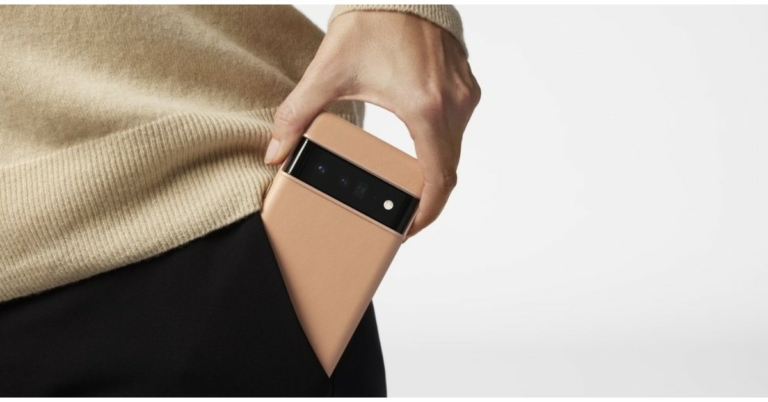
Software giant Google today officially announced the launch of the Pixel smartphones globally. The new series includes two phones- the Google Pixel 6 and the Google Pixel 6 Pro. Both the devices feature Google’s in-house Tensor chipset, which is the company’s first custom mobile chip. In addition to this, the smartphones run on Android 12 and feature a premium design.
Google Pixel 6, Pixel 6 Pro price and availability details
The Google Pixel 6 price will start at $599that translates to Rs 44,971. On the other hand, the Google Pixel 6 Pro will be available at an asking price of $899, which converts to Rs 67,494. The pre-order will begin today and will be available for sale with all major U.S. carriers starting from October 28. The Pixel 6 will be offered in Black, Red and Blue colour options, while the Pro variant will come in White, Black and Light Gold shades.
Not only that, the company has also introduced Pixel Pass, an easy subscription that delivers the best of Google. Starting at $45 per month for U.S. customers. Its Pixel Pass includes a new Pixel 6, Google One, YouTube Premium and YouTube Music Premium, Google Play Pass, and Preferred Care. Pixel Pass with Pixel 6 Pro costs $55 per month. After two years, the users will have the option to upgrade to a new Pixel.
Design and display of the Google Pixel 6 and Pixel 6 Pro
In terms of design, the biggest USP of both devices is the camera module, giving the phone a clean and symmetrical design. Pixel 6 has a distinct graphic and a vibrant appearance, according to the company. The matte black metal band makes it look premium. It is made with a polished metal unibody and transitions into gorgeous curved glass in colours that complement the metallic frames.
The Pixel 6 comes with a 6.4-inch LTPO display and it supports an adaptive refresh rate up to 90Hz. The Google Pixel 6 Pro features a 6.7-inch LTPO display that comes with a variable refresh rate that ranges from 10Hz to 120Hz depending upon the content. Both phones have a punch-hole cutout on the front and the display is protected with Corning Gorilla Glass Victus. There is an in-display fingerprint sensor onboard as well.
The Google Tensor processor is the company’s latest SoC specifically designed for Pixel phones
Google’s Pixel 6 and Pixel 6 Pro are the first devices to be powered by Google’s in-house Tensor chipset. It has 2 high-performance cores, 2 mid-core, and 4 high-efficiency cores paired with a 20 core GPU. The vanilla Pixel 6 will be available with 8GB of RAM and 128GB/256GB of UFS 3.1 storage. The Pro, on the other hand, will be available with up to 12GB of RAM and storage options of 128GB, 1256GB, and 512GB.
According to the company, Google Assistant on Google Tensor uses the most accurate Automatic Speech Recognition (ASR) ever released by Google. Users can also use a high-quality ASR model, even for long-running applications such as recorders or tools such as Live Caption, without quickly draining the battery. Google Tensor also enables Live Translate to work on media like videos using on-device speech and translation models. It will allow users to translate directly in the chat application, meaning no more cutting and pasting text into the Google Translate web service.
The devices are the first to run Android 12 out of the box. It includes the next-generation Titan M2TM, which works with the Tensor security core to protect your sensitive user data, PINs, and passwords. The company has also extended our support window to at least five years of security updates, so your phone has the most up-to-date protection.
What’s new with the cameras this time?
According to the Mountain View company, the Pixel 6 and Pixel 6 Pro have the most advanced cameras. Both the phones have a new 1/1.3 inch sensor on their rear. The primary sensor is said to capture up to 150% more light (compared to the Pixel 5’s primary camera), meaning you’re going to get photos and videos with even greater detail and richer colour.
The vanilla variant has a 50MP primary sensor that binds images down to 12.5MP. There is a 12MP ultra-wide lens as well. It includes an 8MP selfie camera.
On the other hand, the Pro variant has a similar sensor but has an additional 48MP telephoto lens offering 4x optical zoom and up to 20x zoom with an improved version of Pixel’s Super Res Zoom. There’s also an upgraded ultrawide front camera that records a 4K video. The device also sports an 11.1MP camera sensor in the front for taking selfies and video calling.
The company has also introduced the Magic Eraser feature for the smartphone that helps remove unnecessary distractions in just a few taps right in Google Photos. The feature is capable of detecting distractions in your photos, like people in the background, power lines, and power poles, and suggesting what you might want to remove. Then, you can choose whether to erase them all at once or tap to remove them one by one. In addition to this, the Magic Eraser can figure out what you’re trying to remove based on what you circle, so you don’t have to spend time worrying about precise brushing.
Battery and connectivity options
The Google Pixel 6 boasts a 4,614mAh battery that comes with wireless and 30W fast charging support. The Google Pixel 6 Pro houses a bigger 5,003mAh battery which has wireless and 30W fast charging support.
Both the smartphones include WiFi 6E, Bluetooth 5.2, and sub 6Ghz 5G support.
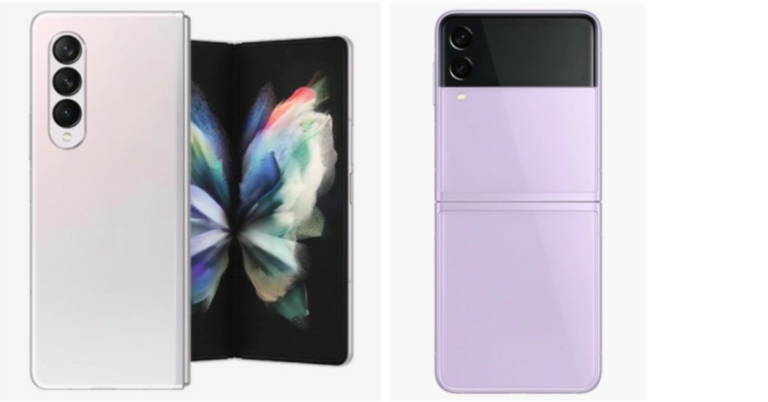
Not much time has passed since the Samsung foldable phones were launched in India. At the time of the launch, both Samsung Galaxy Z Fold 3 and Samsung Galaxy Z Flip 3 were introduced in two colour options but now they will be available in more shades as the new colour variant has joined the family.Samsung Galaxy Z Fold 3 was earlier available in two colour options of Phantom Black and Phantom Green. Whereas Samsung Galaxy Z Flip 3 was made available in Phantom Black and Cream colour options. But now Z Fold 3 will come in a new Phantom Silver while Z Flip 3 can be accessed in Lavender colour options. But the new shades will specifically be available in 256GB and 128GB storage variants respectively.The pricing remains unchanged as Z Fold 3 will retail at 1,49,999 for the 12GB RAM with a 256GB storage variant. The price for the 12GB RAM with a 512GB storage variant is set at Rs 1,57,999. On the other hand Z Flip 3 will still cost Rs 84,999 for the 8GB RAM with 128GB storage option and the 256GB storage model will come at Rs 88,999.
Samsung Galaxy Z Fold 3 specifications
The Samsung Galaxy Z Fold 3 comes with a 7.6-inch foldable QXGA AMOLED 2X Infinity Flex main display having 2,208×1,768 pixels of resolution, 22.5:18 aspect ratio, and 374ppi pixel density. The outer display features a 6.2-inch HD AMOLED display on the outside with 832×2,268 pixels resolution, 24.5:9 aspect ratio, and 387ppi pixel density. Both screens have a 120Hz refresh rate, HDR10+ support with Gorilla Glass Victus protection on top. The phone is powered by a 5nm octa-core SoC with up to 12 GB RAM with 512GB storage options. It runs on Android 11 on top of One UI. It comes with a side-mounted fingerprint sensor. There is a triple rear camera setup that includes a 12-megapixel primary sensor, along with a 12-megapixel secondary telephoto lens and a 12-megapixel ultra-wide lens. There is an under-display camera on the Galaxy Z Fold 3 with a 4-megapixel sensor along with an f/1.8 aperture and a 10-megapixel selfie camera with an f/2.2 aperture at the cover.Besides this, the handset is backed by a 4,400mAh battery along with 25W wireless and reverse charging support. It also supports two new S Pen models- S Pen Fold Edition and the S Pen Pro.
Samsung Galaxy Z Flip 3 specifications
Samsung Galaxy Z Flip 3 highlights a 6.7-inch primary full-HD+ dynamic display offering 1,080×2,640 pixels of resolution along with the support for HDR10+ and 120Hz refresh rate. There is a 1.9-inch AMOLED display with a 512×260 pixels resolution on the lid.The device is powered by a 5nm octa-core SoC coupled with up to 8GB RAM and up to 256GB UFS 3.1 storage. For imaging, there is a dual rear camera setup that includes a 12-megapixel primary sensor with an f/1.8 aperture and a 12-megapixel wide-angle lens. In terms of selfies, there is a 10-megapixel sensor on the front having an f/2.4 aperture. In addition to this, the device is backed by a 3,300mAh battery with wireless and reverse charging support and 15W fast charging.
For the latest gadget and tech news, and gadget reviews, follow us on Twitter, Facebook and Instagram. For newest tech & gadget videos subscribe to our YouTube Channel. You can also stay up to date using the Gadget Bridge Android App. You can find the latest car and bike news here.
HDR or High Dynamic Range is a feature present in almost all the current phones and camera applications. Many people think that just turning on HDR makes the image look better and sharper. Yes, it’s kind of true but there is more to it. To know the best use of HDR the first step is to learn what it is and how to use HDR mode on Android
What is HDR
As mentioned above HDR is High Dynamic Range. Dynamic range in photography terms means the difference in the lightest and darkest elements of an image. When you turn on the HDR mode in any device, it increases the dynamic range beyond the actual capture. This helps create a more accurate and close to a real representation of what we actually see. Especially helpful when we click images of some landscape where brightening and better details are required. Yes, it’s true that it enhances the image, but HDR mode is not suitable for every situation. A prime example of it is taking a direct photograph of a scene with bright colours. HDR will gradually increase the light making the image look unnatural. Now the next question is what happens behind the scenes when you press the shutter button with HDR on. Read Also: CES 2020: Panasonic unveils the world’s first VR glasses
Working of HDR
Image Credit – Mi communityWhen you press the shutter of the mobile camera application, the camera takes lots of pics of the same scenario with different exposure. This is the reason why taking HDR images takes a little bit more time. After taking multiple pictures it is combined to make a perfect one piece. Then the software optimises the darker and lighter region while enhancing the details. This is the reason why it is advised to take HDR photos with steady hands as it gives the best results. Nowadays smartphone cameras also have an Auto HDR feature that analyses the scene and switches the mode on or off accordingly. Now the question is when to use HDR mode?
When to / When not to use HDR
When to
Landscapes – The outdoors especially in bright sunlight can cause way too much contrast, use HDR to reduce it and increase the blacks to balance it out.
Dim/dark light – As the process is software-based the HDR mode will try to compensate with the darker amount by adding some light to balance the whites in the photo, you might not see a drastic difference but a noticeable one.
Sharper image – Use HDR mode to get sharper images as the process captures multiple photos more details are covered in this mode.
When not to
High contrast scene – When you are trying to capture a high contrast scene avoid using HDR as it will try to balance light making the image less vivid.
Moving object – As multiple images are captured during HDR mode a moving object can create distortion in the final result.
Vivid scenes – When in vivid surroundings the HDR mode will extra enhance the colours making the picture look unnatural, though it can be something a user likes and it completely depends on the individual’s taste.
Almost all phones nowadays have HDR mode built-in in their camera application. If you are still not satisfied, there are tons of applications available in Google PlayStore. Here is how you can turn it on.Step 1 – Fire up the camera application on your Android smartphone.You will spot an HDR icon on the first screen itself, tap on it to enable HDR mode (OnePlus phone used for the above reference). If you do not find it on the first screen, follow the next steps.Step 2 – Head to the camera setting to find the HDR option.Step 3 – Toggle it on to enable HDR mode. (Samsung’s OneUI used for reference)This is a complete guide of what HDR is and the best way to use HDR mode to take photos on your Android smartphone. Hope this helps you take good pictures and clarifies all the doubts regarding HDR you had.
For the latest gadget and tech news, and gadget reviews, follow us on Twitter, Facebook and Instagram. For newest tech & gadget videos subscribe to our YouTube Channel. You can also stay up to date using the Gadget Bridge Android App. You can find the latest car and bike news here.
Vivo Y33s made its debut in India just 2 months ago. Now the Chinese smartphone company has increased the price of the smartphone by Rs 1,000. This price revision will be applicable to the device with immediate effect. The smartphone comes with a triple rear camera set up and a 5,000mAh battery. It is powered by MediaTek Helio G80 SoC.
Vivo Y33s new price in India and availability
The Vivo Y33s was launched in India in August this year. The phone was then launched at Rs 17,990 for the single 8GB RAM with 128GB storage. But after its latest price revision, the will retail in the country at Rs 18,990. The phone with new pricing is now available on Vivo e-store in the country as well on Amazon and Flipkart. The device comes in two colour options of Midday Dream and Mirror Black.
Vivo Y33s specifications
Vivo Y33s is highlighted with a 6.58-inch full-HD+ LCD display with 1,080×2,408 pixels of resolution. The device is shipped with Funtouch OS 11.1 based on Android 11 out of the box. Under the hood, there is a MediaTek Helio G80 SoC with 8GB of RAM (4GB of extended RAM) and 128GB of storage. The internal memory can be expanded up to 1TB using a microSD card.For optics, Vivo Y33s features a triple rear camera setup that includes a 50MP primary sensor. Furthermore, there is a 2MP macro sensor and a 2MP depth sensor. For taking selfies and video chats it sports a 16-megapixel front-facing camera.There is Multi-Turbo 5.0 that optimizes the memory to improve performance. The liquid cooling technology features an intelligent heat dissipation management system that keeps the smartphone cool, even while playing heavy-duty games. In addition to this, there is a 5,000mAh battery that supports 18W fast charging. Also, the phone sports a side-mounted fingerprint scanner, dual-band Wi-Fi, 4G, Bluetooth v5, NFC, GPS, and USB Type-C port for connectivity. Whereas the sensors on the phone include an accelerometer, ambient light sensor, proximity sensor, e-compass, and gyroscope.
For the latest gadget and tech news, and gadget reviews, follow us on Twitter, Facebook and Instagram. For newest tech & gadget videos subscribe to our YouTube Channel. You can also stay up to date using the Gadget Bridge Android App. You can find the latest car and bike news here.
The new insanely fast, top of the line Macbook Pro series was launched at the “Unleashed” event in October 2021. The new Macbook is even faster and looks more beautiful than the previous generation. Powering the new insides is the M1 max and M1 pro chips, which give the laptops a significant boost. Are you planning to buy the new Macbook Pro 2021? Here are some apps for MacBook pro that you must install to have a great experiece.
Ulysses
A writing application to get your work done with. It works as a completely normal notepad application until you open its extensive library of tools. With its minimalistic design keeping, a record of your written material becomes easy. All the documents are stored and organised in a dropdown styled many so users can open them with a click. These files are divided into folders and subcategories for ease of use. Do not worry if you can’t carry your Macbook everywhere, all the documents are backed up on your iCloud account so they can be easily accessed, viewed and shared from anywhere.
Microsoft 365
One of the most popular office suites with millions of users worldwide. If you are new to the Apple ecosystem, worry not Microsoft Office 365 supports the new M1 chips from day one. Every application included in the Microsoft productivity bundle will work natively without the need for Rosetta (used to run cross-platform applications). Whether you need to make a presentation, a Word file or manage records on your Excel sheet, install the Microsoft 365 package and you are good to go.
Fantastica
This application is a list organiser, which helps you manage schedules and do day to day tasks easily. Whether it is a bill payment, a meeting reminder or a casual shopping list, Fantastica has got your back. Just set a reminder and forget about it. With a beautiful design, the application also has cross-platform compatibility so be it your Mac or a Windows laptop your reminders are covered anyway. Many awards winner, this application is a must-have in your library.
OmniFocus
Imagine having a calendar application with cross-application sync. Well, OmniFocus is the application which you are looking for. One of the best productivity applications out in the market. The idea behind this application is to get your plans easily noted down in your calendar even when the application is not opened. You can add tasks from any application and everything will be synced down across all the devices. Consider using it to see what wonders it can do.Read Also: Amazon launches Luna cloud gaming service
Affinity applications
There are lots of Affinity applications available in the market. These all are ideal for artists and graphic designers. The application is used for productivity, creating posters, logos, icons, artwork and much more across the globe. There are a huge number of tools to make the work easy and go through the process smoothly. The application supports cross platforms, which makes it easy to run on all M1 chip systems including iPad pro. Getting this application an easy select for apps for MacBook Pro
Zoom
One of the most popular apps that helped us cope up with the covid situations by keeping our work going. Zoom is a simple video calling app with lots of features under its sleeves. Users can schedule a meeting, change the background while on a video call or record their calls, Zoom’s got you covered. Screen share is another great feature that initially gave competition to other applications. Users were able to share and control the screen making the life of teachers and tech support really easy. Use Zoom to conduct meetings or simply talk to your loved ones on your new Macbook.
Todoist
Have a habit of making a list of jobs from pen and paper? Todoist is a simple solution for you. It fetches the details from your calendar and accepts manual input from the users. After that, the application arranges it in a to-do list, which users can scratch off once the task is done. While working you remembered to buy some groceries? Just add them to the Todoist and it will be automatically synced with your other hand device. The list can further be saved on any popular cloud service you use. Now no more forgetting small tasks, use Todoist and keep your work organised making it one of the best apps for MacBook pro.
Adobe Lightroom
Adobe is working hard on making the heavy Photoshop and Premiere pro compatible with M1 chips. Till then you can surely consider using Lightroom, which is a lightweight version of those applications without the need of Rosetta. It is a stripped down version of a complicated editing application that only includes essential basic photo editing tools. Ideal for consumers who want to edit their photos lightly or simply want to tweak them a little. It is also good for beginners, to get them into the world of photo editing. The application supports RAW files so using Lightroom won’t deteriorate the quality of your image.Read Also: 10 Best Apps to download in your new Apple iPad Mini 2021
Luna Display
The new Macbook Pro now supports up to 4 external displays and having an external one improves your workspace. If you don’t want to invest in an external display and have a spare iPad in your home. Use Luna Display to extend your screen using your iPad. There is a built-in feature for that called Sidecar. Well, Luna Display takes it to a level further as you can make another Mac your extended display as well. A great option for people for whom one traditional monitor is not enough.
Pixelmator Pro
Want a photo editing application to just perform basic functions? Try using Pixelmator Pro, the application is capable of performing basic tasks and touch-up to photos. With a number of tools and filters, one can easily enhance their clicks or even old memories.The application keeps everything simple, giving new life to a photograph. The best feature is an automatic photo-enhancement tool. It is an AI-based system that relies on an algorithm trained on 20 million images. This makes enhancing your photos in just a few clicks, child’s play.
These are some apps for MacBook Pro (2021) that you should consider installing for a better Apple experience.
For the latest gadget and tech news, and gadget reviews, follow us on Twitter, Facebook and Instagram. For newest tech & gadget videos subscribe to our YouTube Channel. You can also stay up to date using the Gadget Bridge Android App. You can find the latest car and bike news here.
Delhi Metro Rail Corporation will now allow free access to the Internet via free high-speed WiFi at Yellow Line Stations for the commuters. DMRC has collaborated with a technology consortium to offer the facility inside the metro station within a year except for the Airport Express line. The passengers will be able to access WhatsApp, Facebook, Google Search and more.While allowing access to the internet for free at all Yellow Line Metro Stations in Delhi the DMRC said, “Despite the various constraints posed by the Covid pandemic in the last more than a year, Delhi Metro in its efforts to continuously enhance the travel experience for its commuters, has successfully introduced the facility of free high-speed wifi service from all Metro stations of its Yellow Line (i.e, Line-2 from HUDA City Centre to Samaypur Badli) from today.”According to Delhi Metro, this service which happens to coincide with the start of festivities is launched on this Line which has a total of 37 Metro Stations and runs pretty much entirely underground through one of Delhi’s most congested areas, covering out Delhi, North Delhi, Central Delhi, South Delhi and at last Gurugram.With the launch of High-Speed WI-Fi at all stations of Yellow Line, “Oui DMRC Free WI-Fi” is now available at 94 stations of the Delhi Metro Network. This Free Wi-Fi service is being provided by a Consortium led by M/S Techno Sat Comm. Commuters will be able to access standard internet applications, which includes Email, Facebook, Google Search, WhatsApp, Video and Audio calls and so on by simply logging into network ID “OUI DMRC FREE Wi-Fi”.
In order to access the free WiFi at the stations, follow these steps:
Open your phone and search for “OUI DMRC FREE Wi-Fi”.
Enter your phone number and email address to receive OTP via SMS.
Then enter the OTP, agree to the terms and conditions and then tap the connect button to use the free WiFi service.
If you have any trouble accessing free WiFi at Metro Stations on any of these lines, commuters can call HelpLine at 9541693693.“OUI DMRC Free High-Speed Wi-Fi connectivity is already available on all stations of the Blue Line and Airport Express Line (The network is restored after Covid),” Delhi Metro Rail Corporation said.It should be noted that the Blue Line (Dwarka Sector 21 to Noida Electronic City/Vaishali) has 50 metro stations with over 400 access points installed by DMRC to provide uninterpreted internet access, whereas the Airport Express Line(New Delhi Railway Station to Dwarka Sector 21, linking Indira Gandhi International Airport) has six stations with over 50 access points to provide uninterpreted internet access. Apart from offering free WiFi service at Metro stations across its network, DMRC is working with Techno Sat Comm to introduce this service inside Metro trains within a year. In already operational trains, upgrading and installing the desired access points can be a difficult task according to DMRC but has trailed free WiFI service in its Airport Line trains, which has been suspended due to COVID restrictions in 2020 and is now being restored within the next 10-15 days.
For the latest gadget and tech news, and gadget reviews, follow us on Twitter, Facebook and Instagram. For newest tech & gadget videos subscribe to our YouTube Channel. You can also stay up to date using the Gadget Bridge Android App. You can find the latest car and bike news here.
The much-awaited Google Pixel 6 Series is going to launch tonight. The company has set up a Pixel Fall Launch event to unveil its new lineup, which is going to include two devices Pixel 6 and Pixel 6 Pro. Every year the tech giant tries to come up with something; this time the upcoming smartphones will be armed with Google’s in-house Tensor chipset that will also be the first feature on the Pixel 6 phones.
How to watch Google Pixel 6 series launch event
The Pixel launch event will be hosted on the company’s official YouTube channel and on social media platforms at 10 am PT that is 10:30 PM IST. A special event page has been created by the company that will also live host the event. Just for your convenience, we have also embedded the link below:
The expected price of Google Pixel 6 devices
Ahead of the official announcement, the pricing details of Pixel 6 and Pixel 6 Pro for the US and UK were leaked via an online store. Both the devices were spotted listed on Target Store. As per the leaked listing the Google Pixel 6 is likely to be priced at $599 that is roughly around Rs 67,500 for the 128GB storage options. On the other hand, the price of the Pixel 6 Pro is expected to be $898 which translates to Rs 67,500 for the 128GB storage option. However the phone is expected to be offered in more variants, but as of now, we are only aware of the base variant pricing. Another tipster spotted the upcoming phones on the Amazon UK website. The Google Pixel 6 Pro was listed at GBP 849 for the 128GB memory that converts to Rs 87,800 while the 256Gb storage option will cost GBP 949 which translates to Rs 98,100. According to the tipster both the phones will be available for sale from the very first day of November in the UK.
Google Pixel 6, Google Pixel 6 specification expected
In terms of specification, both the Pixel phone will be featuring Google’s in-house Tensor chipset. Reportedly the Pixel 6 will come with a 6.4-inch OLED display while the Pro variant will feature a 6.7-inch LTP OLED display with adaptive refresh rate support ranging from 10Hz to 120Hz. Both the displays will be guarded withCorning Gorilla Glass Victus and will come with an IP68 build for protection against splash and dust.The leaks also confirm that the Google Pixel 6 and Pixel 6 Pro’s camera set up will include a 50MP primary sensor and a 12MP ultra wide-angle shooter. The main camera is suggested to capture 150% lighter than the previous Pixel 5. The Pro variant will equip a telephoto shooter with 4x optical zoom and up to 20x Super ResZoom. The smartphones are also said to come with added features like a Magic eraser that is proficient in eliminating undesired things including people from the captured images.The Pixel 6 Pro might also support 30W fast charging further it may also offer 23W and 21W wireless charging support.
For the latest gadget and tech news, and gadget reviews, follow us on Twitter, Facebook and Instagram. For newest tech & gadget videos subscribe to our YouTube Channel. You can also stay up to date using the Gadget Bridge Android App. You can find the latest car and bike news here.
After a year’s wait and lots of speculations, Apple finally debuted its new third-generation Airpods yesterday in the “Unleashed” event along with the new MacBook pro. The launch event tells us that there is a lot in common with both earphones with similar features and almost similar design. Surprisingly Apple didn’t give up on the 2nd gen Airpods and they are still being sold at the lowest $129 (Rs 12,900) mark. Now that the AirPods 3 are available for pre-order, the question is, which one should we consider buying AirPods 3 or AirPods pro? This article will help you out.
Design
The new AirPods 3 has a design close to the Pro variant but without the silicon tip. The narrower round ear tip can be seen as compared to the prevision gen. Just like the AirPod Pro, the third generation is also sweat and water-resistant making it a good option for those who use these earphones during workouts or in bad weather conditions. We can also see a significant change in the design of the case for the 3rd gen. It looks a lot similar to the Pro counterpart as compared to the previous-gen. The newer version now supports MagSafe wireless charging so that is a big change as well. The stem of the 3rd gen AirPods is quite smaller, similar to AirPods pro. With a smaller stem, there is no compromise with the battery on board. They also have a new Force touch sensor, which enables you to control your entertainment as well as activate Siri. As the AirPods Pro have silicon tips, they are interchangeable according to your fit, but that’s not the case with 3rd gen AirPods.Read Also: Apple to launch two new third-generation of AirPods
Features
The top of the earphone’s line by the company, Apple AirPods Pro gets active noise cancellation on board along with transparency mode to hear important noise and sounds around you. Not all but there are few features that these new TWS inherit are Spatial sound and Adaptive EQ. Spatial sound gives a surround sound feeling to users and when paired with Dolby Atmos support that the company recently added, gives an immersive experience. Adaptive EQ adjusts the sound of the music or multimedia according to the fit of the earphones to compensate for the loss of audio if any.
Battery
The next-gen has a longer battery life as compared to the predecessor. Not only that it is a significant improvement over the Pro counterpart as well. Both, the 3rd gen AirPods and AirPods Pro, are powered by an H1 chip so we can expect similar performance. Apple claims that these new earphones will last for 6 hours on a single charge and up to 5 hours with spatial audio enabled. Along with that users can expect 4 hours of talk time and the charging case should provide up to 30 hours (4 full charges) of listening time.Talking about the AirPods Pro in comparison, according to Apple it should last 4.5 hours on a single charge and 5 hours of active noise cancellation and transparency mode is disabled. They offer 3.5 hours of talk time and the case provides 24 hours (near to 3 full charges) of total listening time.Read Also: Amazon to roll out an updated interface for Fire TV StickNow answering the question of AirPods Pro vs AirPods 3rd Gen: which one you should consider? Taking note of all the aspects and differences, if the users are keen to go towards active noise cancellation, transparency mode, better fit and budget is not an issue for them can consider buying the AirPods Pro for Rs 24,900 without a doubt. For consumers interested in better battery life, the round shape tips give a better fit and want to get the taste of the latest technology at an affordable price tag of Rs 12,900 can consider AirPods 3rd generation.
For the latest gadget and tech news, and gadget reviews, follow us on Twitter, Facebook and Instagram. For newest tech & gadget videos subscribe to our YouTube Channel. You can also stay up to date using the Gadget Bridge Android App. You can find the latest car and bike news here.
A mouse is an accessory that we consider as the most important tool with a PC or laptop. It comes in different shapes and sizes, and one must have the best one to finish your tasks efficiently. If you are a professional who wants more control from his/her mouse, then you are reading the right review. Logitech threw over the MX Anywhere 3, which we have been tinkering with for a few weeks now. This is Logitech MX Anywhere 3 review and what we think of this new-age PC/laptop companion.
Logitech MX Anywhere 3 review: Design
Right of the bat, you will find the Logitech MX Anywhere 3 to be one of the best-looking wireless mice out there. We have been using the MX Anywhere series in the team since the first version. And with every new edition, we feel that the company will only give a little bit of an upgrade. But to our amazement, they have been bringing some solid changes in both looks and performance sectors.
Compared to the first version, you will see a lot of changes on the exterior shell, but over the second version, not so much at least in the contour and curves department. What has changed from the last series is the rubberised side gripping, which works for us. We reviewed the silver-grey variant and quite liked the outlook. Other colours available are pink and white.
The Logi branding can be found on the top as well and really suave silver metallic scroll wheel. More about it in the performance section. Here you will also find the mode shift key that can switch the scroll wheel from ratchet to smooth free-spin mode.
Twin forward and back buttons can be found on the left side and are well within reach. Below you will get vertically placed glider footings. These work really well, irrespective of the surface. The power key and the device selection button can also be found here. The Logitech MX Anywhere 3 is lighter than the previous edition and weighs 99 grams. The connectivity port has also been upgraded. Now you get USB Type-C port instead of the micro-USB port.
Logitech MX Anywhere 3 review: Performance
The Logitech MX Anywhere 3 is a workhorse, which the work from home force wants. This is a mouse that actually lowers a lot of your burden. To begin with, it works with multiple operating systems, including Mac and Windows. The company does give a USB wireless connection dongle with it, however, you do not require it as it can connect with Bluetooth easily.
The sensor in the Logitech MX Anywhere 3 has a max DPI value of 4,000 which is excellent if you work on large screens. Most of the functions can be customised using the Logitech Options software. Users can customise the scroll click button, the side buttons and even the mode key just above the scroll wheel. Or they can use some of the pre-sets already present in the software for apps like Adobe Photoshop and Microsoft office suite. So, this way the side buttons are pre-customised for each software you use and you do not have to change it every time you open the software.
This brings us to one of the main attractions of the mouse, its fabulous scroll wheel. The metal roll is something that has been borrowed from the Master edition of mice from Logitech. The mouse auto-detects the speed of your scroll, which the company calls MagSpeed. If you are slow scrolling, it will scroll few lines and if you quickly scroll it, the wheel becomes free and will start scrolling multiple lines at once. Pretty neat!
Also Read:How to remotely access your PC from anywhere in the world
Also, if you use multiple laptops or a desktop and laptop. You can download the Logitech Flow app. What this does is that you do not require multiple mice for each device. Just one Logitech MX Anywhere 3 mouse is enough. All you have to do is install the flow app in each machine (can be a MAC and Windows too), put them on the same WiFi network, take the mouse pointer to the edge of one screen and it will be automatically taken to the next one. The process is almost seamless. With it, you can even transfer files from one machine to the other or copy-paste text from one laptop to the other. Yes, we know, Mind Blown!
The Logitech MX Anywhere 3 can work on any surface including glass. And it does work on glass surfaces, but not as well as it does on a gaming mouse pad. Nonetheless, it surely works much better than its competition. A 500 mAh battery is placed inside the mouse and the company claims it can last for up to 70 days. Well, it has been 4 weeks for us and we have not recharged it even once. Also using the supplied USB-A to USB-C cable you can fast charge the mouse and get three hours of battery life in just 1 minute of charge.
Verdict
The Logitech MX Anywhere 3 can be purchased for Rs 5,995 from online e-commerce stores. The mouse makes perfect sense for power users, photo and video editors as it gives you more control. If you work on multiple machines, this is one mouse that can juggle three of them at once. We quite liked it and frankly speaking found no flaw in it. It is an exceptional buy if you can afford it.
Pros
The scroll wheel
A lot of good extra features
Works on any surface





 The phone is powered by a 5nm octa-core SoC with up to 12 GB RAM with 512GB storage options. It runs on Android 11 on top of One UI. It comes with a side-mounted fingerprint sensor. There is a triple rear camera setup that includes a 12-megapixel primary sensor, along with a 12-megapixel secondary telephoto lens and a 12-megapixel ultra-wide lens. There is an under-display camera on the Galaxy Z Fold 3 with a 4-megapixel sensor along with an f/1.8 aperture and a 10-megapixel selfie camera with an f/2.2 aperture at the cover.
Besides this, the handset is backed by a 4,400mAh battery along with 25W wireless and reverse charging support. It also supports two new S Pen models- S Pen Fold Edition and the S Pen Pro.
The phone is powered by a 5nm octa-core SoC with up to 12 GB RAM with 512GB storage options. It runs on Android 11 on top of One UI. It comes with a side-mounted fingerprint sensor. There is a triple rear camera setup that includes a 12-megapixel primary sensor, along with a 12-megapixel secondary telephoto lens and a 12-megapixel ultra-wide lens. There is an under-display camera on the Galaxy Z Fold 3 with a 4-megapixel sensor along with an f/1.8 aperture and a 10-megapixel selfie camera with an f/2.2 aperture at the cover.
Besides this, the handset is backed by a 4,400mAh battery along with 25W wireless and reverse charging support. It also supports two new S Pen models- S Pen Fold Edition and the S Pen Pro.
 The device is powered by a 5nm octa-core SoC coupled with up to 8GB RAM and up to 256GB UFS 3.1 storage. For imaging, there is a dual rear camera setup that includes a 12-megapixel primary sensor with an f/1.8 aperture and a 12-megapixel wide-angle lens. In terms of selfies, there is a 10-megapixel sensor on the front having an f/2.4 aperture.
In addition to this, the device is backed by a 3,300mAh battery with wireless and reverse charging support and 15W fast charging.
For the latest gadget and tech news, and gadget reviews, follow us on Twitter, Facebook and Instagram. For newest tech & gadget videos subscribe to our YouTube Channel. You can also stay up to date using the Gadget Bridge Android App. You can find the latest car and bike news here.
The device is powered by a 5nm octa-core SoC coupled with up to 8GB RAM and up to 256GB UFS 3.1 storage. For imaging, there is a dual rear camera setup that includes a 12-megapixel primary sensor with an f/1.8 aperture and a 12-megapixel wide-angle lens. In terms of selfies, there is a 10-megapixel sensor on the front having an f/2.4 aperture.
In addition to this, the device is backed by a 3,300mAh battery with wireless and reverse charging support and 15W fast charging.
For the latest gadget and tech news, and gadget reviews, follow us on Twitter, Facebook and Instagram. For newest tech & gadget videos subscribe to our YouTube Channel. You can also stay up to date using the Gadget Bridge Android App. You can find the latest car and bike news here.  The phone is powered by a 5nm octa-core SoC with up to 12 GB RAM with 512GB storage options. It runs on Android 11 on top of One UI. It comes with a side-mounted fingerprint sensor. There is a triple rear camera setup that includes a 12-megapixel primary sensor, along with a 12-megapixel secondary telephoto lens and a 12-megapixel ultra-wide lens. There is an under-display camera on the Galaxy Z Fold 3 with a 4-megapixel sensor along with an f/1.8 aperture and a 10-megapixel selfie camera with an f/2.2 aperture at the cover.
Besides this, the handset is backed by a 4,400mAh battery along with 25W wireless and reverse charging support. It also supports two new S Pen models- S Pen Fold Edition and the S Pen Pro.
The phone is powered by a 5nm octa-core SoC with up to 12 GB RAM with 512GB storage options. It runs on Android 11 on top of One UI. It comes with a side-mounted fingerprint sensor. There is a triple rear camera setup that includes a 12-megapixel primary sensor, along with a 12-megapixel secondary telephoto lens and a 12-megapixel ultra-wide lens. There is an under-display camera on the Galaxy Z Fold 3 with a 4-megapixel sensor along with an f/1.8 aperture and a 10-megapixel selfie camera with an f/2.2 aperture at the cover.
Besides this, the handset is backed by a 4,400mAh battery along with 25W wireless and reverse charging support. It also supports two new S Pen models- S Pen Fold Edition and the S Pen Pro.
 The device is powered by a 5nm octa-core SoC coupled with up to 8GB RAM and up to 256GB UFS 3.1 storage. For imaging, there is a dual rear camera setup that includes a 12-megapixel primary sensor with an f/1.8 aperture and a 12-megapixel wide-angle lens. In terms of selfies, there is a 10-megapixel sensor on the front having an f/2.4 aperture.
In addition to this, the device is backed by a 3,300mAh battery with wireless and reverse charging support and 15W fast charging.
For the latest gadget and tech news, and gadget reviews, follow us on Twitter, Facebook and Instagram. For newest tech & gadget videos subscribe to our YouTube Channel. You can also stay up to date using the Gadget Bridge Android App. You can find the latest car and bike news here.
The device is powered by a 5nm octa-core SoC coupled with up to 8GB RAM and up to 256GB UFS 3.1 storage. For imaging, there is a dual rear camera setup that includes a 12-megapixel primary sensor with an f/1.8 aperture and a 12-megapixel wide-angle lens. In terms of selfies, there is a 10-megapixel sensor on the front having an f/2.4 aperture.
In addition to this, the device is backed by a 3,300mAh battery with wireless and reverse charging support and 15W fast charging.
For the latest gadget and tech news, and gadget reviews, follow us on Twitter, Facebook and Instagram. For newest tech & gadget videos subscribe to our YouTube Channel. You can also stay up to date using the Gadget Bridge Android App. You can find the latest car and bike news here. 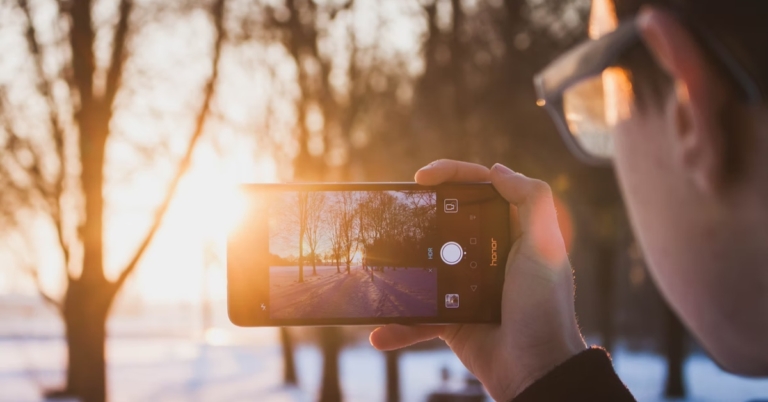


 You will spot an HDR icon on the first screen itself, tap on it to enable HDR mode (OnePlus phone used for the above reference). If you do not find it on the first screen, follow the next steps.
Step 2 – Head to the camera setting to find the HDR option.
Step 3 – Toggle it on to enable HDR mode. (Samsung’s OneUI used for reference)
This is a complete guide of what HDR is and the best way to use HDR mode to take photos on your Android smartphone. Hope this helps you take good pictures and clarifies all the doubts regarding HDR you had.
For the latest gadget and tech news, and gadget reviews, follow us on Twitter, Facebook and Instagram. For newest tech & gadget videos subscribe to our YouTube Channel. You can also stay up to date using the Gadget Bridge Android App. You can find the latest car and bike news here.
You will spot an HDR icon on the first screen itself, tap on it to enable HDR mode (OnePlus phone used for the above reference). If you do not find it on the first screen, follow the next steps.
Step 2 – Head to the camera setting to find the HDR option.
Step 3 – Toggle it on to enable HDR mode. (Samsung’s OneUI used for reference)
This is a complete guide of what HDR is and the best way to use HDR mode to take photos on your Android smartphone. Hope this helps you take good pictures and clarifies all the doubts regarding HDR you had.
For the latest gadget and tech news, and gadget reviews, follow us on Twitter, Facebook and Instagram. For newest tech & gadget videos subscribe to our YouTube Channel. You can also stay up to date using the Gadget Bridge Android App. You can find the latest car and bike news here. 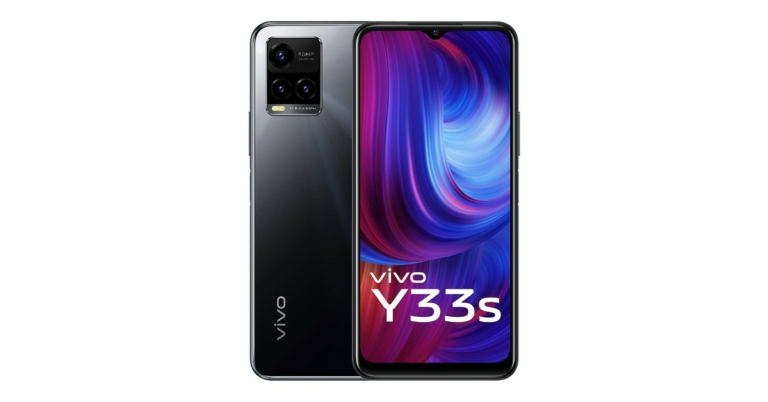
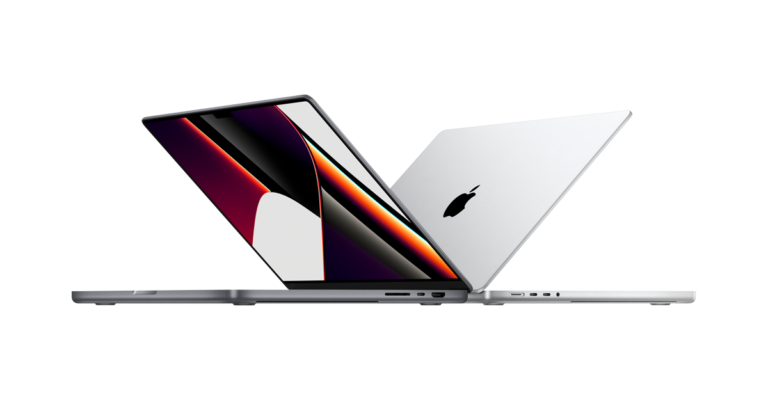
 A writing application to get your work done with. It works as a completely normal notepad application until you open its extensive library of tools. With its minimalistic design keeping, a record of your written material becomes easy. All the documents are stored and organised in a dropdown styled many so users can open them with a click.
These files are divided into folders and subcategories for ease of use. Do not worry if you can’t carry your Macbook everywhere, all the documents are backed up on your iCloud account so they can be easily accessed, viewed and shared from anywhere.
A writing application to get your work done with. It works as a completely normal notepad application until you open its extensive library of tools. With its minimalistic design keeping, a record of your written material becomes easy. All the documents are stored and organised in a dropdown styled many so users can open them with a click.
These files are divided into folders and subcategories for ease of use. Do not worry if you can’t carry your Macbook everywhere, all the documents are backed up on your iCloud account so they can be easily accessed, viewed and shared from anywhere.
 One of the most popular office suites with millions of users worldwide. If you are new to the Apple ecosystem, worry not Microsoft Office 365 supports the new M1 chips from day one. Every application included in the Microsoft productivity bundle will work natively without the need for Rosetta (used to run cross-platform applications). Whether you need to make a presentation, a Word file or manage records on your Excel sheet, install the Microsoft 365 package and you are good to go.
 This application is a list organiser, which helps you manage schedules and do day to day tasks easily. Whether it is a bill payment, a meeting reminder or a casual shopping list, Fantastica has got your back. Just set a reminder and forget about it. With a beautiful design, the application also has cross-platform compatibility so be it your Mac or a Windows laptop your reminders are covered anyway. Many awards winner, this application is a must-have in your library.
 Imagine having a calendar application with cross-application sync. Well, OmniFocus is the application which you are looking for. One of the best productivity applications out in the market. The idea behind this application is to get your plans easily noted down in your calendar even when the application is not opened. You can add tasks from any application and everything will be synced down across all the devices. Consider using it to see what wonders it can do.
Read Also: Amazon launches Luna cloud gaming service
Imagine having a calendar application with cross-application sync. Well, OmniFocus is the application which you are looking for. One of the best productivity applications out in the market. The idea behind this application is to get your plans easily noted down in your calendar even when the application is not opened. You can add tasks from any application and everything will be synced down across all the devices. Consider using it to see what wonders it can do.
Read Also: Amazon launches Luna cloud gaming service
 There are lots of Affinity applications available in the market. These all are ideal for artists and graphic designers. The application is used for productivity, creating posters, logos, icons, artwork and much more across the globe. There are a huge number of tools to make the work easy and go through the process smoothly. The application supports cross platforms, which makes it easy to run on all M1 chip systems including iPad pro. Getting this application an easy select for apps for MacBook Pro
 One of the most popular apps that helped us cope up with the covid situations by keeping our work going. Zoom is a simple video calling app with lots of features under its sleeves. Users can schedule a meeting, change the background while on a video call or record their calls, Zoom’s got you covered.
Screen share is another great feature that initially gave competition to other applications. Users were able to share and control the screen making the life of teachers and tech support really easy. Use Zoom to conduct meetings or simply talk to your loved ones on your new Macbook.
One of the most popular apps that helped us cope up with the covid situations by keeping our work going. Zoom is a simple video calling app with lots of features under its sleeves. Users can schedule a meeting, change the background while on a video call or record their calls, Zoom’s got you covered.
Screen share is another great feature that initially gave competition to other applications. Users were able to share and control the screen making the life of teachers and tech support really easy. Use Zoom to conduct meetings or simply talk to your loved ones on your new Macbook.
 Have a habit of making a list of jobs from pen and paper? Todoist is a simple solution for you. It fetches the details from your calendar and accepts manual input from the users. After that, the application arranges it in a to-do list, which users can scratch off once the task is done. While working you remembered to buy some groceries? Just add them to the Todoist and it will be automatically synced with your other hand device. The list can further be saved on any popular cloud service you use. Now no more forgetting small tasks, use Todoist and keep your work organised making it one of the best apps for MacBook pro.
 Adobe is working hard on making the heavy Photoshop and Premiere pro compatible with M1 chips. Till then you can surely consider using Lightroom, which is a lightweight version of those applications without the need of Rosetta.
It is a stripped down version of a complicated editing application that only includes essential basic photo editing tools. Ideal for consumers who want to edit their photos lightly or simply want to tweak them a little. It is also good for beginners, to get them into the world of photo editing. The application supports RAW files so using Lightroom won’t deteriorate the quality of your image.
Read Also: 10 Best Apps to download in your new Apple iPad Mini 2021
Adobe is working hard on making the heavy Photoshop and Premiere pro compatible with M1 chips. Till then you can surely consider using Lightroom, which is a lightweight version of those applications without the need of Rosetta.
It is a stripped down version of a complicated editing application that only includes essential basic photo editing tools. Ideal for consumers who want to edit their photos lightly or simply want to tweak them a little. It is also good for beginners, to get them into the world of photo editing. The application supports RAW files so using Lightroom won’t deteriorate the quality of your image.
Read Also: 10 Best Apps to download in your new Apple iPad Mini 2021
 The new Macbook Pro now supports up to 4 external displays and having an external one improves your workspace. If you don’t want to invest in an external display and have a spare iPad in your home. Use Luna Display to extend your screen using your iPad. There is a built-in feature for that called Sidecar. Well, Luna Display takes it to a level further as you can make another Mac your extended display as well. A great option for people for whom one traditional monitor is not enough.
 Want a photo editing application to just perform basic functions? Try using Pixelmator Pro, the application is capable of performing basic tasks and touch-up to photos. With a number of tools and filters, one can easily enhance their clicks or even old memories.
The application keeps everything simple, giving new life to a photograph. The best feature is an automatic photo-enhancement tool. It is an AI-based system that relies on an algorithm trained on 20 million images. This makes enhancing your photos in just a few clicks, child’s play.
These are some apps for MacBook Pro (2021) that you should consider installing for a better Apple experience.
For the latest gadget and tech news, and gadget reviews, follow us on Twitter, Facebook and Instagram. For newest tech & gadget videos subscribe to our YouTube Channel. You can also stay up to date using the Gadget Bridge Android App. You can find the latest car and bike news here.
Want a photo editing application to just perform basic functions? Try using Pixelmator Pro, the application is capable of performing basic tasks and touch-up to photos. With a number of tools and filters, one can easily enhance their clicks or even old memories.
The application keeps everything simple, giving new life to a photograph. The best feature is an automatic photo-enhancement tool. It is an AI-based system that relies on an algorithm trained on 20 million images. This makes enhancing your photos in just a few clicks, child’s play.
These are some apps for MacBook Pro (2021) that you should consider installing for a better Apple experience.
For the latest gadget and tech news, and gadget reviews, follow us on Twitter, Facebook and Instagram. For newest tech & gadget videos subscribe to our YouTube Channel. You can also stay up to date using the Gadget Bridge Android App. You can find the latest car and bike news here. 

 Another tipster spotted the upcoming phones on the Amazon UK website. The Google Pixel 6 Pro was listed at GBP 849 for the 128GB memory that converts to Rs 87,800 while the 256Gb storage option will cost GBP 949 which translates to Rs 98,100. According to the tipster both the phones will be available for sale from the very first day of November in the UK.
 Another tipster spotted the upcoming phones on the Amazon UK website. The Google Pixel 6 Pro was listed at GBP 849 for the 128GB memory that converts to Rs 87,800 while the 256Gb storage option will cost GBP 949 which translates to Rs 98,100. According to the tipster both the phones will be available for sale from the very first day of November in the UK.
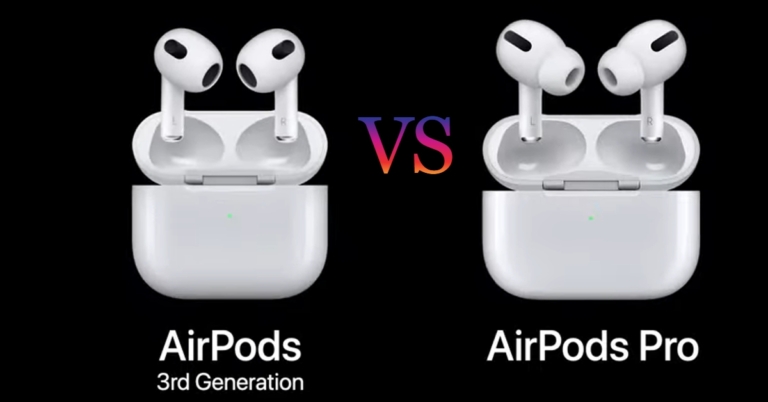
 The top of the earphone’s line by the company, Apple AirPods Pro gets active noise cancellation on board along with transparency mode to hear important noise and sounds around you. Not all but there are few features that these new TWS inherit are Spatial sound and Adaptive EQ.
Spatial sound gives a surround sound feeling to users and when paired with Dolby Atmos support that the company recently added, gives an immersive experience. Adaptive EQ adjusts the sound of the music or multimedia according to the fit of the earphones to compensate for the loss of audio if any.
The top of the earphone’s line by the company, Apple AirPods Pro gets active noise cancellation on board along with transparency mode to hear important noise and sounds around you. Not all but there are few features that these new TWS inherit are Spatial sound and Adaptive EQ.
Spatial sound gives a surround sound feeling to users and when paired with Dolby Atmos support that the company recently added, gives an immersive experience. Adaptive EQ adjusts the sound of the music or multimedia according to the fit of the earphones to compensate for the loss of audio if any.
 The next-gen has a longer battery life as compared to the predecessor. Not only that it is a significant improvement over the Pro counterpart as well. Both, the 3rd gen AirPods and AirPods Pro, are powered by an H1 chip so we can expect similar performance.
Apple claims that these new earphones will last for 6 hours on a single charge and up to 5 hours with spatial audio enabled. Along with that users can expect 4 hours of talk time and the charging case should provide up to 30 hours (4 full charges) of listening time.
Talking about the AirPods Pro in comparison, according to Apple it should last 4.5 hours on a single charge and 5 hours of active noise cancellation and transparency mode is disabled. They offer 3.5 hours of talk time and the case provides 24 hours (near to 3 full charges) of total listening time.
Read Also: Amazon to roll out an updated interface for Fire TV Stick
Now answering the question of AirPods Pro vs AirPods 3rd Gen: which one you should consider? Taking note of all the aspects and differences, if the users are keen to go towards active noise cancellation, transparency mode, better fit and budget is not an issue for them can consider buying the AirPods Pro for Rs 24,900 without a doubt.
For consumers interested in better battery life, the round shape tips give a better fit and want to get the taste of the latest technology at an affordable price tag of Rs 12,900 can consider AirPods 3rd generation.
For the latest gadget and tech news, and gadget reviews, follow us on Twitter, Facebook and Instagram. For newest tech & gadget videos subscribe to our YouTube Channel. You can also stay up to date using the Gadget Bridge Android App. You can find the latest car and bike news here.
The next-gen has a longer battery life as compared to the predecessor. Not only that it is a significant improvement over the Pro counterpart as well. Both, the 3rd gen AirPods and AirPods Pro, are powered by an H1 chip so we can expect similar performance.
Apple claims that these new earphones will last for 6 hours on a single charge and up to 5 hours with spatial audio enabled. Along with that users can expect 4 hours of talk time and the charging case should provide up to 30 hours (4 full charges) of listening time.
Talking about the AirPods Pro in comparison, according to Apple it should last 4.5 hours on a single charge and 5 hours of active noise cancellation and transparency mode is disabled. They offer 3.5 hours of talk time and the case provides 24 hours (near to 3 full charges) of total listening time.
Read Also: Amazon to roll out an updated interface for Fire TV Stick
Now answering the question of AirPods Pro vs AirPods 3rd Gen: which one you should consider? Taking note of all the aspects and differences, if the users are keen to go towards active noise cancellation, transparency mode, better fit and budget is not an issue for them can consider buying the AirPods Pro for Rs 24,900 without a doubt.
For consumers interested in better battery life, the round shape tips give a better fit and want to get the taste of the latest technology at an affordable price tag of Rs 12,900 can consider AirPods 3rd generation.
For the latest gadget and tech news, and gadget reviews, follow us on Twitter, Facebook and Instagram. For newest tech & gadget videos subscribe to our YouTube Channel. You can also stay up to date using the Gadget Bridge Android App. You can find the latest car and bike news here. 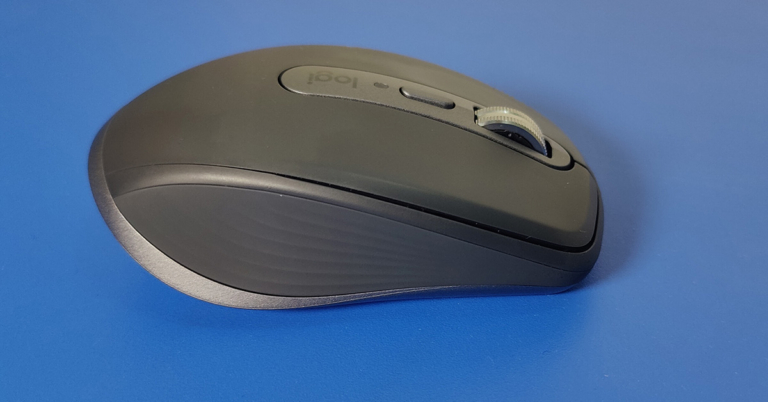
 The Logi branding can be found on the top as well and really suave silver metallic scroll wheel. More about it in the performance section. Here you will also find the mode shift key that can switch the scroll wheel from ratchet to smooth free-spin mode.
 The Logi branding can be found on the top as well and really suave silver metallic scroll wheel. More about it in the performance section. Here you will also find the mode shift key that can switch the scroll wheel from ratchet to smooth free-spin mode.
 Twin forward and back buttons can be found on the left side and are well within reach. Below you will get vertically placed glider footings. These work really well, irrespective of the surface. The power key and the device selection button can also be found here. The Logitech MX Anywhere 3 is lighter than the previous edition and weighs 99 grams. The connectivity port has also been upgraded. Now you get USB Type-C port instead of the micro-USB port.
