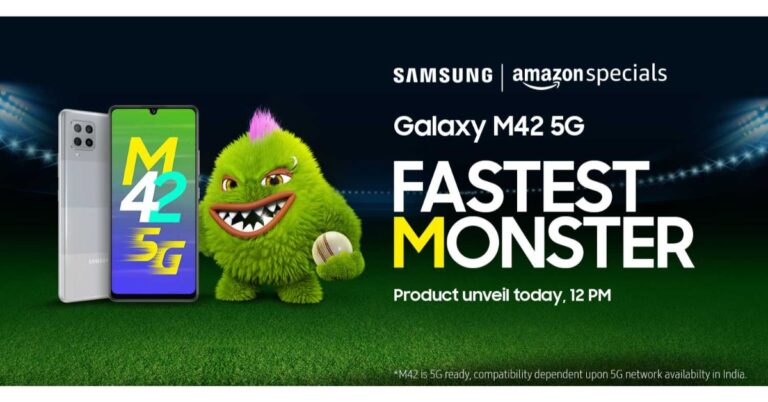
Samsung is all set to launch its next 5G smartphone in India today. The company is going to introduce the long-rumoured Samsung Galaxy M42 5G in the country. It should be noted that this smartphone is going to be the first 5G smartphone to make its entry into the popular Galaxy M range. It will be featuring a waterdrop-style notch display and a quad-camera setup in a square-shaped module. The Samsung Galaxy M42 5G shall be unveiled through the Amazon India website at noon today. Ahead of the official announcement, the device has also been listed on Amazon and a dedicated landing page has been created to tease its availability. The company has not yet disclosed the pricing of its 5G phone but leaks suggest that it will be retailing in India at Rs 20,000 and Rs 25,000 price segments. After getting launched the smartphone will be available for purchase via Amazon India, Samsung online store and partner retail outlets.Coming to the specifications, a recent report suggests that Samsung Galaxy M42 5G will be a rebranded variant of Galaxy A42 5G. The device code “a42xq” spotted via Google Play Console listings claims that they both have the same codes. Most importantly the specifications of both the handsets are also the same. On the other hand, Wi-Fi Alliance and Bluetooth SIG listing had also confirmed that Galaxy M42 5G, is a rebranded Samsung Galaxy A42 5G model. If the report is to be believed then the specifications of the smartphone will be similar to Galaxy A42 5G, however, there might be some slight differences. As per the listing the Samsung Galaxy M42 5G will be powered by Qualcomm SM7225 chipset, which is the Snapdragon 750G processor paired with 6GB of RAM. Moreover, the device will be featuring an HD+ display with 720×1,339 pixels of resolution and will ship Android 11 out of the box.In terms of rear optics, the upcoming smartphone will include a quad rear camera set up that will include a 64 or 48-megapixel primary sensor. Moreover, it will pack a 6,000mAh battery. Alongside, the phone will also include Samsung Knox security as well as Samsung Pay. Noticeably the tech firm is promoting Galaxy M42 5G as “Fastest Monster”.
For the latest gadget and tech news, and gadget reviews, follow us on Twitter, Facebook and Instagram. For newest tech & gadget videos subscribe to our YouTube Channel. You can also stay up to date using the Gadget Bridge Android App.
The e-commerce website Flipkart is hosting Daily Trivia Quiz. Every day it brings a bunch of new questions for its users. By answering them correctly you can win exciting prizes. The questionnaire is based on questions related to general knowledge. Also, the users can win free vouchers and super coins, among other offers via the daily quiz. April 28 Flipkart Daily Trivia Quiz Answers has already gone live on its platform.
The participant should be at least 18 years old and should have a valid login ID. The Quiz is available on the mobile platform and not the web version. E-commerce conducts the quiz on daily basis and goes live at 12:00 AM IST and runs till 11:59 PM IST. The winners are announced within 15 days from the date of participation that can be viewed under the Gems/Rewards section in the app.
How to participate in the Flipkart Daily Trivia Quiz
To participate download the Flipkart app on your phone. Then open the Flipkart app then head to Game Zone. Now click on the Daily Trivia Banner or search for Daily Trivia. Enter the game and answer all 5 questions with correct answers.
April 28 Flipkart Daily Trivia Quiz Answers
Question 1: In which of these continents was the 2009 IPL season organised?
Answer: Africa
Question 2: Identify this former cricketer who is currently the director of the IPL team Sunrisers Hyderabad?
Answer: Tom Moody
Question 3:Glenn Maxwell has not played for which of these IPL teams?
Answer: Chennai Super Kings
Question 4: The first-ever Purple Cap winner in the IPL was from which country?
Answer: Pakistan
Question 5: Who was the second batsman to score a century in IPL 2021?
Answer: Devdutt Padikkal
The e-commerce platform Amazon is back with another new session of the quiz on its platform. It brings Amazon Quiz sessions for its customers on a daily basis. Customers can stand a chance to win bumper prizes just by playing at home from 12 AM to 11:59 PM. Every day Amazon asks 5 questions that the customers have to answer correctly. This session is only available for app user in India.
In today’s Amazon Quiz the winners will get a chance to win Rs 15,000 Amazon Pay Balance. Check out April 28 Amazon Quiz answers:
Question 1: Kraigg Brathwaite, the new Test captain of West Indies was born in which Caribbean island?
The answer is- Barbados
Question 2: On April 6th, the UN observes International Day of ____ for Development and Peace. Fill in the blanks
The answer is- Sport
Question 3: Eshan Naqvi, plays the role of which badminton player in the movie ‘Saina’, starring Parineeti Chopra?
The answer is- Parupalli Kashyap
Question 4: This breed of dog originated in which of these places and was brought to England by fishermen in about 1800?
The answer is- Newfoundland
Question 5: This animal is seen on the logo of which of these organisations?
The answer is- WWF
The Premium smartwatch maker, Garmin, has today announced the launch of the all-new smartwatch in India. The Garmin Approach S12 smartwatch is another GPS enabled device that is said to be helpful to golfers in improving their game and providing accurate data for each swing. In addition to this, the smartwatch is backed with a dedicated app. The golf GPS watch by Garmin does not feature a coloured display however it is relatively cheaper than the other wearable that the company offers. Garmin Approach S12 smartwatch has been specially designed keeping in mind the increasing love for Golf in India. This smart wearable will help golf players to improve their performance and game with accurate data. The Garmin Approach S12 smartwatch has been launched in the country with a price tag of Rs 20,990. The device will be available for purchase via Amazon.in, synergizer.co.in, Flipkart, Tata Cliq as well as through the offline market across the country. It will be available in two colour option of White and Black.Launching the new smartwatch for Golf lovers in India, Mr Ali Rizvi, Director of Garmin India said, “Golfing is a very niche sport and requires a great course and steady techniques to win each hole. As Golf enthusiasts are increasing in India, the players need a perfect device that can enhance their performance and game with accurate data. The new Approach S12 is engineered with all the essential elements which are required by the players during their game. The smartwatch will equip the customers with precision and form with every swing and also add a touch of style to their personality.”Speaking of the features, the Garmin Approach S12 smartwatch is a dedicated device for golfers which uses GPS for better accuracy, provides yardages and can help you keep score — all from your wrist. The smart wearable comes loaded with more than 42,000 golf courses around the world. It has a 0.9 inches sunlight-visible, transflective memory-in-pixel display. The watch is 5ATM rated for water and dust resistanceThe Autoshot feature on the watch measures shot distances and auto-records detected shots for post-round analysis on the dedicated Garmin Golf app. It is a free to download app and is compatible with iPhone and Android devices so that you can compete, compare and connect with fellow golfers. The Green View displays the shape and layout of the green and allows you to manually drag and drop the pin to today’s position for even more precise targeting. Furthermore, the CourseView Auto Updater automatically updates frequently played courses for free when connected to a wireless network. When the Garmin Approach S12 smartwatch is synced with the Garmin Connect it lets you log workouts, track data and share your triumphs through social media. In addition to this, the golfers can play up to 30 hours per charge all that in GPS mode. On the normal watch mode, it is said to last for up to 10 weeks.
For the latest gadget and tech news, and gadget reviews, follow us on Twitter, Facebook and Instagram. For newest tech & gadget videos subscribe to our YouTube Channel. You can also stay up to date using the Gadget Bridge Android App.
The PlayStation 5 DualSense controller is the most advanced game controller designed by Sony to date. It offers several features to enhance the gaming experience and performance. The controller features a haptic feedback mechanism, built-in microphone setup, and adaptive triggers.
Earlier, the PlayStation 5 DualSense controller could only get wirelessly connected with Android devices. However, with the release of the new iOS 14.5 update, Apple devices can now get connected with the PlayStation 5 DualSense and the Xbox Series X controllers.
How can you connect the PlayStation 5 DualSense controller to an Android device?
To connect the PlayStation 5 DualSense controller to an Android device, follow these steps.
Open the Notification panel of your Android device by swiping down the screen.
Tap the Bluetooth icon to turn it on.
Go to the Bluetooth settings by tapping and holding the icon. This step may vary across different devices.
On your PlayStation 5 DualSense controller, press and hold the logo button and the Share button until the LEDs blinks.
You will find the PlayStation 5 DualSense controller appear in the Available devices section of the Bluetooth settings.
Tap the DuаlSense 5 Wireless Controller in the Available devices list.
Tap Pair to connect establish the connection between the PlayStation 5 DualSense controller and the Android device.
How can you connect the PlayStation 5 DualSense controller to an Android or an iOS device?
How can you connect the PlayStation 5 DualSense controller to an iOS device?
You must note that to connect the PlayStation 5 DualSense controller, your device must have the iOS 14.5 version. If your device is running a previous version update the operating system by going to Settings > General > Software Update.
To connect the PlayStation 5 DualSense controller to an Android device, follow these steps.
Turn on the Bluetooth by going to Settings > Bluetooth.
On your PlayStation 5 DualSense controller, press and hold the logo button and the Share button until the LEDs blinks.
You will find the PlayStation 5 DualSense controller appear in the Available devices section of the Bluetooth settings.
Tap the DuаlSense 5 Wireless Controller in the Available devices list to connect it.
The second wave of the COVID-19 pandemic has imposed its worst impact in India. With around 3.5 lakh new COVID-19 patients each day, the country is indeed going through a catastrophic situation. Being one of the largest and most populous nations, its reverberation can be felt throughout the world.
How is the world coming together to help India fight the COVID-19 pandemic?
India follows and has always preached the lesson of “Vasudhaiva Kutumbakam” i.e. the world is one family. The country has selflessly helped every nation amid the COVID-19 pandemic in all possible ways. India did not think twice to provide vaccines or medical supplies to even the biggest nations of the world. Now, in its difficult time, other countries are showing their compassion and extending their helping hands to help India win this fight against the COVID-19 pandemic.
How are big tech companies helping India win the war against the COVID-19 pandemic?
India has produced some of the most influential leaders in the world. This is evident from the fact that some of the leading multinational companies have Indian CEOs including Sundar Pichai (CEO of Google LLC & Alphabet Inc.), Satya Nadella (CEO of Microsoft), Shantanu Narayen (CEO, Adobe Inc.), Arvind Krishna (CEO of IBM Group).
Almost all big companies of the world have their headquarters in India. The country is not merely a marketplace for them. With lakhs of employees and millions of customers, India is like a home to them. Thus, CEOs of around 40 top American companies including Apple Inc., Google, and Microsoft did not think twice to help India recuperate from this apocalyptic situation.
How is Microsoft helping India fight the COVID-19 pandemic?
Microsoft CEO Satya Nadella announced that the company will help India improve its medical infrastructure through its “voice, resources, and technology”. Moreover, Microsoft will help the Indian government and hospitals buy critical oxygen concentration devices.
According to Satya Nadella, chief executive officer (CEO) of Microsoft, “I am heartbroken by the current situation in India. I’m grateful the US government is mobilizing to help. Microsoft will continue to use its voice, resources, and technology to aid relief efforts, and support the purchase of critical oxygen concentration devices”.
How is Microsoft helping India fight the COVID-19 pandemic?
How is Apple Inc. helping India fight the COVID-19 pandemic?
Apple CEO Tim Cook announced that the company will provide donations and assistance in relief efforts to contain the COVID-19 cases on the ground.
According to Tim Cook, chief executive officer of Apple Inc., “Amid a devastating rise of COVID cases in India, our thoughts are with the medical workers, our Apple family and everyone there who is fighting through this awful stage of the pandemic. Apple will be donating to support and relief efforts on the ground”.
How is Apple Inc. helping India fight the COVID-19 pandemic?
How is Google helping India fight the COVID-19 pandemic?
Google CEO Sundar Pichai announced to help India by providing medical supplies and assistance to high-risk communities.
According to Sundar Pichai, chief executive officer of Google LLC & Alphabet Inc., “Devastated to see the worsening Covid crisis in India. Google & Googlers are providing Rs 135 Crore in funding to @GiveIndia , @UNICEF for medical supplies, orgs supporting high-risk communities, and grants to help spread critical information”.
How is Google helping India fight the COVID-19 pandemic?
With the countries of the world coming together to help each other, that day is not far when India, as well as the world, will emerge out of this pandemic.
For the latest gadget and tech news, and gadget reviews, follow us on Twitter,FacebookandInstagram. For newest tech & gadget videos subscribe to our YouTube Channel. You can also stay up to date with the Gadget Bridge Android App.
Garena Free Fire City Open 2021 tournament has been officially announced in India. In this gaming tournament, the survivors will be battling to get a chance to represent their own city/state. This national tournament will bring the top 12 Free Fire teams from across the nation to win a prize pool of Rs 60 lakhs. Read on for all the details.Garena has announced the Free Fire City Open 2021 tournament in India. The is the national tournament being hosted in the country for the very first, time and to participate the survivors can sign up in-game through the Free Fire Cup (FFC) mode till the match day on 30 April. In the Free Fire tournament, the players will battle for a chance to represent their own city/state in which the top 12 Free Fire teams from across the nation will fight to win a prize pool of Rs 60 lakh. According to Garena, these 12 teams will consist of the 10 top teams from 8 states, which have been named after their major city – Delhi, Mumbai (Maharashtra), Hyderabad(Telangana), Ahmedabad (Gujarat), Kolkata (West Bengal), Chennai (Tamil Nadu), Lucknow (Uttar Pradesh), and Visakhapatnam(Andhra Pradesh). Besides this, there will be two wildcard entries that will come from outside of these 8 regions. It should be noted that these 8 participating regions have been chosen via a public poll. Speaking on the format of the format, the winners from each of the participating cities will be chosen basis their individual city finals. So, 2 teams selected from the play-ins between the teams ranked #2 to #4 from each of the 8 city finals; and 2 “wildcard” entries which will be the best teams chosen from the rest of India, outside of the 8 participating cities. The tournament is said to kickstart with the FFC mode on April 30 followed by the city finals starting in June. How to register?
Firstly sign up in-game through the Free Fire Cup (FFC) mode.
Click on the banner and you will be taken to the FFCO lobby, here all the important details related to match, schedule, scoring and other details have been given.
Then tap on the quad button in the lobby in order to create or join a team.
If you want to create a team then you are required to fill in all your details like the name of your squad, contact information, your region and so on.
On the other hand, you need to submit a request so as to join a team from the friends or application list.
Each team will receive a total of eight tickets and the team formation will begin from April 30.
The Xbox Game Bar application on Windows 10 enables you to capture your screen along with application audio and voiceover. This feature of Xbox helps you record your gameplays along with commentary. You may also use this feature to record your online lectures or create your own tutorial videos. The screen recordings are automatically saved on your PC to access them anytime.
What you must ensure before you begin recording your screen using the Xbox Game Bar?
Before you begin recording your screen using the Xbox Game Bar, you must ensure the following points.
Enable the Xbox Game Bar in the Settings: Go to Settings > Gaming > Xbox Game bar and turn the toggle on for record game clips, chatting with friends, and receiving game invites.
Enable the Xbox Game Bar in the Settings.
Open the app that you want to record: Either close or minimize the apps that you don’t is to record. If other application windows are left open, they will also be recorded.
Turn-off other sounds: The screen recorder function of the Xbox Game Bar records all the sounds that are playing at a time. These include the sounds from your current application as well as background applications. To avoid distracting sounds, either close the secondary applications or turn their volume off.
How can you record your PC’s screen using the Xbox Game Bar?
To record your PC’s screen using the Xbox Game Bar, follow these steps.
Launch the Xbox Game Bar by search it in the Start menu. Alternatively, you can use the Windows+G key combination to start it.
Apart from the application sounds, you can do a voiceover by clicking the microphone icon located at the top left corner. This will activate the external audio recording.
To control the volume of the running application, use the slider given in the System Sounds tab.
Once you’re set to start the screen recording, click the Record button. Alternatively, you may use the Windows+Alt+R key combination.
Once you’re set to start the screen recording, click the Record button.
As soon as the screen recording begins, you will get a pop up with a timer that displays the total time of recording. You may also use the microphone icon given on the pop up to toggle your external microphone on or off.
As soon as the screen recording begins, you will get a pop up with a timer that displays the total time of recording.
Once you’ve recorded your screen, you may stop the recording by clicking the stop button located on the top left as well as on the pop-up. Alternatively, you may use the Windows+Alt+R key combination.
You will get a notification saying, “Game clip recorded”.
You will get a notification saying, “Game clip recorded”.
To access the recorded screens, click the notification that you get once you stop the screen recording. Alternatively, you can go to This PC > Videos > Captures to get all screen recordings.
For the latest gadget and tech news, and gadget reviews, follow us on Twitter,FacebookandInstagram. For newest tech & gadget videos subscribe to our YouTube Channel. You can also stay up to date with the Gadget Bridge Android App.
The second wave of the COVID-19 pandemic in India has been more severe than the first. Some cities have been undergoing complete lockdown while others are experiencing weekend lockdown. As a result, organisations are allowing their employees to carry out their work from home.
The environment at home is different from that of an office. Before you can delve into office tasks at your home, you need to ensure that you have all the gears and facilities for uninterrupted workflow. A laptop is among the most essential gadgets that you need for your office-related work. Here are the best laptops that you can buy for under ₹ 30,000 to work from home.
1) Asus E203 E203MAH-FD005T 11.6-inch laptop
The Asus E203 comes with a 1.1GHz Intel Celeron N4000 processor that will efficiently handle your office tasks. The 4GB LPDDR4 RAM accompanied by Intel UHD Graphics 600 Graphics enables you to run graphic-driven software and websites. You get a 500GB 5400RPM hard drive for storing your work-related documents and files. The 11.5-inch screen firmly helps with a durable 180-degree hinge. As a result, you can adjust the angle according to your sitting posture for stress-free working hours. If you need faster speed, you can, later on, install an SSD in it, which will better the load times and boot speed.
Asus E203 E203MAH-FD005T 11.6-inch laptop
Price: ₹ 24,277
Buy on Amazon
2) HP Chromebook 14a-na0003TU 14-inch laptop
The HP Chromebook laptop features several features to make your workflow smooth. With Google Assistant, you can speed up your tasks by using voice commands for opening and navigating through applications. You may also set reminders for subtasks, control your home and play videos during breaks. The laptop is powered by the Intel Celeron N4020 processor with a base clock frequency of 1.1GHz and a burst frequency of 2.8 GHz. The laptop runs the Chrome OS that offers automatic updates so your apps run smoothly with the latest virus protection. You get a 4GB DDR4-2400 SDRAM and a 64GB HDD expandable up to 256GB.
HP Chromebook 14a-na0003TU 14-inch laptop
Price: ₹ 24,990
Buy on Amazon
3) Lenovo Ideapad Slim 3 laptop
The Lenovo Ideapad Slim 3 is powered by an AMD Athlon Silver 3050U processor that can get clocked at a base frequency of 2.3GHz and a max frequency of 3.2GHz. The laptop is equipped with 2 cores and 4MB cache memory for fast data fetching. You get pre-installed MS Office Home for carrying out your work efficiently. The laptop is equipped with 4GB DDR4 RAM for graphic-enabled tasks. You get 3 years of authorised warranty across India that includes a 1-year default base warranty and a 2-year additional warranty.
Lenovo Ideapad Slim 3 laptop
Price: ₹ 28,089
Buy on Amazon
4) Dell Vostro 3405 14″ HD AG Display laptop
The Dell Vostro 3405 is a 14-inch laptop that is powered by an AMD Silver 3050U laptop. You get 256GB SSD for data transfer and application loading. The laptop comes with 4GB RAM accompanied by Intel Integrated Graphics for handling multiple software simultaneously. You can even run applications that demand GPU. Dell Vostro 33405 comes with pre-installed Windows 10 and Microsoft Office so that you can efficiently carry your tasks while working from home. The HDMI 1.4b enables you to view your applications and presentations on larger screens.
Dell Vostro 3405 14″ HD AG Display laptop
Price ₹ 28,990
Buy on Amazon
5) Acer A315-23 Aspire 3 laptop
The Acer Aspire 3 laptop is a 15.6-inch laptop featuring a Full HD 1080p display. The laptop runs an AMD Ryzen R3-3250U processor with a base clock frequency of 2.6GHz. You get a 1TB hard drive for storing all your work-related files and documents. The Acer Aspire 3 laptop comprises 4GB RAM and AMD Radeon graphics for running your applications and projects smoothly. The laptop comes with two built-in speakers for carrying out online conferences with clear sound output. The 3-cell battery provides a backup of 8 hours.
Acer A315-23 Aspire 3 laptop
Price: ₹29,999
Buy on Reliance Digital
For the latest gadget and tech news, and gadget reviews, follow us on Twitter,FacebookandInstagram. For newest tech & gadget videos subscribe to our YouTube Channel. You can also stay up to date with the Gadget Bridge Android App.
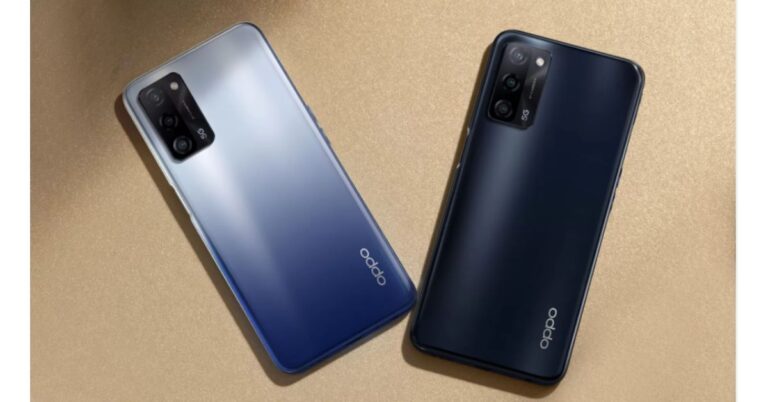
The Chinese smartphone company, Oppo, today launched its brand new budget 5G ready smartphone in India. The company has introduced Oppo A53s 5G, which is an offspring of Oppo A53 5G that was launched in the country last year. The latest 5G smartphone is powered by MediaTek Dimensity 700 SoC. It comes with a rectangular shaped triple rear camera setup and a 60Hz refresh rate screen. In addition to this, it packs a 5,000mAh battery and runs Android 11 out of the box.Oppo A53s 5G pricing and availabilityOppo A53s 5G has been launched in two RAM and storage configurations. The price of the 6GB RAM with 128GB storage has been set at Rs 14,990 on the other hand the 8GB RAM with 128GB storage model will be available with a price tag of Rs 16,990. The device will be available in two colour options of Crystal Blue and Ink Black. In terms of availability, the phone is scheduled to on its first sale via Flipkart starting May 2 at noon onwards. The launch offers for Oppo A53s 5G includes up to 10 percent discount on HDFC Bank cards and on non-EMI transactions. There will be a 5 percent unlimited cashback on Flipkart Axis Bank Credit card and 10 percent Off on the first transaction on HDFC Bank Mastercard Credit card.Oppo A53s 5G tech specificationsThe Oppo A53s 5G comes with a 6.52-inch HD+ display driven by 720×1,600 pixels of resolution. It offers 60Hz refresh rate support and an 88.7 percent screen-to-body ratio. The smartphone runs ColorOS 11.1 based on Android 11. Under the covers, there is a MediaTek Dimensity 700 SoC paired with Mali-G57 MC2 GPU. The phone will be offered with up to 8GB of RAM and 128GB of storage that can also be expanded up to 1TB using a microSD card.On the imaging front, Oppo A53s 5G sports a triple rear camera setup consisting of a 13-megapixel primary sensor with an f/2.2 aperture. Further assisted by a 2-megapixel depth sensor with an f/2.4 aperture and a 2-megapixel macro lens with an f/2.4 aperture. For taking selfies and video calling the 5G smartphone sports an 8-megapixel front-facing camera with f/2.0 aperture.Oppo A53s 5G packs a 5,000mAh battery. In terms of integrations, there is 5G, 4G, Wi-Fi, GPS, Bluetooth v5, and a USB Type-C port. The sensors on the phone include a side-mounted fingerprint scanner, accelerometer, ambient light sensor and proximity sensor.
For the latest gadget and tech news, and gadget reviews, follow us on Twitter, Facebook and Instagram. For newest tech & gadget videos subscribe to our YouTube Channel. You can also stay up to date using the Gadget Bridge Android App.





 Launching the new smartwatch for Golf lovers in India, Mr Ali Rizvi, Director of Garmin India said, “Golfing is a very niche sport and requires a great course and steady techniques to win each hole. As Golf enthusiasts are increasing in India, the players need a perfect device that can enhance their performance and game with accurate data. The new Approach S12 is engineered with all the essential elements which are required by the players during their game. The smartwatch will equip the customers with precision and form with every swing and also add a touch of style to their personality.”
Speaking of the features, the Garmin Approach S12 smartwatch is a dedicated device for golfers which uses GPS for better accuracy, provides yardages and can help you keep score — all from your wrist. The smart wearable comes loaded with more than 42,000 golf courses around the world. It has a 0.9 inches sunlight-visible, transflective memory-in-pixel display. The watch is 5ATM rated for water and dust resistance
The Autoshot feature on the watch measures shot distances and auto-records detected shots for post-round analysis on the dedicated Garmin Golf app. It is a free to download app and is compatible with iPhone and Android devices so that you can compete, compare and connect with fellow golfers.
The Green View displays the shape and layout of the green and allows you to manually drag and drop the pin to today’s position for even more precise targeting. Furthermore, the CourseView Auto Updater automatically updates frequently played courses for free when connected to a wireless network. When the Garmin Approach S12 smartwatch is synced with the Garmin Connect it lets you log workouts, track data and share your triumphs through social media. In addition to this, the golfers can play up to 30 hours per charge all that in GPS mode. On the normal watch mode, it is said to last for up to 10 weeks.
For the latest gadget and tech news, and gadget reviews, follow us on Twitter, Facebook and Instagram. For newest tech & gadget videos subscribe to our YouTube Channel. You can also stay up to date using the Gadget Bridge Android App.
Launching the new smartwatch for Golf lovers in India, Mr Ali Rizvi, Director of Garmin India said, “Golfing is a very niche sport and requires a great course and steady techniques to win each hole. As Golf enthusiasts are increasing in India, the players need a perfect device that can enhance their performance and game with accurate data. The new Approach S12 is engineered with all the essential elements which are required by the players during their game. The smartwatch will equip the customers with precision and form with every swing and also add a touch of style to their personality.”
Speaking of the features, the Garmin Approach S12 smartwatch is a dedicated device for golfers which uses GPS for better accuracy, provides yardages and can help you keep score — all from your wrist. The smart wearable comes loaded with more than 42,000 golf courses around the world. It has a 0.9 inches sunlight-visible, transflective memory-in-pixel display. The watch is 5ATM rated for water and dust resistance
The Autoshot feature on the watch measures shot distances and auto-records detected shots for post-round analysis on the dedicated Garmin Golf app. It is a free to download app and is compatible with iPhone and Android devices so that you can compete, compare and connect with fellow golfers.
The Green View displays the shape and layout of the green and allows you to manually drag and drop the pin to today’s position for even more precise targeting. Furthermore, the CourseView Auto Updater automatically updates frequently played courses for free when connected to a wireless network. When the Garmin Approach S12 smartwatch is synced with the Garmin Connect it lets you log workouts, track data and share your triumphs through social media. In addition to this, the golfers can play up to 30 hours per charge all that in GPS mode. On the normal watch mode, it is said to last for up to 10 weeks.
For the latest gadget and tech news, and gadget reviews, follow us on Twitter, Facebook and Instagram. For newest tech & gadget videos subscribe to our YouTube Channel. You can also stay up to date using the Gadget Bridge Android App.  Launching the new smartwatch for Golf lovers in India, Mr Ali Rizvi, Director of Garmin India said, “Golfing is a very niche sport and requires a great course and steady techniques to win each hole. As Golf enthusiasts are increasing in India, the players need a perfect device that can enhance their performance and game with accurate data. The new Approach S12 is engineered with all the essential elements which are required by the players during their game. The smartwatch will equip the customers with precision and form with every swing and also add a touch of style to their personality.”
Speaking of the features, the Garmin Approach S12 smartwatch is a dedicated device for golfers which uses GPS for better accuracy, provides yardages and can help you keep score — all from your wrist. The smart wearable comes loaded with more than 42,000 golf courses around the world. It has a 0.9 inches sunlight-visible, transflective memory-in-pixel display. The watch is 5ATM rated for water and dust resistance
The Autoshot feature on the watch measures shot distances and auto-records detected shots for post-round analysis on the dedicated Garmin Golf app. It is a free to download app and is compatible with iPhone and Android devices so that you can compete, compare and connect with fellow golfers.
The Green View displays the shape and layout of the green and allows you to manually drag and drop the pin to today’s position for even more precise targeting. Furthermore, the CourseView Auto Updater automatically updates frequently played courses for free when connected to a wireless network. When the Garmin Approach S12 smartwatch is synced with the Garmin Connect it lets you log workouts, track data and share your triumphs through social media. In addition to this, the golfers can play up to 30 hours per charge all that in GPS mode. On the normal watch mode, it is said to last for up to 10 weeks.
For the latest gadget and tech news, and gadget reviews, follow us on Twitter, Facebook and Instagram. For newest tech & gadget videos subscribe to our YouTube Channel. You can also stay up to date using the Gadget Bridge Android App.
Launching the new smartwatch for Golf lovers in India, Mr Ali Rizvi, Director of Garmin India said, “Golfing is a very niche sport and requires a great course and steady techniques to win each hole. As Golf enthusiasts are increasing in India, the players need a perfect device that can enhance their performance and game with accurate data. The new Approach S12 is engineered with all the essential elements which are required by the players during their game. The smartwatch will equip the customers with precision and form with every swing and also add a touch of style to their personality.”
Speaking of the features, the Garmin Approach S12 smartwatch is a dedicated device for golfers which uses GPS for better accuracy, provides yardages and can help you keep score — all from your wrist. The smart wearable comes loaded with more than 42,000 golf courses around the world. It has a 0.9 inches sunlight-visible, transflective memory-in-pixel display. The watch is 5ATM rated for water and dust resistance
The Autoshot feature on the watch measures shot distances and auto-records detected shots for post-round analysis on the dedicated Garmin Golf app. It is a free to download app and is compatible with iPhone and Android devices so that you can compete, compare and connect with fellow golfers.
The Green View displays the shape and layout of the green and allows you to manually drag and drop the pin to today’s position for even more precise targeting. Furthermore, the CourseView Auto Updater automatically updates frequently played courses for free when connected to a wireless network. When the Garmin Approach S12 smartwatch is synced with the Garmin Connect it lets you log workouts, track data and share your triumphs through social media. In addition to this, the golfers can play up to 30 hours per charge all that in GPS mode. On the normal watch mode, it is said to last for up to 10 weeks.
For the latest gadget and tech news, and gadget reviews, follow us on Twitter, Facebook and Instagram. For newest tech & gadget videos subscribe to our YouTube Channel. You can also stay up to date using the Gadget Bridge Android App. 












 Oppo A53s 5G tech specifications
The Oppo A53s 5G comes with a 6.52-inch HD+ display driven by 720×1,600 pixels of resolution. It offers 60Hz refresh rate support and an 88.7 percent screen-to-body ratio. The smartphone runs ColorOS 11.1 based on Android 11. Under the covers, there is a MediaTek Dimensity 700 SoC paired with Mali-G57 MC2 GPU. The phone will be offered with up to 8GB of RAM and 128GB of storage that can also be expanded up to 1TB using a microSD card.
On the imaging front, Oppo A53s 5G sports a triple rear camera setup consisting of a 13-megapixel primary sensor with an f/2.2 aperture. Further assisted by a 2-megapixel depth sensor with an f/2.4 aperture and a 2-megapixel macro lens with an f/2.4 aperture. For taking selfies and video calling the 5G smartphone sports an 8-megapixel front-facing camera with f/2.0 aperture.
Oppo A53s 5G packs a 5,000mAh battery. In terms of integrations, there is 5G, 4G, Wi-Fi, GPS, Bluetooth v5, and a USB Type-C port. The sensors on the phone include a side-mounted fingerprint scanner, accelerometer, ambient light sensor and proximity sensor.
For the latest gadget and tech news, and gadget reviews, follow us on Twitter, Facebook and Instagram. For newest tech & gadget videos subscribe to our YouTube Channel. You can also stay up to date using the Gadget Bridge Android App.
Oppo A53s 5G tech specifications
The Oppo A53s 5G comes with a 6.52-inch HD+ display driven by 720×1,600 pixels of resolution. It offers 60Hz refresh rate support and an 88.7 percent screen-to-body ratio. The smartphone runs ColorOS 11.1 based on Android 11. Under the covers, there is a MediaTek Dimensity 700 SoC paired with Mali-G57 MC2 GPU. The phone will be offered with up to 8GB of RAM and 128GB of storage that can also be expanded up to 1TB using a microSD card.
On the imaging front, Oppo A53s 5G sports a triple rear camera setup consisting of a 13-megapixel primary sensor with an f/2.2 aperture. Further assisted by a 2-megapixel depth sensor with an f/2.4 aperture and a 2-megapixel macro lens with an f/2.4 aperture. For taking selfies and video calling the 5G smartphone sports an 8-megapixel front-facing camera with f/2.0 aperture.
Oppo A53s 5G packs a 5,000mAh battery. In terms of integrations, there is 5G, 4G, Wi-Fi, GPS, Bluetooth v5, and a USB Type-C port. The sensors on the phone include a side-mounted fingerprint scanner, accelerometer, ambient light sensor and proximity sensor.
For the latest gadget and tech news, and gadget reviews, follow us on Twitter, Facebook and Instagram. For newest tech & gadget videos subscribe to our YouTube Channel. You can also stay up to date using the Gadget Bridge Android App.  Oppo A53s 5G tech specifications
The Oppo A53s 5G comes with a 6.52-inch HD+ display driven by 720×1,600 pixels of resolution. It offers 60Hz refresh rate support and an 88.7 percent screen-to-body ratio. The smartphone runs ColorOS 11.1 based on Android 11. Under the covers, there is a MediaTek Dimensity 700 SoC paired with Mali-G57 MC2 GPU. The phone will be offered with up to 8GB of RAM and 128GB of storage that can also be expanded up to 1TB using a microSD card.
On the imaging front, Oppo A53s 5G sports a triple rear camera setup consisting of a 13-megapixel primary sensor with an f/2.2 aperture. Further assisted by a 2-megapixel depth sensor with an f/2.4 aperture and a 2-megapixel macro lens with an f/2.4 aperture. For taking selfies and video calling the 5G smartphone sports an 8-megapixel front-facing camera with f/2.0 aperture.
Oppo A53s 5G packs a 5,000mAh battery. In terms of integrations, there is 5G, 4G, Wi-Fi, GPS, Bluetooth v5, and a USB Type-C port. The sensors on the phone include a side-mounted fingerprint scanner, accelerometer, ambient light sensor and proximity sensor.
For the latest gadget and tech news, and gadget reviews, follow us on Twitter, Facebook and Instagram. For newest tech & gadget videos subscribe to our YouTube Channel. You can also stay up to date using the Gadget Bridge Android App.
Oppo A53s 5G tech specifications
The Oppo A53s 5G comes with a 6.52-inch HD+ display driven by 720×1,600 pixels of resolution. It offers 60Hz refresh rate support and an 88.7 percent screen-to-body ratio. The smartphone runs ColorOS 11.1 based on Android 11. Under the covers, there is a MediaTek Dimensity 700 SoC paired with Mali-G57 MC2 GPU. The phone will be offered with up to 8GB of RAM and 128GB of storage that can also be expanded up to 1TB using a microSD card.
On the imaging front, Oppo A53s 5G sports a triple rear camera setup consisting of a 13-megapixel primary sensor with an f/2.2 aperture. Further assisted by a 2-megapixel depth sensor with an f/2.4 aperture and a 2-megapixel macro lens with an f/2.4 aperture. For taking selfies and video calling the 5G smartphone sports an 8-megapixel front-facing camera with f/2.0 aperture.
Oppo A53s 5G packs a 5,000mAh battery. In terms of integrations, there is 5G, 4G, Wi-Fi, GPS, Bluetooth v5, and a USB Type-C port. The sensors on the phone include a side-mounted fingerprint scanner, accelerometer, ambient light sensor and proximity sensor.
For the latest gadget and tech news, and gadget reviews, follow us on Twitter, Facebook and Instagram. For newest tech & gadget videos subscribe to our YouTube Channel. You can also stay up to date using the Gadget Bridge Android App.