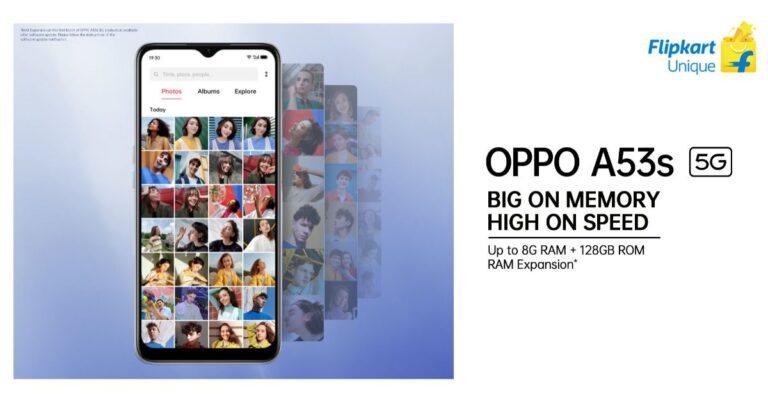
The Chinese smartphone company, Oppo, today launched its brand new budget 5G ready smartphone in India. The company has introduced Oppo A53s 5G, which is an offspring of Oppo A53 5G that was launched in the country last year. The latest 5G smartphone is powered by MediaTek Dimensity 700 SoC. It comes with a rectangular shaped triple rear camera setup and a 60Hz refresh rate screen. In addition to this, it packs a 5,000mAh battery and runs Android 11 out of the box.Oppo A53s 5G pricing and availabilityOppo A53s 5G has been launched in two RAM and storage configurations. The price of the 6GB RAM with 128GB storage has been set at Rs 14,990 on the other hand the 8GB RAM with 128GB storage model will be available with a price tag of Rs 16,990. The device will be available in two colour options of Crystal Blue and Ink Black. In terms of availability, the phone is scheduled to on its first sale via Flipkart starting May 2 at noon onwards. The launch offers for Oppo A53s 5G includes up to 10 percent discount on HDFC Bank cards and on non-EMI transactions. There will be a 5 percent unlimited cashback on Flipkart Axis Bank Credit card and 10 percent Off on the first transaction on HDFC Bank Mastercard Credit card.Oppo A53s 5G tech specificationsThe Oppo A53s 5G comes with a 6.52-inch HD+ display driven by 720×1,600 pixels of resolution. It offers 60Hz refresh rate support and an 88.7 percent screen-to-body ratio. The smartphone runs ColorOS 11.1 based on Android 11. Under the covers, there is a MediaTek Dimensity 700 SoC paired with Mali-G57 MC2 GPU. The phone will be offered with up to 8GB of RAM and 128GB of storage that can also be expanded up to 1TB using a microSD card.On the imaging front, Oppo A53s 5G sports a triple rear camera setup consisting of a 13-megapixel primary sensor with an f/2.2 aperture. Further assisted by a 2-megapixel depth sensor with an f/2.4 aperture and a 2-megapixel macro lens with an f/2.4 aperture. For taking selfies and video calling the 5G smartphone sports an 8-megapixel front-facing camera with f/2.0 aperture.Oppo A53s 5G packs a 5,000mAh battery. In terms of integrations, there is 5G, 4G, Wi-Fi, GPS, Bluetooth v5, and a USB Type-C port. The sensors on the phone include a side-mounted fingerprint scanner, accelerometer, ambient light sensor and proximity sensor.
For the latest gadget and tech news, and gadget reviews, follow us on Twitter, Facebook and Instagram. For newest tech & gadget videos subscribe to our YouTube Channel. You can also stay up to date using the Gadget Bridge Android App.
The recently launched Samsung Galaxy M12 is the successor of Galaxy M11 that was launched in India last year. The device comes with a massive 6,000mAh battery, waterdrop-style display and a quad rear camera set up. With all these features today we will talk about its pros and cons as it has arrived with some improvements over its predecessor. So let’s find out how well it performed in our Samsung Galaxy M12 review.
Design
Let’s start first with the built quality and the design of the Samsung Galaxy M12. If you look at the rear of the phone it has a new textured finish while the bottom area features a smooth finish, which looks refreshing and feels good too. The best part about this design is that it does not attract smudges or fingerprints and feels great while holding. The weight of the phone is 221g that feels bulky when you hold it but considering it houses a massive 6,000mAh battery, it is ok. Also, the mobile phone is 9.7mm thick and because of its thickness, the camera bump is less visible, which is also good as it does not wobble when it lays flat on the surface.If we compare it to the design of M11, with the latest version, instead of a rear fingerprint sensor it now sports a side-mounted one. Honestly, we recently reviewed the Galaxy A32, which comes with an under-display sensor that either took a long time to open or too many failed attempts, however, it is refreshing to seeM12 side sensor unlocks the device much faster. Just above the power/fingerprint scanner is the volume rocker, which again is well placed. On the left frame is the sim tray and the headphone jack, USB Type C port with a single firing speaker grill is given at the bottom.Moving on to the display, where you get a 6.5-inch HD+ TFT Infinity-V Display. The screen offers 720×1,600 pixels of resolution and a 20:9 aspect ratio. The best part about the display is that it supports a 90Hz refresh rate. But we would have loved it more if Samsung would have gone for an FHD display or an AMOLED one. However, the viewing angles are decent. The screen is smooth and is bright enough to look at in direct sunlight also. The screen is WIDEVINE L1 certified, which makes HD video streaming pleasurable. Overall, the display looks pretty sharp but the colours could have been better.
Performance and camera
Talking about the internals, Samsung Galaxy M12 is powered by the Exynos 850 SoC based on an 8nm process. The review unit we have tested is the 6GB RAM with a 128GB storage version. It can handle day to day stuff and multitasking just fine. To compensate Samsung has provided the 90Hz refresh rate panel along with the One UI Core OS. This phone is only meant for casual gaming. We played Call of Duty on medium graphics and at High frame rate settings in which we experienced a few stutters now and then. So for heavy gamers, this device is not recommended for you. Samsung here provides Android-based One UI 3.1 but that is also a core version instead of a full version of One UI. The biggest drawback of the core version is that here you don’t get a secure folder, Knox security and more. The UI feels clean, although the phone does come with some apps pre-installed such as Amazon, Netflix, PhonePe and Snapchat. But these can also be uninstalled. Now coming to the camera performance, Samsung Galaxy M12 has a quad-camera setup, which includes a 48-megapixel primary sensor with f/2.0 aperture, a 5-megapixel ultra-wide sensor with f/2.2 aperture and 123-degree field of view, a 2-megapixel macro sensor, and a 2-megapixel depth sensor. Upfront, you get an 8-megapixel selfie camera with f/2.2 aperture.M12 produces beautiful shots in a well-lit environment. The pictures have good details, are sharp, and the colours are close to natural. As there is a 5-megapixel wide-angle lens so don’t expect detailed and sharp images however it offers a 123-degree field of view which is quite good. While the portrait images are impressive and edge detection is on point, also colours look natural. On the other hand, we were a bit not ecstatic about the macro shots, it just gets the work done.In terms of selfies, if there is ample lighting the subject’s details, skin tone, exposure everything is on point but in low light, the camera sensor struggles to produce well-lit-like images. Also, there is no dedicated night mode. So when it comes to night time images from the front and the rear cameras, performance slightly dips and is not great. As you would see if the images are taken in a low lit environment the images are grainy and lack details. Video recording on the other hand is just average as there is no stabilisation on the front as well as on the rear camera set up.So considering the price point, we are quite satisfied with the camera performance.Before we conclude let’s talk about the battery performance. The Samsung Galaxy M12 comes with a 6,000mAh battery. Even on heavy usage and multiple hours of gaming, it was able to deliver a day more hours of battery life. However, the average users can stretch it to two or more days. But when it comes to charging, the company ships a 15W fast charger that easily takes 3 hours to get fully charged.
Verdict
So in the end we would say Samsung Galaxy M12 is a decent performer and would not disappoint you at all as it comes with a 90Hz panel, a 6,000mAh battery, good performing cameras and Android 11 out of the box. So we would actually recommend you this phone if you are looking for a good sturdy budget phone.Pros90Hz refresh rate screen48-megapixel quad rear cameraAndroid 116,000mAh batteryAffordableConsLacks FHD displayNight Mode is missingVideo stabilisation is missing
For the latest gadget and tech news, and gadget reviews, follow us on Twitter, Facebook and Instagram. For newest tech & gadget videos subscribe to our YouTube Channel. You can also stay up to date using the Gadget Bridge Android App.
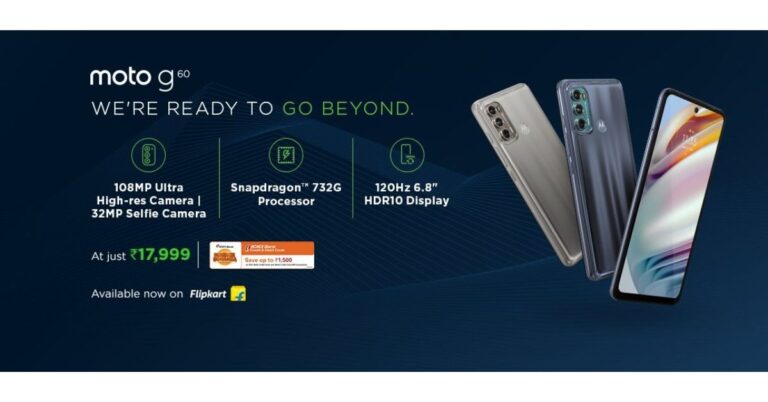
Last week, Motorola launched two new smartphones in India Moto G60 and Moto G40 Fusion. Both the devices share some similarities in terms of specifications and design. Today Moto G60 will go on sale for the first time in the country. The sale will go live via Flipkart. The device is powered by Qualcomm Snapdragon 732G and houses a 6,000mAh battery. In addition to this, it features a 120Hz screen refresh rate screen and a 108-megapixel triple rear camera setup. The thing is all these flagship-level specs will be offered under the budget price segment.Moto G60 pricing and launch offer detailsMotorola launched Moto G60 in a single 6GB RAM with a 128GB storage model priced at Rs 17,999. The device will be available in two colour options of Dynamic Gray and Frosted Champagne. The sale of the smartphone will go live at noon via Flipkart. On the purchase of the phone, there will be an instant discount of Rs 1,500 on ICICI Bank cards and EMI transactions. In addition to this, there will exchange offers along with no-cost EMI options.Moto G60Moto G60 specificationsMoto G60 comes with a 6.8-inch full-HD+ display with a 120Hz refresh rate, 20.5:9 aspect ratio and HDR10 support. The phone runs Android 11 out of the box and is powered by octa-core Qualcomm Snapdragon 732G SoC, paired with 6GB RAM and 128GB of storage option. The internal storage can be expanded via a hybrid microSD card to up to 1TB.In terms of imaging, this Motorola smartphone features a triple rear camera setup that includes a 108-megapixel primary sensor with an f/1.7 aperture. In addition to this, there is an 8-megapixel ultra-wide-angle sensor with f/2.2 aperture and 118-degree field of view and a 2-megapixel depth sensor with f/2.4 aperture. Upfront there is a 32-megapixel selfie camera with an f/2.2 aperture.Furthermore, Moto G60 is backed by a 6,000mAh battery that comes with TurboPower 20 fast charging support. On the connectivity front, it includes a Bluetooth 5.0, Wi-Fi 802.11 ac, NFC, USB Type-C port, 3.5mm audio jack and more. The phone also offers a rear-mounted fingerprint sensor, an accelerometer, gyroscope, proximity sensor, ambient light sensor, and sensor hub.
For the latest gadget and tech news, and gadget reviews, follow us on Twitter, Facebook and Instagram. For newest tech & gadget videos subscribe to our YouTube Channel. You can also stay up to date using the Gadget Bridge Android App.
Remembering the birthdays of your friends and relatives can be a challenging task. In a fast-moving world, everyone is busy with their lifestyle. As a result, forgetting to wish people on their birthdays is likely. However, Google Calendar enables you to set reminders so that you never miss wishing your friends and relatives on their birthdays.
Google Calendar is an application available for Android as well as iOS devices. This application offers the following features.
You may view the calendar in different modes like a month, week and day.
You may add events from Gmail such as restaurant reservations, flights, and hotel bookings.
You may add events related to your video conferencing to your calendar.
Due to integration with iCloud and Google Drive, you can all your schedules in one place in a few steps.
Google Calendar application is integrated with Apple Health so that you can easily mark your workout goals.
How can you add a birthday to Google Calendar using your contact list?
To add a birthday to Google Calendar through your contacts, follow these steps:
Launch the Contacts app and choose the contact for which you wish to add a birthday.
Tap Edit contact and select More fields located at the bottom.
Scroll down and look for the field for the birthday.
Tap the date field to choose the date and tap Save.
Now launch the Google Calendar application.
You’ll find the birthday as soon as the Calendar syncs with the Contacts application.
You may also do it manually by tapping the three dots located at the upper right corner and then choosing Refresh.
How can you add a birthday to Google Calendar as a repeat reminder?
To add a birthday to Google Calendar as a repeatable reminder, follow these steps.
Launch the Calendar application and tap the plus icon located at the bottom-right corner
Tap the plus icon located at the bottom-right corner
You will get three options, namely, Goal, Reminder, Task, and Event. Tap the Reminder option.
In the text field that says, “Remind me to…”, add a note such as “ABC’s Birthday” and choose the date from the calendar.
In the text field that says, “Remind me to…”, add a note.
Tap Does not repeat and choose Every year.
Tap Does not repeat and choose Every year.
Tap the Save button located at the top-right corner.
You’ll get the reminder on the selected date every year. You may also add the reminder using Google Assistant. You just need to say, “Okay, Google, remind me about ABC’s birthday on [Date]”. Just like the above process, select Does not repeat and then tap Every year.
For the latest gadget and tech news, and gadget reviews, follow us on Twitter,FacebookandInstagram. For newest tech & gadget videos subscribe to our YouTube Channel. You can also stay up to date with the Gadget Bridge Android App.
Google is known to produce one of the most innovative technologies in the world. The camera setup installed in the Pixel smartphone series is believed to be highly sophisticated. Implementation of advanced Machine Learning algorithms enables the Pixel camera to offer a reliable face-recognition system and realistic depth effect. Recently, Google leaked photo samples taken by the Pixel 5A on a blog.
How did Google accidentally reveal Pixel 5a camera details?
In a blog post, Google revealed two image samples that are believed to be taken from the upcoming Pixel 5A smartphone. The blog was intended to explain the features and working of the HDR+ algorithm. However, the company accidentally linked the Google Photos gallery comprising of two images that looked different from the EXIF data. These images conformed to the rumour regarding the release of the new smartphone this year.
The first leaked image indicates the presence of a wide-angle lens in the Pixel 5A smartphone. (Image Source: Google)
The first leaked image indicates the presence of a wide-angle lens in the Pixel 5A smartphone. The image was taken on October 1, 2020. This shows that the company has been working on the smartphone for a while. The Pixel 4A 5G and the Pixel 5 were are announced during the same time. The second image was of a girl standing inside the water. The image was taken on February 16, 2021. Since the second image is void of the EXIF data, it might be taken from a Pixel 5A prototype.
One of the leaked images taken by the Pixel 5A smartphone was taken down by the company. Since the EXIF data related to the image was already public so withdrawing the images would hardly make any difference.
The second image was of a girl standing inside the water. The image was taken on February 16, 2021. (Image Source: Google)
What do the Google Pixel 5A leaks suggest about its design and features?
The leaked EXIF data indicate the following features regarding the Google Pixel 5A smartphone.
Design and Display
The upcoming Pixel 5A is expected to have dimensions quite similar to those of the Pixel 4A 5G. The leaked images indicate the design to be measuring 156.2 x 73.2 x 8.8 mm. The smartphone may feature a 6.2-inch FHD+ OLED display with a punch-hole at the top to accommodate the selfie camera. The Pixel 5A will offer an elegant look with minimal bezels on the top and bottom. The device may provide a rear fingerprint scanner, a 3.5 mm headphone jack, and stereo speakers.
Performance & Camera
The Pixel 5A is expected to run the powerful Qualcomm Snapdragon 765G processor. The leaked images indicate that the smartphone may feature a square module at the rear comprising of a dual-camera setup with a flash. The information derived out of the EXIF data suggests that the smartphone may come with an ultra-wide lens. Being a 5G smartphone, the Pixel 5A will offer ultra-fast connectivity for experiencing lag-free online gaming and streaming.
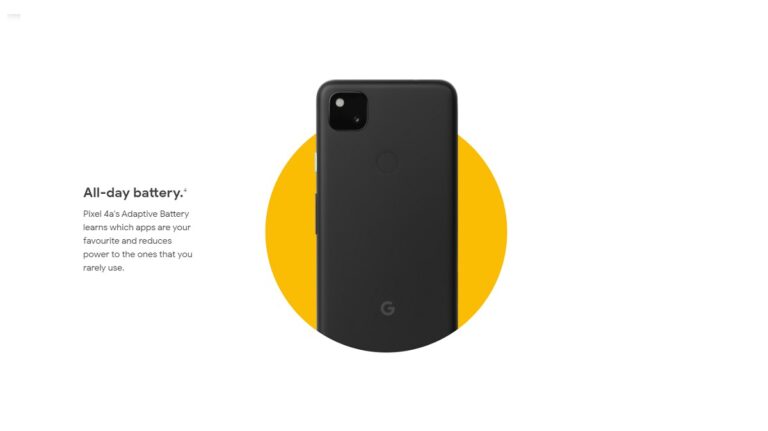
The current Pixel 4A
How soon is the Pixel 5A 5G expected to arrive?
Google is expected to launch its Pixel 5A in August 2021 which would be almost one year after the Pixel 4A release. However, some reports suggest that that the launch event may take place as early as June 2021. This year’s launch event may not necessarily be in line with that of the Pixel 4A.
Last year, the launch event was postponed due to the COVID-19 outbreak. However, the suspense regarding the launch of the Pixel 5A is intact as the COVID-19 pandemic persists. The complete information regarding the regions where the Pixel 5A is yet to be revealed.
For the latest gadget and tech news, and gadget reviews, follow us on Twitter,FacebookandInstagram. For newest tech & gadget videos subscribe to our YouTube Channel. You can also stay up to date with the Gadget Bridge Android App.
After launching Oppo A54 and A74 in the Indian market the Chinese smartphone company is all set to launch another A-Series phone in the country. Today the company has scheduled to launch the Oppo A53s 5G smartphone, which is a follow-up device to Oppo A53. The new phone will be powered by MediaTek Dimensity 700 SoC that will come with large memory and storage.Oppo A53s launch detailsOppo A53s will be launching today at noon via Flipkart. This smartphone has been listed on the e-commerce website already, to tease its availability. As per the listing, this 5G phone will come in a blue gradient finish however it will also be made available in more colour options. It should also be noted that Oppo A53 5G is going to be the first budget 5G smartphone to be priced under Rs 15,000. The company stated that “The new smartphone is aiming at breaking all records, by bringing in the most affordable device to its consumers, which is 5G ready and packs in a powerful and advanced MTK700 processor, under the hood.”Oppo A53s expected specificationAs we already said, Oppo A53s is an offspring of Oppo A53 5G that was launched in the market last year so the specification will be a bit similar. The device is confirmed to be powered by MediaTek Dimensity 700 SoC, which is based on a 7nm process with two Cortex-A76 cores clocked at 2.2GHz and six Cortex-A55 cores clocked at 2.0GHz. It will be featuring a rectangular shaped triple rear camera setup with flash support. It is likely to include a 48 or a 64-megapixel primary sensor, a 2-megapixel depth sensor and another 2-megapixel macro lens. While on the front it might include an 8-megapixel selfie camera. As per the listing, there will be a side-mounted fingerprint sensor for security doubling up as the power button. The Oppo A53s 5G is also expected to feature a 90Hz refresh rate screen. The Flipkart listing has also revealed that the phone will be available in two different configurations of 6GB RAM with 128GB storage and 8GB RAM with 128GB storage. Moreover, the company says there will be a 5,000mAh battery and 18W fast charging support. On the connectivity front, it might include Bluetooth 5.1, NavIC GPS, Wi-Fi 5 standard and more.
For the latest gadget and tech news, and gadget reviews, follow us on Twitter, Facebook and Instagram. For newest tech & gadget videos subscribe to our YouTube Channel. You can also stay up to date using the Gadget Bridge Android App.
The e-commerce website Flipkart is hosting Daily Trivia Quiz. Every day it brings a bunch of new questions for its users. By answering them correctly you can win exciting prizes. The questionnaire is based on questions related to general knowledge. Also, the users can win free vouchers and super coins, among other offers via the daily quiz. April 27 Flipkart Daily Trivia Quiz Answers has already gone live on its platform.
The participant should be at least 18 years old and should have a valid login ID. The Quiz is available on the mobile platform and not the web version. E-commerce conducts the quiz on daily basis and goes live at 12:00 AM IST and runs till 11:59 PM IST. The winners are announced within 15 days from the date of participation that can be viewed under the Gems/Rewards section in the app.
How to participate in the Flipkart Daily Trivia Quiz
To participate download the Flipkart app on your phone. Then open the Flipkart app then head to Game Zone. Now click on the Daily Trivia Banner or search for Daily Trivia. Enter the game and answer all 5 questions with correct answers.
April 27 Flipkart Daily Trivia Quiz Answers
Question 1: Which IPL team has never been captained by an overseas player?
Answer: Chennai Super Kings
Question 2: Fast Bowler Prasidh Krishna, who recently made his debut for India, plays for which IPL team?
Answer: Kolkata Knight Riders
Question 3: Who was the Emerging Player of the Year for the IPL 2009 season?
Answer: Rohit Sharma
Question 4: Which of these was the first match of IPL 2021 that had a Super Over?
Answer: DC vs SRH
Question 5: Who took 30 wickets to win the Purple Cap in the IPL 2020 season?
Answer: Kagiso Rabada
India’s leading e-commerce website Amazon hosts an Amazon Quiz session for its customers. The website brings an app quiz on a daily basis, which begins at 12 AM to 11:59 PM daily. As part of the quiz, the participants stand a chance to prizes as well as cash prizes on a daily basis.
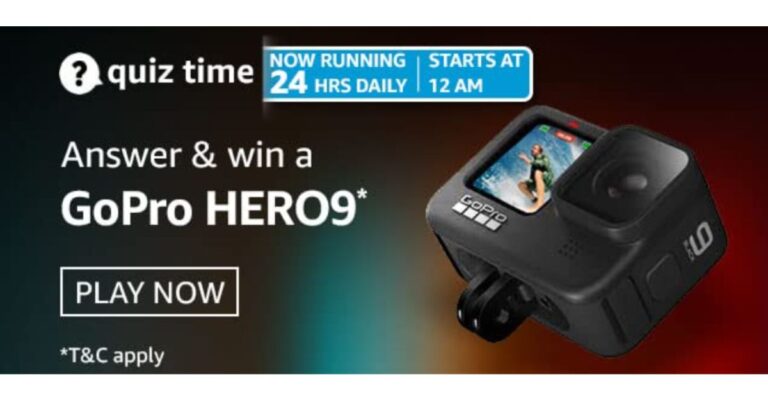
The Amazon Quiz session allows the customers to win bumper prizes such as Apple iPhone x, iPhone Xs, Go Pro Hero 8 and many more every day while sitting at home. To win the participants must answer five questions correctly based on current affairs and general knowledge. One wrong answer can eliminate you from the quiz and the results will be announced at the end of the month. Today’s question will let you win a GoPro Hero9 Action Camera. Check below for today’s Amazon quiz answers.
Amazon Quiz Answers for April 27:
Question 1: On the occasion of National Maritime Day in India, observed on April 5th, an award named what is presented?
The answer is- Varuna
Question 2: Recently, which of these vaccines was denied emergency use authorization in India by the government’s Subject Expert Committee?
The answer is- Sputnik- V
Question 3: Which organisation headquartered in Vienna, agreed to gradually ease its oil output cuts from May onwards?
The answer is- OPEC
Question 4: The defending Olympic champion in women’s singles in this sport is from which country?
The answer is- Spain
Question 5: In the Marvel Cinematic Universe, this superhero is NOT alive during the timeline of which of these movies?
The answer is- Spiderman: Far from Home
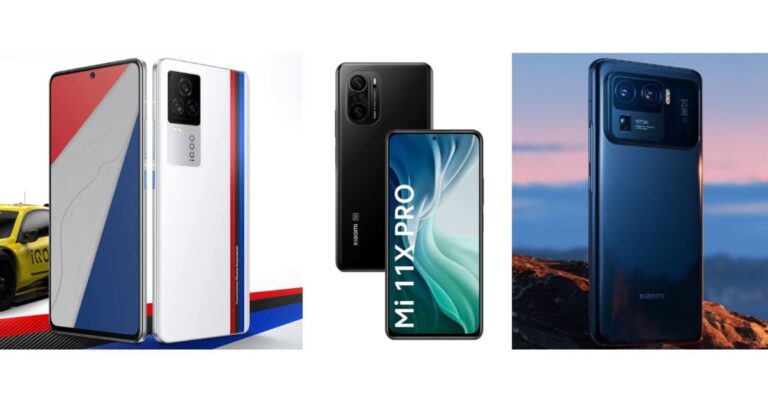
iQoo 7 Legend is the latest smartphone by Vivo’s sub-brand, which comes with the top of line specifications. The device today made its way to the Indian market and is Qualcomm Snapdragon 888 SoC and has a triple rear camera setup. So, today we have compared the smartphone with the recently launched Mi 11X Pro and Mi 11 Ultra that will help you note the differences between the three handsets.
iQoo 7 Legend: 48-megapixel primary sensor with f/1.79 aperture, a 13-megapixel ultra-wide-angle and a macro lens with f/2.2 aperture and a 13-megapixel depth sensor with f/2.46 aperture.Mi 11X Pro: 108-megapixel Samsung HM2 sensor with an f/1.75 aperture, an 8-megapixel ultra-wide sensor with f/2.2 aperture that has 119-degree FoV, and a 5-megapixel macro shooter with f/2.4 aperture. Mi 11 Ultra: 50-megapixel Samsung GN2 primary wide-angle sensor with f/1.95 aperture and OIS support. In addition to this, there are two 48-megapixel Sony IMX586 ultra-wide-angle and tele-macro sensors (5x optical and 120x digital zoom) onboard.
Selfie camera
iQoo 7 Legend: 16-megapixelMi 11X Pro: 20-megapixel sensor with an f/2.45 apertureMi 11 Ultra: 20-megapixel sensor
RAM and storage
iQoo 7 Legend: 8GB with a 128GB storage and 12GB with a 256GB storage variant Mi 11X Pro: 8GB + 128GB and 8GB + 256GB variantMi 11 Ultra: 12GB of RAM with 256GB storage
Battery
iQoo 7 Legend: 4,000mAh battery with 66W fast charging supportMi 11X Pro: 4,520mAh batteries that support 33W fast chargingMi 11 Ultra: 5,000mAh battery, which has support for 67W wired and wireless fast charging support
Operating system
iQoo 7 Legend: Android 11 with OriginOS Mi 11X Pro: MIUI 12 based on Android 11 Mi 11 Ultra: MIUI 12 on top of Android 11
All three phones come with flagship-level specifications and features. Considering the pricing and specs Mi 11 Ultra offers top-of-the-line specs, and is basically a camera-centric smartphone having a 50-megapixel Samsung GN2 primary wide-angle sensor including 48-megapixel Sony IMX586 ultra-wide-angle and tele-macro sensors which the other two smartphones lack. These three phones feature a 120Hz refresh rate display, but the Ultra is slightly bigger than both the handsets.On the other hand, Mi 11X Pro does come with similar pricing as of iQoo 7 Legend but with upgraded specs. At similar pricing, the Xiaomi smartphone offers an enhanced camera set up on the back as well as on the front. The battery is also bigger than the Legend but iQoo comes with a 67W fast charging tech. So if you are looking for a cheaper option then you can go for Mi 11X Pro as it is quite similar to Ultra and better than iQoo 7 Legend with similar pricing.
For the latest gadget and tech news, and gadget reviews, follow us on Twitter, Facebook and Instagram. For newest tech & gadget videos subscribe to our YouTube Channel. You can also stay up to date using the Gadget Bridge Android App.
Microsoft recently announced that thirteen game titles of Electronic Arts will soon get updates. These updates will provide enhancements to the refresh rates on the Xbox Series X/S. The FPS boost will allow the gamers to play thirteen games from Electronic Arts at refresh rates of up to 120Hz.
Which games will support up to 120Hz refresh rates on Xbox Series X/S?
Thirteen game titles that will support the FPS Boost shall be available to Xbox Game Pass Ultimate members through EA Play.
The game titles from Electronic Arts that will support the refresh rates of up to 120Hz are as follows.
Battlefield 1
Battlefield 4
Battlefield 5
Mirror’s Edge Catalyst
Plants vs. Zombies: Battle for Neighborville
Plants vs. Zombies: Garden Warfare
Plants vs. Zombies: Garden Warfare 2
Star Wars Battlefront II
Star Wars Battlefront
Titanfall
Titanfall 2
Unravel 2
Sea of Solitude (will support the refresh rate of up to 60Hz)
According to Xbox, “We recommend installing the latest Xbox OS update to get the most out of FPS Boost titles! Also, to play at 120hz, make sure your TV settings are optimized correctly: https://xbx.lv/2QKQQvm“.
What is EA Play?
EA Play is an online video game subscription service provided by the collaborative efforts of Xbox and Electronic Arts. With EA Play on the Xbox Game Pass subscription, users will be able to access several video games without paying an extra cost. The game library includes Battlefield 5, Need for Speed Heat, and Star Wars Jedi: Fallen Order.
The EA Play subscription also comes with additional monthly rewards. The players can get rewards including EA Play Celebration Pack for Madden 21, Gold Team Fantasy MUT packs, and N7 Weapon Charm for Apex Legends. People using the EA Desktop app can get discounts on digital purchases. They will also access the exclusive in-game challenged and reward and member-only content.
What is EA Play?
What is FPS Boost in Xbox Series X/S?
The FPS Boost was developed in February 2021 by the backward compatibility team of Xbox Wire. The technology was designed with a motive to enhance the framerates of select game titles to 2x. By improving the frame rates, the gameplay experience will become smoother with better response times.
According to Xbox, “From Titans and Zombies to Soldiers and Plants, every frame counts. FPS Boost is coming to some of your favourite EA games: https://xbx.lv/3axv7hA“.
How can gamers use the FPS Boost on select video games?
The FPS Boost feature is not enabled by default on the Xbox Series X/S. You will need to activate it by going to the Compatibility Options in the Manage game and add-ons setting.
To utilise the FPS Boose feature on the Xbox Series X/S, you will need to update and reboot their consoles. To ensure that the supported game has the FBS Boost feature enabled, follow these steps.
Tap on the Xbox button given on the controller
Use the Guide overlay indicator given in the top-right corner.


 Oppo A53s 5G tech specifications
The Oppo A53s 5G comes with a 6.52-inch HD+ display driven by 720×1,600 pixels of resolution. It offers 60Hz refresh rate support and an 88.7 percent screen-to-body ratio. The smartphone runs ColorOS 11.1 based on Android 11. Under the covers, there is a MediaTek Dimensity 700 SoC paired with Mali-G57 MC2 GPU. The phone will be offered with up to 8GB of RAM and 128GB of storage that can also be expanded up to 1TB using a microSD card.
On the imaging front, Oppo A53s 5G sports a triple rear camera setup consisting of a 13-megapixel primary sensor with an f/2.2 aperture. Further assisted by a 2-megapixel depth sensor with an f/2.4 aperture and a 2-megapixel macro lens with an f/2.4 aperture. For taking selfies and video calling the 5G smartphone sports an 8-megapixel front-facing camera with f/2.0 aperture.
Oppo A53s 5G packs a 5,000mAh battery. In terms of integrations, there is 5G, 4G, Wi-Fi, GPS, Bluetooth v5, and a USB Type-C port. The sensors on the phone include a side-mounted fingerprint scanner, accelerometer, ambient light sensor and proximity sensor.
For the latest gadget and tech news, and gadget reviews, follow us on Twitter, Facebook and Instagram. For newest tech & gadget videos subscribe to our YouTube Channel. You can also stay up to date using the Gadget Bridge Android App.
Oppo A53s 5G tech specifications
The Oppo A53s 5G comes with a 6.52-inch HD+ display driven by 720×1,600 pixels of resolution. It offers 60Hz refresh rate support and an 88.7 percent screen-to-body ratio. The smartphone runs ColorOS 11.1 based on Android 11. Under the covers, there is a MediaTek Dimensity 700 SoC paired with Mali-G57 MC2 GPU. The phone will be offered with up to 8GB of RAM and 128GB of storage that can also be expanded up to 1TB using a microSD card.
On the imaging front, Oppo A53s 5G sports a triple rear camera setup consisting of a 13-megapixel primary sensor with an f/2.2 aperture. Further assisted by a 2-megapixel depth sensor with an f/2.4 aperture and a 2-megapixel macro lens with an f/2.4 aperture. For taking selfies and video calling the 5G smartphone sports an 8-megapixel front-facing camera with f/2.0 aperture.
Oppo A53s 5G packs a 5,000mAh battery. In terms of integrations, there is 5G, 4G, Wi-Fi, GPS, Bluetooth v5, and a USB Type-C port. The sensors on the phone include a side-mounted fingerprint scanner, accelerometer, ambient light sensor and proximity sensor.
For the latest gadget and tech news, and gadget reviews, follow us on Twitter, Facebook and Instagram. For newest tech & gadget videos subscribe to our YouTube Channel. You can also stay up to date using the Gadget Bridge Android App. 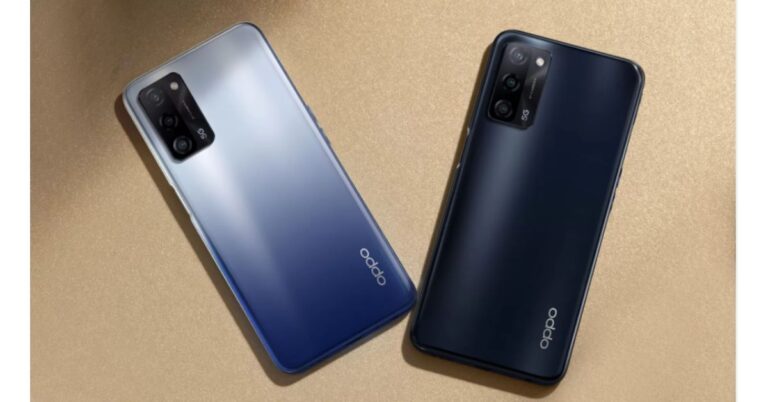
 Oppo A53s 5G tech specifications
The Oppo A53s 5G comes with a 6.52-inch HD+ display driven by 720×1,600 pixels of resolution. It offers 60Hz refresh rate support and an 88.7 percent screen-to-body ratio. The smartphone runs ColorOS 11.1 based on Android 11. Under the covers, there is a MediaTek Dimensity 700 SoC paired with Mali-G57 MC2 GPU. The phone will be offered with up to 8GB of RAM and 128GB of storage that can also be expanded up to 1TB using a microSD card.
On the imaging front, Oppo A53s 5G sports a triple rear camera setup consisting of a 13-megapixel primary sensor with an f/2.2 aperture. Further assisted by a 2-megapixel depth sensor with an f/2.4 aperture and a 2-megapixel macro lens with an f/2.4 aperture. For taking selfies and video calling the 5G smartphone sports an 8-megapixel front-facing camera with f/2.0 aperture.
Oppo A53s 5G packs a 5,000mAh battery. In terms of integrations, there is 5G, 4G, Wi-Fi, GPS, Bluetooth v5, and a USB Type-C port. The sensors on the phone include a side-mounted fingerprint scanner, accelerometer, ambient light sensor and proximity sensor.
For the latest gadget and tech news, and gadget reviews, follow us on Twitter, Facebook and Instagram. For newest tech & gadget videos subscribe to our YouTube Channel. You can also stay up to date using the Gadget Bridge Android App.
Oppo A53s 5G tech specifications
The Oppo A53s 5G comes with a 6.52-inch HD+ display driven by 720×1,600 pixels of resolution. It offers 60Hz refresh rate support and an 88.7 percent screen-to-body ratio. The smartphone runs ColorOS 11.1 based on Android 11. Under the covers, there is a MediaTek Dimensity 700 SoC paired with Mali-G57 MC2 GPU. The phone will be offered with up to 8GB of RAM and 128GB of storage that can also be expanded up to 1TB using a microSD card.
On the imaging front, Oppo A53s 5G sports a triple rear camera setup consisting of a 13-megapixel primary sensor with an f/2.2 aperture. Further assisted by a 2-megapixel depth sensor with an f/2.4 aperture and a 2-megapixel macro lens with an f/2.4 aperture. For taking selfies and video calling the 5G smartphone sports an 8-megapixel front-facing camera with f/2.0 aperture.
Oppo A53s 5G packs a 5,000mAh battery. In terms of integrations, there is 5G, 4G, Wi-Fi, GPS, Bluetooth v5, and a USB Type-C port. The sensors on the phone include a side-mounted fingerprint scanner, accelerometer, ambient light sensor and proximity sensor.
For the latest gadget and tech news, and gadget reviews, follow us on Twitter, Facebook and Instagram. For newest tech & gadget videos subscribe to our YouTube Channel. You can also stay up to date using the Gadget Bridge Android App. 
 If we compare it to the design of M11, with the latest version, instead of a rear fingerprint sensor it now sports a side-mounted one. Honestly, we recently reviewed the Galaxy A32, which comes with an under-display sensor that either took a long time to open or too many failed attempts, however, it is refreshing to seeM12 side sensor unlocks the device much faster. Just above the power/fingerprint scanner is the volume rocker, which again is well placed. On the left frame is the sim tray and the headphone jack, USB Type C port with a single firing speaker grill is given at the bottom.
 Moving on to the display, where you get a 6.5-inch HD+ TFT Infinity-V Display. The screen offers 720×1,600 pixels of resolution and a 20:9 aspect ratio. The best part about the display is that it supports a 90Hz refresh rate. But we would have loved it more if Samsung would have gone for an FHD display or an AMOLED one. However, the viewing angles are decent. The screen is smooth and is bright enough to look at in direct sunlight also. The screen is WIDEVINE L1 certified, which makes HD video streaming pleasurable. Overall, the display looks pretty sharp but the colours could have been better.


 Samsung here provides Android-based One UI 3.1 but that is also a core version instead of a full version of One UI. The biggest drawback of the core version is that here you don’t get a secure folder, Knox security and more. The UI feels clean, although the phone does come with some apps pre-installed such as Amazon, Netflix, PhonePe and Snapchat. But these can also be uninstalled.

 Now coming to the camera performance, Samsung Galaxy M12 has a quad-camera setup, which includes a 48-megapixel primary sensor with f/2.0 aperture, a 5-megapixel ultra-wide sensor with f/2.2 aperture and 123-degree field of view, a 2-megapixel macro sensor, and a 2-megapixel depth sensor. Upfront, you get an 8-megapixel selfie camera with f/2.2 aperture.

 M12 produces beautiful shots in a well-lit environment. The pictures have good details, are sharp, and the colours are close to natural. As there is a 5-megapixel wide-angle lens so don’t expect detailed and sharp images however it offers a 123-degree field of view which is quite good. While the portrait images are impressive and edge detection is on point, also colours look natural. On the other hand, we were a bit not ecstatic about the macro shots, it just gets the work done.

 In terms of selfies, if there is ample lighting the subject’s details, skin tone, exposure everything is on point but in low light, the camera sensor struggles to produce well-lit-like images. Also, there is no dedicated night mode. So when it comes to night time images from the front and the rear cameras, performance slightly dips and is not great. As you would see if the images are taken in a low lit environment the images are grainy and lack details. Video recording on the other hand is just average as there is no stabilisation on the front as well as on the rear camera set up.
So considering the price point, we are quite satisfied with the camera performance.
Before we conclude let’s talk about the battery performance. The Samsung Galaxy M12 comes with a 6,000mAh battery. Even on heavy usage and multiple hours of gaming, it was able to deliver a day more hours of battery life. However, the average users can stretch it to two or more days. But when it comes to charging, the company ships a 15W fast charger that easily takes 3 hours to get fully charged.
In terms of selfies, if there is ample lighting the subject’s details, skin tone, exposure everything is on point but in low light, the camera sensor struggles to produce well-lit-like images. Also, there is no dedicated night mode. So when it comes to night time images from the front and the rear cameras, performance slightly dips and is not great. As you would see if the images are taken in a low lit environment the images are grainy and lack details. Video recording on the other hand is just average as there is no stabilisation on the front as well as on the rear camera set up.
So considering the price point, we are quite satisfied with the camera performance.
Before we conclude let’s talk about the battery performance. The Samsung Galaxy M12 comes with a 6,000mAh battery. Even on heavy usage and multiple hours of gaming, it was able to deliver a day more hours of battery life. However, the average users can stretch it to two or more days. But when it comes to charging, the company ships a 15W fast charger that easily takes 3 hours to get fully charged.
 If we compare it to the design of M11, with the latest version, instead of a rear fingerprint sensor it now sports a side-mounted one. Honestly, we recently reviewed the Galaxy A32, which comes with an under-display sensor that either took a long time to open or too many failed attempts, however, it is refreshing to seeM12 side sensor unlocks the device much faster. Just above the power/fingerprint scanner is the volume rocker, which again is well placed. On the left frame is the sim tray and the headphone jack, USB Type C port with a single firing speaker grill is given at the bottom.
 Moving on to the display, where you get a 6.5-inch HD+ TFT Infinity-V Display. The screen offers 720×1,600 pixels of resolution and a 20:9 aspect ratio. The best part about the display is that it supports a 90Hz refresh rate. But we would have loved it more if Samsung would have gone for an FHD display or an AMOLED one. However, the viewing angles are decent. The screen is smooth and is bright enough to look at in direct sunlight also. The screen is WIDEVINE L1 certified, which makes HD video streaming pleasurable. Overall, the display looks pretty sharp but the colours could have been better.


 Samsung here provides Android-based One UI 3.1 but that is also a core version instead of a full version of One UI. The biggest drawback of the core version is that here you don’t get a secure folder, Knox security and more. The UI feels clean, although the phone does come with some apps pre-installed such as Amazon, Netflix, PhonePe and Snapchat. But these can also be uninstalled.

 Now coming to the camera performance, Samsung Galaxy M12 has a quad-camera setup, which includes a 48-megapixel primary sensor with f/2.0 aperture, a 5-megapixel ultra-wide sensor with f/2.2 aperture and 123-degree field of view, a 2-megapixel macro sensor, and a 2-megapixel depth sensor. Upfront, you get an 8-megapixel selfie camera with f/2.2 aperture.

 M12 produces beautiful shots in a well-lit environment. The pictures have good details, are sharp, and the colours are close to natural. As there is a 5-megapixel wide-angle lens so don’t expect detailed and sharp images however it offers a 123-degree field of view which is quite good. While the portrait images are impressive and edge detection is on point, also colours look natural. On the other hand, we were a bit not ecstatic about the macro shots, it just gets the work done.

 In terms of selfies, if there is ample lighting the subject’s details, skin tone, exposure everything is on point but in low light, the camera sensor struggles to produce well-lit-like images. Also, there is no dedicated night mode. So when it comes to night time images from the front and the rear cameras, performance slightly dips and is not great. As you would see if the images are taken in a low lit environment the images are grainy and lack details. Video recording on the other hand is just average as there is no stabilisation on the front as well as on the rear camera set up.
So considering the price point, we are quite satisfied with the camera performance.
Before we conclude let’s talk about the battery performance. The Samsung Galaxy M12 comes with a 6,000mAh battery. Even on heavy usage and multiple hours of gaming, it was able to deliver a day more hours of battery life. However, the average users can stretch it to two or more days. But when it comes to charging, the company ships a 15W fast charger that easily takes 3 hours to get fully charged.
In terms of selfies, if there is ample lighting the subject’s details, skin tone, exposure everything is on point but in low light, the camera sensor struggles to produce well-lit-like images. Also, there is no dedicated night mode. So when it comes to night time images from the front and the rear cameras, performance slightly dips and is not great. As you would see if the images are taken in a low lit environment the images are grainy and lack details. Video recording on the other hand is just average as there is no stabilisation on the front as well as on the rear camera set up.
So considering the price point, we are quite satisfied with the camera performance.
Before we conclude let’s talk about the battery performance. The Samsung Galaxy M12 comes with a 6,000mAh battery. Even on heavy usage and multiple hours of gaming, it was able to deliver a day more hours of battery life. However, the average users can stretch it to two or more days. But when it comes to charging, the company ships a 15W fast charger that easily takes 3 hours to get fully charged.