Canon recently revealed the development of one of its most powerful sports camera named EOS R3. It is being designed to suffice “reliability and durability demands of professionals even when working in challenging conditions.”
According to Tatsuro Kano, Executive Vice President and General Manager, Imaging Technologies and Communications Group, Canon U.S.A., “The development of the Canon EOS R3 and the launch of the new RF lenses are the latest testaments to the company’s commitment to professional still and video image and content creators. When the camera becomes available, it will pair well with each of the new RF lenses announced today. Canon is excited to share this news today, and we look forward to seeing the images captured with the new RF lenses and upcoming EOS R3”.
What are the expected features of the Canon EOS R3?
Canon EOS R3 is expected to inherit features from Canon EOS R5 and Canon EOS 1D X Mark III. Thus, it will offer resurrected Eye Control AutoFocus feature and outstanding burst shooting capabilities. Here are the expected features of the upcoming camera.
Body
The Canon EOS R3 will feature a single-piece camera body for enhanced sturdiness. The camera will consist of an integrated vertical grip area for comfortable handling. Just like 1-series DSLRs, the Canon EOS R3 will come with a weather and dust-resistant body.
Lens
The Canon EOS R3 will be a professional-focused mirrorless camera featuring two following super-telephoto zooms for the RF mount
RF400mm f/2.8 L IS USM
RF600mm f/4 L IS USM.
The EOS R3 will utilise the autofocus technologies found in R5 as well as R6. This will enable the new camera to efficiently perform body and eye detection. The resolution of the camera is yet to be released b the company.
Processor and software
Canon is determined to introduce to the EOS R3 the new full-frame backside-illuminated CMOS sensor for the highly optimised conversion of light into electrical signals resulting in faster readout speeds. According to Canon, the EOS R3 will be capable of capturing up to 30 frames per second with auto exposure and active full-time Dual Pixel CMOS autofocus.
The company is also planning to bring a new category to the EOS R system that will emphasize more on the autofocus performance with respect to fast-moving subjects. For file transfer, the Canon EOS R3 will come with a new File Transfer application for iOS and Android.
Canon EOS R3 is expected to inherit features from Canon EOS R5Buy Canon EOS R5 on Amazon
What is the expected release date and price of the Canon EOS R3?
Canon has not revealed the release date of the EOS R3. However, it is expected to arrive before the commencement of the Tokyo Olympics on July 23, 2021. Being a sports camera, the Canon EOS R3 will be a preferred choice for photographers who wish to capture the breathtaking moments of the forthcoming Olympics.
For the latest gadget and tech news, and gadget reviews, follow us on Twitter, Facebook and Instagram. For newest tech & gadget videos subscribe to our YouTube Channel. You can also stay up to date with the Gadget Bridge Android App.
Sony recently announced a new software update for the PlayStation 5 console that will enable the users to keep their video games on external storage drives. Considering the large volumes of modern video games, this update is perceived not only beneficial but also essential.
How will the secondary storage option benefit PlayStation 5 users?
The new feature of secondary storage comes under the April update of the PlayStation 5. The console offers total internal storage of 825GB SSD. However, some storage is utilised by the system files and the operating system. As a result, the effective memory available for video games is only 667.2GB. On the other hand, PC gamers have the flexibility to store their games on as many external devices as they want to allow them to play unlimited games.
According to Hideaki Nishino, PlayStation’s Senior Vice President of Platform Planning and Management, “It is faster to reinstall PS5 games from USB extended storage than to re-download or copy them from a disc. Because PS5 games are designed to take advantage of the console’s ultra-high-speed SSD, PS5 titles can’t be played from USB extended storage.”
The new feature in PlayStation 5 will allow the gamers to keep their large-sized games on external USB storage devices like external hard drives or external SSDs. Some high-volume video games include GTA V (68GB), Deus Ex: Mankind Divided (77GB), Hitman 2 (149GB), Red Dead Redemption 2 (150GB), and Call Of Duty: Modern Warfare (231 GB).
What is the limitation of the new software update in PlayStation 5?
Although the PlayStation 5 users will get the flexibility to keep their games on multiple storage options, they can’t play the video games directly from the external drives. To run a video game, the users will have to copy the game files to the console’s internal storage.
According to Hideaki Nishino, PlayStation’s Senior Vice President of Platform Planning and Management, “PS5 titles also cannot be directly downloaded to USB extended storage” the “games that you transfer or copy back to internal storage will automatically update when applicable.”
What other features will the new software update offer?
The April update of the PlayStation 5 software will come with the ability to automatically download the video game updates. It will also have a cross-generation Share Play feature that will enable the PlayStation 5 users to share their screen with PlayStation 4 users. As a result, PlayStation 4 users can enjoy the PlayStation 5 games via Share Play.
What other features will the new software update offer? (Image Credit: Sony PlayStation)
How to access games using an external storage drive on PlayStation 5?
This method is preferred by users when you wish to transfer your PlayStation 4 games to PlayStation 5. To access games using an external storage drive on PlayStation 5, follow these steps.
Connect the external USB storage to your PlayStation 5 console.
Go to Settings > Storage > External Storage > Games and Apps.
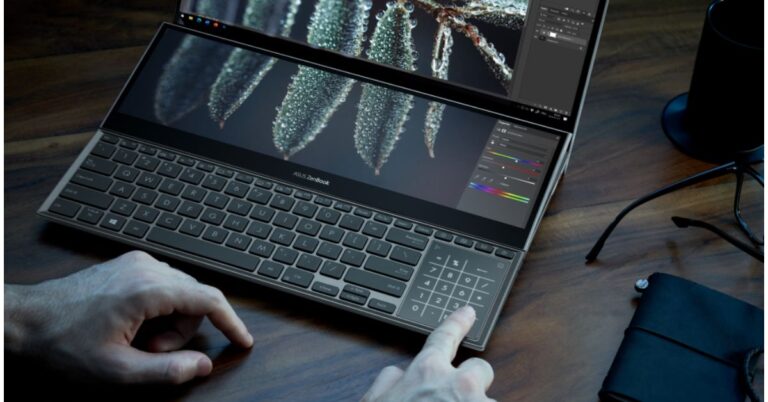
Asus Zenbook series is getting bigger and better. The company today expanded its laptops portfolio with the launch of ZenBook Duo 14 and ZenBook Pro Duo 15 OLED in India. Both the devices were unveiled through an online launch event where the company showcased the features of the new Zenbooks. The latest offering is a dual-screened laptop offering a four-sided frameless NanoEdge display with ultra-slim bezels. Asus ZenBook Duo 14, ZenBook Pro Duo 15 OLED price and availabilityThe Asus ZenBook Duo 14 has been launched in India at a starting price of Rs 99,000. The price of the ZenBook Pro Duo 15 OLED has been set at Rs 2,39,990. The former one is now up for sale while the latter one will be available in mid-May. These can be purchased via Amazon, Flipkart, AES (ASUS Exclusive stores), Offline channel partners such as Reliance Digital, Croma and Vijay Sales.Asus ZenBook Duo 14 specificationsAsus ZenBook Duo 14 comes with a 14-inch full-HD LED-backlit display with 1,920×1,080 pixels of resolution. It offers 100 percent sRGB coverage, 400 nits of peak brightness and 93 percent of screen-to-body ratio. As we mentioned earlier the laptop features a dual display, so the secondary display is a 12.65-inch tilting ScreenPad that offers 1,920×515 pixels resolution with stylus support. The secondary display is touch-enabled that tilts up to 7 degrees reducing glare and reflections for improved readability. Asus ZenBook Duo 14The ZenBook Duo 14 (UX482EA) is powered by an Intel Core i7-1156G7 processor, paired with Nvidia GeForce MX450 GPU. It runs Windows 10 Home edition and comes with up to 16GB of LPDDR4x RAM and 1TB of M.2 SSD. The audio speakers are powered by Harman Kardon with microphones and Cortana support. In terms of connectivity, there are two Thunderbolt 4 ports, one USB 3.2 Gen 2 Type-A port, one HDMI 1.4, a 3.5mm headphone jack, Wi-Fi 6 and Bluetooth v5.0. It is backed by a 70Wh battery which is claimed to deliver up to 17 hours of battery life as per the company.Asus ZenBook Pro Duo 15 OLEDAsus ZenBook Pro Duo 15 OLED specificationsThe Asus ZenBook Pro Duo 15 OLED is another dual-screen laptop that sports a 15.6-inch OLED 4K UHD NanonEdge touch-enabled primary display. The screen is TUV Rheinland certified and has VESA Display HDR 500 True Black, Pantone certifications. It offers 100 percent DCI-P3 colour gamut, up to 400 nits of brightness and 178-degree viewing angles. The 14.1-inch tilting ScreenPad Plus display automatically tilts up to 9.5 degrees angle with stylus support. The laptop comes with up to Intel Core i9-10980HK processor, along with up to 32GB of DDR4 RAM and 1TB M.2 PCIe 3.0 SSD storage.In addition to this, there is a 92Wh battery installed within. The speakers are certified by Harman Kardon with an array of microphones and Cortana voice-recognition supportas well as AI Noise-Canceling. For connectivity, it includes Wi-Fi 6 Bluetooth v5.0, two Thunderbolt 3 ports, one USB 3.2 Gen 2 Type-A port, HDMI 2.1, and a headphone jack.
For the latest gadget and tech news, and gadget reviews, follow us on Twitter, Facebook and Instagram. For newest tech & gadget videos subscribe to our YouTube Channel. You can also stay up to date using the Gadget Bridge Android App.
Samsung has put an end to the rumours by releasing its Galaxy Quantum 2 smartphone. It is a mid-range smartphone featuring premium features including 5G connectivity, a 120Hz display, and a 64MP rear camera.
What are the features of the new Samsung Galaxy Quantum 2?
Samsung smartphones are renowned for their high-quality screen and powerful batteries. The detailed features of the new Samsung Galaxy Quantum 2 are as follows.
Design and Display
The smartphone features a 6.7-inch Super AMOLED display with a refresh rate of 120Hz. It has a triple rear camera setup with a 64MP primary lens, a 12MP ultra-wide lens, and a 5MP depth sensor. There is also a 10MP front camera for clicking selfies and video calling. The smartphone offers an Android 11 based Samsung One User Interface.
Performance, RAM, Storage and Chipset
The Samsung Galaxy Quantum 2 comes with a QRNG (quantum random number generator) processor that runs on the Qualcomm Snapdragon 855+ mobile platform. The smartphone will offer 6GB of RAM to provide an enhanced multitasking and gaming experience. You will get 128GB of storage to keep your apps and files. You get a 4,500mAh battery that will keep the device awake all day long.
Connectivity
The Samsung Galaxy Quantum 2 is a 5G smartphone offering loads of connectivity options like Wi-Fi 802.11 a/b/g/n/ac, dual-band, Wi-Fi Direct, and hotspot. The smartphone comes equipped with Bluetooth 5.0 for seamless pairing with other devices. Moreover, you get USB Type-C 2.0 for fast data transfer.
Security
The main highlight of the Samsung Galaxy Quantum 2 is its quantum cryptography feature. The security chip is expected to generate “unpredictable and patternless true” random numbers for secure banking and finance-related tasks. Moreover, the smartphone features an under-display fingerprint scanner.
What are the features of the new Samsung Galaxy Quantum 2?
What is the price of the Samsung Galaxy Quantum 2?
The Samsung Galaxy Quantum 2 initially launched in South Korea and is available for pre-order. The device comes in three colour variants, namely, Black, White, Violet. The sale of the smartphone will begin on April 23, 2021. The price of the smartphone is about 520 EUR (approx Rs 46,731.79). The release dates for other markets is yet to be revealed, but sources tell us it will be making its way to India soon.
How will the Samsung Galaxy Quantum 2 influence the Indian market?
5G smartphones are quite high in the Indian market. The Samsung Galaxy Quantum 2 will have an advantage over other 5G smartphones owing to its price. Besides, the 120Hz display will attract gamers who wish to indulge in fast-paced online gaming. The device may also be preferred by photography enthusiasts due to its high-quality 64MP camera setup.
For the latest gadget and tech news, and gadget reviews, follow us on Twitter, Facebook and Instagram. For newest tech & gadget videos subscribe to our YouTube Channel. You can also stay up to date with the Gadget Bridge Android App.
Xiaomi is reportedly working on its new range of tablets in order to enable productivity. These will provide an array of features at a low cost that buyers will be able to appreciate. The Chinese company is developing the Xiaomi Mi Pad 5 range to expand its portfolio even further. The new tablet range would include Mi Pad 5 Lite, Mi Pad 5 Plus, and Mi Pad 5 Pro. With very less known about the Mi Pad 5 range of tablets, there’s only speculation and leaks to fall back on when it comes to the device tech specs. As per a report by MyDrivers Xiaomi, Mi Pad 5’s are suggested to come powered by Qualcomm Snapdragon 870 SoC. In addition to this, the tab is most likely to rack in a much larger 8,000mAh battery with super-fast charging. The Xiaomi Mi Pad 5 is also expected to come with a tablet system similar to the Mi MIX FOLD folding screen. Therefore it will be offering functions such as the PC mode, dual-screen drag and drop, parallel windows, and conference secretary.In terms of the display, the leaks suggest that Xiaomi Mi Pad 5 will be equipped with an 11-inch 2K resolution LCD screen. This would have support for 20Hz/144Hz refresh rate and 480Hz touch adoption rate. Moreover, there will be a side-mounted fingerprint sensor to unlock the device. The Xiaomi tablet is speculated to launch between May and June of this year.On the other hand, another report claims that Xiaomi would not launch one but three tablets namely Xiaomi Mi Pad 5 Lite, Mi Pad 5 Plus, and Mi Pad 5 Pro. As per a tipster the tablet codenamed Enuma bearing model number K81 could be powered by the Snapdragon 870 SoC. It might also feature a 48-megapixel primary camera and will be called Mi Pad 5 Pro. Whereas the Mi Pad 5 Plus has been codenamed Elish having model number K81A. It is also expected to be powered by the same chipset but would come with a 12-megapixel main camera.Finally, the Xiaomi Mi Pad 5 Lite is codenamed Nabu bearing model number K82 is said to include a Snapdragon 860 SoC. The device is tipped to feature a quad rear camera set up with a 12-megapixel main camera. Furthermore, it is expected to pack a massive 12,400mAh battery and have support for NFC as well as wireless charging. The tablet is also said to feature a 120Hz refresh rate display with 2,560×800 resolution and 410 nits peak brightness. Apart from this, there will be four speakers and dual-cell batteries on this one.
For the latest gadget and tech news, and gadget reviews, follow us on Twitter, Facebook and Instagram. For newest tech & gadget videos subscribe to our YouTube Channel. You can also stay up to date using the Gadget Bridge Android App.
Wireless charging is a convenient way to power your devices like smartphones, wireless earphones, and smartwatches. You simply need to place your device on the charger and continue using your device. Wireless chargers last longer than conventional wired chargers as there are no inserting points so no point of wearing out. Here are the top 10 wireless chargers to choose from.
1) Apple MagSafe Charger
The Apple MagSafe Charger supports Qi charging and can wirelessly charge iPhone 8 or later version. As a result, it is compatible with iPhone 12 models, iPhone 11 models, the second-generation iPhone SE, iPhone X models, and iPhone 8 models. The charger can be used to charge your AirPods and AirPods Pro wirelessly and with a charging case. You get a 1m USB-C integrated cable for optimal performance.
Apple MagSafe Charger
Price: ₹4,500
Buy on Amazon
2) Apple MagSafe Duo
The Apple MagSafe Duo efficiently charges Apple devices that come with Qi charging facility. Thus, the charger is compatible with Qi-certified iPhones, AirPods, and Apple Watch. You just need to place your device on the charger. The charger has high energy efficiency to ensure faster and stable charging. The Apple MagSafe Duo comes with a unique design that you can fold to easily carry it along.
Apple MagSafe Duo
Price: ₹13,900
Buy on Amazon
3) Google Wireless Charger
The Google Wireless Charger provides fast and efficient wireless charging for your Pixel smartphones. The charger is compatible with Pixel 4, Pixel 4 XL, Pixel 3 and Pixel 3 XL smartphones. You may charge your devices wirelessly as well as with Pixel Stand. The charger comes with Google Assistant. It allows you to set routines and get real-time information related to traffic and weather.
Google Wireless Charger
Price: ₹7,900
Buy on Amazon
4) Samsung EP-PG950BBEGIN Wireless Charger Stand
The Samsung EP-PG950BBEGIN comes with Smart Charging Technology that automatically figures out the requirements of the different devices paired with it. It also checks short-circuit, over-heating, and over-charging. The charger is compatible with Samsung Galaxy S8 and Samsung Galaxy S8+. You get a matte silicone design in two colour variants. The convertible design enables you to use it in both horizontal and vertical orientations.
Samsung EP-PG950BBEGIN Wireless Charger Stand
Price: ₹1,999
Buy on Reliance Digital
5) Belkin BoostUp Wireless Charging Stand
The Belkin BoostUp Wireless Charging Stand comes with Qi compatibility. Thus, you can wirelessly charge Apple iPhone 8 or later models, AirPods, and Apple Watch. The charger is optimised to provide efficient charging with minimum heating. It comes with a 5W USB Type-A port that enables you to connect a third device like a power bank. The charger is engineered to work such that you don’t need to remove your smartphone’s cover while charging.
Belkin BoostUp Wireless Charging Stand
Price: ₹27,999
Buy on Amazon
6) Belkin Fast Wireless Charging Stand 10W
The Belkin 10W wireless charger is compatible with all Qi-enable devices including iPhones and Samsung smartphones. The charger delivers a continuous 10W of power for fast charging with the Wireless Charging Stand. You can use it in portrait as well as landscape mode. The built-in LED lights tell you when your device is properly aligned. You can charge your device with up to 3mm of plastic cases.
Belkin Fast Wireless Charging Stand 10W
Price: ₹2,499
Buy on Amazon
7) Anker Wireless Charger with USB-C
The Anker Wireless charger comes with a full-speed wireless charging capability of 15W. It is equipped with USB-C for efficient power input. The slip-proof design checks sliding off while charging. The charger comes with soft edges for proper handling. You can charge wirelessly all Qi-enabled devices like Apple iPhone or Samsung smartphones. The charger works through even 5mm plastic cases.
Anker Wireless Charger with USB-C
Price: ₹9,398
Buy on Amazon
8) Anker 10W Wireless Charging Stand
The Anker Wireless Charging Stand deliver a charging output of 10W for high-speed charging. It works in landscape and portrait modes so that you may continue with your tasks while the smartphone is getting charged. The charger is case-friendly, so you charge your device without removing the plastic case. The MultiProtect safety system detects a foreign object. It also checks over-heating and short circuits.
Anker 10W Wireless Charging Stand
Price: ₹2,499
Buy on Amazon
9) Huawei CP60 Wireless Quick Charge
The Huawei CP60 provides a maximum charging output of 40W. It automatically identifies the paired devices to regulate the power output. The built-in chip automatically turns the charger off if any metal object is detected. The charger is compatible with charge cases of up to 5mm thickness. The LED lights indicate the charging status in real-time and the silicone design prevents slipping.
Huawei CP60 Wireless Quick Charge
Price: ₹1,996
Buy on Amazon
10) Nanami Fast Wireless Charger Stand
The Nanami Fast Wireless Charger provides the maximum charging output of 10W. It works in portrait as well as landscape mode so that you can use your smartphone while it’s getting charged. The Smart LED setup indicates the charging status in real time and tells you when your device is not properly aligned. The charger comes with superior safety protection to avoid over-heating and over-charging.
Nanami Fast Wireless Charger Stand
Price: ₹ 5,299
Buy on Amazon
For the latest gadget and tech news, and gadget reviews, follow us on Twitter, Facebook and Instagram. For newest tech & gadget videos subscribe to our YouTube Channel. You can also stay up to date with the Gadget Bridge Android App.
Apple has officially confirmed its next event is to be held on April 20, which is Tuesday. But before the announcement about the event could be made official, the company’s voice assistant Siri revealed the details about the upcoming event which is next week. A lot of speculations and leaks are suggesting that soon the company will take the wraps off its latest iPad Pro models.Also, the company has a tradition of keeping its event on Tuesdays if we look at its past events. The Apple voice assistant has been telling people that Apple’s next event is to be held on April 20 at Apple Park in Cupertino. If you ask Apple’s voice assistant Siri when Apple’s next event is, it has spilled the beans by answering that its next event is to be held on April 20. It further responds by suggesting that all the details about the upcoming event can be found on Apple.com. The company’s reliable voice assistant is providing the users with the same answer on various devices such as iPhone, iPad, HomePod and Mac.The company has further confirmed the upcoming event by listing it on its website where you can add it to your calendar. The company has also set out invitations for its April 20 event.Also, various reports about the company’s next iPad launch have been pouring in from all quarters. Recently, it was claimed that the Apple iPad Pro models could be announced at the Apple upcoming event. The new model of iPad Pro is expected to feature a mini-LED screen but that will be available on its top variant of the 12.9-inch model, the lower versions are tipped to come with an 11-inch LCD screen. The Mini-LED display, which is tipped to come integrated into the upper-end models, is said to offer a better contrast ratio. The report also suggests that the shipping of the most premium model could be delayed due to few glitches in the production of the mini-LED display and would lead to a short initial supply. This means its shipping may commence a bit later. Taiwan-based suppliers Ennostar, General Interface Solution, and Taiwan Surface Mounting Technology are the key supplier of the mini-LED technology out of which one supplier is said to be dealing with poor manufacturing.On the other hand rumours about the AirPods have also been doing the rounds, however, Apple analyst Ming-Chi Kuo suggests that the launch is not expected soon as it is tipped to happen in the third quarter of 2021.
The e-commerce website Flipkart is hosting Daily Trivia Quiz. Every day it brings a bunch of new questions for its users. By answering them correctly you can win exciting prizes. The questionnaire is based on questions related to general knowledge. Also, the users can win free vouchers and super coins, among other offers via the daily quiz. April 14 Flipkart Daily Trivia Quiz Answers has already gone live on its platform.
The participant should be at least 18 years old and should have a valid login ID. The Quiz is available on the mobile platform and not the web version. E-commerce conducts the quiz on daily basis and goes live at 12:00 AM IST and runs till 11:59 PM IST. The winners are announced within 15 days from the date of participation that can be viewed under the Gems/Rewards section in the app.
How to participate in the Flipkart Daily Trivia Quiz
To participate download the Flipkart app on your phone. Then open the Flipkart app then head to Game Zone. Now click on the Daily Trivia Banner or search for Daily Trivia. Enter the game and answer all 5 questions with correct answers.
April 14 Flipkart Daily Trivia Quiz Answers
Question 1: The current captain of which IPL team is not a wicketkeeper?
Answer: Royal Challengers Bangalore
Question 2: Who lifted the IPL trophy with Deccan Chargers in the 2nd season of the IPL?
Answer : Adam Gilchrist
Question 3:Who scored IPL 2021 season’s first century?
Answer: Sanju Samson
Question 4: This former Australian cricketer is the current coach of which IPL team?
Answer: Royal Challengers Bangalore
Question 5:Who took IPL 2021’s first 5 wicket haul?
Answer: Harshal Patel
Every day Amazon India brings a daily quiz for its customers to win exciting new prizes every day on its platform. The Amazon Quiz can be played daily from 12 AM to 11:59 PM. Today you can win Rs 5,000 Amazon Pay Balance if you managed to answer all the questions correctly. Daily a new set of questions is presented in front of the participants that gives millions of people across the country to win exciting prizes.
The Amazon Quiz has gone live on its mobile platform. The participants have to answer 5 questions that are based on general knowledge and current affairs. After clearing the daily quiz their name will be shortlisted for a lucky draw to select a winner. Amazon announces the results of the lucky draw at the end of the month. So today’s Quiz will let you win Rs 5,000 Amazon Pay Balance.
April 14 Amazon Quiz Answers
Question 1: In March 2021, who became the third batsman in international cricket to smash a bowler for six consecutive sixes?
The answer is- Kieron Pollard
Question 2: Mohamed Mahmoud Al Khaja is the UAE’s first ambassador to which country?
The answer is- Israel
Question 3: India’s and Asia’s first National Dolphin Research Centre is being set up in which state?
The answer is- Bihar
Question 4: Which company bought this brand of VR headsets?
The answer is- Facebook
Question 5: Which animal is associated with this brand of sports goods?
The answer is- Puma
The Portable Document Format, commonly known as PDF is one of the most preferred file formats across different purposes and professions. This file format is compatible with almost all electronic devices. Being a highly secure format, it is used for circulating online content like e-books, research papers, applications, and press releases.
Although PDF has a plethora of benefits over other file formats, it has its drawbacks too. It is not easy to edit PDF files. You need to follow the following methods to edit a PDF file
Method 1: By converting the file into a Word file.
You can easily edit a PDF file by converting it into Word. Once you are satisfied with the amendments, you can save the Word file in PDF format.
To convert the PDF file into Word, follow these steps.
Open the iLovePDF website (https://www.ilovepdf.com/) in a web browser. This website offers a plethora of tools to modify your PDF files.
Open the iLovePDF website
Hover over the ‘CONVERT PDF’ option in the menu bar located at the top.
In the dropdown menu, select the ‘PDF to WORD’ option.
Select the PDF file from your device’s storage that you want to convert into Word.
Click the ‘Convert to PDF’ button located at the bottom right.
Click the ‘Convert to PDF’ button located at the bottom right.
The processing time may vary depending on the size of the PDF file. Bigger the PDF file, the more processing time it will take.
The uploaded PDF file will be converted into a Word file and automatically downloaded. However, if the auto-download feature does not work, click the ‘Download WORD’ button to save the file.
Now make the desired changes in the file. Once you are done with the editing, go to File and click Save as. Type the file name and select the format as PDF.
Method 2: Using the Adobe DC Software
Adobe DC is a useful software to edit your PDF files. However, to use editing tools on Adobe DC, you need to upgrade your free software to a paid one. The free version only offers you basic features like viewing and highlighting.
The price list of the subscription plans is as follows.
Acrobat Standard DC: ₹ 1,037 per month
Acrobat Pro DC: ₹ 1,196 per month
The price list of the Adobe DC subscription plans
To edit a PDF file using the Adobe DC software, follow these steps.
Open your PDF file in Acrobat DC.
In the right menu, click the Edit PDF option
Use the editing tools as per your choice.
Using the Format list, you may add new text or modify the fonts update fonts.
Using the Objects list, you may resize or replace images.
You may also add annotations and a watermark.
Once you have made appropriate changes in the file, press the Ctrl+S key combination to save your PDF file.