Samsung India has expanded its QLED lineup in India with the launch of Neo QLED TV range. The Television features an infinity one design and quantum mini LEDs for the ultra-fine light control, deepest black and higher contrast. It is claimed to offer true-to-life picture quality for a cinematic viewing and immersive gaming experience. The lineup will be available in 5 sizes and the company is offering exciting deals on the purchase of the Samsung Neo QLED TV range.Samsung Neo QLED TV range price and availabilityThe Samsung Neo QLED TV range will be available in 5 sizes of 85-inch (2m 16cm), 75-inch (1m 89cm), 65-inch (1m 63cm), 55-inch (1m 38cm) and 50-inch (1m 25cm). The Neo QLED 8K TVs will be available in two models – QN800A 75-inch and 65-inch and QN900A 85-inch. Whereas the Neo QLED 4K TV line-up would also be available in two models – QN85A in 75-inch, 65-inch and 55-inch and QN90A in 85-inch, 65-inch, 55-inch and 50-inch. The price of the Neo QLED TV range starts at Rs 99,990. It will be available for purchase via all Samsung retail stores, leading consumer electronics stores, and online platforms, including Samsung’s official online store Samsung Shop.In addition to this, customers pre-booking select Neo QLED TVs can avail offers such as complimentary Galaxy Tab S7+, Galaxy Tab S6 Lite LTE, cashback of up to Rs 20,000 and EMIs starting as low as Rs 1,990 from April 15-30 exclusively on Samsung’s official online store Samsung Shop. Later on from April 19 similar pre-book offers will also be available on Flipkart, Amazon and at all leading consumer electronics stores.SpecificationsAll the 8K and 4K models come under the Samsung Neo QLED TV lineup featuring Quantum Mini LED, precisely controlled by Quantum Matrix Technology and Neo Quantum Processor. According to the company, the Mini LEDs are 40 times smaller than regular LEDs, which allows the device to display fine light and contrast levels. It increases the luminance scale that makes dark areas darker and bright areas brighter, resulting in a more precise and immersive HDR experience.While the Neo Quantum Processor enhances the upscaling capabilities. It uses up to 16 different neural network models, each trained in AI upscaling and deep learning technology. In addition to this, it can optimize picture quality to 4K and 8K picture output despite the input quality.The Samsung Neo QLED TV lineup also offers an ultra-wide immersive gaming experience with its Motion Xcelerator Turbo+ feature. This offers the option to play PC and console games with a Super Ultra-Wide Game View and Game Bar. In addition to this, the seamless gaming experience can be achieved with Auto Low Latency Mode that makes sure there is no tearing and stuttering. It also comes with the new and intuitive Game Bar that allows gamers to easily adjust the screen’s aspect ratio, check input lag, connect wireless headsets, and more. Moreover, the new lineup of Samsung QLED Television brings in several premium, room-filling audio features – Object Tracking Sound Pro’s dynamic sound corresponds to the movement of objects on the screen and SpaceFit Sound analyzes the installed TV’s physical environment and provides immersive sound tailored specifically to your space. Over that, the range will also include the Samsung TV Plus service that offers access to content across genres such as news, lifestyle, technology, gaming and science, sports and outdoors, music, movies and binge-able shows, without any subscription and no additional device such as a set-top box.
For the latest gadget and tech news, and gadget reviews, follow us on Twitter, Facebook and Instagram. For newest tech & gadget videos subscribe to our YouTube Channel. You can also stay up to date using the Gadget Bridge Android App.
Asus ROG Phone 5 was launched in India last month in March. The device was then scheduled to go live for pre-orders on April 15, which is for today at 12 noon via Flipkart. The new gaming phone comes in three different models that are the regular ROG Phone 5, the ROG Phone 5 Pro, and the ROG Phone 5 Ultimate. All three devices are powered by Qualcomm Snapdragon 888 SoC and feature a 144Hz Samsung AMOLED display.Asus ROG Phone 5 price in India and pre-orders detailsAs said, the Asus ROG Phone 5 was launched in three distinct variants. But today only the vanilla variant will be available for pre-orders via Flipkart from 12 noon onwards. The price of the gaming phone in India has been set at Rs 49,999 for the 8GB RAM with 128GB storage while the 12GB RAM with 256GB storage option comes at Rs 57,999. The device will be offered in two colour options of Phantom Black and Storm White colour.The launch offers for the smartphone include 5 percent unlimited cashback on Flipkart Axis Bank Credit Card. While on the exchange of your old smartphone the customers can get up to Rs 16,500 off.Earlier ROG Phone 5 Pro and the ROG Phone 5 Ultimate were also listed to go live for pre-orders, but somehow the company changed its mind and now only the regular variant will be available for purchase.Asus ROG Phone 5 specificationsAsus ROG Phone 5 features a 6.78-inch full-HD+ AMOLED display with 1,080×2,448 pixels of resolution. The display also offers a 20.4:9 aspect ratio, a 144Hz refresh rate, up to 1,200 nits of peak brightness and comes protected by Corning Gorilla Glass Victus. The gaming phone runs ROG UI and ZenUI custom interfaces based on Android 11. Under the hood, there is an octa-core Qualcomm Snapdragon 888 SoC, paired with an Adreno 660 GPU. For the photos and the videos, the Asus ROG Phone 5 features a triple rear camera setup that includes a 64-megapixel primary Sony IMX686 sensor with an f/1.8 aperture. In addition to this, there is a 13-megapixel ultra-wide-angle lens with f/2.4 aperture and a 5-megapixel macro lens. Upfront there is a 24-megapixel selfie camera sensor with an f/2.45 aperture.Over that, the phone comes with a thermal design from Asus called GameCool 5 for better temperature control. There are AirTrigger 5, dual front-firing speakers, multi-antenna Wi-Fi, a quad-mic noise-cancelling and ultrasonic buttons for an enhanced gaming experience in the smartphone, too. The Asus ROG Phone 5 also includes RGB light under the ROG logo and a pogo pin connector for external accessories. In terms of connectivity, the device includes 5G, 4G LTE, Wi-Fi 6, Bluetooth 5.0, GPS/ A-GPS, NFC, two USB Type-C ports and a 3.5mm headphone jack. The phone is backed by a dual-cell 6,000mAh battery that supports 65W fast charging.
For the latest gadget and tech news, and gadget reviews, follow us on Twitter, Facebook and Instagram. For newest tech & gadget videos subscribe to our YouTube Channel. You can also stay up to date using the Gadget Bridge Android App.
MediaTek, the Taiwanese fabless semiconductor company, announced to release its Dimensity 700 chipset that will feature optimised 5G capabilities. The processor will significantly improve the night mode capturing by smartphone cameras. The company also revealed that Realme shall be the first smartphone company to feature the new chipset.
According to Anku Jain, Managing Director, MediaTek India, “The MediaTek Dimensity 700 brings the power of 5G to the India market. The SoC is designed in line with our vision to spread the benefits of 5G to consumers everywhere in an accelerated manner. The SoC delivers advanced connectivity with a seamless all-around smartphone experience, whether you’re working, playing a video or connecting with your friends. The MediaTek Dimensity 700 chip will create a new wave in the 5G smartphone segment in India and also expect more OEMs to join the league in the coming months”.
What is the architecture of the new MediaTek Dimensity 700 chip?
The MediaTek Dimensity 700 chip is designed to carry out intricate operations at fast pace along with 5G connectivity. As a result, it consists of one of the most complex architectures designed by the company. The CPU of the chip houses two Arm Cortex-A76 cores that run at a clock speed of up to 2.2GHz. The processor utilises a 2CC 5G Carrier Aggregation to cover an additional 30% throughput bandwidth. Thus, the chip can seamlessly facilitate 5G communication across the coverage layer.
What are the features of the new MediaTek Dimensity 700 chip?
The new MediaTek Dimensity 700 chip is designed for efficient 5G connectivity and handling complex AI-enabled tasks. The key features of the new processor are as follows.
Supports up to 90Hz displays
The MediaTek Dimensity 700 chip is a highly dense chip performing several computations per second to offer high refresh rates to displays. The processor may also be installed into budget gaming smartphones that require a refresh rate of up to 90Hz. The chip is capable of rendering high-resolution images for an elevated user experience.
Improved Night modes shooting
Capturing images of shooting videos at night or in low-light conditions is always a challenge. The MediaTek Dimensity 700 chip is highly optimised to perform AI-based processing of the images captured by the camera in real-time. As a result, the pictures or videos captured at night will look natural and vivid.
Improved Night modes shooting
Elongated battery life even with 5G
The MediaTek Dimensity 700 chip is designed with the latest technologies including the UltraSave Network Environment Detection, MediaTek 5G UltraSave OTA Content Awareness, Dynamic BWP and Connected Mode DRX. As a result, the smartphone will intelligently optimise 5G connectivity to utilise minimum power and improve battery life.
Versatile Voice Assistant Support
The MediaTek Dimensity 700 processor is flexible to support voice assistant software from various brands. It can automatically figure out the requirements of different voice assistant applications to provide optimum resources.
According to Madhav Sheth, Vice President of Realme and CEO of Realme India and Europe said, “Realme and MediaTek have enjoyed a highly productive partnership since we began our journey in 2018. Over the years, we have brought a leap-forward smartphone experience to millions of users worldwide, aided by MediaTek’s cutting-edge technology. In 2021, we were one of the first brands to bring smartphones with the powerful MediaTek Dimensity 800U 5G chipset and now we are again the first to launch the MediaTek Dimensity 700 in our smartphones in India. As a 5G leader and popularizer, Realme envisions bringing 5G-enabled smartphones with enhanced capabilities to users, so they can access their desired tech lifestyle. We are happy to have MediaTek as a partner in this journey. Together, we will continue to massify, develop and nurture an ecosystem of 5G smartphones in India and globally”.
For the latest gadget and tech news, and gadget reviews, follow us on Twitter, Facebook and Instagram. For newest tech & gadget videos subscribe to our YouTube Channel. You can also stay up to date with the Gadget Bridge Android App.
The e-commerce website Flipkart is hosting Daily Trivia Quiz. Every day it brings a bunch of new questions for its users. By answering them correctly you can win exciting prizes. The questionnaire is based on questions related to general knowledge. Also, the users can win free vouchers and super coins, among other offers via the daily quiz. April 15 Flipkart Daily Trivia Quiz Answers has already gone live on its platform.
The participant should be at least 18 years old and should have a valid login ID. The Quiz is available on the mobile platform and not the web version. E-commerce conducts the quiz on daily basis and goes live at 12:00 AM IST and runs till 11:59 PM IST. The winners are announced within 15 days from the date of participation that can be viewed under the Gems/Rewards section in the app.
How to participate in the Flipkart Daily Trivia Quiz
To participate download the Flipkart app on your phone. Then open the Flipkart app then head to Game Zone. Now click on the Daily Trivia Banner or search for Daily Trivia. Enter the game and answer all 5 questions with correct answers.
April 15 Flipkart Daily Trivia Quiz Answers
Question 1: Which team made it to the IPL finals for the first time in the 2020 season?
Answer: Delhi Capitals
Question 2: Identify this Mumbai Indians player who recently made his debut for India.
Answer: Krunal Pandya
Question 3: In 2019, who became the youngest bowler to take a hat-trick in an IPL match?
Answer: Sam Curran
Question 4: In IPL history only two Indians have won the player of the series award. Virat Kohli and
Answer: Sachin Tendulkar
Question 5: Businessman Keshav Bansal owned which former IPL team?
Answer: Gujarat Lions
Amazon India is back with another lucrative quiz on its platform. Amazon Quiz has already gone live and today you can stand a chance to win Rs 10,000 Amazon Pay Balance. Every day the e-commerce platform brings an opportunity for its customers to win amazing prizes by answering five questions. The questionnaire is based on general knowledge and current affairs. If you managed to answer all the questions correctly you will be eligible to win gifts such as iPhone X, iPhone Xs, Seagate HDD, GoPro Hero 8 Camera, LG Smartphones, Air Purifier, Oppo smartphones, Amazon Pay Balance among others.
The Amazon Quiz is hosted for the app users only which means desktops users cannot participate in the quiz. So before participating just make sure you have downloaded the App. The lucky users might win something by answering all the questions correctly. The Amazon Quiz can be played daily from 12 AM to 11:59 PM. Daily the e-commerce platform gives a chance to millions of people across the country to win exciting prizes. To participate and win Rs 10,000 Amazon Pay Balance check out today’s answers.
April 15 Amazon Quiz Answers
Question 1: Recently, a National Committee was formed to celebrate what in 2022 in the form of Azadi Ka Amrit Mahotsav?
The answer is- 75 years of India’s Independence
Question 2: The immense Chicxulub crater, that may have caused the extinction of Dinosaurs, is located underneath the Yucatan Peninsula in which nation?
The answer is- Mexico
Question 3: In an ODI match at which venue in 2021, did you have 1 pair of brothers representing India and another pair representing England?
The answer is- Pune
Question 4: Which necessary phone peripheral was recently removed from the box of the newest version of this particular mobile phone?
The answer is- Both of these
Question 5: These animals can eat up to a kilogram of what per day?
The answer is- Eucalyptus leaves
For the latest gadget and tech news, and gadget reviews, follow us on Twitter, Facebook and Instagram. For newest tech & gadget videos subscribe to our YouTube Channel. You can also stay up to date using the Gadget Bridge Android App.
Twitter is the most popular microblogging platform with over 187 million daily active users worldwide. It allows you to socialise with your friends, families, contacts, and other users by sharing thoughts, images, and videos. You can also send messages in the DM section.
When a user posts or attaches a video or an image, it gets embedded within the tweet. As a result, you can play it within the app without switching the screen. Like Facebook, Twitter does not allow you to download the video from within the app. However, it allows you to share the video or copy the link address. There are several websites and applications that enable you to save Twitter videos on your device provided you have the video link.
How to download Twitter videos on a PC?
To download Twitter videos on a PC, follow these steps.
Launch a web browser and go to Twitter.
Go to the video that you wish to download.
Right-click the video and then click Copy Video Address.
Right-click the video and then click Copy Video Address.
Samsung Galaxy A32 was launched in India earlier in March. In order to attract more buyers, the company has announced some exciting offers on the purchase of the smartphone. The phone comes with an sAMOLED 90Hz display, a quad-camera setup, with a 64MP main camera along with the ultra-wide-angle lens, macro lens and depth camera. The Samsung Galaxy A32 was introduced in India in a single configuration of 6GB RAM with 128GB storage. At the time of the launch, the device was priced at Rs 21,999 but now Smasung has rolled out an instant cashback of up to Rs 1,500 for all its customers that brings down its value to Rs 18,999. It should be noted that instant cashback is only available on HDFC Credit Card, Debit Card and EMI transactions.In addition to this, customers purchasing Samsung Galaxy A32 can now avail no-cost EMI options (including zero down payment and zero processing schemes) with leading NBFCs. Taking a fast recap of Samsung Galaxy A32 specs, it runs One UI 3.1 on top of Android 11 out of the box. The device features a 6.4-inch full-HD Super AMOLED display with a 90Hz refresh rate panel, a peak brightness of up to 800 nits and a 20:9 aspect ratio. Under the hood, there is MediaTek Helio G80 SoC paired with 6GB of RAM with 128GB of storage which can be expanded up to 1TB using a microSD card.For the photos and videos, Samsung Galaxy A32 comes with a quad-camera setup that includes a 64-megapixel primary camera with f/1.8 aperture, an 8-megapixel ultra-wide-angle lens with 123-degrees of FoV, a 5-megapixel macro sensor and a 2-megapixel depth sensor. For taking selfies, there is a 20-megapixel front-facing camera.It is backed by a 5,000mAh battery with 15W fast charging that provides up to 20 hours of video playback, 93 hours of music playback and 19 hours of internet usage time. The phone comes with an in-display fingerprint sensor along with an accelerometer, ambient light, gyroscope, magnetometer, and proximity sensor. In terms of connectivity, there is 4G LTE, Wi-Fi 802.11ac, Bluetooth v5, GPS/ A-GPS, NFC, USB Type-C, and a 3.5mm audio jack.
For the latest gadget and tech news, and gadget reviews, follow us on Twitter, Facebook and Instagram. For newest tech & gadget videos subscribe to our YouTube Channel. You can also stay up to date using the Gadget Bridge Android App.
Garena is rolling out Free Fire OB27 update from today onwards. In addition to this, the developers have also announced a new K.O. Night major event along with the patch update. The event will feature a full in-game reskin, a special interface, and plenty of exciting activities and rewards. Whereas the latest update will bring a new revival mechanism to the Garena Free Fire. With the arrival of the Free Fire OB27 update, the whole UI of the character system will be changed and will be accessible to all the users. The players will be able to switch between skills via the loadout section in the main lobby. In addition to this, a change in the levelling system can also be seen and the users will require memory fragments to level up their Free Fire character. It should be noted that the gamers will not be able to access the game from 9:30 am IST to 6:00 pm IST. However after the maintenance ends, you may update the game from the Google play store or App Store and play as usual.Alongside this, the developers have also announced the latest major event, K.O. Night. This will introduce Survivors to Laura and Rafael, a pair of ex-lovers who split up after discovering they belong to opposing factions. But their destinies are set on a collision course after they separately sign up for K.O. Night, the premier fighting tournament in Free Fire. Apart from this the K.O. Night Event, Free Fire will also include in-game reskin, a special interface with daily missions, peak-day activities, login and friend call-back bonuses, and various belt drops that can be exchanged for exclusive K.O. Night-themed rewards. In addition to this, the popular Bermuda map will also make a comeback and become permanent while the Kalahari map will become optional for users to download. With the return of Bermuda Remastered, the character advancement and skill systems will also undergo several changes. Survivors will now be able to level up characters using only memory fragments – which can be earned by playing Free Fire. Over that, Free Fire gamers will also receive a Clash Squad Season 6, a new character, a new revive mechanism, as well as an extensive list of character and weapon balancing adjustments and quality-of-life updates.
For the latest gadget and tech news, and gadget reviews, follow us on Twitter, Facebook and Instagram. For newest tech & gadget videos subscribe to our YouTube Channel. You can also stay up to date using the Gadget Bridge Android App.
IP Address stands for Internet Protocol Address which is a unique value that identifies a device on a network. Internet Protocol governs the transmission of data back and forth in a local network.
Although the IP Address of an external network is static and can’t be changed by a PC, users can modify the IP Address of a home network. Changing the IP Address of a PC or a smartphone is useful when you install a new Wi-Fi router and want the home network to utilise the default IP Address range.
How to change the IP Address on a PC?
If your PC has, by default, set a static IP Address, you can change it in the following steps.
Go to the Start menu and launch the Control Panel.
In the Control Panel, choose the Network and Sharing Center.
In the Control Panel, choose the Network and Sharing Center.
Select the Change adapter settings option.
Double-click the Wi-Fi network for which you wish to change the IP Address.
Double-click the Wi-Fi network for which you wish to change the IP Address.
Go to the Properties.
Double-click Internet Protocol Version 4 (TCP/IPv4).
Double-click Internet Protocol Version 4 (TCP/IPv4).
Select Obtain an IP address automatically. The router will automatically set an IP Address for your PC.
Make sure that the Obtain DNS server address automatically option is selected. If you deselect it, your DNS server settings may cause connection issues.
How to change the IP Address on an iOS device?
Although it’s not easy to change the Settings on an Apple device, you can modify its IP Address in the following steps.
Launch the Settings app on your iOS device.
Select the Wi-Fi option.
Select the Wi-Fi option.
Tap the ‘i’ located next to the connected Wi-Fi network.
Tap the ‘i’ located next to the connected Wi-Fi network.
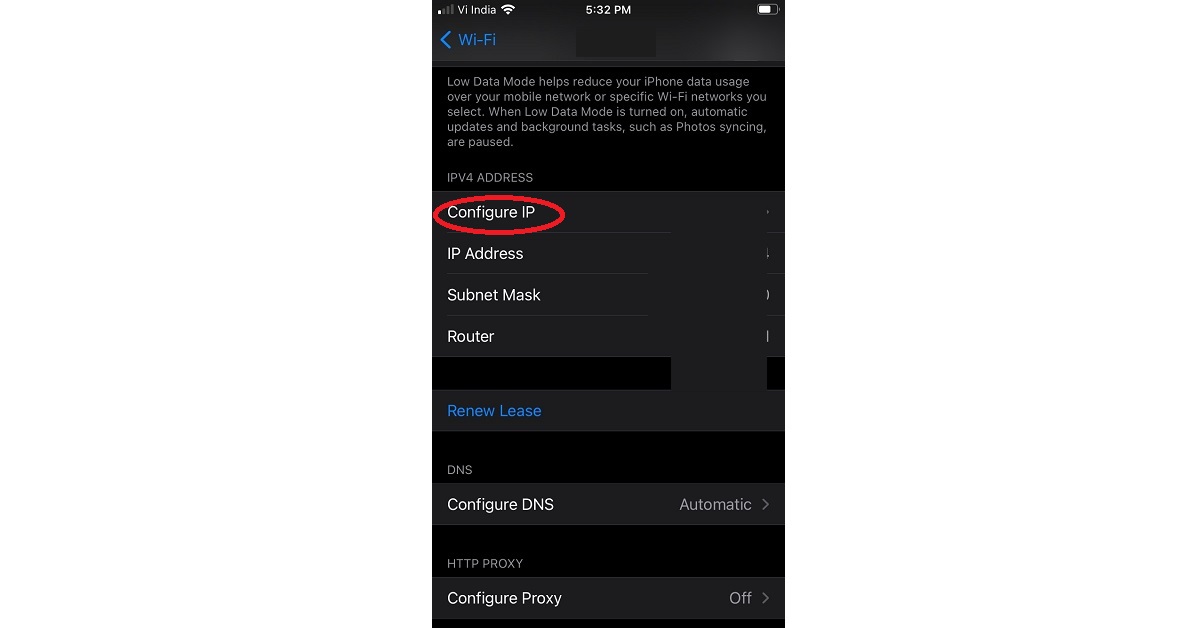
Tap the Configure IP option.
Tap the Configure IP option.
Tap Manual and type the IP Address and DNS name.
It must be noted that changing the local IP Address does not degrade the performance of your Wi-Fi network.
How to change the IP Address on an Android device?
To change the IP Address on an Android device, follow these steps.
Go to Settings > Network & internet > Wi-Fi.
Select the WI-Fi network for which you wish to change the IP Address and tap Forget.
Earlier last month Samsung introduced the Galaxy A32 in the Indian market. The device is available in 2 variants — 5G and 4G. The 5G variant caters to the Western market, which is basically in the US, Europe and was first introduced in Russia. However, here in India, only the 4G model is available. The new Samsung A-Series phone comes with an sAMOLED 90Hz display. It runs One UI 3.1 on top of Android 11 and is powered byMediaTek Helio G80 SoC paired with 4GB of RAM with 64GB and 6GB RAM with 128GB storage. Apart from this, the device comes with a refreshed design, soft edges and more. There is no visible camera module and the camera placement on the smartphone is also quite different from the other mid-range devices that Samsung offers. We have been using this phone for a few days now and here is our Samsung Galaxy A32 review.
Samsung Galaxy A32 Design
Before anything else, let’s talk about the design first. The Samsung Galaxy A32 looks really awesome and it’s certainly well built. We got the glossy Awesome Black colour option for the review, but Samsung offers this handset in three more shades that is Awesome White, Awesome Blue, and Awesome Violet. So which one is the most Awesome for you? Do let us know in the comments section. As said, the phone bears a minimalist design with soft edges. The back of the phone has a glossy finish and the new camera setup design is definitely eye-catching. Each of the lenses sits individually with raised edges. So, the rear panel design makes it stand out from the smartphones by the company, which comes in this price range. The glossy rear does attract lots of fingerprints so you need to keep a cloth handy to wipe the surface. A lot of phones these days come with a protective case bundled in the box but sadly you get no such thing with the Galaxy A32.Moving on, the device has a lightweight build as the back is plastic. In fact, the frame of the A32 is also made of plastic and not metal, but with a glossy finish. The power button and the volume rocker is given on the right side of the frame and on the other side a sim card slot is placed. While the USB-C port, the headphone jack, a single firing speaker and a primary mic sit at the bottom of the phone, a secondary mic is placed at the top. Instead of a side-mounted fingerprint sensor like in the Redmi Note 10, Samsung has gone for an under-display sensor, however, it’s not the fastest, but gets the job done. Samsung Galaxy A32 is the company’s first non-flagship phone that comes with a 6.4-inch full-HD Super AMOLED display. It comes with a higher refresh rate screen of 90Hz, which is great considering the price point it is available at. It comes with a peak brightness of up to 800 nits and a 20:9 aspect ratio. However, there are 120Hz displays now available from its competition in the same price bracket. Speaking of the performance of the display, it offers a really nice contrast level and sufficient brightness. Sadly, this phone does not have HDR support. Thus, you won’t get HDR streams on any of the OTT platforms including YouTube. The touch response is impressive. Moreover, there is a U shaped cut out to play house to the selfie camera, but come on, it’s 2021 and the company should have gone for the infinity O-design, which we love in some of its bigger siblings. But that certainly is not a deal-breaker. The bezel on the sides is slim with a relatively pronounced chin area. Also, there is no IP rating for water resistance, which is again not a deal-breaker, but many budget phones these days come with the certification.
Performance and Cameras
Now here comes the main thing which is the performance. It is delivered from aMediaTek Helio G80 SoC. It does get your day-to-day tasks done easily. But we did notice a bit of stutter or lag when used intensively. While the unlocking is on the slower side, application update and download are also slow. It should also be noted that this chipset is being used on phones that cost half of what Samsung is asking for the A32. At similar pricing, Vivo is offering Vivo V20 which comes with Snapdragon 720, which offers an AMOLED display, sleek design with glass rear panel and awesome cameras for similar pricing. Which something is asked by many. Here are the Geekbench 5 benchmarks results:Single-Core Score: 348Multi-Core Score: 1293As a result, gaming is not the best experience on this phone. We did try a few games and as you can imagine the phone’s performance was not up to the mark thanks to the Mediatek chipset. We played COD on medium graphics and high framerates. We saw a lot of constant frame drops and the overall gaming performance is not smooth at all, which is a bit disappointing. But hey, Samsung is not promoting it as a Gaming smartphone so no points cut there.Speaking of the software, the device runs One UI 3.1 based on top of Android 11, which is good to see as many of the brands are still not offering Android 11 and are promising it with future updates. So here you get all the Android 11’s regular features. However, the South Korean company also promises three major updates with 4 years of security patches. You get easy to understand always-on display settings. Notably now when you pull the notification scroll it now covers the entire display even when there is no notification or just one. Moreover, now you don’t get to see the Notification history, but make sure it is turned on as it comes off by default. In addition to the Smart pop-up view, the device comes with Bubbles to handle notifications from messaging apps. You can turn either of them from the Floating Notifications. Other things like the Game launcher is a good feature for those who do not want any distractions during gameplay. Besides this, Samsung also offers things like secure folders along with Samsung Knox security, which is good to see at this price point if you really want to keep your data private and secure. While the audio quality is now great as like most of its non-flagship here also Samsung gives you a single loudspeaker that gets the job done. In terms of cameras, the Samsung Galaxy A32 is endowed with a quad-camera setup that includes a 64-megapixel primary camera with f/1.8 aperture, an 8-megapixel ultra-wide-angle lens with 123-degrees of FoV, a 5-megapixel macro sensor and a 2-megapixel depth sensor. For taking selfies, there is a 20-megapixel front-facing camera.The overall performance of the cameras is good, it delivers punchy colours, great dynamic range in daylight conditions. The colour contrast is a bit boosted but is all right. However, the ultra-wide-angle lens did struggle in capturing dynamic range and could not match the colours when compared to the primary sensor. So most of our camera play was around the primary sensor, which we loved! During low light conditions, you get a dedicated night mode and it does help a lot when compared to when the feature is off. But we did notice a bit of grain in the night shots, which is acceptable as ISO kicks in. We were really impressed with the macro shots because it delivers a detailed and natural bokeh effect in the images. The front camera takes fairly sharp selfies when shot in good lighting. The front camera delivered excellent daylight selfies but not the best lowlight selfies. We recommend, to have a good light source on your face for best results, or better to use the rear camera, which will do an excellent job (during night time). macro shotOn the flip side, users cannot record a 4K video with this smartphone, which came across as strange. Maybe a future update will take care of the issue and we can record videos in 4K mode. Right now users would need to use the FHD mode for videos. .On the battery front, Samsung Galaxy A32 comes with a 5,000mAh battery, which is the largest that you get at this price point by the company. The battery gets you through the day, even if you are a power user. You get a 15W charging adapter in the box that takes two hours to charge the phone. We personally would have liked to see a 25W charger in the box.
Conclusion
All in all, this smartphone left us with a mixed bag of feelings. The battery backup is average and the charging is also slow. The phone’s unlock features are also slow, too. All this because of the Mediatek Chipset. But what is great is its rear cameras and display. If you want good cameras and a bright, crisp display, with very modern looks, you can go for this smartphone. For gaming enthusiasts, you can look elsewhere. Pros Fresh designAndroid 11Good DisplayConsNo video stabilisationNo 4K recordingSlow charging
For the latest gadget and tech news, and gadget reviews, follow us on Twitter, Facebook and Instagram. For newest tech & gadget videos subscribe to our YouTube Channel. You can also stay up to date using the Gadget Bridge Android App.


 Specifications
All the 8K and 4K models come under the Samsung Neo QLED TV lineup featuring Quantum Mini LED, precisely controlled by Quantum Matrix Technology and Neo Quantum Processor. According to the company, the Mini LEDs are 40 times smaller than regular LEDs, which allows the device to display fine light and contrast levels. It increases the luminance scale that makes dark areas darker and bright areas brighter, resulting in a more precise and immersive HDR experience.
While the Neo Quantum Processor enhances the upscaling capabilities. It uses up to 16 different neural network models, each trained in AI upscaling and deep learning technology. In addition to this, it can optimize picture quality to 4K and 8K picture output despite the input quality.
The Samsung Neo QLED TV lineup also offers an ultra-wide immersive gaming experience with its Motion Xcelerator Turbo+ feature. This offers the option to play PC and console games with a Super Ultra-Wide Game View and Game Bar. In addition to this, the seamless gaming experience can be achieved with Auto Low Latency Mode that makes sure there is no tearing and stuttering. It also comes with the new and intuitive Game Bar that allows gamers to easily adjust the screen’s aspect ratio, check input lag, connect wireless headsets, and more.
Moreover, the new lineup of Samsung QLED Television brings in several premium, room-filling audio features – Object Tracking Sound Pro’s dynamic sound corresponds to the movement of objects on the screen and SpaceFit Sound analyzes the installed TV’s physical environment and provides immersive sound tailored specifically to your space.
Over that, the range will also include the Samsung TV Plus service that offers access to content across genres such as news, lifestyle, technology, gaming and science, sports and outdoors, music, movies and binge-able shows, without any subscription and no additional device such as a set-top box.
For the latest gadget and tech news, and gadget reviews, follow us on Twitter, Facebook and Instagram. For newest tech & gadget videos subscribe to our YouTube Channel. You can also stay up to date using the Gadget Bridge Android App.
Specifications
All the 8K and 4K models come under the Samsung Neo QLED TV lineup featuring Quantum Mini LED, precisely controlled by Quantum Matrix Technology and Neo Quantum Processor. According to the company, the Mini LEDs are 40 times smaller than regular LEDs, which allows the device to display fine light and contrast levels. It increases the luminance scale that makes dark areas darker and bright areas brighter, resulting in a more precise and immersive HDR experience.
While the Neo Quantum Processor enhances the upscaling capabilities. It uses up to 16 different neural network models, each trained in AI upscaling and deep learning technology. In addition to this, it can optimize picture quality to 4K and 8K picture output despite the input quality.
The Samsung Neo QLED TV lineup also offers an ultra-wide immersive gaming experience with its Motion Xcelerator Turbo+ feature. This offers the option to play PC and console games with a Super Ultra-Wide Game View and Game Bar. In addition to this, the seamless gaming experience can be achieved with Auto Low Latency Mode that makes sure there is no tearing and stuttering. It also comes with the new and intuitive Game Bar that allows gamers to easily adjust the screen’s aspect ratio, check input lag, connect wireless headsets, and more.
Moreover, the new lineup of Samsung QLED Television brings in several premium, room-filling audio features – Object Tracking Sound Pro’s dynamic sound corresponds to the movement of objects on the screen and SpaceFit Sound analyzes the installed TV’s physical environment and provides immersive sound tailored specifically to your space.
Over that, the range will also include the Samsung TV Plus service that offers access to content across genres such as news, lifestyle, technology, gaming and science, sports and outdoors, music, movies and binge-able shows, without any subscription and no additional device such as a set-top box.
For the latest gadget and tech news, and gadget reviews, follow us on Twitter, Facebook and Instagram. For newest tech & gadget videos subscribe to our YouTube Channel. You can also stay up to date using the Gadget Bridge Android App. 
 Specifications
All the 8K and 4K models come under the Samsung Neo QLED TV lineup featuring Quantum Mini LED, precisely controlled by Quantum Matrix Technology and Neo Quantum Processor. According to the company, the Mini LEDs are 40 times smaller than regular LEDs, which allows the device to display fine light and contrast levels. It increases the luminance scale that makes dark areas darker and bright areas brighter, resulting in a more precise and immersive HDR experience.
While the Neo Quantum Processor enhances the upscaling capabilities. It uses up to 16 different neural network models, each trained in AI upscaling and deep learning technology. In addition to this, it can optimize picture quality to 4K and 8K picture output despite the input quality.
The Samsung Neo QLED TV lineup also offers an ultra-wide immersive gaming experience with its Motion Xcelerator Turbo+ feature. This offers the option to play PC and console games with a Super Ultra-Wide Game View and Game Bar. In addition to this, the seamless gaming experience can be achieved with Auto Low Latency Mode that makes sure there is no tearing and stuttering. It also comes with the new and intuitive Game Bar that allows gamers to easily adjust the screen’s aspect ratio, check input lag, connect wireless headsets, and more.
Moreover, the new lineup of Samsung QLED Television brings in several premium, room-filling audio features – Object Tracking Sound Pro’s dynamic sound corresponds to the movement of objects on the screen and SpaceFit Sound analyzes the installed TV’s physical environment and provides immersive sound tailored specifically to your space.
Over that, the range will also include the Samsung TV Plus service that offers access to content across genres such as news, lifestyle, technology, gaming and science, sports and outdoors, music, movies and binge-able shows, without any subscription and no additional device such as a set-top box.
For the latest gadget and tech news, and gadget reviews, follow us on Twitter, Facebook and Instagram. For newest tech & gadget videos subscribe to our YouTube Channel. You can also stay up to date using the Gadget Bridge Android App.
Specifications
All the 8K and 4K models come under the Samsung Neo QLED TV lineup featuring Quantum Mini LED, precisely controlled by Quantum Matrix Technology and Neo Quantum Processor. According to the company, the Mini LEDs are 40 times smaller than regular LEDs, which allows the device to display fine light and contrast levels. It increases the luminance scale that makes dark areas darker and bright areas brighter, resulting in a more precise and immersive HDR experience.
While the Neo Quantum Processor enhances the upscaling capabilities. It uses up to 16 different neural network models, each trained in AI upscaling and deep learning technology. In addition to this, it can optimize picture quality to 4K and 8K picture output despite the input quality.
The Samsung Neo QLED TV lineup also offers an ultra-wide immersive gaming experience with its Motion Xcelerator Turbo+ feature. This offers the option to play PC and console games with a Super Ultra-Wide Game View and Game Bar. In addition to this, the seamless gaming experience can be achieved with Auto Low Latency Mode that makes sure there is no tearing and stuttering. It also comes with the new and intuitive Game Bar that allows gamers to easily adjust the screen’s aspect ratio, check input lag, connect wireless headsets, and more.
Moreover, the new lineup of Samsung QLED Television brings in several premium, room-filling audio features – Object Tracking Sound Pro’s dynamic sound corresponds to the movement of objects on the screen and SpaceFit Sound analyzes the installed TV’s physical environment and provides immersive sound tailored specifically to your space.
Over that, the range will also include the Samsung TV Plus service that offers access to content across genres such as news, lifestyle, technology, gaming and science, sports and outdoors, music, movies and binge-able shows, without any subscription and no additional device such as a set-top box.
For the latest gadget and tech news, and gadget reviews, follow us on Twitter, Facebook and Instagram. For newest tech & gadget videos subscribe to our YouTube Channel. You can also stay up to date using the Gadget Bridge Android App. 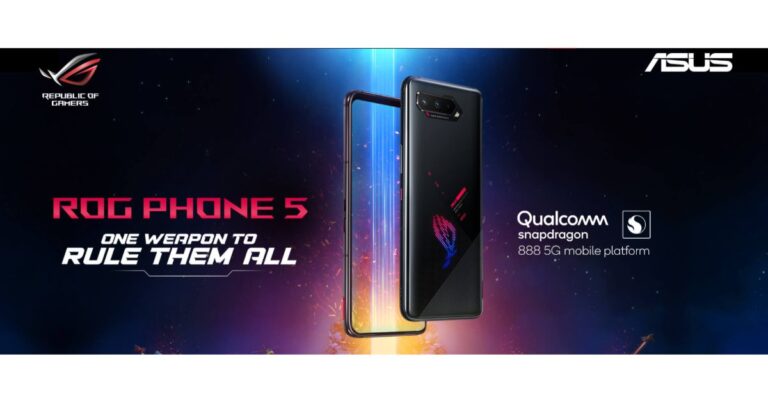
 Asus ROG Phone 5 specifications
Asus ROG Phone 5 features a 6.78-inch full-HD+ AMOLED display with 1,080×2,448 pixels of resolution. The display also offers a 20.4:9 aspect ratio, a 144Hz refresh rate, up to 1,200 nits of peak brightness and comes protected by Corning Gorilla Glass Victus. The gaming phone runs ROG UI and ZenUI custom interfaces based on Android 11. Under the hood, there is an octa-core Qualcomm Snapdragon 888 SoC, paired with an Adreno 660 GPU.
For the photos and the videos, the Asus ROG Phone 5 features a triple rear camera setup that includes a 64-megapixel primary Sony IMX686 sensor with an f/1.8 aperture. In addition to this, there is a 13-megapixel ultra-wide-angle lens with f/2.4 aperture and a 5-megapixel macro lens. Upfront there is a 24-megapixel selfie camera sensor with an f/2.45 aperture.
Over that, the phone comes with a thermal design from Asus called GameCool 5 for better temperature control. There are AirTrigger 5, dual front-firing speakers, multi-antenna Wi-Fi, a quad-mic noise-cancelling and ultrasonic buttons for an enhanced gaming experience in the smartphone, too. The Asus ROG Phone 5 also includes RGB light under the ROG logo and a pogo pin connector for external accessories.
In terms of connectivity, the device includes 5G, 4G LTE, Wi-Fi 6, Bluetooth 5.0, GPS/ A-GPS, NFC, two USB Type-C ports and a 3.5mm headphone jack. The phone is backed by a dual-cell 6,000mAh battery that supports 65W fast charging.
For the latest gadget and tech news, and gadget reviews, follow us on Twitter, Facebook and Instagram. For newest tech & gadget videos subscribe to our YouTube Channel. You can also stay up to date using the Gadget Bridge Android App.
Asus ROG Phone 5 specifications
Asus ROG Phone 5 features a 6.78-inch full-HD+ AMOLED display with 1,080×2,448 pixels of resolution. The display also offers a 20.4:9 aspect ratio, a 144Hz refresh rate, up to 1,200 nits of peak brightness and comes protected by Corning Gorilla Glass Victus. The gaming phone runs ROG UI and ZenUI custom interfaces based on Android 11. Under the hood, there is an octa-core Qualcomm Snapdragon 888 SoC, paired with an Adreno 660 GPU.
For the photos and the videos, the Asus ROG Phone 5 features a triple rear camera setup that includes a 64-megapixel primary Sony IMX686 sensor with an f/1.8 aperture. In addition to this, there is a 13-megapixel ultra-wide-angle lens with f/2.4 aperture and a 5-megapixel macro lens. Upfront there is a 24-megapixel selfie camera sensor with an f/2.45 aperture.
Over that, the phone comes with a thermal design from Asus called GameCool 5 for better temperature control. There are AirTrigger 5, dual front-firing speakers, multi-antenna Wi-Fi, a quad-mic noise-cancelling and ultrasonic buttons for an enhanced gaming experience in the smartphone, too. The Asus ROG Phone 5 also includes RGB light under the ROG logo and a pogo pin connector for external accessories.
In terms of connectivity, the device includes 5G, 4G LTE, Wi-Fi 6, Bluetooth 5.0, GPS/ A-GPS, NFC, two USB Type-C ports and a 3.5mm headphone jack. The phone is backed by a dual-cell 6,000mAh battery that supports 65W fast charging.
For the latest gadget and tech news, and gadget reviews, follow us on Twitter, Facebook and Instagram. For newest tech & gadget videos subscribe to our YouTube Channel. You can also stay up to date using the Gadget Bridge Android App.  Asus ROG Phone 5 specifications
Asus ROG Phone 5 features a 6.78-inch full-HD+ AMOLED display with 1,080×2,448 pixels of resolution. The display also offers a 20.4:9 aspect ratio, a 144Hz refresh rate, up to 1,200 nits of peak brightness and comes protected by Corning Gorilla Glass Victus. The gaming phone runs ROG UI and ZenUI custom interfaces based on Android 11. Under the hood, there is an octa-core Qualcomm Snapdragon 888 SoC, paired with an Adreno 660 GPU.
For the photos and the videos, the Asus ROG Phone 5 features a triple rear camera setup that includes a 64-megapixel primary Sony IMX686 sensor with an f/1.8 aperture. In addition to this, there is a 13-megapixel ultra-wide-angle lens with f/2.4 aperture and a 5-megapixel macro lens. Upfront there is a 24-megapixel selfie camera sensor with an f/2.45 aperture.
Over that, the phone comes with a thermal design from Asus called GameCool 5 for better temperature control. There are AirTrigger 5, dual front-firing speakers, multi-antenna Wi-Fi, a quad-mic noise-cancelling and ultrasonic buttons for an enhanced gaming experience in the smartphone, too. The Asus ROG Phone 5 also includes RGB light under the ROG logo and a pogo pin connector for external accessories.
In terms of connectivity, the device includes 5G, 4G LTE, Wi-Fi 6, Bluetooth 5.0, GPS/ A-GPS, NFC, two USB Type-C ports and a 3.5mm headphone jack. The phone is backed by a dual-cell 6,000mAh battery that supports 65W fast charging.
For the latest gadget and tech news, and gadget reviews, follow us on Twitter, Facebook and Instagram. For newest tech & gadget videos subscribe to our YouTube Channel. You can also stay up to date using the Gadget Bridge Android App.
Asus ROG Phone 5 specifications
Asus ROG Phone 5 features a 6.78-inch full-HD+ AMOLED display with 1,080×2,448 pixels of resolution. The display also offers a 20.4:9 aspect ratio, a 144Hz refresh rate, up to 1,200 nits of peak brightness and comes protected by Corning Gorilla Glass Victus. The gaming phone runs ROG UI and ZenUI custom interfaces based on Android 11. Under the hood, there is an octa-core Qualcomm Snapdragon 888 SoC, paired with an Adreno 660 GPU.
For the photos and the videos, the Asus ROG Phone 5 features a triple rear camera setup that includes a 64-megapixel primary Sony IMX686 sensor with an f/1.8 aperture. In addition to this, there is a 13-megapixel ultra-wide-angle lens with f/2.4 aperture and a 5-megapixel macro lens. Upfront there is a 24-megapixel selfie camera sensor with an f/2.45 aperture.
Over that, the phone comes with a thermal design from Asus called GameCool 5 for better temperature control. There are AirTrigger 5, dual front-firing speakers, multi-antenna Wi-Fi, a quad-mic noise-cancelling and ultrasonic buttons for an enhanced gaming experience in the smartphone, too. The Asus ROG Phone 5 also includes RGB light under the ROG logo and a pogo pin connector for external accessories.
In terms of connectivity, the device includes 5G, 4G LTE, Wi-Fi 6, Bluetooth 5.0, GPS/ A-GPS, NFC, two USB Type-C ports and a 3.5mm headphone jack. The phone is backed by a dual-cell 6,000mAh battery that supports 65W fast charging.
For the latest gadget and tech news, and gadget reviews, follow us on Twitter, Facebook and Instagram. For newest tech & gadget videos subscribe to our YouTube Channel. You can also stay up to date using the Gadget Bridge Android App. 








 Alongside this, the developers have also announced the latest major event, K.O. Night. This will introduce Survivors to Laura and Rafael, a pair of ex-lovers who split up after discovering they belong to opposing factions. But their destinies are set on a collision course after they separately sign up for K.O. Night, the premier fighting tournament in Free Fire.
 Apart from this the K.O. Night Event, Free Fire will also include in-game reskin, a special interface with daily missions, peak-day activities, login and friend call-back bonuses, and various belt drops that can be exchanged for exclusive K.O. Night-themed rewards. In addition to this, the popular Bermuda map will also make a comeback and become permanent while the Kalahari map will become optional for users to download. With the return of Bermuda Remastered, the character advancement and skill systems will also undergo several changes. Survivors will now be able to level up characters using only memory fragments – which can be earned by playing Free Fire.
Over that, Free Fire gamers will also receive a Clash Squad Season 6, a new character, a new revive mechanism, as well as an extensive list of character and weapon balancing adjustments and quality-of-life updates.
For the latest gadget and tech news, and gadget reviews, follow us on Twitter, Facebook and Instagram. For newest tech & gadget videos subscribe to our YouTube Channel. You can also stay up to date using the Gadget Bridge Android App.
Apart from this the K.O. Night Event, Free Fire will also include in-game reskin, a special interface with daily missions, peak-day activities, login and friend call-back bonuses, and various belt drops that can be exchanged for exclusive K.O. Night-themed rewards. In addition to this, the popular Bermuda map will also make a comeback and become permanent while the Kalahari map will become optional for users to download. With the return of Bermuda Remastered, the character advancement and skill systems will also undergo several changes. Survivors will now be able to level up characters using only memory fragments – which can be earned by playing Free Fire.
Over that, Free Fire gamers will also receive a Clash Squad Season 6, a new character, a new revive mechanism, as well as an extensive list of character and weapon balancing adjustments and quality-of-life updates.
For the latest gadget and tech news, and gadget reviews, follow us on Twitter, Facebook and Instagram. For newest tech & gadget videos subscribe to our YouTube Channel. You can also stay up to date using the Gadget Bridge Android App.  Alongside this, the developers have also announced the latest major event, K.O. Night. This will introduce Survivors to Laura and Rafael, a pair of ex-lovers who split up after discovering they belong to opposing factions. But their destinies are set on a collision course after they separately sign up for K.O. Night, the premier fighting tournament in Free Fire.
 Apart from this the K.O. Night Event, Free Fire will also include in-game reskin, a special interface with daily missions, peak-day activities, login and friend call-back bonuses, and various belt drops that can be exchanged for exclusive K.O. Night-themed rewards. In addition to this, the popular Bermuda map will also make a comeback and become permanent while the Kalahari map will become optional for users to download. With the return of Bermuda Remastered, the character advancement and skill systems will also undergo several changes. Survivors will now be able to level up characters using only memory fragments – which can be earned by playing Free Fire.
Over that, Free Fire gamers will also receive a Clash Squad Season 6, a new character, a new revive mechanism, as well as an extensive list of character and weapon balancing adjustments and quality-of-life updates.
For the latest gadget and tech news, and gadget reviews, follow us on Twitter, Facebook and Instagram. For newest tech & gadget videos subscribe to our YouTube Channel. You can also stay up to date using the Gadget Bridge Android App.
Apart from this the K.O. Night Event, Free Fire will also include in-game reskin, a special interface with daily missions, peak-day activities, login and friend call-back bonuses, and various belt drops that can be exchanged for exclusive K.O. Night-themed rewards. In addition to this, the popular Bermuda map will also make a comeback and become permanent while the Kalahari map will become optional for users to download. With the return of Bermuda Remastered, the character advancement and skill systems will also undergo several changes. Survivors will now be able to level up characters using only memory fragments – which can be earned by playing Free Fire.
Over that, Free Fire gamers will also receive a Clash Squad Season 6, a new character, a new revive mechanism, as well as an extensive list of character and weapon balancing adjustments and quality-of-life updates.
For the latest gadget and tech news, and gadget reviews, follow us on Twitter, Facebook and Instagram. For newest tech & gadget videos subscribe to our YouTube Channel. You can also stay up to date using the Gadget Bridge Android App. 


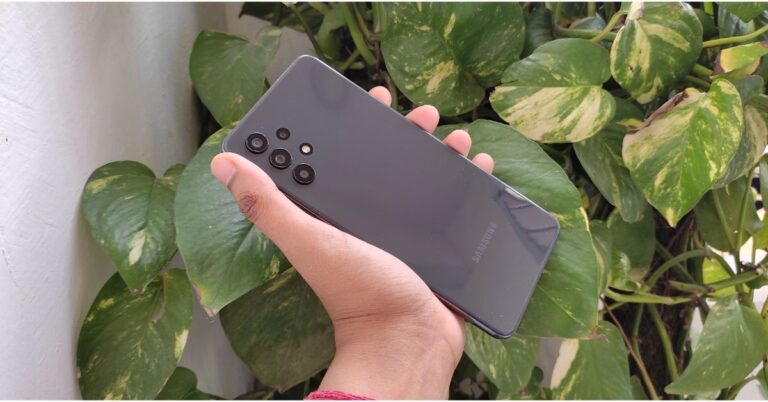
 As said, the phone bears a minimalist design with soft edges. The back of the phone has a glossy finish and the new camera setup design is definitely eye-catching. Each of the lenses sits individually with raised edges. So, the rear panel design makes it stand out from the smartphones by the company, which comes in this price range. The glossy rear does attract lots of fingerprints so you need to keep a cloth handy to wipe the surface. A lot of phones these days come with a protective case bundled in the box but sadly you get no such thing with the Galaxy A32.
Moving on, the device has a lightweight build as the back is plastic. In fact, the frame of the A32 is also made of plastic and not metal, but with a glossy finish.
As said, the phone bears a minimalist design with soft edges. The back of the phone has a glossy finish and the new camera setup design is definitely eye-catching. Each of the lenses sits individually with raised edges. So, the rear panel design makes it stand out from the smartphones by the company, which comes in this price range. The glossy rear does attract lots of fingerprints so you need to keep a cloth handy to wipe the surface. A lot of phones these days come with a protective case bundled in the box but sadly you get no such thing with the Galaxy A32.
Moving on, the device has a lightweight build as the back is plastic. In fact, the frame of the A32 is also made of plastic and not metal, but with a glossy finish.
 The power button and the volume rocker is given on the right side of the frame and on the other side a sim card slot is placed. While the USB-C port, the headphone jack, a single firing speaker and a primary mic sit at the bottom of the phone, a secondary mic is placed at the top. Instead of a side-mounted fingerprint sensor like in the Redmi Note 10, Samsung has gone for an under-display sensor, however, it’s not the fastest, but gets the job done.
Samsung Galaxy A32 is the company’s first non-flagship phone that comes with a 6.4-inch full-HD Super AMOLED display. It comes with a higher refresh rate screen of 90Hz, which is great considering the price point it is available at. It comes with a peak brightness of up to 800 nits and a 20:9 aspect ratio. However, there are 120Hz displays now available from its competition in the same price bracket. Speaking of the performance of the display, it offers a really nice contrast level and sufficient brightness. Sadly, this phone does not have HDR support. Thus, you won’t get HDR streams on any of the OTT platforms including YouTube.
The power button and the volume rocker is given on the right side of the frame and on the other side a sim card slot is placed. While the USB-C port, the headphone jack, a single firing speaker and a primary mic sit at the bottom of the phone, a secondary mic is placed at the top. Instead of a side-mounted fingerprint sensor like in the Redmi Note 10, Samsung has gone for an under-display sensor, however, it’s not the fastest, but gets the job done.
Samsung Galaxy A32 is the company’s first non-flagship phone that comes with a 6.4-inch full-HD Super AMOLED display. It comes with a higher refresh rate screen of 90Hz, which is great considering the price point it is available at. It comes with a peak brightness of up to 800 nits and a 20:9 aspect ratio. However, there are 120Hz displays now available from its competition in the same price bracket. Speaking of the performance of the display, it offers a really nice contrast level and sufficient brightness. Sadly, this phone does not have HDR support. Thus, you won’t get HDR streams on any of the OTT platforms including YouTube.
 The touch response is impressive. Moreover, there is a U shaped cut out to play house to the selfie camera, but come on, it’s 2021 and the company should have gone for the infinity O-design, which we love in some of its bigger siblings. But that certainly is not a deal-breaker. The bezel on the sides is slim with a relatively pronounced chin area. Also, there is no IP rating for water resistance, which is again not a deal-breaker, but many budget phones these days come with the certification.
 You get easy to understand always-on display settings. Notably now when you pull the notification scroll it now covers the entire display even when there is no notification or just one. Moreover, now you don’t get to see the Notification history, but make sure it is turned on as it comes off by default. In addition to the Smart pop-up view, the device comes with Bubbles to handle notifications from messaging apps. You can turn either of them from the Floating Notifications. Other things like the Game launcher is a good feature for those who do not want any distractions during gameplay.
Besides this, Samsung also offers things like secure folders along with Samsung Knox security, which is good to see at this price point if you really want to keep your data private and secure. While the audio quality is now great as like most of its non-flagship here also Samsung gives you a single loudspeaker that gets the job done.
In terms of cameras, the Samsung Galaxy A32 is endowed with a quad-camera setup that includes a 64-megapixel primary camera with f/1.8 aperture, an 8-megapixel ultra-wide-angle lens with 123-degrees of FoV, a 5-megapixel macro sensor and a 2-megapixel depth sensor. For taking selfies, there is a 20-megapixel front-facing camera.
You get easy to understand always-on display settings. Notably now when you pull the notification scroll it now covers the entire display even when there is no notification or just one. Moreover, now you don’t get to see the Notification history, but make sure it is turned on as it comes off by default. In addition to the Smart pop-up view, the device comes with Bubbles to handle notifications from messaging apps. You can turn either of them from the Floating Notifications. Other things like the Game launcher is a good feature for those who do not want any distractions during gameplay.
Besides this, Samsung also offers things like secure folders along with Samsung Knox security, which is good to see at this price point if you really want to keep your data private and secure. While the audio quality is now great as like most of its non-flagship here also Samsung gives you a single loudspeaker that gets the job done.
In terms of cameras, the Samsung Galaxy A32 is endowed with a quad-camera setup that includes a 64-megapixel primary camera with f/1.8 aperture, an 8-megapixel ultra-wide-angle lens with 123-degrees of FoV, a 5-megapixel macro sensor and a 2-megapixel depth sensor. For taking selfies, there is a 20-megapixel front-facing camera.
 The overall performance of the cameras is good, it delivers punchy colours, great dynamic range in daylight conditions. The colour contrast is a bit boosted but is all right. However, the ultra-wide-angle lens did struggle in capturing dynamic range and could not match the colours when compared to the primary sensor. So most of our camera play was around the primary sensor, which we loved!
 During low light conditions, you get a dedicated night mode and it does help a lot when compared to when the feature is off. But we did notice a bit of grain in the night shots, which is acceptable as ISO kicks in. We were really impressed with the macro shots because it delivers a detailed and natural bokeh effect in the images.
  The front camera takes fairly sharp selfies when shot in good lighting. The front camera delivered excellent daylight selfies but not the best lowlight selfies. We recommend, to have a good light source on your face for best results, or better to use the rear camera, which will do an excellent job (during night time).


 As said, the phone bears a minimalist design with soft edges. The back of the phone has a glossy finish and the new camera setup design is definitely eye-catching. Each of the lenses sits individually with raised edges. So, the rear panel design makes it stand out from the smartphones by the company, which comes in this price range. The glossy rear does attract lots of fingerprints so you need to keep a cloth handy to wipe the surface. A lot of phones these days come with a protective case bundled in the box but sadly you get no such thing with the Galaxy A32.
Moving on, the device has a lightweight build as the back is plastic. In fact, the frame of the A32 is also made of plastic and not metal, but with a glossy finish.
As said, the phone bears a minimalist design with soft edges. The back of the phone has a glossy finish and the new camera setup design is definitely eye-catching. Each of the lenses sits individually with raised edges. So, the rear panel design makes it stand out from the smartphones by the company, which comes in this price range. The glossy rear does attract lots of fingerprints so you need to keep a cloth handy to wipe the surface. A lot of phones these days come with a protective case bundled in the box but sadly you get no such thing with the Galaxy A32.
Moving on, the device has a lightweight build as the back is plastic. In fact, the frame of the A32 is also made of plastic and not metal, but with a glossy finish.
 The power button and the volume rocker is given on the right side of the frame and on the other side a sim card slot is placed. While the USB-C port, the headphone jack, a single firing speaker and a primary mic sit at the bottom of the phone, a secondary mic is placed at the top. Instead of a side-mounted fingerprint sensor like in the Redmi Note 10, Samsung has gone for an under-display sensor, however, it’s not the fastest, but gets the job done.
Samsung Galaxy A32 is the company’s first non-flagship phone that comes with a 6.4-inch full-HD Super AMOLED display. It comes with a higher refresh rate screen of 90Hz, which is great considering the price point it is available at. It comes with a peak brightness of up to 800 nits and a 20:9 aspect ratio. However, there are 120Hz displays now available from its competition in the same price bracket. Speaking of the performance of the display, it offers a really nice contrast level and sufficient brightness. Sadly, this phone does not have HDR support. Thus, you won’t get HDR streams on any of the OTT platforms including YouTube.
The power button and the volume rocker is given on the right side of the frame and on the other side a sim card slot is placed. While the USB-C port, the headphone jack, a single firing speaker and a primary mic sit at the bottom of the phone, a secondary mic is placed at the top. Instead of a side-mounted fingerprint sensor like in the Redmi Note 10, Samsung has gone for an under-display sensor, however, it’s not the fastest, but gets the job done.
Samsung Galaxy A32 is the company’s first non-flagship phone that comes with a 6.4-inch full-HD Super AMOLED display. It comes with a higher refresh rate screen of 90Hz, which is great considering the price point it is available at. It comes with a peak brightness of up to 800 nits and a 20:9 aspect ratio. However, there are 120Hz displays now available from its competition in the same price bracket. Speaking of the performance of the display, it offers a really nice contrast level and sufficient brightness. Sadly, this phone does not have HDR support. Thus, you won’t get HDR streams on any of the OTT platforms including YouTube.
 The touch response is impressive. Moreover, there is a U shaped cut out to play house to the selfie camera, but come on, it’s 2021 and the company should have gone for the infinity O-design, which we love in some of its bigger siblings. But that certainly is not a deal-breaker. The bezel on the sides is slim with a relatively pronounced chin area. Also, there is no IP rating for water resistance, which is again not a deal-breaker, but many budget phones these days come with the certification.
 You get easy to understand always-on display settings. Notably now when you pull the notification scroll it now covers the entire display even when there is no notification or just one. Moreover, now you don’t get to see the Notification history, but make sure it is turned on as it comes off by default. In addition to the Smart pop-up view, the device comes with Bubbles to handle notifications from messaging apps. You can turn either of them from the Floating Notifications. Other things like the Game launcher is a good feature for those who do not want any distractions during gameplay.
Besides this, Samsung also offers things like secure folders along with Samsung Knox security, which is good to see at this price point if you really want to keep your data private and secure. While the audio quality is now great as like most of its non-flagship here also Samsung gives you a single loudspeaker that gets the job done.
In terms of cameras, the Samsung Galaxy A32 is endowed with a quad-camera setup that includes a 64-megapixel primary camera with f/1.8 aperture, an 8-megapixel ultra-wide-angle lens with 123-degrees of FoV, a 5-megapixel macro sensor and a 2-megapixel depth sensor. For taking selfies, there is a 20-megapixel front-facing camera.
You get easy to understand always-on display settings. Notably now when you pull the notification scroll it now covers the entire display even when there is no notification or just one. Moreover, now you don’t get to see the Notification history, but make sure it is turned on as it comes off by default. In addition to the Smart pop-up view, the device comes with Bubbles to handle notifications from messaging apps. You can turn either of them from the Floating Notifications. Other things like the Game launcher is a good feature for those who do not want any distractions during gameplay.
Besides this, Samsung also offers things like secure folders along with Samsung Knox security, which is good to see at this price point if you really want to keep your data private and secure. While the audio quality is now great as like most of its non-flagship here also Samsung gives you a single loudspeaker that gets the job done.
In terms of cameras, the Samsung Galaxy A32 is endowed with a quad-camera setup that includes a 64-megapixel primary camera with f/1.8 aperture, an 8-megapixel ultra-wide-angle lens with 123-degrees of FoV, a 5-megapixel macro sensor and a 2-megapixel depth sensor. For taking selfies, there is a 20-megapixel front-facing camera.
 The overall performance of the cameras is good, it delivers punchy colours, great dynamic range in daylight conditions. The colour contrast is a bit boosted but is all right. However, the ultra-wide-angle lens did struggle in capturing dynamic range and could not match the colours when compared to the primary sensor. So most of our camera play was around the primary sensor, which we loved!
 During low light conditions, you get a dedicated night mode and it does help a lot when compared to when the feature is off. But we did notice a bit of grain in the night shots, which is acceptable as ISO kicks in. We were really impressed with the macro shots because it delivers a detailed and natural bokeh effect in the images.
  The front camera takes fairly sharp selfies when shot in good lighting. The front camera delivered excellent daylight selfies but not the best lowlight selfies. We recommend, to have a good light source on your face for best results, or better to use the rear camera, which will do an excellent job (during night time).

