Amazon Quiz Answers Today 21 January 2023: Participate to win Rs 500

21 January 2023 Amazon Quiz has gone live on its mobile app platform. The quiz can be played from 12 AM to 11:59. All you need to do is just answer five easy questions that the e-commerce website puts before you. Today you can stand a chance to win Rs 500 Amazon Pay Balance. Every day Amazon posts a new questionnaire that consists of five simple questions about general knowledge and current events. To enter a lucky draw, participants must correctly answer the questions. One incorrect answer will result in your elimination from the quiz. Each month, only one person will be declared the winner and the results will be announced at the end of the month. Amazon customers who submit correct answers can win an Amazon Pay Balance worth up to Rs 50,000. To ensure that you answer all five questions correctly, Gadget Bridge updates all of the correct answers on a daily basis. Take a look at today’s answers: Amazon Quiz Today Prize – Rs 500 Amazon Pay Balance Quiz Date – 21 January 2023 Daily Timing – 12 AM to 11:59 PM Winner Announcement – Today 12 PM

Amazon Quiz Answers Today 21 January 2023

Question 1: What are Olympic medals made of?

Answer: All of the above

Question 2: The northern lights are also known as the aurora borealis, occur in which location?

Answer: Norway

Question 3: What is the hardest natural substance in the world?

Answer: Diamond

Question 4: Who is this female, an education activist in Pakistan who became the youngest Nobel Peace Prize winner?

Answer: Malala Yousafzai

Question 5: Who is this famous climate activist?

Answer: Greta Thunberg

How To Play Amazon Quiz

Only app users are eligible to play the Amazon quiz every morning from 12 AM to 11:59 PM. The quiz is not available on the desktop. For those who are unaware of how to play the Amazon quiz below are the steps, you can follow to take the quiz.
  • Firstly download the Amazon app from Google Play Store or App Store
  • Now fill in the required information through the Sign Up option.
  • You need to log in to the Amazon app and scroll down on the home screen to find the Amazon Quiz banner.
  • Tap on the Amazon Quiz banner and tap on the Start button to start the Quiz.
  • Now you will get 5 questions and you need to answer them correctly. One wrong answer will eliminate you from the Quiz.
  • After answering all the questions correctly you are now eligible for a Lucky Draw.
  • The winner’s name will be announced today at 12 PM.
For the latest gadget and tech news, and gadget reviews, follow us on TwitterFacebook and Instagram. For newest tech & gadget videos subscribe to our YouTube Channel. You can also stay up to date using the Gadget Bridge Android App. You can find the latest car and bike news here.

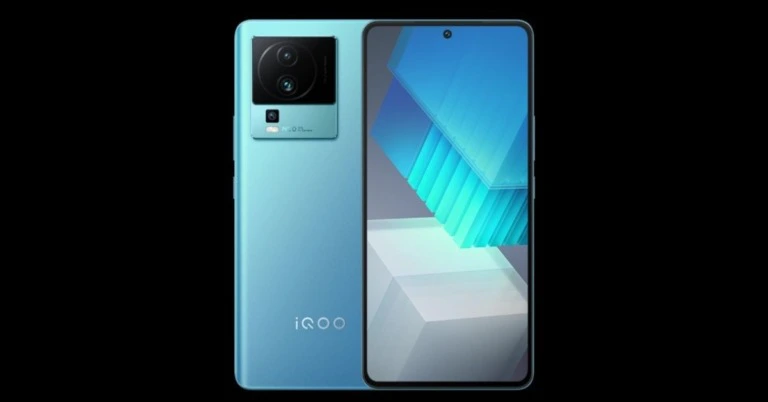
iQoo Neo 7 is scheduled to launch in India on February 16

Before it makes its debut in India, the company has announced the iQoo Neo 7 launch date. After making its debut in China in October 2022 the device will be unveiled in India next month on February 16. It is powered by OriginOS Ocean, which is based on Android 13. The company has revealed that the upcoming smartphone will come equipped with Dimensity 8200 processor. It will also support 120W fast charging. The launch of the iQoo Neo 7 in India has been scheduled for February 16 according to Vivo’s subsidiary iQoo. The phone will only be sold through Amazon and iQOO e-store in India, according to information provided by the business. The phone had previously been introduced in China in October of the previous year. Also Read: iQoo Neo 6 Review: Performs flawlessly, but should you buy it? The company in its announcement said, “iQOO witnessed immense love and excitement for its products across segments last year. One such smartphone was the iQOO Neo 6 which was not only the consumer’s favorite but also the #1 bestseller and highest-rated smartphone on Amazon. The smartphone was a class apart and had many bells and whistles, which made it the best smartphone in the segment. To continue to delight its consumers with the same synergy, iQOO is ready to launch the successor to Neo 6 — iQOO Neo 7 in India on 16th February 2023. The smartphone promises exceptionally powerful performance and an ultra-rich gaming experience for day-to-day multi-tasking and much more.” iQoo Neo 7 is scheduled to launch in India on February 16 According to the manufacturer, the MediaTek Dimensity 8200 chip within the iQOO Neo 7 will aid consumers with the same and boost performance beyond and above expectations. The Neo 7 delivers the top 7 advantages of the MTK 8200 CPU, including the most recent 4nm technology, high frame rate gaming, MTK Hyper Engine 6.0, a potent AI processor, MTK Imagiq 7.0, and speedier performance. Also Read: iQOO 11 Review: A real beast Also supported by the iQOO Neo 7 is 120W flash charging. The company went on to say that in order to deliver a powerful and unparalleled smartphone experience, the CPU was throttled at 77% of its maximum speed (325104GIPS). The smartphone also has a number of features designed specifically to give Gen Z users a distinctive gaming experience, such as full coverage 3D Cooling System, ultra-game mode, etc. Customers will also be surprised by the iQOO Neo 7’s highest AnTuTu score of 890K+. It will also feature a 6.78-inch E5 AMOLED Display with 120Hz refresh rate support. For the latest gadget and tech news, and gadget reviews, follow us on TwitterFacebook and Instagram. For newest tech & gadget videos subscribe to our YouTube Channel. You can also stay up to date using the Gadget Bridge Android App. You can find the latest car and bike news here.

Tips On How To Choose The Best Online Gaming Parlour

The online casino industry is developing every day. Casino news shows the industry is competitive since it is worth billions of dollars. The industry is ever-evolving with new technologies. They include artificial intelligence, blockchain, mobile apps, and virtual and augmented reality. Online casinos have a variety of games like baccarat, roulette, slots, and blackjack. More people have turned to online gambling. This move has made the industry more popular and increased revenue. Most online casinos have live dealer rooms where players interact with real dealers through video streaming technology. Players experience the thrill of playing in a real casino environment right from their homes. Live dealers ensure fairness during games by providing security for transactions. With so many choices, knowing which online casino is best for you can be challenging. Below are vital tips to consider before choosing an online casino.

Licensing, Registration, and Regulation for Gambling

Check the licensing of an online gambling site when choosing an online casino site. Besides, the site should have regulation by a reputable authority. Moreover, the licensing should be from an accredited licensing jurisdiction. This licensing ensures that the casino meets certain standards of fairness and safety. Confirm that the casino’s website has this license on display. Besides, check whether a reputable gaming commission regulates the casino. Such institutions test games for accuracy and fairness. You should also look for approval seals from other independent testing bodies.

Promotions and Bonuses

Consider whether the online casino offers promotional offers or bonuses for new players. Promotions and bonuses can be a great way to start an online casino. These promotions motivate you to continue playing. Offers like cash-back rewards, free spins, and slot machines could be part of the promotion. You should be keen to read the terms and conditions of each bonus before taking advantage of it. This keenness prevents you from unnecessary restrictions that could affect your gaming experience. It would help if you also were keen on expiry dates for promotions and bonuses to take advantage of them.

Mode of Payment

You should check the available payment method option before registering for online casinos. Check the fees associated with each payment method before selecting which one to use. Most online casinos offer different payment methods, such as bank transfers, cryptocurrency, debit and credit cards, and e-wallets. A regulated and licensed online casino will secure your funds.

Support For Customers

Good customer service is vital for any successful business. When it comes to an online casino, you may have technical issues and queries. Choose an online casino that will have a 24/7 customer service provision to address your needs. The casino can offer the service via phone, live chat, or email support channels. You should also know the competence of the service agents. this knowledge will inform their ability to handle different challenges.

Privacy And Safety Of Your Personal Information

Before signing up for any online casino platform, ensure the site is safe and secure. A secure site includes having secure payment methods that ensure your personal information is safe. Check that the casino has a privacy policy. The policy will protect your data from misuse and unauthorized access. The promotions and bonuses the casino offers shouldn’t share your personal information confidential. When this information gets to a third party, you become vulnerable to attack. By so doing, you have an assurance of the safety and privacy of your personal information.

Look Out For The Competition

Online casinos do compete to attract new players like you. This competition can sometimes be to your advantage. But it would be best if you were very careful since some casinos make offers they can’t fulfill. For example, some casinos may limit the amount you can withdraw from their bonus wins. Such a move can be to your disadvantage. Check for the wagering need. It will give you the amount you must bet before releasing your bonuses as cash.

Conclusion

You should do enough research before signing up with any online casino. Consider the casino’s licensing, promotions, and bonuses as outlined. Customer support, payment mode, privacy, and personal information safety are key. All these tips can help you make an informed decision when selecting an online casino. For the latest gadget and tech news, and gadget reviews, follow us on TwitterFacebook and Instagram. For newest tech & gadget videos subscribe to our YouTube Channel. You can also stay up to date using the Gadget Bridge Android App. You can find the latest car and bike news here.

Top 8 methods to Fix ‘iPhone Dictation Not Working’ on iOS 16 (2023)

0
Your iPhone has a powerful speech-to-text feature called ‘Dictation’ that transcribes whatever you say into the microphone. This feature comes in incredibly handy when your hands are occupied with a certain task and you need to shoot a quick text. However, users often report issues with this feature, especially since updating to iOS 16. In this article, we bring you the top 8 methods to fix the ‘iPhone dictation not working issue’ on iOS 16. Read Also: Best entry-level wired earphones under Rs 1,000

Check the microphone

A malfunctioning microphone is the most likely reason that iPhone Dictation stopped working out of the blue. To check your iPhone’s microphone, send a voice note to a friend on any messaging app like WhatsApp and hear it back. If you cannot make out what you said or if your voice is muffled, the fault likely lies with your microphone. Since speech-to-text heavily relies on taking voice input through the microphone, it may have stopped working correctly because of the malfunctioning mic. Take your iPhone to the service centre to get its mic repaired. 

Check if Dictation is enabled

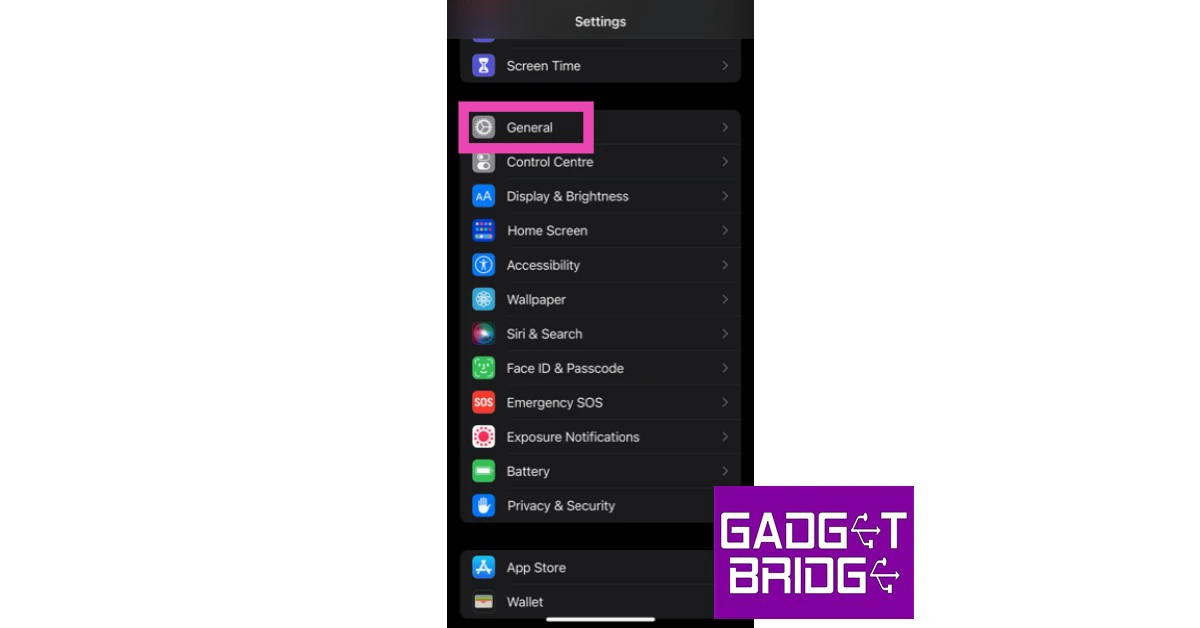
Here’s how you can check if Dictation is enabled on your iPhone. Use this fix if you do not see the microphone icon on your keyboard at all. Step 1: Go to Settings and select General. Step 1: Go to Settings and select General. Step 2: Select ‘Keyboard’. Step 2: Select ‘Keyboard’. Step 3: Turn the toggle bar on for ‘Enable Dictation’. Confirm your choice in the popup box. Step 3: Turn the toggle bar on for ‘Enable Dictation’. Confirm your choice in the popup box.

Restart Siri

Restarting Siri may fix some of the temporary glitches that your iPhone may be facing.  Step 1: Go to Settings and select ‘Siri & Search’. Step 1: Go to Settings and select ‘Siri & Search’. Step 2: Turn off all the toggle bars and then turn them back on. Step 2: Turn off all the toggle bars and then turn them back on.

Add the dictation language

If you are dictating in a language that is not enabled in the Apple Keyboard, it won’t be able to recognise it. Simply enable the language in Apple Keyboard and try again. Here’s how. Step 1: Go to Settings and select General. Step 1: Go to Settings and select General. how to fix iphone dictation not working on ios 16 Step 2: Select Keyboard. Step 2: Select ‘Keyboard’. how to fix iphone dictation not working on ios 16 Step 3: Tap on ‘Keyboards’. Step 4: Select ‘Add new keyboard…’ Step 4: Select ‘Add new keyboard…’ how to fix iphone dictation not working on ios 16 Step 5: Add the language you want to dictate it.  Step 6: Go back to Settings>General>Keyboard and tap on ‘Dictation languages’. Step 7: Select the languages you want the dictation feature to recognise. 

Reset Network Settings

For Dictation to work, you need an active and stable internet connection. The microphone icon for Dictation greys out when your iPhone is not connected to the Internet. Sometimes your iPhone may be connected to a Wi-Fi network or running mobile data yet the microphone icon may turn grey. This means something is wrong with the network. You can try resetting your iPhone’s network setting to fix this. Here’s how. Step 1: Go to Settings and select General.  Step 1: Go to Settings and select General. how to fix iphone dictation not working on ios 16 Step 2: Scroll down and select ‘Transfer or reset iPhone’.  Step 3: Select ‘Reset’ followed by ‘Reset Network Settings’. Step 3: Select ‘Reset’ followed by ‘Reset Network Settings’.

Ensure Siri and Dictation aren’t restricted

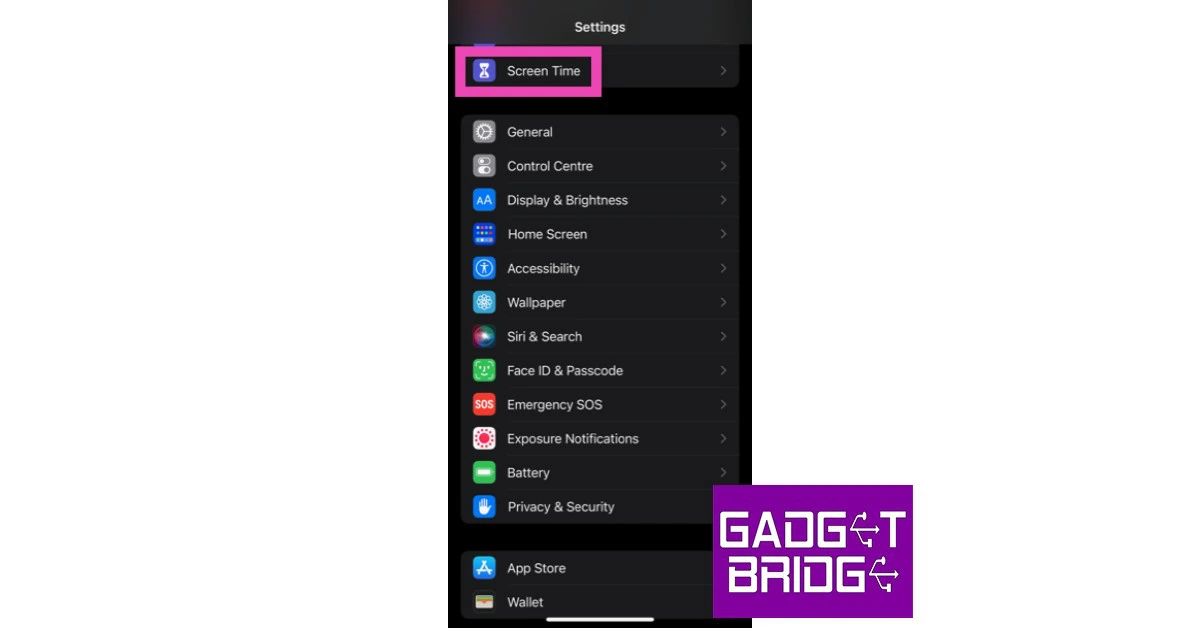
Use this fix if you do not see the microphone icon on your keyboard at all. Step 1: Go to Settings and select Screen Time.  Step 1: Go to Settings and select Screen Time.  how to fix iphone dictation not working on ios 16 Step 2: Tap on ‘Content and privacy restrictions’. Step 3: Select ‘Allowed Apps’ and make sure that the toggle bar for Siri & Dictation is turned on. Step 3: Select ‘Allowed Apps’ and make sure that the toggle bar for Siri & Dictation is turned on. how to fix iphone dictation not working on ios 16

Turn off Low Power Mode

Once your iPhone’s battery level drops down a certain threshold, it automatically turns on Low Power Mode. Some functions of your iPhone may stop working in Low Power Mode. If Dictation is one of them, you can try turning off Low Power Mode. Here’s how. Step 1: Go to Settings and select Battery. Step 2: Turn the toggle bar off for Low Power Mode. Step 2: Turn the toggle bar off for Low Power Mode. how to fix iphone dictation not working on ios 16

Update the iOS version

Go to Settings>General>Software update. how to fix iphone dictation not working on ios 16 Oftentimes, some features of your iPhone may experience unexpected issues because of bugs and other glitches. These issues are quickly resolved in the next update. Simply go to Settings>General>Software Update to update the software version. Read Also: Apple releases new Black Unity collection and content to celebrate Black History Month

Conclusion 

These are the top 8 methods to fix the ‘iPhone Dictation not working’ issue on iOS 16. If the issue still persists after trying all those fixes, try performing a factory reset on your iPhone. Make sure you back up all your personal data because a factory reset will clear your phone’s memory entirely. If you found this article helpful, let us know in the comments! For the latest gadget and tech news, and gadget reviews, follow us on Twitter, Facebook and Instagram. For newest tech & gadget videos subscribe to our YouTube Channel. You can also stay up to date using the Gadget Bridge Android App. You can find the latest car and bike news here.
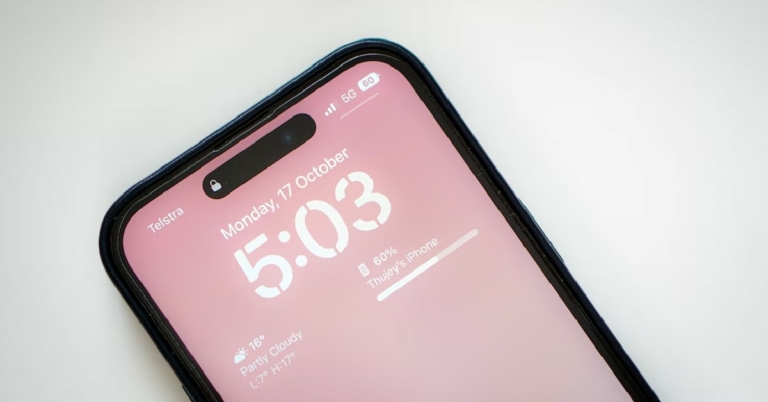
Instagram updated with a new Quiet mode

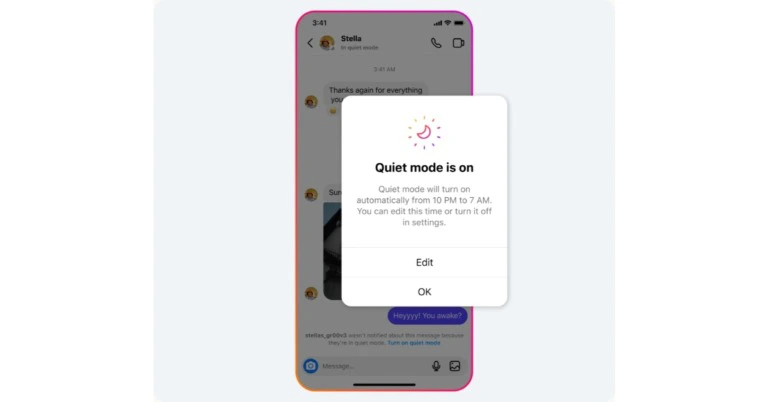
To promote setting boundaries with friends and followers and to aid in focus, Meta introduced Quiet mode on Instagram. The function is intended specifically for its teenage users. Users will not get any notifications once it’s enabled, but it will send an auto-reply whenever someone sends a direct message (DM). Moreover, the profile’s activity status will also change to let people know. Meta via its blog post announced the new Instagram features. It said, “Today, we’re launching Quiet mode on Instagram to help people focus and to encourage people to set boundaries with their friends and followers. Once it’s enabled, you won’t receive any notifications, your profile’s activity status will change to let people know and we’ll automatically send an auto-reply when someone sends you a DM.” Instagram updated with a new Quiet mode According to the social networking site, teenagers have stated that they occasionally want to take time for themselves and maybe seeking more ways to concentrate at night, when studying, and at school. Now that the Quiet mode hours can be readily customised to meet a user’s schedule, Instagram will briefly summarise all alerts after the feature is disabled so that you may catch up on anything you missed. Also Read: Eight new nations will have access to the Samsung Wallet app including India Despite being specifically designed for its teenage users, the Quiet mode is accessible to all users. But Instagram will remind teenagers to do it after they spend a certain amount of time online at night on Instagram. Starting today, everyone can use quiet mode in the US, UK, Ireland, Canada, Australia, and New Zealand. The photo-sharing app intends to expand the availability of quiet mode to other nations. It is introducing new features that allow people to tell what content they don’t want to be recommended to them. In addition, if you choose Not Interested in a post that you saw in Explore, it will try to avoid displaying similar content to you in the future in other places where it makes recommendations, such as Reels, Search, and other locations. Additionally, while you can currently block DMs and comments that contain certain terms, Instagram is now extending this option to include any recommended posts that you could see on the platform. It will stop recommending content with phrases like “fitness” or “recipes” in the caption or the hashtag once you add a word or list of words, emojis, or hashtags that you want to avoid. This is accessible in the Privacy settings’ Hidden Words section. Also Read: Apple launched HomePod (2nd generation) in India: Details inside Instagram has also updated its Parental Supervison tools. is working to make parents more aware of the decisions their children make and to make it simpler for them to have conversations with their children about their settings through the Family Center and other supervision tools, in addition to giving teens more tools to manage their time and experiences on the platform. It just launched a feature that allows parents to view their teen’s Instagram privacy and account settings. Parents will be notified if their kid updates a setting so they may chat to their teen about the change. Now, parents may see accounts that their adolescent has blocked. For the latest gadget and tech news, and gadget reviews, follow us on TwitterFacebook and Instagram. For newest tech & gadget videos subscribe to our YouTube Channel. You can also stay up to date using the Gadget Bridge Android App. You can find the latest car and bike news here.

Eight new nations will have access to the Samsung Wallet app including India

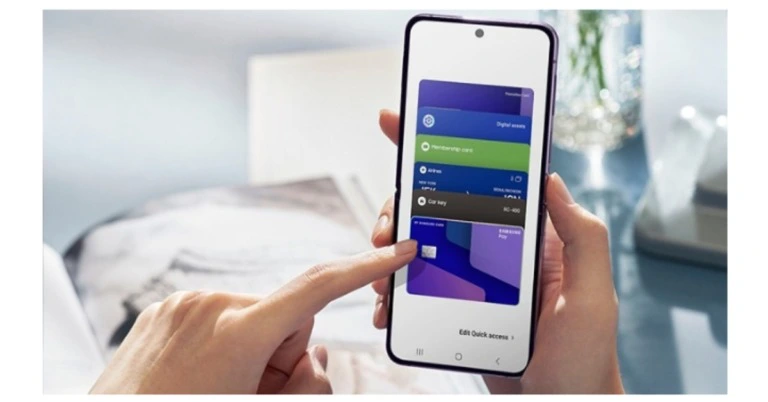
As of the end of January, Samsung Wallet will be offered in eight additional markets, including Australia, Brazil, Canada, Hong Kong, India, Malaysia, Singapore, and Taiwan2, according to a statement from Samsung Electronics. Samsung Wallet was introduced in 7 countries in June of last year. Later in October, Samsung declared that it was bringing the service to 13 other nations. Currently, 21 nations offer the app. For those who do not know, Samsung Wallet is a safe, mobile app that allows you to securely store and access your everyday necessities. Through a blog post, the South Korean giant announced the rollout of the Samsung Wallet. The app will soon be made available in eight more nations, the South Korean tech company has said. Australia, Brazil, Canada, Hong Kong, India, Malaysia, Singapore, Taiwan, and other countries will soon have access to the app. Also Read: Tecno Phantom X2 Pro 5G with a retractable portrait lens launched in India China, France, Germany, Italy, Spain, the UK, and the US were the seven nations where Samsung Wallet was first introduced. Later it was expanded to 13 additional nations, including Western Asia, Scandinavia, and Europe. UAE, Bahrain, Kuwait, Oman, Qatar, and the Middle East region. Eight new nations will have access to the Samsung Wallet app including India “When Samsung launched Samsung Wallet last year, we committed to building the experience through open partnerships with our business and service providers and ensuring access to the platform for as many people as possible,” said Jeanie Han, EVP and Head of Digital Wallet Team at Mobile experience Business, Samsung Electronics. “Over the past several months, we’ve worked hard to rapidly expand the availability of Samsung Wallet, bringing the platform to more potential users. We look forward to sharing exciting new developments in the year ahead.” With just one swipe, users may quickly, easily, and securely store and access vital papers and identifications, including bank cards, digital keys, travel permits, driver’s licences, and student IDs. Samsung’s security platform, Samsung Knox, which features fingerprint recognition and encryption to ensure that consumers’ sensitive data is safeguarded, guards the Wallet platform. Additional security against potential online and offline hacking efforts is provided by Samsung Wallet, which keeps particularly important documents in a secure setting. For the latest gadget and tech news, and gadget reviews, follow us on TwitterFacebook and Instagram. For newest tech & gadget videos subscribe to our YouTube Channel. You can also stay up to date using the Gadget Bridge Android App. You can find the latest car and bike news here.

14 simple methods to fix ‘Text Message Notification Sound Not Working’ on Android

0
 Sometimes, the simplest problems on your smartphone can be the most confusing ones to fix. Users often report that their smartphone does not alert them with a ringing sound upon receiving a text message. An issue as basic as this can arise due to a number of reasons, making it incredibly confusing to fix. In this article, we bring you 14 simple methods to fix the ‘Text message notification sound not working’ issue on an Android smartphone. Read Also: 4 Questions to Ask When Selecting a VPN

Here’s why your phone isn’t pinging for texts

There are several reasons why the text message notification sound may not be working on your Android smartphone. Here are some of the common causes.
  • Silent mode is enabled
  • Certain conversations are muted
  • Notifications from the Messages app are disabled
  • The native Messages app is not set as the default app for texting
  • The cache of the Messages app is corrupted
  • A third-party app is interfering with the Messages app
  • You’re using an older Android version

Allow sound and vibration for text messages

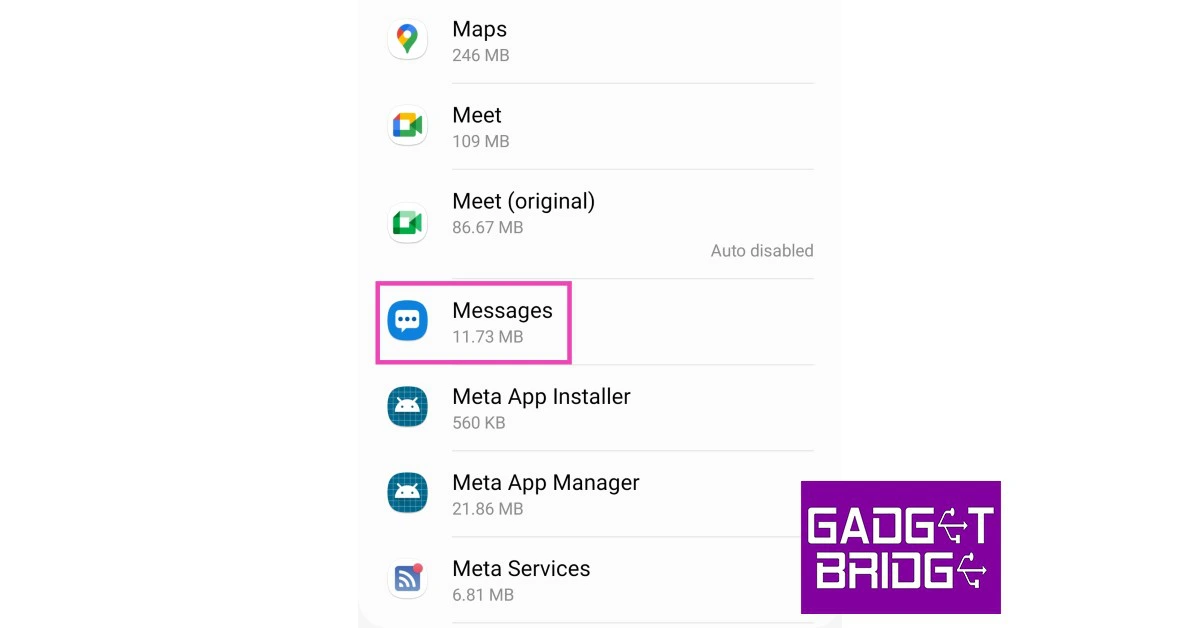
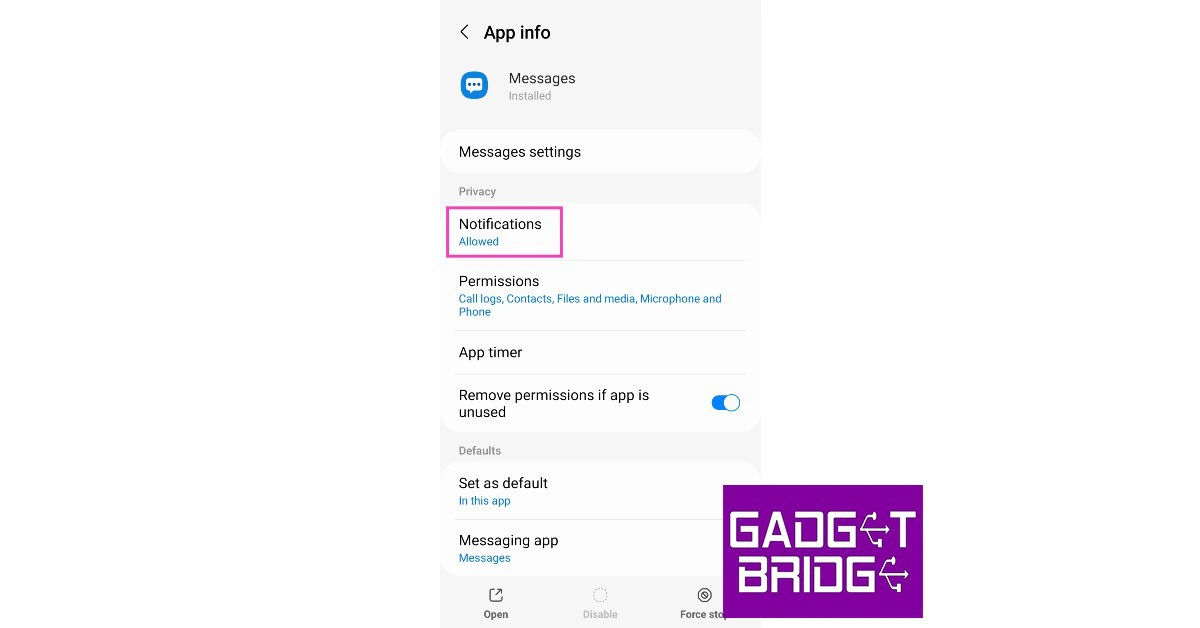
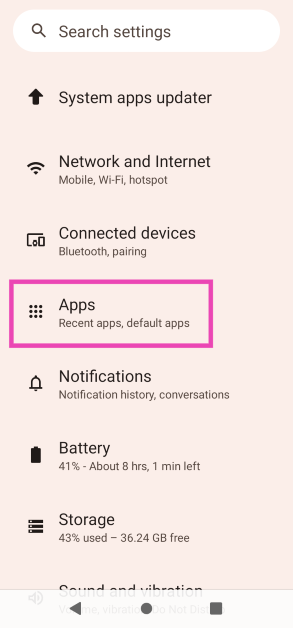
You may not be receiving notification sounds for text messages because you disabled ringing alerts for the Messaging app. Here’s how you can allow sound and notifications for text messages. Step 1: Go to Settings. Step 2: Scroll down and select Apps. Step 2: Scroll down and select Apps. Step 3: Select the default Messages app. Step 3: Select the default ‘Messages’ app. Step 4: Tap on Notifications. Step 4: Tap on Notifications. Step 5: Select Allow sound and vibration. Step 5: Select ‘Allow sound and vibration.’ Your text messages will not be delivered quietly anymore.

Unmute conversations from the Messages app

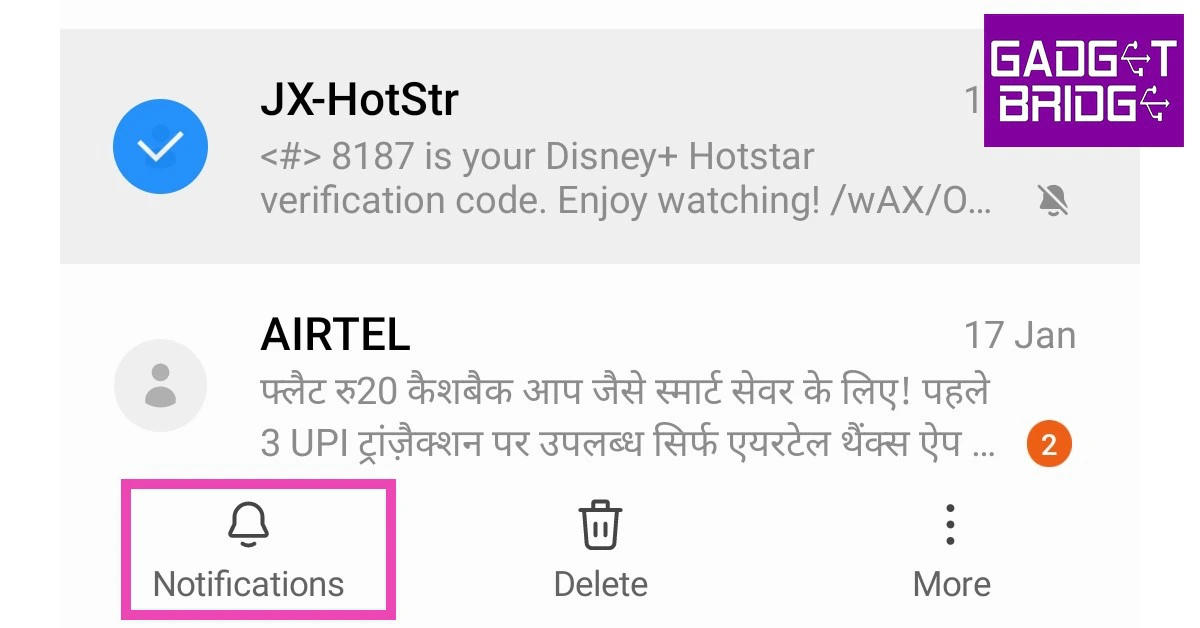
Muted conversations do not deliver notifications every time the sender sends you a text. Here’s how you can unmute a conversation. Step 1: Open the Messages app. Step 2: Long-press on the muted conversation. Step 3: Tap Notifications. Step 3: Tap ‘Notifications’. The conversation will be unmuted.

Check your phone’s notification volume

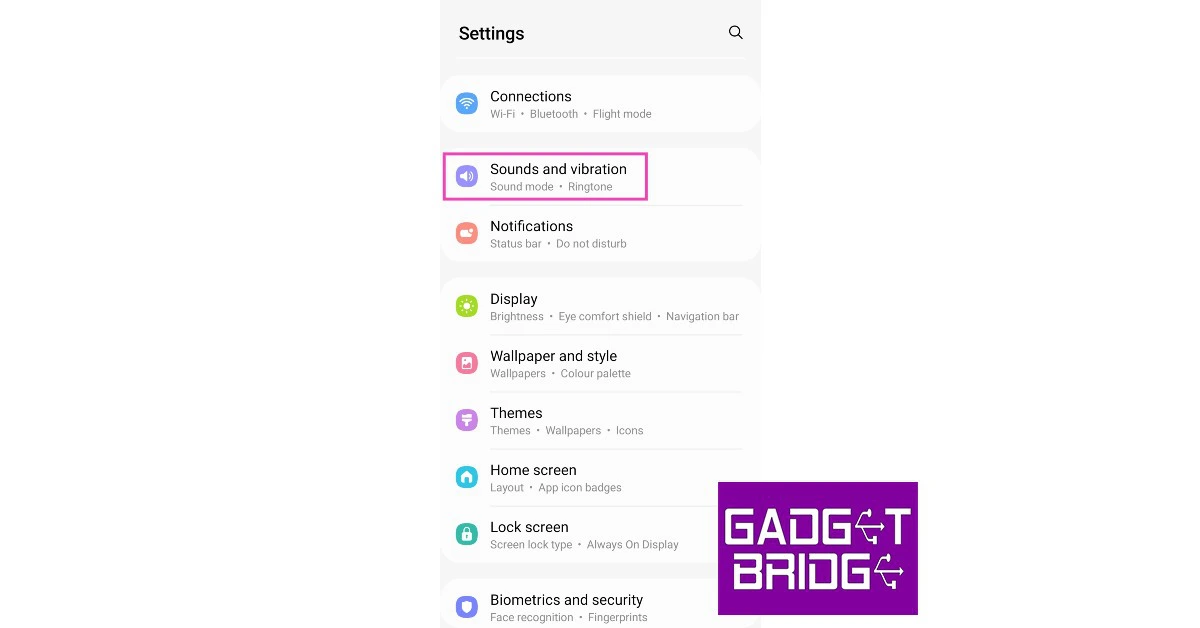
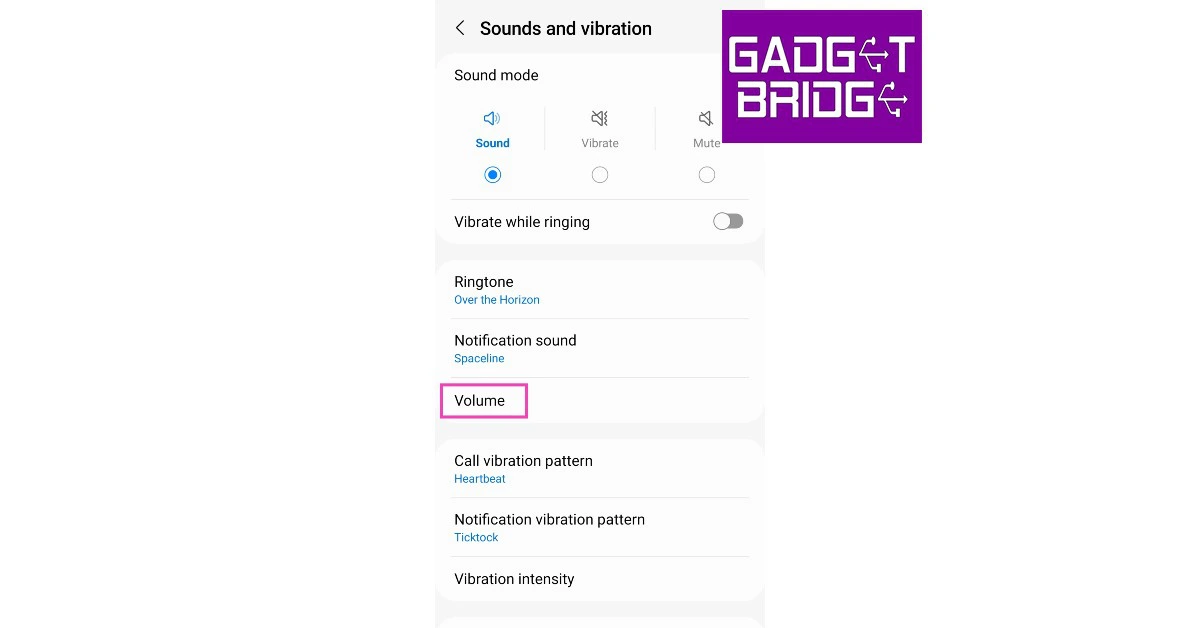
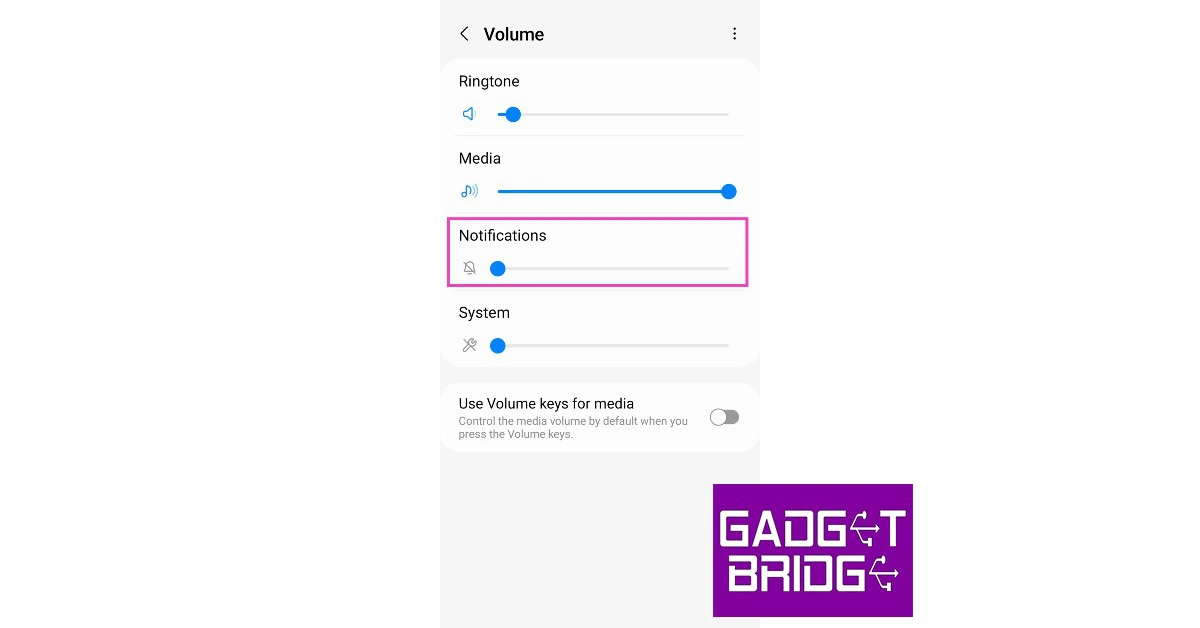
It is possible your smartphone is on the ‘loud’ sound profile, but the notification and alert sounds are muted. Here’s how you can check if the notification sound is enabled. Step 1: Go to Settings. Step 2: Select Sounds and vibration. Step 2: Select ‘Sounds and vibration’. Step 3: Tap on Volume. Step 3: Tap on ‘Volume’. how to fix text message notification sounds not working on android Step 4: Turn the volume bar up for Notifications Step 4: Turn the volume bar up for Notifications.  how to fix text message notification sounds not working on android

Use the volume slider

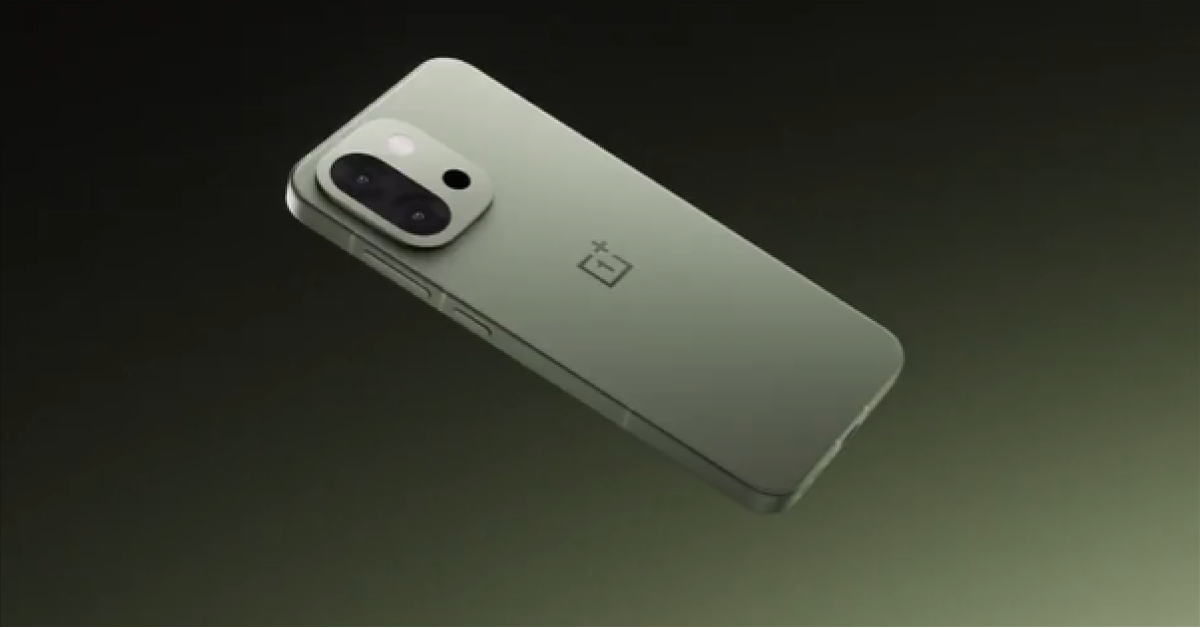
OnePlus 13s is expected to arrive in India at this price: Details Inside Instead of accessing the settings (as mentioned in the previous method), you can also simply press the volume key and tap on the ellipses on the volume bar. This will show you the volume status of music, notifications, ringtones, and system sounds. Simply press and hold the volume bar for notifications and turn it up.

Check the Alert Slider

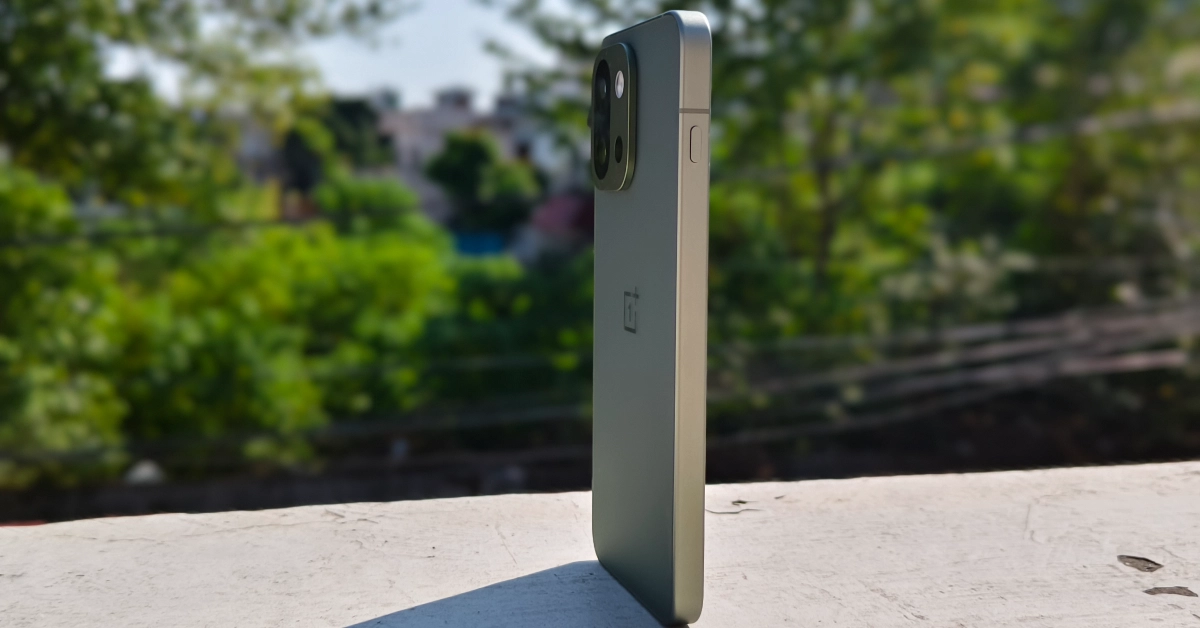
What is the Plus key on OnePlus 13s? Here’s how you can customise it Certain smartphones have an Alert Slider to toggle different sound profiles. It is quite easy to move the slider and put your phone in silent mode. Make sure that the slider is in the correct position to rectify this error. If your smartphone has a Plus key or Action button, long-press it to go back to a loud sound profile.

Turn off ‘Do Not Disturb’

Turn off ‘Do Not Disturb’ how to fix text message notification sounds not working on android Your Android smartphone’s ‘Do Not Disturb’ feature hides all the notifications and alerts when it is turned on. When your phone is on DND, you will neither receive any notification popups nor the notification sounds for text messages. To disable DND, simply drag the drop-down menu and tap on DND.

Make the native Messages app the default messaging app

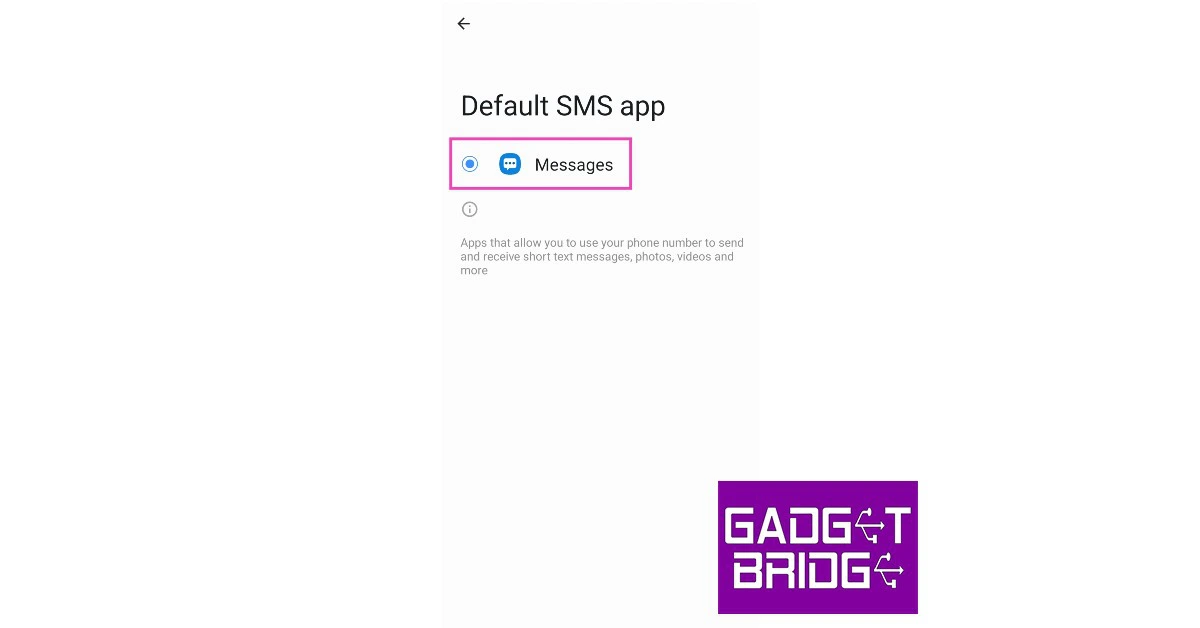
If you use a third-party app for messaging, it may cause a conflict with the native messaging app and start malfunctioning. This may result in undelivered notifications or no sound alerts for incoming messages. To fix this, make the native Messages app your default messaging app. Here’s how. Step 1: Go to Settings. Step 2: Scroll down and select Apps. Step 2: Scroll down and select Apps. how to fix text message notification sounds not working on android Step 3: Select the default ‘Messages’ app. Step 3: Select the default ‘Messages’ app. how to fix text message notification sounds not working on android Step 4: Tap on ‘Messaging app’ under the defaults section. Step 4: Tap on ‘Messaging app’ under the defaults section. how to fix text message notification sounds not working on android Step 5: Select the native Messages app. Step 5: Select the native Messages app.

Clear cache

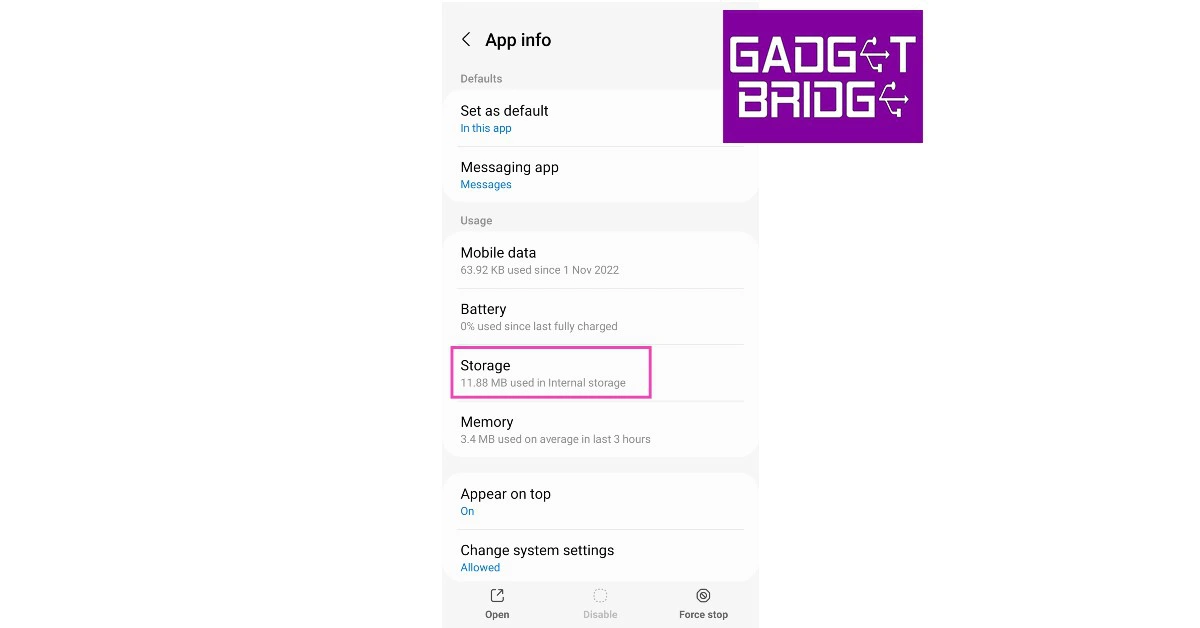
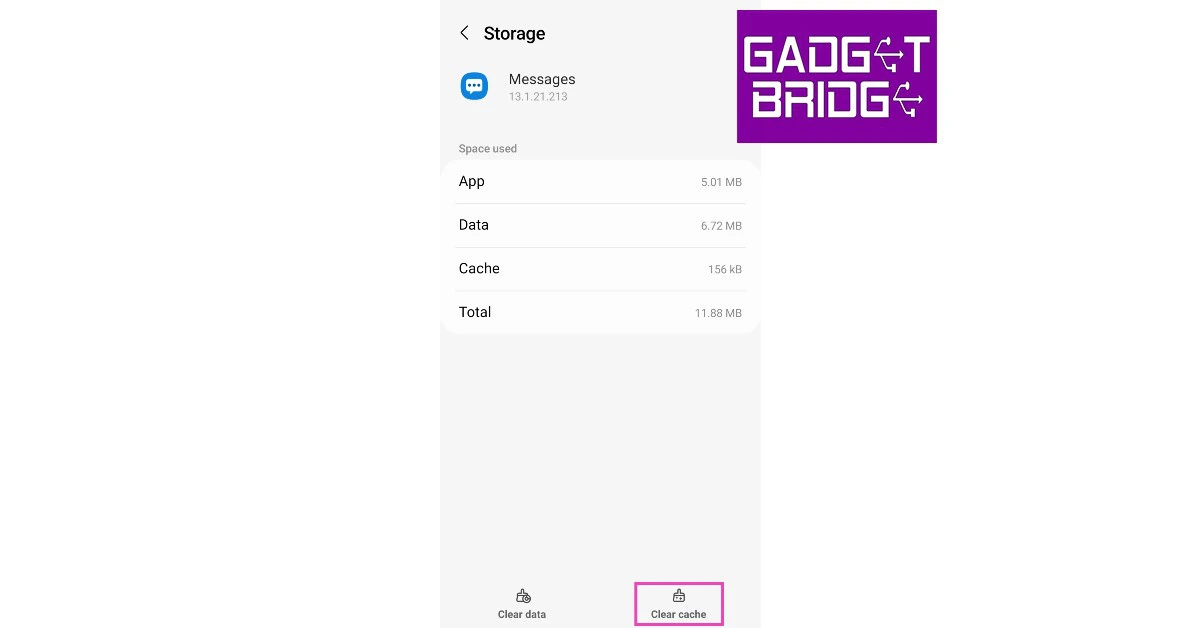
Clearing the cache will get rid of any corrupted temporary files that may be causing the Messages app to act up. Here’s how you can clear the cache. Step 1: Go to Settings. Step 2: Scroll down and select Apps. Step 2: Scroll down and select Apps. how to fix text message notification sounds not working on android Step 3: Select the default ‘Messages’ app. Step 3: Select the default ‘Messages’ app. how to fix text message notification sounds not working on android Step 4: Tap on Storage. Step 4: Tap on Storage. how to fix text message notification sounds not working on android Step 5: Select Clear Cache. Step 5: Select ‘Clear Cache’. how to fix text message notification sounds not working on android

Force Quit the Messages app

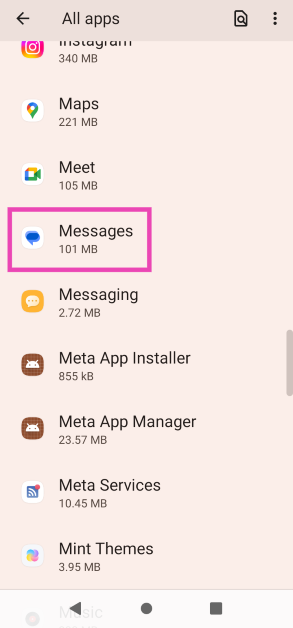
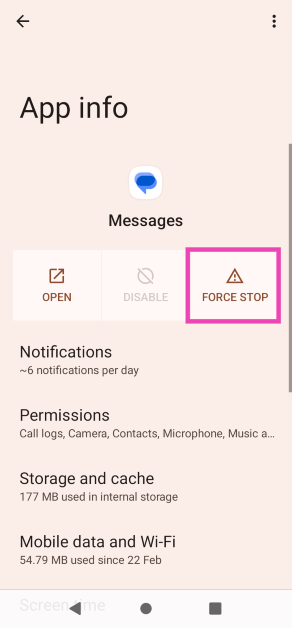
Force-quitting and restarting the Messages app can fix the background issues that may be causing it to deliver notifications quietly. Here’s how you can go about it. Step 1: Go to Settings and select Apps. Step 1: Go to Settings and select Apps. Step 2: Tap on Messages. Step 2: Tap on Messages. Step 3: Select Force Quit. Step 3: Select Force Quit.

Disconnect all Bluetooth devices

Sennheiser-Sport-True-Wireless-earbuds-review With TWS and wireless neckbands replacing wired headphones as the primary audio gear for your smartphone, it is all too common to forget that they are paired to the device. Some wireless earbuds may not automatically disconnect from your phone even after they are placed in the charging case with the lid shut off. Since they are still connected to the device, the notification sounds will not be audible to you. Make sure you disconnect all Bluetooth-driven headphones and earbuds once you encounter this issue.

Restart your smartphone

Restart Your Phone Oftentimes, some temporary glitches get in the way of the most basic functions in your smartphone. These glitches can be fixed by a simple reboot. To restart your smartphone, simply press and hold the power button and select ‘Restart’.

Reset App Preferences

Resetting the app preferences on your device is the quickest way to restore all apps to their default settings without performing a factory reset. Carrying out this step will ensure that any app-related malfunction doesn’t get in the way of the smooth functioning of your device. To reset app settings, go to Settings>Apps and tap on the three dots at the top right corner of the screen. Select ‘Reset app preferences’.

Update your smartphone

Step 1: Connect your phone to a WiFi network and plug in its charger. Step 2: Go to Settings and select Software update. Step 2: Scroll down and select Software Update. Step 3: Tap on Download and Install. Your smartphone will check for any new updates. Step 3: Tap on ‘Download and Install’. Step 4: If an update is available, tap on Install Now. You can also schedule the update for a later time. Step 4: Select ‘Install now’. Best Ways to Update Your Phone OS: iPhone and Android

Factory reset your smartphone

As a last-ditch measure to fix the ‘text message notification sounds not working’ issue, you can factory reset your smartphone. Make sure you create a backup of your data before this step. Step 1: Go to Settings and select About Phone. Step 1: Go to Settings and select ‘About Phone.’ Step 2: Select Backup & reset and tap on Erase all data (factory reset). Step 2: Select ‘Backup & reset’ and tap on ‘Erase all data (factory reset).’ How To Easily Hard or Factory Reset Xiaomi Smartphones? Step 3: In the following window, select Delete all data from the bottom of the screen. Step 3: In the following window, select ‘Delete all data’ from the bottom of the screen. How To Easily Hard or Factory Reset Xiaomi Smartphones? Step 4: Enter your smartphone’s PIN, pattern, or password. Step 5: Tap OK on all backup warnings. Step 5: Tap ‘OK’ on all backup warnings. How To Easily Hard or Factory Reset Xiaomi Smartphones?

Frequently Asked Questions (FAQs)

Why is the text message notification sound not working on my Android phone?

Your phone kills text message notification sounds when it is put into DND mode. You also may not be able to hear text message notifications when the Messages app isn’t the default messaging app or when its notifications are put on mute.

Why is my phone not notifying me when I get text messages?

If the notifications for the Messages app on your phone are disabled, it will not ping you for any incoming texts. The same applies to muted conversations.

How do I change my text message notification sound on Android?

To change your phone’s text message notification tone, go to Settings>Sounds and Vibration> Notification sound.

How do I turn on text message notifications?

To turn on text message notifications on your Android phone, go to Settings>Apps>Messages> Notifications and switch on the toggle bar for Allow Notifications.

How do I unmute a conversation in the Messages app?

Launch the Messages app, long-press the muted conversation, and hit the loudspeaker icon at the top of the screen. Read Also: The Complete Guide to Crypto Investing Strategies 2023

Conclusion 

These are the 14 best and simplest methods to fix the ‘Text message notification sound not working’ issue on an Android smartphone. Got any other ways of fixing this problem? Let us know in the comments!

Voice notes can now be recorded and shared via status on WhatsApp: Report

It is now possible to share a sort of voice note in the WhatsApp status. Select Android beta testers have apparently started receiving the new Status feature. Instead of making a video to send to your contacts, you might share a short voice message in the status. Update 2.23.2.8 for WhatsApp is now being rolled out via the Google Play Beta Program. According to a report by WaBetaInfo, the function enables you to post voice status updates to a particular group of people that you specify in your privacy settings. The same 24-hour period applies to these voice status updates as it does to video, photo, and text updates. Some fortunate beta testers of WhatsApp will soon be able to send voice notes via status updates. Also Read: Apple launched HomePod (2nd generation) in India: Details inside
Voice notes can now be recorded and shared via status on WhatsApp: Report
Image courtesy: WaBetaInfo
According to the shared screenshot, beta testers who were fortunate enough to have the functionality activated can now send voice notes as status updates by accessing it from the text status section. By allowing users to delete a recording before sharing it, WhatsApp also gives users more control over their voice recordings. As was already established, voice notes can only be recorded for a maximum of 30 seconds, and to hear voice notes posted via status, users must update their WhatsApp version. Also Read: Apple releases new Black Unity collection and content to celebrate Black History Month End-to-end encryption is always used when sharing voice notes as status updates to make sure that only the contacts you specify in your privacy settings may hear them. Voice notes shared via status updates vanish after 24 hours, just like photographs and videos, although users always have the option to delete voice notes for everyone once they have been posted as status updates.

Availability

As per the report those who downloaded the most recent beta from the Google Play Store can share voice notes via status updates, and it will be made available to even more users over the next few weeks. For the latest gadget and tech news, and gadget reviews, follow us on TwitterFacebook and Instagram. For newest tech & gadget videos subscribe to our YouTube Channel. You can also stay up to date using the Gadget Bridge Android App. You can find the latest car and bike news here.
Best entry-level wired earphones under Rs 1,000

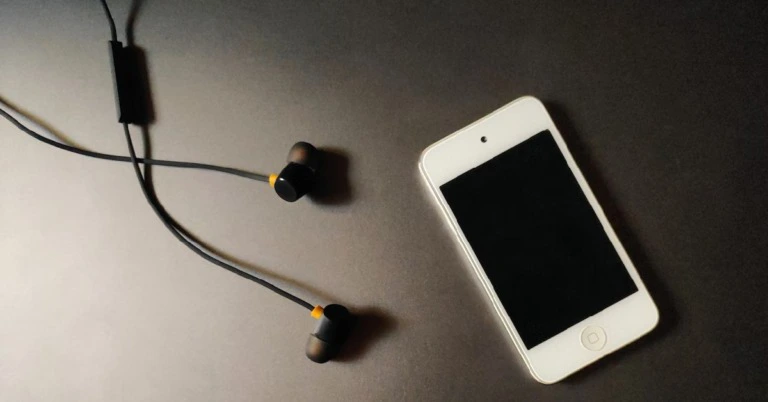
Even though truly wireless headsets are on the rise and are becoming more affordable by the day, they still haven’t proven to be worthy competition to wired earphones in the budget segments. Entry-level TWS have some gaping flaws in their audio output, which generally is not the case with wired earphones. On top of that, wired earphones offer virtually no latency while gaming or playing videos. The budget earphones segment in India is hotly contested with brands like JBL, Sony, and Skullcandy putting out multiple products in the under-1000 price category. In this article, we bring you the best entry-level wired earphones under Rs 1,000 that you can buy right now. Read Also: Garmin Instinct Crossover and Instinct Crossover Solar launched in India

Sony MDR-EX15AP

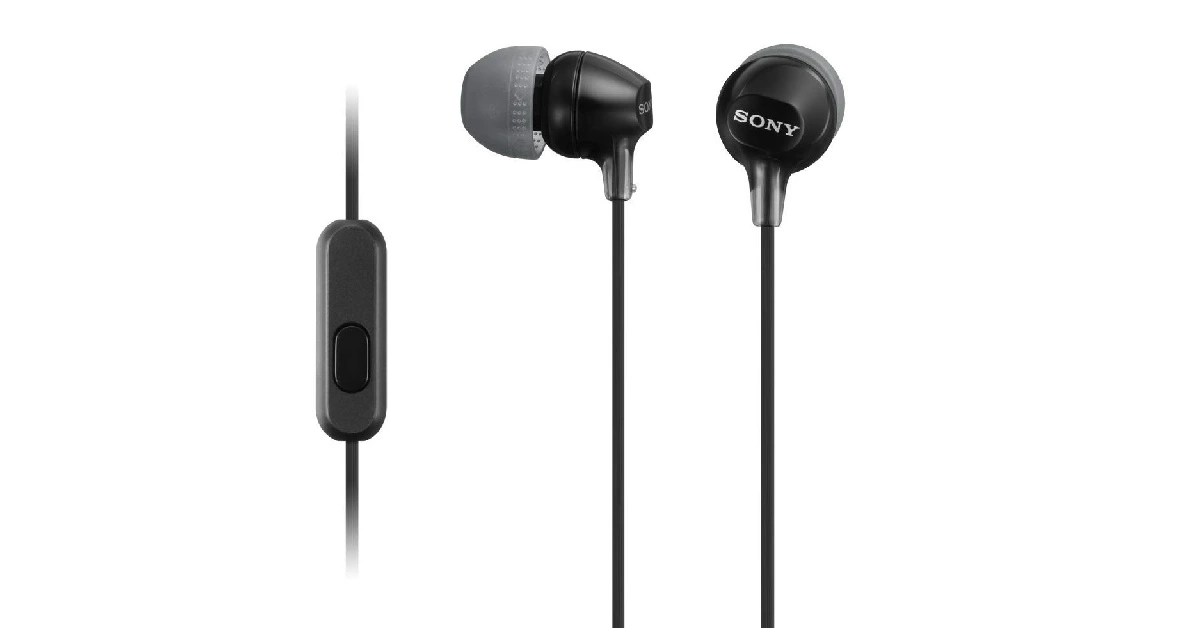
Price: Rs 761 Sony MDR-EX15AP Sony’s entry-level earphones could very well be the best of the lot in functionality as well as audio output. The Sony MDR-EX15AP are equipped with neodymium drivers to deliver the perfect mix of frequencies. The in-ear design provides a snug fit, and there are additional silicone hybrid ear tips within the packaging for all ear sizes. The earphones are also shipped with a cord adjuster that keeps them from tangling in your pocket. But the part where the MDR-EX15AP truly outshine their competition is Smart Key app connectivity. Using this app, you can customise the mic button to either control the track or the volume. There are also four colours on offer, with the violet one priced slightly higher at Rs 880.

JBL C100SI

Price: Rs 599 JBL C100SI JBL C100SI has all the makings of a perfect entry-level wired headset. These earphones produce a well-mixed bass-driven audio output that every JBL loyalist will be familiar with. They are also equipped with a one-button universal remote that can be used to pick up calls, play/pause audio, forward/rewind the song, and trigger the voice assistant. The lightweight in-ear design provides a perfect fit, and the earphones come with three ear tips catering to all sizes. At Rs 599, the JBL C100SI are an absolute bargain.

Skullcandy Jib

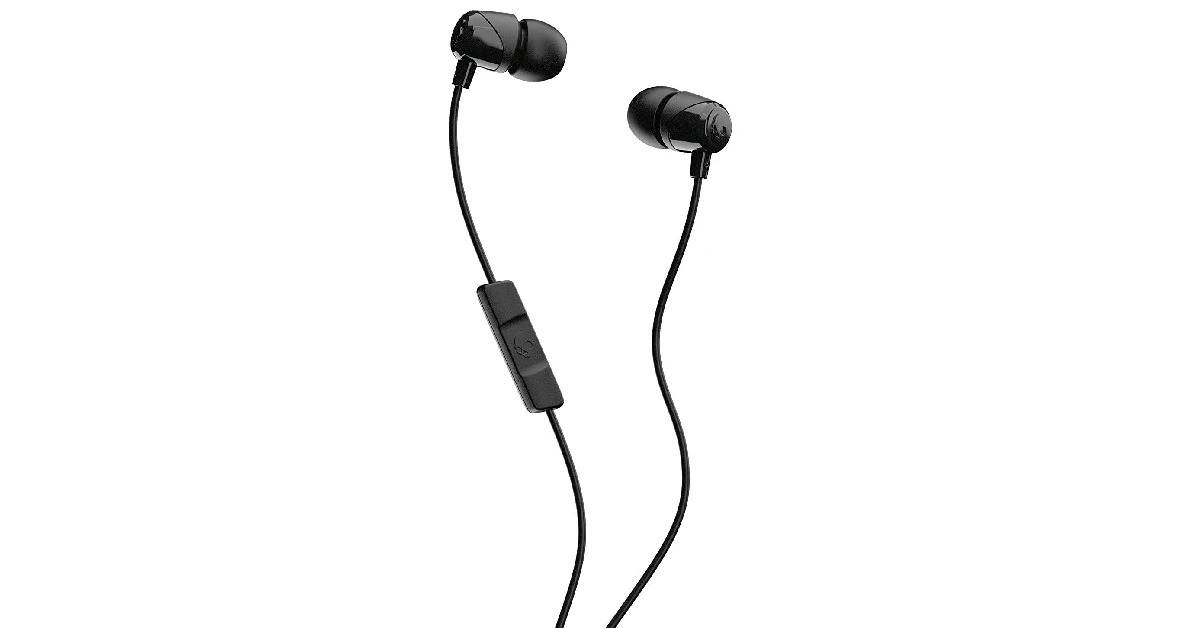
Price: Rs 829 Skullcandy Jib Like JBL, Skullcandy has loyalists that are drawn to the brand’s signature sound. The Skullcandy Jib offer that unique sound profile at an affordable price of just Rs 829. The earphones are also equipped with an in-line microphone along with dedicated volume controls. The 1.2m cable is claimed to be tangle free, so you can keep it in your pockets without having to worry about untangling it. 

MI Dual Driver

Price: Rs 599   Mi Dual-Driver In-Ear Earphones launched at Rs 799 in India. best entry-level wired earphones under Rs 1,000 As the name suggests, these earphones from MI come with two 10mm and 8mm dynamic drivers to deliver a rich, thumping sound. The MI Dual Driver offers a frequency response range of 20-40,000Hz. In terms of design and functionality, the MI Dual Driver pulls ahead of its competition. Firstly, these earphones have a metal build and magnetic earbuds, which is unheard of in this category. The braided cable design is ideal to avoid being tangled. The earphones also offer dedicated keys for volume control and an additional key to pick up calls, skip track, or trigger the voice assistant. Priced at Rs 599, the MI Dual Driver earphones could very well be the most value-for-money purchase out there.

Audio Technica Sonic Sport

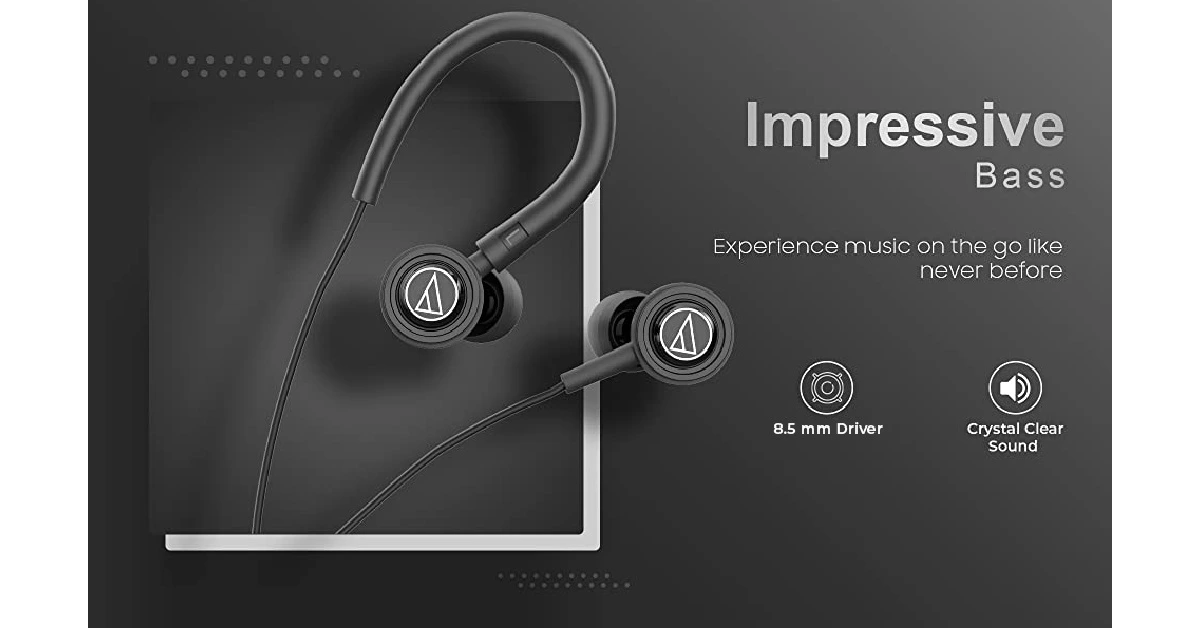
Price: Rs 999 Audio Technica Sonic Sport. best entry-level wired earphones under Rs 1,000 Mostly known for making high-end audio products, Audio Technica also has something to offer in the entry-level wired earphones category. The Audio Technica Sonic Sport are an ideal pair of earphones for those that love to work out. The ear hooks on these earphones comfortably wrap around your ear and provide a strong fit that won’t easily come off while you’re running or working out. The ear hooks can be snapped on and off whenever required. The 8.5mm audio driver delivers a bass-rich audio output that is true to Audio Technica’s reputation. 

boAt Bassheads 152

Price: Rs 449 boAt Bassheads 152. best entry-level wired earphones under Rs 1,000 Closing out this list is the boAt Bassheads 152 which features 10mm audio drivers that deliver a dynamic bass-rich sound. If you’re on a shoestring budget and are looking for a good pair of earphones under Rs 500, the Bassheads 152 should be your first choice. Weighing just 13g, these earphones are also the lightest on this list. Apart from a well-balanced sound, the boAt Bassheads 152 also comes with an in-line mic and a button to pick up calls and control music playback. Read Also: Samsung unveiled the ISOCELL HP2 200-Megapixel Image Sensor for premium smartphones

Conclusion 

These are our picks for the best entry-level wired earphones under Rs 1,000 that you can buy right now. These picks cover a diverse range of sound profiles from bass-driven to thumping audio output. Think there’s a headset we missed out on? Let us know in the comments! For the latest gadget and tech news, and gadget reviews, follow us on Twitter, Facebook and Instagram. For newest tech & gadget videos subscribe to our YouTube Channel. You can also stay up to date using the Gadget Bridge Android App. You can find the latest car and bike news here.
Apple releases new Black Unity collection and content to celebrate Black History Month

0
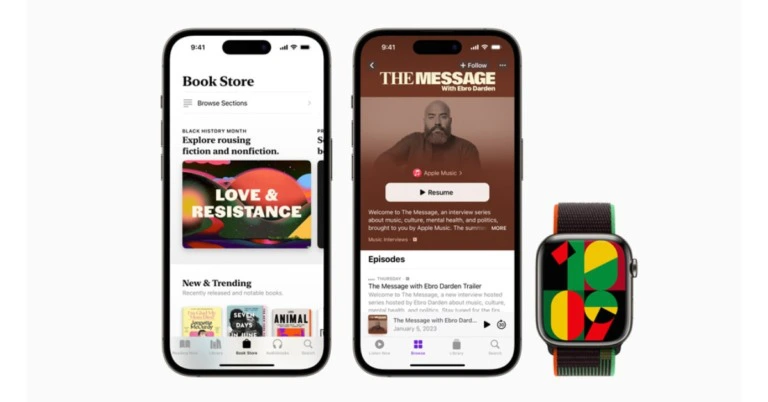
Apple celebrates Black History Month with handpicked launches and special content honouring the Black community and culture. This collection includes a limited-edition Apple Watch Black Unity Sport Loop, as well as a new watch face and iPhone wallpaper that go well with it. Beginning in February, users will be able to explore brand-new activations, such as the Smithsonian’s series of Apple Maps Guides, Dr. Jelani Cobb’s TV and movie collections, and more. Additionally, through its Racial Equity and Justice Initiative (REJI), Apple is extending its support to five groups whose mission is to empower Black and Brown communities by fostering creativity through technology.

Apple Watch and iPhone

The word “Unity” is woven abstractly into the band of the Black Unity Sport Loop of the Apple Watch using red, green, and black yarns that honour the Pan-African flag, while a special layering of yarns gives the letters a feeling of three-dimensionality. The Unity Mosaic watch face also features geometric patterns in green, black, red, and yellow. As the minutes change, each number morphs into a different form. With the new Unity wallpaper for their Lock Screen, iPhone users can also express their support. Apple Watch Black Unity Sport Loop Currently available for pre-order on apple.com and in the Apple Store app, the Black Unity Sport Loop will go on sale for $49 on January 24 in some Apple Store locations (US).

App Store

Apps and games that develop innovative solutions for Black communities in fields like music, finance, and gaming will be highlighted on the App Store. Dot’s Home, a 2022 App Store Award-winning game created to inform users about housing discrepancies suffered by communities of colour, and financial wellness applications like Goalsetter, Altro, and CapWay that are providing the neighbourhood with financial resources are among these apps and games. The App Store will also highlight a number of apps that enable users to listen to, watch, and learn about the significance of this creative movement in both the past and present in order to commemorate the 50th anniversary of hip-hop culture. Also Read: Apple releases a brand-new Mac mini with M2 and M2 Pro

Apple Music

Apple Music will highlight the countless ways that Black musicians and artists have improved music and culture across all genres via improvisation, healing, reinvention, and other means. Users can also listen to fresh episodes of The Message and additional radio shows on Apple Music 1, Country, and HITS. The For Us, By Us playlist will be updated to include expressions of resiliency and resistance.

Apple TV App

The dean of the Columbia University School of Journalism and a staff writer at The New Yorker, Dr. Jelani Cobb, has selected a number of television shows and movies for viewers to view via the Apple TV app. The focus of this year’s collections is on narratives that highlight three distinct pillars: “Freedom in Black,” “Love in Spite Of,” and “The Mosaic.” The theme of the collection is “The Matter of Black Lives.”

Apple Fitness+

Special workouts on Apple Fitness+ will feature tracks honouring Black musicians, and JoAnna Hardy, a Fitness+ trainer, will lead a new meditation specifically for Black History Month. A new edition of Time to Walk, an audio series showcasing some of the most inspirational people in the world, will be made available via Fitness+ on January 30.

Apple News

Apple News will feature engaging articles, interviews, and audio stories about the Black experience in America throughout the month. These stories will include viewpoints and analysis from renowned journalists. Also Read: Apple launched HomePod (2nd generation) in India: Details inside

Apple Podcasts

Beginning on February 1, Apple Podcasts will feature shows from producers Bridget Todd, Bob the Drag Queen, Monét X Change, and Apple Music’s Ebro Darden that represent the omnipresence of Blackness — the ways that Black music, media, spaces, and theory positively influence our understanding of the world and one another. Additionally, a custom selection of podcast recommendations chosen by Black disruptors will be available for listeners to peruse.

Apple Books

Apple Books will highlight its Read More Black Authors collection throughout Black History Month, providing readers and listeners with excellent books and audiobooks in a variety of genres.

Apple Maps

The Smithsonian developed a series of guides for Apple Maps to highlight significant sites in the century-long civil rights movement (1900-1957, 1960-1978, 1980-2020). Users can peruse the Guides to discover more details on the occasions, figures, and locations that have influenced the history of the country. For the latest gadget and tech news, and gadget reviews, follow us on TwitterFacebook and Instagram. For newest tech & gadget videos subscribe to our YouTube Channel. You can also stay up to date using the Gadget Bridge Android App. You can find the latest car and bike news here.