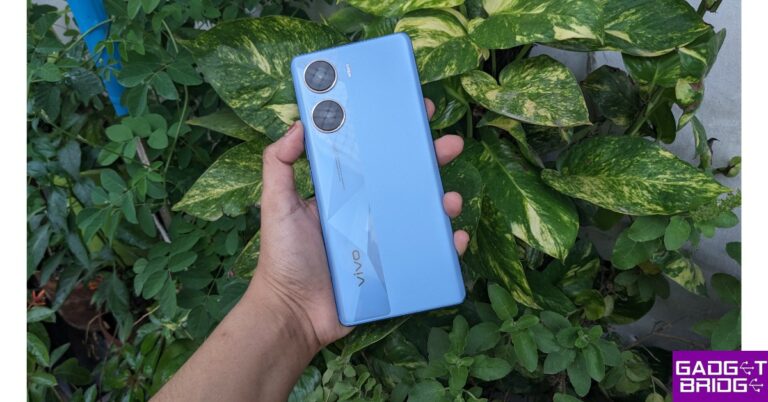
Changing the video speed is one of the most basic video-editing skills that every smartphone user should know. If you want to make your video more presentable, you should know how to set it to the ideal tempo. Your smartphone is easily able to accomplish this task without needing any third-party app. In this article, we bring you the 3 best ways to change the speed of a video on Android and iOS/iPhone.Read Also:Top 3 Ways to Stop Instagram From Posting to Facebook
In This Article
Use the native editor to change the speed of video on Android
Step 1: Select the video you want to edit.Step 2: Tap the pencil icon on the bottom menu.Step 3: Scroll through the editing options and select Speed.Step 4: Use the slider to change the speed of the video.Step 5: Hit the tick icon at the bottom right corner of the screen.Step 6: Hit Save at the bottom right corner of the screen.
Use the native editor to change the speed of video on an iPhone
Step 1:Launch the Photos app and select the video.Step 2: Tap the Edit option at the top right corner of the screen.Step 3: The speed bar is positioned right below the video seeker.Step 4: Bring the bars closer to speed up the video and separate them further to slow it down.Step 5: Hit Done at the bottom right corner of the screen.
Use a third-party app
Step 1:Install the Video Editor & Maker – InShot app from the Google Play Store.Step 2: Tap on Video from the Create new section and load the video from your phone’s gallery.Step 3: Select Speed from the toolbar.Step 4: Select the playback speed. You can speed up the video or convert it entirely into slow motion.Step 5: Tap on Curve to speed up or slow down different parts of the video. Tap the play button to preview.Step 6: Select Save.
This is how you can change the speed of a video on Android and iPhone/iOS. When it comes to basic editing like changing the playback speed, your phone’s native editor is well-equipped to handle the task. For more advanced editing tasks, you will need to install a third-party video editor like InShot, Vita, or iMovie. Here is our list of the top 10 video editing apps for iPhone and iPad. Android users can check out this list to find the top 10 video editors for their platform.For the latest gadget and tech news, and gadget reviews, follow us on Twitter, Facebook and Instagram. For newest tech & gadget videos subscribe to our YouTube Channel. You can also stay up to date using the Gadget Bridge Android App. You can find the latest car and bike news here.
iQoo has officially announced the launch of its new smartphones in India. iQoo Z7 Pro 5G is the latest addition to the company’s Z-Series lineup. The device is powered by an octa-core MediaTek Dimensity 7200 SoC. It comes with a dual camera setup that includes a 64-megapixel sensor. There is a 120Hz AMOLED display and a 4,500mAh battery with 44W wired Flash Charge support.
In This Article
iQoo Z7 Pro 5G price in India, sale details
iQoo Z7 Pro 5G has been launched in India with a starting price of Rs 23,999 for the base 8GB RAM with 128 GB storage option. On the other hand, the cost of the 8GB RAM with 256GB storage option is set at Rs 24,999. However, additional bank offers of up to Rs 2,000 bring the price down to Rs 21,999 and Rs 22,999, respectively.Also Read:Boat Smart Ring with heart and menstrual monitoring launched in IndiaAs per the company, the effective price is for a limited time with launch offers, so users can purchase the device early to avail the best price. The iQOO Z7 Pro will be available for purchase on Amazon.in and iQOO e-store from September 5 at noon. The phone will be offered in two colour options- Blue Lagoon and Graphite Matte.
iQoo Z7 Pro 5G specifications
iQoo Z7 Pro 5G features a 6.78-inch full-HD+ AMOLED display with 2400 x 1080 pixels of resolution. The screen supports a 120Hz refresh rate and has a touch sampling rate of 300Hz. The device has an aspect ratio of 20:9 and comes with a peak brightness level of 1300 nits. The device runs on FuntouchOS 13 with Android 13. Under the hood, there is an octa-core 4nm MediaTek Dimensity 7200 SoC with Mali-G610 MC4 GPU. It comes with 8GB of LPDDR4X RAM and up to 256GB of UFS 2.2 storage.iQoo Z7 Pro 5G sports a dual rear camera setup that includes a 64-megapixel Samsung GW3 primary sensor and a 2-megapixel depth sensor. It also features a ring LED light. It also features a 16-megapixel front-facing sensor for taking selfies and video calling.Also Read:Apple Event: September 12 confirmed for the introduction of the iPhone 15 SeriesiQoo Z7 Pro 5G has an in-display fingerprint sensor, a gyroscope, an e-compass, a proximity sensor, an ambient light sensor, and an accelerometer. In addition to this has connectivity for 5G, 4G VoLTE, Wi-Fi 6, Bluetooth 5.3, GPS, and USB Type-C. It has an IP52 rating for water and dust resistance. The 4,600mAh battery in the iQoo Z7 Pro supports 66W wired fast charging.
For the latest gadget and tech news, and gadget reviews, follow us on Twitter, Facebook and Instagram. For newest tech & gadget videos subscribe to our YouTube Channel. You can also stay up to date using the Gadget Bridge Android App. You can find the latest car and bike news here.
After being banned for nearly ten months, Battleground Mobile India, aka BGMI, is officially available again in India. BGMI fans are looking for ways to improve their game experience and one such method is the usage of redemption codes, which offers a variety of rewards and advantages using BGMI redeem codes players can gain access to new skins, outfits, loot crates, weapons and free UC and diamonds.As mentioned earlier, these codes give users the chance to earn unique rewards and gain extra benefits while playing the game. This includes GUN SKINS (M4, AKM, M416, AWM, M24, UZI, KAR98K), free character voucher, Andy, Carlo, Sara, Victor character for free, free Anna Character on completing the mission and UC or Royal Pass Discount. So here we have gathered a list of the most recent BGMI redeem codes as of 1 September 2023. Also, redeem these codes asap as these are only valid for a limited duration.
In This Article
BGMI Redeem Codes for 1 September2023
updating soon…
How to get free Redeem Codes for BGMI on 1 September2023?
Launch BGMI on your device.
Then select the Redeem Code option from the main menu.
Next, click on the Redeem code tab.
A new window will open, requesting the redemption code.
Now enter your BGMI code.
Confirm and click on the “Redeem” tab.
If your redeem code is valid then you will get a message confirming that your rewards were successfully redeemed.
Garena Free Fire is a battle royale game with regular awards and tournaments to keep players interested. If you play Garena Free Fire, you should be aware of the redeem codes that are released on a daily basis. However, because the battle royale game is banned in India, players from other countries can use the Free Fire Redeem codes daily. If you’re unfamiliar with the Garena Free Fire redeem codes or don’t know how to get them, we’ve put together a step-by-step guide to help you redeem them. Check out Garena Free Fire Redeem Codes for 1 September 2023.The Free Fire redeem codes are a great way to get free stuff. These are 12-digit codes that contain alphabets and numbers, as well as an expiration date and time. Because the Garena FF redeem codes cannot be used more than once, you should hurry to the redemption page to claim your free reward before someone else does. To get a free reward, all you have to do is go to reward.ff.garena.com/en, which is the official redemption page. Also, keep an eye on this space for daily updates on Garena Free Fire redemption codes and rewards.
In This Article
Garena Free Fire Redeem Codes Today 1 September2023
updating soon…
How to Get Free Fire Redeem Codes for Garena on 1 September2023?
For most individuals, a wallet and a smartphone are probably two of their most prized possessions. You don’t often see anyone leaving their home without either of them. However, both wallets and smartphones are subject to wear and tear, more so than any other physical possession out there.
Thankfully, with the right care and consideration, you can enhance the longevity of your cherished belongings. Here are some simple, yet effective tips to care for your smartphone and wallet that you can follow to keep them looking new for a long time.
In This Article
Tips to Care for Your Wallet
Properly maintaining your wallet can not only enhance the way it looks but can also improve its integrity and durability. Here’s what you need to do.
● Keep Away from Sunlight
Irrespective of whether you have a fabric or a leather wallet, always make sure that you keep it away from direct sunlight. The ultraviolet (UV) rays and heat from sunlight will dry the moisture from the material and cause it to fray and crack easily. If you want your wallet to last longer, remember to store it in a cool and dry place.
● Clean Regularly
Over time, wallets tend to accumulate dust, dirt and grime, which can make them appear dull and lifeless. A task as simple as cleaning your wallet regularly with a soft, yet slightly damp cloth can do wonders to its looks. If you have a leather wallet, consider using a leather cleaner solution to get rid of grime. But be careful not to use any chemicals, excessive water or abrasives as they can damage the material permanently.
● Refrain from Overstuffing
One of the major causes of wallet damage is overstuffing. Keeping coins and other metal objects for extended periods can scratch or tear the linings. To prevent this, check your wallet periodically and remove unwanted items, receipts and business cards. Lightening your wallet should ensure its longevity.
● Protect from Moisture
Moisture and water are two things that can irreparably damage your wallet irrespective of whether it is made of leather or fabric. Therefore, you should always make sure to keep your wallet dry and away from moisture. If you find that your wallet has been exposed to either water or moisture, dry it immediately using a cloth or tissue before you start using it again.
Tips to Care for Your Smartphone
Similar to a wallet, your smartphone also deserves to be cared for considering that it is one of the most used physical possessions. However, unlike wallet maintenance, maintaining your smartphone is a different ballgame. Here are some tips that you can follow.
● Use a Screen Protector
Although most smartphones these days are offered with toughened glass displays, they may still be prone to scratches and cracks if you drop them. Here’s where investing in a screen protector can help. Display protectors made from tempered glass, especially the ones that cover the entire screen, can prevent your display from getting damaged due to drops; and they’re very cost-effective and easy to replace.
● Use a Case
Protecting your phone with a case is another good way to care for it. It not only protects your phone from nicks and dents but also prevents the back panel and the camera unit from getting scratched. There are many different types of phone cases ranging from the cost-effective TPU (silicone) case to a hard-shell case.
● Clean Ports and Openings
The various openings and ports of your phone can gather dust, dirt and grime. When left as it is, this can cause irreparable damage. This is precisely why it is crucial to clean them from time to time. If you feel that you’re not well equipped to clean your smartphone properly, don’t hesitate to take it to a professional.
● Avoid Water Exposure
Preventing water exposure is not only an integral part of safeguarding your wallet, but is also an important aspect to ensure the longevity of your smartphone. And just because most phones are being offered with IPX dust and water protection doesn’t mean they’re impervious to water damage. Therefore, it is a good idea to keep your phone away from water and moisture.
Protect Your Wallet and Smartphone With Insurance
Diligent care for your wallet and smartphone can improve their longevity and keep them in good condition for years to come. However, despite your best efforts, you may still end up damaging them or worse, losing them.
Considering that your wallet doesn’t just contain cash but also your documentary evidence, debit cards and credit cards, losing them can prove to be costly. You may end up becoming a victim of unauthorised card use. Here’s where the CPP wallet care plan can help.
Available on Bajaj Finserv, this plan for your wallet is a pocket insurance plan that provides coverage of up to ₹2 Lakhs against card fraud, losses due to phishing and PIN-based frauds for just a nominal fee of just ₹699 per year. In addition to this, you also get emergency travel and hotel assistance worth ₹50,000 for domestic destinations and ₹1 Lakh for international destinations. Other plans like our key insurance cover also offer instant card-blocking services in case you lose your wallet.
Similarly, your smartphone is no less important than your wallet. Replacing a lost phone or even a damaged component like the display can drain your finances quickly. Having a pocket insurance plan during such incidents can be a lifesaver. The Mobile Protect Plan is an insurance plan for your smartphone starting at just ₹1,212 per annum. What’s more, the plan offers 100% comprehensive coverage against accidental and liquid damage to your phone’s display.
For the latest gadget and tech news, and gadget reviews, follow us on Twitter, Facebook and Instagram. For newest tech & gadget videos subscribe to our YouTube Channel. You can also stay up to date using the Gadget Bridge Android App. You can find the latest car and bike news here.
The CZUR Fancy S Pro is a versatile solution, seamlessly integrating the functions of a webcam and a document camera.
When talking about their importance, document cameras serve as modern overhead projectors, displaying documents, 3-D objects, and images in classrooms and meetings, fostering engagement and sustainability.
In contrast, webcams, primarily for online meetings and learning, enable real-time face-to-face interactions, enhancing visual communication and bridging distances at a budget-friendly cost.
Let’s dive into four compelling reasons why the CZUR Fancy S Pro deserves your attention.
In This Article
Versatile Design for Enhanced Functionality
The CZUR Fancy S Pro boasts a versatile design that enhances your work experience in various ways:
Multi-Jointed Arm Design:
This design provides unmatched flexibility, allowing you to position the camera precisely as needed. This is particularly useful for live-streaming tutorials, presentations, online meetings, and even teaching remote classes.
Top View Camera:
This feature provides a top-down perspective, making it ideal for showcasing documents, artwork, and 3D objects with clarity. The device features a 12 MP, 4K camera and a 60 fps frame rate, ensuring crystal-clear presentations.
Adjustable Angles and Levels:
It has adjustable angles and levels. The flexible multi-jointed arm can be bent and swivelled at multiple angles, so you can easily find the perfect viewing angle for your needs.
The arm can also be rotated 180 degrees to scan documents from either side. This makes it a versatile tool for scanning documents, taking photos, and making presentations.
Camera Orientation:
The CZUR Fancy S Pro camera can be oriented horizontally and vertically.
The camera head can be swivelled 180 degrees, so you can easily switch between the two orientations.
Press the camera orientation button on the top of the scanner to change the camera orientation. The button is labelled with a camera icon and a horizontal and vertical line.
Physical Controls:
Also, it features several physical controls on its top: a light control button for adjusting brightness, an exposure button to modify camera exposure, a focus button for camera focus adjustment, and a rotation button to flip the camera by 180 degrees.
High-Definition Camera for Best Results
Under the hood, the CZUR Fancy S Pro doesn’t disappoint; here’s how:
CMOS 12 Megapixel:
A powerful CMOS sensor boasting 12 megapixels captures intricate details and vivid colours with exceptional clarity.
High-Resolution Streaming:
With its best budget webcam, enjoy stunning 4K resolution at 15 frames per second or smooth 1080P streaming at 60 frames per second, ensuring your visuals are crystal clear and engaging.
Level Fill Light:
The built-in 3-level fill light ensures consistent lighting quality, eliminating shadows and enhancing the visibility of your content.
Versatile Tool for Remote Communication
The CZUR Fancy S Pro is a versatile tool that offers various applications for remote communication. Here are some scenarios where it can be particularly useful:
In the Classroom for Visual Presenters:
The CZUR Fancy S Pro series is a great device for visual presenters in the classroom. This device features a 12MP, 4K camera and LED fill lights, capturing high-quality images of documents, artwork, 3D objects, and microscopic specimens.
It’s versatile, adjusting height, angle, and orientation, even rotating 180 degrees for portrait or landscape modes. Doubling as a webcam, it’s compatible with popular software like Zoom and Skype, while its built-in microphone ensures clear audio.
Online Teaching/Meetings/Study:
Crafted for simplicity, the CZUR Fancy S Pro offers easy access for distance learners, educators, and presenters. Its user-friendly interface unlocks its full potential effortlessly, aiming to enrich experiences and productivity across roles while ensuring user-friendly operation.
Recording All Types of Videos:
Whether you’re recording painting videos, cooking tutorials, or makeup tutorials, the CZUR Fancy S Pro can capture every detail with clarity and precision with its high-resolution 4k camera. It has the best webcams for streaming and ensures your visuals are crystal clear and engaging.
Seamless Compatibility and Integration
Navigating today’s changing technological realm takes cutting-edge innovation and seamlessly integrating gadgets, systems, and applications.
We’ll examine how the CZUR Fancy S Pro bridges the gap between hardware and software and lays the road for a healthy digital ecosystem where work and creativity may flow freely.
Compatibility with Various Devices and Operating Systems:
The CZUR Fancy S Pro is compatible with Windows and MacOS. It works smoothly with prevailing software like Zoom, Skype, and Microsoft Teams for remote teaching, remote work, and online study.
Plug and Play, Universal Compatibility:
One of the great features of the CZUR Fancy S Pro is its universal compatibility and ease of use. The device embraces the ‘Plug and Play’ concept, ensuring seamless integration with all your devices.
Integration with Popular Productivity and Presentation Applications:
The CZUR Fancy S Pro works smoothly with popular productivity and presentation apps, such as
Microsoft Office: You can use the CZUR Fancy S Pro to scan documents and images directly into Microsoft Word, Excel, and PDF/Searchable PDF, etc.
Evernote: Document scans can be transferred to Evernote, allowing you to easily record notes and ideas.
Google Drive: You can transfer videos and pictures taken with the CZUR Fancy S Pro to Google Drive. This makes it easy to share your documents with others and lets you access them from anywhere.
PDF element: You can directly edit and convert scans into PDFs with CZUR Fancy S Pro.
Prezi: Create presentations from scanned content.
Conclusion
The CZUR Fancy S Pro excels with its versatile design, high-definition camera, communication flexibility, and compatibility.
Whether you’re an educator, content creator, or professional, this streaming webcam offers features to meet your needs.
Potential improvements could focus on refining low-light performance and expanding integration with emerging platforms. All-in-all, the CZUR Fancy S Pro is a top choice for its innovative features and adaptability in diverse scenarios.
For the latest gadget and tech news, and gadget reviews, follow us on Twitter, Facebook and Instagram. For newest tech & gadget videos subscribe to our YouTube Channel. You can also stay up to date using the Gadget Bridge Android App. You can find the latest car and bike news here.
In order to use Amazon’s products and services, you need to create an Amazon account. Your Amazon Echo, Kindle, and Fire TV need a valid Amazon account to function properly. This account can also be used to sign up for Prime Video. With one account logged into so many devices, it can be hard to keep track of its activity. In this article, we show you how to sign out of Amazon on all devices.Read Also:How To Build a Raspberry Pi Android TV Box?
In This Article
Sign out of Amazon on all devices using your smartphone
Step 1:Launch the Amazon app on your smartphone.Step 2: Switch to the You tab.Step 3: Scroll down to the bottom and tap See All next to Your Account.Step 4: Under Account Settings, tap on Content and Devices.Step 5: Switch to the Devices tab.Step 6: Tap the device you want to log out of.Step 7: Hit Deregister.Step 8:Confirm your selection in the popup box.Go through all the devices individually. You will be signed out of Amazon on all devices.
Sign out of Amazon on all devices using the website
Step 1: Go to the Amazon website and sign in using your Amazon account.Step 2: Click on the All option at the top right corner of the screen.Step 3: Scroll down and select Your Account.Step 4: Under Digital content and devices, select Content and devices.Step 5: Switch to the devices tab.Step 6:Select the device you want to remove.Step 7: Click on Deregister.Step 8:Confirm your selection in the popup box.You will be signed out of your Amazon account on the selected device.
Frequently Asked Questions (FAQs)
How do I sign out of my Amazon account on my Echo device?
Launch the Amazon app, go to You>Your Account>Content and devices>Devices, select the Echo device and tap on Deregister.
How do I sign out of my Amazon account on my Echo device using a PC?
Go to the Amazon website and select All>Your Account>Digital content and devices>Content and devices>Devices. Select the Echo device and click on Deregister.
How do I protect my Amazon account from unauthorised access?
Step 1:Launch the Instagram app on your phone and tap the profile icon at the bottom right corner of the screen.Step 2: Tap the hamburger menu icon at the top right corner of the screen and select Settings and privacy.Step 3: Tap on Accounts Center.Step 4: Tap on Accounts.Step 5: Select the Remove option for your Facebook profile.Your Instagram account will be unlinked from your Facebook account.
Disable the option to automatically share Instagram posts on Facebook
Step 1:Launch the Instagram app on your phone and tap the profile icon at the bottom right corner of the screen.Step 2: Tap the hamburger menu icon at the top right corner of the screen and select Settings and privacy.Step 3: Tap on Accounts Center.Step 4: Select Connected Experiences.Step 5: Tap on Sharing across profiles.Step 6: Under the Share From section, select your Instagram profile.Step 7: Turn off the toggle switches for Your Instagram Story and Your Instagram Posts.
Stop an individual Instagram post from being shared on Facebook
When you’re about to make a post on Instagram, it asks you whether you want to share it on other social media platforms as well. Simply turn off the toggle switch for Facebook. Go to Advanced Settings and turn off the toggle switch for Share Your Posts to Facebook for good measure. You can also choose to restrict the post from being shared on other social media platforms from this window itself. Once that is taken care of, hit Share to post the media on Instagram.
Frequently Asked Questions (FAQs)
How do I unlink my Instagram account from Facebook?
Go to Profile Menu>Settings and Privacy>Accounts Center>Accounts and select the Remove option for your Facebook profile.
How do I stop my Instagram from posting to Facebook?
Go to Menu>Settings and Privacy>Accounts Center>Connected Experiences>Sharing Across Profiles>Instagram and turn off the toggle switch for Your Instagram Story and Your Instagram Posts.
How do I restrict an individual Instagram post from being shared on Facebook?
Oppo has unveiled its new flip phone, the Oppo Find N3 Flip, following Samsung’s wrapping up the launch of its most recent foldable smartphone series. AMOLED displays of 6.80 inches and 3.26 inches, respectively, are included on the newly released clamshell phone. A MediaTek Dimensity 9200 SoC with eight cores powers the gadget. Additionally, the smartphone has a triple rear camera configuration.
In This Article
Oppo Find N3 Flip specifications
Oppo Find N3 Flip is a clamshell-style foldable phone. The primary display is an AMOLED 6.80-inch screen with a 120Hz refresh rate. An additional 3.26-inch cover display, like its predecessor, is vertically positioned. An octa-core MediaTek Dimensity 9200 SoC is housed inside the device along with up to 512GB of internal storage and 12GB of RAM.The Find N3 Flip’s external cover houses a circular camera set-up that houses a triple rear camera arrangement. The camera system consists of a 32-megapixel telephoto sensor, an 8-megapixel ultra-wide-angle sensor, and a 50-megapixel Sony IMX890 main lens with OIS capability. The phone includes a 32-megapixel front camera for taking selfies and making video calls.Also Read:Boat Smart Ring with heart and menstrual monitoring launched in IndiaFor biometric security, the Find N3 Flip has a side-mounted fingerprint scanner. A gyroscope and an ambient light sensor are also present. The Oppo Find N3 Flip has 5G, Wi-Fi, Bluetooth, and NFC connectivity options.
Oppo Find N3 Flip price and sale details
The Oppo Find N3 Flip has been introduced in China. It comes in two different configurations of 12GB RAM with 256GB storage priced at CNY 6,799 which translates to Rs 77,000. On the other hand, the price of the 12GB RAM with 512GB storage option is set at Rs 86,100. The device will be available in three colour options of Mirror Night, Mist Rose, and Moonlight Muse.In terms of availability, the phone is up for pre-orders with sales starting from September 8 in China. According to the Chinese company, the device will also arrive in the international market as well.
For the latest gadget and tech news, and gadget reviews, follow us on Twitter, Facebook and Instagram. For newest tech & gadget videos subscribe to our YouTube Channel. You can also stay up to date using the Gadget Bridge Android App. You can find the latest car and bike news here.
YouTube is fairly new to the bite-sized content game, but it has made a tremendous impact in the little time that it’s been here. Dubbed ‘Shorts’, YouTube’s short video medium allows users to reach a wide audience across the world. In this article, we show you how to upload YouTube Shorts from a phone and PC. Read Also:Top 10 Card Games to Play on PC
In This Article
Create and upload YouTube Shorts from your phone
Step 1:Launch the YouTube app on your smartphone.Step 2: Tap the Plus icon on the bottom menu.Step 3: Select Create a Short.Step 4: Allow access to your Camera and Microphone.Step 5: Hit the red button to start recording.Step 6: Hit the red button again to stop recording.Step 7: Apply your preferred effects from the toolbar on the right side of the screen.Step 8: Hit the tick icon at the bottom right corner of the screen.Step 9: Add a sound, text, voiceover, or filter.Step 10: Hit the Next button at the top right corner of the screen.Step 11: Add a caption and set the location and visibility preferences.Step 12: Tap Upload Short.
Upload YouTube Shorts from your phone’s gallery
Already got a video saved on your device’s gallery? Here’s how you can upload it as a Short.Step 1:Launch the YouTube app on your smartphone.Step 2: Tap the Plus icon on the bottom menu.Step 3: Select Create a Short.Step 4:Allow access to your Camera and Microphone.Step 5: Tap the Gallery icon and select a video.Step 6:Trim the video to its ideal length.Step 7: Hit the Next button at the top right corner of the screen.Step 8:Add a caption and set the location and visibility preferences.Step 9: Tap Upload Short.
Upload YouTube Shorts from a PC
All videos under 60 seconds and a vertical aspect ratio are uploaded as Shorts on YouTube.Step 1: Launch the web browser and go to YouTube’s homepage.Step 2: Click the Create icon at the top right corner of the screen.Step 3: Select Upload Video.Step 4: In the upload window, click on Select Files.Step 5: Select the video from your PC’s storage.Step 6: Add the description and hit Next.Step 7: Add the necessary tags to the video, then hit Next.Step 8: Make sure your video does not violate any copyright.Step 9: Select your visibility preference and hit Publish.
Frequently Asked Questions (FAQs)
How do I upload YouTube Shorts from my phone’s gallery?
Hit the plus icon on the YouTube homepage and go to Create Shorts. Tap the gallery icon and select the video you want to upload from your phone’s gallery. Make your preferred edits, then hit Next followed by Upload Short.
How do I upload YouTube Shorts from my PC?
Select the Create icon from the YouTube home page. This will take you to the Creator Studio. Select a video from your PC’s storage and follow the onscreen instructions. The video should be less than 60 seconds long and must have vertical orientation.
The release of a new Smart Ring in India has been announced by Boat. The Noise Luna Ring, which debuted in the nation last month, will be in direct competition with the Boat Smart Ring. Numerous health-related features are included with the new wearable device. The device can track SpO2, heart rate, and menstrual cycle. It is 5 ATM water resistant and boasts a superior ceramic and metal construction. Additionally, it is stated that the Smart ring has a battery life of up to 7 days.
Boat Smart Ring has a high-quality ceramic and aluminium construction. It is approved for 5 ATM water resistance. Additionally, during music playback, gestures can be utilised to pause, resume, and switch tracks. You can utilise these motions to snap images on a linked smartphone as well, which enables you to capture group photos while holding the phone at a distance for better image quality.Blood oxygen saturation levels (SpO2), body temperature, heart rate, sleep patterns, and blood pressure are all monitored by the Boat Smart Ring. A Menstrual tracker that allows you to monitor your period is also included. The gadget has a smart activity-tracking feature that allows you to keep track of your steps, calories burned, and multiple sports modes. These activities can be monitored using the specific Boat Ring app, which is available for download from the App Store and Google Play Store.In an emergency, SOS calls can also be made via the Boat Smart Ring. The battery life of the device, according to Boat, is seven days, and the ring may be recharged using the provided charger.
For the latest gadget and tech news, and gadget reviews, follow us on Twitter, Facebook and Instagram. For newest tech & gadget videos subscribe to our YouTube Channel. You can also stay up to date using the Gadget Bridge Android App. You can find the latest car and bike news here.
Raspberry Pi is an ultra-portable single-board computer that can be used to carry out basic computing tasks. Previously, we’ve talked about how you can use an Android device to write Raspberry Pi SD cards. Now, let’s shift our focus to more interesting tasks you can carry out on your portable computer. In this article, we show you how to build a Raspberry Pi Android TV Box.Read Also:Samsung Galaxy Z Flip 5 Review: Flip it good!
In This Article
Requirements
Raspberry Pi 4 with 4GB or 8GB of RAM
A monitor or TV
An HDMI cable
A 16GB microSD card
Keyboard and mouse
Power adapter
Build a Raspberry Pi Android TV Box
Step 1:Download Android TV OS for Raspberry using this link.Step 2: Sideload the GApps package for Android TV since its build does not come with Google’s suite of apps.Step 3:Flash the Android TV OS on the microSD card using the Balena Etcher tool.Step 4:Insert the microSD card into the Raspberry Pi. Connect a mouse and keyboard as well. A wireless connection is preferred, but a USB connection is fine too. Connect the TV/Monitor using an HDMI cable as well.Step 5: Once Lineage OS boots up, you will be able to see the Android TV home page.Step 6: Use these basic controls to navigate the interface:
F1 – Home
F2 – Back
F3 – Apps
F4 – Menu
F5 – Power
F11 – Volume Down
F12 – Volume Up
Step 7: Use a USB storage device to move the GApps package to your Raspberry Pi Android TV.Step 8: Use the File Manager app on Android TV to install the APKs.Step 9: Enter Developer Mode by going to Settings>Device Preferences>About and clicking the Build Number 7 times.Step 10: Go to Developer Options and turn on the toggle switch for Advanced Reboot.Step 11: Now, go back to the Device Preferences page and select Reboot.Step 12: Hit Recovery.Step 13: Click on Swipe to Allow Modifications.Step 14: Select Install.Step 15: Select the GApps package and click on Swipe to confirm Flash.Step 16: Go to the main menu and select Swipe to factory reset.Step 17: Select Reboot System.Once you’ve carried out these steps, your Raspberry Pi will boot with Android TV. Sign in using your Google Account to begin using the Android TV services.
Frequently Asked Questions (FAQs)
Can my Raspberry Pi load Android TV?
Yes, it is possible to load your Raspberry device with Android TV. You will need to download an Android TV build and flash it on a memory card using the Balena Etcher tool. This SD card can then be used to boot Android TV on the device.
Does the Android TV build for Raspberry Pi come with Google’s suite of apps?
No, the Android TV build for Raspberry Pi does not come with Google’s suite of apps. You will need to sideload them using a third-party source.
Is there a legitimate way to run Android TV on Raspberry Pi?
Using an Android TV build for Raspberry Pi is not strictly legal. You are at risk of losing your Google account if you are found violating the ToS.Read Also:How to use Chrome Extensions on iOS?
Conclusion
This is how you can build a Raspberry Pi Android TV Box. While this is a fun little activity, a Raspberry Pi-based Android TV is very limited when it comes to functionalities. Major streaming apps like Netflix lack Widevine support, which means that HD video playback is not up to the mark. With hardware acceleration lacking as well, the viewing experience suffers a lot.For the latest gadget and tech news, and gadget reviews, follow us on Twitter, Facebook and Instagram. For newest tech & gadget videos subscribe to our YouTube Channel. You can also stay up to date using the Gadget Bridge Android App. You can find the latest car and bike news here.
Apple has made its annual event’s date official. September 12 is the date of the tech giant’s Apple event. The launch of the iPhone 15 series, the future Apple Watch Series 9 wearable line, and iPads are all anticipated by the company. The upcoming operating systems for compatible iPhone and Apple Watch devices, iOS 17 and watchOS 10, may also be unveiled at the event. The products that will be presented during the Apple Event have not yet been made public by the firm.
In This Article
Apple Event details
Apple Event was previously branded “Far Out,” but this time it will be called “Wonderlust.” The event is scheduled for September 12 and will be broadcast live online. The event will be held at Apple Park and will begin at 10 PM PT and 10.30 PM IST. Apple.com and the Apple TV app will both live broadcast the unveiling.
iPhone 15 series specifications
At the fall launch event, the firm is anticipated to unveil a number of devices, including the iPhone 15 series, Apple Watch Series 9, and Apple Watch Ultra 2. In addition to this, we will get confirmed release dates for iOS 17 and watchOS 10.The iPhone 15 series, which includes the iPhone 15, iPhone 15 Plus, iPhone 15 Pro, and iPhone 15 Pro Max, will be part of the much-awaited iPhone series. The features, appearance, and colour possibilities for these versions have all been the subject of several rumours. One of the greatest updates to the next iPhones this year will be the changeover from Apple’s proprietary Lightning port to a USB Type-C port.The iPhone 15 is said to keep the same 6.1-inch display as it was before. The dynamic island notch will probably be used in the base model. The actual mute switch will also be replaced by a new “Action Button” that may be modified.Additionally, Apple will follow the pattern and use the same chipset that powered the iPhone 14 Pro models in the iPhone 15 model. The company’s newest Bionic A17 processor will power the iPhone 15 Pro and iPhone 15 Pro Max versions.Also Read: iPhone 15 Series may feature colour-matched braided USB-C cablesRumour has it that this time around, the iPhone 15 models will sport 48-megapixel rear cameras. The Pro Max edition, on the other hand, is anticipated to have a bigger, more visible camera module that has periscope lenses that allow optical zoom of up to 5–6x, as well as other supporting sensors.Comparing this year’s iPhone 15 series to last year’s model, the battery capacity will be improved dramatically, rising to 350-600mAh. This is the precise capacity:iPhone 15: 3877mAh (iPhone 14: 3279mAh) iPhone 15 Plus: 4912mAh (iPhone 14 Plus: 4325mAh)iPhone 15 Pro: 3650mAh (iPhone 14 Pro: 3200mAh) iPhone 15 Pro Max: 4852mAh (iPhone 14 Pro Max: 4323mAh)
iPhone 15 series price
Pricing-wise, the iPhone 15 Pro might be $100 (about Rs 8,223) more expensive than the current model. Additionally, it is predicted that the cost of the iPhone 15 Pro Max will rise by $200 (about Rs 16,450). There will likely be a price hike for these iPhone 15 models in India as well.The price of the iPhone 15 is projected to be $799 (approximately Rs 65,700), the price of the iPhone 15 Plus to be $899 (about Rs 73,900), the price of the iPhone 15 Pro to be $1,099 (roughly Rs 90,100), and the price of the iPhone 15 Pro Max to be $1,299 (nearly Rs 1,06,500).
For the latest gadget and tech news, and gadget reviews, follow us on Twitter, Facebook and Instagram. For newest tech & gadget videos subscribe to our YouTube Channel. You can also stay up to date using the Gadget Bridge Android App. You can find the latest car and bike news here.
After being banned for nearly ten months, Battleground Mobile India, aka BGMI, is officially available again in India. BGMI fans are looking for ways to improve their game experience and one such method is the usage of redemption codes, which offers a variety of rewards and advantages using BGMI redeem codes players can gain access to new skins, outfits, loot crates, weapons and free UC and diamonds.As mentioned earlier, these codes give users the chance to earn unique rewards and gain extra benefits while playing the game. This includes GUN SKINS (M4, AKM, M416, AWM, M24, UZI, KAR98K), free character voucher, Andy, Carlo, Sara, Victor character for free, free Anna Character on completing the mission and UC or Royal Pass Discount. So here we have gathered a list of the most recent BGMI redeem codes as of 30 August 2023. Also, redeem these codes ASAP as these are only valid for a limited duration.
In This Article
BGMI Redeem Codes for 30 August2023
Updating Soon…
How to get free Redeem Codes for BGMI on 30 August2023?
Launch BGMI on your device.
Then select the Redeem Code option from the main menu.
Next, click on the Redeem code tab.
A new window will open, requesting the redemption code.
Now enter your BGMI code.
Confirm and click on the “Redeem” tab.
If your redeem code is valid then you will get a message confirming that your rewards were successfully redeemed.
Garena Free Fire is a battle royale game with regular awards and tournaments to keep players interested. If you play Garena Free Fire, you should be aware of the redeem codes that are released on a daily basis. However, because the battle royale game is banned in India, players from other countries can use the Free Fire Redeem codes daily. If you’re unfamiliar with the Garena Free Fire redeem codes or don’t know how to get them, we’ve put together a step-by-step guide to help you redeem them. Check out Garena Free Fire Redeem Codes for 30 August 2023.The Free Fire redeem codes are a great way to get free stuff. These are 12-digit codes that contain alphabets and numbers, as well as an expiration date and time. Because the Garena FF redeem codes cannot be used more than once, you should hurry to the redemption page to claim your free reward before someone else does. To get a free reward, all you have to do is go to reward.ff.garena.com/en, which is the official redemption page. Also, keep an eye on this space for daily updates on Garena Free Fire redemption codes and rewards.
In This Article
Garena Free Fire Redeem Codes Today 30 August2023
updating…
How to Get Free Fire Redeem Codes for Garena on 30 August2023?
If you find yourself spending considerable time on your PC and happen to be a passionate card game lover, then this article is tailor-made for you! Get ready to delve into the captivating realm of virtual card games that promise endless hours of entertainment and excitement. Whether you’re already familiar with some of these card games or new to the genre, they all offer an opportunity to enhance your gaming skills and problem-solving abilities. From classic gems that have stood the test of time to innovative creations that push the boundaries of what card games can be, we’ve compiled the top 10 card games to play on PC.
In This Article
Hearts
Hearts is a classic trick-taking card game played with a standard 52-card deck. It is a popular game often played for fun and social gatherings. The game is also known by other names, such as “The Black Lady” or “Black Maria” in the UK. The main objective in Hearts card game is to avoid acquiring certain cards that carry penalty points. In the standard variation, the cards with penalty points are the hearts suit (worth one point each) and the Queen of Spades (worth 13 points). The player with the fewest penalty points at the end of the game is the winner. Hearts is typically played by four players, though it can also be adapted for three or five players by removing or adding specific cards. The game is played clockwise.
Euchre
Euchre is known for its unique and distinguishing feature called “trump.” Before each hand, players bid on which suit will be trump for that round, or they can pass if they don’t want to make a bid. The player who wins the bid becomes the “maker” and must try to win at least the number of tricks they bid, while the opposing team aims to prevent them from doing so. Euchre’s strategic element lies in balancing risk and reward during bidding, as well as cleverly playing cards during tricks to outmanoeuvre opponents and achieve the desired number of tricks. With a perfect blend of skill, teamwork, and luck, Euchre continues to be a beloved social card game, especially in gatherings and social events.
Solitaire
Solitaire is a classic card game that has been enjoyed by millions of people worldwide. The game’s objective is to arrange a standard deck of 52 playing cards into specific sequences and piles. The most common version of solitaire is Klondike, where the player must build four foundation piles, each starting with an Ace and ending with a King, sorted by suit. The rest of the cards are dealt into seven tableau piles, with the top card face-up, and the player can move cards between the piles according to certain rules, like building down in alternating colours. The challenge lies in strategically moving the cards to create empty spaces and unveil hidden cards to build the foundation piles and ultimately win the game.
Spider Solitaire
This PC game needs no introduction; Spider Solitaire has been a staple on computers worldwide for decades. A classic variant of traditional solitaire, this game offers a delightful challenge that has kept players captivated since its digital debut. Known for its intricate webs of cards and strategic gameplay, Spider Solitaire provides hours of entertainment and a sense of accomplishment with each successfully woven sequence. The game’s objective is to arrange a tableau of cards in descending order from King to Ace within each suit, leading to a full set of sorted cards that can be removed from the board. What sets Spider Solitaire apart from its simpler cousin is the option to play with one, two, or even four suits, making it an ideal choice for players seeking a varying level of difficulty.
Bridge
Bridge is a strategic and sophisticated card game that has been enjoyed by millions of players worldwide for over a century. It is played by four players, divided into two partnerships, sitting opposite each other. The game uses a standard deck of 52 cards, and each player is dealt 13 cards. The bridge is renowned for its deep level of complexity and requires players to communicate effectively with their partners, making it a social and intellectually stimulating activity. Once the bidding phase is complete, the declarer’s partner becomes the dummy, laying their cards face-up on the table. The declarer then plays both their hand and the dummy’s hand to fulfil the contract they bid.
Hearthstone
Hearthstone, developed and published by Blizzard Entertainment, is undoubtedly one of the most popular digital collectable card games (CCG) in the gaming world. The game is set in the Warcraft universe, utilizing characters, spells, and elements from the well-established franchise. Hearthstone’s accessibility and user-friendly interface have contributed significantly to its widespread appeal, attracting both seasoned card game enthusiasts and newcomers alike. One of the game’s key strengths is Blizzard’s commitment to providing regular updates, expansions, and new content. This ensures that the meta-game stays fresh and dynamic, encouraging players to experiment with new strategies and deck builds regularly.
War
War is a simple and straightforward card game that has been played by people of all ages for generations. It is often one of the first card games children learn, as its rules are easy to grasp, making it an ideal introduction to the world of card gaming. Despite its simplicity, War can still be an enjoyable and mildly competitive experience for players of all skill levels. The objective of War is to collect all the cards from the opponent, and the game continues until one player has amassed all the cards. The outcome of the game is based solely on the luck of the draw, making it a game of chance rather than skill. This randomness is part of its charm, as it levels the playing field and keeps the game light-hearted and enjoyable for players of all ages.
BlackJack
Blackjack, also known as 21, is one of the most popular and widely recognized casino card games in the world. It is a game that combines elements of chance and strategy, making it an appealing choice for seasoned gamblers and casual players. The objective of Blackjack is simple: to have a hand value as close to 21 as possible without exceeding it, while also having a higher total than the dealer. The tension in Blackjack arises from the risk-reward dynamics of trying to get as close to 21 as possible without busting (going over 21). Players must make decisions based on their hand, the dealer’s up-card, and their knowledge of basic Blackjack strategy. The goal is to outmaneuver the dealer and achieve a higher hand value without taking excessive risks.
Gin Rummy
Gin Rummy is a classic two-player card game that belongs to the Rummy family of games. It has been a favourite among card players for many years, appreciated for its blend of strategy, skill, and a bit of luck. The game’s objective is to form sets (three or four cards of the same rank) and runs (three or more consecutive cards of the same suit) to create melds and ultimately reduce the hand’s point value. The game’s name “Gin Rummy” originates from the alcoholic drink “gin” and a slang term for “rum” (meaning strange or odd). The drink was often associated with players who would win or lose by large margins, leading to the use of “gin” in the name. Gin Rummy remains a popular game in both casual and competitive settings. It is often played in social gatherings and family reunions, as well as in dedicated Gin Rummy clubs and online platforms.
Yu-Gi-Oh
Yu-Gi-Oh! Master Duel is an exciting and immersive free-to-play digital collectible card game (CCG) that transports players into the captivating world of the Yu-Gi-Oh! franchise. Developed as a celebration of the iconic trading card game, Master Duel offers an expansive library of over 10,000 cards, allowing players to craft their decks and engage in strategic battles against opponents from all around the world. Drawing inspiration from the beloved Yu-Gi-Oh! anime and manga series, the game features a plethora of legendary monsters, spell cards, and trap cards that fans have come to cherish. Players can relive iconic duels and create new unforgettable moments in the ever-evolving virtual duel arena.
For the latest gadget and tech news, and gadget reviews, follow us on Twitter, Facebook and Instagram. For newest tech & gadget videos subscribe to our YouTube Channel. You can also stay up to date using the Gadget Bridge Android App. You can find the latest car and bike news here.
As we barrel into the dazzling future of technology, Ethereum Code isn’t just knocking on our doors – it has already made its grand entry and is revolutionizing corners of finance that were previously untouched. One such area experiencing this extraordinary evolution is ETF trading. Ethereum Code’s power to process complex computations at breathtaking speeds is rewriting the game rules, setting unimaginable benchmarks for accuracy, strategy optimization, and dynamic response in ETF trading. This post will peel back the glossy exterior to explore the monumental shift in the trading world, unravelling how this quantum leap could catapult your ETF experience miles ahead. Are you ready to astound yourself?
Ethereum Code utilizes artificial intelligence and quantum computing to analyze data from multiple sources simultaneously, providing traders with a more thorough and accurate understanding of market trends and opportunities. By leveraging these advanced technologies, Ethereum Code helps traders make informed decisions about their investments, potentially increasing their profits and minimizing risks. This makes trading ETFs a more efficient and effective process for investors.
In This Article
Ethereum Code: Revolutionizing ETF Trading
In the fast-paced world of exchange-traded funds (ETFs), where every millisecond can make a difference, the introduction of ethereumcodetrading.com has set off a wave of excitement and anticipation. This cutting-edge technology is poised to revolutionize the ETF trading experience in ways we could only dream of a few years ago. By harnessing the power of quantum computing and artificial intelligence, Ethereum Code brings forth a new era of speed, accuracy, and optimization in the world of ETF trading.
Imagine being able to process massive amounts of data in real-time, analyze market trends with unparalleled precision, and execute trades at lightning-fast speeds. With Ethereum Code, these possibilities become a reality. By leveraging the advanced computational capabilities of quantum computers and the sophisticated algorithms of AI, this innovative technology paves the way for more informed decision-making, enhanced trading strategies, and improved outcomes in ETF trading.
However, it’s important to note that Ethereum Code is not just about speed and efficiency. It also introduces novel approaches to portfolio management and risk assessment. By utilizing advanced machine learning techniques, Ethereum Code can identify lucrative opportunities that may otherwise go unnoticed and optimize portfolio allocations based on personalized investment goals and risk tolerance levels. This level of customization and adaptability empowers investors to navigate the complex landscape of ETFs with greater confidence and precision.
Now that we have explored how Ethereum Code is revolutionizing the world of ETF trading, let’s delve into the innovation behind this groundbreaking technology.
The Innovation behind Ethereum Code
At the heart of Ethereum Code lies the fusion of quantum computing and artificial intelligence. Quantum computers leverage principles from quantum mechanics to harness the power of qubits—analogous to classical bits but capable of existing in multiple states simultaneously through superposition. This unique property enables quantum computers to perform calculations at an unprecedented scale and speed, making them ideal for solving complex problems that elude classical computers.
By harnessing the computational power and speed of quantum computers, Ethereum Code can process vast amounts of financial data, analyze market trends, and simulate various trading scenarios with remarkable efficiency. This capability not only enables faster decision-making but also provides insights into market movements that would be impossible to achieve with traditional computing methods.
In addition to quantum computing, artificial intelligence plays a vital role in Ethereum Code. Through advanced machine learning algorithms, AI models can learn from past trading patterns, identify trends, and make informed predictions about future market movements. This synergy between quantum computing and AI allows for more accurate forecasting, improved trading strategies, and ultimately, better investment outcomes.
Having covered the innovation behind Ethereum Code, let’s now explore how it interfaces with the world of ETFs to unlock its transformative potential.
A 2022 study from the Journal of Financial Markets reported that algorithmic trading systems, like Ethereum Code, contribute to improved market quality, reducing spreads by about 50% in the ETF space.
According to a 2023 report from Deloitte, AI-powered trading platforms are expected to handle approximately 75% of global exchange-traded fund trades by 2025.
A survey conducted by Bloomberg in late 2023 found that approximately 68% of institutional investors using automated trading systems reported enhanced accuracy and risk management strategies with their ETF trades.
ETF and Ethereum Code Interface
The intersection of exchange-traded funds (ETFs) and Ethereum Code technology marks an exciting development in the world of trading. ETFs, as popular investment vehicles, provide investors with diversified exposure to various asset classes, such as stocks, bonds, or commodities. On the other hand, Ethereum Code brings the power of artificial intelligence and machine learning to enhance trading strategies and decision-making processes. The interface between ETFs and Ethereum Code opens up new possibilities for investors seeking optimized portfolio management and improved performance.
Advantages Offered by Ethereum Code for ETF Investors
Ethereum Code offers several advantages that can greatly benefit ETF investors. Let’s explore some of these key advantages:
Enhanced Data Analysis: Ethereum Code has the ability to analyze vast amounts of data in a fraction of the time it would take a human trader. This allows for more comprehensive market analysis, identification of patterns, and detection of market anomalies that might not be readily apparent to human traders.
Real-Time Decision-Making: With its lightning-fast processing capabilities, Ethereum Code enables real-time decision-making based on current market conditions. This real-time analysis helps investors capitalize on opportunities as they arise and make prompt adjustments to their portfolios.
Improved Risk Management: By leveraging advanced algorithms and predictive models, Ethereum Code can assess and manage risks more effectively. It can factor in various risk parameters, historical data, and market trends to optimize portfolio allocation and minimize downside risks.
Optimized Trading Strategies: Ethereum Code can create sophisticated trading strategies by considering multiple variables simultaneously. These strategies are designed to maximize returns while minimizing costs related to brokerage fees, taxes, and slippage.
Emotion-Free Trading: Emotions can often cloud judgment and lead to irrational decision-making in traditional investing. Ethereum Code eliminates this human bias by executing trades based on objective data analysis rather than emotional responses to market fluctuations.
Potential for Higher Returns: The combination of advanced data analysis, real-time decision-making, risk management, and optimized trading strategies provided by Ethereum Code has the potential to generate higher returns for ETF investors. It can identify profitable opportunities that might go unnoticed by human traders, leading to improved performance.
Overall, integrating Ethereum Code into the ETF trading experience offers investors a more dynamic and efficient approach to portfolio management. It empowers them with advanced tools and capabilities to stay ahead in an ever-changing market landscape.
Automated Execution and Strategy Deployment
One of the key advantages that Ethereum Code brings to ETF trading is its ability to automate execution and deploy strategies seamlessly. With its advanced machine learning algorithms and real-time data analysis, Ethereum Code can execute trades swiftly and efficiently, eliminating the need for manual intervention. This automation not only saves time but also reduces the possibility of human error, ensuring precision in trade execution.
Imagine you want to invest in an ETF that tracks a specific market index. Instead of manually placing buy or sell orders throughout the day, Ethereum Code can handle this task for you. It can monitor market conditions, analyze trends, and execute trades at the most opportune moments based on your predetermined strategy. This level of automation allows you to stay focused on other aspects of your investment strategy while still taking advantage of lucrative opportunities in the market.
Through automated execution and strategy deployment, Ethereum Code optimizes your ETF trading experience by ensuring efficient trade execution without requiring constant monitoring. This aspect alone helps alleviate the stress and time commitment typically associated with active trading.
Ethereum Code’s Data Analysis and Market Predictions
Ethereum Code’s data analysis capabilities are truly transformative when it comes to ETF trading. Its sophisticated algorithms enable rapid analysis of enormous datasets, allowing for near-real-time identification of market patterns, trends, and potential investment opportunities.
By analyzing vast amounts of historical and real-time market data, Ethereum Code can generate comprehensive insights into various ETFs. These insights empower investors to make more informed decisions based on quantitative analysis rather than relying solely on intuition or subjective opinions. In turn, this increases the likelihood of making profitable trades and minimizing risks.
For instance, suppose you are considering investing in a technology-focused ETF. Through its data analysis prowess, Ethereum Code may identify certain technological advancements or industry developments that could impact the performance of this particular sector. Armed with these predictive insights, you can align your investment strategy accordingly, potentially maximizing your returns and minimizing potential losses.
Furthermore, Ethereum Code’s ability to accurately predict market trends and movements gives investors a competitive edge. By spotting trade patterns more quickly and precisely than humans, it allows for nimble decision-making and the ability to capitalize on emerging opportunities before they become widely recognized by the market.
Navigating ETF Market with Ethereum Code Insights
With the rapid advancement of technology, the world of trading has seen remarkable transformations. One area where groundbreaking progress is being made is in navigating the ETF market utilizing the power of Ethereum Code insights. Ethereum Code, a fusion of quantum computing and artificial intelligence, offers a new paradigm for investors seeking an edge in ETF trading.
Let’s delve into how Ethereum Code insights can help traders navigate the complex landscape of ETFs. Harnessing the computational power and speed of quantum computers, this cutting-edge technology enables the analysis of vast amounts of data in real-time. By leveraging sophisticated machine learning algorithms, it can identify patterns, analyze market movements, and make predictions that were previously difficult to spot using traditional methods.
For instance, imagine an investor looking to allocate their funds among various ETFs based on specific objective criteria such as risk tolerance, sector exposure, and historical performance. Ethereum Code can quickly process historical data from multiple ETFs, identify correlations between them, and generate tailored investment strategies that optimize portfolio returns while managing risk.
Moreover, Ethereum Code insights can offer a deeper understanding of market dynamics by capturing subtle nuances and hidden relationships within ETFs. It can identify emerging trends, market inefficiencies, and potential arbitrage opportunities that may elude human analysis.
Investors can benefit greatly from these insights. They can fine-tune their investment decisions, adapt their strategies to changing market conditions promptly, and potentially enhance long-term returns. The ability to gain a competitive edge through advanced data analysis undeniably opens up new vistas for navigating the complex ETF landscape.
Having explored how Ethereum Code insights can empower investors in navigating the ETF market, let’s now turn our attention to the future implications of this technology in ETF trading.
Ethereum Code insights have opened up new opportunities for investors seeking an edge in ETF trading. By harnessing the computational power and speed of quantum computing, combined with sophisticated machine learning algorithms, Ethereum Code can quickly process vast amounts of data in real-time, identify patterns, analyze market movements, and make predictions that were previously difficult to spot using traditional methods. This technology offers a deeper understanding of market dynamics by capturing subtle nuances and hidden relationships within ETFs, thereby potentially enhancing long-term returns. In conclusion, Ethereum Code insights have the potential to revolutionize the ETF market as we know it today.
The Future of ETF Trading with Ethereum Code
As Ethereum Code continues to evolve and mature, its impact on the future of ETF trading is poised to be significant.
The integration of Ethereum Code with trading platforms holds the promise of revolutionizing the way ETFs are traded and managed. Imagine a scenario where algorithmic trading systems powered by Ethereum Code have the ability to execute trades based on real-time market data, identify optimal entry and exit points, and react swiftly to changing market conditions. Such advancements could lead to increased efficiency in ETF trading, reduced transaction costs, and improved risk management.
Furthermore, Ethereum Code can enhance the development of smart beta strategies in ETFs. By leveraging its computational power, it becomes possible to create more sophisticated factor models that go beyond traditional fundamental or technical analysis. This can potentially unlock new sources of alpha and enable investors to capture value in previously unexplored areas.
Ethereum Code also has the potential to foster innovation in ETF product offerings and customization. It can help asset managers design ETFs that align with specific investment objectives or implement dynamic strategies that adapt to market trends autonomously. This level of flexibility and personalization may open up opportunities for investors to tailor their ETF portfolios to match their unique preferences and goals.
In many ways, the future of ETF trading with Ethereum Code is akin to navigating uncharted waters. The possibilities are vast, and as we sail into this new era, it’s important for investors to stay informed and embrace the transformative potential that Ethereum Code brings.
For the latest gadget and tech news, and gadget reviews, follow us on Twitter, Facebook and Instagram. For newest tech & gadget videos subscribe to our YouTube Channel. You can also stay up to date using the Gadget Bridge Android App. You can find the latest car and bike news here.
Rockstar Games‘ ‘Grand Theft Auto: San Andreas’ is one of the most popular games on the planet. The game is available on every major platform, including Android. While its mobile experience is pretty limited, it is still one of the better Android games around. In this article, we show you how to download GTA San Andreas on Android.Read Also:Vivo V29e with 44W fast charging support launched in India
In This Article
Download GTA San Andreas on Android from Google Play Store
The most legitimate way to download GTA San Andreas on your Android phone is from the Google Play Store. Currently, it is listed on the Play Store for Rs 182. If you don’t want to pay to install San Andreas on your device, check out these methods to get paid apps for free on Android. If you don’t mind paying for the app, here’s how you can install GTA San Andreas on your Android phone.Step 1:Launch the Google Play Store app on your Android phone.Step 2: Tap the search bar at the top and search for GTA San Andreas.Step 3: Open the app page for GTA San Andreas.Step 4: Tap on the blue button that mentions the price of the game.Step 5: Make the payment using a debit/credit card, online wallet, UPI, net banking, or enter a Play Store redeem code.GTA San Andreas will be installed on your Android phone.
Download GTA San Andreas on Android for free
If you do not wish to pay to download GTA San Andreas on your Android phone, you can download its APK for free from a trusted third-party app marketplace. Once you have downloaded the APK, here’s how you can install it on your device.Step 1: Go to Settings and select Biometrics and Security.Step 2: Tap on Install unknown apps.Step 3:Scroll to the app you used to download the APK.Step 4: Turn on the toggle switch next to the relevant app.Step 5: Go to your downloads folder and open the APK file.Step 6: Follow the onscreen instructions to install the game on your phone.
Frequently Asked Questions (FAQs)
Is GTA San Andreas available for Android?
Yes, GTA San Andreas is available for Android and can be downloaded from the Google Play Store.
How do I download GTA San Andreas on my Android phone?
GTA San Andreas is currently priced at Rs 182 on the Google Play Store.
Even before the Samsung Galaxy Z Flip 5 foldable smartphone was officially released, Gadget Bridge had been tinkering with it. Everyone at Gadget Bridge was incredibly eager to explore the device once it arrived, and the cover screen in particular was the main driver of this enthusiasm. All of the foldables have been reviewed by our team members up to this point, and we have been using this one as our daily driver for almost a month. We wanted to highlight certain significant features of this phone, one of which is its build and durability. Long-term durability is provided by the hinge design, which feels stronger and now folds with absolutely no gap. The phone’s larger, better cover screen, though, has to be its main selling point. In order to determine whether it is necessary to upgrade your foldable phone if you currently own one, let’s quickly review the Samsung Galaxy Z Flip 5.
In This Article
Samsung Galaxy Z Flip 5 Review: Design and Display
Due to dust particles building up underneath the display on the previous generation of Samsung foldables, there were problems with the screen, and the display protector frequently wore out quickly. In order to fix this issue, Samsung greatly improved the space between the hinges, preventing dust from entering the area where the phone actually folds in the middle. Regarding the crease, it is undeniably visible.The Galaxy Z Flip 5 featured increased durability and water resistance in addition to fitting almost any place. This foldable smartphone is protected by Armour Aluminium frames and Corning Gorilla Glass Victus. The current models don’t have dust resistance, but they do have IPX8 water resistance (you can swim with it) for increased durability. Also Read:Nothing Phone 2 Review: Flagship level performanceThe Galaxy Z Fold 5’s two halves now almost touch when folded; there is a small gap there that is not as noticeable as much as on the previous model (Samsung Galaxy Z Flip 4 Review). The hinge is sturdy enough to be used with the numerous Flex-mode-related software functions and to be held at the desired angle.One of the phone’s most noteworthy improvements this time is the larger Cover Screen, which offers both productivity and customised features. It sports an improved Flex Window that is 3.78 times bigger than the Cover Screen of its predecessor.In contrast to its predecessor, which was 17.1mm thicker, the Z Flip 5 is smaller and measures 15.1mm thick when folded.Consequently, it is significantly more portable and feels sturdy in the hand. Despite being a flip phone, it doesn’t seem at all flimsy and is more portable.At the bottom, there is a speaker grille, a USB Type C port, and two microphones. The SIM card tray, which only supports one nano SIM card (of which one must be an eSIM), is located on the left side of the device. The volume rocker and power button are located on the right side. At the top, there is a noise-cancelling microphone.The remaining design elements are, nevertheless, unchanged. The power button on the left is integrated with a fingerprint scanner. Additionally, the Z Flip 5 is now available in fresh mint colour, which we have for review. While there are other options, such as black, white, and lavender, we believe this mint looks good.It has a 1,080×2,640 full-HD+ Dynamic AMOLED 2X Infinity Flex inner display with a refresh rate of 120Hz. The main display’s aspect ratio is 22:9. A 3.4-inch Super AMOLED cover display with a resolution of 720×748 pixels, a refresh rate of 60Hz, and a pixel density of 306ppi is featured on the device. Additionally, Corning Gorilla Glass Victus 2 protection is present on the back panel and the display.The main foldable AMOLED screen has a new shock-dispersion layer inside, while the sides are made of armour aluminium. Thus, the display is almost entirely tall. The bezels are thin and of identical size. Dynamic refresh rates range from 1Hz to 120Hz on it. The inside is dynamic, however, the cover panel only has a 60Hz refresh rate.Also Read:OnePlus Nord CE3 5G Review: A no-nonsense smartphone under Rs 30,000The stereo speakers, which are still at the bottom, are also the same. You receive stereo speakers that are powerful and of high quality, along with Dolby Atmos support. This phone is fantastic for multimedia as well.
Samsung Galaxy Z Flip 5 Review: Performance and Camera
With the Samsung Galaxy Z Flip 5, you may flip open the device to answer calls. Simply folding the phone closed will end a call as well.The new cover screen, which Samsung refers to as a Flex Window, is now 3.78 times bigger than the previous iteration, as we have noted. This is currently one of the significant advancements that the foldable phone has received. It introduces a number of new features and customisation possibilities. With a right swipe, you can access notifications, check out the quick settings, and launch Samsung Pay from the bottom. There are also many widgets when you swipe right. These perform better and look better on a larger screen. On the cover screen, you can easily access the widget you want by pinching it, which allows multitasking on this screen.For the Flex window, you also receive a tonne of awesome wallpapers that you can all customise. Additionally, a better camera preview is now displayed on the screen. In either photo mode or video mode, you have access to all the controls. You may even instantly check your images right here. The phone’s flex mode allows you to use the main camera or the ultra-wide angle camera to snap pictures or videos.It’s good that you can now perform other tasks like dialling a number with this fully functional dialer without having to open the entire phone. In addition, a full Qwerty keyboard is available for text replying directly from the Flex window. The calendar’s view can also be changed. The weather widget will then scroll so you can see more information. Swiping up launches the Samsung Wallet, allowing you to tap and pay and access documents like IDs and boarding passes. You can also use Samsung Pay and NFC to make payments with a card or UPI.Not only that, but we really appreciate the bubble that appears in the bottom left corner of the cover screen while music is playing or a call is in progress.You can try out some of the new capabilities in the Lab option under Advanced features in the Settings. For example, you may add your preferred apps to the cover screen as well as use the primary panel on the cover screen. There are a few apps like messages, maps, and others available right now. It’s interesting to note that WhatsApp and maps functioned flawlessly on the cover screen.However, little has changed in terms of specifications. It features the identical Armour Aluminium frame, IPX8 water resistance rating, LTPO display, battery, and camera set-up. The performance improvement comes from the Qualcomm Snapdragon 8 Gen 2 for Galaxy. CPU and GPU cores of this particular Snapdragon 8 Gen 2 SoC have been overclocked. 8GB of LPDDR5x RAM and 256GB or 512GB of UFS 4.0 storage are both included with the Galaxy Z Flip 5. Adreno 740 GPU is already included inside it for graphics. We have found the device to be responsive, both while using it regularly and when playing games. You can play games on the highest settings. We used a 120FPS setting for Call of Duty: Mobile.The phone’s benchmarks are undoubtedly excellent. In our Geekbench 6 CPU test, it scored:
Single-Core Score: 2017
Multi-Core Score: 5280
CPU Benchmark results: 7380
It has the latest OneUI 5.1.1 software, which is based on Android 13. Samsung promises major updates for four years and security updates for five years. This foldable phone, taking into account the software and hardware, is in our opinion one of the finest optimised. The new dual touch feature that Samsung has incorporated into the Z Flip 5 is another intriguing feature. This makes it simple to drag and drop several photographs to WhatsApp and do a lot more.Also Read:Infinix GT 10 Pro Review: The best gaming smartphone under Rs 20,000?The Samsung Galaxy Z Flip 5’s camera is a dual rear camera system, just like its predecessor. It features a 12-megapixel ultra-wide primary sensor with an f/2.2 aperture and 123-degree FoV, as well as a 12-megapixel wide-angle camera with dual pixel autofocus and an f/1.8 lens, 83-degree field of view, and support for optical image stabilisation (OIS). A 10-megapixel selfie camera with an f/2.2 aperture and an 85-degree FoV is used to take pictures and make video calls.Normal Photo Vs PortraitNormal Photo Vs PortraitWide Vs Ultra-WideThe camera, whether on the front or back, is identical to that of the Flip 4, however, Samsung has improved its optimisation. The images come out well; Samsung never lets us down in this area. Both the colours and the details are brilliant. The photographs appear clear and with good sharpness.Night-time images taken in extremely low-light situationsA new AI-powered method ensures that noise in low-light images is minimised. The photographs captured at night have richer colours and details in addition to less noise. You also get a digital 10X zoom along with upgraded Nightography features to optimise pictures in dim light.Night-time images taken in extremely low-light situationsNot just images, but also 4K videos seem fantastic. Both the rear and the front cameras are capable of recording 4K footage. The videos that were recorded have good clarity, sharpness, and most important of all, stability.0.5 Vs 1x Vs 10x (low-light)The battery is identical to that of the previous model. On the Galaxy Z Flip 5, Samsung has included a 3,700mAh battery that enables 25W rapid charging. The battery can be charged from empty to 50%, according to the manufacturer, in just 30 minutes. Additionally, Fast Wireless Charging 2.0 and Wireless PowerShare are supported by the phone. Given that it features the newest flagship chipset in comparison to what you had on the Flip 4, the battery will likely last you longer. We were able to get a screen on time of 5 to 6 hours without interruption.
Verdict
Handling the Samsung Galaxy Z Flip 5 is effortless. Additionally, it is smaller and more robust. The new models still have an IPX8 construction but lack dust resistance. Due to the revised hinge design, the phone no longer has a gap, but a dustproof folding phone would undoubtedly provide Samsung an advantage over rivals. It’s a powerful phone, so you can play games at the highest settings. The speakers are quite loud and clear. Additionally, the cover display is a lot more functional, so you’ll probably open the Flip 5 much less than you would the Flip 4. With all the functionality it adds, the cover screen is undoubtedly the best and a significant game-changer in this situation.The Samsung Galaxy Z Flip 5 begins at Rs 99,999 (but you might get some discount with your bank cards). The company is currently providing a lot of offers, though, if you purchase it immediately. So we say, just buy it if you can afford it.
Unlike Android, iOS restricts you from using Chrome extensions on your iPhone due to Apple’s strict API policy. While the Chrome app for Android doesn’t allow extensions either, there are several Chromium-based web browsers that do. Apple users are limited to Safari extensions on their devices. But there are a couple of ways to access Chrome’s utilities as well. In this article, we bring you the top 2 ways to use Chrome extensions on iOS.Read Also:Vivo V29e with 44W fast charging support launched in India
In This Article
Use Chrome Remote Desktop for iOS and iPadOS
Step 1:Enable the Chrome Remote Desktop extension from the Chrome Web Store on your PC.Step 2:Install the Chrome Remote Desktop app on your iPhone or iPad.Step 3: Set up remote access on your PC using this link.Step 4:Launch the Chrome Remote Desktop app on your iPhone or iPad and sign in using the same account as your PC.Step 5:Selectyour PC from the list of remote devices.Step 6: Enter the PIN you created while setting up remote desktop on your PC.Step 7: You will now be able to access your desktop’s home screen on your Apple device.Once you gain remote access to your PC on your iPhone, you can use Chrome’s extensions on it as well. Make sure your PC is connected to the Internet at all times.
Use Orion Browser
Orion Browser for iOS offers all the major Chrome extensions on your iPhone. If you’re looking for a specific, niche extension, it is possible that you may not find it here. However, it does offer adblocking and anti-tracking extensions. Once you’ve installed the Orion browser on your iPhone, go to the browser settings, scroll down, and turn on the toggle switch for Chrome extensions. You will now be able to install Chrome extensions from the Chrome Web Store.
Frequently Asked Questions (FAQs)
How do I get Chrome extensions on my iPhone?
To get Chrome extensions on your iPhone or iPad use Chrome Remote Desktop or the Orion mobile browser.
How do I get Chrome extensions on my Android phone?
Connecting your smartphone to a Mercedes car is a pretty straightforward process. If you’re familiar with Android Auto and Apple CarPlay, you will find no difficulty in connecting the phone to the car’s infotainment system. The only thing that may vary is the process of entering the pairing mode on the car’s infotainment display. In this article, we bring you the best ways to connect an iPhone or an Android phone to a Mercedes vehicle.Read Also:OnePlus Nord CE3 5G Review: A no-nonsense smartphone under Rs 30,000
In This Article
Connect an iPhone to a Mercedes vehicle using Apple CarPlay
Step 1: Press the phone button on the steering wheel of the vehicle. This will trigger the pairing menu on the infotainment system. You can also tap the phone option on the infotainment display to enter pairing mode.Step 2: Select Connect Device on the touchscreen infotainment display.Step 3: Tap on Connect New Device followed by Start Search on System.Step 4: Turn on the Bluetooth on your iPhone and make sure the device is discoverable.Step 5: Select your iPhone on the touchscreen infotainment display.Step 6: Accept the pairing code on your iPhone.Step 7: On your iPhone, accept the request to sync contacts to the infotainment system.Step 8: On the touchscreen infotainment display, tap on Accept and Start Apple CarPlay.Once your iPhone is connected to the Mercedes vehicle, you can access apps like Spotify and Apple Maps on the infotainment display.
Connect an Android phone to a Mercedes vehicle using Android Auto
Wired connection
Step 1: Connect your Android phone to the infotainment system using a USB cable. You’ll find the USB port in the car’s centre console.Step 2: On the touchscreen infotainment display, accept the terms and conditions.Step 3: Tap on Start Automatically.Your Android phone will connect to the infotainment system of the Mercedes vehicle using Android Auto.
Wireless Connection
Step 1: Enter the pairing mode on the infotainment system by tapping the phone option on the display or pressing the phone button on the steering.Step 2: Tap on My Devices.Step 3: Select Connect New Device.Step 4: Turn on the Bluetooth on your Android phone and make sure it is discoverable.Step 5: Select your Android phone on the touchscreen display.Step 6: Accept the pairing code on your phone.Your Android phone will connect to the Mercedes car’s infotainment system using Android Auto.
Frequently Asked Questions (FAQs)
How do I connect an iPhone to a Mercedes car?
Enter the pairing mode by tapping the phone option on the infotainment display and turn on the Bluetooth on your iPhone. Select your device in the car’s display and accept the pairing code. Your iPhone will connect to the Mercedes’ infotainment system using Apple CarPlay.
How do I connect my Android phone to a Mercedes car?
Pair your Android phone to the infotainment display of the Mercedes car using a Bluetooth connection. You can enter pairing mode by tapping the phone icon on the infotainment display or the phone button on the steering.
This is how you can connect your iPhone or Android phone to a Mercedes vehicle. Once your primary device has been connected to the vehicle, it will automatically pair with the infotainment display the next time you get inside the vehicle. If you’re unable to connect your phone to the car, make sure it is stationary and then try again. Some touchscreen interfaces require the vehicle to be at a halt for the pairing process to begin.For the latest gadget and tech news, and gadget reviews, follow us on Twitter, Facebook and Instagram. For newest tech & gadget videos subscribe to our YouTube Channel. You can also stay up to date using the Gadget Bridge Android App. You can find the latest car and bike news here.
The Nothing consumer technology company, with headquarters in London, has begun rolling out Nothing OS 2.0 to Phone 1 users. It is jam-packed with additional features, increased customizability, and improved functioning. Users of Nothing’s Phone 2 received Nothing OS 2.0.2a last week. The camera performance was prioritised in this version, with an emphasis on HDR enhancements, low-light settings, and facial clarity. Since the launch of the Phone 2 in July, there has been yet another software development.Since its release last month, Nothing OS 2.0 has only been accessible to users of the Phone 2, but starting today, Phone 1 users can also utilise the software, which features ‘ mindful consumption’ at its core, as per the company.Since the new update is already live on our Nothing Phone 1 (Review), we’ve shared a screenshot to show that it’s now possible to get the upgrade.To get the new update you must go to settings if you haven’t received a notification, scroll down, click on the System tab, and then select System Update. You can see there that Phone 1 users can now download Nothing OS 2.0. Also, note that you must be connected to a Wi-Fi network since you must download a 0.97GB file. Additionally, it is preferable to charge your device before starting the update process.Also Read:Vivo V29e with 44W fast charging support launched in IndiaThe Nothing OS 2.0 brings a notable feature which is the ability to clone apps. Using this feature you will be able to clone apps like WhatsApp and use multiple accounts in apps on the same device without having to log out. In addition to this, an app locker is another capability your phone 1 will get with the new update. This feature will allow you to prevent specific apps from unauthorised access requiring another lock when attempting to open.According to the company, the changelog only contains the highlight features, but there are many areas in which they have improved the Phone 1 software.The Nothing Phone 2 glyph (Review) interface has a lot of customisable features which are now been extended to the Nothing Phone 1. Essential Notification which allows your important apps and contacts to leave persistent Glyphs so you know at a glance if you have any important missed notifications. The update also brings the Glyph Torch option that allows you to use the Glyph interface to light up entirely on long pressing the torch option.As per the changelog the design of the clock, weather, and quick look has been updated. Nothing has also introduced the new Quick Settings widget, allowing you to access settings even quicker. In addition to this Widgets are now also available on lockscreen and AOD.With the Nothing OS 2 upgrade, the Phone 1’s user interface also gets upgraded. They contain brand-new icon grid layouts for the home screen as well as the option to hide icon labelsFor the latest gadget and tech news, and gadget reviews, follow us on Twitter, Facebook and Instagram. For newest tech & gadget videos subscribe to our YouTube Channel. You can also stay up to date using the Gadget Bridge Android App. You can find the latest car and bike news here.
If you have ever shown interest towards mobile gaming, you would know that a lot of the premium games on the Google Play Store come with a price tag. Apart from games, you can also find a lot of paid premium apps on the official Android marketplace. If you’re principally opposed to paying for apps, there are a few ways you can install them for free. In this article, we bring you the top 11 ways to get paid apps for free on Android.Read Also:OnePlus Nord CE3 5G Review: A no-nonsense smartphone under Rs 30,000
In This Article
Use Google Opinion Rewards
Google Opinion Rewards pays you with Play Store credit to share your opinion. Once you take a survey, you are paid a small amount of money. Over a period of time, you can accumulate enough Play Store credit to buy a paid app. Once you download the Google Opinion Rewards app, you are given one survey a week. Questions on the survey may be based on your recent travel history. Other than that, Google asks for your opinion on different brand logos and other marketing-related topics. The individual payout for each survey may not be massive, but over a period of time, you can buy your favourite paid apps with the saved amount.
Use Google Play Points
Signing up for Google Play Points is another way to earn Play Store rewards. This program gives you a certain number of points for every in-app purchase that is billed through Google Play. You can also earn rewards for buying apps, movies, books, and other items on the Google Play Store. These points can be redeemed for Play Store credit. Once you’ve accumulated enough credit, you can buy a paid app for free.
Use Google Play Offers
You may have seen the Offers tab in the Play Store app. If you haven’t gone through these offers yet, you are missing out on a lot of amazing deals. On certain occasions, you can find paid apps and games being offered for free. Play Store offers work pretty well in conjunction with Play Store credits. Accumulating enough credits through Opinion Rewards and Play Points can take a lot of time. Google Play Offers make sure that you don’t have to save the full amount to make the purchase.
Add the app to your wishlist
Like Amazon, Google Play Store also has the option to add items to your wishlist. You can share your wishlist across your social media handles and hope that a patron fulfils it. To add an item to your wishlist, go to its page on Google Play Store, tap the ellipses at the top right corner of the screen, and select ‘Add to wishlist’.
SharewareOnSale
If you aren’t patient enough to accumulate Play Points, we recommend using SharewareOnSale. This website lists all the paid apps that have either undergone a price cut or are available for free. You can find incredible deals on this platform and install apps that otherwise would’ve cost you money. SharewareOnSale has a dedicated section for Windows apps as well. The only catch is that you can’t set reminders to alert you when a specific app goes on sale.
AppsFree
AppsFree monitors the Google Play Store and notifies you when a paid app gets listed for free. You can set reminders for specific apps for certain categories that interest you. To prevent being inundated with notifications, you can apply certain filters to narrow down the alerts. These filters include app rating, size, ads, in-app purchases, and more. If these filters don’t do the job, you can weed out apps using keywords. There is an option to dismiss apps that are already installed on your device. If you suspect that a particular developer is acting in a malicious manner, you can block all alerts from their apps.
Price Drop App
Similar to AppsFree, Price Drop App lists paid apps and tools that are either available for free or have received a significant price cut. The layout of this app is pretty dated but it gets the job done. It sorts the titles by ‘Apps’ and ‘Games’. There is no way to set an alert for a particular app, so you will need to keep checking the app regularly to catch a discount or an offer. The apps listed on Price Drop App contain the rating, download count, and the necessary tags.
Aptoide
Aptoide is a third-party Android marketplace that often lists paid apps for free on its platform. The upside is that these apps are legitimate and not ‘modded’ or ‘cracked’ versions of the original. Developers often choose to post free versions of their apps on independent platforms for marketing purposes. Once you download an APK from Aptoide, you will need to allow your phone to install apps from unknown sources to go ahead. Aptoide is a trustworthy platform, so you don’t need to worry about malware being pushed along with its APKs.
APK4Free
APK4Free is another platform that excels in providing paid Android apps for free. While it has an exhaustive library of apps, the downside is that it isn’t as reliable as Aptoide. You will find a lot of invasive and pop-up ads on the platforms. Due to callous regulation policy, some publishers are able to get away with posting counterfeit or malicious apps. If you are hell-bent on downloading an app from this platform, perform a Google search and check if other users have had any success with it.
4Shared
4Shared is an online file-sharing network designed to cater to music, apps, books, images, books, and more. If you’ve exhausted all your options, it is worth trying to search for your desired app on this platform. You can find 4Shared on the Google Play Store. If you do not wish to install its app, you can always use its web portal to find what you’re looking for. 4Shared requires registering with a valid email before downloading any content from its platform.
Reddit
While Reddit isn’t a direct source of apps, it can always point you in the right direction. If you have no luck finding your desired app on third-party platforms, you can always turn to Reddit and seek the help of other people. Subreddits like r/GooglePlayDeals, r/APKsApps, and r/AndroidApps can be used for any queries.
Frequently Asked Questions (FAQs)
How to download apps on Android for free?
You can use apps like AppsFree to monitor any price drops or free deals on paid apps. Certain third-party marketplaces like Aptoide often offer paid apps for free as well. You can also use file-sharing networks like 4Shared to get your hands on free premium apps.
How do I get paid apps for free on Android?
Once you’ve collected enough credits, go through Play Store offers to find heavy discounts on paid apps. Use your Play Store credits to make a purchase.
Is it okay to download paid apps for free?
As long as you’re downloading the app from legitimate sources (Play Store, Aptoide, Softonic etc.), you don’t need to worry about any issues. However, certain platforms often push malware on users under the guise of offering paid apps without any cost.
Read Also:How to check your phone’s RAM usage in real time?
Conclusion
This is how you can get paid apps for free on Android. These are all the legal ways to go about it. You can also sideload the cracked versions of paid apps for free using third-party app marketplaces, but that wouldn’t classify as ‘legal’. Check out this article to learn how you can install an app on your phone using third-party sources.
As we venture deeper into the digital age, Artificial Intelligence (AI) continues to reshape various sectors, making surprise entries and masterstrokes. One of its intriguing plays is in the world of cryptocurrency trading, promising a future with fewer risks and greater reliability. In this blog post, we will dive into how AI is pulling the strings behind the scenes to counteract market manipulation – a quintessential issue that haunts every trader’s dreams. Strap yourself in as we take you on a journey tracing AI’s footprints in mitigating market manipulation and creating safer investment spaces in the vast universe of cryptocurrencies.
AI can help in mitigating market manipulation in cryptocurrency trading through real-time monitoring and analysis of trading data, identification of suspicious activities or patterns, and automation of trades based on pre-determined rules. By removing human emotion and bias from the equation, AI algorithms can detect potential instances of market manipulation and take appropriate actions to minimize its impact.
In This Article
AI’s Role in Cryptocurrency Trading
In recent years, artificial intelligence (AI) has emerged as a game-changer in the world of cryptocurrency trading. Its integration with trading platforms has revolutionized the way investors analyze and interpret market trends, leading to more informed decision-making. AI algorithms possess the ability to process vast amounts of data and identify patterns that might be overlooked by human traders. By leveraging machine learning, AI can adapt and evolve its strategies based on real-time market conditions, potentially providing higher returns and mitigating risks.
Imagine an investor who wants to capitalize on the volatility of cryptocurrencies but doesn’t have the time or expertise to monitor the markets 24/7. They can employ an AI-powered trading bot that utilizes advanced algorithms to monitor price movements, news sentiment, social media trends, and other relevant data sources in real-time. This enables them to execute trades swiftly and accurately based on predefined strategies, all while minimizing emotional biases.
For example, Immediate Edge has emerged as a game-changer, offering a robust countermeasure to market manipulation. The technology leverages the principles of quantum computing to analyze vast amounts of data at unprecedented speeds. It’s here, in this high-speed, high-volume environment, that Immediate Edge shines. By rapidly identifying and responding to suspicious trading patterns, it mitigates the risk of manipulation, ensuring a more transparent and fair trading landscape.
By harnessing the power of AI in cryptocurrency trading, investors can benefit from enhanced efficiency, reduced costs, and increased transparency. However, one of the most significant advantages lies in its potential role in detecting and mitigating market manipulation.
Now that we understand how AI is disrupting traditional cryptocurrency trading practices let’s delve into how it helps in detecting market manipulation.
The integration of AI in cryptocurrency trading has transformed the way investors analyze market trends, enabling them to make more informed decisions. AI-powered algorithms can process vast amounts of data and identify patterns that might be missed by human traders, adapting and evolving strategies based on real-time conditions to potentially mitigate risks and provide higher returns. AI also enables investors to capitalize on volatility with swift and accurate trades while minimizing emotional biases. Furthermore, the use of AI in cryptocurrency trading enhances efficiency, reduces costs, increases transparency, and plays a vital role in detecting and mitigating market manipulation.
Detecting Market Manipulation
Cryptocurrency markets have long been plagued by market manipulation tactics aimed at artificially inflating or deflating prices for personal gain. This poses a significant challenge for investors seeking fair and transparent markets. However, with the advent of AI technologies, detecting these manipulative activities has become more effective and efficient.
AI algorithms can analyze large volumes of historical and real-time data from multiple sources to identify suspicious trading patterns or anomalies that are indicative of market manipulation. By examining factors such as volume spikes, sudden price movements unrelated to market fundamentals, and coordinated trading behaviours across different exchanges, AI models can flag potentially manipulative activities.
In addition to analyzing trading data, AI can also incorporate natural language processing (NLP) techniques to monitor social media platforms and news sources for market sentiment. This helps in detecting instances where false information or rumours are spread to manipulate cryptocurrency prices.
For instance, let’s say there is a sudden surge in the price of a specific cryptocurrency due to highly positive sentiments expressed on social media platforms. An AI system equipped with sentiment analysis capabilities can discern whether this spike is genuine or orchestrated by influential individuals seeking to manipulate the market.
By leveraging AI in detecting market manipulation, regulators and exchanges can take proactive measures to protect investors and maintain the integrity of the crypto markets. This includes implementing stricter surveillance mechanisms, imposing penalties on manipulators, and blocking suspicious transactions or accounts.
AI vs Traditional Trading Methods
The world of cryptocurrency trading has experienced a significant transformation with the advent of Artificial Intelligence (AI). Traditional trading methods often rely on human intuition, market analysis, and emotional decision-making. However, AI brings a new level of sophistication and efficiency to the table. By leveraging advanced algorithms and machine learning techniques, AI can analyze immense amounts of data in real-time, identify patterns, and make informed trading decisions without being influenced by emotions or biases.
For instance, imagine a traditional trader who spends hours analyzing market trends, news articles, and financial indicators before making a trading decision. This process can be time-consuming and prone to human error, as emotions can cloud judgment under pressure. On the other hand, an AI-powered trading system can instantly process vast amounts of data, looking for obscure correlations or changes in sentiment across social media platforms that humans might overlook.
A 2022 report by Chainalysis found that illicit activity accounted for about 15% of total cryptocurrency transactions, and the application of AI could be instrumental in reducing this.
According to an academic study published in 2023, artificial intelligence systems helped detect suspicious trading patterns 78% faster than human analysts could in cryptocurrency markets.
The same study found that with AI’s help, incidences of flash crashes (rapid drop and recovery in prices) due to market manipulation reduced by about 20%.
Benefits and Advancements of AI in Trading
The integration of AI in cryptocurrency trading has brought forth numerous benefits and advancements that were previously unattainable.
Firstly, speed is a crucial advantage. The ability of AI to process and analyze vast volumes of data within milliseconds enables it to execute trades swiftly, capitalizing on even the tiniest market fluctuations that might go unnoticed by human traders. This agility allows for more precise entries and exits from trades, ultimately maximizing profits and minimizing losses.
Secondly, accuracy is significantly enhanced with the use of AI in trading. While humans are susceptible to errors due to fatigue or cognitive biases, AI systems operate flawlessly without succumbing to these limitations. The reliance on complex algorithms and historical data enhances the accuracy of predictions made by AI models, providing traders with valuable insights into potential market movements.
Additionally, the self-learning capabilities inherent in AI empower trading systems to continuously improve their performance over time. As the AI model accumulates more data and learns from past trading experiences, it becomes increasingly adept at making informed decisions and adapting to changing market conditions. This adaptability is invaluable in the unpredictable world of cryptocurrency trading.
In the next section, we will further explore how AI advancements in trading have revolutionized risk management and provided traders with a competitive edge in mitigating market manipulation.
Speed and Accuracy Benefits
In the rapidly evolving world of cryptocurrency trading, swift and precise decision-making is paramount. This is where artificial intelligence (AI) proves to be a game-changer, offering significant benefits in terms of speed and accuracy. AI-powered algorithms possess remarkable computational abilities that can analyze vast amounts of data in fractions of a second, far surpassing human capabilities. By swiftly processing market data, AI systems can identify patterns and trends that may elude human traders. Additionally, AI excels at executing trades with precision and minimizing latency, allowing for faster response times to market fluctuations.
Consider a scenario where a sudden dip occurs in the price of a popular cryptocurrency due to an unexpected event. In this case, an AI-powered trading system can quickly assess the situation based on extensive historical data and pre-defined parameters. It can then execute trades automatically to take advantage of the opportunity before human traders can even react. Such speed and accuracy elevate the potential for profitable trading opportunities while mitigating losses caused by delayed responses.
However, it’s important to recognize that as much as AI brings forth numerous advantages in cryptocurrency trading, there are also significant drawbacks and challenges that must be navigated carefully.
Drawbacks and Challenges in AI Trading
While AI promises great potential in cryptocurrency trading, it is not without its share of challenges. One crucial issue is the dependence on data quality. To make accurate predictions and informed decisions, AI systems require vast amounts of historical data. If the data used is flawed or incomplete, it can lead to inaccurate results and flawed trading strategies. This highlights the importance of ensuring high-quality data sources for training AI algorithms.
Another challenge lies within legal concerns surrounding AI-driven cryptocurrency trading systems. Regulations are still catching up with technological advancements in this field, leaving room for ambiguity. The use of AI raises questions about accountability and transparency when automated systems make independent decisions regarding trades and investments. Ensuring compliance with existing regulations and addressing ethical considerations becomes crucial to prevent potential misuse and market manipulation.
It is essential to strike a balance between the advantages of AI in trading and its ethical implications. Critics argue that heavy reliance on AI may lead to an over-automated market, where algorithms dominate and human judgment is diminished. However, proponents believe that when properly managed and regulated, AI can enhance human decision-making capabilities, allowing for more efficient and accurate trading strategies.
Despite these challenges, with proper oversight and appropriate precautions, AI has the potential to greatly mitigate market manipulation in the cryptocurrency trading sphere.
Dependence on Data Quality and Legal Concerns
The success of AI in cryptocurrency trading is heavily reliant on the quality and accuracy of the data it receives. AI algorithms analyze vast amounts of data to make informed trading decisions, including market trends, news events, social media sentiment, and historical price patterns. However, if the data fed into these algorithms is flawed or manipulated, it can lead to inaccurate predictions and compromised trading strategies.
Data quality becomes crucial in detecting market manipulation practices such as pump-and-dump schemes or spoofing. By analyzing real-time data from various sources and identifying patterns that indicate potential manipulation, AI algorithms can help mitigate these fraudulent activities. Additionally, ensuring the integrity of the data is essential to maintain market transparency and fairness.
Moreover, legal concerns play a significant role in the implementation of AI in cryptocurrency trading. Regulatory frameworks around cryptocurrency exchanges and trading are still evolving in many jurisdictions. Issues related to data privacy, algorithmic accountability, and compliance with anti-money laundering (AML) regulations need careful consideration.
To address these concerns, collaborations between AI developers, regulators, and industry stakeholders are crucial. Establishing standards for data quality, promoting transparency in AI algorithms, and adhering to regulatory guidelines can foster trust and confidence in AI-driven cryptocurrency trading systems.
AI Trading: Future Outlook
Looking ahead, the future of AI in cryptocurrency trading holds tremendous potential. As technology continues to advance and more historical data becomes available, AI algorithms will improve in their ability to predict market trends accurately. This will enable traders to make better-informed decisions and optimize their investment strategies.
Furthermore, advancements in natural language processing (NLP) can enhance sentiment analysis by analyzing social media feeds, news articles, and other textual data for insights into market sentiment. Integrating NLP capabilities with AI trading algorithms can provide a comprehensive understanding of market dynamics and investor sentiment.
AI-powered trading systems have the ability to operate 24/7, allowing for continuous monitoring of markets and executing trades instantly. This can help capture investment opportunities that may arise at any time, even during non-trading hours.
However, it is crucial to strike a balance between human oversight and AI automation in cryptocurrency trading. While AI algorithms excel at processing large amounts of data quickly, human judgment is still necessary to consider broader economic factors, emerging geopolitical events, and other qualitative aspects that impact the market.
For the latest gadget and tech news, and gadget reviews, follow us on Twitter, Facebook and Instagram. For the newest tech & gadget videos subscribe to our YouTube Channel. You can also stay up to date using the Gadget Bridge Android App. You can find the latest car and bike news here.
Vivo has expanded its V series lineup with the introduction of Vivo V29e in India. The newly launched smartphone comes with a 50-megapixel selfie camera. In addition to this, there is a 44W fast charging support. The handset is powered by Qualcomm Snapdragon 695 SoC and is fuelled by a 5,000mAh battery.
In This Article
Vivo V29e price in India, sale details
Vivo V29e price in India has been set at Rs 26,999 for the base 8GB RAM with 128GB storage option. The price of the 8GB RAM with 256GB storage variant is set at Rs 28,999. The smartphone will be available in two colour options of Artistic Red and Artistic Blue. The phone is currently up for pre-orders and will go on sale starting September 7. For booking and purchase you can head to Vivo e-store. Flipkart and select retail stores in the country.Consumers pre-booking the smartphone online via Flipkart and vivo e-store can avail an instant discount of Rs 2,500 using HDFC and SBI cards, along with an additional exchange bonus of Rs 2,000. At mainline stores, consumers can pre-book and avail up to 10% cashback using ICICI, SBI, HDB Financial Services and One card along with an additional upgrade bonus of up to Rs 2,500.Also Read:iPhone 15 USB-C port may have similar speeds to those of the present Lightning Port
Vivo V29e specifications
Vivo V29e highlights a dual pattern back with a diamond cut design and glass finish that enhances the smartphone’s overall premium look. It comes with a 6.78-inch full-HD+ display having 2400 x 1080 pixels of resolution. The screen has a refresh rate of 120Hz and a peak brightness level of 1300 nits. In addition to this, there is a PWM dimming rate of up to 360Hz. The device runs on FuntouchOS 13 based on Android 13 out of the box. Under the hood, there is a Qualcomm Snapdragon 695 SoC coupled with Adreno 619 GPU. The phone comes with 8GB of RAM and up to 256GB of inbuilt storage.Also Read:Apple will no longer use the moniker “iPhone 15 Pro Max” and will instead use “iPhone 15 Ultra”For the photos and videos, Vivo V29e features a dual rear camera setup consisting of a 64-megapixel primary sensor with optical image stabilisation (OIS) and an 8-megapixelultra-wide-angle lens. There is a 50-megapixel front-facing camera for taking selfies and video calling.In addition to this, there is 5G, 4G, Wi-Fi 802.11 b/g/n/ac, Bluetooth v5.1, GPS, and USB Type-C port for connectivity. It comes with a 5,000mAh battery with 44W wired fast charging support. For the latest gadget and tech news, and gadget reviews, follow us on Twitter, Facebook and Instagram. For newest tech & gadget videos subscribe to our YouTube Channel. You can also stay up to date using the Gadget Bridge Android App. You can find the latest car and bike news here.


 Step 3: Scroll through the editing options and select Speed.
 Step 4: Use the slider to change the speed of the video.
 Step 5: Hit the tick icon at the bottom right corner of the screen.
Step 6: Hit Save at the bottom right corner of the screen.
Step 5: Hit the tick icon at the bottom right corner of the screen.
Step 6: Hit Save at the bottom right corner of the screen.

 Step 1: Launch the Photos app and select the video.
Step 2: Tap the Edit option at the top right corner of the screen.
Step 3: The speed bar is positioned right below the video seeker.
Step 4: Bring the bars closer to speed up the video and separate them further to slow it down.
Step 5: Hit Done at the bottom right corner of the screen.
Step 1: Launch the Photos app and select the video.
Step 2: Tap the Edit option at the top right corner of the screen.
Step 3: The speed bar is positioned right below the video seeker.
Step 4: Bring the bars closer to speed up the video and separate them further to slow it down.
Step 5: Hit Done at the bottom right corner of the screen.
 Step 3: Select Speed from the toolbar.
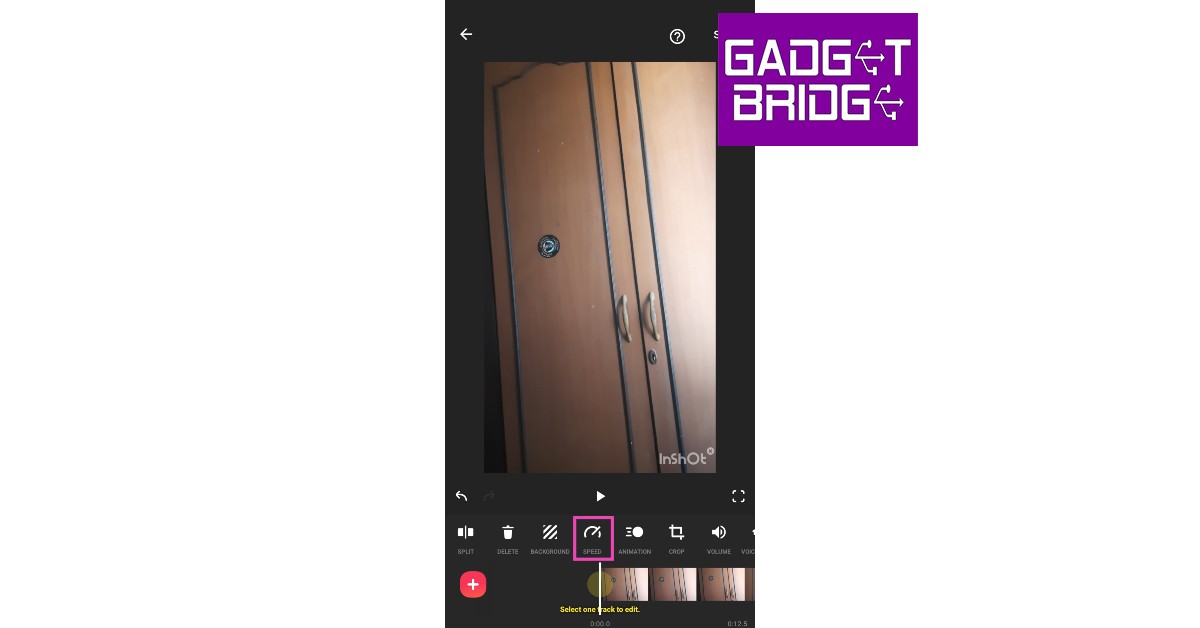 Step 4: Select the playback speed. You can speed up the video or convert it entirely into slow motion.
 Step 5: Tap on Curve to speed up or slow down different parts of the video. Tap the play button to preview.
 Step 6: Select Save.
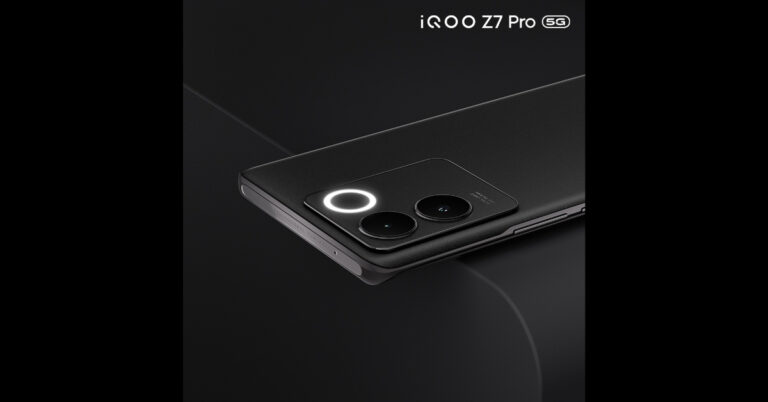










 Step 3:
 Step 4:
 Step 5:
 Step 6:
 Step 7:
 Step 8: Confirm
 Step 3:
 Step 4:
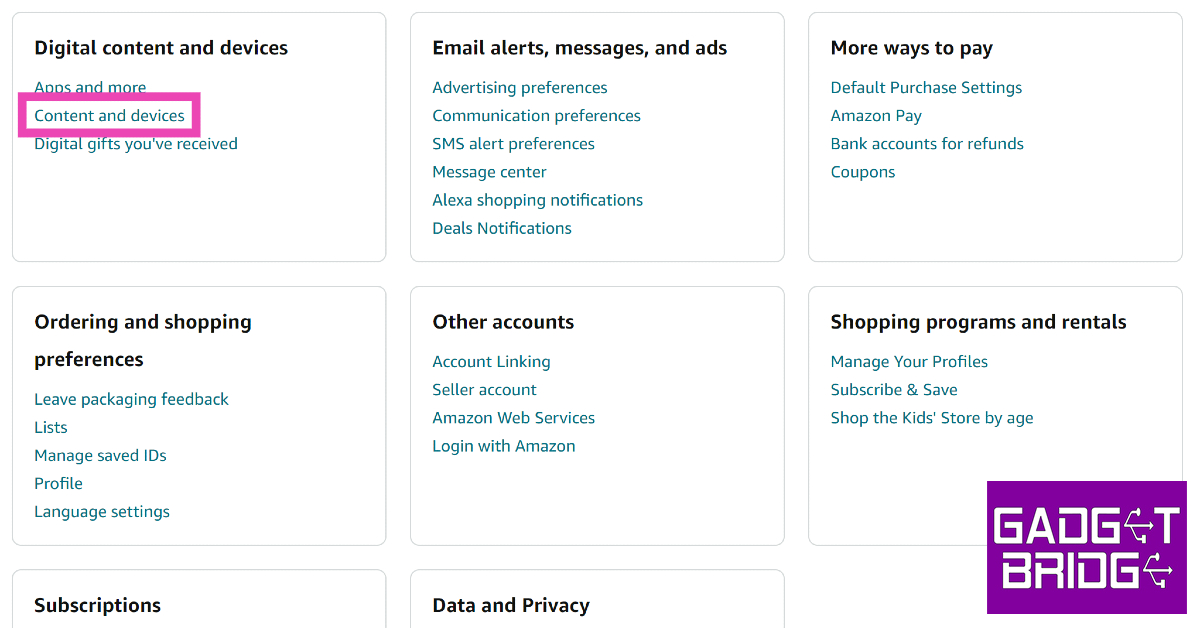 Step 5:
 Step 6: Select
 Step 7:
  Step 8: Confirm
 Step 2:
 Step 3:
 Step 4:
 Step 5:
 Step 6:
 Step 7:




 Step 3:
 Step 4:
 Step 5:
 Step 6:
 Step 11: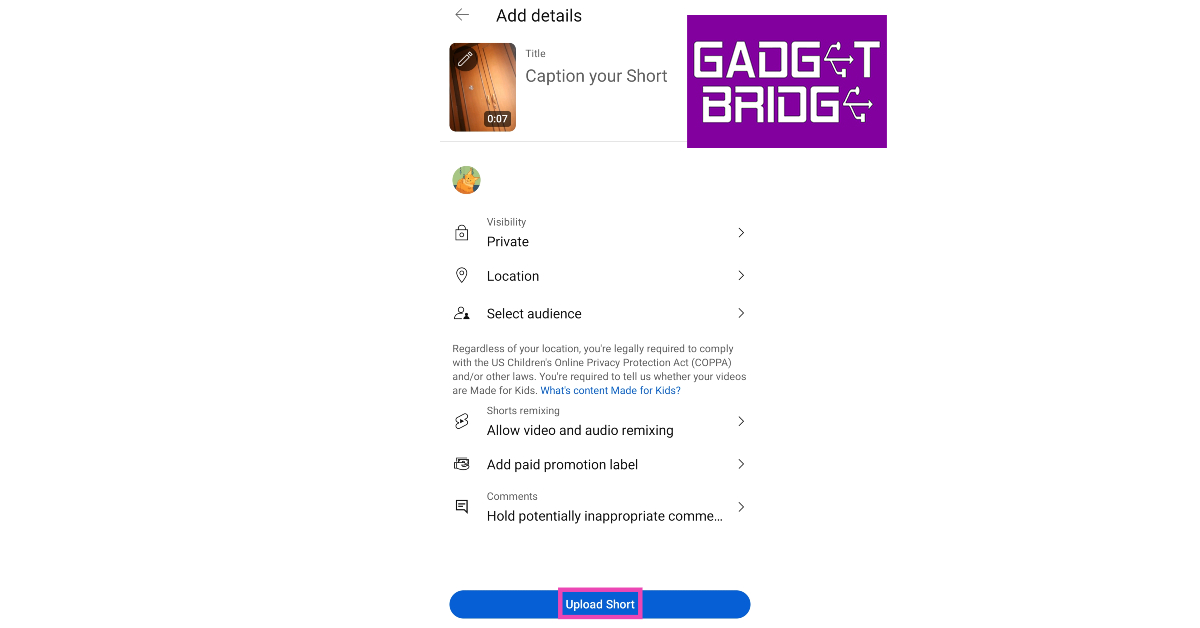
 Step 6: Trim
 Step 3:
 Step 4:
 Step 5:
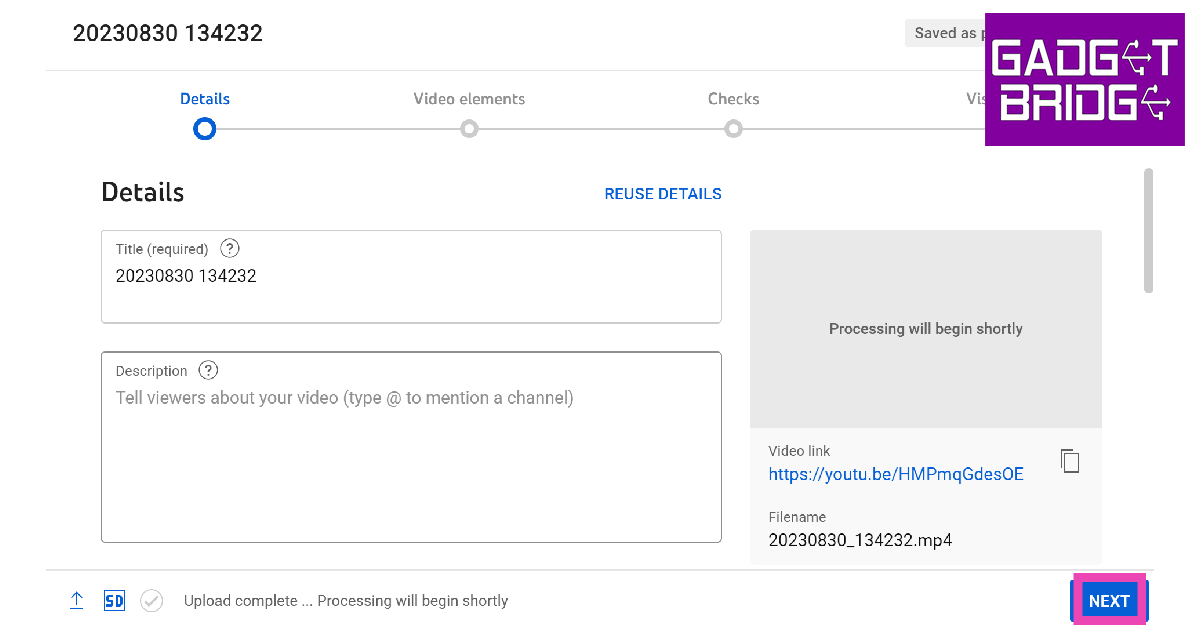 Step 7:
 Step 8:
 Step 9:

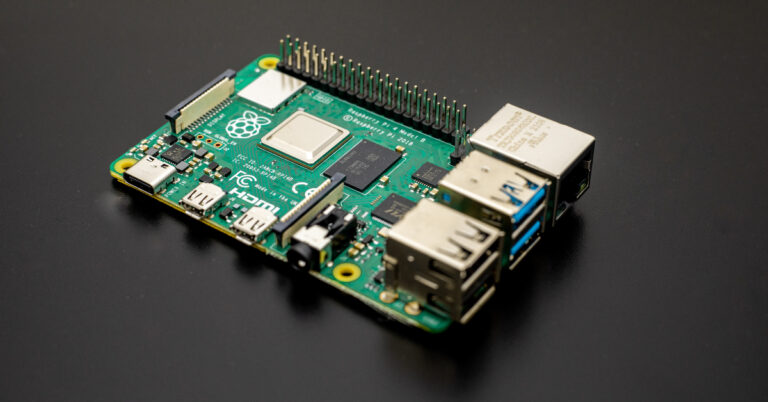
 Step 1: Download





 Ethereum Code offers several advantages that can greatly benefit ETF investors. Let’s explore some of these key advantages:

 Step 4:
 Step 5:
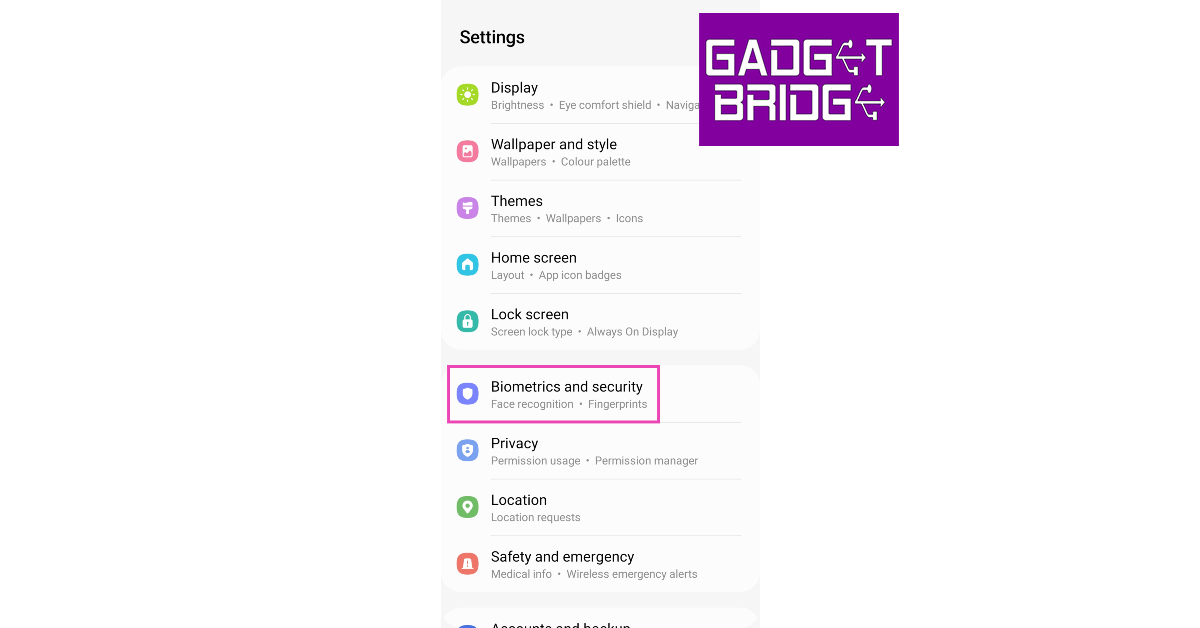 Step 2:
 Step 3: Scroll
  Step 5: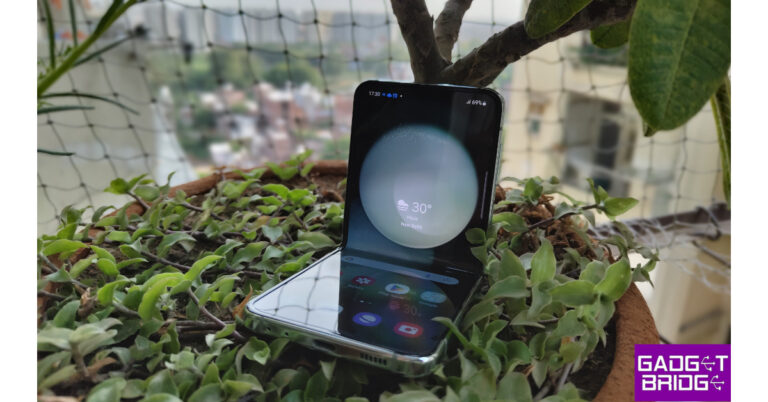


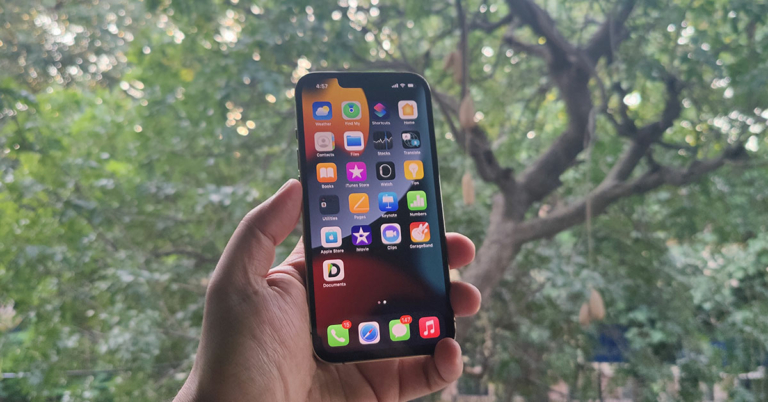
 Step 1: Enable

 Step 1:




 If you aren’t patient enough to accumulate Play Points, we recommend using
 Similar to AppsFree,
 4Shared is an online file-sharing network designed to cater to music, apps, books, images, books, and more. If you’ve exhausted all your options, it is worth trying to search for your desired app on this platform. You can find 4Shared on the
  While Reddit isn’t a direct source of apps, it can always point you in the right direction. If you have no luck finding your desired app on third-party platforms, you can always turn to Reddit and seek the help of other people. Subreddits like r/GooglePlayDeals, r/APKsApps, and r/AndroidApps can be used for any queries.

 The integration of AI in cryptocurrency trading has brought forth numerous benefits and advancements that were previously unattainable.
Firstly, speed is a crucial advantage. The ability of AI to process and analyze vast volumes of data within milliseconds enables it to execute trades swiftly, capitalizing on even the tiniest market fluctuations that might go unnoticed by human traders. This agility allows for more precise entries and exits from trades, ultimately maximizing profits and minimizing losses.
Secondly, accuracy is significantly enhanced with the use of AI in trading. While humans are susceptible to errors due to fatigue or cognitive biases, AI systems operate flawlessly without succumbing to these limitations. The reliance on complex algorithms and historical data enhances the accuracy of predictions made by AI models, providing traders with valuable insights into potential market movements.
Additionally, the self-learning capabilities inherent in AI empower trading systems to continuously improve their performance over time. As the AI model accumulates more data and learns from past trading experiences, it becomes increasingly adept at making informed decisions and adapting to changing market conditions. This adaptability is invaluable in the unpredictable world of cryptocurrency trading.
In the next section, we will further explore how AI advancements in trading have revolutionized risk management and provided traders with a competitive edge in mitigating market manipulation.
The integration of AI in cryptocurrency trading has brought forth numerous benefits and advancements that were previously unattainable.
Firstly, speed is a crucial advantage. The ability of AI to process and analyze vast volumes of data within milliseconds enables it to execute trades swiftly, capitalizing on even the tiniest market fluctuations that might go unnoticed by human traders. This agility allows for more precise entries and exits from trades, ultimately maximizing profits and minimizing losses.
Secondly, accuracy is significantly enhanced with the use of AI in trading. While humans are susceptible to errors due to fatigue or cognitive biases, AI systems operate flawlessly without succumbing to these limitations. The reliance on complex algorithms and historical data enhances the accuracy of predictions made by AI models, providing traders with valuable insights into potential market movements.
Additionally, the self-learning capabilities inherent in AI empower trading systems to continuously improve their performance over time. As the AI model accumulates more data and learns from past trading experiences, it becomes increasingly adept at making informed decisions and adapting to changing market conditions. This adaptability is invaluable in the unpredictable world of cryptocurrency trading.
In the next section, we will further explore how AI advancements in trading have revolutionized risk management and provided traders with a competitive edge in mitigating market manipulation.