Garena Free Fire is a battle royale game with regular awards and tournaments to keep players interested. If you play Garena Free Fire, you should be aware of the redeem codes that are released on a daily basis. However, because the battle royale game is banned in India, players from other countries can use the Free Fire Redeem codes daily. If you’re unfamiliar with the Garena Free Fire redeem codes or don’t know how to get them, we’ve put together a step-by-step guide to help you redeem them. Check out Garena Free Fire Redeem Codes for 18 February 2023.
The Free Fire redeem codes are a great way to get free stuff. These are 12-digit codes that contain alphabets and numbers, as well as an expiration date and time. Because the Garena FF redeem codes cannot be used more than once, you should hurry to the redemption page to claim your free reward before someone else does. To get a free reward, all you have to do is go to reward.ff.garena.com/en, which is the official redemption page. Also, keep an eye on this space for daily updates on Garena Free Fire redemption codes and rewards.
Garena Free Fire Redeem Codes Today 18 February 2023
BR43FMAPYEZZ
NPYFATT3HGSQ
FFCMCPSGC9XZ
MCPW2D2WKWF2
ZZZ76NT3PDSH
FFCMCPSEN5MX
HNC95435FAGJ
6KWMFJVMQQYG
FFCMCPSUYUY7E
MCPW3D28VZD6
EYH2W3XK8UPG
UVX9PYZV54AC
FFCMCPSJ99S3
XZJZE25WEFJJ
V427K98RUCHZ
MCPW2D1U3XA3
FFAC2YXE6RF2
FFCMCPSBN9CU
FFBBCVQZ4MWA
How to Get Free Fire Redeem Codes for Garena on 18 February 2023?
Have you participated in the Amazon Quiz today? If not then participate in the 18 February 2023 Amazon Quiz as it has already gone live on the app. The daily quiz can be played from 12 AM to 11:59 every day on the mobile app platform. Today e-commerce is giving the chance to win Rs 500 Amazon Pay Balance.
Every day Amazon brings a fresh quiz for its customers. By participating in the quiz the participants can win an Amazon Pay Balance of up to Rs 50,000. The quiz can only be played on the mobile app as it is not available for the desktop platform. The quiz contains five easy questions and you have to answer all the questions correctly. The participants will then be shortlisted for a lucky draw to select a winner. Whereas the results are declared at the end of the month. Check out today’s Amazon quiz answers to win Rs 500.
Question 1: The first Test between India and Australia in the Border Gavaskar Trophy 2023 would be played in which city?
Answer: Nagpur
Question 2: Which actor would make his ‘digital debut’ in the Amazon Prime series ‘Farzi’?
Answer: Shahid Kapoor
Question 3: Manik Saha is the Chief Minister of which state going to elections in February 2023?
Answer: Tripura
Question 4: This is the flag of which country?
Answer: Argentina
Question 5: Name this breed of dog
Answer: Dalmatian
How To Play Amazon Quiz
Only app users are eligible to play the Amazon quiz every morning from 12 AM to 11:59 PM. The quiz is not available on the desktop. For those who are unaware of how to play the Amazon quiz below are the steps, you can follow to take the quiz.
Firstly download the Amazon app from Google Play Store or App Store
Now fill in the required information through the Sign Up option.
You need to log in to the Amazon app and scroll down on the home screen to find the Amazon Quiz banner.
Tap on the Amazon Quiz banner and tap on the Start button to start the Quiz.
Now you will get 5 questions and you need to answer them correctly. One wrong answer will eliminate you from the Quiz.
After answering all the questions correctly you are now eligible for a Lucky Draw.
The winner’s name will be announced today at 12 PM.
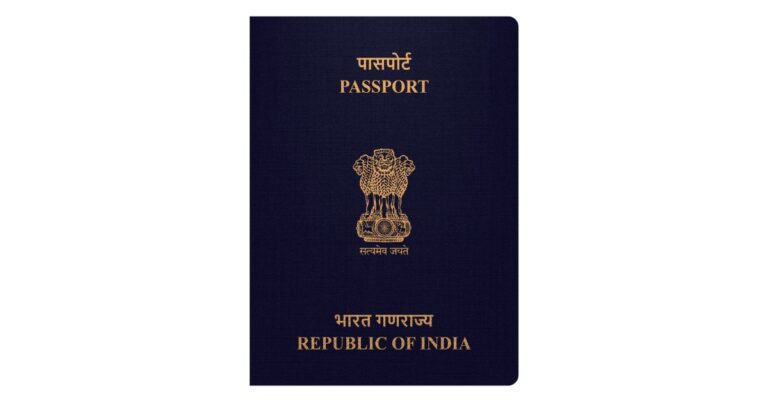
The Ministry of External Affairs has announced the launch of the mPassport Police app. The government claims that this app will simplify and hasten the procedure of police verification of passport approval.
The Passport Mobile Application was introduced by Union Home Minister Amit Shah to enable speedy passport verification. Police investigations will be more transparent and time-efficient with digital verification. The staff of the Spl. Branch/Delhi Police has been given 350 mobile tablets. With the help of these tablets, the complete passport application verification procedure will go paperless, and digital. This implies that tablet-based verification will shorten the verification process from 15 days to 5 days, saving a total of 10 days on the time it takes to issue passports.
State Police departments have a pressing need to use smartphones and tablets to reduce paperwork and delays associated with processing at the Thana and field level. The custom mobile application (mPassport Police App) has been suggested for the Thana and Field Verification processing teams. Users of Police Stations who already use the PSP Police (Web) Application for processing Passport Services applicants’ police verifications may download the app to record the inputs of field verification processing completed at the applicant’s residence.
“Police plays an important role to deliver passports and related services such as Police Clearance Certificate (PCC) to the citizens. In the various models for police verification implemented across the nation, the status of intermediate activities related to the verification process is not recorded/tracked in the system. This is mainly because most of the activities involved in the verification process essentially include exchange of physical documents (PP Forms) across District Police Headquarter (DPHq), Thana, Criminal Investigation Department (CID)/ Local Intelligence Unit (LIU) and Field Verification teams, and contributes most to the delays in the overall Police Verification Report (PVR) processing time.”
A good camera module is imperative to a smartphone’s appeal and performance in the market. When buying a smartphone, the first thing that people look for is the camera specs. And while megapixels may not mean everything when it comes to camera performance, good specs surely don’t hurt on paper. So, without further ado, here is our list of the top smartphones with 50MP or higher cameras.
Samsung Galaxy S23 Ultra being at the top of the list shouldn’t surprise anyone. Samsung’s flagship smartphone has garnered a reputation for being the best Android in the business. The new S23 Ultra comes with a massive 200MP primary sensor with an 85-degree field of view and f/1.8 aperture. On top of that, there’s a 12MP ultrawide, 10MP telephoto (3x Optical zoom), and a 10MP periscope telephoto (10x Optical zoom) lens on offer. With an astrophotography mode, the Samsung Galaxy S23 Ultra can take highly detailed images of the night sky and even the moon!
Google Pixel 7
Pixels are universally known for their excellent cameras and image processing. The Google Pixel 7 upholds that tradition and continues to be one of the best camera smartphones out there. Pixel 7’s camera unit consists of a 50MP primary shooter and a 12 MP ultrawide lens. The Pro variant of the Pixel 7 comes with an additional 48MP telephoto lens. However, for the price, the non-Pro variant is one of the best smartphones you can buy right now. Read our review of the Google Pixel 7 here and Pixel 7 Pro here.
OnePlus 11
Hasselblad tuning is back on the OnePlus 11, after missing OnePlus 10T. The 50MP primary shooter has an f/1.8 aperture and comes with Optical Image Stabilisation. The camera unit also features a 48-megapixel Sony IMX58 ultrawide sensor (f/2.2 aperture and 115-degree field of view) in addition to a 32-megapixel telephoto lens with 2x optical zoom. The OnePlus is powered by the new Snapdragon 8 Gen 2 SoC.
Samsung Galaxy Z Fold 4
When it comes to foldables, Samsung currently has a stronghold on the market with its high-end hardware and ultra-smooth and adaptive software experience. The Samsung Galaxy Z Fold 4 is not only the best foldable you can buy right now, but it also has one of the best camera units across all smartphones – foldable or otherwise. There are a total of five cameras on Fold 4. The 50MP primary shooter has an f/1.8 aperture, dual-pixel autofocus, optical image stabilisation (OIS), and an 85-degree field of view. A 10MP telephoto lens and a 12MP ultrawide sensor complete the rear camera unit. On top of that, you get a 4MP under-display camera and a 10MP cover camera. Read our review here.
iQOO 11
The recently launched iQOO 11 is currently available in two variants – Legend and Alpha. The Legend Edition comes with the iconic BMW stripes while the Alpha Edition gets a leather finish. iQOO’s latest flagship comes with a 50MP Samsung GN5 primary sensor. There’s also a 13MP telephoto and 8MP ultrawide lens onboard. Read our in-depth review of iQOO 11 with the camera test here. Prices for the iQOO 11 start at Rs 59,999.
Xiaomi 12 Pro
While we’re all waiting for the Xiaomi 13 to launch in India, the Xiaomi 12 Pro still remains one of the better smartphones released last year. The smartphone features a triple 50MP rear camera unit comprising the wide, ultrawide, and telephoto lens. The Xiaomi 12 Pro can record 8K HDR videos at 24fps, 4K videos at 30/60fps,1080p videos at 30/120/240/960fps, and 720p videos at 1920fps. To see how it fared in our camera test, read our full review of the Xiaomi 12 Pro here.
Redmi Note 12 Pro+
Moving to the midrange category, the recently launched Redmi Note 12 Pro+ made the headlines for housing a 200MP primary shooter. This main lens also comes with Optical Image Stabilisation, which is quite helpful while shooting videos or taking pictures with Night Mode on. An 8MP ultrawide lens and a 2MP macro lens are also a part of Note 12 Pro+ rear camera arrangement. Up front, you get a 16MP selfie camera. 120W superfast charging is also one of the premium features that are on offer with the Note 12 Pro+. Meanwhile, the Pro variant of the Note 12 series comes with a 50MP main sensor, which is also quite impressive. We tried it out in a range of lighting conditions, you can read more about it in our review here.
Oppo Reno 8T
Launched earlier this month, the Oppo Reno 8T is a slightly affordable alternative to the Oppo Reno 8 Pro. The Reno 8T features a 108MP primary sensor in its rear camera unit along with a 2MP macro lens and a 2MP depth sensor. There’s also a 32MP selfie camera up front. The Reno 8T comes with several camera modes such as Selfie HDR, Bokeh Flare Portrait, and Dual-View Video for vlogging. Powering the Reno 8T is the Snapdragon 695 5G SoC.
Vivo V25 Pro
Launched last year, the Vivo V25 had an impressive camera unit compared to its other midrange peers. The rear camera unit of the Vivo V25 Pro features a 64MP primary shooter, an 8MP ultrawide, and a 2MP macro lens. The rear camera can record 4K and 1080p videos at 30fps. The Vivo V25 Pro also sports a pretty unique colour-changing back panel. Read our in-depth review here.
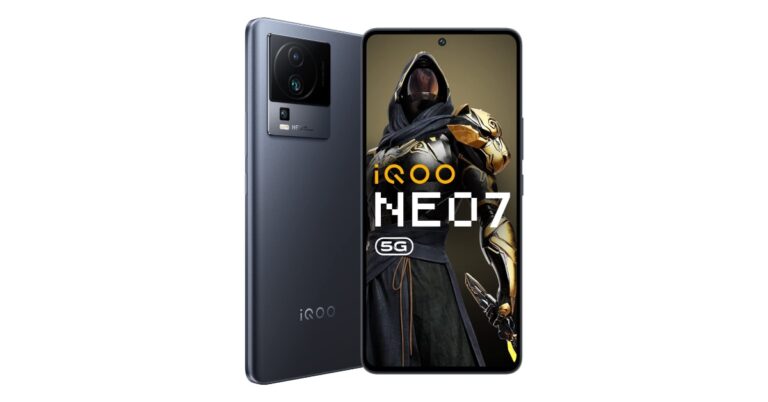
iQOO Neo 7
iQOO Neo 7 is one of the newest phones on the market and iQOO’s contender in the midrange category. The smartphone sports a triple rear camera setup featuring a 64MP primary shooter with OIS and f/1.79 aperture, a 2MP macro lens, and a 2MP depth sensor. The rear camera can record 4K and 1080p videos at 30fps. There’s also a 16MP selfie camera on board. On top of that, the Neo 7 gets a 5,00mAh battery and 120W fast charging support.
Samsung Galaxy A14
We recently reviewed Samsung’s latest budget smartphone, the Galaxy A14 and were quite impressed by its rear camera unit. Prices for the Galaxy A14 start at Rs 16,499 and in this range, its rear camera delivers a solid performance. The rear camera unit comprises a 50MP primary sensor, a 2MP macro lens and another 2MP depth sensor. Furthermore, there’s a 13MP selfie camera up front. To have a look at A14’s camera performance, read our review here.
These are our picks for the best smartphones with 50MP or higher cameras. When it comes to shooting images, the number of megapixels on the sensor only matters to a certain extent. The image processing of the software has a big part to play in how the photos come out. Which smartphone do you think has the best camera unit out there? Let us know in the comments!
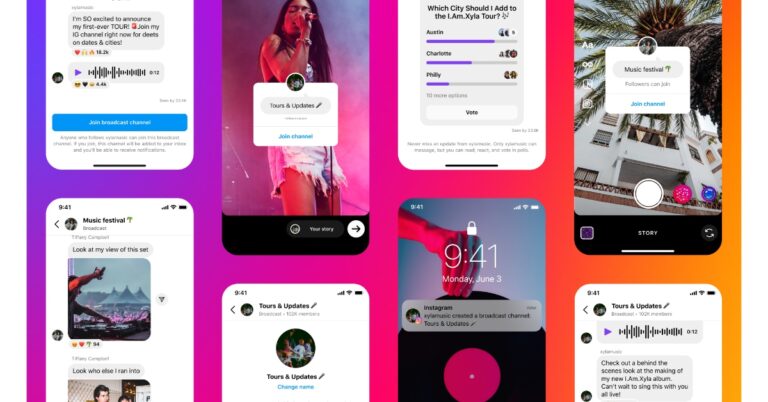
A broadcast chat feature called Channels is being rolled out on Instagram, the social media site owned by Meta Platforms. With the help of broadcast channels, creators can communicate openly and immediately with a large number of their fans. Creators can use broadcast channels to share text, photo, video, voice notes, and polls with followers to keep them up to date on the newest developments and behind-the-scenes happenings. With more features soon to come, followers can comment on posts and take part in polls.
With his own “Meta Channel,” Mark Zuckerberg introduced Instagram broadcast channels.
Meta’s CEO Mark Zuckerberg via Facebook post said, “We’re starting to roll out Instagram channels — a new broadcast chat feature. I’m starting a channel to share news and updates on all the products and tech we’re building at Meta. It will be the place I share Meta product news first. We’re also bringing channels to Messenger and Facebook in the coming months.”
Creators can invite all of their followers into broadcast channels and interact with their most enthusiastic followers using this one-to-many, public messaging platform.
Creators can quickly and casually update their audience by using broadcast channels. To showcase their most recent developments and behind-the-scenes experiences, they can use text, photo, video, and voice notes. They can also make polls to collect input from fans. Followers can respond to content and cast their votes in polls, but only creators can send messages.
The blog post states that additional features will be added to Instagram in the upcoming months, including the ability to invite another creator into the channel to talk about potential collaborations, collect questions for an AMA using question prompts, and more.
How Does It Function?
A creator can launch a broadcast channel from their Instagram inbox once they have access. A one-time notification to join the channel will be sent to their followers after they send their first broadcast channel message. Creators can also urge followers to subscribe as soon as the broadcast channel is available by using the “join channel” sticker in Stories or by pinning the channel link to their profile.
Make sure to set the audience to “all followers” for creators with subscriptions who wish to make a broadcast channel accessible to all followers. For your most unique content, you may also create a broadcast channel that is only accessible to paid subscribers.
Using a creator’s Story sticker, the link pinned to their profile, or, if you are already a follower, the one-time notification provided when a creator starts a new channel, you can access the link to the broadcast channel on a mobile device.
Simply select “Join broadcast channel.” People who are not the creator’s followers yet will be prompted to join.
It will show up in the Instagram inbox next to other message threads after you join the channel.
Followers are unable to send messages, but they can comment on posts and vote in polls. They can also send a link to the broadcast channels of their preferred creators so that friends can follow and join.
According to the company, the broadcast channel can be found and the content viewed by anyone. The initial invitation to join the broadcast channel will be sent to all followers; however, only those who accept will afterward receive notifications for fresh updates. Followers have the option to turn off all broadcast channel notifications for a creator as well as leave or mute any broadcast channels at any time.
Availability
In addition to testing broadcast channels in Messenger and Facebook in the upcoming months, Meta is launching this new service on Instagram initially. With a small group of American creators, Meta is presently testing broadcast channels with plans to grow in the coming months. Creators interested in being eligible for early access can join up HERE: (please access the waitlist on your mobile device). According to the company, there are a limited number of spots available, and it will be rolling out early access.
While browsing the internet, it is absolutely necessary to keep an eye out for any suspicious activity. While not clicking on shady links is the least you can do to avoid any potential damage to your system, there may be bigger threats lurking in the background. Luckily, there are certain steps you can take to safeguard yourself against any malicious activity. In this article, we bring you 7 tips to make your Internet browsing experience safer.
Harmful malware is always getting sneakier and trying to find a way into your smartphone or PC. Most of the time, your web browser is well equipped to handle this situation and is easily able to filter out malicious elements while you’re browsing the Internet. Major web browsers like Chrome, Safari, Firefox, and Edge receive regular security updates which help them fix any loopholes that the malicious files may take advantage of. If you’re using an old version of the browser, these security issues become easy to exploit. Which is why it is essential to use the latest version of your web browser.
Use a VPN
Public WiFi networks are not as safe as you think. There may be several security threats lurking in the background that you’re unaware of. Your data can easily be intercepted and monitored when you are on a public network. Use a secure VPN to safeguard yourself from this threat. A VPN encrypts your personal data and directs it through a different server. This makes it hard for a third party to monitor your internet activity.
Use different passwords for different services
Data breaches are becoming increasingly common. If your password was compromised in one data breach, hackers may use that password to gain access to other services linked to your account. The easiest way to avoid this is by maintaining a unique password for every service or website you sign up for. Can’t remember all the unique passwords? Use a password manager to safely store all your passwords in one place.
Use two-factor authorisation
In the odd case that a third party ends up with unauthorised access to your password, you can make it harder for them to gain control of your account by enabling two-factor authorisation. Most major websites and apps have already incorporated TFA in their system. Some platforms even allow you to use a physical security key as an added layer of security.
Manage cookies on your web browser
It shouldn’t come as a surprise that your web activity is monitored by different websites through cookies. This doesn’t mean that all cookies serve that purpose. Some store your login credentials, so you don’t have to enter them every time you visit a website. Others track your internet activity down to the motion of your cursor. Many regard this as a clear violation of privacy, and it is suggested you routinely clear all cookies from your web browser. Read this article to know how to clear cookies from your web browser.
Install an antivirus
Good antivirus software protects your computer from all kinds of malicious files like malware, trojans, and ransomware. If you’re constantly downloading files from the Internet, it is a good idea to have an antivirus scan them for viruses before you install them on your system. McAfee, Avast, and Bitdefender are some of the most popular antivirus software in the market today.
Turn on HTTPS-only mode
HTTPS stands for Hypertext Transfer Protocol Service and is critical in ensuring a safe browsing experience with its safe encrypted connection. If a website does not use HTTPS, it may leave your system vulnerable to malicious elements. To fix this, you can turn on the HTTPS-only mode on your web browser to ensure that unsecured websites do not get opened. To activate HTTPS-only mode on Chrome go to Settings>Privacy and Security>Security and enable ‘Always use secure connections’.
These are the 7 tips you must keep in mind to ensure a safe browsing experience. For added safety, routinely change all your passwords and make sure that the websites you visit only use essential cookies. Additionally, use an ad-blocker at all times to reduce the odds of phishing scams and do not allow access to third parties to your system unless it is absolutely necessary.
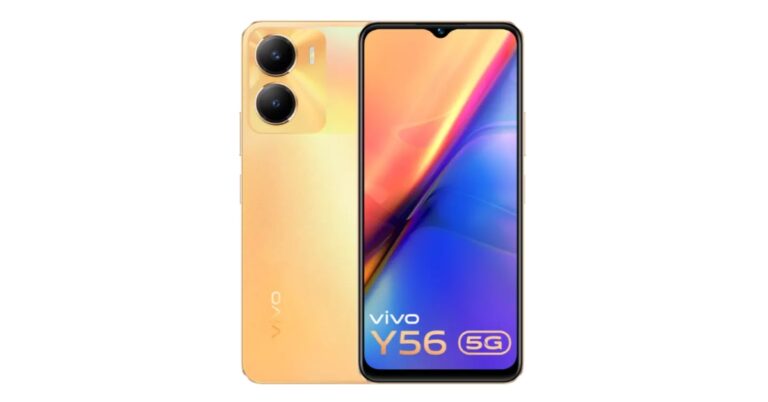
The Chinese smartphone company Vivo has silently launched another Y-Series smartphone in India. Vivo Y56 5G has been found listed on the company’s official website in the country. According to a retailer, the device is currently available for purchase via an offline store. The phone features a 50MP dual rear camera setup and a 5,000mAh battery. In addition to this, the phone is powered by a MediaTek Dimensity 700 SoC.
Vivo Y56 5G price in India and availability details
According to a major retailer, Mahesh Telecom, the Vivo Y56 5G is currently sellable through offline retailers in the nation. The information was shared by the Mumbai-based retailer on Twitter. The cost of the single 8GB RAM with 128GB storage variant of the Vivo Y56 5G, according to the store, is Rs 19,999. Additionally, the new Y-series smartphone and its specifications have been made available on Vivo’s official India website. It is available in the colours Orange Shimmer and Black Engine. To the best of our knowledge, the company’s website does not yet list the handset’s price.
Vivo Y56 5G specifications
As per the listing, the 6.58-inch full-HD+ LCD screen of the Vivo Y56 5G has a resolution of 1,080×2,408. Funtouch OS 13 powered by Android 13 handles the smartphone. It is driven by an 8GB RAM/MediaTek Dimensity 700 SoC combination. With the help of unused onboard storage, the built-in RAM can be increased up to 16GB. Additionally, it provides 128GB of inbuilt storage.
The battery in the Vivo Y56 5G is 5,000mAh and supports 18W fast charging. The Vivo smartphone has Wi-Fi, Bluetooth v5.1, GPS, Glonass, OTG, FM radio, and a USB Type-C connector as connectivity choices. An accelerometer, ambient light sensor, e-compass, gyroscope, and proximity sensor are among the sensors on board. For login, it has a side-mounted fingerprint sensor.
The listing features a rectangular rear camera module and a display with a waterdrop notch. Vivo Y56 5G has a dual rear camera system with a 50-megapixel primary sensor with an f/1.8 aperture and a 2-megapixel secondary sensor with an f/2.4 aperture. A 16-megapixel sensor with an f/2.0 aperture is located at the front of the device for selfies and video calls.
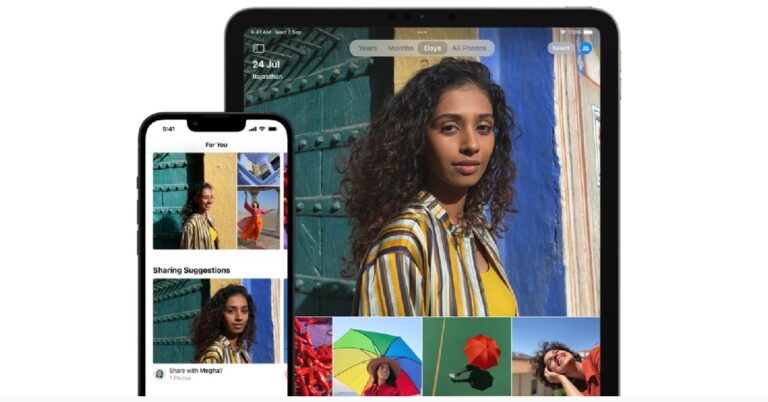
With iOS 16, Apple ushered in a bunch of new features from a new improved lock screen to Always on Display. There were also some underrated features that didn’t grab the headlines but will certainly come in handy in the long run. Removing duplicate images from your photo gallery is one of them. Now you don’t have to rely on third-party apps to do the job. In this article, we show you how to remove duplicate images on your iPhone. (2023)
The native Photos app on your iPhone is well-equipped to delete any duplicate images and videos. Here’s how you can save storage space by merging duplicate media on your phone.
Step 1: Launch the Photos app and tap on Albums.
Step 2: Tap on ‘Duplicates’ below Utilities. This is where you will find all the duplicate images and videos on your iPhone. You won’t be able to see the Duplicates folder if there are no duplicate images or videos on your phone.
Step 3: Select ‘Merge’ and then confirm your selection.
What does merging do?
The Duplicates folder in your iPhone contains all the similar-looking photos and videos in your gallery. Your iPhone recognises the duplicate images and gives you the option to go through them before the merging process begins. Once you merge the duplicate images and videos together, your phone will look for the highest-quality version of the image by seeking relevant data across all the duplicates. The high-quality version will be preserved in the gallery while the others will be moved to the Recently Deleted album.
Use a third-party app
Before iOS 16, iPhone users had to either manually go through the duplicate images on their phone to delete them or rely on third-party apps to do the job. Some ‘gallery’ apps like Gemini Photos have the added feature to remove duplicates while others like Remo Duplicate Photos Remover are designed specifically to delete redundant images from your phone. Now that iOS 16 has a native duplicate remover tool, third-party apps are the less popular option. If you still want to use them, you will need to give them permission to access the files on your iPhone.
This is how you can remove duplicate images on your iPhone. Sometimes the native tool may do an inadequate job of finding the best shot out of all the duplicates. Maybe you like a picture that isn’t necessarily a perfect shot but contains some detail that you admire. In this scenario, it is better to manually go through all your images and delete the duplicates you don’t like.
Over the years, WhatsApp has added a lot of personalisation options on its platform, allowing users to add a splash of colour to their conversations and not just be bound to the default experience. If you’re someone who uses night mode religiously, WhatsApp even has an in-app feature to enable dark mode. In this article, we show you how to change the WhatsApp chat theme on an Android smartphone.
Here’s how you can enable the in-app dark theme on WhatsApp.
Step 1: Launch WhatsApp on your smartphone and tap the ellipses (three dots) at the top right corner of the screen.
Step 2: Tap on Settings.
Step 3: Select Chats.
Step 4: Tap on ‘Theme’ under the Display category.
Step 5: Tap on ‘Dark’ to enable the dark theme.
Enable dark mode from System Settings
Turning on dark mode from your smartphone’s settings will apply it across all apps, including WhatsApp. Here’s how you can do that.
Step 1: Go to Settings and select Display.
Step 2: Tap on ‘Dark’ to enable dark mode.
Change the chat wallpaper
Here’s how you can change the background wallpaper for all chat threads on WhatsApp.
Step 1: Launch WhatsApp on your smartphone and tap the ellipses (three dots) at the top right corner of the screen.
Step 2: Tap on Settings.
Step 3: Select Chats.
Step 4: Tap on ‘Wallpaper’ under the Display category.
Step 5: Select ‘Change’ and browse through the default wallpapers. You can also choose an image from your phone’s gallery to set it as a chat background.
Step 6: Select a wallpaper to see its preview. Tap on ‘Set wallpaper’ to set it as your chat background.
You can also set up different backgrounds for different chats. In order to do this, you will have to open an individual chat first. Tap on the ellipses at the top right corner of the screen and select ‘Wallpaper’. Select an image to set as the background for that particular chat.
This is how you can change the WhatsApp chat theme on an Android smartphone. Once you change the wallpaper for an individual chat, the changes will be applied on your end only. The recipient or other members of the group can always set up a different wallpaper as their chat background.
Vivo has expanded its Y-Series in India with the launch of a brand-new smartphone. The company has introduced Vivo Y100 which comes with a color-changing design. The device is powered by MediaTek Dimensity 900 SoC. It features a 4,500mAh battery and comes with an AMOLED display with 90Hz refresh rate support. In addition to this, there is a dual rear camera setup that includes a 64MP primary sensor.
Vivo Y100 price in India and sale details
The Vivo Y100 has been launched in India with a price tag of Rs 24,999 for the 8GB RAM with 128GB storage option. The device comes in color-changing variants- Pacific Blue and Twilight Gold along with a third metal black. The phone is now available for purchase via Amazon, Flipkart, Vivo India e-store and across all partner retail stores.
Customers can also get cashback from Kotak Mahindra, HDFC, ICICI, and SBI up to Rs 1500.
Vivo Y100 specifications
Vivo Y100 is highlighted with a 6.38-inch AMOLED Display. The screen comes with a 90Hz refresh rate, 360Hz High touch sampling rate, supports peak brightness at 1300 nits and HDR10+ certification. The handset also has a well-liked “Colour Changing” technology, which enables the device’s rear panel to change colour when exposed to sunshine or UV rays.
It comes pre-installed with the most recent FunTouch OS 13, which is based on Android 13. An octa-core MediaTek Dimensity 900 SoC built using a 6nm technology powers the device. The Vivo Y100 also includes UFS 2.2 and 8GB of additional RAM with Extended RAM 3.0, which speeds up and improves the experience of moving between apps.
The 64-megapixel primary back camera on board the Vivo Y100 has optical image stabilisation. Dual 2-megapixel sensors are there in addition to this. A 16-megapixel front camera on the phone is used for selfies and video calls.
It has a 4,500mAh battery inside that can be charged quickly at 44W. Dual SIM, 5G, dual-band WiFi, Bluetooth 5.2, USB Type-C, GPS, and OTG are just a few of the connectivity choices available. Additionally, it supports a 3.5mm audio jack that is certified for high-resolution audio.
Garena Free Fire is a battle royale game with regular awards and tournaments to keep players interested. If you play Garena Free Fire, you should be aware of the redeem codes that are released on a daily basis. However, because the battle royale game is banned in India, players from other countries can use the Free Fire Redeem codes daily. If you’re unfamiliar with the Garena Free Fire redeem codes or don’t know how to get them, we’ve put together a step-by-step guide to help you redeem them. Check out Garena Free Fire Redeem Codes for 17 February 2023.
The Free Fire redeem codes are a great way to get free stuff. These are 12-digit codes that contain alphabets and numbers, as well as an expiration date and time. Because the Garena FF redeem codes cannot be used more than once, you should hurry to the redemption page to claim your free reward before someone else does. To get a free reward, all you have to do is go to reward.ff.garena.com/en, which is the official redemption page. Also, keep an eye on this space for daily updates on Garena Free Fire redemption codes and rewards.
Garena Free Fire Redeem Codes Today 17 February 2023
XFW4-Z6Q8-82WY
HFNS-J6W7-4Z48
HHNA-T6VK-Q9R7
2FG9-4YCW-9VMV
4ST1-ZTBE-2RP9
8F3Q-ZKNT-LWBZ
V44Z-Z5YY-7CBS
4TPQ–RDQJ-HVP4
WD2A-TK3Z-EA55
E2F8-6ZRE-MK49
J3ZK-Q57Z-2P2P
FFDB-GQWP-NHJX
TDK4-JWN6RD6
GCNV-A2PD-RGRZ
How to Get Free Fire Redeem Codes for Garena on 17 February 2023?
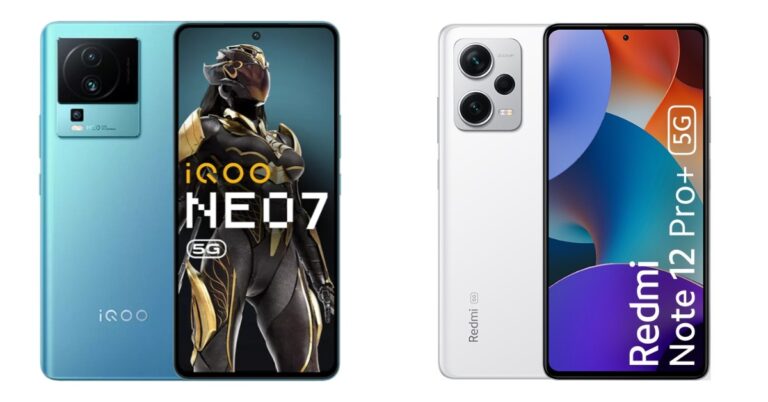
iQoo Neo 7 5G today launched in India. The device comes with some upgrades over its predecessor iQoo Neo 6 from last year. Here is a comparison between the Redmi iQoo Neo 7 5G and Redmi Note 12 Pro+ for those who intend to purchase the former or are thinking about upgrading from their older phone. We’ll examine the differences between the two phones’ prices, designs, and technical specifications in this comparison.
iQoo Neo 7 5G: A triple rear camera setup that includes a 64-megapixel primary sensor with OIS ( f/1.79 aperture). In addition to this, there is a 2-megapixel macro sensor (f/2.4 aperture) and a 2-megapixel depth sensor (f/2.4 aperture).
Redmi Note 12 Pro+: The triple rear camera setup has a 200-megapixel primary sensor with OIS. A 2-megapixel macro lens and an 8-megapixel ultra wide-angle camera are also part of the arrangement.
Selfie camera
iQoo Neo 7 5G: 16-megapixel
Redmi Note 12 Pro+: 16-megapixel
RAM and storage
iQoo Neo 7 5G: 8GB RAM with 128GB storage and 12GB RAM with 256GB storage option
Redmi Note 12 Pro+: 8GB RAM with 256GB storage, and 12GB RAM with 256GB storage
Numerous similarities exist between the two smartphones. There is no difference in the selfie camera, display, or battery size. With regard to screen size and brightness, the iQoo Neo 7 stands out. iQoo’s 64MP triple rear camera setup falls short of Redmi’s 200MP main camera setup in terms of optics. A 16MP selfie camera is included in both phones, though.
Redmi Note 12 Pro+’s processor is a 6nm MediaTek Dimensity 1080 chip, whereas Neo 7 5G’s SoC is a 4nm MediaTek Dimensity 8200. Redmi Note 12 Pro+ has MIUI 13 which is based on Android 12, while Neo 7 has Color OS 13, which is based on Android 13.
There are significant distinctions between them, nevertheless, which make them appropriate for certain people.
Have you participated in the Amazon Quiz today? If not then participate in the 17 February 2023 Amazon Quiz as it has already gone live on the app. The daily quiz can be played from 12 AM to 11:59 every day on the mobile app platform. Today e-commerce is giving the chance to win Rs 2,500 Amazon Pay Balance.
Every day Amazon brings a fresh quiz for its customers. By participating in the quiz the participants can win an Amazon Pay Balance of up to Rs 50,000. The quiz can only be played on the mobile app as it is not available for the desktop platform. The quiz contains five easy questions and you have to answer all the questions correctly. The participants will then be shortlisted for a lucky draw to select a winner. Whereas the results are declared at the end of the month. Check out today’s Amazon quiz answers to win Rs 2,500.
Question 1: The recently released movie ‘Chhatriwali’ stars which actress in the lead role?
Answer: Rakul Preet Singh
Question 2: In a record transfer deal for the English Premier League, which club recently signed Enzo Fernandez?
Answer: Chelsea
Question 3: Joshimath in the news for cracks developing in houses is in which state?
Answer: Uttarakhand
Question 4: This is a view of Marine Drive in which city?
Answer: Mumbai
Question 5: The marriage of which royal is being shown here?
Answer: King Charles III
How To Play Amazon Quiz
Only app users are eligible to play the Amazon quiz every morning from 12 AM to 11:59 PM. The quiz is not available on the desktop. For those who are unaware of how to play the Amazon quiz below are the steps, you can follow to take the quiz.
Firstly download the Amazon app from Google Play Store or App Store
Now fill in the required information through the Sign Up option.
You need to log in to the Amazon app and scroll down on the home screen to find the Amazon Quiz banner.
Tap on the Amazon Quiz banner and tap on the Start button to start the Quiz.
Now you will get 5 questions and you need to answer them correctly. One wrong answer will eliminate you from the Quiz.
After answering all the questions correctly you are now eligible for a Lucky Draw.
The winner’s name will be announced today at 12 PM.
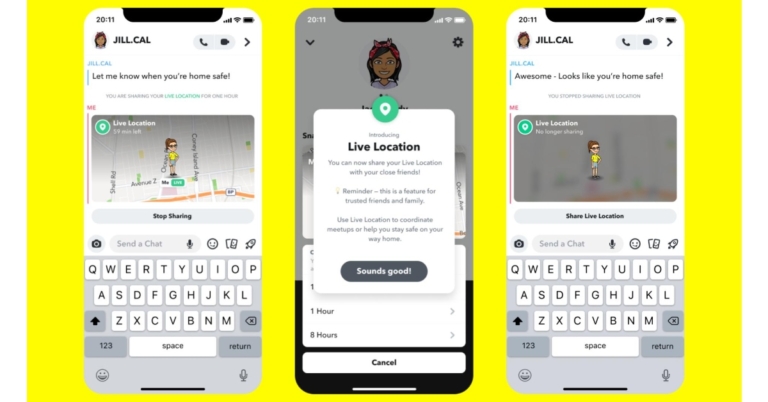
Back in 2017, Snapchat introduced Snap Map which lets its users stay tuned to the major events across the world. If there’s a live news story unfolding somewhere in the world, you can simply search for that location on Snapchat and view the stories that users have uploaded from there. Need a closer look at a sports game? Look up the stadium on Snap Map to view stories from the crowd. Snap Map also lets you view the live location of your friends and lets you know what they are doing. In this article, we show you how to see your friends’ locations on Snapchat.
Here’s how you can view your friends’ location on Snapchat
Step 1: Launch the Snapchat app on your smartphone and swipe left twice to access the Snap Map. You can even tap on the location pin icon at the bottom left corner of the screen to go to the Snap Map with one touch.
Step 2: Now tap on the ‘Friends’ sign at the bottom right corner of the screen to view your friends’ location on the map.
Step 3: Tap the search icon to look up the location of a friend.
Step 4: Tap the friend’s Bitmoji to see their exact location.
How does Snap Map work?
Apart from seeing your friends’ locations, you can use Snap Map to view Snapchat stories from across the world. All you need to do is browse the map and tap on a particular location to view all the stories that Snapchat users have uploaded from there. This is a bit similar to the Periscope app which allows you to view live streams from any given location across the world. If you’re interested in following a public event happening miles away from you, you can simply go to its location on Snap Map and see what other people have uploaded.
Your location on Snap Map is only visible to your friends. You can also enter Ghost Mode to hide your location from everyone on the app. You can also curate a list of special friends to share your location with. To change your location settings go to your Snapchat profile and select Settings>See My Location.
This is how you can see your friends’ location on Snapchat. While Snap Map is a fun feature to use, you should be careful with sharing your public location on Snapchat at all times, even if it is only accessible to your contacts. Additionally, you can adjust the location permission for Snapchat from app settings on your Android smartphone.
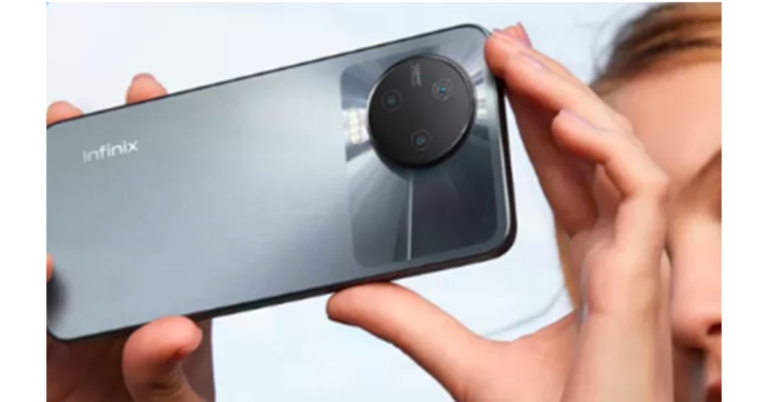
Infinix is getting ready to release the Inbook Y1 Plus, a brand-new laptop in the affordable category. Through a website on the e-commerce site Flipkart, the company has announced the release of its new laptop and teased some of its main specs. According to the company, it will feature a 15.6-inch Color Rich Anti-Glare FHD Display. The battery will have a 50Whr capacity. The laptop is aimed at college students and budding professionals.
While the precise release date of the Infinix InBook Y1 Plus is unknown, Flipkart will be the place to buy it. The device is tipped to launch on February 20 in the country. According to the new teaser the business released, the upcoming laptop will probably cost less than Rs 30,000. The preview image shows the colour selections in Silver, Blue, and Grey.
The company has created a dedicated microsite for the Infinix InBook Y1 Plus on Flipkart. The landing page reveals that the upcoming laptop will be powered by an Intel Core processor. The Infinix InBook Y1 Plus will have ultra-narrow bezels on the sides. A 15.6-inch FHD display is mentioned as a feature of the laptop. The display will also support 250 nits of brightness, and an 86 percent sRGB colour gamut.
Moreover, the device will be featuring a premium AG glass Touchpad that allows multi-touch and gesture support. A 50 Wh battery and 45 W Type-C Fast Charging are also included with the Inbook Y1 Plus, allowing it to charge to 75% in just one hour. For ease of use, the Inbook Y1 Plus is anticipated to be an incredibly lightweight laptop.
The company released the Infinix InBook X2 Plus in India in October of last year. The 11th Gen Intel Core CPUs within the InBook X2 Plus make it a lightweight, thin laptop. The device has a full-HD webcam and a 15.6-inch IPS display.
The starting pricing for the Infinix InBook X2 Plus on Flipkart is Rs 32,990. A high-end variant with a 512GB hard drive and an 11th-generation Intel Core i7 processor costs Rs 52,990.
iQoo Neo 7 5G has officially made its debut in India today. The device is a successor of iQoo Neo 6 which was launched last year in the country. The phone is driven by a MediaTek Dimensity 8200 SoC. It features a 120Hz AMOLED display. In addition to this, the handset offers 120W fast charging, which can allegedly charge the phone to 50% of its capacity in 10 minutes.
iQoo Neo 7 5G price in India and sale details
iQoo Neo 7 5G has been launched in India with a price tag of Rs 29,999 (Effective Price 28,499) for the 8GB RAM with 128GB storage option. The price of the 12GB RAM with 256GB storage option is set at Rs 33,999(Effective Price 32,499). The phone will come in two colour options of Frost Blue and Interstellar Black.
For buyers using credit and debit cards from the ICICI, HDFC, and SBI banks, iQoo is providing a flat discount of Rs 1,500. A further exchange offer of Rs 2,000 is also available. For up to nine months, there are no-cost EMI options available.
The device is now available for purchase via the company’s official website and Amazon in the country.
iQoo Neo 7 5G specifications
iQoo Neo 7 5G is powered by an octa-core 4nm MediaTek Dimensity 8200 5G SoC. It will be available with up to 12GB of LPDDR5 RAM and 256GB of UFS3.1 of storage options. The smartphone runs on Funtouch OS 13 based on Android 13 out of the box.
The iQOO Neo 7 has Extended RAM 3.0, which increases your RAM by 8 GB, turning a phone with 12 GB of RAM into a phone with 20 GB of RAM. This feature enables users to effortlessly access and navigate between many apps at once. The smartphone incorporates dynamic X-Axis Linear Motors and Motion Control for a better gaming experience, as well as 4D Game Vibration. In PUBGNEWSTATE, Call of Duty Mobile, and BGMI shortly, the gadget is said to support 90 FPS.
The device has a 6.78-inch full-HD+ AMOLED screen with a resolution of 1,080×2,400 pixels and a refresh rate of 120Hz. The capacitive touch display is advertised to give a 1,200Hz rapid touch sampling rate, a 300Hz touch sampling rate, 1,300 nits of peak brightness, and a pixel density of 388ppi. The screen has a 20:9 aspect ratio and a 93.11 percent screen-to-body ratio.
For photos and videos, there is a triple rear camera setup that includes a 64-megapixel primary sensor with OIS ( f/1.79 aperture). In addition to this, there is a 2-megapixel macro sensor (f/2.4 aperture) and a 2-megapixel depth sensor (f/2.4 aperture).
The device comes with a 5,000mAh battery with 120W fast charging support.
The phone has 5G, Wi-Fi, Bluetooth, OTG, NFC, GPS, and a USB Type-C port as choices for connectivity. A fingerprint sensor is also integrated into the display. An accelerometer, ambient light sensor, e-compass, gyroscope, proximity sensor, and infrared remote control are just a few of the sensors on board.
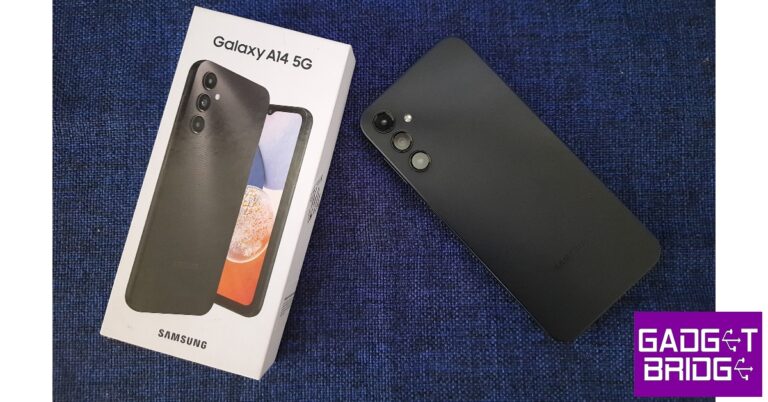
Samsung has been on a release spree since the start of the year, rolling out smartphones across different categories and price points. While the flagship Galaxy S23 dominates all the headlines, Samsung’s budget offerings always mix things up and give us something new to talk about each year. Prices for the recently launched Samsung Galaxy A14 5G start at Rs 16,499 for the 4GB + 64GB variant. The 6GB + 128GB variant will cost you Rs 18,999, while the 8GB + 128GB variant fetches Rs 20,999. This is the price category where most of India buys its smartphones. We got our hands on the A14 and used it for over a week, here is our Samsung Galaxy A14 5G review.
The Samsung Galaxy A14 5G ships in a compact rectangular box – much like a flagship. Inside the box, you will find the smartphone, a SIM ejector pin, a quick start guide, a regional lock guide, and a USB Type-C charging cable. There’s no power adapter inside the box, which is one part of the flagship experience that Samsung would have been better off not incorporating on the Galaxy A14. The smartphone is available in three colour options – Dark Red, Light Green, and Black.
Holding the Samsung Galaxy A14 gives off a study and rugged feel, even though the back panel and frame are made entirely out of plastic. The frame in particular is quite chunky and the rounded edges offer a good grip. The plastic back has a fine ridge texture that may not be everyone’s cup of tea but gives the smartphone a flair of its own. Samsung has updated the camera module to look like that of the Samsung Galaxy S23 series.
On the right side of the frame, you will find the volume rocker key and the power button that also doubles up as a fingerprint sensor. The keys are quite clicky and fun to fidget around with, and the fingerprint scanner is surprisingly fast. The hybrid SIM tray with a microSDXC slot has been housed on the left side of the frame. At the bottom, you will find the 3.5mm headphone jack, a USB Type-C charging slot, a microphone, and the speaker grille. The A14 does not have an IP rating.
Moving to the font, the 6.6-inch PLS LCD display is surrounded by thick bezels on all sides. The front camera is housed in a waterdrop notch, which feels a bit dated. With a refresh rate of 90Hz, the A14’s display offers a great touch response and elevates the browsing experience. The 1080p resolution is optimum for streaming OTT content as well. The screen-to-body ratio is just 80.2%. If it weren’t for the sizeable chin and the thick bezels, the Samsung Galaxy A14 could have set the design benchmark in this category.
Samsung Galaxy A14 5G review: Performance and Cameras
The Galaxy A14 is powered by Samsung’s own Exynos 1330 SoC while the Mali G-68 handles the graphics front. OS duties are carried out by the new Android 13 with One UI 5.0 on top. Samsung has promised two years of major OS updates along with four years of security patches with the A14. This means you will be able to run Android 15 on this device when it rolls out.
We used the 8GB + 128GB variant of the A14 for this review, and it was surprisingly fast. Everything down from the fingerprint scanner to the apps and browsing experience was snappy and quick. For a budget smartphone, the load time for the apps was minimal even where there were multiple tasks running in the background. CPU benchmark tests using Geekbench 6 returned a score of 922 points for single-core and 2,059 points for multi-core. Using this metric, the Samsung Galaxy A14 5G outperforms Redmi Note 12.
When it comes to the OS, One UI continues to be the best in the game, offering a clean look without a whole lot of bloatware. You can even access Android’s Material You themes on this device and personalise them according to your liking. Samsung’s One UI also offers some helpful features that are very easy to incorporate into your daily usage. Gestures like turn over to mute, double tap to turn the screen on/off, and pick up the phone to call make the phone all the more accessible to use. There’s also a one-handed mode on offer.
We played Call of Duty Mobile on A14 and the smartphone absolutely crushed it. We didn’t experience any stutters or lags during our gameplay. The phone got only slightly heated after playing COD for 30-40 minutes. More graphically demanding games like Apex Legends did experience a few frame drops occasionally but the overall experience was quite decent. At this price point, the Samsung Galaxy A14 may be one of the better gaming smartphones around.
The Galaxy A14 packs a 5,000mAh battery that Samsung claims can provide a 2-day backup. While the 2-day claim is definitely far-fetched, we got a decent performance out of the battery. After a day of above-average use with almost 5 hours of screen time, we were left with a 15-20% charge. The smartphone offers 15W wired charging, which shouldn’t come as a surprise since fast charging isn’t Samsung’s forte. It takes almost 2 hours to fully charge the phone.
The camera unit at the back features a 50MP primary shooter, 2MP macro lens, and another 2MP depth sensor. An ultrawide lens instead of the macro camera would have come in clutch for the A14. However, the 50MP shooter delivers a rock-solid performance.
In daylight conditions, the Samsung Galaxy A14 captures a good amount of detail, showcasing a versatile range of colours. The pictures feel rich and vibrant, without coming across as overprocessed. The portrait mode impressed us with its accurate edge detection and managed to capture the subject really well. The images take some time to process, but the overall results were quite satisfactory. A handful of flaws come up to the surface in limited lighting, but that is something you should expect from every smartphone in this price range.
Portrait ModeLow light shot without Night ModeLow light shot with Night Mode
We did not start out with high hopes while shooting images at night, but the 50MP primary lens exceeded our expectations. The images came out sharper than we expected, at the grain was ironed out while shooting in night mode. The 13MP selfie camera also performs decently and does not overcorrect the skin tone, which is good to see. The colour temperature is a bit cooler than other Samsung smartphones.
Starting at Rs 16,499, the Samsung Galaxy A14 is a good buy. We’d suggest going for one of the higher variants if you plan on gaming on this device. The smartphone covers most of the bases really well and even offers a good gaming performance. If it weren’t for the thick bezels on the display, the Galaxy A14 would be the easiest phone to recommend in this price range. Nevertheless, it is still a solid contender and we can see it enjoying a fair share of popularity this year.
Sony has been producing Bluetooth wireless speakers for ages now and they have become better year after year. The party speaker market is becoming bigger here in India and also in the USA. The Japanese major recently launched the Sony SRS-XV900 in the Indian market and we spent over a month with this larger party speaker. This is our Sony SRS-XV900 review, which you should not miss if you are in the market to buy a large wireless party speaker.
Sony SRS-XV900 review: Design
Ok, yes getting it out of the box is a task, but that is the only tedious chore you would need to go through with this one. Everything else is child’s play. In the box, you get the large speaker that measures almost 3 feet from top to bottom. With that, you also get an AC power cord and an optical cable to connect it with compatible televisions.
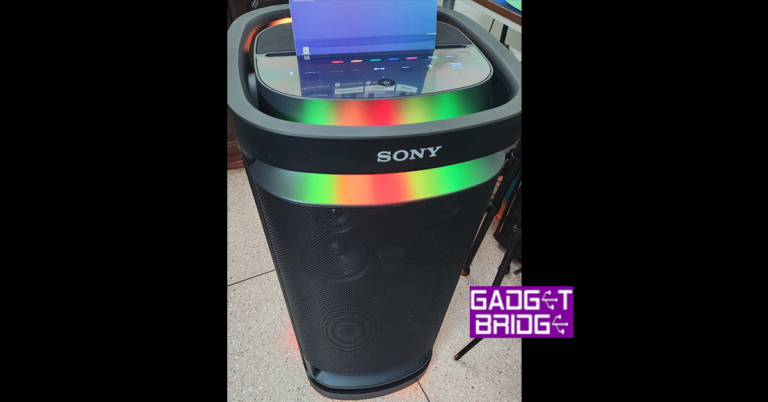
The Sony SRS-XV900 is a wireless speaker and turns on using the power button on the top panel. Here you will also find many other feather touch buttons like volume, play/pause, Bluetooth pairing, Bass Boost, USB and more. The speaker is built of very premium high-quality plastic and metal mesh, which can be found all around the speaker system.
There are a total of 9 speakers in the Sony SRS-XV900 Bluetooth speaker. This comprises of one large woofer, 2 smaller (120mm) front-firing audio drivers and 6 tweeters, which provide omnidirectional sound. So, no matter where you place this party loudspeaker in the room you will always get great audio reception. More about it is in the next section below.
When it comes to connectivity you get quite a few ports at the back. You can connect two MICs (with aux), or one MIC and one guitar (with aux) ports located on the rear. Here you will also find a USB pen drive/USB charging port as well as audio-in (3.5mm) and optical-in ports.
The Sony SRS-XV900 has a lot of LED lights on it, which can be found on the top and at the bottom. These give an ambient glow and fire up according to the sound being played. These can also be changed by pressing the light buttons on the top control panel. You can choose from different single colours such as red, yellow, blue, green and pink. There is also a multi-colour button, which will shuffle between these lights according to the sound being played.
This wireless speaker weighs 26.6 kg and is not particularly easy to carry. To make the lugging process easier the Sony SRS-XV900 sports two wheels at the rear bottom and a handle at the top so you can easily move it around. Seems like Sony thought of it all. If only there was an additional USB port up top (maybe behind a rubber seal), it would have been perfect. Other than that, everything seems top-notch.
Moving to the best part, its experience and performance. We loved every single bit of it and the attention-grabbing sound it produces is what we look for in every BT speaker. Yes, we cannot compare it to its smaller siblings, but those can also be paired with it using party play (in case you need to cover a larger area, not that it requires more).
The Sony SRS-XV900 party Bluetooth wireless speaker is great for all sorts of rooms, small to very large, even outdoors. Just place one of these and you are ready for the celebration. We played a lot of music with this speaker and it performed brilliantly. The highs, mids and lows are very audible and don’t even get us started on the bass. Simply put, it is SUPERB.
Connecting it with various devices is also easy and one can connect it with compatible TVs as well with the optical cable. We played a lot of music from Apple Music and played movies sound via it too. It just blew our mind at every step. We did get a chance or two to hear it perform at max volume and it did a wonderful job. No cracking of any sort.
The battery life of the Sony SRS-XV900 is great too. After 1 full charge, which does take quite some time. You get up to 25 hours according to Sony, which is just about right. We were able to secure 24.5 hours from the music BT speaker. Over that, Karaoke and Guitar feature is also available on this device.
All in all, we were quite happy with the audio quality of the Sony SRS-XV900.
Verdict
But, as always, it all boils down to the price of a device in a price-sensitive market like India. Sony is selling the Sony SRS-XV900 for Rs 99,990. While many will think it is steep, we also do think it could have been a little less priced. But when you listen to its audio output and the features it is giving, the price is somewhat justified. If you are looking for a premium high-end party speaker, your search ends here.
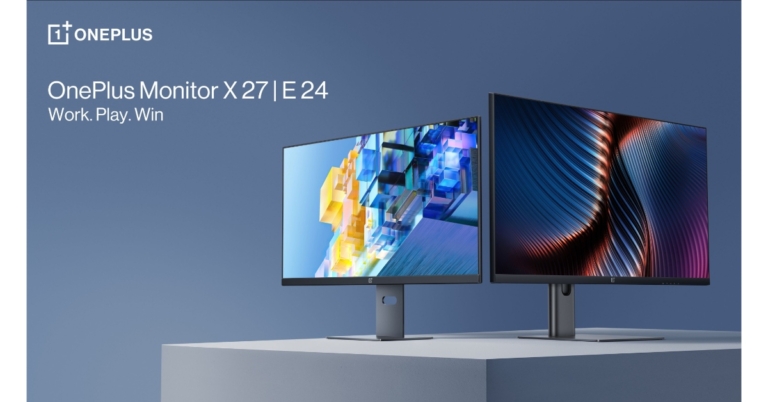
The OnePlus has joined the monitor market with the introduction of the OnePlus Monitors. The OnePlus Monitor X27 and OnePlus Monitor E24 are two new monitors that come in 27-inch and 24-inch sizes, respectively. The company has announced an open sale for both products in the country.
OnePlus Monitor E24 and X27 price in India and availability
The price of the OnePlus Monitor E 24 and X 27 has been set at Rs 11,999 and Rs 27,999 respectively. Both monitors will be available for purchase via OnePlus.in, the OnePlus Store app, Amazon, Flipkart, and OnePlus experience stores in the country.
OnePlus Monitor X27
With a 165Hz refresh rate and an astonishingly quick 1ms reaction time, the OnePlus Monitor X27 offers a quick and fluid gaming experience, delivering ultra-clear pictures with little latency or blurring. With AMD Freesync Premium, users can enjoy gaming at a professional level, with smooth visuals free of screen tearing and jittering, as well as flexible frame rates tailored to each individual game.
Users may stream content, play their favourite games, and much more with a clear 2K QHD visual resolution. A superb viewing experience is also offered by the OnePlus Monitor X27, whose expansive 178° IPS display and stunning HDR 400 colour offer amazing views from all directions.
The OnePlus Monitor X27 provides customers with a lifelike viewing experience thanks to its rich 10-bit colour and wide DCI-P3 95% colour gamut. The OnePlus Monitor X27 provides customers with a lifelike viewing experience thanks to its rich 10-bit colour and wide DCI-P3 95% colour gamut.
Thanks to its usefully changeable viewing angle, the OnePlus Monitor X27 adapts to user tasks with ease. Effective tilt, rotation, and pivot angles for the monitor are 5 to 21 degrees, 20 to 20 degrees, and 90 to 90 degrees, respectively. The monitor’s height can also be changed from 0-130mm.
A special type-C connector included on the OnePlus Monitor X27 allows customers to send their display feed while simultaneously charging their laptops at speeds of up to 65W quick charging. The Type-C connection on the OnePlus Monitor X27 enables power delivery of up to 65W through the USB PD standard (5V-3A, 9V-3A, 12V-3A,15V-3A,20V-3.25A). By displaying the screen of their phone or tablet, users can also share content. Users’ devices must support DisplayPort Alt Mode and be capable of communicating with the display feed using the Type-C connector provided in the package.
Users are able to multitask productively in a clutter-free setting without the need for additional displays thanks to the dual PbP and PiP split-screen modes. On the OnePlus Monitor X27, users may view documents from two different devices side by side and stream any video from their phone to the monitor’s upper right corner while finishing off that crucial piece of work.
OnePlus Monitor E24
With a Full HD display, 16.7 million realistic colours, and a wide 178° IPS panel, the OnePlus Monitor E24 offers clients top-notch imaging in its pricing category. Users may view their preferred content with less lag and more clarity thanks to a 75 Hz refresh rate and adaptive sync technology, which allows dynamic frame rate management. Due to TUV Rheinland certification, the OnePlus Monitor E24, like the OnePlus Monitor X27, provides a healthy viewing experience with less blue light and flicker-free graphics.
It also comes with a sturdy metal support to keep it upright. The device has a spectacular three-sided bezel-less design and an amazing adjustable stand angle (-5° to 15°) with useful tilt and rotation. Like the OnePlus Monitor X27, the OnePlus Monitor E24 has an integrated wire management feature to keep users’ workspaces organised. The OnePlus Monitor E24 also has type-C port connectivity, just like the OnePlus Monitor X27.
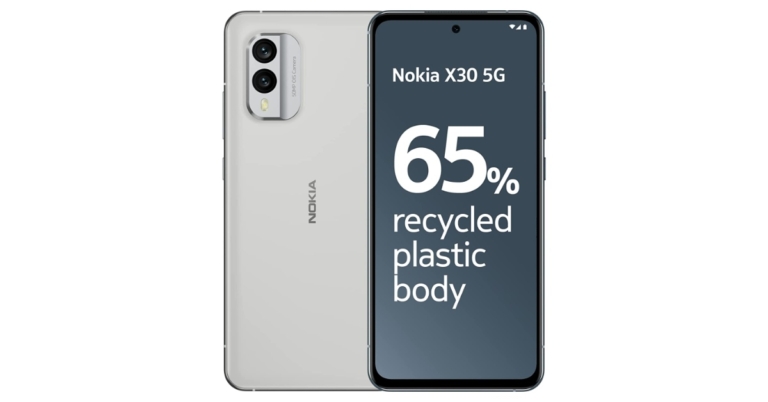
Nokia X30 5G has officially launched in India. The device was first launched at IFA 2022. The handset sports a 6.43-inch AMOLED screen and runs on a Snapdragon 695 5G SoC. The phone includes a dual back camera configuration and a 4,200mAh battery with the capability for 33W rapid charging. It boasts a 50-megapixel dual back camera arrangement. The phone also has an IP67 rating for water and dust protection.
Nokia X30 5G price in India and sale details
Nokia X30 5G has been launched in India with a price tag of Rs 48,999. The device will only be available in a single 8GB RAM with 256GB storage option. According to the company, it is a limited-period launch price. The phone will be offered in two colour options of Cloudy Blue or Ice White. The pre-booking for the device has opened and is scheduled to go on sale exclusively on Amazon and Nokia.com from February 20.
The launch offer includes a 33W fast charger and Nokia Comfort earbuds, which are valued at Rs 5799. There will be attractive exchange deals as well as key bank offers.
Nokia X30 5G specifications
This Nokia X30 5G’s 6.43-inch Full HD+ AMOLED display offers a 1,080 x 2,400-pixel resolution. It has Corning Gorilla Glass Victus protection, a 90Hz refresh rate, and a maximum brightness of 700 nits. Inside it is a Snapdragon 695 5G SoC with 8GB of RAM and 256GB of internal storage. The system runs on Android 12.
The Nokia X30 5G sports two cameras on the back: a 13MP ultra-wide angle camera and a 50MP main sensor with optical image stabilisation. Additionally, the back camera setup is shielded by a Corning Gorilla Glass layer. There is also a 16MP front-facing camera.
The Nokia X30 5G’s 4,200mAh battery supports 33W fast charging. Under the display of the smartphone is a fingerprint sensor. The Nokia X30 5G has a USB Type-C port, 5G, Wi-Fi 802.11 a/b/g/n/ac/ax-ready, Bluetooth 5.1, NFC, GPS/AGPS, GLONASS, and Beidou connectivity options. An accelerometer, ambient light sensor, e-compass, gyroscope, and proximity sensor are among the sensors on board.
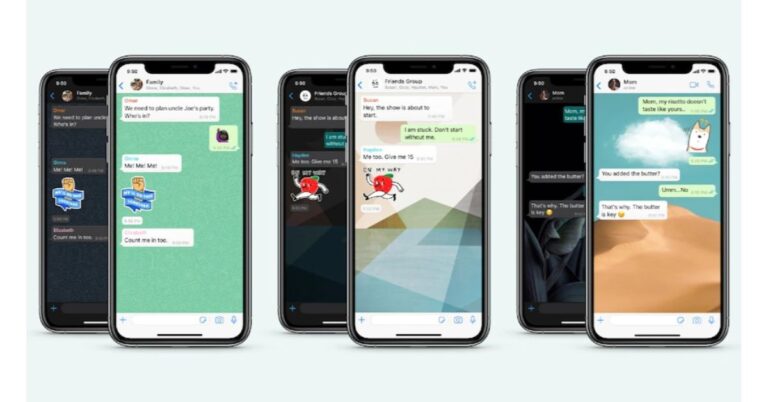
WhatsApp offers a lot of customisation options to its users, in order to bring a more personalised experience to the app. If you’re bored of WhatsApp’s default theme, you can always make things interesting by changing the chat wallpaper for your conversations on the app. In this article, we bring you the top ways to change the WhatsApp chat theme on an iPhone.
Step 2: Tap on the Settings tab at the bottom of the screen.
Step 3: Select ‘Chats’.
Step 4: Tap on ‘Theme’.
Step 5: Select the Dark Theme.
Change the Chat Wallpaper
Here’s how you can change the background wallpaper for all the chats on WhatsApp.
Step 1: Launch WhatsApp on your iPhone.
Step 2: Tap on the Settings tab at the bottom of the screen.
Step 3: Tap on ‘Chats’.
Step 4: Select ‘Chat Wallpaper’.
Step 5: Choose a chat wallpaper from WhatsApp’s wallpaper library. You can also upload a wallpaper or image from your phone’s gallery. You can choose a wallpaper for dark mode as well.
Step 6: Have a look at the preview to see how the wallpaper will look on the chat page. Tap on ‘Save’ to confirm your selection. If you want to browse more wallpapers, select ‘Cancel’.
Your changes will apply to every chat on WhatsApp. When you change the chat background, only you will be able to view the new wallpaper. The changes won’t apply to other people in the conversation.
This is how you can change the WhatsApp chat theme and background wallpaper on an iPhone. If you want to change the wallpaper for one specific chat, open the chat thread and tap on the contact’s name at the top. From the options, select ‘Wallpaper and sound’ and choose the image you want as the chat background.
Garena Free Fire is a battle royale game with regular awards and tournaments to keep players interested. If you play Garena Free Fire, you should be aware of the redeem codes that are released on a daily basis. However, because the battle royale game is banned in India, players from other countries can use the Free Fire Redeem codes daily. If you’re unfamiliar with the Garena Free Fire redeem codes or don’t know how to get them, we’ve put together a step-by-step guide to help you redeem them. Check out Garena Free Fire Redeem Codes for 16 February 2023.
The Free Fire redeem codes are a great way to get free stuff. These are 12-digit codes that contain alphabets and numbers, as well as an expiration date and time. Because the Garena FF redeem codes cannot be used more than once, you should hurry to the redemption page to claim your free reward before someone else does. To get a free reward, all you have to do is go to reward.ff.garena.com/en, which is the official redemption page. Also, keep an eye on this space for daily updates on Garena Free Fire redemption codes and rewards.
Garena Free Fire Redeem Codes Today 16 February 2023
FKY89OIKJH2RGD
GYU4AZVXNJHYN
FYUKL09OKATQRD
E2WCFVGEBHFJU
BHCXZJDOLR5TK
OYG9KIJ8UHGTAF
RQDE12CF3EGRFJ
FIVUBYHDENMTYH
FOL9XZKO8A5RQ
FF6C2F3EVRFBNI
FVUYTXFZSFEIKN
F5TGOWINR32BYT
FWVGBRFNGOL54
FEKMTGJNVHBUY
FESF4RFS8NTYHY
How to Get Free Fire Redeem Codes for Garena on 16 February 2023?
Daily Amazon brings a fresh quiz for its customers with exciting rewards on its platform. The Amazon quiz can be played every day from 12 AM to 11:59. 16 February 2023 Amazon Quiz has gone live on its platform and the e-commerce platform Amazon is today giving you a chance to win Rs 5,000 Amazon Pay Balance.
To participate all you need to do is log in to your Amazon app on your device and give answers. Daily a new set of questions are presented to the participants which gives them a chance to win exciting prizes. The questionnaire consists of five easy questions that are usually based on general knowledge and current affairs. You can submit the correct answers and can win an Amazon Pay Balance of up to Rs 50,000. It should be noted that the quiz is not accessible on the web platform instead you have to participate only through the dedicated app.
Question 1: Jofra Archer recently picked up his first 6 wicket haul in ODI cricket against which country?
Answer: South Africa
Question 2: Siddharth Malhotra and Rashmika Mandanna can be seen together in a spy thriller film titled Mission _____ . Fill in the blanks
Answer: Majnu
Question 3: The Adani group recently acquired the important port of Haifa in which country?
Answer: Israel
Question 4: This is ‘The Temple of Heaven’ in which city?
Answer: Beijing
Question 5: This animal is found on the logo of which organization
Answer: WWF
How To Play Amazon Quiz
Only app users are eligible to play the Amazon quiz every morning from 12 AM to 11:59 PM. The quiz is not available on the desktop. For those who are unaware of how to play the Amazon quiz below are the steps, you can follow to take the quiz.
Firstly download the Amazon app from Google Play Store or App Store
Now fill in the required information through the Sign Up option.
You need to log in to the Amazon app and scroll down on the home screen to find the Amazon Quiz banner.
Tap on the Amazon Quiz banner and tap on the Start button to start the Quiz.
Now you will get 5 questions and you need to answer them correctly. One wrong answer will eliminate you from the Quiz.
After answering all the questions correctly you are now eligible for a Lucky Draw.
The winner’s name will be announced today at 12 PM.
How Do I Move Windows 11 Without Losing My Data? You may use a 100% secure OS transfer tool. PassFab 4EasyPartition is an excellent system migration tool for transferring Windows to a new hard drive.
Transfer/Migrate Windows 11 to New Hard Drive in 2023 [NEW]
The answer is that you can transfer Windows to a new hard drive. Making a backup image of your current Windows 11 installation, copying it to the new hard drive, and setting up the boot settings to start from the new drive are the steps involved in moving an operating system to a new hard drive. This procedure can assist you in maintaining a backup copy of your operating system, upgrading to a bigger hard drive, or replacing a problematic hard disc. You may find detailed instructions on how to move Windows 11 to a new hard drive in this article.
Can I Transfer Windows 11 to New Hard Drive
Continue reading if you wish to migrate Windows to a new drive. Transferring Windows 11 to a new hard drive may not be a particularly difficult task if you are familiar with the steps involved in making an operating system backup image, setting up the boot settings, and restoring an image to a new hard drive. The procedure can, however, become more challenging if you are unfamiliar with these processes or run into any technical difficulties along the way.
The software can make the process of moving Windows 11 to a new hard drive easier since it frequently has an intuitive user interface and can automate many of the tasks.
Why I Need to Transfer Windows to New Hard Drive
You might need to copy Windows to a new hard drive for several reasons:
Adding a new hard drive: The quantity of data on your computer’s hard disk might increase as you utilize it. increasing the size of the hard disc.
Replacing a bad hard drive: There are many different types of mechanical, wear-and-tear, and power surge-related reasons why hard drives might break down over time.
Keeping a backup copy: You may get a backup copy of your operating system and data by moving Windows 11 to a new hard drive.
Increasing performance: Installing Windows 11 on a fresh hard drive might also make your machine run faster.
Ultimate Choice-Transfer Windows to New Hard Drive with 4EasyPartition
Transferring Windows 11 to a new hard drive may be made easier with the help of many available tools. These tools offer a user-friendly interface and can assist in automating many of the necessary tasks.
There is a third-party partition management system called PassFab 4EasyPartition that may be used to move Windows 11 to a new hard drive. The best partition manager for Windows, PassFab 4EasyPartition, aims to increase disc performance. It provides secure OS migration to SSD/HDD in a matter of clicks. You may migrate with just one click rather than having to spend hours reinstalling operating systems and apps.
Key Features of PassFab 4EasyPartition:
Direct data transfer without reinstalling the application. Save time and increase productivity.
When users switch to a more efficient OS, make sure there are no service interruptions. Applications, system configuration files, and other items don’t need to be installed.
Move your data, operating system, and apps securely and effectively without losing any data.
Swap out your HDD for an SSD for the quickest and easiest method to boot
System migration is just only a few steps thanks to an intuitive UI and a step-by-step tutorial.
Steps to transfer Windows to a new hard drive using PassFab 4EasyPartition:
Step 1: Launch PassFab 4EasyPartition after downloading it, then select “Start” to begin the procedure.
Note: The new USB flash drive, HDD, or SSD that you wish to migrate to must be connected to your computer.
Step 2: Click “Start” to move forward after choosing the source disc from which to migrate and the destination disc you wish to migrate to.
Step 3: A warning pop-up window will appear. To move on to the next stage, select “Sure.”
Step 4: Please verify the details for the source disc and the target disc in the preview interface before clicking “Start” to begin system migration. It won’t take long for the migration.
Result: Your system was successfully migrated. To finish the procedure, click “Finish.”
People Also Ask
How to transfer windows from one SSD to another?
Ans: For the majority of users, replacing a hard drive is challenging since it entails a number of challenging processes, including reinstalling the operating system and certain other essential software. Fortunately, PassFab 4EasyPartition allows you to move the operating system to another SSD without having to reinstall Windows.
2. Can I move Windows from HDD to SSD without reinstalling?
Ans: Without having to reinstall the operating system, you may transfer Windows from a normal hard disc drive (HDD) to a solid-state drive (SSD). This method of producing a backup image of your existing Windows system is called cloning. The tool PassFab 4EasyPartition can help to simplify the procedure.
3. How do I transfer Windows 11 to a new SSD?
Ans: To completely copy a hard drive to a new SSD, including the operating system, applications, and data, utilise PassFab 4EasyPartition for Disk Clone. It is therefore the perfect tool for moving Windows 11 to a fresh SSD. A suitable choice for people who are unfamiliar with the hard disc cloning procedure.
4. Does Windows 11 have a cloning tool?
Ans: Although there isn’t a built-in cloning tool for Windows 10, there are a number of third-party software that may be used to copy a hard drive, including your data and operating system. Your operating system and data may be quickly transferred to a new hard drive with PassFab 4EasyPartition.
Conclusion
Windows may be transferred to a new hard disc. There are various ways to do this, one of which is to use third-party software to clone the hard disc. Manually transferring Windows to a new hard drive is not always simple or dependable. System restoration in Windows 11/10 may occasionally fail with an error message. PassFab 4EasyPartition is one such program that can be used to transfer Windows 10 to a new hard drive.
Features including data migration, boot disc creation, disc cloning, and a user-friendly interface are available with PassFab 4EasyPartition.
Google’s native password manager is an excellent tool to store all your passwords in one place and sync them across multiple devices. Every time you enter a password on Chrome or any other third-party client, Google Password Manager asks your permission to save the password on your Google Account. However, if you want to manually save a password, it will require some additional steps. In this article, we show you how to manually add passwords in Chrome Password manager.
This is how you can manually add passwords in Chrome Password Manager using your laptop and smartphone. You can also sync and back up your passwords across all your devices. Read our article here to find out how. Read this article to know how to manage your saved passwords on Chrome like a pro.






























![How to Move Windows 11 to Another Drive [2023 Updated]](https://www.gadgetbridge.com/wp-content/uploads/2023/02/laptop-windows-microsoft-768x402.jpg "How to Move Windows 11 to Another Drive [2023 Updated]")