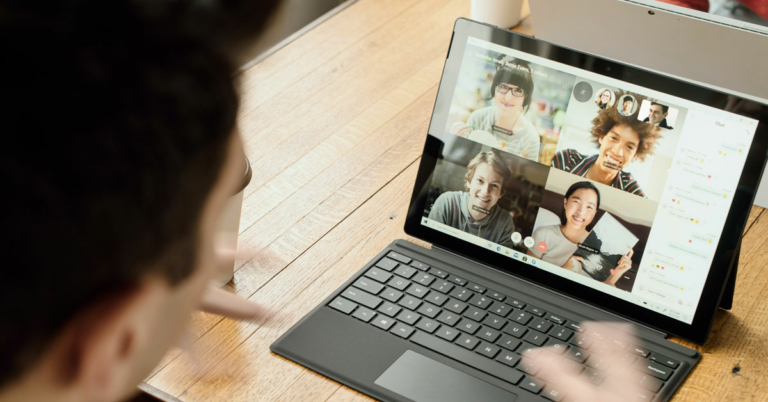
Google meet is one of the most used online meeting clients that we use in our everyday life. It is easy to use, comes with interesting features, and can be accessed on any device. It does not require you to download any additional apps, so it does not take up a lot of space on your gadget. If the background noise is too much, then attending meetings online can sometimes be a little aggravating. Just for that, we have gathered the top 3 ways to remove background noise in Google Meet video calls.Here is how to remove background noise in Google Meet video calls:
Sit in a room with good isolation:
Sitting in a room well isolated can reduce the amount of background noise of a dog barking nearby or the noise that is produced by construction work. Also, try to attend meetings in that room of your house which is filled with sound-absorbing materials such as rugs, mats, carpets, and heavy curtains. Soft materials like blankets and rugs have the ability to absorb sound up to some extent. Also, you have to make sure that while attending the meeting you are not directly facing a wall, as it will reflect back your voice and can produce noise.Read also: Microsoft now introduces new custom background effects in
Turn off the appliances that produce noise:
Of course, controlling everything in your surroundings is not possible, but you can at least turn off the appliances in your house that may create noise. If you have pets in your home it’s better to stay as far as possible from them as you can. It is understandable that not everyone has a separate room at their home, but it is better to stay away and create boundaries from the source noise.
Remove noise inside Google Meet:
Using Google’s noise cancellation feature can also help you to reduce noise up to an extent. However, most of the noise-removing tools make your voice a bit robotic, but anyway it would be far better than that of a dog barking nearby.If you have tried the previous options and the noise is still there. It is the right time to enable Google’s noise cancellation feature.To enable noise cancellation feature in your Google Meet just follow the given steps:
Open google meet to join the meeting.
Before tapping on ask to join click the 3 dot menu.
17 December 2021 Amazon Quiz has gone live on its mobile app platform. The quiz can be played from 12 AM to 11:59. All you need to do is just answer five easy questions that the e-commerce website puts before you. Today you can stand a chance to win Rs 5,000 Amazon Pay Balance.Every day Amazon posts a new questionnaire that consists of five simple questions about general knowledge and current events. To enter a lucky draw, participants must correctly answer the questions. One incorrect answer will result in your elimination from the quiz. Each month, only one person will be declared the winner and the results will be announced at the end of the month. Amazon customers who submit correct answers can win Amazon Pay Balance worth up to Rs 50,000. To ensure that you answer all five questions correctly, Gadget Bridge updates all of the correct answers on a daily basis. Take a look at today’s answers:
17 December 2021 Amazon Quiz Answers
Question 1: What name is given to the portal for monitoring the implementation of the National Clean Air Programme in India?
Answer: PRANA
Question 2: Mihidana is a GI-tagged sweet dish from which Indian state?
Answer: West Bengal
Question 3: Which border guarding force of India is deployed along its border with Nepal and Bhutan?
Answer: Sashastra Seema Bal
Question 4: If you were born on this occasion, what would your zodiac sign be?
Answer: Capricorn
Question 5: In which country do the Pumas represent this sport?
For Christmas and New Year, Sony India has announced exciting offers across television and audio products. The offer runs from December 16 to January 3, 2022, and is available through a variety of online and offline channels.On the occasion of Christmas and New Year, Sony India has brought attractive deals and offers on its wide range of audio products and Bravia Televisions. The sale has already begun and it will be valid till January 3 across Sony retail stores (Sony Centre and Sony Exclusive), www.ShopatSC.com portal, major electronic stores and exclusively on Amazon and Flipkart e-commerce portal.On a select range of BRAVIA televisions, get an instant cashback of Rs 20,000, up to 30% off MRP, one EMI free, and two years warranty this festive season. The Sony Bravia Television features the XR Cognitive Processor, Google TV, Dolby Vision, Dolby Atmos, and 4K 120fps.Sony is discounting a variety of audio products, including headphones, Truly Wireless earbuds, and Bluetooth speakers. In addition to this, customers who purchase the recently launched X-Series party speakers SRS-XG500, SRS-XP500, and SRS-XP700 will receive a complimentary microphone worth Rs 1,490.The WH-1000XM4 and WF-1000XM3 are now available for Rs 24,990 and Rs 9,990, respectively, at a reduced price. The Sony WH-XB900N Noise Cancelling Headphones will cost Rs 9,990. The WH-H910N NC Headphones were earlier priced at Rs 24,990 but now they can be bought for Rs 9,990.The WH-CH710N Noise Cancellation Headphones, on the other hand, are available for just Rs 7,990. The WF-XB700 TWS earbuds, on the other hand, are now available for Rs 6,990.Sony WF-H800 TWS earphones will cost Rs 6,990. Originally these were selling for Rs 16,990 before the Sony sale. WI-SP510, WH-CH510, WI-XB400, WI-C400, WI-C310, and WI-C200 are among the other headphones and neckbands that will be available for purchase. These can be purchased for Rs 3,990, 2,990, 2,790, 2,990, 1,999 and 1,599 respectively, at a discounted price. The Sony SRS-XB13 Bluetooth speakers will be offered at a reduced price of Rs 3,590.
For the latest gadget and tech news, and gadget reviews, follow us on Twitter, Facebook and Instagram. For newest tech & gadget videos subscribe to our YouTube Channel. You can also stay up to date using the Gadget Bridge Android App. You can find the latest car and bike news here.
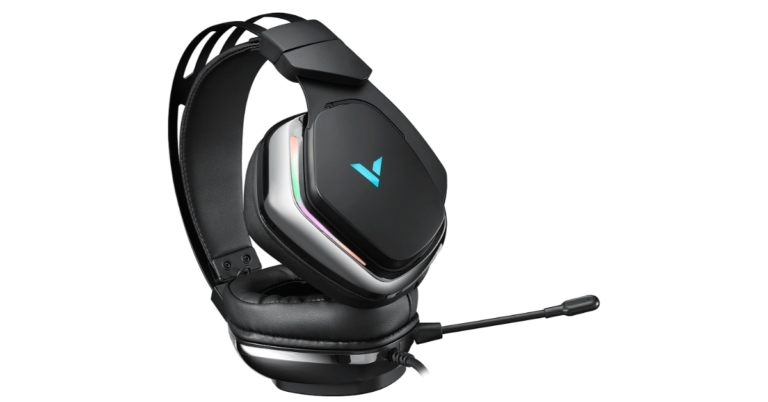
Rapoo, a company known for producing a variety of gaming accessories, has just released its latest gaming headphones in the Indian market. The company has rolled out the Rapoo VH710 Gaming Headset. The audio device is powered by 50mm drivers, In addition to this, the earphones come with ENC Mic and cool LED backlights.
Rapoo VH710 Gaming Headset price and availability
Rapoo VH710 Gaming Headset has been introduced in India with a price tag of Rs 3,999. The budget gaming headphone will be available for purchase via online and offline stores in the country. It comes with a Limited Replacement Warranty of 1 Year from the date of purchase.
Rapoo VH710 Gaming Headset specifications
Speaking about the design first, the Rapoo VH710 Gaming Headset is lightweight headphones featuring a headband suspension and is built using ultra-strong and durable materials. There are RGB backlight LEDs wherein you can create your own personalised ambience to enhance your gaming experience. In addition to this, there is an in-line controller that helps you with quick volume controls, mute and backlight controls.In terms of specifications, the Rapoo VH710 Gaming Headset comes equipped with 50mm drivers for punchy bass and crisp highs. The headphones feature an ENC microphone with de-noising functions and are also included in the headset for stable and crystal-clear chats and voice calls. You can also fine-tune the drivers using RAPOO’s proprietary driver interface to customise voice modes. The company promises to provide a virtual 7.1-channel surround sound environment that allows you to clearly distinguish and detect sound direction.Salient Features:
Virtual 7.1 channel audio output brings you a stunning surround sound experience
Cool RGB LED backlight
Headset with controller enables you easy to launch multifunction
Sound unit with 50mm drivers, showing every sound details
ENC single microphone with de-noising function, clear and stable calls
Lightweight design with a flexible headband suspension system
Built with Ultra-strong and durable materials
Customised driver configuration interface allows you to customise voice modes freely
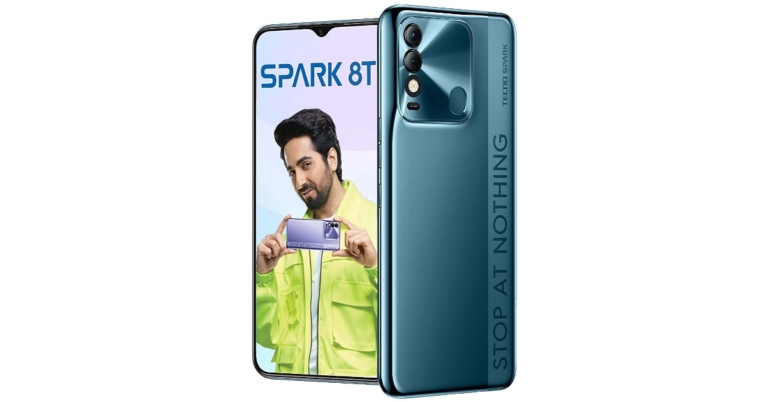
Transsion holding smartphone brand – Tecno Mobile has announced the expansion of its Spark 8 smartphone series with the launch of the new device. The company has introduced Tecno Spark 8T in India. The device is powered by MediaTek Helio G35 SoC and boasts a 5,000mAh battery. Being an economical option under the lineup the phone also features a 50MP dual rear camera setup. Keep reading to know its price in India and availability details.
Tecno Spark 8T price in India and availability details
Tecno Spark 8T has been launched in India in a single 4GB RAM with a 64GB storage option. The phone is priced at Rs 8,999. The device is offered in four colour options of Atlantic Blue, Cocoa Gold, Iris Purple and Turquoise Cyan. The smartphone is now available for purchase in the country via Amazon.To recall Tecno Spark 8 comes in two variants 2GB RAM with 64GB storage at Rs 7,999 whereas the 3GB RAM with 32GB internal storage option is priced at Rs 9,299. The mobile is being made available in three colour options of Atlantic Blue, Iris Purple and Turquoise Cyan.
Tecno Spark 8T specifications
Speaking about the specifications, the Tecno Spark 8T has an HD+ 6.56-inch FHD display. The screen offers 500 nits of peak brightness and a screen to body ratio of 91 percent. The device runs on HiOS on top of Android 11. Under the hood, there is a MediaTek Helio A35 processor. The phone is offered in a single 4GB of RAM and 64GB of internal storage option that can be expanded using a microSD card.The new Tecno Spark 8 comes with a dual rear camera set up inside a square-shaped camera module. The set-up consists of a 50-megapixel main camera and an AI secondary lens alongside the LED flash. Pro shooting modes like 1080P Time-lapse, Slow Motion, AR Shot, smile capture, AI Portrait and many more to help you click professional photos and videos. Upfront there is an 8-megapixel sensor for taking selfies.In addition to this, there is a 5,000mAh battery and a rear-mounted fingerprint sensor. For connectivity, there is WiFi, 4G, Bluetooth 5.0, GPS, micro USB port and USB OTG. While the sensors onboard include an accelerometer, ambient light, proximity sensor and g-sensor.
For the latest gadget and tech news, and gadget reviews, follow us on Twitter, Facebook and Instagram. For newest tech & gadget videos subscribe to our YouTube Channel. You can also stay up to date using the Gadget Bridge Android App. You can find the latest car and bike news here.
Attending meetings or classes on your phone or laptop is very normal in today’s era. Online meetings have opened the door to get involved in any meeting on the go, but attending the meetings online does come with the cost of background noise. Dogs barking in the street, children playing in the lobby, can be very irritating and inappropriate at times. We have found 4 amazing ways by which you can remove background noise from your end in Zoom Video calls. Check the top ways to remove background noise in Zoom video calls:
Use rooms with furniture carpets and other sound-absorbing materials:
Have you ever noticed that in an empty room how your sound echoes? Yes, each and every room produces some amount of echo, we might not be able to hear it, but there is some amount of echo in any room. The echo can be reduced if you have a heavy curtain or furniture inside it.So, you should always try to do meetings in that room of your house which has most of the furniture, carpets and other sound damping materials. The microphones on devices are sensitive and can pick up even the slightest of sound. So, next time whenever you sit for an online meeting, make sure you try this method and see the results.Read also: Best ways to fix audio issues in Zoom meetings
Use the Microphone correctly:
Most of the people don’t know where the microphone of their device is placed, so either they end up blocking the mic on their phone or they stay too far from the mic of their laptop. Blocking the mic makes your sound muffle and noisy. The mics on the phones are generally placed at the bottom of the phone and on the top bezel in the case of laptops. So make sure that they are neither blocked nor you are too far from them.Additionally, you can also use an external mic if it is available with you, or you can just use any normal pair of earphones. External mic/earphones generally are better than onboard mics on most of the laptops.
Use inbuilt noise reduction tools:
Zoom is a really popular web conferencing tool that is used across the globe. It has many features and one of them is its built-in noise suppression tool.It reduces the amount of background noise from your end and offers clean and crisp audio.The only requirement in this is that you should have the latest version of the Zoom desktop app (5.2.0 or newer). If you have the latest version then follow these steps:
Click on the Settings icon on the top right corner.
Then, select the audio option.
Under the suppress background noise menu, you will find 3 stages of audio separation select any one according to your surroundings.
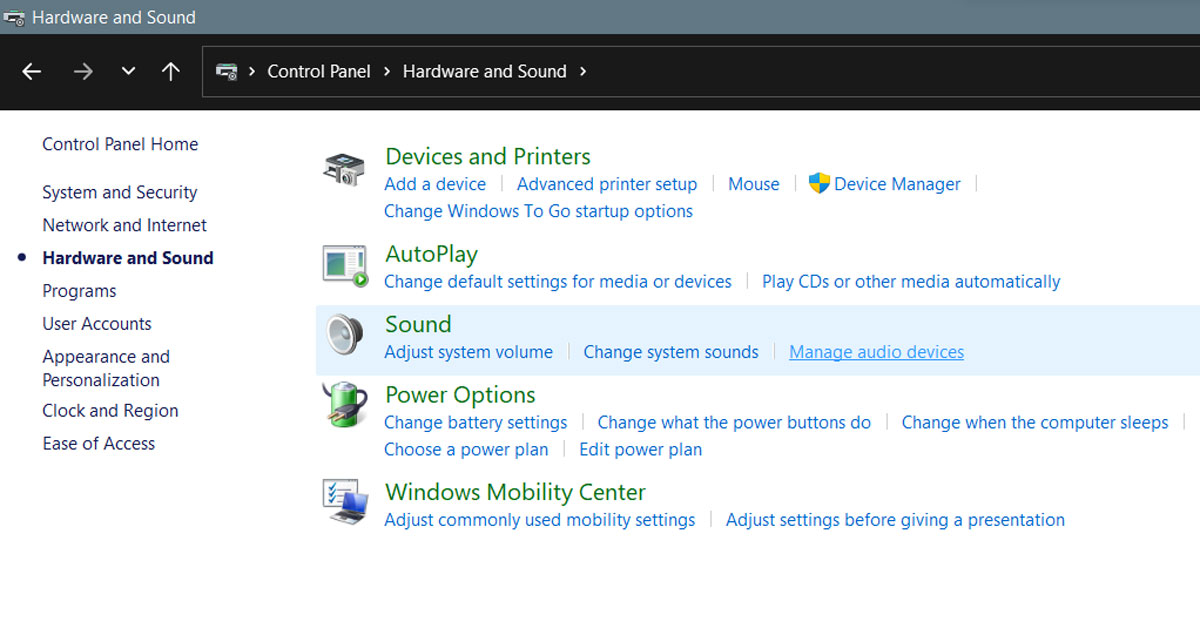
Another way to reduce background noise in Zoom Video calls is this one. Windows also has its own in-built noise suppression tools if you are on Windows 7 or later, then you can also find it in your system. Just follow the steps below to enable noise reduction:
Open hardware and sound option in the control panel.
Under the sound option, click the manage audio devices.
Switch to the recording tab.
Select the microphone being used and click on properties.
You will find a slider that controls the microphone’s sensitivity, reduce it and see if it reduces the noise.
Also, go to the microphone effects option and enable noise reduction and enable acoustic echo cancellation.
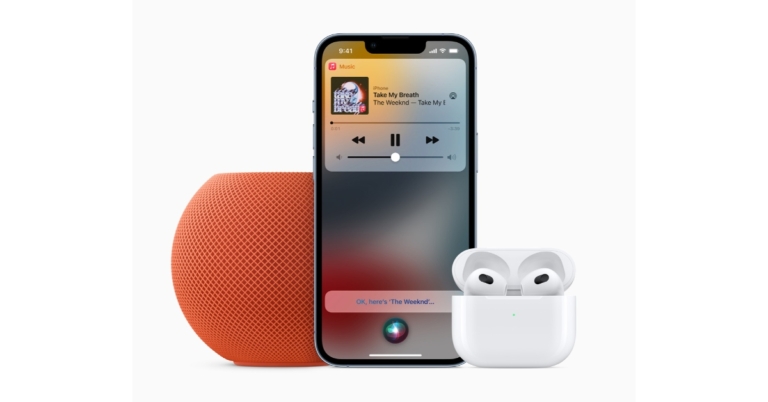
Apple has rolled out the Apple Music Voice Plan, a new Apple Music subscription tier built around Siri’s capabilities. For Rs 49 per month, Apple Music Voice Plan subscribers get access to the service.Providing access to its new Apple Music Voice plan, the new service, which is primarily intended for use with HomePod speakers or AirPods, restricts users from using Siri to access Apple Music.Oliver Schusser, Apple’s vice president of Apple Music and Beats said, “Apple Music and Siri are natural partners and already work seamlessly together. With Siri actively used on hundreds of millions of devices worldwide, we are thrilled to add this new plan that delivers an effortless music experience just by using your voice and makes Apple Music accessible to even more people around the world.”Users can sign up for the Apple Music Voice Plan by saying “Hey Siri, start my Apple Music Voice trial,” or by going to the Apple Music app and signing up. Users can request music to be played across all of their Siri-enabled devices, including HomePod mini, AirPods, iPhone, or any other Apple device, as well as when using CarPlay, once they have subscribed to the Apple Music Voice Plan.In addition, Apple Music is releasing hundreds of new mood and activity playlists created by Apple Music’s editorial team and optimised specifically for voice. For a truly personalised music experience, Siri subscribers can ask Siri to “Play the dinner party playlist,” “Play something chill,” or even “Play more like this.” These new playlists are available to all Apple Music subscribers, and they make using Apple Music with Siri even better. Apple Music Voice Plan subscribers will also have access to all of Apple Music’s playlists, including New Music Daily, Rap Life, Today’s Hits, Today’s Country, A-List Pop, R&B Now, and more.Australia, Austria, Canada, China, France, Germany, Hong Kong, India, Ireland, Italy, Japan, Mexico, New Zealand, Spain, Taiwan, the United Kingdom, and the United States will all have access to the Apple Music Voice Plan later this fall.Also, the subscribers will receive a personalised in-app experience that includes suggestions based on the listener’s music preferences as well as a queue of recently played music via Siri. There will also be a section called “Just Ask Siri” in the app where subscribers can learn how to get Siri to work better with Apple Music.Subscribers can easily switch to Apple Music’s individual plan for INR 99 per month or family plan with up to six accounts for Rs 149 per month at any time to gain access to Apple Music’s premium offerings, which include Spatial Audio and Lossless Audio, Lyrics, Music Videos, and more.
For the latest gadget and tech news, and gadget reviews, follow us on Twitter, Facebook and Instagram. For newest tech & gadget videos subscribe to our YouTube Channel. You can also stay up to date using the Gadget Bridge Android App. You can find the latest car and bike news here.
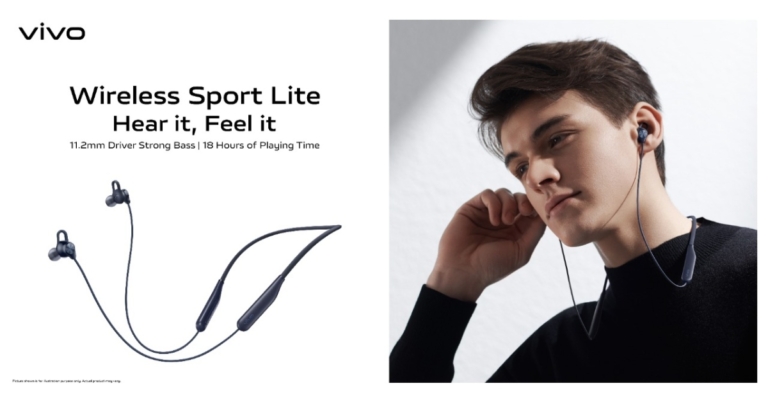
Vivo has officially announced the launch of its new audio device in India. The company has introduced Vivo Wireless Sport Lite neckband earphones. The new earphones feature an 11.2mm driver and Call Noise Cancellation feature. In addition to this, there is support for Google Voice Assistant for hands-free operation.
Vivo Wireless Sport Lite price and availability details
Vivo Wireless Sport Lite neckband earphones have been launched in India with a price tag of Rs 1,999. The device will come in two colour options of Black and Blue. These earphones are now available for purchase via Vivo India E-store and across all partner retail stores in the country.
Vivo Wireless Sport Lite specifications
Vivo Wireless Sport Lite neckband earphones come equipped with an 11.2mm dynamic driver unit designed to deliver a more powerful and full-bodied sound as well as a bio-fibre composite diaphragm to enhance audio intricacies. These earphones offer a frequency response range of 100–8,000Hz. The neckband also comes with a low latency rate of up to 80ms which results in a theatre-like audio experience.The device also includes a Call Noise Cancellation feature, which ensures that you can clearly hear everyone on the other end of the line and have uninterrupted communication. The neckband’s 129mAh battery provides 5 hours of playtime in just 10 minutes. When fully charged the device can run for 18 hours (play music of AAC codec at 50% volume) and can last for 13 hours (play music of AAC codec at 100% volume)Vivo Wireless Sport Lite comes with Bluetooth version V5.0 support that helps them pair instantly with nearby devices. The earphones are IPX4 rated for water and dust resistance. The device also offers many functional features including Easy connection, Magnetic switch, Google Voice assistance, Quick Pair, and Game low lagging which makes it easy for users to use.Commenting on the launch, Vivo Spokesperson said, “At Vivo, we are committed to delivering superior experiences that surpass the ever-growing demands of our consumers. After witnessing the success of TWS Neo earphones last year, we are pleased to announce the launch of a new addition to our allied devices range with Vivo Wireless Sport Lite neckband, a step towards the development of IoT technology. With this new launch, we aim to strike a chord amongst the everyday music lovers by offering an amalgamation of unique and immersive audio experience along with unmatched sound clarity”.
For the latest gadget and tech news, and gadget reviews, follow us on Twitter, Facebook and Instagram. For newest tech & gadget videos subscribe to our YouTube Channel. You can also stay up to date using the Gadget Bridge Android App. You can find the latest car and bike news here.
If you are someone who is always keen on learning new things, then Twitter Spaces can be a great platform for you. It will provide you an audio room experience to exchange ideas, talk about latest happenings around the globe, or just chit chat with like minded people. But, there are some tricks by which you can improve the experience of the Twitter Spaces. Here are some of the best tricks for you if you are a Twitter Spaces addict:
Use Earphones/Headphones:
Discussion on Twitter Spaces can go on for very long and you don’t want to stress the muscles of your hand holding the phone when attending Spaces. So, using a pair of earphones can be a very handy option.Using earphones not only lets you enjoy Spaces without getting tired but also you can do some of your work while listening to the Spaces. Also, if you use earphones you will not annoy your roommate with the discussion of tasty food, while they are on a diet.So, next time before you join or host any Space, grab yourself a pair of earphones and you are good to go.Read also: Twitter teams up with Walmart to launch Live Shopping on its platform
Plan and Schedule your Spaces:
Planning Spaces can be a great option if you love to organise and schedule things in your life. Scheduling Spaces will also allow your followers to get prepared for the topic that you have chosen and you will get more interaction. With the Twitter app you can schedule the Space that you want to host just follow these steps:
Open the Twitter app on your Android or iOS device.
Click the “+” icon on the bottom right side of the screen, and select Spaces.
Give the name to the Spaces and select topics for the Space.
Finally, tap on the calendar icon and schedule your Space, you can also share the scheduled Space via Tweet, DM, or by sharing the link.
Sharing Tweets on Spaces:
If you are going to host a space then there is one cool and interesting feature that will allow you to make your space more interesting and more interactive. You can share tweets in your space to make the Twitter Space more interesting. So, if you are discussing a topic with the audience and you want to bring another perspective to the conversation that you have seen in a tweet, you can simply share that tweet into the spaces. The shared tweet will be displayed on the top of the screen and will be visible to everyone.To share tweets in Twitter Spaces just follow these steps:
Go to the Twitter app and just start a space, as you do it normally.
Then, find the tweet that you wanted to share and tap the share icon on the tweet.
Lastly, select Spaces, and the tweet that you wanted to show to your audience will be shared.
Talking with your followers can be a very fun experience, but it might get boring if your followers are not as geeky or nerdy as you are. So, it would be a better option to invite your friends and connections who are relevant to the topic to share their thoughts and ideas on the space. Inviting people like you in the space will help to keep the space interesting for a longer period.With these Tips and Tricks, you can get a better experience using Twitter Spaces.For the latest gadget and tech news, and gadget reviews, follow us on Twitter, Facebook and Instagram. For newest tech & gadget videos subscribe to our YouTube Channel. You can also stay up to date using the Gadget Bridge Android App. You can find the latest car and bike news here.
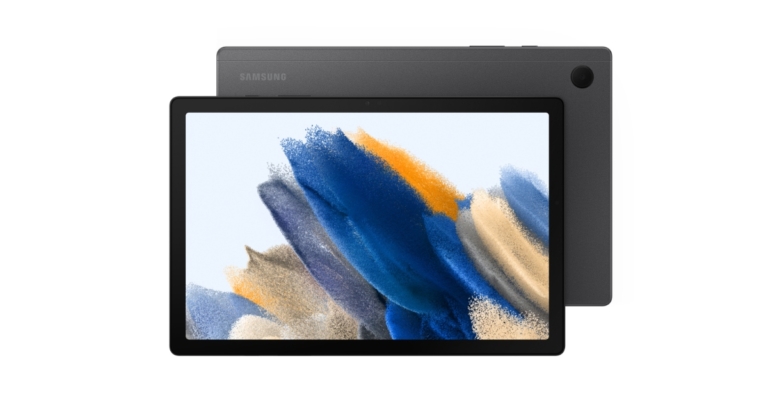
The South Korean smartphone manufacturer Samsung appears to be on a roll. The much anticipated Samsung Galaxy Tab A8 has finally been released in the market. The newly released Tab is a cost-effective option with a variety of features, including quad speakers powered by Dolby Atmos and more. The Samsung Tablet is a mid-range tablet with an octa-core SoC and a long-lasting battery.
Samsung Galaxy Tab A8 price and availability details for India
Samsung Galaxy Tab A8 comes in three different models- LTE and WiFi. The company has not yet revealed the price of the tab but it will be available in three distinct configurations of 3GB RAM with 32GB internal storage, 4GB RAM with 64GB internal storage and 4GB RAM with 128GB storage options.The device will be offered in three colour options Gray, Pink Gold, and Silver. Like we said before, the pricing is yet to be announced but the Samsung Tab will be made available in the US and other regions from January 2022.
Samsung Galaxy Tab A8 specifications and features
Coming to the specifications, the Samsung Galaxy Tab A8 comes with a 10.4-inch TFT display having 1,920×1,200 pixels of resolution. It offers 80 percent screen-to-body ratio and a 16:10 common aspect ratio. The tab runs on One UI based on top of Android 11. Under the hood, there is an octa-core processor paired with up to 4GB of RAM with a 128GB of storage option. There is a dedicated micro SD card slot on the device to further expand the memory to up to 1TB.In terms of camera capabilities, the Galaxy Tab A8 features an 8-megapixel rear camera and a 5-megapixel front camera for taking selfies. The device houses a 7,040mAh battery that comes with a 15W charger.For connectivity, the options include dual-band Wi-Fi, LTE, Bluetooth 5.0, a 3.5mm headphone jack and a USB Type-C port. In addition to this, there are quad-speakers with Dolby Atmos support. And with Samsung TV Plus and more than 200 free channels, Galaxy Tab A8 owners can enjoy live and on-demand entertainment to their heart’s content. And for new users, Galaxy Tab A8 comes with two months of ad-free YouTube Premium so you can watch your favourite videos uninterrupted, in the background, and offline. The users can split your screen and use two apps side-by-side, and even add a pop-up window too, with Multi-Active Window. If you’re in a lecture, you can simultaneously chat with classmates, take notes and view a presentation all at once. And when browsing the internet, simply drag a link from your current window to the side to create a split-screen. The Drag & Split feature automatically opens a second browser window for more dynamic web page browsing.
For the latest gadget and tech news, and gadget reviews, follow us on Twitter, Facebook and Instagram. For newest tech & gadget videos subscribe to our YouTube Channel. You can also stay up to date using the Gadget Bridge Android App. You can find the latest car and bike news here.