Swipe Night, Tinder’s first-person series is getting back on the online dating platform. Swipe Night: Killer Weekend second season will be premiering on November 7. The new feature will be accessible in 25 markets worldwide. This will be available for the Indian members as well but for three weeks only. It will be returning with a new storyline that invites Tinder members to join a group of friends on a birthday weekend getaway where something goes terribly wrong. The Swipe Night: Killer Weekend will be going live on Sunday that is November 7 at 6 PM in each member’s local market. Tinder members in 25 global markets will be able to find Swipe Night in the newly launchedExplore, where it will run for three consecutive weeks. While the Fast Chat experience will be available on Sundays from 6 PM to midnight, members can replay it and make different choices throughout November and beyond. Similar to the first season the participants can use Tinder’s iconic Swipe feature to choose how the story unfolds. Each episode requires members to make 10 or more decisions and each of these choices will lead them down and a different path within the experience, exposing them to new clues or spaces to investigate as they get closer to solving the case. Also, the participants will be asked to choose their suspect at the end of each week and then paired in Fast Chat with someone who chose a different suspect. Members will be able to discuss the scenes they witnessed, analyse clues they did not see and work together to solve the mystery. Building on the interactivity of the first instalment, members will be able to reach rooms within the house and investigate objects that reveal additional clues during the Swipe Night experience. According to Tinder, the first season of Swipe Night was experienced by 20 million members who saw a 26 percent increase in matches.Kyle Miller, VP of Product, said, “Swipe Night was our first big experiment to see if members wanted to do something more than Swipe, and the answer was resoundingly ‘yes.” “The evolution of Swipe Night, and experiences more broadly on Tinder, allow members to have a fun, low-pressure way to break the ice. We decided on the mystery genre because it’s a conversation catalyst and a unique opportunity for members to get to know their match by working together to solve the crime.”
For the latest gadget and tech news, and gadget reviews, follow us on Twitter, Facebook and Instagram. For newest tech & gadget videos subscribe to our YouTube Channel. You can also stay up to date using the Gadget Bridge Android App. You can find the latest car and bike news here.
Facebook is going to shut down its facial recognition system on its social networking platform that is said to be potentially compromising privacy. The features help to identify users in photographs and videos.Meta via a blog post said, “We’re shutting down the Face Recognition system on Facebook. People who’ve opted in will no longer be automatically recognized in photos and videos and we will delete more than a billion people’s individual facial recognition templates.”So now people who have opted into the Face Recognition setting will no longer be automatically recognised in photos and videos and the facial recognition template used to identify them will be deleted as part of this change. According to the company, this change will also have an effect on Automatic Alt Text (AAT) which generates image descriptions for the blind and visually impaired. AAT descriptions will no longer include the names of people recognised in photos after this change but will otherwise function normally. “Making this change required careful consideration because we have seen a number of places where face recognition can be highly valued by people using platforms. For example, our award-winningautomatic alt text system, which uses advanced AI to generate descriptions of images for people who are blind and visually impaired, uses the Face Recognition system to tell them when they or one of their friends is in an image.”Facial recognition tech is used for identity verification, or to prevent fraud and impersonation. However, the many specific instances where facial recognition can be useful must be balanced against growing concerns about the use of this technology in general. Many people are concerned about the role of facial recognition tech in society and regulators are still working to develop a clear set of rules governing its use. In the face of this outgoing uncertainty, the company believes that restricting the use of facial recognition to a limited set of use cases is appropriate. Ending the use of our existing Face Recognition system means the services it enables will be removed over the coming weeks, as will the setting allowing people to opt into the system.
For the latest gadget and tech news, and gadget reviews, follow us on Twitter, Facebook and Instagram. For newest tech & gadget videos subscribe to our YouTube Channel. You can also stay up to date using the Gadget Bridge Android App. You can find the latest car and bike news here.
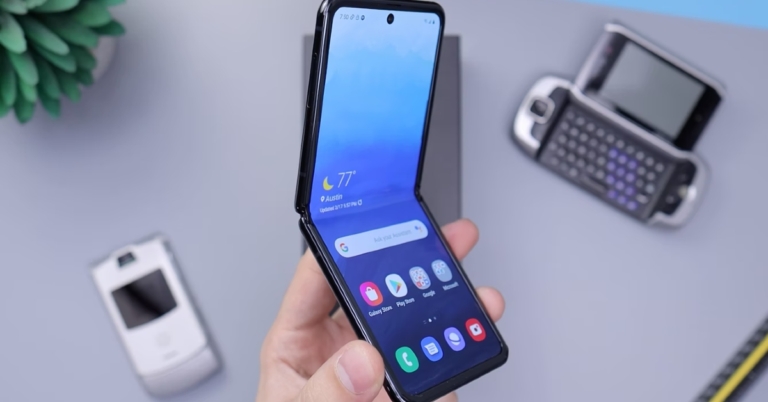
Internet connectivity has become an essential need in our day-to-day life. Most consumers rely on WiFi connectivity across all devices. There is a possibility that the devices in your room are not getting the proper internet strength to connect. In such cases, you might need a repeater to extend the range. But do you know that you can use your current smartphone or a spare Android as a repeater as well? Here are the top 7 ways you can use your Android smartphone as a WiFi repeater.Using a smartphone as a WiFi extender has multiple benefits. Yes, there are many WiFi-extending solutions in the market that work flawlessly, for example, entender from TP-Link or Google Nest. But these are pretty expensive. Also, a big advantage of using a smartphone as the repeater is that it can be used on the go as compared to the traditional counterpart which needs to be plugged into a home socket. Depending on your smartphone model here is how to do it.
Using Wi-Fi extender setting
Many smartphones like the OnePlus and some Samsung phones have built-in Wi-Fi extender options. The process is the easiest one with absolutely no hassle. All you have to do is bring down the notification panel on your Android phone and switch on Wi-Fi and Hotspot simultaneously. We also recommend altering the Hotspot password and not keeping it as an open network. Read Also: OnePlus will return to its roots will be offering budget smartphones
Wi-Fi coverage extend option
If your phone does not have a built-in option to use Wi-Fi and hotspot together, worry not Google has provided the option hidden in the Developers option. Head to the setting and open developer options (head to software info>build number and tap it 4-5 times to enable it if it’s not available). Here find the “Enable Wi-Fi Coverage Extend” feature and toggle it on. Now you will be able to do the exact same thing mentioned in the first method.
Use a third-party application
If you don’t feel like the experience from the pre-existing feature you can always download a third-party application for your help. The only con about these applications is that you have to manually set up wifi for each device. But worry not we have a solution for that as well. Try downloading the NetBridge application once done, open the application and give all the permissions. Now you will see the main highlight of the application. On the setup page where there will be different OS platforms (consider the image below), you now select the device you use like for say Windows, it will tell you a step-by-step guide to how to set it up.
Use USB tethering
USB tethering is mainly used to share your device’s mobile data over a USB connection, but some devices also allow a WiFi connection to be extended using this feature. Here’s how you can go about it.
Step 1:Connect your Android smartphone to a PC using a USB cable.
Step 2: Go to Settings and select Connection.
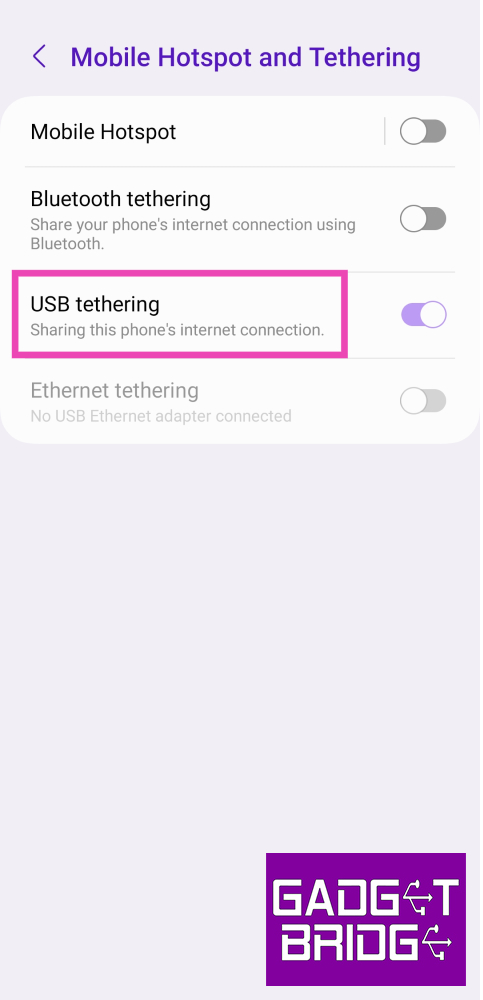
Step 3: Tap on Mobile Hotspot and Tethering.
Step 4: Make sure your phone’s mobile data is turned off and that you are connected to a WiFi network.
Step 5: Turn on the toggle switch for USB tethering.
Use Ethernet tethering
If your PC or laptop has an ethernet port, you can use an ethernet USB cable to share your WiFi connection with your PC. Here’s how.
Step 1:Connect your Android smartphone to a PC using an Ethernet USB cable.
Step 2: Go to Settings and select Connection.
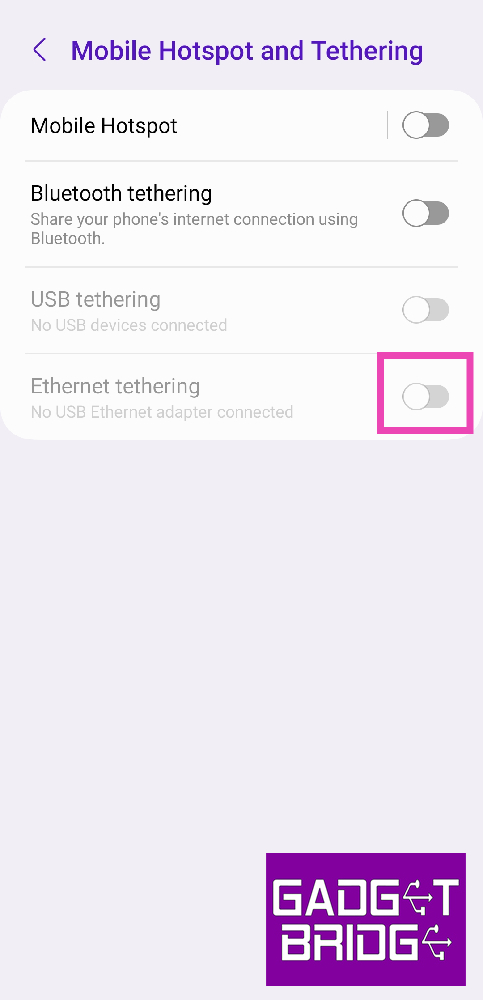
Step 3: Tap on Mobile Hotspot and Tethering.
Step 4: Make sure your phone’s mobile data is turned off and that you are connected to a WiFi network.
Step 5: Turn on the toggle switch for Ethernet tethering.
Use Bluetooth tethering
Yes, it is a wireless medium to use the phone as a Wi-Fi repeater and yes it transmits signals. The biggest drawback of this method is that the connection is very slow. But this still works and can be used in emergency cases. This can be switched on by long-pressing the hotspot settings on the notification panel and toggling Bluetooth tethering. Read Also: 10 must-download utility apps for new Android smartphone
Root the phone
This method is not advised as it may brick your phone very easily. If you have a spare smartphone and you don’t mind losing it. Try rooting your phone and discover tons of editability options of which a WiFi repeater is one. Most of the new ROMs also have this feature built into the UI. Also, be careful and always take professional help before trying rooting for the first time. With this, you can convert your smartphone into a WiFi repeater.
Frequently Asked Questions (FAQs)
How do I repeat my WiFi connection using my smartphone?
You can extend the WiFi connection that your smartphone is connected to by simply turning on the mobile hotspot. You can also extend the network over a USB or Ethernet connection.
Can my smartphone act as a WiFi repeater using a hotspot?
Most midrange and premium smartphones are capable of sharing a WiFi connection over a mobile hotspot. If your device isn’t able to do the same, go to Developer options (by tapping on the build number 7 times) and turn on the toggle switch for ‘Enable WiFi Coverage Extend’.
What are some good apps for sharing my WiFi connection over a mobile hotspot?
These are the top 7 ways to use your Android smartphone as a WiFi repeater. These methods will come in clutch when you’ve forgotten the password to a WiFi network that your phone is connected to. Simply extend the WiFi network using these methods so other devices can connect to it.
For the latest gadget and tech news, and gadget reviews, follow us on Twitter, Facebook and Instagram. For newest tech & gadget videos subscribe to our YouTube Channel. You can also stay up to date using the Gadget Bridge Android App. You can find the latest car and bike news here.
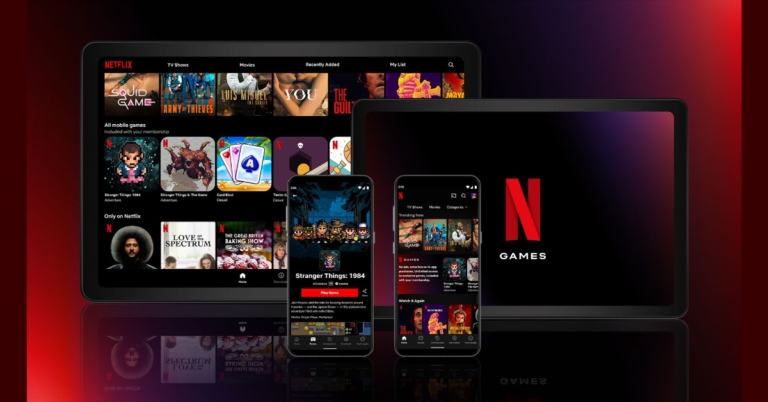
The popular video streaming app Netflix has announced the launch of games on its platform. The Netflix Games can be accessed by users worldwide. As of now, they can only play five mobile games on both Android and iOS platforms of the app. According to the company initially, the company will be offering 5 exclusive mobile games with no ads, no additional fees and no in-app purchases. The list includes Stranger Things: 1984, Stranger Things 3, Shooting Hoops, Card Blast and Teeter Up.While announcing the Netflix Games the company’s blog post says, “We love games, whether it’s physical games (Floor Is Lava), mind games (The Circle) or Squid Game😉. And we love entertaining our members. That’s why we’re excited to take our first step in launching Netflix games on mobile to the world.” It further added, Whether you’re craving a casual game you can start from scratch or an immersive experience that lets you dig deeper into your favourite stories, we want to begin to build a library of games that offers something for everyone. We’re in the early days of creating a great gaming experience, and we’re excited to take you on this journey with us.”The new Netflix games will be available to download and play to all the Android and iOS members across the globe. So before you begin you need to share all the details and one needs to have a Netflix subscription so that there are no ads, no additional fees and no in-app purchases. In the beginning, Netflix is making you play all its mobile games only on Android when you log into your profile. Members on an Android mobile phone will see a dedicated games row and games tab where you can select any game to download. While the tablet users can also have a dedicated games row or be able to select games from the categories drop-down menu to download and play.Netflix games will be available in various languages, so your games will automatically default to the preference set in your Netflix profile. If your language is not yet available, games will default to English.In addition to this, the users will be able to use the same account to play games on multiple mobile devices(but there is a device limit).While in terms of child safety these games are not available on children’s profiles. If you have set up a PIN to prevent children from accessing adult profiles, you will need that same PIN to log in to Netflix and play the game on a device. Some of the games will require internet connection to be accessed while other games will be available to play offline.
Have you participated in the Amazon Quiz today? If not then participate in the 3 November 2021 Amazon Quiz as it has already gone live on the app. The daily quiz can be played from 12 AM to 11:59 every day on the mobile app platform. Today the e-commerce is giving the chance to win Rs 1000 Amazon Pay Balance.Every day Amazon brings a fresh quiz for its customers. By participating in the quiz the participants can win an Amazon Pay Balance of up to Rs 50,000. The quiz can only be played on the mobile app as it is not available for the desktop platform. The quiz contains five easy questions and you have to answer all the questions correctly. The participants will then be shortlisted for a lucky draw to select a winner. Whereas the results are declared at the end of the month. Check out today Amazon quiz answers to win Rs 1000.
3 November 2021 Amazon Quiz Answers
Question 1: Which of these states has had three Chief Ministers in 2021?
Answer: Uttarakhand
Question 2: At the Whistling Straits course, the USA beat Europe in which recently conclude team competition?
Answer: Ryder CupQuestion 3: Which of these Oscar-winning actors plays the villain in the latest James Bond movie- No Time to Die?Answer: Rami Malek
Question 4: This is the famous Sears Tower, located in which city in the USA?
Answer: Chicago
Question 5: This is a visual from the Sir Seewoosagur Ramgoolam International Airport serving the capital of which country?
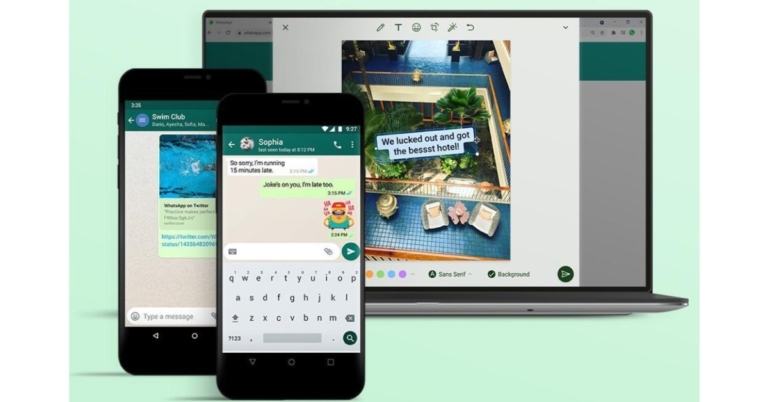
WhatsApp now has added three new features to its platform. The latest update arrives both on the web and mobile versions of the app. WhatsApp users can now edit their pictures on the web using the desktop editor while the mobile users will be able to get sticker suggestions. The company has also improved the app’s link preview as well. While announcing the new WhatsApp features the instant messaging platform commented, “ We built this feature with privacy in mind, so rest assured that WhatsApp cannot see your searches and your personal messages are always protected by end-to-end encryption.”
WhatsApp new features:
Preview links. Now you’ll know what you’re clicking into. Share news, videos, or that fun Tweet, sneak peek included.
Sticker suggestions. Find the perfect sticker as you type, it’s just like emoji suggestions but better.
Desktop photo editor. Now you can add stickers and text or crop and rotate your photos from any WhatsApp screen, big or small.
WhatsApp preview linksLink previews have also been improvised. When sending a link through WhatsApp web users can see a full preview of it. On receiving the link the users have even more scope as to what the link is all about. WhatsApp sticker suggestionsSo now when users type a message they will receive suggestions, providing the right sticker for their conversations. The new sticker suggestions feature on WhatsApp will resolve the issues of going through the process of finding the right sticker that usually breaks the flow of conversations. WhatsApp desktop photo editorThe social media app has also introduced a desktop photo editor to the web version of the app. Earlier this feature was only available on the mobile version of WhatsApp but it has been extended to the desktop platform as well. So now you can easily edit your picture on the web platform but for this, the company has separately added a media editor option.
For the latest gadget and tech news, and gadget reviews, follow us on Twitter, Facebook and Instagram. For newest tech & gadget videos subscribe to our YouTube Channel. You can also stay up to date using the Gadget Bridge Android App. You can find the latest car and bike news here.
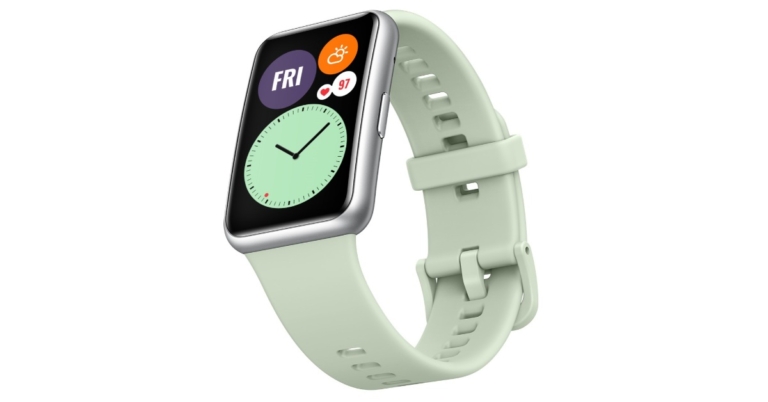
The Chinese electronics company Huawei has announced the launch of its latest smartwatch in the Indian market. Huawei Watch Fit is the latest device to arrive in the country. The fitness band comes with an Always-On display and offers 96 workout modes. It also features a SpO2 tracker, heart rate monitor and more.
Huawei Watch Fit price in India and availability
Huawei Watch Fit has been launched in India with a price tag of Rs 8,990. The latest smartwatch from HUAWEI will be available with several wrist strap colour options including Sakura Pink, Isle Blue and Graphite Black. The fitness watch is now available exclusively on Amazon. As an introductory offer, consumers will get a free HUAWEI Mini Speaker with the purchase of HUAWEI WATCH FIT till stocks last. To recall, Huawei Watch Fit was first introduced in the United Arab Emirates (UAE) in August this year. There it was launched at AED 399.
Huawei Watch Fit specifications and features
The Huawei Watch Fit has a 1.64-inch AMOLED display with a resolution of 280×456 pixels of resolution and a pixel density of 326ppi. The display is shielded by a 2.5D curved glass with a 70 percent screen to body ratio. The screen also features always-on watch faces. Users would be able to download additional watch faces from third-party developers via the Watch Face Store. This also means allowing you to use a photo from your phone as the face of your watch.The smartwatch also includes 12 animated workouts such as Exercise at work Full-Body Stretch and Ab Ripper. It also includes 44 standard movement demonstrations along with 96 workout modes. The watch’s workout mode includes 11 professional sport modes such as running, swimming, cycling as well as 85 custom workout modes. For a more personalised training experience, use the heart rate algorithm. Aside from that, there is an AI heart rate algorithm, a SpO2 tracker for monitoring blood oxygen saturation levels. Huawei’s proprietary TruSeen 4.0 heart rate monitoring technology allows HUAWEI WATCH FIT to support intelligent background heart rate monitoring, while HUAWEI TruSleep 2.0 delivers sleep stage monitoring, real-time heart rate monitoring, sleep respiration quality and big data analysis. The smartwatch comes with 12 animated fitness courses and 44 standardised fitness exercises built-in to give users free one-on-one personal training without the need for a smartphone or any other device. The watch also includes a GPS Sensor, a six-axis IMU sensor that includes an accelerometer and a gyroscope.The smartwatch offers 10 days of battery life when heart rate and sleep monitoring are turned on while just half an hour will charge the battery to 70%.
For the latest gadget and tech news, and gadget reviews, follow us on Twitter, Facebook and Instagram. For newest tech & gadget videos subscribe to our YouTube Channel. You can also stay up to date using the Gadget Bridge Android App. You can find the latest car and bike news here.
South Korean electronics major LG Electronics today announced exciting offers on its home entertainment range as a part of its Khushiyon ka carnival campaign. The new LG sale has been launched to commemorate the Diwali festival. This will allow buyers to save a lot of money this holiday season when buying LG OLED TVs. According to the company, the customers will have the opportunity to win prizes worth up to Rs 11 crore under the auspices of these offers that will be valid until November 15. Those you purchase LG Home Entertainment products this Diwali can take advantage of exciting offers and enter to win a plethora of attractive gifts. On select LG TVs, customers can get five year assurance and can also win an OLED TV every day. There will be other prizes worth up to Rs 11 crores on the offer.Buyers can get up to 20 percent instant cashback on select debit/credit cards as well as fixed EMIs starting from Rs 999 with the first EMI completely free. In addition, with the purchase of a select LG TV, customers can win free audio products worth up to Rs 64,990 and an LG ToneFree FN7.Apart from this LG electronics has also announced a partnership with Shah Rukh Khan and Gauri Khan for its OLED TV lineup. The company is also said to release its next-gen OLED TVs with Dolby Vision IQ, Dolby Atmos and Auto Volume Leveling. Moreover, LG has also introduced the OLED Evo which is an India specific Nano Cell TV Series, the LG QNED lineup. Commenting on this initiative, Mr. Hak Hyun Kim, Director – Home Entertainment, LG Electronics India,– said, “LG has enjoyed the loyalty of its customers in India for the past 24 years, and these offers are our way to thank each of them for their trust in the company’s offerings. As a customer-centric brand, we have always strived to offer our consumers the most meaningful innovation that not just addresses their present needs but is future-ready. We hope to add more light to everyone’s home this Diwali with these attractive offers on our range of Home Entertainment products.”
For the latest gadget and tech news, and gadget reviews, follow us on Twitter, Facebook and Instagram. For newest tech & gadget videos subscribe to our YouTube Channel. You can also stay up to date using the Gadget Bridge Android App. You can find the latest car and bike news here.
AirDrop is an integrated piece of software in the Apple ecosystem. The application allows Mac users to transfer files on their iPad or iPhones or vice versa. The speciality of AirDrop is that it accomplishes this wirelessly, without the use of cloud storage or any thor party services. But with these facilities, a common problem faced by the users is AirDrop not working. There can be a lot of reasons why a user faces this problem. Here are a few solutions that you can try which solve AirDrop failure on Mac.
Check Wi-Fi and Bluetooth
AirDrop mainly relies on Bluetooth and Wi-Fi to transfer files. The first check during this process should be to ensure that your Bluetooth and Wi-Fi are enabled for you to have an effortless experience. On the Mac, the menu bar clicks on Wi-Fi and Bluetooth one by one to enable it. The prompt will be shown in the AirDrop menu as well. If the prompt is not there try turning them off and then on again.Read Also: Apple approves TRAI’s DND app to avoid iPhone ban in India
Discoverable to everyone
Sometimes the Contacts Only option for sharing in AirDrops creates an issue resulting in the failure of files to your iPhone. Allow it for everyone by following the below steps.Step 1 – Open the Finder menu and click AirDrop on the left pane.Step 2 – In the Allow me to discover by option, select Everyone.Try sending the file again to see if the issue is resolved.
Disable DND
DND or Do not disturb feature blocks away from all the notifications so users can work efficiently it also blocks the incoming files eliminating the AirDrop functionality. To check, head to the control centre in MacOS to see the Do Not Disturb tab. Make sure it’s turned off, also check the same for the pairing device as well.
Prevent Mac from sleeping automatically
If you are transferring huge files, which will surely take time, it will make the mac sleep automatically if the setting is off. This will ultimately cancel the transfer in the middle so to prevent it follow the below steps.Step 1 – Open System preference on Mac.Step 2 – In battery head to Power Adapter setting.Step 3 – Check on the Prevent computer from sleeping… option.But checking on this option your Mac won’t sleep automatically once the screen is off.Read Also: Best 3 ways to fix AirDrop transfer failure on iPhone
Bonus Tip
Before starting the transfer do check if the devices are compatible. Also, see if all the sharing requirements are fulfilled by the other device as well as there might be a problem on the other device and you might have been trying to fix the Mac for no reason. Following these steps will fix AirDrop failure on Mac
For the latest gadget and tech news, and gadget reviews, follow us on Twitter, Facebook and Instagram. For newest tech & gadget videos subscribe to our YouTube Channel. You can also stay up to date using the Gadget Bridge Android App. You can find the latest car and bike news here.
We previously reported that the Redmi Note 11 Pro and Redmi Note 11 Pro will be rebranded as Xiaomi smartphones in India. However, no information was provided about the standard Redmi Note 11 5G. According to a leak the device will be released in India as the Redmi Note 11T 5G.Redmi late in October introduced the Redmi Note 11 series in China. The company has not yet revealed the global nor the Indian availability of the smartphone. But according to a tipster the Redmi Note 11 5G is expected to arrive in India as Redmi Note 11T 5G. The device is likely to be codenamed evergo. The codename of the Poco M4 Pro 5G is revealed to have the codename evergreen on the other hand the Redmi Note 10T 5G could be codename evergoin. Some of the previous reports also suggested that Redmi Note 11 5G could be rebranded to Poco M4 Pro 5G which the company confirmed to launch on November 9.Other than that Redmi Note 11 Pro and Redmi Note 11 Pro+ is will also be rebranded before arriving in the country the Phones are slated to hit the stores here as Xiaomi 11i and Xiaomi 11i HyperCharge respectively. For the global market, the company will go with Redmi branding. If the rumours and leaks are true, then only the branding will change while the rest of the specifications will remain the same as the original ones. The Redmi Note 11 5G features a 6.6-inch FHD display and comes with a refresh rate of 90Hz. It is powered byMediaTek Dimensity 810 SoC. The phone has dual rear cameras that include a 50MP primary sensor and an 8MP secondary lens. While on the front the phone features a 16MP selfie camera. It also carries a 5,000mAh battery and supports 33W fast charging. The 3.5mm audio jack and a USB Type C post are also available for connectivity. On the other hand, Redmi Note 11 Pro and Redmi Note 11 Pro+ comes with a hole punch design 6.67 inch AMOLED display The screen supports a 120Hz refresh rate, 260Hz touch sampling rate 20:9 aspect ratio and HDR10+. Both the phones are powered by MediaTek Dimensity 920 SoC.They have a quad rear camera set up on both Xiaomi 11i and Xiaomi 11i HyperCharge including a 108MP Samsung HM2 primary sensor. Apart from this, there is an 8MP wide-angle sensor and a 2MP depth sensor. There is a 16MP snapper on the front for taking selfies and video calling. Redmi Note 11 Pro packs a 5,160mAh battery with 67W fast charging support. Whereas the Xiaomi 11i HyperCharge houses a 4,500mAh battery with a mega 120W fast charging support.
For the latest gadget and tech news, and gadget reviews, follow us on Twitter, Facebook and Instagram. For newest tech & gadget videos subscribe to our YouTube Channel. You can also stay up to date using the Gadget Bridge Android App. You can find the latest car and bike news here.




 Read Also: OnePlus will return to its roots will be offering budget smartphones
 Step 3: Tap on Mobile Hotspot and Tethering.
 Step 4: Make sure your phone’s mobile data is turned off and that you are connected to a WiFi network.
Step 5: Turn on the toggle switch for USB tethering.
Step 4: Make sure your phone’s mobile data is turned off and that you are connected to a WiFi network.
Step 5: Turn on the toggle switch for USB tethering.

 Read Also: OnePlus will return to its roots will be offering budget smartphones


 Step 3: Tap on Mobile Hotspot and Tethering.
 Step 4: Make sure your phone’s mobile data is turned off and that you are connected to a WiFi network.
Step 5: Turn on the toggle switch for USB tethering.
Step 4: Make sure your phone’s mobile data is turned off and that you are connected to a WiFi network.
Step 5: Turn on the toggle switch for USB tethering.
 Read Also: 10 must-download utility apps for new Android smartphone






 AirDrop mainly relies on Bluetooth and Wi-Fi to transfer files. The first check during this process should be to ensure that your Bluetooth and Wi-Fi are enabled for you to have an effortless experience. On the Mac, the menu bar clicks on Wi-Fi and Bluetooth one by one to enable it. The prompt will be shown in the AirDrop menu as well. If the prompt is not there try turning them off and then on again.
Read Also: Apple approves TRAI’s DND app to avoid iPhone ban in India
AirDrop mainly relies on Bluetooth and Wi-Fi to transfer files. The first check during this process should be to ensure that your Bluetooth and Wi-Fi are enabled for you to have an effortless experience. On the Mac, the menu bar clicks on Wi-Fi and Bluetooth one by one to enable it. The prompt will be shown in the AirDrop menu as well. If the prompt is not there try turning them off and then on again.
Read Also: Apple approves TRAI’s DND app to avoid iPhone ban in India
 Try sending the file again to see if the issue is resolved.
 DND or Do not disturb feature blocks away from all the notifications so users can work efficiently it also blocks the incoming files eliminating the AirDrop functionality. To check, head to the control centre in MacOS to see the Do Not Disturb tab. Make sure it’s turned off, also check the same for the pairing device as well.
 But checking on this option your Mac won’t sleep automatically once the screen is off.
Read Also: Best 3 ways to fix AirDrop transfer failure on iPhone
But checking on this option your Mac won’t sleep automatically once the screen is off.
Read Also: Best 3 ways to fix AirDrop transfer failure on iPhone