

Samsung Galaxy F22 to be launched in India today: Here is what to expect
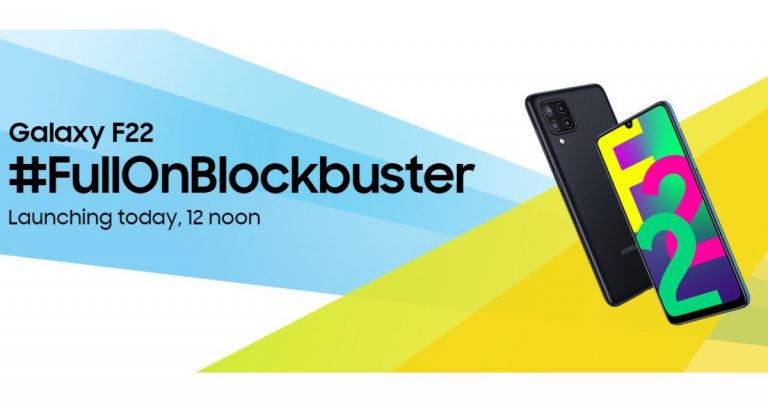
The company will be introducing Samsung Galaxy F22 in India today. Ahead of the official launch, the company has also introduced a dedicated microsite on Flipkart to tease its availability. The key highlights of the smartphone include an HD+ sAMOLED Display with 90Hz refresh rate support. Moreover, there will be a large 6,000mAH Battery and a 48-megapixel quad camera set up.
As said, Samsung Galaxy F22 will be launching today in India at 12 noon. The company is not holding any special event today to uncover the device. The device will be simply listed on the e-commerce website for purchase as soon as it gets launched in the country. Prior to the official launch, the firm has also listed the device on Flipkart to tease its availability. After the launch, the mobile phone will go on sale via Flipkart, Samsung’s online store and select retail stores in the country. In terms of pricing, the smartphone is expected to get launched under the Rs 15,000 price tag.
The dedicated microsite for Samsung Galaxy F22 only reveals the key specifications but not the pricing. As revealed by the company, the forthcoming phone will feature a 6.4-inch HD+ Infinity-U sAMOLED display that will come with 90Hz refresh rate support. In addition to this, the device is said to offer a super smooth performance by reducing motion blur and response time.
Moreover, Galaxy F22 will come with a massive 6000mAh battery that is claimed to provide uninterrupted content viewing. In terms of optics, the Samsung Galaxy F22 will be featuring a True 48MP Quad Camera set-up. The details about the other three sensors will be revealed later on.
According to Google Play Console listing the display of the Galaxy F22 strides in with 720×1,339 pixels of resolution. The mobile is said to be powered by MediaTek MT6769T, which is believed to be MediaTek Helio G80 SoC. Paired with 4GB of RAM, the mobile phone will ship with Android 11 out of the box.
The smartphone is also said to be a rebadged version of the Galaxy A22 that was launched in the European market last month.
For the latest gadget and tech news, and gadget reviews, follow us on Twitter, Facebook and Instagram. For newest tech & gadget videos subscribe to our YouTube Channel. You can also stay up to date using the Gadget Bridge Android App.
How to install Windows 11 on unsupported PCs or Laptops?

Microsoft has released Windows 11 on 24 June and now you can install it on your PCs and Laptops. And new Windows 11 has brought some long-waited features to enhance the Windows experience. But it seems that to install the new Windows 11 the computers required a TPM 2.0 module in it. But there is always a way to bypass software. Here is how you can install Windows 11 on unsupported PCs or Laptops. Read below.
 This method will help you to bypass the Windows 11 requirement for installation by editing the registry. You can edit the registry when you have installed Windows 11 in your system and an error message shows up “This PC can’t run Windows 11”. You can launch the Windows Registry Editor by pressing Shift+F10 and when the command prompt opens up type Regedit. And make sure you have backed up your data. Follow the steps.
Read more: How to remove the news and interest widget from the Windows 10 taskbar?
This method will help you to bypass the Windows 11 requirement for installation by editing the registry. You can edit the registry when you have installed Windows 11 in your system and an error message shows up “This PC can’t run Windows 11”. You can launch the Windows Registry Editor by pressing Shift+F10 and when the command prompt opens up type Regedit. And make sure you have backed up your data. Follow the steps.
Read more: How to remove the news and interest widget from the Windows 10 taskbar?
By editing the registry: Back-up your data
 This method will help you to bypass the Windows 11 requirement for installation by editing the registry. You can edit the registry when you have installed Windows 11 in your system and an error message shows up “This PC can’t run Windows 11”. You can launch the Windows Registry Editor by pressing Shift+F10 and when the command prompt opens up type Regedit. And make sure you have backed up your data. Follow the steps.
Read more: How to remove the news and interest widget from the Windows 10 taskbar?
This method will help you to bypass the Windows 11 requirement for installation by editing the registry. You can edit the registry when you have installed Windows 11 in your system and an error message shows up “This PC can’t run Windows 11”. You can launch the Windows Registry Editor by pressing Shift+F10 and when the command prompt opens up type Regedit. And make sure you have backed up your data. Follow the steps.
Read more: How to remove the news and interest widget from the Windows 10 taskbar?
- Use the Windows icon and open Settings.
- Go to Update & Security>Find Windows Insider Program.
- Now Click on Get started>Link your Microsoft Account>Press Release Preview Ring>Restart.
- Now after restarting your Windows> Press Win+R>Type Regedit.
- When the registry open up copy this on the registry bar: HKEY_LOCAL_MACHINE\SOFTWARE\Microsoft\WindowsSelfHost\UI\Selection
- Now from the Selection folder on the right panel>Right-Click>Export.
- From the function opens up on the right panel>Select UIBranch and turn its value data to Dev>Content Type to Mainline>Ring to External.
- Reboot the Computers> Open Update & Security and you will receive the Windows 11 update.
6 July 2021 Flipkart Daily Trivia Quiz Answers: Answer to win exciting prizes

The e-commerce website Flipkart is hosting Daily Trivia Quiz. Every day it brings a bunch of new questions for its users. By answering them correctly you can win exciting prizes. The questionnaire is based on questions related to general knowledge. Also, the users can win free vouchers and super coins, among other offers via the daily quiz. 6 July 2021 Flipkart Daily Trivia Quiz has already gone live on its platform.
The participant should be at least 18 years old and should have a valid login ID. The Quiz is available on the mobile platform and not the web version. E-commerce conducts the quiz on daily basis and goes live at 12:00 AM IST and runs till 11:59 PM IST. The winners are announced within 15 days from the date of participation that can be viewed under the Gems/Rewards section in the app.
How to participate in the Flipkart Daily Trivia Quiz
To participate download the Flipkart app on your phone. Then open the Flipkart app then head to Game Zone. Now click on the Daily Trivia Banner or search for Daily Trivia. Enter the game and answer all 5 questions with correct answers.6 July 2021 Flipkart Daily Trivia Quiz Answers
Question 1: Which film had a character by the name of “Langda Tyagi” Played by Saif Ali Khan? Answer: Omkara Question 2: Suneo, Gain And Shizuka features in which of these animes ? Answer: Doraemon Question 3: Who was awarded the first Dada Saheb Phalke Award in 1969 ? Answer: Devika Rani Question 4: Montague and Capulet are the last names of which fictional couple? Answer: Romeo and Juliet Question 5: Which Indian state’s film Industry goes by the name of a fragrant, pious wood? Answer: Karnataka
For the latest gadget and tech news, and gadget reviews, follow us on Twitter, Facebook and Instagram. For newest tech & gadget videos subscribe to our YouTube Channel. You can also stay up to date using the Gadget Bridge Android App.
6 July 2021 Amazon Quiz: Answer all the questions to win Rs 20000 Amazon Pay Balance

Get ready to answer a new set of questions as the 6 July 2021 Amazon Quiz is live on its platform. The quiz can be played every day from 12 AM to 11:59 PM. Today you can stand a chance to win Rs 20000 Amazon Pay Balance.
By participating in Amazon Quiz every day you can stand a chance to win prizes such as iPhone X, iPhone Xs, Seagate HDD, GoPro Hero 8 Camera, LG Smartphones, Samsung Galaxy S20, Air Purifier, Oppo smartphones, Amazon Pay Balance among other exciting free gifts. The E-commerce platform brings a daily quiz on its mobile platform which every day gives chances to millions of people across the country to win gadgets and goodies. The quiz goes live on the Amazon app but the quiz is not available for desktop users only app users can participate in the daily quiz. The quiz contains 5 questions based on general knowledge and current affairs to which the contestants have to answer all the questions correctly. Any wrong answer will eliminate you from the quiz. Further, your name will be selected for a lucky draw and the company will announce the results at the end of the month. We have updated all five questions with their correct answers below for the 6 July 2021 Amazon Quiz so that you can win Rs 20000 Amazon Pay Balance.
6 July 2021 Amazon Quiz Answers
Question 1: Under the Pradhan Mantri Swasthya Suraksha Yojana, which of these institutions are being set up in 22 new locations?
The answer is- AIIMS
Question 2: Clyde’s spot, discovered in 2020 by amateur astronomer Clyde Foster using his own 14-inch telescope, is located on which planet?
The answer is- Jupiter
Question 3: Om Prakash Bhardwaj, who recently passed away, was a Dronacharya Award-winning national coach in which sport?
The answer is- Boxing
Question 4: What were the fighters who fought in this place called?
The answer is- Gladiators
Question 5: What was the name of the dog that belonged to this character?
The answer is- Snowy
Vivo became the second fastest-growing 5G smartphone brand Globally

In the Q1 of 2021, Vivo recorded 62 percent quarter-on-quarter to 19 million units shipped, according to a report by Strategy Analytics. Samsung and Vivo were the world’s fastest-growing 5G smartphone vendors in the first quarter of 2021. Samsung grew 79 percent quarter-on-quarter, while Vivo jumped 62 percent QoQ.
The South Korean brand grew to 79% QoQ to 17 million units shipped. The new 5G models, such as Galaxy S21 5G, S21 ultra 5G and S21+ 5G, are said to have performed well in South Korea, North America, and parts of Europe. Whereas Vivo was the second-fastest-growing 5G smartphone vendor in Q1 2021, jumping 62% QoQ to 19 million units shipped. iQoo U3 5G and U7 5G smartphones are the biggest contributors while China and Europe are its 5G smartphone strongholds. Oppo has recorded 55% QoQ growth on the other hand Xiaomi increased 41% QoQ, both due to solid volumes at home in China. Apple performance dropped to 23% QoQ, following a blowout Q4 2020.
Ken Hyers, Director at Strategy Analytics, said, “Global 5G smartphone shipments grew a healthy 6% QoQ and hit a record 136 million units during the first quarter of 2021. Demand for 5G smartphones remains very strong, particularly in China, United States, and Western Europe. We forecast global 5G smartphone shipments to reach a record 624 million units for the full-year 2021, soaring from 269 million in full-year 2020.”
Another analysis by Counterpoint states that Vivo has the highest share in the smartphone market during the mid-year shopping festival in China. The data stated that sales rose by 7% YoY. The company took the first spot during the first three weeks of June, making up 23% of the smartphone sales of the top eight OEMs. Whereas the second and third spots went to OPPO (21%) and Xiaomi (19%). Honor’s performance has improved after separating from Huawei. Its sales in the first three weeks of June increased more than 15% when compared to the first three weeks of May. Moreover, Apple’s sales also increased by 16% YoY during the shopping festival, taking it to the fourth spot. On the other hand Realme sales also increased more than tenfold from last year as it is said to have offered various discounts but also introduced the Q3 Pro Carnival Edition.
For the latest gadget and tech news, and gadget reviews, follow us on Twitter, Facebook and Instagram. For newest tech & gadget videos subscribe to our YouTube Channel. You can also stay up to date using the Gadget Bridge Android App.
Samsung Galaxy Unpacked event to take place on August 11: Report
Samsung is reportedly to host its next Galaxy Unpacked event on August 11. Previously the Samsung Galaxy Unpacked event was tipped to happen on August 8 but as per the new report, it will take place on August 11. In its upcoming event, the company is said to introduce five devices that will include Samsung Galaxy Z Flip 3, Galaxy Z Fold 3, Galaxy Watch 4, Galaxy Watch Active 4, and Galaxy Buds 2.
Digital Daily has reported that the Samsung Galaxy Unpacked event is set to happen on August 11 which will be hosted via an online presentation. The annual event is said to begin at 11 PM Korean time and 7.30 PM IST. The launch is also claimed to be live-streamed at the company’s official website as well as via YouTube channel.
Samsung has the tradition of hosting Galaxy Unpacked events to announce its new devices. The company usually hosts two mega-events during a year. One is held between January and February and the second during August. So the speculations being made can be believed however this may not be true as we will still wait for the company to make an official announcement.
Unlike every year the upcoming annual ‘Galaxy Unpacked’ will bring not one or two but more devices. Last year we saw the Galaxy Note20 series at the first-ever Galaxy Unpacked virtual event. But Samsung is going to change things this time. Reportedly the South Korean company will be introducing Samsung Galaxy Z Flip 3, Galaxy Z Fold 3, Galaxy Watch 4, Galaxy Watch Active 4, and Galaxy Buds 2. After the launch, the devices will go on sale from August 28 onwards.
As per a tipster, the Samsung Galaxy Watch 4 will come in two sizes 42mm and 46mm. On the other hand, Samsung Galaxy Watch Active 4 will be available in 40mm and 44mm sizes.
Previously Samsung Galaxy Z Fold 3 leaks suggested that the foldable phone will be made available in Black, Dark Green, and Silver colour options. The device will also get hybrid S Pen support that will have a blunt tip to prevent the screen from scratches. Whereas the display, hinge and bezels will have armour protection. The outer part of the foldable smartphone will be protected with Corning Gorilla Glass Victus. Leaks also suggest that the Z Fold 3 will also pack either a 4,275mAh or a 4,380mAh battery.
For the latest gadget and tech news, and gadget reviews, follow us on Twitter, Facebook and Instagram. For newest tech & gadget videos subscribe to our YouTube Channel. You can also stay up to date using the Gadget Bridge Android App.
Best wireless fast chargers under Rs 10,000

Wireless charging is now becoming very popular. You can now charge your smartphone by just keeping it on the surface of the wireless charger. With more high-end phones releasing they are bringing the wireless charging feature, which is changing the way you charge your smartphones. Here are some of the best wireless fast chargers under Rs 10,000.
 This wireless charger is compatible with both Android smartphones and iPhones with 15W Qi-Certified fast wireless charging. The gadget has auto-adaptive LED indicator technology that brightens up in the day and dims in the night for sleep-Friendly adaptive light compatibility. The high efficient chip in the INUI wireless charger gives you a 15W fast charge. The device is temperature protected with the cutting edge NTC temp degree guard and the air vents designs in the back that will protect your mobile battery from overheating.
Price: Rs 7,700
Buy from Amazon.in
Read more: Xiaomi to launch Mi Pad 5 tablets soon, tipped to feature Qualcomm Snapdragon 870 SoC
This wireless charger is compatible with both Android smartphones and iPhones with 15W Qi-Certified fast wireless charging. The gadget has auto-adaptive LED indicator technology that brightens up in the day and dims in the night for sleep-Friendly adaptive light compatibility. The high efficient chip in the INUI wireless charger gives you a 15W fast charge. The device is temperature protected with the cutting edge NTC temp degree guard and the air vents designs in the back that will protect your mobile battery from overheating.
Price: Rs 7,700
Buy from Amazon.in
Read more: Xiaomi to launch Mi Pad 5 tablets soon, tipped to feature Qualcomm Snapdragon 870 SoC
 The wireless charging pad by Belkin is designed for Apple iPhones and has compatibility with iPhone 8, iPhones 8 plus, and iPhone X. The wireless fast charger can charge at the speed of 7.5W for devices running iOS 11.1.2 and later. The Belkin Boost up is Qi-certified and works perfectly with any Qi-enabled device. The best feature is that you do not need to remove the iPhone case; the charging pad will be able to charge through most lightweight cases.
Price: Rs 8,000
Buy it on Amazon.in
Read also: iQoo 7 Series confirmed to launch in India on April 26, would be an Amazon exclusive
The wireless charging pad by Belkin is designed for Apple iPhones and has compatibility with iPhone 8, iPhones 8 plus, and iPhone X. The wireless fast charger can charge at the speed of 7.5W for devices running iOS 11.1.2 and later. The Belkin Boost up is Qi-certified and works perfectly with any Qi-enabled device. The best feature is that you do not need to remove the iPhone case; the charging pad will be able to charge through most lightweight cases.
Price: Rs 8,000
Buy it on Amazon.in
Read also: iQoo 7 Series confirmed to launch in India on April 26, would be an Amazon exclusive
 The wireless charger is designed for both Android and iOS devices with 10W of speed charging. The Spigen compact wireless fast charger is compatible with all Qi-Enabled smartphones. The device is equipped with some high-end technology like ControlHeat, ControlLight, ControlSlip technology, and Smart IC chip protection. Also, it comes with Foreign Object Debris (FOD), CE, Qi protects you from all possible damage to the charger.
Price: Rs 4,000
But the product on Amazon.in
The wireless charger is designed for both Android and iOS devices with 10W of speed charging. The Spigen compact wireless fast charger is compatible with all Qi-Enabled smartphones. The device is equipped with some high-end technology like ControlHeat, ControlLight, ControlSlip technology, and Smart IC chip protection. Also, it comes with Foreign Object Debris (FOD), CE, Qi protects you from all possible damage to the charger.
Price: Rs 4,000
But the product on Amazon.in
 The product is compatible with iPhone, Samsung Galaxy, and AirPods Pro and has a charging speed of 10W fast charging. The Yootech wireless charging pad is powered by Intelligent Protect technology that will give you temperature control, surge protection, short circuit protection, and also the wireless charger is made of fire-resistant ABS material. It also has a sleep-friendly design, which will be indicated by the green LED light.
Price: Rs 2,500
Buy at Amazon.in
For the latest gadget and tech news, and gadget reviews, follow us on Twitter, Facebook and Instagram. For newest tech & gadget videos subscribe to our YouTube Channel. You can also stay up to date using the Gadget Bridge Android App.
The product is compatible with iPhone, Samsung Galaxy, and AirPods Pro and has a charging speed of 10W fast charging. The Yootech wireless charging pad is powered by Intelligent Protect technology that will give you temperature control, surge protection, short circuit protection, and also the wireless charger is made of fire-resistant ABS material. It also has a sleep-friendly design, which will be indicated by the green LED light.
Price: Rs 2,500
Buy at Amazon.in
For the latest gadget and tech news, and gadget reviews, follow us on Twitter, Facebook and Instagram. For newest tech & gadget videos subscribe to our YouTube Channel. You can also stay up to date using the Gadget Bridge Android App.
INIU Wireless Charger: Fast wireless charging stand
 This wireless charger is compatible with both Android smartphones and iPhones with 15W Qi-Certified fast wireless charging. The gadget has auto-adaptive LED indicator technology that brightens up in the day and dims in the night for sleep-Friendly adaptive light compatibility. The high efficient chip in the INUI wireless charger gives you a 15W fast charge. The device is temperature protected with the cutting edge NTC temp degree guard and the air vents designs in the back that will protect your mobile battery from overheating.
Price: Rs 7,700
Buy from Amazon.in
Read more: Xiaomi to launch Mi Pad 5 tablets soon, tipped to feature Qualcomm Snapdragon 870 SoC
This wireless charger is compatible with both Android smartphones and iPhones with 15W Qi-Certified fast wireless charging. The gadget has auto-adaptive LED indicator technology that brightens up in the day and dims in the night for sleep-Friendly adaptive light compatibility. The high efficient chip in the INUI wireless charger gives you a 15W fast charge. The device is temperature protected with the cutting edge NTC temp degree guard and the air vents designs in the back that will protect your mobile battery from overheating.
Price: Rs 7,700
Buy from Amazon.in
Read more: Xiaomi to launch Mi Pad 5 tablets soon, tipped to feature Qualcomm Snapdragon 870 SoC
Belkin Boost up Wireless charging pad
 The wireless charging pad by Belkin is designed for Apple iPhones and has compatibility with iPhone 8, iPhones 8 plus, and iPhone X. The wireless fast charger can charge at the speed of 7.5W for devices running iOS 11.1.2 and later. The Belkin Boost up is Qi-certified and works perfectly with any Qi-enabled device. The best feature is that you do not need to remove the iPhone case; the charging pad will be able to charge through most lightweight cases.
Price: Rs 8,000
Buy it on Amazon.in
Read also: iQoo 7 Series confirmed to launch in India on April 26, would be an Amazon exclusive
The wireless charging pad by Belkin is designed for Apple iPhones and has compatibility with iPhone 8, iPhones 8 plus, and iPhone X. The wireless fast charger can charge at the speed of 7.5W for devices running iOS 11.1.2 and later. The Belkin Boost up is Qi-certified and works perfectly with any Qi-enabled device. The best feature is that you do not need to remove the iPhone case; the charging pad will be able to charge through most lightweight cases.
Price: Rs 8,000
Buy it on Amazon.in
Read also: iQoo 7 Series confirmed to launch in India on April 26, would be an Amazon exclusive
Spigen F308W Compact Fast Wireless charger
 The wireless charger is designed for both Android and iOS devices with 10W of speed charging. The Spigen compact wireless fast charger is compatible with all Qi-Enabled smartphones. The device is equipped with some high-end technology like ControlHeat, ControlLight, ControlSlip technology, and Smart IC chip protection. Also, it comes with Foreign Object Debris (FOD), CE, Qi protects you from all possible damage to the charger.
Price: Rs 4,000
But the product on Amazon.in
The wireless charger is designed for both Android and iOS devices with 10W of speed charging. The Spigen compact wireless fast charger is compatible with all Qi-Enabled smartphones. The device is equipped with some high-end technology like ControlHeat, ControlLight, ControlSlip technology, and Smart IC chip protection. Also, it comes with Foreign Object Debris (FOD), CE, Qi protects you from all possible damage to the charger.
Price: Rs 4,000
But the product on Amazon.in
Yootech F500: Type C PD Qi-Certified wireless charger Pad
 The product is compatible with iPhone, Samsung Galaxy, and AirPods Pro and has a charging speed of 10W fast charging. The Yootech wireless charging pad is powered by Intelligent Protect technology that will give you temperature control, surge protection, short circuit protection, and also the wireless charger is made of fire-resistant ABS material. It also has a sleep-friendly design, which will be indicated by the green LED light.
Price: Rs 2,500
Buy at Amazon.in
For the latest gadget and tech news, and gadget reviews, follow us on Twitter, Facebook and Instagram. For newest tech & gadget videos subscribe to our YouTube Channel. You can also stay up to date using the Gadget Bridge Android App.
The product is compatible with iPhone, Samsung Galaxy, and AirPods Pro and has a charging speed of 10W fast charging. The Yootech wireless charging pad is powered by Intelligent Protect technology that will give you temperature control, surge protection, short circuit protection, and also the wireless charger is made of fire-resistant ABS material. It also has a sleep-friendly design, which will be indicated by the green LED light.
Price: Rs 2,500
Buy at Amazon.in
For the latest gadget and tech news, and gadget reviews, follow us on Twitter, Facebook and Instagram. For newest tech & gadget videos subscribe to our YouTube Channel. You can also stay up to date using the Gadget Bridge Android App. Best ways to fix your region and clock settings in Windows 10

If the region and clock settings are not set correctly on your computers it can cause you a lot of misinformation. You can fix the settings of the region and clock easily in a few steps. You can also use the automatic settings, which choose the time and region based on your location. Moreover, the correct time sets your schedule right. Here are some ways to fix your region and clock settings in Windows 10.
 You can sync your Windows 10 with an internet time server to make sure the clock is time accurate. Windows 10 comes with a built-in clock system that syncs in with the internet server. There are some options you can do to set the clock right. You can manually set the time if it shows any errors. Follow the guide below.
 You can change the settings of your region manually to get the right location and fix the problem in your region settings. Setting the region correctly will also help you set your time and date correctly on your Windows 10. According to your region and location Windows also give you proper content to make you more accurate. The regional settings influence how your date/time formats and language appear on the screens. Fix the region to have more accurate time and language on your computers. The following is the procedure to fix the region’s settings.
Fix the Clock on your Windows 10:
 You can sync your Windows 10 with an internet time server to make sure the clock is time accurate. Windows 10 comes with a built-in clock system that syncs in with the internet server. There are some options you can do to set the clock right. You can manually set the time if it shows any errors. Follow the guide below.
- Click on the Windows icon or search on the search box for Settings.
- From the Time & Language option>Click Date & time.
- Right-click on the Date & Time>Adjust Date/time.
- On the time zone box>Pick the correct time>Toggle Set time automatically.
- Enable Adjust for daylight saving time automatically.
- To make sure the time is set to the internet server>Press Synchronise your clock>Sync now.
- The clock will now set to automatic synchronisation and show you the correct time.
- You might need to restart the PC.
Set your region on your Windows 10:
 You can change the settings of your region manually to get the right location and fix the problem in your region settings. Setting the region correctly will also help you set your time and date correctly on your Windows 10. According to your region and location Windows also give you proper content to make you more accurate. The regional settings influence how your date/time formats and language appear on the screens. Fix the region to have more accurate time and language on your computers. The following is the procedure to fix the region’s settings.
- Open the Settings using the search box on the left bottom or click on the Windows icon to find the gear icon for opening settings.
- Tap on Time & Language for the next steps.
- Now select Region.
- Use the drop-down menu from the Region section to set the location.
- On the page open on the right change the Country or region to your country you are in.
- From the Regional Format section below that>Go to Change data format.
- Now change the data format accordingly: Calendar, First day of the week, Short date, Long date, Short time, Long time.
- Now the settings will be fixed according to your location and you can access more accurate regions and clocks.
5 wireless mice under Rs 5,000 for work from home.

Are you searching for the right wireless mouse to work from home? A wireless mouse can make your life easier by letting you work more efficiently. Finding the right wireless can be very time-consuming with so many products to choose from. We have made a list of the 5 best wireless mice you can buy today. Read below.
 The product features true wireless Bluetooth connectivity and it is very lightweight with just 68 grams. Microsoft’s new Surface is truly portable and it is designed for comfort navigation for you to use your laptop/PC via Bluetooth. The wheel of the mouse is optimised for smooth and better scrolling through your screens. The product dimension is 15.24 x 10.16 x 5.08 cm which requires 2 AAA batteries to power up the mice.
Price: Rs 5,000
Buy it on Amazon.in
Read more: Top 10 Windows 10 tricks that you need to know
The product features true wireless Bluetooth connectivity and it is very lightweight with just 68 grams. Microsoft’s new Surface is truly portable and it is designed for comfort navigation for you to use your laptop/PC via Bluetooth. The wheel of the mouse is optimised for smooth and better scrolling through your screens. The product dimension is 15.24 x 10.16 x 5.08 cm which requires 2 AAA batteries to power up the mice.
Price: Rs 5,000
Buy it on Amazon.in
Read more: Top 10 Windows 10 tricks that you need to know
 This wireless mouse from Dell is a product worth mentioning in the list. The Dell Multi-Device wireless mouse will let you seamlessly work on your computers. The product comes with Bluetooth 5.0 for a faster and smooth connection and it is powered by a 2.4GHz wireless connection. It also comes with a toggle button to turn on or off the wireless device and enhance the scroll wheel. This mouse can connect to any Windows, Linux, or Android operating system and offers a 3 years warranty period.
Price: Rs 4,000
Buy from Amazon.in
Read also: Top 10 best camera phones of 2020 for the enthusiasts
This wireless mouse from Dell is a product worth mentioning in the list. The Dell Multi-Device wireless mouse will let you seamlessly work on your computers. The product comes with Bluetooth 5.0 for a faster and smooth connection and it is powered by a 2.4GHz wireless connection. It also comes with a toggle button to turn on or off the wireless device and enhance the scroll wheel. This mouse can connect to any Windows, Linux, or Android operating system and offers a 3 years warranty period.
Price: Rs 4,000
Buy from Amazon.in
Read also: Top 10 best camera phones of 2020 for the enthusiasts
 The Logitech G 304 is compatible with both Windows PC and Mac. It features the Hero gaming sensor which is 10x the power efficiency of any average wireless mouse. The mouse can work on lightspeed technology specially designed for better gaming and work experience. To juice up all these amazing features, it comes with an ultra-long battery life of 250 hours of continuous usage on a single AA battery and packs it with a 2-year warranty.
Price: Rs 3,800
Buy at Amazon. In
The Logitech G 304 is compatible with both Windows PC and Mac. It features the Hero gaming sensor which is 10x the power efficiency of any average wireless mouse. The mouse can work on lightspeed technology specially designed for better gaming and work experience. To juice up all these amazing features, it comes with an ultra-long battery life of 250 hours of continuous usage on a single AA battery and packs it with a 2-year warranty.
Price: Rs 3,800
Buy at Amazon. In
 It comes with slipstream corsair wireless technology and a 10,000 DPI optical sensor for high-accuracy mouse scrolling. The product is very light, weighing just 96g, and can be used for hours of work. The battery is packed in to run for 135 hours for a non-stop work experience.
Price: Rs 5,000
Buy the product on Amazon. in
It comes with slipstream corsair wireless technology and a 10,000 DPI optical sensor for high-accuracy mouse scrolling. The product is very light, weighing just 96g, and can be used for hours of work. The battery is packed in to run for 135 hours for a non-stop work experience.
Price: Rs 5,000
Buy the product on Amazon. in
 This wireless optical mouse is engineered with a 2.4GHz wireless interface to give you faster and better scrolling on your computers. The product is compatible with Windows XP, Vista, 7, 8, and Windows 10. The wireless optical weight is only 96grams so that you can enjoy a better experience in using a lightweight mouse. The mouse features Bluetooth connectivity to enhance the connection to your system.
Price: Rs 4,000
Buy from Flipkart.com
For the latest gadget and tech news, and gadget reviews, follow us on Twitter, Facebook and Instagram. For newest tech & gadget videos subscribe to our YouTube Channel. You can also stay up to date using the Gadget Bridge Android App.
This wireless optical mouse is engineered with a 2.4GHz wireless interface to give you faster and better scrolling on your computers. The product is compatible with Windows XP, Vista, 7, 8, and Windows 10. The wireless optical weight is only 96grams so that you can enjoy a better experience in using a lightweight mouse. The mouse features Bluetooth connectivity to enhance the connection to your system.
Price: Rs 4,000
Buy from Flipkart.com
For the latest gadget and tech news, and gadget reviews, follow us on Twitter, Facebook and Instagram. For newest tech & gadget videos subscribe to our YouTube Channel. You can also stay up to date using the Gadget Bridge Android App.
Microsoft New Surface Mobile Mouse: Poppy Red
 The product features true wireless Bluetooth connectivity and it is very lightweight with just 68 grams. Microsoft’s new Surface is truly portable and it is designed for comfort navigation for you to use your laptop/PC via Bluetooth. The wheel of the mouse is optimised for smooth and better scrolling through your screens. The product dimension is 15.24 x 10.16 x 5.08 cm which requires 2 AAA batteries to power up the mice.
Price: Rs 5,000
Buy it on Amazon.in
Read more: Top 10 Windows 10 tricks that you need to know
The product features true wireless Bluetooth connectivity and it is very lightweight with just 68 grams. Microsoft’s new Surface is truly portable and it is designed for comfort navigation for you to use your laptop/PC via Bluetooth. The wheel of the mouse is optimised for smooth and better scrolling through your screens. The product dimension is 15.24 x 10.16 x 5.08 cm which requires 2 AAA batteries to power up the mice.
Price: Rs 5,000
Buy it on Amazon.in
Read more: Top 10 Windows 10 tricks that you need to know
Dell Multi-Device Wireless Mouse: MS5320W
 This wireless mouse from Dell is a product worth mentioning in the list. The Dell Multi-Device wireless mouse will let you seamlessly work on your computers. The product comes with Bluetooth 5.0 for a faster and smooth connection and it is powered by a 2.4GHz wireless connection. It also comes with a toggle button to turn on or off the wireless device and enhance the scroll wheel. This mouse can connect to any Windows, Linux, or Android operating system and offers a 3 years warranty period.
Price: Rs 4,000
Buy from Amazon.in
Read also: Top 10 best camera phones of 2020 for the enthusiasts
This wireless mouse from Dell is a product worth mentioning in the list. The Dell Multi-Device wireless mouse will let you seamlessly work on your computers. The product comes with Bluetooth 5.0 for a faster and smooth connection and it is powered by a 2.4GHz wireless connection. It also comes with a toggle button to turn on or off the wireless device and enhance the scroll wheel. This mouse can connect to any Windows, Linux, or Android operating system and offers a 3 years warranty period.
Price: Rs 4,000
Buy from Amazon.in
Read also: Top 10 best camera phones of 2020 for the enthusiasts
Logitech G 304 Lightspeed Wireless Gaming mouse
 The Logitech G 304 is compatible with both Windows PC and Mac. It features the Hero gaming sensor which is 10x the power efficiency of any average wireless mouse. The mouse can work on lightspeed technology specially designed for better gaming and work experience. To juice up all these amazing features, it comes with an ultra-long battery life of 250 hours of continuous usage on a single AA battery and packs it with a 2-year warranty.
Price: Rs 3,800
Buy at Amazon. In
The Logitech G 304 is compatible with both Windows PC and Mac. It features the Hero gaming sensor which is 10x the power efficiency of any average wireless mouse. The mouse can work on lightspeed technology specially designed for better gaming and work experience. To juice up all these amazing features, it comes with an ultra-long battery life of 250 hours of continuous usage on a single AA battery and packs it with a 2-year warranty.
Price: Rs 3,800
Buy at Amazon. In
Corsair Katar Pro Wireless
 It comes with slipstream corsair wireless technology and a 10,000 DPI optical sensor for high-accuracy mouse scrolling. The product is very light, weighing just 96g, and can be used for hours of work. The battery is packed in to run for 135 hours for a non-stop work experience.
Price: Rs 5,000
Buy the product on Amazon. in
It comes with slipstream corsair wireless technology and a 10,000 DPI optical sensor for high-accuracy mouse scrolling. The product is very light, weighing just 96g, and can be used for hours of work. The battery is packed in to run for 135 hours for a non-stop work experience.
Price: Rs 5,000
Buy the product on Amazon. in
Asus MW203 Wireless Mouse: Wireless optical
 This wireless optical mouse is engineered with a 2.4GHz wireless interface to give you faster and better scrolling on your computers. The product is compatible with Windows XP, Vista, 7, 8, and Windows 10. The wireless optical weight is only 96grams so that you can enjoy a better experience in using a lightweight mouse. The mouse features Bluetooth connectivity to enhance the connection to your system.
Price: Rs 4,000
Buy from Flipkart.com
For the latest gadget and tech news, and gadget reviews, follow us on Twitter, Facebook and Instagram. For newest tech & gadget videos subscribe to our YouTube Channel. You can also stay up to date using the Gadget Bridge Android App.
This wireless optical mouse is engineered with a 2.4GHz wireless interface to give you faster and better scrolling on your computers. The product is compatible with Windows XP, Vista, 7, 8, and Windows 10. The wireless optical weight is only 96grams so that you can enjoy a better experience in using a lightweight mouse. The mouse features Bluetooth connectivity to enhance the connection to your system.
Price: Rs 4,000
Buy from Flipkart.com
For the latest gadget and tech news, and gadget reviews, follow us on Twitter, Facebook and Instagram. For newest tech & gadget videos subscribe to our YouTube Channel. You can also stay up to date using the Gadget Bridge Android App. Beware: These are the 9 apps stealing Facebook login credentials from Google Play

As per a recent report, Google has pulled out 9 malicious Android apps from the Google Play Store that are stealing Facebook users login and passwords. One of the apps from the list had millions of users that disabled in-app ads by logging into their Facebook account.
Google LLC has finally discarded all these 9 Android apps from the Play Store, first discovered by Doctor Web’s malware analysts. According to its reports, these malicious apps were stealing Facebook users’ credentials, including logins and passwords details. These stealer trojans were spread as harmless software and were installed more than 5,856,010 times.
However, the analysts have discovered a total of 10 trojan apps out of which 9 were available on Google Play. Processing Photo which is a photo editing software was found as Android.PWS.Facebook.13 was spread by the developer chikumburahamilton. It was installed over 500,000 times.
Also Read: Google Drive security issue could disguise malicious files into legitimate documents
The report stated that “applications that enabled access limitations for using other software installed on Android devices: App Lock Keep from the developer Sheralaw Rence, App Lock Manager from the developer Implummet col, and Lockit Master from the developer Enali mchicolo―all detected as Android.PWS.Facebook.13. They were downloaded at least 50,000, 10 and 5,000 times respectively.”
Another Rubbish Cleaner from the developer SNT.rbcl which poses as a utility to optimize the Android device performance was identified as Android.PWS.Facebook.13 has been downloaded over 100,000 times.
Astrology programs- Horoscope Daily from the developer HscopeDaily momo and Horoscope Pi from the developer Talleyr Shauna, are also detected as Android.PWS.Facebook.13. The former one is said to have more than 100,000 installs while the latter―more than 1,000 installs.
After identifying the web security specialist reported to Google. Then Google took the initiative to remove part of these malicious applications from Google Play.
Doctor Web reported that its specialists during the investigation of these stealer trojans or applications have discovered that an earlier modification that was spread through Google Play under the guise of an image editing software called EditorPhotoPip, which has already been removed from the official Android app store but still available on software aggregator websites. This modification was added to the Dr.Web virus database as Android.PWS.Facebook.15.
Moreover the Android.PWS.Facebook.13, Android.PWS.Facebook.14, and Android.PWS.Facebook.15 are identified as native Android apps whereas the Android.PWS.Facebook.17 and Android.PWS.Facebook.18 are utilizing the Flutter framework designed for cross-platform development. As per the report, all these can be considered modifications of the same trojan since they use identical configuration file formats and identical JavaScript scripts to steal user data.
Throwing some more light these Android apps were functional and are said to weaken the vigilance of potential victims to access all of the apps’ functions and, allegedly, to disable in-app ads, users were prompted to log into their Facebook accounts. Over that, the advertisements inside some of the apps were indeed present. This operation was done to further encourage Android device owners to perform the required actions. Allowing that users agreed and clicked the login button, they saw a standard social network login form. At once it will look like a genuine login form but these trojans used a special mechanism to fool their victims. After receiving the required settings from one of the C&C servers upon launch, they loaded the legitimate Facebook web page https://www.facebook.com/login.php into WebView. Next, they loaded JavaScript received from the C&C server into the same WebView.
Reportedly this script was directly used to take over the entered login credentials. From there on, this JavaScript, using the methods provided through the JavascriptInterface annotation, moved the stolen login and password to the trojan applications, which then transmitted the data to the attackers’ C&C server. After the victim logged into their account, the trojans also stole cookies from the current authorization session. Those cookies were also sent to cybercriminals.
Investigation revealed that they all received settings for stealing logins and passwords of Facebook accounts. Having said that, the attackers could have easily changed the trojans’ settings and commanded them to load the web page of another legitimate service. They could have even used a completely sham login form located on a phishing site. Hence, the trojans could have been utilised to steal logins and passwords from any service.
Also Read: Google discovered and removed more than 500 malicious Chrome extension
A health and fitness program is known as Inwell Fitness and detected as Android.PWS.Facebook.14 from the developer Reuben Germaine. It has more than 100,000 installs. Lastly, an image editing app called PIP Photo which was sprhavLillians is said to various versions which are detected as Android.PWS.Facebook.17 and Android.PWS.Facebook.18. This app has over 5,000,000 downloads.