What is Focus Assist in Windows 10 and how to enable it?

0
Focus Assist is a useful feature provided by Windows 10. It enhances your productivity by keeping you focussed on your current task and avoid distractions from notifications.

What is the use of the Focus Assist feature in Windows 10?

The Focus Assist feature was originally introduced as ‘Quiet Hours’ in previous versions of Windows 10. This feature enables you to avoid unnecessary notifications while you are carrying out a task that demands your focus. You get flexibility in deciding the degree of suppression of notifications. You may maintain a priority list or completely avoid notifications.
What is the use of the Focus Assist feature in Windows 10?

How to use the Focus Assist feature in Windows 10?

To enable the Focus Assist feature, follow these steps.
  • Click the square icon located in the bottom-right part of the screen to launch the Notification Center. You may also do it by typing “Focus Assist” in the search bar.
  • Windows 10 offers three ways to see notifications in Focus Assist.
    • Off: When you turn the Focus Assist off, you receive notification from all your contacts and applications.
    • Priority Only: This option allows you to maintain the priority list of apps and contacts. Once you enable this option, you will only receive notifications from the included apps and contacts.
    • Alarms Only: This option prevents all notifications except those from alarms set by you.
How to use the Focus Assist feature in Windows 10?

What do Automatic Rules stand for?

In the Focus Assist section, you will also find a heading named Automatic rules. Here you can make the Windows learn the conditions that should enable the Focus Assist automatically. You get the following four conditions to set.
  • During these times: You can set the desired time during which you don’t want any distraction from notifications.
  • When I’m duplicating my display: Enabling this option suppresses notifications as long as you’re projecting your monitor to an external screen.
  • When I’m playing a game: This option prevents notifications while you play games in full-screen mode.
  • When I’m using an app in full-screen mode: This option also blocks notifications as long as you’re using an app in full-screen mode.
What do Automatic Rules stand for?
When Focus Assist activates automatically, you receive a announcement in the Notification Center informing that the Focus Assist is on. If you don’t want this message to be displayed, uncheck the option: Show a notification in action center when focus assist is turned on automatically. For the latest gadget and tech news, and gadget reviews, follow us on TwitterFacebook and Instagram. For newest tech & gadget videos subscribe to our YouTube Channel. You can also stay up to date with the Gadget Bridge Android App.

How to share your screen on Google Meet using Chrome and the app?

0
Google Meet is one of the most widely used applications for video calls and conferences. With its handy features like live captioning and audio and video preview screen, it gives tough competition to apps like Zoom and Microsoft Teams. The screen-share feature of Google Meet allows a participant to share access to his/her computer screen in real-time with other users.

Who would need to share the screen on Google Meet and why?

Google Meet is extensively used by organisations across the globe for conducting online meetings and conferences. The COVID-19 pandemic has further encouraged companies, schools, and hospitals to carry out meetings online via applications like Google Meet. With the screen-share feature of Google Meet, the participants can get the same output as in a conventional meeting. They can deliver presentations and share data pertaining to a discussion.
Who would need to share the screen on Google Meet and why?

How to share screen on Google Meet using Google Chrome?

Google Meet allows you to share your screen at any instance during an online meeting. Chrome has a high degree of integration with Meet and offers handy features to share your screen. However, the basic concept remains the same for other browsers as well like Firefox, Edge, or Safari.
  • Click the ‘Present Now’ button located in the bottom toolbar.
  • Select one of the three options in the pop-up menu indicating the part of the screen you wish to share: the entire screen, a window, or the browser Tab.
  • If you select ‘A tab’, you will be asked to choose a tab to share from the list of all open tabs to share. If you select ‘A window’, you will be prompted to choose one among all open task windows to share.
  • If you wish to share a Chrome tab running a YouTube video, uncheck the Share Audio option if you don’t want to share the video sound.
  • Click Share.
  • To stop sharing the screen, click the You Are Presenting followed by clicking Stop Presenting.
How to share screen on Google Meet using Google Chrome?

How to share the screen on the Google Meet app?

The process of sharing the screen on Google Meet is the same for Android and iOS devices. Follow these steps.
  • While you are in a video call, tap the screen and then tap the three vertical dots located in the top right corner.
  • Tap the ‘Share screen’ option
  • Now Tap Start Sharing and select Start now. If you are on iOS, you can start sharing by selecting the Start Broadcast option.
  • To stop, tap the Stop Sharing option.
How to share the screen on the Google Meet app?
For the latest gadget and tech news, and gadget reviews, follow us on TwitterFacebook and Instagram. For newest tech & gadget videos subscribe to our YouTube Channel. You can also stay up to date with the Gadget Bridge Android App.

Telegram introduced Voice Chats 2.0 feature to channels

Telegram recently announced the new Voice Chats 2.0 feature that shall allow voice chat in Telegram channels. The company had included the voice chat feature in Telegram groups in 2020. Now, users can indulge in live chats on channels as well. According to Telegram, “Anyone can host Voice Chats in Groups or Channels, where an unlimited number of listeners can tune in to live talks and podcasts – with powerful features like custom titles, audio recording, invite links and more”.

Why did Telegram introduce the Voice Chats 2.0 feature?

In the backdrop of the changed privacy policies of WhatsApp, many users are looking for alternative platforms for messaging. Telegram has managed to absorb some WhatsApp users. The Clubhouse app is another competitor of Telegram that has gained popularity in recent times. The app is available solely for iOS devices but the company is planning to release its Android version as well. The Voice Chats 2.0 feature is expected to give Telegram an edge over Clubhouse.
Why did Telegram introduce the Voice Chats 2.0 feature?

What are the features of Telegram Voice Chats 2.0?

According to Telegram, “Whereas some conversations are supposed to be non-permanent, others are value-preserving and passing on. Admins can now file audio from voice chats to save lots of talks and publish them for followers who missed the dwell occasion”. The following are some key features of the new Voice Chats 2.0.
  • Consumer’s Bio: The new update allows the contributors to see the consumer’s bio inside a group voice chat or a channel.
  • Hyperlinks: The admins of the channel can create a hyperlink or assign a title to the voice chat.
  • Celebrities: Celebrities can also become a part of a voice chat without getting bombarded by fan mails.
  • Resume Playback: The new update will allow the users to resume voice message playback from the point they left off.
  • Swipe-left gesture: This feature will be available for Android users. They can assign unique responses to the swipe-left gesture.
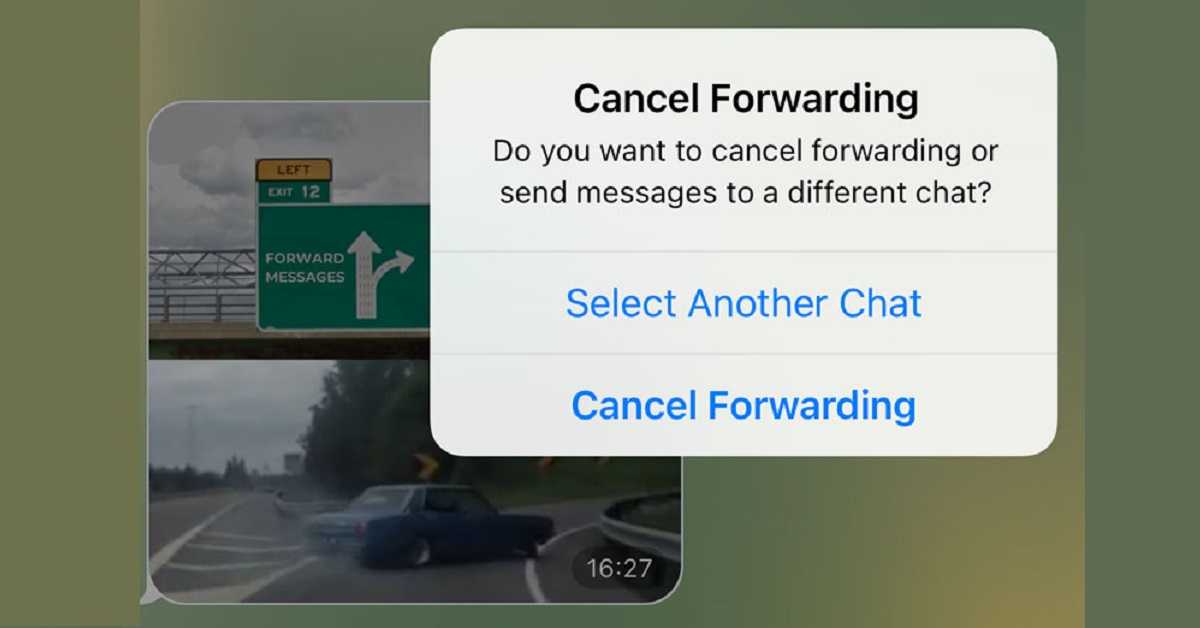
  • Edit forwarded message: Now, users are given a chance to cancel forwarding a message if they feel that they forwarded the wrong message.
What are the features of Telegram Voice Chats 2.0?
What are the features of Telegram Voice Chats 2.0? (Image Credit: Telegram)

How can you start the voice chat on Telegram?

The admins of a Telegram channel can begin the voice chat in the following steps.
  • Launch the Telegram app.
  • Go to the channel in which you want to host the voice chat.
  • Tap the three dots located on the top right corner.
  • Select the ‘Start Voice Chat’ option to begin the voice chat.
How can you start the voice chat on Telegram?
How can you start the voice chat on Telegram? (Image Credit: Telegram)
For the latest gadget and tech news, and gadget reviews, follow us on TwitterFacebook and Instagram. For newest tech & gadget videos subscribe to our YouTube Channel. You can also stay up to date with the Gadget Bridge Android App.

OnePlus 9 Pro Vs Samsung Galaxy S20 Ultra Vs Apple iPhone 12: Comparison, which one should you buy?

Yesterday OnePlus officially unveiled its most hyped flagship series, the OnePlus 9. Under the lineup, the company introduced three devices OnePlus 9 and OnePlus 9 Pro flagship smartphones alongside its affordable OnePlus 9R. These devices come loaded with the latest features and are priced lower than other flagships devices by Samsung and Apple. So, considering the price we have put together the OnePlus 9 Pro up against Samsung Galaxy S20 Ultra and Apple iPhone 12 to help you decide, which offers all the features at its best price. 

Display

OnePlus 9 Pro: 6.7-inch QHD+ Fluid Display 2.0 AMOLED display Samsung Galaxy S20 Ultra: 6.8-inch Edge QHD+ Dynamic AMOLED 2X Infinity-O Display Apple iPhone 12: 6.1-inch OLED Super Retina display

Processor

OnePlus 9 Pro: Qualcomm Snapdragon 888 SoC Samsung Galaxy S20 Ultra: Exynos 2100 SoC Apple iPhone 12: A14 Bionic SoC

Rear camera(s)

OnePlus 9 Pro: 48-megapixel Sony IMX789 primary sensor,  50-megapixel Sony IMX766 secondary sensor with an f/2.2 ultra-wide-angle Freeform lens, an 8-megapixel telephoto lens, and a 2-megapixel monochrome lens Samsung Galaxy S20 Ultra: 108-megapixel primary sensor with f/1.8, 12-megapixel Dual Pixel sensor with an f/2.2 aperture, a 10-megapixel telephoto lens with f/2.4 aperture, 3x optical zoom and lastly another 10-megapixel telephoto sensor   aperture Apple iPhone 12: 12-megapixel primary sensor with an f/1.6 lens and a 12-megapixel ultra-wide-angle shooter with an f/2.4 aperture

Selfie camera

OnePlus 9 Pro: 16-megapixel sensor Samsung Galaxy S20 Ultra: 40-megapixel selfie camera Apple iPhone 12: 12-megapixel camera sensor

RAM and storage

OnePlus 9 Pro: 8GB + 128GB storage variant and 12GB + 256GB storage Samsung Galaxy S20 Ultra: 12GB RAM with 128GB and 16GB RAM with 512GB storage option Apple iPhone 12: 4GB RAM with 64GB/ 128GB/ 256GB 

Battery

OnePlus 9 Pro: 4,500mAh battery Samsung Galaxy S21 Ultra: 5,000mAh battery Apple iPhone 12: 2,815mAh

Operating system

OnePlus 9 Pro: OxygenOS 11, based on Android 11 Samsung Galaxy S20 Ultra: One UI based on Android 11 out of the box Apple iPhone 12: OS 14

Starting Price

OnePlus 9 Pro: Rs 64,999  Samsung Galaxy S20 Ultra: Rs 1,05,999 Apple iPhone 12: Rs 79,900

Our Take

Both Samsung and OnePlus smartphones are quite similar in specs but the OnePlus 9 Pro’s camera specs don’t match with both the other devices. Over that, for improved camera specs, the company has partnered with Swedish brand Hasselblad. The Chinese company offers a 65W Power Adapter, Fluid Display, Snapdragon 888 chipset and  Hasselblad cameras. And given the price, it is worth considering as the device comes with top of the line specifications. For the latest gadget and tech news, and gadget reviews, follow us on TwitterFacebook and Instagram. For newest tech & gadget videos subscribe to our YouTube Channel. You can also stay up to date using the Gadget Bridge Android App.

Microsoft renamed Xbox Live as Xbox Network: Reasons for name change and Features

Microsoft recently renamed Xbox Live, an online multiplayer gaming service, as Xbox network. Interestingly, the clips regarding the change of name were posted on Xbox Network rather than Xbox Live. The Xbox Network was recently released as a beta version for testing on the Xbox dashboard.

Why did Microsoft change the name?

Microsoft released the Xbox Live in 2002 as an online multiplayer gaming and digital media delivery service. In subsequent console launches, new features were added to Xbox Live. The online gaming service enabled players to play online games and connect with other Xbox players. According to Microsoft’s spokesperson, “‘Xbox network’ refers to the underlying Xbox online service, which was updated in the Microsoft Services Agreement. The update from ‘Xbox Live’ to ‘Xbox network’ is intended to distinguish the underlying service from Xbox Live Gold memberships”. Microsoft renamed Xbox Live as Xbox network intending to cover all the features of Xbox and not just Xbox Live. Xbox Live Gold shall continue with the same name to differentiate the subscription from the other set of services.
Why did Microsoft change the name?

Do Xbox Live and Xbox Network differ only in name?

Microsoft had indicated the name change via its Services Agreement in 2020. However, there was no official announcement regarding the plan. The new name of Xbox Live will not significantly change the way players avail themselves of the online gaming service. The same service will now appear with a new name in console menus. Now, the players will access their gameplay screenshots on the Xbox network instead of the Xbox Live. It is reported that Microsoft had planned to raise the price for the subscription of Xbox Live Gold. However, considering the displeasure among the players, the company was compelled to drop the plan of price hike.
Do Xbox Live and Xbox Network differ only in name?

What is the plan of Microsoft regarding the Xbox Network? 

According to the reports, Microsoft is aiming to remove the need for an Xbox Live subscription to play free games such as Apex Legends and Fortnite. However, the company hasn’t revealed officially if it is going to get rid of the subscription policy to play free games. EA Play is another significant expansion in the capability of the Xbox Game Pass. Now, players having the Xbox Game Pass can enjoy over 100 high-quality games and an EA Play membership at an affordable monthly price.
What is the plan of Microsoft regarding the Xbox Network? 
What is the plan of Microsoft regarding the Xbox Network?
For the latest gadget and tech news, and gadget reviews, follow us on TwitterFacebook and Instagram. For newest tech & gadget videos subscribe to our YouTube Channel. You can also stay up to date with the Gadget Bridge Android App.

Google resolved Gmail and Chrome Crash issue by releasing the Android System WebView update

Google fixed the issue with Android System WebView that forced applications like Gmail and Chrome to crash. These issues are likely to emerge in those smartphones for which the update happens to be incompatible.

What was the issue?

Recently, the Android System WebView developed an issue that caused Google applications like Gmail and Chrome to crash. To throw some light, the Android System WebView is an operating system component that enables applications to render web content. According to Google, “We’re aware of a problem with Gmail affecting a significant subset of users. The affected users are unable to access Gmail. We will provide an update by 3/23/21, 5:35 AM detailing when we expect to resolve the problem”. During the time Google probe into the issue, it suggested the users temporarily switch to the desktop versions of the application that got crashed.
What was the issue?
What was the issue?

Did Google resolve the issue?

Google started tackling the issue as soon as it acknowledged it. The company resolved the crashing problem by releasing updates for the Android System WebView and Chrome. The users facing the problem may update the above applications from the Play Store. According to Google, “We have resolved the issue with WebView that caused some apps on Android to crash for some users. Updating Android System WebView and Google Chrome via Google Play should now resolve the issue”.
Did Google resolve the issue?

How did other companies respond to the issue?

When the issue of Gmail and Chrome getting crashed was raised, Samsung Support tweeted the problem is likely to get resolved in the upcoming update. Meanwhile, reverting the application updates may resolve the issue for some users. According to Samsung Support US, “Please remove the Webview Update and then restart the phone. Here are the steps: Go settings > apps > tap the three dots in the top right corner > show system apps > search for Android System WebView > select Uninstall updates.”
How did other companies respond to the issue?
For the latest gadget and tech news, and gadget reviews, follow us on TwitterFacebook and Instagram. For newest tech & gadget videos subscribe to our YouTube Channel. You can also stay up to date with the Gadget Bridge Android App.

OnePlus Watch with over 110 workout modes launched in India: Check out the pricing and availability details 

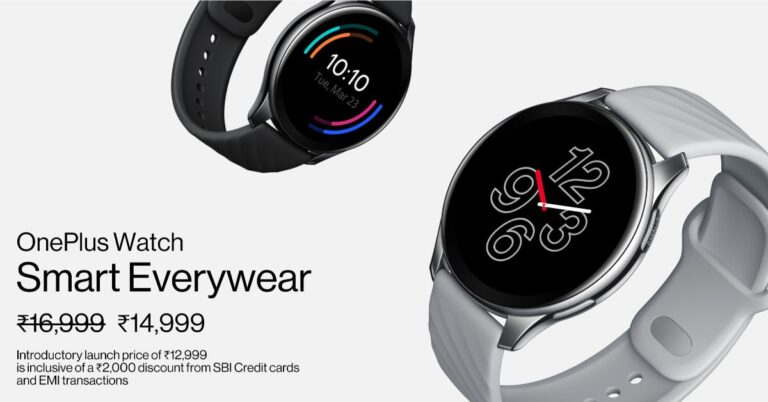
OnePlus officially introduced the OnePlus Watch that has a circular design, alongside the OnePlus 9 Series in India. The company made this announcement during the online event yesterday. The OnePlus wearable comes with a seamless wireless connection hence allowing you to receive voice calls and app notifications directly on your wrist. The device offers over 110 workout modes and it also doubles as a remote control if you have a OnePlus TV at your place.  OnePlus Watch price in India and availability OnePlus Watch has been introduced in India with a price tag of Rs 16,999. However globally the company has launched this wearable at a much lesser price, which is at EUR 159 that translates to Rs 13,700. According to the company, the OnePlus smartwatch’s pre-orders are slated to begin in early April. It would be offered in a Stainless Steel case with Midnight Black and Midnight Silver shades. But there will also be a Cobalt Limited Edition version, which is a Cobalt Alloy case in Gold colour. OnePlus Watch features OnePlus Watch comes with a unibody design having a stainless steel body with a glossy CD pattern on the display. It features a 46mm round dial with a 2.5D curved glass AMOLED display. The smartwatch runs on RTOS-based OS while offering 4GB standalone storage. The device is 5ATM and IP68 rated for water and dust resistance. As said, the OnePlus Watch features 110 workout modes and can automatically detect workouts such as jogging marathon, outdoor cycling, indoor cycling, freestyle training and running as it has inbuilt sensors on it. Like we said earlier, this smart wearable comes with a seamless connection, hence allowing you to receive voice calls and app notifications directly on your wrist. Over that, you can also use it as a remote control for the OnePlus TV. Moreover, you can turn the TV off after 30 minutes from your wrist when it detects that you have fallen asleep or it turns the volume down if you get an incoming call. Apart from fitness and other sensors it also includes some important health monitoring features such as SpO2, stress detection, breathing, rapid heart rate alerts, and sedentary reminders. In addition to this, the watch gets support for Bluetooth as well as GPS as connectivity options.  OnePlus Watch has a 405mAh battery, which comes with Warp Charge fast charging support. It is said to last for about a week with 20 minutes of charge and can run for a whole day with just five minutes of charge. On nominal use, it can last for up to 2 weeks. For the latest gadget and tech news, and gadget reviews, follow us on TwitterFacebook and Instagram. For newest tech & gadget videos subscribe to our YouTube Channel. You can also stay up to date using the Gadget Bridge Android App.

Top 5 gadgets to make your home safer

Technology has indeed made our day-to-day tasks convenient. It also protects us from threats and hazards. With the integration of sensors with software, gadgets can prepare us against accidental fires and intruders. Household safety is a serious matter, yet most people invest the least in it. Here are the top 5 gadgets that you must buy to make your home safer.

1) Kidde i9040 Battery-Operated Compact Smoke Detector Alarm

A smoke detector is a necessary equipment that every household. Some common causes of fire include faulty wiring, smoking, and heating appliances. Kidde i9040 is a smoke alarm based on ionization sensing technology. It is operated by a 9V battery so that it keeps working regardless of power-cuts. The gadget is easy-to-install and can be fixed in all rooms. The test button enables you to verify that the smoke detector is working properly. The peculiar alarm sound gives you an early warning in case of a fire hazard. You will know when the battery needs to be replaced via the low battery indicator. You can be assured of quality as the product is UL listed and offers 3 years of warranty.
Kidde i9040 Battery-Operated Compact Smoke Detector Alarm
Price: ₹1,300 Buy on Amazon

2) Wi-Fi Panoramic 360 Degree Camera 

DAGS is known for offering reliable security systems across different parts of India. This Wi-Fi camera captures video in a panoramic view covering the entire 360 degrees. As a result, it can spot the activities of intruders in all directions. The Wi-Fi connectivity enables you to monitor your doorstep from anywhere at any time using your smartphone. The camera has a compact design so that you may install it using a sticker without making it visible to anyone. The camera also with other security features like two-way audio, motion-sensor, and alarm messaging. The night-vision ensures that it keeps monitoring even in low-light conditions or at night. The video quality is HD so that you notice the minutest details.
Wi-Fi Panoramic 360 Degree Camera 
Wi-Fi Panoramic 360 Degree Camera
Price: ₹1,279 Buy on Amazon

3) EZVIZ C6N Motion capturing camera

A motion-detector camera is a highly useful gadget to monitor movements in and around your house. EZVIZ C6N is a Wi-Fi-enabled Pan & Tilt camera that detects movements and automatically tracks the object like animals and humans. The camera is linked to a mobile application to send notifications. Pan & Tilt feature enables it to rotate while tracking in full 360-degree field of view. The smart-tracking feature provides constant follow-up and video recording. With a motion-detection alert, you get notification on your smartphone in real-time. The smooth motorised rotation ensures that there are no blind spots. You can control the rotation manually or set it to automatic mode. The two-way communication feature enables you to talk to your family members even when they are away from home.
EZVIZ C6N Motion capturing camera
Price: ₹2,329 Buy on Amazon

4) Kidde Carbon Monoxide Alarm 

Carbon Monoxide is a highly suffocating gas produced as a by-product of combustion. Being colourless and odourless, it goes undetected by human senses. Carbon Monoxide poisoning is caused due to malfunctioning burning equipment. As per the reports, about 200 people are killed every year by accidental CO poisoning in the US. As a result, many countries have legislation for compulsory CO detectors in homes. The Kidde KN-COPP-B-LPM is a battery-powered alarm that offers constant continuous monitoring of Carbon Monoxide levels. The digital display shows the CO levels in PPM (parts per million) that gets updated after 15 seconds. The Peak Level Memory indicates the highest concentration of CO.
Kidde Carbon Monoxide Alarm 
Kidde Carbon Monoxide Alarm
Price: ₹4,549 Buy on Amazon

5) Yale J20 Smart Rim Door Lock 

Smart locks are Wi-Fi enabled or Bluetooth enabled door locking solutions that allow access through different means including fingerprint, passwords, and voice commands. The Yale J20 comes with a LED-activated keypad on a metal design making it comfortable to use the numeric pad. The auto-lock system secures your door once it stays unlocked for 30 minutes. With the geofencing feature, the door automatically unlocks as soon as you return home. SO, you don’t have to look around for keys or use your smartphone. You get full control of the lock on your smartphone including remote access, one-time password, and alarm notifications. The smart lock has an intrusion alarm that is automatically activated when someone tries to force open the door.
Yale J20 Smart Rim Door Lock 
Yale J20 Smart Rim Door Lock
Price: ₹7,498 Buy on Amazon For the latest gadget and tech news, and gadget reviews, follow us on TwitterFacebook and Instagram. For newest tech & gadget videos subscribe to our YouTube Channel. You can also stay up to date with the Gadget Bridge Android App.

Why Indian players prefer to play live online games

It’s no breaking news that online casino is on the rise in India, but did you know that live gaming is one of the big movers? There are many reasons driving the rise in popularity, such as growing mobile use, greater internet coverage, rising disposal income, and better software. Each factor contributes to something different, resulting in the rise of live online casino games amongst Indian players.

What are live casino games?

What exactly is meant by the term’ live casino games? These are games that are hosted by real-life dealers, streamed from studios, and made to look as if you are actually in a casino. A huge range of games now have live online versions, such as:
  • Poker
  • Roulette
  • Baccarat
  • Andar Bahar
  • Teen Patti
As well as classics, players also benefit from a host of modern games that have been custom made for the live format. One studio on the cutting edge of innovation is Evolution Gaming which can be found at the Raj.bet live casino. Evolution not only creates the most exciting, immersive environments, they are also one of the largest iGaming suppliers in the world and have received a tick of fairness from independent auditor eCOGRA.

Safe, fair, and secure gaming

This leads us to the next reason why Indian players are flocking to live games. These games, and internet betting as a whole, are safer than ever. Often, due to licencing, online casinos must prove that the games they provide are fair and produce the stats they claim. One of the key statistics is RTP, standing for Return To Player. This is the theoretical amount of money paid back to players over extended periods of time. Online plays and games, including live gaming, offer much better rates than those found offline at physical casinos. This means that players can expect to win more online than offline. Keep in mind RTP is a theoretical value, so sometimes players win more, sometimes less – that’s the exciting part of online gaming.

A growing number of options

The legal situation in India means that playing at physical casinos is generally illegal, but online casinos based offshore are not. Once Indian players became aware of this legal situation, the shift to online playing kicked into high gear. The industry was quick to spot the shift as well, and the thought of millions of upwardly mobile Indian players with ever greater amounts of disposable income was too tempting to pass up. Nowadays there are many fantastic online casinos bending over backwards to accommodate players from the Indian subcontinent. This means accounts in rupees, support teams speaking the language, and of course the best games such as live dealer tables which cater to local tastes. This includes classic Indian games such as Andar Bahar and Teen Patti.

Wrap up

Add all of these factors up and it is no wonder Indians prefer to play live casino games. It’s never been easier to log in at a great online casino and browse the live range, which is getting bigger, safer, and better all of the time. Since Indian players cannot play at physical casinos, it makes sense to see them doing so online. Such a huge potential is not going unnoticed so we can expect to see even more great options for Indian players to enjoy in the future. For the latest gadget and tech news, and gadget reviews, follow us on TwitterFacebook and Instagram. For newest tech & gadget videos subscribe to our YouTube Channel. You can also stay up to date using the Gadget Bridge Android App.

March 24 Flipkart Daily Trivia Quiz Answers: Answer to win exciting prizes

The e-commerce website Flipkart is hosting Daily Trivia Quiz. Every day it brings a bunch of new questions for its users. By answering them correctly you can win exciting prizes. The questionnaire is based on questions related to general knowledge. Also, the users can win free vouchers and super coins, among other offers via the daily quiz. March 24 Flipkart Daily Trivia Quiz Answers has already gone live on its platform. The participant should be at least 18 years old and should have a valid login ID. The Quiz is available on the mobile platform and not the web version. E-commerce conducts the quiz on daily basis and goes live at 12:00 AM IST and runs till 11:59 PM IST.  The winners are announced within 15 days from the date of participation that can be viewed under the Gems/Rewards section in the app.

How to participate in the Flipkart Daily Trivia Quiz

To participate download the Flipkart app on your phone. Then open the Flipkart app then head to Game Zone. Now click on the Daily Trivia Banner or search for Daily Trivia. Enter the game and answer all 5 questions with correct answers.

March 24 Flipkart Daily Trivia Quiz Answers 

Question 1:  After which royal dynasty is the international cricket stadium in Indore named? Answer: Holkar Question 2: In which country is Camp Nou, the largest stadium of Europe? Answer: Spain Question 3: Which of these is not one of two versions of Rugby? Answer:  Rugby Alliance Question 4: After whom is the Barsapara Stadium in Guwahati officially named? Answer: Bhupen Hazarika Question 5: Which Roman emperor stopped the pagan rituals of the ancient Olympic games? Answer: Theodosius I For the latest gadget and tech news, and gadget reviews, follow us on TwitterFacebook and Instagram. For newest tech & gadget videos subscribe to our YouTube Channel. You can also stay up to date using the Gadget Bridge Android App.