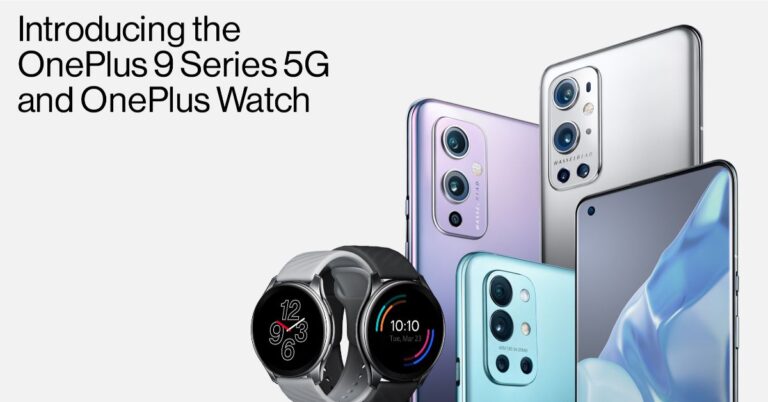
The Chinese premium smartphone company Oneplus today officially unveiled its state of the art OnePlus 9 Series in India and globally via an online launch event. The company has introduced the line up at a competitive price point, which includes the OnePlus 9, OnePlus 9 Pro and an India exclusive, the OnePlus 9R offering an almost flagship-level experience. The gorgeous phones feature a 120Hz fluid AMOLED display and the Qualcomm Snapdragon 888 SoC. This time the company has focused on providing improved camera capabilities. For this, the company has partnered with Hasselblad to provide a Hasselblad-branded camera set up. In addition to this, the Chinese company has also launched its second wearable in the form of a smartwatch called the OnePlus Watch.
OnePlus 9, OnePlus 9 Pro, OnePlus 9R Price in India and availability
OnePlus 9 has been launched in two variants of 8GB RAM with 128GB storage and 12GB RAM with 256GB memory options. The price of the former one is priced at Rs 49,999 while the latter one comes with a price tag of Rs 54,999. This model will be offered in three colour options of Astral Black, Winter Mist, And Arctic Sky.The elder sibling which is the Pro model will be available in 8GB RAM with 128GB storage priced at Rs 64,999 and Rs 69,999 for the 12GB RAM with 256GB storage model. It will be offered in Stellar Black, Morning Mist, and Pine Green colour options.This year, the OnePlus 9 series includes an India exclusive, the OnePlus 9R. This device has been introduced at a competitive price point of Rs 39,999 and Rs 43,999 for the 8GB RAM with 128GB storage and 12GB RAM with 256GB storage options respectively. This model will come in Carbon Black and Lake Blue colour options.According to the company, the preorders are suggested to begin earlier next month.OnePlus 9 tech specsOnePlus 9 runs Android 11 based Oxygen OS 11 out of the box. The vanilla 9 features an FHD+ 6.55-inch display AMOLED display. It supports a 120Hz refresh rate and is protected with a layering of Corning Gorilla Glass. This phone is powered by a Snapdragon 888 chipset coupled with up to 12GB LPDDR5 RAM and up to 256GB of UFS 3.1 storage. The mobile phone packs a 4,500mAh battery with 65W fast charging support.As for the cameras, the standard variant features a Hasselblad-branded triple rear camera setup consisting of a 48MP Sony IMX689 sensor, 50MP Sony IMX766 ultra-wide sensor and a 2MP monochrome lens. On the front, there is a single 16MP Sony IMX471 sensor for taking selfies and video calling.OnePlus 9 Pro tech specsThe OnePlus 9 Pro comes packed with some crazy good features. For the display, it sports a 6.7-inch QHD+ AMOLED LTPO Fluid Display 2.0 screen. According to a type of content the refresh rate adopts from 1 Hz which goes up to 120Hz. For binge-watching videos and social media experience, it has a Super Video resolution feature optimising your experience including HyperTouch for better gaming response.The device runs Android 11 with Oxygen OS 11and under the hood there is top of a line Qualcomm Snapdragon 888 processor offering 5G support. For smooth gameplay, it comes with a 5-layer Gaming Grade cooling system that will keep the phone cool during long gameplay. The premium device also includes Warp Charge 65T, which is claimed to charge the OnePlus 9 Pro to 100 per cent in just 30 minutes and 100 per cent in just 43 minutes wirelessly.In terms of camera capabilities, the phone Hasselblad-branded quad rear camera set up that includes the main camera features a 48MP Sony IMX789 sensor and a 50-megapixel Sony IMX766 ultrawide sensor. Moreover, there is an 8-megapixel telephoto lens and a 2-megapixel depth camera sensor. For taking selfies there is a 16-megapixel sensor.This time OnePlus has improved the video capabilities of the device by offering support for 8K resolution at 30 frames per second (FPS). Over that, you can shoot a next to the professional slow-motion video at 4K at 120fps.OnePlus 9R tech specsThe OnePlus 9R is an India exclusive device having an OLED panel with a 120Hz refresh rate and a 240Hz touch sampling rate. It runs Android 11 with Oxygen OS 11 out of the box and is powered by Snapdragon 870 paired with up to 12GB RAM with 256GB storage. It sports a 48-megapixel quad rear camera setup. This device packs a 4,500mAh battery with Warp Charge 65 fast charging support.
For the latest gadget and tech news, and gadget reviews, follow us on Twitter, Facebook and Instagram. For newest tech & gadget videos subscribe to our YouTube Channel. You can also stay up to date using the Gadget Bridge Android App.
The South Korean electronics giant, Samsung, today announced the expansion of its popular Curd Maestro to loT enabled family hub SpaceMax refrigerators in India. The consumer electronics brand (due to strong demand) introduced its proprietary feature to Curd Maestro technology to its large capacity refrigerators that were introduced last year. Raju Pullan, Senior Vice President, Consumer Electronics Business, Samsung India commented, At Samsung, we believe in impactful innovations that transform lives. Our Curd Maestro Refrigerators have got a very positive response from consumers, strengthening our position as the No. 1 refrigerator brand in India. Seeing consumer demand for large capacity refrigerators and the popularity of our Curd Maestro technology, we have introduced it in our IoT enabled Curd Maestro Family Hub and SpaceMax Curd Maestro refrigerators. We are confident this launch will address the evolving needs of our consumers. Samsung Curd Maestro Family Hub refrigerator price and availabilityThe price of the Samsung Curd Maestro Family Hub refrigerator (673 litres) in India has been set at a special pre-booking price of Rs 187,990 on Samsung.com, Amazon, Flipkart and online stores of retail partners across India, including Croma, Reliance Digital and Vijay Sales from today onward till March 31st. While the 692-litre model will be available Real Stainless and Black Matt starting from Rs 93,990, across all leading retail stores. The 845-litre Side-by-Side refrigerator is now available at a price tag of Rs 101,990.As per the company, on the purchase of a Curd Maestro Family Hub refrigerator, buyers get a complimentary Samsung Galaxy S20 FE (Fan Edition) along with a cashback of up to Rs 6,000. Whereas Side-by-Side Refrigerators come with a 10-year warranty on their Digital Inverter Technology Compressor that provides up to 50% energy savings.FeaturesThe Samsung Curd Maestro Family Hub refrigerator now comes with the company’s proprietary Curd Maestro technology all one needs to do is boil and cool the milk and mix the curd culture manually. It will not only ferment the curd but will store it too. Curd Maestro makes curd with the same consistency each time and eliminates all the hassle of curd making in different weather conditions. Curd Maestro enables curd preparation in 6.5 to 7.5 hours – 6.5 hours for soft curd, 7.5 hours for thick curd.In addition to this, the Samsung refrigerators come with a built-in View Inside Camera, therefore, allowing the users to take a quick peek inside the refrigerator with a multi-finger swipe down on the Family Hub screen, without opening the refrigerator. You can also use the SmartThings app to see what’s inside the refrigerator without even opening its door while you are not at home. This feature will let you create shopping lists, food memos, digitally label food with expiration dates and set reminders. These features on the Curd Maestro Family Hub lets you stay more organised. The built-in screen can be used as a whiteboard, memo or even a photo album. Over that users can also make calls and share photos and notes with each other through the refrigerator. They can even share and update calendars through the Family Hub app.You can also enjoy hands-free calls with Bixby voice control. Just ask “Hi Bixby, what’s new today?” and it will provide a readout of the news, weather and calendar updates. The refrigerator will also let you access millions of songs through the web browser, live radio app or Music apps such as Spotify, and TuneIn or mirror their Samsung Smart TVs and smartphones to watch their favourite shows on the Family Hub screen. The new Family Hub also features a 25-watt premium speaker for the sound that is deep in bass and rich in the mid-range.In addition to this, the Meal Planner will help you in customising the entire food experience by recommending smart recipes based on dietary preferences you set, helps you come up with a week-long meal plan based on your refrigerator inventory, and prepares your shopping list.While the SpaceMax Technology enables the inside walls of the refrigerator to be much thinner by using a minimal amount of high-efficiency insulation hence allowing more storage space. There is a Deodorizing Filter too that will keep your food items by constantly passing air through built-in activated carbon filters. The Power Cool & Power Freeze features offer rapid cooling performance at the touch of a button.
For the latest gadget and tech news, and gadget reviews, follow us on Twitter, Facebook and Instagram. For newest tech & gadget videos subscribe to our YouTube Channel. You can also stay up to date using the Gadget Bridge Android App.
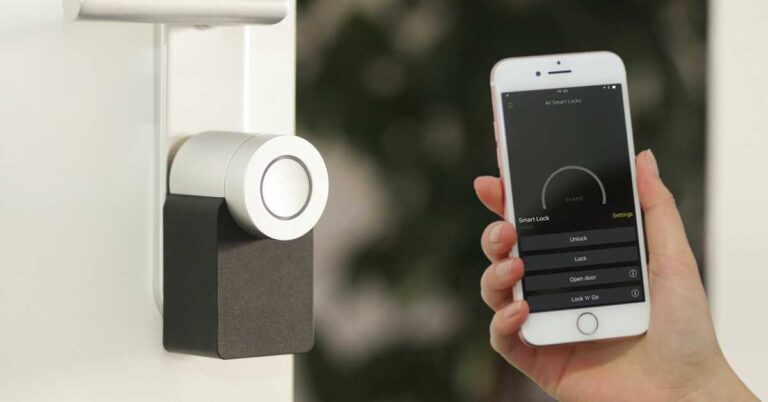
Smart locks are Wi-Fi enabled or Bluetooth enabled door locking solutions that allow access through different means fingerprint, passwords, voice commands, and of course physical keys. Unlike conventional locks, smart locks provide the convenience of remote access Different manufacturers implement different technologies including evolving technologies like fingerprint scanning and digital assistant support.
What are the features of a smart lock?
Smart locks come with customisation features so that you can monitor the activity at your doorstep. With Bluetooth and Wi-Fi connectivity, you can remotely update features and passwords. Here are some major smart lock features.
1) Remote control through a mobile application
Smart locks are linked to an application that you can run on your smartphone. You can use the application to remotely control the lock. It also informs you about the entries and alerts you regarding any activity.
2) Set limitations for access
You can set limitation for individual entry code. The limitations conform to a specific duration say hours or days. Thus, password holders can get into your home only during designated hours.
Yale J20 Smart Rim Door Lock with RF Card, Pin & App-Enabled Access, Bluetooth & Wi-Fi
Price: ₹ 7,498
Buy on Amazon
4) Auto-lock settings
The auto-locking feature is highly convenient provided by most smart locks. This feature causes the smart lock to automatically lock the door if it’s left unlocked for a definite period.
5) Permanent and temporary entry codes
Smart locks allow you to set temporary and permanent codes keeping in mind different visitors like cleaning services, repair services, relatives, and family members.
What if electricity or internet connection gets interrupted?
Power-cuts and internet issues can occur anytime that will surely halt the functioning of the smart lock if no alternative power supply is available. As a solution, smart locks come with a conventional key port that you can use similar to a standard lock. If only the Wi-Fi network goes out, you can still use Bluetooth connectivity with your smartphone to get access to your home.
What if electricity or internet connection gets interrupted?
For the latest gadget and tech news, and gadget reviews, follow us on Twitter, Facebook and Instagram. For newest tech & gadget videos subscribe to our YouTube Channel. You can also stay up to date with the Gadget Bridge Android App.
Microsoft’s Windows 10 provides the account management feature by which multiple users can work on the same computer and save their tasks in individuals profiles. In just a few clicks, you can switch users without losing any data.
Who would need to switch users on Windows 10?
Switching users become relevant When you work on a computer that is shared among multiple users, say in a family or an organisation. It is an effective way to keep the projects and tasks organised and avoid data work loss while another user is working on the same system.
Here are the simple ways to switch users on Windows 10.
Method 1: Using the Windows 10 Sign-in screen
This is the most commonly known methods to switch users in Windows 10. The process followed is the same as what you follow while switching users in the lock screen. Press the Windows + L to lock the screen. A list of users appears on the screen who previously logged into the computer. You just need to choose an account from the menu and enter the password to log in.
Method 2: Using the Windows 10 Start Menu
This is the simplest method to switch users in Windows 10. When you open the start menu by pressing the Windows key, you will see a list of users on the left. The list indicates the users who previously logged in to the computer. Click the user you want to switch to. You will be redirected to the login screen. Once you enter the password, you get the Windows with the allocated account settings.
Method 2: Using the Windows 10 Start Menu
Method 3: Using Ctrl+Alt+Delete key combination
The Ctrl+Alt+Delete is a highly useful key combination that helps us troubleshoot a variety of Windows issues. It is also a really useful tool to switch Windows accounts. Once you press Ctrl+Alt+Delete, click the ‘Switch User’ option to enter the lock screen. The lock screen presents a list of users who logged into the PC. Choose the desired user and enter the password to access the Windows account.
Method 4: Using Alt+F4 shortcut
The Alt+F4 is a shortcut to close the current task. When you repeatedly use the combination, it closes all the open applications. When no more tasks are active, it opens the Windows Shutdown dialogue box. In the dropdown menu, you can choose the ‘Switch User’ option. You will again be redirected to the lock screen. At this point, you just have to click the desired user icon and enter the password to log into the account.
Method 5: Using the Command Prompt
This is the step that a majority of Window users aren’t comfortable with. Once you launch the Command Prompt, enter the following command: runas /user:<computer name>\<username> explorer.exe
Method 5: Using the Command Prompt
You will be asked to enter the user’s password. Type the password and press Enter. This is one of the fastest methods to switch users in Windows provided you know the username and password.
For the latest gadget and tech news, and gadget reviews, follow us on Twitter, Facebook and Instagram. For newest tech & gadget videos subscribe to our YouTube Channel. You can also stay up to date with the Gadget Bridge Android App.
Sony has outdone itself with its latest launch in the form of PlayStation 5. We had been eagerly waiting for it since so many months and finally, the company launched the devices in the country and with extreme anticipation, we got our hands on it. This is the Sony PlayStation 5 review, which you should read before buying.
Design
Sony PlayStation 5, out of the box, seems something like you would see placed in a rocket ship trying to find life on another planet. Yes, this gaming console is futuristic and screams for attention. Dressed in white and glossy black, this gaming beasts is a class apart. The curves on the white panels add to the show and one can place it vertically or horizontally on the desk with the use of the in-box stand. Though we did not use the stand when we placed it erect on the desk, Sony does recommend using it, since that improves airflow.
Sony PS branding can be found on the white panel, while the rear and the front hold a lot of ports. These include Ethernet, HDMI, USB type-A as well as USB Type-C ports. The front also has the power as well as the eject disc buttons. We have to mention one thing, the sides do not attract fingerprint smudges, however, the middle black part is a magnet for fingerprints. While the white panels did get dirty, we could easily clean it off with Indian made cleaner that has alcohol.
As always, a controller too comes with the Sony PlayStation 5. This time it is also dressed in white and black and has been upgraded. The overall look and feel of the controller is very modern, it has become slightly heavy, nevertheless does the job well. The vibration motor/haptic feedback in it is also more responsive and in some games, it becomes a delight to work with. However, not all games at the moment make use of it. Even the triggers have become responsive, and they require a certain level of tugging as they resist a little in some games. But that is very good as that adds to the realism and Sony calls it Adaptive Triggers.
Performance
Coming to the performance of the Sony PlayStation 5, we loved every bit of it. Since the company takes a couple of years to bring out an upgrade, it is not like the PC or the smartphone market which come with small to medium updates every now and then. Everything in and around the Sony PlayStation 5 has been changed, starting from its ability to support 8K screens. However, we connected it to a 4K screen from Xiaomi (since 8K was not at hand), the colours as well UI of the PS5 were lively.
There are a lot of changes made to the UI. A lot of peppiness has been added and it is very modern. You get all sorts of light and particle effects in it and the UI like the PlayStation itself looks very futuristic. Over that, it has become very fast too. With the inclusion of an 825GB SSD (out of which you get approx. 650GB) the console is super quick. There is an AMD Ryzen X86 CPU inside, coupled with 16GB of RAM. Ray Tracing is also on board, which enables you to take advantage of things like reflections, better particle systems etc in games. However, we did keep it off since we found the performance to be slightly better and frame rates to be higher.
There are not a ton of games available on the Sony PlayStation 5 right now. But saying that, the console is backwards compatible. We played some of the old games we had on the previous generation on to the PS5 and all of them seemed better, ran faster and we could make out the difference. If you plan to play with friends online, then we do recommend connecting the internet via the ethernet port as that will reduce the latency.
The Sony PlayStation 5 consumes 350W of power, which is not bad. A gaming PC of this stature will consume almost double of that. Talking about which, if you get the same kind of specs in a Gaming PC, it will also cost you much more. However, the graphics could be better. But that is a debate for another day.
Up to 120 FPS is supported in the Sony PlayStation 5, if you connect it with a 120Hz monitor or TV. HDR is also there, which also adds a lot of great hues to games like Spider-Man and Astros Playroom. Another thing we really want to stress upon is how quite the console has become. While the PS3 and PS4 seemed like a hornet nest went disturbed, Sony PlayStation 5 is very quiet, even if you are playing games on it for hours.
Verdict
All in all, we loved every bit of the Sony PlayStation 5. It gave us very little to bicker about and we wanted to steal it from Sony and keep it for ourselves as ‘our precious’ (smeegle voice). Gadget Bridge anniversary is right around the and hopefully, the tech-heads in the team will install one in the office.
But jokes apart, Sony PlayStation 5 is everything a casual to pro gamer would want. The looks are great, the gaming is top-notch, the load times of games is lowered and we got 8K support as well. At a price of Rs 49,990, it will be a great addition to your living room or den. Think of it as an investment you made right now and for the next 3-4 years your casual gaming needs have been taken care of.
Pros
Futuristic looks
Very good graphics
Supports 8K
Cons
New games will come in slowly
Some will debate PC graphics are better
For the latest gadget and tech news, and gadget reviews, follow us on Twitter, Facebook and Instagram. For newest tech & gadget videos subscribe to our YouTube Channel. You can also stay up to date with the Gadget Bridge Android App.
At the IFA 2020 tech event, the audiophile company JBL introduced a host of audio devices in Berlin. The company launched new Bluetooth speakers and headphones. The audio company owned by Harman brought some of them to India recently and today it has introduced JBL PartyBox On-The-Go and PartyBox 310 in the country. Both of these are big sized speakers that feature JBL wireless mic and come with rechargeable batteries. Read on to know its features pricing and availability details in the country.JBL PartyBox On-The-Go and PartyBox 310 price and availability detailsJBL PartyBox On-The-Go has been launched in India with a price tag of Rs 24,999. Whereas the price of the JBL PartyBox 310 has been set at Rs 39,999. Both the Bluetooth speakers are available for purchase now via the official websitein.jbl.com, all leading online as well as offline stores in the country.JBL PartyBox On-The-GoJBL PartyBox On-The-Go FeaturesJBL PartyBox On-The-Go is a big sized speaker that comes with a sound output of 100W, which can last up to 6 hours on a single charge and is bundled with a wireless mic with a padded shoulder strap. For connectivity, it has Bluetooth and other inputs for guitar, mic USB and AUX. The JBL speaker further includes a wireless mic with bass, treble and echo tuning along with a light show sync feature. As said the wireless speaker is IPX4 splash-proof rated.JBL PartyBox 310 featuresJBL PartyBox 310 is another big sized speaker. This audio device features dazzling lights and a set of smooth-glide wheels along with a pull-out handle for portability. The JBL speaker comes with 240 watts of JBL Pro Sound and a synced light show. It can deliver up to 18-hours of battery life and is compatible with most speaker stands. There are dual mics and guitar inputs with built-in vocal tuning. The device can be paired with JBL PartyBox App to control your party with your phone to switch tracks, customize light show and more. The PartBox 310 is also IPX4 rated for water resistance. Hence, you can turn up your favourite playlists anywhere this Holi, get-togethers at home to dance parties outside.JBL PartyBox 310“JBL’s PartyBox Series has become the go-to speakers for our consumers for any gatherings, events, or parties. We are delighted to receive such a heart-warming response from our consumers and are excited to introduce two new additions in this series. JBL PartyBox On-The-Go – a new speaker designed to provide even more functionality and mobility to great sound and PartyBox 310, which continues to advance JBL’s tradition of offering the ultimate sound experience and design,” said Vikram Kher, Vice-President, Lifestyle Audio, HARMAN India.
For the latest gadget and tech news, and gadget reviews, follow us on Twitter, Facebook and Instagram. For newest tech & gadget videos subscribe to our YouTube Channel. You can also stay up to date using the Gadget Bridge Android App.
Gameplay streaming is one of the most trending activities nowadays. It offers the best of both gaming and being connected socially. There are several platforms like YouTube and Twitch that allow you to add several features to enhance engagement. PlayStation 5 has unlocked new opportunities for gamers to play as well as stream their skills. With the DualSense wireless controller of the PlayStation 5, you can quickly begin streaming within the console.
What do you need to stream gameplay on PlayStation 5?
Streaming gameplay on PlayStation 5 is quite straightforward. You only need the following:
A stable internet connection
A PlayStation Network account
Linking of the account with a streaming service like YouTube or Twitch.
What do you need to stream gameplay on PlayStation 5?
When you link your PlayStation Network account with YouTube or Twitch, the public broadcasts will be visible on your PlayStation Network profile. As soon as you link your YouTube account, you will have to wait for the verification before you can begin streaming. However, Twitch does not demand verification and you can start streaming your gameplay immediately.
How to stream gameplay on PlayStation 5?
Create a YouTube or Twitch account using a smartphone or PC. It is beneficial to install Twitch on your smartphone so that you can dynamically modify the stream settings.
Launch the video game that you want to stream.
Press the Create button.
Select the Broadcast option located at the bottom of the screen by pressing ‘X’.
Select between YouTube and Twitch to stream on.
How to stream gameplay on PlayStation 5?
Link your PlayStation Network Account to YouTube or Twitch if haven’t done it before.
Enter the name of the broadcast and press X on Go Live to begin streaming.
You can modify the stream quality by choosing the ellipses button with ‘X’.
When you wish to pause the stream, press the PlayStation button to go to the Control Center.
Press the ‘Square’ button followed by pressing the ‘X’ button to stop the stream.
It is important to note that based on the genre of game that you are streaming, you are placed in a category. To maximise engagement to your stream, using the Twitch application so that you can include additional tags and choose a go-live notification.
Can you stream your audio and video along with the gameplay?
The e-commerce website Amazon today announced Grand Gaming Days in India. The newly announced sale for the gaming enthusiasts offering a host of offers and deals on gaming gadgets. The shopping portal will be offering great deals on gaming laptops, desktops & monitors, advanced headphones, gaming consoles, graphic cards, TVs. At the moment the online marketplace is hosting Fab Phones Fest that will go on till March 25 The Amazon Grand Gaming Days Sale that is announced will bring a bunch of offers and discounts on some popular gaming products on Amazon.in. These range from popular brands like Lenovo, Acer, Logitech, ASUS, LG, HP, Sony, Dell, Corsair, Cosmic byte, JBL and more. The sale will be live until March 25, 2021.Offers and deals on Gaming Laptops, Desktops and Monitors:The Amazon Grand Gaming Days will now offer HP Pavilion Gaming laptop at Rs 57,990. The gaming device features a narrow bezel display and custom-tuned audio. This comes with improved thermal cooling for overall performance and stability with high-grade graphics and processing power for gaming and multitasking.WhereasASUS TUF Gaming FX505DT Laptop can now be purchased at Rs 59,990. The laptop is powered by AMD Ryzen 7 processor and NVIDIA GeForce GTX 1650 graphics. There is a 144Hz IPS-level NanoEdge display, which is certified by military-grade MIL-STD-810G standards.Another one is from MSI. TheMSI Bravo Ryzen is powered by a 7nm technology AMD Ryzen processor and Radeon RX graphics. It comes with a smooth gaming display with FreeSync Premium Technology. Immersive Hi-Res Audio offers a lossless audio experience and Cooler Boost 5 thermal system. This laptop will be available at Rs 82,990.Coming to the desktops, Amazon will be offeringLenovo IdeaCentre G5 Gaming Desktop powered by 10th Generation Intel Core i5-10400 Processor, 2.9 GHz base speed, up to 4.3 GHz maximum speed, 6 Cores, 12MB Cache. This PC comes with 8GB DDR4-2933 RAM, expandable to 32GB and 1TB HDD + 256GB SSD storage. During Amazon’s Grand Gaming Days Sale in the country, the buyers can purchase it at Rs 62,990.Moreover,ASUS ROG Strix is now up for sale at Rs 67,990. It runs Windows 10 Home and under the hood, there is an Intel Core 10th Gen i5-10400F CPU paired with NVIDIA GeForce GTX 1650 graphics card.Amazon will also offer monitors from brands like Samsung and LG at discounted rates during the sale. The 27-inchSamsung Odyssey Curved gaming monitor with a 144hz refresh rate and AMD Free Sync will be available at a discounted price of Rs 22,802. On the other hand,LG Ultragear 32″ 2K gaming monitor is now available for Rs 23,449. This monitor features a 144Hz refresh rate panel with 1ms motion blur reduction and Dynamic Action Sync for smooth gameplay.You will also get to see deals and discounts on other miscellaneous gaming products and accessories such as mics, headsets, gaming TVs as well as routers.
For the latest gadget and tech news, and gadget reviews, follow us on Twitter, Facebook and Instagram. For newest tech & gadget videos subscribe to our YouTube Channel. You can also stay up to date using the Gadget Bridge Android App.
Google recently released a new application named WifiNanScan that calculates the distance between two smartphones with the help of the Wi-Fi Aware protocol. The app is designed as a tool for developers, researchers, demonstrators who want to carry out developments and testing of their applications.
How does WifiNanScan work?
WifiNanScan works on the Wi-Fi Aware technology, which is also known as Neighbour Awareness Networking (NAN). The Wi-Fi Aware enables an Android 8.0 or higher device to connect to a nearby device without requiring any medium. The connected devices can share data without any hassle. The Wi-Fi Aware while locating nearby devices measures the distance that is utilised by the WifiNanScan application.
According to Google, “Wi-Fi Aware capabilities enable devices running Android 8.0 (API level 26) and higher to discover and connect directly to each other without any other type of connectivity between them. Wi-Fi Aware is also known as Neighbor Awareness Networking (NAN)”.
What are the features of WifiNanScan?
The WifiNanScan will help you estimate the distance between two devices with an accuracy of about one metre. It must be noted that the WifiNanScan application is compatible with only devices running the Android 8.0 operating system or higher. In other words, it won’t locate the distance from other devices. The app determines the distance in the range of 15 metres. This data is quite useful to the developers who want to test their file-sharing applications.
According to Google, “The WifiNanScan app measures the distance between two smartphones using the Wi-Fi Aware protocol (also called Neighborhood Aware Networking(NAN)). It’s designed as research, demonstration, and testing tool for developers, vendors, universities, and more”.
What are the features of WifiNanScan?
How to Use WifiNanScan on your Android 8.0+ device?
Since the app is compatible with only Android 8.0+ devices, you must first acknowledge the Android version of your device. Follow these steps.
Launch your phone’s Settings app.
Close to the bottom, tap System > Advanced > System update.
Here you will see the ‘Android version’ and ‘Security patch level’.
The new WifiNanScan application holds significance for a variety of domains including education and industry. These are as follows.
1) Users can send a document to a printer securely without logging in to a network.
2) They can view restaurant menus and reserve their seats while passing by
3) The app will help it automating the check-ins and will replace physical identification systems in schools and organisations.
What is the significance of the WifiNanScan?
According to Google, “With this app, it is possible to obtain a distance measurement with a precision of about one metre with phones up to 15 metres apart. Developers, OEMs, and researchers can use this tool to validate distance/range measurements enabling the development of peer-to-peer ranging and data transfer, find my phone and context-aware applications based on the Wi-Fi Aware/ NAN API.
For the latest gadget and tech news, and gadget reviews, follow us on Twitter, Facebook and Instagram. For newest tech & gadget videos subscribe to our YouTube Channel. You can also stay up to date with the Gadget Bridge Android App.
Although Apple iOS 14.5 is not yet released, the rumours regarding iOS 15 have started surfacing. The new operating system (OS) by Apple is expected to bring a fresh range of features including appearance and camera tricks. Busting the rumours, we have come up with the most relevant information regarding the upcoming iOS 15 for you.
When is the iOS 15 likely to release?
Apple usually launched the new version of iOS at its annual conference named WWDC (Worldwide Developers Conference). The WWDC 2021 is expected to be held in June 2021. The WWDS 2021 revealed the iOS 14, iPad OS 14, and macOS Big Sur. Considering the ongoing COVID-19 pandemic, the WWDC 2021 is anticipated to be a virtual event. Once the new iOS is announced, a beta version will be released. We can expect a stable release in September 2021.
When is the iOS 15 likely to release?
Which iPhone models will be compatible with the upcoming iOS 15?
An operating system is designed while keeping a minimum processor capability in mind. As the interface becomes more interactive, the demand for CPU resources increases. The upcoming iOS may require iPhone 7 or later to run optimally. The A9 chip embedded in the iPhone 6 may not cater to the requirements of the Apple iOS 15. The A10 chip, on the other hand, will be able to handle the operating system tasks seamlessly.
What new features can we expect in the new iOS 15?
Apple iOS 15 will be a big update for Apple devices. The iOS 15 may bring comparatively fewer changes. We will get more details about the features at WWDC 2021. However, the upcoming iOS 15 is expected to sport the following new features.
1) Widgets: The widget feature was first introduced in iOS that can be customised in the form of smart stacks. The iOS 15 may add more capabilities to widgets.
2) Default applications: The upcoming OS by apple may allow you to modify more default applications. In iOS 14, the default mail app could be swapped by a third-party app. Similarly, you could change the default music application Apple Music.
What new features can we expect in the new iOS 15?
3) Unser Interface: The iOS 15 is reported to be highly interactive giving more control to the user. For instance, you may get more accessibility in toggling features and changing volume and brightness. It may also provide an option to change the widget size.
4) Lock Screen: The iOS 15 is rumoured to change the lock screen and the way notifications are displayed.
5) Gaming boost: Games are going to get a boost and the new OS will help reduce lag and better frame rates.


 OnePlus 9 Pro tech specs
The OnePlus 9 Pro comes packed with some crazy good features. For the display, it sports a 6.7-inch QHD+ AMOLED LTPO Fluid Display 2.0 screen. According to a type of content the refresh rate adopts from 1 Hz which goes up to 120Hz. For binge-watching videos and social media experience, it has a Super Video resolution feature optimising your experience including HyperTouch for better gaming response.
The device runs Android 11 with Oxygen OS 11and under the hood there is top of a line Qualcomm Snapdragon 888 processor offering 5G support. For smooth gameplay, it comes with a 5-layer Gaming Grade cooling system that will keep the phone cool during long gameplay. The premium device also includes Warp Charge 65T, which is claimed to charge the OnePlus 9 Pro to 100 per cent in just 30 minutes and 100 per cent in just 43 minutes wirelessly.
In terms of camera capabilities, the phone Hasselblad-branded quad rear camera set up that includes the main camera features a 48MP Sony IMX789 sensor and a 50-megapixel Sony IMX766 ultrawide sensor. Moreover, there is an 8-megapixel telephoto lens and a 2-megapixel depth camera sensor. For taking selfies there is a 16-megapixel sensor.
This time OnePlus has improved the video capabilities of the device by offering support for 8K resolution at 30 frames per second (FPS). Over that, you can shoot a next to the professional slow-motion video at 4K at 120fps.
OnePlus 9 Pro tech specs
The OnePlus 9 Pro comes packed with some crazy good features. For the display, it sports a 6.7-inch QHD+ AMOLED LTPO Fluid Display 2.0 screen. According to a type of content the refresh rate adopts from 1 Hz which goes up to 120Hz. For binge-watching videos and social media experience, it has a Super Video resolution feature optimising your experience including HyperTouch for better gaming response.
The device runs Android 11 with Oxygen OS 11and under the hood there is top of a line Qualcomm Snapdragon 888 processor offering 5G support. For smooth gameplay, it comes with a 5-layer Gaming Grade cooling system that will keep the phone cool during long gameplay. The premium device also includes Warp Charge 65T, which is claimed to charge the OnePlus 9 Pro to 100 per cent in just 30 minutes and 100 per cent in just 43 minutes wirelessly.
In terms of camera capabilities, the phone Hasselblad-branded quad rear camera set up that includes the main camera features a 48MP Sony IMX789 sensor and a 50-megapixel Sony IMX766 ultrawide sensor. Moreover, there is an 8-megapixel telephoto lens and a 2-megapixel depth camera sensor. For taking selfies there is a 16-megapixel sensor.
This time OnePlus has improved the video capabilities of the device by offering support for 8K resolution at 30 frames per second (FPS). Over that, you can shoot a next to the professional slow-motion video at 4K at 120fps.
 OnePlus 9R tech specs
The OnePlus 9R is an India exclusive device having an OLED panel with a 120Hz refresh rate and a 240Hz touch sampling rate. It runs Android 11 with Oxygen OS 11 out of the box and is powered by Snapdragon 870 paired with up to 12GB RAM with 256GB storage. It sports a 48-megapixel quad rear camera setup. This device packs a 4,500mAh battery with Warp Charge 65 fast charging support.
For the latest gadget and tech news, and gadget reviews, follow us on Twitter, Facebook and Instagram. For newest tech & gadget videos subscribe to our YouTube Channel. You can also stay up to date using the Gadget Bridge Android App.
OnePlus 9R tech specs
The OnePlus 9R is an India exclusive device having an OLED panel with a 120Hz refresh rate and a 240Hz touch sampling rate. It runs Android 11 with Oxygen OS 11 out of the box and is powered by Snapdragon 870 paired with up to 12GB RAM with 256GB storage. It sports a 48-megapixel quad rear camera setup. This device packs a 4,500mAh battery with Warp Charge 65 fast charging support.
For the latest gadget and tech news, and gadget reviews, follow us on Twitter, Facebook and Instagram. For newest tech & gadget videos subscribe to our YouTube Channel. You can also stay up to date using the Gadget Bridge Android App. 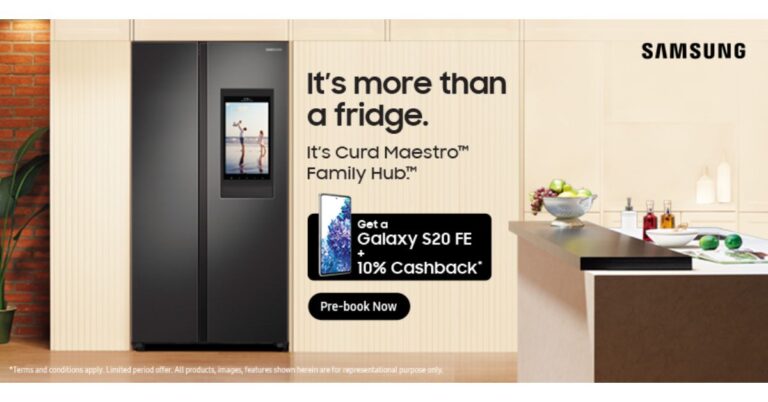






 Design
Sony PlayStation 5, out of the box, seems something like you would see placed in a rocket ship trying to find life on another planet. Yes, this gaming console is futuristic and screams for attention. Dressed in white and glossy black, this gaming beasts is a class apart. The curves on the white panels add to the show and one can place it vertically or horizontally on the desk with the use of the in-box stand. Though we did not use the stand when we placed it erect on the desk, Sony does recommend using it, since that improves airflow.
Sony PS branding can be found on the white panel, while the rear and the front hold a lot of ports. These include Ethernet, HDMI, USB type-A as well as USB Type-C ports. The front also has the power as well as the eject disc buttons. We have to mention one thing, the sides do not attract fingerprint smudges, however, the middle black part is a magnet for fingerprints. While the white panels did get dirty, we could easily clean it off with Indian made cleaner that has alcohol.
Design
Sony PlayStation 5, out of the box, seems something like you would see placed in a rocket ship trying to find life on another planet. Yes, this gaming console is futuristic and screams for attention. Dressed in white and glossy black, this gaming beasts is a class apart. The curves on the white panels add to the show and one can place it vertically or horizontally on the desk with the use of the in-box stand. Though we did not use the stand when we placed it erect on the desk, Sony does recommend using it, since that improves airflow.
Sony PS branding can be found on the white panel, while the rear and the front hold a lot of ports. These include Ethernet, HDMI, USB type-A as well as USB Type-C ports. The front also has the power as well as the eject disc buttons. We have to mention one thing, the sides do not attract fingerprint smudges, however, the middle black part is a magnet for fingerprints. While the white panels did get dirty, we could easily clean it off with Indian made cleaner that has alcohol.
 As always, a controller too comes with the Sony PlayStation 5. This time it is also dressed in white and black and has been upgraded. The overall look and feel of the controller is very modern, it has become slightly heavy, nevertheless does the job well. The vibration motor/haptic feedback in it is also more responsive and in some games, it becomes a delight to work with. However, not all games at the moment make use of it. Even the triggers have become responsive, and they require a certain level of tugging as they resist a little in some games. But that is very good as that adds to the realism and Sony calls it Adaptive Triggers.
 Performance
Coming to the performance of the Sony PlayStation 5, we loved every bit of it. Since the company takes a couple of years to bring out an upgrade, it is not like the PC or the smartphone market which come with small to medium updates every now and then. Everything in and around the Sony PlayStation 5 has been changed, starting from its ability to support 8K screens. However, we connected it to a 4K screen from
Performance
Coming to the performance of the Sony PlayStation 5, we loved every bit of it. Since the company takes a couple of years to bring out an upgrade, it is not like the PC or the smartphone market which come with small to medium updates every now and then. Everything in and around the Sony PlayStation 5 has been changed, starting from its ability to support 8K screens. However, we connected it to a 4K screen from  The
The