

Instagram goes ‘musical’ with these new features

Popular photo-sharing app Instagram has added a number of new features to Stories. With the new features, Instagram users can ask for music recommendations from their followers, answer questions during a live stream and create a countdown for your moments. The update to the app has started rolling out to both its Android as well as iOS versions.
The Facebook-owned company created a blog post to announce these features to its users. Another interesting thing that you can do is reply to questions sticker in Stories with a song from their library. But it is worth noticing that this feature is only available in regions where the app’s music library is available. If it is available in your region, you’ll be able to see a music icon with the question sticker on your friends’ Stories. On clicking that icon, users will be able to share a song from your music library on the photo-sharing app.
Instagram has also enabled new camera effects that work with the music that is being played via the app. To access these, you can go to the music section in camera and click on the new icons that are available above capture.
The question sticker can also be used in live videos on Instagram going forward. With the feature, you will be able to post questions as you normally would in Stories format. Once the user goes live on the app, they’ll be able to see your questions in order to answer them.
Furthermore, followers will also be to view which questions that are being answered by the user who has gone live. The photo-sharing app will also let users share photos and videos during live broadcasts.
The latest update will also enable you to use the new countdown sticker in your Instagram Stories. Furthermore, users can add a countdown with an end date and time. They will also be able to select the colour of the countdown before it gets added to their Story.
You will also be able to use the countdown sticker in your future Stories. When your countdown ends, your followers will receive a notification about the same. This feature is now available on both Android and iOS versions of Instagram across the globe.
For the latest gadget and tech news, and gadget reviews, follow us on Twitter, Facebook and Instagram. For newest tech & gadget videos subscribe to our YouTube Channel.
Asus ZenFone 5 is now getting Android 9 Pie update
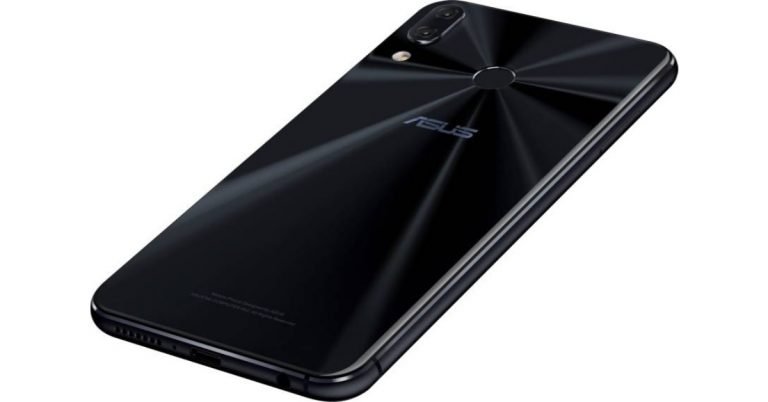
You would be happy to hear that the Asus ZenFone 5 has received the Android 9.0 Pie update finally. There are two kinds of updates which are available—the FOTA update and the OTA update. The FOTA update has already been launched and the OTA update is going to be launched soon.
In order to download the FOTA update, we have enlisted a few steps for your convenience. They are pretty easy to follow so go ahead if you have the Asus Zenfone 5:
- Download the package from the source link
- Move the downloaded files to the microSD card
- Then after entering into recovery mode click on “apply updates” from microSD
- Now select the downloaded package and your work is done
Netgear Orbi RBK20 router with tri-band WiFi system launched in India
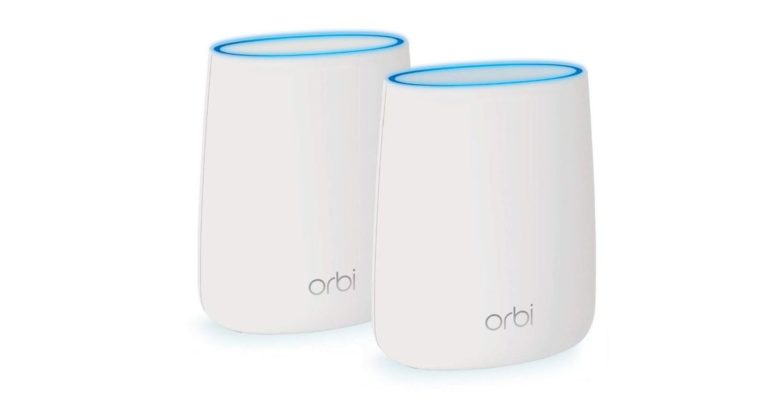
The brand new Orbi RBK20 has been launched by Netgear, today. Netgear is a global networking company which has been providing devices to customers, based on connectivity, for a long time. The company is based out of California, USA and has its offices in India too. They have a large range of WiFi routers and digital hubs in India and now they expanded the line-up with the launch of Orbi RBK20. According to the company, this device has been made specially in order to evade the consequences of cyber threats, which often pervade through WiFi networks, if not configured properly.
The device has a 5GHz connection between the router and satellite and can provide signals to up to 4,000 square feet. It is compatible with diverse kinds of houses and can spread connectivity to large extent due to its four high-gain antennas. This feature is based on the company’s vision to provide WiFi to any kind of home considering that every home nowadays is in demand of a great and more powerful wireless internet connection.
The WiFi speed on his machine can reach up to 2.2Gbps. It comes with FastLane3 technology (the dedicated WiFi backhaul) that creates a better 4K HD streaming and gaming environment in spite of connecting to more devices. The WiFi can be connected to more than one satellite if need be, and therefore it eliminates a lot of dead zones. In other words, the WiFi provides a large network coverage at a very high speed. It also means that a lot of devices can be connected to it without hinderance of any one device’s net speed. Over that, this WiFi hub has smart parental controls, works with Amazon Alexa and Google Assistant.
To talk more about the company, Netgear sells its products in more than 30,000 retail locations worldwide, and through tentatively 25,000 resellers. The selling also takes place by the means of multiple major cable, mobile and wireline service providers. The product is priced at Rs 12,899 and is selling via online stores such as Amazon, here in India.
For the latest gadget and tech news, and gadget reviews, follow us on Twitter, Facebook and Instagram. For newest tech & gadget videos subscribe to our YouTube Channel.
7 easy tips to extend battery on your Android smartphone
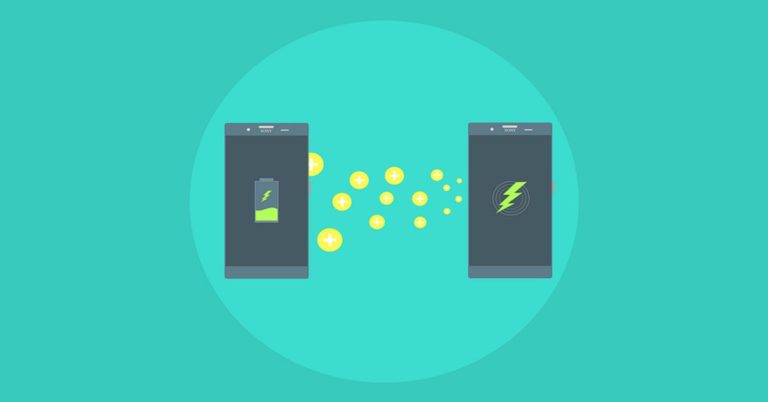
Do you have battery troubles with your smartphone? We know that most people would answer that with a yes. Considering that the tasks we perform on smartphones in today’s time are so demanding, it’s actually unsurprising to see so many people carry power banks. With this list, we are here to make your life easy so that you can make the most of your Android smartphone’s battery. Here are some easy tips to follow in order to do so:
 In a recent report, Google literally admitted that dark mode consumes less battery on any Android smartphone. If your smartphone has a system-wide dark theme, enable it right away. If not, opt for the dark mode in as many apps as you can and use a dark wallpaper. YouTube, Android Messages, Twitter, and Pocket are examples of apps that support the dark theme.
 We understand that disabling GPS on your device is not a practical piece of advice. So we recommend going to the Settings of your smartphone to see which all apps have access to your location. You’ll find this in the option of App-level permissions under Location tab. From here, you can disable the apps which you think don’t really require your location or the ones you don’t use too much.
 If you use a device that has Android Oreo or Android Pie, you would know that your smartphone notifies you about open Wi-Fi networks even if Wi-Fi has been disabled. You can turn this off by heading to Settings, then clicking on Network & internet and then selecting the option of Wi-Fi. Here, go to Wi-Fi preferences and uncheck ‘Open network notification’.
 Did you know that a lot of apps stay active even after you exit them? But these are not something to worry about as you only have to adjust a few settings in order to save the battery they use. Head to Settings and click on Apps & Notifications. Here, go to the app’s page and tap on Battery and then go to the option of ‘Battery Optimisation’. Here, select all the valid options to save battery that is being used by the app.
 Check the battery usage of all of your apps in the settings of your smartphone. You can do this by heading to Settings and then to Battery Usage under the Battery tab. If you find some apps to be draining too much battery, uninstall them and instead install their Lite version or use them on the web if the Lite version is not available.
 Using Google Assistant surely makes things fun and easy, but then, it can use up a lot of battery from your device in order to provide you with information and respond at your wake command. So, if you are not heavily dependent on it, here are the steps to disable it. Head to Google app and select ‘More’. Tap on Settings and then go to Google Assistant header. Here, tap on Settings again and select Assistant. Press on Phone and switch Google Assistant off.
 If you find notifications on your smartphone to be too annoying, you can disable them completely. For doing this, go to the Settings of your smartphone, and press on Accounts. You would be able to see the Automatically sync data option at the bottom. Scroll down and disable it or disable it for select apps by going to their page. Going forward, you would only see the new content on that app when you visit it.
For the latest gadget and tech news, and gadget reviews, follow us on Twitter, Facebook and Instagram. For newest tech & gadget videos subscribe to our YouTube Channel.
[td_smart_list_end]
If you find notifications on your smartphone to be too annoying, you can disable them completely. For doing this, go to the Settings of your smartphone, and press on Accounts. You would be able to see the Automatically sync data option at the bottom. Scroll down and disable it or disable it for select apps by going to their page. Going forward, you would only see the new content on that app when you visit it.
For the latest gadget and tech news, and gadget reviews, follow us on Twitter, Facebook and Instagram. For newest tech & gadget videos subscribe to our YouTube Channel.
[td_smart_list_end]
In This Article
Enable dark mode on your device
 In a recent report, Google literally admitted that dark mode consumes less battery on any Android smartphone. If your smartphone has a system-wide dark theme, enable it right away. If not, opt for the dark mode in as many apps as you can and use a dark wallpaper. YouTube, Android Messages, Twitter, and Pocket are examples of apps that support the dark theme.
Control your location settings
 We understand that disabling GPS on your device is not a practical piece of advice. So we recommend going to the Settings of your smartphone to see which all apps have access to your location. You’ll find this in the option of App-level permissions under Location tab. From here, you can disable the apps which you think don’t really require your location or the ones you don’t use too much.
Turn the option of Automatic Wi-Fi off
 If you use a device that has Android Oreo or Android Pie, you would know that your smartphone notifies you about open Wi-Fi networks even if Wi-Fi has been disabled. You can turn this off by heading to Settings, then clicking on Network & internet and then selecting the option of Wi-Fi. Here, go to Wi-Fi preferences and uncheck ‘Open network notification’.
Check background apps
 Did you know that a lot of apps stay active even after you exit them? But these are not something to worry about as you only have to adjust a few settings in order to save the battery they use. Head to Settings and click on Apps & Notifications. Here, go to the app’s page and tap on Battery and then go to the option of ‘Battery Optimisation’. Here, select all the valid options to save battery that is being used by the app.
Use the Lite version of battery draining apps
 Check the battery usage of all of your apps in the settings of your smartphone. You can do this by heading to Settings and then to Battery Usage under the Battery tab. If you find some apps to be draining too much battery, uninstall them and instead install their Lite version or use them on the web if the Lite version is not available.
Turn off Google Assistant
 Using Google Assistant surely makes things fun and easy, but then, it can use up a lot of battery from your device in order to provide you with information and respond at your wake command. So, if you are not heavily dependent on it, here are the steps to disable it. Head to Google app and select ‘More’. Tap on Settings and then go to Google Assistant header. Here, tap on Settings again and select Assistant. Press on Phone and switch Google Assistant off.
Turn off auto-sync
 If you find notifications on your smartphone to be too annoying, you can disable them completely. For doing this, go to the Settings of your smartphone, and press on Accounts. You would be able to see the Automatically sync data option at the bottom. Scroll down and disable it or disable it for select apps by going to their page. Going forward, you would only see the new content on that app when you visit it.
For the latest gadget and tech news, and gadget reviews, follow us on Twitter, Facebook and Instagram. For newest tech & gadget videos subscribe to our YouTube Channel.
[td_smart_list_end]
If you find notifications on your smartphone to be too annoying, you can disable them completely. For doing this, go to the Settings of your smartphone, and press on Accounts. You would be able to see the Automatically sync data option at the bottom. Scroll down and disable it or disable it for select apps by going to their page. Going forward, you would only see the new content on that app when you visit it.
For the latest gadget and tech news, and gadget reviews, follow us on Twitter, Facebook and Instagram. For newest tech & gadget videos subscribe to our YouTube Channel.
[td_smart_list_end] Huawei P20, P20 Pro, Mate10, Mate Pro along with Honor Play and View 10 will be updated to EMUI 9 based Android Pie soon
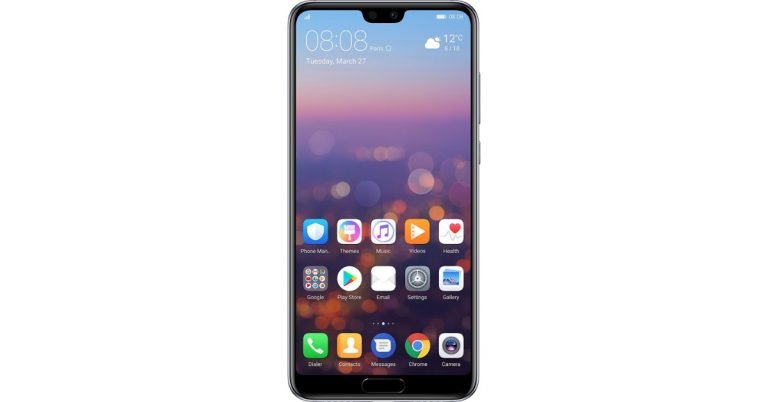
The EMUI based Android Pie update is going to roll out for a lot of Huawei phones. Those phones include Huawei P20, P20 Pro, Mate 10, Mate 10 Pro, Honor View 10, Honor Play and Honor 10. The Honor Play, View 10, 10 are priced Rs 15,999, Rs 29,999, Rs24,999 respectively. The Huawei P20 Pro and Mate 10 are priced Rs 59,999 and Rs 16,835.
The news about the update was found out from a tweet Huawei posted recently that it is going to roll out Pie skinned with EMUI 9 for the aforementioned phones. The update might not come to everyone’s phone immediately as the roll out is being done in a gradual process. Previously the company rolled out the same update for Huawei P20 and Huawei P20 Pro, which happened in China this month. Along with the update the November security patch for the P20 and P20 Pro has been released to protect the phones from any bugs, viruses whatsoever.
According to reports, one is required to have at least 80 percent battery and a strong WiFi connection before this update can be downloaded. These things are really important for the updates to be downloaded successfully in your Android Smartphone.
Once the software updated is successfully downloaded, it is reported to provide the following benefits:
- New UI.
- Gesture based navigation.
- The new HiVision visual, which does image search similar to that of Google Lens. One thing good about it is that it shows a range of food items and also their calories, so one can eat without caution of having to become obese. They can test the calories out prior to eating and select the food items that are healthy for them. Also, HiVision shows landmarks of 15 countries and over 10 million artworks.
- HiTouch is another feature, which helps users to search by tapping two fingers on the screen. This feature can search 120 different items from more than 200 e-commerce platforms and also official online stores of 100 brands.
- Next is One click projection, GPU Turbo 2.0 and PC mode that are also part of this update.
Apple continues to struggle in Indian smartphone market as iPhone sales fall
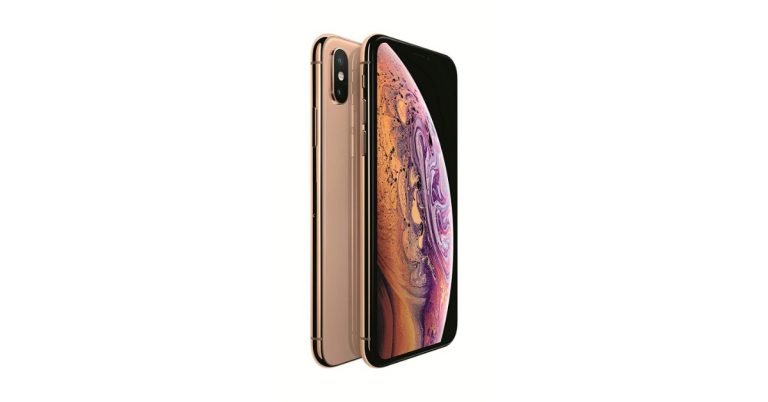
The year is not a good one for Apple in India. It was earlier reported that the sales of iPhones have taken a hit this year and that the Cupertino based technology giant has seen the first full year decline in sales. And now, a report has emerged that highlights how the company continues to lose its grip in the Indian smartphone market. The report in The Wall Street Journal states that the expensive Apple iPhone range is not able to compete against devices from companies like Samsung, Xiaomi and Oppo in India.
A number of smartphone makers from Asia, and mainly China has captured the Indian smartphone market. While Xiaomi reportedly dominated the budget segment, OnePlus has been ruling the premium smartphone market in the country, according to research firms Counterpoint and IDC. Generally, devices from these companies are more affordable than Apple and they pack a number of features, so customers are naturally drawn to buy them.
Coming back to the The Wall Street Journal report, it highlights a counter salesperson from India who said that even a single iPhone sale in a day now is being considered lucky. A few years back in 2013, around 80 iPhones were sold in a single day, the source continued to tell. However, we should mention that a shift from offline to online shopping must be considered. Also, the competition in recent years has grown stiffer with a number of new smartphone players coming in.
Apple’s this year’s range comprises of iPhone XS, iPhone XS Max and the ‘affordable’ iPhone XR. However, since the smartphone bears a price tag of Rs 76,900, it is not exactly what many people call as ‘affordable’. However, some Apple devices do continue to sell in India, but these are mostly older models including the iPhone 6 and iPhone SE. It is worth noticing that these can be bought by customers at around Rs 20,000. The more expensive models have fewer takers. And to add to Apple’s woes, OnePlus and Samsung are continuing to strengthen their hold in the smartphone market.
According to the report, Apple’s premium and high-margin approach may make it successful in some ‘developed’ markets, but it’s not doing the company much good in India. A change in strategy is the obvious next move for Apple if it hopes to revive in India.
For the latest gadget and tech news, and gadget reviews, follow us on Twitter, Facebook and Instagram. For newest tech & gadget videos subscribe to our YouTube Channel.
New PUBG Vikendi map would be available on Android and iOS from 20th December: Learn how to download it

In order for you to download the Vikendi map, you need to update the mobile game to 0.10.0 version, which has been released by Tencent games in both the mobile operating systems. This can also be done through the respective app stores. Earlier there was a notice that the Vikendi map would be activated in the game starting 18th December, however that has been delayed by two days. It was also mentioned that those who download the game update before 25th December would be able to avail Outfit box III and 1,888 BP.
The new map sort of celebrates Christmas. The home screen of the game is based on the holidays. There is snowy background with an SUV in the game which has Christmas lights. In the backdrop there is a Christmas song going on, which warns players to beware of enemies while cherishing the festive season. The map’s dimensions are 6x6km. The game would be later available for consoles on January 21.
Here is everything you need to know about the new PUBG Vikendi Map:
- The snow map is 6x6km
- Arabic language support is added
- New Snowmobile added being the Vikendi-exclusive vehicle
- Snowball fight in Vikendi Spawn Island
- Players who regularly exit matches right in the beginning will be barred from entering matches for a certain period of time
- Players can collect all daily mission awards at one time
- By finishing daily missions, players would be able to avail Added Lucky Treasure feature, which gives them a chance to upgrade weapon
- Backpack has added features to show players the sources of unobtained items
- Added season spending rewards
- New commands added for quick chats
- Suspicious behaviour can be reported if spotted by players while spectating after dying
- The added snow theme in the game leads players to collect bells from classic mode and exchange them for rewards
- Added cross-server match making: players now have the privilege to compare themselves with other players from the same tier
- Added firearms upgrade system
- Added display for crew challenge winners on Erangel’s Spawn Island
OnePlus 5G smartphone’s first image gets leaked
The upcoming year will be an important one for OnePlus. The Chinese smartphone brand will not only be seen launching its OnePlus 7 and OnePlus 7T smartphones, but it has also announced that it will be unveiling a 5G smartphone too. Although earlier speculations assumed that OnePlus 7 will come with 5G capabilities, the company clarified that it is planning a separate range for its 5G handsets as it wishes to continue selling its flagships at affordable prices. Reports about both its upcoming devices keep surfacing online.
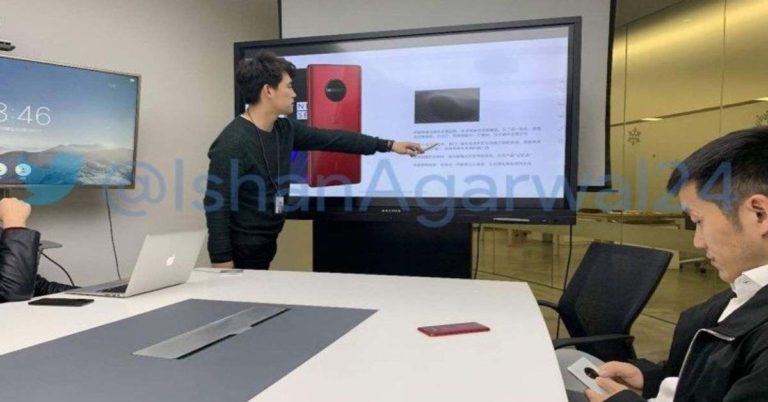
And now, we may have got the first look at one of the upcoming OnePlus smartphones. A photograph from an internal company meeting that shows OnePlus CEO Pete Lau has been leaked. In the background, one can see a picture of a OnePlus device. But there’s no clarity on whether it’s OnePlus 7, OnePlus 7T or OnePlus’ 5G smartphone. However, if you take a look at the picture, you’ll see the upcoming smartphone has a very different design compared to the one we have seen till now on other OnePlus smartphones.
The device featured on the slide is Red in colour and it sports a huge circular camera module on its back panel. The smartphone lying on the desk seems to be of the same colour too. But if you see the picture closely, the man sitting towards the right has the same OnePlus smartphone with a huge camera module. The only difference is, that the smartphone he is holding is White in colour. As we mentioned earlier, we don’t know which model of OnePlus this is, but if we believe the reports that claim that OnePlus’ 5G smartphone would be launched earlier than OnePlus 7, then in all probability the device in the image is OnePlus 5G mobile. Recently, OnePlus had announced at Qualcomm’s annual summit that the first carrier to get the OnePlus 5G will be EE in the UK. The 5G-enabled smartphone by OnePlus is expected to cost $100 or $200 more than OnePlus 6T. The company has also announced that its 5G-enabled smartphone will be powered by the Snapdragon 855 chipset paired with X50 modem. The same chipset will also be present in OnePlus 7, but with a different modem. Image courtesy: Ishan Agarwal/Twitter For the latest gadget and tech news, and gadget reviews, follow us on Twitter, Facebook and Instagram. For newest tech & gadget videos subscribe to our YouTube Channel.EXCLUSIVE! Here's your first look at an upcoming OnePlus Device I don't know much about. This image shows the device in prototype/designing stage and it is not final but this is probably how the device may end up looking. That's Pete (CEO of OP) in the img and the device itself. pic.twitter.com/Yau9EsgSDy
— Ishan Agarwal (@ishanagarwal24) December 19, 2018
Asus Zenfone Max Pro M2 review: Amongst the best budget smartphones
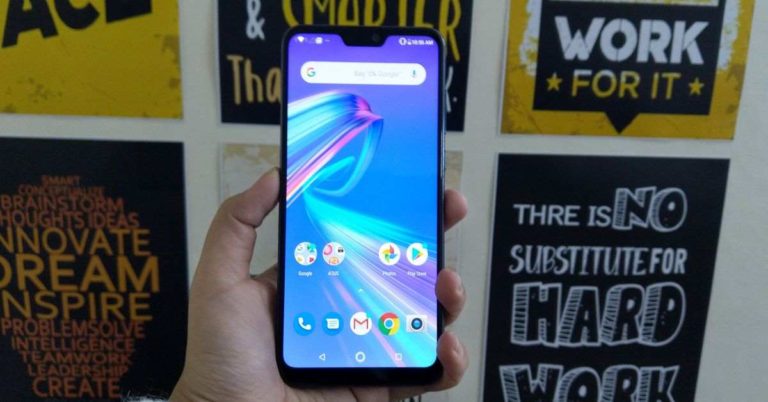
When Asus launched its Zenfone Max Pro M1 smartphone earlier this year, it set a benchmark for budget smartphones. The smartphone packed good features and was very reasonably priced. And we loved it when we reviewed it. Naturally, we were really looking forward to using the Asus Zenfone Max Pro M2. The smartphone comes in three storage variants priced in the range of Rs 12,999 to Rs 16,999. Read the rest of our review to know more about Asus Zenfone Max Pro M2 and how did it perform on our test bench:
 Asus has claimed that Zenfone Max Pro M2 is the first smartphone in the price segment to come with Corning Gorilla Glass 6. Coming back to the display, it is outlined by thin bezels on the sides and the top, and has a slightly broader chin at the bottom. It is worth noticing that Asus Zenfone Max Pro M2’s earpiece is not placed inside the notch, but instead, it lies more towards the top part of the frame. The company has done this in order to decrease the size of the notch.
Asus Zenfone Max Pro M2 has plastic side edges that house the power and volume buttons on the right and SIM tray on the left. The bottom edge has the microUSB port, the primary microphone, the 3.5mm headphone jack and the speaker grille. The secondary microphone is placed on the top.
There are a number of the things that we liked about the design of the device. Firstly, it is extremely comfortable to use the smartphone with one hand. The power and volume buttons and the fingerprint sensor are all placed well and are easy to reach. During our time with the smartphone, the fingerprint scanner worked really well.
Asus has claimed that Zenfone Max Pro M2 is the first smartphone in the price segment to come with Corning Gorilla Glass 6. Coming back to the display, it is outlined by thin bezels on the sides and the top, and has a slightly broader chin at the bottom. It is worth noticing that Asus Zenfone Max Pro M2’s earpiece is not placed inside the notch, but instead, it lies more towards the top part of the frame. The company has done this in order to decrease the size of the notch.
Asus Zenfone Max Pro M2 has plastic side edges that house the power and volume buttons on the right and SIM tray on the left. The bottom edge has the microUSB port, the primary microphone, the 3.5mm headphone jack and the speaker grille. The secondary microphone is placed on the top.
There are a number of the things that we liked about the design of the device. Firstly, it is extremely comfortable to use the smartphone with one hand. The power and volume buttons and the fingerprint sensor are all placed well and are easy to reach. During our time with the smartphone, the fingerprint scanner worked really well.
 Coming to the 6.3-inch Full-HD+ display of the smartphone, it is another aspect that we really liked. The screen produced very sharp and clear images with accurate colours. When we tried looking at the screen from different angles, the colours did not lose their consistency. The sunlight readability was not a problem either. We spent long hours playing games and watching YouTube videos on the device and we loved every bit of it.
 We always give some extra marks to smartphones that come with a stock Android experience. And Asus Zenfone Max Pro M2 is one of them. We love how the software had no bloatware at all and came without any customizations, which can at times make the experience laggy. The smartphone had Google’s entire suite of apps, and Facebook, Messenger and Instagram – which can’t really be counted as extra apps since most of us use it on a daily basis. Other than this, the Sound Recorder, FM Radio and Calculator apps are from Asus. So, they are really as few as they can be.
During our time with the smartphone, we did not encounter any lag in its performance. The apps launched very quickly and we had no trouble switching between them. There were no delays in the smartphone’s performance when we multitasked on it and we found the experience with the UI to be pretty smooth. However, there was one small thing that we missed in this smartphone. In a lot of smartphones that come with notches, there is an option of running the apps in full-screen mode. In Asus Zenfone Max Pro M2, some apps ran in full screen, but when we tried to use the others, the area on either side of the notch blacked out. It’s negligible, but you’ll miss it if you have used the functionality in a previous device. Furthermore, there isn’t an option of ‘removing’ the notch using software adjustments, so you would really just have to live with it.
We always give some extra marks to smartphones that come with a stock Android experience. And Asus Zenfone Max Pro M2 is one of them. We love how the software had no bloatware at all and came without any customizations, which can at times make the experience laggy. The smartphone had Google’s entire suite of apps, and Facebook, Messenger and Instagram – which can’t really be counted as extra apps since most of us use it on a daily basis. Other than this, the Sound Recorder, FM Radio and Calculator apps are from Asus. So, they are really as few as they can be.
During our time with the smartphone, we did not encounter any lag in its performance. The apps launched very quickly and we had no trouble switching between them. There were no delays in the smartphone’s performance when we multitasked on it and we found the experience with the UI to be pretty smooth. However, there was one small thing that we missed in this smartphone. In a lot of smartphones that come with notches, there is an option of running the apps in full-screen mode. In Asus Zenfone Max Pro M2, some apps ran in full screen, but when we tried to use the others, the area on either side of the notch blacked out. It’s negligible, but you’ll miss it if you have used the functionality in a previous device. Furthermore, there isn’t an option of ‘removing’ the notch using software adjustments, so you would really just have to live with it.
 Most games ran on the device very smoothly. The lighter ones didn’t cause any trouble at all, and even the heavier ones like Asphalt 9 Legends ran reasonably well. If you play a heavy game on the device for around 30 minutes or so, it might start getting slightly warm. But this doesn’t apply to games that come without very heavy graphics. As we mentioned earlier, we watched a number of videos on YouTube during our time with the smartphone. The experience was really good. The images depicted were sharp and clear. The Zenfone Max Pro M2’s speaker can be very loud, too. Clubbed together, they make the video watching experience extremely good.
The battery life of the smartphone was definitely among the key highlights. After usage that involved browsing the internet, listening to music, playing games, watching videos and using Google Maps for straight two hours, the smartphone was still left with over 50% charge by the end of the day. In fact, we only charged it once in two days. However, fast charging is not supported on the device and it takes almost two hours to charge it fully.
Most games ran on the device very smoothly. The lighter ones didn’t cause any trouble at all, and even the heavier ones like Asphalt 9 Legends ran reasonably well. If you play a heavy game on the device for around 30 minutes or so, it might start getting slightly warm. But this doesn’t apply to games that come without very heavy graphics. As we mentioned earlier, we watched a number of videos on YouTube during our time with the smartphone. The experience was really good. The images depicted were sharp and clear. The Zenfone Max Pro M2’s speaker can be very loud, too. Clubbed together, they make the video watching experience extremely good.
The battery life of the smartphone was definitely among the key highlights. After usage that involved browsing the internet, listening to music, playing games, watching videos and using Google Maps for straight two hours, the smartphone was still left with over 50% charge by the end of the day. In fact, we only charged it once in two days. However, fast charging is not supported on the device and it takes almost two hours to charge it fully.
 Coming to the cameras of Asus Zenfone Max Pro M2, they also did a good job. The camera app was very simple to use and comes with quick access buttons for shooting modes and beautification along with depth effect. There are a number of filters present on the app that can be used on the images too. In the December update, Asus has said that the camera app will also get AI enhancements; and EIS and Bokeh effect for the selfie camera.
 We liked the performance of the cameras. The images were detailed and the colours were accurate. The photos taken retained clarity even when they were viewed on a laptop. While the pictures taken in well-lit areas were very good, the ones taken in dimly lit areas were reasonable. Selfies taken by the front-facing snapper were decent too, but they became much better as soon as we enabled the Beautification mode.
 For some reason, we couldn’t run the Antutu benchmark test on this device. In Geekbench, Asus Zenfone Max Pro M2 scored 1,474 and 5,539 in the single and multi-core scores. Putting it at the top lot of the category.
In This Article
Asus Zenfone Max Pro M2 Design and Display
Let’s start with the design of the smartphone. Asus Zenfone Max Pro M2 looks more premium than its predecessor and its good looks show that the company has invested thought and time into its design. The new offering from Asus is available in two colour options – Blue and Titanium, and the one that we got for review was dressed in Titanium. Asus Zenfone Max Pro M2’s back panel is laminated and has a glossy finish. This, in fact, is primarily what makes the smartphone look so premium. It does attract more fingerprint smudges than its predecessor, but then that can’t really be compared as Asus Zenfone Max Pro M1 mobile came with a metal back panel. The back panel of Asus Zenfone Max Pro M2 houses the vertically stacked dual rear cameras in a module that also includes the LED flash. The fingerprint sensor of the device is placed in the centre and right beneath it lies the Asus branding. The front is dominated by a 6.26-inch display that has a notch on the top and is protected by Corning Gorilla Glass 6. Asus has claimed that Zenfone Max Pro M2 is the first smartphone in the price segment to come with Corning Gorilla Glass 6. Coming back to the display, it is outlined by thin bezels on the sides and the top, and has a slightly broader chin at the bottom. It is worth noticing that Asus Zenfone Max Pro M2’s earpiece is not placed inside the notch, but instead, it lies more towards the top part of the frame. The company has done this in order to decrease the size of the notch.
Asus Zenfone Max Pro M2 has plastic side edges that house the power and volume buttons on the right and SIM tray on the left. The bottom edge has the microUSB port, the primary microphone, the 3.5mm headphone jack and the speaker grille. The secondary microphone is placed on the top.
There are a number of the things that we liked about the design of the device. Firstly, it is extremely comfortable to use the smartphone with one hand. The power and volume buttons and the fingerprint sensor are all placed well and are easy to reach. During our time with the smartphone, the fingerprint scanner worked really well.
Asus has claimed that Zenfone Max Pro M2 is the first smartphone in the price segment to come with Corning Gorilla Glass 6. Coming back to the display, it is outlined by thin bezels on the sides and the top, and has a slightly broader chin at the bottom. It is worth noticing that Asus Zenfone Max Pro M2’s earpiece is not placed inside the notch, but instead, it lies more towards the top part of the frame. The company has done this in order to decrease the size of the notch.
Asus Zenfone Max Pro M2 has plastic side edges that house the power and volume buttons on the right and SIM tray on the left. The bottom edge has the microUSB port, the primary microphone, the 3.5mm headphone jack and the speaker grille. The secondary microphone is placed on the top.
There are a number of the things that we liked about the design of the device. Firstly, it is extremely comfortable to use the smartphone with one hand. The power and volume buttons and the fingerprint sensor are all placed well and are easy to reach. During our time with the smartphone, the fingerprint scanner worked really well.
 Coming to the 6.3-inch Full-HD+ display of the smartphone, it is another aspect that we really liked. The screen produced very sharp and clear images with accurate colours. When we tried looking at the screen from different angles, the colours did not lose their consistency. The sunlight readability was not a problem either. We spent long hours playing games and watching YouTube videos on the device and we loved every bit of it.
Asus Zenfone Max Pro M2 Performance and Cameras
Before we start talking about the performance of the device, we’ll take a minute to shed some light on its specifications. Asus Zenfone Max Pro M2 is powered by an octa-core Qualcomm Snapdragon 660 processor clubbed with either 3GB/4GB/6GB of RAM. It comes in two storage models – 32GB and 64GB. The one in this review is with 4GB RAM. On the camera front, Asus Zenfone Max Pro M2 sports a dual rear camera setup with 12MP and 5MP sensors. For selfies and video calls, there is a 13MP sensor on the front panel. The key highlight of the Android 8.1 Oreo-based smartphone is its massive 5,000mAh battery. We always give some extra marks to smartphones that come with a stock Android experience. And Asus Zenfone Max Pro M2 is one of them. We love how the software had no bloatware at all and came without any customizations, which can at times make the experience laggy. The smartphone had Google’s entire suite of apps, and Facebook, Messenger and Instagram – which can’t really be counted as extra apps since most of us use it on a daily basis. Other than this, the Sound Recorder, FM Radio and Calculator apps are from Asus. So, they are really as few as they can be.
During our time with the smartphone, we did not encounter any lag in its performance. The apps launched very quickly and we had no trouble switching between them. There were no delays in the smartphone’s performance when we multitasked on it and we found the experience with the UI to be pretty smooth. However, there was one small thing that we missed in this smartphone. In a lot of smartphones that come with notches, there is an option of running the apps in full-screen mode. In Asus Zenfone Max Pro M2, some apps ran in full screen, but when we tried to use the others, the area on either side of the notch blacked out. It’s negligible, but you’ll miss it if you have used the functionality in a previous device. Furthermore, there isn’t an option of ‘removing’ the notch using software adjustments, so you would really just have to live with it.
We always give some extra marks to smartphones that come with a stock Android experience. And Asus Zenfone Max Pro M2 is one of them. We love how the software had no bloatware at all and came without any customizations, which can at times make the experience laggy. The smartphone had Google’s entire suite of apps, and Facebook, Messenger and Instagram – which can’t really be counted as extra apps since most of us use it on a daily basis. Other than this, the Sound Recorder, FM Radio and Calculator apps are from Asus. So, they are really as few as they can be.
During our time with the smartphone, we did not encounter any lag in its performance. The apps launched very quickly and we had no trouble switching between them. There were no delays in the smartphone’s performance when we multitasked on it and we found the experience with the UI to be pretty smooth. However, there was one small thing that we missed in this smartphone. In a lot of smartphones that come with notches, there is an option of running the apps in full-screen mode. In Asus Zenfone Max Pro M2, some apps ran in full screen, but when we tried to use the others, the area on either side of the notch blacked out. It’s negligible, but you’ll miss it if you have used the functionality in a previous device. Furthermore, there isn’t an option of ‘removing’ the notch using software adjustments, so you would really just have to live with it.
 Most games ran on the device very smoothly. The lighter ones didn’t cause any trouble at all, and even the heavier ones like Asphalt 9 Legends ran reasonably well. If you play a heavy game on the device for around 30 minutes or so, it might start getting slightly warm. But this doesn’t apply to games that come without very heavy graphics. As we mentioned earlier, we watched a number of videos on YouTube during our time with the smartphone. The experience was really good. The images depicted were sharp and clear. The Zenfone Max Pro M2’s speaker can be very loud, too. Clubbed together, they make the video watching experience extremely good.
The battery life of the smartphone was definitely among the key highlights. After usage that involved browsing the internet, listening to music, playing games, watching videos and using Google Maps for straight two hours, the smartphone was still left with over 50% charge by the end of the day. In fact, we only charged it once in two days. However, fast charging is not supported on the device and it takes almost two hours to charge it fully.
Most games ran on the device very smoothly. The lighter ones didn’t cause any trouble at all, and even the heavier ones like Asphalt 9 Legends ran reasonably well. If you play a heavy game on the device for around 30 minutes or so, it might start getting slightly warm. But this doesn’t apply to games that come without very heavy graphics. As we mentioned earlier, we watched a number of videos on YouTube during our time with the smartphone. The experience was really good. The images depicted were sharp and clear. The Zenfone Max Pro M2’s speaker can be very loud, too. Clubbed together, they make the video watching experience extremely good.
The battery life of the smartphone was definitely among the key highlights. After usage that involved browsing the internet, listening to music, playing games, watching videos and using Google Maps for straight two hours, the smartphone was still left with over 50% charge by the end of the day. In fact, we only charged it once in two days. However, fast charging is not supported on the device and it takes almost two hours to charge it fully.
 Coming to the cameras of Asus Zenfone Max Pro M2, they also did a good job. The camera app was very simple to use and comes with quick access buttons for shooting modes and beautification along with depth effect. There are a number of filters present on the app that can be used on the images too. In the December update, Asus has said that the camera app will also get AI enhancements; and EIS and Bokeh effect for the selfie camera.
 We liked the performance of the cameras. The images were detailed and the colours were accurate. The photos taken retained clarity even when they were viewed on a laptop. While the pictures taken in well-lit areas were very good, the ones taken in dimly lit areas were reasonable. Selfies taken by the front-facing snapper were decent too, but they became much better as soon as we enabled the Beautification mode.
 For some reason, we couldn’t run the Antutu benchmark test on this device. In Geekbench, Asus Zenfone Max Pro M2 scored 1,474 and 5,539 in the single and multi-core scores. Putting it at the top lot of the category.
Verdict and Final Words
At the given price, it is surely one amongst the best devices that are available. It has a beautiful design, a good display, and smooth performance. The battery is undoubtedly the best feature of Asus Zenfone Max Pro M2 and the cameras work reasonably well too. We see no reason to not recommend it. You certainly would not regret spending your money on Asus Zenfone Max Pro M2. The smartphone does give a strong competition to the Realme handsets available in the budget range, but our vote goes to Asus Zenfone Max Pro M2 since it comes with stock Android. With it, you can expect to get timely Android updates and security patches. So your device will stay updated at all times. Pros – Beautiful design, Amazing battery, Smooth performance Cons – Reasonable low-light photography, Warms up after prolonged gaming For the latest gadget and tech news, and gadget reviews, follow us on Twitter, Facebook and Instagram. For newest tech & gadget videos subscribe to our YouTube Channel.Moto G7 Play passes EEC Certification
Motorola is all set to launch its Moto G7 series early next year. And from what we know so far, the company will be launching four smartphones in the series —Moto G7, Moto G7 Power, Moto G7 Plus, Moto G7 Play.
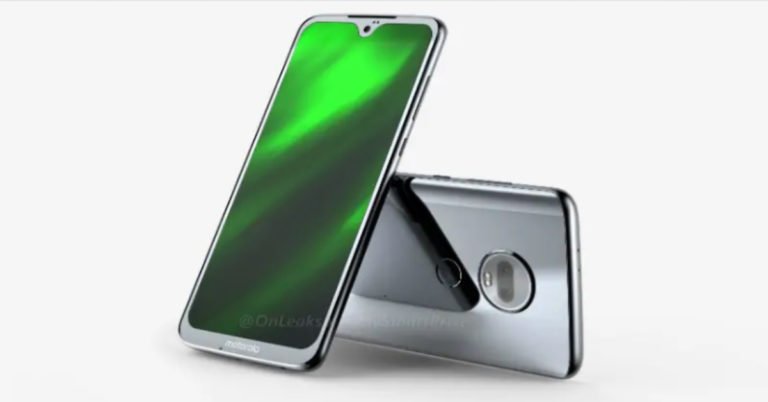
And now, it has been reported that Moto G7 Play has been certified by the Eurasian Economic Commission. According to the listing on EEC, the Moto G7 Play with model number Moto XT1952-1 will be powered by Android 9.0 Pie out-of-the-box. According to an FCC listing that earlier surfaced online with the image of the smartphone, Moto G7 Play will have a microSD slot, an audio jack, a hybrid dual SIM slot and a back-mounted fingerprint scanner with a Moto dimple. The listing also said that the smartphone will house a 2,820mAh battery.
To speak further about the specifications of Moto G7 Play, the smartphone will be powered by a Snapdragon 632 SoC processor, according to the listing. Though some renders show that the phone will feature a waterdrop notch on top of the front screen, the images from FCC listing differ on that. According to the images, the upcoming Moto G7 Play will have a rectangular screen and will not sport any cut-outs for camera or other sensors.
To recall, a previous report from 91mobiles claimed that Moto G7 will be launched on December 25. The expected price of the smartphone is Rs 19,990 and it will reportedly be powered by an Octa-core Qualcomm Snapdragon 660 processor. Reports suggest that Moto G7 will house a 3,000mAh battery and will come with 6GB RAM and 64GB storage.
The device will feature a dual rear camera setup with 16MP and 5MP sensors. For selfies and video calls, there will be a 12MP sensor. The smartphone will reportedly be available in two colour variants—black and red.
While we have already seen a standard, a Plus and a Play variant this year, what we are looking forward to is Moto G7 Power. While not much is known about the smartphone yet, it is expected to house a big battery as it is named ‘Power’.
For the latest gadget and tech news, and gadget reviews, follow us on Twitter, Facebook, Instagram and YouTube.