Amazon Quiz Answers Today 13 April 2023: Participate to win Rs 5,000

13 April 2023 Amazon Quiz has gone live. Customers from different parts of the country are participating in the daily quiz. The quiz begins from 12 AM to 11:59 PM. Those participating in the quiz can win exciting prizes by answering all the questions correctly. Today participants have a chance to win a Rs 5,000 Amazon Pay Balance. Amazon quiz brings an opportunity for its customers to win Amazon Pay Balance ranging from Rs 1,000 to Rs 50,000. The Quiz can be played from 12 AM to 11:59 PM. The e-commerce platform brings a fresh quiz on a daily basis which consists of five questions related to general knowledge and current affairs. The participants need to answer all the questions correctly and their names will be selected for a lucky draw. The winner will be announced at the end of the month. One wrong answer could eliminate you from the quiz. If you manage to answer all the questions correctly you can stand a chance to win a Rs 5,000 Amazon Pay Balance today. Only app users are eligible to participate in the Quiz. Check Out 13 April 2023 Amazon Quiz Answers. Amazon Quiz Today Prize – Rs 5,000 Amazon Pay Balance Quiz Date – 13 April 2023 Daily Timing – 12 AM to 11:59 PM Winner Announcement – Today 12 PM

Amazon Quiz Answers Today 13 April 2023

Question 1: In 2023, which nation has the potential to add 15% to the global growth, as per the IMF chief? Answer: India Question 2: Which actor is the new Creative Director and TV pitchman for Salesforce? Answer: Matthew McConaughey Question 3: Vicky Kaushal recently wrapped the shooting of which film directed by Meghna Gulzar? Answer: Sam Bahadur Question 4: What is the closest genetic relative of this animal? Answer: Camel Question 5: What ballet performance was this dancer most famous for? Answer: The Dying Swan

How To Play Amazon Quiz

Only app users are eligible to play the Amazon quiz every morning from 12 AM to 11:59 PM. The quiz is not available on the desktop. For those who are unaware of how to play the Amazon quiz below are the steps, you can follow to take the quiz.
  • Firstly download the Amazon app from Google Play Store or App Store
  • Now fill in the required information through the Sign Up option.
  • You need to log in to the Amazon app and scroll down on the home screen to find the Amazon Quiz banner.
  • Tap on the Amazon Quiz banner and tap on the Start button to start the Quiz.
  • Now you will get 5 questions and you need to answer them correctly. One wrong answer will eliminate you from the Quiz.
  • After answering all the questions correctly you are now eligible for a Lucky Draw.
  • The winner’s name will be announced today at 12 PM.
For the latest gadget and tech news, and gadget reviews, follow us on TwitterFacebook and Instagram. For newest tech & gadget videos subscribe to our YouTube Channel. You can also stay up to date using the Gadget Bridge Android App. You can find the latest car and bike news here.

Steam voice chat not working? Try these 6 fixes (2024)

0
Steam’s voice chat feature is a small but underrated feature that vastly contributes to its popularity among gamers. It can get pretty annoying when you are connected on a call but your voice doesn’t get through. There can be several things causing this issue. In this article, we bring you the top 6 ways to fix Steam voice chat if it isn’t working on your Windows device. Read Also: How To View Saved Wi-Fi Password On Chromebook?

Make sure your microphone is set as the default device

Step 1: Right-click on the Volume icon in the taskbar at the bottom of the screen. Select Sounds. Step 1: Right-click on the Volume icon in the taskbar at the bottom of the screen. Select Sounds. Step 2: Switch to the Recording tab. Step 2: Switch to the Recording tab. Step 3: Select your microphone and set it as the default device. Step 3: Select your microphone and set it as the default device.

Set your Microphone as the default device on Steam

Step 1: Open Steam and select Friends. Click on View Friends List. Step 2: Click on the gear icon. Step 3: Click on the Voice section in the side menu. Step 4: Click on Voice Input Device and select your microphone.

Disable audio enhancements

Step 1: Right-click on the Volume icon in the taskbar at the bottom of the screen. Select Sounds. Step 1: Right-click on the Volume icon in the taskbar at the bottom of the screen. Select Sounds. Step 2: Switch to the Playback tab. Step 3: Click on your audio output device and select Properties. Step 3: Click on your audio output device and select ‘Properties’. steam voice chat not working Step 4: Go to the Enhancements tab and click the checkbox for Disable all enhancements. Step 4: Go to the Enhancements tab and click the checkbox for ‘Disable all enhancements’. steam voice chat not working Step 5: Apply your changes and then click on OK.

Give microphone access to the apps on your PC

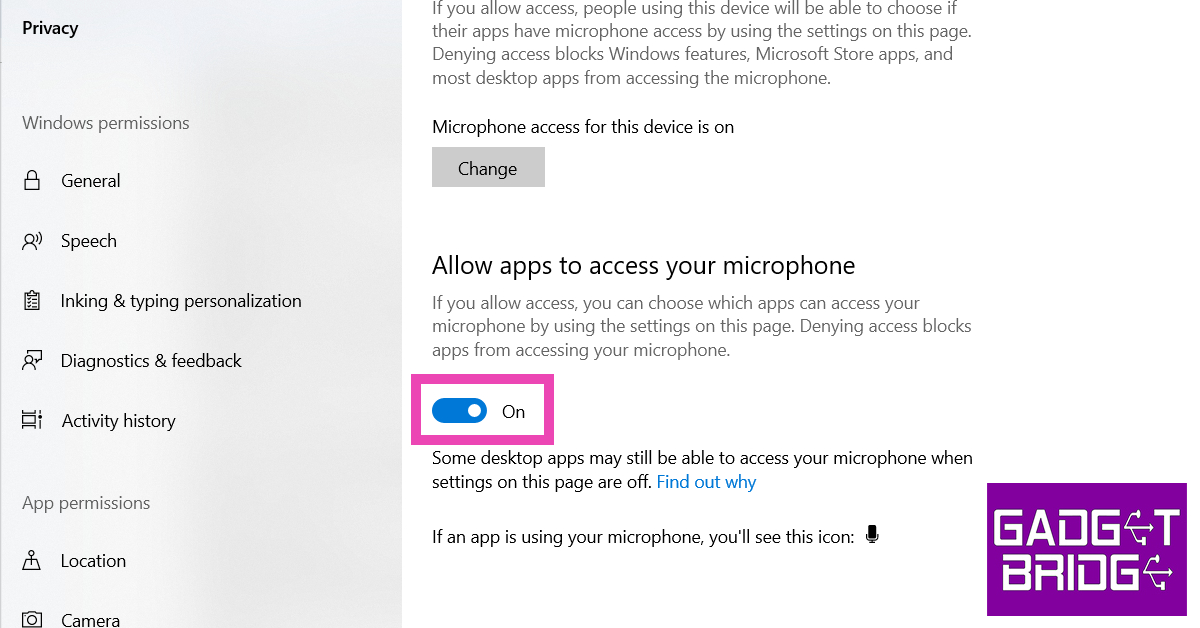
Step 1: Go to Settings and select Privacy. Step 1: Go to Settings and select Privacy. steam voice chat not working Step 2: Select Microphone from the side menu. Step 2: Select ‘Microphone’ from the side menu. steam voice chat not working Step 3: Make sure the toggle bar under the Allow apps to use your microphone section is switched on. You can also scroll down and check if the Steam app has individual permission to use your microphone. Make sure the toggle bar under the ‘Allow apps to use your microphone section’ is switched on. steam voice chat not working

Make sure Steam is allowed to record your microphone

Step 1: Log into your Steam account and select Settings Step 2: Switch to the Broadcasting tab. Step 3: Check the box for Record my Microphone. Step 4: Click on OK.

Make sure you are not signed into your Steam account on any other PC

If you are signed into your Steam account on another PC, it may conflict with the voice chat on your current device. Your account may be accessing the microphone of the other PC, leading to complications on your current device. Sign out of Steam on the other device and restart your current device to fix this issue.

Frequently Asked Questions

How do I enable voice chat on Steam?

To initiate a voice chat with a friend on Steam, simply right-click on their name and select ‘Start Voice Chat’.

How do I fix my voice chat in Steam?

Make sure your microphone is set as default on your PC and on Steam. Also, make sure that Steam has permission to access and record your microphone.

Why is my microphone not working on Steam?

If your microphone isn’t working on Steam, make sure you have disabled all audio enhancements.  Read Also: Summer Gadgets 2023: Tech That Will Keep You Cool

Conclusion

These are the top 6 ways to fix the Steam voice chat if it is not working on your Windows device. If the issue still persists after trying these fixes, it is possible that your microphone may be at fault. Try plugging in a new headset or external microphone to check if that’s the case.

YouTube rolling out 5 new features for Premium Subscribers

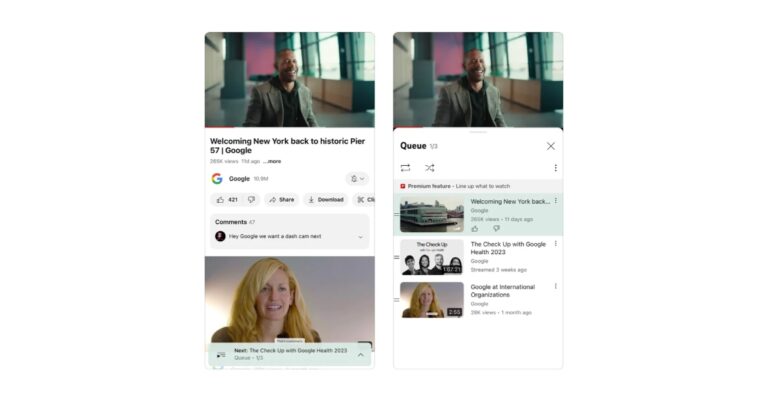
YouTube is rolling out a new update that brings Premium features for pro users. It now gives more control and access to ads-free, offline, background play and an uninterrupted music listening experience for premium users of iOS and Android apps. It has released features like smart downloads, enhanced 1080p HD Video, and more According to the latest blog post, YouTube Premium subscribers are getting a fresh update that brings a number of features for a better user experience. The very first feature is this Queuing videos which allows users to set up videos to watch next without interrupting their current watching session. Also Read: Sony WH-CH520 headphones with 30mm driver and 50 hours of battery life launched in India

How to queue videos on a computer

  • Search for videos you need to add to your queue first.
  • Then click on More next to the video title.
  • Select Add to Queue.
You can also add videos to your Queue by hovering over the video and selecting Add to Queue. In order to make sharing easier through Meet Live Sharing on Android devices, Premium members will be able to host Google Meet sessions where all attendees, regardless of whether they are Premium or free users, can watch YouTube videos together. This ability will also be rolled out for FaceTime users on iOS via SharePlay. Now premium members of Android, iOS and Web app can resume watching YouTube videos wherever they previously left off even as they switch between devices, allowing you to resume watching without missing a thing. Even when you are not connected to the internet the latest feature Smart Downloads will automatically add recommended videos straight to your library for offline viewing. Even if you forgot to download videos you can always watch them whenever you want. “With Smart Downloads, while you’re connected to Wi-Fi, we automatically add recommended videos straight to your library, ready for offline viewing. Forgot to download your favourite content before boarding that long flight? Don’t worry! With this feature, you can watch videos on the go, whenever you want, while also discovering new content without the hassle of searching,” YouTube blog post said. YouTube in the coming weeks will also be rolling out an enhanced bitrate version of 1080p HD video quality starting on iOS (and an experiment coming to the Web soon too.) According to the Video streaming platform users still, be able to access videos in 1080p. Note that in order to access these features one needs to be a Premium Subscriber. For the latest gadget and tech news, and gadget reviews, follow us on TwitterFacebook and Instagram. For newest tech & gadget videos subscribe to our YouTube Channel. You can also stay up to date using the Gadget Bridge Android App. You can find the latest car and bike news here.

Sony WH-CH520 headphones with 30mm driver and 50 hours of battery life launched in India

Sony India has officially unveiled its new set of affordable headphones in India. The Sony WH-CH520 headphones have debuted in the country. The headset offers up to 50 hours of battery life and comes with fast charging tech. In addition to this, they are lightweight and comfortable for all-day use. The new headset includes a built-in mic for hands-free calling. The audio device comes with 360 Reality Audio and DSEE. One can also customise music according to their liking with the EQ Custom on the Sony| Headphones Connect App. They can also switch between two devices at once as there is a multipoint connection.

Sony WH-CH520 headphones features

The Sony WH-CH520 headphones come with a Swivel design that allows compact and easy carrying. They have an adjustable headband with padding, soft earpads and a lightweight design for a comfortable and perfect fit. The on-ear headphones by Sony come equipped with 30mm drivers. It also includes DSEE Ultimate for upscaling music in WH-CH520 whether it is Wi-Fi streamed or downloaded. Sony WH-CH520 headphones with 30mm driver and 50 hours of battery life launched in India The Sony headphones have a Multipoint connection that lets users quickly switch between two devices at once. There is a dedicated button for easy operation and can be accessed with a voice command. In addition to this Sony WH-CH520 headphones also allow sound customisations using the equalizer in the Sony Headphones Connect app. It offers several settings to match sound quality with the music genre. Also Read: Confirmed: Apple to open its second retail store in New Delhi after Mumbai on April 20, timing and event details inside For better call quality Sony WH-CH520 is integrated with beamforming microphones with Precise Voice Pickup technology. The microphones are covered with a newly developed wind noise reduction structure to reduce background noise. They also support the Fast Pair feature, giving you the edge to connect the headphones with your Android device on the go. While the Swift Pair also quickly pair these headphones with Windows 10 computer via Bluetooth. The WH-CH520 provides a battery life of up to 35 hours with Noise Cancelling and 50 hours without Noise Cancelling with quick charging. According to the company, 3 minutes of charge provides 1 hour of playback. Sony WH-CH520 headphones with 30mm driver and 50 hours of battery life launched in India

Sony WH-CH520 headphones price and sale details

Sony WH-CH520 headphones have been launched in India with a price tag of Rs 4,490. They come in Black, White, Blue and Beige colour options. The headset will be available for purchase via Sony retail stores (Sony Center and Sony Exclusive), www.ShopatSC.com portal, major electronic stores, and other e-commerce websites in India. For the latest gadget and tech news, and gadget reviews, follow us on TwitterFacebook and Instagram. For newest tech & gadget videos subscribe to our YouTube Channel. You can also stay up to date using the Gadget Bridge Android App. You can find the latest car and bike news here.

Lava Blaze 2 launched in India at Rs 8,999: Sale details inside

0
Indian smartphone brand Lava officially announced the launch of a new smartphone in the Indian market. The company has introduced Lava Blaze 2. The entry-level phone comes under the 10k price segment. It includes a 6.5-inch LCD display that supports a 90Hz refresh rate. The budget smartphone is powered by an octa-core Unisoc T616 processor and runs Android 12 out-of-the-box. There is support for RAM expansion as well. The phone also houses a 5,000mAh battery.

Lava Blaze 2 price in India and sale details

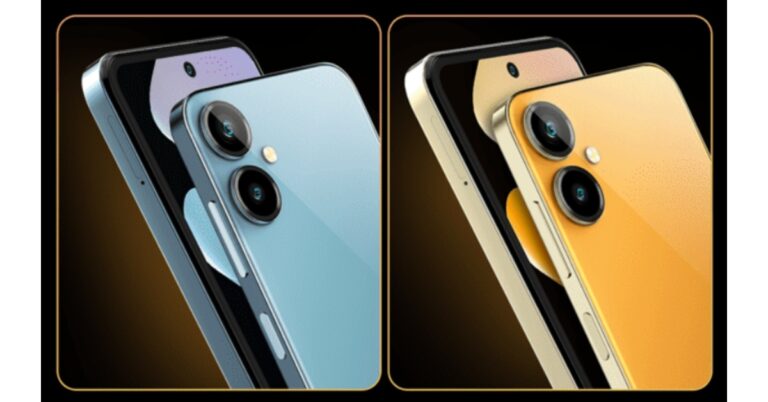
The Lava Blaze 2 has been introduced in India in a single 6GB RAM with a 128GB storage option. The phone comes with a price tag of Rs 8,999. The device will be available in three colour options of Glass Black, Glass Blue, and Glass Orange. It is scheduled to go on sale from April 18 via Amazon and other online and offline stores in the country. The sale will begin at 12 noon IST. Lava Blaze 2 price in India and sale details

Lava Blaze 2 specifications

In terms of specifications, the Lava Blaze 2 features a 6.5-inch IPS LCD display with 720×1600 pixels of resolution. The 2.5D curved screen has a punch-hole cutout to house a selfie camera and supports a 90Hz refresh rate. The budget smartphone runs on Android 12. Under the hood, there is an octa-core Unisoc T616 processor SoC with up to 6GB RAM and 128GB storage. There is a RAM expansion feature that virtually expands the RAM to an additional 5GB. In addition to this, the internal storage can also be expanded via a microSD card. Also Read: Confirmed: Apple to open its second retail store in New Delhi after Mumbai on April 20, timing and event details inside Lava Blaze 2 comes with a dual rear camera setup that includes a 13-megapixel primary sensor and a secondary 2-megapixel lens. There is an 8-megapixel front-facing camera for taking selfies and video calling. The Lava smartphone includes a 5,000mAh battery that supports 18W charging. The phone also includes 4G LTE, Wi-Fi, Bluetooth, GPS, and a micro-USB port as well as 3.5mm headphone jack for connectivity. The Lava Blaze 2 also boasts a side-mounted fingerprint sensor, as well as face unlock. For the latest gadget and tech news, and gadget reviews, follow us on TwitterFacebook and Instagram. For newest tech & gadget videos subscribe to our YouTube Channel. You can also stay up to date using the Gadget Bridge Android App. You can find the latest car and bike news here.

9 easy fixes for Facebook Not Loading Properly on smartphone [Solved]

With over 2.7 billion people actively using the platform on a monthly basis, Facebook is, without a doubt, one of the most widely used social media platforms currently available. On the other hand, there are times when Facebook on your smartphone will not load correctly, leaving you feeling frustrated and cut off from your social network. You are not the only person who is having problems with Facebook on their mobile app not loading correctly on their phone. The good news is that there are some straightforward solutions that you can test out which fix Facebook Not Loading Properly problem once more. In this article, we will go over nine quick solutions that can assist in fixing the problem where Facebook does not load correctly on your mobile device. If you’ve been having issues with Facebook, like slow loading times, errors, or glitches, these fixes should help you get back to using the platform as you normally would. Read Also: Best ways to fix if pages do not load on Google Chrome in Windows 10

Delete all cached files and cookies9 easy fixes for Facebook Not Loading Properly on smartphone

Cache and cookies are likely to be responsible if Facebook does not load correctly on your mobile device. This is one of the most common causes of this problem. These files are in charge of storing temporary data on your device, which over time, may become obsolete and lead to problems with the application. Clear your cache and cookies in order to bring the app back to life and get it functioning normally again. Go to Settings > Apps & notifications > Facebook > Storage & cache > Clear cache/Clear storage on an Android device. This will clear your cache as well as your cookies.

Keep the Facebook app up to date

An older version of the Facebook app may also be to blame for your mobile device’s inability to load web pages from Facebook properly. Updates are frequently made available by Facebook in order to address app stability and performance issues. It’s possible that the problems you’re experiencing with the app are due to the fact that you haven’t updated it in a while. It may be possible to resolve any issues that are preventing your Facebook app from loading properly by installing the latest update. To update Facebook on an Android device, navigate to the Google Play Store, select “My apps & games,” then select “Facebook,” and finally select “Update.”

Check Your Connection to the InternetCheck Your Connection to the Internet

If Facebook does not load correctly on your mobile device, one possible explanation is that you have a slow internet connection. If you find that the app loads slowly or gives you errors, it’s possible that the problem lies with the strength of your internet connection rather than the app itself. If the performance of the application is poor, try changing to a different network or restarting your Wi-Fi to see if either of these solutions helps. On an Android device, navigate to Settings > Network & Internet> Wi-Fi > Connected network > Speed test to check the status of your internet connection. Read Also: 5 hidden features of Google maps you should know of on Android

Turn off the VPN and any proxy serversTurn off the VPN and any proxy servers - fixes for Facebook Not Loading Properly

The Virtual Private Network (VPN) or the proxy server you use may be the source of the problems you are experiencing with the Facebook app. Because of the ability of these tools to change your IP address, it will be more difficult for Facebook to identify your device and location. It may be possible to fix the issue and enable Facebook to load properly on your mobile device by turning off your virtual private network (VPN) or proxy server. To turn off VPN on an Android device, navigate to the Settings menu, select Network & Internet > VPN, and tap the toggle switch to the off position. To delete the VPN configuration on an iOS device, navigate to Settings > General > VPN > tap the I next to the VPN configuration > and then tap Delete VPN configuration.

Reinstall the application

Check Your Connection to the Internet

In the event that none of those mentioned above solutions is successful, there may be an issue with the installation of your Facebook app. Reinstalling the application may be able to resolve any problems that are preventing it from loading in the correct manner. Make sure that you have your Facebook login details and any other important data saved before reinstalling the app, as uninstalling the app will delete all of its data. Reinstalling the app will restore all of its data. To reinstall Facebook on an Android device, navigate to the Google Play Store, type Facebook into the search bar, and tap the Install button. On an iOS device, navigate to the App Store, then search for Facebook and tap the Get button. Read Also: Snapchat not loading snaps? Here are easy 7 fixes

Check to See If Your Device Is Compatible

There is a possibility that Facebook will not function properly on your mobile device if the most recent version of the app is not compatible with your handset. If your device is dated, it is possible that it will not be able to manage the most recent features of the app or meet its requirements. Visit the app’s description page on the Google Play Store or the App Store and look for compatibility information to determine if Facebook can run on your device. If your device is not compatible with the app’s most recent version, you may need to upgrade to a newer device that is capable of supporting the app’s most recent version. 

Delete all Data from the Facebook AppDelete all Data from the Facebook App - fixes for Facebook Not Loading Properly

If deleting the cache and cookies did not solve the problem, you can try erasing the app’s data instead. When you clear the app’s data, all of the app’s settings, preferences, and stored data will be deleted. This can help resolve any problems that may be preventing Facebook from loading properly. Clearing the app’s data, however, will also sign you out of Facebook, so if you want to use Facebook again, you will need to log in again. On an Android device, navigate to Settings > Apps & notifications > Facebook > Storage & cache > Clear storage to clear the data stored by the Facebook app. To delete the app data for Facebook on an iOS device, navigate to Settings > General > iPhone Storage > Facebook > Delete App Data.

Restart Your SmartphoneRestart Your Smartphone

There are times when the most straightforward approaches deliver the greatest outcomes. Simply restarting your mobile device can help fix a wide variety of software-related problems, including those that may be preventing Facebook from loading properly. Your device’s memory can be refreshed, and any lingering bugs or errors can be removed if you restart it. After your device has finished restarting, attempt to open Facebook once more to check if it loads correctly. To restart your smartphone on Android, press and hold the power button until the Power menu appears. On iOS, press and hold the power button until the slide to power off screen appears. Slide the power off button to the right, wait for your device to turn off, then press and hold the power button again to turn it back on. Tap on Restart to restart your device.

Get in touch with Facebook’s Support TeamGet in touch with Facebook's Support Team - fixes for Facebook Not Loading Properly

If you’ve tried all of these solutions and are still having problems with Facebook not loading correctly on your mobile device, it may be time to get in touch with Facebook’s customer support team. A dedicated support team at Facebook is available to assist you with any problems you may be having with the application. You can get in touch with the Facebook support team through the website or the app by going to the Help Center and submitting a question or concern. After that, someone from the Facebook support team will review your request and assist you to help you solve the problem. Read Also: Best ways to make the Clubhouse experience even better

Conclusion 

In conclusion, Facebook is an integral part of our social lives, which is why it is so annoying and frustrating when it does not function as it must. The solutions we have discussed in this article are all simple and easy to implement; whether it be deleting your cache and cookies, updating the Facebook app, or checking your internet connection, each of these steps can be taken independently. Always begin with the simplest solutions first before moving on to more complex fixes, as this will ensure the best possible outcome. Keep in mind that you should always keep the Facebook app up to date, and check for software updates on your smartphone regularly. You can ensure that your Facebook app runs without any errors by following these easy steps, enabling you to maintain a steady connection with your loved ones and friends. For the latest gadget and tech news, and gadget reviews, follow us on TwitterFacebook and Instagram. For the newest tech & gadget videos subscribe to our YouTube Channel. You can also stay up to date using the Gadget Bridge Android App. You can find the latest car and bike news here.

How To View Saved Wi-Fi Password On Chromebook?

0
Viewing a saved WiFi password on your Chromebook is not a straightforward task. There are a couple of hoops you’ll need to go through. If you’re looking for an easier solution, you should try viewing the WiFi password on your Android or Windows device, given you are connected to the same network. Read this article to find out how you can do that. You can also share the Wi-Fi password with another device directly from your Android phone. Here are all the different ways you can do that. If you’re still intent on viewing the saved WiFi password on your Chromebook, read along to know how you can go about it. Read Also: How to use Bing AI on Microsoft SwiftKey keyboard for Android?

Enter Developer Mode

How to enable Google Play Store on a Chromebook? how to view wifi password on chromebook Before you begin, you will need to enter Developer Mode on your Chromebook. This will wipe out all data, profiles, and saved networks on your device. Since all the saved networks will be deleted from your Chromebook, you will only be able to view the passwords that are saved after turning on this mode. Entering Developer Mode on your Chromebook is similar to rooting your Android device. Here’s how you can enter Developer Mode on your Chromebook. Step 1: Press Escape, Refresh, and Power Button to boot your Chromebook in recovery mode. Step 2: Press CTRL+D. Step 3: Press Enter to confirm you want to enter Developer Mode. Step 4: Wait for 10-20 minutes. All data will be wiped from your Chromebook as it enters Developer Mode.

Find the saved WiFi Password

HP Chromebook 11a for students launched in India, priced at Rs 21,999. how to view wifi password on chromebook Once you start using your Chromebook in Developer Mode, you will be able to view the password of any WiFi network that it is connected to. Here’s how. Step 1: Press Ctrl+Alt+T. Doing this will allow you to enter Crosh shell. Step 2: Now, type the following code:

shell

sudo su

cd/home root

ls

Step 3: A string code will appear on the screen. Copy it.

Step 4: Type cd and paste the string code. Press Enter. Step 5: Now, type the following command:

shill/shill.profile

Step 6: Hit Enter. Step 7: A list of WiFi networks will appear on the screen. Find the network you want. Step 8: Look for Passphrase=rot47: below the network. This is the encrypted password. Step 9: To decrypt the password enter the following command. Replace wifipassword with the encrypted text.

echo wifipassword | tr ‘!-~’ ‘P-~!-O’  

The WiFi password will appear on the screen.

Frequently Asked Questions

How do I find my WiFi password on a Chromebook?

To find your WiFi password on a Chromebook you will need to enter developer mode and then access Crosh shell. Use the lines of code mentioned above to view your password.

Is it possible to view my WiFi password on a Chromebook without entering Developer Mode?

No. The only way you can view your WiFi password on a Chromebook is by entering developer mode and then accessing Crosh shell.

Where are the WiFi settings on Chromebook?

To access WiFi settings on your Chromebook, go to Settings>Network>WiFi. Read Also: Mivi K7 TWS earbuds with 60 hours of playtime launched in India

Conclusion 

This is how you can view a saved WiFi password on your Chromebooks. Chromebooks are generally very safe devices, which is why there is no straightforward way to view a password. The only downside to this method is that you will lose all your saved data. For the latest gadget and tech news, and gadget reviews, follow us on Twitter, Facebook and Instagram. For newest tech & gadget videos subscribe to our YouTube Channel. You can also stay up to date using the Gadget Bridge Android App. You can find the latest car and bike news here.

Summer Gadgets 2023: Tech That Will Keep You Cool

Summer is already upon us, and by the looks of things it seems like it’ll be a scorcher. It’s time to get your air conditioners serviced and perhaps look into some more cooling options to beat the heat. You may be surprised by some novelty cooling products out there. Luckily, you don’t have to venture into the depths of the Internet to find what you are looking for. Here are our picks for the top summer gadgets of 2023 that will keep you cool all season. Read Also: How to make your Android smartphone louder? Top 5 ways

Tropicool PortaChill Portable Fridge

Price: Rs 4,999 Tropicool PortaChill Portable Fridge This mini portable fridge makes a great addition to your desk and your car. With a 5-litre capacity and removable shelves, this fridge can fit up to 2 bottles or 6 cans. The PortaChill requires minimal maintenance since it doesn’t use a compressor or refrigerant gas to carry out the cooling. It comes with an AC as well as a DC outlet which makes it perfect for home and car use. If you’re a slow drinker and like to sip on your drink for hours, this device will help you keep your drink cooled while you’re at your desk!

Gaiatop Desk Fan

Price: Rs 569 Gaiatop Desk Fan This inexpensive desk fan should be on top of your summer buying list. The Gaiatop Desk Fan is USB powered and can be plugged into your desktop, PC, USB outlet in your car, and even a power bank to provide instant cooling. The fan weighs 8 ounces and is portable enough to carry around in a backpack. It can operate at three speeds that can be adjusted with the click of a button. The fan can rotate vertically from 0 to 30 degrees and doesn’t exceed the 50dB noise level even when operating at full blast.

Geeky Portable Handheld Fan

Price: Rs 679 Geeky Portable Handheld Fan Taking portability to another level, this battery-operated handheld fan weighs just 135g and has dimensions of 9 x 3.5 x 19cm. You can easily carry the Geeky Portable Handheld Fan in your backpack or purse. For days when it gets scorching hot, you can hold this fan against your face for some instant cooling. This device is ideal for when you’re out and don’t have access to a fan or an AC. You can charge this fan using a DC outlet, a PC, or even a power bank. The 1,200mAh battery offers 3-4 hours of battery life. Geeky handheld fan is one of the best portable summer gadgets around.

Daybetter Mini USB AC

Price: Rs 449 While we’re talking about portable cooling options, we cannot leave out this mini desk AC. The Daybetter Mini USB AC can be plugged into any USB outlet (including your laptop or a power bank) for some instant ultra cooling. You can also use this device to get rid of any bad odour in your room by adding some perfume to the bottom tray that holds water.

Kitchenif Digital Ice Cream Maker

Price: Rs 4,263 Kitchenif Digital Ice Cream Maker Ice cream is an essential part of the summer experience. If it is your go-to dessert during the summer, there’s no better way to have ice cream on demand than making it at home! The Kitchenif Digital Ice Cream Maker can make a fresh batch of ice cream in just 25 to 30 minutes. This handy device can also prepare slush, sorbets, frozen yoghurts, and more. The best part about having an ice cream maker at home is that you control all the ingredients and can play around with a bunch of flavours that you won’t usually find in store-bought ice cream. This is one of the best summer gadgets you can buy in 2023.

Aloe Cooling Gel Memory Foam Pillow

Price: Rs 899 Aloe Cooling Gel Memory Foam Pillow. summer gadgets 2023 Do you find yourself constantly flipping the pillow at night to rest your head on the cooler side? The Aloe Cooling Gel Pillow by The White Willow will make sure you don’t any more. This pillow is available in five sizes: X-Small, Small, Standard, Queen, and King. The different contours give you the option to rest your head on an elevated level or a flat surface. The aloe cooling gel keeps your pillow fresh and cool throughout the night, ensuring a refreshing sleep.

Kuen Pack of 4 Cooling Towels

Price: Rs 2,635 Kuen Pack of 4 Cooling Towels. summer gadgets 2023 This Pack of 4 Cooling Towels by Kuen is ideal for runners who don’t let the scorching summer sun get in their way. These towels provide instant cooling and can be used as a cooling bandana, scarf, or neckband. All you need to do is soak it in water, wring it, snap it, and let it rest on your body to absorb all the sweat and bring instant cooling. You can easily let this towel rest around your neck while exercising in hot outdoor conditions. While they are not ‘summer gadgets’ in the strictest sense, these towels by Kuen will certainly help you beat the heat.

Hoox Car Smart Cup Holder

Price: Rs 2,009 Hoox Car Smart Cup Holder. summer gadgets The Hoox Car Smart Cup Holder will keep your drinks chilled while you’re on the go. Cars can get ridiculously hot during the summer. Even with the AC turned on, your drink can go warm over a period of time. This cooling cup holder by Hoox plugs into your car’s 12V power outlet and gives you the option to keep your drink warm or hot. The inside of the holder is made of an aluminium alloy. You will find different buttons for heating and cooling on the rim of the holder.

Samsung Side-By-Side Refrigerator

Price: Rs 1,13,000 Samsung Introduces brand new 2023 Side-by-Side Refrigerator Range in India. summer gadgets Thinking of upgrading your old refrigerator this summer? It may be time to go big. The recently launched Samsung Side-By-Side Refrigerator has been specifically designed for Indian consumers and comes with unique features like Convertible 5-in-1 FamilyHub and Curd Maestro+. The fridge has a storage capacity of 653 litres and comes in four BESPOKE glass finish colour variants – Clean White, Clean Navy, Clean Pink, and Glam Deep Charcoal. This fridge is WiFi enabled and can be controlled through Samsung’s SmartThings app.

Voltas Split AC

Price: Rs 30,990 Voltas Split AC. summer gadgets This Split AC by Voltas has a 1.4-ton capacity and comes with a decent 3-star energy rating. The noise level doesn’t exceed 46dB which means you can get ultra cooling with bare minimum noise. There are 4 cooling modes on offer that can be controlled through the remote. Annual energy consumption by this AC is 4,600 units, as claimed by Voltas. You get a 1-year warranty on the product and a 10-year warranty for the compressor. There’s an LED display on the AC to monitor the cooling temperature. It also comes with features like anti-dust protection, self-diagnosis, sleep mode, and more. Read Also: How to use Bing AI on Microsoft SwiftKey keyboard for Android?

Conclusion

These are our picks for the top summer gadgets of 2023 that will keep you cool. We’ve made sure to include all cooling options across different price points. Thinking of buying something on this list? Do let us know in the comments! For the latest gadget and tech news, and gadget reviews, follow us on Twitter, Facebook and Instagram. For newest tech & gadget videos subscribe to our YouTube Channel. You can also stay up to date using the Gadget Bridge Android App. You can find the latest car and bike news here.

Confirmed: Apple to open its second retail store in New Delhi after Mumbai on April 20, timing and event details inside

Last week Apple revealed that its first retail store in India is set to open in Mumbai. It was also speculated that the next Apple Store is likely to open in New Delhi. The company has now officially confirmed that its next Apple BKC Store will be located right in the nation’s capital, New Delhi just two days after the Mumbai debut. The Apple BKC Store, the company’s first official retail location in India will welcome the public inside, in Mumbai on April 18 at 11 AM IST. It has been revealed that the second retail location in India would open on April 20 in New Delhi at 10 AM IST. Apple’s first retail store will be located in Mumbai at Jio World Drive Mall. While its second official store in New Delhi will be accessible at Saket. According to the iPhone maker, these latest retail locations mark a significant expansion in India that will offer great new ways to browse, discover, and buy Apple products with exceptional service and experiences for customers. Also Read: Apple reveals its first retail store in India, the Apple BKC Store opening in Mumbai As mentioned earlier last week the Cupertino-based tech giant revealed the first picture of the store barricade in advance of the opening revealing the iconic Kaali Peeli taxi art. This time the company revealed the barricade for Apple Saket which features a unique design that takes inspiration from Delhi’s many gates, each signifying a new chapter to the city’s storied past. The New Delhi Apple Store looks vibrant with colourful artwork to celebrate its second store in India. Apple fans and users can easily explore the Apple latest product lineup, find creative inspiration, and get personalised service and support from the store’s team. In advance, the company has also launched custom Apple BKC and Apple Saket wallpapers, specially curated playlists on Apple Music to move to the sounds of Mumbai and Delhi that can be downloaded from apple.com/in/retail/bkc and apple.com/in/retail/saket. Just days before the company opens the door of its first Apple Store in India to the public in Mumbai, the company announced a special Today at Apple session — “Mumbai Rising” running from opening day through the summer. It is going to be an online-only event where visitors, local artists, and creatives will be brought together with sessions offering hands-on activities with Apple’s products and services that celebrate the local community and culture in Mumbai. For the latest gadget and tech news, and gadget reviews, follow us on TwitterFacebook and Instagram. For newest tech & gadget videos subscribe to our YouTube Channel. You can also stay up to date using the Gadget Bridge Android App. You can find the latest car and bike news here.

Thomson Oath Pro Max 65-inch Google TV launched in India

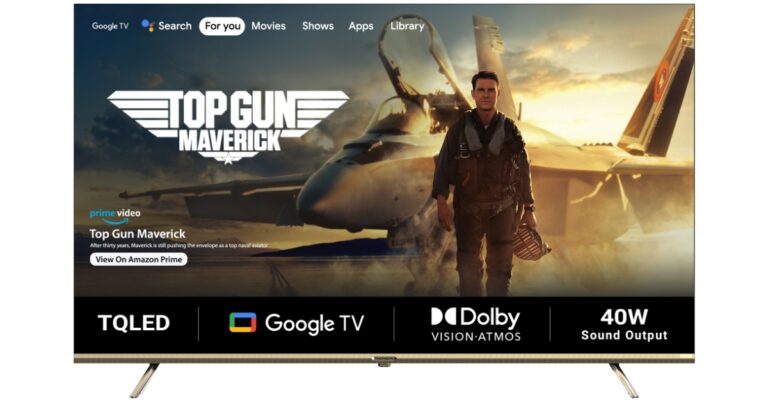
French consumer electronics brand Thomson has announced the launch of 65-inch Google TV in India. The Television is the latest addition to the company’s existing Oath Pro Max series. The Smart TV comes with a bezel-less design. It includes Google TV and Dual Band (2.4 + 5) GHz Wi-Fi for connectivity. There is support for Dolby Vision with HDR 10+ on the Oath Pro Max 65-inch Google TV. In addition to this, there is Dolby Atmos, Dolby Digital Plus, DTS Trusurround with 40W Dolby Audio Stereo Box Speaker. The Thomson Oath Pro Max TV offers 2GB RAM and 16GB ROM.

Thomson Oath Pro Max 65-inch Google TV price in India and availability

The Oath Pro Max 65-inch Google TV has been launched in India with a price tag of Rs 43,999. The device will come with a Rose Gold finish. It will be available for purchase via Flipkart in the country. The TV is scheduled to go on sale from April 13 in the country. Apart from this, the company will also put several Televisions on sale during Flipkart Summer Saving Days which will also begin on April 13 and will go on till April 17. They will be available at attractive pricing during the sale period. Below is the Thomson TV discounted price list:

FSN

Brand

Model

April BAU

Summer Saving Day Sale

TVSF66GTGDHUNH8T

Thomson

24TM2490

6999

5999

TVSGMGWWZYMMPG83

Thomson

24Alpha001

6999

6499

TVSGMGWWMFGBU8FF

Thomson

40Alpha009BL

13999

13499

TVSGEMQV7R4CMTGA

Thomson

32ALPHA007BL

8999

8499

TVSFUYG8KB8GZAZA

Thomson

32PATH0011

10999

9499

TVSFUYG8YZFZBBRX

Thomson

32PATH0011BL

11499

9999

TVSF66GTBYHHZHAM

Thomson

32TM3290

8499

7999

TVSFUYG8PRFJRFGB

Thomson

40PATH7777

16999

15499

TVSFZAH3GHFXYQYX

Thomson

42PATH2121

17999

15999

TVSG6P49GSVUVVQU

Thomson

43 OP MAX9099

24999

22999

TVSFZAH37T8FCAWK

Thomson

43PATH0009 BL

18999

16999

TVSG6TJEFQMUSQTE

Thomson

43PATH4545BL

20999

19499

TVSG6P49TZXRM2WB

Thomson

50 OP MAX9077

29999

29999

TVSG6TJEE2CH4XGU

Thomson

50PATH1010BL

27999

24999

TVSG6P49DH7HWDHP

Thomson

55 OP MAX9055

31999

29999

TVSG6TJEJBQYGPQ6

Thomson

55PATH5050BL

30999

28999

TVSFT4FJSHYV7ZBE

Thomson

65 OATHPRO 2020

53999

53999

TVSFUYGQTGAHCNTN

Thomson

75 OATHPRO2121

79999

79999

TVSGHADTWZAWZXSF

Thomson

Q50H1000

33999

31999

TVSGHADTWPTJCMP7

Thomson

Q55H1001

40999

35999

TVSGHADTPGMHTJMH

Thomson

Q65H1100

59999

56999

TVSFUYG8VGNNVEAF

Thomson

43PATH0009

18999

18999

TVSFUYGQ7HTRRZHG

Thomson

50OATHPRO1212

27999

27999

TVSFT4FJABVZFRHT

Thomson

55 OATHPRO 0101

29999

29999

TVSFT4FJQ4YYXTKY

Thomson

43OATHPRO 2000

22999

22999

TVSFUYG8ATYPYRJR

Thomson

43PATH4545

19999

19999

TVSFUYG8Y7EEZCSD

Thomson

50PATH1010

24999

24999

Thomson Oath Pro Max 65-inch Google TV specifications

The Thomson Oath Pro Max 65-inch TV comes with a 4K IPS display and a bezel-less design. The screen comes with HDR10+ and Dolby Vision support. It also offers 500 nits of peak brightness. In addition to this, it also includes dual 40W Dolby Audio Stereo Box speakers that also support Dolby Atmos, Dolby Digital Plus, and DTS TrueSurround. The Thomson Oath Pro Max also includes four sound modes: Standard, Sport, Movie, and Music. Also Read: Vivo T2 5G and Vivo T2x 5G debuts in India: Price and sale details Thomson Oath Pro Max 65-inch Google TV launched in India According to the company, the Television comes with an in-built Chromecast and Airplay supports 10000 Plus Apps and Games Like Netflix, Prime Video, Hotstar, Zee5, Apple TV, Voot, Sony LIV, and Google Play Store with 500,000 Plus TV Shows. Thomson Oath Pro Max 65-inch Google TV launched in India The Television is powered by an MT9062 processor with Mali-G52 GPU. It offers 2GB of RAM and 16GB of storage. In terms of connectivity, the Smart TV includes Dual-band Wi-Fi, Bluetooth version 5.0, USB 2.0, and HDMI. It also supports Speakers/headphones, Game Controller, Mouse, Keyboard. Lastly, the Thomson Oath Pro Max 65-inch Google TV also shipped with Google Assistant-enabled remote. It includes dedicated keys for Netflix, YouTube and more. For the latest gadget and tech news, and gadget reviews, follow us on TwitterFacebook and Instagram. For newest tech & gadget videos subscribe to our YouTube Channel. You can also stay up to date using the Gadget Bridge Android App. You can find the latest car and bike news here.