Xiaomi India today hosted a Smarter Living event in the country. The company presented a host of AIoT products at the event that includes Xiaomi Smart TV X Pro Series, Xiaomi Smart Air Purifier 4 Series and Xiaomi Robot Vacuum Mop-2i. The latest Smart TV by the company supports Dolby Vision IQ whereas the Air purifier has a triple layer filtration. The Xiaomi Robot Vacuum offers enhanced and customised cleaning.
Xiaomi Smart TV X Pro Series price and features
The all-new Xiaomi Smart TV X Pro Series supports 4K HDR with improved colours, contrast, saturation, and brightness across Wide Colour Gamut, along with Dolby Vision IQ support and Vivid Picture Engine 2 technology. The television includes a 40-Watt speaker system with support for Dolby Atmos and DTS:X technology. The device is powered by Google TV so you can easily stream your favourite content. It has a Google Chromecast Built-in feature plus users can experience over 30 content providers on PatchWall.Xiaomi Smart TV X Pro will be available in three sizes 43, 50 and 55 inch priced at Rs 32,999, Rs 41,999 and Rs 47,999 respectively. But the company is offering them at a special launch price of Rs 31,499, Rs 39,999 and Rs 45,999. The sale is scheduled to start on April 19 at 12 noon via mi.com, Flipkart and offline retail partners.
Xiaomi Smart Air Purifier 4 Series price and features
On the other hand, the Xiaomi Smart Air Purifier 4 Series includes two models Xiaomi Smart Air Purifier 4 and Xiaomi Smart Air Purifier 4 Lite that are claimed to reduce harmful substances in the air with its Triple Layer Filtration. It is said to eliminate up to 99.97% of particles as small as 0.3 microns so you breathe clean and fresh air.It comes integrated with a negative ion generator to help remove airborne particles like pollen, animal dander, dust, and mould spores. According to Xiaomi, the new air purifier offers clean air across the room with 360° Filtration and True HEPA Filter. Xiaomi Smart Air Purifier 4 offers a Particle Clean Air Delivery Rate (PCADR) of up to 400m3/h, capable of circulating air of max. 516 sq. ft within 10 minutes. The Smart Air Purifier Lite comes with a PCADR of up to 360m3/h and can deliver 6000L of clean air per minute.The Xiaomi Smart Air Purifier 4 also supports app control and voice control with Google Assistant and Amazon Alexa. There is an OLED display with two touch controls to view the air quality, temperature, and humidity status.The Xiaomi Air Purifier 4 comes at a special introductory price of Rs 13,999. The ICICI card holders can avail of a discount of Rs 750. While the Xiaomi Smart Air Purifier 4 Lite has been launched at a special introductory price of Rs 9,999. The ICICI card users can get Rs 500 off on their purchases.The Early access sale will begin on April 20 at noon via mi.com and offline retail partners. Whereas the Xiaomi Smart Air Purifier 4 sale starts from April 23 at 12 noon on Amazon.in and for Xiaomi Smart Air Purifier 4 Lite on Flipkart and Amazon.in.
Xiaomi Robot Vacuum-Mop 2i price and features
Xiaomi Robot Vacuum-Mop 2i is one of the devices that launched today at the Xiaomi Smarter Living event. It is actually a combo of a vacuum and a mop. The cleaning device has a large suction inlet and a powerful brush, the new vacuum-mop uses 2,200 pa suction to pull dirt effortlessly. Further, it includes 25 high-precision sensors that analyses real-time information about the home environment.In addition to this the Gyroscope and Optical Sensor Aided Navigation on the new Xiaomi Robot Vacuum-Mop 2i scans and maps the complex environment of the home to plan the cleaning route. It comes equipped with a 450 ml independent large dust compartment and a battery that can clean areas of more than 1200 sq ft. easily with up to 100-minute run time.When connected with the Xiaomi Home App you can control it remotely, and other functions like customizing cleaning schedules, adjusting cleaning modes and water levels, tracking device location and more. Besides this, it supports Google Assistant and Amazon Alexa voice assistance for hands-free control.The Xiaomi Robot Vacuum – Mop 2i is launched at Rs 16,999 however if you use an ICICI card to purchase it you can save up to Rs 1000. The early access sale will begin on April 25 at noon via mi.com and offline retail partners while the sale starts on April 28 at noon via Amazon.
For the latest gadget and tech news, and gadget reviews, follow us on Twitter, Facebook and Instagram. For newest tech & gadget videos subscribe to our YouTube Channel. You can also stay up to date using the Gadget Bridge Android App. You can find the latest car and bike news here.
Asus ROG Phone division started great a couple of years ago. They became a path-breaking phenomenon when it came to gaming smartphones with great specs and very good pricing. But after today’s launch of the Asus ROG Phone 7 series, we beg to differ. This time the cons outweigh the pros and there are some really odd things about these new smartphones, which you all should know about. Take an informed decision.
Here are 5 reasons not to buy the Asus ROG Phone 7 series
Overpriced
In a price-sensitive market, let’s be frank, that price is not at all friendly. At Rs 1 lakh you can buy many other better phones or invest in a more usefulphone by paying a little extra, like the Samsung S23 Ultra, which has all round features, better specs, cameras and is built for extreme gaming. Else you can invest in a smartphone from Xiaomi like the Note 12 Pro and keep upgrading every year. In Rs 1 lakh you can buy one phone each year with newer and better specs.
Read Also:iPhones Compared: iPhone 14 Plus Vs iPhone 13
Same old boring design
There is nothing new when it comes to the design of the Asus ROG 7 series. It looks just or almost the same like the last 3-4 iterations of the ROG smartphone. It just shows how lazy the designer got at Asus and probably did not even think about giving fresh cutting edge form factor, which once was the pride of the ROG smartphone company.
Low Grade Cameras
While the world has moved to 100+ megapixel sensors the Asus ROG Phone 7 and 7 Ultimate are still using old technology. 50MP primamry camera just does not cut it for a smartphone that has a price tag of Rs 1 Lakh. Samsung is giving 200MP in the S23 Ultra, which is around the same price and Asus is still stuck with years old 50MP.
Extremely bulky
The phone is relatively heavy and bulky compared to other smartphones, which may not be comfortable to hold for extended periods. It is almost quarter of a kilogram heavy. Your hands will get tired and sprain after playing on it for long. While the competition is going sleeker the new ROG 7 series smartphones are still very heavy.
Read Also: 6 simple ways to fix YouTube video and audio not in sync on Android
Spend more to keep it cool or lag out
Yes, a cool thing about the Asus ROG Phone series was the accessories, which is now essential to keep the smartphone cool. the internal system will heat up very quickly. The phone is already so heavy and now it will be even heavier to keep it cool. Over that, one has to shell out extra money to keep it cool. The cooling fan is not part of the box, pay more if you want to game on it properly else you will see frame drops, and frame drops and lag are the most hated things by any gamer. Imagine you are in an intese fight in COD: Mobile and the frame drops and you lag out, this is very possible without the bulky cooling fan. but for that you will need to pay more.
For the latest gadget and tech news, and gadget reviews, follow us on Twitter, Facebook and Instagram. For newest tech & gadget videos subscribe to our YouTube Channel. You can also stay up to date using the Gadget Bridge Android App. You can find the latest car and bike news here.
Instagram is home to some of the freshest and most engaging bite-sized content on the Internet. Instagram Reels have become wildly popular in a very short period of time. One of the reasons behind this popularity is the special focus on making Reels easy to share within the platform and even outside of it. Of late, users have noticed a glitch that keeps Instagram from loading the correct Reel once they click on the link shared with them on a different Instant Messaging app. Repeatedly clicking on the Instagram link opens up a different Reel every time. Luckily, we make have a few fixes for you. Here’s how you can resolve the ‘Instagram loading the wrong Reel’ issue on your Android smartphone.Read Also:Best Voice Messaging Apps in 2023
Switch to Instagram Lite
As the name implies, Instagram Lite is a smaller and faster version of the Instagram app. The Lite version occupies less storage space on your phone and consumes considerably less amount of data than the regular app. There are a few drawbacks, though. Instagram Lite does not allow swiping gestures on its interface, so you will have to rely on tapping the icons to access basic features. Instagram Stories on the Lite app may take some time to load as well since the app cuts down on data usage by not preloading them.The good news is that the Lite version of Instagram does not have the annoying bug that loads a different Reel when you click on a shared link. Clicking on a link shared with you through WhatsApp, Telegram, or any other IM app will load the correct Reel. You can download Instagram Lite from Google Play Store by clicking on this link. Launch the app after it is installed and log in using your Instagram handle.
Clear app cache
If you don’t want to switch to Instagram Lite, you can try clearing the app cache before clicking on a link. A cache stores temporary files to ensure that an app runs faster. Once you launch an app, it reaches the cache to access stuff like banner images, scripts, files, and other multimedia without needing to download them again. If you haven’t cleared the app cache in a long time, a corrupted temporary file may keep it from working properly. Here’s how you can clear Instagram’s app cache on your smartphone.Step 1: Go to Settings and select Apps.Step 2: Scroll down and select Instagram.Step 3: Tap on Storage.Step 4: Select ‘Clear Cache’ from the toolbar at the bottom of the screen.
Update the Instagram app
Any glitches or bugs are generally resolved with a quick update. Check if there is an update available for Instagram. Go to Instagram’s page on Google Play Store and tap on ‘Update’. Sometimes an update may take some time to arrive. You can also download a previous version of the app from third-party app stores like APKPure and APKMirror. It is possible that an older version may not face the same issue on your device.
Frequently Asked Questions
Why is Instagram not loading the correct Reel when I click on a link?
An internal glitch or bug may be keeping Instagram from loading the correct Reel when you click on a shared link. Try clearing the app cache or using Instagram Lite to get rid of this issue.
How to fix Instagram Reels if they are not loading?
These are the best ways to fix the ‘Instagram loading a wrong or different Reel on clicking a shared link’ issue. If the issue still persists after trying the methods mentioned above, report the problem to Instagram. Go to Settings>Help>Report a problem to let Instagram know about the issue you’re facing.For the latest gadget and tech news, and gadget reviews, follow us on Twitter, Facebook and Instagram. For newest tech & gadget videos subscribe to our YouTube Channel. You can also stay up to date using the Gadget Bridge Android App. You can find the latest car and bike news here.
Acer has upgraded its Gaming portfolio with the launch of the Acer Predator Helios 16 professional gaming laptop in India. The machine comes equipped with a 13th Gen Intel Core i9 processor. It also includes NVIDIA GeForce RTX 4080 Series GPU. Furthermore, there is a 16-inch IPS display that supports a 240Hz refresh rate. It also includes an FHD camera and a Mini LED per-key backlit keyboard. For more details keep on reading.
Acer Predator Helios 16 price in India
Acer Predator Helios 16 has been launched in India at Rs 199990. The gaming laptop will be available for purchase via store.acer.com and Acer Exclusive Stores.
Acer Predator Helios 16 specifications
Acer Predator Helios 16 features a 16-inch IPS (In-Plane Switching) display with a WQXGA resolution of 2560 x 1600. It offers 500 nits of brightness with a 240Hz refresh rate. It also includes Acer ComfyView LED-backlit TFT LCD technology that keeps the display crystal clear even in brightly lit environments. The laptop is powered by up to 13th Gen Intel Core i9 processor having 24 cores, made up of up to eight performance cores (P-core) and 16 efficient cores supporting DDR4/DDR5 and PCIe 4.0/5.0. It also includes NVIDIA GeForce RTX 4080 Series GPU with 175W MGP, up to 32GB of 5600MHz DDR5 memory, and high-speed PCIe storage.The Acer Predator Helios 16 includes 5th Gen AeroBlade 3D fans, vector heat pipes, and liquid metal thermal grease, ensuring seamless performance even during extended gaming sessions, without encountering any heat-related issues. One can also customise the per-key RGB backlit keyboard with Mini LED backlights. The company recommends using PredatorSense software to further tailor the RGB lighting to your preference.Also Read:Vivo Y100A with 90Hz AMOLED display launched in IndiaThe Acer laptop further comes with an Intel Killer E2600 Ethernet Controller, Intel Killer Wi-Fi 6E AX1675i, full range of USB 3.2 Gen2, including two Thunderbolt™ 4 USB-C ports HDMI 2.1 and a Micro SD Card reader.Lastly, the gaming laptop has a customisable thermal deco, FHD camera and DTS:X Ultra sound ecosystem. It uses liquid metal thermal grease so that the laptop stays cool even during heavy gaming sessions.For the latest gadget and tech news, and gadget reviews, follow us on Twitter, Facebook and Instagram. For newest tech & gadget videos subscribe to our YouTube Channel. You can also stay up to date using the Gadget Bridge Android App. You can find the latest car and bike news here.
Nothing might be a young company, but they have come a long way in a short period of time. More so because they are listening to what the customers are saying. They are regularly hearing the social media chants and otherwise banter, including ours, to make their devices better. After Nothing Ear (1), the company is out with Nothing Ear (2), which we got over for an assessment. We took them through our rigorous test bench and this is the Nothing Ear (2) review you need to read before purchasing.
Read Also:Nothing Ear 1 review: The first step in the right direction
Nothing Ear (2) review: Design
Let’s first address the elephant in the room. So, the second iteration of the Nothing Ear are very similar to the first one and consumers can easily mistake them for the previous edition. For a moment, even we did. But when you look closely, you will find subtle yet good differences. For starters, both the Nothing Ear (2) and its case have become smaller and lighter. But does that mean they also have a lesser battery? We shall find out in the next section, for now, let’s talk more about its form factor.
Packaged in an eco-friendly cardboard outer package, you get a transparent charging case in which the Nothing Ear (2) lie, magnetically cocooned in their respective hollows. The lid of the charging case also slams shuts into place using a magnet, which has a nice thud to it when shut. The façade is very similar to the previous edition, except the charging case’s battery now protrudes out from the bottom. Again, to keep its weight low and to sport a smaller design, this has been done. We thought the case might wobble on a flat surface due to this, but it does not.
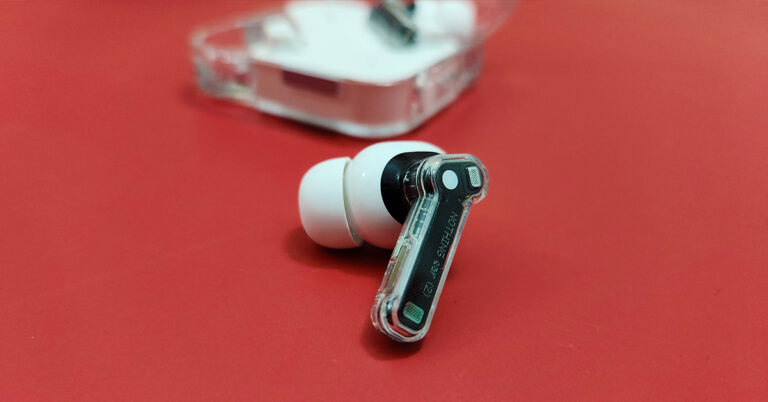
Moving to the build of the Nothing Ear (2) audio ear plugs, you get a smaller transparent stem on each with white audio driver enclosures and white silicon tips. Users also get additional silicon tips in the box to fit into different ear cavities. For us, the default ones were just fine. We quite liked what we saw and these half-transparent earphones sure look yummy for the taking. Each earpiece has multiple microphones to keep the noise out up to 40-decibel levels. More on that a little later.
Consumers also get a strung USB Type-C charging cable in the box. To connect it to any charger, users can use the supplied USB Type-C charging port located on the charging case, which also has the BlueTooth pair button next to it. Also, on this case, there is a LED light indicator, which supports different functionalities, like when you are connected to a device or when it is in pairing mode etc.
Read Also:Nothing Ear 1 Black Edition is now available in India: Details
Nothing Ear (2) review: Performance
Let’s move to the fun part — its resonance. Each Nothing Ear (2) earphone hides an 11.6mm audio driver to provide exquisite sound. Download the Nothing X app from the Play Store, turn on the BlueTooth on the smartphone and head straight into the setup. It will take about 5-10 mins for the initial setup, but it is worth the wait. The app will take into consideration a few factors and accordingly set a sound that is best suited for you.
For us, we love a more bassy setup. If you do not like what the app has to provide (which we doubt) you can also head into the equaliser part of the app and play around with different modes. And there are 4-5 of them. We loved every beat the Nothing Ear (2) provided us with. These are spectacular in the resonance department and we were not expecting the brilliant thump they provide. The bass can put some of the over-the-ear headphones to shame.
We listened to quite a few tracks we are drooling over these days and when we tuned into them with the Nothing Ear (2), we heard newer never heard before beats in the same songs. Jaws Dropped!
After we collected ourselves back up by just getting a great music beat down, or up, whatever you want to call it, we charged towards the gaming section of our smartphone. We turned on the low lag mode in the Nothing X app and it did manage to reduce the sound lag by quite a few milliseconds. Overall, the gaming experience was not bad either with the Nothing Ear (2).
The Nothing Ear (2) come with Active Noise Cancelation (ANC), too. You get three modes (off, transparency and noise cancellation) which can be accessed using the app. The ANC can also be controlled by pinching and holding the stem of the earphones. Talking about which, there are pinch controls on the Nothing Ear (2) as well.
You can triple or double pinch to skip back or forward a track, single pinch to play/pause a track or answer or cut a call. 9 out of 10 times these worked as marketed. However, you cannot control the volume with them. For that, you would need to bring out the smartphone.
Moving to the battery life of the Nothing Ear (2), these sport a 33mAh battery in the earphones and an additional 485mAh battery in the case. The company says you can get 6.3 hours of battery from the earbuds and 36 hours of additional playback with the charging case (ANC off).
This is more or less right. We were able to squeeze in 5.75 hours of playback and got another 33 hours using the charging case. With the ANC turned on we got 3.5 hours of music playback from the earpieces and additional 20 hours from the charging case. This, overall, is not bad coming from such a small contraption.
Talking a little bit more about the Nothing Ear (2), the earphones have an IP54 rating for water and dust resistance and the case has an IP55 rating. The case also supports wireless Qi charging of up to 2.5w. Over that, these also support multi-device connectivity. You can pair them with your mobile phone as well as the laptop at the same time enabling you to take calls and listen to music from the laptop without switching Bluetooth. Lastly, Bluetooth version 5.2 is what these earbuds use.
Verdict
So, it all bubbles down to if at Rs 9,999 are the Nothing Ear (2) worth buying? That is an astounding yes. You get exquisite sound, good ANC, lightweight, good looks, IP rating and also wireless charging. These are a well-packaged set of earphones. If you have a budget of Rs 5-7 thousand for new wireless earphones, we suggest extending it by a few thousand and buy these.
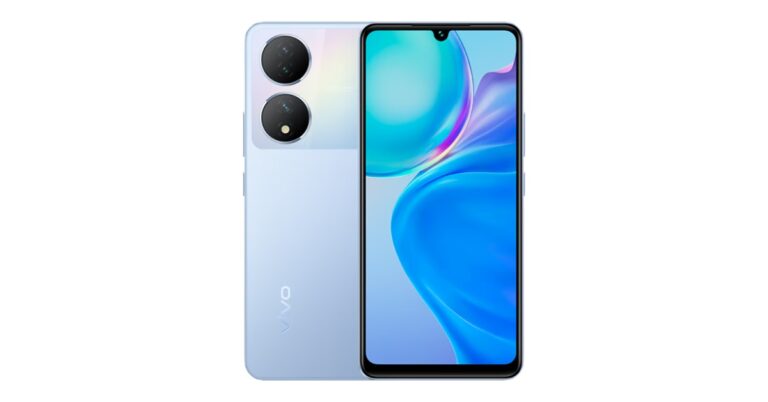
Vivo has expanded its Y-Series portfolio with the addition of Vivo Y100A in India. The device features a colour-changing design which is similar to its sibling Y100. The newly launched smartphone comes in three variants Pacific Blue, Twilight Gold and Metal Black. Also, there are two camera modules at the back of the phone. In addition to this, the device features a 90Hz AMOLED display. Additionally, it runs on Android 13 with FunTouch OS 13 on top and is powered by Qualcomm Snapdragon 695 SoC.
Vivo Y100A price in India and sale details
Vivo Y100A has been launched in India and the price is yet to be announced. However, the phone is listed on Croma with 8GB RAM and 256GB storage option at Rs 26,999. The handset comes in three colour options – Metal Black, Twilight Gold, and Pacific Blue. It is currently available for purchase via the company’s official online store and Croma in the country.
Vivo Y100A specifications
Vivo Y100 features a 6.38-inch full-HD+ AMOLED display with 2400 × 1080 resolution. The screen of the phone offers 1300 nits of peak brightness. In addition to this, the display comes with 90Hz refresh rate support. The device operates on Android 13-based FunTouch OS 13 out of the box. Under the hood, there is an octa-core Qualcomm Snapdragon 695 SoC with an expandable RAM feature. The device comes in a single 8GB RAM with up to 128GB storage option. The internal memory is expandable via a microSD card.For photos and videos, the Vivo Y100A features a triple rear camera setup that includes a 64-megapixel primary sensor with OIS support. Additionally, the setup also consists of 2-megapixel sensors along with an LED flash. The device comes with a 16-megapixel front-facing camera for taking selfies and video calling.The newly launched phone also houses a 4,500mAh battery with support for 44W flash charging. For connectivity, it includes dual-SIM card support, 5G, 4G, dual-band WiFi, Bluetooth 5.2, USB Type-C, GPS, OTG, and 3.5mm audio jack.
For the latest gadget and tech news, and gadget reviews, follow us on Twitter, Facebook and Instagram. For newest tech & gadget videos subscribe to our YouTube Channel. You can also stay up to date using the Gadget Bridge Android App. You can find the latest car and bike news here.
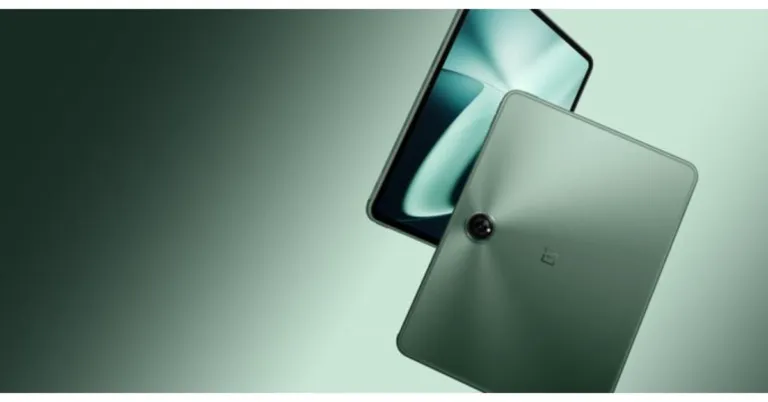
OnePlus Pad was launched in India at the Cloud 11 event alongside OnePlus 11 5G and OnePlus 11R 5G. The pricing and availability details of the tablet were not revealed at the time of the launch. The only thing the company disclosed was that it was scheduled to go on sale in April. While there is still no update on this, the expected price and availability details have now surfaced on the web. The screen on the OnePlus Pad is big, and it looks expensive. The 11.6-inch display on the front of the OnePlus tablet has tiny bezels surrounding it.Tipster Piyush Bhasarkar via Twitter revealed that the OnePlus Pad is scheduled to go on sale between April 28 and April 30. Apart from revealing the potential release dates he also shared information regarding the price of the tablet. According to the tipster the OnePlus Pad is likely to be priced at Rs 23,099 after applying offers. The tablet is expected to cost Rs 30,000 in the country.
In addition to India, the OnePlus tab was also announced North America, Europe and the Middle East.
Also Read:OnePlus Pad, company’s first tablet launches in India: Price and availability details
OnePlus Pad specifications
The OnePlus Pad features an 11.61-inch display with a refresh rate of 144Hz, a resolution of 2,800×2,000, a pixel density of 296 ppi, and a brightness of 500 nits. The device has a 2.5D curved glass, a 7:5 screen ratio, and an 88 percent screen-to-body ratio.The OnePlus Pad comes with quad-speaker setup that are said to provide an Omnibearing sound field, and depending on how the tablet is held, the speakers can switch between the left and right channels. Dolby Atmos and Dolby Vision are also supported on the tablet. TheOnePlus tablet also comes with a 9,510mAh battery with 67W SUPERVOOC capability, which is said to provide up to one month of standby time. It has an 8-megapixel selfie camera and a single 13-megapixel back camera with an LED flash. In addition to this, the device is supplied with a magnetic keyboard and a stylus.The Device has 5G cellular sharing with smartphones and comes equipped with a MediaTek Dimensity 9000 chipset, which supports up to 12GB of LPDDR5 RAM. The Tab runs on Android 13 out of the box and should get at least the 2 next OS updates with security updates.
For the latest gadget and tech news, and gadget reviews, follow us on Twitter, Facebook and Instagram. For newest tech & gadget videos subscribe to our YouTube Channel. You can also stay up to date using the Gadget Bridge Android App. You can find the latest car and bike news here.
Most Instant Messaging apps these days offer all the communication features you need. You can share images, texts, & locations, and even make payments on some IM apps. One of the underrated features of instant messaging is the ability to send voice notes or voice messages. Voice messaging comes in clutch when you are driving or occupied with some other task that keeps you from texting. While it may seem like a standard feature, every app has its own unique spin on voice notes. In this article, we bring you the best voice messaging apps in 2023.Read Also:YouTube rolling out 5 new features for Premium Subscribers
WhatsApp
There is a reason why WhatsApp is the preferred messaging app among Android users. The messaging platform is the be-all and end-all of instant messaging for Android users. From video calls to personal emojis – WhatsApp has it all. Voice messaging wasn’t a part of the app when it first launch, but was later added as the app grew in popularity and tried to beat its competition at every turn. Now that voice messaging has been on the platform for a while, WhatsApp has perfected it entirely.To begin with, you can listen to voice messages on WhatsApp even when you minimise the app and return to the home screen. This isn’t a common feature in other apps and severely limits your phone’s functionality while playing voice notes. Another helpful feature offered by WhatsApp is switching the audio from the main speaker to the earpiece speaker as soon as you bring the phone closer to your ear. This makes it convenient to listen to your voice notes when you’re out in public.
Voxer Walkie Talkie Messenger
If you’re looking for an app that prioritises voice communication over everything else, you should consider downloading Voxer. With Push-to-Talk integrated into the app, Voxer essentially gives you the Walkie-Talkie experience. You can either have a live chat with someone or simply leave a voice message for them to listen to later. All voice messages on Voxer are end-to-end encrypted, making it the first walkie-talkie app to offer that feature. Apart from voice messaging, Voxer also allows you to send multimedia and create groups within the app.
LINE
Line is one of the most versatile messaging apps around, offering all the features of a regular messaging app along with features like public profiles, payments and more. You can easily get on a voice call with a group of friends or leave them voice notes for free. One of the better parts of using Line is that you get a lot of control over how the app looks on your phone. There are a bunch of themes that you can use to customise the app.
HeyTell
Similar to Voxer, HeyTell is also a walkie-talkie app that lets you connect with your friends and family over voice messages. HeyTell also uses Push-to-Talk to carry out instantaneous voice communication. HeyTell has a bunch of privacy features that you can select to choose who is able to contact you. In order to initiate communication with someone, you will have to accept their invitation first. One of the unique features of HeyTell is that it lets you change your voice with a filter while communicating with the other person.
Zello PTT Walkie Talkie
Zello is primarily a Push-to-Talk voice messaging app that also lets users send messages, images, and locations on its platform. The app has a unique hands-free mode that lets you send voice messages while you’re driving. Using Zello, you can either talk to a contact privately or join a group voice chat with up to 6,000 users. For workplace and professional teams, Zello is a great app for sending voice alerts.
NuovoTeam
For a more professional setting, NuovoTeam is a great Push-to-talk voice messaging app to connect with your workmates. NuovoTeam makes remote communication more efficient and secure. With Android compatibility, you can turn any tablet or smartphone on the platform into a walkie-talkie with NuovoTeam. The app lets you broadcast your voice messages to an audience or simply chat personally with a contact.Read Also:Lava Blaze 2 launched in India at Rs 8,999: Sale details inside
Dell and Alienware have announced the launch of their first-ever Gaming store in the Indian market. The country’s first Alienware gaming experience centre will be a place for gamers to meet, interact, play, and buy Dell’s newest products while allowing free walk-ins. The “Battle Zone,” is the store’s main attraction which offers a holistic multiplayer gaming experience. Additionally, the Dell gaming store will provide product display, experience, sales, service, and maintenance, providing players with a comprehensive, personalised and intelligent gaming experience.Commenting on the opening of the store, Rosandra Silveira, Sr. Vice President, Global Channel Sales, Dell Technologies, said, “It’s incredible to see the rate at which the Indian gaming landscape is expanding. Alienware has always been at forefront at reshaping the gaming experience and the new Alienware Experience Store embodies the legacy of the Alienware brand by enabling the use of cutting-edge technology and innovative design elements to create what we refer to as ‘the gamers’ paradise. Providing a completely new entertainment experience, the store will further strengthen our engagement with the Indian gaming community and create quality experiences for all gamers.”Also read:Apple to open its second retail store in New Delhi after Mumbai on April 20, timing and event details insideDell Technologies and Alienware announced the opening of India’s first gaming experience store. This Gaming Store will be located in New Delhi at Nehru Place. Dell Technologies’ executives Rosandra Silveira, Sr. Vice President, Global Channel Sales, and Raj Kumar Rishi, Vice President and Managing Director, Consumer and Small Business, inaugurated the store.It is a hub for gamers and enthusiasts to meet, interact, and play their favourite games on Dell’s latest devices. According to the company, Store will be offering product display and experience areas, an e-sports game section along with a peripheral and accessories unit to the players.The Dell Alienware gaming store has a distinctive colour scheme, metallic design, and iconic Alienware features. The store is designed with digital screens that create interesting dynamic content that enables visitors to dive right into an extraterrestrial gaming experience.As said earlier “Battle Zone,” is the main attraction of the gaming store which enables players to face off with their opponent and test-drive the entire available ecosystem. All these elements are enhanced by clean lines and monochromatic colouring that serve as stark reminders of the Alienware world. In order to provide a cosy ambiance the store has subtle lighting that takes the customer into a futuristic setting.“Everything is prepared keeping the gamers at the core further creating a complete game ecosystem for them in one place,” the company said.“Alienware has always been the ‘legacy’ for gaming enthusiasts, and the Alienware Experience Store demonstrates a vigorous ambition for players to experience unique avant-garde style and high-performance gaming equipment. The store will be a hub for e-sports game leagues and community gathering for game developers and enthusiasts alike further demonstrating Dell Technologies and Alienware’s innovation and leadership in the industry”, said Raj Kumar Rishi, Vice President and Managing Director, Consumer and Small Business, Dell Technologies, India.
For the latest gadget and tech news, and gadget reviews, follow us on Twitter, Facebook and Instagram. For newest tech & gadget videos subscribe to our YouTube Channel. You can also stay up to date using the Gadget Bridge Android App. You can find the latest car and bike news here.
Garena Free Fire is a battle royale game with regular awards and tournaments to keep players interested. If you play Garena Free Fire, you should be aware of the redeem codes that are released on a daily basis. However, because the battle royale game is banned in India, players from other countries can use the Free Fire Redeem codes daily. If you’re unfamiliar with the Garena Free Fire redeem codes or don’t know how to get them, we’ve put together a step-by-step guide to help you redeem them. Check out Garena Free Fire Redeem Codes for 13 April 2023.The Free Fire redeem codes are a great way to get free stuff. These are 12-digit codes that contain alphabets and numbers, as well as an expiration date and time. Because the Garena FF redeem codes cannot be used more than once, you should hurry to the redemption page to claim your free reward before someone else does. To get a free reward, all you have to do is go to reward.ff.garena.com/en, which is the official redemption page. Also, keep an eye on this space for daily updates on Garena Free Fire redemption codes and rewards.
Garena Free Fire Redeem Codes Today 13 April 2023
FFCMCPSBN9CU
FFAC2YXE6RF2
ZZATXB24QES8
U8S47JGJH5MG
VNY3MQWNKEGU
NPYFATT3HGSQ
FFCMCPSGC9XZ
MCPW2D2WKWF2
FFIC33NTEUKA
FFBBCVQZ4MWA
UVX9PYZV54AC
BR43FMAPYEZZ
How to Get Free Fire Redeem Codes for Garena on 13 April 2023?



 Xiaomi Smart TV X Pro will be available in three sizes 43, 50 and 55 inch priced at Rs 32,999, Rs 41,999 and Rs 47,999 respectively. But the company is offering them at a special launch price of Rs 31,499, Rs 39,999 and Rs 45,999. The sale is scheduled to start on April 19 at 12 noon via mi.com, Flipkart and offline retail partners.
 The Xiaomi Smart Air Purifier 4 also supports app control and voice control with Google Assistant and Amazon Alexa. There is an OLED display with two touch controls to view the air quality, temperature, and humidity status.
The Xiaomi Air Purifier 4 comes at a special introductory price of Rs 13,999. The ICICI card holders can avail of a discount of Rs 750. While the Xiaomi Smart Air Purifier 4 Lite has been launched at a special introductory price of Rs 9,999. The ICICI card users can get Rs 500 off on their purchases.
The Early access sale will begin on April 20 at noon via mi.com and offline retail partners. Whereas the Xiaomi Smart Air Purifier 4 sale starts from April 23 at 12 noon on Amazon.in and for Xiaomi Smart Air Purifier 4 Lite on Flipkart and Amazon.in.
The Xiaomi Smart Air Purifier 4 also supports app control and voice control with Google Assistant and Amazon Alexa. There is an OLED display with two touch controls to view the air quality, temperature, and humidity status.
The Xiaomi Air Purifier 4 comes at a special introductory price of Rs 13,999. The ICICI card holders can avail of a discount of Rs 750. While the Xiaomi Smart Air Purifier 4 Lite has been launched at a special introductory price of Rs 9,999. The ICICI card users can get Rs 500 off on their purchases.
The Early access sale will begin on April 20 at noon via mi.com and offline retail partners. Whereas the Xiaomi Smart Air Purifier 4 sale starts from April 23 at 12 noon on Amazon.in and for Xiaomi Smart Air Purifier 4 Lite on Flipkart and Amazon.in.
 When connected with the Xiaomi Home App you can control it remotely, and other functions like customizing cleaning schedules, adjusting cleaning modes and water levels, tracking device location and more. Besides this, it supports Google Assistant and Amazon Alexa voice assistance for hands-free control.
The Xiaomi Robot Vacuum – Mop 2i is launched at Rs 16,999 however if you use an ICICI card to purchase it you can save up to Rs 1000. The early access sale will begin on April 25 at noon via mi.com and offline retail partners while the sale starts on April 28 at noon via Amazon.
For the latest gadget and tech news, and gadget reviews, follow us on Twitter, Facebook and Instagram. For newest tech & gadget videos subscribe to our YouTube Channel. You can also stay up to date using the Gadget Bridge Android App. You can find the latest car and bike news here.
When connected with the Xiaomi Home App you can control it remotely, and other functions like customizing cleaning schedules, adjusting cleaning modes and water levels, tracking device location and more. Besides this, it supports Google Assistant and Amazon Alexa voice assistance for hands-free control.
The Xiaomi Robot Vacuum – Mop 2i is launched at Rs 16,999 however if you use an ICICI card to purchase it you can save up to Rs 1000. The early access sale will begin on April 25 at noon via mi.com and offline retail partners while the sale starts on April 28 at noon via Amazon.
For the latest gadget and tech news, and gadget reviews, follow us on Twitter, Facebook and Instagram. For newest tech & gadget videos subscribe to our YouTube Channel. You can also stay up to date using the Gadget Bridge Android App. You can find the latest car and bike news here. 


 Step 2:
 Step 3:
 Step 4: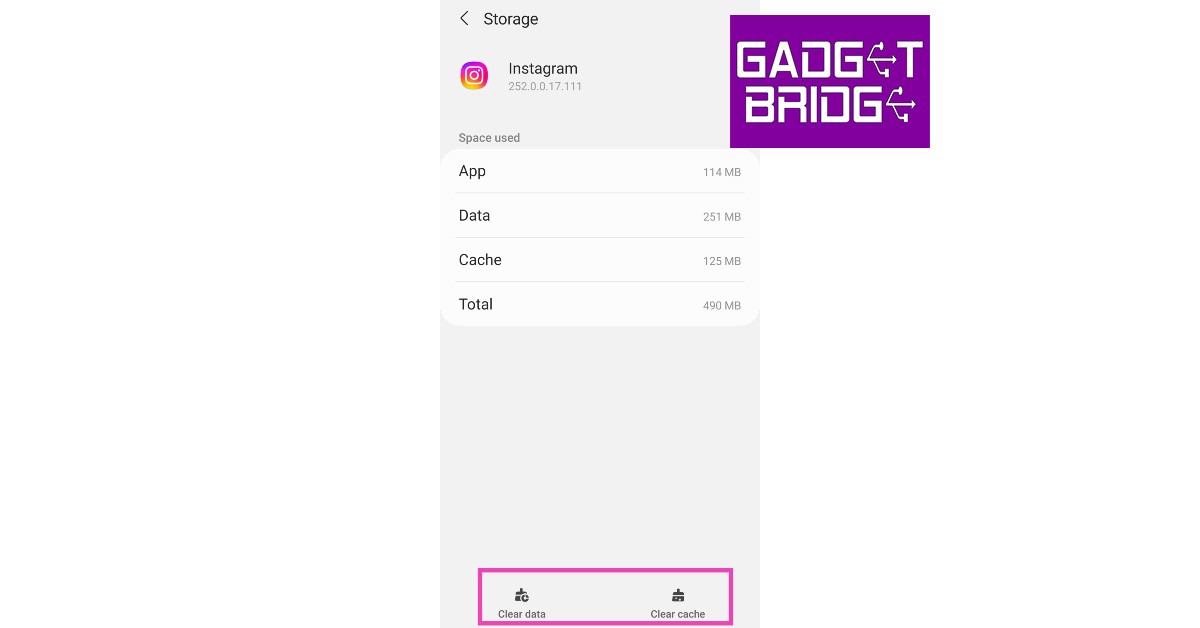



 Packaged in an eco-friendly cardboard outer package, you get a transparent charging case in which the Nothing Ear (2) lie, magnetically cocooned in their respective hollows. The lid of the charging case also slams shuts into place using a magnet, which has a nice thud to it when shut. The façade is very similar to the previous edition, except the charging case’s battery now protrudes out from the bottom. Again, to keep its weight low and to sport a smaller design, this has been done. We thought the case might wobble on a flat surface due to this, but it does not.
 Moving to the build of the Nothing Ear (2) audio ear plugs, you get a smaller transparent stem on each with white audio driver enclosures and white silicon tips. Users also get additional silicon tips in the box to fit into different ear cavities. For us, the default ones were just fine. We quite liked what we saw and these half-transparent earphones sure look yummy for the taking. Each earpiece has multiple microphones to keep the noise out up to 40-decibel levels. More on that a little later.
 Consumers also get a strung
  For us, we love a more bassy setup. If you do not like what the app has to provide (which we doubt) you can also head into the equaliser part of the app and play around with different modes. And there are 4-5 of them. We loved every beat the Nothing Ear (2) provided us with. These are spectacular in the resonance department and we were not expecting the brilliant thump they provide. The bass can put some of the over-the-ear headphones to shame.
We listened to quite a few tracks we are drooling over these days and when we tuned into them with the Nothing Ear (2), we heard newer never heard before beats in the same songs. Jaws Dropped!
After we collected ourselves back up by just getting a great music beat down, or up, whatever you want to call it, we charged towards the gaming section of our smartphone. We turned on the low lag mode in the Nothing X app and it did manage to reduce the sound lag by quite a few milliseconds. Overall, the gaming experience was not bad either with the Nothing Ear (2).
For us, we love a more bassy setup. If you do not like what the app has to provide (which we doubt) you can also head into the equaliser part of the app and play around with different modes. And there are 4-5 of them. We loved every beat the Nothing Ear (2) provided us with. These are spectacular in the resonance department and we were not expecting the brilliant thump they provide. The bass can put some of the over-the-ear headphones to shame.
We listened to quite a few tracks we are drooling over these days and when we tuned into them with the Nothing Ear (2), we heard newer never heard before beats in the same songs. Jaws Dropped!
After we collected ourselves back up by just getting a great music beat down, or up, whatever you want to call it, we charged towards the gaming section of our smartphone. We turned on the low lag mode in the Nothing X app and it did manage to reduce the sound lag by quite a few milliseconds. Overall, the gaming experience was not bad either with the Nothing Ear (2). The Nothing Ear (2) come with Active Noise Cancelation (ANC), too. You get three modes (off, transparency and noise cancellation) which can be accessed using the app. The ANC can also be controlled by pinching and holding the stem of the earphones. Talking about which, there are pinch controls on the Nothing Ear (2) as well.
 You can triple or double pinch to skip back or forward a track, single pinch to play/pause a track or answer or cut a call. 9 out of 10 times these worked as marketed. However, you cannot control the volume with them. For that, you would need to bring out the smartphone.
Moving to the battery life of the Nothing Ear (2), these sport a 33mAh battery in the earphones and an additional 485mAh battery in the case. The company says you can get 6.3 hours of battery from the earbuds and 36 hours of additional playback with the charging case (ANC off).
This is more or less right. We were able to squeeze in 5.75 hours of playback and got another 33 hours using the charging case. With the ANC turned on we got 3.5 hours of music playback from the earpieces and additional 20 hours from the charging case. This, overall, is not bad coming from such a small contraption.
Talking a little bit more about the Nothing Ear (2), the earphones have an IP54 rating for water and dust resistance and the case has an IP55 rating. The case also supports wireless Qi charging of up to 2.5w. Over that, these also support multi-device connectivity. You can pair them with your mobile phone as well as the laptop at the same time enabling you to take calls and listen to music from the laptop without switching Bluetooth. Lastly, Bluetooth version 5.2 is what these earbuds use.
You can triple or double pinch to skip back or forward a track, single pinch to play/pause a track or answer or cut a call. 9 out of 10 times these worked as marketed. However, you cannot control the volume with them. For that, you would need to bring out the smartphone.
Moving to the battery life of the Nothing Ear (2), these sport a 33mAh battery in the earphones and an additional 485mAh battery in the case. The company says you can get 6.3 hours of battery from the earbuds and 36 hours of additional playback with the charging case (ANC off).
This is more or less right. We were able to squeeze in 5.75 hours of playback and got another 33 hours using the charging case. With the ANC turned on we got 3.5 hours of music playback from the earpieces and additional 20 hours from the charging case. This, overall, is not bad coming from such a small contraption.
Talking a little bit more about the Nothing Ear (2), the earphones have an IP54 rating for water and dust resistance and the case has an IP55 rating. The case also supports wireless Qi charging of up to 2.5w. Over that, these also support multi-device connectivity. You can pair them with your mobile phone as well as the laptop at the same time enabling you to take calls and listen to music from the laptop without switching Bluetooth. Lastly, Bluetooth version 5.2 is what these earbuds use.