Garena Free Fire Redeem Codes Today 7 December 2023: Here is how to claim them

Garena Free Fire is a battle royale game with regular awards and tournaments to keep players interested. If you play Garena Free Fire, you should be aware of the redeem codes that are released on a daily basis. However, because the battle royale game is banned in India, players from other countries can use the Free Fire Redeem codes daily. If you’re unfamiliar with the Garena Free Fire redeem codes or don’t know how to get them, we’ve put together a step-by-step guide to help you redeem them. Check out Garena Free Fire Redeem Codes for 7 December 2023. The Free Fire redeem codes are a great way to get free stuff. These are 12-digit codes that contain alphabets and numbers, as well as an expiration date and time. Because the Garena FF redeem codes cannot be used more than once, you should hurry to the redemption page to claim your free reward before someone else does. To get a free reward, all you have to do is go to reward.ff.garena.com/en, which is the official redemption page. Also, keep an eye on this space for daily updates on Garena Free Fire redemption codes and rewards.

Garena Free Fire Redeem Codes Today 7 December 2023

FNJU87RIU6Y56YIU FV7YFHDN4M496LYP F6T78KJHGSERFF87 FRJNTR67UH675Y4E FUYFTHUJR67URYH4 FUTYJT5I78OI78F2 F3BG4N5MTK6YLHOI FBVFTYJHR67UY4IT FKY89OLKJFH56GRG FV7CYTGDRTUNMJEK FYHR6TYHJ67YJ7TC F6Y6FHRTJ67YHR57 FDYHR6Y7SUR674U3 FHFTY67URT6HGSU4 FDYGTH6R567UE56K FYH6T7YJUT67UUTH F7UHYFRT67URU34S FOGFUYJN67UR6OBI

How to Get Free Fire Redeem Codes for Garena on 7 December 2023?

  • Visit the Garena Free Fire game’s official website at reward.ff.garena.com.
  • Use your Facebook, Google, VK, Apple ID, Huawei ID, or Twitter account to log in.
  • You’ll be taken to a valid redemption code (s)
  • Copy and paste the 12-digit redemption code into the text box.
  • On the screen, a dialogue box will appear.
  • ‘Ok’ should be selected.
For the latest gadget and tech news, and gadget reviews, follow us on TwitterFacebook and Instagram. For newest tech & gadget videos subscribe to our YouTube Channel. You can also stay up to date using the Gadget Bridge Android App. You can find the latest car and bike news here.

Top 4 Ways to Install or Update the WiFi Driver on Windows 11?

0
If you grew up in the late 90s and early 2000s you must be aware of the painstaking task of installing the relevant driver package before connecting a PC accessory or hardware to your computer. Even early smartphones used to come with a small disc containing the relevant PC suite. Over the years, ‘plug-and-play’ has become the norm but this does not mean that drivers do not exist. The important drivers come bundled with the OS, facilitating a seamless connection when the computer is connected to the relevant hardware. You can always uninstall these drivers or swap them for new ones. Today, we bring you the top 4 ways to install or update the WiFi driver on a Windows 11 PC. Read Also: Google Messages rolls out Photomoji: Here is how you can use it

When should I update the WiFi Driver on my Windows 11 PC?

Updating the WiFi driver on your Windows PC is not something you should do often. If your PC is connected to the WiFi adapter and is receiving a strong signal, there is no need to meddle with the driver package. As you may already know, a driver is a piece of software that establishes communication between your PC’s OS and the hardware connected to it. The need to update the driver package arises when the hardware stops responding or something goes awry. As a part of troubleshooting a particular problem, you should check the drivers associated with it. If your PC fails to connect to the WiFi network, it is a good idea to check whether its WiFi driver package is updated. To make sure there’s nothing wrong with it, you can also try uninstalling and then reinstalling the WiFi drivers.

Use Device Manager to install or update the WiFi driver on Windows 11

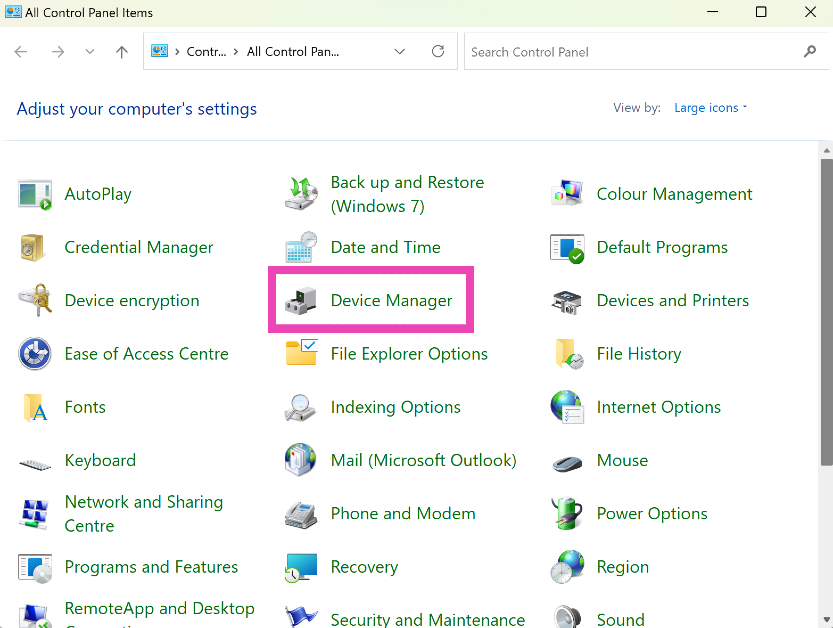
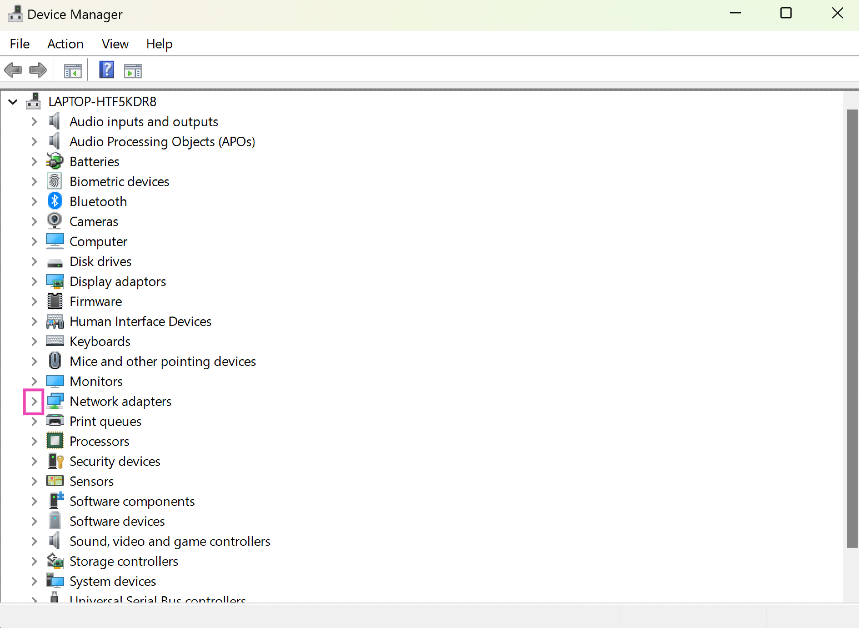
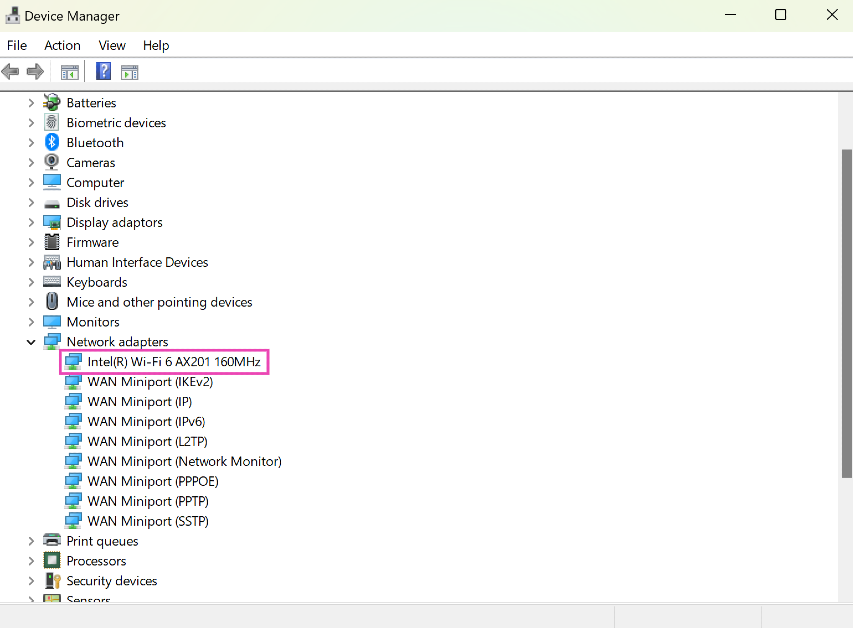
Step 1: Go to Control Panel and select Device Manager. Step 1: Go to Control Panel and select Device Manager. Step 2: Hit the arrow next to Network adapters. Step 2: Hit the arrow next to Network adapters. Step 3: Right-click on the WiFi adapter and hit Update driver. Step 3: Right-click on the WiFi adapter and hit Update driver. Step 4: Choose whether you want Windows to automatically search for an updated driver or manually select the driver from your computer’s storage. The WiFi driver will be updated on your computer.

Update the WiFi using Windows Update

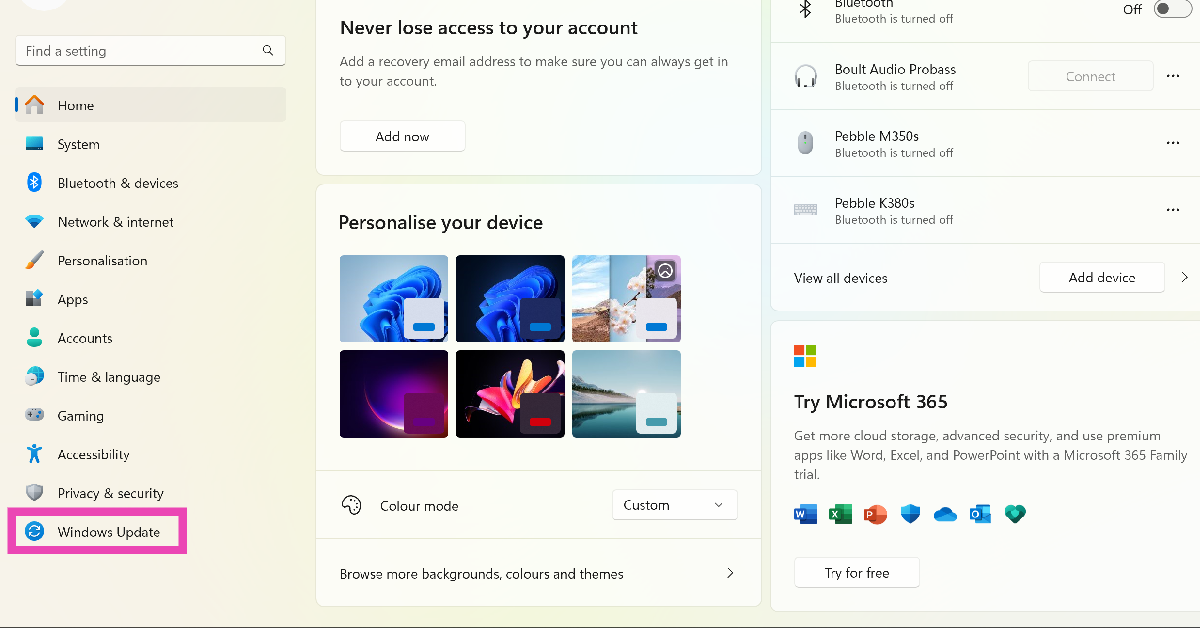
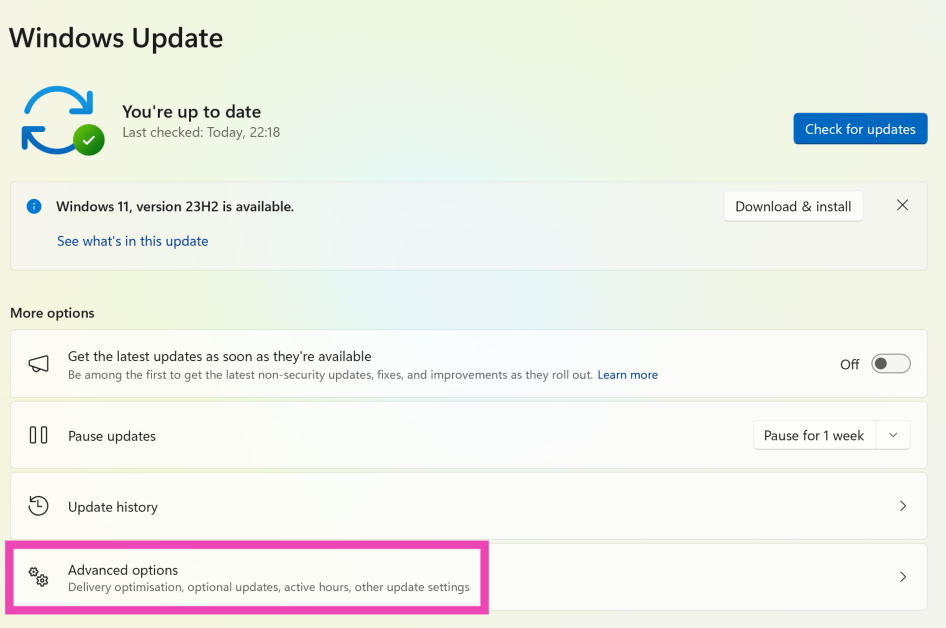
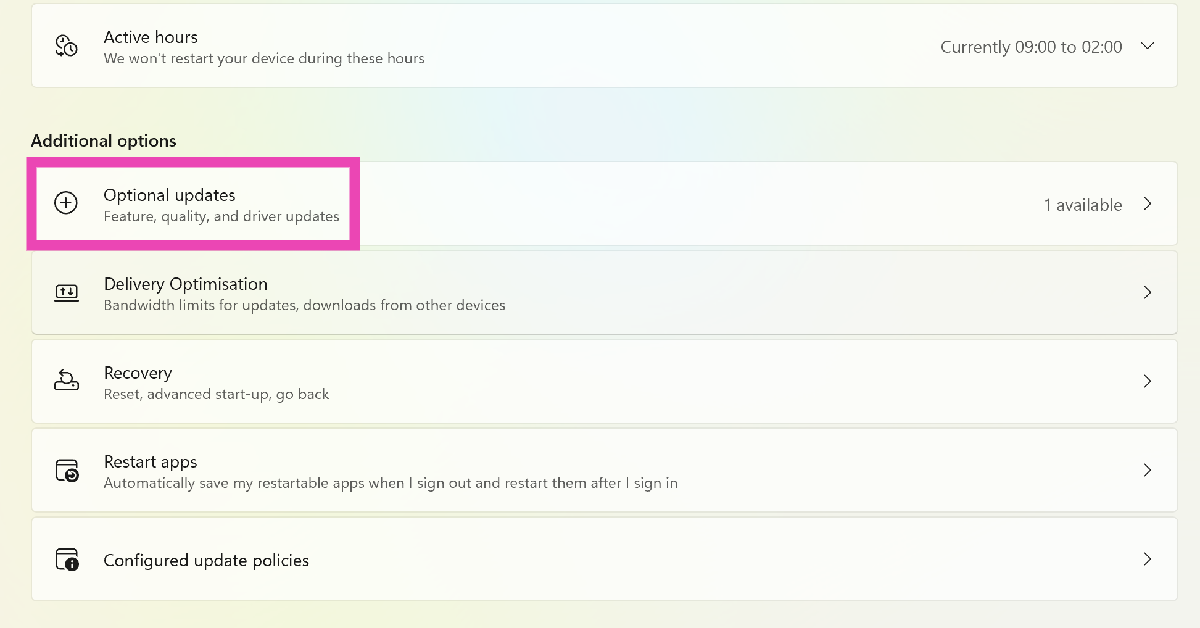
Step 1: Go to Settings and select Windows Update from the side menu. Step 1: Go to Settings and select Windows Update from the side menu. Top 4 Methods to Update wifi Drivers on Windows 11 Step 2: Click on Advanced Options. Step 2: Click on Advanced options. Top 4 Methods to Update wifi Drivers on Windows 11 Step 3: Select Optional Updates. Step 3: Select Optional updates. Top 4 Methods to Update wifi Drivers on Windows 11 Step 4: Click on the checkbox for the WiFi driver and hit Download and install.

Use the CD that came with the WiFi adapter

Most PC accessories and peripherals are plug-and-play. However, manufacturers make sure to provide a CD that contains the driver package for the device. Use this CD to install the driver package on your computer. If you can’t find the disc in the adapter’s retail package, you may need to download the driver from the manufacturer’s website. Take a look at the next method to learn how you can do that.

Download and install the WiFi adapter driver from the manufacturer’s website

Another quick way of installing the WiFi driver on your Windows 11 PC is by visiting the manufacturer’s website and downloading the driver package. Here’s how you can go about it. Step 1: Visit the WiFi adapter manufacturer’s website and search for the latest driver for Windows 11. You may find this option in the Services and Support section. Make sure that the driver package is meant for your adapter’s model. Step 2: Download and install the driver package on your computer. Step 3: Locate the package in the Downloads folder and open it. Step 4: Follow the onscreen instructions to install the WiFi driver package on your device. Step 5: Double-check that the correct WiFi driver has been installed by going to Device Manager and viewing the wireless adapter properties.

Frequently Asked Questions (FAQs)

How do I uninstall my Windows 11 PC’s WiFi driver?

Go to Control Panel>Device Manager>View>Devices by driver. Right-click on oem20.inf (netwtw08.inf) and select Remove Driver. In the popup box, select both checkboxes and hit Remove.

How do I update the WiFi driver on my Windows 11 PC?

Updating the WiFi driver on your Windows 11 PC is fairly easy. Simply go to Control Panel>Device Manager>Network Adapters, right click on the wireless adapter and hit Update.

My WiFi adapter did not come with the disc that contains the driver package. What do I do now?

If you can’t find the CD with the driver package in the retail package of your WiFi adapter, you don’t need to worry. Simply go to the Services/Support section on the manufacturer’s website and download the driver package for your adapter. Read Also: Best gaming phones under Rs 20000 in India

Conclusion

These are the top 4 ways to install or update the WiFi driver on your Windows 11 PC. Microsoft works with a lot of third-party hardware manufacturers and bundles their driver packages in its update. This process is quite seamless and saves you the hassle of downloading the package from the manufacturer’s website.

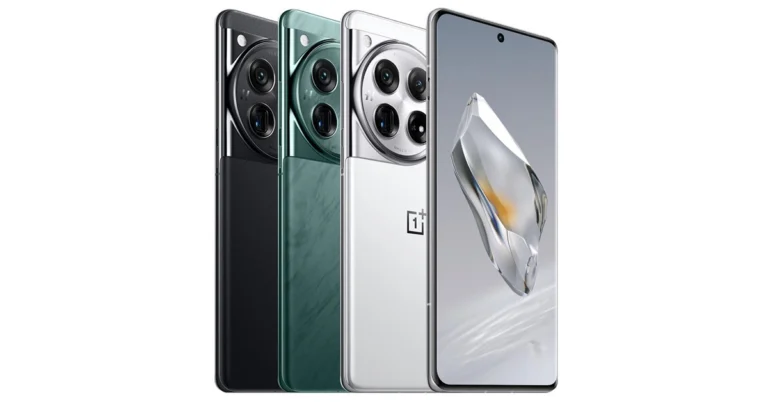
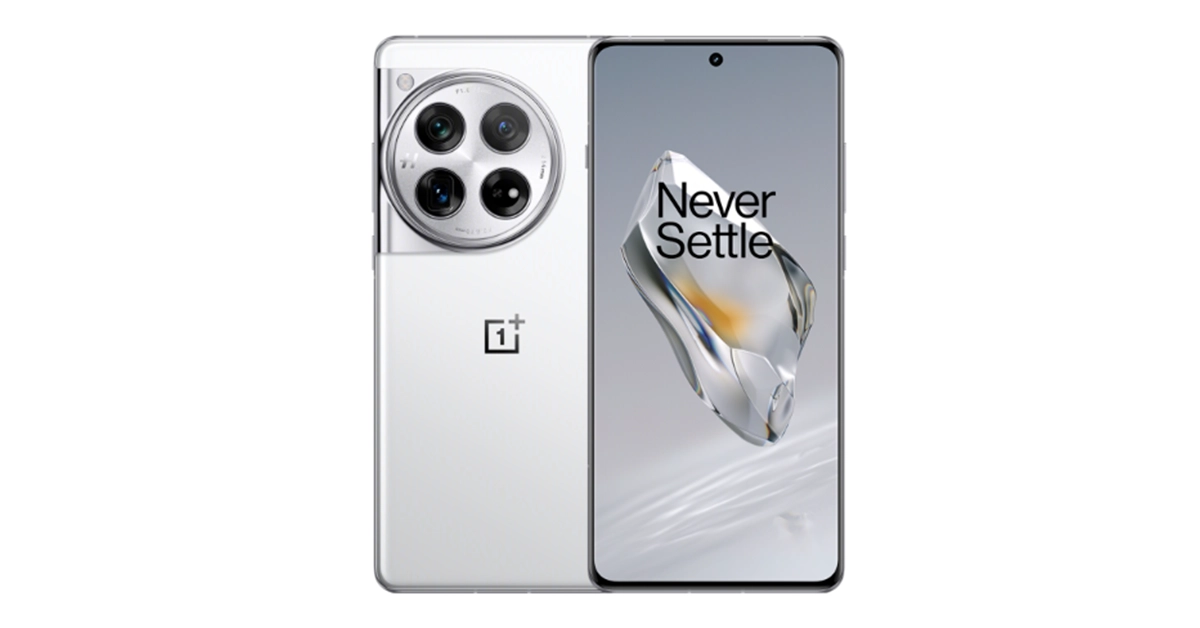
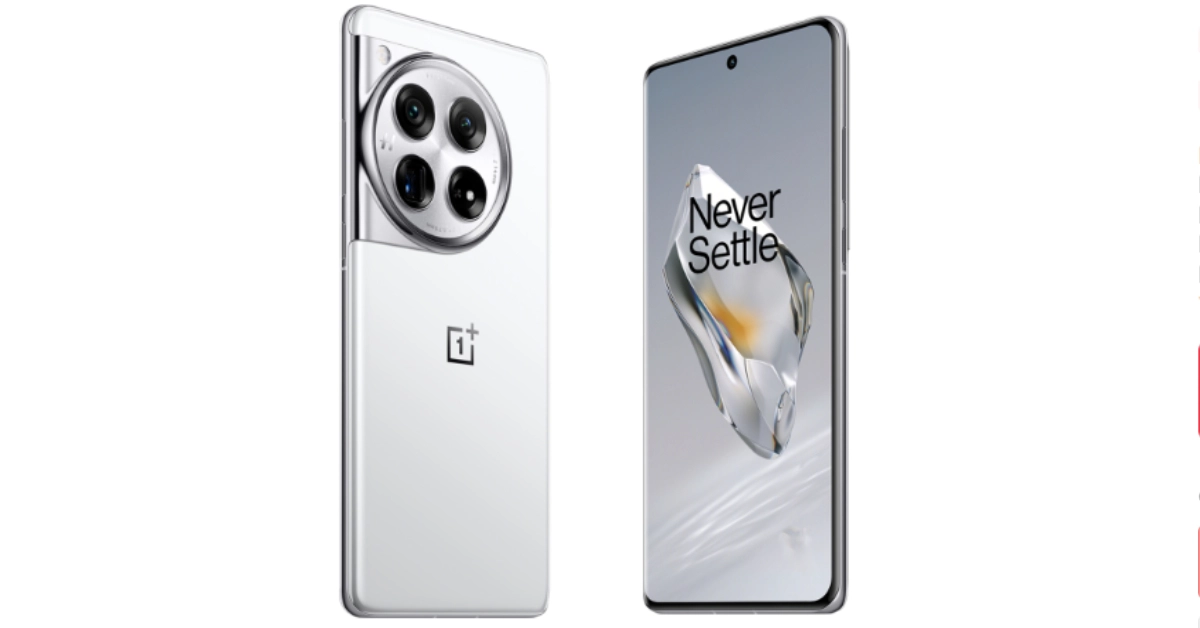
OnePlus 12 could launch in January 2024, company confirms

Key Highlights
  • OnePlus 12 features a Hasselblad-branded triple rear camera system led by a Sony LYT-808 sensor with a 50-megapixel primary camera.
  • The phone has an LTPO OLED screen with 120Hz refresh rate support.
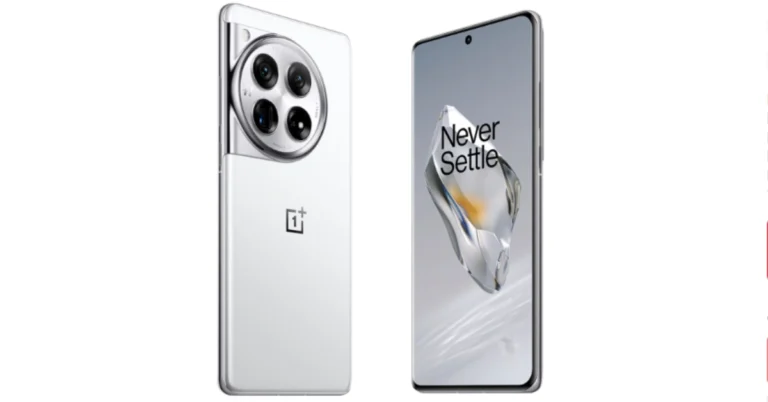
OnePlus 12 debuted in China on Tuesday and now is all set to hit the India stores soon. The device is highlighted with a 120Hz LTPO OLED and is powered by Snapdragon 8 Gen 3 SoC. It has a triple camera setup tuned by Hasselblad. The handset comes with IP65 protection. The Chinese tech firm has officially confirmed to launch its latest flagship in India and Globally. Here is when it will launch in India.  OnePlus 12 microsite went live in India including other nations like the USA and the UK. But now the company has revealed the launch timeline for India and the global market. According to the company’s latest revelation, the OnePlus 12 will make its global debut in India and across the world in early 2024. The information has been shared on the UK page in the campaign’s Terms and Conditions section. However, there is no such information shared on the Indian microsite. However, the company has a tradition of launching most of its phones in India and China first so we are pretty are much sure the India launch is next on the cards. As mentioned the UK content page for the upcoming phone suggests launch in late January because the contest would run from November 27 to January 23. The end date of the campaign therefore raises the possibility that January 24 could be the debut date. OnePlus 12 specifications OnePlus 12 features a 6.82-inch quad-HD+ LTPO OLED screen with an adaptive refresh rate ranging between 1Hz and 120Hz. The screen supports 4,500 nits of screen brightness. The device is IP65 rated for dust and water resistance. The device is powered by Qualcomm- 4nm Snapdragon 8 Gen 3 SoC. The device is offered with up to 24GB of LPDDR5X RAM and up to 1TB of UFS 4 inbuilt storage. The phone is endowed with a Hasselblad branded triple rear camera with a Sony LYT-808 sensor with a 50-megapixel primary camera (OIS, and f/1.6 aperture), a 64-megapixel telephoto secondary lens (OIS, 3X optical zoom and f/2.6 aperture) and a 48-megapixel ultra-wide-angle lens (114-degree field-of-view). Lastly, there is a 32-megapixel front-facing camera (f/2.4 aperture) for taking selfies and video calling. The flagship phone is fueled by a 5,400mAh battery with 100W SuperVOOC wired, 50W wireless and 10W reverse wireless charging support. 

Best camera phones under Rs 25000: Here are our top 10 recommendations

The use of digital cameras is now limited only to professionals. Nowadays, most people prefer to take photos using their phones since they can easily fit them in their pockets or bags. If you have an interest in photography and don’t want to spend a lot of money and are looking for a camera-focused phone for yourself then you have come to the right place. Customers have a set budget under which they want to get maximum features like the best camera sensor, fast CPU, long battery life, good design and build that lasts longer. We have done research and prepared a list in which most of the camera phones mainly fall under Rs 25000. We think this list will be very helpful to you in making the proper choice when purchasing a new camera phone, so check it out if you want to buy one with the best features available.

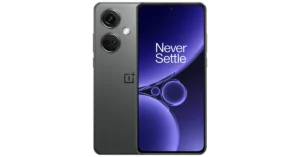
OnePlus Nord CE 2 5G

OnePlus Nord CE 3 5G price reduced, gets a price cut of Rs 2,000 OnePlus Nord CE 2 5G is endowed with a 6.43-inch Full-HD+ Fluid AMOLED display with a refresh rate of 90Hz. The device is powered by Android 11, with OxygenOS 11 and is equipped with MediaTek Dimensity 900 SoC and ARM Mali-G68 GPU. The triple rear camera setup includes a 64-megapixel main camera, an 8-megapixel ultra-wide-angle camera and a 2-megapixel macro camera. Upfront there is a 16-megapixel Sony IMX471 selfie camera. The OnePlus phone includes a 4,500mAh battery with 65W fast charging support. Price starts at Rs 24,999

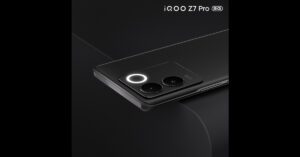
iQOO Z7 Pro 5G

iQoo Z7 Pro 5G iQoo Z7 Pro 5G comes with a 6.78-inch full-HD+ AMOLED display with 120Hz refresh rate. The device boots FuntouchOS 13 with Android 13. It is powered by MediaTek Dimensity 7200 SoC with Mali-G610 MC4 GPU. The phone features a dual rear camera setup that includes a 64-megapixel Samsung GW3 primary sensor and a 2-megapixel depth sensor. It also has a ring LED light. Additionally, a 16-megapixel front-facing sensor is there for taking selfies and video calling. The 4,600mAh battery in the iQoo Z7 Pro supports 66W wired fast charging. Price starts at Rs 23,999

Xiaomi 11i 5G

Xiaomi 11i 5G price in India The Xiaomi 11i has a 6.67-inch full-HD+ Super AMOLED display with 120Hz refresh rate support. It runs on Android 11 with MIUI 12.5 Enhanced version on top. The handset is powered by a MediaTek Dimensity 920 SoC. It includes a triple rear camera arrangement with a 108-megapixel primary Samsung HM2 sensor with an f/1.89 aperture, an 8-megapixel ultra-wide lens, and a 2-megapixel macro sensor. There is a 16-megapixel selfie camera sensor with an f/2.45 aperture on the front. The device equips a 4,500mAh dual-cell lithium polymer battery with 67W fast charging. Price starts at Rs 17,999

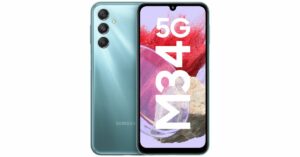
Samsung Galaxy M34 5G

Samsung Galaxy M34 5G with 6,000mAh battery launched in India Samsung Galaxy M34 5G on the other hand features a Full HD+ 6.5-inch display. The device runs OneUI 5.1, an Android 13-based operating system. The phone is driven by an Exynos 1280 SoC with a Mali-G68 MP4 GPU. It has a triple rear camera setup that includes a 50-megapixel primary sensor, a 2-megapixel macro sensor and an 8-megapixel ultra-wide angle camera. For selfies, there is a 13-megapixel sensor front-facing camera. A 6,000mAh battery powers the device. Price starts at Rs 19,999

Poco X5 Pro 5G

review of Poco X5 Pro 5G Poco X5 Pro highlights a 6.67-inch Xfinity AMOLED Display on the Poco X5 Pro 5G has a 120Hz adaptive refresh rate. It operates on MIUI 14 for Android 12 and is powered by a Snapdragon 778G SoC and an Adreno 642L GPU. The device includes a triple rear camera setup with a 108-megapixel ISOCELL HM2 main sensor. A 2-megapixel macro camera and an 8-megapixel ultra-wide angle lens are also included. On the front, there is a 16-megapixel selfie camera. Moreover, the phone is backed by a 5,000mAh battery with 67W fast charging and 5W wired reverse charging capabilities. Price starts at Rs 18,999

OnePlus Nord CE 3 Lite

OnePlus Nord CE 3 Lite review: Design and Display OnePlus Nord CE 3 Lite 5G is highlighted with a 6.72-inch full-HD+ LCD having a dynamic refresh rate of 120Hz. The device is shipped with OxygenOS 13.1 on top of Android 13 out of the box. Under its hood, there is an octa-core Snapdragon 695 SoC with Adreno 619 GPU for graphics. The 5G smartphone features a triple rear camera setup consisting of a 108-megapixel Samsung HM6 sensor with an f/1.75 aperture and EIS support. It also includes a 2-megapixel macro lens and another 2-megapixel depth sensor. For selfies, there is a 16-megapixel front-facing camera. The phone further sports a 5,000mAh battery that supports 67W SuperVOOC fast charging. Price starts at Rs 19,999

Redmi K50i 5G

Redmi K50i Review: A performance-oriented smartphone under 30K The Redmi K50i has a 6.6-inch full HD+ liquid FFS (Field Fringe Switching) Display that supports a 144Hz refresh rate. There is a MediaTek Dimensity 8100 processor. It runs on MIUI 13, which is based on Android 12. It has a triple camera setup at the back, including a 64-megapixel Samsung JW1 sensor that is supported by an 8-megapixel and a 2-megapixel ultrawide lens. A 16MP selfie camera is located up front. The phone boasts a 5080mAh battery and comes with 67W Turbo Charger. Price starts at Rs 25,999

Vivo V25 5G

Vivo V25 5G price in India and sale details Vivo V25 runs on Android 12, Funtouch OS 12. It has a 6.44-inch full-HD+ AMOLED screen with a refresh rate of 90Hz and a touch sampling rate of 180Hz. The device is powered by MediaTek Dimensity 900 SoC. It features a triple rear camera arrangement consisting of a 64-megapixel sensor with an f/1.79 aperture and optical image stabilisation. Additionally, there is a 2-megapixel macro lens with an f/2.4 aperture and an 8-megapixel wide-angle lens. A 50-megapixel selfie camera with Eye Autofocus and an f/2.0 aperture is located up front. The phone is fuelled by a 4,500mAh battery with 44W fast charging support. Price starts at Rs 23,940

Oppo F21s Pro 5G

Oppo F21S Pro Series launching in India today: How to watch the event live Oppo F21s Pro 5G features a 6.43-inch full-HD+ AMOLED display that supports a 90Hz refresh rate. The phone runs on ColorOS 12.1 skinned on Android 12. It is powered by an octa-core Qualcomm Snapdragon 680 SoC. There is a triple rear camera setup that includes a 64-megapixel primary sensor, a 2-megapixel macro camera and a 2-megapixel depth sensor. Also, it comes with a 32-megapixel front-facing camera for selfies. In addition to this, the smartphone boasts a 4,500mAh battery with support for 33W SuperVOOC charging. Price starts at Rs 25,999

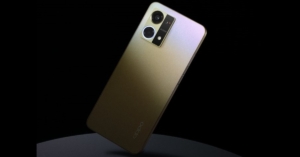
Oppo F23 5G

Oppo F23 5G price in India and sale details Oppo F23 5G features a 6.72-inch full-HD+ LTPS LCD with 120Hz refresh rate support and 240Hz touch sampling rate. The 5G phone runs on ColorOS 13.1 on top of Android 13. It is driven by an octa-core Qualcomm Snapdragon 695 5G SoC. For optics, there is a triple rear camera setup that includes a 64-megapixel primary sensor (autofocus and f/1.7 aperture), a 2-megapixel mono sensor (f/2.4 aperture), and a 2-megapixel micro sensor (f/3.3 aperture). Additionally, it includes a 32-megapixel front-facing camera for selfies and video calling. The Oppo F23 5G sports a 5,000mAh battery with 67W SuperVOOC charging support. Price starts at Rs 22,999

Top 7 Ways to Run Command Prompt as an Administrator in Windows 11

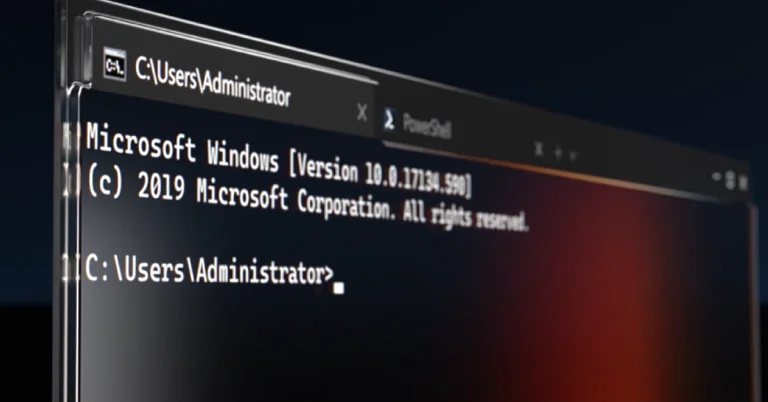
While the majority of people rely on the graphical interface of their Windows PCs, some users prefer Command Prompt to run text-based commands and gain greater control over the system. For the latter to happen, it is essential to run Command Prompt as Administrator. This is also known as the ‘Elevated’ Command Prompt. There are several ways you can go about this. Today, we bring you the top 7 ways to run Command Prompt as Administrator on a Windows 11 PC. Read Also: Top 4 Methods to Update Audio Drivers on Windows 11

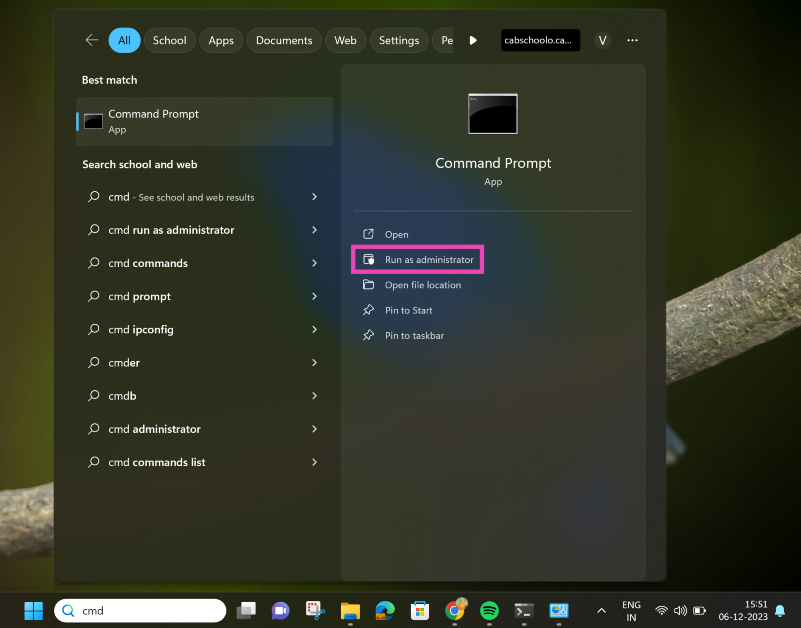
Run Command Prompt as an Administrator from the Windows Search Bar

Step 1: Click on the Search box in the taskbar and search for ‘cmd’. Step 2: On the right panel click on Run as administrator. Step 2: On the right panel click on Run as administrator. Step 3: Hit Yes.

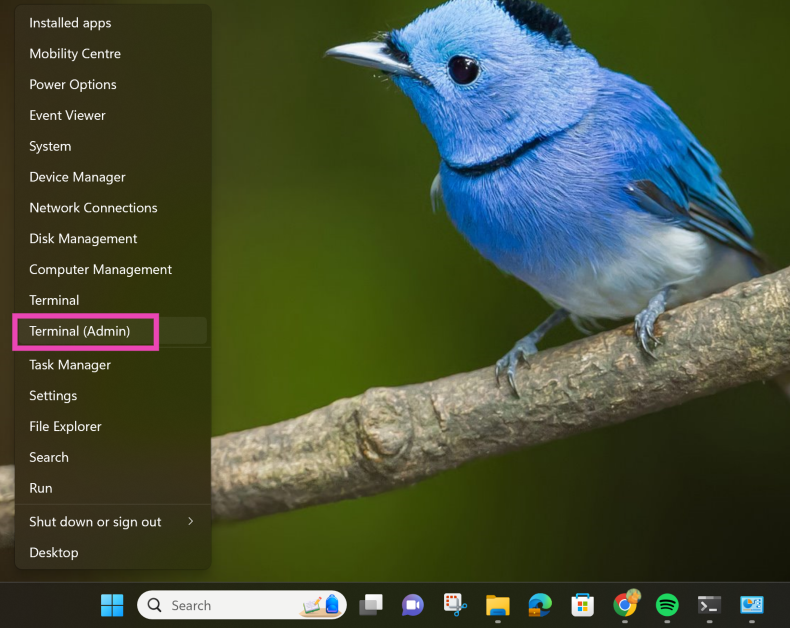
Use Quick Access Menu

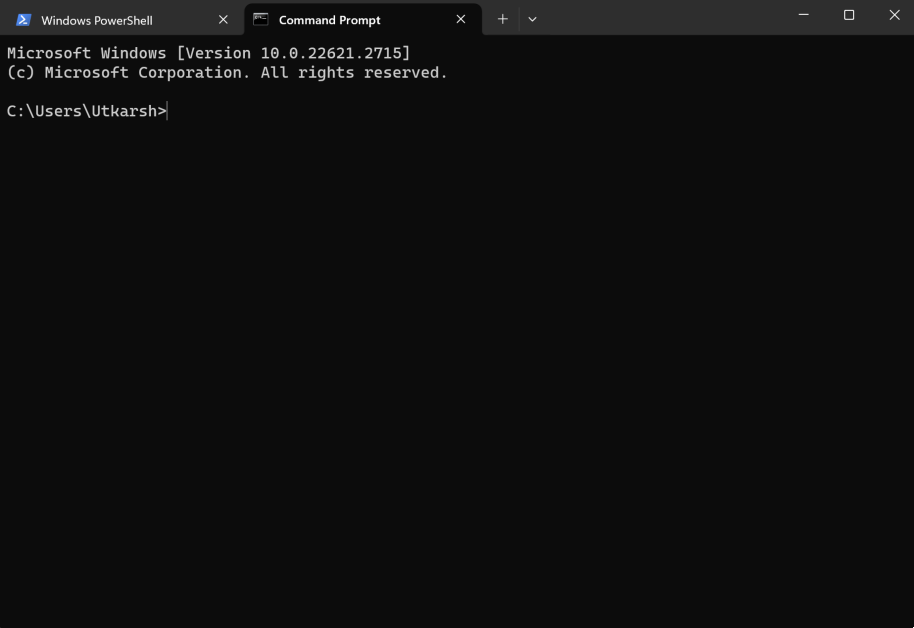
Step 1: Right-click on the Windows icon on the taskbar. Or simply press Windows Key + X. Step 2: Select Terminal (admin). Step 2: Select Terminal (admin). Step 3: Hit Yes. Step 4: Press Ctrl + Shift + 2 to open Command Prompt. Step 4: Press Ctrl + Shift + 2 to open Command Prompt.

Use the File Explorer to Run Command Prompt as Administrator in Windows 11

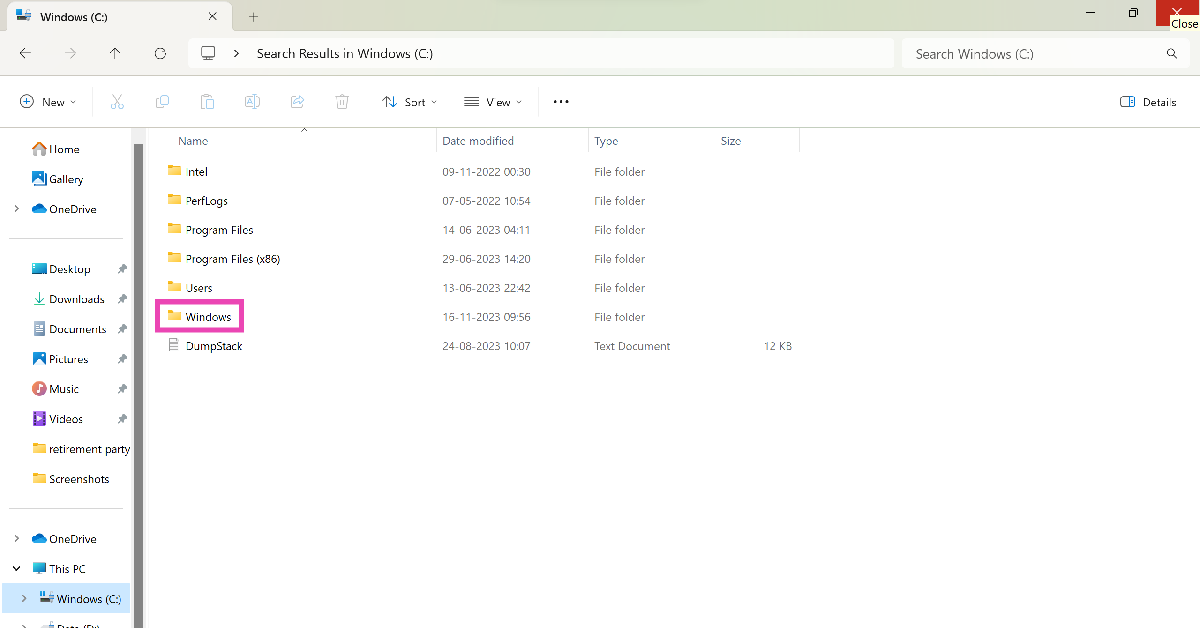
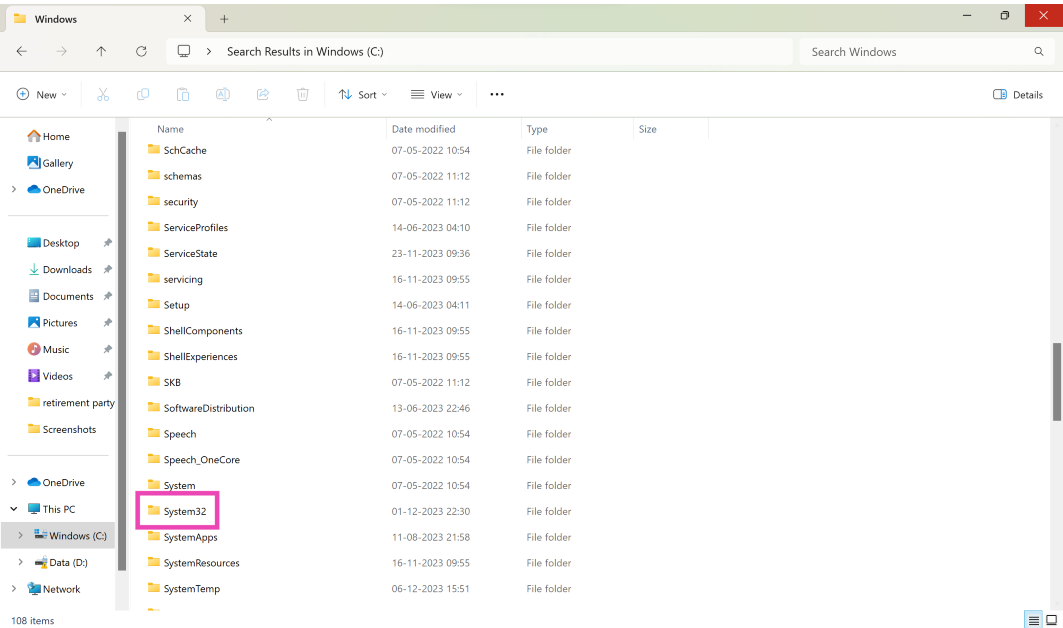
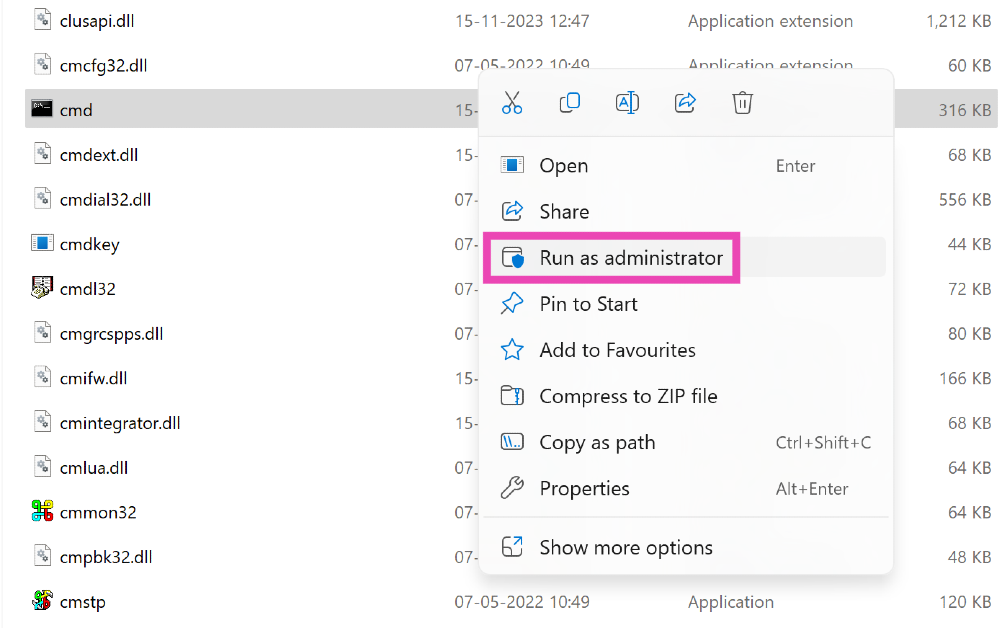
Step 1: Open the File Explorer from the taskbar. Step 2: Open the C: Drive and go to the Windows folder. Step 2: Open the C: Drive and go to the Windows folder. Step 3: Open the System 32 folder. Step 3: Open the System 32 folder. Step 4: Scroll down and right-click on cmd.exe. Step 4: Scroll down and right-click on cmd.exe. Step 5: Select Run as administrator.

Use the Address Bar in File Explorer

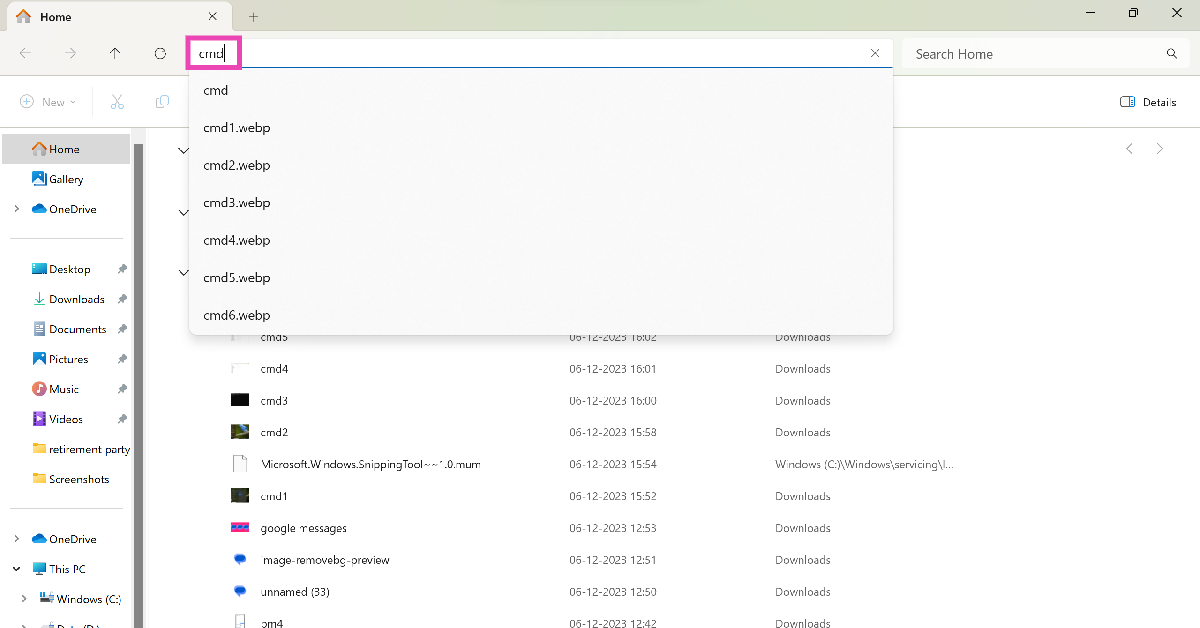
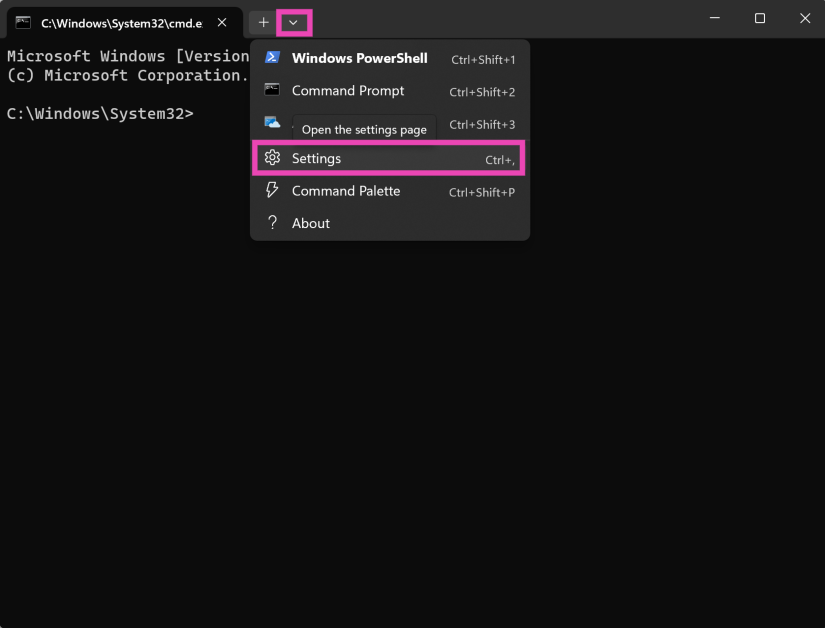
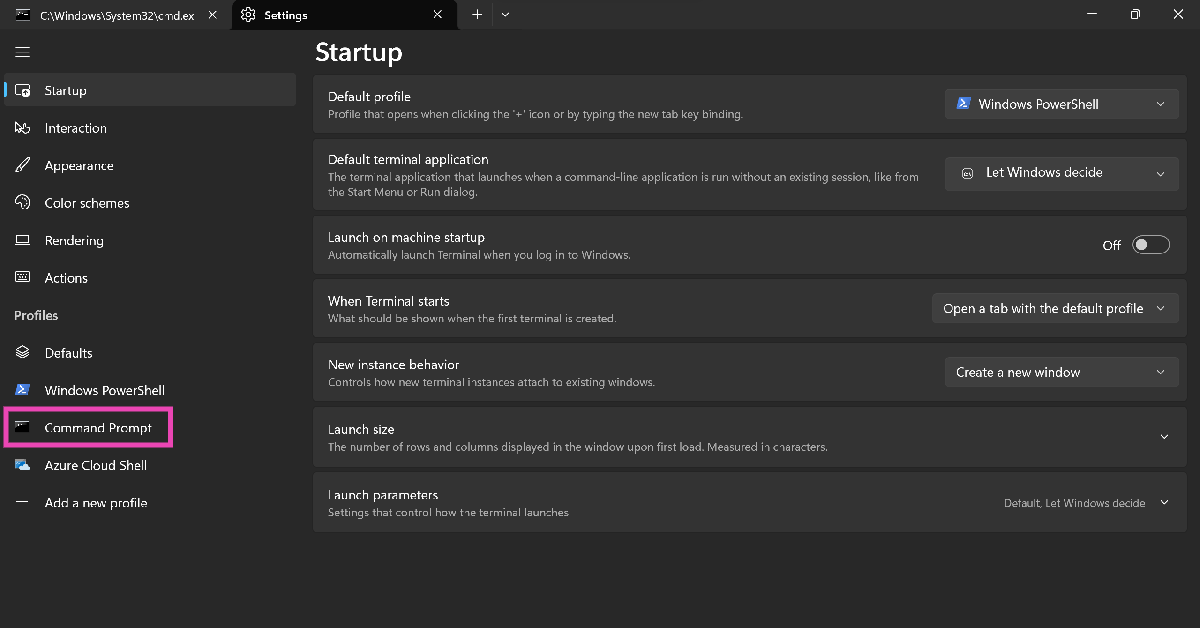
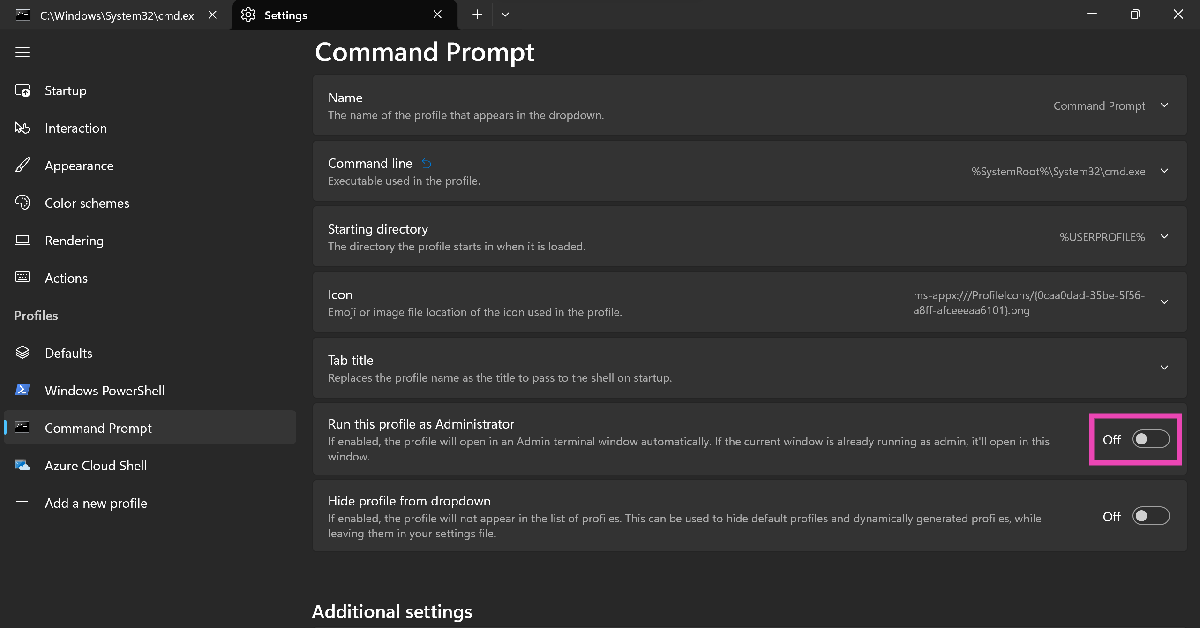
Step 1: Launch the File Explorer from the taskbar. Step 2: Click on the address bar and enter ‘cmd’. Hit Enter. Step 2: Click on the address bar and enter ‘cmd’. Hit Enter. This will open CMD in Terminal. To make sure it runs CMD as administrator, follow these steps. Step 3: Click on the downward arrow and select Settings. Step 3: Click on the downward arrow and select Settings. Step 4: Select Command Prompt from the side menu. Step 4: Select Command Prompt from the side menu. Step 5: Turn on the toggle switch for Run this profile as Administrator. Step 5: Turn on the toggle switch for Run this profile as Administrator.

Run Command Prompt as Administrator from the Control Panel

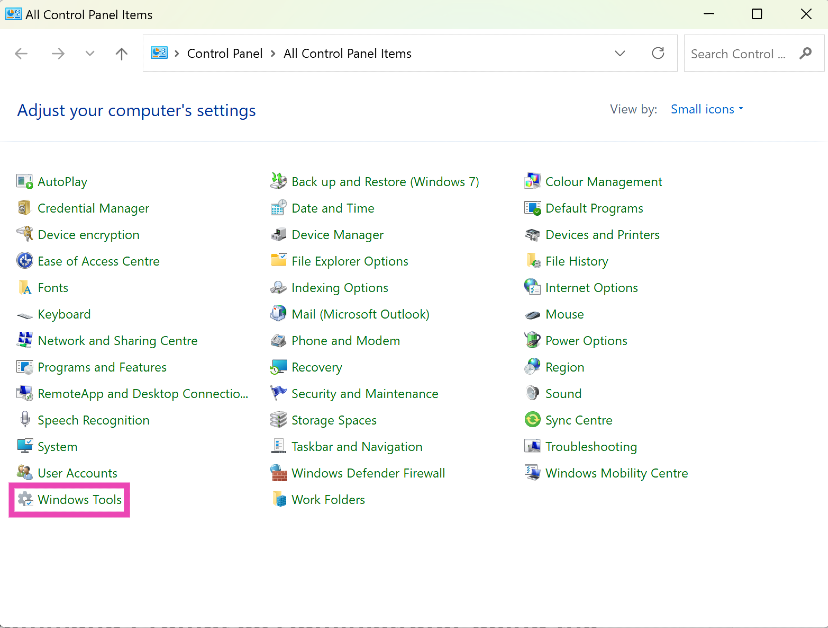
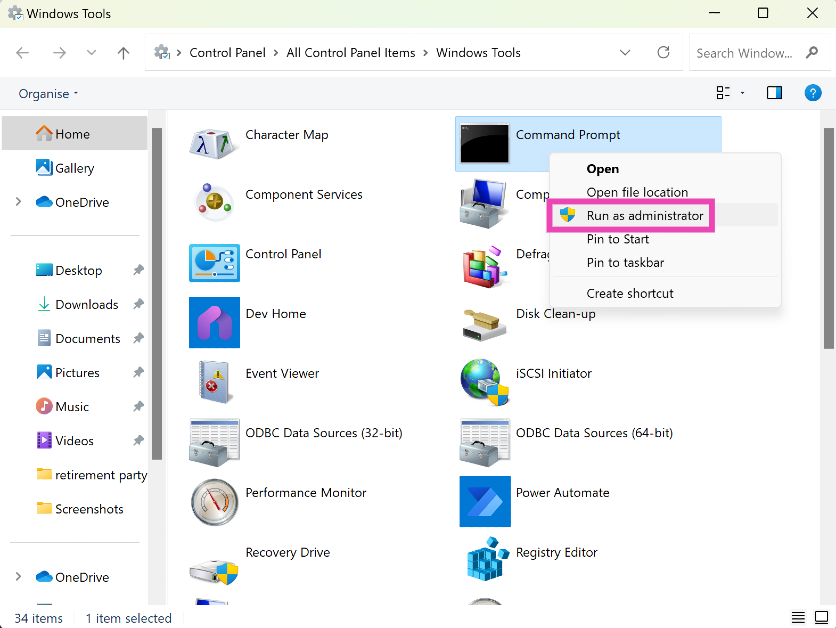
Step 1: Open the Control Panel on your computer and select Windows Tools. Step 2: Right-click on Command Prompt and select Run as administrator. Step 2: Right-click on Command Prompt and select Run as administrator.

Use the Run Dialog Box

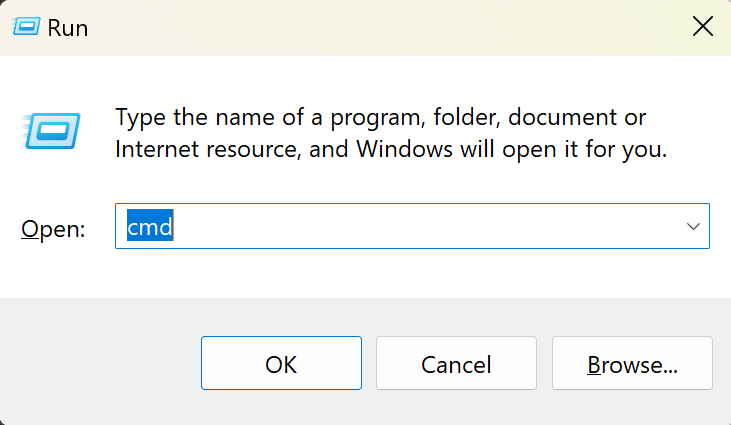
Step 1: Press Windows Key + R. Step 2: Type ‘cmd’ and press Ctrl+Shift+Enter. Step 2: Type ‘cmd’ and press Ctrl+Shift+Enter. Top 7 Ways to Run Command Prompt as an Administrator in Windows 11

Run Command Prompt as Administrator using the Task Manager on Windows 11

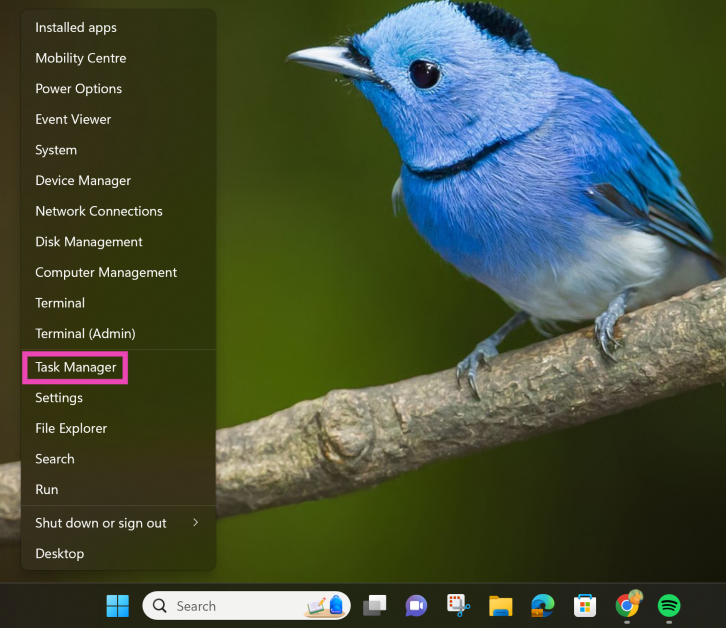
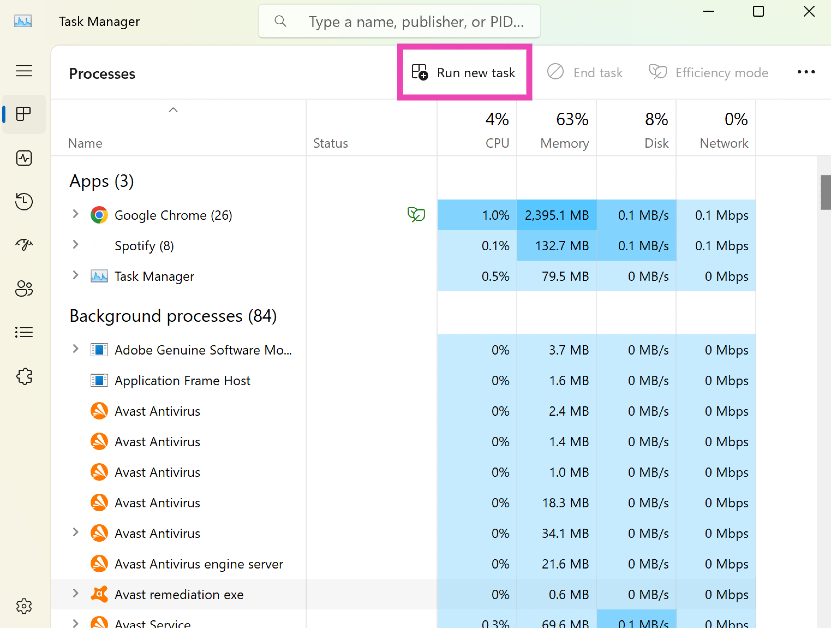
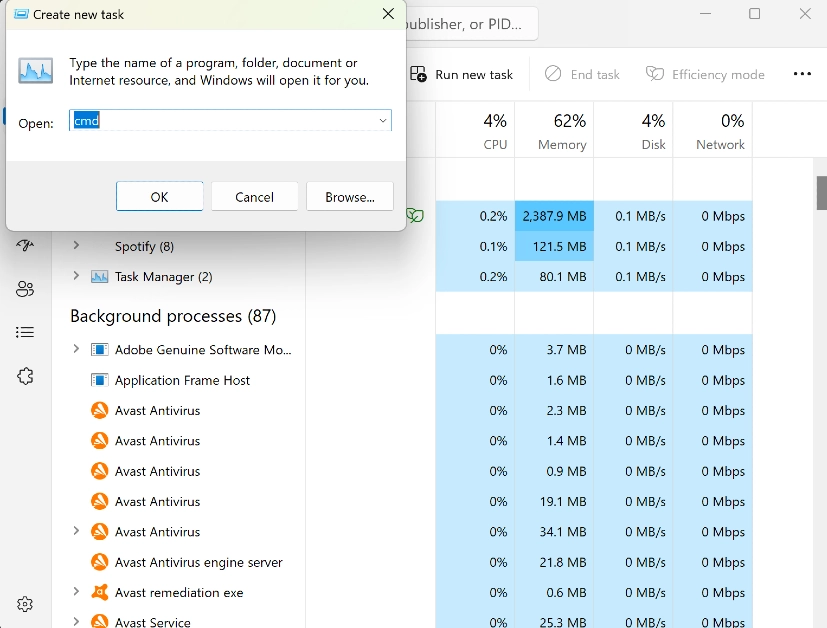
Step 1: Open the Quick Access Menu by right-clicking the Windows icon on the taskbar or pressing the Windows Key + X. Step 2: Select Task Manager. Step 2: Select Task Manager. Top 7 Ways to Run Command Prompt as an Administrator in Windows 11 Step 3: Click on Run New Task. Step 3: Click on Run New Task. Top 7 Ways to Run Command Prompt as an Administrator in Windows 11 Step 4: Enter ‘cmd’ and select the checkbox for ‘Create this task with administrative privileges’. Step 4: Enter ‘cmd’ and select the checkbox for ‘Create this task with administrative privileges’. Step 5: Hit Enter.

What if I’m not logged into the Admin profile?

If you’re not logged into the admin profile on your Windows 11 PC, you can still run CMD as administrator. The steps mentioned above will work for Guest accounts as well. The only caveat is that you need to provide the admin username and password. If you don’t have the admin credentials you will be denied access to administrator privileges. But, you can still use CMD in its regular form.

Frequently Asked Questions (FAQs)

How do I run Command Prompt as Administrator on my Windows 11 PC?

To run Command Prompt as Administrator on your Windows 11 PC, simply type ‘CMD’ in the search box in the taskbar and select ‘Run as Administrator’ from the app options.

How do I open CMD as admin in Terminal?

Open Terminal, go to Settings>Command Prompt and turn on the toggle switch for ‘Run this profile as Administrator’.

Where is the Command Prompt file located on my PC?

You can find the cmd.exe file in the Windows>System32 folder inside the C: drive. Read Also: OnePlus 12 powered by Snapdragon 8 Gen 3 announced: Details inside

Conclusion 

These are the top 7 ways to run Command Prompt as Administrator on a Windows 11 PC. If you are signed into your PC from a Guest account, you will need to provide admin credentials in order to gain access to the administrator privileges for Command Prompt. If you know any other ways to make this work, let us know in the comments!

Redmi 13C 5G and 4G model launched in India, price starts at Rs 7,999

Key Highlights
  • The Redmi 13C 5G is dust and water-resistant.
  • The 5G model comes equipped with MediaTek Dimensity 6100+ SoC.
  • The 4G model is powered by MediaTek Helio G85 SoC.
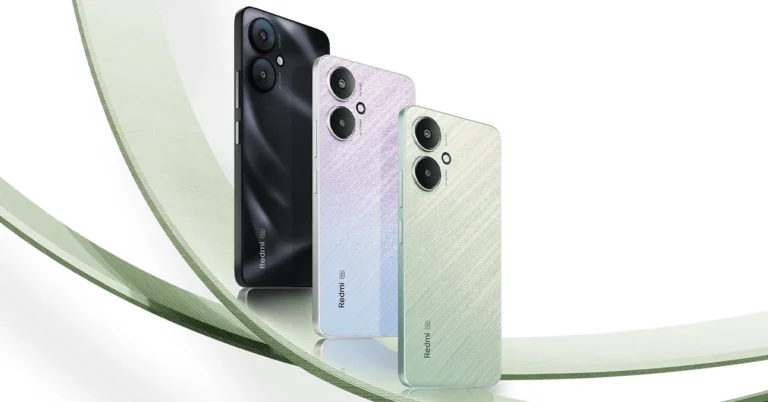
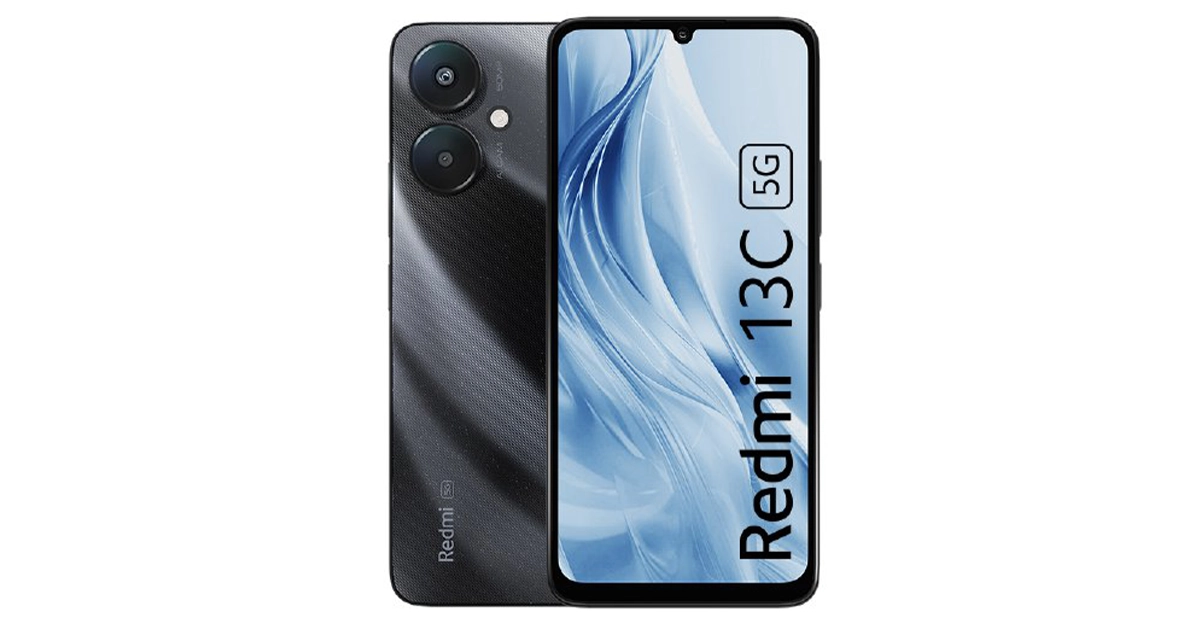
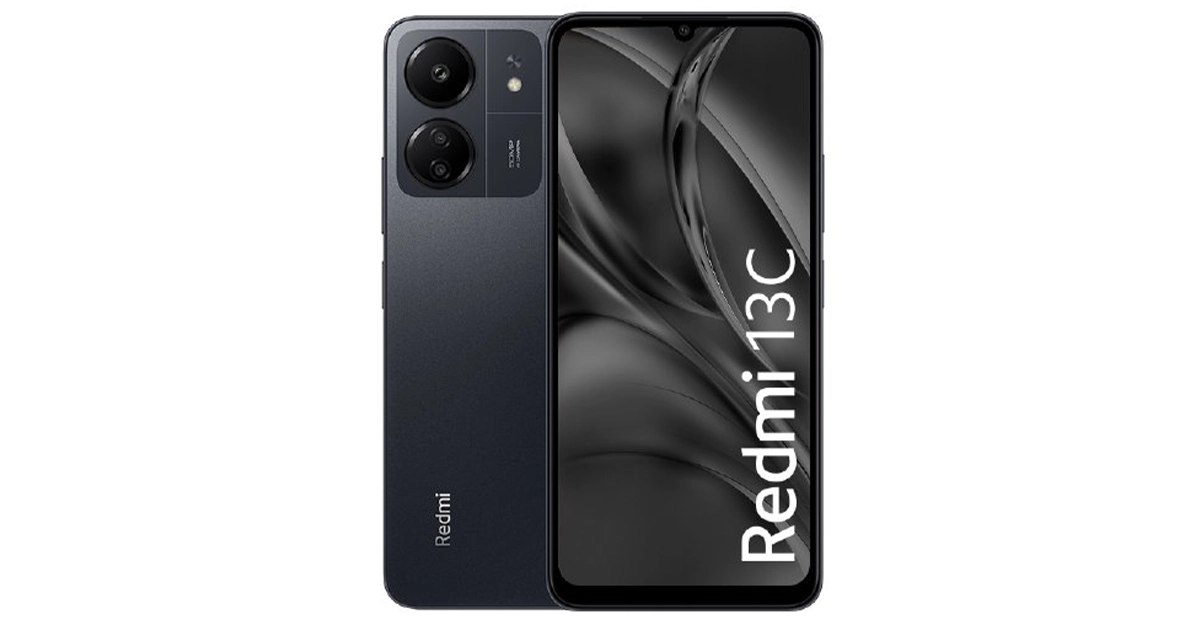
The much-awaited Redmi 13C series has debuted in India today. The newly launched lineup succeeds Redmi 12C which was introduced in June of this year, only six months ago. The series includes two smartphones Redmi 13C 5G and a 4G variant. The devices fall under the budget segment. The phones are splash-resistant and offer dust protection. Redmi 13C 5G and 4G model launched in India, price starts at Rs 7,999

Redmi 13C 5G and Redmi 13C price in India, sale details

Redmi 13C 5G has been launched in the following variants:
  • 4GB RAM with 128GB storage: Rs 9,999
  • 6GB RAM with 128GB storage: Rs 11,999
  • 8GB RAM with 256GB storage: Rs 13,499
On the other hand, the 4G Redmi 13C comes in the following options:
  • 4GB RAM with 128GB storage: Rs 7,999
  • 6GB RAM with 128GB storage: Rs 8,999
  • 8GB RAM with 256GB storage: Rs 10,499
This device comes in two colourways Black and Green. The first sale of the 4G variant will begin from December 12 whereas the 5G model will go on sale from December 16. The smartphones can be purchased via mi.com, Amazon India and other online stores. Also Read: Best gaming phones under Rs 20000 in India

Redmi 13C 5G specifications

The Redmi 13C features a 6.74-inch HD+ LCD screen with 1,600 x 720 pixels of resolution. The display comes with a 90Hz refresh rate and 180Hz touch sampling rate support. The device is powered by MediaTek Dimensity 6100+ SoC with 8GB of LPDDR4X RAM and 256GB of UFS2.2 internal storage. The storage can be expanded up to 1TB using a microSD card. The phone boots Android 13-based MIUI 14 out of the box. The 5G variant is available with a dual rear camera setup including a 50-megapixel primary camera (f/1.8 aperture) and a secondary sensor for collecting depth data while Portrait mode is in use. In terms of selfies, the company has provided a 5-megapixel camera with f/2.2 aperture. Besides this, there is a 5,000mAh battery onboard with 18W charging support. Connectivity options: 5G, Wi-Fi ac, Bluetooth 5.3, GPS, 3.5mm audio port, and a USB Type-C port. Redmi 13C 5G and Redmi 13C price in India, sale details

Redmi 13C specifications

The Redmi 13C 4G model shared a lot of similarities with its 5G sibling. The display, battery, and software are the same as mentioned above. As it is a 4G variant the device is powered by MediaTek Helio G85 SoC with up to 8GB of LPDDR4X RAM and + 256GB of eMMC 5.1 internal storage. Unlike the 5G variant, the 4G model comes with a triple rear camera setup that includes a 50-megapixel main lens (f/1.8 aperture), a 2-megapixel macro lens (f/2.4 aperture), and a third lens for collecting depth data. For selfies and video calling, there is an 8-megapixel front camera with f/2.0 aperture.

Google Messages rolls out Photomoji: Here is how you can use it

Google recently announced 7 new features for the Messages app to celebrate 1 billion RCS users on the platform. The tech giant will roll out these features in a phased manner. Some devices have already started receiving the ‘Photomoji’ feature, which gives users a new way to react to messages and respond with custom emojis. To check if this feature is available on your device, watch out for the circular badge on the emoji icon in the Messages app. If you’re one of the lucky users, check out how you can use Photomoji on Google Messages. Read Also: OnePlus 12 powered by Snapdragon 8 Gen 3 announced: Details inside

How to use Photomoji on Google Messages

Step 1: You can send a Photomoji as a reaction to a message or as a standalone emoji. Long press a text for the former and hit the emoji icon for the latter. Hit Create. Step 1: You can send a Photomoji as a reaction to a message or as a standalone emoji. Long press a text for the former and hit the emoji icon for the latter. Hit Create. Step 2: Select the image that you want to turn into a Photomoji. Step 2: Select the image that you want to turn into a Photomoji. Step 3: Google will scan the image for objects and display the results. At the moment, you cannot isolate the object from the image yourself. This process is completely automated. Step 3: Google will scan the image for objects and display the results. At the moment, you cannot isolate the object from the image yourself. This process is completely automated. Step 4: Select a Photomoji from the list and hit Send. Step 4: Select a Photomoji from the list and hit Send. Once you send a Photomoji, it can be accessed from the Customs tab in the emoji section later. You can also choose to delete the saved Photomojis.

Google will also be introducing these new features to Messages

Photomoji is one of the 7 new features that Google plans on introducing to celebrate 1 billion RCS users on the Messages app. Other features include Voice Moods, Screen Effects, Custom Bubbles, Reaction Effects, Animated Emojis, and Profiles. With Voice Moods, users can spruce up their voice notes with visual animations and effects. Google has also increased the bitrate and sampling rate of voice messages to improve the audio quality. Screen Effects is a cool feature that displays beautiful animations on the screen when certain phrases or words are typed into the chat. Google says there are at least 15 hidden prompt words that will trigger these screen effects. Custom Bubbles gives users more control over how their chat screen looks. Users can now choose the colour of the chat bubbles and the chat background for every conversation. You can assign a particular colour to your friends and a different one to your family. Reaction Effects puts a nice twist to the message reactions. Instead of the reaction simply popping up under the message, it will now have its unique effect. For example, once you react to a message with a thumbs-up, three hands with thumbs-up gestures will pop out of the message before settling in as a traditional reaction. Animated Emojis are similar to Reaction Effects. Once you send a standalone emoji in the chat, it will spring into a little animation. All the major emojis have their unique animations that you can now try out with your friends. Finally, with Profiles you can put up a name and picture alongside your phone number. This will help users to recognise other people in group chats. If you receive a message from an unknown phone number, you will now be able to see their name and profile picture.

Frequently Asked Questions (FAQs)

How do I know if my Google Messages app supports Photomoji?

Google is currently rolling out Photomoji in a phased manner. If the feature is available on your device, you will see a circular badge on the emoji icon.

How do I create a Photomoji in Google Messages?

Hit the ‘Create’ button in the reactions or emoji field. Select a picture from your device and let Google isolate the objects from it. You will be presented with a few options. Select the Photomoji that you like the most out of the bunch.

Can I manually create a Photomoji out of any object in a picture?

As of now, the process of isolating the object from a picture to create a Photomoji is completely automated and handled by Google’s AI mechanism. Read Also: iQoo 12 5G pre-bookings open in India, price leaked ahead of launch

Conclusion

This is how you can create a Photomoji on the Google Messages app. What do you think of this feature? Would you switch from your phone’s native messaging app to Google Messages to use Photomoji? Let us know in the comments! Watch this space for more updates about the upcoming features in the Google Messages app.

Best gaming phones under Rs 20000 in India

There is a glut of smartphones in India. Among all of these, choosing the best gaming phone which not only works for you but is also within your budget is very difficult in a world where mobile gaming is at its peak. But this year we saw a good range of gaming smartphones that may perform really well for less than Rs 20,000. We did some research for you and picked the best gaming smartphone under Rs 20000 you can buy in India. Our top five choices are listed here.

Infinix GT 10 Pro 5G

Infinix GT 10 Pro review: Design and Display
Infinix GT 10 Pro’s retail package can also be fashioned into a boom box
Infinix GT 10 Pro (Infinix GT 10 Pro Review)operates on Android 13-based XOS 13. It comes with a 6.67-inch full-HD+ 10-bit AMOLED LTPS display. The screen supports a 120Hz refresh rate and 360Hz touch sampling rate. 900 nits of peak brightness and 100 percent coverage of the DCIP colour gamut. The gaming phone is powered by MediaTek Dimensity 8050 SoC. The device features a triple rear camera set-up with a 108-megapixel primary sensor and two 2-megapixel camera sensors. For selfies, there is a 32-megapixel front-facing camera. The smartphone packs a 5,000mAh battery with 45W fast charging support. Buy here

OnePlus Nord CE 3 Lite 5G

OnePlus Nord CE 3 Lite review: Design and Display The OnePlus Nord CE 3 Lite (OnePlus Nord CE 3 Lite Review) runs on octa-core Snapdragon 695 SoC with Adreno 619 GPU for graphics. It also features a 6.72-inch full-HD+ LCD with 1,080×2,400 pixels of resolution. The phone packs a 5,000mAh battery that supports 67W SuperVOOC fast charging. It (OnePlus Nord CE 3 Lite Review) has a triple rear camera setup with a 108-megapixel Samsung HM6 sensor with an f/1.75 aperture and EIS support. It also consists of a 2-megapixel macro lens and another 2-megapixel depth sensor. There is a 16-megapixel front-facing camera for selfies. Buy Here

Vivo T2x 5G

Vivo T2x 5G
Vivo T2x 5G
Vivo T2x 5G operates on Android 13-based Funtouch OS 13 out of the box. It comes with a 6.38-inch AMOLED display with 1,080×2,400 pixels of resolution. The screen supports a refresh rate of 90Hz and a 360Hz touch sampling rate. The display has 1300 nits of peak brightness and a 6000000: 1 contrast ratio. The gaming phone is powered by MediaTek Dimensity 6020 SoC. It has a dual rear camera setup includes a 50-megapixel primary sensor with f/1.8 aperture and a 2-megapixel sensor with f/2.4 aperture. There is an 8-megapixel sensor with f/2.0 aperture for taking selfies. The smartphone comes with a 5,000mAh battery with 18W charging support. Buy Here Also Read: OnePlus 12 powered by Snapdragon 8 Gen 3 announced: Details inside

iQoo Z7 5G

iQoo Z7 5G price in India and offer details iQoo Z7 5G (iQoo Z7 5G Review)includes a 6.38-inch full-HD+ resolution AMOLED display with a refresh rate of 90Hz. It runs on Android 13-based Funtouch OS 13 out-of-the-box. The phone is powered by an octa-core MediaTek Dimensity 920 SoC. In addition to this, there is a dual rear camera system that includes a 64-megapixel primary sensor with OIS, and a 2-megapixel portrait lens. Also, there is a 16-megapixel front camera for selfies. The handset sports a 4,500mAh battery with 44W Flash Charge support. Buy Here

Poco X5 Pro 5G

Poco X5 Pro 5G Review: It will serve you well Poco X5 Pro 5G (Poco X5 Pro 5G Review) has a 6.67-inch Xfinity AMOLED Display with a 120Hz adaptive refresh rate, 240Hz touch sampling rate and a maximum brightness of 900 nits. It is powered by MIUI 14 for Android 12. Under its hood, there is a Snapdragon 778G SoC and an Adreno 642L GPU. The gaming smartphone also includes a triple camera unit consisting of a 108-megapixel ISOCELL HM2 main sensor. A 2-megapixel macro camera and an 8-megapixel ultra-wide angle lens are also included. On the front, there is a 16-megapixel selfie camera. The mobile phone boasts a 5,000mAh battery with 67W fast charging and 5W wired reverse charging support. Buy here

Compared: What are the Attachment Size Limits for Gmail, Yahoo, Outlook, Hotmail and more

There is nothing more annoying than an email attachment refusing to go through. Nine times out of ten, this happens because the attachment’s file size exceeds the limit imposed by the service provider. If this happens more often than you like, you may want to look at other email service providers and the file size limits they offer. So, without further ado, let’s take a look at the attachment size limits for Gmail, Yahoo Mail, Outlook, Hotmail, and more. Read Also: Nothing Phone 2a launch imminent in India, bags BIS certification

Why do email service providers impose an attachment size limit?

Why do email service providers impose an attachment size limit? Attachment size limits exist for two major reasons. The first reason is related to server security, as having no storage/attachment size limit can prompt certain malicious entities to send extremely large files over email, leading to a server outage. Capping the file size reduces the chances of these attacks. Once you upload an attachment that exceeds the stipulated limit, your email will get stuck in the outbox. The rise of cloud storage services has given email service providers further impetus to limit the attachment size. The size limit on Gmail pushes users towards Google Drive, which is highly compatible with the former. The same goes for Office 365/Hotmail and OneDrive. These service providers are able to generate more revenue by charging users for additional storage space on their respective cloud storage services.

Attachment Size Limits for Gmail, Yahoo Mail, Outlook, and more

Service Provider Attachment Size Limit
Gmail 25MB (larger attachments are sent as a Google Drive link)
Yahoo Mail 25MB
Outlook 20MB
Hotmail 25MB
AOL 25MB
WhatsApp 16MB for media, 2GB for documents
Telegram 2GB
Facebook Messenger 25MB
iMessage 100MB
Google Drive 15GB free storage
iCloud 5GB free storage
Dropbox 2GB free storage
SkyDrive 7GB free storage
One Drive 5GB free storage

How do I get around the attachment file size limit?

How do I get around the attachment file size limit? Every once in a while you may hit the file size limit for email attachments or the media you’re trying to send through an IM app. There’s no need to fret as there are a bunch of things you can do in this scenario. Here are some tips and tricks for you.
  • Use a cloud storage service: The best way to get around the file size limit on emails and instant messengers is by using a cloud storage service like Dropbox, Google Drive, or OneDrive. This option doesn’t compromise on media quality and extends the size limit by a comfortable margin.
  • Crop your pictures: WhatsApp is notorious for capping the size of all media files at 16MB. The best thing you can do in this scenario is slightly cropping the images to bring their size down. You can crop the images on your smartphone’s native image editor. Even a slight crop that is barely noticeable will also work in this situation.
  • Trim videos: Editing the unnecessary parts of a video can bring down its size by a large factor. If your video barely exceeds the file size limit, cut out a couple of seconds from the beginning and the end to make it conform to the limit. This can be done using your phone’s native editor and does not require a third-party app. Read this article to learn more.
  • Compress files: PDF documents and other files rarely create any trouble, but if they do, you can easily compress them using a third-party app or an online tool. Websites like SmallPDF, PDF24Tools, and SodaPDF offer free tools for this job. You can even find a PDF compressor tool on Adobe’s official website.

Frequently Asked Questions (FAQs)

What is the maximum file size that Gmail allows to be sent as an attachment?

You can send files up to 25MB in size using Gmail. Yahoo and Hotmail have a similar file size limit as well.

Why am I not able to email a file even if it is the same size as the allowed limit?

The file size limit constitutes the size of the attachment as well as the size of the text in the email. This means an attachment which is the exact size as the allowed limit will not go through if there is some text in the email as well.

How do I send a large attachment on Gmail?

You can split the contents of the attachment into multiple emails or use Google Drive to send it all at once. You can also compress the attachment if you don’t mind compromising on the quality. Read Also: GTA 6 trailer released: An online leak caused the game’s trailer to be released ahead of schedule

Conclusion

These are the attachment size limits imposed by Gmail, Hotmail, Yahoo Mail, Outlook and other email service providers. You should also know that the cumulative size of the emails in your Gmail inbox also eats up a significant portion of your free Google storage. Always make sure you delete the spam emails to keep the storage manageable

Garena Free Fire Redeem Codes Today 6 December 2023: Here is how to claim them

Garena Free Fire is a battle royale game with regular awards and tournaments to keep players interested. If you play Garena Free Fire, you should be aware of the redeem codes that are released on a daily basis. However, because the battle royale game is banned in India, players from other countries can use the Free Fire Redeem codes daily. If you’re unfamiliar with the Garena Free Fire redeem codes or don’t know how to get them, we’ve put together a step-by-step guide to help you redeem them. Check out Garena Free Fire Redeem Codes for 6 December 2023. The Free Fire redeem codes are a great way to get free stuff. These are 12-digit codes that contain alphabets and numbers, as well as an expiration date and time. Because the Garena FF redeem codes cannot be used more than once, you should hurry to the redemption page to claim your free reward before someone else does. To get a free reward, all you have to do is go to reward.ff.garena.com/en, which is the official redemption page. Also, keep an eye on this space for daily updates on Garena Free Fire redemption codes and rewards.

Garena Free Fire Redeem Codes Today 6 December 2023

FDYGTH6R567UE56K FYUJT67U6JT67UTH FNJU87RIU6Y56YIU FV7YFHDN4M496LYP F6T78KJHGSERFF87 FKY89OLKJFH56GRG FUTYJT5I78OI78F2 F3BG4N5MTK6YLHOI FOGFUYJN67UR6OBI FV7CYTGDRTUNMJEK FYHR6TYHJ67YJ7TC F6Y6FHRTJ67YHR57 FDYHR6Y7SUR674U3 FBVFTYJHR67UY4IT FURFHJUT67I6T7U4 FRJNTR67UH675Y4E FUYFTHUJR67URYH4 F7UHYFRT67URU34S

How to Get Free Fire Redeem Codes for Garena on 6 December 2023?

  • Visit the Garena Free Fire game’s official website at reward.ff.garena.com.
  • Use your Facebook, Google, VK, Apple ID, Huawei ID, or Twitter account to log in.
  • You’ll be taken to a valid redemption code (s)
  • Copy and paste the 12-digit redemption code into the text box.
  • On the screen, a dialogue box will appear.
  • ‘Ok’ should be selected.
For the latest gadget and tech news, and gadget reviews, follow us on TwitterFacebook and Instagram. For newest tech & gadget videos subscribe to our YouTube Channel. You can also stay up to date using the Gadget Bridge Android App. You can find the latest car and bike news here.

The Future of Mobile Gaming: Next-Gen Smartphone Gadgets and Online Games

Mobile gaming is incredibly popular, as our smartphones are never far away from our hands or our attention! The better the technology gets, the more diverse and engaging games there are in this ever-evolving landscape of mobile gaming. There are over 2.2 billion people in mobile gaming worldwide, and whether you’re a casual player or a seasoned gamer, there are games for everybody, the future of mobile gaming is looking bright!

The Rise of Mobile Gaming

It’s great to be able to whip out your phone and play a game when you’re waiting in a queue or sitting on the train! Mobile technology has advanced exponentially and rapidly, and smartphones have paved the way for a new era of mobile gaming. Mobile games are easy to download and install. No more waiting hours for a game to download! Touch screens, app stores and advanced graphics make mobile gaming more accessible and fun, and as our phones became more powerful and connected, social and multiplayer gaming gained popularity. As mobile technology continues to improve, next-gen smartphone technology will have an exciting impact on mobile gaming.

Online Casino Games

Convenience has always been a huge factor in the popularity of online casino games, and mobile casino games take convenience to a whole new level. With our phones, we can play from any location on the planet! Thanks to the advanced capabilities of modern smartphones, online slot games offer a large range of graphics and themes, along with various versions of roulette and poker. Additionally, in blackjack games, players can employ the same strategic moves when drawing cards or holding where they’re at, mirroring the authentic and immersive gaming experience found in traditional casinos.

Multiplayer Mobile Gaming

Multiplayer mobile games are wildly popular, with social features such as leaderboards, achievements, and friend invites creating a sense of community and competition among players. When you’re a part of a thriving gaming community, it creates a lot of player loyalty and brand affinity. The mobile version of multiplayer games has become a lot more advanced and sophisticated, which is why they are attracting lots of new users. Many of these games make it super easy to find lots of other players to game with, creating a communal experience with the potential to make new friends and connections.

Augmented Reality (AR) Gaming

Augmented Reality technologies are taking gaming to a whole new level of immersion, allowing players to interact with games in new and exciting ways! Players can now interact with virtual objects in the real world using their smartphones – this technology works by overlaying digital imagery over the player’s view of the real world via their smartphone screen. AR will continue to be a game-changer (literally!), as the concept of enhancing our real world by adding fantasy elements is thrilling and engaging. Two-thirds of gamers say they will increase their AR game usage in the next 5 years, and it will be exciting to see what technological advances will bring in this area.

Mobile eSports and Competitive Gaming

Mobile gaming esports and competitive gaming have seen an unprecedented rise in popularity in the last few years! With more avenues to challenge and compete against each other, mobile sports tournaments and games are not just a hobby anymore – they have become a huge industry with millions of invested fans. There’s a genre for everyone, from strategy games to shooters and multiplayer online battle areas.

Future Innovations in Mobile Gaming

In the past, we’ve seen mobile gaming evolve from simple, pixelated games to complex, immersive experiences. And this is really only the start of an exciting future for mobile gaming! Game developers are promoting both competition and friendship by investing more in features that connect gamers worldwide. AR developments will result in virtual puzzles or challenges that can only be solved by visiting specific real-world locations. Haptic feedback allows players to feel the weight of each move and the purpose behind it, creating a sense of emotion and providing a more distinct and memorable interaction within the game. Next-gen smartphone gadgets will shape the future of mobile gaming – the development of 5G, blockchain-based games, cloud gaming and AI-powered gameplay mechanics will give us a hugely diverse and engaging gaming landscape on our beloved smartphones. Dive into the diverse world of online games available on your smartphone, magical experiences are waiting for you!

Top 4 Methods to Update Audio Drivers on Windows 11

0
Random malfunctions and glitches on your PC can be confusing to resolve, especially when you don’t know what’s causing them. There are certain steps you can take to begin diagnosing the issue, but it can be a tedious process. Your best course of action should be to get the most obvious problems out of the way. If your PC’s speakers stop working all of a sudden, the issue is likely caused by faulty or outdated audio drivers. Today, we bring you the top 4 methods to update audio drivers on a Windows 11 PC. Read Also: Vivo T2 5G and Vivo Y56 prices in India dropped: Details Inside

Why should I update my PC’s drivers?

Your PC’s drivers are what link the operating system with the hardware. If you play a song on your PC, the audio drivers are set into action, relaying the necessary commands to the sound card on your PC. You can think of the drivers as intermediaries that carry commands back and forth between the OS and the various components of your PC. If a certain component starts malfunctioning out of the blue, the first thing you should do is check if its driver is updated to the latest version. Keeping the drivers up to date also ensures that you get the best performance out of your PC, whether you’re gaming or recording a podcast. It is a good idea to perform a regular check to confirm that all drivers (network, keyboard, audio, graphics, and more) are updated.

Use device manager to update audio drivers in Windows 11

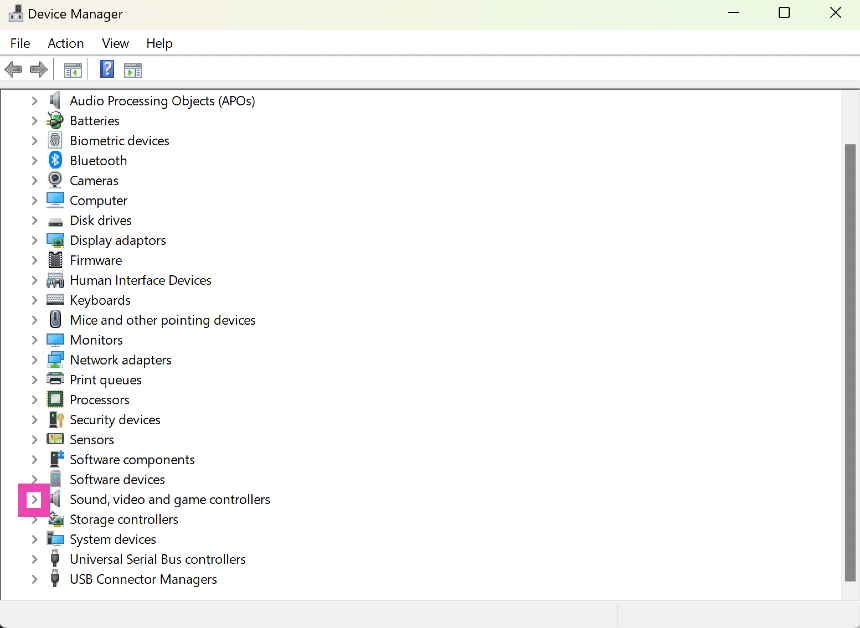
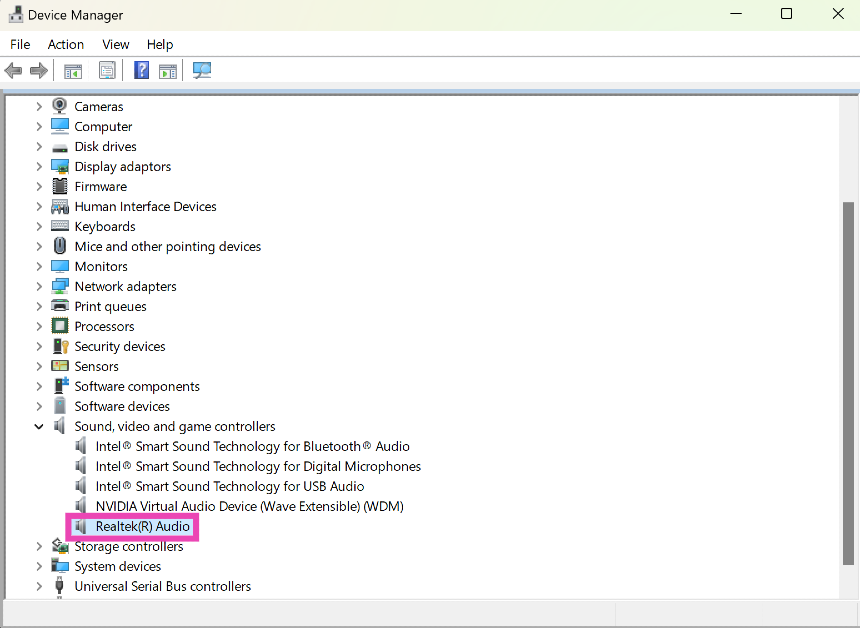
Step 1: Go to Control Panel and select Device Manager. Step 1: Go to Control Panel and select Device Manager. Step 2: Hit the arrow next to Sound, video and game controllers to expand the options. Step 3: Right-click on the audio driver and select Update driver. Step 3: Right-click on the audio driver and select Update driver. Top 4 Methods to Update Audio Drivers on Windows 11 Step 4: Choose whether you want Windows to automatically search your computer for available drivers or manually select a driver from your device. Step 5: If you choose the first option, Windows will automatically update your computer’s audio drivers. If no changes are made, it means the drivers are updated to the latest version.

Update Windows to the latest version to update the audio drivers

Step 1: Go to Settings and select Windows Update from the side menu. Step 1: Go to Settings and select Windows Update from the side menu. Top 4 Methods to Update Audio Drivers on Windows 11 Step 2: Click on Advanced options. Step 2: Click on Advanced options. Top 4 Methods to Update Audio Drivers on Windows 11 Step 3: Select Optional updates. Step 3: Select Optional updates. Top 4 Methods to Update Audio Drivers on Windows 11 Step 4: Select the audio driver and install it on your device.

Search your PC manufacturer’s website for the latest audio drivers

The two methods mentioned above do not cater to the audio driver updates that are pushed by your PC’s manufacturer. When a problem is specific to your PC, you may need to install the manufacturer’s audio driver pack on the device. To do this, simply go to the manufacturer’s website and look for audio drivers in the ‘Services’ or ‘Support’ section. To install the drivers, you will need to enter your PC’s serial number, product ID, or some other verification tag.

Use Driver Easy

Driver Easy is a third-party software that makes it very easy to update all the drivers on your PC in one place. While this task does not necessarily require third-party software, it is an option you can use when other methods are not working. The ‘Lite’ version of Driver Easy is free to use, but the Pro version costs $29.95 per year (for 3 PCs). However, the free version works fine albeit for one small caveat. Once you use Driver Easy to download a particular driver, you will need to install it manually using the method mentioned above.

Frequently Asked Questions (FAQs)

How do I update the audio drivers on my Windows 11 PC?

To install the latest audio drivers on your Windows 11 PC, go to Control Panel>Device Manager>Sound, right-click on the audio driver and select ‘Update driver’.

I don’t want to download the latest Windows update, but I only want to update my PC’s drivers. How do I do that?

Go to Settings>Windows Update>Advanced settings>Optional updates and install the driver of your choice.

How often should I update my PC’s drivers?

To get the maximum performance out of your PC, you should keep its drivers updated to the latest version at all times. If a new update starts creating malfunctions, you can always switch back to the previous one. Read Also: Noise Three Wireless headphones with up to 70 hours of playtime launched in India

Conclusion

These are the top 4 ways to update the audio drivers on your Windows 11 PC. Instead of paying for third-party software, we’d suggest manually updating your PC’s drivers. The process may be time-consuming but it eliminates the need to rely on another tool. Sometimes, a third-party tool may also push malware on your device, so make sure you always download tools from trusted sources.

OnePlus 12 powered by Snapdragon 8 Gen 3 announced: Details inside

Key Highlights
  • The OnePlus 12 is highlighted with a 120Hz LTPO OLED.
  • The smartphone’s triple camera setup is tuned by Hasselblad.
  • The handset is IP65-rated for protection.
OnePlus 12 has officially made its debut. The device has arrived in China today. It is powered by Qualcomm’s latest flagship Snapdragon 8 Gen 3 SoC. The device comes with a Hasselblad-branded triple rear camera system led by a Sony LYT-808 sensor with a 50-megapixel primary camera. In addition to this, the device features an LTPO OLED screen with 120Hz refresh rate support. The phone operates on Android 14-based ColorOS 14 on top. OnePlus 12 price and sale details

OnePlus 12 price and sale details

The OnePlus 12 has launched in its home country China. The flagship smartphone is made available in the following configurations:
  • 12GB RAM with 256GB storage: CNY 4,299 (approx Rs 50,700)
  • 16GB RAM with 512GB storage: CNY 4,799 (approx Rs 56,600)
  • 16GB RAM with 1TB storage: CNY 5,299 (approx Rs 62,500)
  • 24GB RAM with 1TB storage: CNY 5,799 (approx Rs 68,400)
The phone is offered in three colour options: Pale Green, Rock Black, and White In terms of availability, the company has started accepting pre-reservations of its new phone via its website. Also Read: iQoo 12 5G pre-bookings open in India, price leaked ahead of launch

OnePlus 12 specifications

A 6.82-inch quad-HD+ LTPO OLED screen with 1,440 x 3,168 pixels is the highlight of the OnePlus 12. The display comes with an adaptive refresh rate ranging between 1Hz and 120Hz. Also, the screen supports 4,500 nits of screen brightness. Moreover, the smartphone is IP65 rated for dust and water resistance. Under its hood, there is the most powerful chipset by Qualcomm- 4nm Snapdragon 8 Gen 3 SoC. The device is offered with up to 24GB of LPDDR5X RAM and up to 1TB of UFS 4 inbuilt storage. OnePlus 12 specifications Hasselblad branded triple rear cameras positioned inside a circular module are the features of the phone. OnePlus camera system highlights a Sony LYT-808 sensor with a 50-megapixel primary camera (OIS, and f/1.6 aperture), a 64-megapixel telephoto secondary lens (OIS, 3X optical zoom and f/2.6 aperture) and a 48-megapixel ultra-wide-angle lens (114-degree field-of-view). Lastly, there is a 32-megapixel front-facing camera ( f/2.4 aperture) for taking selfies and video calling. The handset is backed by a 5,400mAh battery with 100W SuperVOOC wired, 50W wireless and 10W reverse wireless charging support.
  • OnePlus 12 sensors: Under-display fingerprint sensor, gyroscope, accelerometer, magnetometer and proximity sensor
  • OnePlus 12 connectivity options: 5G, 4G LTE, Wi-Fi 7, Bluetooth 5.4, GPS, NFC, and a USB Type-C port

iQoo 12 5G pre-bookings open in India, price leaked ahead of launch

Key Highlights
  • iQoo 12 5G will launch in India on December 12.
  • The company is offering priority passes exclusively to those pre-booking the device.
  • The gaming phone is the first smartphone to come to India powered by the Snapdragon 8 Gen 3 SoC processor. 
iQoo 12 5G pre-booking window has opened in India. The device is scheduled to launch in India on December 12. The company recently announced priority passes that will be available on a first-come, first-served basis. Ahead of the launch, the iQoo 12 price in India has also leaked through Amazon. Check out the Indian price of the device. According to a tipster, Amazon India accidentally listed iQoo 12 5G on its price in India therefore revealing the price of the smartphone. However, the listing has since been taken down by the e-commerce platform. As per the leaked listing the upcoming phone will come in two variants 12GB and 16GB RAM. The 12GB RAM with 256GB storage is said to come at Rs 52,999 whereas the price of 16GB RAM with 512GB storage will be set at Rs 57,999. For those who are unaware the price of the phone was also leaked last month that is likely to be within that range. The retail box of iQoo 12 5G was leaked by a well-known tipster. As per the image shared on X, the upcoming phone will be priced between Rs 50,999 – Rs 59,999. The price of the device is said to start at Rs 56,999 and will be available in two variants- 12GB RAM with 256GB storage and 16GB RAM with 512GB storage. Also Read: Nothing Phone 2a launch imminent in India, bags BIS certification Pre-booking orders for the iQOO 12 5G are already being accepted by the firm on Amazon and the iQOO Store in India. According to the company, the customers will get a priority pass for the device by making a refundable deposit of Rs 999 when they pre-book on Amazon India.  The priority pass bearers will get the ability to order iQoo 12 5G, 24 hours in advance. Moreover, it will also offer customers a complimentary Vivo TWS worth Rs 2,999 with the purchase of the device. Also note that there are a limited number of priority passes so they can be availed on a first-come, first-served basis. Know more about the priority pass and exclusive offers here.

iQOO 12 5G specifications

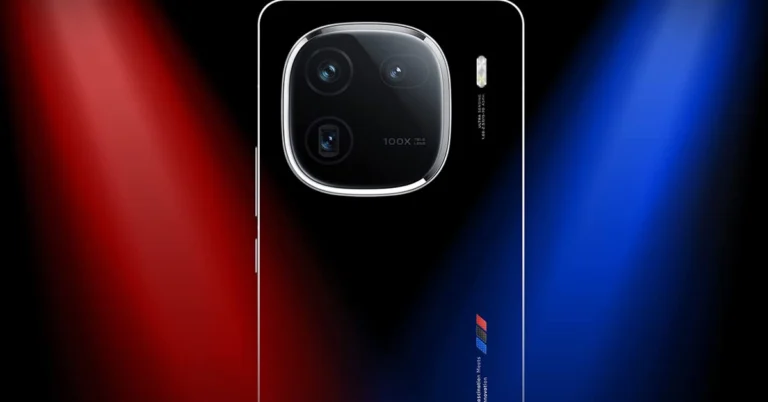
The iQoo 12 5G comes with a 6.78-inch 1.5K AMOLED display with 1,260×2,800 pixels of resolution. The screen supports up to 144Hz refresh rate, HDR10+ and a 20:9 aspect ratio. The device runs on OriginOS 4 on top of Android 14 and is powered by a 4nm Snapdragon 8 Gen 3 SoC processor. The smartphone has a triple rear camera setup that includes a 1/1.3-inch 50-megapixel primary sensor (f/1.68 aperture), 64-megapixel periscope telephoto (f/2.57 aperture and 100X digital zoom) and 50-megapixel ultra wide-angle sensor (f/2.0 aperture). For selfies, the device features a 16-megapixel front-facing camera with f/2.45 aperture. iQoo 12 5G is backed by a 5,000mAh battery, with 120W fast charging support. Also, there is an in-display fingerprint sensor for biometrics. 

Nothing Phone 2a launch imminent in India, bags BIS certification

Key highlights 
  • Nothing Phone 2a was spotted listed on the BIS website.
  • The device will be a more affordable version of Nothing Phone 2.
The London-based tech firm Nothing is planning to launch a new smartphone in the market. The new device allegedly Nothing Phone 2a has been spotted on the BIS website indicating an imminent launch. The upcoming phone will be a water-down variant and will be priced lower compared to Nothing Phone 2. So to achieve an affordable price the company will definitely cut some corners. Also recently the tech firm surprisingly reduced the price of the more expensive Nothing Phone 2 by Rs 5,000. This further strengthens the fact that the company is going to bring a new smartphone to the market.  Nothing new is anticipated to launch a new smartphone in India. However the company has not confirmed any information regarding this, but a recent leak indicated a new phone is coming. But here we are not mentioning the Nothing Phone 3. That will not launch ahead of the schedule because a UK-based OEM’s product cycle suggested the mobile phone is probably going to be released in July of next year.  Also Read: GTA 6 trailer released: An online leak caused the game’s trailer to be released ahead of schedule Thus, it is speculated that the third rumoured Nothing smartphone would be the affordable Nothing Phone 2a. The alleged phone has been spotted listed on the Bureau of Indian Standards (BIS) website. The device went on the Indian regulatory list with the model number A142.  The report further shared that the listing also mentions a battery that may be different in size from the one found in the existing and previous models and goes by the model number NT03.

Nothing Phone 2 specifications

Nothing Phone 2 has a 6.7-inch Full-HD+ resolution of 2412 x 1080 pixels, and a 120Hz adaptive refresh rate. The display has SGS Low Blue Light and HDR10+ certifications. The device runs on Nothing OS 2.0, based on Android 13. It is powered by the Qualcomm Snapdragon 8+ Gen 1 SoC. For photography, Phone 2 (Nothing Phone 2 Review)features a dual rear camera setup consisting of a 1/1.56-inch 50-megapixel primary Sony IMX890 sensor ( f/1.88 aperture) with optical image stabilisation (OIS) and EIS support and a 1/2.76-inch 50-megapixel Samsung ISOCELL JN1 sensor with an ultra-wide lens (114-degree FoV and f/2.2 aperture). Upfront there is a 1/2.74-inch Sony IMX615 32-megapixel sensor (f/2.45 aperture) for taking selfies and video calling. The handset is backed by a 4,700mAh battery with support for both 15W Qi wireless charging and 45W PPS wired fast charging.

GTA 6 trailer released: An online leak caused the game’s trailer to be released ahead of schedule

Key Highlights
  • The trailer was leaked online a day ahead of the official release.
  • GTA 6 is a successor of GTA 5.
Rockstar Games has finally pushed out the much-awaited GTA 6 trailer. The first trailer of the Grand Auto Theft 6 was earlier planned to release on December 5 but there was no choice left for the firm but to roll out the teaser ahead of the scheduled thanks to online leak. Not just that the game developer has also revealed information about the launch timeline and availability. GTA 6 first trailer launch was set for December 5 at 9 am ET which is 7.30 PM according to Indian Standard Time. But the trailer was leaked online a day ahead of the official release. And then what happened, the company had to release the trailer officially in a jiffy. The trailer was released 15 hours earlier than planned after the leak. However the account which leaked the GTA 6 trailer has now been suspended on X (formerly Twitter). While releasing the trailer ahead of schedule the company said, “Our trailer has leaked so please watch the real thing on YouTube”
According to the teaser, GTA 6 is situated in Vice City, a made-up version of Miami. Note that Grand Auto Theft 6 aka GTA 6 is a successor of GTA 5 which was introduced in the year 2013. It’s been a decade since GTA 5 was released. But the fans have to wait for the launch of Grand Auto Theft 6 as the first trailer has not only been launched the GTA 6’s debut schedule and supported platforms were also officially announced. Also Read: Krafton brings Bollywood star Ranveer Singh on board as BGMI’s official ambassador According to Rockstar Games, Grand Theft Auto 6 is coming in 2025. It will be available on PlayStation 5 computer entertainment systems and Xbox Series X|S games and entertainment systems in 2025. “Grand Theft Auto VI continues our efforts to push the limits of what’s possible in highly immersive, story-driven open-world experiences,” said Sam Houser, Founder of Rockstar Games. “We’re thrilled to be able to share this new vision with players everywhere,” the company said via a press release.

Garena Free Fire Redeem Codes Today 5 December 2023: Here is how to claim them

Garena Free Fire is a battle royale game with regular awards and tournaments to keep players interested. If you play Garena Free Fire, you should be aware of the redeem codes that are released on a daily basis. However, because the battle royale game is banned in India, players from other countries can use the Free Fire Redeem codes daily. If you’re unfamiliar with the Garena Free Fire redeem codes or don’t know how to get them, we’ve put together a step-by-step guide to help you redeem them. Check out Garena Free Fire Redeem Codes for 5 December 2023. The Free Fire redeem codes are a great way to get free stuff. These are 12-digit codes that contain alphabets and numbers, as well as an expiration date and time. Because the Garena FF redeem codes cannot be used more than once, you should hurry to the redemption page to claim your free reward before someone else does. To get a free reward, all you have to do is go to reward.ff.garena.com/en, which is the official redemption page. Also, keep an eye on this space for daily updates on Garena Free Fire redemption codes and rewards.

Garena Free Fire Redeem Codes Today 5 December 2023

F3BG4N5MTK6YLHOI FBVFTYJHR67UY4IT FUGYHVBC9XMS8UE4 FDYGTH6R567UE56K FYUJT67U6JT67UTH FNJU87RIU6Y56YIU FV7YFHDN4M496LYP F6Y6FHRTJ67YHR57 FDYHR6Y7SUR674U3 F7UHYFRT67URU34S FOGFUYJN67UR6OBI FV7CYTGDRTUNMJEK FYHR6TYHJ67YJ7TC FFYUFJU778SU7YTG FUTYJT5I78OI78F2 F6T78KJHGSERFF87 FRJNTR67UH675Y4E FUYFTHUJR67URYH4

How to Get Free Fire Redeem Codes for Garena on 5 December 2023?

  • Visit the Garena Free Fire game’s official website at reward.ff.garena.com.
  • Use your Facebook, Google, VK, Apple ID, Huawei ID, or Twitter account to log in.
  • You’ll be taken to a valid redemption code (s)
  • Copy and paste the 12-digit redemption code into the text box.
  • On the screen, a dialogue box will appear.
  • ‘Ok’ should be selected.
For the latest gadget and tech news, and gadget reviews, follow us on TwitterFacebook and Instagram. For newest tech & gadget videos subscribe to our YouTube Channel. You can also stay up to date using the Gadget Bridge Android App. You can find the latest car and bike news here.

Top 6 places to find good and funny profile pictures

If you value your anonymity online, putting up a picture of yourself on your socials is out of the question. Leaving the profile picture empty is not a good option either, as it gives the impression that you’re a bot or worse – a troll. What you can do is set up a profile picture that reflects who you are as a person. It could be a funny avatar or a fan art of your favourite movie or TV show. But how do you go about looking for these pictures? Check out our list of the top 6 places to find good and funny profile pictures for your socials. Read Also: How to share your WhatsApp Status on Instagram?

Pinterest

Pinterest Pinterest is one of the biggest platforms on the Internet for finding images related to any theme or mood. Once you set up your profile on Pinterest, you can go through the different images or ‘pins’ about a particular topic. It is easy to find other users on Pinterest who are interested in the same things as you. You can look up their boards and save images that you like on your board or directly download them on your device. From anime avatars to digital art, you are bound to find what you like on Pinterest.

Pexels

Pexels Pexels is an online resource for free stock images and videos. With over 3 million images on the platform, you can search for avatars and profile pictures, or simply look up images related to a particular subject. Downloading an image from Pexels is fairly easy. Once you open an image, click the arrow next to ‘Free Download’ and select your preferred size for the image. Once that’s done, click on ‘Download Selected Size’.

Unsplash

Unsplash Like Pexels, Unsplash is also an online resource for royalty-free images. Once you get a hang of what keywords to use in your search queries, the results will get much better. There are tons of free stock images on Unsplash, but you’ll also find a large number of animated pictures, funny images, or pictures of animals, places, and things, that are perfect to be used as profile pictures across your socials.

Reddit

Reddit Top 6 places to find good and funny profile pictures Although it is not known for being an image-sharing website, Reddit is an excellent place to find profile pictures for your socials. What we really like about Reddit are its niche communities or ‘subreddits’ that cater to very specific interests or themes. If you’re a fan of a TV show that got cancelled a decade ago, you will still find people talking about it on Reddit. Apart from engaging in discussions, users also post fan art and edits of their favourite TV shows and movies. If you’re looking for generic profile pictures, subreddits like r/pics, r/art, r/alternativeart, and r/anime are excellent places to start. 

Bing AI

Bing AI Top 6 places to find good and funny profile pictures If you can’t find what you’re looking for, why not just create it yourself? Even if you don’t know the first thing about creating artwork, AI tools like Bing Image Creator, Deep AI, and others have made it possible to bring your thoughts to life in the form of enticing images. Once you sign into Bing Image Creator, all you need to do is give clear and concise prompts for the image you want it to generate. The results are simply astonishing.

Instagram

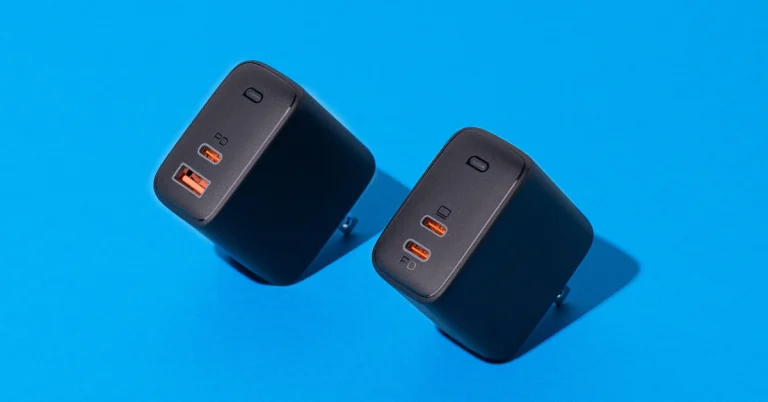
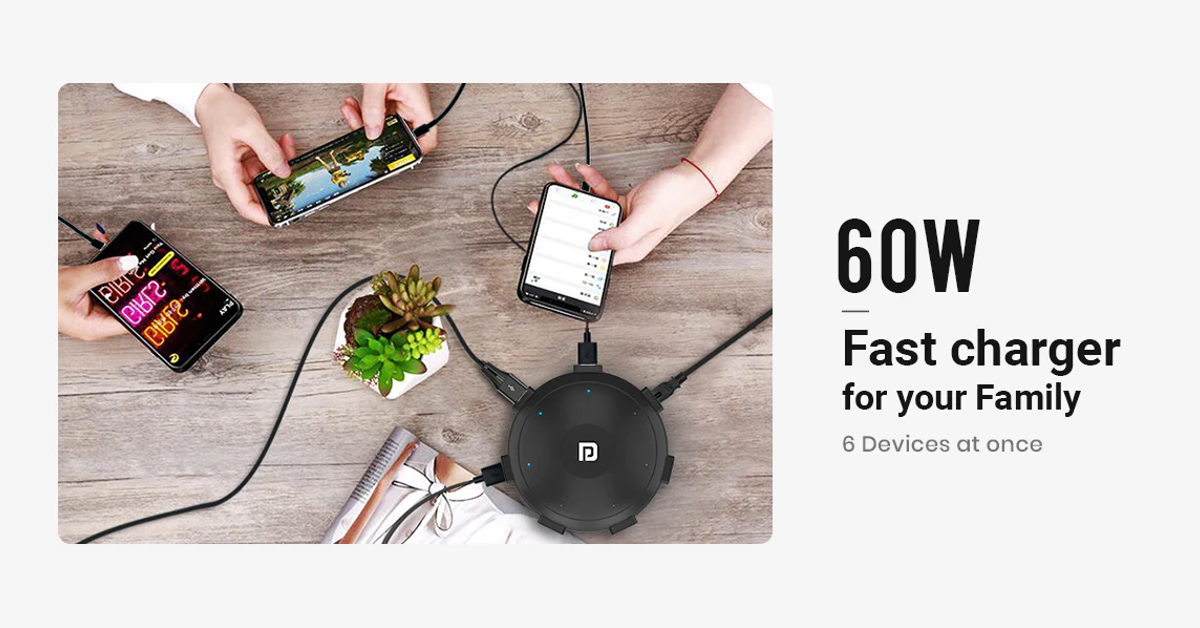
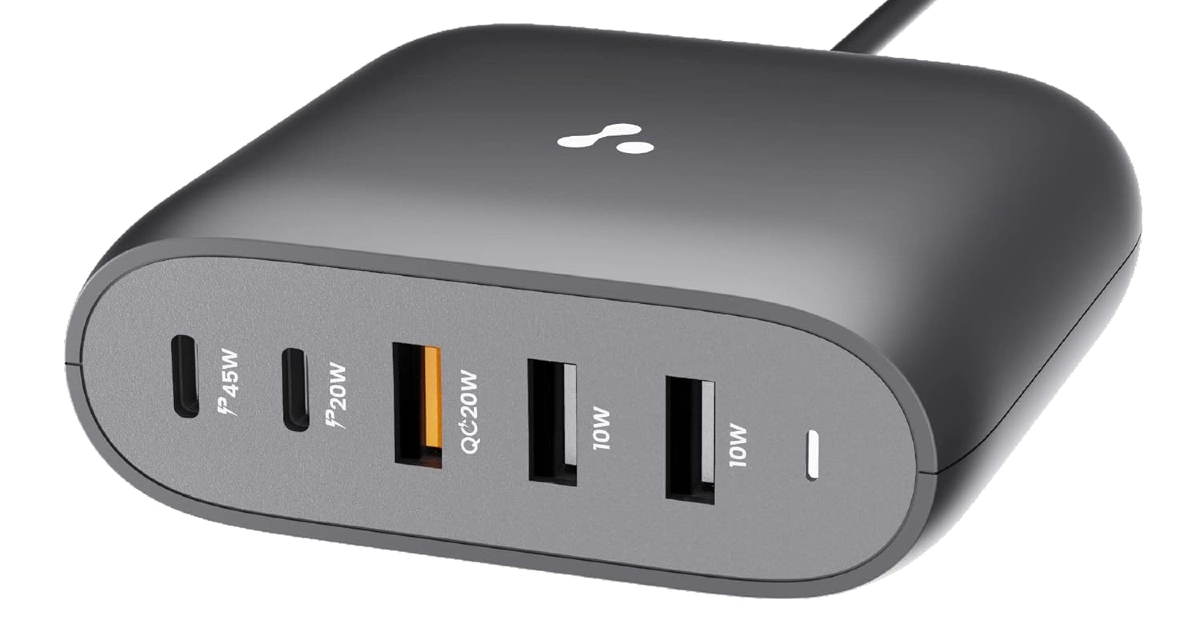
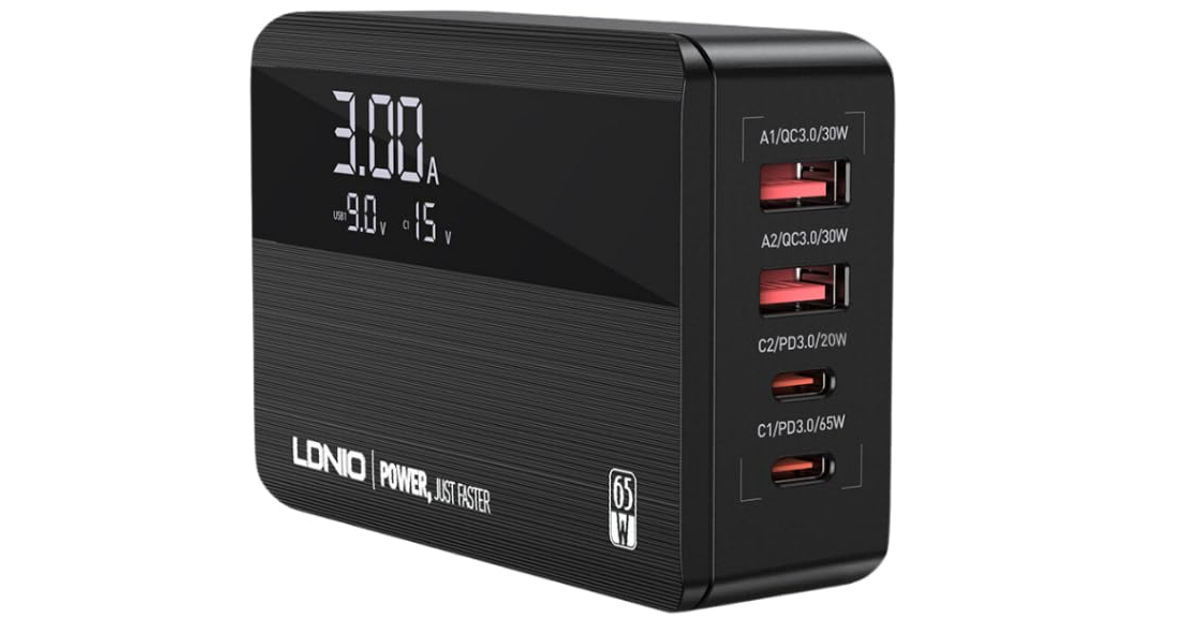
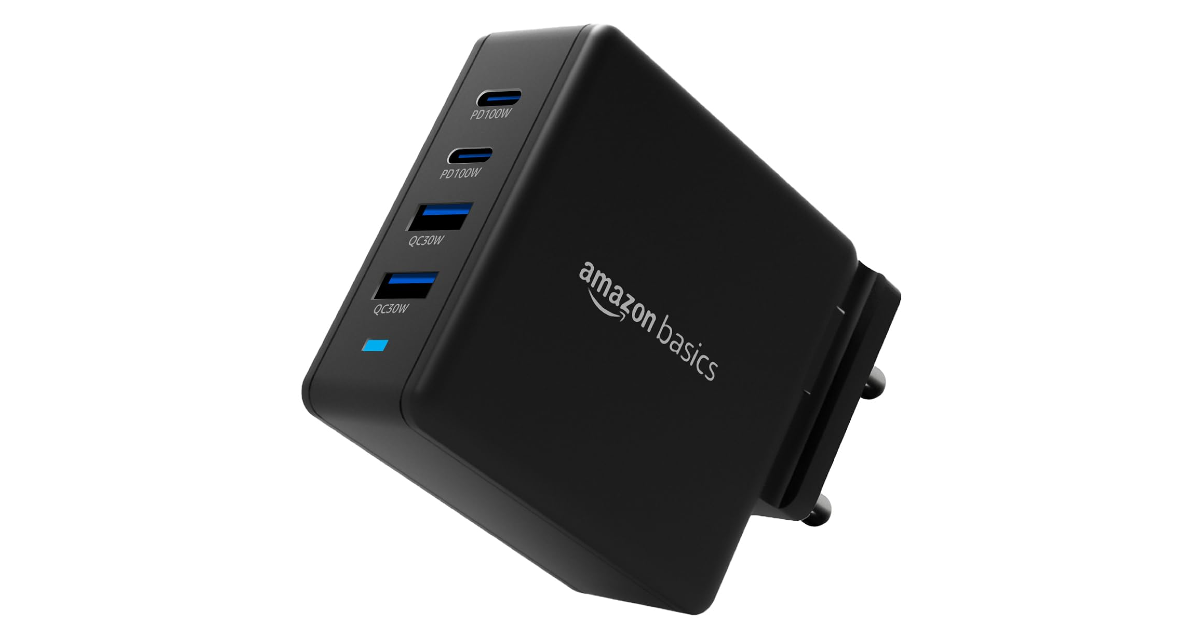
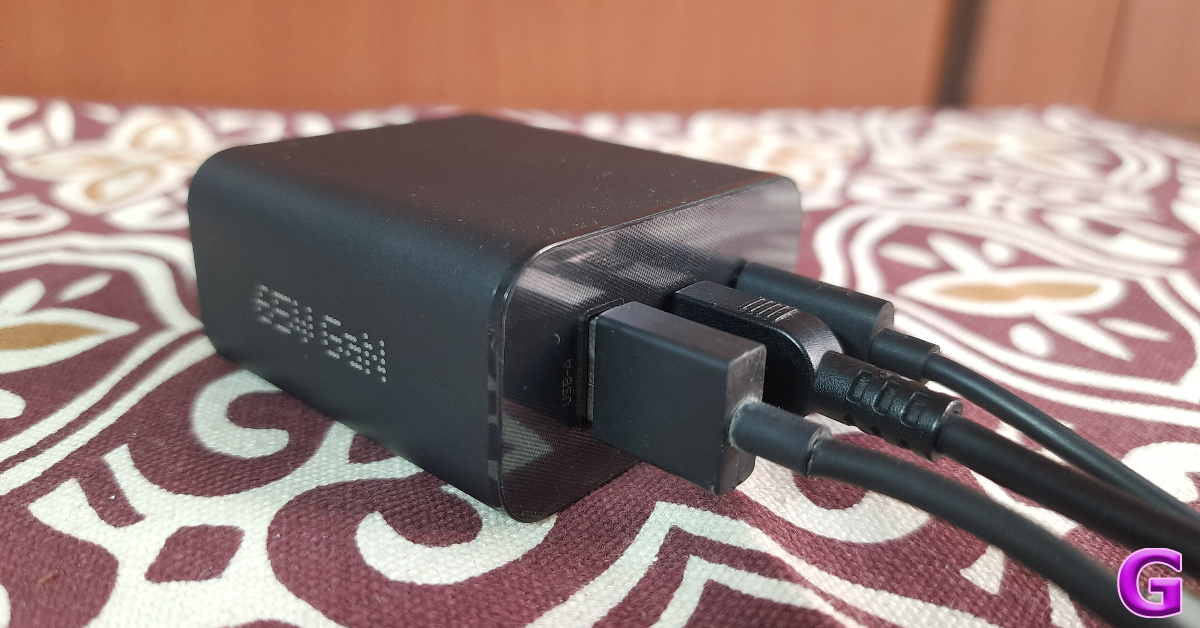
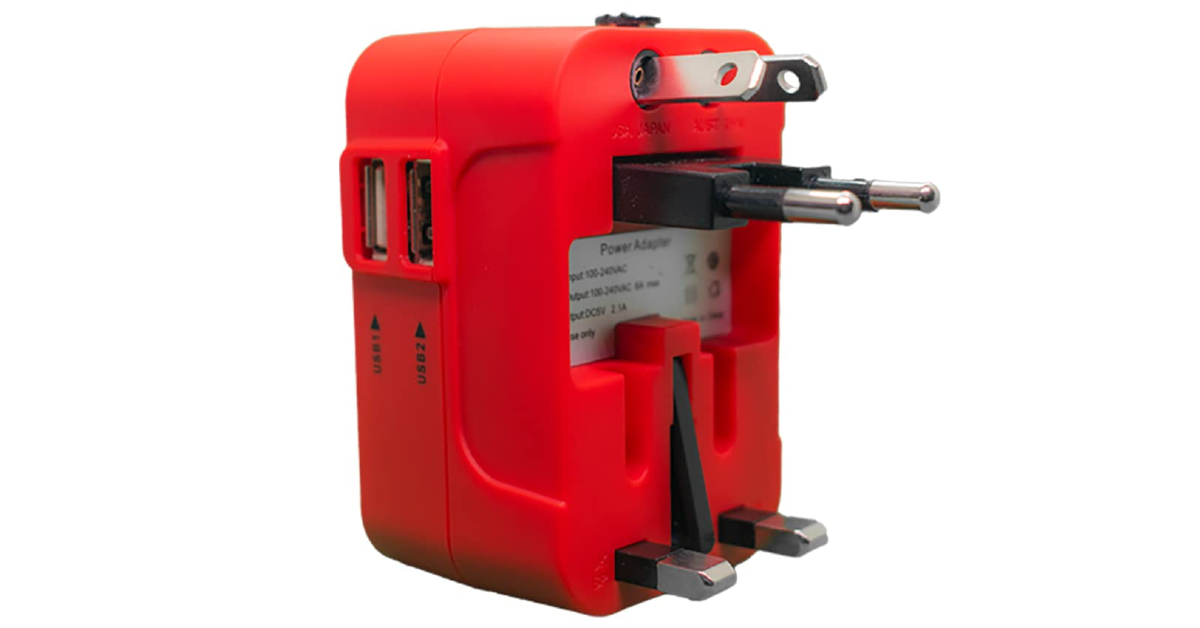
Instagram Top 6 places to find good and funny profile pictures Instagram is the home to independent artists and creators who want their work to reach a wider audience. Like Reddit, you can find a lot of art content on Instagram catering to a particular niche. Browse the relevant hashtags for art to find what you’re looking for. Once you make a few searches, Instagram will suggest similar stuff on your Explore page. Always make sure that you always credit the artist while using their work. Read Also: Best multi-USB charging adapters for your smartphones and tablets

Conclusion

These are the top 6 places on the Internet to find good and funny profile pictures for your socials. While using the work of small creators and artists, make sure that you have their consent to do so. If you’re using an artwork for free, it is good ethics to credit the person who made it. If the creator has watermarked their signature on the image, don’t crop it out. Know any other places on the Internet to find interesting profile pictures? Let us know in the comments!

How to Insert Google Slides into Google Docs

0
Google Workspace’s ecosystem is seamless and does not require any effort to get used to. If you primarily work on Docs, you can easily import a chart from Google Sheets, a table from Google Photos, or a drawing from Google Drive. All of these options can be accessed from the ‘Insert’ tab at the top of the document. However, one tool that’s missing from the list of options is Google Slides. If you’ve faced this issue as well, check out this quick way to insert Google Slides into Google Docs. Read Also: Vivo T2 5G and Vivo Y56 prices in India dropped: Details Inside

Things to keep in mind while attaching a slide to a Google Doc

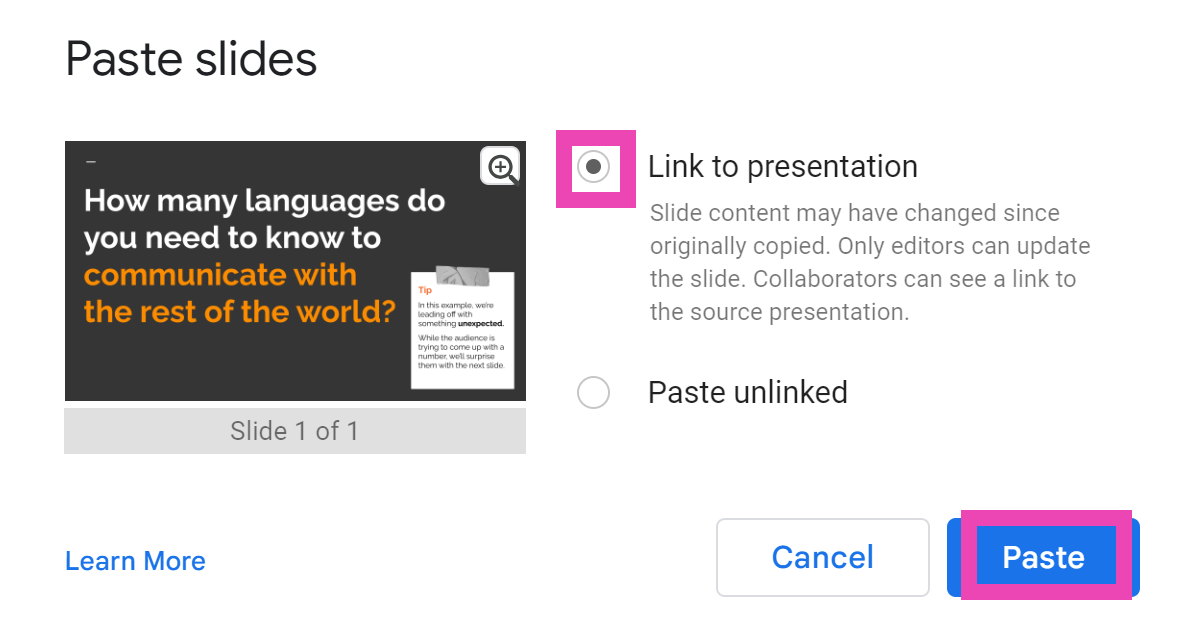
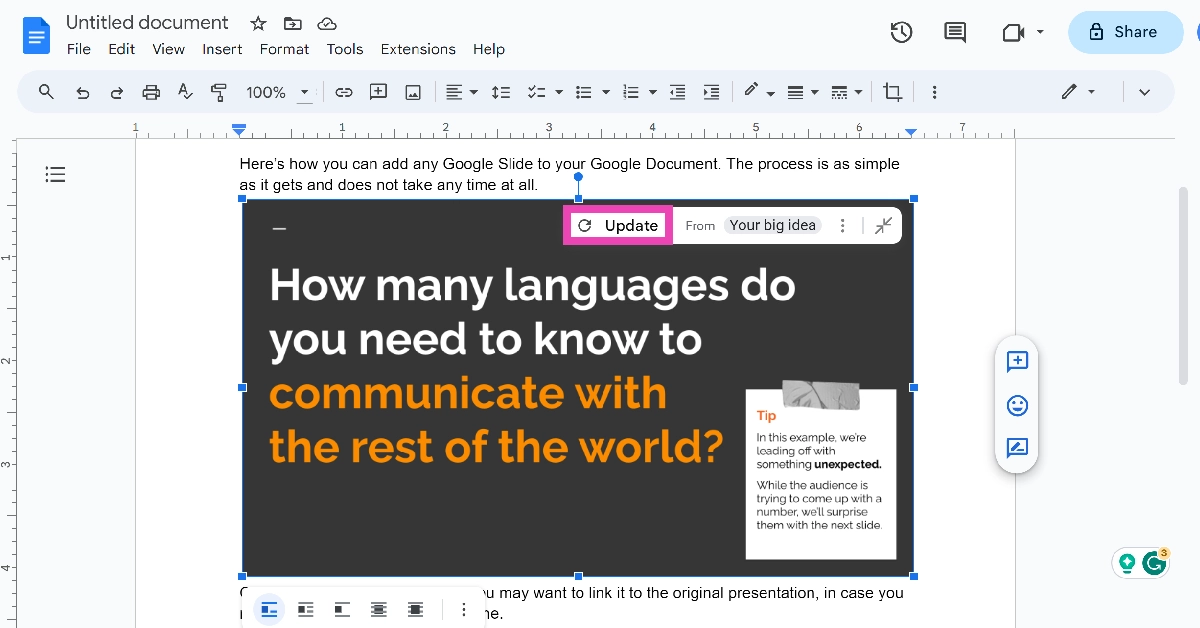
The process of embedding Google Slides into Google Docs is very easy and free of any hurdles or hoops. You may need to use this feature when you’re composing additional text to go with your presentation. Adding slides from the presentation in appropriate places on the document reminds people of key ideas and makes it easy to digest them. If you plan on making changes to your presentation later, make sure you link the slide to its source in Google Slides. This option will be given to you in a popup box when you paste the slide into the document. Any changes made to the presentation will then be reflected on the embedded slide as soon as you update it. Only editors can update the slide while collaborators can see the link to the source presentation.

Insert Google Slides into Google Docs

Step 1: Go to Google Slides and select a presentation. Step 2: Use the side menu to navigate to the slide you want to insert into your Google Doc. Step 2: Use the side menu to navigate to the slide you want to insert into your Google Doc. Step 3: Hit Edit at the top of the page and select Copy. Step 3: Hit Edit at the top of the page and select Copy. Step 4: Go to Google Docs and open the document in question. Step 5: Place your cursor in the spot where you want to insert the slide. Step 6: Right-click and select Paste or simply press Ctrl+V on your keyboard. Step 7: Choose whether you want to link the slide to its original presentation or not. This will allow the changes to be reflected on the document when the contents of the slide are changed in the original presentation. Step 7: Choose whether you want to link the slide to its original presentation or not. This will allow the changes to be reflected on the document when the contents of the slide are changed in the original presentation. Step 8: When you change the slide in the original presentation, go back to the document and select Update from the slide’s options bar. Step 8: When you change the slide in the original presentation, go back to the document and select Update from the slide's options bar.

Frequently Asked Questions (FAQs)

How do I embed or insert Google Slides into Google Docs?

Go to Google Slides and select the slide you want to embed in the document. Select Edit>Copy, then open the document and paste it in the relevant spot.

Who can see the link to my presentation in Google Docs?

Once you insert a slide in a Google Doc, only the collaborators on the document can see the link to the original presentation.

How do I update the slide I pasted on a Google Doc after changing the presentation?

Click on the slide, then hit Update in the options bar. Only document editors can take this action. Read Also: Noise Three Wireless headphones with up to 70 hours of playtime launched in India

Conclusion

This is how you can embed or insert Google Slides into Google Docs. Since Slides and Docs are both part of Google Workspace, the process of attaching a slide to a document is very easy and does not require any convoluted mechanism. If you know any other way to go about this task, let us know in the comments!

Krafton brings Bollywood star Ranveer Singh on board as BGMI’s official ambassador

Key Highlights
  • The BGMI update features the RS Discovery event and more.
  • Moreover, it also introduces emotes inspired by the actor’s popular dance moves and his voice pack among other exciting updates.
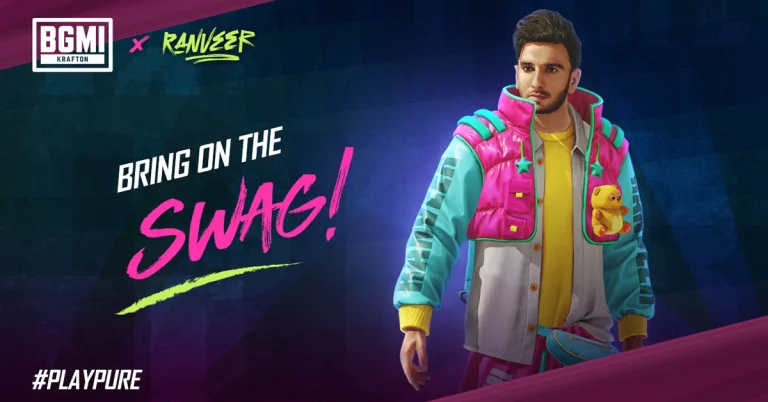
Battlegrounds Mobile India (BGMI) developer Krafton today announced that Bollywood superstar Ranveer Singh will be its official brand ambassador. Not just that is said to be a playable character in the Battle Royal Game. He will be available in two 3D avatars with emotes and skin for guns and more. In addition to this, the latest BGMI update also introduces the RS Discovery event. Read the entire article to know about the latest update. Krafton has rolled out BGMI’s 2.9 update featuring iconic Bollywood superstar Ranveer Singh. He is going to be the brand ambassador for the title, as a playable character, “enabling BGMI users to immerse themselves in the charismatic aura of the star within the game.” The BGMI latest update is currently live with two 3D Ranveer Singh avatars, emotes inspired by the actor’s popular dance moves and a voice pack, among other items. According to Karafton, there will be a Ranveer Singh discovery event, the Ranveer Singh crate and a Play and Win event that will allow players to win rewards. As mentioned earlier Ranveer Singh will be available in two playable 3D Ranveer Singh avatars – RS Dark Stealth and RS Swaggy Baba in Battlegrounds Mobile India. Ranveer Singh Special Crate. The RS crate has emotes inspired by superstar Ranveer Singh’s dance moves – Swagster Groove emote, Swagster Tathad emote, Swagster Sway emote, Swagster Twirl emote along with a special voice pack. The RS Crate also includes items such as RS Swaggy Buggy, RS Fury -M249 upgradable gun skin, RS Dhamaka (grenade skin), RS Pan-cho (pan skin), as well as other rewards like ornaments, and space gifts. The RS crate will allow players to spend UC, the in-game currency, for drawing rewards. The price for 1 draw is 60 UC but the first draw of the day is available at 30 UC. Also Read: Tecno Spark Go (2024) with dual rear camera setup launched in India

Ranveer Singh Discovery event

The RS Discovery event brings a point-based system where players earn points by participating in Classic mode matches. The event will be live from December 1 to January 25. The event consists of 50 stages (each level can be unlocked with 100 points, allowing the player to reach 5000 points by stage 50) and offers a variety of goodies, including space gifts, ornaments, parachutes, and more. The event consists of 50 stages (the player can collect 100 points to unlock the next stage hence accumulating 5000 points by stage 50), offering various rewards such as ornaments, space gifts, parachutes and more.

Play and Win event

In this event players can accomplish a variety of tasks and gather RS tokens which can be exchanged for permanent rewards in an Exchange centre in the game named “Play Pure with Ranveer Singh”. The event includes tasks such as playing as Ranveer Singh, Pure Showdown, teaming up, Pure Speed, and daily logins. The Lion Champion Set, Lion Champion Headgear, Thorned Rose – Crowbar, Neon Kiss Ornament, Classic Crate Coupon (5-time limit), and Supply Crate Coupon (10-time limit) are among the reward exchange options.

BGMI’s 2.9 updates other key features

BGMI’s 2.9 update also adds Snowy Village, a zone featuring high-speed Snow Rails and rideable reindeer. It also includes Snowball Blasters that can be used strategically, turning opponents into snowmen, and a two-story Ice Sculpture Plaza using them as a special battlefield. From December 1, 2023, to January 24, 2024, Snowy Village hosts BGMI’s Frost Festival, offering unique engagements, treats, snowboards, and Snowball Blasters freezing water. On discovering Snow Toddlers and the Lucky Snowman might lead players to rewarded crates. BGMI’s Version 2.9 offers an immersive winter-themed experience with festive reindeer vehicles appearing for shared rides. The latest Royale Pass Ace is available with the latest BGMI update. One can get the Freaky Fiesta-themed sets by wearing your cred. Players can also take part in RP missions to increase their player rank and unlock exciting rewards. These rewards include new custom colour outfits, snow bikes and reindeer finishes, and various other enticing items. Kafton has collaborated with Pagani, the iconic sports car maker to introduce two Pagani car models with exclusive colour schemes to the game, offering players a taste of luxury and speed.

Tecno Spark Go (2024) with dual rear camera setup launched in India

Key highlights
  • The price of Tecno Spark Go (2024) starts at Rs 6,599.
  • The smartphone is powered by Unisoc T606 SoC.
  • It runs on HiOS 13 based on Android 13 (Go Edition).
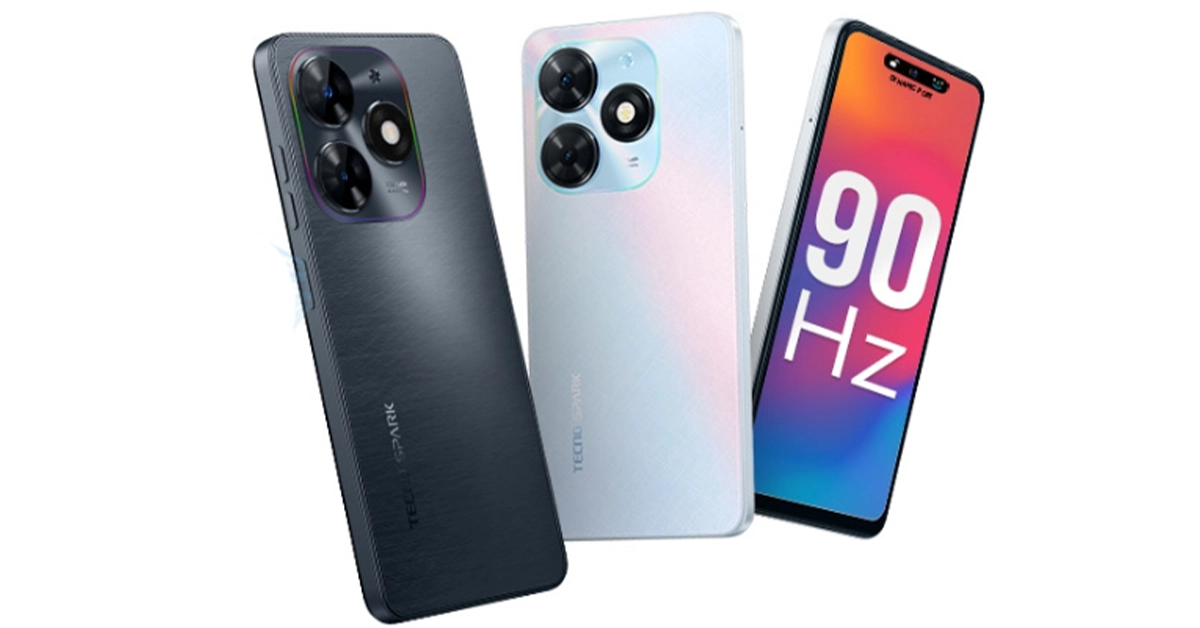
Chinese smartphone maker Tecno today announced the launch of a new budget smartphone in India. The company has introduced the latest model of Tecno Spark Go (2024). It is a successor of Tecno Spark Go (2023) which arrived earlier this year. The device is powered by a Unisoc T606 chipset. It features an HD+ IPS display with 90Hz refresh rate support. There is also a dual rear camera setup. The phone is backed by a 5,000mAh battery. In addition to this, it runs on HiOS 13.

Tecno Spark Go (2024) price in India and availability

Tecno Spark Go (2024) price in India has been set at Rs 6,599 for the 3GB RAM with 64GB storage. There are two more variants: 8GB RAM with 64GB storage and 8GB RAM with 128GB storage. The price of both models is to be announced later on. The handset comes in two colour options of White and Black. In terms of availability, the budget smartphone is scheduled to go on sale from December 7 via Amazon. Tecno Spark Go (2024) price in India and availability

Tecno Spark Go (2024) specifications

Tecno Spark Go (2024) is highlighted with a 6.56-inch HD+ IPS display having 720×1,612 pixels of resolution. Its display comes with 90Hz refresh rate support and Panda screen protection. Additionally, there is Dynamic Port software that shows notifications around the selfie camera. The budget smartphone runs on HiOS 13 based on Android 13 (Go Edition). Under the hood, there is an octa-core Unisoc T606 SoC with memory fusion technology that expands the RAM virtually with the help of unused storage. The device has up to 8GB of RAM and up to 128GB of internal storage. Also Read: WhatsApp to bring feature to share status updates on Instagram: Report For photos and videos, Tecno Spark Go (2024) features a dual rear camera setup that includes a 13-megapixel primary camera and an AI lens. Up front, there is an 8-megapixel selfie camera. The Tecno phone is backed by a 5,000mAh battery. There is a side-mounted fingerprint sensor for phone unlocking. In addition to this, it comes with dual stereo speakers with DTS sound technology.

WhatsApp to bring feature to share status updates on Instagram: Report

Key Highlights
  • WhatsApp is developing a new way to share status on Instagram.
  • Recently Meta also enabled the feature to share WhatsApp status updates on Facebook
  • Users will find it easier to interact with their audience on both platforms.
WhatsApp is planning to integrate a new feature on its platform. Reportedly, the instant messaging platform’s parent company Meta is working on the ability to share WhatsApp Status updates on Instagram stories directly. Recently Meta also brought the ability to send status updates to Facebook. Previously the company enabled the feature to share Instagram stories to WhatsApp Status. According to a fresh report by WABetaInfo WhatsApp’s latest optional feature to share status updates to Instagram is in the pipeline. As per the report, the upcoming feature will be available in a future update of the app as it is still under development. This feature was enabled on WhatsApp beta for the Android 2.23.25.20 update.
WhatsApp to bring feature to share status updates on Instagram: Report
Image Courtesy: WABetaInfo
According to the shared screenshot, Beta users will see the option to set an Instagram account enabled under the Status privacy in Settings. As per the report, the feature will be optional letting users decide whether or not they want to activate this feature. Additionally, this will also save time by improving the consistency and dependability of content sharing on Instagram and WhatsApp. Moreover, this ability to easily share their WhatsApp status updates to Instagram streamlines the process of changing status across other platforms. Also, this will enable users to create and post separate updates on WhatsApp and Instagram therefore completing the task in one step. Also Read: Best camera phones to buy in India across various price points Previously Meta also activated the option to automatically share status updates to Facebook Story. Thus the functionality will make it easier to share one’s status update across several apps, which saves time.  As an extension of the Chat Lock feature that was introduced just a few months ago Meta the parent company of WhatsApp has rolled out a new Secret Code feature to keep your chats safe. This will add another level of security to chats and make them harder to find, particularly when you hand your phone to a friend or a family member. 

How to share your WhatsApp Status on Instagram?

Ever since Meta acquired Instagram and WhatsApp, the tech giant has been gradually working towards converging all of its social media platforms. Users are already able to share their Instagram and WhatsApp stories & updates to Facebook. According to a recent report from WABetaInfo, Meta is adding the option to share WhatsApp status directly to Instagram. Of course, this feature will be turned off by default and will require users to link their Instagram accounts to WhatsApp in order to work as intended. So, let’s take a quick look at how to share your WhatsApp Status on Instagram. Read Also: Vivo T2 5G and Vivo Y56 prices in India dropped: Details Inside

Share your WhatsApp Status on Instagram

Step 1: Launch WhatsApp on your smartphone and switch to the Updates tab. Step 2: Hit the ellipses next to Status. Step 2: Hit the ellipses next to Status. Step 3: Select Status privacy. Step 3: Select Status privacy. Step 4: Tap on Instagram.
Step 4: Tap on Instagram.
Image Credit: WABetaInfo
Step 5: Enter your Instagram account credentials to link it to your WhatsApp account. If you are already logged into the Instagram app on your phone, simply hit Agree. Step 6: Open the WhatsApp status update you want to share on Instagram and hit the ellipses at the top right corner of the screen. Step 7: Hit Share to Instagram>Share now.

Enable sharing to Instagram from WhatsApp settings

Step 1: Launch WhatsApp on your smartphone and tap the ellipses at the top right corner of the screen. Step 2: Hit the ellipses at the top right corner of the screen. How to share your WhatsApp Status on Instagram? Step 2: Select Settings. Step 3: Go to Settings. How to share your WhatsApp Status on Instagram? Step 3: Hit Privacy. Step 3: Hit Privacy. How to share your WhatsApp Status on Instagram? Step 4: Select Status. Step 4: Select Status. How to share your WhatsApp Status on Instagram? Step 5: Tap on Instagram.
Step 4: Tap on Instagram.
Image Credit: WABetaInfo
Step 6: Log into your Instagram account using your username or password, or simply hit Agree if you are already logged in.

What else is new on WhatsApp?

This year, Meta added a slew of new features across the board to the IM platform. Be it highly requested features like HD image sharing, chat lock, and multi-account support to fringe options like video messages and link previews, WhatsApp is constantly evolving to maintain its position as the biggest messaging platform in the world. We may still see a few other additions to the platform before the year ends. Apart from sharing status updates on Instagram, WhatsApp is also working on an AI chatbot and the ability to search users by their usernames. That’s correct, you will soon be able to set up a username for your WhatsApp account. This will allow other users on the platform to find you easily without knowing your number. If you don’t feel comfortable with giving someone your phone number, you can simply share your WhatsApp username with them. This feature is completely optional, which means you don’t need to create a username to carry on using WhatsApp. WhatsApp very own AI-powered chatbot will also be added to the app soon. This chatbot will be very similar to Snapchat’s My AI. You can use it to set up reminders, brainstorm new ideas, and assist you in daily activities. You can even use it for creative tasks like composing a poem or coming up with interesting captions for your pictures and videos.

Frequently Asked Questions (FAQs)

How do I link my Instagram account to WhatsApp?

Launch WhatsApp, then go to Settings>Privacy>Status>Instagram. If you are already logged into your account on the Instagram app, hit Agree. If not, enter your Instagram account credentials to link it to WhatsApp.

How do I share my WhatsApp status update on my Instagram stories?

Open the WhatsApp status update you want to share, hit the ellipses at the top right corner of the screen, and select Share to Instagram>Share now.

Can I share my Instagram Reels on WhatsApp?

To share your Instagram Reel on WhatsApp, simply hit the Share icon and select WhatsApp from the list. Read Also: Noise Three Wireless headphones with up to 70 hours of playtime launched in India

Conclusion

This is how you can share your WhatsApp status update on your Instagram stories. Doing so can save you a lot of time if you like to keep all your social media profiles updated with the same kind of content. However, Instagram offers better editing options for your Stories than WhatsApp does for status updates.

Best multi-USB charging adapters for your smartphones and tablets

Smartphones have come a long way in the last decade, but the one aspect that not many people talk about is fast charging. You don’t need to keep your phone plugged in overnight for charging. Some of the best ‘hyper-charging’ phones can be fully juiced in under 20 minutes. Of course, you also need a powerful charging adapter to accomplish this feat. So, let’s take a closer look at the best multi-USB charging adapters for your smartphones and tablets. Read Also: Noise Three Wireless headphones with up to 70 hours of playtime launched in India

Portronics UFO Pro

Price: Rs 954 on Amazon Portronics UFO Pro If your work desk is cluttered with wires and charging adapters for every device you own, the Portronics UFO Pro charging station is exactly what you’re looking for. This adapter weighs 60g and has dimensions of 11.6 x 11.6 x 3.3 cm. With 60W of total wattage, the UFO Pro can charge your smartphone up to 50% in 30 minutes (if the phone supports fast charging). There are 6 charging ports on this station – QC 3.0 (1), USB Type-A 2.0 (4), and USB Type-C (1). Having a round form factor, the UFO Pro stays true to its name. This design allows the user to use all six charging ports at once, without any hassle.

Ambrane 75W Charger Adapter

Price: Rs 2,799 on Amazon Ambrane 75W Charger Adapter This GaN charger from Ambrane has 2 USB Type-A, 2 USB Type-C, and one Quick Charging USB port. The adapter also supports PD fast charging. The GaN technology makes the adapter compact and portable while also ensuring that it doesn’t overheat while charging multiple devices at once. The Type-C PD charging ports on this adapter are capable of charging laptops as well. If your laptop supports USB Type-C charging, you can completely eliminate the need to carry its bulky charger everywhere you go by switching to this Ambrane adapter. Certainly one of the best multi-USB charging adapters around.

T Teclusive 65W GaN charger

Price: Rs 2,299 on Amazon T Teclusive 65W GaN charger This 65W GaN charger has 4 charging ports – 2 USB Type-C PD, and 2 USB Type-A QC. The 100W equivalent of this adapter costs Rs 3,749. The C1 USB Type-C slot provides the promised maximum wattage of 65W. Apart from smartphones and tablets, you can also use this charger to power your laptops and notebooks. The integrated copper and ABS shell on the adapter makes it temperature-resistant. The Surge Protection System guards it against sudden voltage fluctuations. One of our favourite features offered by this adapter is its integrated display which shows the current output and voltage as per the charging speed.

Amazon Basics 4-Port 100W GaN charger

Price: Rs 4,099 on Amazon Amazon Basics 4-Port 100W GaN charger Best multi-USB charging adapters for your smartphones and tablets This Amazon Basics power adapter is 35% smaller than your regular charger and offers a whopping 100W of maximum charging speed. There are 2 USB Type-A and 2 USB Type-C ports on this adapter. The latter can be used to power laptops. The intelligent chip inside this adapter adjusts its output voltage when multiple devices are drawing power from it. This prevents overheating and makes the overall charging process very safe. The Amazon Basics GaN charger works for Macbooks and Chromebooks as well.

CMF 65W GaN Charger

Price: Rs 2,699 on Flipkart usb ports Best multi-USB charging adapters for your smartphones and tablets Nothing’s subsidiary brand CMF specialises in budget offerings across different categories. So far the company has released a TWS, a smartwatch, and a 65W GaN charger. We reviewed the latter last month and were mighty impressed by its charging chops. The adapter contains two USB Type-C and one USB Type-A charging slot. Here is the power breakdown for all three ports.
  • USB C1+USB C2: 45.0W+20.0W
  • USB C1+USB A: 45.0W+18.0W
  • USB C2+USB A: Share 5.0V⎓3.0A(15.0W)
  • USB C1+USB C2+USB A: 45.0W+15.0W
The CMF GaN charger supports a diverse range of fast charging protocols. D3.0, QC4.0+/3.0/2.0, SCP, FCP, PPS, AFC, Apple 2.4A, Samsung 9V2A, and DCP enabled devices can be powered with this adapter.

rts 25W Universal Travel Adapter

Price: Rs 587 on Amazon rts 25W Universal Travel Adapter If you need a travel adapter for travelling abroad but don’t want to buy a different one for every country you visit, this product has you covered. The rts 25W universal travel adapter has multiple plugs for the US, EU, UK, and AU regions. This adapter will work perfectly well, whether you’re in Central America or Russia. There are two USB Type-A charging ports on the side of this adapter which allow you to directly charge your smartphone or tablet. You can also connect your regular charger to this adapter. This adapter is a steal at Rs 587. Read Also: Oppo Reno 10 Pro 5G price dropped by Rs 2,000 in India

Conclusion

These are the best multi-USB charging adapters you can buy right now for your smartphones, tablets, laptops, Chromebooks, Macbooks, and other devices. If you’re buying a fast-charging adapter, make sure your smartphone supports fast charging as well. There is no point in buying a 65W adapter if your smartphone supports only 25W charging. Is there a particular adapter that you think deserves to be on this list? Let us know in the comments!

Best camera phones to buy in India across various price points

Lots of smartphones are launching as we write this and more are going to launch soon. In this situation, it is challenging to find the best camera phone that not only offers incredible camera features but fits your pocket. We believe the best camera smartphone should not only have camera-focused features but also a good battery life, a fast CPU and an excellent display (which are equally important). Not just that build quality and IP rating also matters. Our Gadget Bridge team has been testing a lot of devices and we have put together a list of the best camera phones you can purchase across price segments to help you find a good device for all your clicking needs.

iPhone 15 Pro Max

iphone 15 pro max rear iPhone 15 Pro Max sports a 6.7-inch OLED display and ProMotion with a refresh rate that ranges between 1Hz and 120Hz support. The iPhone comes with Dynamic Island. The device is powered by an A17 Pro SoC. For photos, the iPhone (iPhone 15 Pro Max Review) includes a triple rear camera unit with a 48-megapixel wide-angle sensor, a 12-megapixel ultra-wide sensor, and a 12-megapixel telephoto sensor with a periscope lens. For Selfies, there is a 12-megapixel lens on the iPhone 15 Pro Max. In addition to this, there is a USB Type-C port for charging. The phone runs on iOS 17 out-of-the-box. Price starts at Rs 1,59,900 Also Read: 5 best camera smartphones under Rs 50,000

Samsung Galaxy S23 Ultra

Samsung Galaxy S23 Ultra Samsung Galaxy S23 Ultra features a 6.8-inch Edge QHD+ Dynamic AMOLED 2X Display with dynamic refresh rate ranging from 1 to 120 Hz. The phone is powered by a Qualcomm Snapdragon 8 Gen 2 SoC and runs Android 13 with One UI 5.1. The device comes with a Samsung S Pen stylus. The camera system (Samsung Galaxy S23 Ultra Review) includes- a 200-megapixel sensor, 10-megapixel telephoto lenses with a 3x optical zoom, a 12-megapixel ultra-wide camera with a 120-degree field of view, and an f/2.2 aperture, as well as a final 10-megapixel telephoto sensor. Up front, there is a 12-megapixel selfie camera. The phone is backed by a 5,000mAh battery (45W wired and Fast Wireless Charging 2.0). Price starts at Rs 1,24,999

Google Pixel 8

Google Pixel 8 The Pixel 8 features a 6.2-inch FHD+ Actua display which supports an Adaptive refresh rate ranging between 60Hz and 120Hz. Under the hood, there is a Tensor G3 SoC with a Titan M2 security coprocessor. It runs on the latest edition of Android software, Android 14 with Pixel-exclusive features onboard. The phone comes with a 10.5-megapixel Dual PD sensor for selfies. There is a dual rear camera setup that includes a 50MP Octa PD sensor and a 12 MP ultrawide camera with an auto-focus. The Google Pixel 8 has a 4,485mAh battery with 24W wired and 12W wireless fast charging support. Price starts at Rs 75,999

Vivo X90

Vivo X90 The Vivo X90 features a 6.78-inch AMOLED display and a refresh rate of up to 120 Hz. The device runs on OriginOS 3 and runs Android 13 and is powered by an octa-core 4nm MediaTek Dimensity 9200 SoC and a G715 GPU. It (Vivo X90 review)comes with a Zeiss-branded triple rear camera unit consisting of a 12-megapixel ultra-wide-angle camera, a 12-megapixel portrait camera and a 50-megapixel main sensor. The smartphone sports a 32-megapixel selfie camera. Price starts at Rs 59,500

OnePlus 11 5G

OnePlus 11 review: Design and Display OnePlus 11 5G is highlighted with a 6.7-inch Samsung LTPO 3.0 AMOLED display with an adjustable refresh rate of up to 120Hz. The device is powered by an octa-core 4nm Snapdragon 8 Gen 2 SoC and an Adreno 740 GPU. It (OnePlus 11 5G Review)comes with a triple rear camera setup that includes a 50-megapixel sensor with OIS, a 32-megapixel portrait sensor and a 48-megapixel Sony IMX58 ultra wide-angle sensor. For selfies, there is a 16-megapixel sensor. The handset has a 5,000mAh dual-cell battery with 100W SuperVOOC charging support. Price starts at Rs 56,999

Xiaomi 12 Pro

Xiaomi 12 Pro The Xiaomi 12 Pro comes with a 6.72-inch LTPO WQHD+ E5 AMOLED display with a dynamic refresh rate of 1 to 120Hz. The phone is powered by an octa-core Snapdragon 8 Gen 1 SoC with an Adreno 730 GPU. It runs Android 12 with MIUI 13 on top. The smartphone’s triple rear camera system includes a 50-megapixel Sony IMX707 primary sensor, a 50-megapixel ultra-wide-angle lens, and a 50-megapixel telephoto sensor. Moreover, the device (Xiaomi 12 Pro Review)has a 32-megapixel selfie camera sensor. The Xiaomi 12 Pro packs a 4,600mAh with 120W Xiaomi Hypercharge fast wired charging. Price starts at Rs 41,999

Samsung Galaxy S21 FE 5G

Samsung Galaxy S21 FE 5G Samsung Galaxy S21 FE 5G has a 6.4-inch FHD+ Dynamic AMOLED 2X Display with a 240Hz touch sampling rate, an incredibly smooth 120Hz refresh rate, and AI-based blue light control. It is powered by a Snapdragon 888 SoC. Samsung Galaxy S21 FE 5G comes with a 12-megapixel primary sensor with an f/1.8 wide-angle lens, a 12-megapixel ultra-wide sensor, and an 8-megapixel telephoto sensor making up the triple rear camera setup on the Galaxy S21 FE 5G. For selfies and video calls, the gadget (Samsung Galaxy S21 FE 5G review) also includes a 32-megapixel front camera with an f/2.2 aperture. Price starts at Rs 33,900

OnePlus Nord CE 3 Lite

OnePlus Nord CE 3 Lite review: Design and Display The OnePlus Nord CE 3 Lite is powered by an octa-core Snapdragon 695 SoC with Adreno 619 GPU for graphics. It also features a 6.72-inch full-HD+ LCD with 1,080×2,400 pixels of resolution. The phone packs a 5,000mAh battery that supports 67W SuperVOOC fast charging. It (OnePlus Nord CE 3 Lite Review) comes with a triple rear camera setup that includes a 108-megapixel Samsung HM6 sensor with an f/1.75 aperture and EIS support. It also consists of a 2-megapixel macro lens and another 2-megapixel depth sensor. There is a 16-megapixel front-facing camera for selfies. Price starts at Rs 19,999

Redmi Note 12 5G 

Redmi Note 12 5G, Redmi Note 12 Pro 5G, and Redmi Note 12 Pro+ 5G goes official in India The Redmi Note 12 5G has a 6.67-inch and boasts a 1,080 x 2,400-pixel resolution. The phone is powered by a Qualcomm Snapdragon 4 Gen 1 octa-core SoC. It runs on MIUI 13, an Android 12 skin. The Redmi Note 12 5G features a 48-megapixel primary sensor and a 2-megapixel depth sensor as part of its dual rear camera system. For selfies, the phone boasts an 8-megapixel front camera. Price starts at Rs 15,499

Vivo Y27

Vivo Y27 with MediaTek Helio G85 SoC launched in India The Vivo Y27 comes with a 6.64-inch FHD+ LCD Sunlight display. It operates on FunTouch OS 13 which is based on the Android 13 operating system. Under the hood, there is MediaTek Helio G85 chipset and its Extended RAM 3.0 functionality. The handset features a dual rear camera setup with a 50 MP primary camera and a 2 MP bokeh camera. It has a variety of camera functions, including Bokeh Flare Portrait, Super Night Mode, and Super Night Selfie Mode. It has an 8 MP front camera with the Aura Screen Light function for selfies, ensuring sharp, high-resolution selfies in any setting. It includes a 5,000mAh battery and a quick 44W FlashCharge. Price starts at Rs 13,999