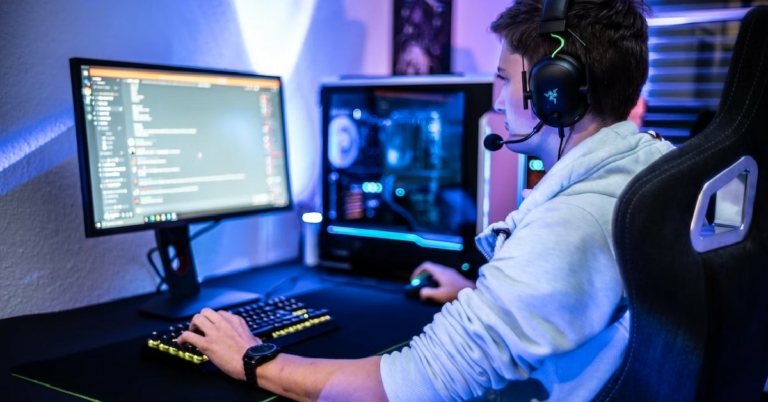
Discord started off as a VoIP and IM app for gamers but soon evolved into a common platform for all kinds of communities. Whether you are a member of a book club or an online course, Discord offers a way to make group interactions easier. Users turn to Discord to get on video meetings or even stream to their audience. The app makes it incredibly easy for you to share your screen and stream gameplay or other activities. While Discord may be easy to use, it doesn’t mean that it’s devoid of issues. In this article, we bring you a few easy fixes to the ‘Discord stream showing black screen’ error on your Windows PC.Read Also:Nothing Phone 2 to have curved frame and edges, design revealed
In This Article
Update Graphics Drivers
Step 1: Right-click on the Start menu icon.Step 2: Select Device Manager.Step 3: Click on the arrow next to Display Adapters to expand it.Step 4: Right-click the graphics card and select ‘Update driver’.
Disable Hardware Acceleration
Hardware Acceleration facilitates smooth, fluid transitions and animations. If you don’t have a powerful GPU, this may cause a black screen to appear. In this case, you need to disable hardware acceleration to restore normalcy. Here’s how.Step 1: Click the gear icon next to your username to launch settings.Step 2: Select ‘Advanced’ from the side menu.Step 3: Switch off the toggle bar for Hardware Acceleration.
End all Discord tasks
If you’re using a Discord app on your Windows PC, ending the task for Discord can fix the black screen you are seeing. Here’s how.Step 1: Right-click on the taskbar and select Task Manager.Step 2: Right-click on Discord’s process and select End Task.
Enable Reduced Motion
Step 1: Launch Discord and click on the gear icon to open settings.Step 2: Select Accessibility from the side menu.Step 3: De-select ‘Sync with computer’ and switch on the toggle bar for ‘Enable Reduced Motion’.Step 4: Restart the app.
Clear Discord cache
Corrupt temporary files in the cache can interfere with the app’s core functions. Here’s how you can clear Discord’s cache.Step 1: Launch the Discord app on your Windows PC.Step 2: Press Windows Key + R.Step 3: In the popup box, type %appdata% and hit Enter.Step 4: Go to Discord>Cache.Step 5: Delete all the files inside the Cache folder.
Run Discord as administrator
Running Discord as an administrator ensures that the app has access to all the necessary permissions. Sometimes, Discord may show a black screen while streaming if one of the integral permissions is denied by the system. Running the app as admin ensures that will won’t be the case. Simply right-click on the Discord app and select ‘Run as administrator’.
Disable Aero Theme
Users have often reported that the customised ‘Aero’ theme often creates a malfunction while streaming, often leading to the screen turning black. To make sure this is not the case with you, disable the Aero theme and check if you are still encountering the problem. Go to Settings>Appearance and choose one of the native themes for Discord.
Update the Discord app
If you’re using an older version of Discord, it may have a bug that is causing this issue. These bugs are typically fixed by a quick update. Check if there are any pending updates for the Discord app and install one from the official website or the Microsoft Store.
Frequently Asked Questions (FAQs)
How do I fix the black screen on Discord?
To fix the black screen on Discord, disable Hardware Acceleration and update the Discord app and your PC Graphics drivers.
Why is Discord screen share not working?
If you’re unable to share your screen on Discord, force stop the app and clear its cache. Then, restart the app and try again.
After being banned for nearly ten months, Battleground Mobile India, aka BGMI, is officially available again in India. BGMI fans are looking for ways to improve their game experience and one such method is the usage of redemption codes, which offers a variety of rewards and advantages using BGMI redeem codes players can gain access to new skins, outfits, loot crates, weapons and free UC and diamonds.As mentioned earlier, these codes give users the chance to earn unique rewards and gain extra benefits while playing the game. This includes GUN SKINS (M4, AKM, M416, AWM, M24, UZI, KAR98K), free character voucher, Andy, Carlo, Sara, Victor character for free, free Anna Character on completing the mission and UC or Royal Pass Discount. So here we have gathered a list of the most recent BGMI redeem codes as of 30 June 2023. Also, redeem these codes asap as these are only valid for a limited duration.
Garena Free Fire is a battle royale game with regular awards and tournaments to keep players interested. If you play Garena Free Fire, you should be aware of the redeem codes that are released on a daily basis. However, because the battle royale game is banned in India, players from other countries can use the Free Fire Redeem codes daily. If you’re unfamiliar with the Garena Free Fire redeem codes or don’t know how to get them, we’ve put together a step-by-step guide to help you redeem them. Check out Garena Free Fire Redeem Codes for 30 June 2023.The Free Fire redeem codes are a great way to get free stuff. These are 12-digit codes that contain alphabets and numbers, as well as an expiration date and time. Because the Garena FF redeem codes cannot be used more than once, you should hurry to the redemption page to claim your free reward before someone else does. To get a free reward, all you have to do is go to reward.ff.garena.com/en, which is the official redemption page. Also, keep an eye on this space for daily updates on Garena Free Fire redemption codes and rewards.
Do you play Nintendo Switch online? If yes, we have an exciting update for you. Gamers who have their premium Expansion Pack now have access to four more Sega Genesis games – Crusader of Centy, Ghouls ’n Ghosts, Landstalker, and The Revenge of Shinobi. Nintendo and Sega added these games to the pack on Tuesday and with this move, the total number of Sega Genesis games accessible to Nintendo Switch Online + Expansion Pack players now comes to 44. That’s quite a variety to choose from!
Here’s what you need to know about the newly added games:
In This Article
1. Ghouls ’n Ghosts
This side-scrolling game is Capcom’s sequel to Ghosts ’n Goblins, and its plot revolves around Ghosts returning with Ghouls for revenge three years after the events of the prequel. They initiate a holocaust on the princess’ kingdom and it is then on Sir Arthur to save her and every other mortal.
Read Also:How To See Your Friends’ Location On Snapchat?
2. Landstalker
This game is known for its action-packed and adventure-filled treasure-hunt where players take the role of Nigel as he solves puzzles and finishes off enemies. The game has an isometric view-point and is also considered to be the predecessor for Alundra games.
3. Crusader of Centy
Developed by Nextech, the action-adventure game revolves around a 14-year-old boy named Corona who inherits his late father’s sword to fight monsters and protect the human race. He can also talk to several animals who join his cause and aid him as the story progresses.
4. The Revenge of Shinobi
The hack-and-slash action game is a sequel to Shinobi and centers around Joe as he seeks revenge from a criminal organization called Neo Zeed for killing his master and kidnapping his bride.
Read Also:How to fix ‘Free Fire MAX keeps downloading expansion packs’?
If you wish to get the Nintendo Switch Online + Expansion pack, you can pick from the $49.99 annual individual plan or the $79.99 annual family plan that can be shared by up to 8 users. Besides the games we have mentioned here, the package also gives access to Nintendo 64 and Game Boy Advance games, Splatoon 2’s Octo Expansion, Mario Kart 8 Deluxe’s Booster Course Pass and Animal Crossing: New Horizons’ Happy Home Paradise add-on.
For the latest gadget and tech news, and gadget reviews, follow us on Twitter, Facebook and Instagram. For newest tech & gadget videos subscribe to our YouTube Channel. You can also stay up to date using the Gadget Bridge Android App. You can find the latest car and bike news here.
Japanese technology company Sony has revealed some highly confidential information about its PlayStation business by mistake. At the FTC vs Microsoft hearing, the company showed a document from PlayStation CEO Jim Ryan that had information about the margins Sony shares with publishers, the cost of developing some of its games and Call of Duty revenue.
On a closer look, it seems like someone has redacted the documents using a black Sharpie. Although the court did ask for the document to be removed, the damage was done as it had already been downloaded by the press and Sony‘s rivals.
Read Also:Call of Duty: Mobile crossed 35 million downloads, maximum downloads come from India
According to the document, Horizon Forbidden West cost the company $212 million over five years with 300 employees while $220 million was spent on The Last of Us Part II with 200 employees. The document further revealed that 1 million PlayStation gamers play nothing apart from Call of Duty.
Sony had shown the document at the hearing to show how heavily its revenues would be impacted if Call of Duty was an Xbox exclusive. Sony has made it clear in various filings to regulators that it fears Microsoft making the game exclusive to its gaming console.
Sony’s document also showed (most likely accidently) how much Call of Duty is worth to PlayStation. In just the United States, Call of Duty was worth $800 million, that too back in 2021. It is reported that the document has revealed that the global figure was $1.5 billion. But that’s just the game. If you also pencil in the money Sony makes via accessories, subscriptions and more, the number jumps to a figure that looks like $13.9 (or $15.9) billion dollars.
Read Also: Best gaming mice under Rs 5,000 (June 2023)
It has also been revealed that the company shares what seems like 10% with third-party publishers like Activision. And speaking of Activision, Sony only has one more CoD game of its exclusive marketing deal with the company and that game is scheduled to be released at the end of 2023. The document also said that half of its PS5 owners also have a Nintendo Switch.
This isn’t the first time a tech giant has been affected by document redaction problems. Only earlier this week, a confidential document from Microsoft revealed a lot of information about the company including its Xbox targets. But now, it’s been replaced with a version that’s been heavily redacted.
For the latest gadget and tech news, and gadget reviews, follow us on Twitter, Facebook and Instagram. For newest tech & gadget videos subscribe to our YouTube Channel. You can also stay up to date using the Gadget Bridge Android App. You can find the latest car and bike news here.
After sharing the screenshot of the Nothing Phone 2’s home screen the company has now begun teasing the design of the upcoming phone. With just two weeks left for the launch of the Phone 2, the firm has now teased the design of the back panel of the smartphone. Like its predecessor, Phone 2 will run on the Nothing OS and be powered by Qualcomm’s Snapdragon SoC.Also read:Nothing Phone 2 pre-orders detailsNothing recently teased the design of the Nothing Phone 2’s rear panel in a tweet. Similar to the Nothing Phone 1, the device has a transparent glass cover back and LED light panels underneath. Furthermore, the teaser confirms that the Phone 2 will have curved edges and a curved frame. The Phone 1 in contrast had flat edges and a flat back panel.Last week, the CEO of Nothing, Carl Pei, posted on Twitter what appears to be a screenshot from the forthcoming Nothing Phone 2. The phone’s home screen screenshot appears to be different from Nothing Phone 2 from the previous year.Also Read:Amazon India accidentally revealed the price of Motorola Razr 40: Details InsideThe Nothing Phone 2’s display has a small space between the clock and the top-left corner of the screen indicating that the forthcoming phone might not have the hole-punch display cutout that its predecessor had. Therefore it is likely to have a centrally aligned hole punch cutout to house the selfie camera.An exclusive Glyph Sound Pack for the Phone (2) and Phone (1) has been created in collaboration with the Swedish house music DJ group. Using the “Glyph Composer,” a brand-new feature, users may generate personalised ringtones.The Snapdragon 8+ Gen 1 SoC from Qualcomm will power the Nothing Phone 2. A 6.7-inch display will be available on the forthcoming phone. A 4,700mAh battery is also confirmed to be present. In addition, this time a triple back camera will be horizontally positioned. There will be a 50MP primary sensor with OIS in the camera module. A 16MP selfie camera will be on the front of the device.
For the latest gadget and tech news, and gadget reviews, follow us on Twitter, Facebook and Instagram. For newest tech & gadget videos subscribe to our YouTube Channel. You can also stay up to date using the Gadget Bridge Android App. You can find the latest car and bike news here.
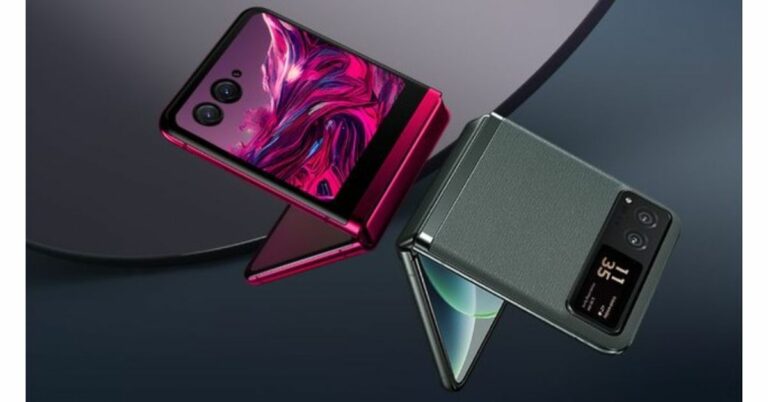
Motorola Razr 40 series is scheduled to launch in India on July 3. Ahead of the official announcement the price of the Razr 40 got accidentally leaked via Amazon. To recall, the foldable phone has already launched alongside Motorola Razr 40 Ultra in China. Amazon is confirmed to be the official sales partner for the upcoming series.
In This Article
Motorola Razr 40 Ultra and Razr 40 pricing
A week before its official release, the Motorola Razr 40’s price was inadvertently disclosed on Wednesday on Amazon. The pricing of the clamshell foldable smartphone will begin at Rs. 59,999, according to the listing. Note that the listing has been removed and the pricing of both phones is not being displayed on the online platform.Also Read:Google Pixel 7a Review: Is it an all-rounder phone at Rs 44,000?However, the company did earlier reveal that when buying the Motorola Razr 40 online with ICICI Bank and SBI credit cards, the e-commerce platform will give you a 10% discount.To recall, Motorola Razr 40 Ultra was launched in China with a starting price of CNY 5,699 which translates to Rs 66,000 for 8GB RAM with 256GB storage whereas the Motorola Razr 40 price starts at CNY 3,999 which converts to Rs 46,000 for 8GB RAM with 128GB storage.
Motorola Razr 40 Ultra and Razr 40 specifications
Both the Motorola Razr 40 Ultra and Razr 40 sport a 6.9-inch foldable pOLED display with a 1,080 x 2,640-pixel resolution. The display also supports a 165Hz refresh rate and a maximum brightness of 1,200 nits. Android 13 is already pre-installed on the flip phones when they are shipped. The Qualcomm Snapdragon 7 Gen 1 SoC is used in the Razr 40’s entry-level edition, and the Qualcomm Snapdragon 8+ Gen 1 SoC is used in the Razr 40 Ultra.Also Read:Here is everything about the newly launched Qualcomm Snapdragon 4 Gen 2 mobile platform: Specifications, availabilityBoth the Razr 40 Ultra and Razr 40 will have dual rear cameras. A 12-megapixel primary sensor with OIS and a 13-megapixel secondary ultra-wide-angle sensor make up the camera system of the Razr 40 Ultra. The Razr 40, on the other hand, sports a 64-megapixel primary sensor in addition to a 12-megapixel super wide-angle camera. Both devices have a 32-megapixel front-facing camera for selfies.The 3,800mAh battery on the Razr 40 Ultra supports 33W rapid charging and 5W wireless charging. The Razr 40 supports 30W wired and 8W wireless charging and has a 4,200mAh battery.
For the latest gadget and tech news, and gadget reviews, follow us on Twitter, Facebook and Instagram. For newest tech & gadget videos subscribe to our YouTube Channel. You can also stay up to date using the Gadget Bridge Android App. You can find the latest car and bike news here.
The Chinese smartphone brand Vivo has revealed that it has been appointed as the Official Exclusive Supplier of Mobile Phones for the 19th Asian Games Hangzhou on June 15th, 2023. The official day also marks the beginning of the 100-day countdown to the Asian Games in Hangzhou. Additionally, iQOO, a sub-brand of Vivo, has been chosen as the Official Esports Gaming Phone for the esports events taking place during the Games.Mao Genhong, the Deputy Secretary General and Director of the Executive Office of HAGOC (Hangzhou Asian Games Organizing Committee), Xu Jianfeng, Deputy of the International Relations Department of HAGOC, Du Mengfei and Ye Hong, Deputies of the Market Development Department of HAGOC, and Jia Jingdong, the Vice President of Branding at vivo in China, and other guests attended the signing ceremony.Participants from 45 countries and regions will compete in the 19th Asian Games, which will take place in Hangzhou, China, from September 23, 2023, to October 8. Jia Jingdong, Vice President of Branding at vivo, presented two newest models, the vivo X90s and iQOO 11S, to HAGOC in honour of the company’s official cooperation with the Hangzhou Asian Games.Also Read:Google Pixel 7a Review: Is it an all-rounder phone at Rs 44,000?The Vivo brand has worked with various illustrious sporting events throughout the years, including the Sudirman Cup, NBA, FIFA World Cup TM, and UEFA EUROTM, and has done so to further its awareness among a rising worldwide audience. As the Official Exclusive Supplier of Mobile Phones for the Hangzhou Asian Games, the Vivo brand will also employ its cutting-edge professional imaging technology to capture and share the event’s most thrilling moments with users across the world, giving the excitement of sports to everyone on and off the pitch.In addition to this iQoo has also made its debut of Esports at Hangzhou Asian Games. Vivo’s sub-brand has been chosen as the Official Esports Gaming Phones for the Hangzhou Asian Games.“We are greatly looking forward to partnering with vivo on the occasion of the 100-day countdown to Hangzhou Asian Games. We believe that together with Vivo’s extensive experience in sports event cooperation and its commitment to meeting users’ needs with innovative technology products, we can effectively make a strong connection with people and promote this event together,” said Mr. Mao Genhong, during the signing ceremony.
For the latest gadget and tech news, and gadget reviews, follow us on Twitter, Facebook and Instagram. For newest tech & gadget videos subscribe to our YouTube Channel. You can also stay up to date using the Gadget Bridge Android App. You can find the latest car and bike news here.
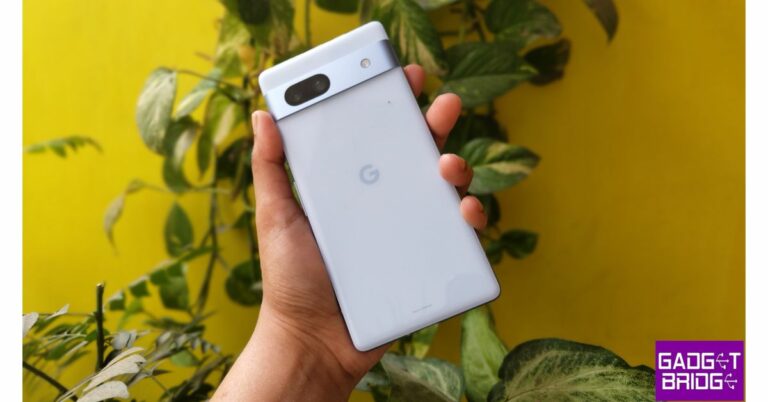
The camera performance on Google’s Pixel smartphones has been one of the things that have stood out, always. We have used the recently released Google Pixel 7a for a month in order to provide you with a thorough and honest review. It has a starting price of roughly Rs. 44,000 in India, which is obviously on the high end. Let’s see how it did on our test bench in this Google Pixel 7a review.
In This Article
Google Pixel 7a Review: Design and Display
Comparing the recently released Google Pixel 7a to the Pixel 6a, it appears to be more expensive. In essence, it is a less expensive Pixel 7 alternative. Visit this page to read its review of Google Pixel 7 if you haven’t already. Pixel 7a is surrounded by a metal frame on the sides. Essentially, it is 100% recycled metal that has been anodized. Although the phone features a Galastic back panel, an innovative material, we believe there is little difference. The rear panel has a glass-like texture, attracts fingerprints, and smudges easily. This time, the camera band appears more prominent and is made of metallic silver. The earlier iteration had an all-black band.The new one feels nicer in the hand than the previous one did. This time, the phone is smaller; we don’t often see smaller phones these days, and we personally prefer this feature because it fits comfortably in the pocket.At the bottom, there is a microphone, a USB Type C port, and a speaker grille. Note that the microphone described here resembles a grille rather than a hole. A power button and a volume rocker are provided on the right side of the frame. Additionally, a noise-cancelling microphone is mounted on the top, and the SIM card slot is located on the frame’s lift side. A single SIM card slot and eSIM support are both present on the SIM tray. The 3.5mm headphone jack is absent, though.On the front, there is Gorilla Glass 3 protection. The chin is obvious, and the side bezels are very significant. But, it has a reliable in-display fingerprint sensor and face unlock.A 6.1-inch full-HD+ OLED with HDR capability is featured on the Pixel 7A. The screen includes Corning Gorilla Glass 3 protection, as said, and a refresh rate of 90Hz. Although the phone’s peak brightness is not extremely great, it is sufficiently bright for the content to be seen outside during the day. Although the OLED screen makes the hues look good. The refresh rate of the screen is fixed at 90Hz and cannot be changed. The adaptive brightness sensor also performs average in this situation.The multimedia experience is above average because of the stereo speakers’ loudness and decent quality.Also Read:Pixel 7 Pro Review: Why you should get the phone
Google Pixel 7a Review: Performance and Cameras
The Google Tensor G2 SoC and Titan M2 security chip, along with 8GB of LPDDR5 RAM and 128GB of UFS 3.1 storage, power the Google Pixel 7a.The Pixel 7a comes pre-installed with Android 13 and the firm guarantees three years of software updates and five years of security updates. Additionally, Pixels are among the first smartphones to get the latest Android updates. The best feature of Pixel phones is their incredibly simple user interface. It is completely free of bloatware, has lightning-fast speed, and never lags. We loved it for that.We engaged in Call of Duty and BGMI games. This phone performs well in games, as it should. The experience at first is really fluid and smooth, however after approximately 15 minutes the phone temperature will rise dramatically. The temperature in the AC room where the gaming test was conducted was set at 25 degrees. We wonder if you play video games outside in this sweltering weather, the phone won’t operate. At times it got really baking hot, which is unusual for a Pixel smartphone.The heating problem causes the touch response to change. The heating problem causes a jerky gameplay experience, which as said, is so not Google smartphone.Moving on, when it comes to camera performance, Pixel Phones are constantly rated as one of the best gadgets on our test bench. The Pixel 7a has a dual-camera system on the back. The system consists of a 13-megapixel ultra-wide lens and Sony’s 64-megapixel main sensor with optical image stabilisation (OIS) capabilities. Additionally, a 13-megapixel front-facing camera for selfies and video calls is there. The Pixel 7a’s front camera can record 4K video and features Super Res Zoom up to 8x. Additionally, the phone has tools like Magic Eraser, Photo Unblur in Google Photos, and Real Tone technology, which correctly portrays your skin tone.Day light shotsWe captured some images using all possible settings and scenarios and we were happy with the results. Since it is also possible to record in 4K, it is a good choice for vlogging. There are plenty of other modes to look into. The camera interface is preconfigured at 1x, but one may change it to 0.5 for ultrawide and even 2x, but they are digital, not optical, zooms.There is a Top Shot option that records a short video so you can get the desired shot you want.Primary shots taken outdoors and indoorsWe were quite impressed with the outcome in terms of picture quality for the primary lens photographs. It is comparable to how we genuinely see with our eyes because the sky, structure, and dynamic range are all so naturally appearing. The images are fairly true to life, with neither overly saturated nor underexposed colours. Rich colours and intricate textures are presented to the user.1x Vs 2xThere is a super-res mode option that allows you to zoom up to 8x without using an optical zoom lens while still getting 16-megapixel images. So processing-wise, Pixel 7a does a good job. Another benefit is that you may enhance your images with a variety of tools when you click “Edit” after snapping a picture, eliminating the need for additional editing software.However, two editing tools stand out as our favourites. The first is the Blur. You can manually apply the portrait mode effect to any image you choose. You have control over the depth, blur effect, and in and out-of-focus areas. When capturing portrait or long-exposure shots, we also noticed some oversharpening in the portraits, and the phone processes them a bit slowly.Also Read:Sennheiser Profile USB Microphone Streaming Set review: Pro sound on a budgetSecond, you may use various filters to add colour to the sky, essentially creating a colour transition.Next up is the 13-megapixel ultra wide-angle sensor on the backup camera. Really, the production of the images is outstanding. In actuality, the photographs’ clarity, details, and colour are quite identical to those captured with the primary camera. Most other brands of smartphones have a softness when taking ultra-wide pictures, but the Pixel 7a impressed us. The ultra-wide images have substance, good details, and an edge rather than softness.After that, we used Pixel 7a to shoot some portrait pictures. We must admit that the blur effect, the discernible depth, and the out-of-focus area are all quite natural-looking. The output resembles a DSLR in several ways. The majority of the time, edge detection is also good, but it is not always, particularly close to the hair.Portrait ShotsThe photo quality is once again excellent for selfies. Neither too warm nor too cool, the skin tone appears to be natural. So, if you’re considering the Pixel 7a for selfies, the results are excellent. However, as we already observed, edge detection is not very good when using the front camera to take portrait-style pictures. But one feature that we enjoy is that you have the choice of 1x or 0.7x when shooting pictures with the front camera, whether they are regular or portrait. You can snap extremely wide-angle selfies with this, and the group pictures will look great.Long exposureAnother intriguing function of this smartphone is the long-exposure mode. You can capture handheld pictures without a tripod as long as you keep in mind that some subjects should be in motion and others should be still. If you use this tool wisely, it can be really helpful.Regarding the low-light shooting, the Pixel 7a has a dedicated night mode called Night Sight that is by default enabled but may be changed in the settings. Even though there wasn’t much of a change, night sight somewhat increases saturation. The primary camera performs superbly overall in low light. However, if you take pictures with an ultra-wide angle, noise starts to show up.Without/with night sight onFinally coming to the videos. Despite the fact that the Pixel 6a’s video performance was passable, we believe there has been a significant improvement with the Pixel 7a in this area. The stability is first and foremost considerably better given the cost. Whether it is regular or ultrawide, we believe this is one of the best video stabilisation results we have had from a phone in this market. Although you can capture videos in 4K at 60FPS with an ultra-wide angle, the standard 4K resolution has the best output for video stabilisation. It is important to keep in mind that both the standard mode and the ultra-wide angle have a lot of noise when recording video in low light. However, the video quality is excellent during the day.In general, we enjoyed having a variety of video stabilisation options depending on the situation in which we are taking the video. However, the Google Pixel 7a camera is once again affected by the heating problem. While photographing outdoors, the device overheats. After only 15 to 20 minutes of capturing pictures and movies, the camera began to overheat and alerted us. As a result, several video samples were damaged, and the camera also stopped recording videos. Therefore, there is a really serious problem with this phone, especially now that we are in Delhi in June. If you make a vlog outside, it’s possible that you won’t be able to record after a short while. For short videos, it is a good device.In terms of endurance, the Google Pixel 7a comes with a 4,385mAh battery. The device doesn’t come with a charger but allows 18W charging. So we utilised our 25W charger, but the charging process is really slow. Additionally, it has an average battery life of around a day on a full charge. We were expecting 6 to 7 hours of screen-on time, but we only received 4 to 5 hours.
Verdict
The Pixel phone’s key selling points are its cameras and the stock Android experience. We were quite pleased with the outcomes of the ultra-wide sensor. The output is excellent, the dynamic range is excellent, and even the colours have produced excellent results. It closely resembles the performance of the Pixel 7 camera. Overall, if you’re looking for a camera phone, especially one with good still photography, it’s a really good phone. It also produces pretty good videos, although there are some drawbacks that we’ve already discussed, including overheating issues during gaming and low-light videography.
Should you buy Pixel 7a or not?
The Pixel 7a costs Rs 44,000, so if you’re considering purchasing it right away, we advise you to hold off until the festival season that is right around the corner. You will be able to purchase it for about Rs 35,000 if you purchase it around Diwali. If you cannot wait, then go for it right away.Google Pixel 7a Pros
Improved design
nice display
excellent cameras
Google Pixel 7a Cons
Slow charging
Comes without a charger
Overheating issue during gaming and while using the camera
Garena Free Fire is a battle royale game with regular awards and tournaments to keep players interested. If you play Garena Free Fire, you should be aware of the redeem codes that are released on a daily basis. However, because the battle royale game is banned in India, players from other countries can use the Free Fire Redeem codes daily. If you’re unfamiliar with the Garena Free Fire redeem codes or don’t know how to get them, we’ve put together a step-by-step guide to help you redeem them. Check out Garena Free Fire Redeem Codes for 29 June 2023.The Free Fire redeem codes are a great way to get free stuff. These are 12-digit codes that contain alphabets and numbers, as well as an expiration date and time. Because the Garena FF redeem codes cannot be used more than once, you should hurry to the redemption page to claim your free reward before someone else does. To get a free reward, all you have to do is go to reward.ff.garena.com/en, which is the official redemption page. Also, keep an eye on this space for daily updates on Garena Free Fire redemption codes and rewards.
After being banned for nearly ten months, Battleground Mobile India, aka BGMI, is officially available again in India. BGMI fans are looking for ways to improve their game experience and one such method is the usage of redemption codes, which offers a variety of rewards and advantages using BGMI redeem codes players can gain access to new skins, outfits, loot crates, weapons and free UC and diamonds.As mentioned earlier, these codes give users the chance to earn unique rewards and gain extra benefits while playing the game. This includes GUN SKINS (M4, AKM, M416, AWM, M24, UZI, KAR98K), free character voucher, Andy, Carlo, Sara, Victor character for free, free Anna Character on completing the mission and UC or Royal Pass Discount. So here we have gathered a list of the most recent BGMI redeem codes as of 29 June 2023. Also, redeem these codes asap as these are only valid for a limited duration.
In This Article
BGMI Redeem Codes for 29 June 2023
BBKRZBZBF9- Free Cannon Popularity
UCBYSD600- 600 UC
DKJU9GTDSM- Thousand Silver Fragments
VETREL2IMHX- Bumble Bee Set
BVDJZBZ8NC- Free PAN Skin
BTOQZHZ8CQ- Any New Skin
DKJU5LMBPY- Silver Fragments
BBVNZBZ4M9- Football and Chicken Popularity
RNUZBZ9QQ- Any Random Outfit
LEVKIN2QPCZ- Gold Racer Set
TQIZBZ76F- Motor Vehicle Skin
BMTCZBZMFS- Pretty in Pink Headpiece, Pretty in Pink Set
BOBR3IBMT- Desert Ranger Set
BBKVZBZ6FW- Two Red Tea Popularity
SIWEST4YLXR- Assassin Suit or Bottom
EKJONARKJO- M41 Gun Skin (For 1st 500 users)
TJXFTNLZMYS- Assassin Bottom/ Suit
BAPPZBZXF5- UMP 45 Gun Skin
7HVKDSKFAWEK- Unknown Rewards
MIDASBUY- Free Rename and Room Card
How to get free Redeem Codes for BGMI on 29 June 2023?
Launch BGMI on your device.
Then select the Redeem Code option from the main menu.
Next, click on the Redeem code tab.
A new window will open, requesting the redemption code.
Now enter your BGMI code.
Confirm and click on the “Redeem” tab.
If your redeem code is valid then you will get a message confirming that your rewards were successfully redeemed.
Technology is something that underpins much of our daily lives and this is certainly true for how we stay entertained globally. While this can be seen in how tech has transformed the way we listen to music or how we watch movies, it is perhaps the changes it has brought to casino gaming that are most impressive. This is especially true in the UK, where gaming at the latest internet casinos is a very popular way of filling in spare time.
It is key to know what you are doing before you dive in, though, and this means being able to gauge whether an online casino is safe in 2023 is crucial. But what should you be looking for?
In This Article
Check out online casino review sites
If you don’t fancy manually checking out details around every casino you are thinking of gaming at, this is a good option to consider. Online casino review sites might also list top platforms to game at that you would not have come across otherwise or thought about playing at.
But what are these websites all about? In simple terms, they are trusted online resources that bring together the most reputable iGaming platforms to sign up within 2023 in one handy place. Casino review sites will also usually give in-depth details on each site to look over and help you decide which is best for your own personal gaming tastes.
This new list found on Top 10 Casino Sites shows not only what to look for in terms of Internet casino review platforms but also just how useful these sites can be.
Check licensing and security features
To find a safe internet casino to game at in 2023, you must only choose one that is fully regulated and licensed to operate by a top gaming authority (such as the UK Gambling Commission)
If you head to an online casino’s website to look over what they offer, make sure to check this out. It should not be hard to find the information, as all legitimate casinos will clearly show – usually somewhere on their homepage – who they are licenced with. This is also something that online casino reviews tend to include and this is another place you can check this key detail.
You should also only play at casinos online that have the latest and toughest online security features to protect your cash and details. This should include measures such as two-factor account authentication and effective firewalls. Cybersecurity features like this help keep hackers at bay and make the site more secure to play at.
Provably fair games and top developers
This is another excellent piece of advice when looking at how to be sure an iGaming site is safe to play at in 2023. All secure online casinos will only work with respected, reputable software providers. This includes some of the top names in the sector, such as NetEnt, Microgaming and Pragmatic Play. By looking for operators that carry games from top studios like this, you can be sure their games are fair and safe to play.
In addition, it is also worth looking out for certifications an online casino might have for provably fair games. eCOGRA is perhaps the most well-known and any site that carries this seal of approval can be relied on to offer honest games. Whether you game on a desktop or a mobile device like the Redmi A2+, this is a top piece of advice to remember.
Legit payment options
Knowing whether an online casino is safe to play at in 2023 does not need to be a hassle. One quick way to get a feel for this is by looking at the list of payment options any site has. If they offer a good choice of well-known, secure payment choices, then it is a positive sign.
This is because the best iGaming payment providers are not likely to work with unsafe or scam sites. Payment options from the safest providers also mean you can be sure of fair, secure transactions when playing at a casino online.
Good payment methods to look out for include top e-wallets (such as Skrill or PayPal), well-known debit card brands (like Visa) and legit crypto coins such as Bitcoin or Ethereum.
Finding a safe and honest online casino in 2023
When thinking about the impact of tech on modern life, you have to consider the huge changes that online casinos have brought for entertainment globally. This is certainly true in the UK, where more people than ever love to play the latest casino games online. If you plan to do this, though, knowing how to find a safe iGaming site to log on to is a must. This guide shows UK gamers what to look out for and what to keep in mind when finding a casino to register with.
For the latest gadget and tech news, and gadget reviews, follow us on Twitter, Facebook and Instagram. For newest tech & gadget videos subscribe to our YouTube Channel. You can also stay up to date using the Gadget Bridge Android App. You can find the latest car and bike news here.
Technology giant Google is reported to be working on a new AI system called Gemini that, the company claims, will rival or even surpass ChatGPT. According to the Wired, the new AI technology is being developed in Google’s DeepMind laboratory.
In order to get ahead of ChatGPT, DeepMind developers are planning to integrate an old AI program called AlphaGo into the upcoming LLM, or language learning model. It is worth noting that AlphaGo is based on reinforcement learning meaning that the software deals with complicated problems through trial and error. But while making repeated attempts to solve the problem, the AI learns from its failures to improve its performance for the future.
Read Also:What is ChatGPT? How to use the viral chatbot like a pro?
DeepMind is aiming to create Google‘s future language learning model with the ability to solve complex problems.
But then, Gemini does have the potential to become more intelligent than any other artificial intelligence in the world, considering it has the ability to get and reformat information from the internet into text that sounds more natural. According to DeepMind’s co-founder and CEO Demis Hassabis, “if done correctly, (Gemini) will be the most beneficial technology for humanity ever.”
However, he has also added that the new AI is currently under development and it is a “a process that will take a number of months.” It should also be mentioned that it is going to cost Google a lot of money to develop this as it can range from hundreds to millions of dollars. Even ChatGPT took more than $100 million to be developed.
In another news, ChatGPT app on iOS now lets customers who pay $20 per month for its service get up-to-date information from Microsoft Bing. This comes after Microsoft made a multi-billion dollar investment into OpenAI earlier this year. It was at its Build Conference in May this year that the company announced that its Bing browser would become the default search engine for ChatGPT.
Read Also:Google announced Bard a new AI chatbot and ChatGPT competitor
It should be noted that the integration has been rolled out to Plus users as a beta in the web version of the ChatGPT app which “knows when and how to browse the internet to answer questions about recent topics and events.” However, the free version of the app is only capable of surfacing information that was available up to 2021.
If you wish to switch on web-browsing with Bing on ChatGPT (iOS), you would have to turn on the Browsing option in the ‘New Features’ section of the app. Then select GPT-4 and once you enter the dropdown menu, pick the option of ‘Browse with Bing’. The feature will “soon” come to the Android version of the app too.
For the latest gadget and tech news, and gadget reviews, follow us on Twitter, Facebook and Instagram. For newest tech & gadget videos subscribe to our YouTube Channel. You can also stay up to date using the Gadget Bridge Android App. You can find the latest car and bike news here.
Food ordering and delivery service DoorDash has announced a big change to the payment of couriers. The company has said that going forward, its couriers will have the ability to earn hourly rates besides the tips they receive.
The couriers will now see a new option called ‘Earn by Time’ and the reason it is good for them is because this would guarantee an hourly minimum rate they would earn for the time they spend making deliveries. The time would start as soon as a courier accepts an order and will end only when the order is dropped to the customer.
Read Also:Microsoft rolls out limited preview of its Family Safety app on iOS and Android
This is a huge change from the current system where couriers earn a base pay on the basis of factors like time taken, distance and desirability. It is worth pointing out though that even now, not every order will have the option of ‘Earn by Time’. Also, couriers would have to enable the option of earning hourly rates at the start of every order that is applicable.
In addition to this, the company is also rolling out a feature for location-sharing that would enable couriers to share their live-location with up to five contacts. This enhances the existing safety features of the service that include a way for couriers to not serve rude customers and reminders for customers to switch on the lights of the porch when a courier is expected.
Besides this, another update called ‘Dash Along the Way’ has also been added that enables couriers to pick up orders while they are on their way to a specific destination. A new way of tipping is also there now which lets customers add a tip or boost up the one that they have already paid even after checking out.
Read Also:The best way to download YouTube videos in your iPhone camera roll
That’s not all. There are some updates that would benefit the customers as well. This includes a new search option that enables customers to look for items across various grocery stores, restaurants and retail outlets. A new Browse tab has also been added with which customers can sift through different categories of products like drinks, beauty items, food supplies, etc in case they are not sure what they want to shop for.
One of the best new features is the option of multiple carts using which customers can put different products in different carts and the app will save the progress each time. This can prove to be extremely helpful while customers are preparing orders all through the week. Another useful feature that is being added is support for online SNAP/EBT payments at select stores like Aldi, Safeway, 7-Eleven and Meijer.
For the latest gadget and tech news, and gadget reviews, follow us on Twitter, Facebook and Instagram. For newest tech & gadget videos subscribe to our YouTube Channel. You can also stay up to date using the Gadget Bridge Android App. You can find the latest car and bike news here.
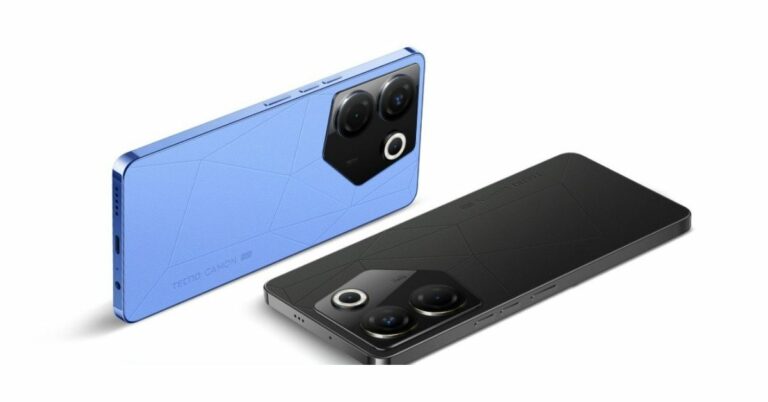
Tecno Camon 20 Pro 5G debuted in India later last month. The company has announced that the device is now available at a discounted price of Rs 2,000. The 5G smartphone features a 120Hz AMOLED display. It is powered by MediaTek Dimensity 8050 SoC. In addition to this, the phone has a triple rear camera setup and a 5,000mAh battery.Tecno Camon 20 Pro 5G can be purchased for a little bit lesser price thanks to the recent bank offer which the company is offering. In addition to this, the firm is also offering payment-based discounts and exchange offers on the purchase of the smartphone. Tecno is providing an instant discount of Rs 2,000 if the transaction is made using all bank cards. As a result, the 8GB RAM with 128GB storage variant cost Rs 17,999, while the 8GB RAM with 256GB storage variant will cost Rs 19,999.Note that the discount offer will be available through June 30 in the country. There is also an exchange offer with an Rs 18,999 maximum. Options for cost-free EMIs begin at Rs. 1,667.Also Read:Here is everything about the newly launched Qualcomm Snapdragon 4 Gen 2 mobile platform: Specifications, availabilityTo recall Tecno Camon 20 Pro 5G was launched at Rs 19,999 for the base GB RAM with 128GB storage variant and the price of the 8GB of RAM and 256GB of storage was set at Rs 21,999.
SSL stands for Secure Sockets Layer and plays a crucial role in creating an encrypted connection between your web browser and the web server hosting the website. If a website does not have an SSL certificate, your browser will return an SSL error. There are several kinds of SSL errors for different situations. In this article, we bring you the 6 best methods to fix SSL connection errors on Android phones.Read Also:Purchased a Costly Cell Phone? Think About Getting It Insured
In This Article
Check your phone’s date and time
Typically, your Android phone automatically updates the date and time using your mobile network. However, if you have turned off this setting, your phone may display the incorrect date and time if it has been in a dead state for a long time. Certain apps (like WhatsApp) won’t work unless you enter the correct date and time. The same applies to websites. You may get the SSL Connection error in this scenario. To fix this issue, go to Settings>General Management>Date and Time and enter the correct information.
Check your Internet connection
You may get an SSL connection error if you are using public WiFi. Switch to mobile internet or connect to your home WiFi to ensure that the issue is not network-related. You can also try opening the website on another device connected to the same network to verify the root of the problem. If the website does not load on the other device either, the network connection is to blame.
Clear browsing data
Clearing your default web browser’s browsing data can help fix SSL connection errors on an Android phone. Here’s how you can fix Chrome’s browsing data.Step 1: Launch the Google Chrome app on your smartphone.Step 2: Tap the ellipses on the top right corner of the screen.Step 3: Select ‘History’.Step 4: Tap the cross icon next to a website entry to delete it from your browsing history.Step 5: To delete all of your browsing history, tap on ‘Clear browsing data’.Step 6: Set the time range to ‘All time’ and select ‘Clear data’.
Disable the Antivirus app
If you use an Antivirus app for your phone, disable it and try loading the website again. Sometimes, antivirus apps can cause your browser to return one of the SSL errors, even when there is nothing wrong with the website. You can disable the antivirus by force-stopping it from settings, or uninstalling it while you’re using the website the question.
Update your web browser
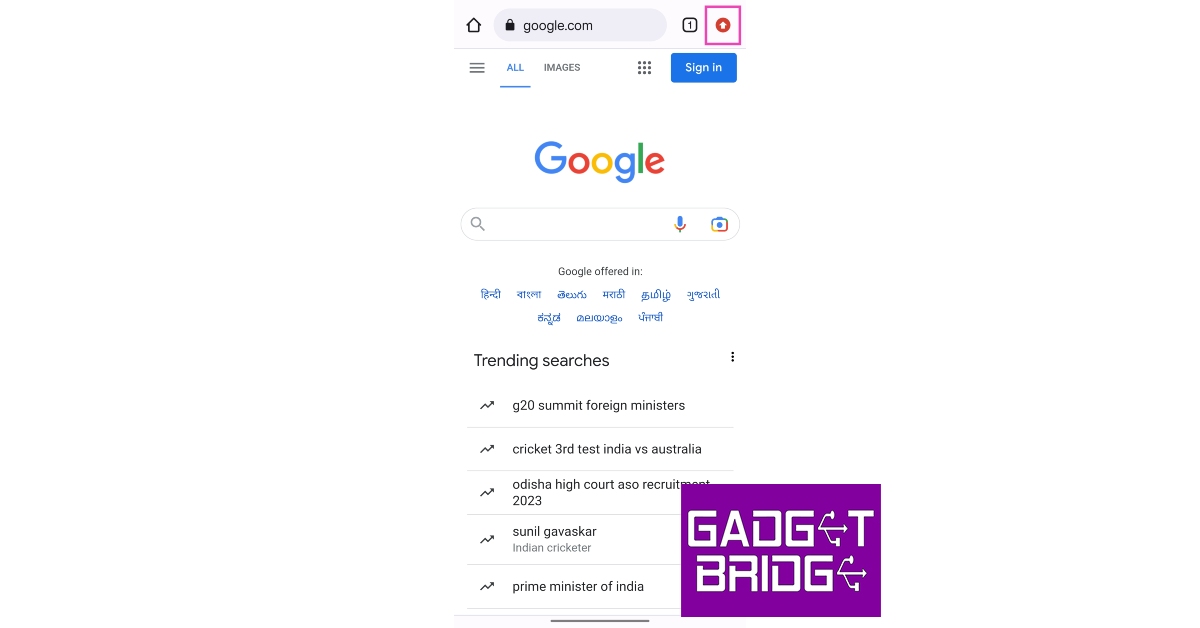
Older versions of web browsers are often not compatible with new web pages. This may be because the website is optimised for a newer version of the browser you are using. Here’s how you can update Google Chrome on Android.Step 1: Open the Google Chrome app on your smartphone.Step 2: Tap on the upward arrow icon at the top right corner of the screen. This arrow appears when a new update for Chrome is available.Step 3: Tap on ‘Update Chrome’.Step 4: You will be redirected to the app’s page on Google Play Store. Tap on ‘Update’ to update Chrome to its latest version.
Reset network settings
If none of the fixes mentioned in this list were helpful, your last resort would be resetting the network settings on your device. Here’s how you can go about it.
Step 1: Go to Settings and select ‘General Management’.Step 2: Scroll down and select ‘Reset’.Step 3: Tap on ‘Reset Network Settings’.Step 4: Select ‘Reset Settings’.Step 5: Enter your PIN to confirm your selection.
Frequently Asked Questions (FAQs)
What is an SSL error on Android?
When your phone’s web browser cannot verify a website’s Secure Sockets Layer (SSL) Certificate, it returns an SSL error. An SSL certificate verifies that the website is legitimate.
How do I fix the SSL connection error on my phone?
To fix an SSL connection error on your device, make sure it has the correct date and time and clear all your browsing data.
Nothing Phone 2 is launching in India and globally on July 11. The device will replace the Nothing Phone 1 that debuted in July 2022. In addition to teasing the device’s features, the company will also start to take pre-orders for its upcoming smartphone from tomorrow. Phone 2 will be driven by Qualcomm’s Snapdragon SoC and run on the Nothing OS, and like its predecessor, it will include a transparent rear panel.The London-based consumer technology company Nothing has stated that customers may now pre-order the second generation smartphone on Flipkart, starting tomorrow at 12 PM. The device is scheduled to officially launch in India on July 11.Also Read:Nothing Phone 2 will officially launch in India on this date: Checkout the detailsThe company has also created a dedicated microsite on Flipkart ahead of the Phone 2 debut. Those who are interested may pay a refundable deposit of Rs 2,000 to pre-order. On the day of launch which is July 11, the buyers will be able to select the configuration/ model of their choice and pay the remaining payment to secure the purchase between 9 PM IST on July 11 and 11:59 PM IST on July 20.
Here’s how to pre-order Phone (2) on Flipkart.
Pay a refundable INR 2,000 deposit to secure the order.
Come back between 11 July 9 PM IST – 20 July 11:59 PM IST
Choose your variant
Pay the remaining balance and claim your exclusive pre-order offers.
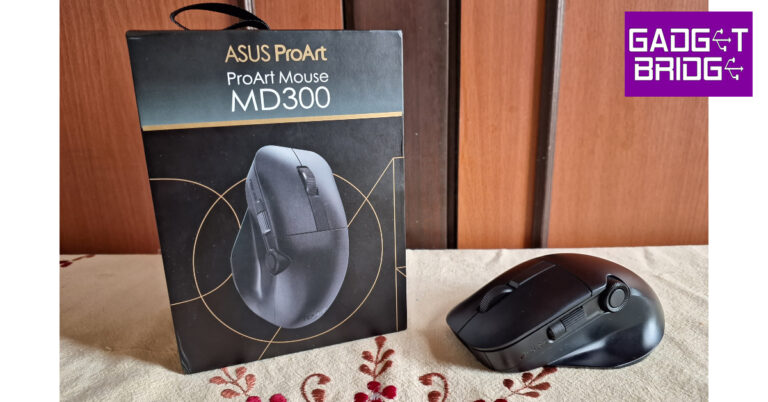
Launched in March 2023, the Asus ProArt Mouse MD300 carries a hefty price tag of Rs 8,499 but offers some unique features that may make it a bargain. The Asus Dial, which can also be found on other Asus ProArt devices, makes its way to the MD300. Asus has tried to incorporate clever software tricks to get the most out of this dial. We’ve been using this productivity mouse for the last week, testing it in different scenarios. If you’re thinking of upgrading your mouse, make sure you read our Asus ProArt Mouse MD300 review first.Read Also:Costway Folding Treadmill: Why We Think It Is A Convenient And Versatile Exercise Solution
In This Article
Asus ProArt Mouse MD300 review: Design
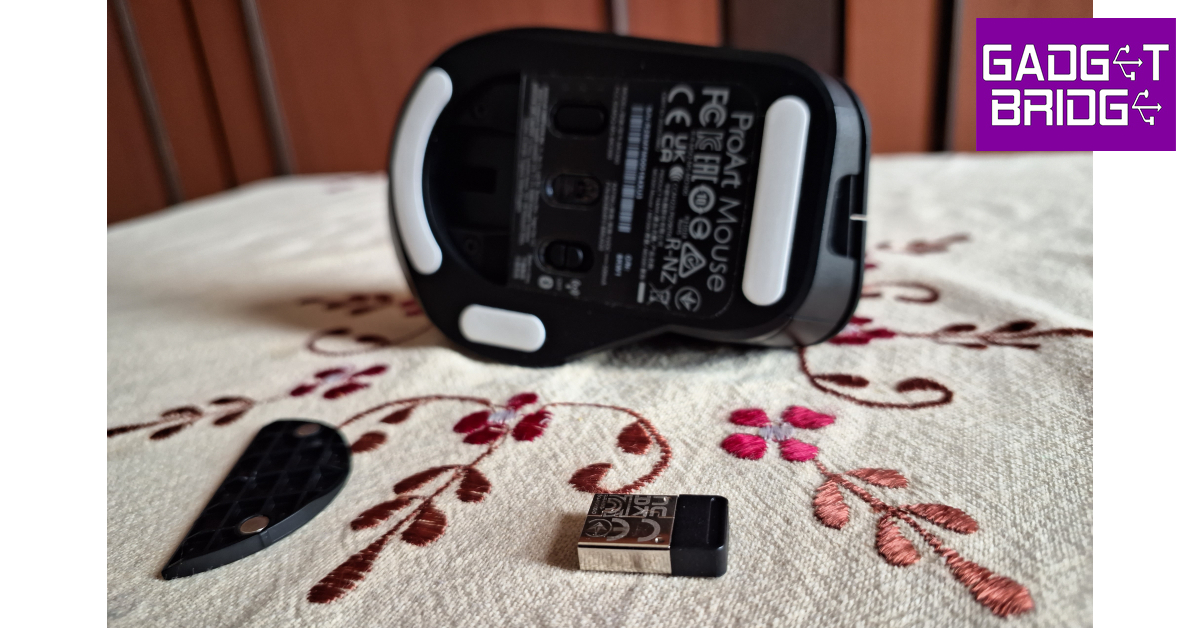
Inside the box, you get the MD300 mouse, a 2.4GHz USB receiver (inside the mouse), a USB Type-C to Type-A cable, a USB Type-C adapter, a Quick Start Guide, and a Warranty Card. The mouse weighs 109g without the USB dongle. Dimensionally, the mouse is 118mm long, 73mm wide, and 43mm tall.We really like the build of the ProArt MD300. Even though its shell is made out of plastic, the matte black finish on the body gives it the premium feel you expect from a mouse in this price category. While the mouse may be slightly on the heavier side, its weight does not hinder any routine tasks.The Asus ProArt Mouse MD300 has an ergonomic design without being too bulky or flashy. The thumb rest on the left side of the device is of the appropriate width. The size of the mouse caters to all hand sizes. Apart from the standard vertically aligned scroll wheel at the centre of the mouse, you also get a horizontal scroll wheel along the side. Also present is the unique Asus Dial right alongside the horizontal scroll wheel. The Asus Dial offers more resistance than the other two wheels to reduce any accidental touches.There are a total of six programmable buttons on this mouse. The horizontal and vertical scroll wheels have integrated clicks, and there’s an additional button in the Asus Dial as well. The right-click and left-click have satisfying feedback. There’s another button right below the main scroll wheel, too. Interestingly, there are no dedicated back and forward buttons on this mouse, which a mouse of this stature should have had. There are three big feet on the bottom panel that keep the mouse in place. The pairing button and power button are placed on either side of the optical sensor. The USB receiver is housed inside a small cavity on the lower side of the panel that does not hinder its movement.
Asus ProArt Mouse MD300 review: Performance
Pairing the Asus ProArt Mouse MD300 to your PC is super easy via Quick Pairing. As soon as you turn on the mouse, its pairing notification pops up on your PC. To connect the mouse to another device, all you have to do is press the pairing button at the bottom. The ProArt MD300 can connect to a maximum of 3 devices at one time.The 4,200 DPI sensor on this mouse is bang on the money. You can easily use this mouse on any surface. We even tried using it on a glass table, where the mouse performed admirably well. While tracking was not an issue, the scrolling experience could have been better. For starters, there is no option to put the mail scrolling wheel in a free scroll mode. If you want to quickly scroll to the bottom of a spreadsheet or a long web page, you will have to put up with the resistance of the wheel.The side scroll wheel is not programmed to work on Excel and Google Docs by default. Horizontal scrolling is something you have to enable using Asus’ customisation software. Ideally, a mouse should be optimised in a way that doesn’t require you to install additional software to map the basic actions.The Asus Dial is programmed to control the volume by default. You can program it to carry out actions like zooming in/out, altering the exposure, managing brightness and more, using Asus’ Armoury Crate software. This dial is a great tool for users that spend a lot of time editing photos and videos. While it is prone to accidental touches, its high resistance makes sure that it only pursues an action when the proper pressure is applied.You can also map other keys using Armoury Crate. Even if you’re not a power user, assigning multimedia controls to the scroll wheels and the Asus Dial will come in very clutch. Once you get a hang of the mouse, you can set it up to carry out routine tasks seamlessly. You can also download firmware updates for the mouse from Armoury Crate.Equipped with an 800mAh battery, Asus claims the MD300 can last for 150 days on a single charge. We did not use the mouse long enough to test this claim, but in our one week of use the battery drop-off was very minimal. Charging the mouse is also super easy, with a Type-C port provided at the front. One minute of quick charge powers this mouse for 8 hours of light use or 3 hours of heavy use.Read Also:Embracing The Digital Revolution: The Impact of High-Quality Odds Calculators and Converters
Verdict
When it comes to hardware and design, the Asus ProArt Mouse MD300 does not disappoint. The mouse has a very premium in-hand feel and the ergonomic design ensures you do not feel any fatigue even after using it for several continuous hours. The Asus Dial is a nice addition, and we’d like to see it get more functions in future updates. The lack of a free scroll mode does dampen the experience a bit, but if you don’t mind that, the ProArt MD300 is a solid buy for Rs 8,499.
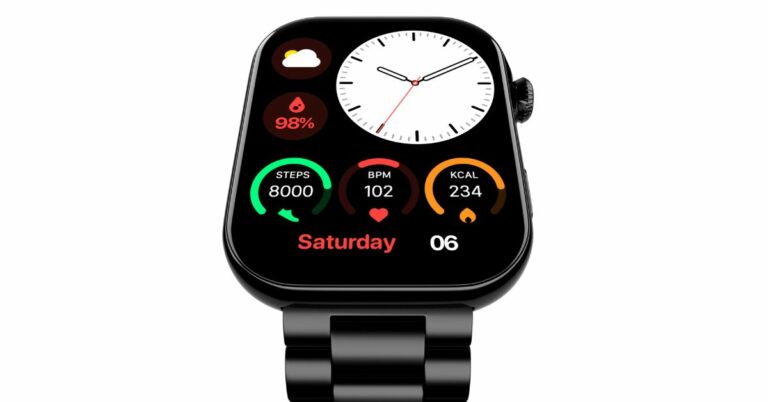
Noise ColorFit Vision 3 smartwatch is the latest offering by the Indian lifestyle brand. The fitness tracker has a metal body and features an AMOLED screen which supports ‘always on’ display mode. In addition to this, the device incorporates Gesture Control. It offers 100+ sports modes and 150+ watch faces with the app.
In This Article
Noise ColorFit Vision 3 price in India and availability
The price of the Noise ColorFit Vision 3 smartwatch is set at Rs 4,999. The watch will be available in 5 different colour options: Jet Black, Classic Brown, Forest Green, Jet Black: Elite Edition, and Glossy Silver: Elite Edition. It can be purchased via Flipkart and gonoise.com in the country.
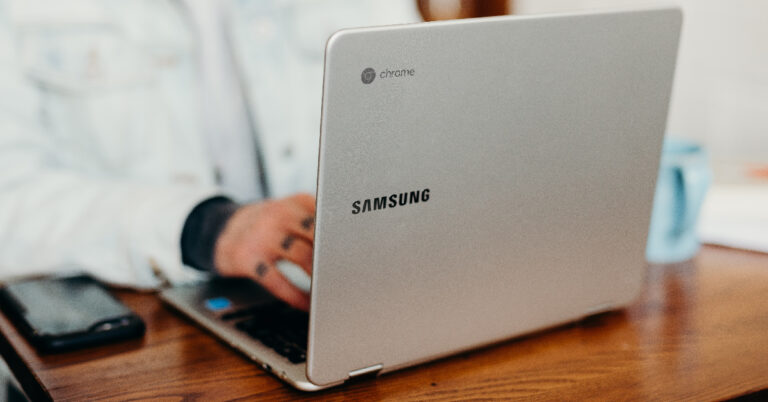
Step 1: Go to remotedestop.google/support on both devices.Step 2: Click the download icon and install the Chrome Remote Desktop app.Step 3: Click on +Generate Code on the device you want to mirror.Step 4: Chrome Remote Desktop will generate a 12-digit code. Enter this code on the destination device (your Chromebook). Find the Connect to another computer panel in the Remote Desktop home screen and paste the code there.Step 5: On the device you want to mirror, click on Share. Give Chrome Remote Desktop the necessary permissions to share your screen.You will now be able to view and control the screen of the other device on your Chromebook.
Use a third-party app to mirror your smartphone’s display on Chromebook
Sharing your Android phone’s screen is a very easy process if you’re using a third-party app. For this to work, your phone and Chromebook need to be connected to the same Wi-Fi network. Here’s how you can share your Android phone’s screen on Chromebook.Step 1: Install the Screen Mirroring & Sharing app on your Android smartphone.Step 2: Launch the app and tap the Cast icon.Step 3: On your Chromebook, go to screenmirrorapp.com.Step 4: Use the in-app QR code scanner on your phone to scan this QR code.Step 5: Tap on Start Now.Your Android phone’s screen will be shared on your Chromebook.
Use Vysor to mirror and control your phone’s screen on Chromebook
While the app mentioned in the previous method shares your Android phone’s screen with your Chromebook, it does not let you control it. Use Vysor if you want to mirror and control your phone’s display on your Chromebook. Before you begin, make sure you have enabled USB debugging. Here’s how.Step 1:Install Vysor on your Chromebook.Step 2: Launch the Vysor app on your Chromebook and select View.Step 3: Your Android phone will appear on the list of available devices if it is connected to the same network as your Chromebook. Once you click View, you will be able to see and control its display on your Chromebook.
Use Allcast to mirror media on your Chromebook
Mirroring your phone to a bigger display has its advantages but sometimes it can be a privacy risk. Some users may not want to share every screen of their phone with everyone. This is where Allcast comes in. Using this app, you will be able to share the media screen with your Chromebook and leave everything else hidden. Here’s how you can use it.Step 1:Install Allcast on your Chromebook from the Chrome Web Store.Step 2: On your Android device, install Allcast from Google Play Store.Step 3: Launch the app on both devices and set your Chromebook as the destination device.Once you begin playing media on your Android phone, it will be mirrored on your Chromebook.
Frequently Asked Questions (FAQs)
How do I mirror my desktop’s screen on my Chromebook?
To share your desktop’s screen on your Chromebook, you will need to use the Chrome Remote Desktop app for both devices.
How do I mirror my Android phone’s display on my Chromebook?
Apps like Vysor and Screen Mirroring & Sharing make it possible to cast your Android phone’s display to a Chromebook. Both devices need to be connected to the same network for this to happen.
How do I stream media on my Chromebook using my phone?
American chipset maker Qualcomm has introduced its most recent processor for entry-level 5G handsets. Qualcomm Snapdragon 4 Gen 2 mobile platform will be succeeding the company’s existing Snapdragon 4 Gen 1 SoC. In addition to this, there is a Qualcomm X61 5G modem and dual-frequency GNSS and NavIC compatibility for navigation. The Processor is based on a 4nm process node and includes Six efficiency cores running at 2GHz and two performance cores running at 2.2GHz.According to the chip manufacturer, Snapdragon 4 Gen 2 is made to easily multitask, support improved photography and videography, and provide dependable connections for consumers in the value tier.Also Read:OnePlus reveals first look of OnePlus Nord 3 5G OnePlus Nord CE 3, Nord Buds 2R, India launch on July 5 Fast CPU speeds, clear photography and videography, as well as quick 5G and Wi-Fi for dependable connectivity, are all features of the Snapdragon 4 Gen 2 that make it easy to use all day. The Snapdragon 4 Gen 2 was the first 4nm platform in the 4-series and was created to increase platform efficiency and enhance battery life. It offers peak rates up to 2.2 GHz and up to 10% greater CPU performance than its predecessor Snapdragon 4 Gen 1 SoC that debuted last year.Moreover, up to 50% of a battery can be recharged with Qualcomm Quick Charge 4+ Technology in just 15 minutes, eliminating the need to restrict device use during the day. Additionally, it supports 120fps FHD+ displays for enhanced clarity and fluid, uninterrupted scrolling.The Qualcomm Snapdragon 4 Gen 2 mobile platform’s electronic image stabilisation and quick focusing reduce blur for sharper pictures even of moving subjects. Multi-Camera Temporal Filtering (MCTF), which offers noise reduction for high-quality films, is now incorporated into the hardware for the first time in the 4-series.Also Read:Sennheiser Profile USB Microphone Streaming Set review: Pro sound on a budgetAn AI-based low-light which allows clear, detailed photographs in low-light conditions is one of the exciting new AI advancements. User clarity on calls and video while working or in a congested environment is ensured by AI-enhanced background noise removal.On the connectivity front, Snapdragon 4 Gen 2 offers lightning-fast speeds and support for more networks, frequencies, and bandwidths internationally thanks to the Snapdragon X61 5G Modem-RF System. Additionally, it is claimed to offer fast, strong Wi-Fi connectivity for gaming, streaming, and more.
Purchasing a costly phone is an exciting and significant investment in today’s tech-savvy world. With numerous features, sleek designs, and advanced functionalities, smartphones have become an indispensable part of our lives. However, along with the joy of owning a high-value device, there is also a need to consider its protection. This is where the idea of getting your expensive phone insured comes into play.
When you purchase a phone, especially one that comes with a hefty price tag, it’s essential to think about the potential risks and uncertainties that may come with it. Accidental damage, theft, or loss are unfortunate possibilities that could leave you with a considerable financial burden. Insuring your phone offers peace of mind by providing coverage against these unforeseen events.
Mobile insurance policies typically cover various aspects such as accidental damage, liquid damage, theft, and even loss. Depending on the policy you choose, you may be eligible for repairs or replacements, ensuring that your investment remains protected. Moreover, insurance plans often come with additional benefits like worldwide coverage and extended warranties, further enhancing the value of your purchase.
Considering the expenses associated with phone repairs or replacements, the cost of insurance is often a small price to pay in comparison. It acts as a safety net, allowing you to enjoy your phone without constant worries about potential mishaps. So, before you encounter any unfortunate incidents, it is wise to think about getting your expensive phone insured and securing its future.
In This Article
Understanding Mobile Phone Insurance
Mobile phone insurance is a service that provides coverage and financial protection for your smartphone against various risks. It typically includes accidental damage, theft, loss, and sometimes even mechanical breakdown. Understanding mobile phone insurance is crucial to make an informed decision about whether to purchase a policy. It’s important to read the terms and conditions carefully, paying attention to coverage limits, deductibles, claim processes, and exclusions. Additionally, consider factors like the cost of insurance, the value of your phone, and your risk tolerance. By understanding the ins and outs of mobile insurance, you can determine if it’s a worthwhile investment to safeguard your valuable device.
Extended Warranty
An extended warranty is an additional protection plan that extends the coverage of a manufacturer’s warranty for a specified period. It provides peace of mind by offering repairs or replacements for mechanical or electrical failures that may occur after the original warranty expires. The importance of an extended warranty lies in the potential cost savings and protection it offers. It safeguards against unexpected repair expenses, especially for high-value items like electronics. Additionally, it extends the lifespan of your product, ensuring its functionality for a longer duration. Considering the uncertainties of technology and the potential for costly repairs, an extended warranty can provide valuable coverage and financial security.
Theft Covers
Theft cover is a type of insurance that protects against the loss of your belongings due to theft. It offers financial compensation or replacement for stolen items, providing peace of mind in case of such unfortunate incidents. The importance of theft cover lies in its ability to mitigate the financial burden and emotional distress caused by theft. It helps in recovering the value of the stolen items, allowing you to replace them without significant out-of-pocket expenses. Moreover, theft cover acts as a deterrent, making thieves think twice before targeting insured possessions. By having theft cover in place, you can protect your valuable belongings and ensure a sense of security in your everyday life.
Problems with Retail Insurance of Mobile Phones
Knowing about the problems with retail insurance of mobile phones is essential to make informed decisions when purchasing coverage. One common issue is the high cost of premiums, which can sometimes be disproportionate to the value of the phone. Additionally, some retail insurance policies may have strict claim procedures or limited coverage, resulting in difficulties when filing claims. Another problem is the presence of exclusions and fine print that may restrict coverage for specific incidents or damages. Finally, some retail insurance policies may not offer comprehensive protection against all risks, leaving customers vulnerable to certain types of damage or loss. Being aware of these problems allows consumers to evaluate their options carefully and choose insurance that provides adequate coverage at a reasonable cost.
Exclusions Under Mobile Insurance
Common exclusions under mobile insurance policies may include:
Wear and tear
Intentional damage
Loss or damage due to negligence
Unapproved repairs or modifications
Damage or loss caused by war, acts of terrorism, or civil unrest may be excluded from coverage.
Software issues
Pre-existing conditions
Mobile Insurance Claim Process
The Mobile Insurance claim process involves the necessary steps to follow when filing a claim for your insured mobile phone. While the exact process may vary depending on the insurance provider, there are general guidelines to keep in mind:
Contact your insurance provider
Gather documentation
Complete the claim form
Submit supporting documents
Await assessment and decision
Repair or replacement
Pay any deductibles or excess
Follow-up and feedback
It is important to familiarise yourself with your insurance policy and understand the claim process in advance, so you are well-prepared if the need arises.
Conclusion
Mobile phone insurance provides valuable protection for your expensive device against various risks such as accidental damage, theft, and loss. Understanding the terms and conditions of the insurance policy, including exclusions, premium rates, and depreciation calculations, is crucial to make informed decisions. While retail insurance may have its drawbacks such as high premiums and limited coverage, being aware of these problems allows consumers to explore alternative insurance options. The claim process is a crucial aspect of mobile insurance, and following the necessary steps diligently ensures a smooth and efficient resolution of claims. By taking the time to understand mobile insurance and its various components, you can make confident choices to safeguard your investment.
For the latest gadget and tech news, and gadget reviews, follow us on Twitter, Facebook and Instagram. For the newest tech & gadget videos subscribe to our YouTube Channel. You can also stay up to date using the Gadget Bridge Android App. You can find the latest car and bike news here.
After being banned for nearly ten months, Battleground Mobile India, aka BGMI, is officially available again in India. BGMI fans are looking for ways to improve their game experience and one such method is the usage of redemption codes, which offers a variety of rewards and advantages using BGMI redeem codes players can gain access to new skins, outfits, loot crates, weapons and free UC and diamonds.As mentioned earlier, these codes give users the chance to earn unique rewards and gain extra benefits while playing the game. This includes GUN SKINS (M4, AKM, M416, AWM, M24, UZI, KAR98K), free character voucher, Andy, Carlo, Sara, Victor character for free, free Anna Character on completing the mission and UC or Royal Pass Discount. So here we have gathered a list of the most recent BGMI redeem codes as of 28 June 2023. Also, redeem these codes asap as these are only valid for a limited duration.
Garena Free Fire is a battle royale game with regular awards and tournaments to keep players interested. If you play Garena Free Fire, you should be aware of the redeem codes that are released on a daily basis. However, because the battle royale game is banned in India, players from other countries can use the Free Fire Redeem codes daily. If you’re unfamiliar with the Garena Free Fire redeem codes or don’t know how to get them, we’ve put together a step-by-step guide to help you redeem them. Check out Garena Free Fire Redeem Codes for 28 June 2023.The Free Fire redeem codes are a great way to get free stuff. These are 12-digit codes that contain alphabets and numbers, as well as an expiration date and time. Because the Garena FF redeem codes cannot be used more than once, you should hurry to the redemption page to claim your free reward before someone else does. To get a free reward, all you have to do is go to reward.ff.garena.com/en, which is the official redemption page. Also, keep an eye on this space for daily updates on Garena Free Fire redemption codes and rewards.
In today’s fast-paced world, maintaining a healthy lifestyle has become increasingly important. As more individuals prioritize their well-being, the demand for exercise equipment that combines functionality, convenience, and affordability is on the rise. Costway, a renowned e-commerce platform, has emerged as a trusted brand offering a wide range of products to meet customers’ diverse needs. In this review, we will focus on Costway Folding Treadmill with Remote Control, highlighting its key features and the brand’s commitment to quality and customer satisfaction.
In This Article
Brand Profile
Costway is an e-commerce platform dedicated to fulfilling customers’ daily living needs. The brand prides itself on delivering products that undergo strict quality selection processes, ensuring that customers receive only the best. With a comprehensive range of offerings, including the popular Rattan, Bouncy Castle, Treadmill, and Kids Toy Car/Ride-On Toys categories, Costway caters to various interests and preferences. With over 6000 SKUs available and frequent updates, Costway ensures customers have access to the latest products in the market.
Product Introduction
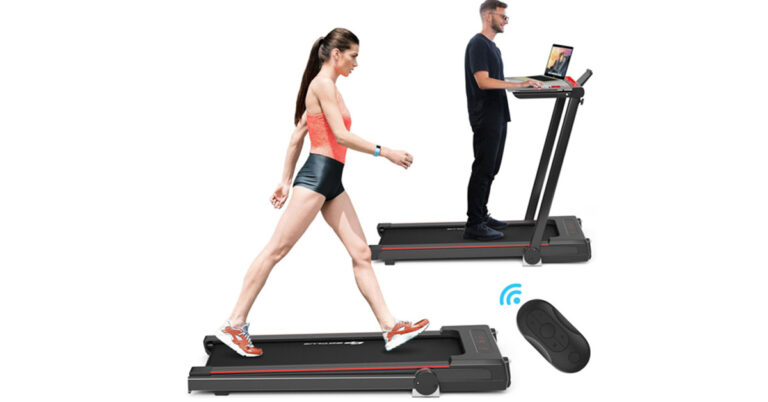
One of the standout products in Costway’s treadmill category is the 3-in-1 Folding Treadmill with Remote Control. This innovative treadmill seamlessly combines the benefits of traditional treadmills, walking machines, and working machines, providing users with a versatile exercise experience. The treadmill features a large and sturdy Acrylic tabletop, allowing users to place their computers or other materials, making it possible to work while exercising. Furthermore, users can choose between running or jogging, depending on their physical fitness levels.
The treadmill is equipped with a quiet and powerful 2.25 HP motor and a 5-layer running belt, ensuring a smooth and noiseless exercise session. This makes it ideal for home and office use, where noise reduction is crucial. Users can easily adjust the speed from 0.5 Mile/H to 7.5 Mile/H using the control board or the included remote control, providing them with full control over their workout intensity.
To enhance the user experience, Costway’s 3-in-1 Folding Treadmill offers an extra-large LCD display that provides real-time data on speed, time, step distance, distance, and calories burned. This comprehensive feedback enables users to monitor their progress effectively. Safety is a top priority, and the treadmill comes with a built-in safety lock that allows for emergency braking, ensuring users can exercise with peace of mind.
Costway understands the importance of entertainment during workouts. The treadmill features built-in speakers, allowing users to connect their electronic devices and enjoy music while exercising. Additionally, a convenient phone holder on the display lets users keep their phones in sight, making it possible to watch their favourite TV series or movies during workouts.
Brand Service
Costway takes pride in offering a comprehensive shopping experience through its Costway+ Care program. Customers can enjoy fast delivery within 3-5 days, ensuring they receive their orders promptly. The brand’s commitment to customer satisfaction is exemplified by its 24-hour customer service, providing timely assistance and addressing any concerns or queries. To further enhance customer confidence, Costway offers a 30-day return guarantee, allowing customers to return products if they are not fully satisfied. Privacy protection is also a priority, ensuring customers’ personal information is handled securely. Additionally, Costway provides product warranties, assuring customers of the brand’s commitment to quality and long-term customer satisfaction.
When it comes to making purchasing decisions, online Costway reviews play a significant role in helping customers evaluate the quality and reliability of a product. Costway, as an e-commerce platform, understands the importance of customer feedback and actively encourages customers to share their experiences through reviews. By providing a platform for customers to express their opinions, Costway allows potential buyers to make informed choices based on the collective feedback.
Conclusion
Costway’s 3-in-1 Folding Treadmill with Remote Control is a versatile and convenient exercise solution that combines the benefits of treadmills, walking machines, and working machines. With its quiet motor, adjustable speed, spacious tabletop, safety features, and entertainment options, this treadmill offers an exceptional workout experience. As a trusted e-commerce platform, Costway delivers on its brand promise of complete product ranges, high-quality items, competitive prices, and excellent customer service. Whether you’re a fitness enthusiast or a busy professional seeking a convenient exercise solution, the Costway folding treadmill is worth considering for its value and versatility.
For the latest gadget and tech news, and gadget reviews, follow us on Twitter, Facebook and Instagram. For newest tech & gadget videos subscribe to our YouTube Channel. You can also stay up to date using the Gadget Bridge Android App. You can find the latest car and bike news here.


 Step 3: Click on the arrow next to Display Adapters to expand it.
 Step 4: Right-click the graphics card and select ‘Update driver’.

 Step 2: Select ‘Advanced’ from the side menu.
 Step 3: Switch off the toggle bar for Hardware Acceleration.

 Step 2: Right-click on Discord’s process and select End Task.

 Step 3: De-select ‘Sync with computer’ and switch on the toggle bar for ‘Enable Reduced Motion’.
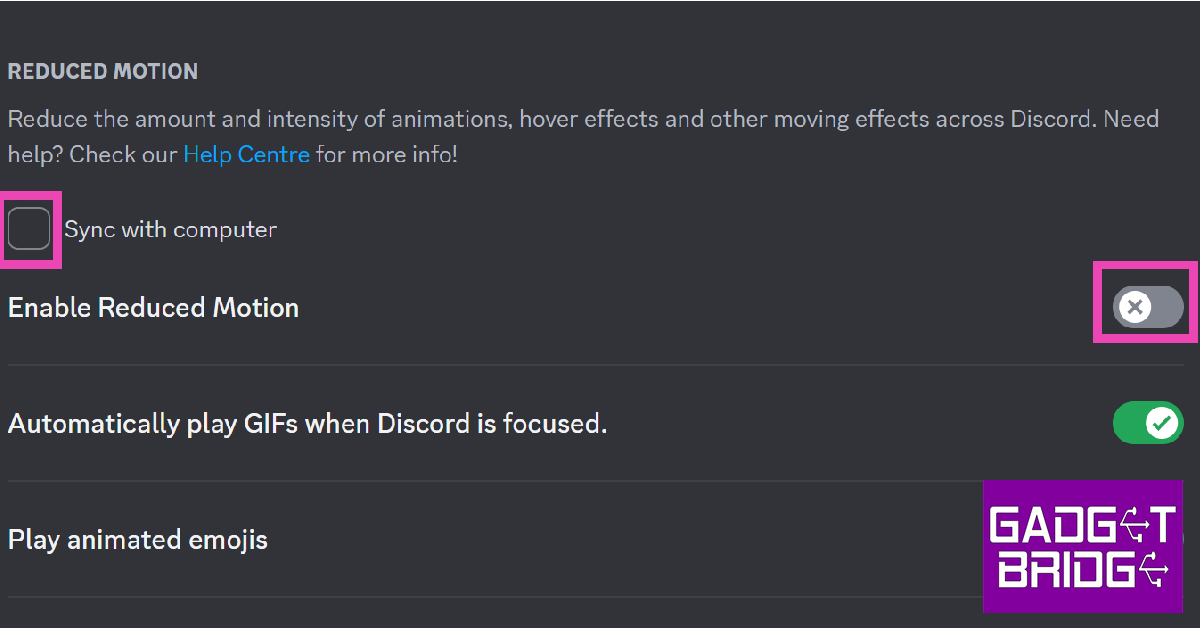 Step 4: Restart the app.
 Step 4: Go to Discord>Cache.
Step 5: Delete all the files inside the Cache folder.
Step 4: Go to Discord>Cache.
Step 5: Delete all the files inside the Cache folder.

 Users have often reported that the customised ‘Aero’ theme often creates a malfunction while streaming, often leading to the screen turning black. To make sure this is not the case with you, disable the Aero theme and check if you are still encountering the problem. Go to Settings>Appearance and choose one of the native themes for Discord.


















 Step 3:
 Step 4:
 Step 6:
 Step 3:
 Step 4:
 Step 2:
 Step 3:
 Step 4:
 Step 5: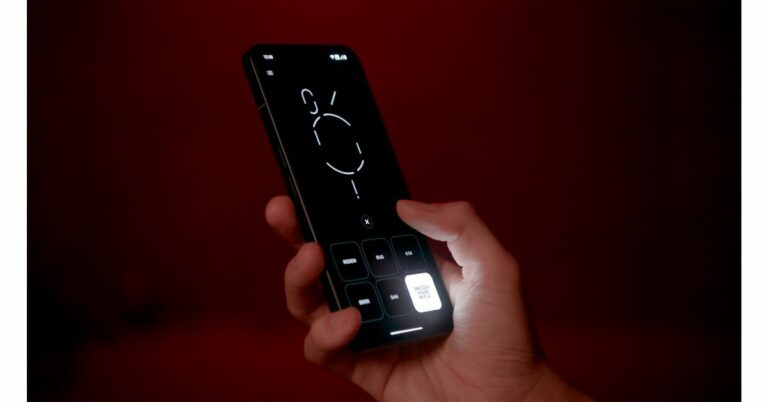






 Step 1:



 Knowing about the problems with retail insurance of mobile phones is essential to make informed decisions when purchasing coverage. One common issue is the high cost of premiums, which can sometimes be disproportionate to the value of the phone. Additionally, some retail insurance policies may have strict claim procedures or limited coverage, resulting in difficulties when filing claims. Another problem is the presence of exclusions and fine print that may restrict coverage for specific incidents or damages. Finally, some retail insurance policies may not offer comprehensive protection against all risks, leaving customers vulnerable to certain types of damage or loss. Being aware of these problems allows consumers to evaluate their options carefully and choose insurance that provides adequate coverage at a reasonable cost.