Mobile technology never stands still. As the world has moved towards digitalization, the rise of e-commerce is changing the way that consumers behave. The influence of high-end smartphones and portable devices makes online gaming more accessible. This is especially true for online casinos during their exponential growth in recent years. Just as buying physical records or DVDs became secondary when streaming and downloads upgraded the tools of choice, there are signs that physical gambling houses are now taking second place in the revolutionary tide of igaming.
In the 21st century, mobile phones are not merely communication tools. They are a plaything beyond the functional voicemail or text. One of the first revolutions in the handheld space was a game called Snake, which celebrated its 25th birthday this year. This basic pixelated piece of software was an absolute breakthrough despite what now seems like primitive beep sounds as the player steered the trail of the serpent to collect bits of cellular food. It was the dawn of a new age in gaming that would burst through barriers and change expectations of what a mobile phone could do.
A quarter of a century later, mobile gaming can now boast about three billion players globally. The rise is certainly linked to an explosion in the number of casual and professional gamers, the rise of esports from a niche industry to a major disruptor, and a surge in the number of viewers watching live streams of different genres. Digital consumers now use their phones for literally anything from shopping to parking, from booking restaurant tables to online wagering.
It is telling to note that out of all the mobile games out there, online casinos grab the most attention span with an average of 22 minutes of gameplay in a recent study. The beauty of the digital experience is that, unlike traditional land-based gambling houses where space is more impersonal, there is no pressure of being shifted or pressured by other gamers. This is further encouraged by the fact that many mobile users get the chance to try out every casino slot found on the website and may even have access to others that are not available on the desktop platform.
Moreover, new research shows that at least 510 million consumers are likely to take up 5G in 2023. The next wave of 5G users has high expectations for performance, especially on network coverage. This is important for online players who need to avoid the issues of buffering. Network outages have always been somewhat of a drawback for mobile games in the past. Lagging is a no-no in a world that moves this fast.
The rise of 5G connectivity will provide extremely reliable networks, as internet speeds range anywhere from 200 megabits per second to ten gigabits per second. The days of Snake will be well and truly like another Jurassic Age as 5G speeds can be up to 100 times faster than 4G in the right conditions. Players will notice a significant change when they use the latest technologies as those pictures will show pixels at a much higher contrast – like 4k and 8k.
Smartphones are easier to tap into than a tablet, PC, or laptop and the gaming on-the-go lifestyle is key to access. There is a huge market in North America with an increasing trend toward custom online slots due to the rapid scope of personalization by consumers. Ontario is now the largest licensed online gaming market in the region, presenting a significant opportunity for both gaming operators and related service providers.
Many games are now offering instant-play versions, which means there is no need to download and install apps on a smartphone to start playing. Players can use the mobile browser and choose a favorite online casino. Additionally, the ease of registering an account with smartphone devices only takes a few minutes. In a world of superfast broadband, immediate access and convenience is something that will be at the forefront of every single decision daily where entertainment is concerned. When it comes to usage, developers ensure an easy-to-follow structure for handheld offers. Players can find their favorite game with a one-click process.
Another big draw to the smartphone gaming crowd is the different sets of bonuses. These bonuses range from welcome offers to low-wagering offers and no-deposit offers to VIP programs. There are also free spins which is an attraction for those that can play for fun on the move. With such numerous perks, more people are turning to mobile gambling, especially those new players who are still getting to grips with the format.
Security is also less of a problem as long as the players are responsible for following protocols. Players do not have to enter passwords to make transactions due to its uniquely designed software. and similar currency. No longer do players need to carry the currency of dollars when payments are fast, safe and convenient. In fact, cryptocurrency options mean that a player can enjoy the game without any fretting over the possibility of fraud. Mobile casinos also use industry-standard 128-bit SSL encryption technology on their sites meaning that personal security is paramount.
Reputable casinos are generally audited by a third party. This ensures that the site is playing by the rules as they are subject to independent testing.
Mobile certainly has the tools to enjoy a high level of customer support. Generally, mobile platforms tend to be more responsive when help is needed, providing swift access to customer service via chat, telephone or other messenger services. Players merely using desktop services will not always have that fast go-to assistance at the touch of a button.
The rise of mobile gaming is an exciting development that will only grow in layers, depth and usability as the advance of augmented reality, VR and machine learning become ever more transparent. Smartphones are now multimedia entertainment devices. For online casinos, the possibilities are endless as artificial intelligence becomes a human need in the real world.
For the latest gadget and tech news, and gadget reviews, follow us on Twitter, Facebook and Instagram. For newest tech & gadget videos subscribe to our YouTube Channel. You can also stay up to date using the Gadget Bridge Android App. You can find the latest car and bike news here.
With the introduction of the Full HD Smart LED Home Projectors X1 and X2 in India, ViewSonic has increased the range of projectors available in its X series. These projectors are ViewSonic’s first high-brightness, smart, lamp-free home projectors.The new X-series LED projectors, the X1 and X2, are suited for all home entertainment areas. With a 30,000-hour lifespan and 3rd generation LED technology, these projectors offer brighter images and rich colours. Additionally, both projectors provide vivid and true-to-life images in Full HD quality that are unaffected by ambient light thanks to their 125% Rec. 709 wide colour gamut.The projectors have a built-in Harman Kardon speaker that adapts to the increased audio experience, providing ideal home viewings of movies, live sports, and for playing video games. Both projectors now provide enhanced features and technologies that replace the need for regular lamp replacement and dangerous mercury with 3,100 LED Lumens of brightness and high-resolution projection.The ViewSonic X1- Smart LED home projector model can be mounted on the ceiling in living rooms or recreational areas to better utilise the space. ViewSonic’s X2 Short Throw Smart LED Home Projector, which can be placed on a tabletop and projects a 100″ big screen from just 1.53 metres away, is ideal for tiny spaces. The area is actually transformed into an immersive entertainment environment at home thanks to these visual solutions and the high-quality audio provided by two Harman Kardon speakers.An incredible feature of the X1 is a lens shift control knob that allows for vertical image modification. Due to its 1.3x optical zoom lens, it also provides flexibility when mounting the projector on the ceiling. To achieve a large image without interfering with existing interior designs, including hanging lights or support beams, users can select a setup place within a range.Both the X1 and X2 projectors offer a quick and easy setup in the convenience of one’s own home in addition to transforming the area into a little movie theatre. Both projectors have an auto keystone, H/V keystone, four corner adjustments, and deliver properly formed images from the top and side views.Additionally, the screen mirroring capabilities make it simple to stream content from mobile devices to a large screen. The projector also has a USB-C port that can be used to connect a gaming console, providing a wide range of entertainment possibilities.Additionally, the projector has a tonne of capabilities like simple Bluetooth connectivity and Wi-Fi connection for private movie nights or music streaming directly from your smartphone. This makes video streaming easier than before.
For the latest gadget and tech news, and gadget reviews, follow us on Twitter, Facebook and Instagram. For newest tech & gadget videos subscribe to our YouTube Channel. You can also stay up to date using the Gadget Bridge Android App. You can find the latest car and bike news here.
The Oceanic+ app is now available for the Apple Watch Ultra, transforming Apple’s toughest watch into an effective diving computer. With the all-new depth gauge and water temperature sensors on Apple Watch Ultra, Oceanic+, a product developed by Huish Outdoors in partnership with Apple, enables recreational scuba divers to take the watch they wear every day to previously unreachable depths — up to 40 metres, or 130 feet, to be exact.Anyone seeking to dip a toe into the adventures that await in the undersea world can use Oceanic+ to help them. The software works in tandem with Apple Watch Ultra to handle all of the intricate calculations needed to safely explore the ocean while providing clear, basic cues and instructions before, during, and after a dive.With an iPhone 8 or later, an Apple Watch Ultra running watchOS 9.1, and an iPhone SE (2nd generation) or later running iOS 16.1, you can use Oceanic+.Both the companion iPhone app and the Oceanic+ app for Apple Watch Ultra offer all of the essential functions of a cutting-edge dive computer, as well as robust dive planning and a thorough post-dive experience. Recreational divers now have a more practical, accessible device with all the features they already know and love from Apple Watch Ultra.Users can enter their surface time, depth, and gas in the dive planner, and Oceanic+ will compute their No Deco (no-decompression) time—a measurement used to establish a time restriction for a diver at a specific depth. Dive conditions, such as tides, water temperature, and even recent information from the community, including visibility and currents, are also incorporated into the planner. After a dive, customers will automatically see data, such as their GPS entry and exit positions, as well as a summary of their dive profile, appear on their Apple Watch Ultra. Additional details are available in the Oceanic+ iPhone app’s summary, which also includes graphs showing the depth, temperature climb rate, and no-decompression limit as well as a map of the entry and exit points.One of the most user-friendly aspects of Oceanic+ on Apple Watch Ultra, according to the company, is the haptic feedback. This is a hardware and software design achievement that enables the watch to tap users on the wrist through a series of vibrations, enabling divers to feel notifications underwater — even through a wetsuit that is 7mm thick.The Oceanic+ app also has other features, such as no-fly time, surface time, rapid access to the dive planner, dive settings, current elevation, maximum elevation permitted, and a quick access button back into the app, that provides users with crucial information and resources at a glance. Users may track and compare every aspect of their dives—from preparation to the initial jump into the water to the initial step back onto dry land—and share their experiences with other divers directly from the app.
Pricing and Availability
You can get the Oceanic+ app for Apple Watch Ultra on the App Store. The fundamental plan is cost-free and offers numerous capabilities that are common to all dives, such as depth and duration, as well as tracking the most recent dives. Oceanic+ costs INR 969 per month or INR 7,700 per year to get decompression tracking, tissue loading, the location planner, and an unlimited logbook capacity. Family Sharing, which provides access to up to five individuals, is additionally offered for INR 11,900 per year.
For the latest gadget and tech news, and gadget reviews, follow us on Twitter, Facebook and Instagram. For newest tech & gadget videos subscribe to our YouTube Channel. You can also stay up to date using the Gadget Bridge Android App. You can find the latest car and bike news here.
Reading an article online can be pretty distracting. Websites these days are full of pop-ups and annoying ads that severely hinder the reading experience. There’s also the temptation to quickly check your social media feed while you’re halfway through an article. Luckily, there are several ways to save a webpage on your device. This way you can read it offline later, without any distractions. This also comes in handy when you want to save an article to read when you’re commuting to work. In this article, we bring you the 10 easy ways to download a complete webpage to read offline later.Read Also: How to create a Whatsapp group call link?
In This Article
Which method should you use?
Your choice of method when it comes to downloading a webpage to read offline later should depend on the device you’re using. Popular web browsers like Google Chrome, Safari, Mozilla Firefox, and Microsoft Edge offer the option to save webpages across all platforms. Alternatively, you can use them to save a webpage as a PDF.
If your web browser does not offer the option to save a webpage as a PDF or HTML file, you can choose to complete the task using a variety of third-party options. Apps like Raindrop and Instapaper work amazingly well when it comes to bookmarking and saving webpages to read later. Third-party tools like PDF24 Tools and CloudConvert can turn any webpage into a PDF file.
Save the webpage in Google Chrome
Google Chrome allows users to save an entire webpage locally on their computer. In order to download a complete webpage using Chrome, simply click on the ellipses (three dots) at the top right corner of the browser and move your cursor to ‘More Tools.’ Click on ‘Save page as…’ to save the entire webpage on your computer. You can also press ‘Ctrl+S’ to quickly save a webpage.
Save the webpage in Mozilla Firefox
Like Chrome, Mozilla Firefox also lets you save a webpage. In order to save a webpage, click on the browser menu and select ‘Save page.’ In the following box, save the page on your desktop as an HTML or text document.
Download a webpage as a PDF file
Downloading a webpage as a PDF has its own advantages. Firstly, the PDF format is easier to read on e-book readers like Kindle, compared to an HTML document. You can also easily share a PDF file with your friends. The simplest way to save a webpage as a PDF file is by clicking on the ellipses (three dots) at the top right corner of the Chrome window and selecting ‘Print.’ In the pop-up window, click on ‘Destination’ and select ‘Save as PDF.’ You can also press Ctrl+P to trigger the print window.
Use the Pocket app
If you need to save a webpage on your smartphone, there is no better app than Pocket. Pocket lets you easily download webpages on your smartphone and saves them for you to read later. With Pocket, you can save any news, webpage, story, article, or video from any publication and read it later. On top of that, Pocket also gives you the option to read saved articles. In order to save a webpage on Pocket, simply copy the URL and paste it into the app.
Use Safari Reading List on iPhone
The Safari browser on iPhone gives its users a quick option to save a webpage for later viewing. You can save a page by tapping on the ‘Share’ icon and selecting ‘Add to Reading list.’ However, Safari does not save web pages offline by default. This means you will need the internet to access the web pages on your reading list. In order to download webpages for offline viewing, go to Settings>Safari and select Automatically save offline.
Use Safari Reading List on Mac
You can also save a webpage on a Mac using the Reading List. First, click on Preferences and go to the Advanced tab. Click the checkbox for ‘Save articles for offline reading immediately.’ To add a page to the Reading List, click on the plus icon next to the URL box. To access the Reading List, click the sidebar button and select the spectacles icon for Reading List.
Use the ‘Save Page WE’ extension for Chrome
If you want to be able to save an entire page with just a few clicks, download the ‘Save Page WE’ extension for Google Chrome. Once you’ve added the extension to your web browser, simply open the webpage you want to save and click on the ‘extensions’ icon next to the URL box. Select ‘Save Page WE’ and click on ‘Save Complete Page.’
Use PDF24 Tools
Step 1:Go to https://tools.pdf24.org/en/ and click on All tools.
Step 2: Scroll down and select Webpage to PDF.
Step 3: Enter the link to the webpage in the text box.
Step 4: Hit Convert to PDF.
Step 5: Once the PDF is ready, hit Download.
Use CloudConvert
You may know CloudConvert as the website that converts files from one format to another. Typically, this website is used to convert video, audio, and image formats. A lesser-known fact about CloudConvert is that it can also be used to save a webpage as a PDF file. To carry out this task, click the ‘Tools’ option next to the website banner and select ‘Save Website as PDF’. The rest is easy. Paste the website URL in the download box, hit Enter, and select ‘Capture Website’. Hit the Download button in the following window.
Use AllinPDF
AllinPDF is another great tool to download a complete webpage as a PDF for reading offline later. Once you paste the website URL in the download box, select PDF as the target file format. Once the PDF has been created, you can choose to download it to your device or preview it in a web browser.
Frequently Asked Questions (FAQs)
How do I save a website offline on my device without using an app?
You can save any website on your device as a PDF by tapping the ellipses on the Chrome browser, selecting Print, and choosing Save as PDF in the Destination section.
Are there any good tools to convert a website to a PDF?
Websites like PDF24 Tools, CloudConvert and AllinPDF make it simple to save a web page as a PDF file.
Are there any good extensions to save a website for offline reading?
The Save Page WE extension for Chrome allows users to save a website offline with a single click.
How do I bypass a paywall on a website?
If you want to read an article without paying for a subscription, enter its link in the Wayback Machine and view one of the snapshots.
How do I add a webpage to my Reading List on iPhone?
These are the top 10 easy ways to download a complete webpage to read later offline. We’ve covered all the different ways to download a webpage on different web browsers like Chrome, Mozilla, and Safari across different platforms like Windows, iOS, Mac, and Android. If you like using some other extension or app to save web pages for offline viewing, let us know in the comments!
The 2022 App Store Awards were announced by Apple today. According to the company, 16 games and applications that encouraged people to participate in the world more intimately, use their ideas more freely, and maintain relationships with friends and family have been the highlight.The winners of this year’s competition reflect an international developer community that is diverse and whose apps and games have been chosen by Apple’s worldwide App Store editorial team for providing outstanding experiences and having a significant cultural effect.While announcing the winners of the 2022 App Store Awards Tim Cook, Apple’s CEO said, “This year’s App Store Award winners reimagined our experiences with apps that delivered fresh, thoughtful, and genuine perspectives. From self-taught solo creators to international teams spanning the globe, these entrepreneurs are making a meaningful impact, and represent the ways in which apps and games influence our communities and lives.”The countless options found in the App Store and Apple’s ecosystem of devices are reflected in this year’s winners. Fitness tracker Gentler Streak helps users balance exercise and rest to maintain a healthy lifestyle, and innovative social media tool BeReal offers users a real peek into the lives of their family and friends. With best-in-class Apple Pencil compatibility, GoodNotes 5 elevates digital note-taking to a new level. ViX’s creators push Spanish-language stories to the forefront of entertainment, while MacFamilyTree 10’s magnificent visual family trees and collaboration with loved ones throughout the world inspire a deeper understanding of genealogy.The business claims that Apex Legends Mobile offers the intense, popular battle royale game to iPhone. Moncage’s enduring riddles masterfully manipulate perspective, and Inscryption’s immersive card battler captivates players with its avant-garde storytelling. El Hijo, a story set in the Wild West, is a cleverly made stealth game that looks fantastic when played with Apple TV on a large screen. Players can manage the most significant esports leagues in the world in League of Legends Esports Manager, a unique life simulation game from Apple Arcade, and Wylde Flowers, a delightful world of colourful characters and magical spells.
2022 App Store Award Winners
Apps
iPhone App of the Year: BeReal, from BeReal.
iPad App of the Year: GoodNotes 5, from Time Base Technology Limited.
Mac App of the Year: MacFamilyTree 10, from Synium Software GmbH.
Apple TV App of the Year: ViX, from TelevisaUnivision Interactive, Inc.
Apple Watch App of the Year: Gentler Streak, from Gentler Stories LLC.
Games
iPhone Game of the Year: Apex Legends Mobile, from Electronic Arts.
iPad Game of the Year: Moncage, from X.D. Network Inc.
Mac Game of the Year: Inscryption, from Devolver.
Apple TV Game of the Year: El Hijo, from HandyGames.
Apple Arcade Game of the Year: Wylde Flowers, from Studio Drydock Pty Ltd.
China Game of the Year: League of Legends Esports Manager, from Shen-zhen Tencent Tianyou Technology Ltd.
Cultural Impact WinnersApple’s App Store editors chose five Cultural Impact winners in addition to honouring the top apps and games for Apple devices that have had a significant cultural impact. The winners of this year’s contest inspire users to express their feelings more fully, build genuine connections with people, honour their ancestry and the generations that came before them, and think about how to improve the world now.
How We Feel from the How We Feel Project, Inc.
Dot’s Home from the Rise-Home Stories Project
Locket Widget from Locket Labs, Inc.
Waterllama from Vitalii Mogylevets
Inua – A Story in Ice and Time from ARTE Experience
The ‘Activate Windows’ watermark at the bottom right corner of your screen can be an annoying distraction while working on your computer, especially when you want to record your screen. While watching movies, having the watermark in your view can keep you from fully enjoying what you’re watching. The ‘Activate Windows’ watermark pops up when the product key is incompatible with the Windows you are using on your desktop. It can also appear when a product key has been used several times. Luckily, there are some easy ways to fix this issue. In this article, we bring you simple and legit ways to remove the ‘Activate Windows’ watermark on Windows 10.Read Also:WhatsApp is rolling out the ability to share contact cards
In This Article
Use the Product Key
This is the simplest and the most legitimate way to remove the ‘Activate Windows’ watermark on your desktop. When you purchase a Windows OS, you get a product key for reinstallation purposes. This ensures that the Windows OS you are using is legitimate. Here’s how you can use the product key to remove the ‘Activate Windows’ watermark. Step 1: Open Settings on your desktop and select ‘Update and Security.’Step 2: Click on ‘Activation’ from the side menu and select ‘Change product key.’Step 3: Enter the product key and hit Next.Reinstall Windows 10 on your desktop. Restart your computer once the OS has been installed. The ‘Activate Windows’ watermark will be removed.
Use Ease of Access
Step 1: Open Settings on your desktop and select ‘Ease of Access.’Step 2: Select ‘Make the computer easier to use.’Step 3: Click the box for ‘Remove background images (where available).’Step 4: Apply the changes.
Disable Windows 10 Tips
Step 1: Open Settings and go to ‘System.’Step 2: Select ‘Notifications & actions’ from the side menu and turn the toggle bar off for ‘Get tips, tricks and suggestions as you use Windows’ and ‘Show me the Windows welcome experience…’
Use the Notepad trick
Step 1: Open Notepad and paste the text below.
@echo off
taskkill /F /IM explorer.exe
explorer.exe
exit
Step 2: Click on ‘File’ and select ‘Save As’. Title the file as ‘Activation.bat’ and select ‘All files’ as the file type. Save the file on the desktop.Step 3: Right-click on the file and select ‘Run as administrator.’Read Also: Zebronics 3-in 1 ZEB-Sound Bomb X1 launched in India
Conclusion
These are the simplest and most legitimate ways to remove the ‘Activate Windows’ watermark on Windows10. You can also use certain third-party tools that specialise in removing watermarks, but that won’t be necessary as long as you can fix the issue by tweaking some simple settings. If you found this article helpful, let us know in the comments!For the latest gadget and tech news, and gadget reviews, follow us on Twitter, Facebook and Instagram. For newest tech & gadget videos subscribe to our YouTube Channel. You can also stay up to date using the Gadget Bridge Android App. You can find the latest car and bike news here.
An estimated 487 million WhatsApp users’ mobile number database has purportedly been listed for sale on a hacking platform. According to reports, the hacker utilised a method called scraping to gather the personal data of these WhatsApp users. Phone numbers that have been leaked could be used for fraud, phishing, impersonation, and marketing.According to a new database, these numbers are reported to belong to WhatsApp users in 84 different countries. According to reports, the leak contains user personal information such as Twitter handles, usernames, account names, locations, phone numbers, and email addresses.Cybernews reported, “Someone is allegedly selling up-to-date mobile phone numbers of nearly 500 million WhatsApp users. A data sample investigated by Cybernews likely confirms this to be true.”As per the report on November 16, an actor advertised on a well-known hacking site that they were offering a database with 487 million WhatsApp user mobile numbers as of the year 2022. Data on WhatsApp users from 84 different countries is purportedly included in the file. Over 32 million US user records, according to the threat actor, are included.It is reported that the residents of Egypt (45 million), Italy (35 million), Saudi Arabia (29 million), France (20 million), and Turkey make up a sizable portion of the world’s phone numbers (20 million). Over 11 million UK citizens’ phone numbers, as well as close to 10 million Russians’, are reportedly included in the information for sale.The threat actor claimed to be selling the US dataset for $7,000, the UK dataset for $2,500, and the German dataset for $2,000, according to Cybernews.The seller of WhatsApp’s database gives Cybernews researchers access to a sample of the data upon request. The shared sample included 817 US user numbers and 1097 UK user numbers. In its investigation, it found out that every single one (number in the sample) of them is actually a WhatsApp user.All the numbers in the instance are those of active WhatsApp users but it has not been disclosed yet how they came into possession of the database. But scraping could be used to get user information for WhatsApp, which is against the service agreement.
For the latest gadget and tech news, and gadget reviews, follow us on Twitter, Facebook and Instagram. For newest tech & gadget videos subscribe to our YouTube Channel. You can also stay up to date using the Gadget Bridge Android App. You can find the latest car and bike news here.
On December 1, the Xiaomi 13 series will make its debut in China. The Xiaomi 13 and Xiaomi 13 Pro will be part of the portfolio that is likely to be powered by the recently announced Qualcomm Snapdragon 8 Gen 2 SoC. Besides this, the tech giant will also announce the next iteration of its OS which is MIUI 14. Moreover, the company will also launch Xiaomi Buds 4, and Xiaomi Watch S2.The Xiaomi 13 series will be introduced in China at a launch event scheduled for December 1. According to the Weibo post , the launch event will begin at 7 PM (4:30 PM IST) in its home market. The company has announced that the basic Xiaomi 13 and Xiaomi 13 Pro would be part of this forthcoming flagship lineup. Together with the Xiaomi 13 series, the Xiaomi Watch S2 and Xiaomi Buds 4 in-ear noise-cancelling true wireless stereo (TWS) earphones are also scheduled to make their debut in China.Moreover, this launch event will also feature the introduction of MIUI 14 which is most likely to power the upcoming smartphone lineup.It is known that these devices use a Snapdragon 8 Gen 2 SoC. Xiaomi has kept the features and aesthetics of these phones a secret. But it has been announced that the Xiaomi 13 series would have premium OLED displays with a 1.61mm slim bottom bezel. According to reports, the Xiaomi 13 series has a curved AMOLED display with 2K resolution. Additionally, a Leica-tuned camera module is rumoured to be included in Xiaomi’s 13 series of smartphones. The selfie camera and triple back cameras will be housed in a hole-punch cutout in the centre of the display, according to leaked renders of the smartphone.According to the report, both phones could be powered by MIUI 14, which is based on Android 13.According to a tipster named Digital Chat Station the recently released Snapdragon 8 Gen 2 SoC will run the forthcoming devices. It supports INT4 and Wi-Fi 7 networking and has real-time ray tracing for gaming. As per speculations, the Xiaomi 13 Pro will have a 6.65-inch curved display and come in 256GB and 512GB storage options.
For the latest gadget and tech news, and gadget reviews, follow us on Twitter, Facebook and Instagram. For newest tech & gadget videos subscribe to our YouTube Channel. You can also stay up to date using the Gadget Bridge Android App. You can find the latest car and bike news here.
WhatsApp recently rolled out a feature to create a group call link across all mobile devices. A WhatsApp group call link allows people to join the call at their own convenience, even after the call has started. Earlier, it was not possible for people to join a group call while it was ongoing. When you join a group call using a link, you can leave and rejoin whenever you please. In this article, we show you how to create a WhatsApp group call link.Read Also: Zebronics 3-in 1 ZEB-Sound Bomb X1 launched in India
In This Article
Here’s how you can create a WhatsApp group call link
Step 1: Open WhatsApp on your smartphone and go to the ‘Calls’ tab.Step 2: Tap on ‘Create call link.’Step 3: Choose whether you want to make an audio or video call.Step 4: You can share the call link with your contacts on WhatsApp or social media and chat platforms. You can also copy the link and post it anywhere you want the people to see.
Bonus tip
How to create a community on WhatsApp
Step 1: Open WhatsApp on your smartphone and swipe to the Community tab on the far left.Step 2: Tap on ‘Start your Community.’Step 3: Enter the Community name and Community description in the relevant fields. You can also upload an image as the Community thumbnail. Tap the forward arrow icon once you’re done.Step 4: After entering the Community name and description, you can add pre-existing groups or create a new group. Tap on ‘Add an existing group’ to add groups that you’re an admin of.Step 5: Tap the tick icon to create the Community.Read Also: Top 10 free hidden games on Google for you to play
Conclusion
This is how you can create a WhatsApp group call link. The group call URL has 22 character identifiers, so no one can guess the call link. Anyone with access to the link can join your call, so make sure you only give it out to people you know. Posting it on public status updates/stories can give access to people you don’t want on the call. Unused links expire after 90 days. Currently, call links only work on mobile devices, but WhatsApp will be looking to roll out this feature on its desktop app and web page too.For the latest gadget and tech news, and gadget reviews, follow us on Twitter, Facebook and Instagram. For newest tech & gadget videos subscribe to our YouTube Channel. You can also stay up to date using the Gadget Bridge Android App. You can find the latest car and bike news here.
Garena Free Fire is a battle royale game with regular awards and tournaments to keep players interested. If you play Garena Free Fire, you should be aware of the redeem codes that are released on a daily basis. However, because the battle royale game is banned in India, players from other countries can use the Free Fire Redeem codes daily. If you’re unfamiliar with the Garena Free Fire redeem codes or don’t know how to get them, we’ve put together a step-by-step guide to help you redeem them. Check out Garena Free Fire Redeem Codes for November 29.The Free Fire redeem codes are a great way to get free stuff. These are 12-digit codes that contain alphabets and numbers, as well as an expiration date and time. Because the Garena FF redeem codes cannot be used more than once, you should hurry to the redemption page to claim your free reward before someone else does. To get a free reward, all you have to do is go to reward.ff.garena.com/en, which is the official redemption page. Also, keep an eye on this space for daily updates on Garena Free Fire redemption codes and rewards.
In This Article
Garena Free Fire Redeem Codes Today 29 November 2022
FF11NJN5YS3E
MSJX8VM25B95
SARG886AV5GR
J3ZKQ57Z2P2P
W4GPFVK2MR2C
MQJWNBVHYAQM
RRQ3SSJTN9UK
FF1164XNJZ2V
X99TK56XDJ4X
FF11WFNPP956
WCMERVCMUSZ9
8F3QZKNTLWBZ
FF7MUY4ME6S
How to Get Free Fire Redeem Codes for Garena on November 29?
29 November 2022 Amazon Quiz has gone live. Customers from different parts of the country are participating in the daily quiz. The quiz begins from 12 AM to 11:59 PM. Those participating in the quiz can win exciting prizes by answering all the questions correctly. Today participants have a chance to win a Rs 5,000 Amazon Pay Balance.Amazon quiz brings an opportunity for its customers to win Amazon Pay Balance ranging from Rs 1,000 to Rs 50,000. The Quiz can be played from 12 AM to 11:59 PM. The e-commerce platform brings a fresh quiz on a daily basis which consists of five questions related to general knowledge and current affairs. The participants need to answer all the questions correctly and their names will be selected for a lucky draw. The winner will be announced at the end of the month.One wrong answer could eliminate you from the quiz. If you manage to answer all the questions correctly you can stand a chance to win a Rs 5,000 Amazon Pay Balance today. Only app users are eligible to participate in the Quiz. Check Out 29 November 2022 Amazon Quiz Answers.Amazon Quiz Today Prize – Rs 5,000Amazon Pay BalanceQuiz Date – 29 November 2022Daily Timing – 12 AM to 11:59 PMWinner Announcement – Today 12 PM
In This Article
Amazon Quiz Answers Today 29 November 2022
Question 1: Cochin International Airport halts flight operations twice every year to allow smooth passage for whom?Answer: God Padmanabhaswamy
Question 2: Which famous painting by Vermeer was recently attacked by climate activists at The Hague?
Answer: Girl With a Pearl Earring
Question 3: A Precision Air passenger plane crashed into Lake Victoria in which country?
Answer: TanzaniaQuestion 4: Where is this mosque located?Answer: IndonesiaQuestion 5: Which was the first mission to mercury?
Answer: Mariner 10
How To Play Amazon Quiz
Only app users are eligible to play the Amazon quiz every morning from 12 AM to 11:59 PM. The quiz is not available on the desktop. For those who are unaware of how to play the Amazon quiz below are the steps, you can follow to take the quiz.
Firstly download the Amazon app from Google Play Store or App Store
Now fill in the required information through the Sign Up option.
You need to log in to the Amazon app and scroll down on the home screen to find the Amazon Quiz banner.
Tap on the Amazon Quiz banner and tap on the Start button to start the Quiz.
Now you will get 5 questions and you need to answer them correctly. One wrong answer will eliminate you from the Quiz.
After answering all the questions correctly you are now eligible for a Lucky Draw.
The winner’s name will be announced today at 12 PM.
The chatting experience has improved significantly as a result of WhatsApp’s constant release of new features and updates. Contact cards sharing on Windows beta is now available for WhatsApp users a few days after releasing the ability to create polls from within the chat share sheet.According to a report by WABetaInfo WhatsApp is already rolling out a new update to some users on the Microsoft Store. These users can now share contact cards directly within the chat share sheet where you can already create polls and send files thanks to this upgrade.In this report, WABetaInfo also included a screenshot. The entry point “Contacts” will appear, as shown in the screenshot, if the feature is already turned on for your WhatsApp account. You can send a contact card using this feature, and the recipient can easily add it to their address book.Image Courtesy: WABetaInfoFollowing the installation of the WhatsApp beta for Windows 2.2247.2.0 update available on the Microsoft Store, the ability to share contact cards has been made accessible to certain beta users, and it will be made available to more beta testers over the next few days.Besides this WhatsApp has also released the ability to create polls to everyone on the latest WhatsApp Desktop update. Following a Facebook statement by Mark Zuckerberg, all users of WhatsApp for iOS and Android now have access to the ability to create polls. Within a few weeks following that official announcement, the functionality was gradually made available to all mobile users, but it still needed to be made available to all desktop users.Everyone using the most recent version of WhatsApp Desktop can now make polls, it appears that the feature has now been broadly rolled out after being made available on WhatsApp beta for Windows.
For the latest gadget and tech news, and gadget reviews, follow us on Twitter, Facebook and Instagram. For newest tech & gadget videos subscribe to our YouTube Channel. You can also stay up to date using the Gadget Bridge Android App. You can find the latest car and bike news here.
Sharing a location is a very easy task for Google Maps users. The app allows you to look up any location on the map and share it directly with your friends. But what if the location you want to share is an unnamed spot on a road? By ‘dropping a pin’ you can mark any spot on the mark and get to know its exact coordinates. You can even share the pin with your friends. In this article, we bring you the simplest way to drop a pin on Google Maps on mobile and desktop and share it with your friends.Read Also:Samsung Galaxy Buds2 Pro Review: Great fit, even better ANC!
In This Article
Drop a pin on Google Maps for desktop
Step 1: Go to https://www.google.com/maps on your web browser.Step 2: Search for the location you want to pin on the map.Step 3: Click on the exact location that you want to mark on the map. You will see a small grey button show up on the location. This is the location ‘pin.’ Click on this pin to know the coordinates of the place. Step 4: Right-clicking on the pin will give you further options like finding the directions to and from the place. You can also drop a pin to add your business to the map. You can also save this location on a personal list.
Share a pinned location using Google Maps for desktop
Once you drop the pin, click on it and select the share option from the location card that comes up on the screen. In the following window, you will be able to copy the Google Maps link to the location or share it directly through Facebook, Twitter, and Gmail.
Drop a pin on the Google Maps app
Step 1: Open the Google Maps app on your smartphone. Step 2: Search the location you want to pin on the map. Step 3: Long press on the location to drop a pin on it.Step 4: You will be able to see the coordinates of the location where you dropped the pin. You can also share the pinned location directly from the app by tapping the share option.Read Also: Which is the cheapest Tesla model you can buy in 2022?
Conclusion
This is how you can drop a pin on Google Maps for mobile and desktop and share it with others. If you’re using Google Maps on a desktop you can send a pinned location to your phone by selecting the ‘Send to phone’ option from the side menu. You will need to enter your phone number if you want to receive the pinned location via text. You can also mail yourself the pinned location.For the latest gadget and tech news, and gadget reviews, follow us on Twitter, Facebook and Instagram. For newest tech & gadget videos subscribe to our YouTube Channel. You can also stay up to date using the Gadget Bridge Android App. You can find the latest car and bike news here.
Zebronics introduced the ZEB- Sound Bomb X1 in India. It is a 3-in-1 device that combines wireless Bluetooth earbuds with a charging case, a wireless Bluetooth speaker, and an integrated torch. In addition to this, the device has 13mm drivers in the earbuds. While the wireless Bluetooth speaker is incorporated within the charging case.
In This Article
Zebronics Zeb-Sound Bomb X1 price in India and availability
ZEB- Sound Bomb X1 price in India has been set at Rs 1,399. Both Amazon and the company’s website have the item for sale. The earphones come in three colours: white, blue, and black
Zebronics Zeb-Sound Bomb X1 features
The Sound Bomb X1 is a multipurpose, 3-in-1 device that can be used for a variety of purposes and is housed in water-resistant housing.The Zebronics Zeb-Sound Bomb X1 earbuds contain 13mm drivers that provide crystal-clear sound, and they have a playback time of up to 30 hours when they are charged. Up to 19 hours of listening are provided by the wireless Bluetooth speaker that is incorporated within the charging case. The earbuds are splash-proof, have touch controls, an integrated microphone, and have strong sound and bass.The Zebronics Zeb-Sound Bomb X1 charging case has extra functions and functionality integrated in it. The case comes with a 36mm dynamic driver, and is powered by the charging case’s internal battery. The case has a USB Type-C connector that may be used to charge it. Additionally, it has an LED torch and a built-in Bluetooth speaker.While commenting during the launch, Mr. Pradeep Doshi, Co-Founder and Director at Zebronics said, “Zebronics has always put its effort in understanding market needs for unique and quality products and thereby bringing in the best in class lifestyle accessories. Sound Bomb X1 is a multifunctional 3-in-1 gadget that caters to the audience having varying requirements all shelled in a splashproof case. Overall, the Zebronics’ Lifestyle Accessories product range will have more add-ons in the time to come and like our other product categories, we shall strive in this to be ‘Always Ahead’”.
For the latest gadget and tech news, and gadget reviews, follow us on Twitter, Facebook and Instagram. For newest tech & gadget videos subscribe to our YouTube Channel. You can also stay up to date using the Gadget Bridge Android App. You can find the latest car and bike news here.
Almost every Google user is familiar with the T-rex game that comes up on Chrome every time you get disconnected from the Internet. Not many people know that you can play several other free hidden games on Google. These games are scattered across Google Search, Google Earth, Google Maps, and other Google services. In this article, we bring you the top 12 free hidden games you can play on Google.Read Also:Samsung Galaxy Buds2 Pro Review: Great fit, even better ANC!
In This Article
Tic-Tac-Toe
Tic-Tac-Toe needs to introduction. Also known as Noughts and Crosses, this game is played between two players. Each player needs to create three successive noughts or crosses on a 3×3 grid without letting their opponent do it first. You can play this game on Google by simply searching for ‘tic tac toe.’ Google will match you against an AI and give you the option to play in several difficulty levels. You can even play against a friend.
Cribbage Online
In Cribbage, the objective is to score points by forming specific card combinations in both the play and the “crib,” a separate hand for one player. Players strategically play cards to create runs, pairs, and other combinations, aiming to be the first to reach a designated point total, traditionally 121 points. The fast-paced game is available online where players can learn the history, rules, and play through a variety of difficulty settings. Start a game of Cribbage now.
Hearts.land
In Hearts, your goal is to avoid capturing certain cards, primarily Hearts and the Queen of Spades, as they carry penalty points. Players strive to end the game with the lowest score possible by skillfully passing cards, winning tricks, and strategically managing their hands to minimize the accumulation of penalty points. The strategic gameplay has made this game a classic, and in the online version, players can compete against computers or other Hearts players from around the world. Start a game of Hearts now.
Pac-Man
Pac-Man is one of the most popular arcade games of all time and is still immensely enjoyed by a lot of people. The purpose of the game is to go through the maze eating up all the dots while steering away from the ghosts. Once you’ve finished all the dots you advance to the next level. Simply Google search for ‘pac-man’ to play the game. You can play this classic game on your smartphone as well as the web browser on your PC.
Minesweeper
All Windows users will remember this classic game that used to come with the operating system. Now you can play it on Google. Simply search for ‘minesweeper’ and you will be presented with the all too familiar grid. Find the hidden mines to win the game!
Quick, Draw!
We are all aware of the big strides that Google is making in AI and machine learning. Now you can test it! By playing ‘Quick, Draw!’ you can make Google’s neural network guess what you’re drawing. At the start of every round, you will be given something to draw on the blank screen. While you’re doodling, Google will guess what you are drawing. It is astonishing to watch Google guess what you are drawing. You can easily kill a lot of time on this game.
Solitaire
Another one of Windows’ classic games, Solitaire is also free to play in Google’s search bar. Simply search for ‘Solitaire’ and Google will bring up the card game in the search window. You can play the game in easy or hard mode. Google has also made some changes to the interface and game design. The game now looks a lot cleaner and comes with new sound effects as well.
Cricket
Google published a unique doodle for the 2017 ICC Champions Trophy which also let users play a minimal cricket game. You can now play the game in doodle archives! All you need to do is hit the ball with a mouse click. If you time it right, the batsman will strike the ball and collect runs. Failure to hit the ball will lead to a dismissal. You can play the doodle cricket game here.
Soccer
Google also came out with a soccer doodle game during the 2012 Olympics. The soccer doodle is one of the most played doodle games worldwide. All you need to do is guard the goal and save the incoming penalty kicks using the arrow keys and space bar. You can play the soccer doodle game here.
Sherlock Mysteries
This is a fun game you can play using Google Assistant. To play this game you need to trigger the voice assistant by saying ‘OK Google’ or ‘Hey Google’ and ask the assistant to let you play the Sherlock Mysteries game. The voice assistant then narrates a story and leaves subtle cues for you to pick and solve the mystery.
Zerg Rush
This Google Easter Egg game is not available on Google anymore, but you can still play it on Google’s mirror, elgooG. Click here to play the game. Once you start the game, multiple balls will drop from all corners and make the search results on the page disappear. In order to nullify the balls, you need to click on them multiple times. This game is best enjoyed on a PC using a mouse.
Google Flight Simulator
This game is similar to the popular Microsoft Flight Simulator. You need to download Google Earth Pro to play this game. Once you’ve launched Google Earth Pro, simply press Ctrl+Alt+A to launch the flight simulator. You can simulate a flight ride from any location and control the airplane using your keyboard or even your joystick!Read Also: How to find new trending songs for TikTok videos?
Google would be releasing upgrades to its Workspace apps that will include new functionality. The company has updated Google Docs, Sheets, and Slides in addition to making some changes to Gmail.As part of a number of updates to its workspace applications for documents, spreadsheets, and presentations a few days ago, Google recently revealed that Google Docs, Google Sheets, and Google Slides have been enhanced for tablets and foldable devices. But now users should find Gmail’s search to be simpler. In addition to this, Google Meet’s file-sharing functionality in conversation and the Sheets app’s user-friendly data display should all be improved.The Blog Post said, “We’re excited to announce a requested feature that allows you to resize the pivot table editor side panel when creating or editing a pivot table. This functionality is especially useful when the names of columns or fields are too long and you want to see the text in its entirety.”Better search results based on your recent Gmail search activity are another benefit when using Gmail online. Results are now more contextually relevant thanks to this improvement to Gmail search.Google introduced the option to join or present during a Google Meet call using Google Docs, Sheets, or Slides earlier this year. You can now quickly share a file with meeting attendees using in-meeting chat if you are presenting or attending a meeting from a file. With this upgrade, everyone in the meeting can interact while chatting by allowing access to a document, spreadsheet, or presentation to all or a subset of the attendees.Google introduced drag and drop in Drive earlier this year, enabling you to easily upload files by dragging and dropping them into the application. By allowing users to move files and folders around in your Drive using drag-and-drop, Google has improved this capability. Either the two-window view or the single-app view can be used for this.
For the latest gadget and tech news, and gadget reviews, follow us on Twitter, Facebook and Instagram. For newest tech & gadget videos subscribe to our YouTube Channel. You can also stay up to date using the Gadget Bridge Android App. You can find the latest car and bike news here.
Lava Blaze NXT has made its debut in India. The device is an upgraded model of the smartphone which was released in July this year. The handset is powered by MediaTek Helio G37 SoC and features an HD+ camera having a waterdrop notch on the front panel.The Lava Blaze NXT has a 16.55cm (6.5 inch) HD+ IPS display. The device comes equipped with an octa-core MediaTek Helio G37 chipset with a maximum clock speed of 2.3 GHz, and 4GB of RAM that can be expanded by an extra 3GB, allowing users to multitask without any issues. The low-cost phone has 64GB of internal storage and 4GB of RAM that can be expanded by an extra 3GB.The 13MP AI triple rear camera on the Lava Blaze NXT is paired with an 8MP selfie front camera. The camera’s functions enable users to capture countless moments and discover the world in novel ways by producing time-lapse, slow-motion, GIFS, and even intelligent document scanning. Additionally, the smartphone contains beauty mode capabilities for smoothing, slimming, whitening, and enlarging the eyes.A 5000mAh battery is included with the smartphone. It also has a luxury appearance with a glass back and a rear fingerprint sensor. Additionally, the system allows for anonymous call recording.
Lava Blaze NXT price and availability details
Lava Blaze NXT has been launched in a single 4GB RAM with a 64GB storage option priced at Rs 9,299. Blaze NXT will be offered in all Lava retail locations. On December 2, 2022, the smartphone will be available for purchase on Amazon and Lava’s online store.Customers will also be offered “free servicing at home,” which they may take advantage of at their doorstep during the warranty period, for a better after-sales consumer experience. Glass Blue, Glass Red, and Glass Green are the three colour options that are offered.Speaking about the product, Tejinder Singh, Product Head, Lava International Limited, said, “The Blaze NXT has been launched keeping in mind consumer feedback and aligns with Lava’s vision of introducing hi-tech smartphones at an affordable price point. With the new smartphone, which is reasonably priced and has a great design, camera, and user experience, we hope to improve our customers’ overall experience. The Blaze NXT comes with Glass Back and is the classiest entry-level smartphone to meet the demands of next-gen consumers.”
For the latest gadget and tech news, and gadget reviews, follow us on Twitter, Facebook and Instagram. For newest tech & gadget videos subscribe to our YouTube Channel. You can also stay up to date using the Gadget Bridge Android App. You can find the latest car and bike news here.
While iPads and iPhones are engineered to last for several years, the battery is one thing that will certainly degrade over time, no matter what. You can try to extend its functional period with optimum usage, but after a few years, you will see a drop in performance. If your iPad works fine but cannot provide enough juice to last even for a few hours, it may be time to replace its battery. In this article, we show you how to repair or replace an iPad battery in India and USA.Read Also: Which is the cheapest Tesla model you can buy in 2022?
In This Article
Get Apple to fix it
Using Apple’s authorised repair service is the most legitimate way you can go about repairing your iPad’s battery. Even though you may have to pay a bit more than usual, Apple’s repair service is the safest and most reliable option for repairing or replacing a battery. You don’t have to worry about any counterfeit parts being used when you go the Apple route. You can go to Apple’s support page on their website to set up an appointment at the nearest Apple Store. If you have an AppleCare+ subscription, Apple will replace your iPad’s battery for free. First, they will run a few tests to check whether the battery was harmed by some action that is not covered by the warranty. If your iPad is eligible for a warranty, you won’t have to pay any money for the battery replacement cost. However, if you do not have an AppleCare+ subscription, things can get a bit pricey. Replacing a dead iPad battery in the US can cost you a standard fee of $99. In India, Apple charges anywhere between Rs 4,000-5,000 for battery replacement. The cost of battery repair and replacement may also depend on the generation of your iPad.If there is no Apple Store in your location, you can also get your iPad’s battery replaced at an Apple-authorised repair centre. You can look up the locations of these repair centres on Apple’s website. In the US, Best Buy is now an Apple-authorised repair centre.
Do it Yourself!
You can replace your iPad’s battery by yourself, but it will require a lot of patience and attention to detail. There are plenty of YouTube videos that will teach you how to take apart your iPad and replace the battery. First, you’ll need to buy a repair kit from Amazon. Once you’ve got the necessary tools at hand, you will need to plan out every step of the process. Watch a few YouTube videos to make yourself aware of all the important steps. You should also know that once you replace your iPad’s battery, it will void your device’s warranty.
Get your iPad’s battery replaced by a third party
If you do not have an AppleCare+ subscription and do not want to splurge extra on replacing your iPad’s battery through Apple, you can always get it done from your local repair shop. This will void your device’s warranty but it will also cost significantly less. To minimise any risk of damage, make sure the repair shop is reputable and has experience in replacing batteries. If you’re in India, you can use services like RapidRepair and iTweak.Read Also: Redmi Note 11 Pro+ gets a price reduction of up to Rs 2,000
Garena Free Fire is a battle royale game with regular awards and tournaments to keep players interested. If you play Garena Free Fire, you should be aware of the redeem codes that are released on a daily basis. However, because the battle royale game is banned in India, players from other countries can use the Free Fire Redeem codes daily. If you’re unfamiliar with the Garena Free Fire redeem codes or don’t know how to get them, we’ve put together a step-by-step guide to help you redeem them. Check out Garena Free Fire Redeem Codes for November 28.The Free Fire redeem codes are a great way to get free stuff. These are 12-digit codes that contain alphabets and numbers, as well as an expiration date and time. Because the Garena FF redeem codes cannot be used more than once, you should hurry to the redemption page to claim your free reward before someone else does. To get a free reward, all you have to do is go to reward.ff.garena.com/en, which is the official redemption page. Also, keep an eye on this space for daily updates on Garena Free Fire redemption codes and rewards.
In This Article
Garena Free Fire Redeem Codes Today 28 November 2022
HSUDJDYENVDIM
SHUSHDYWFFW7
2Y6E7265R7ND72
SHDBBDUUW685G
BDUDIK2JJ2682976
NEHDIJ2NDY62881
NSJWJDNH26E889
NSJJSH26286E627
BSHWH628R662BD
BSHSH25E8UE62H8
BZHSJDH628D628
How to Get Free Fire Redeem Codes for Garena on November 28?
28 November 2022 Amazon Quiz has gone live. Customers from different parts of the country are participating in the daily quiz. The quiz begins from 12 AM to 11:59 PM. Those participating in the quiz can win exciting prizes by answering all the questions correctly. Today participants have a chance to win a Rs 1,000 Amazon Pay Balance.Amazon quiz brings an opportunity for its customers to win Amazon Pay Balance ranging from Rs 1,000 to Rs 50,000. The Quiz can be played from 12 AM to 11:59 PM. The e-commerce platform brings a fresh quiz on a daily basis which consists of five questions related to general knowledge and current affairs. The participants need to answer all the questions correctly and their names will be selected for a lucky draw. The winner will be announced at the end of the month.One wrong answer could eliminate you from the quiz. If you manage to answer all the questions correctly you can stand a chance to win a Rs 1,000 Amazon Pay Balance today. Only app users are eligible to participate in the Quiz. Check Out 28 November 2022 Amazon Quiz Answers.Amazon Quiz Today Prize – Rs 1,000Amazon Pay BalanceQuiz Date – 28 November 2022Daily Timing – 12 AM to 11:59 PMWinner Announcement – Today 12 PM
In This Article
Amazon Quiz Answers Today 28 November 2022
Question 1: Which company has recalled its CyberQuad ATV for children over safety concerns?Answer: Tesla
Question 2: In 2022, the Karnataka government posthumously conferred the ‘Karnataka Ratna’ award on whom?
Answer: Puneeth Rajkumar
Question 3: Which Chinese rocket debris has crashed to Earth over the Indian and Pacific oceans?
Answer: Long March 5BQuestion 4: This restaurant chain is from which country?Answer: GermanyQuestion 5: What is the design motto of this company?
Answer: Expect the Unexpected
How To Play Amazon Quiz
Only app users are eligible to play the Amazon quiz every morning from 12 AM to 11:59 PM. The quiz is not available on the desktop. For those who are unaware of how to play the Amazon quiz below are the steps, you can follow to take the quiz.
Firstly download the Amazon app from Google Play Store or App Store
Now fill in the required information through the Sign Up option.
You need to log in to the Amazon app and scroll down on the home screen to find the Amazon Quiz banner.
Tap on the Amazon Quiz banner and tap on the Start button to start the Quiz.
Now you will get 5 questions and you need to answer them correctly. One wrong answer will eliminate you from the Quiz.
After answering all the questions correctly you are now eligible for a Lucky Draw.
The winner’s name will be announced today at 12 PM.
Back in August, Samsung came out with a line of flagship products which included the Samsung Galaxy Z Flip 4, Samsung Galaxy Z Fold 4, Samsung Galaxy Watch 5, and the Samsung Galaxy Buds2 Pro. Out of this lineup, the Galaxy Buds2 Pro was one product which we felt had the potential of making significant improvements over its predecessor, given how the audio performance of flagship wireless earbuds is still getting close to the ideal standard. After reviewing both the foldable smartphones and the Galaxy smartwatch, we turned our attention to the finest TWS that Samsung has to offer. Samsung has priced the Buds2 Pro at Rs 17,999, so if you’re looking to upgrade you probably want the best at that price. So how does this TWS hold up against the other premium earbuds on the market? We used the Samsung Galaxy Buds2 Pro for a week, here is our in-depth review.Read Also: Which is the cheapest Tesla model you can buy in 2022?
In This Article
Samsung Galaxy Buds2 Pro review: Design
On unboxing the Samsung Galaxy Buds2 Pro you will the charging case with the earbuds inside, a USB-C charging cable, two pairs of extra ear tips, and a quick start guide. The box itself is pretty sleek and compact.The square charging case has round edges and sides and sports a rubbery matte finish. A small notification light is housed at the bottom of the lid while the USB charging port finds its way at the back. The matte finish does feel quite premium, but the case has a tendency to attract dirt stains. Apart from that, the hinge and the lid are pretty strong, and the case can easily withstand rugged use.Flipping the lid open, you’ll notice a notification light between the two charging pods. The earbuds are smaller in size compared to the previous avatar, which increases the quality of the fit by a significant margin. The earbuds also get the matte treatment. The similarity in texture elevates the feel of the product in your hand. Each earbud also houses a microphone and a vent to relieve ANC pressure.The Samsung Galaxy Buds2 Pro fit like a charm. Having reduced the size of the earbuds, Samsung has significantly improved the quality of the fit. The rubber texture coupled with the light weight of the buds provides a great level of comfort, and you can easily wear the earbuds for hours without even noticing they’re there. The fit was so snug and airtight that we didn’t even feel the need to adjust the buds that often.The Buds2 Pro is rated IPX7, which means they can endure light rainfall and sweaty workouts with ease. While working out, the Buds2 Pro proved to be one of the best TWS we’ve used. The rubber texture does not get slippery even when things get sweaty. The earbuds need minimal readjustments once you’ve put them on and you will barely feel them when they’re in.
Samsung Galaxy Buds2 Pro review: Performance
While the Buds2 Pro are excellent when it comes to the build quality and comfort, what truly matters for most users is the audio performance and the level of ANC that they deliver. First off, the Samsung Galaxy Buds2 Pro are incredibly easy to connect, more so for Samsung users. We used the Buds2 Pro with a Samsung Galaxy M31, and the ease of connectivity was unparalleled when we tried using the earbuds with other non-Samsung smartphones. The ‘Samsung Seamless Codec’ is reserved for Samsung smartphone users while other Android users have to rely on the AAC or SBC codecs. The ‘auto-switch’ feature is also reserved for Samsung users exclusively. Samsung will also be rolling out LE audio support when it becomes available in the future. Android users will need to download the ‘Galaxy Wearable’ app to utilise all the functions of the earbuds. Since the app isn’t available on the App Store, iPhone users will have to settle for the most basic features. One of the better parts of using the Buds2 Pro with a Samsung smartphone is that it prompts you to connect the earbuds every time you open the lid of the charging case, even if the Bluetooth on your smartphone is turned off.Moving on to the audio performance, Samsung has definitely upped its game on the Buds2 Pro. The output features a good mix of frequencies. The sound isn’t explicitly bass-driven, the lower frequencies mix in a very subtle manner, providing a very balanced sound profile. However, if you want your music to have a strong bass-y element, you can use the ‘Bass boost’ function from the equaliser in the Galaxy Wearable app. Overall, the Buds2 Pro delivered a rock-solid audio output.When it comes to ANC, the Samsung Galaxy Buds2 Pro is arguably the best in the business right now. While wearing the Buds2 Pro indoors, we could easily tune out the general humdrum and the white noise looming in the house. The lower frequencies were totally nullified. Travelling with the Buds2 Pro in the ear proved to be a delightful experience as well. The noise of the engine and the traffic were muted to a great degree. The higher frequencies of the blaring horns still made through, but they didn’t prove to be an annoyance. The superior quality of ANC along with a comfortable fit means you can easily pop the earbuds in when on a long flight or a bus ride and experience the luxury of quietness while travelling. During phone calls, the performance of the Buds2 Pro was satisfactory, but Samsung can definitely make improvements in its future iterations. The earbuds do a great job of isolating the voice from the surrounding noise, but the quality of audio relayed on call still remains a bit boxy and flat. There is certainly room for improvement here. If you want to get the most out of your Samsung Galaxy Buds2 Pro, you will need to download the Samsung Wearable app. The Wearable app gives you access to a wide range of functions and unlocks the true potential of the Buds2 Pro. Firstly, you can choose to turn the ANC off or set it to the ‘Ambient Sound’ mode. Samsung’s ‘Voice Detect’ can also be turned on from the app. This feature cuts off the ANC and lowers the music volume every time it detects your voice. The volume and ANC are restored when the earbuds don’t detect your voice for 15 seconds. This feature comes in extremely handy when you’re around people, but you will certainly need to turn it off when you want to sing along to the music with your earbuds in.Samsung has also incorporated the ‘360 audio’ on the Buds2 Pro. 360 Audio hits you with sound from all directions, creating an immersive experience. The Head tracking function adjusts the sound direction when you turn your head so it always sounds like it’s coming from the video source. We found the 360 Audio feature to be quite enjoyable while watching videos, but in its current form, it does not hold any purpose while listening to music.Lastly, you can find 5 presets in the equaliser, but there is no option to manually control the output. You can also customise the touch controls using the Wearable app. If you’re actively using your smartphone while listening to music, you can also choose to turn the touch controls off.With ANC enabled, Samsung claims you get up to 5 hours of playtime on the earbuds with an additional 18 hours in the case. When the ANC is turned off, you can get up to 8 hours on the buds with an additional 21 hours in the case. We used the Buds2 Pro with the ANC enabled at all times and got a steady 4 hours 55 minutes out of the earbuds. Compared to the competition in this particular price segment, Samsung should be looking to increase these numbers. However, if you’re mostly going to use these earbuds at home, the battery life won’t be an issue.Read Also: Redmi Note 11 Pro+ gets a price reduction of up to Rs 2,000
Verdict
After a week of thorough use, we have nothing but good things to say about the Samsung Galaxy Buds2 Pro. The price tag of Rs 17,999 may be a little pricey but the audio output and state-of-the-art ANC more than makes up for it. If you’re looking to upgrade to a premium TWS with high-end ANC, you may want to consider splurging a little more for the Buds2 Pro. However, if you’re an iPhone user, we would suggest sticking with the AirPods as the range of features will be extremely limited on the Buds2 Pro.
Pros
Superior level of Active Noise CancellationVery comfortable fitSignificant improvement in sound profile
With over a billion monthly active users, TikTok is one of the biggest platforms on the Internet. If you’re a new content creator, it can be pretty challenging to make your videos stand out in a sea of content. A lot of users find that using trending songs with your TikTok videos helps increase its reach within the app. TikTok pushes videos with trending content in them, so using a popular song can really give you the initial exposure you’re looking for. In this article, we show you how to find new trending songs for TikTok videos. Read Also: Redmi Note 11 Pro+ gets a price reduction of up to Rs 2,000
In This Article
Browse the For You page
The For You page contains some of the most popular and trending videos on TikTok. While it primarily shows you the content you like, TikTok also pushes the famous content creators and current trends on the FYP. If you notice a particular audio and song feature in multiple videos, it means that song is trending. Browsing the FYP is the simplest way to find trending songs and content as it requires no extra effort. Just be mindful of recurring songs and you will certainly find new trends on TikTok.
Use the search bar
Using the search bar is another simple way of finding trending songs on TikTok. All you need to do is tap on the search icon and then search for ‘viral sounds’, ‘trending songs’ or ‘viral music.’ Go to the ‘sounds’ tab to find popular songs and sounds on TikTok. You will also find the play count next to every result. This makes it easier to judge the trendiness of every song. You can even look at the hashtag and videos section to see what popular songs creators are using on their TikTok videos
Use TikTok’s sound library
You can access TikTok’s sound library by tapping the plus sign at the bottom of the screen and then selecting ‘Add Sound.’ Scroll down to find music playlists curated by TikTok. Over here you will find playlists like ‘TikTok Viral’, ‘Featured’, ‘Meme’, and ‘Pop Hits’, which have a high trending potential. You can also find playlists sorted by genre.
Use TikTok’s Creative Center
You need to make a business account for TikTok to log in to the Creative Center. The Creative Center helps brands in marketing their products on TikTok by giving them data related to the trending songs, hashtags, creators, and videos in a particular location. You can use the Creative Center to find trending songs on TikTok at any given time.
Use third-party apps
Third-party apps like Tokmeter, RealTrends, and TrendTok collect data from TikTok to gauge the current trends. You can use these apps to find out which songs are popular in your location. You can find out the number of times the song has been played, the videos and hashtags featuring the song, and the regions where the song is most popular.
Go through Spotify and Billboard charts
It is not surprising that songs that are charting on Billboard and Spotify also trend on TikTok. You will find several new songs on Spotify and Billboard charts every week. Simply open your Spotify app and go to the ‘Made for you’ section. Open the ‘Top Charts – Global’ playlist to find the trending songs.Read Also: How to download WhatsApp stickers? Which are the best WhatsApp sticker apps?
Conclusion
This is how you can find new trending songs on TikTok. If you want to get ahead of the trends, follow the popular content creators on TikTok and monitor the content that they post. Popular content creators are usually on top of all the trends, and following them is a good starting point to figure out what the audience on TikTok likes to watch. If you found this article helpful, let us know in the comments!For the latest gadget and tech news, and gadget reviews, follow us on Twitter, Facebook and Instagram. For newest tech & gadget videos subscribe to our YouTube Channel. You can also stay up to date using the Gadget Bridge Android App. You can find the latest car and bike news here.
Amazon is back with another quiz on its mobile platform. The Amazon Quiz is conducted every day for its customers. Customers from different parts of the country are participating in the daily quiz. Today’s Amazon quiz is now live on the Amazon App. The customers who participate in the 26 November 2022 Amazon Quiz will get a chance to win Rs 2,500 Amazon pay Balance.The Amazon Quiz can be played from 12 AM to 11:59 PM. For those who are unaware of the quiz, the e-commerce platform brings a fresh quiz on a daily basis which consists of five questions related to general knowledge and current affairs. The participants need to answer all the questions correctly and their names will be selected for a lucky draw. The winner will be announced at the end of the month. One wrong answer could eliminate you from the quiz. Only app users are eligible to participate in the Quiz. Check Out 26 November 2022 Amazon Quiz Answers.Amazon Quiz Today Prize – Rs 2500 Amazon Pay BalanceQuiz Date – 26 November 2022Daily Timing – 12 AM to 11:59 PMWinner Announcement – Today 12 PM
In This Article
Amazon Quiz Answers Today 26 November 2022
Question 1: Lula da Silva emerged as the which country’s new president after winning election in November 2022?
Answer: BrazilQuestion 2: Sonakshi Sinha and Huma Qureshi appears together in which 2022 film?
Answer: Double XL
Question 3: Ela Bhatt founded which women’s association?
Answer: SEWAQuestion 4: Where did this fruit first grow in?
Answer: EgyptQuestion 5: What is the meat of deer known as?Answer: Venison
How To Play Amazon Quiz
Only app users are eligible to play the Amazon quiz every morning from 12 AM to 11:59 PM. The quiz is not available on the desktop. For those who are unaware of how to play the Amazon quiz below are the steps, you can follow to take the quiz.
Firstly download the Amazon app from Google Play Store or App Store
Now fill in the required information through the Sign Up option.
You need to log in to the Amazon app and scroll down on the home screen to find the Amazon Quiz banner.
Tap on the Amazon Quiz banner and tap on the Start button to start the Quiz.
Now you will get 5 questions and you need to answer them correctly. One wrong answer will eliminate you from the Quiz.
After answering all the questions correctly you are now eligible for a Lucky Draw.
The winner’s name will be announced today at 12 PM.
In India, the Samsung Black Friday Sale has already begun. Discounts on a variety of devices, including the most recent foldable, S series smartphones and wearables.For its first-ever Black Friday Sale, Samsung unveiled amazing deals on its top-tier smartphones, Buds, and wearables. Smartphones like Galaxy Z Fold 4, Galaxy Z Flip 4, and Galaxy S22, will be available during the sale period. Amazing deals on Galaxy Watch 5 series and Galaxy Buds 2 Pro have also been announced.Customers can receive discounts on a variety of Samsung products, including the Galaxy Z Fold4, Z Flip4, Galaxy S22 Ultra, Galaxy S22+, Galaxy S22, Galaxy S21 FE, Galaxy S20 FE, Galaxy Z Fold3, and Z Flip3. Both online and offline venues, such as Samsung.com, Amazon, Flipkart, and specific retail stores, are eligible for these promotions. Black Friday deals will be available till November 28.The Samsung Black Friday Sale’s top model, the Galaxy S22, is priced at Rs 52999. Amazing incentives for the Galaxy S22+ include a bank cashback of Rs 15000 or an upgrade bonus of Rs 13000 + Rs 10000 instant cashback when purchased from retail outlets.With an instant cashback of Rs 15000 + Rs 10000 upgrade incentive, customers can purchase the Galaxy Z Flip 3 for as little as Rs 59999. Customers may purchase the Galaxy Z Fold 4 for Rs 146999, with an additional Rs 8000 in bank cashback or Rs 8000 in an upgrade bonus. Customers of the Galaxy Z Fold 4 will also receive a Galaxy Watch 4 Classic BT 46 mm at Rs 2999. With a bank cashback of Rs 7000 or an upgrade incentive of Rs 7000, the Galaxy Z Flip 4 starts at an effective price of Rs 82999. Customers who purchase the Galaxy Z Flip 4 can add the 42 mm Galaxy Watch 4 Classic BT for only Rs 2999.Starting at Rs 22999, the Galaxy Watch5 is available with an Rs 5000 bank cashback or Rs 5000 upgrade incentive. Starting at Rs 37999, the Galaxy Watch5 Pro includes a 7000 Rs bank cashback or 7000 Rs upgrade bonus. Purchasers of the Galaxy Buds2 Pro can receive a bank cashback or an upgrade incentive of Rs 5000, lowering the final cost to Rs 12999.Customers who use the brand-new Samsung Axis Bank Credit Card can get an additional 10% cashback on all purchases in addition to the bonuses.
For the latest gadget and tech news, and gadget reviews, follow us on Twitter, Facebook and Instagram. For newest tech & gadget videos subscribe to our YouTube Channel. You can also stay up to date using the Gadget Bridge Android App. You can find the latest car and bike news here.
By expanding its True-5G coverage to each of Gujarat’s 33 district headquarters today, Jio has made significant progress toward making Gujarat the first state in India with Jio True 5G coverage in every district headquarters. The 33 district heads in Gujarat now have access to 5G service, according to telecom giant Jio. Gujarat is now the first state to offer 5G service to every district headquarters.The company stated, “Gujarat holds a special place, as it is Reliance’s Janmabhoomi. This strategic announcement is a dedication to Gujarat and its people. As a model state, Jio will launch a series of True 5G-powered initiatives across Education, Healthcare, Agriculture, Industry 4.0 and IOT sectors in Gujarat and then extend it across the country.”According to Reliance, each of the 33 district heads in Gujarat will have access to Jio True 5G, making it the first state in India to do so. Users of the “Jio Welcome Offer” will receive limitless 5G data at rates of up to 1 Gbps+ at no extra cost. Jio will also launch a number of True 5G-powered initiatives in the sectors of education, healthcare, agriculture, industry 4.0, and IOT. Together with Jio’s Connectivity and Education Platform, Reliance Foundation and Jio launch the inaugural programme, “Education-ForAll,” with the goal of digitising 100 schools in Gujarat.This shubh-aarambh in Gujarat will take place in conjunction with the significant “Education-For-All” True 5G initiative, in which Jio and Reliance Foundation are collaborating to first digitise 100 schools in Gujarat. JioTrue5G connectivity, an Advanced Content Platform, a Teacher & Student Collaboration Platform, and a School Management Platform will all be made available to schools under this project.According to the company, millions of students across will be enabled on a digital path of empowerment through high-quality education thanks to the power of this technology.Jio users in Gujarat will be able to take advantage of the Jio Welcome Offer beginning on November 25 and enjoy Unlimited Data at speeds of up to 1 Gbps+ at no extra cost.Mr. Akash M Ambani, Chairman, Reliance Jio Infocomm Limited, said, “We are proud to share that Gujarat is now the first state to have 100% district headquarters connected with our robust True 5G network. We want to showcase the real power of this technology and how it can impact a billion lives. Education is a focus-area for Our Hon’ble Prime Minister. Imagine the power of having 300-400 million skilled Indians joining the workforce in the next 10-15 years. It will not only give a better standard of living to each Indian but will also help in realising our Hon’ble Prime Minister’s vision of becoming a developed economy by 2047. Reliance Foundation already runs a program named Education & Sports for All (ESA), where it enables and empowers youth at the grass-root level with quality-education and opportunities in sports. Jio and Reliance Foundation will take the ‘Education for All’ initiative to a whole new level by using the powerful 5G-tech along with platforms that digitise the schools and bring them at par with the best in India and the world. 5G cannot remain an exclusive service available to the privileged few or those in our largest cities. It must be available to every citizen, every home, and every business across India. Only then can we dramatically increase productivity, earnings, and living standards across our entire economy, thereby creating a prosperous and inclusive society in our country. This is our constant belief, inspired by our We Care philosophy.”
For the latest gadget and tech news, and gadget reviews, follow us on Twitter, Facebook and Instagram. For newest tech & gadget videos subscribe to our YouTube Channel. You can also stay up to date using the Gadget Bridge Android App. You can find the latest car and bike news here.


 Reputable casinos are generally audited by a third party. This ensures that the site is playing by the rules as they are subject to independent testing.
Mobile certainly has the tools to enjoy a high level of customer support. Generally, mobile platforms tend to be more responsive when help is needed, providing swift access to customer service via chat, telephone or other messenger services. Players merely using desktop services will not always have that fast go-to assistance at the touch of a button.
The rise of mobile gaming is an exciting development that will only grow in layers, depth and usability as the advance of augmented reality, VR and machine learning become ever more transparent. Smartphones are now multimedia entertainment devices. For online casinos, the possibilities are endless as artificial intelligence becomes a human need in the real world.
For the latest gadget and tech news, and gadget reviews, follow us on Twitter, Facebook and Instagram. For newest tech & gadget videos subscribe to our YouTube Channel. You can also stay up to date using the Gadget Bridge Android App. You can find the latest car and bike news here.
Reputable casinos are generally audited by a third party. This ensures that the site is playing by the rules as they are subject to independent testing.
Mobile certainly has the tools to enjoy a high level of customer support. Generally, mobile platforms tend to be more responsive when help is needed, providing swift access to customer service via chat, telephone or other messenger services. Players merely using desktop services will not always have that fast go-to assistance at the touch of a button.
The rise of mobile gaming is an exciting development that will only grow in layers, depth and usability as the advance of augmented reality, VR and machine learning become ever more transparent. Smartphones are now multimedia entertainment devices. For online casinos, the possibilities are endless as artificial intelligence becomes a human need in the real world.
For the latest gadget and tech news, and gadget reviews, follow us on Twitter, Facebook and Instagram. For newest tech & gadget videos subscribe to our YouTube Channel. You can also stay up to date using the Gadget Bridge Android App. You can find the latest car and bike news here. 
 Reputable casinos are generally audited by a third party. This ensures that the site is playing by the rules as they are subject to independent testing.
Mobile certainly has the tools to enjoy a high level of customer support. Generally, mobile platforms tend to be more responsive when help is needed, providing swift access to customer service via chat, telephone or other messenger services. Players merely using desktop services will not always have that fast go-to assistance at the touch of a button.
The rise of mobile gaming is an exciting development that will only grow in layers, depth and usability as the advance of augmented reality, VR and machine learning become ever more transparent. Smartphones are now multimedia entertainment devices. For online casinos, the possibilities are endless as artificial intelligence becomes a human need in the real world.
For the latest gadget and tech news, and gadget reviews, follow us on Twitter, Facebook and Instagram. For newest tech & gadget videos subscribe to our YouTube Channel. You can also stay up to date using the Gadget Bridge Android App. You can find the latest car and bike news here.
Reputable casinos are generally audited by a third party. This ensures that the site is playing by the rules as they are subject to independent testing.
Mobile certainly has the tools to enjoy a high level of customer support. Generally, mobile platforms tend to be more responsive when help is needed, providing swift access to customer service via chat, telephone or other messenger services. Players merely using desktop services will not always have that fast go-to assistance at the touch of a button.
The rise of mobile gaming is an exciting development that will only grow in layers, depth and usability as the advance of augmented reality, VR and machine learning become ever more transparent. Smartphones are now multimedia entertainment devices. For online casinos, the possibilities are endless as artificial intelligence becomes a human need in the real world.
For the latest gadget and tech news, and gadget reviews, follow us on Twitter, Facebook and Instagram. For newest tech & gadget videos subscribe to our YouTube Channel. You can also stay up to date using the Gadget Bridge Android App. You can find the latest car and bike news here. 
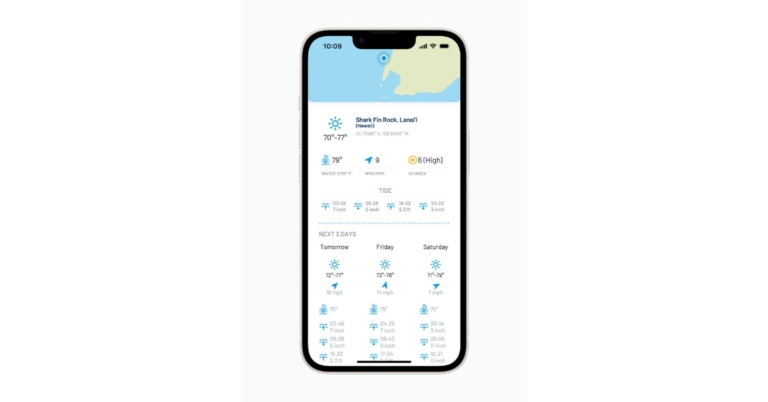

 Step 4: Hit Convert to PDF.
Step 5: Once the PDF is ready, hit Download.
Step 4: Hit Convert to PDF.
Step 5: Once the PDF is ready, hit Download.
 You may know CloudConvert as the website that converts files from one format to another. Typically, this website is used to convert video, audio, and image formats. A lesser-known fact about CloudConvert is that it can also be used to save a webpage as a PDF file. To carry out this task, click the ‘Tools’ option next to the website banner and select ‘Save Website as PDF’. The rest is easy. Paste the website URL in the download box, hit Enter, and select ‘Capture Website’. Hit the Download button in the following window.
 Google Chrome allows users to save an entire webpage locally on their computer. In order to download a complete webpage using Chrome, simply click on the ellipses (three dots) at the top right corner of the browser and move your cursor to ‘More Tools.’ Click on ‘Save page as…’ to save the entire webpage on your computer. You can also press ‘Ctrl+S’ to quickly save a webpage.
 Like Chrome, Mozilla Firefox also lets you save a webpage. In order to save a webpage, click on the browser menu and select ‘Save page.’ In the following box, save the page on your desktop as an HTML or text document.
 Downloading a webpage as a PDF has its own advantages. Firstly, the PDF format is easier to read on e-book readers like Kindle, compared to an HTML document. You can also easily share a PDF file with your friends. The simplest way to save a webpage as a PDF file is by clicking on the ellipses (three dots) at the top right corner of the Chrome window and selecting ‘Print.’ In the pop-up window, click on ‘Destination’ and select ‘Save as PDF.’ You can also press Ctrl+P to trigger the print window.
 If you need to save a webpage on your smartphone, there is no better app than Pocket. Pocket lets you easily download webpages on your smartphone and saves them for you to read later. With Pocket, you can save any news, webpage, story, article, or video from any publication and read it later. On top of that, Pocket also gives you the option to read saved articles. In order to save a webpage on Pocket, simply copy the URL and paste it into the app.
 The Safari browser on iPhone gives its users a quick option to save a webpage for later viewing. You can save a page by tapping on the ‘Share’ icon and selecting ‘Add to Reading list.’ However, Safari does not save web pages offline by default. This means you will need the internet to access the web pages on your reading list. In order to download webpages for offline viewing, go to Settings>Safari and select Automatically save offline.
 You can also save a webpage on a Mac using the Reading List. First, click on Preferences and go to the Advanced tab. Click the checkbox for ‘Save articles for offline reading immediately.’ To add a page to the Reading List, click on the plus icon next to the URL box. To access the Reading List, click the sidebar button and select the spectacles icon for Reading List.
 If you want to be able to save an entire page with just a few clicks, download the ‘Save Page WE’ extension for Google Chrome. Once you’ve added the extension to your web browser, simply open the webpage you want to save and click on the ‘extensions’ icon next to the URL box. Select ‘Save Page WE’ and click on ‘Save Complete Page.’
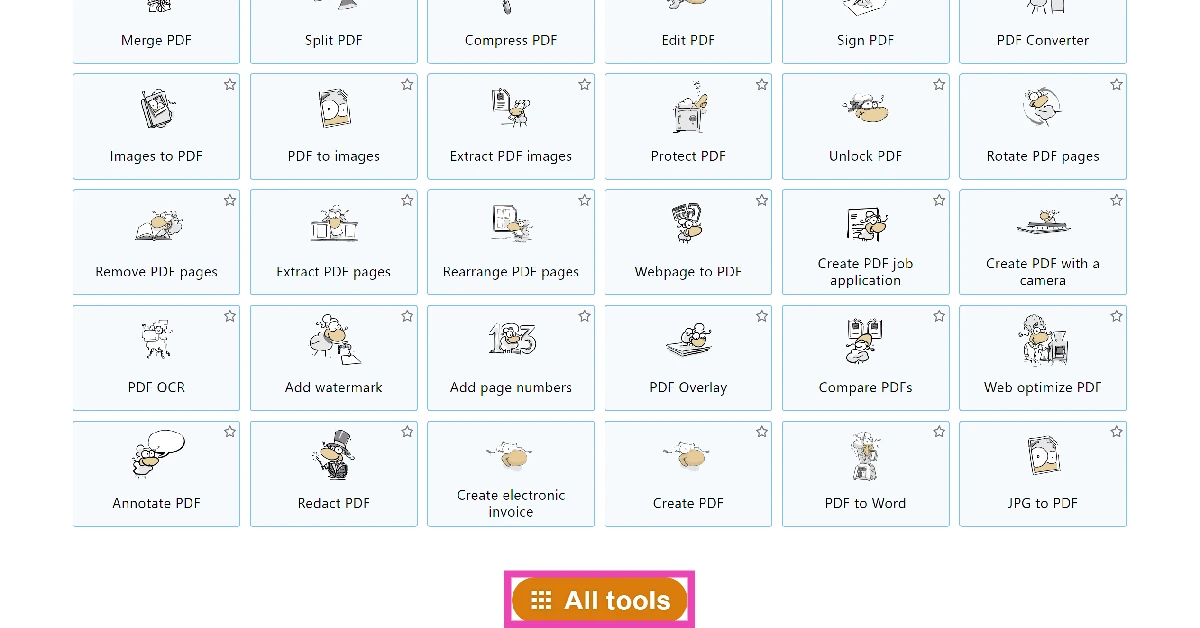 Step 2: Scroll down and select Webpage to PDF.
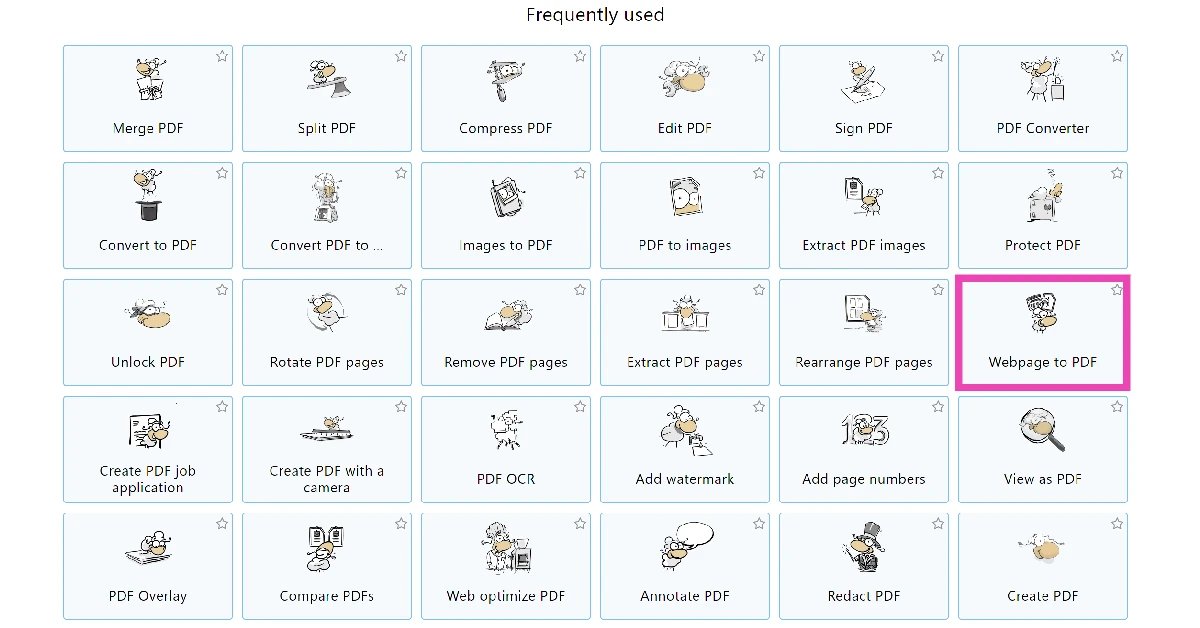 Step 3: Enter the link to the webpage in the text box.
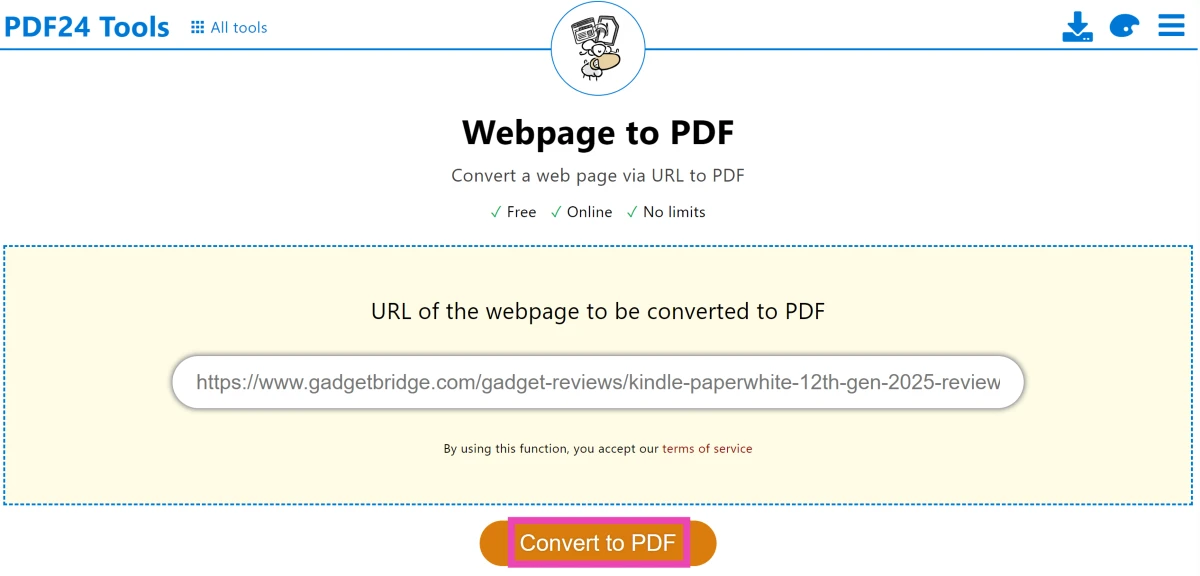 Step 4: Hit Convert to PDF.
Step 5: Once the PDF is ready, hit Download.
Step 4: Hit Convert to PDF.
Step 5: Once the PDF is ready, hit Download.
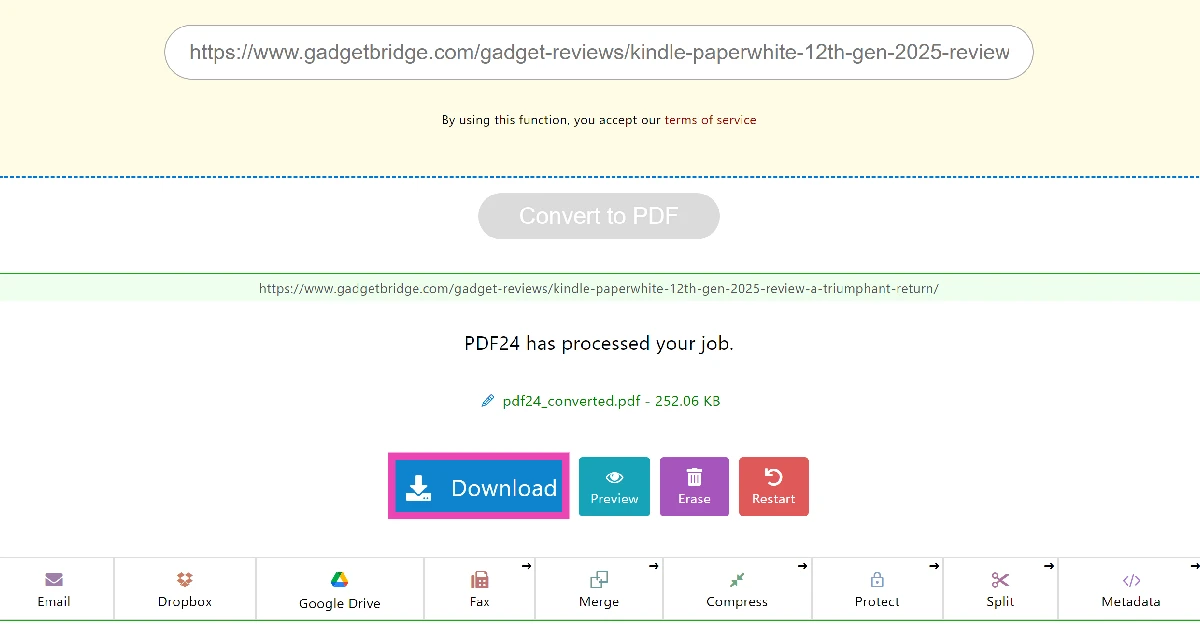
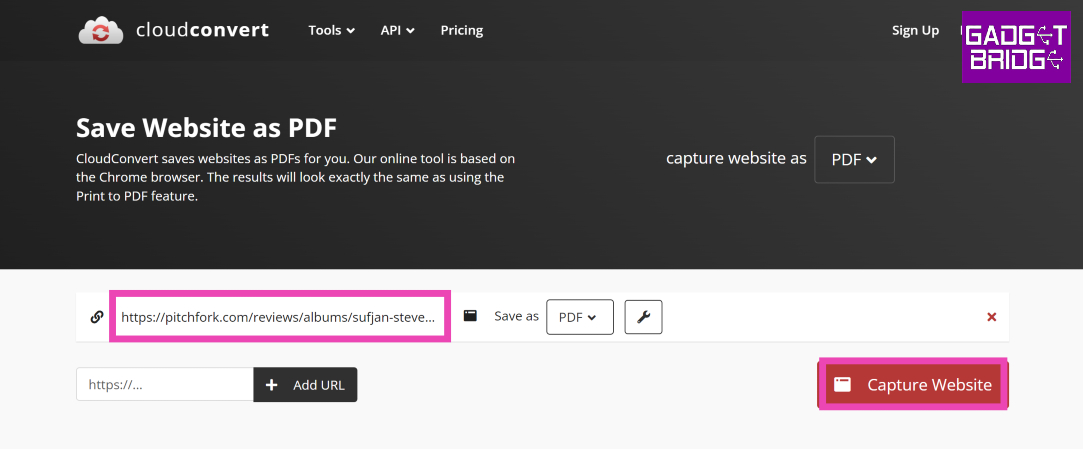 You may know CloudConvert as the website that converts files from one format to another. Typically, this website is used to convert video, audio, and image formats. A lesser-known fact about CloudConvert is that it can also be used to save a webpage as a PDF file. To carry out this task, click the ‘Tools’ option next to the website banner and select ‘Save Website as PDF’. The rest is easy. Paste the website URL in the download box, hit Enter, and select ‘Capture Website’. Hit the Download button in the following window.
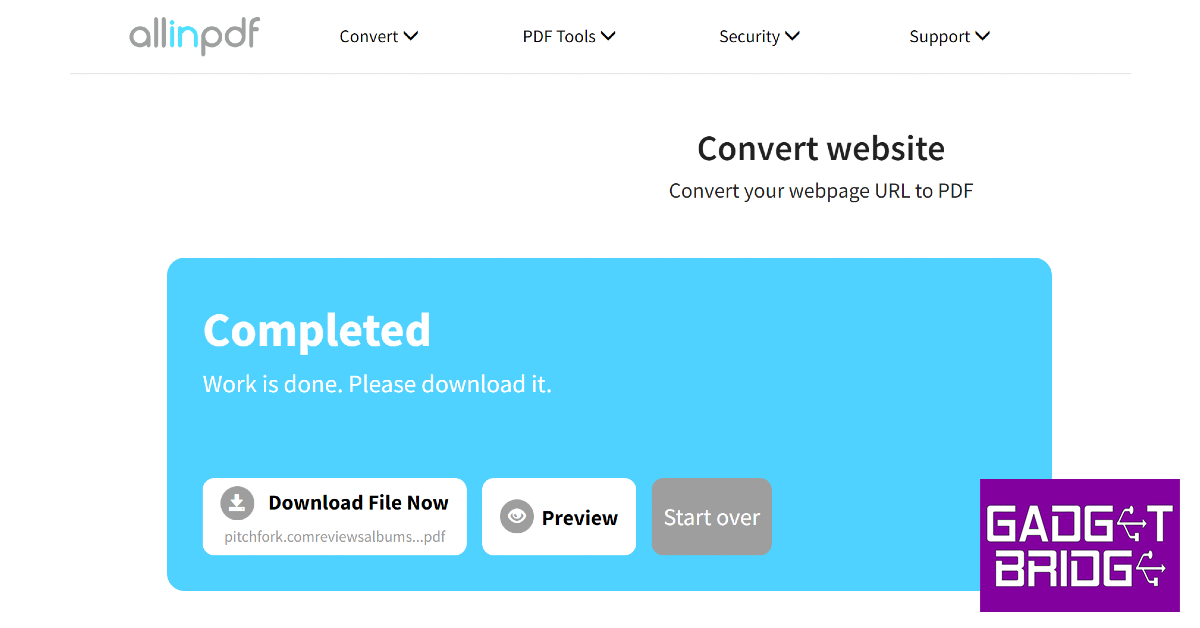 AllinPDF is another great tool to download a complete webpage as a PDF for reading offline later. Once you paste the website URL in the download box, select PDF as the target file format. Once the PDF has been created, you can choose to download it to your device or preview it in a web browser.


 Step 2: Click on ‘Activation’ from the side menu and select ‘Change product key.’
 Step 3: Enter the product key and hit Next.
 Reinstall Windows 10 on your desktop. Restart your computer once the OS has been installed. The ‘Activate Windows’ watermark will be removed.
 Step 2: Select ‘Make the computer easier to use.’
Step 3: Click the box for ‘Remove background images (where available).’
Step 4: Apply the changes.
Step 2: Select ‘Make the computer easier to use.’
Step 3: Click the box for ‘Remove background images (where available).’
Step 4: Apply the changes.
 Step 2: Select ‘Notifications & actions’ from the side menu and turn the toggle bar off for ‘Get tips, tricks and suggestions as you use Windows’ and ‘Show me the Windows welcome experience…’

 Step 2: Click on ‘File’ and select ‘Save As’. Title the file as ‘Activation.bat’ and select ‘All files’ as the file type. Save the file on the desktop.
 Step 3: Right-click on the file and select ‘Run as administrator.’
Read Also: Zebronics 3-in 1 ZEB-Sound Bomb X1 launched in India
Step 3: Right-click on the file and select ‘Run as administrator.’
Read Also: Zebronics 3-in 1 ZEB-Sound Bomb X1 launched in India


 Step 3: Choose whether you want to make an audio or video call.
 Step 4: You can share the call link with your contacts on WhatsApp or social media and chat platforms. You can also copy the link and post it anywhere you want the people to see.
 Step 3: Enter the Community name and Community description in the relevant fields. You can also upload an image as the Community thumbnail. Tap the forward arrow icon once you’re done.
 Step 4: After entering the Community name and description, you can add pre-existing groups or create a new group. Tap on ‘Add an existing group’ to add groups that you’re an admin of.
 Step 5: Tap the tick icon to create the Community.
 Read Also: Top 10 free hidden games on Google for you to play




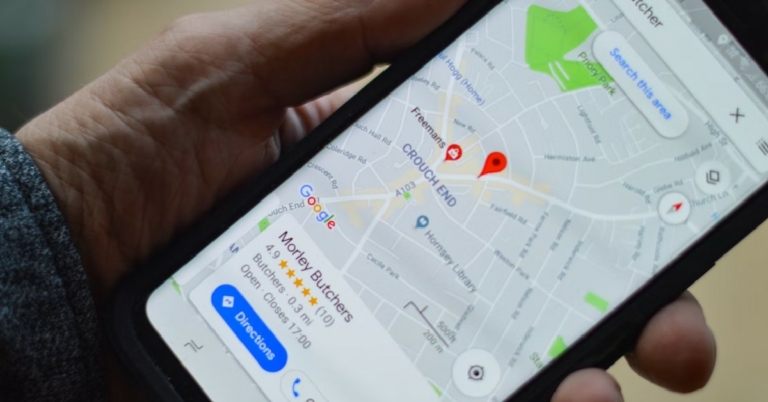
 Step 4: Right-clicking on the pin will give you further options like finding the directions to and from the place. You can also drop a pin to add your business to the map. You can also save this location on a personal list.

 Once you drop the pin, click on it and select the share option from the location card that comes up on the screen. In the following window, you will be able to copy the Google Maps link to the location or share it directly through Facebook, Twitter, and Gmail.
 Step 4: You will be able to see the coordinates of the location where you dropped the pin. You can also share the pinned location directly from the app by tapping the share option.
 Read Also: Which is the cheapest Tesla model you can buy in 2022?


 In Hearts, your goal is to avoid capturing certain cards, primarily Hearts and the Queen of Spades, as they carry penalty points. Players strive to end the game with the lowest score possible by skillfully passing cards, winning tricks, and strategically managing their hands to minimize the accumulation of penalty points. The strategic gameplay has made this game a classic, and in the online version, players can compete against computers or other Hearts players from around the world. Start a game of Hearts now.
 Tic-Tac-Toe needs to introduction. Also known as Noughts and Crosses, this game is played between two players. Each player needs to create three successive noughts or crosses on a 3×3 grid without letting their opponent do it first. You can play this game on Google by simply searching for ‘tic tac toe.’ Google will match you against an AI and give you the option to play in several difficulty levels. You can even play against a friend.
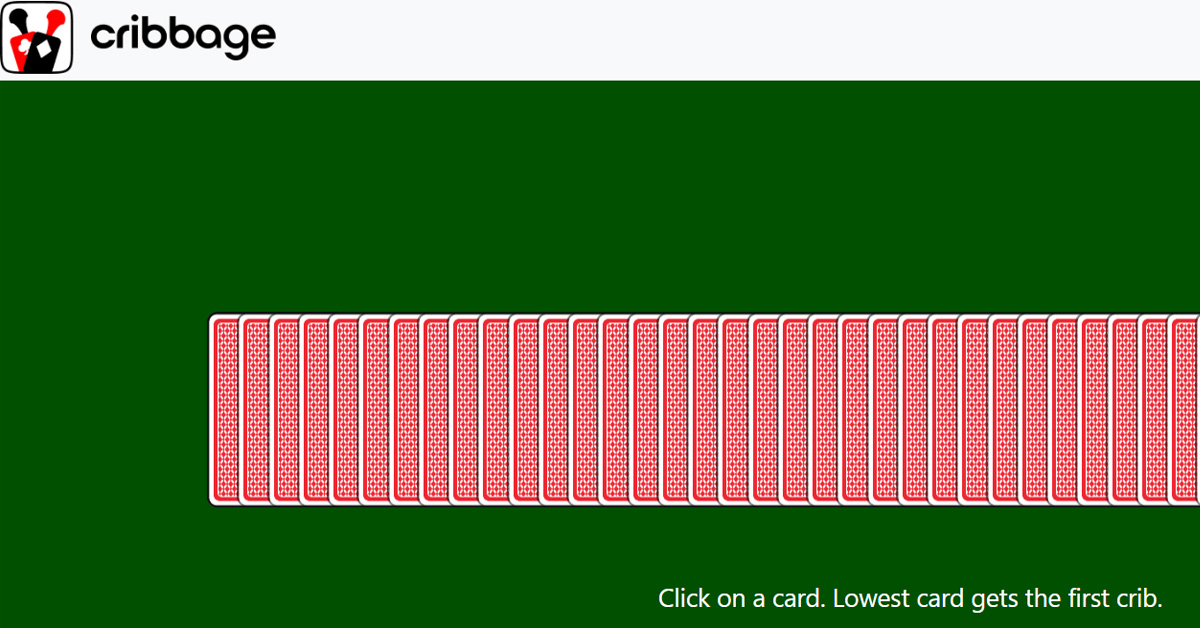 In Cribbage, the objective is to score points by forming specific card combinations in both the play and the “crib,” a separate hand for one player. Players strategically play cards to create runs, pairs, and other combinations, aiming to be the first to reach a designated point total, traditionally 121 points. The fast-paced game is available online where players can learn the history, rules, and play through a variety of difficulty settings. Start a game of Cribbage now.
 In Hearts, your goal is to avoid capturing certain cards, primarily Hearts and the Queen of Spades, as they carry penalty points. Players strive to end the game with the lowest score possible by skillfully passing cards, winning tricks, and strategically managing their hands to minimize the accumulation of penalty points. The strategic gameplay has made this game a classic, and in the online version, players can compete against computers or other Hearts players from around the world. Start a game of Hearts now.
 Pac-Man is one of the most popular arcade games of all time and is still immensely enjoyed by a lot of people. The purpose of the game is to go through the maze eating up all the dots while steering away from the ghosts. Once you’ve finished all the dots you advance to the next level. Simply Google search for ‘pac-man’ to play the game. You can play this classic game on your smartphone as well as the web browser on your PC.
 All Windows users will remember this classic game that used to come with the operating system. Now you can play it on Google. Simply search for ‘minesweeper’ and you will be presented with the all too familiar grid. Find the hidden mines to win the game!
 We are all aware of the big strides that Google is making in AI and machine learning. Now you can test it! By playing ‘Quick, Draw!’ you can make Google’s neural network guess what you’re drawing. At the start of every round, you will be given something to draw on the blank screen. While you’re doodling, Google will guess what you are drawing. It is astonishing to watch Google guess what you are drawing. You can easily kill a lot of time on this game.
 Another one of Windows’ classic games, Solitaire is also free to play in Google’s search bar. Simply search for ‘Solitaire’ and Google will bring up the card game in the search window. You can play the game in easy or hard mode. Google has also made some changes to the interface and game design. The game now looks a lot cleaner and comes with new sound effects as well.
 Google published a unique doodle for the 2017 ICC Champions Trophy which also let users play a minimal cricket game. You can now play the game in doodle archives! All you need to do is hit the ball with a mouse click. If you time it right, the batsman will strike the ball and collect runs. Failure to hit the ball will lead to a dismissal. You can play the doodle cricket game here.
 Google also came out with a soccer doodle game during the 2012 Olympics. The soccer doodle is one of the most played doodle games worldwide. All you need to do is guard the goal and save the incoming penalty kicks using the arrow keys and space bar. You can play the soccer doodle game here.
 This Google Easter Egg game is not available on Google anymore, but you can still play it on Google’s mirror, elgooG. Click here to play the game. Once you start the game, multiple balls will drop from all corners and make the search results on the page disappear. In order to nullify the balls, you need to click on them multiple times. This game is best enjoyed on a PC using a mouse.
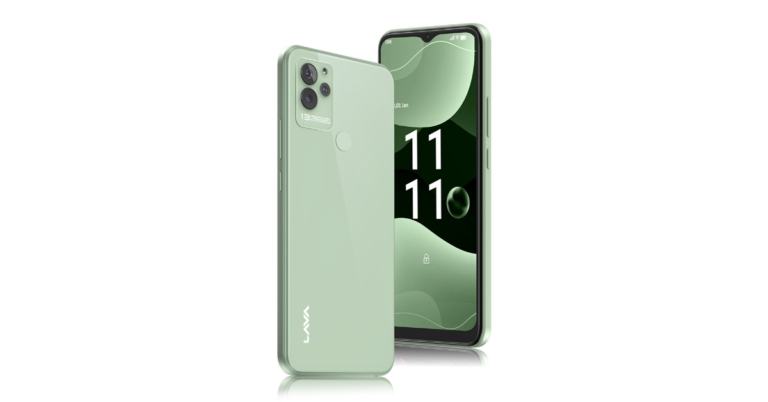
 The 13MP AI triple rear camera on the Lava Blaze NXT is paired with an 8MP selfie front camera. The camera’s functions enable users to capture countless moments and discover the world in novel ways by producing time-lapse, slow-motion, GIFS, and even intelligent document scanning. Additionally, the smartphone contains beauty mode capabilities for smoothing, slimming, whitening, and enlarging the eyes.
A 5000mAh battery is included with the smartphone. It also has a luxury appearance with a glass back and a rear fingerprint sensor. Additionally, the system allows for anonymous call recording.
The 13MP AI triple rear camera on the Lava Blaze NXT is paired with an 8MP selfie front camera. The camera’s functions enable users to capture countless moments and discover the world in novel ways by producing time-lapse, slow-motion, GIFS, and even intelligent document scanning. Additionally, the smartphone contains beauty mode capabilities for smoothing, slimming, whitening, and enlarging the eyes.
A 5000mAh battery is included with the smartphone. It also has a luxury appearance with a glass back and a rear fingerprint sensor. Additionally, the system allows for anonymous call recording.
 The 13MP AI triple rear camera on the Lava Blaze NXT is paired with an 8MP selfie front camera. The camera’s functions enable users to capture countless moments and discover the world in novel ways by producing time-lapse, slow-motion, GIFS, and even intelligent document scanning. Additionally, the smartphone contains beauty mode capabilities for smoothing, slimming, whitening, and enlarging the eyes.
A 5000mAh battery is included with the smartphone. It also has a luxury appearance with a glass back and a rear fingerprint sensor. Additionally, the system allows for anonymous call recording.
The 13MP AI triple rear camera on the Lava Blaze NXT is paired with an 8MP selfie front camera. The camera’s functions enable users to capture countless moments and discover the world in novel ways by producing time-lapse, slow-motion, GIFS, and even intelligent document scanning. Additionally, the smartphone contains beauty mode capabilities for smoothing, slimming, whitening, and enlarging the eyes.
A 5000mAh battery is included with the smartphone. It also has a luxury appearance with a glass back and a rear fingerprint sensor. Additionally, the system allows for anonymous call recording.
 Using Apple’s authorised repair service is the most legitimate way you can go about repairing your iPad’s battery. Even though you may have to pay a bit more than usual, Apple’s repair service is the safest and most reliable option for repairing or replacing a battery. You don’t have to worry about any counterfeit parts being used when you go the Apple route.
You can go to Apple’s support page on their website to set up an appointment at the nearest Apple Store. If you have an AppleCare+ subscription, Apple will replace your iPad’s battery for free. First, they will run a few tests to check whether the battery was harmed by some action that is not covered by the warranty. If your iPad is eligible for a warranty, you won’t have to pay any money for the battery replacement cost.
However, if you do not have an AppleCare+ subscription, things can get a bit pricey. Replacing a dead iPad battery in the US can cost you a standard fee of $99. In India, Apple charges anywhere between Rs 4,000-5,000 for battery replacement. The cost of battery repair and replacement may also depend on the generation of your iPad.
If there is no Apple Store in your location, you can also get your iPad’s battery replaced at an Apple-authorised repair centre. You can look up the locations of these repair centres on Apple’s website. In the US, Best Buy is now an Apple-authorised repair centre.
Using Apple’s authorised repair service is the most legitimate way you can go about repairing your iPad’s battery. Even though you may have to pay a bit more than usual, Apple’s repair service is the safest and most reliable option for repairing or replacing a battery. You don’t have to worry about any counterfeit parts being used when you go the Apple route.
You can go to Apple’s support page on their website to set up an appointment at the nearest Apple Store. If you have an AppleCare+ subscription, Apple will replace your iPad’s battery for free. First, they will run a few tests to check whether the battery was harmed by some action that is not covered by the warranty. If your iPad is eligible for a warranty, you won’t have to pay any money for the battery replacement cost.
However, if you do not have an AppleCare+ subscription, things can get a bit pricey. Replacing a dead iPad battery in the US can cost you a standard fee of $99. In India, Apple charges anywhere between Rs 4,000-5,000 for battery replacement. The cost of battery repair and replacement may also depend on the generation of your iPad.
If there is no Apple Store in your location, you can also get your iPad’s battery replaced at an Apple-authorised repair centre. You can look up the locations of these repair centres on Apple’s website. In the US, Best Buy is now an Apple-authorised repair centre.
 You can replace your iPad’s battery by yourself, but it will require a lot of patience and attention to detail. There are plenty of YouTube videos that will teach you how to take apart your iPad and replace the battery. First, you’ll need to buy a repair kit from Amazon. Once you’ve got the necessary tools at hand, you will need to plan out every step of the process. Watch a few YouTube videos to make yourself aware of all the important steps. You should also know that once you replace your iPad’s battery, it will void your device’s warranty.
 If you do not have an AppleCare+ subscription and do not want to splurge extra on replacing your iPad’s battery through Apple, you can always get it done from your local repair shop. This will void your device’s warranty but it will also cost significantly less. To minimise any risk of damage, make sure the repair shop is reputable and has experience in replacing batteries. If you’re in India, you can use services like RapidRepair and iTweak.
Read Also: Redmi Note 11 Pro+ gets a price reduction of up to Rs 2,000
If you do not have an AppleCare+ subscription and do not want to splurge extra on replacing your iPad’s battery through Apple, you can always get it done from your local repair shop. This will void your device’s warranty but it will also cost significantly less. To minimise any risk of damage, make sure the repair shop is reputable and has experience in replacing batteries. If you’re in India, you can use services like RapidRepair and iTweak.
Read Also: Redmi Note 11 Pro+ gets a price reduction of up to Rs 2,000



 The square charging case has round edges and sides and sports a rubbery matte finish. A small notification light is housed at the bottom of the lid while the USB charging port finds its way at the back. The matte finish does feel quite premium, but the case has a tendency to attract dirt stains. Apart from that, the hinge and the lid are pretty strong, and the case can easily withstand rugged use.
 Flipping the lid open, you’ll notice a notification light between the two charging pods. The earbuds are smaller in size compared to the previous avatar, which increases the quality of the fit by a significant margin. The earbuds also get the matte treatment. The similarity in texture elevates the feel of the product in your hand. Each earbud also houses a microphone and a vent to relieve ANC pressure.
 The Samsung Galaxy Buds2 Pro fit like a charm. Having reduced the size of the earbuds, Samsung has significantly improved the quality of the fit. The rubber texture coupled with the light weight of the buds provides a great level of comfort, and you can easily wear the earbuds for hours without even noticing they’re there. The fit was so snug and airtight that we didn’t even feel the need to adjust the buds that often.
The Buds2 Pro is rated IPX7, which means they can endure light rainfall and sweaty workouts with ease. While working out, the Buds2 Pro proved to be one of the best TWS we’ve used. The rubber texture does not get slippery even when things get sweaty. The earbuds need minimal readjustments once you’ve put them on and you will barely feel them when they’re in.
The Samsung Galaxy Buds2 Pro fit like a charm. Having reduced the size of the earbuds, Samsung has significantly improved the quality of the fit. The rubber texture coupled with the light weight of the buds provides a great level of comfort, and you can easily wear the earbuds for hours without even noticing they’re there. The fit was so snug and airtight that we didn’t even feel the need to adjust the buds that often.
The Buds2 Pro is rated IPX7, which means they can endure light rainfall and sweaty workouts with ease. While working out, the Buds2 Pro proved to be one of the best TWS we’ve used. The rubber texture does not get slippery even when things get sweaty. The earbuds need minimal readjustments once you’ve put them on and you will barely feel them when they’re in.
 The ‘Samsung Seamless Codec’ is reserved for Samsung smartphone users while other Android users have to rely on the AAC or SBC codecs. The ‘auto-switch’ feature is also reserved for Samsung users exclusively. Samsung will also be rolling out LE audio support when it becomes available in the future. Android users will need to download the ‘Galaxy Wearable’ app to utilise all the functions of the earbuds. Since the app isn’t available on the App Store, iPhone users will have to settle for the most basic features. One of the better parts of using the Buds2 Pro with a Samsung smartphone is that it prompts you to connect the earbuds every time you open the lid of the charging case, even if the Bluetooth on your smartphone is turned off.
Moving on to the audio performance, Samsung has definitely upped its game on the Buds2 Pro. The output features a good mix of frequencies. The sound isn’t explicitly bass-driven, the lower frequencies mix in a very subtle manner, providing a very balanced sound profile. However, if you want your music to have a strong bass-y element, you can use the ‘Bass boost’ function from the equaliser in the Galaxy Wearable app. Overall, the Buds2 Pro delivered a rock-solid audio output.
When it comes to ANC, the Samsung Galaxy Buds2 Pro is arguably the best in the business right now. While wearing the Buds2 Pro indoors, we could easily tune out the general humdrum and the white noise looming in the house. The lower frequencies were totally nullified. Travelling with the Buds2 Pro in the ear proved to be a delightful experience as well. The noise of the engine and the traffic were muted to a great degree. The higher frequencies of the blaring horns still made through, but they didn’t prove to be an annoyance. The superior quality of ANC along with a comfortable fit means you can easily pop the earbuds in when on a long flight or a bus ride and experience the luxury of quietness while travelling.
During phone calls, the performance of the Buds2 Pro was satisfactory, but Samsung can definitely make improvements in its future iterations. The earbuds do a great job of isolating the voice from the surrounding noise, but the quality of audio relayed on call still remains a bit boxy and flat. There is certainly room for improvement here.
The ‘Samsung Seamless Codec’ is reserved for Samsung smartphone users while other Android users have to rely on the AAC or SBC codecs. The ‘auto-switch’ feature is also reserved for Samsung users exclusively. Samsung will also be rolling out LE audio support when it becomes available in the future. Android users will need to download the ‘Galaxy Wearable’ app to utilise all the functions of the earbuds. Since the app isn’t available on the App Store, iPhone users will have to settle for the most basic features. One of the better parts of using the Buds2 Pro with a Samsung smartphone is that it prompts you to connect the earbuds every time you open the lid of the charging case, even if the Bluetooth on your smartphone is turned off.
Moving on to the audio performance, Samsung has definitely upped its game on the Buds2 Pro. The output features a good mix of frequencies. The sound isn’t explicitly bass-driven, the lower frequencies mix in a very subtle manner, providing a very balanced sound profile. However, if you want your music to have a strong bass-y element, you can use the ‘Bass boost’ function from the equaliser in the Galaxy Wearable app. Overall, the Buds2 Pro delivered a rock-solid audio output.
When it comes to ANC, the Samsung Galaxy Buds2 Pro is arguably the best in the business right now. While wearing the Buds2 Pro indoors, we could easily tune out the general humdrum and the white noise looming in the house. The lower frequencies were totally nullified. Travelling with the Buds2 Pro in the ear proved to be a delightful experience as well. The noise of the engine and the traffic were muted to a great degree. The higher frequencies of the blaring horns still made through, but they didn’t prove to be an annoyance. The superior quality of ANC along with a comfortable fit means you can easily pop the earbuds in when on a long flight or a bus ride and experience the luxury of quietness while travelling.
During phone calls, the performance of the Buds2 Pro was satisfactory, but Samsung can definitely make improvements in its future iterations. The earbuds do a great job of isolating the voice from the surrounding noise, but the quality of audio relayed on call still remains a bit boxy and flat. There is certainly room for improvement here.
 If you want to get the most out of your Samsung Galaxy Buds2 Pro, you will need to download the Samsung Wearable app. The Wearable app gives you access to a wide range of functions and unlocks the true potential of the Buds2 Pro. Firstly, you can choose to turn the ANC off or set it to the ‘Ambient Sound’ mode. Samsung’s ‘Voice Detect’ can also be turned on from the app. This feature cuts off the ANC and lowers the music volume every time it detects your voice. The volume and ANC are restored when the earbuds don’t detect your voice for 15 seconds. This feature comes in extremely handy when you’re around people, but you will certainly need to turn it off when you want to sing along to the music with your earbuds in.
Samsung has also incorporated the ‘360 audio’ on the Buds2 Pro. 360 Audio hits you with sound from all directions, creating an immersive experience. The Head tracking function adjusts the sound direction when you turn your head so it always sounds like it’s coming from the video source. We found the 360 Audio feature to be quite enjoyable while watching videos, but in its current form, it does not hold any purpose while listening to music.
Lastly, you can find 5 presets in the equaliser, but there is no option to manually control the output. You can also customise the touch controls using the Wearable app. If you’re actively using your smartphone while listening to music, you can also choose to turn the touch controls off.
With ANC enabled, Samsung claims you get up to 5 hours of playtime on the earbuds with an additional 18 hours in the case. When the ANC is turned off, you can get up to 8 hours on the buds with an additional 21 hours in the case. We used the Buds2 Pro with the ANC enabled at all times and got a steady 4 hours 55 minutes out of the earbuds. Compared to the competition in this particular price segment, Samsung should be looking to increase these numbers. However, if you’re mostly going to use these earbuds at home, the battery life won’t be an issue.
Read Also: Redmi Note 11 Pro+ gets a price reduction of up to Rs 2,000
If you want to get the most out of your Samsung Galaxy Buds2 Pro, you will need to download the Samsung Wearable app. The Wearable app gives you access to a wide range of functions and unlocks the true potential of the Buds2 Pro. Firstly, you can choose to turn the ANC off or set it to the ‘Ambient Sound’ mode. Samsung’s ‘Voice Detect’ can also be turned on from the app. This feature cuts off the ANC and lowers the music volume every time it detects your voice. The volume and ANC are restored when the earbuds don’t detect your voice for 15 seconds. This feature comes in extremely handy when you’re around people, but you will certainly need to turn it off when you want to sing along to the music with your earbuds in.
Samsung has also incorporated the ‘360 audio’ on the Buds2 Pro. 360 Audio hits you with sound from all directions, creating an immersive experience. The Head tracking function adjusts the sound direction when you turn your head so it always sounds like it’s coming from the video source. We found the 360 Audio feature to be quite enjoyable while watching videos, but in its current form, it does not hold any purpose while listening to music.
Lastly, you can find 5 presets in the equaliser, but there is no option to manually control the output. You can also customise the touch controls using the Wearable app. If you’re actively using your smartphone while listening to music, you can also choose to turn the touch controls off.
With ANC enabled, Samsung claims you get up to 5 hours of playtime on the earbuds with an additional 18 hours in the case. When the ANC is turned off, you can get up to 8 hours on the buds with an additional 21 hours in the case. We used the Buds2 Pro with the ANC enabled at all times and got a steady 4 hours 55 minutes out of the earbuds. Compared to the competition in this particular price segment, Samsung should be looking to increase these numbers. However, if you’re mostly going to use these earbuds at home, the battery life won’t be an issue.
Read Also: Redmi Note 11 Pro+ gets a price reduction of up to Rs 2,000

 Using the search bar is another simple way of finding trending songs on TikTok. All you need to do is tap on the search icon and then search for ‘viral sounds’, ‘trending songs’ or ‘viral music.’ Go to the ‘sounds’ tab to find popular songs and sounds on TikTok. You will also find the play count next to every result. This makes it easier to judge the trendiness of every song. You can even look at the hashtag and videos section to see what popular songs creators are using on their TikTok videos
 Using the search bar is another simple way of finding trending songs on TikTok. All you need to do is tap on the search icon and then search for ‘viral sounds’, ‘trending songs’ or ‘viral music.’ Go to the ‘sounds’ tab to find popular songs and sounds on TikTok. You will also find the play count next to every result. This makes it easier to judge the trendiness of every song. You can even look at the hashtag and videos section to see what popular songs creators are using on their TikTok videos
 You can access TikTok’s sound library by tapping the plus sign at the bottom of the screen and then selecting ‘Add Sound.’ Scroll down to find music playlists curated by TikTok. Over here you will find playlists like ‘TikTok Viral’, ‘Featured’, ‘Meme’, and ‘Pop Hits’, which have a high trending potential. You can also find playlists sorted by genre.
 You need to make a business account for TikTok to log in to the Creative Center. The Creative Center helps brands in marketing their products on TikTok by giving them data related to the trending songs, hashtags, creators, and videos in a particular location. You can use the Creative Center to find trending songs on TikTok at any given time.
 It is not surprising that songs that are charting on Billboard and Spotify also trend on TikTok. You will find several new songs on Spotify and Billboard charts every week. Simply open your Spotify app and go to the ‘Made for you’ section. Open the ‘Top Charts – Global’ playlist to find the trending songs.
Read Also: How to download WhatsApp stickers? Which are the best WhatsApp sticker apps?
It is not surprising that songs that are charting on Billboard and Spotify also trend on TikTok. You will find several new songs on Spotify and Billboard charts every week. Simply open your Spotify app and go to the ‘Made for you’ section. Open the ‘Top Charts – Global’ playlist to find the trending songs.
Read Also: How to download WhatsApp stickers? Which are the best WhatsApp sticker apps?