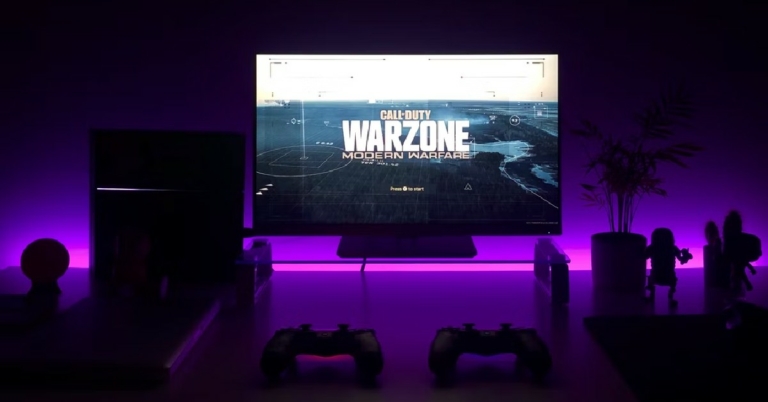
What is Monitor Refresh Rate and does it matter? Everything you must know before buying

If you’re looking to buy a new monitor you may be interested in major specifications like the resolution, screen size, and display. You may have also come across a spec called ‘refresh rate’ and wondered what it meant. If you’re looking to build a gaming system then getting a monitor with the right refresh rate is very important. In this article, we explain what the monitor refresh rate is and why it matters. Read Also: The simplest and fastest way to use your TV as a PC monitor

What is Monitor Refresh Rate?

What is Monitor Refresh Rate? Simply put, monitor refresh rate is the frequency at which the monitor displays the visual information it receives from the CPU. If the frequency is higher, the images on the screen will be updated at a greater pace and will result in a smoother motion. Since refresh rate is a frequency, it is measured in Hertz (Hz). You may have noticed that monitors offer a refresh rate of 60Hz, 120Hz, 144Hz, or even 240Hz.

Does Monitor Refresh Rate Matter?

Does Monitor Refresh Rate Matter? Monitor Refresh Rate is not the only factor in displaying a smooth motion on the screen. Remember, the refresh rate is only the rate at which the monitor can update the images on the screen. A smooth motion display is also dependent upon the rate at which the video frames are being fed to the monitor. This is also known as fps. The GPU generates certain frames per second and sends them to the monitor which then displays them on screen. Each frame is a still image, and the effect of motion is created when the frames are played one after the other. A higher frame rate means smoother motion. As you may have guessed by now, the refresh rate and the fps need to be in sync in order to correctly display the information on the screen. If the frame rate is higher than the refresh rate of the monitor, the image on the screen might ‘tear up’. This is a common issue faced by most gamers when their monitors aren’t updated. 

What do you need to know when buying a new monitor?

If you buy a high-end monitor with a high refresh rate but have a graphics card that doesn’t generate a high frame rate, the refresh rate is wasted on the system as the video will move according to the frame rate. You can buy the high-end monitor if you plan on updating the GPU later on. If you are not interested in gaming, then a monitor with even a 60Hz refresh rate will be optimum for your needs. Motion pictures and TV broadcasts stream at 24fps and modern video recording devices capture videos at 60fps. A monitor with a refresh rate of 60Hz will perform well in this situation. Read Also: Golden Era of Gaming and Nostalgia

Frequently Asked Questions

Should I get a monitor with a higher refresh rate? It depends on what you will be using the monitor for. If you’re looking to build a gaming system then a refresh rate of 144Hz or higher will greatly improve the viewing experience and keep the video from tearing up. If your primary needs are viewing video content and browsing the internet, then a 60Hz monitor will work just fine, and you should focus on other specs like screen resolution and size. What is adaptive sync? The refresh rate may adapt itself to the frame rate being fed to it by the GPU. The monitor and graphics processor work with each other to produce a smooth motion on the screen. This is known as adaptive sync.
For the latest gadget and tech news, and gadget reviews, follow us on TwitterFacebook and Instagram. For newest tech & gadget videos subscribe to our YouTube Channel. You can also stay up to date using the Gadget Bridge Android App. You can find the latest car and bike news here.
Samsung Galaxy Z Fold 4 with Snapdragon 8+ Gen 1 SoC Launched

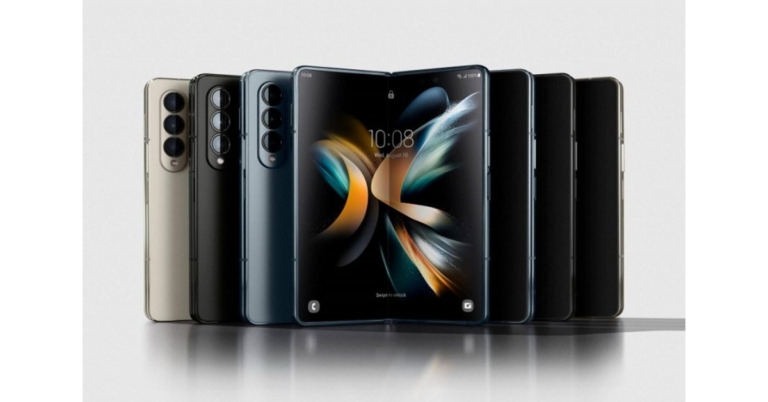
The most anticipated Samsung Galaxy Z Fold 4 was unveiled in India and globally. The device was introduced alongside the clamshell-style phone Galaxy Z Flip 4. The device is powered by Snapdragon 8+ Gen 1 SoC. It features an under-display camera, five cameras and a Flex display.

Samsung Galaxy Z Fold 4 price

The beginning price of the Samsung Galaxy Z Fold 4 is $1,799.99, which is equivalent to about Rs. 1,42,700. The cost of the foldable phone in India has not yet been disclosed. Samsung Galaxy Z Fold 4 price There are three versions available: one with 12GB RAM and 256GB storage, one with 12GB RAM and 512GB storage, and the 12GB RAM and 1TB storage. The Samsung Galaxy Z Fold 4 will be offered in Beige, Graygreen, and Phantom Black colours. There is also a Burgundy colour option that is only available on Samsung.com.

Samsung Galaxy Z Fold 4 specifications

The Samsung Galaxy Z Fold 4 primary display is a 7.6-inch QXGA+ Dynamic AMOLED 2X Infinity Flex Display with 2,176 x 1,812 pixels of resolution. Its aspect ratio is 21.6:18 and the refresh rate can range from 1Hz to 120Hz. The smartphone has a 6.2-inch HD+ Dynamic AMOLED 2X cover Display with 904×2,316 pixels of resolution. The screen has a 120Hz adaptive refresh rate and a 23.1:9 aspect ratio. For structural robustness, it has an armour aluminium frame and hinge cover. The rear panel and cover screen are protected by Corning Gorilla Glass Victus+. A layer structure that is optimised for longevity is added to the main screen panel. And the phone is equipped with IPX8 water resistance, so users can worry less if they get caught in the rain. The Samsung Galaxy Z Fold 4 is the first smartphone to use One UI 4.1.1, which is based on Android 12L, a special edition of Android developed by Google for large and foldable screens. The device is powered by a Qualcomm Snapdragon 8+ Gen 1 SoC, which comes standard with 12GB of RAM. It has internal storage that can go up to 1TB. There are a total of five cameras on the device; a 50-megapixel main sensor with an f/1.8 aperture, dual-pixel autofocus, optical image stabilisation (OIS), and an 85-degree field of view are the highlights of the triple rear camera. With an f/2.2 aperture and a field of view of 123 degrees, the 12-megapixel ultra-wide lens sensor is used. A telephoto lens with an f/2.4 aperture is attached to the third 10-megapixel sensor. OIS, PDAF, and 30X space zoom are all features available. Located below the main screen of the Samsung Galaxy Z Fold 4, the front camera sports a 4-megapixel sensor and an f/1.8 aperture On the cover display, the front camera includes a 10-megapixel sensor and an f/2.2 aperture. The smartphone comes with a 4,400mAh dual battery. Additionally, PowerShare wireless charging is supported. The device has a USB Type-C port, Wi-Fi 6E, Bluetooth v5.2, 5G, and 4G LTE connectivity options. A side-mounted fingerprint sensor, an accelerometer, barometer, gyroscope, geomagnetic sensor, proximity sensor, and light sensor are among the sensors aboard. For the latest gadget and tech news, and gadget reviews, follow us on TwitterFacebook and Instagram. For newest tech & gadget videos subscribe to our YouTube Channel. You can also stay up to date using the Gadget Bridge Android App. You can find the latest car and bike news here.
Samsung Galaxy Z Flip 4 with Flex Mode and Snapdragon 8+ Gen 1 SoC announced

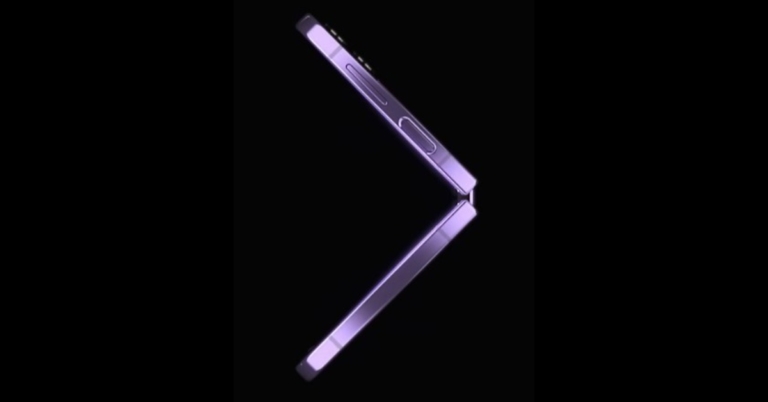
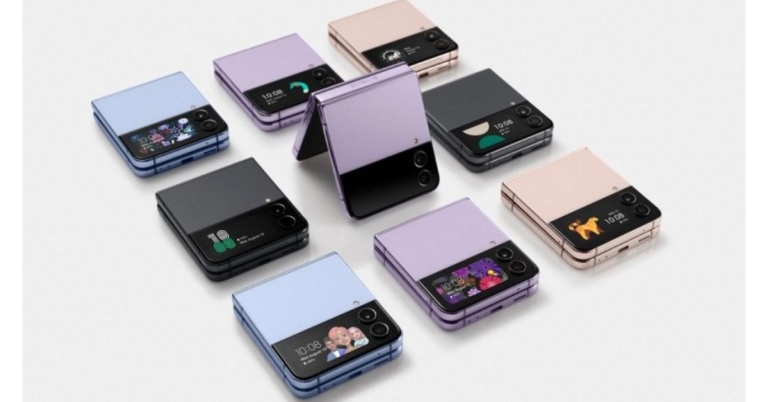
Samsung’s new Galaxy Z Flip 4 foldable smartphone was announced at the company’s Galaxy Unpacked event today. The new foldable phone is driven by most latest Qualcomm’s Snapdragon 8+ Gen 1 SoC. The device features customizable form factors and FlexCam experiences that automatically change to fit the folded screen for taking hands-free photos and videos.

Samsung Galaxy Z Flip 4 price

Galaxy Z Flip 4 availability and price information for India have not yet been made public. The Samsung Galaxy Z Flip 4 is available for a starting price of $999 which converts to Rs 79,000. It will come in three different configurations of 8GB RAM with 128GB storage, 8GB RAM with 256GB storage, and 8GB RAM with 512GB storage. The phone will be offered in Blue, Bora Purple, Graphite, and Pink Gold colour options. A limited number of markets around the world will start selling the Samsung Galaxy Z Flip 4 on August 26. Samsung Galaxy Z Flip 4 price

Samsung Galaxy Z Flip 4 specifications

Samsung Galaxy Z Flip 4 has a 6.7-inch primary Full HD+ Dynamic AMOLED 2X Infinity Flex Display with 1,080×2,640 pixels of resolution. The inside screen has a 120Hz refresh rate and 22:9 aspect ratio. A 1.9-inch Super AMOLED cover screen with a resolution of 260 × 512 pixels is present. The Galaxy Z Flip 4 is composed of Samsung’s Armor Aluminum and has an IPX8 rating for water resistance. FlexCam is activated by partially folding Z Flip 4 to enable hands-free video recording or full group selfies from different perspectives. These are even accessible on customers’ preferred apps. FlexCam is tailored for the most widely used social media platforms, such as Instagram, WhatsApp, and Facebook, thanks to Samsung’s relationship with Meta. Utilize the enhanced Quick Shot feature on the Z Flip 4 to take high-quality selfies directly from the Cover Screen while doing more than ever before. Ideal for content makers and vloggers, Quick Shot mode lets you start shooting high-quality video and smoothly switch to Flex mode to record hands-free without pausing the video. Flex mode is supported at angles between 75° and 115°. With Quick Shot, users can now capture selfies in Portrait Mode and get the preview in the actual photo ratio. The device uses OneUI 4.1.1 on top of Android 12. The Qualcomm Snapdragon 8+ Gen 1 octa-core 4nm SoC and 8GB of RAM power the Galaxy Z Flip 4. The Z Flip 4 comes in three storage options with internal storage of up to 512GB each. MicroSD cards cannot be used to increase the storage capacity. The new phone sports a dual back camera unit with a 12-megapixel ultra-wide main sensor, an f/2.2 aperture and a 123-degree field of view. A 12-megapixel wide-angle camera, an f/1.8 aperture, an 83-degree field of view, and support for optical image stabilisation (OIS) is also included. The Galaxy Z Flip 4 sports a 10-megapixel selfie camera with an f/2.4 aperture and an 80-degree field of vision on top of its folding display for selfies. A USB Type-C port, Bluetooth v5.2, GPS/A-GPS, NFC, Wi-Fi 802.11 a/b/g/n/ac, and 5G are among the available connectivity choices. The onboard sensors include an accelerometer, barometer, gyro, geomagnetic, hall, proximity, and light sensors. Additionally, the phone has a side-mounted fingerprint sensor for security. The Z Flip 4 comes with a 3,700mAh battery from Samsung that supports 25W rapid charging. Additionally, Fast Wireless Charging 2.0 and Wireless PowerShare is supported by the phone. For the latest gadget and tech news, and gadget reviews, follow us on TwitterFacebook and Instagram. For newest tech & gadget videos subscribe to our YouTube Channel. You can also stay up to date using the Gadget Bridge Android App. You can find the latest car and bike news here.
Garena Free Fire Redeem Codes Today 10 August 2022: Here is how to claim them

Garena Free Fire is a battle royale game with regular awards and tournaments to keep players interested. If you play Garena Free Fire, you should be aware of the redeem codes that are released on a daily basis. However, because the battle royale game is banned in India, players from other countries can use the Free Fire Redeem codes daily. If you’re unfamiliar with the Garena Free Fire redeem codes or don’t know how to get them, we’ve put together a step-by-step guide to help you redeem them. Check out Garena Free Fire Redeem Codes for August 10. The Free Fire redeem codes are a great way to get free stuff. These are 12-digit codes that contain alphabets and numbers, as well as an expiration date and time. Because the Garena FF redeem codes cannot be used more than once, you should hurry to the redemption page to claim your free reward before someone else does. To get a free reward, all you have to do is go to reward.ff.garena.com/en, which is the official redemption page. Also, keep an eye on this space for daily updates on Garena Free Fire redemption codes and rewards.

Garena Free Fire Redeem Codes Today 10 August 2022

  • HTY3-RIFG-OR3F
  • FBJY-RY56-MLOT
  • FJO9-4TAS-D3FT
  • YXY3-EGTL-HGJX
  • ST5K-JCRF-VBHT
  • S5JT-UGVJ-Y5Y4
  • X99T-K56X-DJ4X
  • FF11-NJN5-YS3E
  • FF9M-J31C-XKRG
  • FBJY-RY56-MLOT
  • FJO9-4TAS-D3FT
  • PQR3-BKUI-7LT7
  • FSDR-FKUI-YVGR
  • FBTU-6BFY-TBT7
  • FBJU-T6RF-T1RT
  • FBTU-6JKI-E8E7
  • FLU8-HG8R-BHT4
  • FIIF-GI8E-O49F
  • FV5B NJ45 IT8U
  • F4N5 K6LY OU9I
  • FH2G YFDH E34G
  • F7YG T1BE 456Y
  • FJBH VFS4 TY23

How to Get Free Fire Redeem Codes for Garena on August 10?

  • Visit the Garena Free Fire game’s official website at reward.ff.garena.com.
  • Use your Facebook, Google, VK, Apple ID, Huawei ID, or Twitter account to log in.
  • You’ll be taken to a valid redemption code (s)
  • Copy and paste the 12-digit redemption code into the text box.
  • On the screen, a dialogue box will appear.
  • ‘Ok’ should be selected.
For the latest gadget and tech news, and gadget reviews, follow us on TwitterFacebook and Instagram. For newest tech & gadget videos subscribe to our YouTube Channel. You can also stay up to date using the Gadget Bridge Android App. You can find the latest car and bike news here.

Xiaomi Smart Air Fryer 3.5L launched in India

The introduction of the Xiaomi Smart Air Fryer 3.5L in India was announced by Xiaomi. Customers who favour a wiser and healthier lifestyle are catered to by the Xiaomi Smart Air Fryer 3.5L. The smart kitchen gadget has a wide temperature range for multi-functional cooking, more than 50 smart recipes, and voice control powered by Google Assistant. It is designed to bring innovation and simplicity to Indian homes.

Xiaomi Smart Air Fryer specifications

The Xiaomi Smart Air Fryer 3.5L provides users with a smart cooking experience thanks to its special built-in features, which include a wide temperature range for multifunctional cooking, the ability to schedule meals up to 24 hours in advance, an OLED display for convenient monitoring, temperature and timing control, and 50+ simple recipes on the Mi Home App. Instead of using traditional cooking techniques, the Xiaomi Smart Air Fryer 3.5L uses 1500W of heating power to quickly raise the temperature and distribute heat more evenly inside the appliance. This reduces cooking time and provides a faster, healthier, and more convenient way of life. Additionally, it offers a temperature range of 40 to 200 degrees Celsius, as well as continuous operation for 24 hours. The dual-speed motor’s low rotating speed is automatically coupled with the low temperatures for gradual temperature rise. Xiaomi Smart Air Fryer 3.5L price in India With 8 pre-set modes and 360° hot air circulation, the Xiaomi Smart Air Fryer 3.5L cooks food evenly. Additionally, it allows for cooking to be scheduled for up to 24 hours. Customers may take the basket out at any moment to see how the food is cooking and then just put it back in to continue the cooking process. The air fryer includes a unique grill that makes better use of the inside area in order to increase the amount of cooking space. The seven-layer composite frying basket also has a dual-layer PTFE nonstick coating that makes it easy to clean, sturdy, and wear-resistant. It enables users to schedule meals up to 24 hours in advance and offers countless cooking options, including yoghurt fermentation and food dehydration. The Smart Air Fryer can defrost frozen foods, baked products, dried fruits, and fermented vegetables thanks to the dual-speed fan arrangement. With more than 50 smart recipes included, the Xiaomi Smart Air Fryer 3.5L makes it simple for beginners to prepare delectable meals. Home cooks can customise the parameters using the smart air fryer’s capability for unique cooking modes. Users may effortlessly operate the gadget and find more than 50+ simple recipes for quick dinner inspiration by connecting the device to the Mi Home app. With a front-facing OLED display that allows for real-time monitoring of the cooking process and voice commands via Google Assistant to start, pause, or check the remaining cooking time. Xiaomi Smart Air Fryer price in India and availability Starting on August 18, the Xiaomi Smart Air Fryer 3.5L will be sold for Rs 9,999 on Mi.com, Mi Homes, Amazon, and in physical shops. From August 9 to August 15, it will be exclusively offered on Mi.com for a pre-order discount of Rs 2000, making the actual price Rs 7,999. For the latest gadget and tech news, and gadget reviews, follow us on TwitterFacebook and Instagram. For newest tech & gadget videos subscribe to our YouTube Channel. You can also stay up to date using the Gadget Bridge Android App. You can find the latest car and bike news here.

Top 6 Drawing Apps for Windows 10 or 11 you can get for free

If you’re an amateur digital artist who’s still figuring out the craft, you probably do not want to pay for an expensive drawing tool. Luckily, there are a host of software and tools available on the internet that cover every style of digital art, from painting to webtoons. In this article, we bring you the top 6 drawing apps for Windows 10 or 11 you can get for free. Read Also: Mid-year: Best Tablets seen so far in 2022

Krita

Krita Krita is the first name that pops up when talking about free drawing apps that appeal to amateurs and professionals alike. Krita offers a set of pro-level tools, but the interface and layout of the software make it very accessible to beginners. If you’re just starting out on graphic design or digital art, Krita should be your first choice. It is free to use and with its diverse range of tools, you will never need to purchase any other software. Some of the features include brush stabilisers, built-in vector tools, brush engines, wrap-around mode, and a resource manager. Download Krita for Windows here.

Clip Studio Paint

Clip Studio Paint Clip Studio Paint is a versatile digital painting program that is meant for artists who prefer a more ‘natural feel’ to their digital art. Its powerful brush engine captures every minute stroke detail, making sure the art you create is perfectly aligned with how you conceptualised it in your mind. Clip Studio Paint is ideal for Concept Art and Painting, Character Art and Drawing, Comics, Manga, Webtoons, and Animations. Download Clip Studio Paint for Windows here.

MyPaint

MyPaint MyPaint is an easy-to-use painting program meant for beginners. It doesn’t distract you with complicated functions and keeps the experience light and fun. The standard brush offered by MyPaint can emulate charcoal, pencils, ink, or paint. It also has a fullscreen mode which removes any distractions on the screen and leaves you with the brush and the work screen. This distraction-free approach can increase your output. Download MyPaint for Windows here.

Paint 3D

Paint 3D Created by Microsoft, Paint 3D is an updated version of the classic Paint tool. With new brushes and tools, you create art in 2D and 3D on the new Paint. It is free to download from the Microsoft Store and is one of the best drawing apps for beginners. Download Paint 3D for Windows here.

GIMP

GIMP. free drawing apps windows GIMP is one of the most popular alternatives to Photoshop. While most of the tools are meant for photo editing, you can still create art from scratch using GIMP. You can even download third-party plugins according to your need and requirement. This feature is really handy as it gives you control over your art and you can customise the software according to your style. GIMP is one of the best free drawing apps for Windows. Download GIMP for Windows here.

Inkscape

Inkscape. free drawing apps windows If you’ve been creating digital art for a while and need to step up to a software designed for professionals, Inkscape should be your pick. Inkscape has tools that cover a diverse range of styles from freehand drawing to calligraphy. It also comes with excellent tools for object manipulation. The text editor lets you seamlessly embed text into your art, a helpful feature if you’re designing art for websites. The pre-designed shapes and text formats also come in quite handy. Download Inkscape for Windows here. Read Also: Mid-year: Best smartphones seen so far in 2022

Frequently Asked Questions

What is drawing software? Drawing software is any tool, program, or app that helps you create visual art on your computer. MS Paint is an example of drawing software. However, drawing software have come a long way since MS Paint and they are much more intuitive now. Which Drawing App is best for Windows? The answer to this question depends from user to user. Different drawing apps cater to different styles. If you’re a beginner and still figuring out your style, we recommend Krita. Are drawing apps free? The drawing apps we mentioned on this list are either free or have a free trial version available for download. For beginners, we recommend using a free trial first before splurging money on a drawing app.
For the latest gadget and tech news, and gadget reviews, follow us on TwitterFacebook and Instagram. For newest tech & gadget videos subscribe to our YouTube Channel. You can also stay up to date using the Gadget Bridge Android App. You can find the latest car and bike news here.

Intel introduces Arc Pro A-series graphics processing units (GPUs)

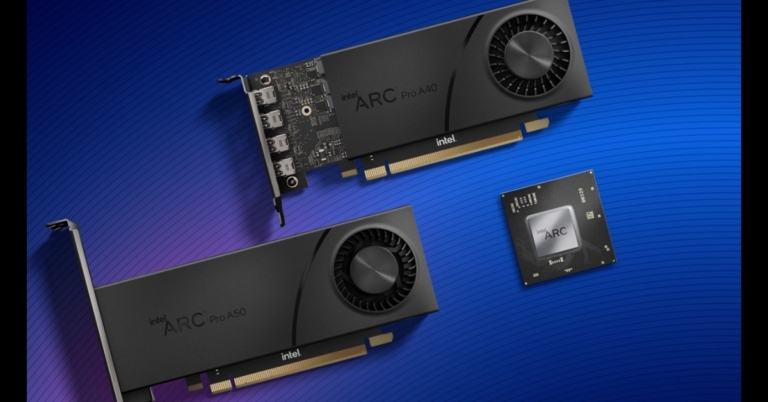
The Intel Arc Pro A-series professional line of graphics processing units (GPUs) was unveiled by Intel. The Intel Arc Pro A40 (single slot) and A50 (dual slot) GPUs for compact form factor PCs and the Intel Arc Pro A30M GPU for mobile form factors are the initial models. They all have industry-first AV1 hardware encoding acceleration, built-in ray tracing hardware, and machine learning capabilities. The company claims that Intel Arc Pro A-series graphics are aiming for certifications with top professional software programmes in the construction, engineering, and manufacturing sectors. Additionally, Intel Arc Pro GPUs run the open source libraries in the Intel oneAPI Rendering Toolkit, which are widely used and incorporated in top rendering tools, and are geared for media and entertainment applications like Blender. The new GPU series by Intel includes the A30M, and two desktop models: the single-slot A40 and dual-slot A50. To improve workflow efficiency, the most recent Intel Arc Pro A-series GPUs support up to four ultra-large screens. When you combine high dynamic range (HDR) with audio support, you have everything you need to create the next impressive multi-display configuration for your home or workplace. Ultra High Definition (UHD) and ultrawide UHD display resolutions are supported by discrete GPUs (with HDR enabled). Dolby Vision enhances compatible displays with richer colours, sharper contrast, and deeper depth thanks to specialised hardware decoding on the Pro GPUs. By dynamically adjusting the image quality based on your service, display device, and platform to offer breathtaking visuals every time, Dolby Vision maximises the promise of HDR technology. In addition to supporting PCIe 4.0 x8 systems, the Intel Arc Pro A-series GPU does not penalise backwards compatibility. A competitively high bandwidth speed improves graphical memory so that your software can access project data even more quickly. This GPU family offers a wealth of excellent technologies, including built-in dedicated AI acceleration where you need it and compatibility for your compatible AI tools. By utilising the combined strength of Intel CPUs and GPUs to unleash even greater performance, Hyper Compute enables the creation of multi-engine content. When performing operations like machine learning services during image processing, Hyper Compute makes use of all available compute engines or AI accelerators on the Intel CPU and GPU platform. For the latest gadget and tech news, and gadget reviews, follow us on TwitterFacebook and Instagram. For newest tech & gadget videos subscribe to our YouTube Channel. You can also stay up to date using the Gadget Bridge Android App. You can find the latest car and bike news here.

Samsung Galaxy Unpacked event to take place today: Here is what to expect

Samsung has set the stage to unveil its new product in the market. And today’s Galaxy Unpacked event will indeed be hosted by the South Korean company. The South Korean company will hold the event online and unveil its newest foldable smartphone there as well as in other countries, including India. To replace their predecessors, which were introduced last year, the business will release the Samsung Galaxy Z Fold 4 and Samsung Galaxy Z Flip 4, but it has not yet made this announcement. Both devices have been the subject of rumours, and before the official announcement, we found various leaks and reports that revealed the price and technical specifications of the phone. In addition, the business is probably going to reveal the Galaxy Buds 2 Pro earbuds at the same time as the Galaxy Watch 5 series.

How to watch Livestream of the Samsung Galaxy Unpacked event

Today is the day of the Samsung Galaxy Unpacked event. It will be a live webcast presentation that begins at 6:30 IST. The company’s official website, social media accounts, and YouTube channel will all stream live the dedicated launch event.

What to expect?

The Galaxy Z Fold 4 and Galaxy Z Flip 4 foldable smartphones, the Galaxy Watch 5 series, and the Galaxy Buds Pro 2 TWS headphones are all anticipated from Samsung at today’s Galaxy Unpacked. There have been numerous rumours about the functions and appearance of these phones, even if Samsung is still keeping the specifics under wraps for the time being. The colour and storage options for the Galaxy Z Flip 4 may have been announced by Samsung, though.
Samsung Galaxy Z Fold 4
According to rumours, the Samsung Galaxy Z Fold 4 will include a 6.2-inch Dynamic AMOLED 2X Infinity-O cover display. A 7.6-inch Dynamic AMOLED 2X Infinity-Flex primary display with 120Hz adaptive refresh rate is likely to be included on the foldable phone. Additionally, it is rumoured to have Corning Gorilla Glass Victus+ protection. A triple rear camera setup with an LED and it was purportedly predicted that the device would conceal the under-display camera. According to rumours, the Samsung Galaxy Z Flip 4 would have a 6.7-inch Super AMOLED screen with a 120Hz refresh rate. A Snapdragon 8+ Gen 1 SoC from Qualcomm might power the device. It is rumoured to have 512GB of internal storage and 8GB of RAM. According to rumours, the Galaxy Z Flip 4 will come in four colours and include a 12-megapixel dual-back camera configuration. The Galaxy Z Flip 4’s available colours are listed as Blue, Bora Purple, Graphite, and Pink Gold. Images of these options were also featured in the phone’s recently released design renderings.
Galaxy Z Flip 4
Galaxy Z Flip 4
Additionally, the possible frame colours for the Bespoke Edition version are noted: Black, Silver, and Gold. According to reports, Samsung will offer Green, Navy, Red, Yellow, and White for this device, out of more than 70 different colour combinations. The Samsung Galaxy Watch 5 series, on the other hand, purportedly appeared on the Galaxy Wearable app. Although nothing is known about Samsung’s next wristwatch, there may be two physical buttons on the side of it. Whereas the Samsung Galaxy Buds 2 Pro are reportedly the Galaxy Buds 2’s replacement. According to a tipster the Samsung Galaxy Z Fold 4 could cost EUR 1,799, which corresponds to Rs 1,45,400 for the 256GB storage model, and EUR 1,919, which translates to Rs 1,55,100 for the 512GB storage variant. Price-wise, the Galaxy Z Flip 4 is expected to retail for EUR 1,109, or about Rs 89,600 for the 128GB storage model, and EUR 1,169, or roughly Rs 94,500 for the 256GB storage model. In a similar vein, The Galaxy Watch 5 (40mm) might cost EUR 299, which converts to Rs 24,200 for the Bluetooth version, and EUR 349, which equals Rs 28,200 for the 4G version. According to reports, the price of the Galaxy Watch 5 (44mm) will start at EUR 329, which is approximately Rs 26,600 for the Bluetooth version, and EUR 379, which is approximately Rs 30,600 for the 4G version. The Galaxy Watch 5 Pro (45mm) will cost EUR 469, or roughly Rs 37,900 for the Bluetooth version, and EUR 499, or roughly Rs 40,300 for the 4G version. For the latest gadget and tech news, and gadget reviews, follow us on TwitterFacebook and Instagram. For newest tech & gadget videos subscribe to our YouTube Channel. You can also stay up to date using the Gadget Bridge Android App. You can find the latest car and bike news here.
OnePlus 10T review: Super fast speed at an attractive price, should you buy it?

The OnePlus 10T officially launched in India last week on August 3. After omitting the T series on the OnePlus 9, OnePlus has decided to bring it back for the OnePlus 10. The Snapdragon 8+ Gen 1 chipset brings enormous power to the device and is a clear upgrade over the flagship OnePlus 10 Pro. The massive 130W charger provides an unmatched charging speed. With the base 8GB + 128GB variant priced at Rs 49,999, the OnePlus 10T is bound to make heads turn in the premium smartphone segment, and maybe even attract consumers who were planning to buy the OnePlus 10 Pro. We used the OnePlus 10T for a week and put its specs and features to test. Here is our comprehensive OnePlus 10T review just for you. Read Also: 10 Best Apps to Download and Use First On Your New OnePlus 10T

OnePlus 10T review: Design and Display

oneplus 10t unboxed
OnePlus 10T unboxed
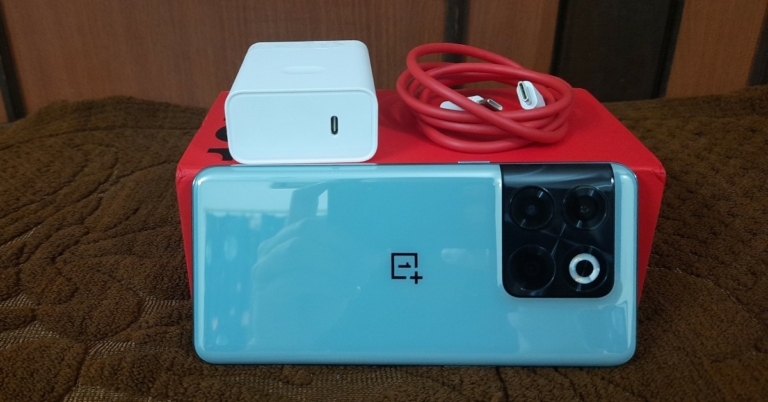
The OnePlus 10T comes packed in the OnePlus signature rectangular red box, with the company’s branding on the front. The smartphone ships with its own 150W turbocharger (more on that later!) and a protective case. The SIM tray, microphone, Type-C USB Port, and speaker are housed at the bottom of the phone, with a second loudspeaker present at the top. The volume keys and power button can be found on either side of the OnePlus 10T. Like other smartphones in this category, the headphone jack has been omitted along with the ringer key.
OnePlus 10T: Top view and Bottom view
When it comes to design, the OnePlus 10T seems indistinguishable from the OnePlus 10 Pro at first glance. While OnePlus has chosen to retain most of the design elements from its flagship offering, there are a few changes on the 10T. Finished with Gorilla Glass 5, the Jade Green version (which we are reviewing) has a smooth back panel, a change from the textured finish on the 10 Pro.
The smooth back panel on the Jade Green version
This panel has the tendency to attract tiny smudges, but after using it for a week we can safely say that it doesn’t amount to be a nuisance. The front selfie camera is now positioned at the top-centre of the screen instead of on the top-left side.
The front camera has been moved to top-centre of the screen
As we mentioned earlier, the OnePlus 10T does not come with the company’s iconic Alert Slider, which may disappoint some brand loyalists. But for those that do not need a dedicated switch to toggle between ringing modes, this feature won’t be missed. OnePlus explained that while the Alert slider is a small fixture on the external design, internally it can occupy a fair bit of space.  The company decided to drop it for high wattage charging, a large battery capacity, and a better antenna signal. This seems like a good enough trade-off to us, as the 10T does cover a lot of ground in battery charging and capacity and superior network speeds. The camera unit design remains the same, with the OnePlus 10T sporting the same square panel as the 10 Pro. However, it is missing the Hasselblad branding and ditches the telephoto lens for a 2MP macro lens. We dive into the effects of these changes in the camera performance section of the review, later on. Coming to the display, OnePlus has opted for a flat-edge display on the 10T instead of the curved edge found on the 10 Pro. The 6.7-inch Full HD+ touchscreen has a Fluid AMOLED display with an adaptive refresh rate of up to 120Hz. With 1,080×2,412p resolution and 87.9% screen-to-body ratio, the OnePlus 10T is an excellent phone to watch video content on. The stereo speakers on either side of the phone create an enveloping surround sound, producing an immersive experience. The refresh rate of 120Hz is thoroughly utilised in gaming mode, which we tested by playing Apex Legends, experiencing no throttling or unwanted load time.  In order to save battery, the refresh rate can be brought down to 90 and 60Hz when the smartphone isn’t performing heavy tasks. The 10T offers a peak brightness of 950 nits and the display adapts meticulously to the outdoor environment, being perfectly visible even in direct sunlight.
The in-display fingerprint sensor deserves a special mention
Even though the in-display fingerprint sensor is becoming a staple in most smartphones across all categories, the OnePlus 10T deserves a special mention for its incredible unlock speed that is unmatched across the spectrum. The 120Hz refresh rate provides a seamless user experience, and the phone is very receptive to touch gestures. Overall, we quite liked what we saw.

OnePlus 10T review: Performance and Cameras

The OnePlus 10T is powered by the Snapdragon 8+ Gen 1 chipset which is a slight improvement on the Snapdragon 8 on the 10 Pro. The SD8+ Gen 1 offers 30% better power efficiency and 10% faster graphics compared to its predecessor in 10 Pro. The OnePlus 10T is offered with an option of 8GB RAM + 128GB storage, 12GB RAM + 256GB storage, and 16GB RAM + 256GB storage.  We tested the mid-placed variant with 12GB RAM and 256GB storage, and it handled whatever tasks we threw at it with absolute ease. The 10T can hold dozens of apps running in the background, seamlessly switching between them with negligible load time. We did not experience any dip in speed even in split screen mode, as we tried playing YouTube with Instagram and other apps, and they all worked out perfectly. The vapor chamber in the 10T is the largest on any OnePlus smartphone. This vapor chamber coupled with 3D graphite and a copper coil keeps the temperature at an optimum level despite the smartphone performing heavy tasks. We tried playing Apex Legends Mobile and Garena Free Fire MAX on the 10T for an extended period of time and the phone barely got warm.  The 360-degree antenna ensures strong network connectivity no matter how you’re holding the phone. This performance rivals dedicated gaming smartphones like the Asus ROG Phone 6.
oneplus 10t performance review
Geek Benchmark 5 test results
The 10T scored 722 on the Geek benchmark 5 test in default mode and 1294 in high-performance mode. This score places it with the likes of Samsung Galaxy S21 Ultra, Samsung Galaxy Note 20 Ultra and Xiaomi Poco X3 Pro. Coming to its operating system, the OnePlus 10T runs on Android 12 skinned with OxygenOS 12.1. The OxygenOS is heavily influenced by Oppo’s ColorOS. The phone comes with no bloatware, except for the Netflix app. One interesting feature is the ‘Shelf’ which can be viewed by swiping down from the top-right section of the screen. The Shelf accommodates all your interactive widgets in one window. These widgets can include temperature, step counter, data usage and storage counter, Spotify, live sports scores and a lot more. For users who do not want to compromise one-half of the top screen swipe, the Shelf can be easily disabled from Settings. The OnePlus 10T will also get an Oxygen 13 upgrade with the Android 13 coming later this year. OnePlus has also promised three major updates with the 10T.
oneplus 10t fast charger performance review
OnePlus 10T charging unit
One of the most talked about components and an attractive feature for prospective buyers is the turbocharger of the OnePlus 10T. The 160W power adapter can provide up to 150W of wired charging. OnePlus continues to deliver fast charging speeds and the 10T beats any other smartphone in this aspect. It takes just over 20 minutes to fully charge the 4,800-mAh dual cell battery with the turbocharger, and if you are in a hurry 3 minutes of charge will take it from a 1% to 15% charge.  The battery typically lasts an entire day, even with regular periods of gaming and above-average screen time. OnePlus claims that the 10T retains 80% battery health after 1,600 charge cycles, which is a little over 4 years. OnePlus 10T does not have wireless charging, but when the phone takes 20 minutes to fully charge we doubt that anyone’s going to complain about it.
oneplus 10t camera performance review
Macro lens vs Primary lens
The camera unit of the OnePlus 10T comprises a 50MP primary camera, an 8MP ultrawide and a 2MP macro lens. As we mentioned earlier, the telephoto lens found on the 10 Pro has been ditched and a 2MP macro lens finds its way into 10T’s camera unit. This decision doesn’t make a lot of sense as the 50MP primary lens does a much better job of capturing images up close than the macro lens. There is no Hasselblad branding on 10T’s camera array either, as OnePlus seems to be keeping it as a distinguishing feature for the 10 Pro. 
oneplus 10t camera review
The 50MP primary camera does well in daylight photography.
The 50MP primary lens does most of the heavy lifting in this camera unit, providing remarkable, vivid pictures in both outdoor and indoor lighting. The camera works particularly well in daylight, producing highly detailed images with well-balanced colours without any oversaturation. During the nighttime, the main lens does a fine job of capturing light in limited conditions. The images produced in night mode are at par with other smartphones in this category, and the grain is barely noticeable. 
oneplus 10t camera review
The OnePlus 10T performs well in low light.
The rear camera can record videos up to 4k at 30 or 60fps. The ‘movie’ mode provides greater control over the ISO, Shutter, EV, MF, and WB. The camera stabilisation on this mode is also pretty neat, and it can be used to record professional-grade videos. The 16MP front selfie camera performs well in regular and portrait mode, and also records 1080p resolution videos at 30 fps. Another good feature of the native camera app is the ‘Dual-View video’ mode. The ‘Dual-View video’ mode can record video from both rear and front cameras simultaneously. Read Also: OnePlus 10 Pro Review: Is it the right investment?

Verdict

At the price of Rs 49,999, the OnePlus 10T is a remarkable smartphone. Even though OnePlus may not market it as a gaming smartphone, it certainly matches the performance of phones in that category. The CPU performance of the OnePlus 10T exceeds that of the flagship 10 Pro. While the camera unit and missing alert slider may put off a few buyers, we don’t see any reason why it would deter buyers looking to buy a premium smartphone at this price point. Pros
  • Speed
  • Ultra-fast charging and great battery life
  • Performance
  • Price
Cons
  • Alert Slider missing
  • Macro camera instead of a telephoto lens
For the latest gadget and tech news, and gadget reviews, follow us on TwitterFacebook and Instagram. For newest tech & gadget videos subscribe to our YouTube Channel. You can also stay up to date using the Gadget Bridge Android App. You can find the latest car and bike news here.

How to Play Pokémon Games on Your iPhone or iPad in 2022?

0
As any video game enthusiast will tell you, Pokemon games are some of the most popular and widely enjoyed games across the world. First released in 1996, Pokemon games have since been released under numerous titles and are extremely fun to play. The first title, Pokemon Monsters Red and Green was released only for Gameboy and Nintendo platforms. Many Pokemon fans still love to go back and enjoy the older titles. But older titles may not be available for your new devices. In this article, we show you how to play Pokemon games on your iPhone and iPad.  Read Also: 10 kids-friendly cartoon series you can let your child watch on Netflix

Play classic Pokemon games on your iPhone or iPad using an emulator

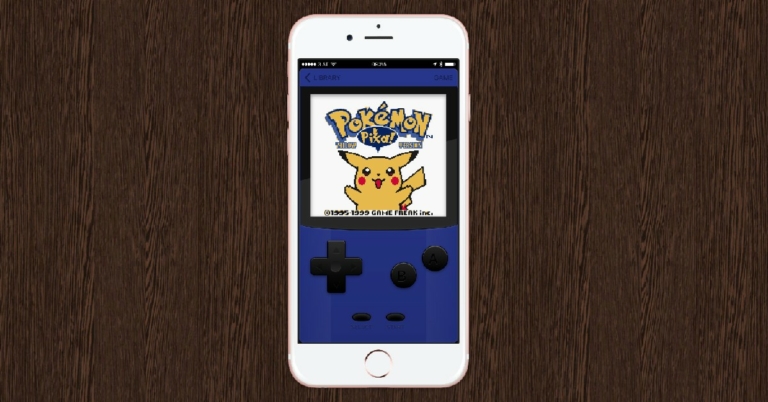
Play classic Pokemon games on your iPhone or iPad using an emulator There are several highly rated Gameboy emulators for iPhone and iPad that you can use to create a Gameboy environment on your Apple device. Since the older classic Pokemon titles aren’t available for smartphones, a Gameboy emulator is your best chance at playing them on your iPhone. You can check out our list of top 7 Gameboy emulators for iPhone here. Gameboy emulators aren’t available on the App Store. You will have to download them from the emulator’s official website.  We recommend using GBA4iOS, Delta Emulator, or Eclipse. These emulators can not only mimic a Gameboy environment but also other major platforms like NES, N64, Sega, and more. Once you’ve downloaded the emulator, you will need to download the ROM of the Pokemon game you want to play. Downloading ROMs isn’t strictly legal as it infringes on the copyright laws made to reduce piracy. But if you want to play a classic Pokemon game on your iPhone, you don’t have any other choice. A simple Google search will direct you to the ROM of the Pokemon game you want to play. Once you’ve downloaded the ROM, you can load it on the emulator and begin playing your favourite Pokemon games.

Play classic Pokemon games using the Safari browser

If you do not want to download an emulator on your iPhone or iPad, you can simply use a web-based emulator like Game Play Colour. One limitation of using a web-based emulator is that switching between apps may reset any progress you made on the game. You will have to save your game on the ROM before you minimize the browser. All you need to do is open the Game Play Colour website on the Safari browser and add it to your iPhone home screen by tapping on Play Now>Share. Tap on the icon that appears on the home screen and load the ROM from your Google Drive account.

Download Pokemon games from App Store

Download Pokemon games from App Store While classic Pokemon games may not be available on the App Store, a lot of newer ones are. Pokemon Go came out in 2016 and is still one of the most popular games today. It uses AR to help you find and catch Pokemons using your iPhone’s camera. Other Pokemon games like Pokemon Masters EX and Pokemon Quest can also be downloaded from the App Store. Read Also: How to run PUBG Mobile on your PC or laptop?

Frequently Asked Questions

Can I download classic Pokemon games from the App Store? No, App Store doesn’t have any classic Pokemon games. To play these games you will need to use an emulator. Are emulators safe to use? Most emulators are safe to use and won’t harm your device. Always check user reviews online before downloading an emulator. You can also check our list of top 7 Gameboy emulators for iPhone here. Which Pokemon games are available on the App Store? Newer Pokemon titles like Pokemon Go, Pokemon Masters EX, and Pokemon Quest are available on the App Store and can be played on iPhone and iPad.
For the latest gadget and tech news, and gadget reviews, follow us on TwitterFacebook and Instagram. For newest tech & gadget videos subscribe to our YouTube Channel. You can also stay up to date using the Gadget Bridge Android App.