

Xiaomi India appoints Alvin Tse as the country’s new general manager, Anuj Sharma to return as its Chief Marketing Officer

Xiaomi India announced today a number of organisational adjustments in preparation for the next phase of its expansion. Alvin Tse has been named General Manager of Xiaomi in India. Tse’s promotion comes after Manu Jain was promoted to Group Vice President at Xiaomi last year and is now responsible for International Strategy, including International Marketing and PR. Anuj Sharma, who left the business for Poco almost two years ago, will return as Chief Marketing Officer.
Since Manu Jain’s departure who switched to a global role as Group Vice President, the Xiaomi India leadership team, which includes Muralikrishnan B, Chief Operating Officer; Raghu Reddy, Chief Business Officer; and Sameer BS Rao, Chief Financial Officer, has been running the company independently and will continue to be a driving force behind the brand.
Alvin Tse was the former General Manager of Xiaomi Indonesia and is now the General Manager of Xiaomi India. He is also a member of the Xiaomi Global founding team, a POCO founding member. As per the company, Alvin will join the Xiaomi India leadership team and help the company’s next phase of growth following his transition. Alvin has assisted Xiaomi in successfully expanding into numerous worldwide markets as a British national and true global citizen.
Moreover, Anuj Sharma will return to Xiaomi India as Chief Marketing Officer to further strengthen the India leadership team. Anuj Sharma will be in charge of the overall brand and marketing strategy. He will play a key role in strengthening Xiaomi’s ties with consumers across the country.
The company in its announcement said, “With their guidance, Xiaomi India will continue to stay true to its core philosophy of relentlessly building amazing products with honest prices such that everyone in the world can enjoy a better lifestyle through innovative technology.”
For the latest gadget and tech news, and gadget reviews, follow us on Twitter, Facebook and Instagram. For newest tech & gadget videos subscribe to our YouTube Channel. You can also stay up to date using the Gadget Bridge Android App. You can find the latest car and bike news here.
New features announced for Instagram Reels, now let you add your own audio and more
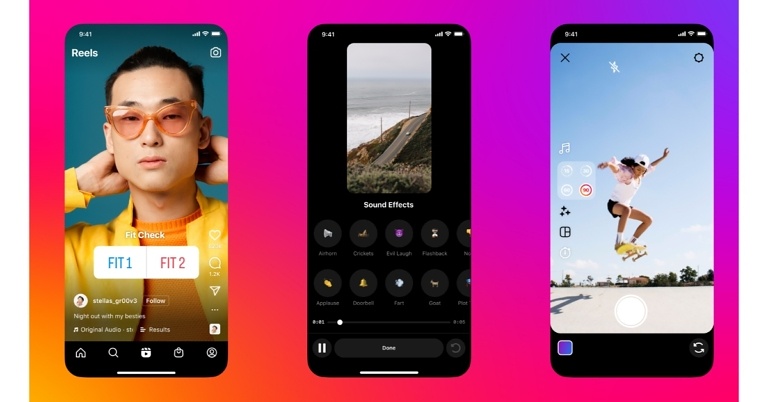
Instagram has announced the rollout of new features and the focus of the upgrade is once again on creators. The duration of Instagram Reels has been increased from 60 seconds to 90 seconds, allowing individuals to reveal their true self on the platform. Moreover, users may now integrate their own music directly into Instagram Reels, according to Instagram.
Instagram Reels is getting some wonderful new features starting today. Reels can now last up to 90 seconds, which is one of the most essential features being added. According to the new blog post, the Instagram Reels will now be extended to 90 seconds. The duration of a Reel has been increased from 60 seconds to 90 seconds, providing additional time for creators to share their work. In addition to this, Reels is getting a new set of sound effects along with there’s a new Import Audio tool that allows you to add your own audio, speech or sound on your camera roll that’s at least five seconds long.
While announcing the new Instagram Reels features the Meta owned photo-sharing app said, “Today, we’re rolling out new features that help you engage more with your audience and help you express your most authentic self on Reels.”
Updated Sound effects
Instagram Reels has updated its sound effects library, which now includes sound effects like air horns to crickets to drums and more. The updated sound effects library can help you add humour to a reel or assist your viewers to connect with their emotions while watching one.
Add your own audio
You can now integrate your own audio right into Instagram Reels. Use the import audio option to add commentary or background noise from any video on your camera roll that is at least five seconds long.
Interactive stickers added
Interactive stickers from Instagram Stories are now accessible on Reels, giving you even more ways to interact with your followers. These are the three alternatives that are currently available:
Poll: Making a two-part reel? Poll your audience on what should happen in your next video so that they can help shape the storyline themselves.
Quiz: Put your audience’s skills to the test (or teach them something new!) with this sticker.
Emoji slider: Let your audience share how your content makes them feel with a sticker that makes the heart-eye emoji even more powerful.
Reels can now continue as long as 90 seconds
Instagram has extended the length of Reels to up to 90 seconds, allowing you extra time to play. Instagram creators will have more time to tell more about themselves, record additional behind-the-scenes footage, delve deeper into the complexities of your material, or do whatever else you choose with the extra time.
Templates
Instagram just introduced Templates, which let you to quickly construct a reel by copying one from another. The audio and clip placeholders are pre-loaded, so all you have to do now is add and trim your own footage.
For the latest gadget and tech news, and gadget reviews, follow us on Twitter, Facebook and Instagram. For newest tech & gadget videos subscribe to our YouTube Channel. You can also stay up to date using the Gadget Bridge Android App. You can find the latest car and bike news here.
Garena Free Fire Redeem Codes Today 3 June 2022: Here is how to claim them

Garena Free Fire is a battle royale game with regular awards and tournaments to keep players interested. If you play Garena Free Fire, you should be aware of the redeem codes that are released on a daily basis. However, because the battle royale game is banned in India, players from other countries can use the Free Fire Redeem codes daily. If you’re unfamiliar with the Garena Free Fire redeem codes or don’t know how to get them, we’ve put together a step-by-step guide to help you redeem them. Check out Garena Free Fire Redeem Codes for June 3.
The Free Fire redeem codes are a great way to get free stuff. These are 12-digit codes that contain alphabets and numbers, as well as an expiration date and time. Because the Garena FF redeem codes cannot be used more than once, you should hurry to the redemption page to claim your free reward before someone else does. To get a free reward, all you have to do is go to reward.ff.garena.com/en, which is the official redemption page. Also, keep an eye on this space for daily updates on Garena Free Fire redemption codes and rewards.
In This Article
Garena Free Fire Redeem Codes Today 3 June 2022
- FF9M J31C XKRG
- FFCO 8BS5 JW2D
- PCNF 5CQB AJLK
- FFAC 2YXE 6RF2
- FFIC JGW9 NKYT
- WEYV GQC3 CT8Q
- 3IBB MSL7 AK8G
- FV5B NJ45 IT8U
- F4N5 K6LY OU9I
- FH2G YFDH E34G
- F7YG T1BE 456Y
- FJBH VFS4 TY23
- F87G YF3D GE6B
How to Get Free Fire Redeem Codes for Garena on June 3?
- Visit the Garena Free Fire game’s official website at reward.ff.garena.com.
- Use your Facebook, Google, VK, Apple ID, Huawei ID, or Twitter account to log in.
- You’ll be taken to a valid redemption code (s)
- Copy and paste the 12-digit redemption code into the text box.
- On the screen, a dialogue box will appear.
- ‘Ok’ should be selected.
Facebook Messenger has added calls tab to its app similar to WhatsApp
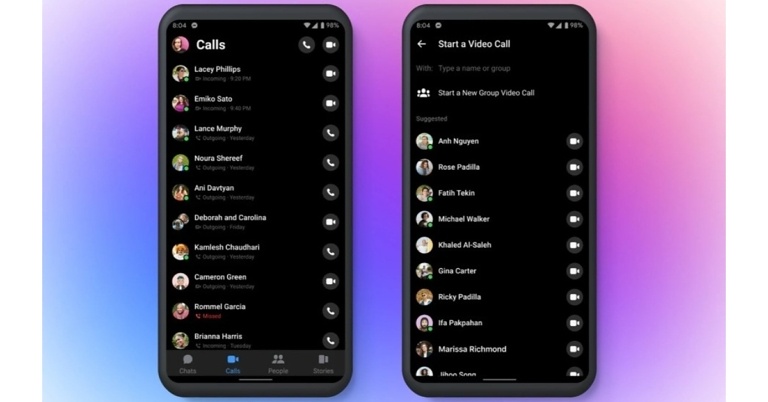
Meta is releasing a new Calls Tab for the Facebook Messenger app, which is aimed to make making audio and video calls easier. The dedicated Calls Tab on Facebook Messenger has been added to the bottom of the app’s function bar, allowing users to instantly access all of their voice and video calls. Moreover, the new appearance is inspired by WhatsApp and will be instantly recognisable to users.
On both Android and iOS, the Facebook Messenger app will get a new audio call tab. The new Calls tab is currently going out to consumers, according to DigitalTrends, and while it may not appear for everyone right once, it’s coming.
As previously said, the Calls tab will not be visible to all Messenger users right now. Users who are fortunate enough to find it will find it in the lower bar of the app’s screen, between the Chats and People sections.
As per the company, the initiative to include calling on the Messenger app’s main screen was made in response to the rapid increase in audio and video calls made through another user’s chat window. According to Meta, it has been discovered that, compared to early 2020, when the COVID-19 pandemic drove many individuals to work from home and conduct meetings through video and audio, there are 40% more daily callers now. Every day, more than 300 million audio and video calls are made by Messenger users throughout the world.
Instead of entering into their chat to initiate calls from the top-right corner of the screen, users will be able to call with a single touch of a button, similar to WhatsApp.
Shortcuts, a new collection of capabilities in the Messenger app that allows users to send GIFs, ASCII emoticons, and do activities using commands, was just added to the Facebook Messenger app. @everyone is a new feature in the Meta-owned IM software that functions similarly to Slack. When a message is received, it is broadcast to all chat participants. The new feature is great for group reminders, get-togethers, and other events. GIFs and ASCII emoticons can also be sent via Facebook Messenger for Android and iOS users. The additional commands and shortcuts are designed to increase the efficiency of texting.
For the latest gadget and tech news, and gadget reviews, follow us on Twitter, Facebook and Instagram. For newest tech & gadget videos subscribe to our YouTube Channel. You can also stay up to date using the Gadget Bridge Android App. You can find the latest car and bike news here.
Amazon Quiz Answers Today 3 June 2022: Participate to win Rs 5,000

3 June 2022 Amazon Quiz has gone live. Customers from different parts of the country are participating in the daily quiz. The quiz begins from 12 AM to 11:59 PM. Those participating in the quiz can win exciting prizes by answering all the questions correctly. Today participants have a chance to win a Rs 5,000 Amazon Pay Balance.
Amazon quiz brings an opportunity for its customers to win Amazon Pay Balance ranging from Rs 1,000 to Rs 50,000. The Quiz can be played from 12 AM to 11:59 PM. The e-commerce platform brings a fresh quiz on a daily basis which consists of five questions related to general knowledge and current affairs. The participants need to answer all the questions correctly and their names will be selected for a lucky draw. The winner will be announced at the end of the month.
One wrong answer could eliminate you from the quiz. If you manage to answer all the questions correctly you can stand a chance to win a Rs 5,000 Amazon Pay Balance today. Only app users are eligible to participate in the Quiz. Check Out 3 June 2022 Amazon Quiz Answers.
Amazon Quiz Today Prize – Rs 5,000 Amazon Pay Balance
Quiz Date – 3 June 2022
Daily Timing – 12 AM to 11:59 PM
Winner Announcement – Today 12 PM
In This Article
Amazon Quiz Answers Today 3 June 2022
Question 1: Who is the first Black woman to appear on the US quarter? Answer: Maya Angelou Question 2: Joumou soup is a traditional pumpkin soup from which country that recently got the UNESCO cultural heritage status? Answer: Haiti Question 3: Yutu-2 is the robotic lunar rover of which country’s mission to the Moon? Answer: China Question 4: A species of which fish, referred to earlier as ‘trash fish’ is named after this animal? Answer: Alligator Gar Question 5: This visual shows which city? Answer: VaranasiHow To Play Amazon Quiz
Only app users are eligible to play the Amazon quiz every morning from 12 AM to 11:59 PM. The quiz is not available on the desktop. For those who are unaware of how to play the Amazon quiz below are the steps, you can follow to take the quiz.- Firstly download the Amazon app from Google Play Store or App Store
- Now fill in the required information through the Sign Up option.
- You need to log in to the Amazon app and scroll down on the home screen to find the Amazon Quiz banner.
- Tap on the Amazon Quiz banner and tap on the Start button to start the Quiz.
- Now you will get 5 questions and you need to answer them correctly. One wrong answer will eliminate you from the Quiz.
- After answering all the questions correctly you are now eligible for a Lucky Draw.
- The winner’s name will be announced today at 12 PM.
How To Create A Disposable Email Address With Gmail In 2022?
Have you ever (even by mistake) clicked on the Social or the Promotions section in your Gmail inbox? No, right? The exponentially piling number of promotional emails in there makes us automatically repel that part of our inbox. Now, the fact that there are people out there who bother to read such emails might be hard to believe. But to tell you, email marketing has become one of the most effective marketing strategies of the decade. Baffling, isn’t it? You, therefore, have to continue dealing with all the spam mails in your account, which is no doubt, quite frustrating. But what if we told you there is a way out? The answer is simple. Disposable emails! Here is a step-by-step guide on how to create a disposable email address with Gmail in 2022.
Disposable email addresses help keep your official email ID neat and tidy. These are email IDs created for temporary usage, such as for subscribing to a specific service that you want. Today, each software, platform, or digital solution requires you to register with your email ID to access its services. But the more people you submit your email to, the higher the number of advertisements or spam emails you receive. This is where disposable emails come into the picture. Although Gmail does not directly provide disposable email addresses, you can create aliases and filter out incoming mail for each alias ID. To create an email alias in Gmail, just follow the steps given below.
Read also: How To Find If Someone Else Is Using Your WhatsApp Account? Top 3 Ways
Step 1: Sign in to your Gmail account.
Step 2: To the immediate left side of your profile icon on the top right corner of the interface lies the Google apps icon. Click on it.
Step 3: Select Account.
 Step 4: Select Personal Info from the list of sections shown on the left pane in the Google Account window that appears next. Then click on the Name field.
Step 5: You will get directed to the Name window wherein your Name and Nickname (alias) field entries are displayed. Add a nickname or alias that you want to appear before ‘@gmail.com’ tag.
Step 6: Click on Save Changes. That’s it!
Read also: How To Scan QR Codes With Google (2022)?
In this way, you can create an alias or a disposable email address with Gmail in 2022. There are many other third-party websites that offer temporary or disposable email address services. Some popular examples include Mailinator, TempMail, and Throwawaymail.com. The best thing about them is that you don’t even have to provide any of your personal details for generating a disposable email using their services.
If you know of any other ways how to create a disposable or temporary email address with Gmail, do share with us in the comments section below.
For the latest gadget and tech news, and gadget reviews, follow us on Twitter, Facebook and Instagram. For newest tech & gadget videos subscribe to our YouTube Channel. You can also stay up to date using the Gadget Bridge Android App. You can find the latest car and bike news here.
Step 4: Select Personal Info from the list of sections shown on the left pane in the Google Account window that appears next. Then click on the Name field.
Step 5: You will get directed to the Name window wherein your Name and Nickname (alias) field entries are displayed. Add a nickname or alias that you want to appear before ‘@gmail.com’ tag.
Step 6: Click on Save Changes. That’s it!
Read also: How To Scan QR Codes With Google (2022)?
In this way, you can create an alias or a disposable email address with Gmail in 2022. There are many other third-party websites that offer temporary or disposable email address services. Some popular examples include Mailinator, TempMail, and Throwawaymail.com. The best thing about them is that you don’t even have to provide any of your personal details for generating a disposable email using their services.
If you know of any other ways how to create a disposable or temporary email address with Gmail, do share with us in the comments section below.
For the latest gadget and tech news, and gadget reviews, follow us on Twitter, Facebook and Instagram. For newest tech & gadget videos subscribe to our YouTube Channel. You can also stay up to date using the Gadget Bridge Android App. You can find the latest car and bike news here.
 Step 4: Select Personal Info from the list of sections shown on the left pane in the Google Account window that appears next. Then click on the Name field.
 Step 5: You will get directed to the Name window wherein your Name and Nickname (alias) field entries are displayed. Add a nickname or alias that you want to appear before ‘@gmail.com’ tag.
 Step 6: Click on Save Changes. That’s it!
Read also: How To Scan QR Codes With Google (2022)?
In this way, you can create an alias or a disposable email address with Gmail in 2022. There are many other third-party websites that offer temporary or disposable email address services. Some popular examples include Mailinator, TempMail, and Throwawaymail.com. The best thing about them is that you don’t even have to provide any of your personal details for generating a disposable email using their services.
If you know of any other ways how to create a disposable or temporary email address with Gmail, do share with us in the comments section below.
For the latest gadget and tech news, and gadget reviews, follow us on Twitter, Facebook and Instagram. For newest tech & gadget videos subscribe to our YouTube Channel. You can also stay up to date using the Gadget Bridge Android App. You can find the latest car and bike news here.
Step 6: Click on Save Changes. That’s it!
Read also: How To Scan QR Codes With Google (2022)?
In this way, you can create an alias or a disposable email address with Gmail in 2022. There are many other third-party websites that offer temporary or disposable email address services. Some popular examples include Mailinator, TempMail, and Throwawaymail.com. The best thing about them is that you don’t even have to provide any of your personal details for generating a disposable email using their services.
If you know of any other ways how to create a disposable or temporary email address with Gmail, do share with us in the comments section below.
For the latest gadget and tech news, and gadget reviews, follow us on Twitter, Facebook and Instagram. For newest tech & gadget videos subscribe to our YouTube Channel. You can also stay up to date using the Gadget Bridge Android App. You can find the latest car and bike news here. Amber Alerts for Missing Children are now available on Instagram
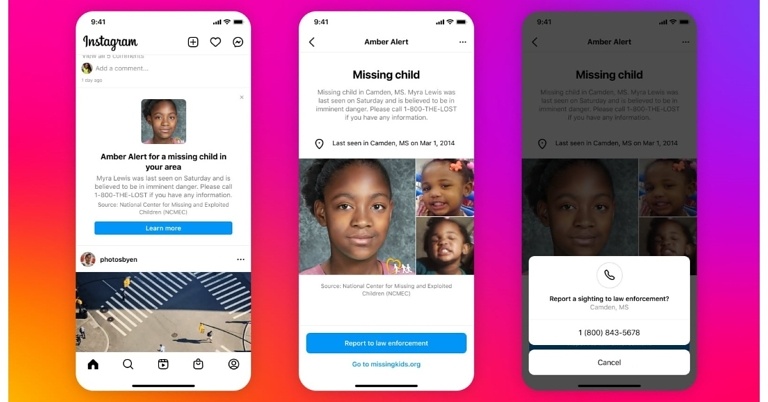
Instagram has announced the addition of another essential service on its platform called AMBER Alerts, which allows individuals to read and share missing child reports in their area. This feature will begin to roll out today and will be available in all 25 countries during the next several weeks. AMBER Alerts on Facebook have proven successful in assisting authorities in locating missing children since 2015. The notice will include crucial information about the youngster, such as a photo, description, and the location of the kidnapping, among other things.
For the first time, Instagram has added AMBER Alerts to its platform. The National Center for Missing & Exploited Children (NCMEC) in the United States, the International Centre for Missing & Exploited Children, the National Crime Agency in the United Kingdom, the Attorney General’s Office in Mexico, the Australian Federal Police, and others collaborated on this feature.
“We know that the chances of finding a missing child increase when more people are on the lookout, especially in the first few hours. With this update, if an AMBER Alert is activated by law enforcement and you are in the designated search area, the alert will now appear in your Instagram feed,” the blog post noted.
Important details about the child will be included in the alert, such as a photo, description, abduction location, and any additional information that can be provided. The warning can also be shared with friends to help spread the information.
According to Instagram, these are uncommon alerts that are specific to the search area. If you get one, it signifies a missing child search is underway in your area. It uses a variety of indications to determine who should receive these alerts, including the city you mention on your profile, your IP address, and location services (if you have it turned on).
AMBER Alerts on Instagram will launch today in 25 countries: Argentina, Australia, Belgium, Bulgaria, Canada, Ecuador, Greece, Guatemala, Ireland, Jamaica, Korea, Lithuania, Luxembourg, Malaysia, Malta, Mexico, the Netherlands, New Zealand, Romania, South Africa, Taiwan, Ukraine, the United Kingdom, the United Arab Emirates, and the United States. We’re focusing on expanding their reach and bringing them to more countries.
AMBER Alerts on Facebook was announced in 2015. Since then, hundreds of successful child endangerment cases have been solved in the United States and around the world because of the warnings.
For the latest gadget and tech news, and gadget reviews, follow us on Twitter, Facebook and Instagram. For newest tech & gadget videos subscribe to our YouTube Channel. You can also stay up to date using the Gadget Bridge Android App. You can find the latest car and bike news here.
BGMI Update: The Hidden Hunters Royale Pass is now available on Battlegrounds Mobile India
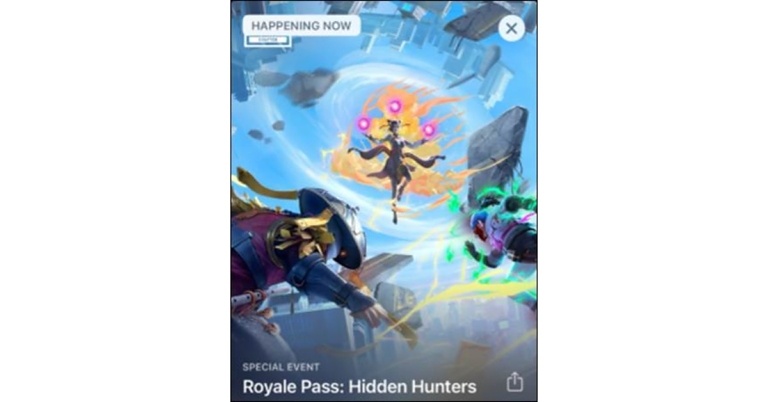
The latest Hunters Royale Pass from Krafton is now available on Battlegrounds Mobile India. The Hidden Hunters Royale Pass can be used to obtain a variety of gifts until 5:30 a.m. on June 17th.
The most recent Battlegrounds Mobile India update is as follows: Players will find a wide variety of fascinating rewards in the new RP, several of which are even free. The RP is available in two versions, according to the gaming company: a basic Elite Pass for 360 UC and a superior Elite Pass for 960 UC. Players can purchase the variant of their choice from the RP section.
Here’s what the Hidden Hunters Royale Pass has in store for you.
- RP Rank 1: Ultimate Trendsetter Set together with Electrotech Scar-L
- Rank 5: Ultimate Trendsetter Mask together with Ultimate Trendsetter Cover
- RP Rank 10: Ultimate Trendsetter Helmet
- RP Rank 15: RP Avatar (M11), Lunar Spear Ornament, along with rare Rising Uppercut Emote (available in the free RP tab)
- RP Rank 20: Sinisflame Molotov Cocktail together with Foxy Twins Parachute (also available in the free RP tab)
- RP Rank 23: Armed Raider Cover (available in the free RP tab)
- RP Rank 25: Armed Raider Set (available in the free RP tab)
- RP Rank 30: Blockade Ahead Emote along with Crimson Emblem Plane Finish
Apps That Save Time: Top 10 Android Apps That Help You Get Your Work Done Faster
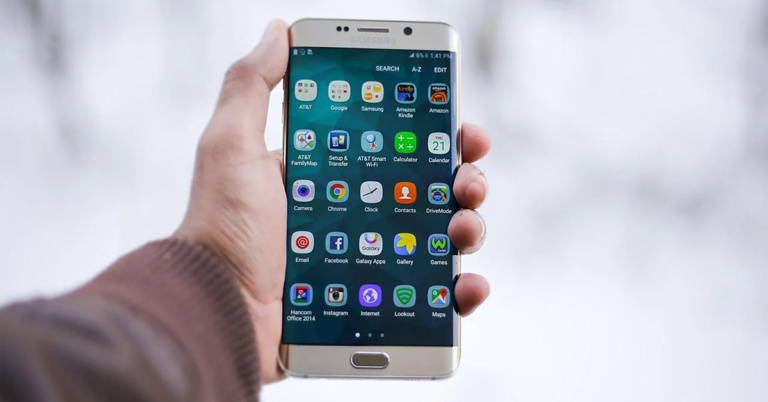
If you’re having trouble focusing on your work, if you often catch yourself procrastinating, or if your projects and timelines constantly get delayed, don’t get disheartened. It happens to the best of us. And after all, we are human beings at the end of the day. But hey, problems don’t come without solutions. So cheer up! We have for you today, the top 10 Android apps that save time and help you get your work done faster. You will be surprised at the number of productivity applications and platforms that are out there, ready to assist you in all kinds of ways. From time tracking, workflow structuring, noise-cancelling to complex project management applications, you have a wide variety of options to select from.
The first one on our list of the top 10 Android apps that save time in 2022 is Hive. It is a productivity platform built for project management amongst fast-moving teams of all sizes. It helps you in managing complex workflows, by providing project and action templates along with powerful document and video proofing tools. It allows you to keep a track of your staff and their timesheets. You can check your to-do list, share files, collaborate with your team members, and also leave an action plan after every meeting. Moreover, it offers over 1,000 integrations with different platforms to create one centralised dashboard and enhance efficiency.
Download Hive
Calendly is a platform that helps in scheduling meetings for you. It has an Android application, Calendly Mobile, which you can use to book meetings with your colleagues without the back-and-forth emailing. You can set the days, hours, and dates of your availability. It even provides options for different time slot lengths for a meeting. You just give the person your Calendly link and they can choose a slot from your availability that best suits them. This cuts down the hassle of negotiating a common meeting time.
Download Calendly.
Read also: 10 Essential Apps To Install First On Your New Windows Laptop
Next on our list of the best productivity apps of 2022 is Evernote. It is a powerful tool that helps executives, entrepreneurs, and creative people to capture their ideas by taking and arranging notes. One of the unique aspects of the app is that it allows the users to take photos of their written notes and upload them on the app. So if you are a person who has a habit of mixing written notes with digital ones, this one may be a perfect solution for you.
Download Evernote.
If This Then That (IFTTT) is a workflow automation tool that connects all your apps, devices, and smart home. It has a no-code interface and offers combining over 700 popular applications and services to automate your life as much as possible. Automation can be as simple as connecting two services or even sophisticated workflows that are built on conditional logic.
Download IFTTT
Another popular Android app for increasing your productivity is Slack, which is specially designed for workplace communications. Originally developed by the American company Slack Technologies, it is now owned by Salesforce. It offers many IRC (Internet Relay Chat) style features, including chat rooms that are organised by topic, private groups, and direct messaging. Moreover, you can see everything related to a project or a topic in its dedicated channel. You can keep a track of the progress and set your status and availability to share with teammates.
Download Slack.
The next one on our list of the top 10 apps that save time and help you get your work done faster, is this one. MindMeister is a pretty cool mind mapping application. It helps you organise, prioritise, and even generate new thought processes. It provides you with tools and templates that help you visualise ideas and plans, collaborate with others to brainstorm and discuss them, add icons, images, and themes, and present your final map gracefully.
Download MindMeister.
A very unique and extremely useful app for helping yourself stay focused is Forest. It is best for those who have a tough time keeping their smartphones and gadgets down and gathering all their attention to work. You simply open the Forest app and plant a tree, whenever you want to focus on a task. The app gives you an incentive not to use your device. If you continue focusing on your work and avoid using your phone, the plant you planted grows further into a tree. But if you fail to focus and end up using your phone again, the tree dies. The big picture is to grow a full forest for yourself. And concentration is the key!
Download Forest.
Read also: Top 15 Best Android TV Apps You Should be Using In 2022
Krisp is another fascinating Android application that helps you stay focused during your meetings. It is an AI-powered noise cancelling app which removes all the background noises and echoes in real-time during a call or a conference, leaving only a clear human voice behind. You can pair Krisp with over 800 communication tools such as Microsoft Teams, Google Meet, Zoom, and more. It acts as a layer between your device and the online communication solution to eliminate any background noise with a single click.
Download Krisp.
The next best productivity app that we have for your Android device is Everhour. It is a time-tracking software that helps teams keep a track of their timesheets. Not only is it a handy tool for monitoring how your employees spend their time, but you also get to estimate tasks, set budgets, build reports, and integrate with a plethora of other project management solutions to tune up your work efficiency.
Download Everhour.
The final item on our list of the top 10 Android apps of 2022 that save time and help you get your work done faster, is Pushbullet. It helps build a network to connect all your devices. You can connect your phone with your PC to send and receive SMS straight from your computer, see all your notifications from your desktop, build channels, and share files between your devices.
Download Pushbullet.
So those were our top picks for the 10 best Android apps that save time and increase your productivity in 2022. We would love to hear about your experience using these apps, and how they improved the speed of implementing your projects and workflows. Do share with us your thoughts in the comments section below.
For the latest gadget and tech news, and gadget reviews, follow us on Twitter, Facebook and Instagram. For newest tech & gadget videos subscribe to our YouTube Channel. You can also stay up to date using the Gadget Bridge Android App. You can find the latest car and bike news here.
In This Article
Hive
 The first one on our list of the top 10 Android apps that save time in 2022 is Hive. It is a productivity platform built for project management amongst fast-moving teams of all sizes. It helps you in managing complex workflows, by providing project and action templates along with powerful document and video proofing tools. It allows you to keep a track of your staff and their timesheets. You can check your to-do list, share files, collaborate with your team members, and also leave an action plan after every meeting. Moreover, it offers over 1,000 integrations with different platforms to create one centralised dashboard and enhance efficiency.
Download Hive
The first one on our list of the top 10 Android apps that save time in 2022 is Hive. It is a productivity platform built for project management amongst fast-moving teams of all sizes. It helps you in managing complex workflows, by providing project and action templates along with powerful document and video proofing tools. It allows you to keep a track of your staff and their timesheets. You can check your to-do list, share files, collaborate with your team members, and also leave an action plan after every meeting. Moreover, it offers over 1,000 integrations with different platforms to create one centralised dashboard and enhance efficiency.
Download Hive
Calendly
 Calendly is a platform that helps in scheduling meetings for you. It has an Android application, Calendly Mobile, which you can use to book meetings with your colleagues without the back-and-forth emailing. You can set the days, hours, and dates of your availability. It even provides options for different time slot lengths for a meeting. You just give the person your Calendly link and they can choose a slot from your availability that best suits them. This cuts down the hassle of negotiating a common meeting time.
Download Calendly.
Read also: 10 Essential Apps To Install First On Your New Windows Laptop
Calendly is a platform that helps in scheduling meetings for you. It has an Android application, Calendly Mobile, which you can use to book meetings with your colleagues without the back-and-forth emailing. You can set the days, hours, and dates of your availability. It even provides options for different time slot lengths for a meeting. You just give the person your Calendly link and they can choose a slot from your availability that best suits them. This cuts down the hassle of negotiating a common meeting time.
Download Calendly.
Read also: 10 Essential Apps To Install First On Your New Windows Laptop
Evernote
 Next on our list of the best productivity apps of 2022 is Evernote. It is a powerful tool that helps executives, entrepreneurs, and creative people to capture their ideas by taking and arranging notes. One of the unique aspects of the app is that it allows the users to take photos of their written notes and upload them on the app. So if you are a person who has a habit of mixing written notes with digital ones, this one may be a perfect solution for you.
Download Evernote.
Next on our list of the best productivity apps of 2022 is Evernote. It is a powerful tool that helps executives, entrepreneurs, and creative people to capture their ideas by taking and arranging notes. One of the unique aspects of the app is that it allows the users to take photos of their written notes and upload them on the app. So if you are a person who has a habit of mixing written notes with digital ones, this one may be a perfect solution for you.
Download Evernote.
IFTTT
 If This Then That (IFTTT) is a workflow automation tool that connects all your apps, devices, and smart home. It has a no-code interface and offers combining over 700 popular applications and services to automate your life as much as possible. Automation can be as simple as connecting two services or even sophisticated workflows that are built on conditional logic.
Download IFTTT
If This Then That (IFTTT) is a workflow automation tool that connects all your apps, devices, and smart home. It has a no-code interface and offers combining over 700 popular applications and services to automate your life as much as possible. Automation can be as simple as connecting two services or even sophisticated workflows that are built on conditional logic.
Download IFTTT
Slack
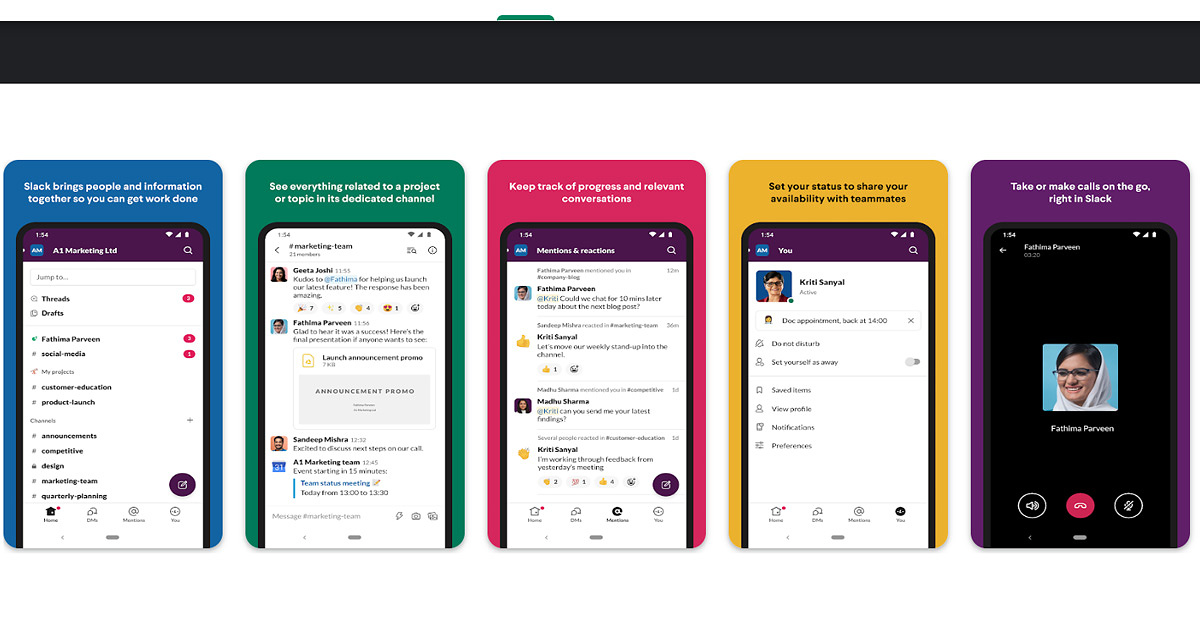 Another popular Android app for increasing your productivity is Slack, which is specially designed for workplace communications. Originally developed by the American company Slack Technologies, it is now owned by Salesforce. It offers many IRC (Internet Relay Chat) style features, including chat rooms that are organised by topic, private groups, and direct messaging. Moreover, you can see everything related to a project or a topic in its dedicated channel. You can keep a track of the progress and set your status and availability to share with teammates.
Download Slack.
Another popular Android app for increasing your productivity is Slack, which is specially designed for workplace communications. Originally developed by the American company Slack Technologies, it is now owned by Salesforce. It offers many IRC (Internet Relay Chat) style features, including chat rooms that are organised by topic, private groups, and direct messaging. Moreover, you can see everything related to a project or a topic in its dedicated channel. You can keep a track of the progress and set your status and availability to share with teammates.
Download Slack.
MindMeister
 The next one on our list of the top 10 apps that save time and help you get your work done faster, is this one. MindMeister is a pretty cool mind mapping application. It helps you organise, prioritise, and even generate new thought processes. It provides you with tools and templates that help you visualise ideas and plans, collaborate with others to brainstorm and discuss them, add icons, images, and themes, and present your final map gracefully.
Download MindMeister.
The next one on our list of the top 10 apps that save time and help you get your work done faster, is this one. MindMeister is a pretty cool mind mapping application. It helps you organise, prioritise, and even generate new thought processes. It provides you with tools and templates that help you visualise ideas and plans, collaborate with others to brainstorm and discuss them, add icons, images, and themes, and present your final map gracefully.
Download MindMeister.
Forest
 A very unique and extremely useful app for helping yourself stay focused is Forest. It is best for those who have a tough time keeping their smartphones and gadgets down and gathering all their attention to work. You simply open the Forest app and plant a tree, whenever you want to focus on a task. The app gives you an incentive not to use your device. If you continue focusing on your work and avoid using your phone, the plant you planted grows further into a tree. But if you fail to focus and end up using your phone again, the tree dies. The big picture is to grow a full forest for yourself. And concentration is the key!
Download Forest.
Read also: Top 15 Best Android TV Apps You Should be Using In 2022
A very unique and extremely useful app for helping yourself stay focused is Forest. It is best for those who have a tough time keeping their smartphones and gadgets down and gathering all their attention to work. You simply open the Forest app and plant a tree, whenever you want to focus on a task. The app gives you an incentive not to use your device. If you continue focusing on your work and avoid using your phone, the plant you planted grows further into a tree. But if you fail to focus and end up using your phone again, the tree dies. The big picture is to grow a full forest for yourself. And concentration is the key!
Download Forest.
Read also: Top 15 Best Android TV Apps You Should be Using In 2022
Krisp
 Krisp is another fascinating Android application that helps you stay focused during your meetings. It is an AI-powered noise cancelling app which removes all the background noises and echoes in real-time during a call or a conference, leaving only a clear human voice behind. You can pair Krisp with over 800 communication tools such as Microsoft Teams, Google Meet, Zoom, and more. It acts as a layer between your device and the online communication solution to eliminate any background noise with a single click.
Download Krisp.
Krisp is another fascinating Android application that helps you stay focused during your meetings. It is an AI-powered noise cancelling app which removes all the background noises and echoes in real-time during a call or a conference, leaving only a clear human voice behind. You can pair Krisp with over 800 communication tools such as Microsoft Teams, Google Meet, Zoom, and more. It acts as a layer between your device and the online communication solution to eliminate any background noise with a single click.
Download Krisp.
Everhour
 The next best productivity app that we have for your Android device is Everhour. It is a time-tracking software that helps teams keep a track of their timesheets. Not only is it a handy tool for monitoring how your employees spend their time, but you also get to estimate tasks, set budgets, build reports, and integrate with a plethora of other project management solutions to tune up your work efficiency.
Download Everhour.
The next best productivity app that we have for your Android device is Everhour. It is a time-tracking software that helps teams keep a track of their timesheets. Not only is it a handy tool for monitoring how your employees spend their time, but you also get to estimate tasks, set budgets, build reports, and integrate with a plethora of other project management solutions to tune up your work efficiency.
Download Everhour.
Pushbullet
 The final item on our list of the top 10 Android apps of 2022 that save time and help you get your work done faster, is Pushbullet. It helps build a network to connect all your devices. You can connect your phone with your PC to send and receive SMS straight from your computer, see all your notifications from your desktop, build channels, and share files between your devices.
Download Pushbullet.
So those were our top picks for the 10 best Android apps that save time and increase your productivity in 2022. We would love to hear about your experience using these apps, and how they improved the speed of implementing your projects and workflows. Do share with us your thoughts in the comments section below.
For the latest gadget and tech news, and gadget reviews, follow us on Twitter, Facebook and Instagram. For newest tech & gadget videos subscribe to our YouTube Channel. You can also stay up to date using the Gadget Bridge Android App. You can find the latest car and bike news here.
The final item on our list of the top 10 Android apps of 2022 that save time and help you get your work done faster, is Pushbullet. It helps build a network to connect all your devices. You can connect your phone with your PC to send and receive SMS straight from your computer, see all your notifications from your desktop, build channels, and share files between your devices.
Download Pushbullet.
So those were our top picks for the 10 best Android apps that save time and increase your productivity in 2022. We would love to hear about your experience using these apps, and how they improved the speed of implementing your projects and workflows. Do share with us your thoughts in the comments section below.
For the latest gadget and tech news, and gadget reviews, follow us on Twitter, Facebook and Instagram. For newest tech & gadget videos subscribe to our YouTube Channel. You can also stay up to date using the Gadget Bridge Android App. You can find the latest car and bike news here. This privacy-focused Android phone, the Murena One, runs on a deGoogled version of Android
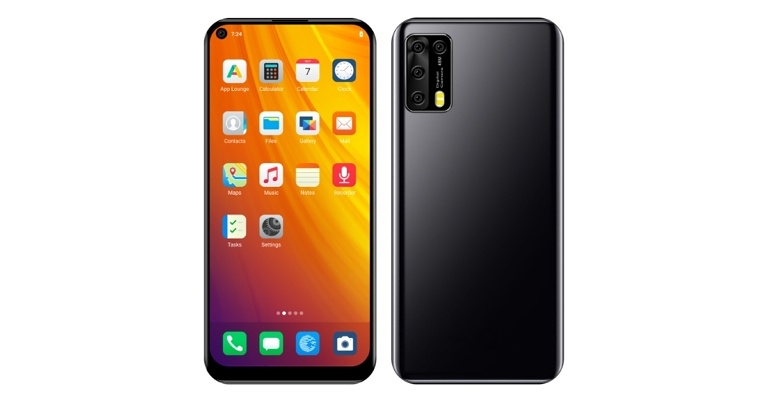
The Murena One, a privacy-focused Android phone developed without Google’s involvement, has been revealed. The new smartphone features an IPS full-HD+ display and is powered by an octa-core MediaTek SoC. Among the other fundamental characteristics of the new smartphone include triple back cameras. The phone is powered by /e/OS, a “deGoogled” Android operating system which is another key aspect of the privacy-first phone.

 Unlike other smartphones, users do not need to login in to a Google account to download apps from the preloaded App Lounge because the Murena One does not include Google Services. Because the Murena One does not use Google Services, it lacks several crucial capabilities, yet offers greater privacy. In-app payments and interoperability with apps that require Google Mobile Services. Murena Cloud, on the other hand, gives users a free 1GB of storage is also included in the cloud. Along with this, they will get free access to search engines, email, and more. The new operating system also includes Mozilla Location Services and OpenStreetMap maps. The /e/OS operating system also features a special Advanced Privacy widget that allows users to disguise their IP address and geolocation, as well as compatibility for privacy-focused 9.9.9.9 and 1.1.1.1 DNS.
For the latest gadget and tech news, and gadget reviews, follow us on Twitter, Facebook and Instagram. For newest tech & gadget videos subscribe to our YouTube Channel. You can also stay up to date using the Gadget Bridge Android App. You can find the latest car and bike news here.
Unlike other smartphones, users do not need to login in to a Google account to download apps from the preloaded App Lounge because the Murena One does not include Google Services. Because the Murena One does not use Google Services, it lacks several crucial capabilities, yet offers greater privacy. In-app payments and interoperability with apps that require Google Mobile Services. Murena Cloud, on the other hand, gives users a free 1GB of storage is also included in the cloud. Along with this, they will get free access to search engines, email, and more. The new operating system also includes Mozilla Location Services and OpenStreetMap maps. The /e/OS operating system also features a special Advanced Privacy widget that allows users to disguise their IP address and geolocation, as well as compatibility for privacy-focused 9.9.9.9 and 1.1.1.1 DNS.
For the latest gadget and tech news, and gadget reviews, follow us on Twitter, Facebook and Instagram. For newest tech & gadget videos subscribe to our YouTube Channel. You can also stay up to date using the Gadget Bridge Android App. You can find the latest car and bike news here.
In This Article
Murena One price and other details
In the United States, the Murena One costs $369 which translates to Rs 28,600 whereas in Europe, it costs EUR 349 which is about Rs 28,900. The phone will be available in June in the United States, the United Kingdom, Canada, Europe, and Switzerland. The product will be available for purchase on the Murena.com website, according to the manufacturer. Moreover, Murena has teamed up with Fairphone to provide the Fairphone 4 and Fairphone 3+, both of which run on /e/OS.
Murena One specifications
Murena One features a 6.53-inch full-HD+ (1,080×2,242 pixels) IPS display with a 19.5:9 aspect ratio and pixel density of 395ppi. The phone is powered by a MediaTek Helio P60 SoC with an octa-core CPU, Mali-G72 GPU, and 4GB of RAM. The device has 128GB of inbuilt storage and can be expanded with a microSD card up to 128GB. A 48-megapixel primary sensor with an f/1.8 lens, as well as 8- and 5-megapixel secondary sensors, make up the triple rear camera arrangement. The Murena One has a 25-megapixel selfie camera sensor with an f/2.0 lens on the front for selfies and video chats. The Murena One has 4G LTE, Wi-Fi 802.11ac, Bluetooth v4.2, GPS/ A-GPS, NFC, USB, and a 3.5mm headphone connector for connectivity. An accelerometer, ambient light, gyroscope, magnetometer, and proximity sensor are among the sensors onboard. There’s also a fingerprint sensor on the side. The handset comes with a 4,500mAh battery. In terms of software, Murena One is powered by the /e/OS V1 operating system, which is based on the Android Open Source Project (AOSP). It excludes Google apps and services in order to provide a more secure experience. Instead of Google Play Store there is App Lounge where users may download and install new Android applications. The app store has a privacy score that ranges from 0 to 10 based on how apps collect personal data. Unlike other smartphones, users do not need to login in to a Google account to download apps from the preloaded App Lounge because the Murena One does not include Google Services. Because the Murena One does not use Google Services, it lacks several crucial capabilities, yet offers greater privacy. In-app payments and interoperability with apps that require Google Mobile Services. Murena Cloud, on the other hand, gives users a free 1GB of storage is also included in the cloud. Along with this, they will get free access to search engines, email, and more. The new operating system also includes Mozilla Location Services and OpenStreetMap maps. The /e/OS operating system also features a special Advanced Privacy widget that allows users to disguise their IP address and geolocation, as well as compatibility for privacy-focused 9.9.9.9 and 1.1.1.1 DNS.
For the latest gadget and tech news, and gadget reviews, follow us on Twitter, Facebook and Instagram. For newest tech & gadget videos subscribe to our YouTube Channel. You can also stay up to date using the Gadget Bridge Android App. You can find the latest car and bike news here.
Unlike other smartphones, users do not need to login in to a Google account to download apps from the preloaded App Lounge because the Murena One does not include Google Services. Because the Murena One does not use Google Services, it lacks several crucial capabilities, yet offers greater privacy. In-app payments and interoperability with apps that require Google Mobile Services. Murena Cloud, on the other hand, gives users a free 1GB of storage is also included in the cloud. Along with this, they will get free access to search engines, email, and more. The new operating system also includes Mozilla Location Services and OpenStreetMap maps. The /e/OS operating system also features a special Advanced Privacy widget that allows users to disguise their IP address and geolocation, as well as compatibility for privacy-focused 9.9.9.9 and 1.1.1.1 DNS.
For the latest gadget and tech news, and gadget reviews, follow us on Twitter, Facebook and Instagram. For newest tech & gadget videos subscribe to our YouTube Channel. You can also stay up to date using the Gadget Bridge Android App. You can find the latest car and bike news here.