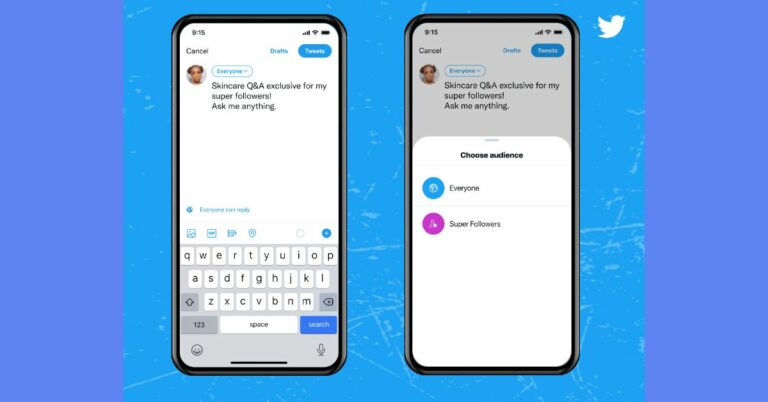
Twitter announced the Super Follows feature on its platform, a new way for creators to generate income: How can you set up a super follow subscription?

Popular Social media website Twitter today announced the launch of a new feature for the creators on its platform. The Super Follow features will allow them to earn revenue every month when they only share subscriber related content with their followers on Twitter.  Commenting on the launch Esther Crawford, Staff Product Manager at Twitter said, “Today we’re excited to introduce Super Follows, a new way for people to earn monthly revenue by sharing subscriber-only content with their followers on Twitter. With Super Follows, people can create an extra level of conversation on Twitter (sharing bonus Tweets and more!) to interact authentically with their most engaged followers – all while earning money.” According to Esther, this feature is for anyone who can offer unique perspectives and personalities to the platform to drive the public conversation, including activists, journalists, musicians, content curators, writers, gamers, astrology enthusiasts, skincare and beauty experts, comedians, fantasy sports experts, and more.  Creating Super Follows content will allow the people to set a monthly subscription of $2.99, $4.99 or $9.99 a month to monetize bonus, “behind-the-scenes” content for their most engaged followers on Twitter.  In addition to this, the followers will get special access to their unfiltered thoughts, early previews and subscriber-only conversations from their favourite accounts. The creators will be able to find and interact with their Super Followers by looking for the Super Followers badge. These public badges will be highlighted under their Super Followers name whenever they reply to a creator’s Tweet.

How and who can set up Super Follow Subscription?

As for now, the Super Follow feature will be accessible for iOS users in the US and Canada. According to Twitter a small group within the U.S. who applied can set up a Super Follows subscription. However the users can continue to apply to join the waitlist to set up a Super Follows subscription by swiping open the sidebar on your Home timeline, tapping on Monetization, then selecting Super Follows.  How and who can set up Super Follow Subscription? Also, there is eligibility for the waitlist at the moment. The users need to have over 10K followed and should have attained 18 years of age. They have tweeted 25 times within the last 30 days, been in the U.S., and follow the Super Follows Policy. The microblogging website will be rolling it out to people using iOS globally in the next few weeks. Creators can share Super Follows Tweets on iOS only and Super Follows Tweets can be viewed on iOS, with Android and twitter.com coming soon.  How to subscribe for Super Follow? All you need to do is tap the Super Follow button on an account’s profile to see a description of their paid offerings and pricing. The interested ones can again tap to subscribe via in-app payment. Immediately upon subscribing to Super Follow on Twitter you can only see subscriber-only content in your Timeline and you can unsubscribe at any time in your App Store subscription settings for iOS. How to subscribe for Super Follow? “As a Super Follower, you can join conversations that only other subscribers can see and reply to. For now, Super Followers can get special access to subscriber-only Tweets, with more to come in the future like Super Follows-only Spaces, newsletters, the choice to opt into different subscription tiers that creators can offer, the ability to subscribe anonymously and more. And don’t worry, public Tweets aren’t going anywhere,” Twitter noted. For the latest gadget and tech news, and gadget reviews, follow us on TwitterFacebook and Instagram. For newest tech & gadget videos subscribe to our YouTube Channel. You can also stay up to date using the Gadget Bridge Android App. You can find the latest car and bike news here.

How to use WebOTP API in Google Chrome to receive OTPs from smartphone to PC

Google Chrome is a widely used web browser on both PC and mobile. The best feature of this browser is its cross-platform capabilities. Chrome 93 is the company’s latest update. Now you can receive OTP from your Smartphone directly onto your system. It can be very helpful for things like accepting payment without the hassle of you picking your phone again and again. The WebOTP API gives the website the ability to programmatically obtain the OTP directly from your verified smartphone and fill it for you. Here is how you can use the demo to see how it works.

Things required

  1. A system is either a laptop or a PC running on either Windows, macOS or ChromeOS.
  2. An Android phone with Google Play Services version 20.30.12 or higher.
  3. Another smartphone with running SMS functionality for the verification and test process.
  4. Chrome 93 or later, both on desktop or laptop and mobile. (Chrome 93 was released today and may not be directly available to all the devices, check for updates)
  5. Both the smartphone and system should be signed to Google Chrome with the same Google account.
  6. Make sure Google Chrome 93 is the default browser.
Read Also: What is WhatsApp OTP Scam and How you can protect yourself

How to use the demo

  1. Head to https://web-otp-demo.glitch.me/ on desktop. Click the Verify button after reading the instruction on the screen.
  2. Send the text msg mentioned on the screen exactly from a second phone to an android device.
3. After the SMS is delivered to the android device there will be a popup on-screen on your desktop asking you to verify your phone number. Press Submit to approve. 4. There will be an OTP generated and sent to you on your Android phone which will be automatically fetched by your desktop version of Google Chrome 93. It’s good to see that Google constantly tries to make the already good browser better with its quality updates. This feature will be implemented by a lot of websites to make the process of OTP sharing easy. It will also be a big step on security as the SMS has a specific format and it’s bound to the origin, so it mitigates the risk of phishing websites stealing the OTP and will make two-factor authentication a hassle-free process. For the latest gadget and tech news, and gadget reviews, follow us on TwitterFacebook and Instagram. For newest tech & gadget videos subscribe to our YouTube Channel. You can also stay up to date using the Gadget Bridge Android App. You can find the latest car and bike news here.

Amazon launches Kisan Store: Farmers can now avail doorstep delivery of agricultural products through the dedicated store 

Popular e-commerce platform Amazon India announced Kisan Store in India today. With the announcement, the farmers will be able to avail doorstep delivery of the agricultural products through the dedicated platform. There will be over a hundred small and medium businesses sellers that will offer 8000+ products such as seeds, farm accessories, plant protection, nutrition and more. Addressing the launch event, Shri Narendra Singh Tomar, Hon’ble Minister of Agriculture & Farmers Welfare said, “It gives me immense pleasure to launch Amazon Kisan Store. I hope this initiative proves to be beneficial for the farmers and the people associated with the farming community to engage the Indian farmers in the modern era of the digital economy, increase the productivity of agricultural produce, and provide services like the logistics industry. Amazon India today announced the launch of a dedicated doorstep delivery facility- Kisan Store in India. The Kisan Store will be accessible through Amazon.in and assisted shopping at Amazon Easy stores in the country. With the launch of the store agricultural products like seeds, farm accessories, plant protection, nutrition and more will be at competitive prices, with the added convenience of delivery at their doorstep with flexible payment options available – Cash on Delivery, Net Banking, UPI, Amazon Pay, and Debit & Credit Cards. The store was launched by Shri Narendra Singh Tomar, Hon’ble Minister of Agriculture & Farmers Welfare. The farmers will be able to access the shop on Amazon in five Indian languages including Hindi, Telugu, Kannada, Tamil, and Malayalam. They can also visit any one of the 50,000+ Amazon Easy stores across the country and avail assisted shopping facilities. Whereas the Amazon Easy store owners will help farmers browse the selection, identify a product they like, create their Amazon accounts, place orders and checkout to buy.  All the agricultural products will be available from over 20 brands offered by over a hundred Small and Medium Businesses present across the country. The launch of the e-commerce platform aims to make online shopping rewarding and convenient for farmers. It will also focus on increasing the selection of choices for farmer’s availability, convenience, ease, and speed of delivery across the country.  Amit Agarwal, Global Senior VP and country head of Amazon India said “We are excited to partner with the Government of India’s vision of empowering farmers with technology wherein the rapid penetration of smartphones & internet can help Indian agriculture experience a paradigm shift. The launch of Kisan Store marks our first step to create an ecosystem for farmers that will enable them to seamlessly place orders and get products of their choice delivered to their doorstep at the click of a button” For the latest gadget and tech news, and gadget reviews, follow us on TwitterFacebook and Instagram. For newest tech & gadget videos subscribe to our YouTube Channel. You can also stay up to date using the Gadget Bridge Android App. You can find the latest car and bike news here.

Sony Audio Days 2021 Sale: Sony India is offering huge discounts on select audio products

0
Sony Audio Days 2021 has kicked off in India today. The exclusive sale is now live and will run till September 5 in the country. The sale will bring exciting offers on premium audio products ranging from Headphones, Truly Wireless Earbuds Series, portable Bluetooth Speakers and  Party Speakers. The audio products will be offered at special prices. So if you are looking to buy any of the Sony Audio products now is the best time. Sony Audio Days 2021 sale has started today and will run till September 5. The 5 days sale can be accessed across Sony retail stores (Sony Center and Sony Exclusive), www.ShopatSC.com portal, major electronic stores and other e-commerce portals. During the Sale, Sony will be offering various deals on its headphones, TWS series and wireless Bluetooth speakers. So we have listed down the product name and available discounted pricing below for your convenience. The tech giant is offering huge discounts on headphones, earphones, BT speakers and party speakers. The WH-1000XM4 can be purchased at Rs 24,990 while WH-XB900N will be available at Rs 14,990. TWS earbuds like WF-1000XM3 is getting a discount of Rs 7,000 and can now be bought for Rs 12,990.  Sony Audio Days 2021 Sale: Sony India is offering huge discounts on select audio products The Sony WH-CH710N Noise Cancellation Headphones, which sell for Rs 14,990 will be available for Rs 7,990. On the other hand, the price of the WF-SP800N has been reduced by Rs 6,000 and is now selling at Rs 12,990, whereas WF-H800 is down by Rs 12,000 and is now being offered at Rs 6,990. Besides the several headphones by Sony are also up for sale. During the Sony Audio Days 2021 model numbers WI-SP510, WH-CH510, WI-XB400, WI-C310 and WI-C200 can be bought at a discounted price of Rs 3,990, 2,990, 2,990, 2,190 and 1,699 respectively. Other Home Audio products like Sony Party Speakers with model numbers SRS-XP700, SRS-XP500 and SRS-XG500 can be bought for Rs 32,990, Rs 26,990, Rs 32,990 respectively. Sony Bluetooth Speakers with model number SRS-XB43, SRS-XB33, SRS-XB23 and SRS-XB13 are now selling at Rs 32,990, Rs 26,990, Rs 32,990, Rs 16,990, Rs 12,490, Rs 8,990 and Rs 3,990 respectively in the country For the latest gadget and tech news, and gadget reviews, follow us on TwitterFacebook and Instagram. For newest tech & gadget videos subscribe to our YouTube Channel. You can also stay up to date using the Gadget Bridge Android App. You can find the latest car and bike news here.

New Chrome 93 update rolls out on Android, iOS, and desktop: Here’s what has changed

Google Chrome is one of the most used and popular browsers in the PC and mobile world. The company is famous for constantly bringing updates to its users to enhance their experience. Google rolled out Chrome 92 towards the end of July. This update introduced better safety controls to protect the privacy of users. In addition to this, the update brought improved phishing detection and site isolation. Adding to this, face/touch ID support was introduced in incognito tabs for iOS devices. There will be 4 major updates from Google for Chrome 93.

Recently Closed Window

The change is not huge but now the recently closed window will let you view all the sites that the user recently closed. This will be found in the recently closed collection from which each website can be opened individually. This feature can be enabled by typing the following statement in the URL. chrome://flags/#tab-restore-sub-menus flag
Recently Closed Window
Image Credit: 9to5Google
Read Also: How to store your vaccination certification on Google Play?

Site information sign

Though it’s an experimental change the user can replace the lock icon in front of URLs with an inverted downward arrow symbol. The icon will work the same as the lock one by showing the certificate, cookies being used along with site setting. This feature is useful for those who do not like the lock symbol in front of their URL and want a minimal design. It can be enabled by typing the following command in the URL. chrome://flags/#page-info-version-2-desktop flag
Site information sign
Image Credits: XDA Developers

Google Drive Card

Even if the update was already released in Chrome 92, it will spread widely with the new 93 update. There will be a Google Drive card in the new default tab of Chrome. The card will appear underneath the search bar of Google, which will show recently or most used files from your Google Drive and Docs making it easy to access, edit and increase productivity.
Google Drive Card
Image Credits: XDA Developers
Read Also: Useful methods to download Instagram pictures for free

WebOTP API

Additionally, Google is also adding WebOTP API support to only the desktop version of the browser. Users will be able to copy the OTP they receive on their phone via SMS directly to their desktop. As soon as the consumer presses the ”Submit” button on the OTP text notification, the API will automatically fetch the data and transfer the password to your PC. These are some exciting changes Google planned to bring to its customers which will be really helpful in productivity. Along with this update, Chrome has dropped support for Ubuntu 16.04. For the iOS version, a new, compact context menu and a few account-related changes can be seen. For the latest gadget and tech news, and gadget reviews, follow us on Twitter, Facebook and Instagram. For newest tech & gadget videos subscribe to our YouTube Channel. You can also stay up to date using the Gadget Bridge Android App. You can find the latest car and bike news here.

Best apps to find and consult a doctor online

The pandemic has scared everyone in the world. Earlier one used to not care for common symptoms of illness but now even a small sneeze raises a lot of questions in the person’s mind. Also, taking a consultancy online is safe as well as convenient. The user does not have to go to the hospital and risk his/her life. Giving consultancy online is easier for doctors as well. Here are the top apps, which will give a good experience in terms of getting yourself checked up online.
  • Practo

Practo It is one of the most famous telemedicine applications and websites available in the Indian market. This application first was made for delivering medicine to your doorsteps. With the updates, one can book an online appointment with the doctor directly from their smartphone. The application also maintains a comprehensive medical directory making it easy to track your medical record. Practo also offers a subscription-based plan starting from Rs 799 a month. The consultancy fee starts from Rs 339 per patient. After the checkup, the patient gets a digital prescription along with free follow-up. The application is available both on iOS and Android Download: iOS, Android
  • Lybrate

Lybrate It is another consultation service available on the web, Android and iOS app stores. The application follows a community approach. A person can ask the questions publicly and professional doctors answer them. This not only helps the current patients but also people having the same symptoms. With lybrate, one can book an online appointment with the nearest doctor available for direct consultancy. Also, patients can get themself checked with an online consultancy. Over that, the application allows you to book appointments for tests at the nearest labs. In the interface, the developers of the app also provided quizzes to create awareness regarding illnesses. The consultancy starts from Rs 950 with a membership ion option of Rs 500 for 3 months and Rs 2,500 for a complete year. Download: iOS, Android Read Also: World Health Day: Top 10 apps to keep you mentally and physically fit
  • Tata Health

Tata Health It is another telemedical app whose owner is Tata Industries, which ensures the trust of many Indians. The application offers services like appointment booking, lab tests and delivery of medicines at your doorsteps. The best feature of this application is it has something called a Health locker, which is a transparent solution to store your medical records. Consumers can book a doctor appointment 24/7 and the consultation fees start from Rs 100, which is really affordable for many. Download: iOS, Android These applications are the top picks for booking a doctor consultancy so one can get in touch with the medical professional any time of day. All of them claim to treat lakhs of patients and have really positive reviews from its consumers. For the latest gadget and tech news, and gadget reviews, follow us on Twitter, Facebook and Instagram. For newest tech & gadget videos subscribe to our YouTube Channel. You can also stay up to date using the Gadget Bridge Android App. You can find the latest car and bike news here.

Samsung Galaxy S21 FE user manual shares some key details and design of the smartphone

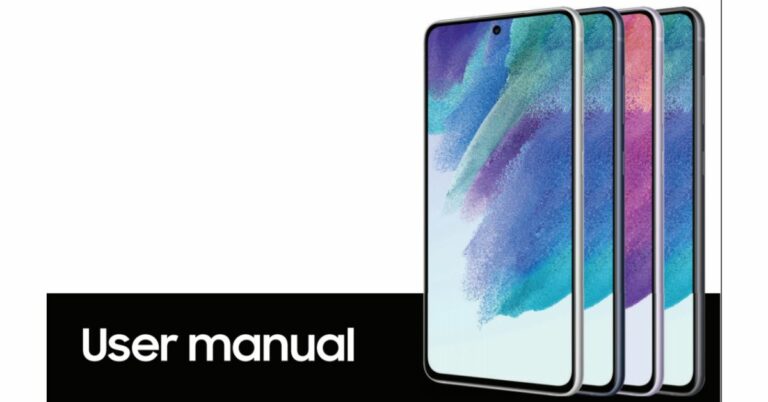
As we are inching closer to the speculated launch date of the Samsung Galaxy S21 FE more rumours and leaks have started doing the rounds on the web. The device is expected to hit the stores on September 8. The phone has been spotted several times on benchmarking websites and other platforms. Now the Samsung Galaxy S21 FE user manual has surfaced online revealing its design and key details.  As per the leaked user manual for the Samsung Galaxy S21 FE, the look of the smartphone will be similar to the vanilla Galaxy S21 however this may not come with a metal housing on the rear camera module. Moreover, the user manual did not have the mention of the microSD so the upcoming phone might not allow storage expansion. 
Samsung Galaxy S21 FE user manual
Image Courtesy: SamMobile
The Samsung Galaxy S21 FE will also include IP68 certification for dust and water resistance. It is said to withstand up to 1.5m and up to 30 minutes. The device will also get a high refresh rate display which may include an ultrasonic in-display fingerprint scanner. Besides this, the handset will also support other features like Dolby Atmos, wireless and reverse wireless charging support. The phone may also come with  Wireless DeX and Samsung Pay features.  Also following the footprints of the Apple, Samsung Galaxy S21 FE retail box may not include a charger and will be sold separately. It will also steer clear of the 3.5mm headphone jack. The user may use a USB Type-C adapter or a wireless headphone to connect. In terms of optics, the rear camera module could also feature triple lenses. Out of which may be an ultra-wide-angle sensor, the user manual noted. The Galaxy S21 FE is also expected to arrive in four colour options of Black, Green, Purple, and White. However not much has been revealed in the user manual but a Geekbench listing claims that the upcoming smartphone will be powered by Exynos 2100 SoC along with a max clock speed of 2.91GHz paired with 8GB of RAM. While the Google Play Console listing mentioned a Qualcomm Snapdragon 888 SoC along with an Adreno 660 GPU and 6GB of RAM. As per the listing, the handset will feature a resolution of 1,080×2,009 pixels. On the other hand, some reports suggest that the phone will sport a 6.4-inch AMOLED display with 120Hz refresh rate support. It is likely to pack a 4,500mAh battery and may come in Blue, Grey, Green, Violet, and White colour options. As of now, there is no official announcement nor the company has shared any details so you can take the information with a pinch of salt. But the way rumours and leaks are pouring in, the launch is not far off. For the latest gadget and tech news, and gadget reviews, follow us on TwitterFacebook and Instagram. For newest tech & gadget videos subscribe to our YouTube Channel. You can also stay up to date using the Gadget Bridge Android App. You can find the latest car and bike news here.

2 September 2021 Flipkart Daily Trivia Quiz Answers: Answer to win exciting prizes

The e-commerce website Flipkart is hosting Daily Trivia Quiz. Every day it brings a bunch of new questions for its users. By answering them correctly you can win exciting prizes. Also, the users can win free vouchers and super coins, among other offers via the daily quiz. 2 September 2021 Flipkart Daily Trivia Quiz Answers has already gone live on its platform. The participant should be at least 18 years old and should have a valid login ID. The Quiz is available on the mobile platform and not the web version. E-commerce conducts the quiz on daily basis and goes live at 12:00 AM IST and runs till 11:59 PM IST.  The winners are announced within 15 days from the date of participation that can be viewed under the Gems/Rewards section in the app.

How to participate in the Flipkart Daily Trivia Quiz

To participate download the Flipkart app on your phone. Then open the Flipkart app then head to Game Zone. Now click on the Daily Trivia Banner or search for Daily Trivia. Enter the game and answer all 5 questions with correct answers.

2 September 2021 Flipkart Daily Trivia Quiz Answers 

Question 1: With which of these sports would you associate the term bout? Answer: Boxing Question 2: Which of these is not a golf club? Answer: Hammer Question 3: In which city has the Indy 500 auto race has been built for the last centuryAnswer: Indianapolis Question 4: In which country does the International Olympic Committee have its headquarters? Answer: Switzerland Question 5: Which of these teams has never won the UEFA Champions League? Answer: Manchester City
For the latest gadget and tech news, and gadget reviews, follow us on TwitterFacebook and Instagram. For newest tech & gadget videos subscribe to our YouTube Channel. You can also stay up to date using the Gadget Bridge Android App. You can find the latest car and bike news here.
2 September 2021 Amazon quiz answers: Participate and win Rs 50,000 Amazon Pay Balance

India’s leading e-commerce website Amazon hosts a Quiz session for its customers daily. The website brings an app quiz on a daily basis, which begins at 12 AM to 11:59 PM daily. As part of the quiz, the participants stand a chance to prizes as well as cash prizes on a daily basis. Today’s 2 September 2021 Amazon Quiz will let you win Rs 50,000 Amazon Pay Balance. The Amazon Quiz session allows the customers to win bumper prizes such as Apple iPhone x, iPhone Xs, Go Pro Hero 8 and many more every day while sitting at home. To win the participants must answer five questions correctly based on current affairs and general knowledge. One wrong answer can eliminate you from the quiz and the results will be announced at the end of the month. Today’s question will let you win Rs 50,000 Amazon Pay Balance. Check below for today’s Amazon quiz answers.

2 September 2021 Amazon Quiz Answers

Question 1: Which country’s new stealth jet has been dubbed “Checkmate”? The answer is- D) Russia Question 2: Amrabad Tiger Reserve, India’s second-largest tiger reserve, is located in which state? The answer is- B) Telangana Question 3: In July 2021, Sher Bahadur Deuba was sworn in as the Prime Minister of which Asian country? The answer is- C) Nepal Question 4: Which of these animals were not the first passengers of this ride? The answer is- D) Dog Question 5: Which Asian country is home to the tallest indoor waterfall is shown here? The answer is- C) Singapore

How to organise photos on your Android smartphone

The use of smartphones has been increasing day by day. Consumers carry their smartphones everywhere and do everything from listening to music to photography to daily work. A normal smartphone consumer clicks a lot of photos and makes tons of videos. The media gets stored on the device making a pile of clutter. It becomes really difficult to find a photo or organise it properly. Following these steps, one by one will surely come in handy to organise your photo clutter.
  • Change your Gallery App

With tons of gallery applications in the market and companies making default gallery applications smarter and smarter, it’s really difficult to choose the best gallery application for your smartphone. The best gallery application according to us is Photos by Google. It has tons of AI and automated features that come in handy to clear all the clutter from your smartphone without any hassle. This is how you set up your Google photos. Step 1 – Download Photos from Google Playstore. Step 2 – Login with your profile enable the backup and sync option. Step 3 – Enable the backup and sync option. Set the upload quality accordingly as only 15 GB is free as standard after that one needs to buy cloud storage from google. Google Photos
  • Optimization and organisation

After everything is set up Google will offer you a lot of options to automatically free the clutter from your device (in terms of images) by arranging them by face recognition or by arranging them in albums. However, the user can arrange the photos according to their preference as well. To do so these steps need to be followed. Step 1 – In the Google Photos application tap on the library option in the bottom bar. Step 2 – Scroll down to see the thumbnail of the New Album. Tap on create a new album. Step 3 – Select the photos you want to add to the album. Step 4 – There will be quite a few options to select your photos, choose accordingly. Step 5 – Press Add on the top right corner and done. Google Photos (1) Read Also: Top software to clean the clutter on your Windows PC The album is created with the selected photos. In a similar fashion, you can create more albums and organise images and videos. One can also further add new photos if they forgot to add them previously. You can do this by tapping on the three dots on the right corner of the album to reveal the additional settings to add or remove images. Google Photos (2) Read Also: Top software to clean the clutter on your Windows PC This solution will surely come in handy to manage your photos and videos as well as backing up your media will clear up the clutter on your smartphone. By going on the setting of Google Photos users can get rid of already backed up photos and videos from local storage making your phone a bit faster. For the latest gadget and tech news, and gadget reviews, follow us on Twitter, Facebook and Instagram. For newest tech & gadget videos subscribe to our YouTube Channel. You can also stay up to date using the Gadget Bridge Android App. You can find the latest car and bike news here.