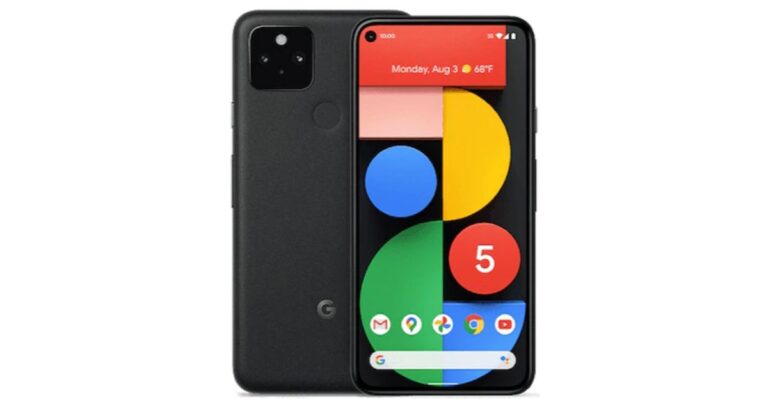
Previously Google confirmed that Pixel 5A will be a mid-range option that is going to be available later this year in the worldwide markets. But according to a fresh report the company is expected to launch the device in August. In addition to this, the phone may also go on sale in a similar month of the launch. However, the past rumours suggested that this time the company might not bring the device to the stores. Reportedly, Google Pixel 5A is said to be announced in August. The device is a follow up of the original Pixel 5, which was launched last year. However, the upcoming devices are said to be low-cost handsets. Another report suggests, that the phone has been spotted with multiple references to the codename “Barbet” in the latest Android 12 Developer Preview that is slated to be used for the models which were launched last year. These references have a model number “sm7250” that is believed to be the Qualcomm Snapdragon 765G SoC which is also present in the Pixel 5 and Pixel 4a 5G.Earlier Google Pixel 5a was rumoured to be cancelled by the company but the company took this matter into its hands therefore by confirming the launch. Google released a statement saying “Pixel 5a 5G is not cancelled. It will be available later this year but will be available in the US and Japan. This statement contradicts an alleged BIS listing which indicated the launch in India as well. Last year Google Pixel 4a and 5 was launched in the month of October. In the same way, the launch of the Pixel 5a is expected to happen around the same timeline or maybe earlier. Image Courtesy: Jon Prosser/YouTubeSeparately, Google Pixel 6 is also scheduled for a launch. The device is said to be powered by the company’s in-house chipset codenamed “Whitechapel” which is also being referred to as GS101. The GS in the acronym stands for Google Silicon. The new chipset is said to be co-developed with Samsung that may share some similarities with its Exynos chipsets. The Google Silicon is also said to have an octa-core ARM CPU with two Cortex-A78 plus two Cortex-A76 and four Cortex-A55 cores. This can be further paired with ARM Mali GPU which is based on Samsung’s 5nm manufacturing architecture.
For the latest gadget and tech news, and gadget reviews, follow us on Twitter, Facebook and Instagram. For newest tech & gadget videos subscribe to our YouTube Channel. You can also stay up to date using the Gadget Bridge Android App.
The e-commerce website Flipkart is hosting Daily Trivia Quiz. Every day it brings a bunch of new questions for its users. By answering them correctly you can win exciting prizes. The questionnaire is based on questions related to general knowledge. Also, the users can win free vouchers and super coins, among other offers via the daily quiz. June 30 Flipkart Daily Trivia Quiz Answers has already gone live on its platform.
The participant should be at least 18 years old and should have a valid login ID. The Quiz is available on the mobile platform and not the web version. E-commerce conducts the quiz on daily basis and goes live at 12:00 AM IST and runs till 11:59 PM IST. The winners are announced within 15 days from the date of participation that can be viewed under the Gems/Rewards section in the app.
How to participate in the Flipkart Daily Trivia Quiz
To participate download the Flipkart app on your phone. Then open the Flipkart app then head to Game Zone. Now click on the Daily Trivia Banner or search for Daily Trivia. Enter the game and answer all 5 questions with correct answers.
June 30 Flipkart Daily Trivia Quiz Answers
Question 1: Starring Irrfan Khan, which film was a biopic on a 7-time national steeplechase champion?
Answer: Paan Singh Tomar
Question 2: Who replaced Navjot Singh Sidhu in the Kapil Sharma Show?
Answer: Archana Puran Singh
Question 3: Who replaced Navjot Singh Sidhu in the Kapil Sharma Show?
Answer: Ramayana
Question 4:Who wins the title of the best student in the film ‘Student of the Year’?
Answer: Varun Dhawan
Question 5: Who acted as the boxer ‘Apollo Creed’ in the ‘Rocky’ film series?
Answer: Bruce Bennet
The e-commerce platform Amazon is back with another new session of the quiz on its platform. It brings Amazon Quiz sessions for its customers on a daily basis. Customers can stand a chance to win bumper prizes just by playing at home from 12 AM to 11:59 PM. Every day Amazon asks 5 questions that the customers have to answer correctly. This session is only available for app user in India.
In today’s Amazon Quiz the winners will get a chance to win Rs 25,000 Amazon Pay Balance. Check out June 30 Amazon Quiz answers:
Question 1: Parul Debi Das, who recently passed away, was the first female IAS officer from which state?
The answer is- Assam
Question 2: Litani river and Qaraoun lake, which is in news due to heavy pollution, is located in which country?
The answer is- Lebanon
Question 3: Which country recently became the first country in the world to allow driverless cars on roads?
The answer is- UK
Question 4: What colour is the centre scoring zone of the target in this sport?
The answer is- Gold
Question 5: What type of accident happened at this place in Ukraine in 1986?
The answer is- Nuclear
Carl Pei today officially announced the launch of his very first product that is Ear 1 TWS earbuds on July 27 under his newly founded tech firm Nothing. Prior to the announcement, the CEO confirmed the first truly wireless earbuds that were earlier teased to launch on June 1. CEO Carl Pei took to Twitter to announce the final date of the launch of Nothing Ear 1 TWS earbuds in the market. With the launch of its first truly wireless earbuds that will be looking to go after consumer tech giants such as Apple, Samsung and OnePlus offering AirPods, Galaxy Buds and OnePlus Buds respectively. Earlier the Nothing Ear 1 TWS earbuds were announced to launch on June 1st but now the company’s head itself confirmed July 27 as the final date for the unveiling. His tweet reads, “ A month ago we announced that ear (1) would be revealed in June. We’re near the finish line and there are a few things left to finalize. For this reason, @Nothing ear (1) will now come out a bit later this summer. Your support and patience mean the world to us. More updates soon!”The launch is scheduled to kickstart at 2 PM BST and 6:30 PM IST. To launch the product in the Indian market Nothing has appointed Samsung’s executive Manu Sharma who recently announced the collaboration of Nothing with Flipkart. He took to Twitter to announce the association to make its TWS earbuds available for purchase in India. His tweet reads, “For the upcoming launch of @nothing ear (1), we are excited to partner with Flipkart as we mark Nothing’s entry in India #ear1 #SoundOfChange #nothing #buildingnothing”The doesn’t divulge much information but the previous design concept of its upcoming TWS earphones shared by the company mentions that Ear 1 TWS will be a combination of transparency, iconic form, and refined functionality. It is the starting point that will define the artistry, confidence and craftsmanship that will carry our products and services for years to come.Whereas the teaser shows the form factor of the audio device. It should be noted that the Noting earbuds are designed in association with Stockholm-based Teenage Engineering.
For the latest gadget and tech news, and gadget reviews, follow us on Twitter, Facebook and Instagram. For newest tech & gadget videos subscribe to our YouTube Channel. You can also stay up to date using the Gadget Bridge Android App.
It will come as a surprise to some Amazon buyers that put product reviews sometimes can be fake. You can identify and know which is a fake review, as it can be critical to buying the best product online. An integral part of the online shopping experience has become which product is worth buying or not and the reviews for the product say so much about them. With more and more cases of fake reviews being caught by experts, it is high time you learn how to differentiate. Here are some ways you can spot fake Amazon reviews.
There is a huge number of reviews in a short span of time:
Generally, it takes a lot of time to get reviews on a product. Considering the fact that there are limited customers that are going to review the product on the Amazon website. If you spot flooding of reviews it is high time you should consider the reviews are paid reviews, for which people are being paid to write positive reviews.
Read more: Redmi Note 10 review: Insanely good budget smartphone
Company website not available:
Another thing you need to look at to spot fake reviews is by checking the company which uploaded the product. If you do not seem to locate an authentic company website, it is highly probable that the company is not trustworthy and all the reviews are to be reconsidered. These are signs that you can spot fake reviews easily.
Read also: How to spot a phishing email or SMS message and avoid it?
Similar wording reviews:
The writing style of a person does not change completely. If the reviews are from the same person but different accounts the content and the words will not be very different. If you are able to observe such similarities you can easily spot a fake review on the Amazon website.
Using a review tool is the best method to check if the review is genuine or fake. Reviewmeta simply uses the grading process as an Amazon-only analyzer. The steps to verify the review on the tool are easy and simple: you copy the URL and paste it on the website. The website will eliminate all the unreliable reviews and help you spot fake reviews on Amazon. The algorithm works in a unique way, letting you grade the reviews and provide detailed breakdowns with graphs. You can also add an extension to your browser.
The review tools will rate how reliable product pages are on Amazon and other websites. You can open the fakespot website and copy the URL from Amazon and paste it on site. Fakespot will then grade the page and see how reliable the information can be. The algorithm of Fakespot finds reviews, analyses language, checks previous reviews, and purchase history to determine the product and the reviews. It filters out all the fake reviews for you to shop better and you can also add an extension of it to your browser.
For the latest gadget and tech news, and gadget reviews, follow us on Twitter, Facebook and Instagram. For newest tech & gadget videos subscribe to our YouTube Channel. You can also stay up to date using the Gadget Bridge Android App.
For the unknown, just clicking on the ‘Allow Notifications’ popup of an app/software during the setup process gives internet access to the app. There are other instances as well when you want your applications to connect to a local network and better internet, but not all of them. Here are the top 4 ways to block the app access to the internet on your Windows computers.
From Windows Defenders Firewall
Although allowing apps to run online using the internet on the laptop is usually good, there are many reasons to block an app from accessing the internet on your computer. One example is to stop automatic updates of an app or disable an app that cannot be used offline. The following are the steps to block an app on Windows computers.
Open your computer, go to the bottom left corner on the Search bar and type Windows Defenders Firewall
On the next page click on Windows Defenders Firewall and open it
From the left side, panel scroll down and select Advanced settings
When the Advanced settings program is open click outbound rules from the side panel
Now from the right-side panel click on New rule
New Outbound Rule Wizard will open and from the options choose Program and click Next
From This program, path browse the apps you want to block, select the app, and press Next
On the next screen tap on Block the Connection
The program will ask when/where you want to apply this rule, tick on all three options: Domain, Private, Public
Next name the rule and add a description to it
Hit finish and the app will be blocked from accessing the internet
By disabling the network adapter you can also block the app access to the internet. Access to all utilities or setups of your computers will be blocked if you disable the network and will help the app in denying access to the internet on your computers. Follow the steps to disable the network adaptor.
Open the Run app on your Windows computers by searching from the search box on the bottom left corner Or you can use the command key Win+R>msc
Open Device Manager on your computers by searching it from the search box
From the Device Manager navigate to Network adapters
From the page click on the arrow icon to expand the list
From the drop-down page, you will see what applications are connected to the internet
Select the application or program you want to disable by using right-click
From the option that appears from the right-click choose to disable
Use Command Prompt
A simple command in CMD can block internet access for any app. But first, you need to copy the app’s path. You can do this by locating the app in its source folder, right clicking on it, and selecting ‘Copy as path’. Once that’s done, launch CMD and enter the following command:
netsh advfirewall firewall add rule name=”FF Block In” protocol=TCP dir=in action=block program=(paste the path of the app here)
Use a third-party tool
If the methods mentioned above seem complicated to you, using a third-party tool can make things easier. OneClickFirewall is one such tool. After installing OCF on your PC, simply right-click on the app you want to prevent from using the internet and select ‘Block Internet Access’. It’s that easy.
Frequently Asked Questions (FAQs)
How do I block an app from accessing the Internet?
You can use Windows Firewall Defender to block an app from using the Internet on your PC. If Firewall Defender is too confusing for you, download OneClickFirewall, right click on the app, and select ‘Block Internet Access’.
How do I block an app from accessing the Internet using Command Prompt?
Copy the app’s path, go to CMD and enter: netsh advfirewall firewall add rule name=”FF Block In” protocol=TCP dir=in action=block program=(paste the path of the app here)
How do I turn off background data usage for an app on Android?
These are the top 4 ways to block an app from accessing the Internet on a Windows PC or laptop. Windows Firewall Defender also lets you block apps on your PC from using the Internet. You can make a whitelist of apps for which you don’t want the ban to apply. If you know any other ways to go about this task, let us know in the comments!
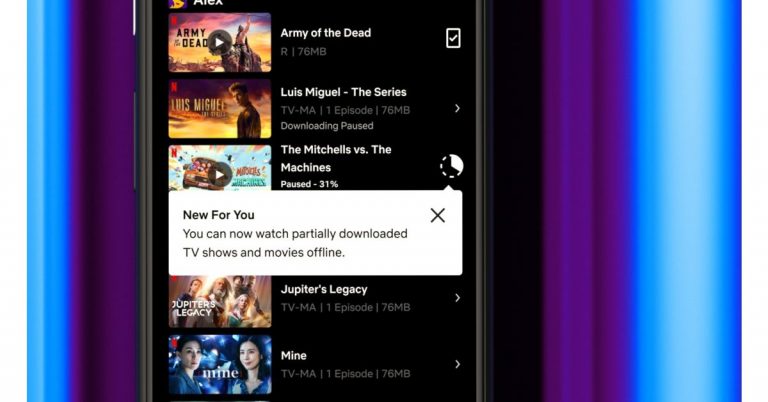
In a new update, the video streaming application Netflix is now allowing users to watch videos before they are partially downloaded. The partial downloading functionality comes for Android users and allows them to start watching series or movies even before the app has completed downloading. The users can choose to finish the download and keep watching, therefore, improving the Netflix download and watch experience.Netflix’s Partial downloading feature is now accessible to Android phones as well as tablets and is currently under testing for iOS devices, which will be launching in the coming months. Keela Robinson, Vice President, Product Innovation said, “So we know the disappointment when you realize your download never completed because of unreliable wifi or a maxed-out data plan. That’s why we’ve improved the Netflix download experience so you can now start watching The Mitchells vs The Machines or the next episode of Luis Miguel – The Series even if it hasn’t completed downloading. Once you’ve regained a strong enough connection, you can choose to finish the download and keep watching — avoiding those surprise notices that you’ve gone over your data limits.”Prior to this, the user’s were not allowed to stream until the download was complete. Netflix’s partial downloads feature will liberate users to watch the videos in case the download gets disrupted due to poor internet connection. So even if the download is incomplete you will be able to watch the downloaded part while the rest of the part can be streamed later on, when the device gets access to the internet. Separately, Netflix earlier this year introduced Downloads For You, a new feature that automatically downloads recommended shows or movies to your mobile device based on your tastes. How to automatically download videos or movies:
Go to the Downloads tab on your mobile device and toggle on Downloads For You.
Choose the amount of content you want to be downloaded to your device (1GB, 3GB, or 5GB) and click Turn On. The more space you allow, the more recommendations Netflix will download for you.
It seems Clubhouse is attracting a lot of attention. The recently released audio-based app has been in the headlines lately. The invite-only social media audio app lets you host a room for audio discussion and live audio. Officially as everyone knows there has not been a Clubhouse version for PC, but to ease the thought there are some ways you can download and install Clubhouse on PC.
Using BlueStacks: Android Apps Emulator
The Android application emulator is one of the best options available to run your Clubhouse app on your PC. You can download the BlueStack software on your computers and the Android apps emulator will let you download and install the Clubhouse app on your PC. The BlueStack emulator is available for both Windows and Mac. The following steps is how to download and install the BlueStacks programming and Clubhouse app.
For those who are new to Clubdeck, it is an unofficial desktop client app for the Cubhouse app. Using the Cludeck website you can access your Clubhouse app on your Windows or Mac PC. The websites you can use have some features for Clubhouse Moderators also. The best part of Clubdeck websites is all the functionality of the app is made available. And also features some advanced functions like recording, streaming to other social networks, and playing custom local audio. Check out the guide below to know more about Clubdeck.
Download the installer and install it properly on your computers and correctly
Open the app and sign in using your mobile number registered on your Clubhouse account
Wait for the verification send to the number and enter the code
After you press submit it will open your Clubhouse account and you can use all features available to the app
The Clubdeck allows you some additional features: Professional microphone for better quality, reroute audio through software like Loopback or Blackhole, Play custom sounds and jiggles files from local media or YouTube, Record and restream the session on Social Media, real-time insight from listeners of your Clubhouse room, backchannel chat to coordinate live with co-moderators, and shortcuts to navigate and moderate Clubhouse like a pro.
Twitter has now enabled the features to host Spaces for accounts that have 600 or more followers. Twitter space is an online community to share their knowledge, their professional abilities, and a place to come together. Twitter Space is an audio-based feature, which lets people interact in groups for a live session. Twitter has added a new ticketed feature in Twitter Space that lets you create a ticket for joining the Space session. The creator of the Ticketed Twitter Space can charge the ticket fee from 1 dollar to 999 dollars.Twitter is synonymous with discussions of what’s happening around the world. The unfiltered thought of users is often shared and expressed. With the Ticketed Twitter Space, the discussion will be brought to live audio experiences. The Twitter account that has enabled the Ticketed space will be able to monetise their Space and charge a fee as a Ticket to join the Twitter Space.
Read more: Now you can be the first to try Ticketed Spaces and Super Follows with your audience, Twitter opens applications
How can you start a Ticketed Twitter Space?
The following steps are to enable the Ticketed feature in your Twitter account. And make sure you meet the requirement set out by Twitter to enable the feature.
Open the Twitter app
Go to the top left corner and click on the three horizontal line icon: (Hamburger menu)
Scroll down on the side panel and select Monetization
And from the options click on Ticketed Space
From the page open up press on “Apply for Ticketed Spaces beta”
Now you have registered and Twitter will get back to you
The tickets let you host an audio-based live session and let you control the entry of other participants by putting a fee to join your sessions. Know more below:
Monetisation: The audience of your session through Twitter Space is charged a fee from 1 dollar to high as 999 dollars as a ticket.
Intimate settings: The live session created on Twitter Space lets you host invitees from 5 to 100 for deeper discussion and live audio sharing
Promote Space: The promotion of your upcoming live audio discussion can be alerted with a push of an in-app notification that will be sent to their devices and you can share the details on your Timeline as well.
Super Follows:
If your Twitter account starts to get more Super Follows you can earn more revenue and also create more content. With the increase in Super Follows, you can earn monthly revenue by creating a direct relationship with your active followers. Also, you can create bonus content and offer it to your biggest followers. Customisation is another great feature of having Super Follows. You can customise the price from 2.99 dollars to 9.99 dollars per month.
For the latest gadget and tech news, and gadget reviews, follow us on Twitter, Facebook and Instagram. For newest tech & gadget videos subscribe to our YouTube Channel. You can also stay up to date using the Gadget Bridge Android App.
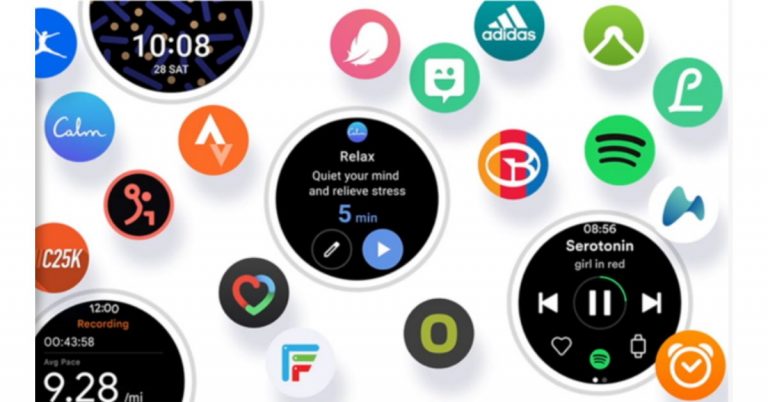
At the ongoing MWC 2021 Samsung at its virtual tech conference introduced the One UI Watch user experience, which is its new unified platform jointly built with Google. According to the company, the new operating system will bring performance enhancements between the Galaxy Watch and Android smartphones. In addition to this, the upcoming Galaxy Watch will be the first to bring the new interface at its Unpacked event that is scheduled for late summer.While presenting the new unified platform and One UI Watch Patrick Chomet, EVP and Head of Customer Experience Office, Mobile Communications Business at Samsung Electronics said, “To unlock the full potential of these wearables, we’re leveraging our long legacy of mobile innovations and our partnerships with trusted industry leaders who have grown with us in our open ecosystem. Through these efforts, we will enrich our smartwatch experience and convenience of the Galaxy ecosystem for our consumers.”One UI Watch will offer a whole new watch experience between the Watch and Android smartphones. As per the company when you install watch-compatible apps on your smartphone they will automatically get downloaded onto your Galaxy Watch. Additionally, if you personalise your clock app on your phone to show the time in different cities around the globe, this will be automatically reflected on your watch as well. Similarly, when you block calls or messages on your phone they will also be blocked on your Watch as well.Besides this, the users will also be able to integrate third-party apps like Adidas Running, GOLFBUDDY Smart Caddie, Strava and Swim.com, Spotify and YouTube Music as well as Google Maps via Google Play directly on your Galaxy Watch.On top of that, One UI Watch user experience will also accompany an improved watch face design tool. This will enable designers to create new watch faces. Moreover, the Android developers will be able to create new designs that will be added to Samsung’s collection of watch faces later this year. This will give more customisation options to users.Like we mentioned earlier the upcoming Galaxy Watch will be the first to feature the new One UI Watch. As per the company the unified platform is scheduled to be announced at Samsung’s Unpacked event later this summer.
For the latest gadget and tech news, and gadget reviews, follow us on Twitter, Facebook and Instagram. For newest tech & gadget videos subscribe to our YouTube Channel. You can also stay up to date using the Gadget Bridge Android App.






 The doesn’t divulge much information but the previous design concept of its upcoming TWS earphones shared by the company mentions that Ear 1 TWS will be a combination of transparency, iconic form, and refined functionality. It is the starting point that will define the artistry, confidence and craftsmanship that will carry our products and services for years to come.
Whereas the teaser shows the form factor of the audio device. It should be noted that the Noting earbuds are designed in association with Stockholm-based Teenage Engineering.
For the latest gadget and tech news, and gadget reviews, follow us on Twitter, Facebook and Instagram. For newest tech & gadget videos subscribe to our YouTube Channel. You can also stay up to date using the Gadget Bridge Android App.
The doesn’t divulge much information but the previous design concept of its upcoming TWS earphones shared by the company mentions that Ear 1 TWS will be a combination of transparency, iconic form, and refined functionality. It is the starting point that will define the artistry, confidence and craftsmanship that will carry our products and services for years to come.
Whereas the teaser shows the form factor of the audio device. It should be noted that the Noting earbuds are designed in association with Stockholm-based Teenage Engineering.
For the latest gadget and tech news, and gadget reviews, follow us on Twitter, Facebook and Instagram. For newest tech & gadget videos subscribe to our YouTube Channel. You can also stay up to date using the Gadget Bridge Android App.  The doesn’t divulge much information but the previous design concept of its upcoming TWS earphones shared by the company mentions that Ear 1 TWS will be a combination of transparency, iconic form, and refined functionality. It is the starting point that will define the artistry, confidence and craftsmanship that will carry our products and services for years to come.
Whereas the teaser shows the form factor of the audio device. It should be noted that the Noting earbuds are designed in association with Stockholm-based Teenage Engineering.
For the latest gadget and tech news, and gadget reviews, follow us on Twitter, Facebook and Instagram. For newest tech & gadget videos subscribe to our YouTube Channel. You can also stay up to date using the Gadget Bridge Android App.
The doesn’t divulge much information but the previous design concept of its upcoming TWS earphones shared by the company mentions that Ear 1 TWS will be a combination of transparency, iconic form, and refined functionality. It is the starting point that will define the artistry, confidence and craftsmanship that will carry our products and services for years to come.
Whereas the teaser shows the form factor of the audio device. It should be noted that the Noting earbuds are designed in association with Stockholm-based Teenage Engineering.
For the latest gadget and tech news, and gadget reviews, follow us on Twitter, Facebook and Instagram. For newest tech & gadget videos subscribe to our YouTube Channel. You can also stay up to date using the Gadget Bridge Android App. 
 Another thing you need to look at to spot fake reviews is by checking the company which uploaded the product. If you do not seem to locate an authentic company website, it is highly probable that the company is not trustworthy and all the reviews are to be reconsidered. These are signs that you can spot fake reviews easily.
Read also: How to spot a phishing email or SMS message and avoid it?
Another thing you need to look at to spot fake reviews is by checking the company which uploaded the product. If you do not seem to locate an authentic company website, it is highly probable that the company is not trustworthy and all the reviews are to be reconsidered. These are signs that you can spot fake reviews easily.
Read also: How to spot a phishing email or SMS message and avoid it?
 Using a review tool is the best method to check if the review is genuine or fake. Reviewmeta simply uses the grading process as an Amazon-only analyzer. The steps to verify the review on the tool are easy and simple: you copy the URL and paste it on the website. The website will eliminate all the unreliable reviews and help you spot fake reviews on Amazon. The algorithm works in a unique way, letting you grade the reviews and provide detailed breakdowns with graphs. You can also add an extension to your browser.
 The review tools will rate how reliable product pages are on Amazon and other websites. You can open the fakespot website and copy the URL from Amazon and paste it on site. Fakespot will then grade the page and see how reliable the information can be. The algorithm of Fakespot finds reviews, analyses language, checks previous reviews, and purchase history to determine the product and the reviews. It filters out all the fake reviews for you to shop better and you can also add an extension of it to your browser.
For the latest gadget and tech news, and gadget reviews, follow us on Twitter, Facebook and Instagram. For newest tech & gadget videos subscribe to our YouTube Channel. You can also stay up to date using the Gadget Bridge Android App.
The review tools will rate how reliable product pages are on Amazon and other websites. You can open the fakespot website and copy the URL from Amazon and paste it on site. Fakespot will then grade the page and see how reliable the information can be. The algorithm of Fakespot finds reviews, analyses language, checks previous reviews, and purchase history to determine the product and the reviews. It filters out all the fake reviews for you to shop better and you can also add an extension of it to your browser.
For the latest gadget and tech news, and gadget reviews, follow us on Twitter, Facebook and Instagram. For newest tech & gadget videos subscribe to our YouTube Channel. You can also stay up to date using the Gadget Bridge Android App.  Another thing you need to look at to spot fake reviews is by checking the company which uploaded the product. If you do not seem to locate an authentic company website, it is highly probable that the company is not trustworthy and all the reviews are to be reconsidered. These are signs that you can spot fake reviews easily.
Read also: How to spot a phishing email or SMS message and avoid it?
Another thing you need to look at to spot fake reviews is by checking the company which uploaded the product. If you do not seem to locate an authentic company website, it is highly probable that the company is not trustworthy and all the reviews are to be reconsidered. These are signs that you can spot fake reviews easily.
Read also: How to spot a phishing email or SMS message and avoid it?
 Using a review tool is the best method to check if the review is genuine or fake. Reviewmeta simply uses the grading process as an Amazon-only analyzer. The steps to verify the review on the tool are easy and simple: you copy the URL and paste it on the website. The website will eliminate all the unreliable reviews and help you spot fake reviews on Amazon. The algorithm works in a unique way, letting you grade the reviews and provide detailed breakdowns with graphs. You can also add an extension to your browser.
 The review tools will rate how reliable product pages are on Amazon and other websites. You can open the fakespot website and copy the URL from Amazon and paste it on site. Fakespot will then grade the page and see how reliable the information can be. The algorithm of Fakespot finds reviews, analyses language, checks previous reviews, and purchase history to determine the product and the reviews. It filters out all the fake reviews for you to shop better and you can also add an extension of it to your browser.
For the latest gadget and tech news, and gadget reviews, follow us on Twitter, Facebook and Instagram. For newest tech & gadget videos subscribe to our YouTube Channel. You can also stay up to date using the Gadget Bridge Android App.
The review tools will rate how reliable product pages are on Amazon and other websites. You can open the fakespot website and copy the URL from Amazon and paste it on site. Fakespot will then grade the page and see how reliable the information can be. The algorithm of Fakespot finds reviews, analyses language, checks previous reviews, and purchase history to determine the product and the reviews. It filters out all the fake reviews for you to shop better and you can also add an extension of it to your browser.
For the latest gadget and tech news, and gadget reviews, follow us on Twitter, Facebook and Instagram. For newest tech & gadget videos subscribe to our YouTube Channel. You can also stay up to date using the Gadget Bridge Android App. 
 Although allowing apps to run online using the internet on the laptop is usually good, there are many reasons to block an app from accessing the internet on your computer. One example is to stop automatic updates of an app or disable an app that cannot be used offline. The following are the steps to block an app on Windows computers.
 By disabling the network adapter you can also block the app access to the internet. Access to all utilities or setups of your computers will be blocked if you disable the network and will help the app in denying access to the internet on your computers. Follow the steps to disable the network adaptor.
 Although allowing apps to run online using the internet on the laptop is usually good, there are many reasons to block an app from accessing the internet on your computer. One example is to stop automatic updates of an app or disable an app that cannot be used offline. The following are the steps to block an app on Windows computers.
 By disabling the network adapter you can also block the app access to the internet. Access to all utilities or setups of your computers will be blocked if you disable the network and will help the app in denying access to the internet on your computers. Follow the steps to disable the network adaptor.
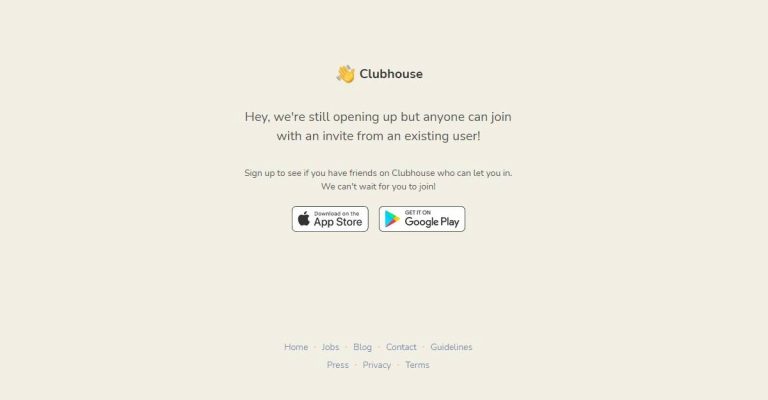
 The Android application emulator is one of the best options available to run your Clubhouse app on your PC. You can download the BlueStack software on your computers and the Android apps emulator will let you download and install the Clubhouse app on your PC.
The BlueStack emulator is available for both Windows and Mac. The following steps is how to download and install the BlueStacks programming and Clubhouse app.
The Android application emulator is one of the best options available to run your Clubhouse app on your PC. You can download the BlueStack software on your computers and the Android apps emulator will let you download and install the Clubhouse app on your PC.
The BlueStack emulator is available for both Windows and Mac. The following steps is how to download and install the BlueStacks programming and Clubhouse app.
 For those who are new to Clubdeck, it is an unofficial desktop client app for the Cubhouse app. Using the Cludeck website you can access your Clubhouse app on your Windows or Mac PC. The websites you can use have some features for Clubhouse Moderators also. The best part of Clubdeck websites is all the functionality of the app is made available. And also features some advanced functions like recording, streaming to other social networks, and playing custom local audio. Check out the guide below to know more about Clubdeck.
 The Android application emulator is one of the best options available to run your Clubhouse app on your PC. You can download the BlueStack software on your computers and the Android apps emulator will let you download and install the Clubhouse app on your PC.
The BlueStack emulator is available for both Windows and Mac. The following steps is how to download and install the BlueStacks programming and Clubhouse app.
The Android application emulator is one of the best options available to run your Clubhouse app on your PC. You can download the BlueStack software on your computers and the Android apps emulator will let you download and install the Clubhouse app on your PC.
The BlueStack emulator is available for both Windows and Mac. The following steps is how to download and install the BlueStacks programming and Clubhouse app.
 For those who are new to Clubdeck, it is an unofficial desktop client app for the Cubhouse app. Using the Cludeck website you can access your Clubhouse app on your Windows or Mac PC. The websites you can use have some features for Clubhouse Moderators also. The best part of Clubdeck websites is all the functionality of the app is made available. And also features some advanced functions like recording, streaming to other social networks, and playing custom local audio. Check out the guide below to know more about Clubdeck.

 The following steps are to enable the Ticketed feature in your Twitter account. And make sure you meet the requirement set out by Twitter to enable the feature.
 The tickets let you host an audio-based live session and let you control the entry of other participants by putting a fee to join your sessions. Know more below:
 If your Twitter account starts to get more Super Follows you can earn more revenue and also create more content. With the increase in Super Follows, you can earn monthly revenue by creating a direct relationship with your active followers. Also, you can create bonus content and offer it to your biggest followers. Customisation is another great feature of having Super Follows. You can customise the price from 2.99 dollars to 9.99 dollars per month.
For the latest gadget and tech news, and gadget reviews, follow us on Twitter, Facebook and Instagram. For newest tech & gadget videos subscribe to our YouTube Channel. You can also stay up to date using the Gadget Bridge Android App.
If your Twitter account starts to get more Super Follows you can earn more revenue and also create more content. With the increase in Super Follows, you can earn monthly revenue by creating a direct relationship with your active followers. Also, you can create bonus content and offer it to your biggest followers. Customisation is another great feature of having Super Follows. You can customise the price from 2.99 dollars to 9.99 dollars per month.
For the latest gadget and tech news, and gadget reviews, follow us on Twitter, Facebook and Instagram. For newest tech & gadget videos subscribe to our YouTube Channel. You can also stay up to date using the Gadget Bridge Android App.  The following steps are to enable the Ticketed feature in your Twitter account. And make sure you meet the requirement set out by Twitter to enable the feature.
 The tickets let you host an audio-based live session and let you control the entry of other participants by putting a fee to join your sessions. Know more below:
 If your Twitter account starts to get more Super Follows you can earn more revenue and also create more content. With the increase in Super Follows, you can earn monthly revenue by creating a direct relationship with your active followers. Also, you can create bonus content and offer it to your biggest followers. Customisation is another great feature of having Super Follows. You can customise the price from 2.99 dollars to 9.99 dollars per month.
For the latest gadget and tech news, and gadget reviews, follow us on Twitter, Facebook and Instagram. For newest tech & gadget videos subscribe to our YouTube Channel. You can also stay up to date using the Gadget Bridge Android App.
If your Twitter account starts to get more Super Follows you can earn more revenue and also create more content. With the increase in Super Follows, you can earn monthly revenue by creating a direct relationship with your active followers. Also, you can create bonus content and offer it to your biggest followers. Customisation is another great feature of having Super Follows. You can customise the price from 2.99 dollars to 9.99 dollars per month.
For the latest gadget and tech news, and gadget reviews, follow us on Twitter, Facebook and Instagram. For newest tech & gadget videos subscribe to our YouTube Channel. You can also stay up to date using the Gadget Bridge Android App.