

In This Article
OnePlus 11R review: Design and Display
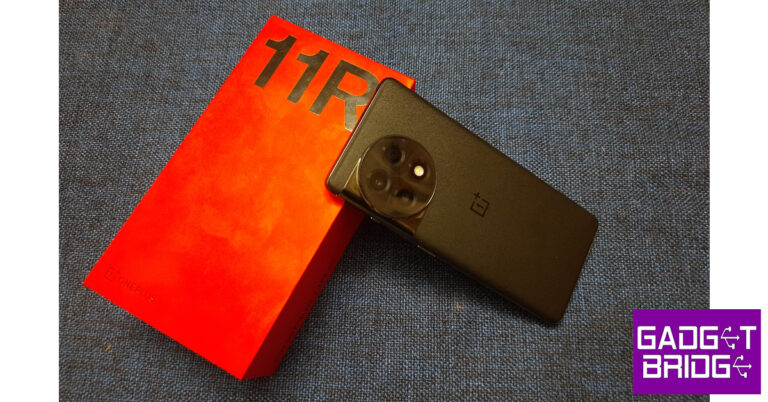
The OnePlus 11R ships inside the signature OnePlus red box. Inside, you will find the smartphone, a silicone cover for the back, a 100W power brick, a USB Type-C cable, a SIM ejector tool, some reading material (Quick Guide and Safety Guide), a Red Cable Club membership card, and some fun stickers. In terms of design, the OnePlus 11R looks just like its flagship counterpart. At first glance, you could easily mistake it for OnePlus 11. The 11R is also the first ‘R’ series OnePlus smartphone that gets the same design as the brand’s flagship. There are a couple of differences, though, as the 11R gets a punch hole cutout for the selfie camera at the centre of the display as opposed to the top right placement on OnePlus 11. Turning the smartphone around, you will also notice the lack of Hasselblad branding on 11R’s camera module.
 What we really liked about OnePlus 11R is that it gets a glass back just like its older sibling. OnePlus could’ve easily ditched the glass panel for a different material (or worse – plastic), but having a glass back really adds to the in-hand feel of the phone and makes it a more premium product. The matte-like finish on the back makes it resistant to fingerprints and gives it a very pleasing texture. The frame of the phone is still plastic, instead of aluminium.
The alert slider is back on the OnePlus 11 series after going missing on OnePlus 10T. It is placed on the right side of the frame, above the power key. The volume rocker keys have been accommodated on the right side of the phone. At the bottom, you will find the USB Type-C charging port, SIM tray, primary speaker, and microphone.
What we really liked about OnePlus 11R is that it gets a glass back just like its older sibling. OnePlus could’ve easily ditched the glass panel for a different material (or worse – plastic), but having a glass back really adds to the in-hand feel of the phone and makes it a more premium product. The matte-like finish on the back makes it resistant to fingerprints and gives it a very pleasing texture. The frame of the phone is still plastic, instead of aluminium.
The alert slider is back on the OnePlus 11 series after going missing on OnePlus 10T. It is placed on the right side of the frame, above the power key. The volume rocker keys have been accommodated on the right side of the phone. At the bottom, you will find the USB Type-C charging port, SIM tray, primary speaker, and microphone.
 Up top, you get the secondary speaker, another microphone, and an IR blaster. The smartphone has a native IR remote app, which makes it very easy to use your phone as a remote for home appliances.
The under-display fingerprint scanner is fast as ever, but its placement still remains a little too low for our liking. OnePlus fixed the positioning on the flagship but carries on with the previous positioning on the 11R. There is no IP rating available for this smartphone, which is kind of a letdown.
Moving to the display, OnePlus 11R sports a 6.74-inch, 120Hz, Fluid AMOLED curved display with HDR10+ support. The display is the same size as the flagship but misses out on Dolby Vision. Watching content on the smartphone is still a treat, though. Watching HDR content was very pleasing, and the curved display with minimal bezels offers an immersive viewing experience.
Up top, you get the secondary speaker, another microphone, and an IR blaster. The smartphone has a native IR remote app, which makes it very easy to use your phone as a remote for home appliances.
The under-display fingerprint scanner is fast as ever, but its placement still remains a little too low for our liking. OnePlus fixed the positioning on the flagship but carries on with the previous positioning on the 11R. There is no IP rating available for this smartphone, which is kind of a letdown.
Moving to the display, OnePlus 11R sports a 6.74-inch, 120Hz, Fluid AMOLED curved display with HDR10+ support. The display is the same size as the flagship but misses out on Dolby Vision. Watching content on the smartphone is still a treat, though. Watching HDR content was very pleasing, and the curved display with minimal bezels offers an immersive viewing experience.
 The display produced a good range of colours, with a lot of detail in the images. You can choose the different colour modes from the display settings and adjust the screen colour temperature to your liking. The stereo speakers are great while you’re watching video content, but leave a little more to be desired while playing music. The Dolby Atmos experience with headphones was much better.
With a peak brightness of 1,450 nits, the display is perfectly legible under bright sunlight. The 120Hz refresh rate gives a fluid browsing experience, although for some apps the refresh rate has been capped at 60Hz. That being said, the touch response we got from the display was exceptional. The haptic feedback was on point too, although not as well-tuned as the flagship. The little vibrations while adjusting the brightness, scrolling the app switcher, and reaching the end of the app drawer felt good and elevated the smartphone’s experience.
The display produced a good range of colours, with a lot of detail in the images. You can choose the different colour modes from the display settings and adjust the screen colour temperature to your liking. The stereo speakers are great while you’re watching video content, but leave a little more to be desired while playing music. The Dolby Atmos experience with headphones was much better.
With a peak brightness of 1,450 nits, the display is perfectly legible under bright sunlight. The 120Hz refresh rate gives a fluid browsing experience, although for some apps the refresh rate has been capped at 60Hz. That being said, the touch response we got from the display was exceptional. The haptic feedback was on point too, although not as well-tuned as the flagship. The little vibrations while adjusting the brightness, scrolling the app switcher, and reaching the end of the app drawer felt good and elevated the smartphone’s experience.
OnePlus 11R review: Performance and Cameras
Let’s get the major specs out of the way first. The OnePlus 11R is powered by Snapdragon 8+ Gen 1 SoC which was also driving the OnePlus 10T. GPU duties are handled by Adreno 730. The smartphone comes with Android 13 skinned with OxygenOS 13. OnePlus has promised three years of software updates and four years of security patches for 11R. As mentioned earlier, the smartphone is available in two variants – 8GB + 128GB and 16GB + 256GB. We used the latter for this review. While the flagship uses the latest Snapdragon 8 Gen 2 SoC, OnePlus 11R makes use of Snapdragon 8+ Gen 1 which was last year’s flagship SoC. Putting the benchmark numbers aside, this chipset leaves no room for any complaints. The phone presented no lags during our use even when we threw a lot of heavy tasks at it. Even with over a dozen apps running in the background, OnePlus 11R did not drop its performance at all. The smartphone continued to crush all the tasks without breaking a sweat.
We played some graphically demanding games on OnePlus 11R and were satisfied with the results. There were no stutters, lags, or annoying frame drops while playing Apex Legends at maximum graphics. The phone heated up slightly after 15 minutes of gameplay, but it did not affect its performance at all. After playing Apex Legends for 40 minutes at a stretch, the battery percentage dropped by 11%.
While the flagship uses the latest Snapdragon 8 Gen 2 SoC, OnePlus 11R makes use of Snapdragon 8+ Gen 1 which was last year’s flagship SoC. Putting the benchmark numbers aside, this chipset leaves no room for any complaints. The phone presented no lags during our use even when we threw a lot of heavy tasks at it. Even with over a dozen apps running in the background, OnePlus 11R did not drop its performance at all. The smartphone continued to crush all the tasks without breaking a sweat.
We played some graphically demanding games on OnePlus 11R and were satisfied with the results. There were no stutters, lags, or annoying frame drops while playing Apex Legends at maximum graphics. The phone heated up slightly after 15 minutes of gameplay, but it did not affect its performance at all. After playing Apex Legends for 40 minutes at a stretch, the battery percentage dropped by 11%.
 Unfortunately, OnePlus’ OS does not have much to contribute to its redemption arc. This isn’t to say that OxygenOS 13 is a bad OS by any means. It just doesn’t have an identity of itself, being awfully similar to Oppo’s ColorOS. It seems like OnePlus is set to keep it this way, at least for the near future. But it’s not all doom and gloom on the OS front. What we liked about OxygenOS 13 is that the bloatware has been kept to a minimum.
The software experience is clean with a bunch of cool features thrown in. There are a lot of customisation options for the lock screen and AOD. We also liked privacy options like App Lock, Hide Apps (which only gives you access to hidden apps after typing the code in the dialer), Private Safe, and System Cloner.
The game toolbar is also a handy feature that allows you to view the frame rate and internal temperature of your smartphone while gaming. It also offers quick shortcuts for screen recording, orientation lock, system status, and more. We also liked the native IR Remote app and used it to control home appliances and gadgets like the AC and TV.
Unfortunately, OnePlus’ OS does not have much to contribute to its redemption arc. This isn’t to say that OxygenOS 13 is a bad OS by any means. It just doesn’t have an identity of itself, being awfully similar to Oppo’s ColorOS. It seems like OnePlus is set to keep it this way, at least for the near future. But it’s not all doom and gloom on the OS front. What we liked about OxygenOS 13 is that the bloatware has been kept to a minimum.
The software experience is clean with a bunch of cool features thrown in. There are a lot of customisation options for the lock screen and AOD. We also liked privacy options like App Lock, Hide Apps (which only gives you access to hidden apps after typing the code in the dialer), Private Safe, and System Cloner.
The game toolbar is also a handy feature that allows you to view the frame rate and internal temperature of your smartphone while gaming. It also offers quick shortcuts for screen recording, orientation lock, system status, and more. We also liked the native IR Remote app and used it to control home appliances and gadgets like the AC and TV.
 On the Geekbench 8 benchmark, OnePlus 11R scored 888 points on the single-core test and 3,373 points on the multi-core test. In comparison, its nearest rival Vivo V27 Pro scored 1,151 points in the single-core test and 3,099 points in the multi-core test.
OnePlus is known to deliver lightning-fast charging speeds, and it doesn’t miss with OnePlus 11R. The 100W SuperVOOC charger can juice up the 5,000 mAh battery in just 25 minutes. This incredible speed doesn’t make you miss wireless charging at all. We were quite pleased with the battery backup as well, as the smartphone coasted through a day of moderate to heavy usage with plenty of charge left at the end. After a screen-on time of almost 7 hours, we were left with a 15% charge at the end of the day.
On the Geekbench 8 benchmark, OnePlus 11R scored 888 points on the single-core test and 3,373 points on the multi-core test. In comparison, its nearest rival Vivo V27 Pro scored 1,151 points in the single-core test and 3,099 points in the multi-core test.
OnePlus is known to deliver lightning-fast charging speeds, and it doesn’t miss with OnePlus 11R. The 100W SuperVOOC charger can juice up the 5,000 mAh battery in just 25 minutes. This incredible speed doesn’t make you miss wireless charging at all. We were quite pleased with the battery backup as well, as the smartphone coasted through a day of moderate to heavy usage with plenty of charge left at the end. After a screen-on time of almost 7 hours, we were left with a 15% charge at the end of the day.
 Moving on, the OnePlus 11R sports a dial-like camera panel at the back. There is no Hasselblad branding on the cameras, which also means the camera app is a bit different than the flagship. While OnePlus offers the same 50MP primary lens as the flagship, the ultrawide lens has been downgraded to 8MP from 48MP, and the telephoto lens has been replaced by a 2MP macro lens.

 The 50MP primary lens delivers a strong performance, much like it does on the flagship. The lack of Hasselblad collaboration is slightly noticeable, but it is by no means a dealbreaker. In daylight conditions, OnePlus 11R managed to capture a lot of detail in the images, with a great range of colours and near-perfect saturation. The images came out sharp, punchy, and well-balanced.


 We were quite pleased with the 16MP selfie camera. Even in challenging low light conditions, the selfies came out well composed. The skin tones produced in the images were close to reality and there is no skin-brightening gimmick that most smartphones in the market resort to.
The primary rear camera can record 4K videos at 30 or 60fps. However, the stabilization is very limited in this resolution. The selfie camera can record 1080p videos at 30fps. The camera app offers a Dual-View video which allows the front and rear cameras to record simultaneously.
Read Also: International Day of Happiness: Wellbeing apps and gadgets
We were quite pleased with the 16MP selfie camera. Even in challenging low light conditions, the selfies came out well composed. The skin tones produced in the images were close to reality and there is no skin-brightening gimmick that most smartphones in the market resort to.
The primary rear camera can record 4K videos at 30 or 60fps. However, the stabilization is very limited in this resolution. The selfie camera can record 1080p videos at 30fps. The camera app offers a Dual-View video which allows the front and rear cameras to record simultaneously.
Read Also: International Day of Happiness: Wellbeing apps and gadgets
Verdict
At Rs 40,000, OnePlus 11R offers tremendous value for money – something that consumers used to associate with OnePlus smartphones. Even though it qualifies as a mid-ranger, OnePlus 11R has the best chipset in its category and offers almost the same features as its flagship counterpart. The choices made by the company to reduce the price of the smartphone pay off quite well.OnePlus 11R: Pros
- Design
- Build quality
- Display
- Great performance
OnePlus 11R: Cons
- No IP rating
- The macro lens serves no purpose


 Rebooting your phone in Safe Mode disables all third-party apps. Press and hold the power off icon in the power menu to reveal the Safe Mode option. If your phone works fine in Safe Mode, it means that one of the third-party apps is at fault. Delete the apps that you installed right before this issue surfaced on your phone. Once that’s done, reboot your smartphone normally. The issue should be fixed. If you’re experiencing the issue in Safe Mode as well, move on to other fixes.


 It is possible that a virus or malware is causing your phone to shut down at random intervals. Install a good anti-virus app on your phone and perform a deep scan of your device. Let the anti-virus app find the source of the virus. Once you know which files are compromised, delete them from your phone.

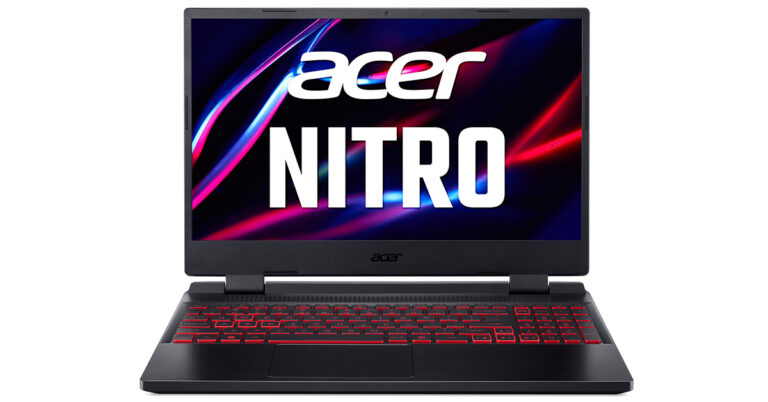
 With dual-fan cooling, dual-intakes (top and bottom), and a quad-exhaust port design, the newly improved chassis in the Acer Nitro 5 (2023), it has a few additional tricks up its sleeve. Open the NitroSense utility software to gain additional control over fan speeds, lighting, and other factors.
With AMD FreeSync maintaining those frames tight and in sync, everything appears better in QHD. A fluid, uninterrupted, and unmatched gaming experience is guaranteed by the 165Hz refresh rate and 3ms reaction time.
“The Acer Nitro 5 (2023) have an unrivalled reputation for offering cutting-edge technology and intense gaming at affordable prices. As gaming has been in the spotlight for the past several years, we are proud and thrilled to introduce the latest Nitro 5 laptop to our Indian gamers. It features the latest AMD Ryzen 7000 processors which is a gaming powerhouse with high performance. With the latest sleek and refined chassis this robust laptop packs a punch giving the users a seamless gaming experience” said Sudhir Goel, Chief Business Officer,
With dual-fan cooling, dual-intakes (top and bottom), and a quad-exhaust port design, the newly improved chassis in the Acer Nitro 5 (2023), it has a few additional tricks up its sleeve. Open the NitroSense utility software to gain additional control over fan speeds, lighting, and other factors.
With AMD FreeSync maintaining those frames tight and in sync, everything appears better in QHD. A fluid, uninterrupted, and unmatched gaming experience is guaranteed by the 165Hz refresh rate and 3ms reaction time.
“The Acer Nitro 5 (2023) have an unrivalled reputation for offering cutting-edge technology and intense gaming at affordable prices. As gaming has been in the spotlight for the past several years, we are proud and thrilled to introduce the latest Nitro 5 laptop to our Indian gamers. It features the latest AMD Ryzen 7000 processors which is a gaming powerhouse with high performance. With the latest sleek and refined chassis this robust laptop packs a punch giving the users a seamless gaming experience” said Sudhir Goel, Chief Business Officer, 
 The company also added, “We will soon introduce a new publicly available API that will enable apps to pin either primary or secondary tiles to
















 Step 3:
 Step 3:
 Step 4:
 Step 4:
 Step 5:
 Step 6:



 Step 2:
 Step 4:
 Step 2:
 Step 3:
 Step 4:
 Step 5:
 Step 5:
 Step 2:
  Step 4:
 Step 3:


 Step 2:
 Step 3:
 Step 4:
 Step 5:

 There is an advanced
