Sending files on the internet has been easy and simple with many platforms available now. But what about the limitation that these sites have, sending big files being one? Files are regularly transferred through mail or other platforms but large files cannot be sent on mail or other usual platforms. Check the list for the 8 best websites to transfer/send large files from a PC or Mac.Read Also:Top 5 Things to Know Before Buying a VR Headset
The DropSend website lets you send/transfer large files through an email link that will be sent to the recipient. The email link that he/she will receive can be downloaded or viewed according to preference. The website offers three paid subscriptions that differ depending on the size you want to send. For 10GB online storage with 25 sends a month you can subscribe to the basic plan, the standard plan gives you 25GB of storage and 50 sends a month, and the professional plan offers you unlimited send each month. Worry not, the website also gives you a free plan option in which you can send files with a maximum size of 8GB.
FileWhopper allows you to transfer files up to 5GB for free and lets you transfer files after 5GB to 10TB for a paid subscription. The file transfer is an easy and simple process you can upload it online or choose from a folder. The files you will be sending are encrypted with zero-knowledge encryption for a more secure transfer. The best function of the website is it lets you pause the upload and save the process in case of an emergency. The attraction of FileWhopper file transfer is no size limit, data protection and simple interface.
Read more: 5 apps and software you can use to wirelessly transfer files from your smartphone to PC and vice versa.
Transferring large files will be easier and very convenient with WeTransfer, a user-friendly website. The file transferring on the website has very few limitations and it is a free file sharing service for all. It allows you to transfer files up to 2GB but the Pro version allows you up to 20GB with many benefits. The process to transfer the files is simple and easy: select the file, enter the email address of the recipients and press transfer. The best part of this website is that you do not need to open an account to transfer the files. In some cases, you might need to verify with a code that will come to your email address.
Read also: How to transfer your PlayStation4 games and saved data to your new PlayStation5 console?
This website has some unique features: it gives you control over the link, which will last till 7 days. Filemail offers a transfer of data of 30GB maximum file size and it is simple to send a file. Just fill out the email address, attach the file you want to transfer and hit send. And also for more interesting functions, the website allows you to add as many recipients as you want. The advantages of this website worth consideration are its download management options, download tracker, unlimited recipients, and no registration.
MediaFire makes your large file sharing easier with its cloud storage service. The website offers 10GB of storage that can be increased up to 50GB later. When you upload your large files on the website’s cloud storage service you will receive a download link that can be shared with others. There is no limit to downloads and you have complete control of the shared download link.
ToffeeShare is one of the websites for sending large files from your PC or Mac to another device. The process of transferring files using ToffeeShare is very simple. Open the official ToffeeShare website on your web browser, hit the plus icon, and upload the file. Once the file has been uploaded, ToffeeShare will generate a QR code and link for the download. Sharing this link with the recipient gives them access to the file. Files are shared straight from your device, which means the transfer process will be terminated as soon as you close the tab.
If you’re looking for a cloud solution, then Google Drive should be on top of your list. Every Google Account gets 15GB of free cloud storage. This is more than enough to store or transfer a large volume of pictures, videos, and other files. Google Drive is available for all major platforms, so compatibility should not be an issue. It may not be as fast as other websites on this list but it is reliable and gets the job done.
Ending this list is Send Anywhere, one of the simplest file-sharing tools for your PC and Mac. Once you upload a file on Send Anywhere, it generates a six-digit code which can be used to download the file on any device. All you need to do is open the Send Anywhere website in another browser and enter the code. If you’re using the website on your smartphone, make sure you enable its desktop version. You can send up to 10GB of files using Send Anywhere for free.
Read Also:Telegram business introduced, to offer customer support
Conclusion
These are the top 8 websites to transfer large files from your PC or Mac. All of these websites work fine for cross-platform sharing. While you can use them all for free, some may require a premium subscription for very large transfers. If you’re looking for an app that can carry out the transfers, check out Xender and Feem.
Vivo Y51A was launched in India earlier this year. Then the company only introduced it in a single 8GB RAM model, but today the new 6GB RAM with 128GB variant has been introduced in the country. Besides this, the specification remains the same. The phone includes a triple rear camera set up, a 5,000mAh battery and is powered by Snapdragon 662 SoC.
Vivo Y51A 6GB RAM with 128GB storage price and availability
The price of the 6GB RAM with 128GB of Vivo Y51 has been set at Rs 16,990. The phone will be available in two colour options of Titanium Sapphire and Crystal Symphony. The new variant is now up for sale via Vivo India E-store in the country. The company is offering cashback to HDFC Bank cardholders. There will be exchange offers and no-cost EMI for up to 12 months as well.To recall, in January this year the phone was introduced at Rs 17,990 for the 8GB RAM with 128GB storage option.
Vivo Y51A tech specs
Vivo Y51A comes with a 6.58-inch full-HD+ LCD offering 1,080×2,408 pixels of resolution. The device runs Funtouch OS 11 on top of Android 11 and it is powered by Qualcomm Snapdragon 662 SoC paired with 8GB RAM with 128GB storage. The internal storage can be expanded up to 1TB using a microSD card.In terms of cameras, Vivo Y51A features a triple rear camera setup that includes a 48-megapixel primary sensor with an f/1.79 aperture. It is accompanied by an 8-megapixel ultra-wide-angle lens with an f/2.2 aperture and a 2-megapixel tertiary lens with f/2.4. The rear camera also offers Ultra-Stable video with Electronic Image Stabilization (EIS) technology along with Super Night Camera capabilities for both front and rear. Moreover, there are other modes like Ultra Stable video, Super Night mode and Macro mode. On the front, there is a 16-megapixel selfie camera with an f/2.0 aperture.In terms of connectivity, there is dual-band Wi-Fi, Bluetooth 5.0, USB Type-C, GPS among others. There is a side-mounted fingerprint sensor for phone unlocking and it also packs a5,000mAh battery with 18W Fast Charge support and Reverse Charging feature.
For the latest gadget and tech news, and gadget reviews, follow us on Twitter, Facebook and Instagram. For newest tech & gadget videos subscribe to our YouTube Channel. You can also stay up to date using the Gadget Bridge Android App.
Microsoft is upgrading the AI features in MS Word with predictive text. Many users of Word now can strain off their fingers while typing. The feature will automatically suggest words as you type, making typing work easier and less hectic. The users can now type faster and reduce the spelling and grammar mistakes to a minimum. Microsoft AI will make machine learning more efficient by enabling grayed-out prediction by tapping the accept key or reject key. The technology will function according to your writing style and give you the best prediction available. In case you do not need it, you can always turn it off.Microsoft for clarity stated the new Predictive text features are not snooping into any of the user’s text in an email or any other texting environment or taking control of their typing. Text prediction is a tool that makes suggestions of what you type. The text can only be read by other humans if you put it within the feedback.
Read more: 10 must-know Hidden Features of Microsoft WordTo use the function of “Text Prediction” you can press the “Tab” key on your keyboard to accept the prediction and use the “Esc” keys to reject the prediction. Microsoft Word will automatically insert the word suggestion into the sentences when you are writing and make the documents clearer. Google docs have Smart compose also, which works in the same manner.
Read also: Now use Google Lens to copy text to your laptop: These are the new features addedThe feature of predictive text is already available on the Office 365 insider program. If you want to test the feature and see how efficient and convenient it can be before you install it on your Microsoft word, you can enroll in the program. Windows also has a similar feature that you can enable by Settings>Device> Typing and turn on the “Show text suggestion as I type” For many users who type large documents in Microsoft Word, this new feature comes as a blessing as when typing huge documents it will make thinking easier. This function will benefit many University students and the researchers who have to write a lot. Moreover, with Microsoft Office 2021 also coming soon, the Predictive text has a lot to offer, as hopefully the new feature will be added in Microsoft 2021.In our view, the Microsoft Predictive text objective is to assist the Word user make his/her typing faster, which will help to save a lot of time and effort of typing more fruitful. Also, Microsoft commented, “Text prediction helps users write more efficiently by predicting text quickly and accurately. The features reduce spelling and grammar errors and learn over time to give the best recommendations based on your writing style.” Hence, enabling the Predictive text feature on your Microsoft Word will not only help in your writing, but will largely contribute to increasing productivity, efficiency, and accuracy.
For the latest gadget and tech news, and gadget reviews, follow us on Twitter, Facebook and Instagram. For newest tech & gadget videos subscribe to our YouTube Channel. You can also stay up to date using the Gadget Bridge Android App.
Elon Reeve Musk, a popular business tycoon, turned 50 today. The founder of CEO and the Chief Engineer at SpaceX is not the only business that he owns. He is the founder of several businesses, which made him one of the richest people in the world. That is not the only reason for his popularity, he is quite popular on social media and the internet for his unorthodox or unscientific stances and highly publicised controversies. Apart from owning SpaceX, he also owns Tesla Motors. So today on his birthday here is the list of the five most popular and expensive things Elon Musk owns.
SpaceX
SpaceX is Elon Musk’s space transportation services and communications company. This aerospace manufacturer is aimed at reducing space transportation costs to enable the colonization of Mars. The company also manufactures heavy vehicles like Falcon 9, rocket engines, dragon, cargo, spacecraft and the very popular Starlink communication satellite. Also, the company’s Starlink constellation became the largest satellite constellation in the world last year. Space Exploration Technologies Corp. (SpaceX) is also developing a fully reusable, two-stage-two-orbit super heavy-lift launch vehicle, Starship. In 2020 SpaceX became the first private company to send astronauts to the International Space Station. In the past as well, SpaceX became the first to produce a privately funded fully liquid-fueled rocket Falcon 1 flight 4 to reach orbit. And recently this month it was the first to reuse a booster for a ‘national security’ mission.
Tesla
Tesla Inc., another company owned by Elon Musk, manufactures electric cars, battery energy storage from home to grid-scale, solar panels and solar roof tiles, as well as other related products and services. The company offers four car models: the Model S, Model 3, Model X and Model Y. The Model S is a five-door liftback sedan whereas the Model 3 is a four-door fastback sedan. On the other hand, Tesla Model X is a mid-size crossover SUV and Model Y is a compact crossover utility vehicle. Apart from this, the company also owns an all-electric Class 8 semi-trailer truck named Tesla Semi, which is available in two variants 300 miles (480 km) and one with 500 miles (800 km) of range. The company has discontinued the very popular original Tesla Roadster, a battery electric vehicle (BEV) sports car. However, its second-generation model was launched in 2017.
X.com now PayPal
X.com was an online bank co-founded in the year 1999 by Elon Musk, Harris Fricker, Christopher Payne, and Ed Ho. But later on, the company merged with a software company Confinity and changed its name to PayPal which spun off to become an independent company after it was bought by eBay in 2002. X.com was the world’s first online bank and in 2017 Musk repurchased the domain name X.com from PayPal citing “it has great sentimental value”.
OpenAI
Open AI is an artificial research laboratory owned by Elon Musk that is the arrival of DeepMind. The company’s mission is to ensure that artificial general intelligence benefits all of humanity and focuses on reinforcement learning.
The Boring Company
An American infrastructure and tunnel construction services company founded by Elon Musk – The Boring Company. The firm focuses on developing projects designed for intra-city transit systems and has completed two tunnels in Las Vegas for loop travel. Loop in an all-electric, zero-emissions, underground public transportation system in which passengers are transported directly to their final destination with no stops along the way.Initially, the company was a subsidiary of SpaceX and it became fully independent in 2018. The company also creates safe, fast to dig, low-cost transportation, utility and freight tunnels that are aimed at solving traffic, enabling rapid point to point transportation and transforming cities.
For the latest gadget and tech news, and gadget reviews, follow us on Twitter, Facebook and Instagram. For newest tech & gadget videos subscribe to our YouTube Channel. You can also stay up to date using the Gadget Bridge Android App.
Playing games for long hours on your smartphone will no longer be a problem as many cooling fans are available now. The phone cooling fans will not let your mobile overheat and let you play mobile games for long. Cooling fans help in extending the battery life span and make your gaming time on your smartphones less of a worry. Here is the list of 5 cooling fans for your smartphones. Remember, all these are available on Amazon USA site, so they might not deliver to all over India. In case you have someone coming from the USA, they can carry it with them.
The IVY mobile cooling fan is a powerful heat sink fan that will help in cooling the phone instantly while playing games. The radiator can be used for half an hour and it is a water-cooled radiator that cools down between 10~30 degree C. The cooler can be attached to a mobile whose width is 65-85mm and it can be used for both Android and iOS devices. The product is equipped with a 1.5m USB data cable. Price: Rs 1,800Buy on Amazon.com
4Trigger Mobile Game Controller With Cooling Fan: YOBWIN
The smartphone cooler comes with a gaming grip gamepad controller for mobile. It comes with six fingers operation support to enhance the game playing you can aim, shoot, move at the same time. The product is equipped with silent cooling fan technology and will help in extending the phone’s battery. The phone cooler also has a charging port on two sides for non-stop gaming. Price: Rs 1,300Buy at Amazon.com
Read more: Acer Predator Triton 300 and Predator Helios 300 with 10th Gen Intel Core H-series processors now available in India
Cyesor Cell Phone Cooler:
The cell phone cooling system for your gaming needs is compatible with all mobiles with 4.5 inches to 7-inch screens. The product is equipped with 3-second Ultra-fast refrigeration with ice porcelain refrigeration technology. Cyesor phone cooler has a 30db noise reduction design, which cuts off all noise by the powerful radiator. And for better user-friendly, all adapter USB ports are used when plugged in and turned on. Price: Rs 1,200Buy from Amazon.com
Read also: Top 5 laptop stands to keep your laptop cool
The best thing about the product is it comes with 2 semiconductor cooling chips for better performance. The SakuraClub phone cooler includes rapid cooling down technology by activating the dual fans cooling the phone down at 6,500rpm in 10 seconds. The phone cooler also features silent features for noise cancellation and it is lightweight. The cooler fits well on all types of mobiles that has a screen size of 4.7-inches to 7-inches. The company claims the product is 100 % quality tested.Price: Rs 2,000Buy the product from Amazon.com
Infinizy Gaming Grip with Portable Charger cooling Fan
The product is ideal for playing different games, which need mobile trigger joysticks with an L1R1 controller. The Infinizy gaming grip with portable cooling fan is compatible with mobile screens up to6.5-inches. The cooler for phones includes an adjustable bracket to accommodate your phone and can be used as a game controller. It also comes with two charging ports on two sides of the handle along with a 6 finger game shooter for better gaming experience. Price: Rs 2,000Buy from Amazon.in
For the latest gadget and tech news, and gadget reviews, follow us on Twitter, Facebook and Instagram. For newest tech & gadget videos subscribe to our YouTube Channel. You can also stay up to date using the Gadget Bridge Android App.
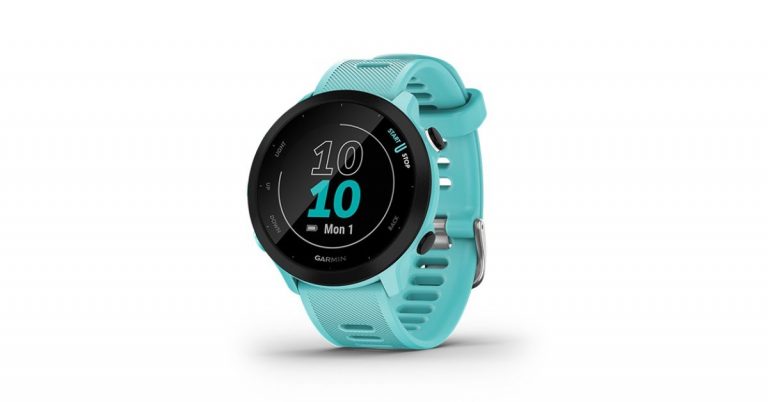
The American smartwatch manufacturer, Garmin, has expanded its portfolio with the launch of a new device in India. The company has introduced GPS enabled Garmin Forerunner 55, which is designed for higher skill levels. Prior to its launch in the country, the company launched this product in the US alongside the much expensive and dedicated premium GPS running and triathlon smartwatch Forerunner 945 LTE earlier this month.Garmin Forerunner 55 price and availabilityThe Garmin Forerunner 55 has been launched in India with a price tag of Rs 20,990. Notably, India pricing is on the higher side as compared to the US pricing. There it was launched at $199.99 that translates to Rs 14,837. Anyways the smartwatch will be offered in three colour options of Aqua, Black, and Monterra Grey. It will be available for purchase via Amazon, Flipkart, Tata CLiQ, Synergizer, and Garmin Brand Stores in the country.Garmin Forerunner 55 featuresGarmin Forerunner 55 comes with a 1.04-inch round display protected with chemically strengthened glass and a Silicon strap. This fitness watch comes with 5ATM certification for water and dust resistance. There is a button on the device which when pressed can track time, distance, speed, pace and heart rate data right before beginning a run or a walk. The Garmin Smartwatch can run up to 2 weeks in smartwatch mode and up to 20 hours in GPS mode. Besides this one can also control the music playing on your paired smartphone and upload your activities to the Garmin Connect app to connect, compete and share your triumphs via social media. You can also set alarms, timers, stopwatch, and sunrise/sunset times. The new smartwatch lets you switch your workout routine with activity profiles for track or virtual running, pool swimming, Pilates, HIIT and even breathwork. You can also track running, treadmill running, track running, indoor track running, virtual running, cycling, swimming, and more.Additionally, it allows the user to monitor their overall health and wellness with wrist-based heart rate, respiration rate, fitness age, stress monitoring, relaxation reminders, sleep monitoring, hydration, and women’s health. It also makes you aware of your calories burned, distance travelled, and more. The Find My watch functionality allows you to easily locate your smartphone. Besides GPS, the smartwatch includes GLONASS, Garmin Elevate wrist heart rate monitor, and accelerometer.
For the latest gadget and tech news, and gadget reviews, follow us on Twitter, Facebook and Instagram. For newest tech & gadget videos subscribe to our YouTube Channel. You can also stay up to date using the Gadget Bridge Android App.
Music can be listened to from many mediums. And listening to music on the radio has been one of the oldest ways. If you enjoy radio music there are great Android apps now that let you tune in to the radio and entertain yourself. Check out the list of best internet radio apps available now for Android smartphones. We are sure these will rock with each one of you.
TuneIn Radio: News, Sports & Online Music Stations
This is an app known for being the most popular radio app. TuneIn not only offers radio stations it also gives you live news, sports updates, podcasts from across the globe.The app streams news channels such as CNN, MSNBC, and FOX news. The interesting feature is you can listen to the radio app from anywhere and it also has “Car mode” that sets the interface to be suitable for driving.Download on Play Store
iHeartRadio: Free Music, Radio & Podcast
iHeartRadio has its own stations apart from the FM radio that the app provides. The app has the largest music catalog that you can choose from. The best part is, you can choose music from all types of genres. You can download the app and use it with no charge or subscription. This Android radio app comes with Chromecast and Android Wear support for your convenience. Download from Play Store
Read more: Samsung Free app gets the new Podcast Player on flagship Galaxy Smartphones: How to use it?
myTuner Radio and Podcasts
The radio app is for those who love traditional radio station content. The app has the most user-friendly UI and lets you access podcasts, internet radio, and FM radio. The app contains more than 5,000 radio stations from many countries giving the users more options. The best feature is that the app supports Android auto, Sonos and streaming sticks.The app is on the Play Store. Download here.
Read also: Apple Podcasts Subscriptions and channels are now live across the globe
My Radio: Free Radio Station, AM FM Radio app Free
The next radio app on the list for Android smartphones is My Radio. The app gives you free access to FM radio, AM radio, and local stations from all around the world. The app has around 50,000+stations that you can tune in to for the relaxation you need. The app has interesting functions like a Radio tuner with a sleep timer so you do not have to worry about switching off the app. The app lets you listen to different types of live radios, news, comedy, talk shows, and more. This app has really great content for everyone.Download from the Play StoreCheck out the above list and do let us know in the comment which one of these is your favourite.
For the latest gadget and tech news, and gadget reviews, follow us on Twitter, Facebook and Instagram. For newest tech & gadget videos subscribe to our YouTube Channel. You can also stay up to date using the Gadget Bridge Android App.
Investing seems very complicated to newcomers but it has been very simplified now. The Android apps for investment allow both new and old investors to invest in the stock market and also the financial market. The process of putting your money in the financial market is simple: you put the money with the aim of earning more money. Here is the list of top rated Android apps to make money investments. (Be careful, there is a risk involved in any money scheme, so read the offer documents carefully)
This app has its own unique features. Forex is designed for beginners who want to start trading and investing. When you open the account the app will give you training as well. The app will give you the required knowledge about Forex trade and also help you improve. After the training, you will be able to easily read the Forex stock charts and it will help you in picking the best asset you need to invest in. Download the app from Play Store
E*TRADE:
The next on the list is E*TRADE. An app, no matter your level of experience, with which you can simply start investing. The app is also commission free and is online listed for US-listed stock. Trading in mutual funds is also possible from E*TRADE. The app allows the option to deposit checks, pay bills, transfer money, and more. E*TRADE is fraud protected and you are not liable for unathorised use of your account.Download at Play Store
Webull:
The Android app Webull is specialised in giving you investment-related news, real-time market data, and analysis tools. All these features provided by the app help you in making smart investing decisions. The app has a customisable portfolio, smart financial tool, global investment news, and one can also practice with free paper trading. You can also enable custom widgets and alerts. Get the app on Playstore.(Be careful, there is a risk involved in any money scheme, so read the offer documents carefully)
For the latest gadget and tech news, and gadget reviews, follow us on Twitter, Facebook and Instagram. For newest tech & gadget videos subscribe to our YouTube Channel. You can also stay up to date using the Gadget Bridge Android App.
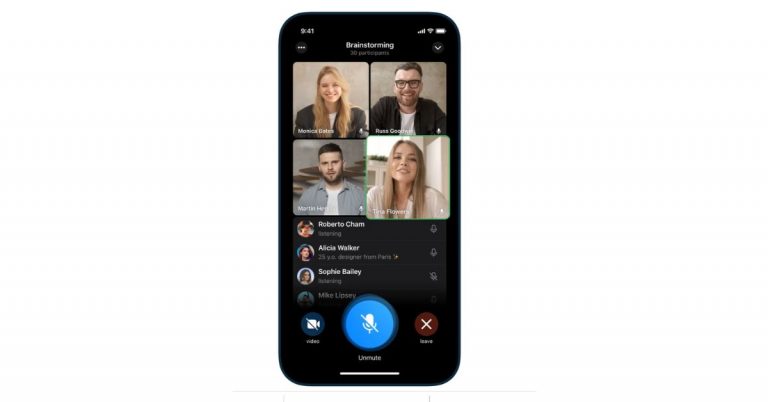
Due to the recent WhatsApp policy, a major shift has been seen from users migrating to Telegram. Before this Telegram did not provide a video calling feature on its platform but has always ensured user’s data protection. So to enhance the user experience the social media platform has finally rolled out group video calls along with more features through its latest update.The group video calling feature was initially announced a year back and now being rolled out across mobile devices, tablets, and desktops. The users can turn on their camera or share their screen during voice call in chats. With this addition, the instant messaging platform can now be utilised for online classes, business meetings and family gatherings. In addition to group video call, the social media channel has also introduced animated backgrounds and message sending animations, as well as a new menu button for bots, new ways to import stickers, reminders to help keep your account safe, and more.Group Video call was a much-demanded feature on Telegram which the company promised to bring exactly a year back. The biggest USP of the feature is that it lets you add up to 30 participants at once in a group video call whereas in WhatsApp only up to 8 people can join a video call. The company promised to expand this limit that will be helpful in streaming games, live events and more. The user can also tap on any video to make it fullscreen. If you pin a video, it will stay focused as new users join the call and turn on their cameras which is not possible during WhatsApp video calls.To start with check the ⋮ menu in the profile of any group where you are an admin (on iOS, you will find a ‘Voice Chat’ button right in the group profile).Like we said before Telegram will also allow screen sharing in addition to the camera feed. This functionality will let you share your screen and camera feed at the same time. To share your screen, tap ⋮ or ⋯ in any app and select it from the menu.Noise suppression has also been improved in voice chats to provide a better and clear audio experience. A toggle has been brought to turn noise suppression off in settings.Apart from mobile phones, as there is more screen space for Tablets and desktops Telegram will offer more display options. Tap to open the side panel and see a split-screen view of the video grid and list of participants, optimized for both portrait and landscape orientation.Voice chats on the desktop will open in a separate window, so you can type and talk without minimizing anything. Desktop apps also have selective screen sharing so you can broadcast an individual program instead of your whole screen. As per Telegram anyone who starts sharing their screen on the desktop app will be pinned automatically which will be helpful when small teams meet to coordinate their work.With the new update Telegram also added a new animated background in Settings. The Android users can go to the Chat Settings > Change Chat Background. For the iOS user’s open Appearance > Chat Background. Also to keep your phone numbers up to date Telegram will send you login info reminders e to ensure you can always log in to your account. If your phone number has changed, you can quickly update it right from the new reminder in Settings on iOS. Initially, this feature is being rolled out to iOS and will arrive in Android in the next update.
For the latest gadget and tech news, and gadget reviews, follow us on Twitter, Facebook and Instagram. For newest tech & gadget videos subscribe to our YouTube Channel. You can also stay up to date using the Gadget Bridge Android App.
The e-commerce website Flipkart is hosting Daily Trivia Quiz. Every day it brings a bunch of new questions for its users. By answering them correctly you can win exciting prizes. The questionnaire is based on questions related to general knowledge. Also, the users can win free vouchers and super coins, among other offers via the daily quiz. June 28 Flipkart Daily Trivia Quiz Answers has already gone live on its platform.
The participant should be at least 18 years old and should have a valid login ID. The Quiz is available on the mobile platform and not the web version. E-commerce conducts the quiz on daily basis and goes live at 12:00 AM IST and runs till 11:59 PM IST. The winners are announced within 15 days from the date of participation that can be viewed under the Gems/Rewards section in the app.
How to participate in the Flipkart Daily Trivia Quiz
To participate download the Flipkart app on your phone. Then open the Flipkart app then head to Game Zone. Now click on the Daily Trivia Banner or search for Daily Trivia. Enter the game and answer all 5 questions with correct answers.
June 28 Flipkart Daily Trivia Quiz Answers
Question 1: How many pawns does each player have in Chess?
Answer: Eight
Question 2:For Which cricket Team did cricketers nicknamed Big Bird, Super Cat and Whispering Death Play?
Answer: West Indies
Question 3:Which Cricketer recently married south Indian Actress Ashrita Shetty ?
Answer: Manish Pandey
Question 4:Who Is the only Indian to score more than 300 runs in four consecutive Test Series?
Answer: Goutam Gambhir
Question 5: Which of these neighbouring countries of India has won an individual Olympic medal?
Answer: Pakistan



 The DropSend website lets you send/transfer large files through an email link that will be sent to the recipient. The email link that he/she will receive can be downloaded or viewed according to preference. The website offers three paid subscriptions that differ depending on the size you want to send. For 10GB online storage with 25 sends a month you can subscribe to the basic plan, the standard plan gives you 25GB of storage and 50 sends a month, and the professional plan offers you unlimited send each month. Worry not, the website also gives you a free plan option in which you can send files with a maximum size of 8GB.
 FileWhopper allows you to transfer files up to 5GB for free and lets you transfer files after 5GB to 10TB for a paid subscription. The file transfer is an easy and simple process you can upload it online or choose from a folder. The files you will be sending are encrypted with zero-knowledge encryption for a more secure transfer. The best function of the website is it lets you pause the upload and save the process in case of an emergency. The attraction of FileWhopper file transfer is no size limit, data protection and simple interface.
Read more: 5 apps and software you can use to wirelessly transfer files from your smartphone to PC and vice versa.
FileWhopper allows you to transfer files up to 5GB for free and lets you transfer files after 5GB to 10TB for a paid subscription. The file transfer is an easy and simple process you can upload it online or choose from a folder. The files you will be sending are encrypted with zero-knowledge encryption for a more secure transfer. The best function of the website is it lets you pause the upload and save the process in case of an emergency. The attraction of FileWhopper file transfer is no size limit, data protection and simple interface.
Read more: 5 apps and software you can use to wirelessly transfer files from your smartphone to PC and vice versa.
 Transferring large files will be easier and very convenient with WeTransfer, a user-friendly website. The file transferring on the website has very few limitations and it is a free file sharing service for all. It allows you to transfer files up to 2GB but the Pro version allows you up to 20GB with many benefits. The process to transfer the files is simple and easy: select the file, enter the email address of the recipients and press transfer. The best part of this website is that you do not need to open an account to transfer the files. In some cases, you might need to verify with a code that will come to your email address.
Read also: How to transfer your PlayStation4 games and saved data to your new PlayStation5 console?
Transferring large files will be easier and very convenient with WeTransfer, a user-friendly website. The file transferring on the website has very few limitations and it is a free file sharing service for all. It allows you to transfer files up to 2GB but the Pro version allows you up to 20GB with many benefits. The process to transfer the files is simple and easy: select the file, enter the email address of the recipients and press transfer. The best part of this website is that you do not need to open an account to transfer the files. In some cases, you might need to verify with a code that will come to your email address.
Read also: How to transfer your PlayStation4 games and saved data to your new PlayStation5 console?
 This website has some unique features: it gives you control over the link, which will last till 7 days. Filemail offers a transfer of data of 30GB maximum file size and it is simple to send a file. Just fill out the email address, attach the file you want to transfer and hit send. And also for more interesting functions, the website allows you to add as many recipients as you want. The advantages of this website worth consideration are its download management options, download tracker, unlimited recipients, and no registration.
 MediaFire makes your large file sharing easier with its cloud storage service. The website offers 10GB of storage that can be increased up to 50GB later. When you upload your large files on the website’s cloud storage service you will receive a download link that can be shared with others. There is no limit to downloads and you have complete control of the shared download link.
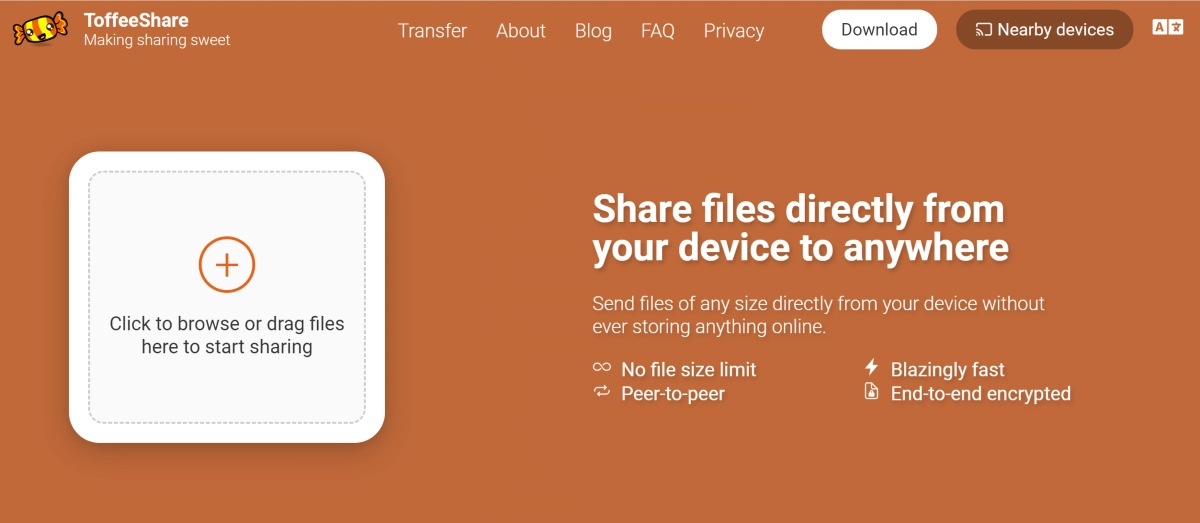 ToffeeShare is one of the websites for sending large files from your PC or Mac to another device. The process of transferring files using ToffeeShare is very simple. Open the official ToffeeShare website on your web browser, hit the plus icon, and upload the file. Once the file has been uploaded, ToffeeShare will generate a QR code and link for the download. Sharing this link with the recipient gives them access to the file. Files are shared straight from your device, which means the transfer process will be terminated as soon as you close the tab.
 If you’re looking for a cloud solution, then Google Drive should be on top of your list. Every Google Account gets 15GB of free cloud storage. This is more than enough to store or transfer a large volume of pictures, videos, and other files. Google Drive is available for all major platforms, so compatibility should not be an issue. It may not be as fast as other websites on this list but it is reliable and gets the job done.
 Ending this list is Send Anywhere, one of the simplest file-sharing tools for your PC and Mac. Once you upload a file on Send Anywhere, it generates a six-digit code which can be used to download the file on any device. All you need to do is open the Send Anywhere website in another browser and enter the code. If you’re using the website on your smartphone, make sure you enable its desktop version. You can send up to 10GB of files using Send Anywhere for free.
Read Also: Telegram business introduced, to offer customer support
Ending this list is Send Anywhere, one of the simplest file-sharing tools for your PC and Mac. Once you upload a file on Send Anywhere, it generates a six-digit code which can be used to download the file on any device. All you need to do is open the Send Anywhere website in another browser and enter the code. If you’re using the website on your smartphone, make sure you enable its desktop version. You can send up to 10GB of files using Send Anywhere for free.
Read Also: Telegram business introduced, to offer customer support








 Garmin Forerunner 55 features