Banking services these days require an OTP verification for every mobile transaction. This adds an extra layer of security to the entire process. However, network providers and bank servers can often lag behind and create a lot of unwanted issues. Since an OTP is only good for 10 minutes, receiving it after the window has passed is of no use. In this article, we bring you 10 simple ways to fix the ‘bank not sending OTP or security code’ issue on your smartphone.Read Also: What is ChatGPT? How to use the viral chatbot like a pro?
What is causing the OTP issue?
The OTP issue on your phone can be caused by a multitude of factors. Here are some common culprits.
Poor network coverage
Call forwarding is enabled on your device
Message inbox is full
Phone storage is full
Messages app cache is corrupted
Do Not Disturb is enabled
Bank server outage
Background software issues
Reset Network Settings
If you aren’t able to receive an OTP from your bank, the issue could either lie with the bank or your network provider. However, you can reset your phone’s network settings to make sure your phone is not a barrier in this scenario. Performing a network reset on your phone restores the network settings to their factory settings. It is a quick way of regaining network functionality without wasting too much time patching the issue. A network reset will unpair all your Bluetooth devices, clear saved WiFi passwords and connections, and set all cellular settings to default.Step 1: Go to Settings and select General management.
Step 2: Scroll down and select Reset.
Step 3: Tap on Reset mobile network settings.
Step 4: Select Reset settings.
Step 5: Enter your PIN to confirm your selection.
Check your blocklist
It is possible you may have blocked the number that is supposed to send you the OTP. Banks routinely send text messages to their account holders, which some people may confuse with spam since the contact doesn’t have a personalised name. If you routinely add spam senders to your blocklist, you may want to check if you added your bank’s number in there as well. Open the Messages app and go to Settings>Block numbers and spam, and check the blocked numbers and messages.
Check if your phone number is registered with your bank account
Did you change your phone number recently? Make sure you update your bank account details accordingly. Your bank sends the OTP to the registered number, and it is important you update this number whenever required. If you recently changed your phone number, immediately change the registered number on your bank account as well.
Check if the bank’s servers are down
With mobile banking quickly becoming the norm, banks are taking time to adjust to the high demand. You may have noticed that UPI payments take time to go through during high usage hours (typically Saturday night). Bank servers are often working at their maximum capacity and may not be able to handle your request immediately. If you aren’t able to receive an OTP from your bank immediately, wait for the servers to be less busy and then try again.
Check if your network is down
If you aren’t able to receive an OTP, the issue may also lie with your network provider. Firstly, you need to check that you are subscribed to an active calling plan. Your network provider may halt your incoming calls and messages if you aren’t subscribed to a plan. Next, you need to check if you are receiving ample network coverage. If not, move to an open area where there is a greater chance of stronger network reception. Finally, send a test message to your number to check if the messaging services are working fine. This is a sure-shot way of checking if the issue lies with your network provider. If you are certain that your network provider is at fault, try receiving the OTP via your email.
Clear the Cache of the default messaging app
Step 1: Go to Settings and select Apps.
Step 2: Scroll down and select your default messaging app.
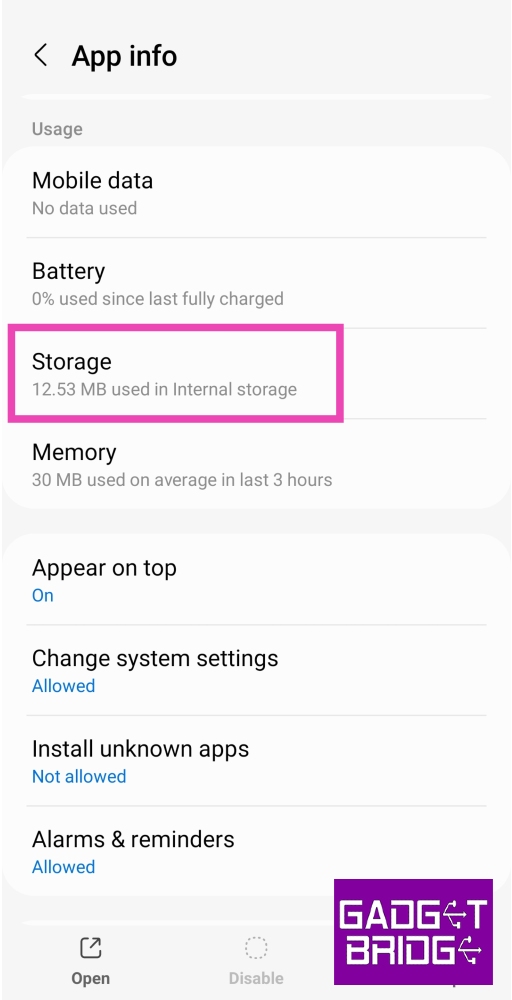
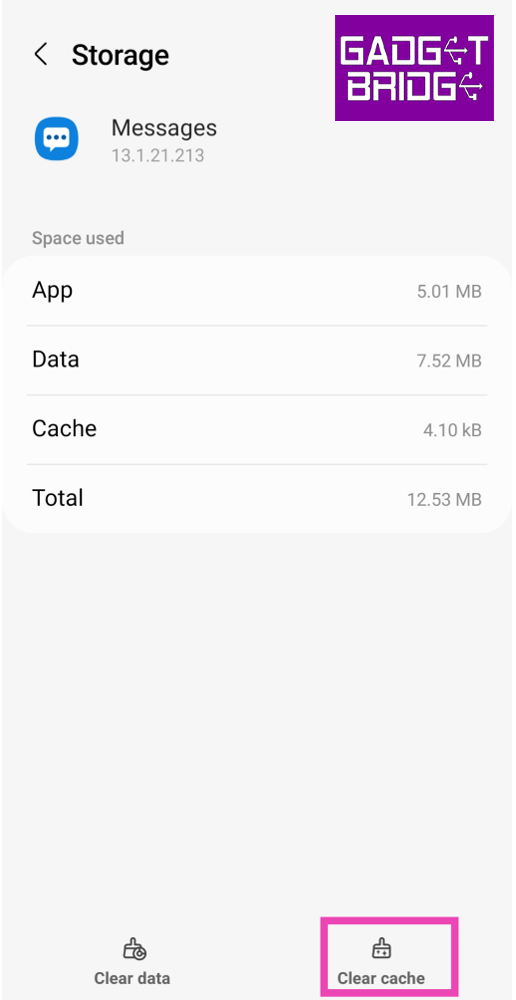
Step 3: Tap on Storage.
Step 4: Select Clear Cache.
Turn off Do Not Disturb (DND)
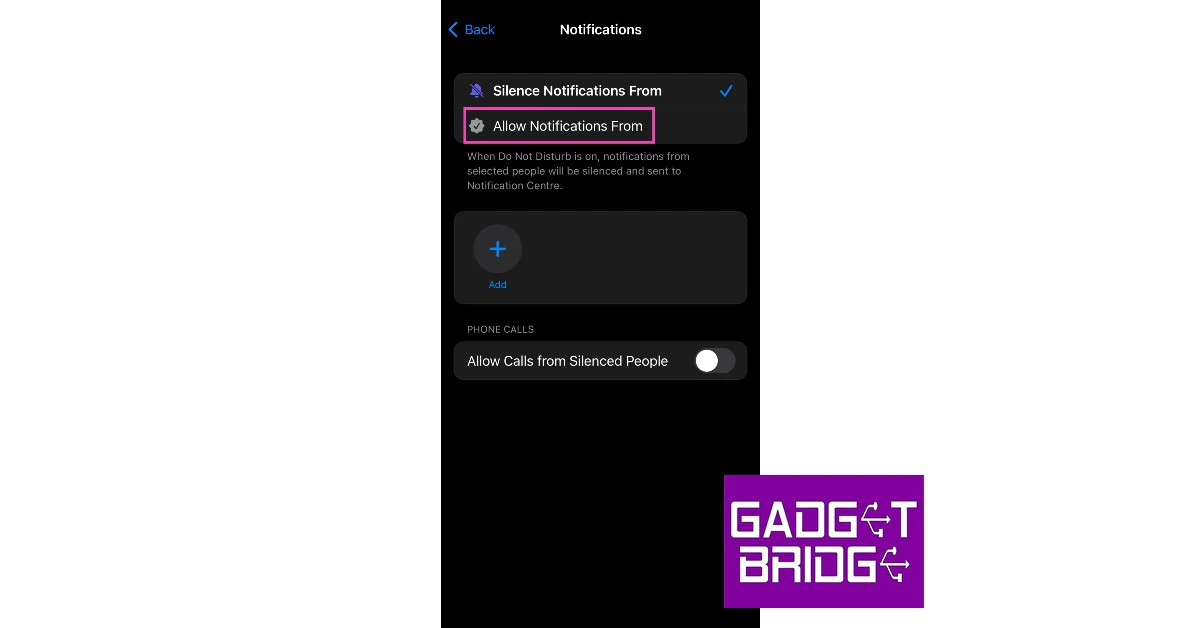
If your phone is in Do Not Disturb (DND) mode, you won’t receive notifications for any incoming calls or messages. This includes OTP messages and security codes from your bank. To fix this issue, turn off DND on your smartphone. You can do this by simply swiping down from the status bar and tapping on the DND tile in the Quick Settings Menu. If you don’t want to turn off DND, you can add your bank’s number to the list of exceptions. Go to Settings>Notifications>Do not disturb to learn more.
Restart your phone
A quick restart of your phone can fix the background issues that may be impeding its network. Press and hold the side key to access the power menu and hit Restart. If the side key triggers the voice assistant, press and hold it with the Volume Up key to open the power menu.
Disable Call Forwarding
Your bank may not always send you an OTP over text. Some banking apps use phone calls to authenticate access using OTPs. If you have enabled call forwarding on your device, this may not work. To disable call forwarding, go to Dialer>Settings>Supplementary Services>Call Forwarding and turn off the ‘Always Forward‘ option.
Clear your inbox
If your phone’s internal storage is full, you may not receive new messages. To fix this issue, make more space by removing the large files on your device. If you can’t afford to delete any data on your phone, simply delete the spam messages in your inbox. This should make enough space for new messages to be received on your phone.
Update your phone’s OS
Step 1: Go to Settings and select Software update.
Step 2: Tap on Download and install.
Step 3: Select Install now.
Frequently Asked Questions (FAQs)
Why is my smartphone not receiving the OTP from my bank?
Typically, the failure to receive an OTP on your smartphone means something is wrong either with your network reception or your bank’s servers.
What should I do if I don’t receive any OTP on my phone?
Wait for the timer to run out and make a request for an OTP again. Make sure you have entered the correct phone number. If you don’t receive the OTP again, perform a network refresh and clear the cache of your phone’s default messaging app.
How do I check if I have blocked my bank’s messaging service?
Go to Messages>Settings and tap on Block numbers and spam to check if you have blocked your bank’s messaging service.
How do I clear my messaging app’s cache?
Go to Settings>Apps>Messages>Storage, and hit ‘Clear cache’.
These are the 11 simple ways to fix the ‘bank not sending OTP or security code’ issue on your smartphone. If none of these fixes work for you, you may want to contact the local branch of your bank for further assistance. If you found this article helpful, let us know in the comments!
Garena Free Fire is a battle royale game with regular awards and tournaments to keep players interested. If you play Garena Free Fire, you should be aware of the redeem codes that are released on a daily basis. However, because the battle royale game is banned in India, players from other countries can use the Free Fire Redeem codes daily. If you’re unfamiliar with the Garena Free Fire redeem codes or don’t know how to get them, we’ve put together a step-by-step guide to help you redeem them. Check out Garena Free Fire Redeem Codes for 19 January 2023.The Free Fire redeem codes are a great way to get free stuff. These are 12-digit codes that contain alphabets and numbers, as well as an expiration date and time. Because the Garena FF redeem codes cannot be used more than once, you should hurry to the redemption page to claim your free reward before someone else does. To get a free reward, all you have to do is go to reward.ff.garena.com/en, which is the official redemption page. Also, keep an eye on this space for daily updates on Garena Free Fire redemption codes and rewards.
Garena Free Fire Redeem Codes Today 19 January 2023
X99TK56XDJ4X
FF7MUY4ME6SC
WEYVGQC3CT8Q
3IBBMSL7AK8G
J3ZKQ57Z2P2P
FFDBGQWPNHJX
TDK4JWN6RD6
4TPQRDQJHVP4
GCNVA2PDRGRZ
XFW4Z6Q882WY
HFNSJ6W74Z48
HHNAT6VKQ9R7
2FG94YCW9VMV
4ST1ZTBE2RP9
8F3QZKNTLWBZ
V44ZZ5YY7CBS
WD2ATK3ZEA55
E2F86ZREMK49
B3G7A22TWDR7X
MCPW3D28VZD6
FFCMCPSGC9XZ
FFCMCPSEN5MX
ZZZ76NT3PDSH
EYH2W3XK8UPG
FFCMCPSUYUY7E
NPYFATT3HGSQ
MCPW2D2WKWF2
V427K98RUCHZ
MCPW2D1U3XA3
FFCMCPSJ99S3
6KWMFJVMQQYG
BR43FMAPYEZZ
UVX9PYZV54AC
XZJZE25WEFJJ
HNC95435FAGJ
How to Get Free Fire Redeem Codes for Garena on 19 January 2023?
Have you participated in the Amazon Quiz today? If not then participate in the 19 January 2023 Amazon Quiz as it has already gone live on the app. The daily quiz can be played from 12 AM to 11:59 every day on the mobile app platform. Today e-commerce is giving the chance to win Rs 5,000 Amazon Pay Balance.Every day Amazon brings a fresh quiz for its customers. By participating in the quiz the participants can win an Amazon Pay Balance of up to Rs 50,000. The quiz can only be played on the mobile app as it is not available for the desktop platform. The quiz contains five easy questions and you have to answer all the questions correctly. The participants will then be shortlisted for a lucky draw to select a winner. Whereas the results are declared at the end of the month. Check out today’s Amazon quiz answers to win Rs 5,000.Amazon Quiz Today Prize – Rs 5,000 Amazon Pay BalanceQuiz Date – 19 January 2023Daily Timing – 12 AM to 11:59 PMWinner Announcement – Today 12 PM
Amazon Quiz Answers Today 19 January 2023
Question 1: Apart from being Vice President, Shri Jagdeep Dhankar is also the Chairman of which of the following?Answer: Rajya SabhaQuestion 2: As of January 2023, who holds the record for the fastest double hundred in one-day internationals?Answer: Ishan KishanQuestion 3: Letitia Wright plays which important female character in the Marvel Cinematic Universe?
Answer: ShuriQuestion 4: This dish is a feature of which cuisine?Answer: Italian
Question 5: This breed of owl was the pet of which fictional character in J K Rowling’s Wizarding World?Answer: Harry Potter
How To Play Amazon Quiz
Only app users are eligible to play the Amazon quiz every morning from 12 AM to 11:59 PM. The quiz is not available on the desktop. For those who are unaware of how to play the Amazon quiz below are the steps, you can follow to take the quiz.
Firstly download the Amazon app from Google Play Store or App Store
Now fill in the required information through the Sign Up option.
You need to log in to the Amazon app and scroll down on the home screen to find the Amazon Quiz banner.
Tap on the Amazon Quiz banner and tap on the Start button to start the Quiz.
Now you will get 5 questions and you need to answer them correctly. One wrong answer will eliminate you from the Quiz.
After answering all the questions correctly you are now eligible for a Lucky Draw.
The winner’s name will be announced today at 12 PM.
Have you ever placed that bet and later realized that the site, odds, and tips were inaccurate? Well, you are not alone. Many punters find themselves in similar situations when exploring March Madness lines, which is quite unfortunate.
Some wagers lose interest in betting when they encounter inconsistencies. However, we have some good news for you with the 7 tips pro wagers use to succeed and bet safely.
Still interested? Keep reading as we explore how the tips will keep you safe while betting online.
1. Understand the Sports Inside Out
Well, betting on a sport is not about picking the odds and clicking the bet button. You need to understand the sport in and out. Why is this crucial? The sports industry is vast and covers hundreds of sports. Picking one from the list and understanding it well boosts your chances of betting safely and winning.
If you pick a sport you aren’t familiar with, the chances of losing are very high. You’ll be unable to pick the correct odds and stats for the teams. It will also be taxing to begin analysis and new research about the team. However, if you know the team inside out, you have the confidence to bet on it safely. Therefore do your research before betting.
2. Shop Around for Bookmakers
As a sports fan, you may feel comfortable betting on a single sportsbook without comparing it with the rest online. That’s a risk as you may miss on offers and additional bonuses.
Comparing a sportsbook with others is an advantage, as it helps you know where the best odds are and the kind of markets you need for various sports.
Once you have the information about the multiple sportsbooks you’ve come across, you may bet safely.
3. Make Few Selections
Have you ever selected more teams and got excited by the estimated odds and the possible wins? Well, that’s where most punters go wrong, and it’s the winning point for most sportsbooks as players bet on March Madness.
The betting platforms understand the industry well and may provide attractive games that tempt you to put more than five teams on your list. Psychologically, your mind becomes excited when introduced to attractive things, and you might make wrong betting decisions even if the odds are tempting.
If you are unsure about the teams, try to choose fewer to boost your chances of winning.
4. Understand the Betting Markets
Some small tricks may see your bet go down. For example, if you bet on your team to win both halves, you will likely be frustrated when the team wins the first half and draws the second half.
Also, if you bet on your team to win in the full-time, half-time bet, you may lose if the opponent wins in the second half. It is even more painful when your team has won the first half with more goals but loses the second half and wins the match.
Therefore, keep an eye on the markets and choose wisely. This will see you enjoy winning while safeguarding your money.
5. Do Not Underestimate the Underdogs
You have a favourite team that you are sure will win the match. After checking their previous performances, you are confident that your bet will be safe with the team.
Sadly, you forget to check the injury list. The underdogs have an entire squad, but the favourites have some injuries. You pick on the favourites only for the underdogs to win, and you lose the bet.
We advise you to explore all the details to pick a team not because they’ve performed well in the past but because their current form in terms of squad depth is excellent.
6. Try Less Popular Sports
Have you heard of the MMA taking over the sporing market? Well, new players are coming up, and there is a lot of coverage for MMA. The odds are also attractive, and you have plenty of information about the competitors. You may try your luck on MMA.
However, do not go blindly for the sports that are freshly new to the market, as you won’t have enough stats about the participants. Take time to understand the sport and bet wisely.
7. Think Before You Bet
Have you heard of wagers betting with their heart? This is common, and emotions overrule the thought. If you are a fan and want that team to win, you may convince yourself it is possible.
Bookies are happy when you start going in that direction. Soon after betting with your heart, you realize the results are not favoring you. We advise you to take some time and think through the team’s March Madness odds. This will help you bet with your mind and win.
For the latest gadget and tech news, and gadget reviews, follow us on Twitter, Facebook and Instagram. For newest tech & gadget videos subscribe to our YouTube Channel. You can also stay up to date using the Gadget Bridge Android App. You can find the latest car and bike news here.
A screen lock is a safety feature that protects the privacy of Huawei smartphones. But there is one annoying thing about it. If you forget the password, which is possible, you could find yourself locked out of your phone and unable to access it. On such an occasion, you might wonder how to unlock Huawei phone.
You may think resetting is the only way. But it will erase everything from your phone, causing data loss. However, a factory reset is not the only solution. If you can’t remember password for Huawei phone, you can still unlock it without resetting it. In this article, we’ll share with you six effective ways about how to open Huawei phone with no factory reset required.
Part 1: When You Need to Unlock Huawei Phone without Resetting?
Want to learn Huawei how to unlock phone without factory resetting? But also curious to know under what circumstances users need to remove the lock screen without a factory reset. Here are some common situations you may find yourself unable to access your Huawei phone:
You forgot your Huawei phone’s lock screen password and are now unable to access your phone.
Your kid changed your Huawei lock screen password accidentally.
You purchased a used Huawei phone whose lock screen password was set by the previous owner, and you have no idea what it is.
In all these situations, you’ll need to unlock your Huawei phone, but it’s wiser to unlock it without a factory reset to prevent data loss. Below are some effective methods to remove the Huawei screen lock without resetting.
Part 2: Effective Tool to Unlock Huawei Phone Without Resetting?
Want to know how to bypass Android lock screen with the most effective tool out there? You may have already tried many techniques to unlock your phone after you forgot its lock screen password. However, only some methods will work for you as they come with varying specifications.
But there is an effective tool that doesn’t come with any requirements and works on all Huawei smartphone models. Tenorshare 4uKey for Android can not only bypass your Huawei phone screen password without resetting but can also unlock pins, passwords, patterns, face recognition, and biometric locks.
Here are some outstanding features of 4uKey for Android:
It can unlock all kinds of Huawei pins, passwords, and patterns, including face recognition, biometric and screen locks.
It can bypass FRP Google account lock smoothly.
It works on different Android OS versions.
Safely unlock Huawei phones without data theft or loss.
Works well on older Huawei phone models.
Here’s how to get into a locked phone without resetting it with 4uKey for Android:
Connect your locked Huawei phone to your PC. Install 4uKey for Android on your computer and launch it. Select “Remove Screen Lock.”
2. Press “Start” to begin the lock removal process.
3. Next, enter into recovery mode by following the instructions given on the screen.
4. Follow every step in the tutorial. Restart your Huawei phone when the process is completed. That’s how to open Huawei phone without factory resetting.
Part 3: Frequent Fixes For Huawei Phone Unlocked
If you are thinking about Huawei how to unlock phone, there are five proven ways to get your Huawei phone unlocked without resetting it. We have mentioned those methods below so you can try them one by one, and hopefully, one of them will work.
Fix 1: Unlock Huawei Phone via Find My Device
To Huawei unlock screen password if you’ve synchronized your phone with a Google account, you can use the Find My Device service. But, Find My Device will only work if you’ve already switched it on. And WiFi connection is needed during whole process. What worse, Find My Device will delete all data from your phone. Here’s how to bypass Android lock screen by using Find My Device:
Open the browser, and open Google Find My Device.
Log in to your Google account.
Press “Next.” Choose “ERASE DEVICE.”
Enter your username and password when prompted. Hit “ERASE.” Then you will get your Huawei phone unlocked.
Fix 2: Unlock Huawei Phone With Useful Android Unlock Tool
If you are thinking about how do I unlock a Huawei phone, there is a useful Android Unlock tool to Huawei unlock phone. This is the safest and most secure tool to unlock your smartphone without a factory reset or losing your data. It works on all types of passwords, patterns and pins to remove them efficiently from your Huawei phone promptly.
Fix 3: Unlock Huawei Phone via Forgot Pattern
If you want to learn how to get into a locked phone without resetting, you can unlock your Huawei phone with a Face Recognition ID. However, you can only use this method if you’ve already set your Face Recognition ID. Below has shown how to unlock Huawei phone’s forgotten password without losing data:
To set the Face ID, open Settings on your Huawei phone.
Navigate to Security and confidentiality.
Choose Face Unlock.
Look into the camera, and the system will take your photo to create an ID.
If you’ve created a Face Recognition ID, you can use it to unlock your Huawei phone.
Fix 4: Using Android Debug Bridge(ADB)
If you are wondering how do I unlock a Huawei phone, Android Debug Bridge (ADB) is another way to remove the lock screen. It is a command-line tool that can connect to your Huawei phone to unlock it without needing a factory reset. Here’s how to unlock Huawei phone without resetting via ADB:
Download the “ADB” tool on your PC.
Extract the files and install the tool.
Connect your locked Huawei phone to your PC.
Open the “Command Prompt” in the ADB installation path.
Type “adb shell rm /data/system/gesture.key.” Hit “Enter.”
Wait for the process to complete.
Restart your Huawei phone. Most probably now you can Huawei lock screen password bypass and gain back access to your phone.
Fix 5: Call Help For Huawei Watch
Since ADB is not user-friendly, you are still trying to open your unlocked Huawei phone. Want to know another method about how to unlock Huawei phone without factory reset? If you own a Huawei watch, you can use it to unlock your Huawei phone.
Here’s how to unlock Huawei phone without resetting via Huawei watch:
Connect your Huawei phone with your Huawei watch.
Navigate to Settings on your Huawei phone.
Choose Security & privacy.
Next, select Lock screen password.
Finally, choose Smart lock to Huawei lock screen password bypass.
Part 4: Final Thought
Can’t remember password for Huawei phone because you forgot it. Want to know how to unlock Huawei phone? Most often, smartphone users forget their lock screen password and choose to reset their phone, losing all data in the process. But there are many practical methods that work to remove the screen lock from your Huawei phone with a factory reset.
Hopefully, our post has been able to answer your query, “how do I unlock my lock screen without resetting it.” Try the earlier-mentioned techniques one by one according to your situation. However, these methods come with certain specifications and may not work for you.
But there is one effective tool Tenorshare 4uKey for Android, that doesn’t come with any limitations. It can remove all kinds of screen locks, face IDs, and biometric and pattern locks. Moreover, it works on older Huawei models and various Android versions to remove locks without losing data.
For the latest gadget and tech news, and gadget reviews, follow us on Twitter, Facebook and Instagram. For newest tech & gadget videos subscribe to our YouTube Channel. You can also stay up to date using the Gadget Bridge Android App. You can find the latest car and bike news here.
Receiving spam calls and texts on your phone can get pretty annoying. Spam texts can totally clutter your message inbox and make it very difficult to find important texts. Luckily, there are a few ways you can avoid receiving texts from unknown numbers on your iPhone. In this article, we bring you the top 5 simple ways to block text messages from unknown numbers on your iPhone.Read Also: JBL introduced a new lineup of Bar Series Soundbars in India: Details Inside
Block text messages from an individual sender
Step 1: Launch the Messages app.Step 2: Open a text message from the sender you want to block.Step 3: Tap the profile icon of the sender.Step 4: Tap on the info icon.Step 5: Select the info icon again from the sender’s profile.Step 6: Select ‘Block this Caller’.The sender won’t be able to call you or send texts to your number.
Filter messages from all unknown numbers
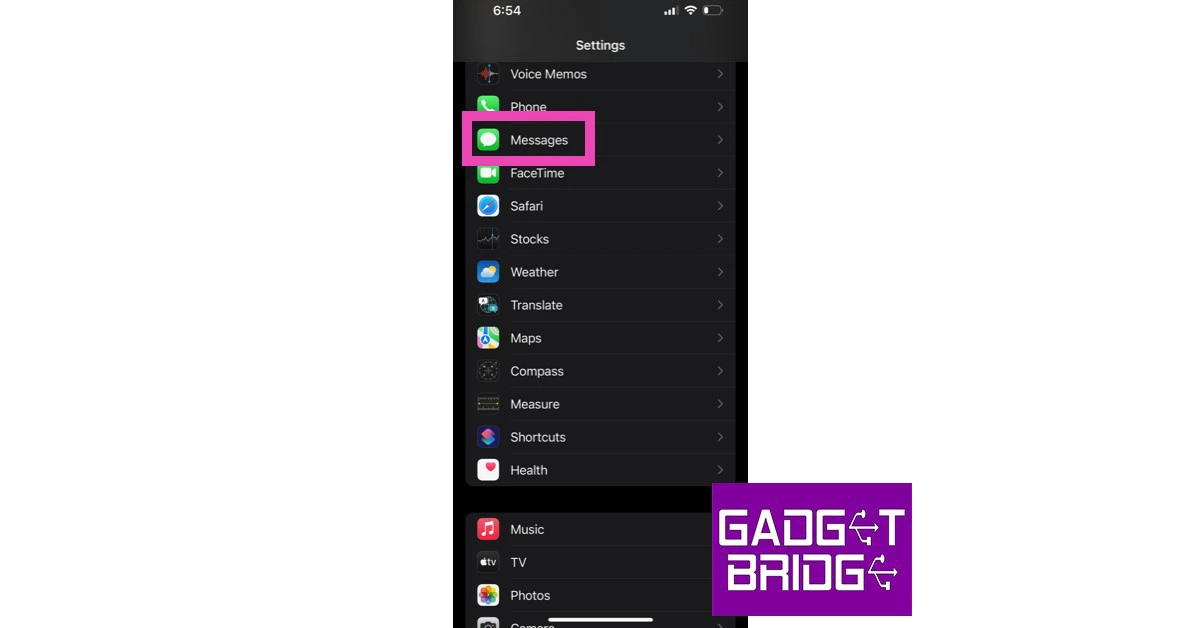
Step 1: Go to Settings and select Messages.Step 2: Tap on ‘Unknown & Spam’ in the Message Filtering section.Step 3: Turn the toggle bar on for ‘Filter Unknown Senders’.Step 4: Make sure you’ve selected the ‘SMS Filter’ option.
Use a third-party app
There are multiple third-party apps that will help you block spam calls and texts with ease. Apps like Truecaller are designed to flag repeat spam callers and block their calls and texts to your number. You can even add individual numbers to the app’s block list. This article explains how you can block or unblock someone using Truecaller. All you need to do is go to your dialer and select the number of the sender that you got the text from. After opening their profile, hit ‘block’. You can also use other third-party apps like Mr Number and Call Blocker.
Use the ‘Do Not Disturb’ feature
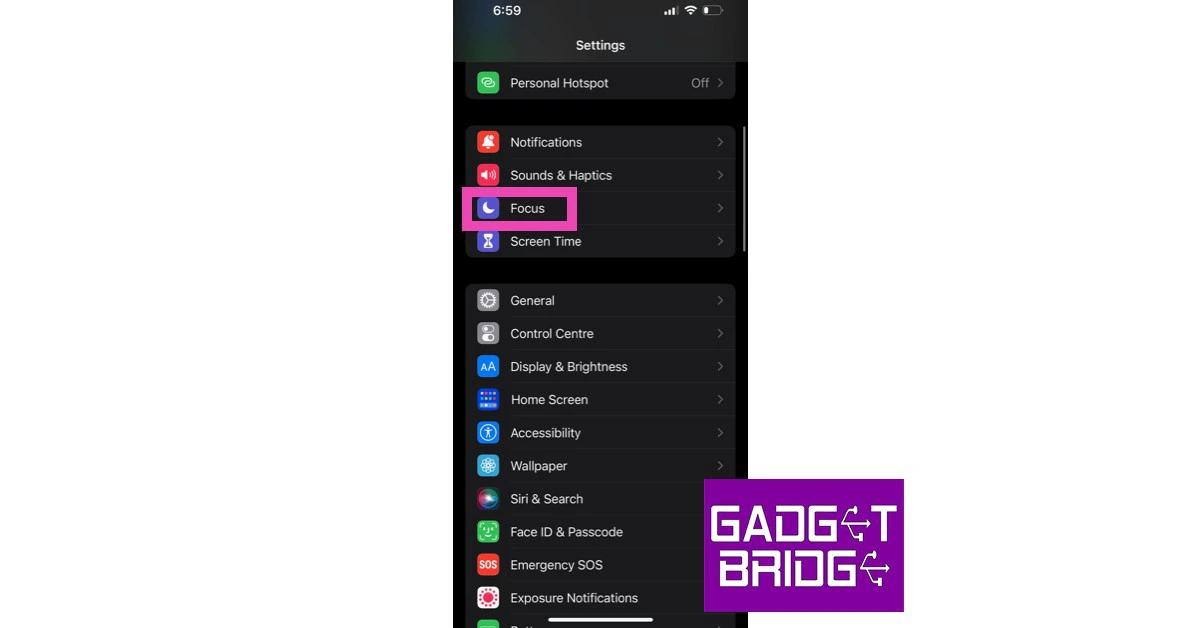
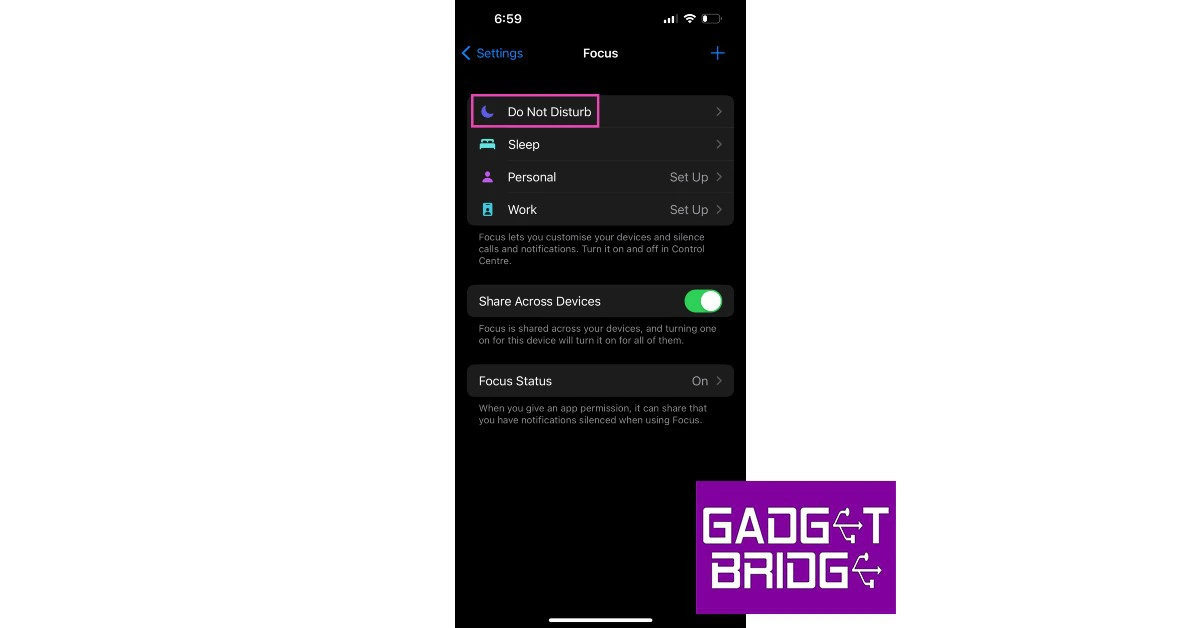
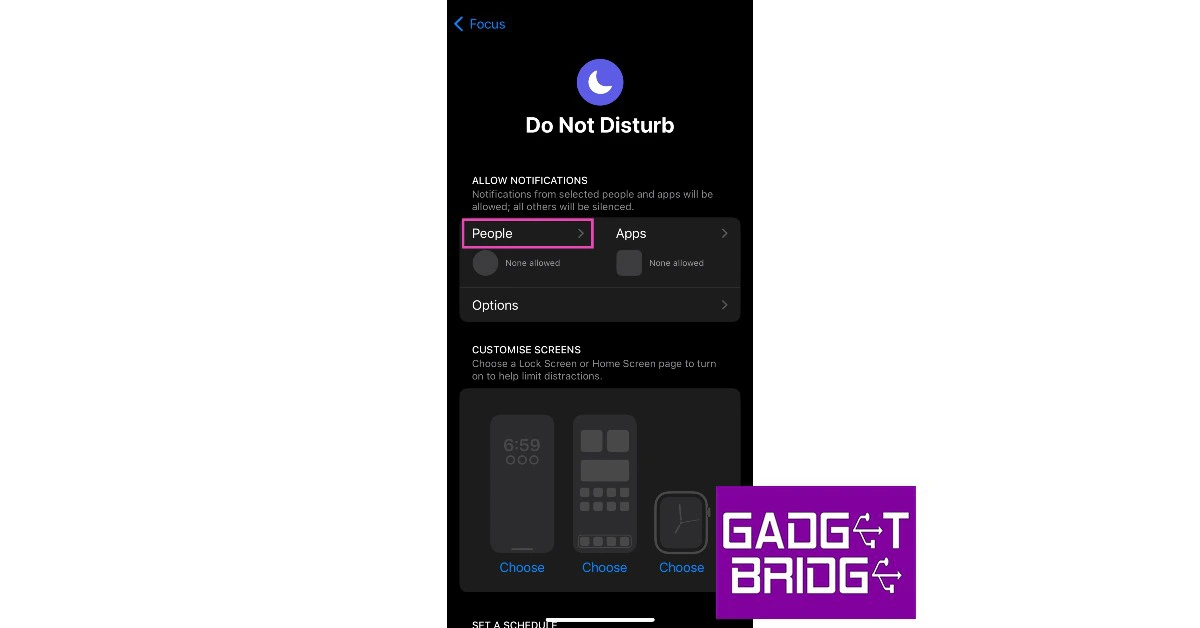
This may be a radical step but it will help in restricting any unwanted spam calls and messages on your number. Turning on ‘Do not Disturb’ on your iPhone only lets certain users contact you via texts and messages. You can add contacts that you want to be accessible to on a whitelist. Other contacts and unknown numbers will be prevented from contacting you. Step 1: Go to Settings. Then press focus.Step 2: Select ‘Do not Disturb’.Step 3: Tap on People.Step 4: Select ‘Allow Calls or notifications from’.Step 5: Select ‘Favourites’ to allow only contacts in your favourite to contact you.
Contact your network carrier
If you are unable to stop the constant barrage of spam texts and calls from unknown numbers, you can contact your network carrier for further assistance. Find the customer support helpline from the carrier’s website or monthly bill and request them to use their spam protection tools to block unwanted messages on your number.Read Also: Best LED Ring Lights For Content Creators
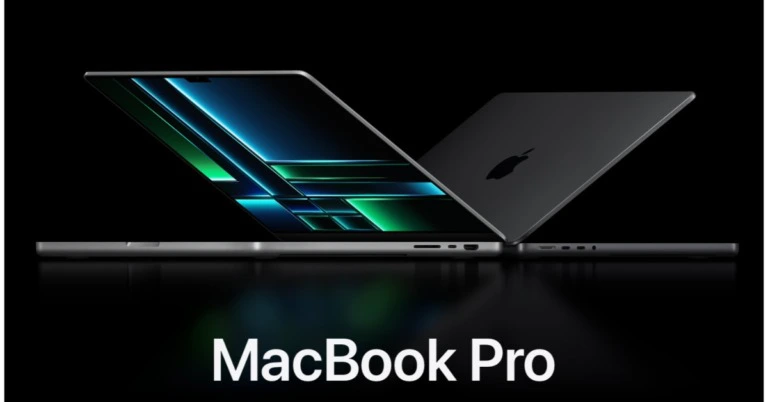
The new 14- and 16-inch MacBook Pros with M2 Pro and M2 Max were unveiled today by Apple. It is claimed to come with game-changing performance and the longest battery life with support for up to 96GB of unified memory for demanding professional workflows. It is said to offer performance that is up to 6x quicker than the top Intel-based MacBook Pro. The Liquid Retina XDR display, a vast range of connectivity, a 1080p FaceTime HD camera, a six-speaker sound system, and studio-quality mics round out the unmatched capabilities of the MacBook Pro.
Price and Availability
The new 14- and 16-inch MacBook Pro models are now available for pre-order, and shipping will take place on January 24. The starting prices for the new 14-inch MacBook Pro with M2 Pro and the 16-inch MacBook Pro with M2 Pro are INR 199900 and INR 184900, respectively.Also Read:Nokia T21 Tablet with 2K AMOLED display launched in India
Specifications and Features
With M2 Pro and M2 Max, the MacBook Pro may revolutionise professional processes in a variety of fields, including art, science, and app development. For up to 20% more performance than M1 Pro, the MacBook Pro with M2 Pro has a 10- or 12-core CPU with up to eight high-performance and four high-efficiency cores. It also has 200GB/s of unified memory bandwidth and up to 32GB of unified memory, which is double the amount in M2.MacBook Pro with M2 Max has a substantially larger GPU with up to 38 cores and up to 30% more graphics performance than M1 Max. It also has 400GB/s of unified memory bandwidth, which is twice as fast as M2 Pro. With up to 96GB of unified memory, the MacBook Pro pushes the boundaries of laptop graphics memory to support demanding graphics workloads like integrating enormous panoramic panoramas and producing scenes with extraordinary 3D geometry and textures.The performance of M2 Max is up to 20% faster than M1 Max thanks to its next-generation 12-core CPU, which has up to eight high-performance and four high-efficiency cores. It also has a more potent media engine than M2 Pro with twice the ProRes acceleration, which dramatically speeds up media playback and transcoding.Also Read:JBL introduced a new lineup of Bar Series Soundbars in India: Details InsideThe new MacBook Pro offers Wi-Fi 6E3, which is up to twice as fast as the previous generation, and upgraded HDMI, which for the first time enables 8K screens, for improved connectivity. Creators can work on scenes that are so vast that PC laptops cannot even run them thanks to the M2 Max model’s up to 96GB of unified memory. The robust media engine in M2 Pro also slays the most well-liked video codecs, greatly speeding up video playback and encoding while consuming very little power.The MacBook Pro offers even greater performance and productivity with macOS Ventura. Any Mac may now use video conferencing capabilities like Desk View, Center Stage, Studio Light, and more thanks to robust improvements like Continuity Camera. FaceTime’s handoff feature enables users to initiate a FaceTime chat on their iPhone or iPad and seamlessly transfer it to their Mac, or the other way around. Additionally, programmes like Stage Manager automatically arrange windows and apps so users can focus on their current job while still having a clear view of everything.The new Freeform app offers a customizable canvas that helps users be more productive and expressive, whether they are planning or brainstorming on their own or with others. Users may now build and share a distinct photo library among up to six family members with iCloud Shared Photo Library. Gaming on Mac has never been better because of Apple silicon’s strength and appeal as well as new developer tools like Metal 3.
For the latest gadget and tech news, and gadget reviews, follow us on Twitter, Facebook and Instagram. For newest tech & gadget videos subscribe to our YouTube Channel. You can also stay up to date using the Gadget Bridge Android App. You can find the latest car and bike news here.
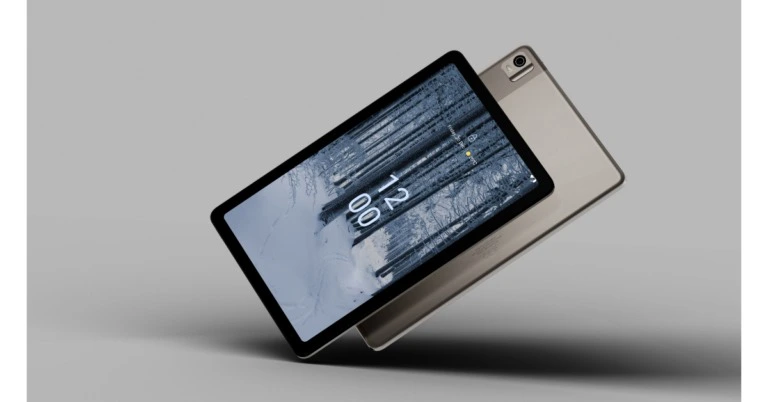
HMD Global has officially announced the launch of the Nokia T21 Tablet in the Indian market. The device is packed with features like HD video streaming, phone calls, and NFC. The gadget has an 8,200mAh battery that supports 18W quick charging. The T21 has an 8MP front camera and an 8MP back camera with flash. It is designed with a durable aluminium shell and a 60% recycled plastic antenna cover for maximum connectivity.
Nokia T21 Tablet price and availability details
The Nokia T21 has 4GB RAM with a 64GB memory option and is available in Charcoal Grey. The price of the Wi-Fi model is INR 17999, and the price of the LTE + Wi-Fi variant is INR 18999. The company has started accepting pre-orders with a pre-booking discount of INR 1000 and a complimentary flip cover worth INR 1999. Starting on January 22, the Nokia T21 will be offered in retail outlets, partner portals, and top retailers.Also Read:Tecno Phantom X2 Pro 5G with a retractable portrait lens launched in India
Nokia T21 Tablet specifications
The Nokia T21 Tablet has a 10.36-inch 2K LCD screen with a resolution of 1,200 × 2,000 pixels. The display has a 5:3 aspect ratio and a maximum brightness of 360 nits. In addition to this, the device has Widevine L1 for Netflix HD support. Under the hood, it has a Unisoc T612 processor that powers it. It comes with 4 GB of RAM and 64 GB of storage, which can be increased to 512 GB using a microSD card slot. The device runs on Android 12 and the company promised two OS upgrades and three years of monthly security updates.It has an 8-megapixel front and back camera for optics. The rear camera, however, has an LED flash and focusing capability.Also Read:JBL introduced a new lineup of Bar Series Soundbars in India: Details InsideInfinite content is available on Google Kids Space to instruct and develop young minds. Additionally, Google Entertainment Space is a one-stop shop that compiles must-watch TV series and movies from several streaming services in one location, so you can relax before night without having to switch between apps. NFC will assist your business with payments and the scanning of NFC tags, and Second Screen will let you customise and manage your Windows PC. And the Nokia T21 is approved as an Android Enterprise Recommended device for businesses.stereo speakers with OZO Spatial Audio for audio. Additionally, it supports Wacom WGP and Wacom Active ESE 2.0 styluses. A single charge of its 8,200mAh battery will power it for up to three days. It works with 18W chargers.
For the latest gadget and tech news, and gadget reviews, follow us on Twitter, Facebook and Instagram. For newest tech & gadget videos subscribe to our YouTube Channel. You can also stay up to date using the Gadget Bridge Android App. You can find the latest car and bike news here.
OpenAI’s latest project ChatGPT has been making waves on the Internet since its launch in November 2022. The chatbot immediately went viral upon launch as users flocked to the OpenAI to throw all kinds of prompts at the bot, ranging from debugging a code to writing a short story, and even creating a recipe from a list of ingredients! While users left amazed at the astonishing and human-like results that ChatGPT produced they were also curious about the implications it could have on how we go about producing art and coming up with solutions for complicated tasks in the future. In this article, we explain what ChatGPT is and how you can use it to create amazing results.Read Also: iQOO 11 Review: A real beast
What is ChatGPT?
ChatGPT is a language model tool created by OpenAI that uses deep learning techniques to go through large data sets of text to accurately form sentences and mimic human-like conversations. While there have been several language model tools before ChatGPT, neither of them is as accurate as OpenAI’s chatbot. OpenAI also allows users to interact with ChatGPT, which immediately made it go viral across the Internet. One of the most fascinating aspects of ChatGPT is its ability to determine the context of a given word in a conversation. The language model strings these words together to generate sentences that will provide a meaningful response to the user. When users enter a prompt, ChatGPT gauges the context of the query with remarkable efficiency and utilises words that reflect what the user is looking for. The responses rarely ever stray in a meaningless direction.While the results produced by ChatGPT are nothing short of amazing, it still has its limitations. The chatbot may occasionally give out incorrect information as there is no way to filter the datasets that are proven to be accurate. Sometimes, you may have to tweak the phrasing of your prompt to obtain a meaningful response. ChatGPT is trained to ask follow-up questions regarding your query. If your query is related to a recent issue, the chatbot may not have any answers for you due to its limited knowledge of world events post-2021. This will potentially be sorted with a future update.
How to use ChatGPT like a pro?
While there are a lot of ChatGPT apps floating around, none of them are officially published by OpenAI. We advise against using these apps as they may target you with adware. The only legit way to use ChatGPT is by signing up on the OpenAI website.Once you’ve signed up to OpenAI, go to https://chat.openai.com/chat and enter a statement or query in the chat box. Make sure you are clear about what you want, as the bot may get confused by ambiguous prompts. Once you’ve pressed enter, ChatGPT will take some time to come up with a response depending on the nature of your query.For example, we asked ChatGPT to write a 500-word book report on ‘Three Men in a Boat’ by Jerome K. Jerome, and the bot came up with an accurate result in under a minute. You can use your imagination to come up with creative tasks and find a way of using the bot to solve the tasks you need help with.You can also ask follow-up questions to your query and the AI will answer accordingly. It can make out if the next question is related to the previous one or if it is of an entirely different nature.
If you’re just starting out freelancing or setting up a small business, proper accounting is one of the aspects that you need to focus on right away. Invoicing and billing can be stressful tasks and no one looks forward to them, but it is also one of the most essential parts of running a business. Luckily, there are a bunch of apps that can help you with it. While most invoicing software solutions come with a price, small business owners with a handful of clients are much better off using a free app while their business is still growing. Here are our picks for the top 7 free invoicing apps for small businesses and freelancers.Read Also: iQOO 11 Review: A real beast
myBillBook
myBillBook makes it easy for small businesses and freelancers to create and share invoices and quotes. You can even share the generated invoices on WhatsApp with a dedicated sharing option on the app. This app is capable of creating a professional GST or non-GST invoice in under 15 seconds. You can even add a QR code along with the invoice for quick payments. With myBillBook, you can even send reminders on WhatsApp to recover payments. Here are all the types of reports you can generate using this app: GSTR 1 format, GSTR 3B, GST-related reports, Balance Sheet, and Profit & Loss. The basic plan does not cost any money, but the app offers ‘Silver’ and ‘Diamond’ plans to manage a greater number of clients.
Zoho Invoice
Zoho Invoice is one of the most popular invoicing apps among small businesses, contractors, and freelancers because of its simple UI and easy-to-use features that do not need much time to get used to. This GST-ready invoicing app is available for all platforms (laptops, phones, tablets) and creates aesthetically pleasing invoices that can be easily shared with your clients. Zoho also allows you to time-track your current projects and send timely reminders for bill payments. You can even use this app to gain insights about your business.
Wave Invoicing
As far as free invoicing services go, it doesn’t get any better than Wave. The Wave Invoicing app lets you create and share professional invoices with your business logo on them. The app sends you a notification every time you receive a payment and even reminds you about pending payments. You can even check the invoice status and send timely reminders to your clients about their payment status.
Hiveage Invoicing
One of the better parts of using Hiveage Invoicing is that there are no limits to the number of invoices you can create and the number of clients you manage. The app works seamlessly with multiple payment gateways. You can create an invoice, share it with your client, and send periodic reminders for pending payments. Hiveage also keeps a track of your expenses and lets you time-track your projects.
GST Invoice Manager – GimBooks
The GST Invoice Manager by GimBooks simplifies the invoice creation and sharing process and lets you carry out the billing and invoicing duties from your home, office, or on the go. You can even file your GST returns from this app itself and even see your business reports. You can attach payment info along with the invoices and send reminders and payment status updates to your clients.
Freshbooks
Freshbooks is one of the best free invoicing and accounting apps for small business owners. This app helps you create professional invoices and also accepts online payments. All payments are recorded automatically in the app so you don’t have to go through manually filling them in. You can even time track your projects and get a brief breakdown of your billable hours. Freshbook’s unparalleled customer support is also a big advantage to using the app and they will guide you through any issues you may be experiencing with the software.
Invoice Maker – Easy & Simple
With over 5 million downloads on Google Play Store, Invoice Maker by Invoice Simple is one of the most popular invoicing apps around. This app carries out all the basic functions of invoicing software with incredible ease. This includes creating estimates, invoices, and bills, sharing invoicing easily with your clients, ability to customise the invoice and adding images to it, generating recipes, and accepting multiple payment gateways. The clean and accessible UI takes the stress away from billing and accounting tasks. Read Also: Compared: Qualcomm Snapdragon 8 Gen 2 vs MediaTek Dimensity 9200
Conclusion
These are our picks for the top 7 free invoicing apps for small businesses and freelancers. Bear in mind that the free versions of these apps are capable of catering to only small businesses with a handful of clients. If you own a medium to large-sized business it is much better to invest in paid accounting software. If you think there’s any other free invoicing app that deserves to be on this list, give it a shout in the comments!For the latest gadget and tech news, and gadget reviews, follow us on Twitter, Facebook and Instagram. For newest tech & gadget videos subscribe to our YouTube Channel. You can also stay up to date using the Gadget Bridge Android App. You can find the latest car and bike news here.



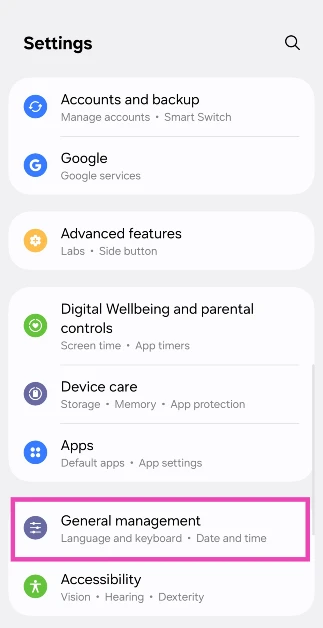 Step 2: Scroll down and select Reset.
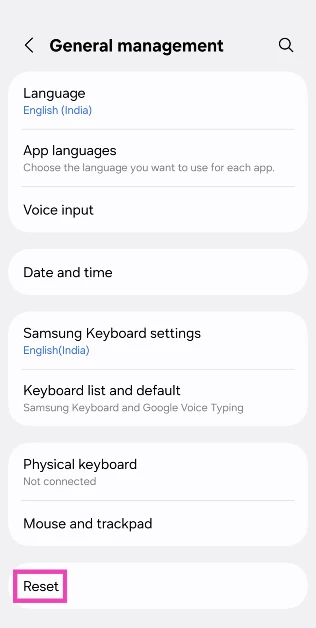 Step 3: Tap on Reset mobile network settings.
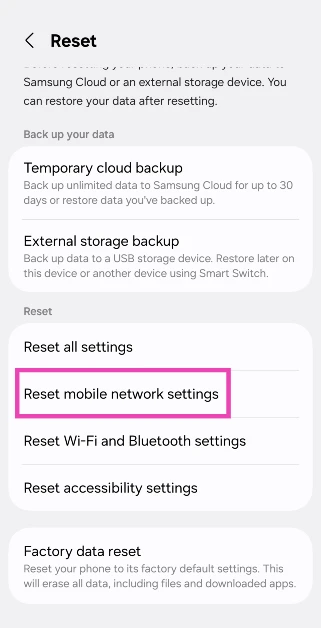 Step 4: Select Reset settings.
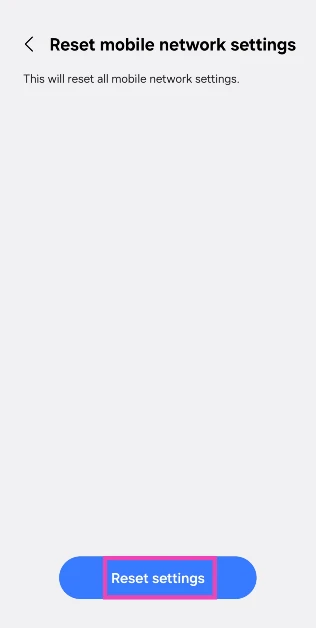 Step 5: Enter your PIN to confirm your selection.
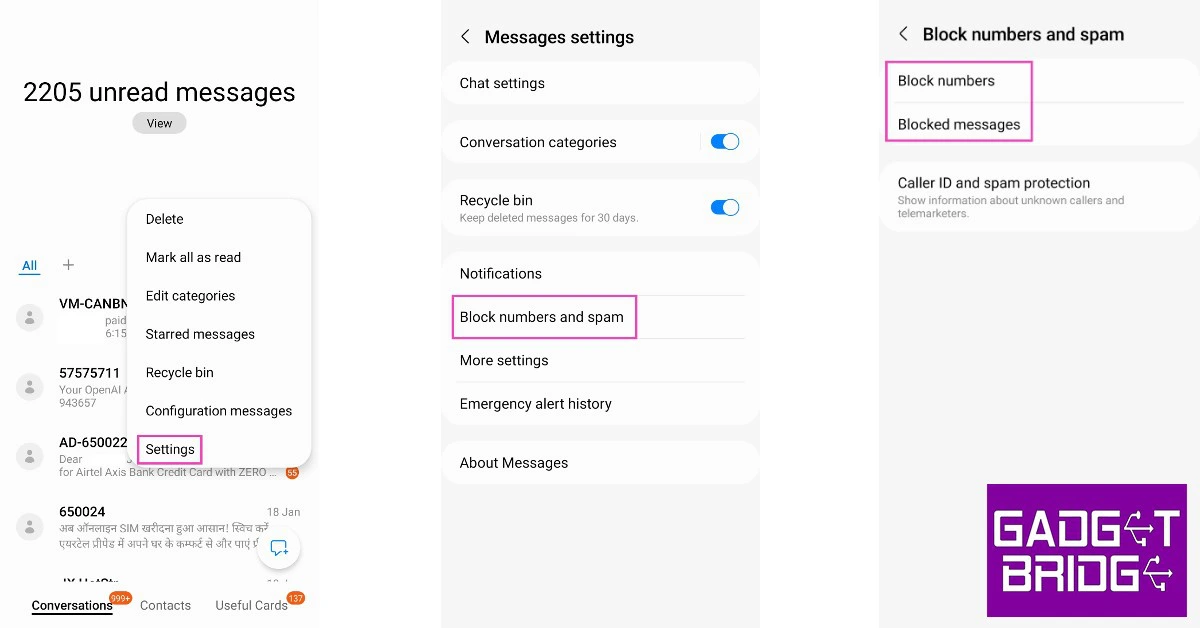 It is possible you may have blocked the number that is supposed to send you the OTP. Banks routinely send text messages to their account holders, which some people may confuse with spam since the contact doesn’t have a personalised name. If you routinely add spam senders to your blocklist, you may want to check if you added your bank’s number in there as well. Open the Messages app and go to Settings>Block numbers and spam, and check the blocked numbers and messages.
 With mobile banking quickly becoming the norm, banks are taking time to adjust to the high demand. You may have noticed that UPI payments take time to go through during high usage hours (typically Saturday night). Bank servers are often working at their maximum capacity and may not be able to handle your request immediately. If you aren’t able to receive an OTP from your bank immediately, wait for the servers to be less busy and then try again.
 If you aren’t able to receive an OTP, the issue may also lie with your network provider. Firstly, you need to check that you are subscribed to an active calling plan. Your network provider may halt your incoming calls and messages if you aren’t subscribed to a plan. Next, you need to check if you are receiving ample network coverage. If not, move to an open area where there is a greater chance of stronger network reception. Finally, send a test message to your number to check if the messaging services are working fine. This is a sure-shot way of checking if the issue lies with your network provider. If you are certain that your network provider is at fault, try receiving the OTP via your email.
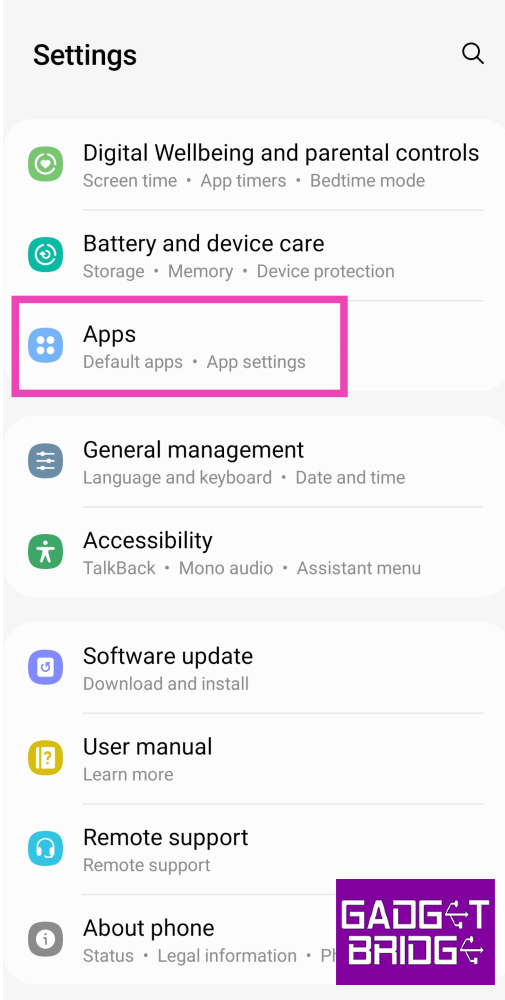 Step 2: Scroll down and select your default messaging app.
 Step 3: Tap on Storage.
 Step 4: Select Clear Cache.
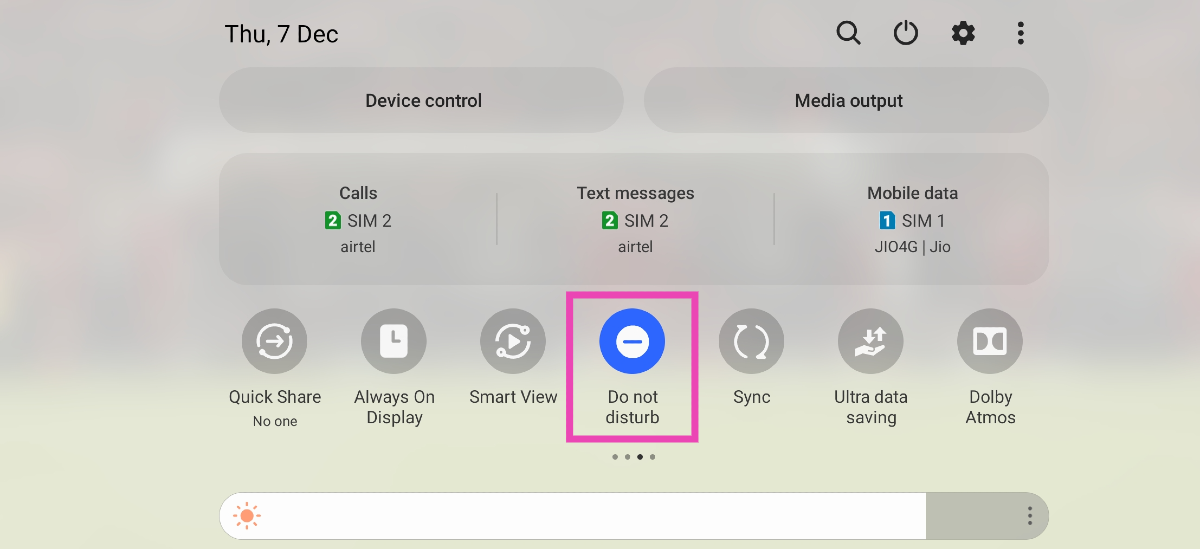 If your phone is in Do Not Disturb (DND) mode, you won’t receive notifications for any incoming calls or messages. This includes OTP messages and security codes from your bank. To fix this issue, turn off DND on your smartphone. You can do this by simply swiping down from the status bar and tapping on the DND tile in the Quick Settings Menu. If you don’t want to turn off DND, you can add your bank’s number to the list of exceptions. Go to Settings>Notifications>Do not disturb to learn more.
 A quick restart of your phone can fix the background issues that may be impeding its network. Press and hold the side key to access the power menu and hit Restart. If the side key triggers the voice assistant, press and hold it with the Volume Up key to open the power menu.
 If your phone’s internal storage is full, you may not receive new messages. To fix this issue, make more space by removing the large files on your device. If you can’t afford to delete any data on your phone, simply delete the spam messages in your inbox. This should make enough space for new messages to be received on your phone.
 Step 2: Tap on Download and install.
 Step 3: Select Install now.




![How to Unlock Huawei Phone Without Factory Reset [2023 Full Fixes]](https://www.gadgetbridge.com/wp-content/uploads/2023/01/unlock-huawei-768x402.jpg.webp "How to Unlock Huawei Phone Without Factory Reset [2023 Full Fixes]")


 3. Next, enter into recovery mode by following the instructions given on the screen.
 4. Follow every step in the tutorial. Restart your Huawei phone when the process is completed. That’s how to open Huawei phone without factory resetting.
 Step 4:
 Step 6: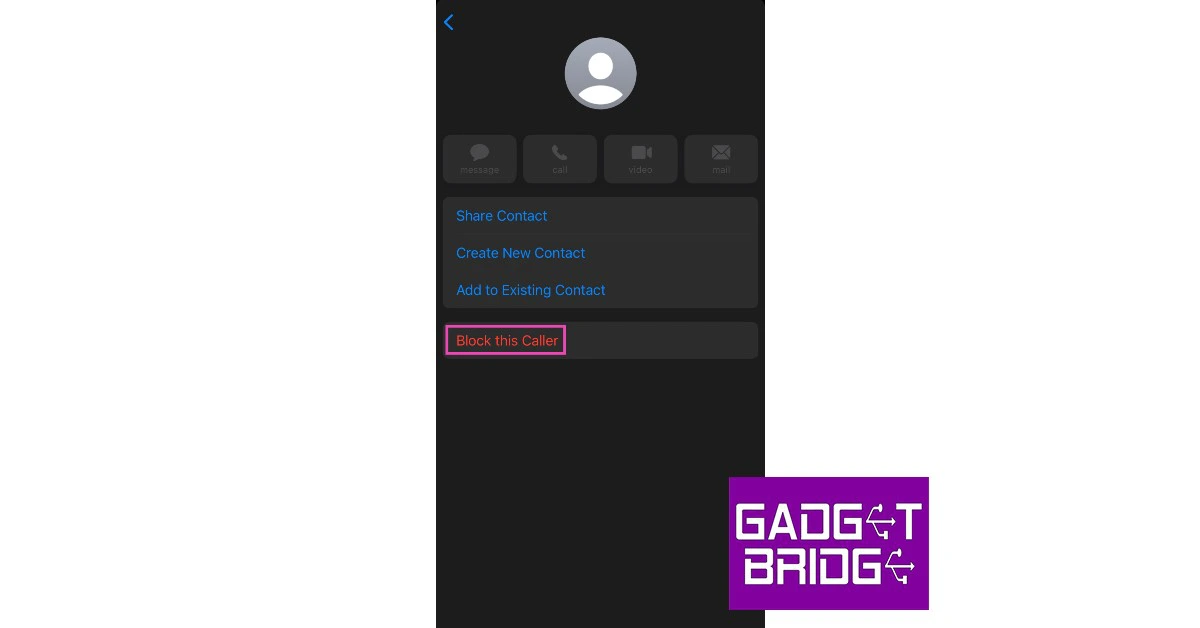
 Step 2:
 Step 3:
 Step 4:
 Step 2:
 Step 3:
 Step 4:
 Step 5: