Instagram may be the world’s largest photo-sharing platform but it isn’t entirely immune to bugs and other issues. Oftentimes, users report that new images do not show up on their Instagram feed, and even when they do, they simply won’t load. There can be multiple reasons behind this problem. In this article, we bring you the top 12 ways to fix the ‘Instagram pictures not showing up’ issue on your smartphone.Read Also: Only those who pay will have access to 2FA SMS security protection on Twitter
Check your internet connection
The most likely reason why Instagram won’t load pictures is a faulty internet connection. Make sure that mobile data on your device is turned on or you are connected to an active WiFi network. Check your network provider’s app to see if you have ample data left. Open a web page or another app to see if it is loading. This will help you get an idea of whether the issue lies with Instagram or your network.
Clear app cache to fix ‘Instagram pictures not showing up’
Temporary files in the cache are always at risk of getting corrupted and impeding the basic functioning of the app. Here’s how you can clear Instagram’s app cache.Step 1: Go to Settings and select Apps.Step 2: Scroll down and select Instagram.Step 3: Tap on Storage.Step 4: Select Clear Cache from the bottom of the screen.
Turn off Instagram’s data saver to fix ‘pictures not showing up’ issue
Instagram has a native data-saving feature that disables the preloading of videos on the platform to consume less mobile data. While this works fine for the most part, it can often lead to pictures and videos not loading at all. Here’s how you can disable the data saver.Step 1: Go to your Instagram profile and tap the hamburger menu at the top right corner of the screen.Step 2: Select Settings.Step 3: Tap on Account.Step 4: Scroll down and select Mobile Data Use.Step 5: Turn the toggle bar off for Data Saver.
Disable your smartphone’s data saver
Like Instagram, your smartphone has a data saver tool as well. You can set a maximum data usage limit on your device. After the limit has been reached, mobile data will be turned off on your phone. Here’s how you can disable data saver on your smartphone. Step 1: Go to Settings and select Connections.Step 2: Tap on Data Usage.Step 3: Tap on Mobile Data usage.Step 4: Click on the gear icon for additional settings.Step 5: Turn the toggle bar off for Set data limit.
Allow unrestricted data usage to Instagram
Step 1: Go to Settings and select Apps.
Step 2: Select Instagram.
Step 3: Tap on Mobile data and WiFi.
Step 4: Turn on the toggle switch for Unrestricted data usage.
Log out and log back in to fix ‘Instagram pictures not showing up’
Any account-related issues can be fixed by logging out of the Instagram app and logging back in. Go to your profile, open the hamburger menu, and select the Log Out option from Settings. Log back into Instagram using your email, phone number, or Instagram handle.
Uninstall and Reinstall the app
Uninstalling the app gets rid of the app data on your device. If you suspect the app data is the reason behind Instagram not functioning properly, uninstall and then reinstall the app on your phone. To delete Instagram, long-press its icon in the app drawer and hit the delete button. This will fix the ‘Instagram pictures not showing up’ issue.
Use Instagram Lite
Instagram Lite is a faster, stripped-down version of Instagram that covers all the essential features of the app. If the main Instagram app isn’t able to load images due to network and connectivity issues, switch to Instagram Lite for smooth and fast browsing. Instagram Lite occupies less space on your phone on top of using minimal data. The app is available on the Google Play Store.
Update the Instagram app
Older versions of the Instagram app may contain bugs that cause glitches and unwanted errors. These bugs are quickly resolved in the following updates. If you haven’t updated the Instagram app in a long time, go to Google Play Store, search for Instagram, and hit Update.
Disable VPN
If the VPN server you are currently connected to is experiencing an outage, Instagram won’t load pictures on your device. To fix this, connect to a different server or disable the VPN service entirely. Go to Settings>Connection>More Connection Settings>VPN or disconnect from the connected server after launching the VPN app from your phone’s home page.
Use Instagram’s Web Portal
If the above-mentioned fixes don’t work, maybe the problem lies with your device. Try using Instagram’s web portal for PC. Although it started out as a pretty basic webpage, Instagram for Web now supports almost all the features of its mobile apps.
Check if Instagram’s servers are down
It is not uncommon for Instagram to experience a server outage. When the servers are down, all app activity is ceased until the servers are back up and running. You have no other option than to wait it out. To check if Instagram’s servers are down, visit the DownDetector website and search for Instagram.
Frequently Asked Questions (FAQs)
Why won’t Instagram load any pictures?
If Instagram isn’t loading any pictures on your device, check your network connection. Additionally, make sure that Instagram’s and your device’s data savers are turned off.
How do I turn off the data saver on Instagram?
To turn off Instagram’s data saver, go to Profile>Menu>Account>Mobile data use and turn off the toggle bar for Data Saver.
How do I turn off my smartphone’s data saver?
Go to Settings>Connections>Data usage>Mobile data usage, hit the gear icon, and turn off the toggle bar for Set data limit.
Read Also: Comparison: OnePlus 11 vs Samsung Galaxy S23
Conclusion
These are the top 12 ways to fix the ‘Instagram pictures not showing up’ issue on your smartphone. If the issue still persists after trying the fixes mentioned above, it is possible that you may have been handed an account ban. For more details, contact Instagram support. If you found this article helpful, let us know in the comments!
If your iPhone’s touchscreen started malfunctioning out of the blue, there could be a multitude of reasons behind it. Oftentimes, older smartphones are more likely to develop touchscreen issues, but if a newer iPhone (like iPhone 13 or 14) starts giving you problems, chances are it is due to a software glitch. In this article, we bring you the top 7 ways to fix touchscreen issues on iPhone 13 and iPhone 14.Read Also:Only those who pay will have access to 2FA SMS security protection on Twitter
Restart your iPhone
A quick restart will resolve any minor background issues that may be keeping your iPhone’s touchscreen from functioning properly. You can restart your iPhone 13 or 14 by pressing the volume key and side key until the power slider appears on the screen. Work the slider icon to turn off your iPhone. However, if the touchscreen is entirely unresponsive, you won’t be able to use the onscreen slider. In this case, you will need to force restart your iPhone. Here’s how you can do thatStep 1: Press and release the Volume Up key.Step 2: Press and release the Volume Down key.Step 3: Press and hold the side key until the Apple logo appears on the screen.Step 4: Release the side key.
Increase the touchscreen sensitivity
If you’re experiencing lag issues with your iPhone’s touchscreen, it may be because the touchscreen sensitivity has been set too low. This problem is more common in older iPhones. Here’s how you can increase touchscreen sensitivity on an iPhone.Step 1: Go to Settings, scroll down and select Accessibility.Step 2: Select Touch from the Physical and Motor section.Step 3: Select Haptic Touch.Step 4: Choose fast under the touch duration options. For a better idea of how the two speeds work, use the touch duration test listed below the options.Make your selection and go back. Your changes will be applied to the phone.
Remove the screen protector
Not every screen protector works perfectly with the iPhone. While buying a screen guard, make sure that it is Apple-compatible. If the touchscreen issues on your iPhone started popping up after you installed the screen protector, peel it off and check if the touchscreen is working fine. If you’re using an Apple-compatible protector, take it off and wipe the screen thoroughly before putting it back on.
Disconnect all accessories connected through the lightning port
Sometimes, your iPhone’s touchscreen may stop working when the device is connected to an accessory via the lightning port. In this case, disconnect your iPhone from whatever accessory is attached to it. This includes headphones, charger, or any external storage device connected through an OTG adapter. If your iPhone is connected to your Mac through the lightning cable, plug it out and see if the touchscreen has been restored to a working condition.
Clean the touchscreen
If your iPhone got splashed with water or is being operated with sweaty hands, make sure you give it a thorough wipe before operating the touchscreen. Any trace of water on the screen may render it unresponsive. It is also common for traces of sweat to accumulate on the touchscreen in humid conditions. Always keep a microfibre cloth handy to give your phone a quick wipe before using it.
Update your iPhone
Step 1: Make sure your iPhone is connected to a WiFi network and plug in its charger.
Step 2: Go to Settings and select General.
Step 3: Select Software Update.
Step 4: Tap on Download and Install.
Factory reset your iPhone
As a last-ditch effort to rescue your iPhone’s touchscreen, you can try performing a factory reset if you suspect that the issue may be related to a software malfunction. If the touchscreen stopped working after a physical impact on the phone, skip this step. Here’s how you can factory reset your iPhone.Step 1: Connect your iPhone to a PC or Mac and launch iTunes.Step 2: Press and release the Volume Up key followed by the Volume Down key. Then press the side key for at least 10 seconds. Step 3: Press and hold the Volume Down key and side key simultaneously. Release the side key after 5 seconds and the Volume Down key after 10 seconds.Step 4: Click on Restore iPhone on iTunes.
You should also know that when you reset your phone to factory settings, there may be cases when your iPhone 13 is completely turned off and does not turn on. This is normal, so the first step is to check all the steps for recovery.
Frequently Asked Questions (FAQs)
Why is my iPhone touchscreen not working?
A faulty screen protector or phone cover, low screen sensitivity, and background software issues can keep your iPhone’s touchscreen from working properly. If there’s hardware damage to the screen, the only way to fix it is by replacing it.
How do I increase my iPhone’s touchscreen sensitivity?
Go to Settings>Accessibility>Touch>Haptic Touch and select ‘Fast’.
How do I restart my iPhone if the display isn’t working?
Press the volume up key followed by the volume down key. Then, press and hold the side key and only release it when the Apple logo appears on the screen.
Read Also: Comparison: OnePlus 11 vs Samsung Galaxy S23
Conclusion
This is how you can fix touchscreen issues on an iPhone 13 and iPhone 14. If the issues still persist after trying the fixes mentioned above, take your iPhone to an authorised Apple service centre for further diagnosis. You may need to replace the entire display if it’s a hardware-related issue.
While the native voice recording app on your smartphone works fine for the most part, if you are looking for additional features like live transcription and noise cancellation, you will need to download a specialized third-party voice recorder. Luckily, there are a lot of options when it comes to audio recording and you will be easily able to find an app that suits your task. In this article, we bring you the top 9 voice recording apps for Android and iOS.Read Also: Comparison: OnePlus 11 vs Samsung Galaxy S23
Dolby On: Record Audio & Music
Dolby’s dedicated audio recording app lets you record music, podcasts, voice memos, and more in a professional capacity. Dolby On offers an array of effects like noise reduction, limiting, spatial audio, EQ, and more. If you don’t have a microphone at your disposal, yet want high-quality sound recordings, Dolby On is a great app to record with. The audio editor that comes with the app lets you improve the sound quality after the recording is finished. You can optimise the volume, boost the fullness, and use other effects to achieve optimum quality before publishing the recording.
Otter: Transcribe Voice Notes
Otter is a great voice recording app for recording and transcribing lectures, meetings, and more. Otter efficiently transcribes the voice recordings made using the app and is even capable of producing live captions for meetings, lectures, and seminars. If you want to share the recording with your colleagues, you can use Otter to summarise the session, highlight text, format the transcription, and identify different speakers in the recording. You can invite collaborators to edit the meeting. While most basic functions of Otter are free to use, the premium subscription offers some additional perks.
AudioShare
AudioShare lets you manage all the audio recordings on your phone in one place. You can also use the app to record any kind of audio – be it music or voice – using an external mic or the built-in mic on your phone. AudioShare is equipped to play and record in 96k, 48k, 44.1k, 22k, 11k, and 8k sample rates. With AudioShare you get an incredible level of control over the editing process, as you are able to apply different effects like fade in/out, trim the audio recording, and even leave notes wherever necessary.
Easy Voice Recorder
If you’re looking for a simple voice recording app without the bells and whistles, go for Easy Voice Recorder. This is a great everyday app to record meetings, lectures, and music using your phone. There is no time limit to the recordings, and you can choose to save the file in compressed formats so as to save storage space. The accessible widgets and shortcuts make it easy to start recording audio within seconds. With WearOS support, you can also record audio using your smartwatch.
Riverside
If you’re looking to record podcasts on your smartphone, then a simple voice recording app isn’t going to cut it. Riverside is one of the more popular apps used by podcasters to record audio on the go. One of the better features of Riverside is that it lets you record up to 8 individual tracks, which makes editing easy once the recording has been completed. If you’re planning on recording a podcast with multiple participants, recording their voices on different tracks will come in extremely handy. Riverside also offers automatic transcriptions for your voice recordings.
Smart Voice Recorder
This easy-to-use app comes with all the basic features of a regular voice recorder, with a greater level of accessibility. Smart Voice Recorder lets you record high-quality audio without having to worry about the length of the recording. One of the unique features of the app is that it can recognise silence and automatically trim it from the final recording. There is also a live audio spectrum analyser on offer, and you can even adjust the audio sampling rate.
Google Recorder
Google’s very own voice recorder is currently only available on Pixel 6 or newer devices, but it will likely be rolled out for other Android smartphones in future. This app offers accurate live transcriptions of voice recordings and can recognise multiple speakers and label them accordingly. You can search within the audio or edit certain parts with ease. What sets Google Recorder apart from other voice recording apps is that it doesn’t need an internet connection to transcribe.
Rev Audio & Voice Recorder
Not happy with how the automated voice transcriptions turn out? Get a human to do it! Rev Audio & Voice Recorder charges $1.50 for human transcription and guarantees 99% accuracy. Your ordered transcriptions are delivered to you by email. Other than that, the app offers all the features of a regular voice recorder like a high-quality recording and playback engine, background recording, in-app editor, and more.
Voice Recorder Pro
For strictly dictational purposes, Voice Recorder Pro is one of the best apps out there. There is no recording limit other than your phone’s storage space. You can record audio in four different formats – MP3, PCM, AAC, and AMR. If you’re not necessarily looking to record high-quality audio but instead want to save up on storage space, AMR should be your preferred format. The app also lets you change the sample rate (8 kHz – 44kHz) and the bitrate (32 – 320 kbps). There’s support for mono and stereo recordings with the option to record in the background as well.Read Also: mPassport Police App launched: To speed up the Police verification process of passport issuance
Meta Platforms has unveiled Meta Verified, a membership service for both Facebook and Instagram. Users of the paid subscription service will be able to obtain a blue badge and use a government ID to authenticate their accounts. Account verification, impersonation protections, access to more visibility, and support are all part of the new subscription service.Mark Zuckerberg announced that Meta will start testing a new service called Meta Verified, a subscription package on Instagram and Facebook that includes a verified badge that authenticates your account with a government ID, proactive account protection, access to account support, and increased visibility and reaches. Also Read:iQOO 11 Review: A real beastThis service is intended to help up-and-coming creators grow their presence and build community more quickly. In order to determine what features are most useful, we will launch a progressive test in Australia and New Zealand later this week. The company will then intend to roll out Meta Verified to the rest of the world in the near future.The move would enhance security and authenticity on social networking platforms, according to the chief executive of Meta Mark Zuckerberg.Those unaware to verify the legitimacy of high-profile accounts, badges, often known as blue ticks, have been utilised as a verification tool. Meta’s latest move follows Twitter’s premium Twitter Blue subscription implementation by Elon Musk in November 2022. Nevertheless, when users began pretending to be well-known brands and celebrities by purchasing the badge, Twitter’s pay-for-verification feature was suspended in November of last year.You’ll receive a verified badge when you sign up for Meta Verified, indicating that your account has been confirmed using a valid government ID and that you are who you say you are. The users will also benefit from increased security against impersonation thanks to proactive account monitoring for potential targets of impersonators who may be people with expanding online audiences. With access to a real person for common account concerns, you can get assistance when you need it. prominence in some platform sections, including search, comments, and recommendations, which increases visibility and reach. special features that let you express yourself in unusual ways.Also Read:Samsung unveils Galaxy S23, Galaxy S23+, and Galaxy S23 Ultra in India: Details Inside
What is required to get Meta verified?
Accounts must meet minimal activity requirements, such as having a history of prior postings and being at least 18 years old to be eligible.
When applying for a Facebook or Instagram account, applicants must first provide a government ID that matches their profile name and photo.
Proactive monitoring for impersonated accounts is part of subscriptions.
The Chinese smartphone brand Vivo has officially announced the release of its new smartphone in India. The company has launched Vivo Y56 5G smartphone in the nation. The MediaTek Dimensity 700 SoC powers the newly released smartphone. It has dual back 50-megapixel cameras as well. The phone also houses a 5,000mAh battery.
Vivo Y56 5G price in India and sale details
Vivo Y56 5G price in India has been set at Rs 19,999 for the single 8GB RAM and 128GB storage option. The device comes in two colour options of Black Engine and Orange Shimmer. The device’s offline retail store sales have started and it can also be purchased via the company’s official website.A significant retailer, Mahesh Telecom, advertised the device for purchase even before the company officially released it. The shop said that physical stores around the country are currently selling the Y56 5G. The retailer from Mumbai posted the information on Twitter.
Vivo Y56 5G specifications
The Vivo Y56 5G’s 6.58-inch full-HD+ LCD screen features a 1,080 by 2,408 resolution. The smartphone is controlled by Funtouch OS 13 running on Android 13. It is powered by a MediaTek Dimensity 700 SoC and 8GB RAM combo. The internal RAM can be expanded up to 16GB with the use of unused onboard storage. It also comes with 128GB of built-in storage.The 5,000mAh battery within the Vivo Y56 5G supports 18W rapid charging. Wi-Fi, Bluetooth v5.1, GPS, Glonass, OTG, FM radio, and a USB Type-C port are among the connectivity options available on the Vivo smartphone. The sensors on board include an accelerometer, ambient light sensor, e-compass, gyroscope, and proximity sensor. It has a side-mounted fingerprint sensor for login.A 50-megapixel primary sensor with an f/1.8 aperture and a 2-megapixel secondary sensor with an f/2.4 aperture make up the dual rear camera system on the Vivo Y56 5G. The front of the gadget has a 16-megapixel sensor with an f/2.0 aperture for selfies and video calls.
For the latest gadget and tech news, and gadget reviews, follow us on Twitter, Facebook and Instagram. For newest tech & gadget videos subscribe to our YouTube Channel. You can also stay up to date using the Gadget Bridge Android App. You can find the latest car and bike news here.
20 February 2023 Amazon Quiz has gone live on its mobile app platform. The quiz can be played from 12 AM to 11:59. All you need to do is just answer five easy questions that the e-commerce website puts before you. Today you can stand a chance to win Rs 5,000 Amazon Pay Balance.Every day Amazon posts a new questionnaire that consists of five simple questions about general knowledge and current events. To enter a lucky draw, participants must correctly answer the questions. One incorrect answer will result in your elimination from the quiz. Each month, only one person will be declared the winner and the results will be announced at the end of the month. Amazon customers who submit correct answers can win an Amazon Pay Balance worth up to Rs 50,000. To ensure that you answer all five questions correctly, Gadget Bridge updates all of the correct answers on a daily basis. Take a look at today’s answers:Amazon Quiz Today Prize – Rs 5,000 Amazon Pay BalanceQuiz Date – 20 February 2023Daily Timing – 12 AM to 11:59 PMWinner Announcement – Today 12 PM
Amazon Quiz Answers Today 20 February 2023
Question 1: Which country won the 2023 Men’s Hockey World Cup played in Odisha?
Answer: Germany
Question 2: A newly released movie by Rajkumar Santoshi is titled ‘Gandhi ______ – Ek Yudh’. Fill in the blanks
Answer: Godse
Question 3: R’Bonney Gabriel won the 71st Miss Universe competition representing which country?
Answer: USA
Question 4: This famous ‘toy train’ starts from which hill station?
Answer: Darjeeling
Question 5: This famous leader was the former President of which country?
Answer: South Africa
How To Play Amazon Quiz
Only app users are eligible to play the Amazon quiz every morning from 12 AM to 11:59 PM. The quiz is not available on the desktop. For those who are unaware of how to play the Amazon quiz below are the steps, you can follow to take the quiz.
Firstly download the Amazon app from Google Play Store or App Store
Now fill in the required information through the Sign Up option.
You need to log in to the Amazon app and scroll down on the home screen to find the Amazon Quiz banner.
Tap on the Amazon Quiz banner and tap on the Start button to start the Quiz.
Now you will get 5 questions and you need to answer them correctly. One wrong answer will eliminate you from the Quiz.
After answering all the questions correctly you are now eligible for a Lucky Draw.
The winner’s name will be announced today at 12 PM.
Twitter officially announced that it will only permit Twitter Blue subscribers to use text messages as a two-factor authentication option after March 20. Users who already have SMS-based 2FA activated but haven’t signed up for Twitter Blue will have 30 days to turn it off and switch to a different methodThe company took to Twitter to update the users about the upcoming security change. Its tweet reads, “Effective March 20, 2023, only Twitter Blue subscribers will be able to use text messages as their two-factor authentication method. Other accounts can use an authentication app or security key for 2FA.”Also Read:Twitter discontinued its CoTweets featureIn order to log in with 2FA, you must also provide a code or security key in addition to your password. By taking this extra step, you can ensure that only you have access to your account. Twitter provides three 2FA options: security key, authentication app, and text message.Twitter reports that while phone-number-based 2FA was once a common type of 2FA, it has sadly been utilised – and misused – by bad actors. As a result, as of right now, only Twitter Blue subscribers will be able to enrol their accounts in the text message/SMS method of 2FA on the microblogging platform. The availability of text message 2FA for Twitter Blue may vary by country and carrier.
There you go, things now will be forced if you do not purchase things. A simple thing as 2FA SMS security will only be available for people who pay. Twitter will be more vulnerable to attacks now. pic.twitter.com/BSFgVPvsrM
Also Read:Demystified: What each Symbol and Icon Means on TwitterExisting non-Twitter Blue subscribers will have 30 days to cancel this method and sign up for another. Twitter will stop allowing non-Twitter Blue subscribers to use Text messages as a 2FA option as of March 20, 2023. Accounts that still have text message 2FA enabled will have it disabled at that point. Your phone number is not automatically removed from your Twitter account when text message 2FA is disabled. Twitter is encouraging non-Twitter Blue subscribers to think about utilising an authentication app or security key method as an alternative.
For the latest gadget and tech news, and gadget reviews, follow us on Twitter, Facebook and Instagram. For newest tech & gadget videos subscribe to our YouTube Channel. You can also stay up to date using the Gadget Bridge Android App. You can find the latest car and bike news here.
Earlier this month, Samsung Galaxy S23 and OnePlus 11 were introduced in India. Both are high-end products from their respective brands, however, the OnePlus phone is more affordable and includes additional quality features. In order to determine which device delivers the most features for the lowest price, we have compared the OnePlus 11 with the Samsung Galaxy S23.
OnePlus 11: Triple rear camera setup- 50-megapixel sensor with OIS and f/1.8 aperture, 32-megapixel portrait sensor and 48-megapixel Sony IMX58 ultra wide-angle sensor (f/2.2 aperture and 115-degree field of view)Samsung Galaxy S23: Triple rear camera setup- 50-megapixel primary wide-angle sensor (f/1.8 aperture and 85-degree field of view), 12-megapixel ultra-wide angle camera (f/2.2 aperture lens and a 120-degree field-of-view) and a 10-megapixel telephoto camera (f/2.4 aperture lens and 3x optical zoom)Also Read:Samsung unveils Galaxy S23, Galaxy S23+, and Galaxy S23 Ultra in India: Details Inside
Selfie camera
OnePlus 11: 16-megapixel sensor (f/2.4 aperture)Samsung Galaxy S23: 12-megapixel selfie sensor (f/2.2 aperture lens and an 80-degree field-of-view)
RAM and storage
OnePlus 11: 8GB RAM with 128GB storage and 12GB RAM with 256GB storage optionsSamsung Galaxy S23: 8GB RAM with 128GB storage and 8GB RAM with 256GB storage options
Comparing first the displays, the OnePlus 11 has a larger 6.7-inch Samsung LTPO 3.0 AMOLED screen while the Galaxy S23 is content with a 6.1-inch full-HD+ Dynamic AMOLED 2X screen. The Galaxy phone is better suited for people with smaller hands for comfortable single-handed use while the OnePlus device is better if you desire a bigger phone. The Samsung Galaxy S23 provides Gorilla Glass Victus 2, whilst the OnePlus 11 chooses the more dated Gorilla Glass 5. Although the OnePlus 11’s display is curved on the sides, the Galaxy S23’s display is brighter.The most recent Qualcomm Snapdragon 8 Gen 2 Soc powers both devices. However, Qualcomm specifically customised the one in the Galaxy for Samsung to perform faster.Both smartphones have a triple rear camera arrangement in terms of optics, however, OnePlus boasts Hasselblad-branded sensors. A 5,000mAh battery powers the OnePlus 11 and supports 100W SuperVOOC fast charging. The Galaxy S23, on the other hand, has a smaller 3,900mAh battery and supports 25W wired charging and 15W wireless charging Samsung offers a feature for wireless charging, however, the OnePlus 11 has a larger battery and supports faster charging. Even In terms of design, the two devices are completely opposite. The OnePlus 11 features an entry-level IP54 rating, which provides splash protection but no significant protection from drowning. On the other hand, the S23 has a complete IP68 rating. The OnePlus 11 is also less expensive than the Galaxy S23.Which should you purchase, then? Your selection for the phone’s size will be the major deciding element in your decision to purchase. The handsets are compatible and reasonably priced, provided you strictly want or want wireless charging or an IP68 rating.
For the latest gadget and tech news, and gadget reviews, follow us on Twitter, Facebook and Instagram. For newest tech & gadget videos subscribe to our YouTube Channel. You can also stay up to date using the Gadget Bridge Android App. You can find the latest car and bike news here.
From May 1, Amazon.com will allow employees to work at least three days per week in the office. The company shared the news via blog post. The decision was made at a meeting earlier this week. Note that the company sent workers home to work remotely as a result of the COVID-19 pandemic. Amazon intends to put this adjustment into action on May 1.CEO Andy Jassy, who also stated that the change would make it simpler to learn and communicate. According to him, there would be several limitations to the norm, including the option for salesmen and customer support staff to work remotely.Also Read:Samsung unveils Galaxy S23, Galaxy S23+, and Galaxy S23 Ultra in India: Details InsideAs per the Amazon head, the pandemic started about three years ago, and it advised all its staff who could work from home to do so. Following that, the firm made a few updates to the guidance (second half of 2021), the most recent of which stated that Director-level leaders would determine for their teams where they would work and that we would experiment for the ensuing period of time.Considering how long the epidemic lasted, several models—including some teams working solely from home, some teams spending all of their time in the office together, and numerous varieties of hybrid—could be seen over a significant amount of time. According to the CEO its S-team discussed whether and how to modify its strategy by listening to employees, observing how their teams performed, speaking with leaders at other organisations, and meeting on a number of occasions.In a blog post, Amazon said that working together and coming up with ideas in person is simpler and more productive. More freely expressed energy and thoughts are riffed on. It’s simpler to learn from one another face-to-face. It’s far simpler to ask someone how to accomplish something or how they handled a certain scenario by walking a short distance to their location as opposed to Chiming or Slacking them. When teams interact in person more regularly, they tend to feel closer to one another. Therefore, this has convinced Amazon that it should return to working together most of the time (at least three days per week). The change will go into effect on May 1 according to Amazon.Also Read:Garena Free Fire Redeem Codes Today 18 February 2023: Here is how to claim them“We made this decision at an s-team meeting earlier this week, and for a number of reasons (including the adjustments I know will be required for some of our employees), I wanted to share with you as early as I could even though we haven’t worked out all the execution details yet. Of course, as there were before the pandemic, there will still be certain roles (e.g. some of our salespeople, customer support, etc.) and exceptions to these expectations, but that will be a small minority. We plan to implement this change effective May 1.”
For the latest gadget and tech news, and gadget reviews, follow us on Twitter, Facebook and Instagram. For newest tech & gadget videos subscribe to our YouTube Channel. You can also stay up to date using the Gadget Bridge Android App. You can find the latest car and bike news here.
Garena Free Fire is a battle royale game with regular awards and tournaments to keep players interested. If you play Garena Free Fire, you should be aware of the redeem codes that are released on a daily basis. However, because the battle royale game is banned in India, players from other countries can use the Free Fire Redeem codes daily. If you’re unfamiliar with the Garena Free Fire redeem codes or don’t know how to get them, we’ve put together a step-by-step guide to help you redeem them. Check out Garena Free Fire Redeem Codes for 18 February 2023.The Free Fire redeem codes are a great way to get free stuff. These are 12-digit codes that contain alphabets and numbers, as well as an expiration date and time. Because the Garena FF redeem codes cannot be used more than once, you should hurry to the redemption page to claim your free reward before someone else does. To get a free reward, all you have to do is go to reward.ff.garena.com/en, which is the official redemption page. Also, keep an eye on this space for daily updates on Garena Free Fire redemption codes and rewards.
Garena Free Fire Redeem Codes Today 18 February 2023
BR43FMAPYEZZ
NPYFATT3HGSQ
FFCMCPSGC9XZ
MCPW2D2WKWF2
ZZZ76NT3PDSH
FFCMCPSEN5MX
HNC95435FAGJ
6KWMFJVMQQYG
FFCMCPSUYUY7E
MCPW3D28VZD6
EYH2W3XK8UPG
UVX9PYZV54AC
FFCMCPSJ99S3
XZJZE25WEFJJ
V427K98RUCHZ
MCPW2D1U3XA3
FFAC2YXE6RF2
FFCMCPSBN9CU
FFBBCVQZ4MWA
How to Get Free Fire Redeem Codes for Garena on 18 February 2023?
Have you participated in the Amazon Quiz today? If not then participate in the 18 February 2023 Amazon Quiz as it has already gone live on the app. The daily quiz can be played from 12 AM to 11:59 every day on the mobile app platform. Today e-commerce is giving the chance to win Rs 500 Amazon Pay Balance.Every day Amazon brings a fresh quiz for its customers. By participating in the quiz the participants can win an Amazon Pay Balance of up to Rs 50,000. The quiz can only be played on the mobile app as it is not available for the desktop platform. The quiz contains five easy questions and you have to answer all the questions correctly. The participants will then be shortlisted for a lucky draw to select a winner. Whereas the results are declared at the end of the month. Check out today’s Amazon quiz answers to win Rs 500.Amazon Quiz Today Prize – Rs 500 Amazon Pay BalanceQuiz Date – 18 February 2023Daily Timing – 12 AM to 11:59 PMWinner Announcement – Today 12 PM
Amazon Quiz Answers Today 18 February 2023
Question 1: The first Test between India and Australia in the Border Gavaskar Trophy 2023 would be played in which city?Answer: NagpurQuestion 2: Which actor would make his ‘digital debut’ in the Amazon Prime series ‘Farzi’?
Answer: Shahid KapoorQuestion 3: Manik Saha is the Chief Minister of which state going to elections in February 2023?Answer: TripuraQuestion 4: This is the flag of which country?
Answer: ArgentinaQuestion 5: Name this breed of dog
Answer: Dalmatian
How To Play Amazon Quiz
Only app users are eligible to play the Amazon quiz every morning from 12 AM to 11:59 PM. The quiz is not available on the desktop. For those who are unaware of how to play the Amazon quiz below are the steps, you can follow to take the quiz.
Firstly download the Amazon app from Google Play Store or App Store
Now fill in the required information through the Sign Up option.
You need to log in to the Amazon app and scroll down on the home screen to find the Amazon Quiz banner.
Tap on the Amazon Quiz banner and tap on the Start button to start the Quiz.
Now you will get 5 questions and you need to answer them correctly. One wrong answer will eliminate you from the Quiz.
After answering all the questions correctly you are now eligible for a Lucky Draw.
The winner’s name will be announced today at 12 PM.
The Ministry of External Affairs has announced the launch of the mPassport Police app. The government claims that this app will simplify and hasten the procedure of police verification of passport approval.The Passport Mobile Application was introduced by Union Home Minister Amit Shah to enable speedy passport verification. Police investigations will be more transparent and time-efficient with digital verification. The staff of the Spl. Branch/Delhi Police has been given 350 mobile tablets. With the help of these tablets, the complete passport application verification procedure will go paperless, and digital. This implies that tablet-based verification will shorten the verification process from 15 days to 5 days, saving a total of 10 days on the time it takes to issue passports.Also Read:Meta introduces Broadcast Channels, a new messaging tool for creators on InstagramState Police departments have a pressing need to use smartphones and tablets to reduce paperwork and delays associated with processing at the Thana and field level. The custom mobile application (mPassport Police App) has been suggested for the Thana and Field Verification processing teams. Users of Police Stations who already use the PSP Police (Web) Application for processing Passport Services applicants’ police verifications may download the app to record the inputs of field verification processing completed at the applicant’s residence.Also Read:Vivo Y56 5G now available via offline retailers in India“Police plays an important role to deliver passports and related services such as Police Clearance Certificate (PCC) to the citizens. In the various models for police verification implemented across the nation, the status of intermediate activities related to the verification process is not recorded/tracked in the system. This is mainly because most of the activities involved in the verification process essentially include exchange of physical documents (PP Forms) across District Police Headquarter (DPHq), Thana, Criminal Investigation Department (CID)/ Local Intelligence Unit (LIU) and Field Verification teams, and contributes most to the delays in the overall Police Verification Report (PVR) processing time.”
For the latest gadget and tech news, and gadget reviews, follow us on Twitter, Facebook and Instagram. For newest tech & gadget videos subscribe to our YouTube Channel. You can also stay up to date using the Gadget Bridge Android App. You can find the latest car and bike news here.
A good camera module is imperative to a smartphone’s appeal and performance in the market. When buying a smartphone, the first thing that people look for is the camera specs. And while megapixels may not mean everything when it comes to camera performance, good specs surely don’t hurt on paper. So, without further ado, here is our list of the top smartphones with 50MP or higher cameras.Read Also: How to change the WhatsApp chat theme on Android?
Samsung Galaxy S23 Ultra
Samsung Galaxy S23 UltraSamsung Galaxy S23 Ultra being at the top of the list shouldn’t surprise anyone. Samsung’s flagship smartphone has garnered a reputation for being the best Android in the business. The new S23 Ultra comes with a massive 200MP primary sensor with an 85-degree field of view and f/1.8 aperture. On top of that, there’s a 12MP ultrawide, 10MP telephoto (3x Optical zoom), and a 10MP periscope telephoto (10x Optical zoom) lens on offer. With an astrophotography mode, the Samsung Galaxy S23 Ultra can take highly detailed images of the night sky and even the moon!
Google Pixel 7
Pixels are universally known for their excellent cameras and image processing. The Google Pixel 7 upholds that tradition and continues to be one of the best camera smartphones out there. Pixel 7’s camera unit consists of a 50MP primary shooter and a 12 MP ultrawide lens. The Pro variant of the Pixel 7 comes with an additional 48MP telephoto lens. However, for the price, the non-Pro variant is one of the best smartphones you can buy right now. Read our review of the Google Pixel 7 here and Pixel 7 Pro here.
OnePlus 11
Hasselblad tuning is back on the OnePlus 11, after missing OnePlus 10T. The 50MP primary shooter has an f/1.8 aperture and comes with Optical Image Stabilisation. The camera unit also features a 48-megapixel Sony IMX58 ultrawide sensor (f/2.2 aperture and 115-degree field of view) in addition to a 32-megapixel telephoto lens with 2x optical zoom. The OnePlus is powered by the new Snapdragon 8 Gen 2 SoC.
Samsung Galaxy Z Fold 4
When it comes to foldables, Samsung currently has a stronghold on the market with its high-end hardware and ultra-smooth and adaptive software experience. The Samsung Galaxy Z Fold 4 is not only the best foldable you can buy right now, but it also has one of the best camera units across all smartphones – foldable or otherwise. There are a total of five cameras on Fold 4. The 50MP primary shooter has an f/1.8 aperture, dual-pixel autofocus, optical image stabilisation (OIS), and an 85-degree field of view. A 10MP telephoto lens and a 12MP ultrawide sensor complete the rear camera unit. On top of that, you get a 4MP under-display camera and a 10MP cover camera. Read our review here.
iQOO 11
The recently launched iQOO 11 is currently available in two variants – Legend and Alpha. The Legend Edition comes with the iconic BMW stripes while the Alpha Edition gets a leather finish. iQOO’s latest flagship comes with a 50MP Samsung GN5 primary sensor. There’s also a 13MP telephoto and 8MP ultrawide lens onboard. Read our in-depth review of iQOO 11 with the camera test here. Prices for the iQOO 11 start at Rs 59,999.
Xiaomi 12 Pro
While we’re all waiting for the Xiaomi 13 to launch in India, the Xiaomi 12 Pro still remains one of the better smartphones released last year. The smartphone features a triple 50MP rear camera unit comprising the wide, ultrawide, and telephoto lens. The Xiaomi 12 Pro can record 8K HDR videos at 24fps, 4K videos at 30/60fps,1080p videos at 30/120/240/960fps, and 720p videos at 1920fps. To see how it fared in our camera test, read our full review of the Xiaomi 12 Pro here.
Redmi Note 12 Pro+
Moving to the midrange category, the recently launched Redmi Note 12 Pro+ made the headlines for housing a 200MP primary shooter. This main lens also comes with Optical Image Stabilisation, which is quite helpful while shooting videos or taking pictures with Night Mode on. An 8MP ultrawide lens and a 2MP macro lens are also a part of Note 12 Pro+ rear camera arrangement. Up front, you get a 16MP selfie camera. 120W superfast charging is also one of the premium features that are on offer with the Note 12 Pro+. Meanwhile, the Pro variant of the Note 12 series comes with a 50MP main sensor, which is also quite impressive. We tried it out in a range of lighting conditions, you can read more about it in our review here.
Oppo Reno 8T
Launched earlier this month, the Oppo Reno 8T is a slightly affordable alternative to the Oppo Reno 8 Pro. The Reno 8T features a 108MP primary sensor in its rear camera unit along with a 2MP macro lens and a 2MP depth sensor. There’s also a 32MP selfie camera up front. The Reno 8T comes with several camera modes such as Selfie HDR, Bokeh Flare Portrait, and Dual-View Video for vlogging. Powering the Reno 8T is the Snapdragon 695 5G SoC.
Vivo V25 Pro
Launched last year, the Vivo V25 had an impressive camera unit compared to its other midrange peers. The rear camera unit of the Vivo V25 Pro features a 64MP primary shooter, an 8MP ultrawide, and a 2MP macro lens. The rear camera can record 4K and 1080p videos at 30fps. The Vivo V25 Pro also sports a pretty unique colour-changing back panel. Read our in-depth review here.
iQOO Neo 7
iQOO Neo 7 is one of the newest phones on the market and iQOO’s contender in the midrange category. The smartphone sports a triple rear camera setup featuring a 64MP primary shooter with OIS and f/1.79 aperture, a 2MP macro lens, and a 2MP depth sensor. The rear camera can record 4K and 1080p videos at 30fps. There’s also a 16MP selfie camera on board. On top of that, the Neo 7 gets a 5,00mAh battery and 120W fast charging support.
Samsung Galaxy A14
We recently reviewed Samsung’s latest budget smartphone, the Galaxy A14 and were quite impressed by its rear camera unit. Prices for the Galaxy A14 start at Rs 16,499 and in this range, its rear camera delivers a solid performance. The rear camera unit comprises a 50MP primary sensor, a 2MP macro lens and another 2MP depth sensor. Furthermore, there’s a 13MP selfie camera up front. To have a look at A14’s camera performance, read our review here.Read Also: Vivo Y100 with colour-changing design launched in India
Conclusion
These are our picks for the best smartphones with 50MP or higher cameras. When it comes to shooting images, the number of megapixels on the sensor only matters to a certain extent. The image processing of the software has a big part to play in how the photos come out. Which smartphone do you think has the best camera unit out there? Let us know in the comments!For the latest gadget and tech news, and gadget reviews, follow us on Twitter, Facebook and Instagram. For newest tech & gadget videos subscribe to our YouTube Channel. You can also stay up to date using the Gadget Bridge Android App. You can find the latest car and bike news here.
A broadcast chat feature called Channels is being rolled out on Instagram, the social media site owned by Meta Platforms. With the help of broadcast channels, creators can communicate openly and immediately with a large number of their fans. Creators can use broadcast channels to share text, photo, video, voice notes, and polls with followers to keep them up to date on the newest developments and behind-the-scenes happenings. With more features soon to come, followers can comment on posts and take part in polls.With his own “Meta Channel,” Mark Zuckerberg introduced Instagram broadcast channels.Meta’s CEO Mark Zuckerberg via Facebook post said, “We’re starting to roll out Instagram channels — a new broadcast chat feature. I’m starting a channel to share news and updates on all the products and tech we’re building at Meta. It will be the place I share Meta product news first. We’re also bringing channels to Messenger and Facebook in the coming months.”Also Read:Vivo Y56 5G now available via offline retailers in IndiaCreators can invite all of their followers into broadcast channels and interact with their most enthusiastic followers using this one-to-many, public messaging platform.Creators can quickly and casually update their audience by using broadcast channels. To showcase their most recent developments and behind-the-scenes experiences, they can use text, photo, video, and voice notes. They can also make polls to collect input from fans. Followers can respond to content and cast their votes in polls, but only creators can send messages.The blog post states that additional features will be added to Instagram in the upcoming months, including the ability to invite another creator into the channel to talk about potential collaborations, collect questions for an AMA using question prompts, and more.
How Does It Function?
A creator can launch a broadcast channel from their Instagram inbox once they have access. A one-time notification to join the channel will be sent to their followers after they send their first broadcast channel message. Creators can also urge followers to subscribe as soon as the broadcast channel is available by using the “join channel” sticker in Stories or by pinning the channel link to their profile.Make sure to set the audience to “all followers” for creators with subscriptions who wish to make a broadcast channel accessible to all followers. For your most unique content, you may also create a broadcast channel that is only accessible to paid subscribers.Also Read:Comparison: Poco X5 Pro Vs Redmi Note 12 Pro
How to Join?
Using a creator’s Story sticker, the link pinned to their profile, or, if you are already a follower, the one-time notification provided when a creator starts a new channel, you can access the link to the broadcast channel on a mobile device.
Simply select “Join broadcast channel.” People who are not the creator’s followers yet will be prompted to join.
It will show up in the Instagram inbox next to other message threads after you join the channel.
Followers are unable to send messages, but they can comment on posts and vote in polls. They can also send a link to the broadcast channels of their preferred creators so that friends can follow and join.
According to the company, the broadcast channel can be found and the content viewed by anyone. The initial invitation to join the broadcast channel will be sent to all followers; however, only those who accept will afterward receive notifications for fresh updates. Followers have the option to turn off all broadcast channel notifications for a creator as well as leave or mute any broadcast channels at any time.
Availability
In addition to testing broadcast channels in Messenger and Facebook in the upcoming months, Meta is launching this new service on Instagram initially. With a small group of American creators, Meta is presently testing broadcast channels with plans to grow in the coming months. Creators interested in being eligible for early access can join up HERE: (please access the waitlist on your mobile device). According to the company, there are a limited number of spots available, and it will be rolling out early access.
For the latest gadget and tech news, and gadget reviews, follow us on Twitter, Facebook and Instagram. For newest tech & gadget videos subscribe to our YouTube Channel. You can also stay up to date using the Gadget Bridge Android App. You can find the latest car and bike news here.
While browsing the internet, it is absolutely necessary to keep an eye out for any suspicious activity. While not clicking on shady links is the least you can do to avoid any potential damage to your system, there may be bigger threats lurking in the background. Luckily, there are certain steps you can take to safeguard yourself against any malicious activity. In this article, we bring you 7 tips to make your Internet browsing experience safer.Read Also: Comparison: iQoo Neo 7 5G vs Redmi Note 12 Pro+
Update your web browser
Harmful malware is always getting sneakier and trying to find a way into your smartphone or PC. Most of the time, your web browser is well equipped to handle this situation and is easily able to filter out malicious elements while you’re browsing the Internet. Major web browsers like Chrome, Safari, Firefox, and Edge receive regular security updates which help them fix any loopholes that the malicious files may take advantage of. If you’re using an old version of the browser, these security issues become easy to exploit. Which is why it is essential to use the latest version of your web browser.
Use a VPN
Public WiFi networks are not as safe as you think. There may be several security threats lurking in the background that you’re unaware of. Your data can easily be intercepted and monitored when you are on a public network. Use a secure VPN to safeguard yourself from this threat. A VPN encrypts your personal data and directs it through a different server. This makes it hard for a third party to monitor your internet activity.
Use different passwords for different services
Data breaches are becoming increasingly common. If your password was compromised in one data breach, hackers may use that password to gain access to other services linked to your account. The easiest way to avoid this is by maintaining a unique password for every service or website you sign up for. Can’t remember all the unique passwords? Use a password manager to safely store all your passwords in one place.
Use two-factor authorisation
In the odd case that a third party ends up with unauthorised access to your password, you can make it harder for them to gain control of your account by enabling two-factor authorisation. Most major websites and apps have already incorporated TFA in their system. Some platforms even allow you to use a physical security key as an added layer of security.
Manage cookies on your web browser
It shouldn’t come as a surprise that your web activity is monitored by different websites through cookies. This doesn’t mean that all cookies serve that purpose. Some store your login credentials, so you don’t have to enter them every time you visit a website. Others track your internet activity down to the motion of your cursor. Many regard this as a clear violation of privacy, and it is suggested you routinely clear all cookies from your web browser. Read this article to know how to clear cookies from your web browser.
Install an antivirus
Good antivirus software protects your computer from all kinds of malicious files like malware, trojans, and ransomware. If you’re constantly downloading files from the Internet, it is a good idea to have an antivirus scan them for viruses before you install them on your system. McAfee, Avast, and Bitdefender are some of the most popular antivirus software in the market today.
Turn on HTTPS-only mode
HTTPS stands for Hypertext Transfer Protocol Service and is critical in ensuring a safe browsing experience with its safe encrypted connection. If a website does not use HTTPS, it may leave your system vulnerable to malicious elements. To fix this, you can turn on the HTTPS-only mode on your web browser to ensure that unsecured websites do not get opened. To activate HTTPS-only mode on Chrome go to Settings>Privacy and Security>Security and enable ‘Always use secure connections’.Read Also: Infinix Inbook Y1 Plus is coming to India, upcoming launch teased
Conclusion
These are the 7 tips you must keep in mind to ensure a safe browsing experience. For added safety, routinely change all your passwords and make sure that the websites you visit only use essential cookies. Additionally, use an ad-blocker at all times to reduce the odds of phishing scams and do not allow access to third parties to your system unless it is absolutely necessary.For the latest gadget and tech news, and gadget reviews, follow us on Twitter, Facebook and Instagram. For newest tech & gadget videos subscribe to our YouTube Channel. You can also stay up to date using the Gadget Bridge Android App. You can find the latest car and bike news here.
The Chinese smartphone company Vivo has silently launched another Y-Series smartphone in India. Vivo Y56 5G has been found listed on the company’s official website in the country. According to a retailer, the device is currently available for purchase via an offline store. The phone features a 50MP dual rear camera setup and a 5,000mAh battery. In addition to this, the phone is powered by a MediaTek Dimensity 700 SoC.
Vivo Y56 5G price in India and availability details
According to a major retailer, Mahesh Telecom, the Vivo Y56 5G is currently sellable through offline retailers in the nation. The information was shared by the Mumbai-based retailer on Twitter. The cost of the single 8GB RAM with 128GB storage variant of the Vivo Y56 5G, according to the store, is Rs 19,999. Additionally, the new Y-series smartphone and its specifications have been made available on Vivo’s official India website. It is available in the colours Orange Shimmer and Black Engine. To the best of our knowledge, the company’s website does not yet list the handset’s price.
Vivo Y56 5G specifications
As per the listing, the 6.58-inch full-HD+ LCD screen of the Vivo Y56 5G has a resolution of 1,080×2,408. Funtouch OS 13 powered by Android 13 handles the smartphone. It is driven by an 8GB RAM/MediaTek Dimensity 700 SoC combination. With the help of unused onboard storage, the built-in RAM can be increased up to 16GB. Additionally, it provides 128GB of inbuilt storage.Also Read:Samsung Galaxy A14 5G Review: Does it tick all the boxes?The battery in the Vivo Y56 5G is 5,000mAh and supports 18W fast charging. The Vivo smartphone has Wi-Fi, Bluetooth v5.1, GPS, Glonass, OTG, FM radio, and a USB Type-C connector as connectivity choices. An accelerometer, ambient light sensor, e-compass, gyroscope, and proximity sensor are among the sensors on board. For login, it has a side-mounted fingerprint sensor.The listing features a rectangular rear camera module and a display with a waterdrop notch. Vivo Y56 5G has a dual rear camera system with a 50-megapixel primary sensor with an f/1.8 aperture and a 2-megapixel secondary sensor with an f/2.4 aperture. A 16-megapixel sensor with an f/2.0 aperture is located at the front of the device for selfies and video calls.
For the latest gadget and tech news, and gadget reviews, follow us on Twitter, Facebook and Instagram. For newest tech & gadget videos subscribe to our YouTube Channel. You can also stay up to date using the Gadget Bridge Android App. You can find the latest car and bike news here.
With iOS 16, Apple ushered in a bunch of new features from a new improved lock screen to Always on Display. There were also some underrated features that didn’t grab the headlines but will certainly come in handy in the long run. Removing duplicate images from your photo gallery is one of them. Now you don’t have to rely on third-party apps to do the job. In this article, we show you how to remove duplicate images on your iPhone. (2023)Read Also:How To See Your Friends’ Location On Snapchat?
Use the native Photos app
The native Photos app on your iPhone is well-equipped to delete any duplicate images and videos. Here’s how you can save storage space by merging duplicate media on your phone.Step 1: Launch the Photos app and tap on Albums.Step 2: Tap on ‘Duplicates’ below Utilities. This is where you will find all the duplicate images and videos on your iPhone. You won’t be able to see the Duplicates folder if there are no duplicate images or videos on your phone.Step 3: Select ‘Merge’ and then confirm your selection.
What does merging do?
The Duplicates folder in your iPhone contains all the similar-looking photos and videos in your gallery. Your iPhone recognises the duplicate images and gives you the option to go through them before the merging process begins. Once you merge the duplicate images and videos together, your phone will look for the highest-quality version of the image by seeking relevant data across all the duplicates. The high-quality version will be preserved in the gallery while the others will be moved to the Recently Deleted album.
Use a third-party app
Before iOS 16, iPhone users had to either manually go through the duplicate images on their phone to delete them or rely on third-party apps to do the job. Some ‘gallery’ apps like Gemini Photos have the added feature to remove duplicates while others like Remo Duplicate Photos Remover are designed specifically to delete redundant images from your phone. Now that iOS 16 has a native duplicate remover tool, third-party apps are the less popular option. If you still want to use them, you will need to give them permission to access the files on your iPhone. Read Also: Infinix Inbook Y1 Plus is coming to India, upcoming launch teased
Conclusion
This is how you can remove duplicate images on your iPhone. Sometimes the native tool may do an inadequate job of finding the best shot out of all the duplicates. Maybe you like a picture that isn’t necessarily a perfect shot but contains some detail that you admire. In this scenario, it is better to manually go through all your images and delete the duplicates you don’t like.For the latest gadget and tech news, and gadget reviews, follow us on Twitter, Facebook and Instagram. For newest tech & gadget videos subscribe to our YouTube Channel. You can also stay up to date using the Gadget Bridge Android App. You can find the latest car and bike news here.
Over the years, WhatsApp has added a lot of personalisation options on its platform, allowing users to add a splash of colour to their conversations and not just be bound to the default experience. If you’re someone who uses night mode religiously, WhatsApp even has an in-app feature to enable dark mode. In this article, we show you how to change the WhatsApp chat theme on an Android smartphone.Read Also: Infinix Inbook Y1 Plus is coming to India, upcoming launch teased
Enable dark theme
Here’s how you can enable the in-app dark theme on WhatsApp.Step 1: Launch WhatsApp on your smartphone and tap the ellipses (three dots) at the top right corner of the screen.Step 2: Tap on Settings.Step 3: Select Chats.Step 4: Tap on ‘Theme’ under the Display category.Step 5: Tap on ‘Dark’ to enable the dark theme.
Enable dark mode from System Settings
Turning on dark mode from your smartphone’s settings will apply it across all apps, including WhatsApp. Here’s how you can do that.Step 1: Go to Settings and select Display.Step 2: Tap on ‘Dark’ to enable dark mode.
Change the chat wallpaper
Here’s how you can change the background wallpaper for all chat threads on WhatsApp.Step 1: Launch WhatsApp on your smartphone and tap the ellipses (three dots) at the top right corner of the screen.Step 2: Tap on Settings.Step 3: Select Chats.Step 4: Tap on ‘Wallpaper’ under the Display category.Step 5: Select ‘Change’ and browse through the default wallpapers. You can also choose an image from your phone’s gallery to set it as a chat background.Step 6: Select a wallpaper to see its preview. Tap on ‘Set wallpaper’ to set it as your chat background.You can also set up different backgrounds for different chats. In order to do this, you will have to open an individual chat first. Tap on the ellipses at the top right corner of the screen and select ‘Wallpaper’. Select an image to set as the background for that particular chat.Read Also:iQoo Neo 7 5G launched in India at Rs 29,999
Vivo has expanded its Y-Series in India with the launch of a brand-new smartphone. The company has introduced Vivo Y100 which comes with a color-changing design. The device is powered by MediaTek Dimensity 900 SoC. It features a 4,500mAh battery and comes with an AMOLED display with 90Hz refresh rate support. In addition to this, there is a dual rear camera setup that includes a 64MP primary sensor.
Vivo Y100 price in India and sale details
The Vivo Y100 has been launched in India with a price tag of Rs 24,999 for the 8GB RAM with 128GB storage option. The device comes in color-changing variants- Pacific Blue and Twilight Gold along with a third metal black. The phone is now available for purchase via Amazon, Flipkart, Vivo India e-store and across all partner retail stores.Customers can also get cashback from Kotak Mahindra, HDFC, ICICI, and SBI up to Rs 1500.
Vivo Y100 specifications
Vivo Y100 is highlighted with a 6.38-inch AMOLED Display. The screen comes with a 90Hz refresh rate, 360Hz High touch sampling rate, supports peak brightness at 1300 nits and HDR10+ certification. The handset also has a well-liked “Colour Changing” technology, which enables the device’s rear panel to change colour when exposed to sunshine or UV rays.Also Read: Comparison: iQoo Neo 7 5G vs Redmi Note 12 Pro+It comes pre-installed with the most recent FunTouch OS 13, which is based on Android 13. An octa-core MediaTek Dimensity 900 SoC built using a 6nm technology powers the device. The Vivo Y100 also includes UFS 2.2 and 8GB of additional RAM with Extended RAM 3.0, which speeds up and improves the experience of moving between apps.The 64-megapixel primary back camera on board the Vivo Y100 has optical image stabilisation. Dual 2-megapixel sensors are there in addition to this. A 16-megapixel front camera on the phone is used for selfies and video calls.Also Read:Infinix Inbook Y1 Plus is coming to India, upcoming launch teasedIt has a 4,500mAh battery inside that can be charged quickly at 44W. Dual SIM, 5G, dual-band WiFi, Bluetooth 5.2, USB Type-C, GPS, and OTG are just a few of the connectivity choices available. Additionally, it supports a 3.5mm audio jack that is certified for high-resolution audio.
For the latest gadget and tech news, and gadget reviews, follow us on Twitter, Facebook and Instagram. For newest tech & gadget videos subscribe to our YouTube Channel. You can also stay up to date using the Gadget Bridge Android App. You can find the latest car and bike news here.
Garena Free Fire is a battle royale game with regular awards and tournaments to keep players interested. If you play Garena Free Fire, you should be aware of the redeem codes that are released on a daily basis. However, because the battle royale game is banned in India, players from other countries can use the Free Fire Redeem codes daily. If you’re unfamiliar with the Garena Free Fire redeem codes or don’t know how to get them, we’ve put together a step-by-step guide to help you redeem them. Check out Garena Free Fire Redeem Codes for 17 February 2023.The Free Fire redeem codes are a great way to get free stuff. These are 12-digit codes that contain alphabets and numbers, as well as an expiration date and time. Because the Garena FF redeem codes cannot be used more than once, you should hurry to the redemption page to claim your free reward before someone else does. To get a free reward, all you have to do is go to reward.ff.garena.com/en, which is the official redemption page. Also, keep an eye on this space for daily updates on Garena Free Fire redemption codes and rewards.
Garena Free Fire Redeem Codes Today 17 February 2023
XFW4-Z6Q8-82WY
HFNS-J6W7-4Z48
HHNA-T6VK-Q9R7
2FG9-4YCW-9VMV
4ST1-ZTBE-2RP9
8F3Q-ZKNT-LWBZ
V44Z-Z5YY-7CBS
4TPQ–RDQJ-HVP4
WD2A-TK3Z-EA55
E2F8-6ZRE-MK49
J3ZK-Q57Z-2P2P
FFDB-GQWP-NHJX
TDK4-JWN6RD6
GCNV-A2PD-RGRZ
How to Get Free Fire Redeem Codes for Garena on 17 February 2023?
iQoo Neo 7 5G today launched in India. The device comes with some upgrades over its predecessor iQoo Neo 6 from last year. Here is a comparison between the Redmi iQoo Neo 7 5G and Redmi Note 12 Pro+ for those who intend to purchase the former or are thinking about upgrading from their older phone. We’ll examine the differences between the two phones’ prices, designs, and technical specifications in this comparison.
iQoo Neo 7 5G: A triple rear camera setup that includes a 64-megapixel primary sensor with OIS ( f/1.79 aperture). In addition to this, there is a 2-megapixel macro sensor (f/2.4 aperture) and a 2-megapixel depth sensor (f/2.4 aperture).Redmi Note 12 Pro+: The triple rear camera setup has a 200-megapixel primary sensor with OIS. A 2-megapixel macro lens and an 8-megapixel ultra wide-angle camera are also part of the arrangement.
iQoo Neo 7 5G: 8GB RAM with 128GB storage and 12GB RAM with 256GB storage optionRedmi Note 12 Pro+: 8GB RAM with 256GB storage, and 12GB RAM with 256GB storage
Numerous similarities exist between the two smartphones. There is no difference in the selfie camera, display, or battery size. With regard to screen size and brightness, the iQoo Neo 7 stands out. iQoo’s 64MP triple rear camera setup falls short of Redmi’s 200MP main camera setup in terms of optics. A 16MP selfie camera is included in both phones, though.Redmi Note 12 Pro+’s processor is a 6nm MediaTek Dimensity 1080 chip, whereas Neo 7 5G’s SoC is a 4nm MediaTek Dimensity 8200. Redmi Note 12 Pro+ has MIUI 13 which is based on Android 12, while Neo 7 has Color OS 13, which is based on Android 13.There are significant distinctions between them, nevertheless, which make them appropriate for certain people.
For the latest gadget and tech news, and gadget reviews, follow us on Twitter, Facebook and Instagram. For newest tech & gadget videos subscribe to our YouTube Channel. You can also stay up to date using the Gadget Bridge Android App. You can find the latest car and bike news here.
Have you participated in the Amazon Quiz today? If not then participate in the 17 February 2023 Amazon Quiz as it has already gone live on the app. The daily quiz can be played from 12 AM to 11:59 every day on the mobile app platform. Today e-commerce is giving the chance to win Rs 2,500 Amazon Pay Balance.Every day Amazon brings a fresh quiz for its customers. By participating in the quiz the participants can win an Amazon Pay Balance of up to Rs 50,000. The quiz can only be played on the mobile app as it is not available for the desktop platform. The quiz contains five easy questions and you have to answer all the questions correctly. The participants will then be shortlisted for a lucky draw to select a winner. Whereas the results are declared at the end of the month. Check out today’s Amazon quiz answers to win Rs 2,500.Amazon Quiz Today Prize – Rs 2,500 Amazon Pay BalanceQuiz Date – 17 February 2023Daily Timing – 12 AM to 11:59 PMWinner Announcement – Today 12 PM
Amazon Quiz Answers Today 17 February 2023
Question 1: The recently released movie ‘Chhatriwali’ stars which actress in the lead role?Answer: Rakul Preet SinghQuestion 2: In a record transfer deal for the English Premier League, which club recently signed Enzo Fernandez?Answer: Chelsea
Question 3: Joshimath in the news for cracks developing in houses is in which state?
Answer: UttarakhandQuestion 4: This is a view of Marine Drive in which city?Answer: Mumbai
Question 5: The marriage of which royal is being shown here?
Answer: King Charles III
How To Play Amazon Quiz
Only app users are eligible to play the Amazon quiz every morning from 12 AM to 11:59 PM. The quiz is not available on the desktop. For those who are unaware of how to play the Amazon quiz below are the steps, you can follow to take the quiz.
Firstly download the Amazon app from Google Play Store or App Store
Now fill in the required information through the Sign Up option.
You need to log in to the Amazon app and scroll down on the home screen to find the Amazon Quiz banner.
Tap on the Amazon Quiz banner and tap on the Start button to start the Quiz.
Now you will get 5 questions and you need to answer them correctly. One wrong answer will eliminate you from the Quiz.
After answering all the questions correctly you are now eligible for a Lucky Draw.
The winner’s name will be announced today at 12 PM.
Back in 2017, Snapchat introduced Snap Map which lets its users stay tuned to the major events across the world. If there’s a live news story unfolding somewhere in the world, you can simply search for that location on Snapchat and view the stories that users have uploaded from there. Need a closer look at a sports game? Look up the stadium on Snap Map to view stories from the crowd. Snap Map also lets you view the live location of your friends and lets you know what they are doing. In this article, we show you how to see your friends’ locations on Snapchat.Read Also: OnePlus Monitor E24 and X27 open sale begin in India
Here’s how you can view your friends’ location on Snapchat
Step 1: Launch the Snapchat app on your smartphone and swipe left twice to access the Snap Map. You can even tap on the location pin icon at the bottom left corner of the screen to go to the Snap Map with one touch.Step 2: Now tap on the ‘Friends’ sign at the bottom right corner of the screen to view your friends’ location on the map.Step 3: Tap the search icon to look up the location of a friend.Step 4: Tap the friend’s Bitmoji to see their exact location.
How does Snap Map work?
Apart from seeing your friends’ locations, you can use Snap Map to view Snapchat stories from across the world. All you need to do is browse the map and tap on a particular location to view all the stories that Snapchat users have uploaded from there. This is a bit similar to the Periscope app which allows you to view live streams from any given location across the world. If you’re interested in following a public event happening miles away from you, you can simply go to its location on Snap Map and see what other people have uploaded. Your location on Snap Map is only visible to your friends. You can also enter Ghost Mode to hide your location from everyone on the app. You can also curate a list of special friends to share your location with. To change your location settings go to your Snapchat profile and select Settings>See My Location.Read Also: Nokia X30 5G powered by Snapdragon 695 5G SoC launched in India
Conclusion
This is how you can see your friends’ location on Snapchat. While Snap Map is a fun feature to use, you should be careful with sharing your public location on Snapchat at all times, even if it is only accessible to your contacts. Additionally, you can adjust the location permission for Snapchat from app settings on your Android smartphone.For the latest gadget and tech news, and gadget reviews, follow us on Twitter, Facebook and Instagram. For newest tech & gadget videos subscribe to our YouTube Channel. You can also stay up to date using the Gadget Bridge Android App. You can find the latest car and bike news here.
Infinix is getting ready to release the Inbook Y1 Plus, a brand-new laptop in the affordable category. Through a website on the e-commerce site Flipkart, the company has announced the release of its new laptop and teased some of its main specs. According to the company, it will feature a 15.6-inch Color Rich Anti-Glare FHD Display. The battery will have a 50Whr capacity. The laptop is aimed at college students and budding professionals.While the precise release date of the Infinix InBook Y1 Plus is unknown, Flipkart will be the place to buy it. The device is tipped to launch on February 20 in the country. According to the new teaser the business released, the upcoming laptop will probably cost less than Rs 30,000. The preview image shows the colour selections in Silver, Blue, and Grey.Also Read:iQoo Neo 7 5G launched in India at Rs 29,999The company has created a dedicated microsite for the Infinix InBook Y1 Plus on Flipkart. The landing page reveals that the upcoming laptop will be powered by an Intel Core processor. The Infinix InBook Y1 Plus will have ultra-narrow bezels on the sides. A 15.6-inch FHD display is mentioned as a feature of the laptop. The display will also support 250 nits of brightness, and an 86 percent sRGB colour gamut.Moreover, the device will be featuring a premium AG glass Touchpad that allows multi-touch and gesture support. A 50 Wh battery and 45 W Type-C Fast Charging are also included with the Inbook Y1 Plus, allowing it to charge to 75% in just one hour. For ease of use, the Inbook Y1 Plus is anticipated to be an incredibly lightweight laptop.The company released the Infinix InBook X2 Plus in India in October of last year. The 11th Gen Intel Core CPUs within the InBook X2 Plus make it a lightweight, thin laptop. The device has a full-HD webcam and a 15.6-inch IPS display.The starting pricing for the Infinix InBook X2 Plus on Flipkart is Rs 32,990. A high-end variant with a 512GB hard drive and an 11th-generation Intel Core i7 processor costs Rs 52,990.
For the latest gadget and tech news, and gadget reviews, follow us on Twitter, Facebook and Instagram. For newest tech & gadget videos subscribe to our YouTube Channel. You can also stay up to date using the Gadget Bridge Android App. You can find the latest car and bike news here.
iQoo Neo 7 5G has officially made its debut in India today. The device is a successor of iQoo Neo 6 which was launched last year in the country. The phone is driven by a MediaTek Dimensity 8200 SoC. It features a 120Hz AMOLED display. In addition to this, the handset offers 120W fast charging, which can allegedly charge the phone to 50% of its capacity in 10 minutes.
iQoo Neo 7 5G price in India and sale details
iQoo Neo 7 5G has been launched in India with a price tag of Rs 29,999 (Effective Price 28,499) for the 8GB RAM with 128GB storage option. The price of the 12GB RAM with 256GB storage option is set at Rs 33,999(Effective Price 32,499). The phone will come in two colour options of Frost Blue and Interstellar Black.For buyers using credit and debit cards from the ICICI, HDFC, and SBI banks, iQoo is providing a flat discount of Rs 1,500. A further exchange offer of Rs 2,000 is also available. For up to nine months, there are no-cost EMI options available.The device is now available for purchase via the company’s official website and Amazon in the country.
iQoo Neo 7 5G specifications
iQoo Neo 7 5G is powered by an octa-core 4nm MediaTek Dimensity 8200 5G SoC. It will be available with up to 12GB of LPDDR5 RAM and 256GB of UFS3.1 of storage options. The smartphone runs on Funtouch OS 13 based on Android 13 out of the box.Also Read:Nokia X30 5G powered by Snapdragon 695 5G SoC launched in IndiaThe iQOO Neo 7 has Extended RAM 3.0, which increases your RAM by 8 GB, turning a phone with 12 GB of RAM into a phone with 20 GB of RAM. This feature enables users to effortlessly access and navigate between many apps at once. The smartphone incorporates dynamic X-Axis Linear Motors and Motion Control for a better gaming experience, as well as 4D Game Vibration. In PUBGNEWSTATE, Call of Duty Mobile, and BGMI shortly, the gadget is said to support 90 FPS.The device has a 6.78-inch full-HD+ AMOLED screen with a resolution of 1,080×2,400 pixels and a refresh rate of 120Hz. The capacitive touch display is advertised to give a 1,200Hz rapid touch sampling rate, a 300Hz touch sampling rate, 1,300 nits of peak brightness, and a pixel density of 388ppi. The screen has a 20:9 aspect ratio and a 93.11 percent screen-to-body ratio.For photos and videos, there is a triple rear camera setup that includes a 64-megapixel primary sensor with OIS ( f/1.79 aperture). In addition to this, there is a 2-megapixel macro sensor (f/2.4 aperture) and a 2-megapixel depth sensor (f/2.4 aperture).The device comes with a 5,000mAh battery with 120W fast charging support.The phone has 5G, Wi-Fi, Bluetooth, OTG, NFC, GPS, and a USB Type-C port as choices for connectivity. A fingerprint sensor is also integrated into the display. An accelerometer, ambient light sensor, e-compass, gyroscope, proximity sensor, and infrared remote control are just a few of the sensors on board.
For the latest gadget and tech news, and gadget reviews, follow us on Twitter, Facebook and Instagram. For newest tech & gadget videos subscribe to our YouTube Channel. You can also stay up to date using the Gadget Bridge Android App. You can find the latest car and bike news here.



 Step 2: Scroll down and select Instagram.
 Step 3: Tap on Storage.
 Step 4: Select Clear Cache from the bottom of the screen.
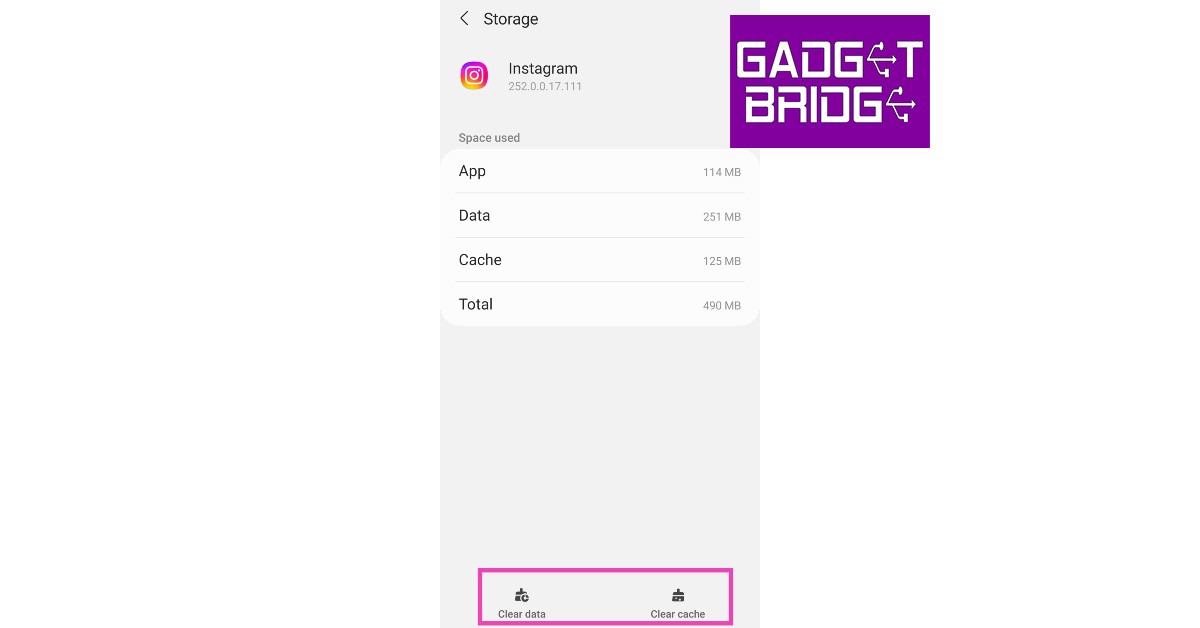
 Step 2: Select Settings.
Step 3: Tap on Account.
Step 2: Select Settings.
Step 3: Tap on Account.
 Step 4: Scroll down and select Mobile Data Use.
 Step 5: Turn the toggle bar off for Data Saver.

 Step 2: Tap on Data Usage.
 Step 3: Tap on Mobile Data usage.
 Step 4: Click on the gear icon for additional settings.
 Step 5: Turn the toggle bar off for Set data limit.

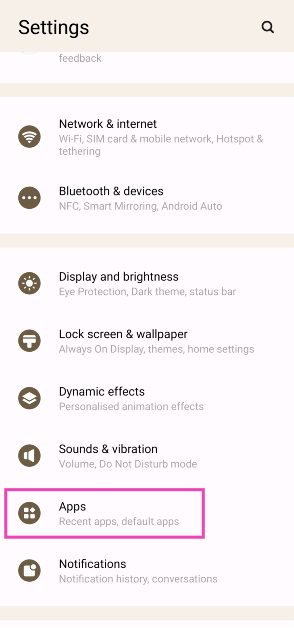 Step 2: Select Instagram.
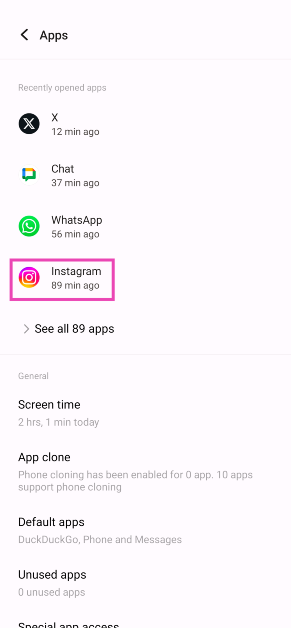 Step 3: Tap on Mobile data and WiFi.
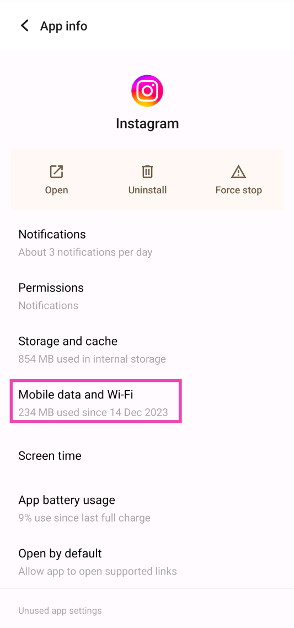 Step 4: Turn on the toggle switch for Unrestricted data usage.
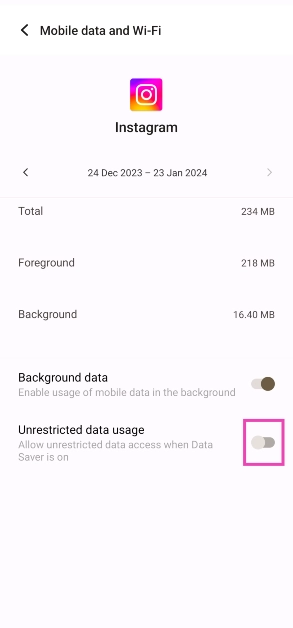
 Any account-related issues can be fixed by logging out of the Instagram app and logging back in. Go to your profile, open the hamburger menu, and select the Log Out option from Settings. Log back into Instagram using your email, phone number, or Instagram handle.
 Instagram Lite is a faster, stripped-down version of Instagram that covers all the essential features of the app. If the main Instagram app isn’t able to load images due to network and connectivity issues, switch to Instagram Lite for smooth and fast browsing. Instagram Lite occupies less space on your phone on top of using minimal data. The app is available on the Google Play Store.
 Older versions of the Instagram app may contain bugs that cause glitches and unwanted errors. These bugs are quickly resolved in the following updates. If you haven’t updated the Instagram app in a long time, go to Google Play Store, search for Instagram, and hit Update.
 If the VPN server you are currently connected to is experiencing an outage, Instagram won’t load pictures on your device. To fix this, connect to a different server or disable the VPN service entirely. Go to Settings>Connection>More Connection Settings>VPN or disconnect from the connected server after launching the VPN app from your phone’s home page.
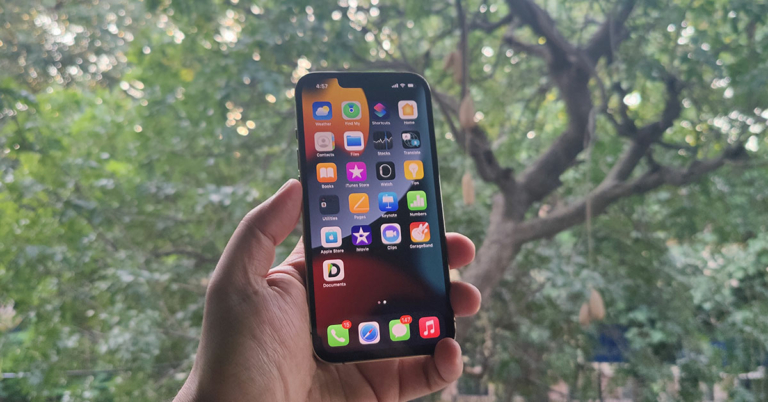

 Step 2:
 Step 3:
 Step 4:
 Step 3: Select Software Update.
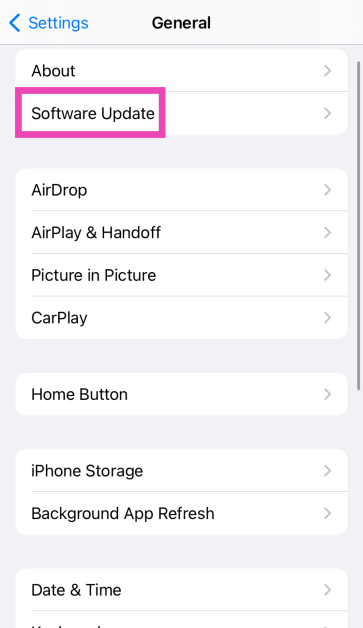 Step 4: Tap on Download and Install.
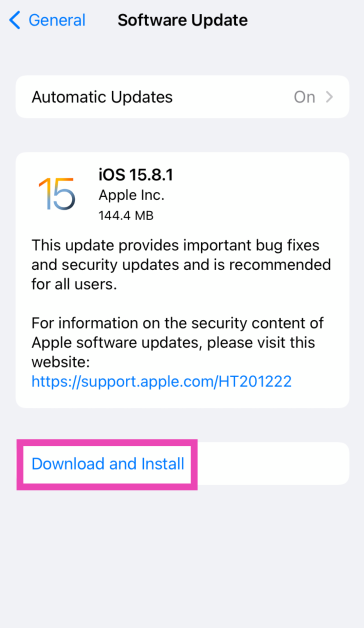
 You should also know that when you reset your phone to factory settings, there may be cases when your


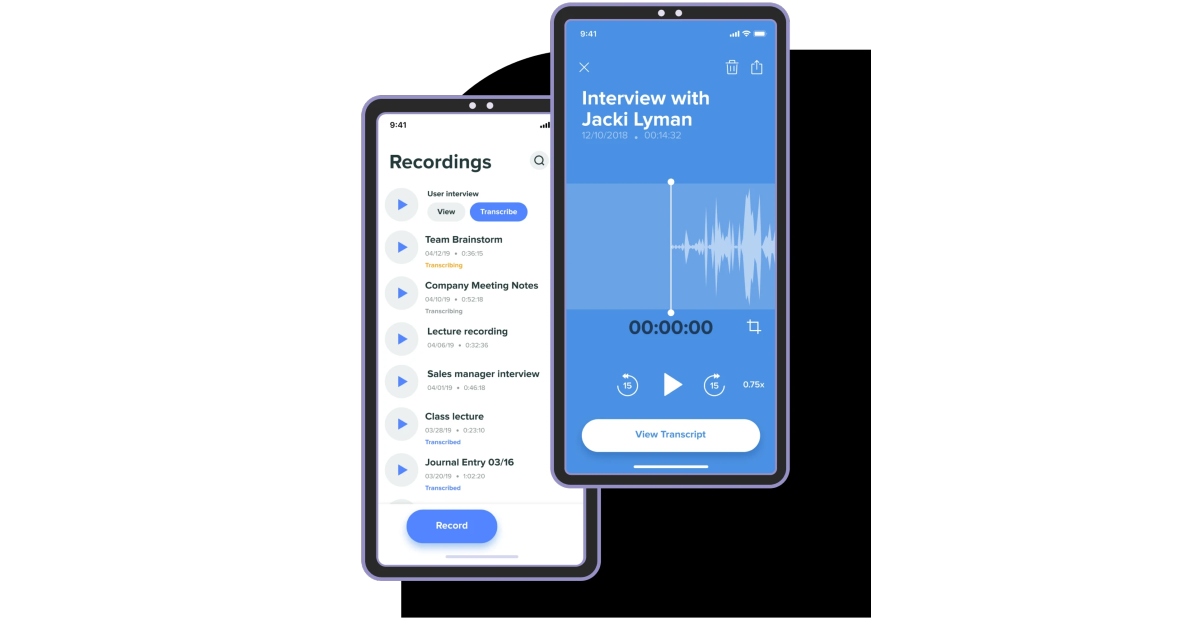


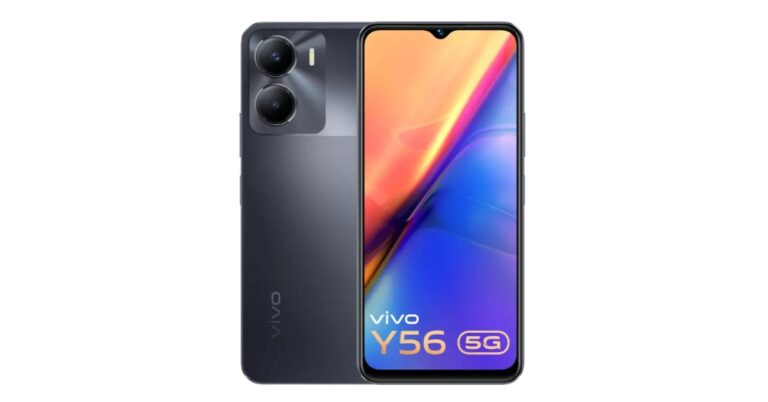


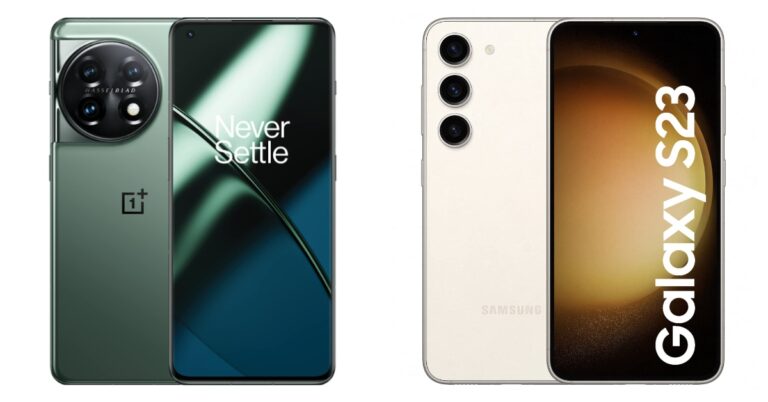





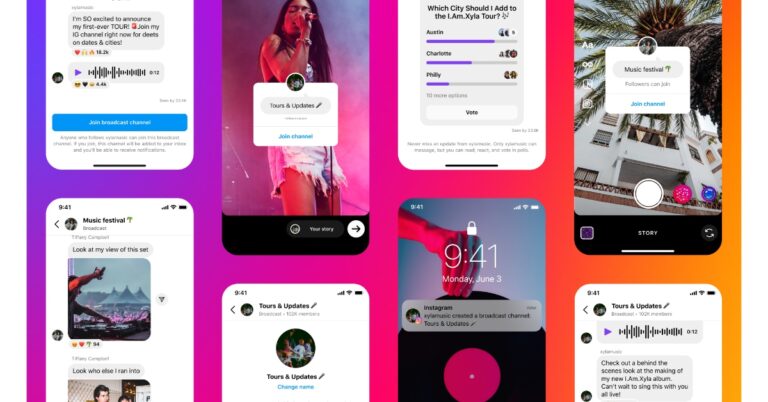



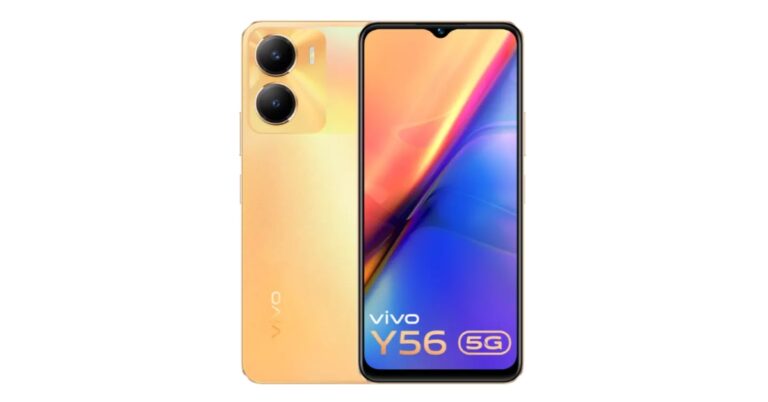

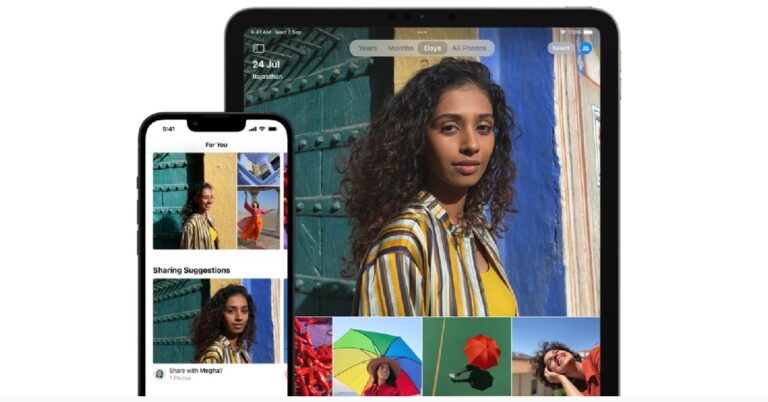
 Step 2:
 Step 3:

 Step 3:
 Step 4:
 Step 5:
 Step 2:
 Step 5
 Step 6:



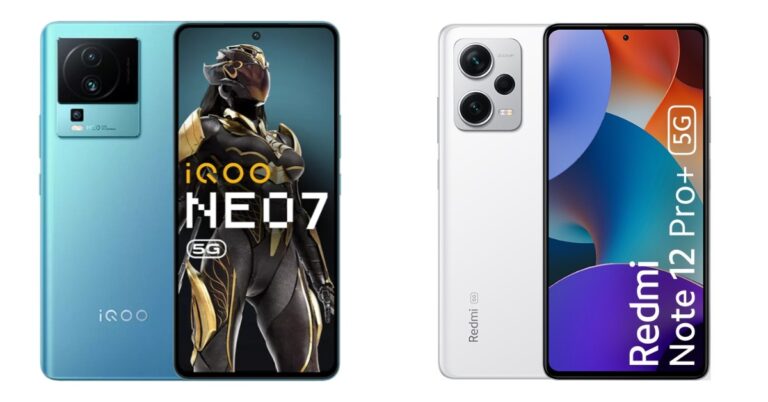

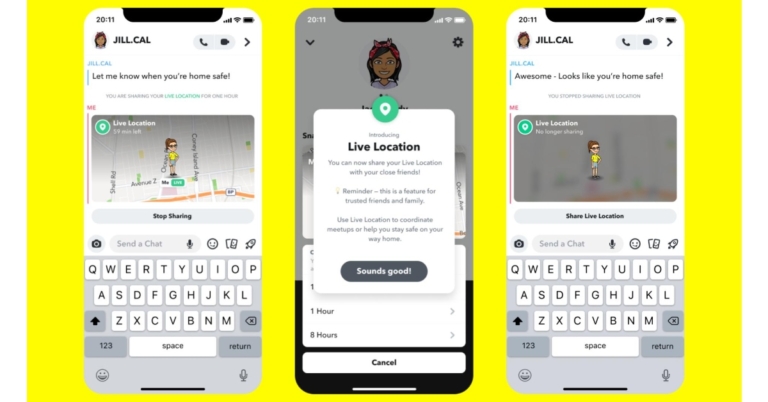
 Step 2:
 Step 3:
 Step 4: