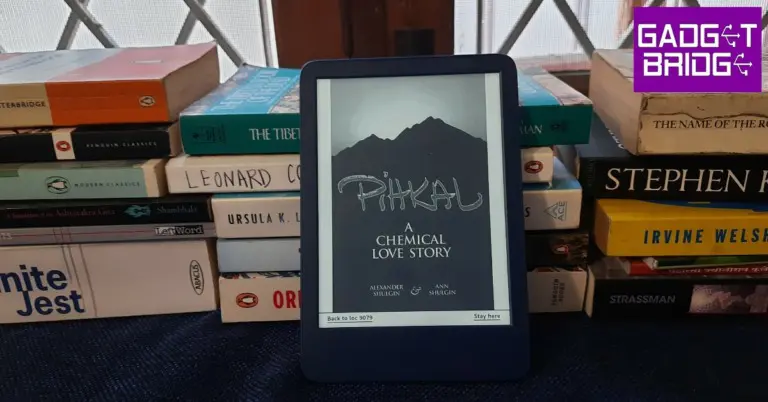
Amazon Kindle 2022 Review: The perfect no-nonsense e-reader!

When it comes to buying an e-reader, most buyers don’t look beyond the Kindle – and for good reason. Amazon has perfected every aspect of the ‘ereading’ experience, from glare-free displays to integrated dictionaries and Goodreads compatibility. Kindle gives you everything you want in an e-reader and then some more. Over the years Amazon has expanded its Kindle lineup to include more premium products like the Kindle Oasis and Signature but the Paperwhite has been the go-to choice for readers.

Amazon also puts out a ‘budget’ Kindle which usually misses out on some of the features of the Paperwhite but comes at an affordable price. The latest in this budget series is the Kindle 2022, which came out in October last year. It is currently available at a price of Rs 9,999 while the Paperwhite goes for Rs 13,999. We used the new Kindle 2022 for over a week and were impressed by how well it has bridged the gap between the entry-level device and the flagship Paperwhite. In this review, we go through what the Kindle 2022 gets right, what it misses out on, and whether you should get it over the more expensive Paperwhite.

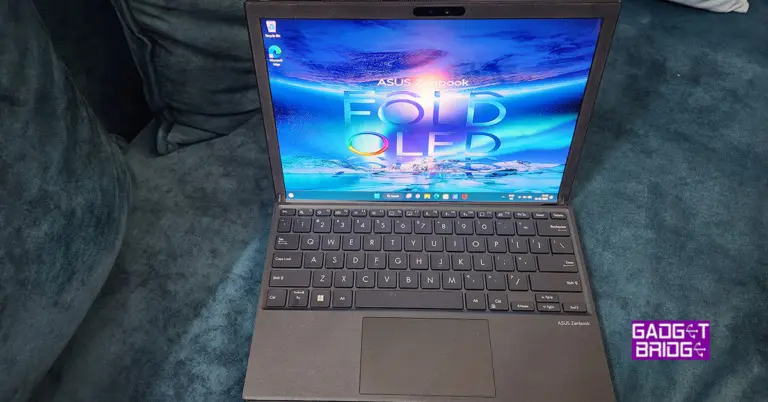
Read Also: Asus Zenbook 17 Fold review: Innovation at its best

Kindle 2022 review: Design and Display

The Kindle 2022 comes in sleek rectangular packaging which is made out of wood fibre-based materials from responsibly managed forests or recycled sources (you expect your Kindle to be eco-friendly). Inside the box, you’ll find the Kindle device, a USB Type-A to C charging cable, an instruction manual, and a product guide pamphlet. Amazon has not included a power adapter with the Kindle.

Kindle 2022 review: Design and Display

The device retains the 6-inch display from its 2019 predecessor but the resolution has been bumped up to 300 ppi, bringing the entry-level Kindle on par with the likes of Paperwhite and Oasis. It is still the most compact Kindle on the market, sitting below the 6.8-inch display Paperwhite. If you’re looking for an e-reader to carry around while on the go, this is the ideal product out of the Kindle lineup.

Kindle 2022 review: Design and Display

The body surrounding the display is made out of polycarbonate which is noticeably cheaper than Paperwhite’s. The chin has the ‘kindle’ lettering embossed on it and is quite chunky, acting as a thumb rest. The notification light, USB port, and power key are placed at the bottom. The new Kindle comes in two colours – Denim and Black. We used the former for this review. The Denim device contains 30% post-consumer recycled plastics, while the Black variant utilises 75% recycled plastics.

The new Kindle is not waterproof. This is one of the features that Amazon reserves for Paperwhite and other premium Kindles. If you like to use the Kindle for reading in the bathtub, decent IP protection should be non-negotiable. In that case, go for Paperwhite. The Kindle 2022 also has 4 LEDs compared to Paperwhite’s 17. While this doesn’t create much of a difference when it comes to illuminating the screen, you will miss out on the colour temperature options.

Kindle 2022 review: Performance

First off, the 300 ppi resolution on the new Kindle’s display creates a world of difference. This is the resolution offered by Amazon on all Kindles across the board. The text quality and lucidity are impeccable and it doesn’t get any better than this. The 4 LEDs on offer do a decent job of lighting up the display in limited lighting conditions and you can use the toolbar to adjust the brightness when there’s optimum natural lighting. As mentioned earlier, you cannot adjust the colour temperature on the entry-level Kindle. 

Kindle 2022 review: Performance

Amazon has also doubled the internal storage to 16 GB, meaning you can essentially carry thousands of books wherever you go. With a Kindle Unlimited subscription, you get access to over 2 million titles. You can also send any files in Kindle-supported formats straight to the device using your email or the smartphone app. 

Amazon claims that the battery on the Kindle is sufficient enough to last up to six weeks under moderate usage. While we didn’t use the device long enough to test this, the battery life held up in line with what Amazon claims. After over a week of use the battery only dropped by ~20%.  The USB-C type port also allows for faster charging.

Kindle 2022 review: Performance

The reading experience on the Kindle was exemplary. The compactness of the device makes it easier to hold and you can go hours without needing to rest your hands. The sizeable chin offers helpful support to your palm or thumb, depending on how you hold the Kindle. The pages load quite fast when you’re reading a book, but navigating through the software could have been a bit smoother. The e-ink anti-glare display is easy on the eyes, letting you read for hours without feeling any eye fatigue.

Talking about software, the new Kindle comes with a few interesting and super helpful features. It gets Bluetooth connectivity which means you can pair it to an audio system or TWS and listen to audiobooks with ease. There’s also a VoiceView Screen Reader in Accessibility options, which is essentially a text-to-speech feature that reads out the text on the screen. This comes in useful for people with limited vision or other visual impairments. There’s also a dedicated tab for Goodreads in the menu along with a web browser. 

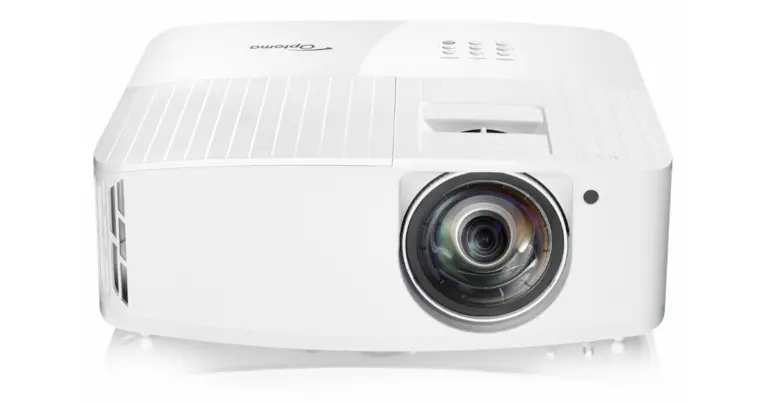
Read Also: Optoma GT2160HDR true 4K UHD short throw cinema gaming projector announced in India

Verdict

Priced at Rs 9,999, Kindle 2022 is the device we would suggest to those looking for a no-nonsense e-reader that gets the essential functions right without bloating the price with extra frills. The compactness and light weight of this Kindle also makes it more suitable to carry around while travelling. Amazon has done a great job of bridging the difference in features between this entry-level Kindle and the Paperwhite. The lack of water resistance may bother some, but we think it is a fair trade-off given the price and the fact that most readers don’t use their Kindles in places where there is a risk of water splashes. However, if you’re a bathtub reader, we’d suggest going for the Paperwhite.

Pros

Price

Well-lit anti-glare display

300 dpi resolution 

16GB storage

Bluetooth connectivity

Type C charging

Cons

Not waterproof

For the latest gadget and tech news, and gadget reviews, follow us on Twitter, Facebook and Instagram. For newest tech & gadget videos subscribe to our YouTube Channel. You can also stay up to date using the Gadget Bridge Android App. You can find the latest car and bike news here.
Lenovo Tab P11 5G with Snapdragon 750G 5G launched in India

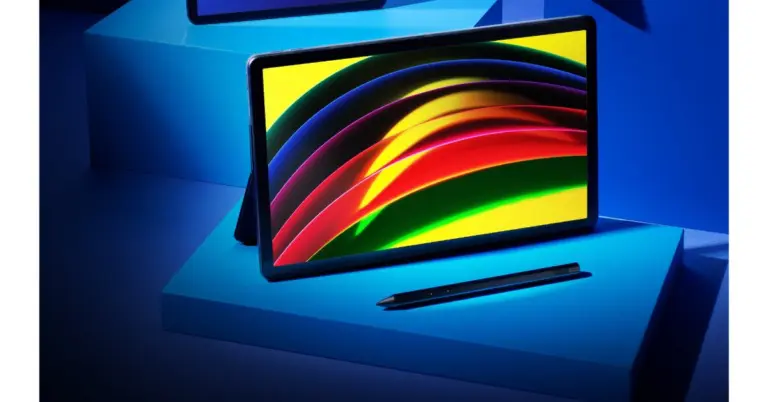
Lenovo today unveiled the Tab P11 5G, its first high-end 5G tablet, in India. The tablet is equipped with a 7700mAh battery that can support up to 12 hours of continuous video streaming. The device is powered by Snapdragon 750G 5G and features certified by TÜV Rheinland display.

Lenovo Tab P11 5G price in India and availability

Lenovo Tab P11 5G has been launched with a starting price of Rs 29,999 for the 128GB storage variant. The price of the 256GB storage model is set at Rs 34,999. Both Amazon and the official Lenovo store will sell the tablet.

Also Read: Noise Twist BT calling smartwatch launched in India

Lenovo Tab P11 5G specifications

The 11-inch 2K display on the Lenovo Tab P11 5G has a resolution of 2000 x 1200 pixels. It has a 60Hz refresh rate IPS screen that supports Dolby Vision. The display is also certified by TÜV Rheinland, for consumers’ eye safety. The Android 11 operating system is used by the Lenovo Tab P11 5G. The tablet has a Qualcomm Snapdragon 750 5G processor built in. It is available with 128GB or 256GB of storage.

Lenovo Tab P11 5G with Snapdragon 750G 5G launched in India

A 5G-capable sim can be inserted into the device’s slot to access 5G services. Real-time video conversations are supported, as are hands-free logins using the front camera sensor and backdrop blur for increased privacy.

The Lenovo Tab P11 5G sports a 13MP camera sensor with autofocus on the back. At the front, there is an 8MP camera with a time of flight (ToF) capability. This enables 3D imaging and gesture recognition on the Lenovo tab P11 5G by determining the gap between the subject and the camera.

Also Read: BenQ GV11 LED Smart Wireless Portable Projector with Android TV 10 launched in India

The tablet is equipped with a 7700mAh battery that can support up to 12 hours of continuous video streaming. It comes with quad JBL speakers with Lenovo Premium Audio (LPA) Solution design, optimised with Dolby Atmos

Sumati Sahgal, Head of Tablets and Smart Devices, Lenovo India said, “In 2023, we expect 5G to become the accepted reality with consumers. It offers a transformational leap for India, with its promise of faster, better connected and more immersive experiences. We are excited to introduce our first Android tablet with dedicated 5G connectivity well-suited for the hybrid lifestyle for consumers leaning towards true mobile freedom with more versatile devices for streaming videos, creating digital content, and working or studying on the go.”

For the latest gadget and tech news, and gadget reviews, follow us on TwitterFacebook and Instagram. For newest tech & gadget videos subscribe to our YouTube Channel. You can also stay up to date using the Gadget Bridge Android App. You can find the latest car and bike news here.

The Best Ways to Turn On and Turn Off SafeSearch on Google Search

0

Google search engine comes with a very helpful SafeSearch filter, which finds its utility in various scenarios. Turning on SafeSearch blocks all explicit, violent, and obscene content from your search results. This comes in handy when you want to exercise parental control on your kid’s desktop or when you’re browsing the web on a public computer. In this article, we bring you the best ways to turn on and turn off SafeSearch on Google Search.

Read Also: Asus Zenbook 17 Fold review: Innovation at its best

Turn on and Turn off SafeSearch from Quick Settings

Step 1: Go to the Google homepage and perform a simple Google search.

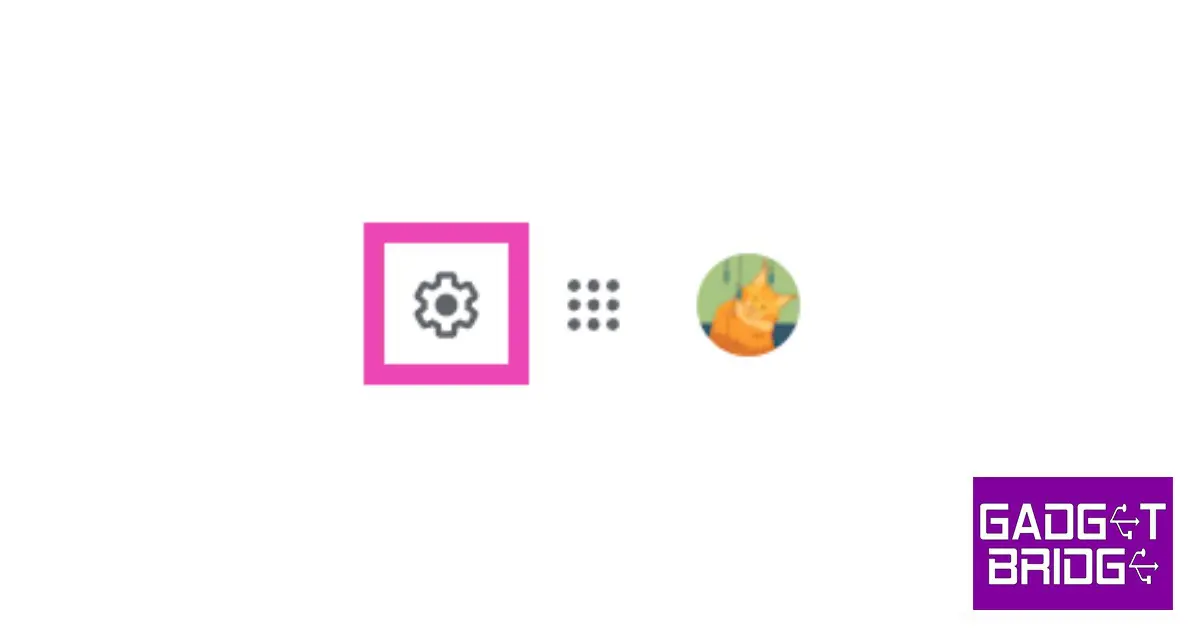
Step 2: On the results page, click on the gear icon at the top right part of the screen.

Step 2: On the results page, click on the gear icon at the top right part of the screen.

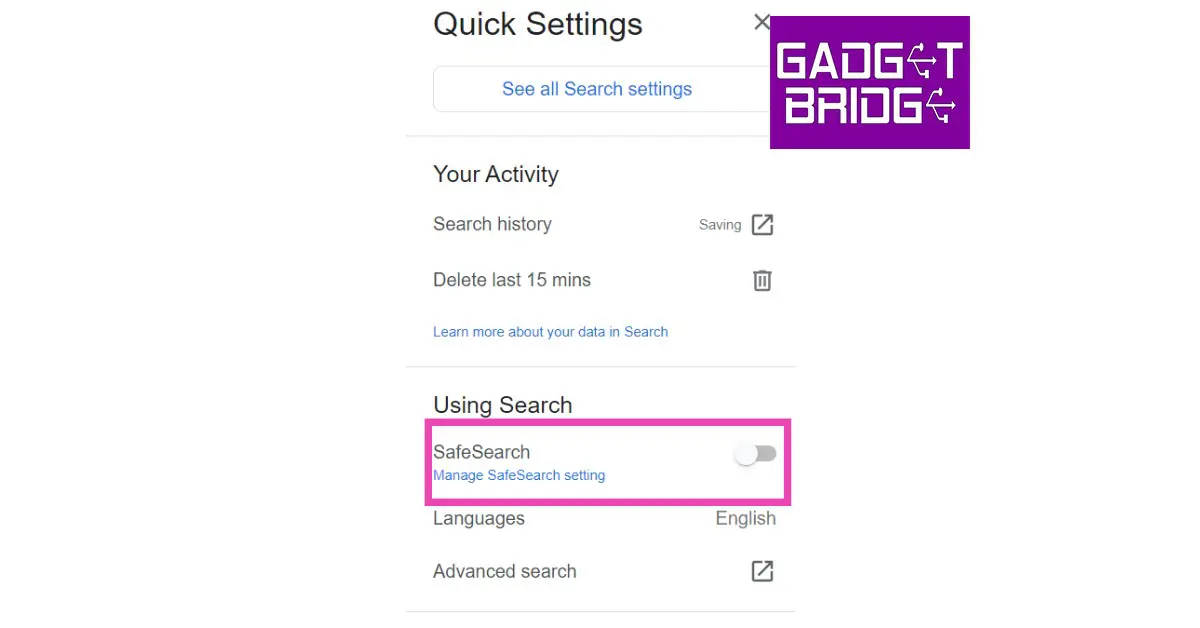
Step 3: A side menu will pop up on your screen from the right. Switch the toggle bar for SafeSearch to blue if you want to turn it on. Conversely, switch it back off if you want to disable SafeSearch.

Switch the toggle bar for SafeSearch to blue

Turn on and Turn off SafeSearch from Google Settings

Step 1: Go to https://www.google.com/preferences and select ‘Search results’ from the side menu.

Step 2: Click on the checkbox for SafeSearch to enable it. Remove the tick by clicking on it again if you want to disable SafeSearch.

Step 2: Click on the checkbox for SafeSearch to enable it. Remove the tick by clicking on it again if you want to disable SafeSearch.

Step 3: Scroll down and select ‘Save’.

Turn on and Turn off SafeSearch using the Google app on Android

Step 1: Launch the Google app on your smartphone.

Step 1: Launch the Google app on your smartphone. The Best Ways to Turn On and Turn Off SafeSearch on Google Search

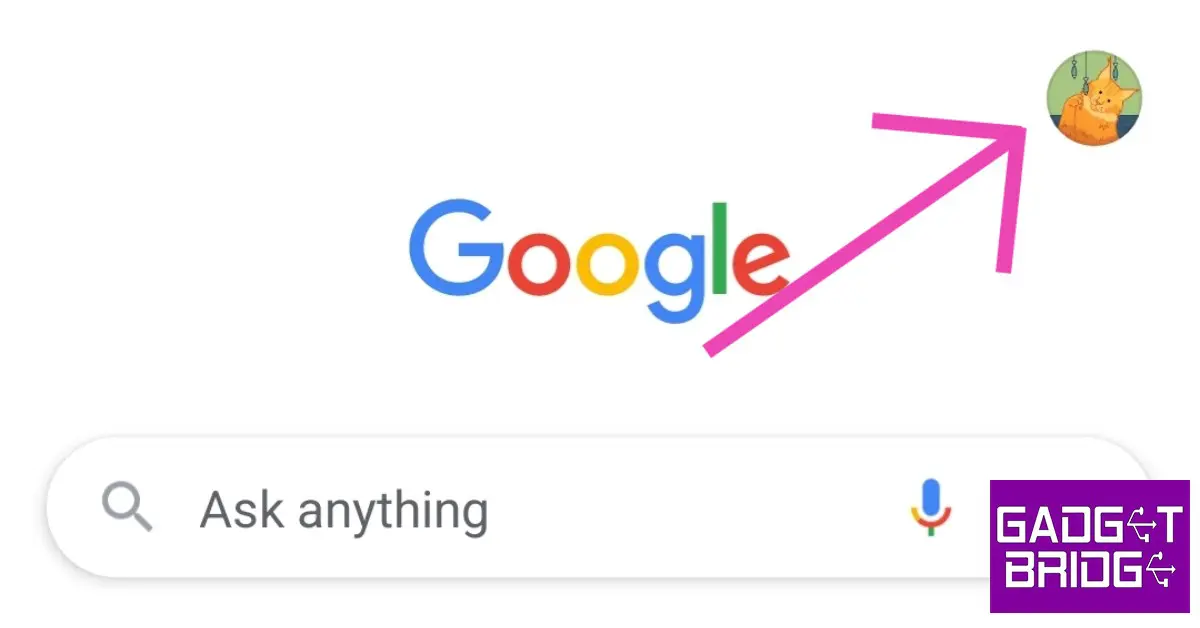
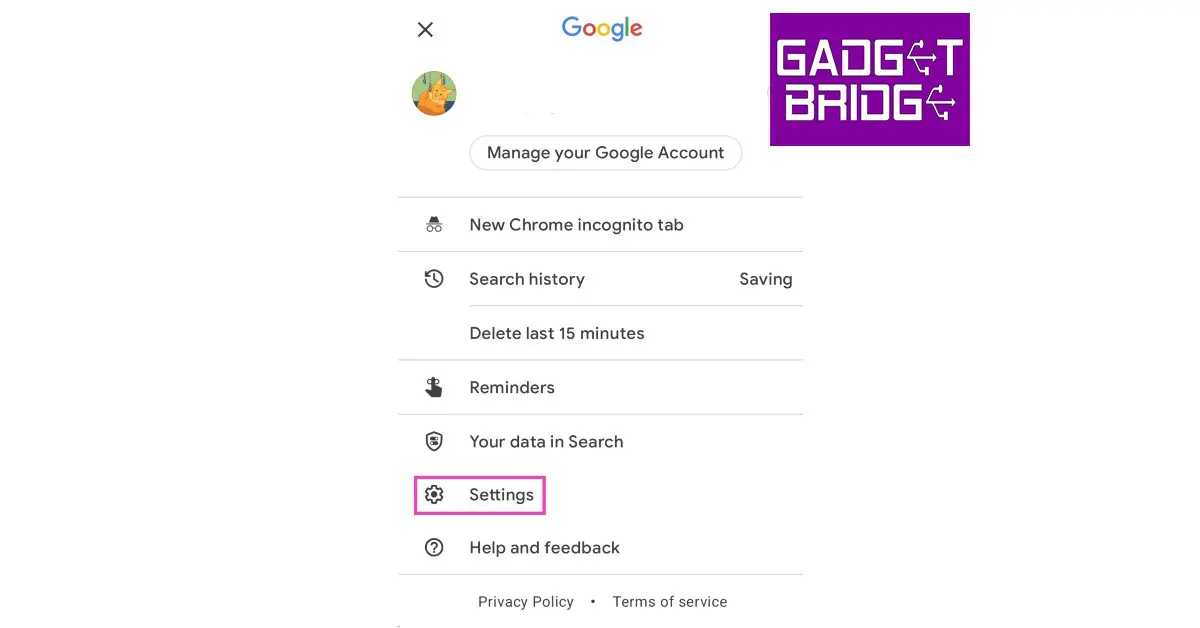
Step 2: Tap on your profile icon at the top right corner of the screen and select Settings.

Step 2: Tap on your profile icon at the top right corner of the screen and select Settings. The Best Ways to Turn On and Turn Off SafeSearch on Google Search

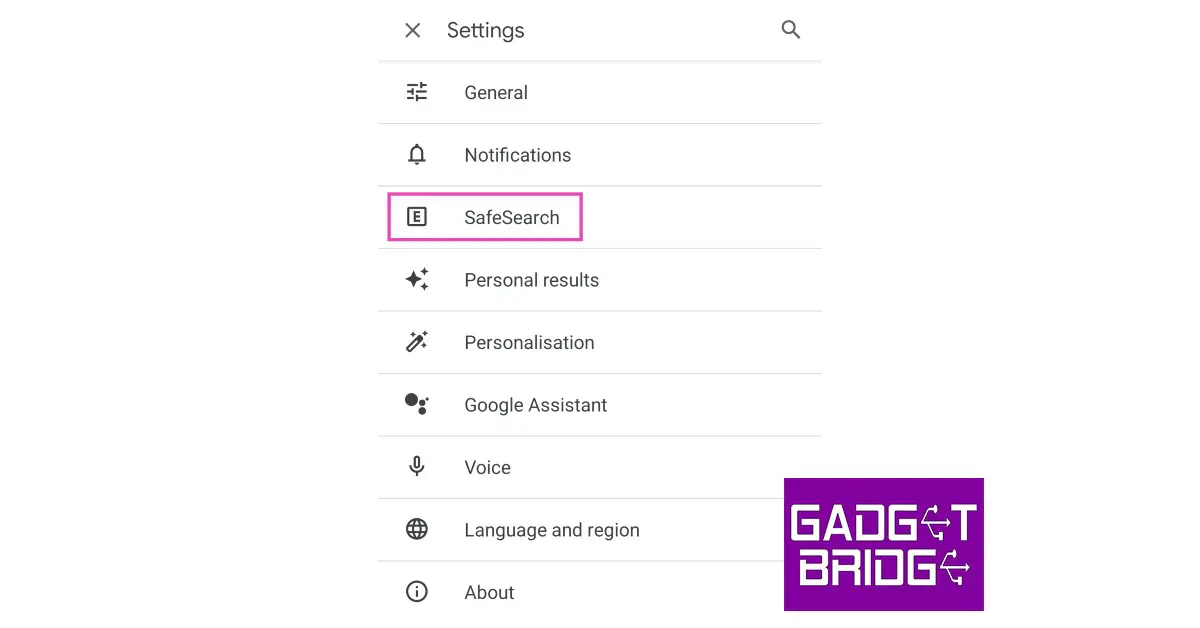
Step 3: Select SafeSearch.

Step 3: Select SafeSearch. The Best Ways to Turn On and Turn Off SafeSearch on Google Search

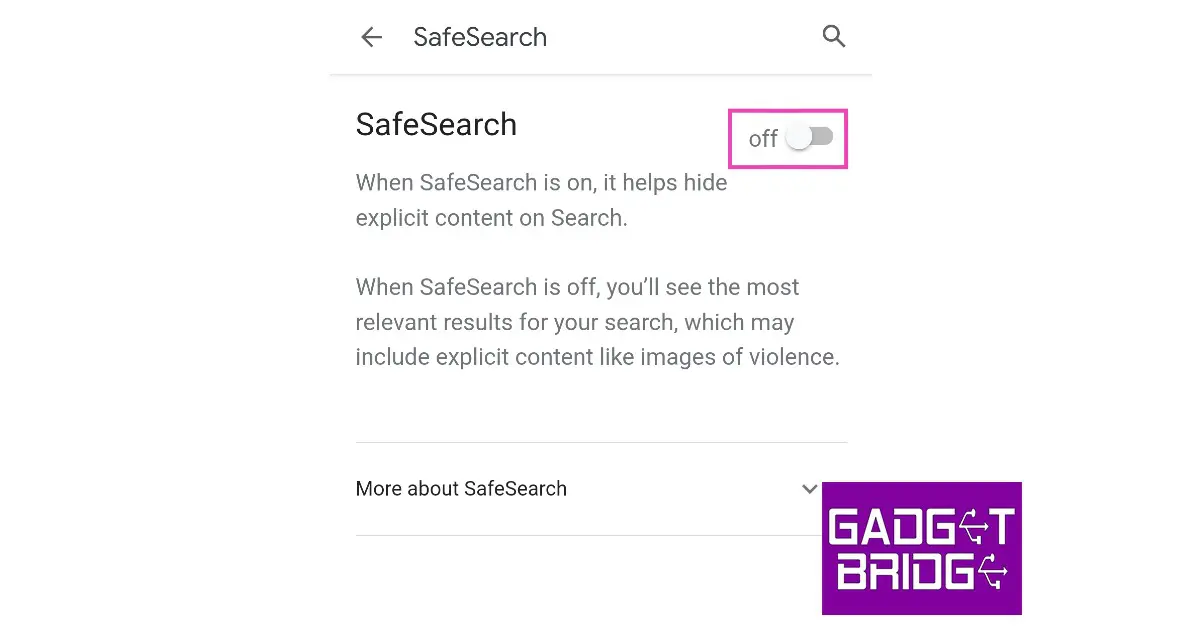
Step 4: Turn the toggle bar on to enable SafeSearch and off to disable it.

Step 4: Turn the toggle bar on to enable SafeSearch and off to disable it. The Best Ways to Turn On and Turn Off SafeSearch on Google Search

Read Also: Philips TAH8506BK headphones with hybrid active noise cancellation launched in India

Conclusion 

These are the best ways to turn on and turn off SafeSearch on Google search. Turning on SafeSearch filters out all the explicit and NSFW content from your search results. While SafeSearch works fine for the most part, sometimes you may need to turn it off to get more accurate results. For example, if a news story related to an accident contains images of gore and blood, it may get blocked by the SafeSearch filter. 

For the latest gadget and tech news, and gadget reviews, follow us on Twitter, Facebook and Instagram. For newest tech & gadget videos subscribe to our YouTube Channel. You can also stay up to date using the Gadget Bridge Android App. You can find the latest car and bike news here.
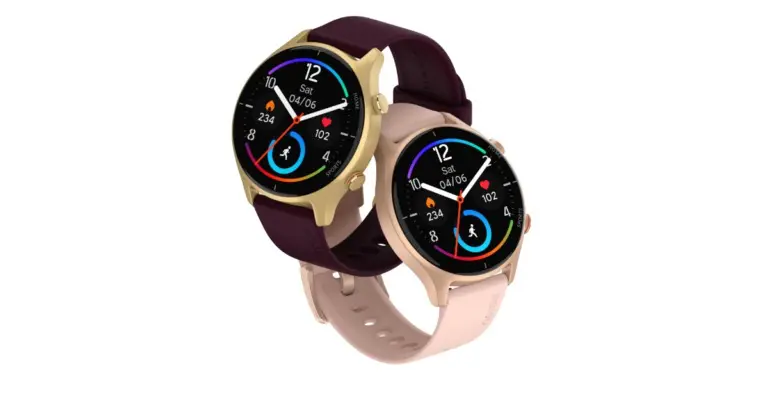
Noise Twist BT calling smartwatch launched in India

Indian lifestyle brand Noise has expanded its smartwatch portfolio with the launch of Noise Twist. The budget smartwatch comes with Bluetooth calling functionality and features the brand’s proprietary TruSync technology for an advanced calling experience. It has a round dial and a TFT display. Moreover, the fitness tracker has in-built speakers and a microphone as well.

Noise Twist price in India and availability

Noise Twist has been launched in India with an affordable price tag of Rs 1,999. The device comes in four different colour options of Black, Wine, Silver, Midnight Blue, Gold and Pink. Noise’s latest round-calling smartwatch can be purchased through the company’s official website as well as via Amazon.

Noise Twist price in India and availability

Also Read: Optoma GT2160HDR true 4K UHD short throw cinema gaming projector announced in India

Noise Twist specifications

NoiseFit Twist is equipped with Tru Sync technology, which attaches a single chip BT calling and ensures seamless pairing as well as an upgraded calling experience. The smartwatch features a 1.38-inch TFT circular display with a pixel density of 246 PPI and a resolution of 240×240 pixels for an immersive viewing experience. The screen offers 550 nits of brightness. Additionally, users can now take advantage of lag-free, steady calls that consume less battery power thanks to the built-in speakers and microphone.

Also Read: BenQ GV11 LED Smart Wireless Portable Projector with Android TV 10 launched in India

The NoiseFit Twist is water and dust resistant to IP68 standards. It contains an internal noise health suite that enables it to monitor all vitals, including SPO2, heart rate, breathing and sleeping habits, and activity levels. Along with 100 sports modes, 100+ watch faces, and female cycle tracking, it also offers general health monitoring and a customizable style. The smartwatch makes use of the gadget incredibly engaging and hassle-free by providing access to recent call logs and having the ability to save up to 10 contacts through Noise Buzz.

For the latest gadget and tech news, and gadget reviews, follow us on TwitterFacebook and Instagram. For newest tech & gadget videos subscribe to our YouTube Channel. You can also stay up to date using the Gadget Bridge Android App. You can find the latest car and bike news here.
BenQ GV11 LED Smart Wireless Portable Projector with Android TV 10 launched in India

In India, BenQ, a manufacturer of portable projectors, announced the availability of the BenQ GV11 LED wireless smart projector. For relaxed viewing and mobility, the GV11’s 135-degree rotating lens and automated vertical keystone provide a remarkable range of angles for projection onto walls, screens, or ceilings.

Speaking on the occasion Mr. Rajeev Singh, Managing Director, BenQ South Asia, said, “BenQ is the No. 1 portable projector brand in India with 54% market share in Q3 ‘22 and the launch of GV11 is to further cement BenQ’s position as the market leader and at the same time provide the best possible entertainment on the go beyond the limitations of space to the young generation, GV11 is embedded with BenQ’s DLP and display technology expertise, custom-built for today’s new generation of busy digital natives and first-time projector buyers which has full support for Apple Airplay and Google Chromecast that makes getting stuff from phones and tablets super easy, wired or wireless.

BenQ GV11 LED Smart Wireless Portable Projector with Android TV 10 launched in India

Also Read: Jio True 5G services now rolling out in Assam

The GV11 projector has everything required to stream non-stop entertainment, cast from any device, play music, and cast from any device. Voice Assistant doesn’t require any additional streaming dongles to instantly access limitless entertainment.

BenQ GV11 LED Smart Wireless Portable Projector Tech Specs

The BenQ GV11 enhances portability and convenience with Google-certified Android TV 10, and access to the Google Play Store gives users access to content from more than 5,000 streaming apps, including Prime Video, YouTube, and others. The GV11 offers a variety of connectivity options with full flexibility, including integrated Bluetooth, HDMI, and USB-A interfaces. provides the greatest audio experience thanks to its 270-degree 5W sound system, treVolo-tuned audio modes, and bass-expanding sealed enclosure design. GV11 offers flawless streaming of movies, television shows, athletic events, and music without the inconvenience of additional streaming equipment, in contrast to other inexpensive projectors.

Also Read: Optoma GT2160HDR true 4K UHD short throw cinema gaming projector announced in India

Pricing and availability

The GV11 from BenQ will be offered on Amazon and Flipkart for a limited duration at a special introductory price of Rs 37,990. With a two-year projector guarantee and a two-year warranty on LED light sources, whichever comes first, the company gives complete peace of mind.

For the latest gadget and tech news, and gadget reviews, follow us on TwitterFacebook and Instagram. For newest tech & gadget videos subscribe to our YouTube Channel. You can also stay up to date using the Gadget Bridge Android App. You can find the latest car and bike news here.

Top 6 Easy Methods to Open Multiple Websites With Just One Click in Google Chrome

0

Do you find yourself opening the same websites every day? For many people, a typical workday begins with opening the same few websites on their desktops. If you find yourself in the same situation, you may have wondered whether there is a way to automate this task. Luckily, there is. In this article, we bring you the top 6 ways to open multiple websites with just one click in Google Chrome. You can also apply these processes to other tasks like opening all the social media websites you visit at once, launching your favourite e-commerce websites with one click, and more.

Read Also: Uttarakhand now has access to Jio True 5G Services

Which method is best for you?

Out of the 6 methods mentioned in this article, you should pick one that suits your workflow the most. If you start your day by opening a group of websites, creating a desktop shortcut that launches those sites is your best option. You can also program Chrome to open those websites as soon as you launch the web browser. However, the problem with this method is that these websites will trigger into action every time you open a new Chrome window.

If you simply want to open a bunch of websites on a list, the ‘Open Multiple URLs’ and ‘Open Multiple Links’ Chrome extensions will come in handy. The latter lets you highlight text and open all the links in it with a couple of clicks. The Open Multiple URLs extension requires pasting the links in a text box. We prefer the Open Multiple Links extension as it is more intuitive and seamless.

Use the ‘Open Multiple URLs’ Chrome Extension 

Step 1: Search for ‘Open Multiple URLs’ extension in the Chrome Web Store and add it to the web browser.

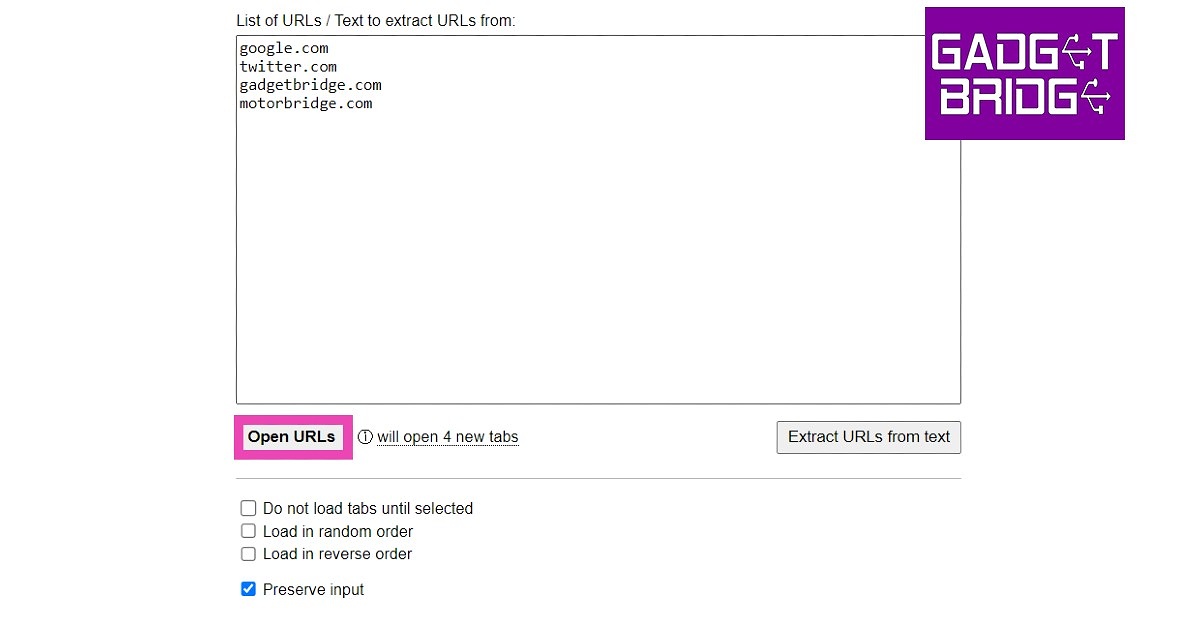
Step 2: Paste the list of websites you want to open with a single click. Make sure the websites are separated by line breaks.

Step 3: Click on the checkbox for ‘Preserve Input’ if it is unticked. This will avoid the trouble of typing the same sites every time you use the extension.

Step 3: Click on the checkbox for ‘Preserve Input’ if it is unticked. This will avoid the trouble of typing the same sites every time you use the extension. how to Open Multiple Websites With Just One Click in Google Chrome

Step 4: Click on ‘Open URLs’.

Use Notepad to open multiple websites with a single click

Using too many extensions can often slow down Chrome. If you’re not interested in any additional extensions other than the essential ones, there’s a neat little Notepad trick that will help you open multiple Chrome tabs with just one click. Here’s how.

Step 1: Launch Notepad.

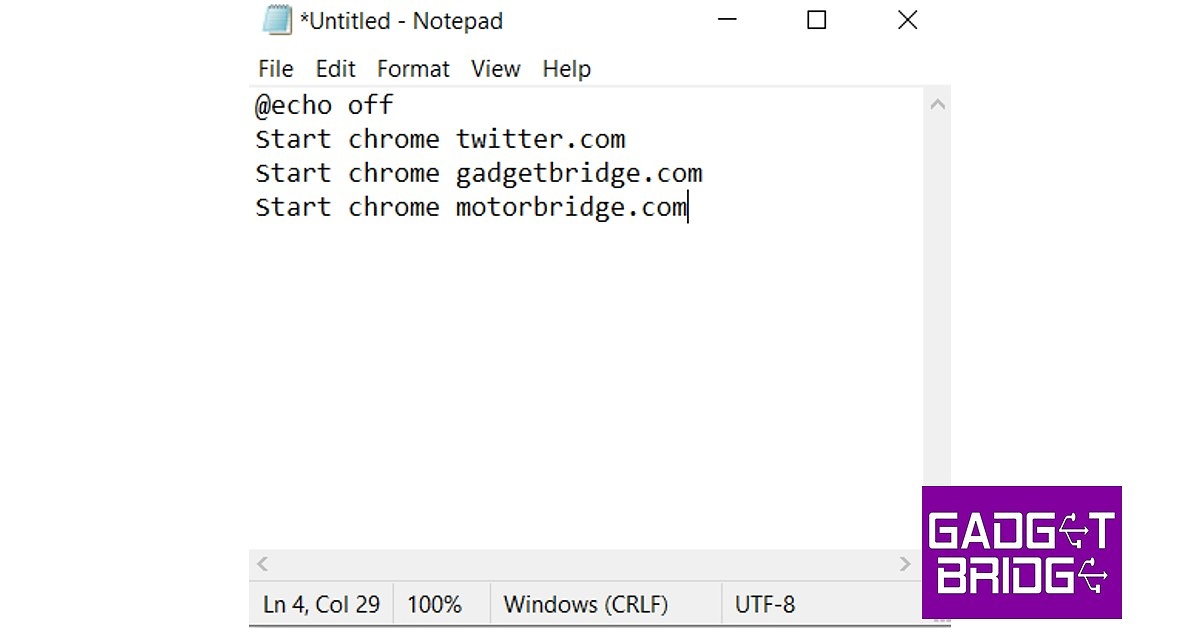
Step 2: Type the following command in the text window.

@echo off  

Start chrome website 1

Start chrome website 2

Start chrome website 3

Enter the website URLs wherever the placeholders are. You can add as many websites as you want.

Step 2: Type the following command in the text window. how to Open Multiple Websites With Just One Click in Google Chrome

Step 3: Save the document as a BAT file on the desktop. You can do this by adding ‘.bat’ to the file name while saving it.

Step 3: Save the document as a BAT file on the desktop. You can do this by adding ‘.bat’ to the file name while saving it.

Step 4: Now to the easiest part. Click on the saved file on the desktop, and it will open all the listed websites on Chrome.

Use the ‘Open Multiple Links’ Chrome Extension

Step 1: Install the Open Multiple Links extension from the Chrome Web Store.

Step 1: Install the Open Multiple Links extension from the Chrome Web Store.

Step 2: Select text containing multiple links and right-click it.

Step 2: Select text containing multiple links and right-click it.

Step 3: Click Open links in new tabs.

Each link will open in a separate tab.

Open Multiple Sites on Startup

Step 1: First, open all the websites you want to open at once on startup.

Step 2: Click on the ellipses (three dots) at the top right corner of the screen and select Settings. 

Step 3: Select On Startup from the left menu.

Step 3: Select ‘On Startup’ from the left menu. how to Open Multiple Websites With Just One Click in Google Chrome

Step 4: Select Open a specific page or set of pages, and then select Use current pages. You can also manually add pages that you want to be opened at once on startup.

Step 4: Select ‘Open a specific page or set of pages’ and then select ‘Use current pages’. You can also manually add pages that you want to be opened at once on startup.

Use a Macro Key

If your PC or laptop has a macro key, it can be customised to open Google Chrome with just one press of a button. To launch multiple websites at once, use the Startup method mentioned above. To assign the Chrome app to the macro key, simply drag and drop it on the Macro Key app. You can also press the macro key on your device and drag the Chrome icon from the desktop to the app window. Once the macro has been set, simply press the key once to launch Chrome and your chosen websites.

Use Bookmarks

Step 1: Open all the websites in different tabs.

Step 2: Press Ctrl+Shift+D. Name the folder and select ‘Bookmarks Bar’.

Step 2: Press Ctrl+Shift+D. Name the folder and select ‘Bookmarks Bar’. how to Open Multiple Websites With Just One Click in Google Chrome

Step 3: The folder will appear on the bookmarks bar. Right-click on it and select Open all to launch all the websites in it at once. You can also drag other websites from the bookmarks bar to this folder to add them to the list.

The folder will appear on the bookmarks bar. how to Open Multiple Websites With Just One Click in Google Chrome

Read Also: Pre-orders for the Samsung Galaxy S23 Series have begun in India: Details inside

Frequently Asked Questions (FAQs)

Is it possible to launch multiple websites on Google Chrome with just one click?

Go to Chrome Settings>On Startup and click on ‘Open a specific page or set of pages’. Enter the websites that you want to open as soon as you launch Chrome.

How do I open multiple websites with one click on any browser?

Open the Notepad app on your PC or laptop and type ‘@echo off’ followed by ‘start [website name]’. Keep using the ‘start’ command before every website on the list. Save the file in BAT format on your desktop. Double-click the file to launch all the mentioned websites on your default web browser.

How do I open multiple bookmarks at once on Chrome?

Press Ctrl + Shift + D to create a bookmarks folder. Add your desired websites to this folder. If you want to open all the websites in this folder at once, right-click on it and select Open all.

What is the macro key on my laptop?

Some laptops ship with an extra key on the keyboard. This ‘macro’ key can be programmed to open apps or carry out a series of tasks with a single press.

Can I open all links in the text I’ve selected at once?

The ‘Open Multiple Links’ Chrome extension lets you open all the links in highlighted text at once.

Read Also: PayPal to Integrate UPI for Cross-Border Payments

Final Thoughts

These are the top 6 easy ways to open multiple websites with just one click in Google Chrome. You can also use the Notepad trick for other web browsers. Instead of ‘Start Chrome’, just use ‘Start’ in the command line. The websites will open in your default web browser. If you found this article helpful, let us know in the comments!

Optoma GT2160HDR true 4K UHD short throw cinema gaming projector announced in India

Optoma announced the arrival of its true 4K UHD short throw cinema gaming projector, the Optoma GT2160HDR, to the Indian market. The projector’s brightness is 4,000 high lumens. Additionally, it supports the minimal 4ms input lag and 240Hz refresh rate. It also has HDMI 2.0 Support for Connection to 4K Entertainment.

The Optoma GT2160HDR is equipped with a cutting-edge Texas Instruments 4K UHD DLP chipset that uses a high-performance DMD with fast switching and XPR video processing technology to display 8.3 million pixels, or four times as many pixels is 1080P, in accordance with the requirements of the Consumer Technology Association’s 4K UHD specification.

Also Read: Philips TAH8506BK headphones with hybrid active noise cancellation launched in India

The short-throw lens used by the GT2160HDR has a throw ratio of 0.496. This practically means that a user can project a picture with a diagonal of 120 inches from a distance of just four feet away. A user’s living room screen can be magnified up to 300 inches thanks to the short-throw projector‘s capabilities.

Optoma GT2160HDR true 4K UHD short throw cinema gaming projector announced in India

GT2160HDR offers 4,000 high lumens of brightness and powerful and stunning colour performance. Optoma’s advanced colour calibration and adjustment technologies go above and beyond HDTV Rec. 709 requirements to deliver the most accurate and true-to-life tints for realistic and in-depth visuals.

The GAMER mode from Optoma is tuned to enhance the details in an image’s dark areas. As a result, players stand a better chance of avoiding getting fragged by an adversary who is hiding in the shadows. The GT2160HDR will automatically transition to HDR display mode if it discovers a game with HDR encoding. In the event that it does not, GT2160HDR offers the HDR SIM mode, which is intended to add an HDR effect to the game graphics and provide a wide colour gamut setting and crisp contrast without sacrificing any detail.

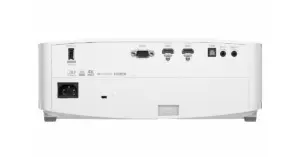
With capabilities like HDR hue and tone mapping technology, HDR / HLG movies or games can be displayed with their best possible performance in terms of accurate colour and dynamic contrast. For connectivity, it includes Wi-Fi, Bluetooth, a USB port, and two HDMI 2.0 ports that support any external 4K devices like the Apple TV 4K, PS4 Pro, and XBOX One X. These features make it easier for users to share content.

For the latest gadget and tech news, and gadget reviews, follow us on TwitterFacebook and Instagram. For newest tech & gadget videos subscribe to our YouTube Channel. You can also stay up to date using the Gadget Bridge Android App. You can find the latest car and bike news here.
Garena Free Fire Redeem Codes Today 13 January 2023: Here is how to claim them

Garena Free Fire is a battle royale game with regular awards and tournaments to keep players interested. If you play Garena Free Fire, you should be aware of the redeem codes that are released on a daily basis. However, because the battle royale game is banned in India, players from other countries can use the Free Fire Redeem codes daily. If you’re unfamiliar with the Garena Free Fire redeem codes or don’t know how to get them, we’ve put together a step-by-step guide to help you redeem them. Check out Garena Free Fire Redeem Codes for 13 January 2023.

The Free Fire redeem codes are a great way to get free stuff. These are 12-digit codes that contain alphabets and numbers, as well as an expiration date and time. Because the Garena FF redeem codes cannot be used more than once, you should hurry to the redemption page to claim your free reward before someone else does. To get a free reward, all you have to do is go to reward.ff.garena.com/en, which is the official redemption page. Also, keep an eye on this space for daily updates on Garena Free Fire redemption codes and rewards.

Garena Free Fire Redeem Codes Today 13 January 2023

  • FFIC33NTEUKA
  • ZZATXB24QES8
  • U8S47JGJH5MG
  • HHNAT6VKQ9R7
  • 2FG94YCW9VMV
  • VNY3MQWNKEGU
  • FFDBGQWPNHJX
  • V44ZZ5YY7CBS
  • 4TPQRDQJHVP4
  • XFW4Z6Q882WY
  • TDK4JWN6RD6
  • HFNSJ6W74Z48

How to Get Free Fire Redeem Codes for Garena on 13 January 2023?

  • Visit the Garena Free Fire game’s official website at reward.ff.garena.com.
  • Use your Facebook, Google, VK, Apple ID, Huawei ID, or Twitter account to log in.
  • You’ll be taken to a valid redemption code (s)
  • Copy and paste the 12-digit redemption code into the text box.
  • On the screen, a dialogue box will appear.
  • ‘Ok’ should be selected.

For the latest gadget and tech news, and gadget reviews, follow us on TwitterFacebook and Instagram. For newest tech & gadget videos subscribe to our YouTube Channel. You can also stay up to date using the Gadget Bridge Android App. You can find the latest car and bike news here.
Try this simple method to recover your lost data, files, images etc from any storage source

No matter who you are, a professional, photographer, vlogger or content creator, all of us have faced corrupt hard drives or SD card problems. We spend hours creating a document or a video or music file, just to find out that our beloved files have been corrupted due to unknown circumstances and our heart breaks. But fret not there is a very simple way to recover any lost data from your corrupted PC or laptop hard drive. Even if you accidentally deleted a file, you can use Wondershare Recoverit 11, which is the latest in data recovery to recuperate them. But before that let’s understand:

Why does data loss happen?

A data loss incident occurs when data is destroyed, deleted, corrupted, or rendered unreadable by users or software applications. A data loss incident might be either intentional or unintentional.

Data loss renders part or all of the data pieces inaccessible to the owner or its associated software application. Data can be lost during storage, transfer, processing, or networking. Data loss includes the theft or loss of a device storing data.

Common causes of data losses include human error, software error, corrupt files, spillage of liquid, viruses, power failure and more.

Why Recoverit Data Recovery?

With 35 patents, Recoverit is the ultimate and professional data recovery programme that can totally recover deleted and lost information, videos, and images from any calamity. It allows data recovery from accidental deletion, formatting, device corruption, virus attack, and other issues; it can simply restore lost data from all devices or storage media, including crashed PCs.

The advanced edition even includes professional video/picture recovery solutions, such as the Enhanced Recovery feature, which allows for one-click recovery of video/picture files, and the professional video repair function, which allows for the restoration of corrupted videos that cannot be accessed. Recoverit can easily recover your critical file data in only three simple steps, regardless of how the data was lost. Scan-Preview-Recover.

Why do we like this software over others?

1. Full-scene Data Recover: supports recovery from data loss scenarios such as accidental deletion, formatting, device corruption, virus attack, unknown error code, etc.

2. Easy-to-use: 3 simple steps, scan-preview-recover.

3. One-stop Recover Solution: supports one-click recovery of video/picture files and repair of unplayable videos

Some great features can be found in Recoverit and here is everything new in the software:

  • Enhanced Recovery: improved the original enhanced recovery function, enhanced fusion scanning, and allows one-click picture/video recovery, resulting in superior recovery outcomes, particularly for huge videos and footage produced with professional cameras.
  • NAS Data Recovery: It allows you to remotely recover deleted or lost data from failed or logically corrupted NAS storage devices such as QNAP or Thecus. There is no need to remove the disc from the NAS.
  • Linux Data Recovery: With Ext4 file system sound support, this capability smoothly scans storage media for Linux data files (lost or deleted) and ensures they are exactly recovered. Before recuperation, a preview is available.
  • New Chip: Depth scanning support for T2 and M1 chips (Mac)
  • New Scenario: Disk mirror/image recovery support
  • New Experience: increase user experience by optimising the interaction of existing products.
  • Enhancement of different scenarios: optimise the scanning scheme and improve scanning quality.

So, how to recover lost data and files using Wondershare Recoverit:

Step 1: Download and install Wondershare Recoverit from this page.

Step 2: Select the location, start a scan and choose the files you want to recover.

Step 3: Start the recovery process by previewing the files and then pressing recover. It is as simple as that.

Conclusion

In no time, your lost file will be recovered. This software is available for all Windows machines/PC/Laptops, you can easily recover any lost or damaged file/data. No matter where it got corrupted. You can recover lost data from external hard drives and SD cards too. Over that, the app is compatible with all Windows operating systems.

For the latest gadget and tech news, and gadget reviews, follow us on TwitterFacebook and Instagram. For newest tech & gadget videos subscribe to our YouTube Channel. You can also stay up to date using the Gadget Bridge Android App. You can find the latest car and bike news here.
Amazon Quiz Answers Today 13 January 2023: Participate to win Rs 500

13 January 2023 Amazon Quiz has gone live on its platform. The quiz timings are 12 AM to 11:59 PM. Interested users can participate in the Amazon daily quiz to win exciting prizes. The company puts up 5 questions based on general awareness. You can submit the correct answers from the four options. Today the participants have the chance to win a Rs 500 Amazon Pay Balance.

Daily the e-commerce platform Amazon brings a new set of questionnaires that includes five easy questions. The Amazon Quiz can be played from 12 AM to 11:59. The users have to answer all the questions correctly to enter into a lucky draw. The result of today’s quiz will be announced at the end of the month and only one person is declared a winner. We at Gadget Bridge update all the answers to the Amazon Quiz on our website for the convenience of our readers. Here are the answers of the 13 January 2023 Amazon Quiz that will make you win Rs 500 Amazon Pay Balance.

Amazon Quiz Today Prize – Rs 500 Amazon Pay Balance

Quiz Date – 13 January 2023

Daily Timing – 12 AM to 11:59 PM

Winner Announcement – Today 12 PM

Amazon Quiz Answers Today 13 January 2023

Question 1: Which web series topped the IMDb most popular web series 2022 list?

Answer: Panchayat

Question 2: Who recently became the second batter after Joe Root to score a double century in his 100th test?

Answer: David Warner

Question 3: Which of these was a nickname given to famous mathematician Shakuntala Devi?

Answer: Human Computer

Question 4: This animal is the state animal of which Indian state?

Answer: Sikkim

Question 5: This is the ‘Adalaj Ni Vav’ in which of these cities?

Answer: Ahmedabad

How To Play Amazon Quiz

Only app users are eligible to play the Amazon quiz every morning from 12 AM to 11:59 PM. The quiz is not available on the desktop. For those who are unaware of how to play the Amazon quiz below are the steps, you can follow to take the quiz.

  • Firstly download the Amazon app from Google Play Store or App Store
  • Now fill in the required information through the Sign Up option.
  • You need to log in to the Amazon app and scroll down on the home screen to find the Amazon Quiz banner.
  • Tap on the Amazon Quiz banner and tap on the Start button to start the Quiz.
  • Now you will get 5 questions and you need to answer them correctly. One wrong answer will eliminate you from the Quiz.
  • After answering all the questions correctly you are now eligible for a Lucky Draw.
  • The winner’s name will be announced today at 12 PM.

For the latest gadget and tech news, and gadget reviews, follow us on TwitterFacebook and Instagram. For newest tech & gadget videos subscribe to our YouTube Channel. You can also stay up to date using the Gadget Bridge Android App. You can find the latest car and bike news here.
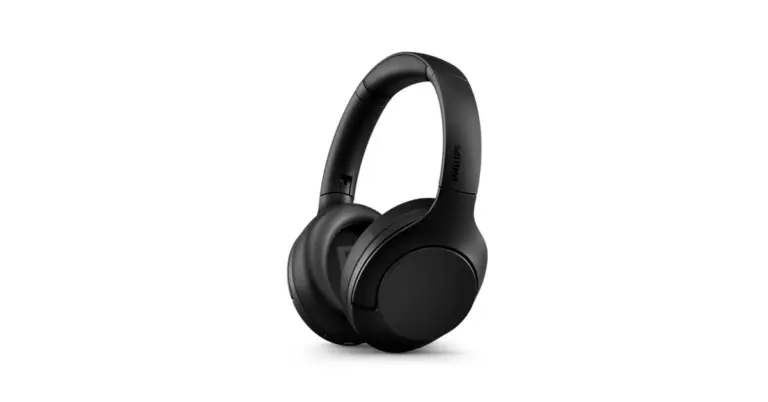
Philips TAH8506BK headphones with hybrid active noise cancellation launched in India

In India, Philips Audio has introduced a brand-new five sets of headphones- Philips TAH8560BK, TAH6506BK, TAA4216BK, TAH4205XTBK, and TAUH201BK. The TAH4205XTBK and TAUH201BK are on-ear headphones while the remaining comes with an over-ear design.

According to the company the launch of a new premium headphone, the TAH8506BK, with outstanding features like ANC Pro and Swipe Touch controls offering convenience and comfort along with a whopping 60 hours of playtime & fast charging, was announced in light of today’s increased adoption of cloud-based audio workstations and growing digitization of instruments.

Philips TAH8506BK

The Philips TAH8506BK has 40 mm drivers and is certified as being Hi-res audio capable. These headphones have the most recent technology in adaptive active noise cancellation and customizable ambient mode, allowing users to regulate how much background noise they hear.

Philips TAH8506BK headphones with hybrid active noise cancellation launched in India
Philips TAH8506BK

The Philips TAH8506BK has a multi-point connect feature that enables users to seamlessly switch between devices. The Philips TAH8506BK also has the newest adaptive active noise cancellation technology, 4 preset EQ presets, and an adjustable ambient mode that enables users to listen to the background noise in accordance with their preferences.

These headphones have a battery backup that provides an incredible 60 hours of playback duration (45 with ANC) on a single charge, and they can run for an additional 8 hours with a quick 15-minute charge.

Philips TAH6506BK

These Philips TAH6506BK noise-canceling headphones filter out unwanted sounds using internal microphones in the ear cups. Two Bluetooth devices can simultaneously be connected to these wireless headphones. so that you can use your phone to make calls while listening to music on your laptop.

These headphones are lightweight and slim, and they have a convenient flat-folding design that makes them easy to carry.

Philips TAA4216BK

Detachable ear cups are a distinguishing feature of the Philips TAA4216BK. Sleeves for the durable, light-weight ear-cups have been made detachable for simple cleaning. These ear cups are seamless since they are filled with cooling gel for those prolonged workout sessions. These wireless on-ear headphones are with you while you exercise and beyond with a 35-hour playtime. Energetic bass is delivered by finely tuned premium 40 mm neodymium drivers. Whether you’re on the treadmill or the beach, you can keep your music to yourself thanks to the closed-back design.

Philips TAH4205XTBK

The bass boost button on the Philips TAH4205XTBK will swiftly and clearly make you feel the stronger bass and beats. Additionally, they contain a multi-function button for simple call and audio control. These headphones have a brand-new technology called “Quick Charge” that helps you 4 hours of gameplay in just 15 minutes of charging. Overall, these headphones have a playback time of 29 hours and a talk time of 21 hours on a single charge. Soft ear cups with a lightweight, an adjustable cushioned headband that may be tilted for maximum comfort.

Philips TAUH201BK

The Philips TAUH201BK provides a clear and crisp audio experience thanks to premium Neodymium acoustic drivers. Additionally, these headphones have an in-line control for simple toggling between music and calls.

With the integrated microphone and environmental noise cancellation in these headphones, you can have clear calls and uninterrupted conversations with all of your loved ones. These headphones are portable thanks to their soft ear cups and flat, foldable design. These compatible headphones will conveniently fit in your workplace drawer, briefcase, or coat pocket.

Pricing and availability

The discounted pricing for the Philips TAH8506BK is Rs 10,999.

Additionally, all of the top offline and online retailers in the nation have the Philips TAH6506BK, TAA4216BK, TAH4205XTBK, and TAUH201BK headphones on sale for prices of Rs 11,999, Rs 8,999, Rs 4,999, and Rs 1,990, respectively.

For the latest gadget and tech news, and gadget reviews, follow us on TwitterFacebook and Instagram. For newest tech & gadget videos subscribe to our YouTube Channel. You can also stay up to date using the Gadget Bridge Android App. You can find the latest car and bike news here.
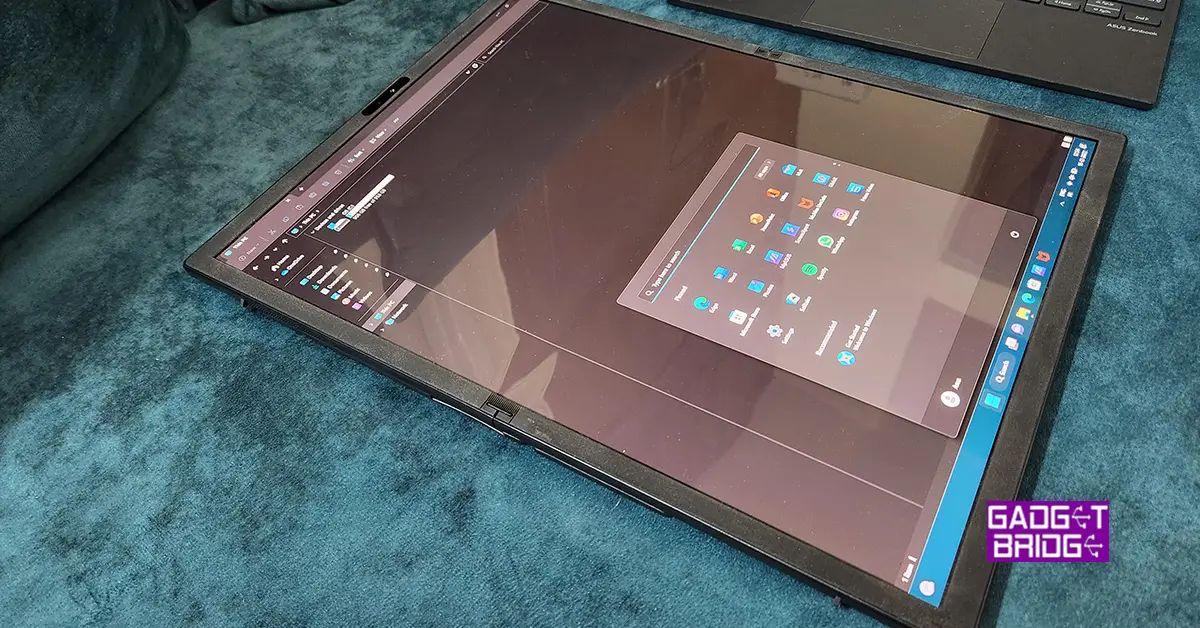
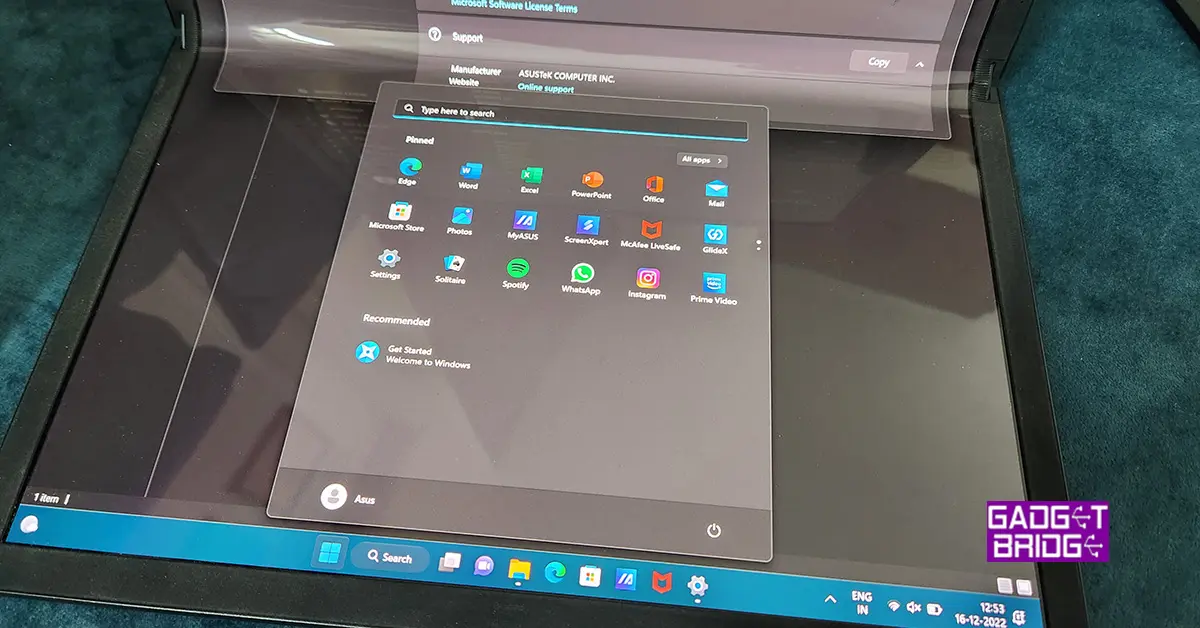
Asus Zenbook 17 Fold review: Innovation at its best

Asus has been at the forefront of innovation when it comes to laptops. In 2022 they came out with quite a few good-looking and powerful machines that not only blazed past the competition but put them so far behind that they looked like a dot in its rearview mirror. The latest innovation to come to our side of the town is the Asus Zenbook 17 Fold. We spent over 2 weeks with the device to understand its ins and outs. This is the Asus Zenbook 17 Fold review you all have been waiting for.

Asus Zenbook 17 Fold review: Design and Display

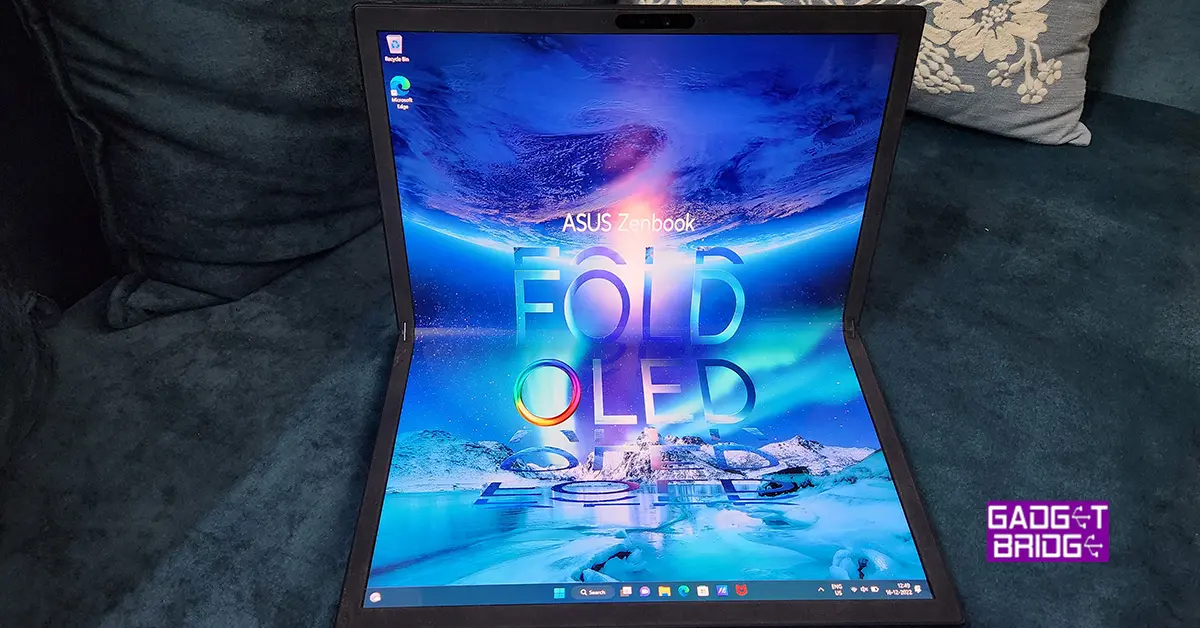
The ASUS ZenBook 17 fold has a distinct design that distinguishes it from other laptops on the market. The 17-inch touchscreen display is the most remarkable feature, which can be opened to 180 degrees to switch between laptop and tablet mode easily. It comes with a keyboard attachment that turns it into a 13-inch laptop. So, only the top part of the screen is in play. This makes it ideal for professionals working on complex projects, as well as individuals looking for a versatile gadget that can be used for both work and play.

Talking a little more about its design, the ZenBook 17 fold has a clean and attractive design in addition to its folding display. The laptop is made of high-quality components, including a lightweight aluminium chassis. The laptop’s hinge is likewise precision-engineered, resulting in smooth and steady functioning when switching modes. When in tablet mode, the hinge also enables for a comfortable and ergonomic viewing position, making it ideal for watching movies, browsing the web, or taking notes. Overall, the ASUS ZenBook 17 fold is a well-constructed laptop that is ideal for anyone looking for a powerful and adaptable gadget.

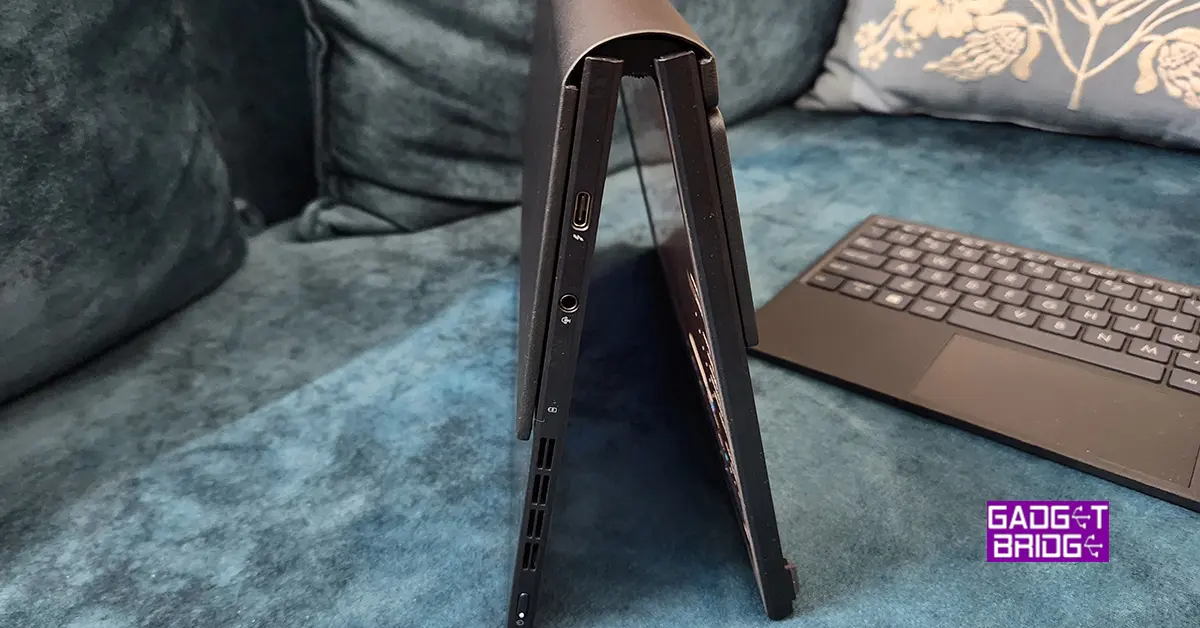
When it comes to connectivity users get two thunderbolt ports, one on each side and one 3.5mm audio/mic port. To connect USB 3.0 devices you will need a USB type-C connections hub. Same as you used to get for the MacBook Airs.

One of the laptop’s most noticeable features is its 17-inch touchscreen display. With a resolution of 3840×2160 pixels, the display offers vibrant, crisp images that are ideal for watching high-definition movies and video content. Additionally, the display fully supports the sRGB colour gamut, making it the perfect choice for experts in graphic design, photography, and video editing. The display is moreover Pantone verified, guaranteeing that colours are correct and constant, which is crucial for professionals who need to do colour-critical tasks.

Read Also: Asus ZenBook 14 Flip OLED convertible laptop with up to AMD

We played a lot of content on the Asus Zenbook 17 Fold, which includes FHD YouTube Videos, Netflix shows and Prime movies. The overall experience with the display was fabulous and the response of the touch screen was far superior to any we have seen in the segment. Sound drivers also do justice to the machine and one can use them for prolonged watching. At 8MM the laptop weighs just 1.5Kg, and 1.8Kg when you attach the keyboard to it.

Asus Zenbook 17 Fold review: Performance

The ASUS ZenBook 17 fold is a powerful laptop that is packed with high-end technology. It is powered by a 12th Gen Intel Core i7 (1250U) processor, which offers fast and efficient performance for all types of tasks. The laptop also comes with IRIS X graphics, which provides smooth and responsive graphics for day-to-day tasks as well as other graphics-intensive tasks. But, do not expect it to play high-end games. It might be able to run them, but at very low FPS at the base settings.

The laptop also comes with 16GB of RAM and 1TB of M.2 NVMe SSD storage, providing plenty of power and storage space for all your needs. We were hoping that there will be 32GB RAM model as well, but that is not available at the moment.

In terms of connectivity, the ASUS ZenBook 17 fold comes with WiFi 6E and Bluetooth 5.0, providing fast and stable wireless connectivity. The laptop also features a webcam with 5MP sensor. In the small form factor, Asus has also put in a 75WHrs 4-cell Li-Ion battery in the machine. On our tests, the laptop stayed alive for 5.5 hours. This included a mix of work as well as full-screen (tablet mode) movie watching.

Windows 11 Home OS comes out of the box and setting it up is a bit tricky if you do not have an active internet connection. Though it is not Asus’s issue, Microsoft really needs to allow users to set up a device without creating a Microsoft account or registering for it first in a forced manner. Take a clue from Android, they tried that at one point, but then they also reverted to allowing users to set up a device without signing in. If the user wants to use PlayStore apps then they need to sign in, else no need. Same should be done with all Microsoft OS’s and laptops.Asus-Zenbook-17-Fold-2

Moving on, we had a fabulous time with this laptop as when we needed to work, we connected the keyboard attachment, which turns it into a 13-inch laptop. And when we wanted to watch something, we flipped it 90 degrees to take full advantage of the 17-inch tablet mode.

Overall, we did not find any flaws in the performance of the Asus Zenbook 17 Fold. We even tried to edit a 4K videos on the machine and it handled the process well.

Read Also: ASUS introduced new lineup of ROG Flow and Zephyrus laptops at CES 2023

Verdict

The ASUS ZenBook Fold 17 is a cutting-edge laptop with a sleek and attractive design, robust performance, and a one-of-a-kind foldable display. This laptop’s 17-inch touchscreen display is ideal for professionals who want a large screen for working on complex projects, as well as individuals looking for a versatile computer that can be used for both work and enjoyment.

The ZenBook Fold 17 can perform even the most demanding jobs with ease because of its powerful Intel Core processor and speedy storage. And as said, it also has a unique folding mechanism that allows the display to be rotated around, making switching between laptop and tablet mode simple. Overall, the ASUS ZenBook 17 is a powerful and versatile laptop that is perfect for both work and play.

But the only thing that pinches is the price. Asus is asking you to break the bank and fetch them Rs 3,29,690, which is equivalent to buying a small car. You have to ask this question to yourself, do you really want a folding touchscreen laptop? If the answer is yes and you can afford it, we see no reason to not buy it.

Asus Zenbook 17 Fold Pros

Folding touchscreen

Superb Display

Good performance

Asus Zenbook 17 Fold Cons

High price

Windows 11 Home setup

For the latest gadget and tech news, and gadget reviews, follow us on TwitterFacebook and Instagram. For newest tech & gadget videos subscribe to our YouTube Channel. You can also stay up to date using the Gadget Bridge Android App. You can find the latest car and bike news here.

Pre-orders for the Samsung Galaxy S23 Series have begun in India: Details inside

Next month, the Samsung Galaxy S23 series is scheduled to go on sale as the company gets ready to unveil its 2023 flagship handsets. In addition to beginning to tease the device’s debut, Samsung has also started to take pre-orders for the next Galaxy S23 smartphone series in India in advance of the Galaxy Unpacked event in February. The Samsung Galaxy S23, Galaxy S23+, and Galaxy S23 Ultra will be released publicly by the South Korean company.

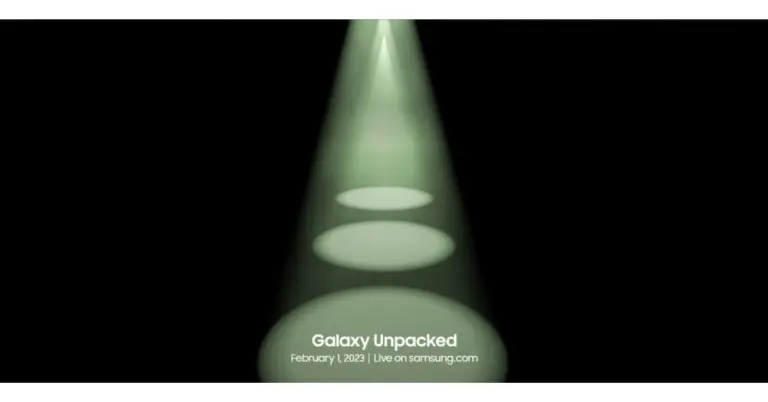
Samsung said on Wednesday that the Galaxy Unpacked 2023 event will take place on February 1. Before the smartphones are released, Samsung has started taking pre-orders for the upcoming Galaxy S23 smartphone series.

Customers who have reserved a unit will be entitled to early access and exclusive discounts when buying a Samsung Galaxy S series smartphone.

The Samsung Galaxy S23 smartphone line is rumoured to be priced similarly to the Galaxy S22 line.

Customers in India can pre-reserve the top-tier Galaxy S series by making a small payment of INR 1999 on Samsung.com, Samsung Exclusive Stores, Amazon.in, and other well-known retail locations. Future Galaxy S series smartphone buyers who pre-order will receive a pre-reserve incentive worth INR 5000. Customers must buy and activate the gadget by March 31, 2023, in order to receive the bonus.

On February 1, 2023, at 11:30 PM, Galaxy Unpacked will be broadcast live on Samsung Newsroom India.

Also Read: Samsung Galaxy Unpacked 2023 confirmed to happen on February 1, might introduce its flagship Galaxy S23 Series

A Qualcomm Snapdragon 8 Gen 2 SoC is believed to be included in the next Galaxy S23 series. Additionally, the Galaxy S23 Ultra might have a quad rear camera setup with a 200-megapixel primary sensor. The two remaining smartphones, the S23 and S23+, are probably going to have three cameras on the back.

The normal Galaxy S23 and Galaxy S23+ will reportedly contain 8GB of RAM and 256GB of internal storage, according to rumours. As opposed to the Galaxy S23 Ultra, which is expected to include 12GB of RAM and storage options of 256GB, 512GB, and 1TB.

For the latest gadget and tech news, and gadget reviews, follow us on TwitterFacebook and Instagram. For newest tech & gadget videos subscribe to our YouTube Channel. You can also stay up to date using the Gadget Bridge Android App. You can find the latest car and bike news here.

Uttarakhand now has access to Jio True 5G Services

Reliance Jio announced that its True 5G services would begin to operate in Uttarakhand from Dehradun. The sole 5G service available in Dehradun is Jio True 5G, which is expanding quickly and offers Jio consumers the technology’s game-changing advantages. On Tuesday Honourable Chief Minister of Assam, Dr. Himanta Biswa Sarma, officially launched Jio True 5G services in Assam at an event held in Guwahati.

The sole 5G service available in Dehradun is Jio True 5G. Jio would spend more than Rs 650 crore on the construction of a standalone 5G network in Uttarakhand in addition to the existing investment of Rs 4,950 crore. In order to achieve the visions of the state of Uttarakhand to become a “Digital Devbhoomi” and the Hon. Prime Minister of “Digital India,” Shri Pushkar Singh Dhami congratulated and appreciated Jio for bringing about transformational changes in the state’s digital landscape.

Also Read: Jio True 5G services now rolling out in Assam

Commenting on the launch, Honorable Chief Minister of Uttarakhand, Shri Pushkar Singh Dhami, said, “I congratulate Jio, the people of Uttarakhand and the people of Dehradun in particular, at the launch of Jio True 5G services. This launch is an important milestone for Uttarakhand and its people, who will benefit immensely from 5G services. Jio has always been at the forefront, especially when it comes to providing mobile and data connectivity in the state. With 5G, every individual, including students and businessmen, IT and healthcare services and sectors like agriculture, education, medicine, information technology & manufacturing will benefit with new opportunities and additional employment. 5G will also enable citizens and government to remain connected on real time basis and will also improve implementation and efficiency of government schemes for the last mile user.”

Beginning on January 11, 2023, Jio subscribers in Dehradun will be eligible for the Jio Welcome Offer, which offers unlimited data at speeds of up to 1 Gbps+ at no extra cost.

Reliance In addition to its True 5G services, which were already offered in Guwahati, Jio debuted its True 5G-Powered Wi-Fi services in the Maa Kamakhya Temple complex. In addition, 7 cities across 4 states now have access to the Jio True 5G service.

The Jio Welcome Offer, which provides Unlimited Data at speeds of up to 1 Gbps+ at no additional cost, will be made available to Jio users in Guwahati and 7 additional cities in the states of Maharashtra (Solapur), Telangana (Warangal, Karimnagar), Kerala (Chertala), Hubli-Dharwad, Mangalore, and Belgaum.

Jio is investing approximately 2,500 crores to deploy the True 5G network in Assam in addition to their current investment of 9,500 crores, demonstrating their unwavering commitment to the growth of our state. Jio True 5G services would be accessible in every Assamese town and taluka by December 2023.

For the latest gadget and tech news, and gadget reviews, follow us on TwitterFacebook and Instagram. For newest tech & gadget videos subscribe to our YouTube Channel. You can also stay up to date using the Gadget Bridge Android App. You can find the latest car and bike news here.

Compared: iQoo 11 Vs OnePlus 11

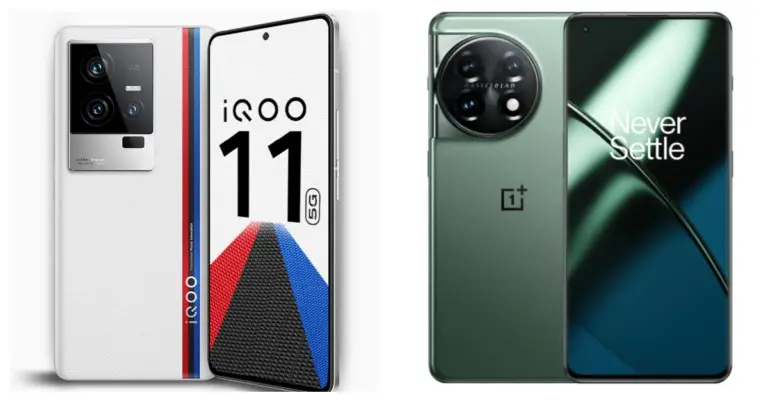
iQoo 11, the first flagship smartphone with a Qualcomm Snapdragon 8 Gen 2 SoC, has been released in India. The phone supports 120W rapid charging. The phone also has a 2K E6 AMOLED display. With these specifications, the phone directly competes with the OnePlus 11, which will go on sale in India in February. So let’s compare the two smartphones to see how they differ and which one would be a better choice for you if you were looking to upgrade or get a new Android phone.

Display

iQoo 11: 6.78-inch Samsung E6 AMOLED display

OnePlus 11: 6.7 inches Samsung LTPO 3.0 AMOLED display

Also Read: iQoo 11 5G with Snapdragon 8 Gen 2 SoC launched in India

Processor

iQoo 11: Qualcomm Snapdragon 8 Gen 2 CPU

OnePlus 11: Snapdragon 8 Gen 2 SoC

Rear camera(s)

iQoo 11: Triple rear camera set up includes 50MP Samsung GN5 primary sensor, a 13MP portrait sensor, and an 8MP ultra-wide sensor

OnePlus 11: Triple rear camera setup includes a 50-megapixel Sony IMX890 main sensor, a 32-megapixel portrait sensor and a 48-megapixel Sony IMX58 extreme wide-angle sensor

Selfie camera

iQoo 11: 16MP camera sensor

OnePlus 11: a 16-megapixel sensor for selfies

RAM and Storage

iQoo 11: 8GB RAM with 256GB storage and 16GB RAM with 256GB memory

OnePlus 11: 12GB RAM with 256GB, 16GB with 256GB option and 16GB with 512GB variant

Battery

iQoo 11: 5,000mAh battery

OnePlus 11: 5,000mAh dual-cell battery

Operating system

iQoo 11: Funtouch OS 13 powered by Android 13

OnePlus 11: ColorOS 13.0 with Android 13

Price

iQoo 11: Rs 59,999

OnePlus 11: CNY 3,999, which is around Rs 48,000

Our Take

Each phone has a similar metal frame around its glass panel. However, the iQoo 11 is available in the Alfa and Legend variants. The Legend has a leather back panel and branding from BMW M Motorsport. Wireless charging and IP certification are two features that are absent from both phones.

Both devices use AMOLED displays with QHD+ resolution for their display. While OnePlus settles for a panel with a 120Hz refresh rate, the iQoo phone supports a 144Hz refresh rate. Whereas the iQoo 11 features a flat display, the OnePlus 11 has a curved finish.

Both the iQOO 11 and the OnePlus 11 are equipped with the same Snapdragon 8 Gen 2 CPU and come pre-installed with Android 13.

Both phones have a triple back camera setup when it comes to photography, however, the OnePlus 11’s camera system has a better sensor than the iQoo’s. The selfie cameras on phones are, however, the same.

Also Read: OnePlus 11 5G and the OnePlus Buds Pro 2 launched: Pricing details

Although both smartphones have 5,000mAh batteries, the iQoo 11 and the OnePlus 11 offer 120W and 100W fast charging, respectively.

But when it comes to gaming, iQoo 11 is the star. It sports a dual-axis linear motor and liquid cooling system for improved gaming and cooling performance. OnePlus, on the other hand, has a single X-axis linear motor with a VC chamber for cooling.

So the actual decision is whether to get the iQoo 11 or hold off until the OnePlus 11 is released in India. So choose the iQoo 11 if you want a premium smartphone with excellent gaming performance, a faster refresh rate display, and support for fast charging. Otherwise, you may wait until the OnePlus 11 comes to India.

For the latest gadget and tech news, and gadget reviews, follow us on TwitterFacebook and Instagram. For newest tech & gadget videos subscribe to our YouTube Channel. You can also stay up to date using the Gadget Bridge Android App. You can find the latest car and bike news here.

How to Check and Remove a Shadowban on X? 9 Easy Methods

0

A shadowban is X’s way of limiting the reach of an account without banning it outright. When a person gets shadowbanned on X, their posts and replies are no longer visible on their followers’ feeds. The only way to access the posts is by searching for the shadowbanned account. In some cases, X may also restrict the account from appearing in searches. Once an account gets shadowbanned, the user does not receive any formal notification for it. Usually, shadowbans are handed out when X suspects an account to be a bot or when the user violates the Terms of Service (ToS). In this article, we bring you the top 9 easy methods to check and remove a shadowban on X.

Read Also: Watch movies online: Top 5 Places to Rent Movies Online

When does X shadowban an account?

If you’re wondering why your X account got shadowbanned, it could be due to one of the following reasons.

  • You posted several posts within seconds.
  • Your spam posts misused a hashtag.
  • The spam posts were made to get a hashtag to trend.
  • You tried to sell your account or buy more views.
  • You posted hateful content on the platform.
  • Your posts violated X’s ToS.

How to check for a shadowban on X

As we mentioned earlier, X does not notify users when placing a shadowban on their account. If you suspect your posts aren’t reaching your audience, there are a few steps you can take to confirm if your account has been shadowbanned. Here are some of them.

Check your post engagements

Check your Tweet engagements

Since shadowbanning limits the reach of your posts, a sudden drop in engagements may point towards an outward restriction of your account. Go through your posts and notice if there has been a drop in interactions (comments, likes, and reposts) and engagements (impressions, profile clicks) over a period of time. X’s new view count feature is also very helpful in determining the reach of your account. To check the engagement metrics of a particular post, click on it and select ‘View Post Activity’. If you notice a sharp decline in engagement, chances are your account has been shadowbanned.

Search for your account from the incognito window

Switch to the incognito tab and make an alt account on X. Look up your username in the search bar. If your profile does not show up in the results, it means X is actively shadowbanning your account. Sometimes, your profile may show up, but the posts may not be visible. This is also a sign of a shadowban.

Check where your comments appear on a post

One of the better signifiers to check for a shadowban is checking where your replies end up on a particular post. If your replies are hidden or show up at the end of the thread, it is very likely that your X account is shadowbanned. Refrain from making comments that could violate the ToS.

Use HiSubway

Use a Shadowban Test website

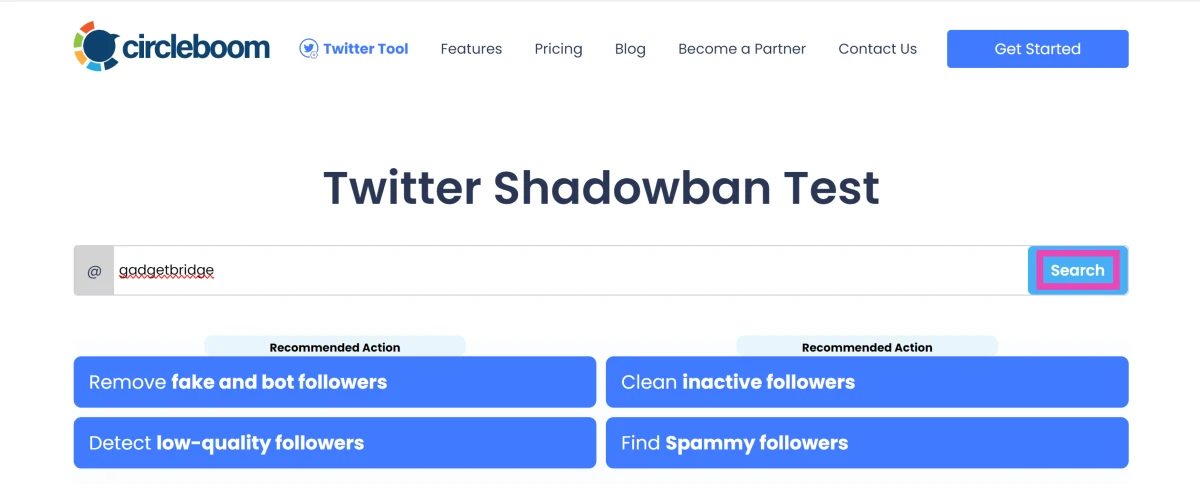
There are several third-party test websites that will perform a test on your X account to check whether it has received a shadowban or not. Go to https://hisubway.online/shadowban/ and enter your username in the search field. The website will perform a few tests and will return the relevant results. 

Use Circleboom

Step 1: Go to Circleboom’s shadowban checker.

Step 2: Enter your X username in the text box.

Step 2: Enter your X username in the text box. How to Check and Remove a Shadowban on X? 9 Easy Methods

Step 3: Hit Search.

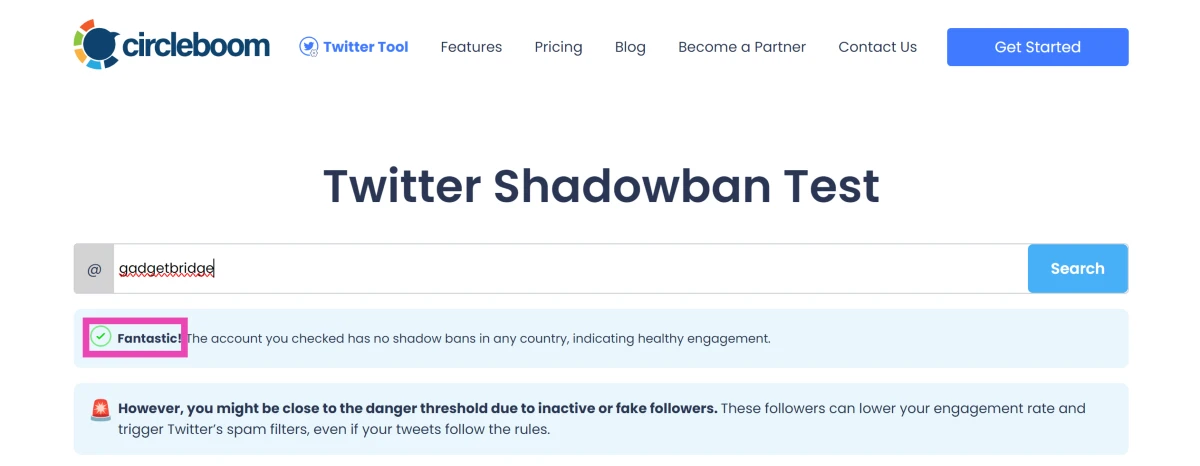
Step 4: Check the results.

Step 4: Check the results. How to Check and Remove a Shadowban on X? 9 Easy Methods

How to remove a shadowban on X

Once you’ve confirmed that X has placed a shadowban on your account, there are some steps you can take to ensure it is reversed in due time. Here’s what you can do.

Remove the posts that may have gotten you shadowbanned

Go through your posts and find out the posts that may have gotten you shadowbanned. X usually shadowbans accounts that post spam, mass follow other accounts, or engage in hateful conduct. Removing any objectionable content from your profile is the first step towards reversing a shadow ban.

Lay low for a while

Once you’ve removed the objectionable content from your profile, lay low and let X assess the situation. Avoid making any objectionable posts that may compound the ban. Do not tag other people in your posts in a manner that may be construed as harassment. Typically, a shadowban takes around 3 days to resolve. Your account will be restored to normalcy soon after.

Do not bypass the ban by making another profile

Trying to bypass the shadowban by making another account or posting through someone else’s account may result in a permaban (permanent ban). Your best course of action is to reduce your X activity until the ban is reversed.

Contact X support

If you think there was a misunderstanding on X’s end in shadowbanning your account, you can try contacting their Support team. This is not uncommon, as X tries to restrict bots on its platform. If you posted a lot of content in a very short duration of time, the algorithm may have mistaken you for a bot and handed you a shadowban. This issue can be easily resolved by contacting the X Support team.

Frequently Asked Questions (FAQs)

Why was my X account shadowbanned?

X hands out shadowbans to accounts that it suspects to be bots. On top of that, the visibility of accounts that spread hateful content is also restricted.

How do I know for sure that I have been shadowbanned on X?

Go to https://hisubway.online/shadowban/ and search for your X handle to know for sure if you have been shadowbanned on the platform. The website performs a diagnosis check on your profile and lets you know whether your posts are being actively suppressed from being exposed to a wider audience.

How long does an X shadowban last?

A shadowban on X typically lasts for 3 days.

How do I get rid of a shadowban on X?

Delete all the objectionable posts that may have caused X to impose a shadow ban on your profile. Under any circumstances, do not create a secondary account, as it may result in a permaban.

Can I bypass my X shadowban by creating another account?

You can bypass a shadowban or a permaban by creating another account. However, if X finds out that you’re bypassing a ban, you risk getting a device ban.

Read Also: Redmi Note 12 Pro Review: Powerful performance at a reasonable price

Conclusion 

These are the top 9 methods to check and remove a shadowban on X. Once the shadowban has been removed, you will see the engagement metrics of your posts go up again. Repeat offences and multiple bans in quick succession can also lead to your account getting permabanned.

Garena Free Fire Redeem Codes Today 12 January 2023: Here is how to claim them

Garena Free Fire is a battle royale game with regular awards and tournaments to keep players interested. If you play Garena Free Fire, you should be aware of the redeem codes that are released on a daily basis. However, because the battle royale game is banned in India, players from other countries can use the Free Fire Redeem codes daily. If you’re unfamiliar with the Garena Free Fire redeem codes or don’t know how to get them, we’ve put together a step-by-step guide to help you redeem them. Check out Garena Free Fire Redeem Codes for 12 January 2023.

The Free Fire redeem codes are a great way to get free stuff. These are 12-digit codes that contain alphabets and numbers, as well as an expiration date and time. Because the Garena FF redeem codes cannot be used more than once, you should hurry to the redemption page to claim your free reward before someone else does. To get a free reward, all you have to do is go to reward.ff.garena.com/en, which is the official redemption page. Also, keep an eye on this space for daily updates on Garena Free Fire redemption codes and rewards.

Garena Free Fire Redeem Codes Today 12 January 2023

  • X99TK56XDJ4X
  • FF7MUY4ME6SC
  • WEYVGQC3CT8Q
  • 3IBBMSL7AK8G
  • J3ZKQ57Z2P2P
  • FFDBGQWPNHJX
  • TDK4JWN6RD6
  • 4TPQRDQJHVP4
  • GCNVA2PDRGRZ
  • XFW4Z6Q882WY
  • HFNSJ6W74Z48
  • HHNAT6VKQ9R7
  • 2FG94YCW9VMV
  • 4ST1ZTBE2RP9
  • 8F3QZKNTLWBZ
  • V44ZZ5YY7CBS
  • WD2ATK3ZEA55
  • E2F86ZREMK49
  • B3G7A22TWDR7X
  • MCPW3D28VZD6
  • FFCMCPSGC9XZ
  • FFCMCPSEN5MX
  • ZZZ76NT3PDSH
  • EYH2W3XK8UPG
  • FFCMCPSUYUY7E
  • NPYFATT3HGSQ
  • MCPW2D2WKWF2
  • V427K98RUCHZ
  • MCPW2D1U3XA3
  • FFCMCPSJ99S3
  • 6KWMFJVMQQYG
  • BR43FMAPYEZZ
  • UVX9PYZV54AC
  • XZJZE25WEFJJ
  • HNC95435FAGJ

How to Get Free Fire Redeem Codes for Garena on 12 January 2023?

  • Visit the Garena Free Fire game’s official website at reward.ff.garena.com.
  • Use your Facebook, Google, VK, Apple ID, Huawei ID, or Twitter account to log in.
  • You’ll be taken to a valid redemption code (s)
  • Copy and paste the 12-digit redemption code into the text box.
  • On the screen, a dialogue box will appear.
  • ‘Ok’ should be selected.

For the latest gadget and tech news, and gadget reviews, follow us on TwitterFacebook and Instagram. For newest tech & gadget videos subscribe to our YouTube Channel. You can also stay up to date using the Gadget Bridge Android App. You can find the latest car and bike news here.
Amazon Quiz Answers Today 12 January 2023: Participate to win Rs 2,500

12 January 2023 Amazon Quiz has gone live on its platform. The quiz timings are 12 AM to 11:59 PM. The Amazon App users can participate in the quiz daily and all they have to do is submit correct answers to the questions asked on the e-commerce platform. Today’s participants can get a chance to win Rs 2,500 Amazon Pay Balance.

Amazon brings a fresh questionnaire that contains 5 questions daily. These questions are based on current affairs and general knowledge. The quiz can be played from 8 AM to 11:59 PM and the contestants need to answer correctly to enter into a lucky draw.

Only one person is declared as a winner and the results will be announced at the end of every month. And to make sure that you give correct answers to all the 5 questions Gadget Bridge everyday updates all the answers to the Amazon Quiz. Do check out 12 January 2023 Amazon Quiz Answers to win Rs 2,500 Amazon pay Balance.

Amazon Quiz Today Prize – Rs 2,500 Amazon Pay Balance

Quiz Date – 12 January 2023

Daily Timing – 12 AM to 11:59 PM

Winner Announcement – Today 12 PM

Amazon Quiz Answers Today 12 January 2023

Question 1: Who invented the first functional telephone?

Answer: Alexander Graham Bell

Question 2: How many grams is a kilogram?

Answer: 1000

Question 3: In 2022, which English player became the 3rd in history to score 10,000+ runs and take 50 wickets or more in Test cricket?

Answer: Joe Root

Question 4: Which of these is a famous song by this band?

Answer: Let It Be

Question 5: This photo was taken in which national park in India, famous for its population of this animal?

Answer: Gir National Park

How To Play Amazon Quiz

Only app users are eligible to play the Amazon quiz every morning from 12 AM to 11:59 PM. The quiz is not available on the desktop. For those who are unaware of how to play the Amazon quiz below are the steps, you can follow to take the quiz.

  • Firstly download the Amazon app from Google Play Store or App Store
  • Now fill in the required information through the Sign Up option.
  • You need to log in to the Amazon app and scroll down on the home screen to find the Amazon Quiz banner.
  • Tap on the Amazon Quiz banner and tap on the Start button to start the Quiz.
  • Now you will get 5 questions and you need to answer them correctly. One wrong answer will eliminate you from the Quiz.
  • After answering all the questions correctly you are now eligible for a Lucky Draw.
  • The winner’s name will be announced today at 12 PM.

For the latest gadget and tech news, and gadget reviews, follow us on TwitterFacebook and Instagram. For newest tech & gadget videos subscribe to our YouTube Channel. You can also stay up to date using the Gadget Bridge Android App. You can find the latest car and bike news here.
5 Best Features of the iPhone 14 Series

Comparing the new iPhone 14 to older versions is probably one of the better pastimes for iPhone lovers. But how does the iPhone 14 compare to the iPhone 13 or earlier? Although there are fewer massive upgrades compared to previous versions, the iPhone14 has some improvements.  Be sure to keep your new iPhone 14 safely secured within an iPhone 14 case or an iPhone 14 Pro case.

Here are five of the best features of the iPhone 14.

Better Camera

iPhone lovers know that with every upgrade, they can look forward to a better camera. The iPhone 14 definitely delivers in this department. You can take photos in lower light with the new aperture settings. You’ll get less camera shake with Action Mode, which you can find in the camera app. The front-facing camera has an autofocus feature, ensuring your selfies will always be in focus.

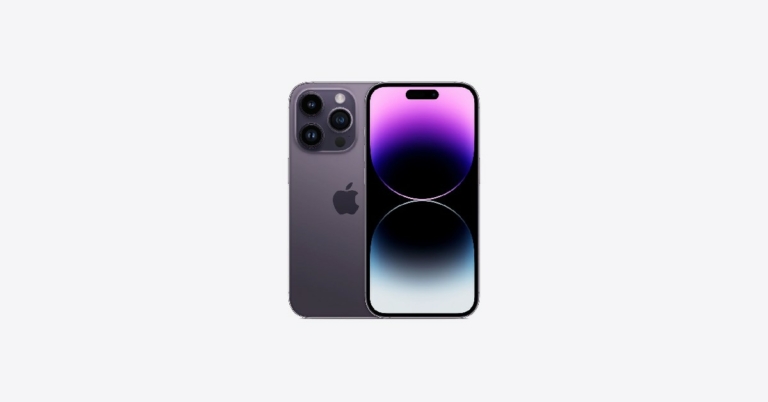
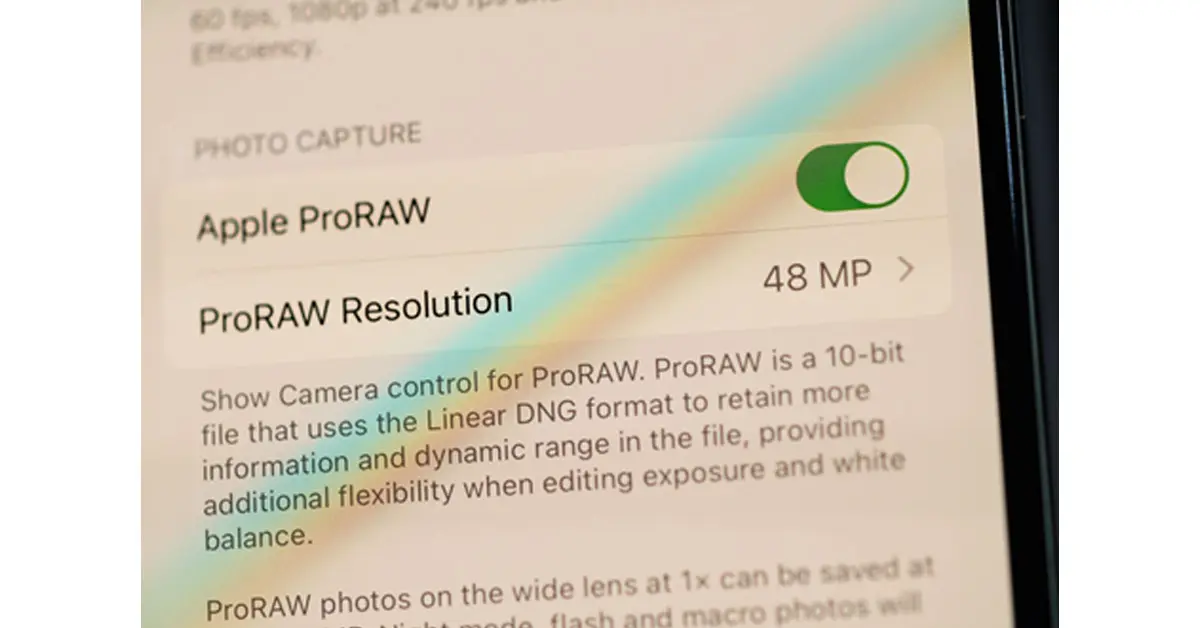
Photography lovers will appreciate the simulated bokeh effect and vivid colors this camera produces. Professional photographers will love that they can use ProRAW for their 48 MP photos.

Source: Hadrian/Shutterstock.com

For those looking to zoom in, you can get a continuous zoom effect when taking photos or videos from a medium to close range. The iPhone 14 has one extra step between the wide 1x and the telephoto 3x.

Satellite Service for Emergencies

You’ll appreciate this new upgrade if you have been stranded in a remote location without cellular service. The iPhone 14 offers a satellite service that will let you make emergency phone calls even though you don’t have cellular or internet service. Once you connect to the service, you’ll be asked questions such as, “Are you lost?” Your iPhone will then contact the nearest service station so that you can get more help.

If you are unable to call, you can also text emergency services via satellite. Text messages will take about 15 seconds. However, if you are surrounded by trees and dense foliage, it may take up to a minute.

You can also use the satellite service to share your location with your contacts if someone needs to come and find you. Whether you got caught in a snowstorm, stranded on a deserted road, lost while out hiking or in an unfamiliar area, this new satellite service can save your life.

Always-On Display

Previous versions of the iPhone were set up so that you had to unlock your screen whenever you needed to check for notifications or any live activity. The iPhone 14 has an always-on display, so you can still see all your phone’s activity even when you’re not using it. For example, you won’t have to punch in your password to check the time. Plus, the always-on display is in low-light mode, so you’re not wasting a ton of battery.

For some, it’s a convenient upgrade because it lets them know what’s happening simply by looking at their phone. For others, it may be too distracting. If you’d like to turn it off, you can go to your Settings, choose Display & Brightness, scroll down to Always On, and then turn it off. An in-between option is to darken your always-on screen by going to Settings, Focus, and then selecting the Do Not Disturb option.

Crash Detection

Another emergency upgrade to the iPhone 14 is Crash Detection. When your iPhone detects a sudden, severe stop in movement, it will display an alert and call emergency services. If you want to cancel, you have 20 seconds. If you don’t respond within 20 seconds, your iPhone will leave an audio message for emergency services. The audio message will give your exact location and let your contacts know that you have been in an accident.

Crash Detection is on by default. However, you can turn it off if you prefer not to have this emergency option constantly running in the background. Go to Settings, then Emergency SOS. You’ll see the Call After Severe Crash and can turn it off.

Crash Detection can, no doubt, be a lifesaver. But, other times, your phone may falsely alert emergency services. If your phone slams into a hard surface, gets run over by a vehicle or falls off a cliff, for example, Crash Detection will be activated. If you suspect there may be a scenario where Crash Detection will be falsely activated, temporarily turn it off.

Improved Internal Chips

Source: Hopix Art/Shutterstock.com

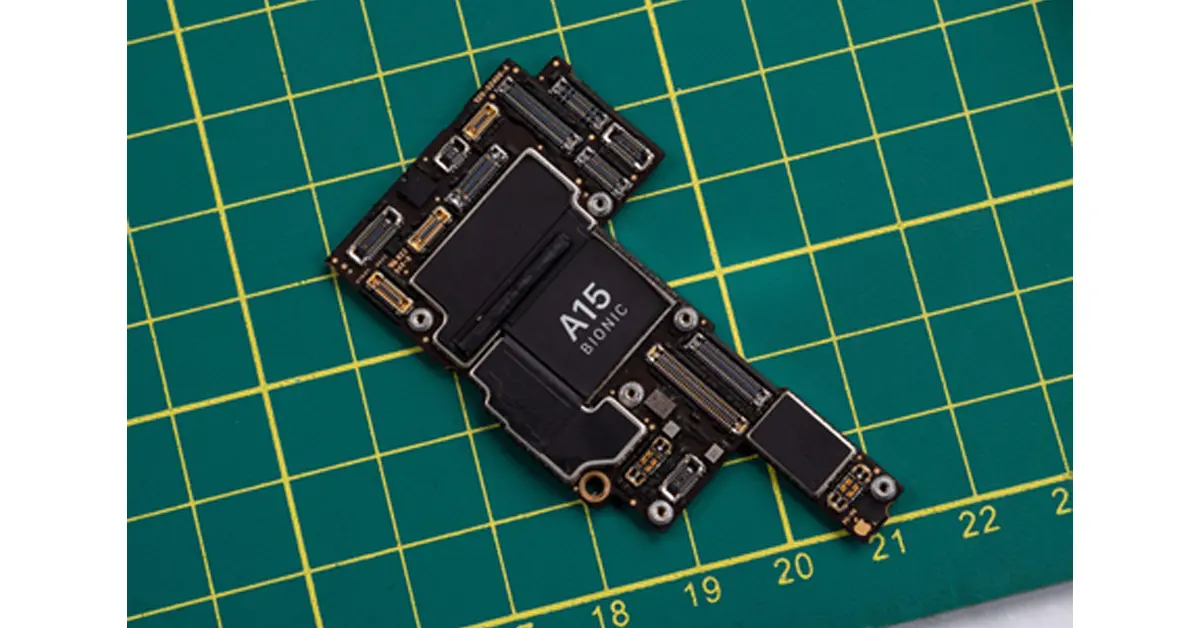
As technology gets better and better, consumers get more impatient. iPhone 14 has catered to that need by providing the iPhone with the fast A15 Bionic chip. Yes, the iPhone 13 has this chip, too. However, in the iPhone 14, the graphics section of the chip is 18% more powerful than in previous phones. This updated design comes with a 5-core graphics processing unit (GPU).

If graphics and visuals are what you love about your iPhone, then this new upgrade will be even better for viewing photos, illustrations and videos. To make sure the cool graphics will always be clear and vivid, use a liquid screen protector.

Conclusion

Overall, the iPhone 14 is pricier than previous versions. Still, the safety features and the camera upgrade could make it worth its price. Plus, you’ll also get a longer battery life. If you’re looking for a device that can be a lifesaver, the iPhone 14 is worth checking out.

For the latest gadget and tech news, and gadget reviews, follow us on TwitterFacebook and Instagram. For newest tech & gadget videos subscribe to our YouTube Channel. You can also stay up to date using the Gadget Bridge Android App. You can find the latest car and bike news here.

Instagram’s user interface will change in February, shop tab will disappear

A few adjustments are being made to the navigation bar of Instagram. The social media platform which has now become a video-sharing app will have the option to start a new Instagram post with the Shop tab being removed from the homepage. The tab can be located in the middle of the navigation bar at the bottom of the page. The Reels button at the bottom of the navigation bar will be replaced by the Create New Post button as part of the modifications.

Instagram is removing the Shop Tab which was introduced in 2020 to the mobile app’s home screen to add shopping capabilities. According to Meta, the photo-sharing app will undergo a few tweaks in the month of February to make it simpler for users to share and connect with their friends and interests.

The shortcut for creating content will now be in the middle of the navigation bar at the bottom of the app, and Reels will be on the right.

The Instagram Shop tab will be eliminated as part of this change. As long as the social media platform continues to invest in shopping experiences that offer the best value to users and companies across feed, stories, reels, advertisements, and more, you will be able to set up and operate your shop on Instagram.

Only companies in a few markets can use this service. Currently, only a small number of businesses and customers in the US have access to checkout.

In 2020, Instagram added two new tabs to its platform: Reels and Shop. Users may connect with businesses and creators and find things they love on the Shop tab while using the Reels tab to access quick, entertaining videos from creators across the world. This move was made to the platform during the Pandemic when more and more people began to shop online and young people began asking their favourite producers for advice on what to buy.

Instagram’s Shop tab has aided users in finding inspiration from creators they adore, shopping on Instagram, and supporting small businesses. Personalised suggestions, editors’ favourites chosen by the @shop channel, shoppable videos, new product collections, and more might be found.

For the latest gadget and tech news, and gadget reviews, follow us on TwitterFacebook and Instagram. For newest tech & gadget videos subscribe to our YouTube Channel. You can also stay up to date using the Gadget Bridge Android App. You can find the latest car and bike news here.
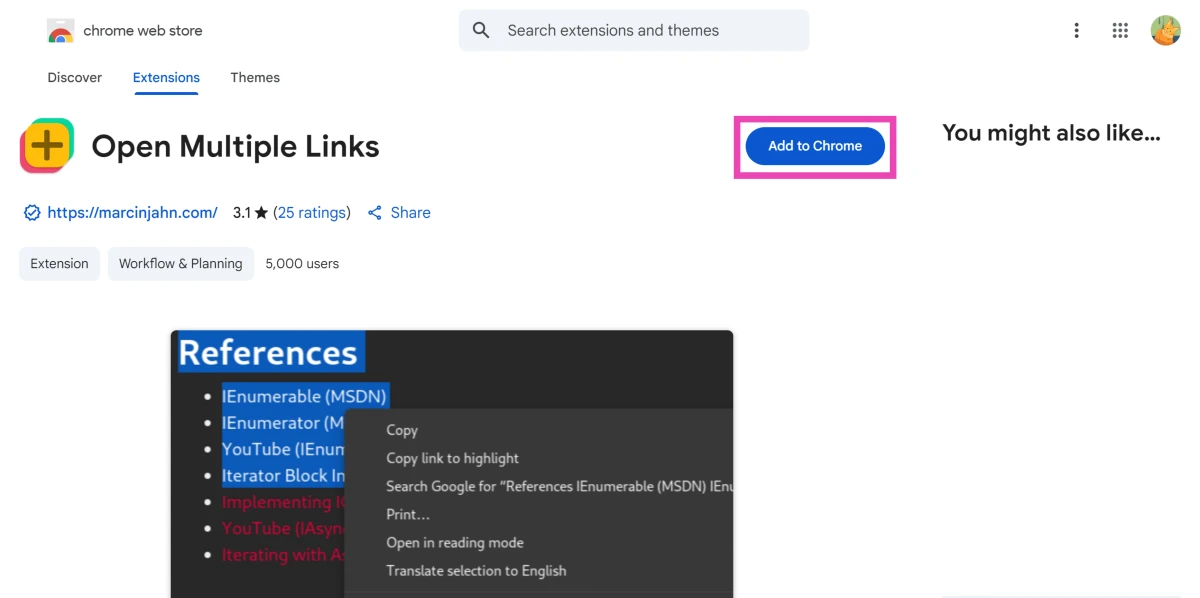
Jio True 5G services now rolling out in Assam

At a ceremony conducted in Guwahati, the Honourable Chief Minister of Assam, Dr Himanta Biswa Sarma, officially launched Jio True 5G services in Assam. Reliance Jio introduced its True 5G-Powered Wi-Fi services at the Maa Kamakhya Temple complex in addition to its True 5G services that were already available in Guwahati. In addition to this, the Jio True 5G service has also been made available in 7 cities of 4 states.

Users of Jio in Guwahati and 7 additional cities in the states of Maharashtra (Solapur), Telangana (Warangal, Karimnagar), Kerala (Chertala), and Hubli-Dharwad, Mangalore, and Belgaum will be invited to take advantage of the Jio Welcome Offer, which offers Unlimited Data at speeds of up to 1 Gbps+ at no extra cost.

Jio gave Dr Himanta Biswa Sarma, the Honourable Chief Minister of Assam, a demonstration of the transformative advantages of True 5G. The healthcare industry was chosen for this demonstration because, among the many advantages of True 5G, it has the ability to save lives in emergency situations as well as enrich lives. Innovative products were displayed, including the medical kit for the Jio Community Clinic, JioGlass, healthcare based on AR and VR, and connected ambulances. These healthcare solutions have the potential to improve the quality of healthcare in metropolitan India and help spread infrastructure for high-quality healthcare to the most rural parts of the nation, impacting more than a billion people.

Also Read: Jio True 5G is now available in Indore and Bhopal, with updates to more cities coming in January 2023

Speaking at the event, the Honourable Chief Minister of Assam, Dr. Himanta Biswa Sarma, said, “I am happy to launch Jio’s True 5G service in Guwahati. I believe True 5G has the power to democratize the healthcare infrastructure across the varied geography of Assam. The health solution demonstrated today i.e., ‘Clinic in a bag’ can aid grassroot-level healthcare workers and Asha workers. It has a simple design and can wirelessly connect to a suite of medical devices over 5G. Healthcare workers with the help of specialist Doctors can diagnose and treat patients in even the most remote locations of Assam. My government is fully committed to aiding the speedy roll-out of 5G services in Assam. By implementing 5G-based healthcare solutions, we can fulfil our Honourable Prime Minister Sh. Narendra Modi Ji’s vision of the Ayushman Bharat Digital Mission by building a Digital Health Ecosystem in the State of Assam. 

Apart from their existing investment of ₹9,500 crores, Jio is additionally investing over ₹2,500 crores to deploy the True 5G network in Assam and this shows their immense commitment towards our state’s development. By December 2023, Jio True 5G services will be made available in every town and taluka of Assam.”

Additionally, Bharti Airtel has announced the expansion of its 5G services into the Odisha cities of Bhubaneswar, Cuttack, and Rourkela. Last week, Bharti Airtel also announced the launch of its 5G services in the Haryana towns of Hissar and Rohtak. The telecom behemoth added that customers of 5G-capable smartphones would have free access to Airtel’s high-speed 5G network.

For the latest gadget and tech news, and gadget reviews, follow us on TwitterFacebook and Instagram. For newest tech & gadget videos subscribe to our YouTube Channel. You can also stay up to date using the Gadget Bridge Android App. You can find the latest car and bike news here.
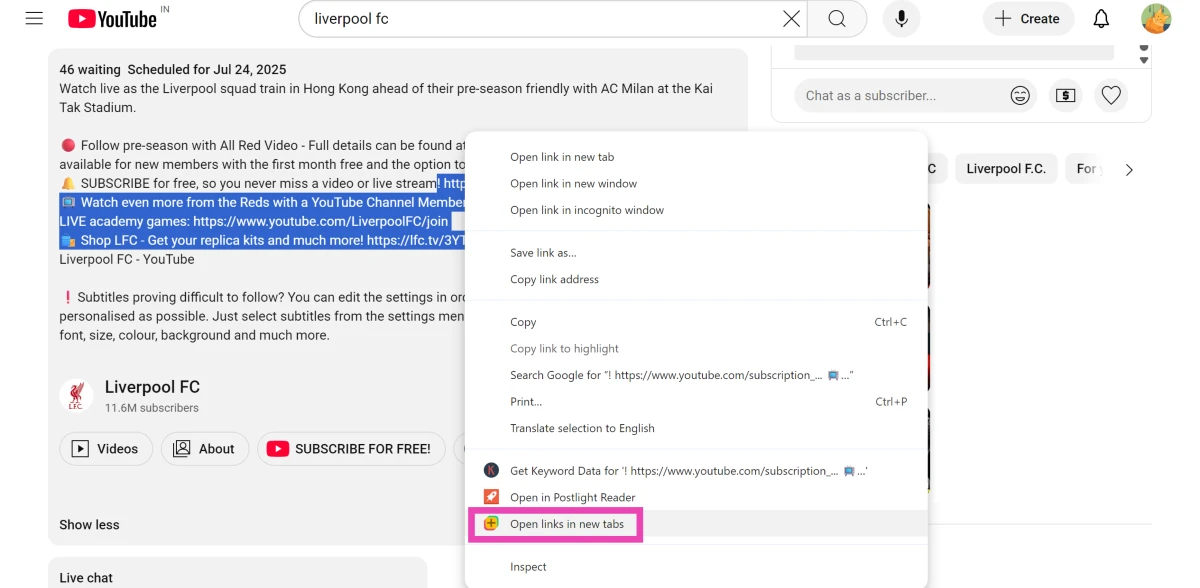
Watch movies online: Top 5 Places to Rent Movies Online

While some may think that online streaming has entirely killed off the movie-renting business, it isn’t entirely true. Movie renting may not be as popular as it once was, but it is still very much alive on the Internet. A significant part of the audience still prefers renting individual movie titles over purchasing a streaming subscription. Even some online streaming giants have dedicated movie-renting libraries for people who do not want to pay for a subscription service. In this article, we bring you the top 5 places to rent movies online.

Read Also: iQoo 11 5G with Snapdragon 8 Gen 2 SoC launched in India

YouTube Movies

YouTube Movies

There are several advantages to renting movies from YouTube. Firstly, the prices offered by YouTube are cheaper than other movie renting platforms. On top of that, you get to choose from a vast collection of movies that includes all the new releases that haven’t made it to the major streaming platforms yet. YouTube’s media player is also a big plus, as most users are already accustomed to it and are aware of the specialised controls. The familiarity of the platform, its availability across TVs and other platforms, and competitive pricing make YouTube Movies the best renting platform out there. In order to rent a movie, simply go to the YouTube Movies webpage and search for your desired movie. You can also search for the movie in the regular search tab and YouTube will show renting options if the movie is available in its catalogue. The viewing period upon renting a movie lasts for two days.

Google TV

Google TV

Last year, Google scrapped the ‘Movies and TV Shows’ section from the Google Play Store and introduced the Google TV app. Google TV brings all the content from the different apps and streaming services in one place. Now you dont have to jump between apps to search for the content you want to watch. On top of streamlining the viewing process, Google TV also offers content that was previously a part of the ‘Movies and TV Shows’ section in the Google Play Store. To rent a movie, simply go to the ‘Shop’ tag and search for the title you are interested in.

Amazon Prime Video

Amazon Prime Video

Amazon Prime Video introduced its movie rental service for India last year. You do not need to have a Prime Video subscription in order to rent a movie. Simply go to the ‘Store’ tab and browse the different movie titles available for rent. Some movie titles are available to rent for as low as Rs 69. Prime Video’s availability across different platforms also makes it one of the better renting options around.

Netflix

Netflix. Watch movies online: Top 5 Places to Rent Movies Online

A lot of people may not know this but Netflix started out as a DVD rental service in 1998 before venturing into online streaming and becoming one of the biggest players in the category. What’s surprising is that Netflix still lets you rent DVDs online. The DVDs are delivered straight to your doorstep and do not come with any due dates or late fees. While the rental service is physical, it still is the only way to watch rare movies that are not available on any streaming platform.

BookMyShow

BookMyShow. Watch movies online: Top 5 Places to Rent Movies Online

If renting physical DVDs using Netflix didn’t surprise you, this one surely will. BookMyShow isn’t just the biggest ticket-booking service in India, it also boasts a vast movie-renting library. You can rent movies for as low as Rs 29 on the platform. On top of that, a sizeable part of BMS’ library is also available to rent in 4K resolution. 

Read Also: Limited-edition Motorola Edge 30 Fusion Viva Magenta launched in India

Conclusion 

These are the top 5 places to rent movies online. Other movie-renting platforms like Fandango, Vudu, and Hulu are not available in India yet. Which service do you use to rent movies online? Let us know in the comments!

For the latest gadget and tech news, and gadget reviews, follow us on Twitter, Facebook and Instagram. For newest tech & gadget videos subscribe to our YouTube Channel. You can also stay up to date using the Gadget Bridge Android App. You can find the latest car and bike news here.

Samsung Galaxy Unpacked 2023 confirmed to happen on February 1, might introduce its flagship Galaxy S23 Series

Leaving all speculations and leaks aside, Samsung today announced the date for its upcoming Galaxy Unpacked 2023 event. The South Korean electronics behemoth will be hosting an in-person event in San Francisco on February 1. Since the COVID-19 epidemic, this will be the first Galaxy Unpacked event held in person. The Samsung Galaxy S23 series, which will include three new models, is likely to be announced during the Galaxy Unpacked Event, although it is yet unknown what else will be unveiled.

The date of the 2023 Samsung Galaxy Unpacked event has been officially confirmed for February 1. The Galaxy Unpacked 2023 event will take place in San Francisco, and it will start on February 1 at 10.30 AM PST or 11.30 PM IST. The company is anticipated to present its newest flagship Galaxy S23 series at the occasion. Three versions, the Samsung Galaxy S23, Galaxy S23+, and Galaxy S23 Ultra, are rumoured to be part of the upcoming series.

The Unpacked event will be live-streamed on Samsung.comSamsung Newsroom India and Samsung’s YouTube channel.

The company in its announcement said, “A new era of Galaxy innovation is coming. Our innovations are designed to enable incredible possibilities for people today and beyond. The new Galaxy S series will be the epitome of how we define the ultimate premium experience. We’re raising the bar and setting new standards for what’s epic.”

The Galaxy S23 and Galaxy S23 Ultra were seen in botanic green, cotton flower, misty lilac, and phantom black colours in leaked renders.

The upcoming Galaxy S23 series is anticipated to be equipped with a Qualcomm Snapdragon 8 Gen 2 SoC. The Galaxy S23 Ultra may also include a quad back camera arrangement, with a 200-megapixel main sensor. Other remaining devices S23 and S23+ are likely to include a triple rear camera set up.

According to rumours, the regular Galaxy S23 and Galaxy S23+ will have 8GB of RAM and 256GB of internal storage. While the Galaxy S23 Ultra would reportedly have 12GB of RAM and 256GB, 512GB, and 1TB of storage.

Also Read: iQoo 11 5G with Snapdragon 8 Gen 2 SoC launched in India

Previous rumours suggested that a Qualcomm Snapdragon chipset might be used worldwide to power the Galaxy S23 series. The CEO of Samsung Mobile Experience (MX), TM Roh, will announce a “Galaxy dedicated chip” at the introduction of the Galaxy S23 series, according to tipper Ice universe.

In terms of pricing the Samsung Galaxy S23 smartphones are rumoured to cost about the same as the Galaxy S22 range.

For the latest gadget and tech news, and gadget reviews, follow us on TwitterFacebook and Instagram. For newest tech & gadget videos subscribe to our YouTube Channel. You can also stay up to date using the Gadget Bridge Android App. You can find the latest car and bike news here.
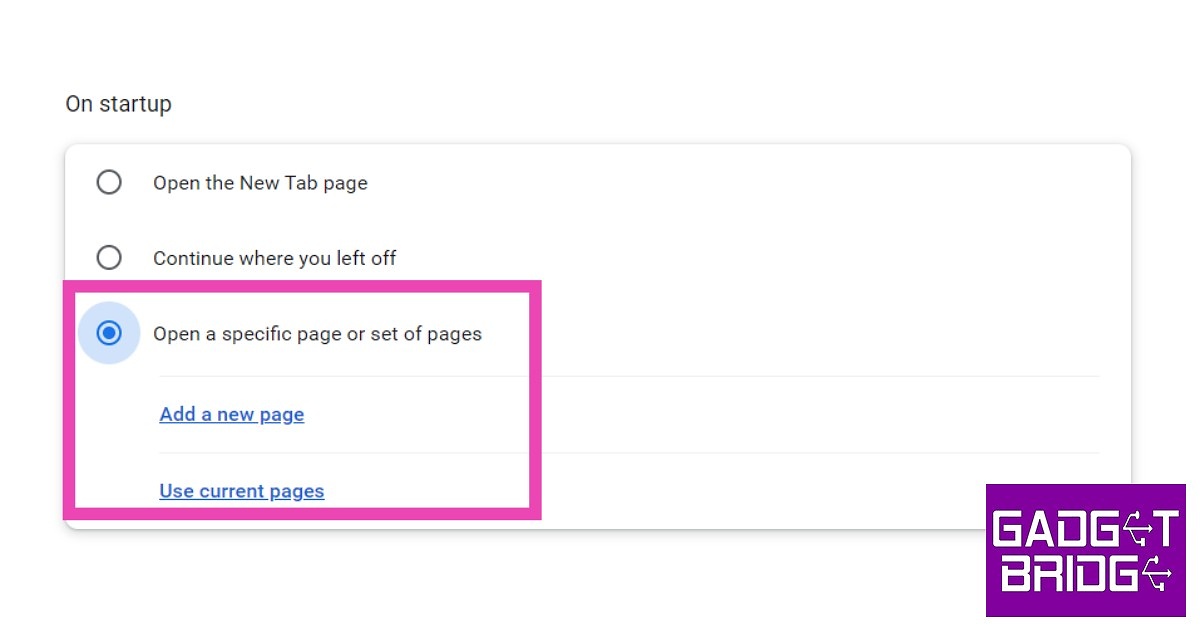
End-to-end encryption for group chats in Google Messages has been made available to open beta testers

0

End-to-end encryption is now supported by Google Messages. The E2EE is now being made available for group chats in the app’s beta version. The business first announced the implementation of the additional security features for group chats back in December. As per the company the rollout has finished for users who signed up to join the open beta programme.

The “This chat is now end-to-end encrypted” banner will appear in group chats for Google Messages beta users who have activated E2EE. The send button will additionally include a lock icon.

And as of right now, every major mobile carrier and manufacturer has adopted RCS as the industry standard with the exception of Apple. When people with iPhones message people with Android phones, Apple refuses to implement RCS and continues to rely on SMS, keeping their texting trapped in the 1990s.

Also Read: Limited-edition Motorola Edge 30 Fusion Viva Magenta launched in India

End-to-end encryption is possible with RCS but not with SMS. As a result, all one-on-one texts received through Google Messages, for instance, are encrypted, making them private and secure and visible only to the sender and the recipient. End-to-end encryption is currently beginning to roll out for group conversations and will soon be accessible to select users participating in the open beta test.

End-to-end encryption for group chats in Google Messages has been made available to open beta testers

RCS not only makes texting safer, but it also improves the experience. According to Google SMS texting lacks many of the features that smartphones offer, but RCS enables you to text over Wi-Fi, send and receive high-quality images and videos, view typing indicators and read receipts in real-time, name group discussions, add or remove friends from group chats, and much more. In order to share the perfect emoji, Messages will soon allow you to reply to RCS messages with any emoji.

No matter where you reside, who made your phone, or what operating system it uses, you can enjoy the same messaging experience because of RCS’s universal compatibility.

For the latest gadget and tech news, and gadget reviews, follow us on TwitterFacebook and Instagram. For newest tech & gadget videos subscribe to our YouTube Channel. You can also stay up to date using the Gadget Bridge Android App. You can find the latest car and bike news here.
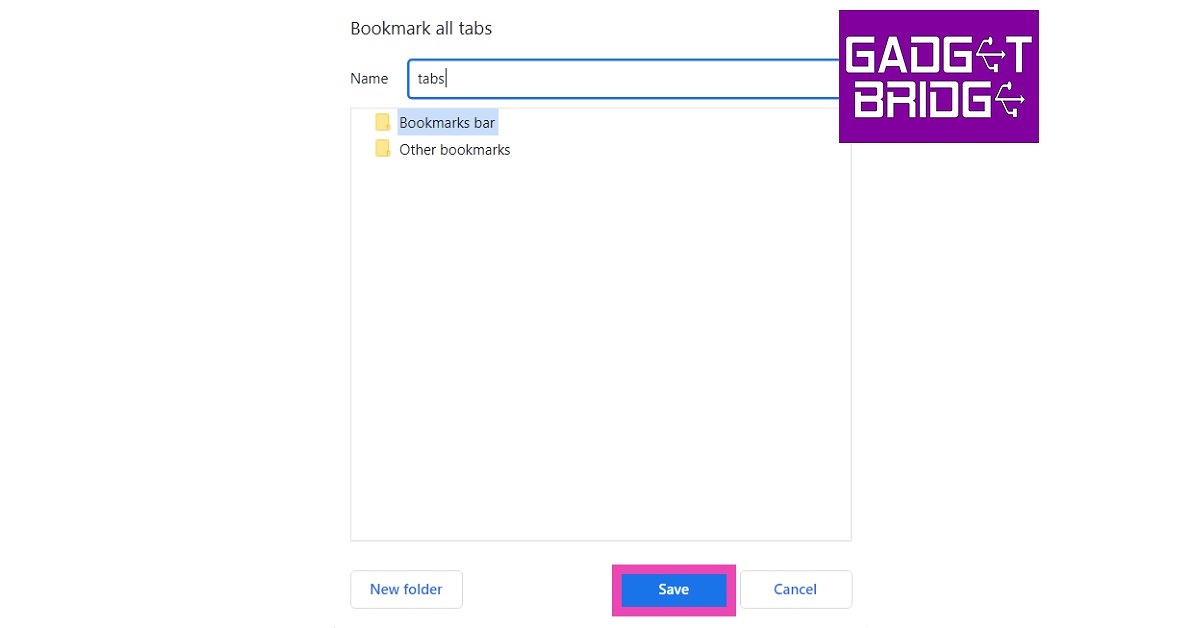
Garena Free Fire Redeem Codes Today 11 January 2023: Here is how to claim them

Garena Free Fire is a battle royale game with regular awards and tournaments to keep players interested. If you play Garena Free Fire, you should be aware of the redeem codes that are released on a daily basis. However, because the battle royale game is banned in India, players from other countries can use the Free Fire Redeem codes daily. If you’re unfamiliar with the Garena Free Fire redeem codes or don’t know how to get them, we’ve put together a step-by-step guide to help you redeem them. Check out Garena Free Fire Redeem Codes for 11 January 2023.

The Free Fire redeem codes are a great way to get free stuff. These are 12-digit codes that contain alphabets and numbers, as well as an expiration date and time. Because the Garena FF redeem codes cannot be used more than once, you should hurry to the redemption page to claim your free reward before someone else does. To get a free reward, all you have to do is go to reward.ff.garena.com/en, which is the official redemption page. Also, keep an eye on this space for daily updates on Garena Free Fire redemption codes and rewards.
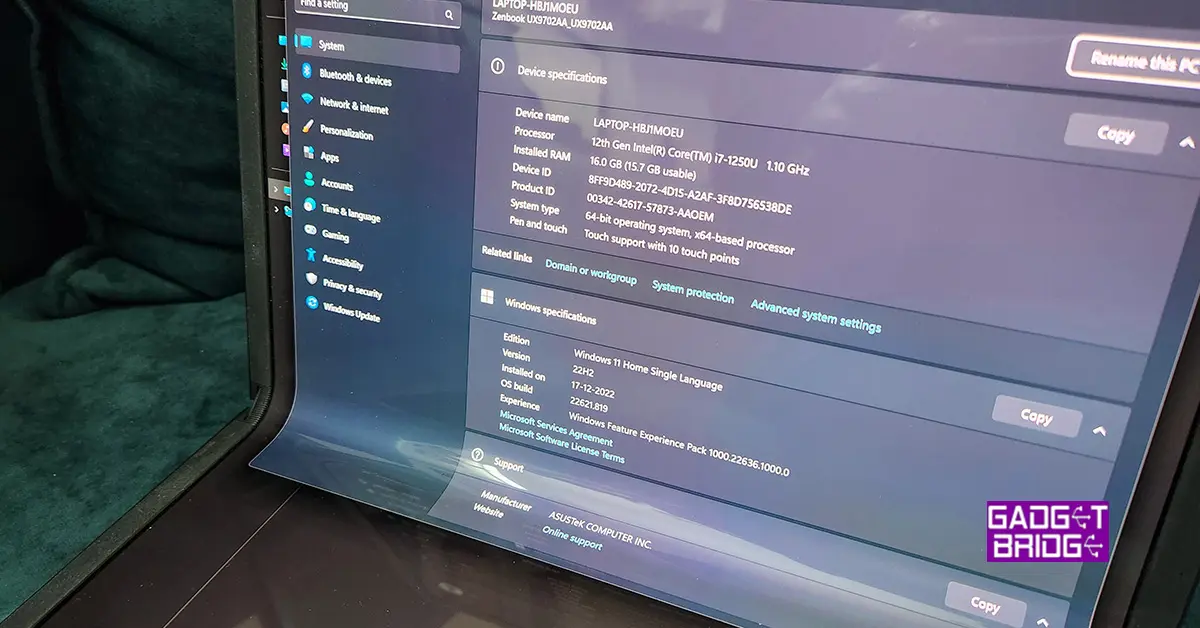
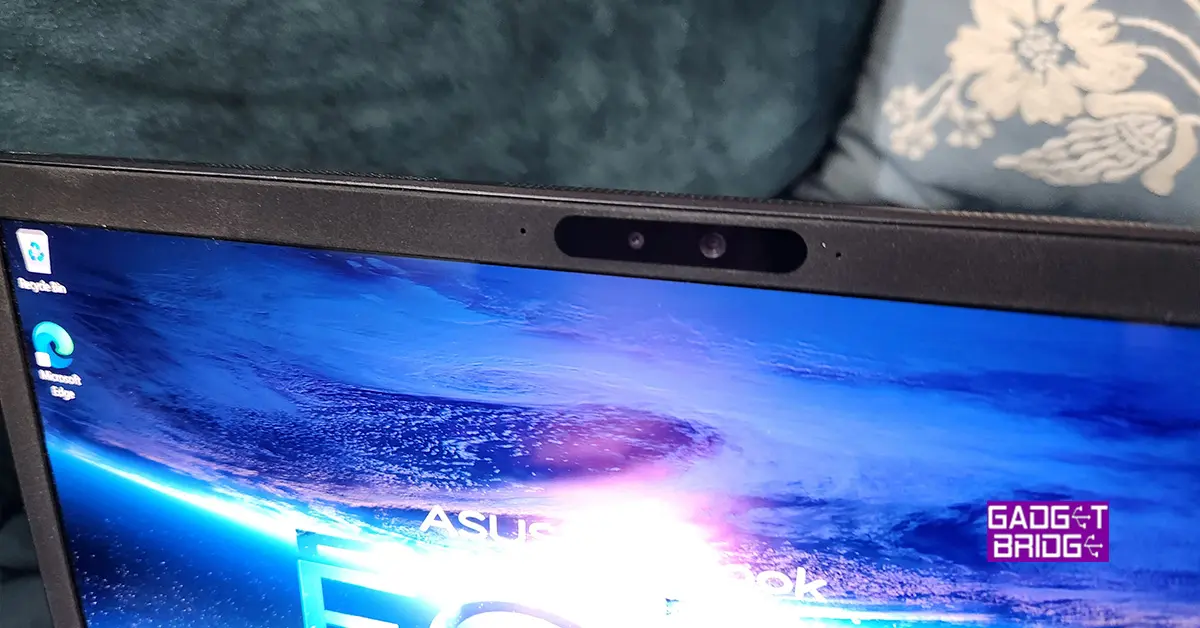
Garena Free Fire Redeem Codes Today 11 January 2023

  • SVCD-EYIY-8URDT
  • FF2VH-BNFH-OGH
  • FBNJ-K3IVI-KBNST
  • F76Y-HGJ1U-GYTF5
  • FAGT-FQRD-E1XCF
  • FVGE-4FGCT–GVXS
  • FHNJ-UFGY-V6TGD
  • FJ4K-56M7-UHONI
  • FUJA-OQIU-Y2GBE
  • FRFG-TCDX-REQDF
  • FFGB-HJHU-CASQE
  • FJST1-32HS-DMJG
  • FNJH-35JIG-HTD56
  • MAX2023-REDEEM
  • FREEFIRE-MAX2023

How to Get Free Fire Redeem Codes for Garena on 11 January 2023?

  • Visit the Garena Free Fire game’s official website at reward.ff.garena.com.
  • Use your Facebook, Google, VK, Apple ID, Huawei ID, or Twitter account to log in.
  • You’ll be taken to a valid redemption code (s)
  • Copy and paste the 12-digit redemption code into the text box.
  • On the screen, a dialogue box will appear.
  • ‘Ok’ should be selected.

For the latest gadget and tech news, and gadget reviews, follow us on TwitterFacebook and Instagram. For newest tech & gadget videos subscribe to our YouTube Channel. You can also stay up to date using the Gadget Bridge Android App. You can find the latest car and bike news here.